Free Al Office Suite with PDF Editor

Edit Word, Excel, and PPT for FREE.
Read, edit, and convert PDFs with the powerful PDF toolkit.
Microsoft-like interface, easy to use.
Windows • MacOS • Linux • iOS • Android

Catalog
WPS Copilot 2026: Practical Guide for Professionals
As our world approaches the era of complete automation, a rise in AI-powered platforms can be seen everywhere. These smart features have now made their way into popular productivity tools, including basic wordprocessing, spreadsheet management, and even presentation design. While exploring the emerging solutions, I noticed how modern solutions like WPS Copilot can make even the most basic tasks more efficient and straightforward. In this guide, I will highlight all the useful features and key strengths of WPS Copilot, discussing everything I discovered while trying it out.
What is WPS Copilot?
WPS Lingxi Assistant, also known as WPS Copilot is an AI-driven assistant developed by Kingsoft Office, designed to provide an efficient and reliable alternative to popular options like Microsoft Copilot. Using its vast library of cutting-edge technologies such as natural language processing and machine learning, and its seamless integration into WPS Office’s ecosystem, it stands out from the competition as a next-generation AI office assistant for all your productivity needs.
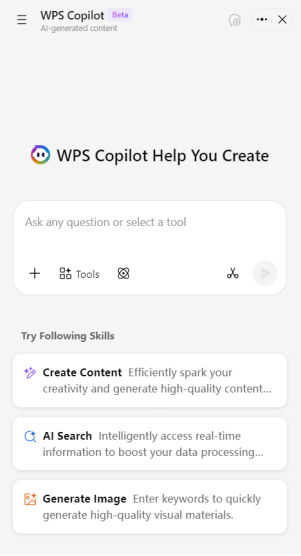
With support for both an independent web portal and a built-in sidebar mode within the WPS applications, WPS Copilot is designed for precise operations and prioritizing efficiency above everything. If you want to change the layout and formatting of your document, or even polish your writing, the WPS Lingxi Sidebar allows you to directly control your document with natural language prompts without having to rely on third-party applications.
Key Features and Detailed Introduction
WPS Lingxi Assistant offers a wide variety of powerful functions and tools to help you boost your productivity and streamline your workflow. These features are mainly divided into two core sections: Q&A and Creation, each one providing an innovative way to solve common office problems and improve overall efficiency. You could be a student trying to learn more about an assignment, or simply a professional designing a presentation for an investor pitch. WPS AI sidebar equips you with everything you need for reliable and polished results.
Q&A: Intelligent Interaction & Information Processing
This section represents the actual dialogue interactions between the users and the AI, allowing you to quickly search for information and even solve problems through straightforward prompts. Whenever I’m using the built-in chatbot to solve a math problem or do detailed research for my project, WPS Copilot uses its Q&A-based technology to help me get natural results.
Chat Dialogue
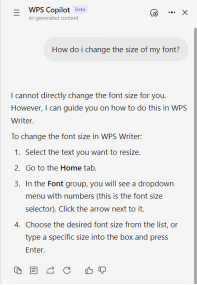
WPS Chatbot allows you to directly communicate with the AI in natural language. It accurately understands the needs of its users to generate an appropriate response accordingly.
For example, when you need to ask questions about an office feature or request content refinements, you can directly type your needs into a prompt, and the AI will quickly provide effective solutions.
AI Search
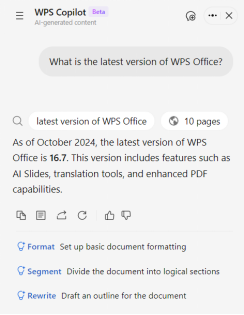
WPS Copilot provides built-in support for advanced searching features, letting its users look for any information publicly available on the internet. All you need to do is type a prompt asking what you want to know, and it will retrieve knowledge in real-time to ensure the information is accurate and up-to-date.
When you need to get the latest information about a specific product or company, or need to retrieve other real-time information, you can use the AI search function to quickly get detailed results, so you don’t have to switch to an external browser just for basic searches.
In-Depth Research
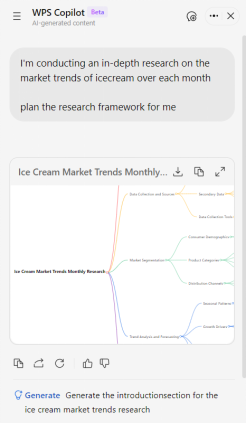
Besides surface-level web searches, WPS Copilot offers a new content generation mode designed specifically to handle complicated research tasks. Once you send your requirements, it will analyze them, carry out detailed information retrieval, and generate results in a polished and complete document.
If you’re studying market trends for your own product or company, you can skip hours of research and web surfing and simply do it using WPS AI Assistant. All you need to do is type a detailed prompt highlighting your requirements and then send it.
Document Interpretation
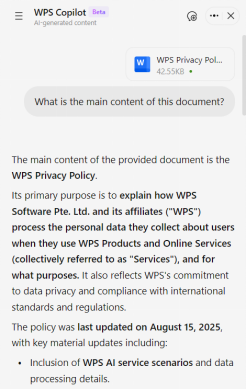
For understanding and analyzing your local and WPS cloud files, you can use the built-in AI document interpretation feature within WPS Copilot. With support for a wide variety of formats, including PDF, DOCX, XLSX, PPTX, TXT, PNG, JPG, and JPEG, it helps you quickly extract key information or concise summaries from lengthy documents.
When you’re concerned about the privacy policy or terms of service of a product you’re using, reading the entire document is too impractical. You can attach the document and ask the AI to give you the main idea of the content to get a concise summary of its main points.
Creation: Intelligent Content Generation & Editing
This section emphasizes the content creation and document manipulation part of WPS Copilot’s features, helping its users generate high-quality content reliably. Not only does it significantly improve the efficiency of creation, but it also greatly reduces the manual operations required for basic content creation and AI document editing.
Image Generation
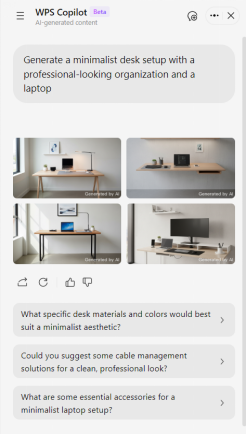
Provided a detailed description of the subject, scene, context, details, and the stylistic choices you require, WPS Copilot can generate high-quality visual materials in just a few minutes. It deeply understands the user requirements to generate an image, ensuring all the given parameters are fulfilled.
If you need images for your presentation or document, you can give Copilot a descriptive prompt such as “Generate a minimalist desk setup with a professional-looking organization and a laptop”, and it will generate a suitable image accordingly.
AI Writing
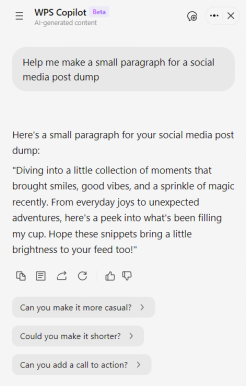
Based on the given prompts, WPS Copilot can generate both short and long-form text to cover different AI content creation needs. It can generate concise reports and summaries, while also supporting citing references, in-depth creation, and editing for lengthy text generation.
If you need to generate a quick paragraph for a social media post you’re making, or a detailed research report on a specific topic, just give the AI an appropriate prompt, and it will deliver a complete output in just a few seconds or minutes, depending on the length.
Mind Map Generation
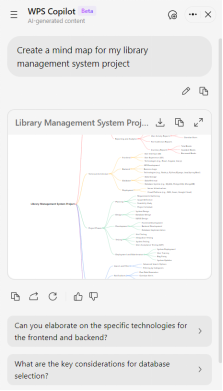
WPS Copilot supports AI mind map generation from natural language prompts, helping users sort out their thinking and organize their content logically. It breaks down the different sections into branches to form a comprehensive mind map, greatly improving the efficiency of content planning.
If you’re a student trying to formulate a detailed plan for your project, you can attach a document with the details of your project, or just type a detailed prompt describing your requirements. It will generate a detailed mind map to help you plan out each step of the way and have a structured framework for your plan.
Slide Creation
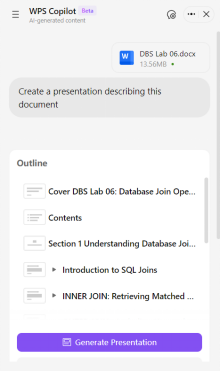
By attaching documents as reference material or just directly describing your requirements in a descriptive prompt, WPS Copilot can automatically deal with AI PPT generation for a detailed outline, select the appropriate template, and even fill in the content for each slide. This greatly simplifies the process of PPT production, minimizing the time and effort that would otherwise be spent on manual design.
When you need to create a detailed PPT for your lab report, you can upload the completed document, and the AI will generate a complete and professionally structured presentation in just a few seconds. The output is completely editable, so you can adjust the outline even after creation to modify the content or make any other changes.
AI Document
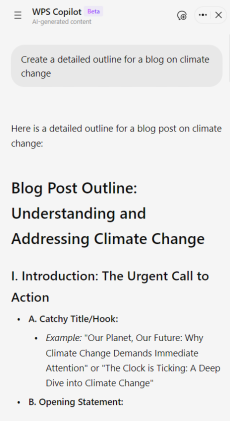
WPS Copilot supports quick document creation based on a single prompt, eliminating the hassle of manual operations from the process and simplifying it. Based on the given prompt, it can cite reference documents, generate detailed outlines, and even create complete documents for various uses.
If you’re a writer about to work on an article, you can ask Copilot to create a detailed outline. It will generate an in-depth document consisting of titles, subtitles, sections to include, and even the content to include in each one.
AI Excel
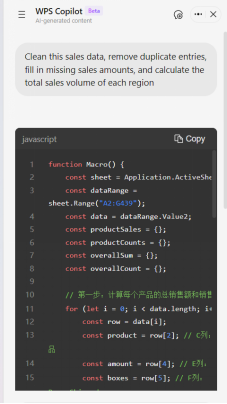
WPS Copilot offers comprehensive features for smart assistance in Excel spreadsheet operations, this includes data entry, formula generation, chart creation, data cleaning and more. You can describe your requirements in a simple prompt, like “Generate a bar chart based on this data”, and the AI will automatically do all the work for you and deliver polished and accurate results.
If you have a large amount of analytical data from your small ecommerce business, you can ask Copilot to clean the data, remove duplicate entries, and even calculate the sales from each region. It will automatically refine the data and give a brief summary to help you understand the underlying data easily.
Formula Generation
You can use WPS Copilot to generate accurate Excel formulas using simple prompts, as it supports common basic formulas like SUM and AVERAGE, and even complex nested formulas like SUMIFS and VLOOKUP with IF. All you need to do is describe the calculation in a prompt, and the AI will do the rest of the conversion itself, ensuring a seamless and error-free process for your spreadsheet management.
If you need to calculate the monthly sales for each product in a sales sheet, you can give it a prompt like “Generate a formula to calculate the total monthly sales for product A”. The AI will automatically create a formula for you and walk you through how to apply it effectively.
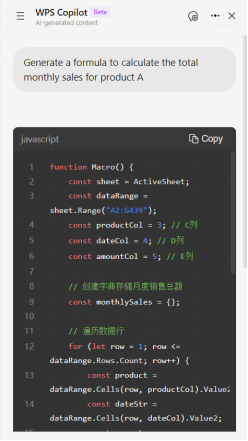
Chart Generation
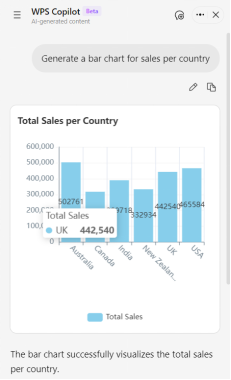
If you’re working with complicated datasets with large amounts of information, you can better understand what you’re dealing with using WPS Copilot’s AI Chart Generation. It supports smart chart generation based on Excel data, generating line charts, bar graphs, and scatter charts with just a single prompt. You can even customize your charts after creation to adjust them to your own requirements.
When you’ve processed monthly sales data in your sheet, you can ask Copilot to generate a line chart based on it. Describe your requirements in a detailed prompt, including the chart title, X-axis, Y-axis, and any other details you’d like to include. By analyzing your prompt, the AI will generate a complete visualization implementing the data stored in your sheet.
Core Advantages & Limitations
I’ve found WPS Copilot to be one of the most reliable AI assistants on the market right now, providing powerful features that have genuinely boosted my productivity and helped me save a lot of time. However, if you’re unsure whether Copilot is the right fit for your own work needs, I find that weighing out the pros and cons can really help in coming to a decision.
Advantages
Seamless WPS Office Integration: Built right into WPS Office, allowing for direct usage within Word, Excel, PowerPoint and other components.
Powerful Multi-Turn Dialogue: Accurately understands your intent and adapts to your requirements, ensuring the output results meet the actual usage.
Comprehensive Function Coverage: Extensive function coverage for streamlining every productivity need.
User-Friendly Operation: Only requires straightforward prompts for usage, allowing for a beginner-friendly and intuitive experience.
Strong Customization: You can adjust the generated content according to your own needs by prompts or by directly citing reference material.
Limitations
Internet Dependency: All AI-based functions of WPS Copilot require an internet connection to work properly.
Platform Restrictions: Advanced features are only available on Windows right now.
Limited Content Accuracy: Generated content may need manual revisions and improvements by users to ensure accuracy.
No Single-Page PPT Support: Only supports the generation of complete PPT presentations.
WPS Copilot vs. Microsoft Copilot Comparison
WPS Copilot provides a lightweight and cost-effective alternative to Microsoft Copilot, providing advanced AI-powered features to its users without any expensive subscriptions or paywalls. While both of them are reliable AI tools for routine tasks, I’ve found WPS Copilot to be the more comprehensive option when it comes to providing all-in-one usability and versatility. If you’re curious about the detailed differences between the two tools, I’ll break each one down in the comparison table below.
FAQs
Q1: Is WPS Copilot free to use?
Yes, basic features like chat dialogue, document editing, and simple Excel operations are completely free. Advanced features like in-depth research and image generation are available on the paid plan at $9.99/month, while WPS Pro with full AI features starts at just $2.99/month.
Q2: Does WPS Copilot work without an internet connection?
No, all AI-based features require an active internet connection to function.
Q3: Which file formats does WPS Copilot support for document interpretation?
WPS Copilot supports a wide range of formats, including PDF, DOCX, XLSX, PPTX, TXT, PNG, JPG, and JPEG.
Q4: Can I use WPS Copilot on my phone?
Yes, WPS Copilot is available across Windows, Mac, iOS, Android, and web, with consistent functionality across all devices.
Q5: How is WPS Copilot different from Microsoft Copilot?
WPS Copilot is significantly more cost-effective, offering core AI features for free and advanced plans starting at $2.99/month, compared to Microsoft Copilot, which can cost $700+ per year. It also integrates more seamlessly into its office suite and has a lower learning curve.
Elevating Your Workflow with WPS Copilot
AI assistants are changing the way people work, eliminating the need to manually do every repetitive task yourself and simplifying the process. After trying out multiple options myself, I’ve found WPS Copilot to be a standout choice, a next-generation AI office solution that effortlessly integrates with the WPS Office ecosystem to assist its users. With its user-friendly interface and strong understanding capabilities, it greatly improves efficiency and provides a level of versatility not found anywhere else, making it ideal for anyone who values their productivity.



15 years of office industry experience, tech lover and copywriter. Follow me for product reviews, comparisons, and recommendations for new apps and software.


