

'%3e%3cpath%20d='M8%200C12.4183%200%2016%203.58172%2016%208C16%2012.4183%2012.4183%2016%208%2016C3.58172%2016%200%2012.4183%200%208C0%203.58172%203.58172%200%208%200ZM11.6162%204.38379C11.2257%203.99337%2010.5927%203.99338%2010.2021%204.38379L8%206.58594L5.79785%204.38379C5.40732%203.99334%204.77429%203.99329%204.38379%204.38379C3.99331%204.77429%203.99335%205.40733%204.38379%205.79785L6.58594%208L4.38379%2010.2021C3.99348%2010.5927%203.99341%2011.2257%204.38379%2011.6162C4.77426%2012.0066%205.40734%2012.0065%205.79785%2011.6162L8%209.41406L10.2021%2011.6162C10.5927%2012.0066%2011.2257%2012.0067%2011.6162%2011.6162C12.0067%2011.2257%2012.0066%2010.5927%2011.6162%2010.2021L9.41406%208L11.6162%205.79785C12.0066%205.40735%2012.0066%204.77429%2011.6162%204.38379Z'%20fill='%23080E17'%20fill-opacity='0.46'/%3e%3c/g%3e%3cdefs%3e%3cclipPath%20id='clip0_3761_713'%3e%3crect%20width='16'%20height='16'%20fill='white'/%3e%3c/clipPath%3e%3c/defs%3e%3c/svg%3e)




'%3e%3cpath%20fill-rule='evenodd'%20clip-rule='evenodd'%20d='M21.4999%2010.9993C21.4999%205.20009%2016.7986%200.498901%2010.9993%200.498901C5.19994%200.498901%200.498657%205.20009%200.498657%2010.9993C0.498657%2016.2404%204.33858%2020.5844%209.35855%2021.3722V14.0346H6.69238V10.9993H9.35855V8.68594C9.35855%206.05427%2010.9262%204.60062%2013.3248%204.60062C14.4736%204.60062%2015.6753%204.80571%2015.6753%204.80571V7.38979H14.3512C13.0468%207.38979%2012.64%208.19921%2012.64%209.0296V10.9993H15.5523L15.0867%2014.0346H12.64V21.3722C17.66%2020.5844%2021.4999%2016.2404%2021.4999%2010.9993Z'%20fill='%231568EA'/%3e%3c/g%3e%3c/svg%3e)


'%3e%3cpath%20d='M2.42045%2022.1876H6.31818V12.7217L0.75%208.54553V20.5171C0.75%2021.4414%201.49892%2022.1876%202.42045%2022.1876Z'%20fill='%234285F4'/%3e%3cpath%20d='M19.682%2022.1876H23.5797C24.5041%2022.1876%2025.2502%2021.4387%2025.2502%2020.5171V8.54553L19.682%2012.7217'%20fill='%2334A853'/%3e%3cpath%20d='M19.682%205.48293V12.7216L25.2502%208.54543V6.31816C25.2502%204.25236%2022.8921%203.07469%2021.2411%204.31361'%20fill='%23FBBC04'/%3e%3cpath%20d='M6.31824%2012.7217V5.48303L13.0001%2010.4944L19.6819%205.48303V12.7217L13.0001%2017.733'%20fill='%23EA4335'/%3e%3cpath%20d='M0.75%206.31816V8.54543L6.31818%2012.7216V5.48293L4.75909%204.31361C3.10534%203.07469%200.75%204.25236%200.75%206.31816Z'%20fill='%23C5221F'/%3e%3c/g%3e%3cdefs%3e%3cclipPath%20id='clip0_2954_7305'%3e%3crect%20width='24.5'%20height='18.375'%20fill='white'%20transform='translate(0.75%203.8125)'/%3e%3c/clipPath%3e%3c/defs%3e%3c/svg%3e)


Preface
Creating a structured lesson plan is essential for effective teaching, yet many educators find it time-consuming and confusing. You may struggle to organize key components like objectives, timing, and assessments. Some templates feel too rigid or difficult to modify. So, are there flexible, editable formats that are also free?
In this article, I'll walk you through how to create a lesson plan, share my picks for the best free lesson plan template downloads, and show you how to edit and print them using WPS Office.


Part 1. How to Create a Lesson Plan
Creating a lesson plan is more than just filling in a schedule; it's about building a roadmap for learning. A good lesson plan helps you structure your teaching, meet curriculum goals, and keep students engaged. But if you're not sure where to start, the process can feel overwhelming.
Here's a quick overview of what a lesson plan is and what to consider when crafting one.
What Is a Lesson Plan?
A lesson plan is a written guide that outlines what a teacher will teach and how it will be taught during a class or a series of classes. It includes key components such as objectives, teaching methods, materials, timing, and assessment methods.
Whether you're a new teacher or an experienced educator looking to streamline your process, having a clear lesson plan ensures a more organized and confident delivery.
Key Elements to Include in a Lesson Plan
Here are some critical aspects to think about when creating your own:
Learning Objectives
Define what students should know or be able to do by the end of the lesson. Objectives should be specific, measurable, and aligned with curriculum standards.
Materials and Resources
List any tools, worksheets, textbooks, or media you'll need. This helps ensure you're fully prepared before class begins.
Instructional Activities
Break down the main teaching activities, such as lectures, discussions, group work, or hands-on tasks. Allocate time to each.
Assessment Methods
Include ways to evaluate whether learning objectives are met — quizzes, presentations, or informal questioning can all work here.
Timing Breakdown
Plan how much time you'll spend on each activity to make sure the lesson fits your schedule and maintains a good pace.
Differentiation
Anticipate different learning needs. Think about how you'll support students who need extra help or challenge those ready to go further.
Reflection
After the lesson, take notes on what went well and what could be improved for next time.
My Experience: Start Small, Then Customize
When I first started writing lesson plans, I often overcomplicated things. Over time, I realized that clarity and simplicity are far more effective than packing everything into one document. I now begin with a basic structure and build from there, depending on the needs of my class. Templates helped me a lot in refining this process, which is exactly what I'll cover in the next section.
Part 2. Top 10 Free Lesson Plan Templates [Download]
Finding a well-designed, editable lesson plan template can save you hours of formatting and restructuring. Below, I've curated 10 free lesson plan templates you can download and use right away, in both Word and Excel formats. These are perfect for teachers who want structured, flexible, and attractive layouts for their classes.
All of these templates are hosted on the WPS Template Store, which offers a wide range of professionally designed files you can edit directly in WPS Office.
1. Kindergarten Lesson Plan [Word]
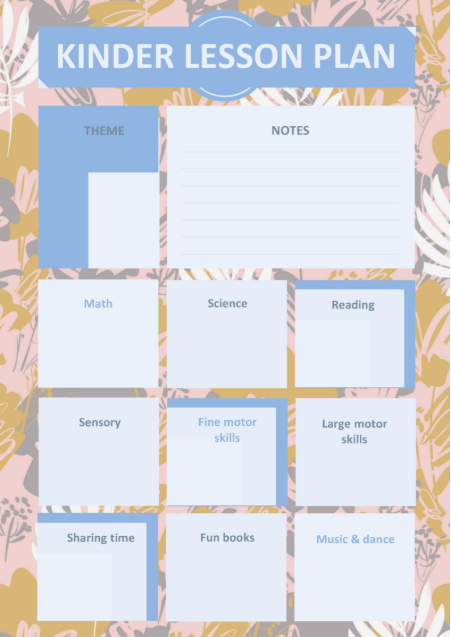
This playful and colorful template is ideal for early childhood educators. It includes structured sections for daily activities, learning objectives, and notes.
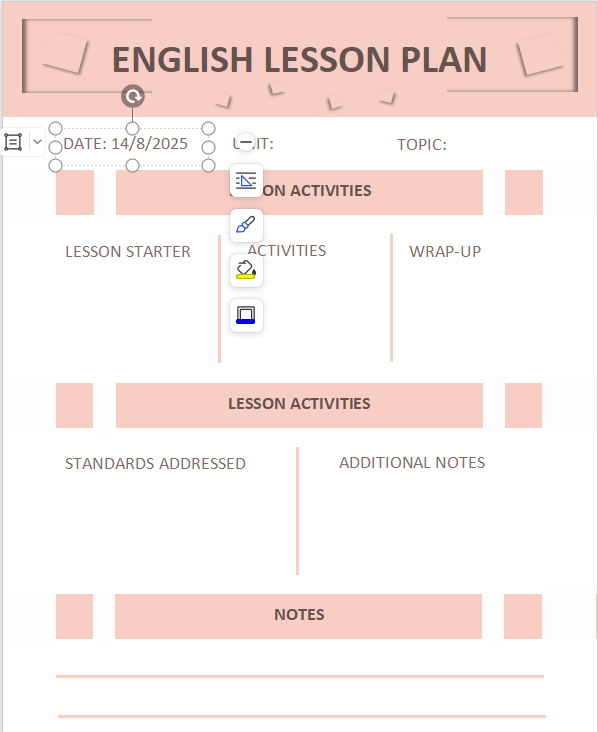
2. English Lesson Plan [Word]
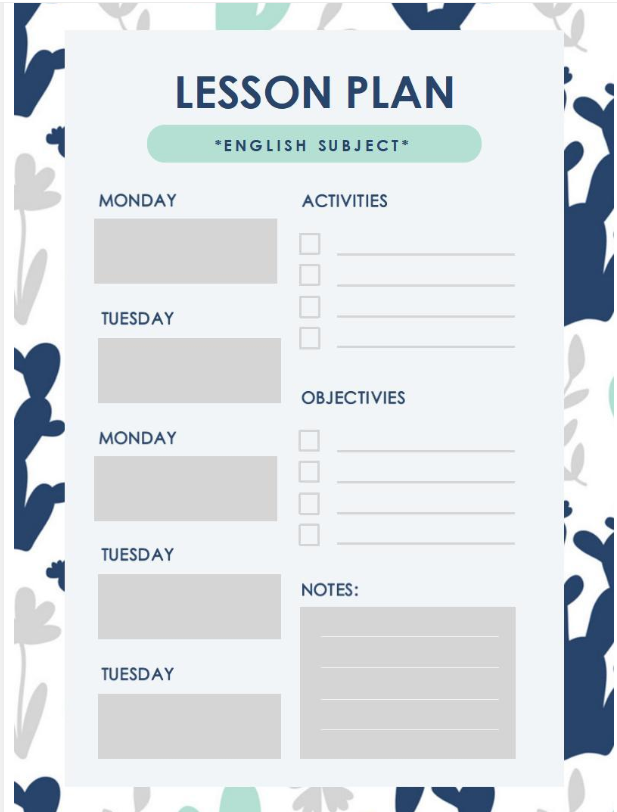
Organized with clear columns for objectives, materials, and assessments, this format is perfect for language-focused subjects.
3. Simple Grid Lesson Plan [Word]
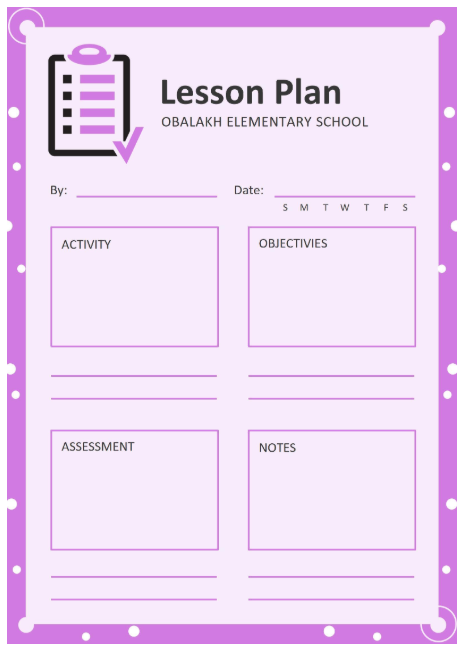
Ideal for teachers who prefer a minimalist design. The grid layout makes it easy to track subjects, periods, and key teaching points at a glance.
4. English Lesson Plan [Word]
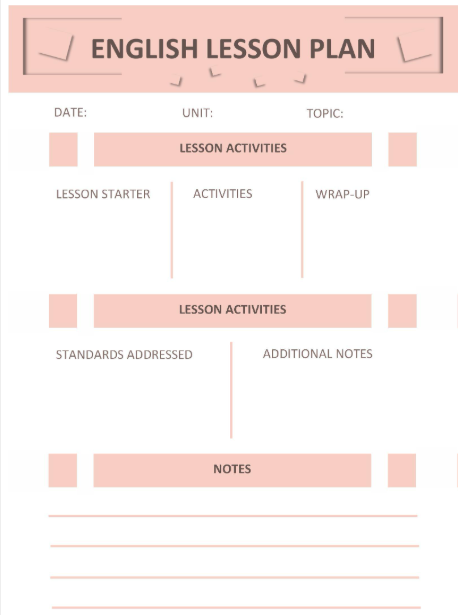
A clean and easy-to-edit document that works well for high school English classes. Includes spaces for weekly goals and daily breakdowns.
5. Green Elegant Roses Lesson Plan [Word]
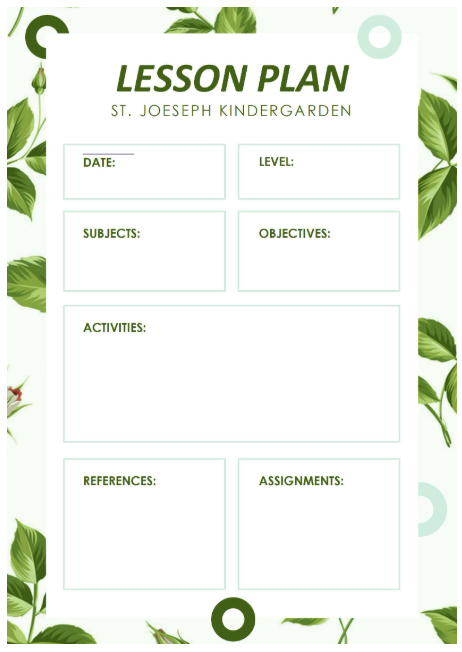
Combines beauty and functionality. Great for art or humanities teachers who want a visually appealing format.
6. English Lesson Plan [Word]
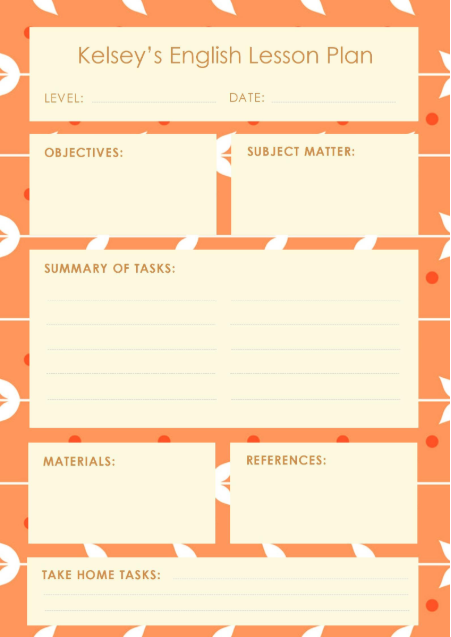
Slightly more structured than the previous options, this one provides a balanced space for learning objectives, classwork, and reflection.
7. Teacher Lesson Plan [Excel]
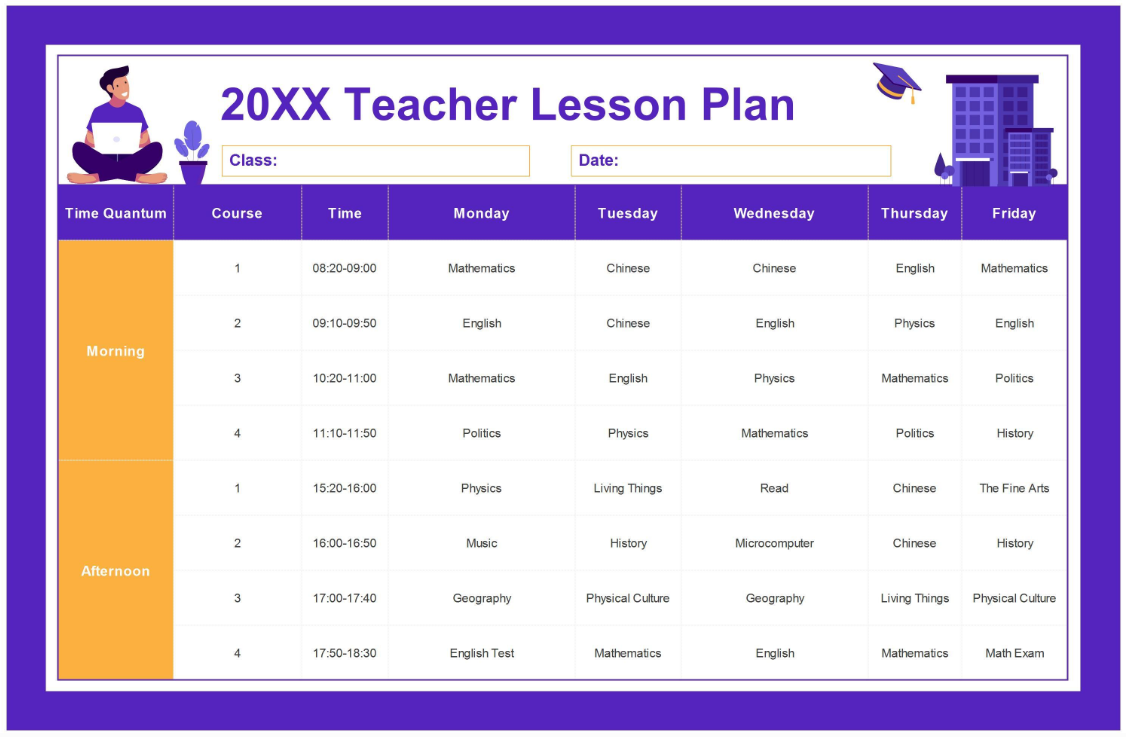
This Excel-based template is perfect for managing weekly subjects and keeping things organized across multiple days.
8. Dark Blue Teacher Lesson Plan [Excel]
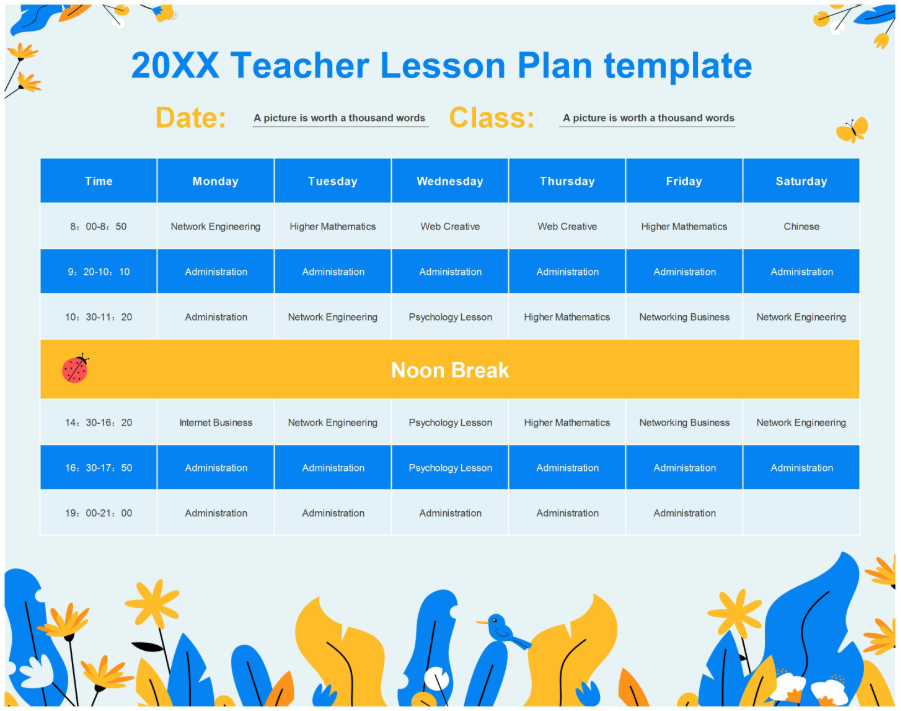
A clean, visually pleasing template ideal for middle or high school teachers. The color scheme makes categories easy to distinguish.
9. Useful Weekly Lesson Plan [Excel]
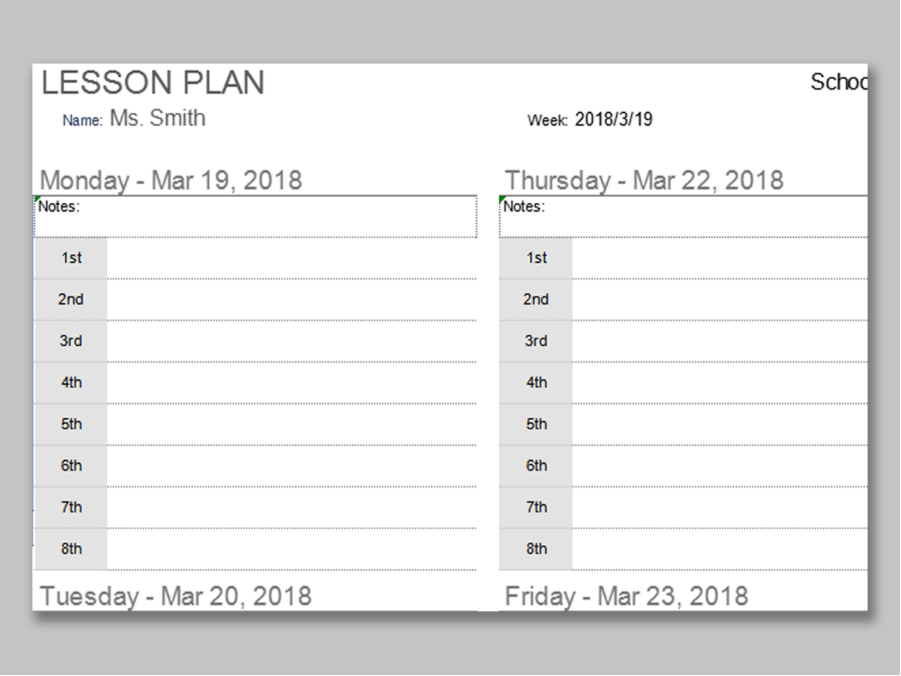
Use this layout if you want a high-level weekly overview. It's great for planning multiple classes or topics across different days.
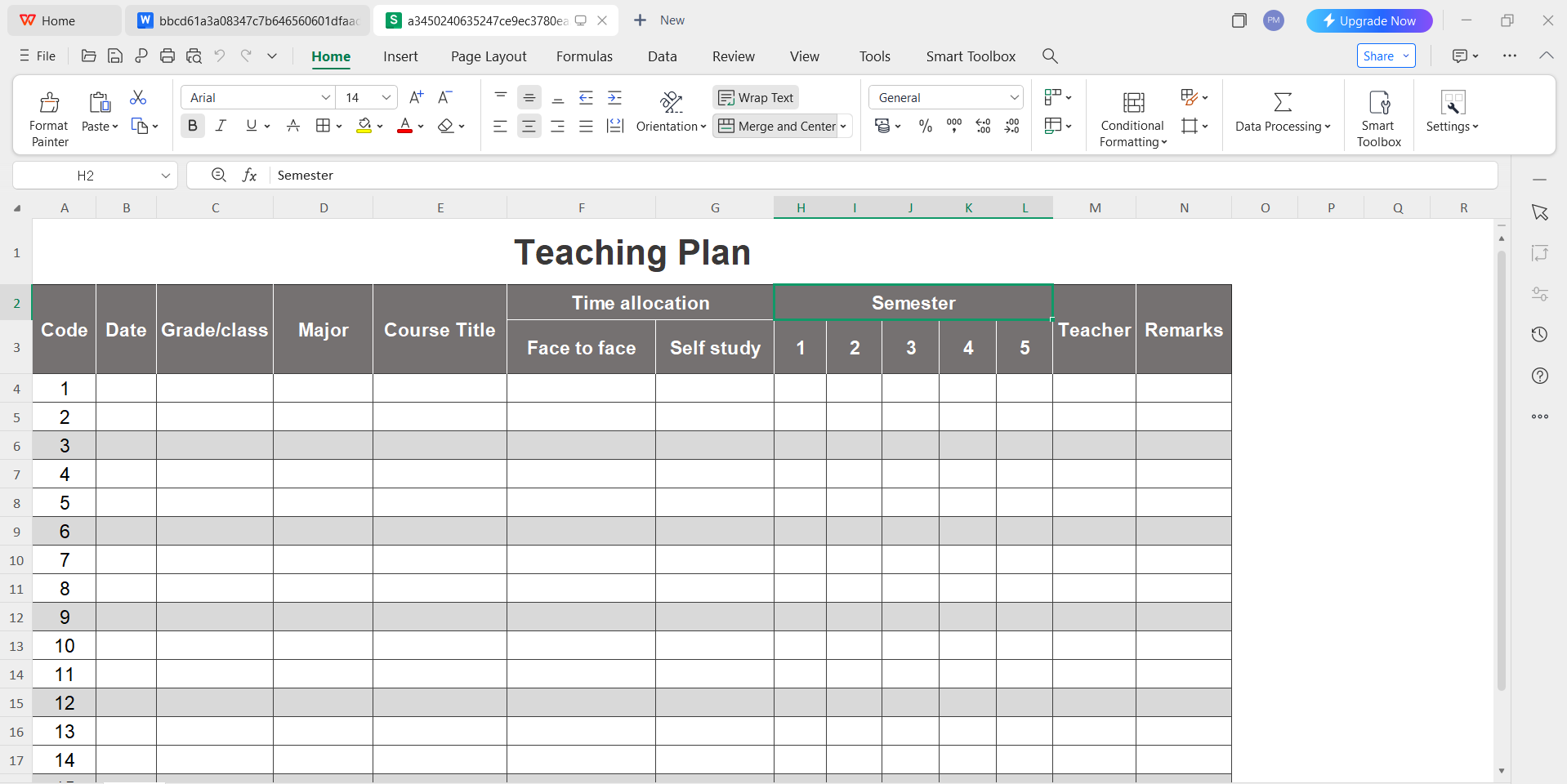
10. Gray Teaching Plan [Excel]
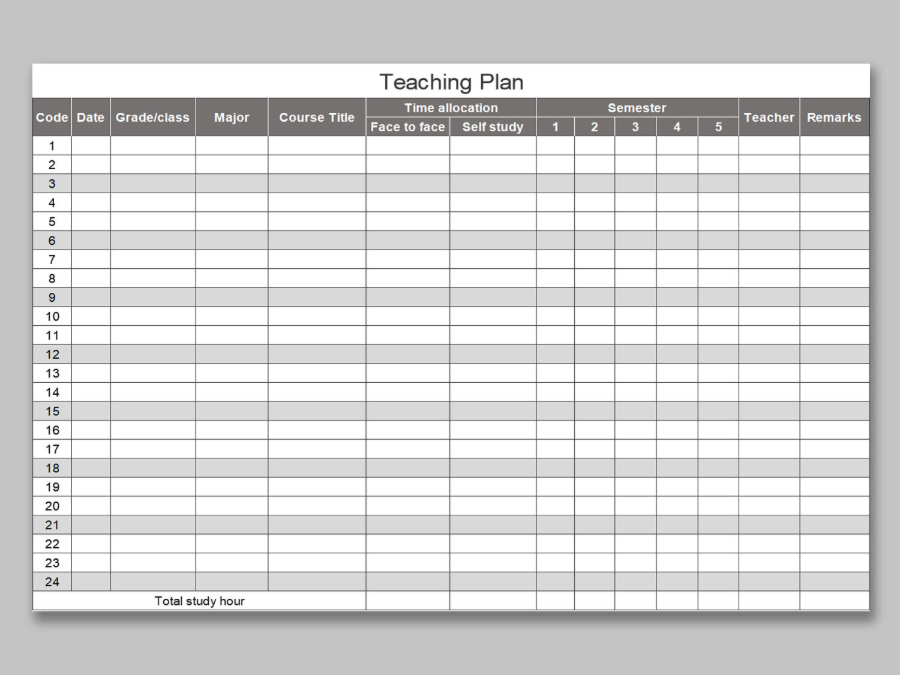
This layout balances simplicity with clarity. It's especially helpful for administrative purposes or more formal submissions.
My Recommendations
Personally, I find the Dark Blue Teacher Lesson Plan works best for weekly planning; it's easy on the eyes and gives a clean structure. If you prefer Word documents, the Green Elegant Roses version is both functional and visually motivating, especially for creative subjects. For beginners, the Simple Grid Lesson Plan is a great place to start because it covers all the basics without clutter.
Want More?
You can explore many more templates at the WPS Template Store. Whether you're teaching math, English, art, or early education, there's a free lesson plan template that fits your teaching style. All templates can be downloaded, customized, and edited directly using WPS Office.
Part 3. How to Edit and Print a Lesson Plan Template in Word & Excel
Once you've chosen a free lesson plan template, the next step is editing and customizing it to match your teaching needs. With WPS Office, you can easily open, modify, save, print, or even share your lesson plan, whether you're using Word or Excel format.
Here's how you can get started:
How to Edit a Lesson Plan Template in WPS Writer (Word)
Step 1: Download and Open the Template
Go to the WPS Template Store and download your preferred lesson plan file in .docx format. Open it using WPS Writer.
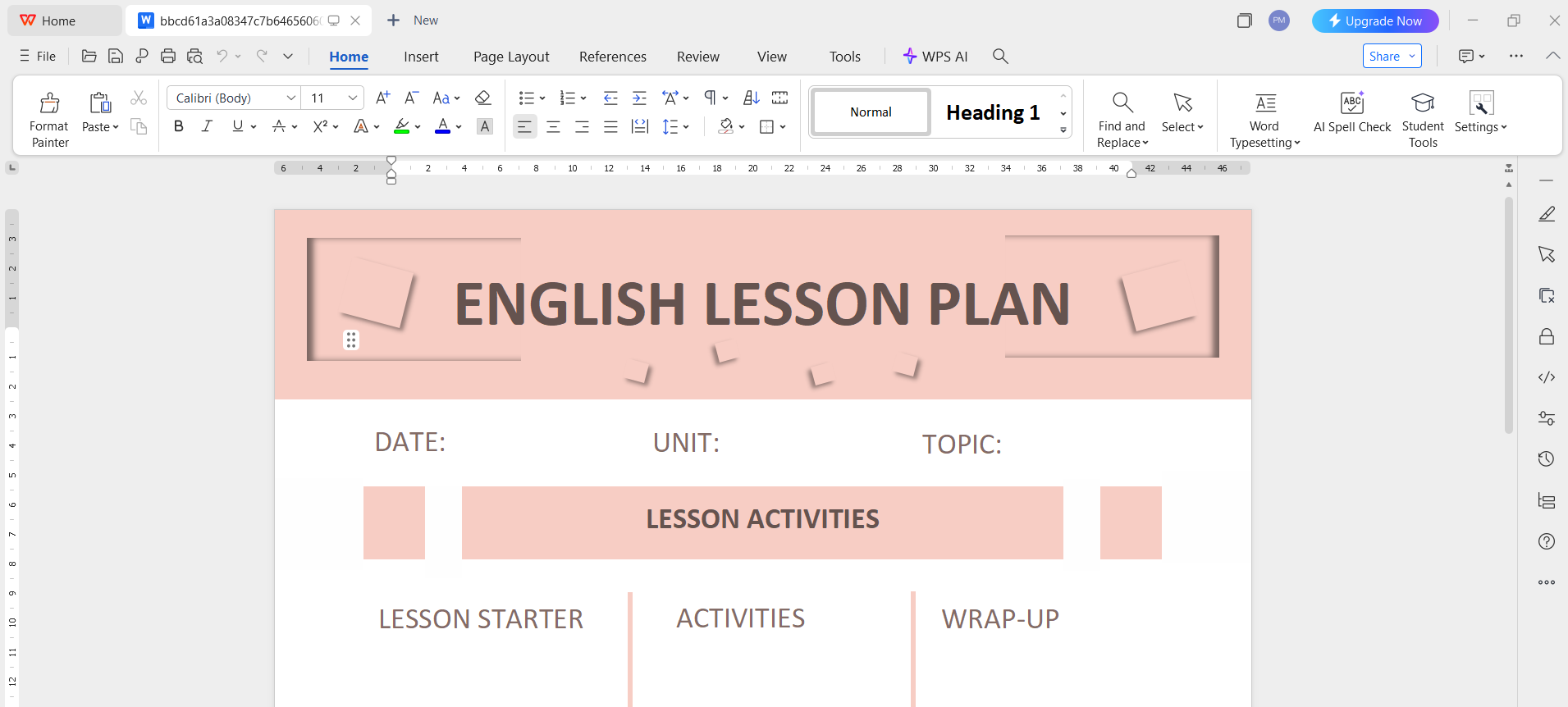
Step 2: Customize the Text
Click into any section of the template (e.g., Objectives, Activities, Notes) and start editing. WPS Writer works just like Microsoft Word, so you can adjust fonts, colors, and layouts easily.
Step 3: Save the Edited File as a PDF
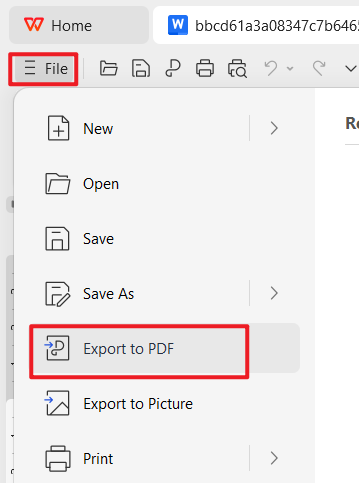
Once your edits are complete, go to File → Export to PDF. This ensures your formatting stays intact and the file is easier to share or print.
Step 4: Generate a Shareable Link Online
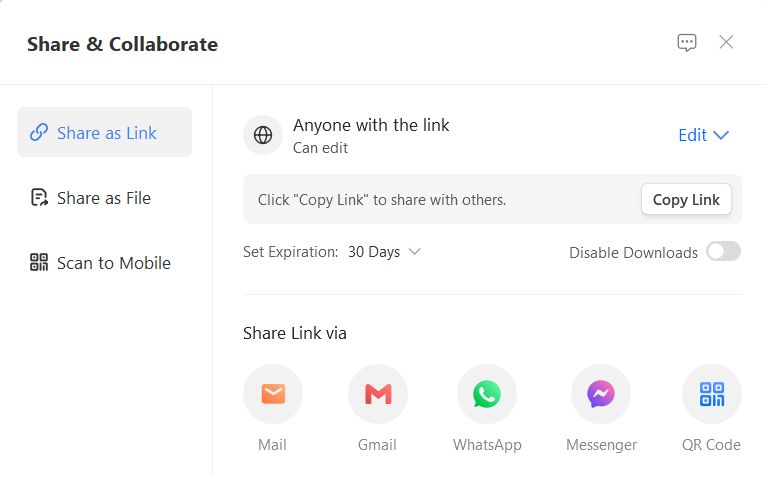
You can collaborate with others by uploading your file to WPS Cloud. To do this: File → Share → Create Shareable Link. Now, you can send the link to a co-teacher or supervisor for feedback or collaboration.
How to Edit a Lesson Plan Template in WPS Spreadsheet (Excel)
Step 1: Open the Excel Template
Download an .xlsx lesson plan template from the WPS site and open it in WPS Spreadsheet.
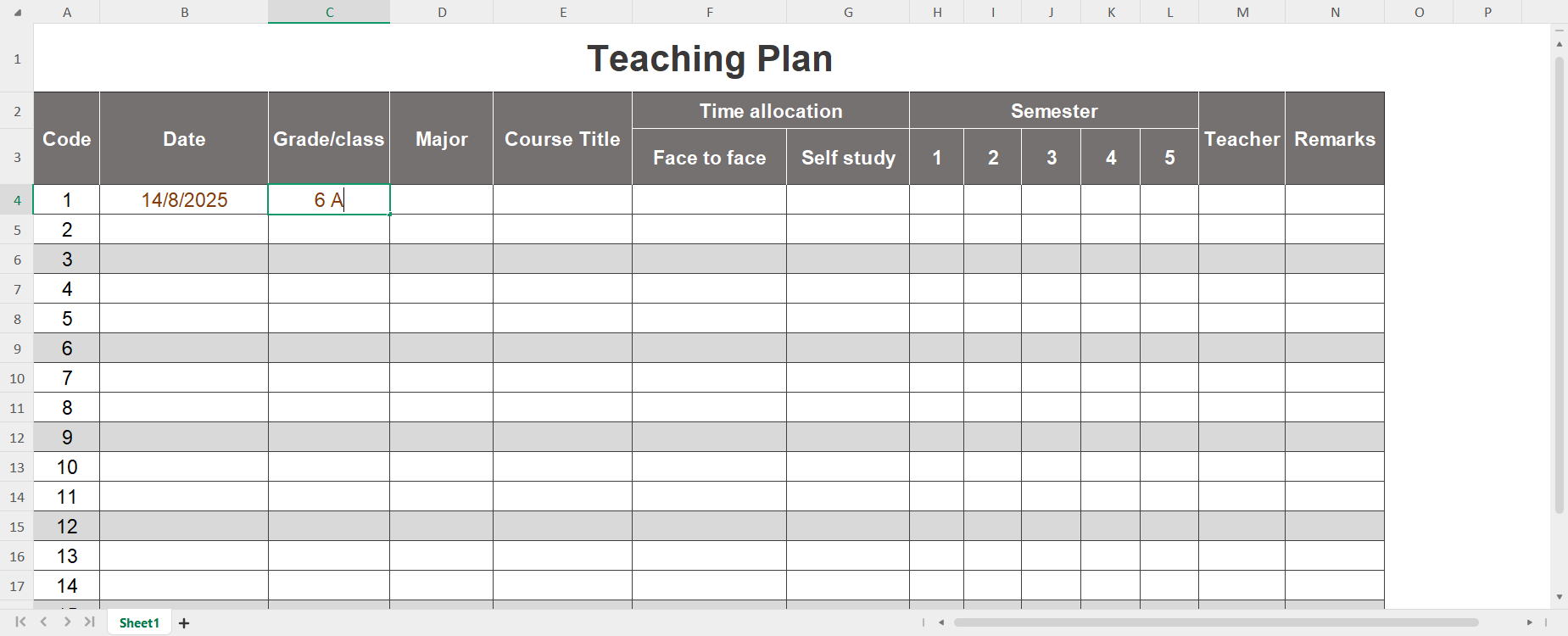
Step 2: Modify Weekly Plans
Edit the table cells for class subjects, times, and tasks. You can add additional columns if needed or use color-coding for clarity.
Step 3: Save and Export as PDF
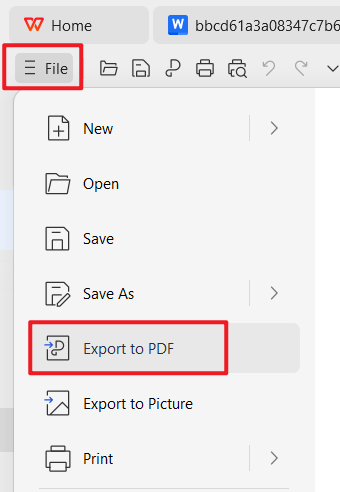
To save your lesson plan: File → Export to PDF. WPS allows high-quality PDF conversion for free.
Step 4: Share Through the Cloud
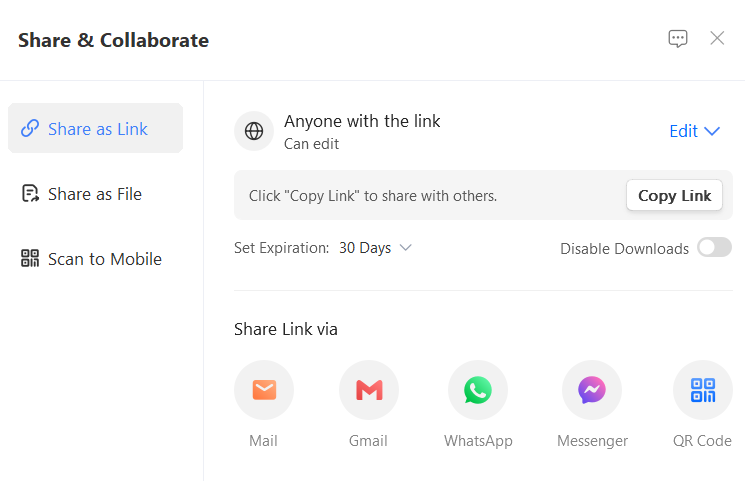
Just like with Writer, you can upload your lesson plan spreadsheet to the WPS Cloud and click Share → Copy Link → Send it to collaborators
Why I Prefer WPS Office for Lesson Planning
WPS Writer and Spreadsheet provide all the essential tools without the cost or complexity of other office suites. Features like built-in templates, PDF export, and cloud sharing make lesson planning not just easier, but faster. I've used WPS Office for years; it's lightweight, clean, and ideal for educators working on a tight schedule or budget.
Part 4. Tips for Lesson Planning
Whether you're a new teacher or a seasoned educator, improving your lesson planning strategy can lead to better classroom experiences for both you and your students. Here are six practical tips to help you get the most out of your free lesson plan template and make your planning process more effective.
Tip 1: Start with Clear, Measurable Objectives
Don't just list what you want to "cover"; define what students shouldbe able to do. Use verbs like "identify," "analyze," or "create" to guide your assessment strategy and align with Bloom's Taxonomy.
Tip 2: Use Time Blocks Strategically
Always overestimate the time activities will take. Plan buffer time between segments and consider transitions. A rushed class loses its impact, and a smooth pace improves focus and flow.
Tip 3: Design for Different Learning Styles
Incorporate a mix of visual, auditory, and kinesthetic elements. Even simple changes like using videos, group discussions, or hands-on tasks can make your plan more inclusive and engaging.
Tip 4: Prepare Assessments in Advance
Assessment isn't only about tests. Add checkpoints, quick activities, exit tickets, or informal Q&A that help you know if students are following along in real-time.
Tip 5: Reflect After Each Lesson
Leave space in your lesson plan to jot down what went well and what didn't. This small habit can significantly improve your future planning by helping you avoid repeating mistakes.
Tip 6: Reuse and Adapt Templates
Once you find a template that works for you, duplicate and adapt it for future lessons. You'll save time and gradually create a consistent planning system tailored to your teaching style.
My Thoughts
Personally, I've found that lesson plans are most helpful when theydon't try to do too much. Simplicity leads to clarity. The more focused and goal-driven my plans are, the more confident I feel walking into class, and the more my students benefit. Using editable templates has allowed me to streamline the process and focus more on teaching, less on formatting.
Part 5. Free Office Suite with Editable Templates
When it comes to editing and customizing your free lesson plan templates, the tool you use matters just as much as the template itself. That's why I recommend WPS Office, a free, lightweight, and feature-rich alternative to Microsoft Office that's especially useful for teachers.
Whether you're working on a Word or Excel format lesson plan, WPS Office gives you everything you need to edit, save, share, and print with ease.
Overview of WPS Office
WPS Office is a free office suite that includes Writer, Spreadsheet, and Presentation, compatible with Microsoft Word, Excel, and PowerPoint formats. It's designed to support productivity without the high costs or heavy software requirements.
It's also available on multiple platforms: Windows, macOS, Linux, Android, iOS, and even in-browser via WPS Cloud.
Key Features for Teachers
Free Download & Use
You can download WPS Office completely free and use all core features without any subscription.
Editable Templates Store
WPS offers a large library of editable templates, including the lesson plan formats we explored earlier, so you don't need to build your layout from scratch.
AI-Powered Tools
Use built-in AI features to rephrase content, summarize lesson materials, or generate outlines.
Built-In PDF Toolkit
Save lesson plans as PDFs instantly, merge multiple documents, or annotate directly within WPS.
Online Document Collaboration
Save files to the WPS Cloud and generate shareable links to collaborate with co-teachers or supervisors.
Cross-Device Sync
Access and edit your lesson plans from your phone, tablet, or desktop.
Safe, Stable & Lightweight
WPS uses minimal system resources, making it ideal even for older laptops and school computers.
Why I Recommend It
I've tried several free office tools, but WPS Office stands out because of how well it blends simplicity with functionality. The rich template store alone makes it a favorite, especially for tasks like lesson planning, weekly scheduling, and student feedback forms. Plus, the cloud sharing and AI features speed up repetitive tasks and help me stay organized without jumping between apps.
If you're an educator looking for a reliable, user-friendly, and fully compatible office suite, especially for working with free lesson plan templates, WPS Office is worth trying.
Summary
Creating a lesson plan doesn't have to be stressful or time-consuming, especially when you have access to a wide variety of free lesson plan templates. From basic Word documents to structured Excel planners, the right template can help you save time, stay organized, and focus on what matters most: teaching effectively. In this guide, we explored how to create a strong lesson plan, reviewed 10 downloadable templates, shared editing steps using WPS Office, and provided tips and FAQs to support your planning process.
If you're looking for more templates or tools, WPS Office is an excellent platform to explore. It offers a rich collection of editable files, powerful editing features, and seamless cloud collaboration, all for free. Whether you're a new teacher or a seasoned educator, WPS Office can help you plan smarter, teach better, and stay on top of every class.

'%3e%3cpath%20d='M19.9911%204.11386V6.471H18.5894C18.0775%206.471%2017.7322%206.57814%2017.5536%206.79243C17.3751%207.00671%2017.2858%207.32814%2017.2858%207.75671V9.44421H19.9019L19.5536%2012.0871H17.2858V18.8639H14.5536V12.0871H12.2769V9.44421H14.5536V7.49779C14.5536%206.39064%2014.8632%205.53201%2015.4822%204.92189C16.1013%204.31177%2016.9257%204.00671%2017.9554%204.00671C18.8304%204.00671%2019.509%204.04243%2019.9911%204.11386Z'%20fill='%23333333'/%3e%3c/g%3e%3cdefs%3e%3cclipPath%20id='clip0_2938_8199'%3e%3crect%20width='16'%20height='16'%20fill='white'%20transform='translate(8%204.00671)'/%3e%3c/clipPath%3e%3c/defs%3e%3c/svg%3e)
'%3e%3cpath%20d='M17.5237%2010.7813L23.4811%204H22.0699L16.8949%209.88693L12.7648%204H8L14.2469%2012.9029L8%2020.0133H9.4112L14.8725%2013.7952L19.2352%2020.0133H24M9.92053%205.04213H12.0885L22.0688%2019.0224H19.9003'%20fill='%23333333'/%3e%3c/g%3e%3cdefs%3e%3cclipPath%20id='clip0_2938_8200'%3e%3crect%20width='16'%20height='16.0134'%20fill='white'%20transform='translate(8%204)'/%3e%3c/clipPath%3e%3c/defs%3e%3c/svg%3e)


