It's possible that filling out a DS-160 form pdf will be very difficult for you if you have yet to learn what it is or how to fill it out. The person completing this form is expected to be attentive and pay close attention to detail. To assess whether or not you are eligible, the DS-160 form pdf will question you on various aspects of your personal life, such as your background and your family. Your responses to these questions, in connection with your performance during the in-person interview, will determine whether or not you are granted the visa.
This article will guide you as you prepare to understand and fill out the DS-160 form pdf. Here you will discover information on how to fill out the DS-160 form pdf online, more straightforward ways of creating the DS-160 form pdf, and instructions on what to do after successfully submitting it.
Use Word, Excel, and PPT for FREE
What is the DS-160 Form PDF?
The DS-160 form PDF is an PDF application for a nonimmigrant visa that may be submitted online. Anyone applying for a temporary visa to the United States must fill out this application form. DS-160 form pdf will decide whether or not you are eligible to be granted a visa, which must be filled out by everyone who wishes to get a visa to visit the United States.
How to Fill DS-160 Form PDF?
It might take around one hour and a half to complete the DS-160 form pdf application form. It is permissible to seek assistance from a competent individual who is qualified, such as an immigration expert. However, you are responsible for electronically signing and submitting the application form on your own. In this part, we will walk you through filling out the form and all its sections step-by-step.
The form allows you to change the language to Arabic, Hindi, Indonesian, French, Spanish, German, Hebrew, Italian, Russian, Vietnamese, Turkish, and a few more languages. If you do not speak English and your language is on the list, choose it from the top right corner before starting to fill out the DS-160 form pdf.
DS-160 language selection toolbar
3. Security Check
You will have to fill in your location and enter the code, which will prevail. After that, you will click the start an application in red color, and the site will take you to a further step.
DS-160 security check screen
4. Application ID
After you have passed the security checks, you will be provided with your ID, and you will have to save it. You can screenshot it or write it down.
DS-160 application ID page
5. Personal Information Data Section
In the first section of the application, you will be asked about; your date of birth, legal name, marital status, country, passport/national ID number, and your U.S. Social Security number or taxpayer ID if you have one.
DS-160 personal information section
6. Travel Information Section
This part of the DS-160 form pdf will request information on your precise travel arrangements, such as the purpose of your travel, dates of your arrival and departure, and the location of your stay in the United States.
DS-160 travel information section
7. Travel Companion Information Section
If you will be traveling with someone else to the US, this part requests information on the people you are traveling with, such as if they are family members, friends, etc.
DS-160 travel companion section
8. Prior Travel to the United States Section
Here you will be asked if you have ever visited the United States, and you must explain why and when you previously visited. This part will ask if you've ever had a U.S. visa application rejected or submitted an immigration petition.
DS-160 prior US travel section
9. Address and Phone Numbers Section
In this part, you must provide your current address and contact information, including your phone number and email address. Additionally, they need your usernames for social media like Instagram, Facebook, and Twitter.
DS-160 address phone section
10. Details of the Passport Section
Your first page of the passport has this information. The DS-160 form pdf will ask for the passport number, where your passport was issued, issue date, expiry date, etc. Simply provide the passport details as requested in the form.
DS-160 passport details section
11. Contacts in the United States Section
You must choose an American citizen who can attest to your identification. Therefore, you can add a friend or family in the United States. Or else you can enter the name of a company or organization you visit if you do not know anyone.
DS-160 US contacts section
12. Members of the Family Information Section
When filling up your DS-160 form pdf, you'll be questioned about your spouse, parents, nationality, home address, and any relatives that reside in the US.
DS-160 family members section
13. Employment History, Education, and Training Section
Here, the form will ask about your educational background, job history, and occupation over the last five years will all be included in this area. It could also ask for information on previous travel patterns.
DS-160 employment education section
14. Security Questions in the Section
This section has five parts and includes around 50 questions about national security in a yes-or-no style. Read them carefully and tick in the appropriate option.
DS-160 security questions section
15. Photo Section
A recent photo of yours is required in this section. Verify the image complies with U.S. government standards. Prepare the image file on your computer so that you may upload it. You must still bring a printed passport-style photo to the visa interview, so keep that in mind.
DS-160 photo upload section
16. Application Review and Submission
Congrats, you've made it to the last segment of your DS-160 form pdf. After carefully reviewing all of the answers from the previous part for accuracy and agreeing to the terms and conditions, you must click submit on this page. You must print the final confirmation page and take it to the visa interview.
DS-160 review submit confirmation
17. What is the next step after completing the DS-160 form PDF?
What should you do after completing the DS-160 form pdf? Relax; after completing the DS-160 form pdf, print the confirmation page and bring it to the US embassy or consulate in your country during your visa interview, together with any further documents required for your visa. You can also test pdf to make sure the whole process go on well.
If you did not print the confirmation page immediately after completing the application, you might always use your Application ID to log into the system again. Using the Application ID you gave, you may later check the status.
As you have read earlier, you will need to submit ds-160 pdf online to the authorities to ensure that your application is considered. Keep reading to find everything related to the ds-160 pdf form:
Access the Online DS-160 Application
Here is how to access the ds-160 pdf easily:
1. Make sure you open the Google Chrome browser on your device and visit the https://ceac.state.gov/genniv/ website. Remember that you wona??t be able to access this website from Microsoft Edge or Safari browser.
2. You will be given some information to read once you visit the website mentioned above. Make sure you read all the instructions carefully on the travel website to ensure you dona??t run into any problems.
3. Once you read the information related to the ds-160 pdf form, you will have to click on the a??Start Applicationa?? button to proceed with the application process.
caec website
4. Keep in mind that you will have to answer all the questions in the English language. However, to view the ds-160 pdf form website in the language in any other language, you can use the a??Select Tooltip Languagea?? feature.
caec language tooltip
5. Using this feature will help you simplify the process of giving answers to the ds-160 pdf file. But ensure that you get help from someone when answering questions to ensure that your application is not rejected.
6. On the next screen, make sure you select the location from where you are filling out the form. You will have to fill in your city and your country to proceed with the process.
7. Once you provide your location information, you will be asked to choose from a??Option Aa?? or a??Option Ba?? to proceed. You will have to click on the 1st option if you are filling your ds-160 pdf for the first time. But you will need to proceed with the 2nd option if you already have a saved application.
caec options screen
8. The ds-160 pdf filling process will not go the right way if you dona??t choose the right option. Ensure that you get help from someone if you are not sure whether you filled out a form earlier or not.
9. If you have already submitted the application before, you will have to upload it on the travel government website. Doing so will identify the authorities that you are aware of in your saved application and provide it as a reference.
10. You will need to click on the a??Browsea?? button to locate the .dat format that is present in your local storage. Make sure you choose the right file and also fill in the answers to the safety questions that are asked of you.
Download and Preview a Sample DS-160 Form
Sample of DS-160 Form
The process of downloading and previewing a ds-160 pdf is super easy. Here is how you can do it:
You can click on the Travel state website to download a preview of the ds-160 pdf form to know what a form looks like and ensure you dona??t run into problems when filling out the actual form.
Make sure you avoid opening the government websites on Safari or Microsoft Edge. You should access the websites from the latest version of Google Chrome so you dona??t run into a problem.
logo
What Documents Do We Need While Fill the DS-160 Form?
The ds-160 pdf form can only be filled the right way if you attach the following documents:
Your updated passport.
Your travel itinerary.
The list of the last five times when you visited the USA.
Your recently updated CV or Resume.
Other information that the concerned department asks from you.
Note:
For Students and Exchange Visitors (F, J, and M):
When completing the DS-160 form, it is important to have your SEVIS ID ready. You can find this ID on your I-20 or DS-2019 form. Additionally, you will be asked to provide the address of the school or program where you plan to study.
For Petition-based Temporary Workers (H-1B, H-2, H-3, CW1, L, O, P, R, E2C):
Make sure to have a copy of your I-129 form on hand. This document will be required during the application process.
For Other Temporary Workers:
During the DS-160 application process, you will be asked to provide information about your employer, including their address.
FAQ from travel.state.gov
How to Quickly Fill Out a DS-160 Form PDF with WPS AI Form Filler
After you understand the fields on a DS-160 Form, the next practical question is: how can you fill the form PDF quickly and accurately?
One of the most efficient options is WPS Office. Beyond standard PDF editing, WPS includes an AI Form Filler (AI Smart Form) feature that can extract details from your source text or files and populate form fields for youa??so you spend less time typing field by field and more time reviewing for accuracy.
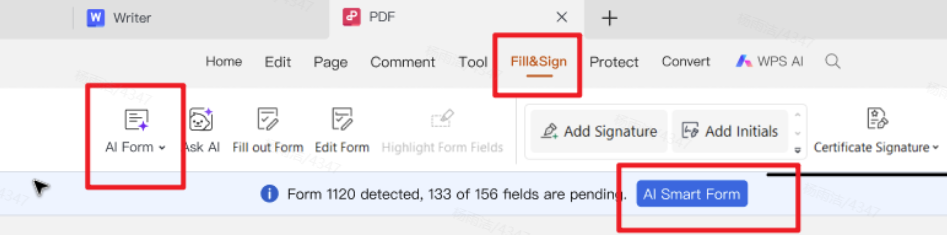
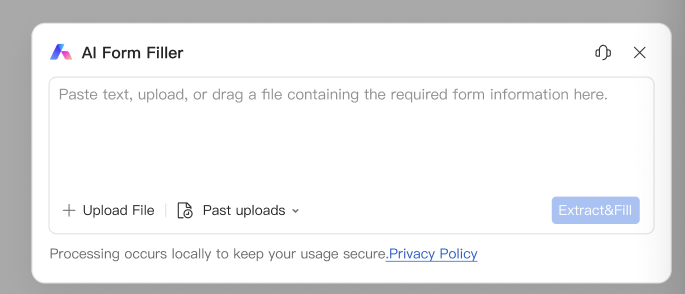
Recommended feature a?? AI Form Filler / AI Smart Form: In WPS PDFa??s Fill&Sign tab, open AI Form or click AI Smart Form when WPS detects pending form fields. Paste text, upload a file, or drag a document with the required information into AI Form Filler, then click Extract&Fill. Always review every field before you save or submit.
Quick steps:
Step 1. Download or open your DS-160 Form PDF in WPS Office.
Step 2. Go to the PDF tab a?? Fill&Sign.
Fill&Sign a?? AI Form and AI Smart Form
Step 3. Start AI Form / AI Smart Form, then paste or upload your source information and click Extract&Fill.
AI Form Filler a?? paste, upload, then Extract&Fill
Step 4. Review all autofilled fields carefully, fix anything incorrect, then save the completed PDF.
For a faster fill-and-sign workflow, try WPS pdf filler tools in WPS Office.
If you also need a i 130 form pdf, see our related guide.
FAQs about DS-160 Form
Q1. Why am I having problems accessing the DS-160 Form?
The ds-160 form pdf is a document that cannot be viewed on an outdated browser or an incompatible browser that cannot support the travel.state.gov website. To fix the issue of no access, you should use Firefox or Chrome. Keep in mind that you cannot access ds-160 pdf by using Safari or Microsoft Edge.
Q2. Are all questions on the DS-160 mandatory?
The ds-160 pdf contains several questions. To ensure that your form is submitted, you will have to give answers to all the questions without exception. Doing so will ensure that the system accepts your form. You can leave the answers blank to the questions that are marked a??Optional.a?? In some cases, you can also use the a??Does Not Applya?? answer as well.
Q3. When filling ds-160 pdf, can my answer be my native language?
A common question people have when filling their ds-160 pdf is if they can provide their answers in their native language. Keep in mind that the Travel Dept. of the US Government requires all applicants to give answers only in the English language to avoid complications.
Fill Your DS-160 Form with WPS Office
The DS-160 PDF filling process will be much easier if you follow the information mentioned above. To ensure that you can fill out the DS-160 forma??or any other type of PDF forma??with ease, consider using the WPS OfficePDF form filler.
One of the best things about WPS Office is that it's a standalone, cross-platform office suite. You can use it not only to edit PDFs, documents, spreadsheets, and presentations, but also to manage PDF files with a wide range of built-in tools. For example, you can compress PDF online to reduce file size for email submission, or merge and split PDF online to organize multiple pages or extract specific sections as needed. Plus, WPS Office runs smoothly on Windows, Mac, Linux, Android, and iOSa??making it a versatile and reliable tool for work on any device.
I'm Maira, experienced in using office suite tools and technology to support professional tasks. My regular use of Office software has helped me develop strong command over these tools, especially in drafting legal instruments and helpful content.


'%3e%3cpath%20d='M8%200C12.4183%200%2016%203.58172%2016%208C16%2012.4183%2012.4183%2016%208%2016C3.58172%2016%200%2012.4183%200%208C0%203.58172%203.58172%200%208%200ZM11.6162%204.38379C11.2257%203.99337%2010.5927%203.99338%2010.2021%204.38379L8%206.58594L5.79785%204.38379C5.40732%203.99334%204.77429%203.99329%204.38379%204.38379C3.99331%204.77429%203.99335%205.40733%204.38379%205.79785L6.58594%208L4.38379%2010.2021C3.99348%2010.5927%203.99341%2011.2257%204.38379%2011.6162C4.77426%2012.0066%205.40734%2012.0065%205.79785%2011.6162L8%209.41406L10.2021%2011.6162C10.5927%2012.0066%2011.2257%2012.0067%2011.6162%2011.6162C12.0067%2011.2257%2012.0066%2010.5927%2011.6162%2010.2021L9.41406%208L11.6162%205.79785C12.0066%205.40735%2012.0066%204.77429%2011.6162%204.38379Z'%20fill='%23080E17'%20fill-opacity='0.46'/%3e%3c/g%3e%3cdefs%3e%3cclipPath%20id='clip0_3761_713'%3e%3crect%20width='16'%20height='16'%20fill='white'/%3e%3c/clipPath%3e%3c/defs%3e%3c/svg%3e)




'%3e%3cpath%20fill-rule='evenodd'%20clip-rule='evenodd'%20d='M21.4999%2010.9993C21.4999%205.20009%2016.7986%200.498901%2010.9993%200.498901C5.19994%200.498901%200.498657%205.20009%200.498657%2010.9993C0.498657%2016.2404%204.33858%2020.5844%209.35855%2021.3722V14.0346H6.69238V10.9993H9.35855V8.68594C9.35855%206.05427%2010.9262%204.60062%2013.3248%204.60062C14.4736%204.60062%2015.6753%204.80571%2015.6753%204.80571V7.38979H14.3512C13.0468%207.38979%2012.64%208.19921%2012.64%209.0296V10.9993H15.5523L15.0867%2014.0346H12.64V21.3722C17.66%2020.5844%2021.4999%2016.2404%2021.4999%2010.9993Z'%20fill='%231568EA'/%3e%3c/g%3e%3c/svg%3e)


'%3e%3cpath%20d='M2.42045%2022.1876H6.31818V12.7217L0.75%208.54553V20.5171C0.75%2021.4414%201.49892%2022.1876%202.42045%2022.1876Z'%20fill='%234285F4'/%3e%3cpath%20d='M19.682%2022.1876H23.5797C24.5041%2022.1876%2025.2502%2021.4387%2025.2502%2020.5171V8.54553L19.682%2012.7217'%20fill='%2334A853'/%3e%3cpath%20d='M19.682%205.48293V12.7216L25.2502%208.54543V6.31816C25.2502%204.25236%2022.8921%203.07469%2021.2411%204.31361'%20fill='%23FBBC04'/%3e%3cpath%20d='M6.31824%2012.7217V5.48303L13.0001%2010.4944L19.6819%205.48303V12.7217L13.0001%2017.733'%20fill='%23EA4335'/%3e%3cpath%20d='M0.75%206.31816V8.54543L6.31818%2012.7216V5.48293L4.75909%204.31361C3.10534%203.07469%200.75%204.25236%200.75%206.31816Z'%20fill='%23C5221F'/%3e%3c/g%3e%3cdefs%3e%3cclipPath%20id='clip0_2954_7305'%3e%3crect%20width='24.5'%20height='18.375'%20fill='white'%20transform='translate(0.75%203.8125)'/%3e%3c/clipPath%3e%3c/defs%3e%3c/svg%3e)



'%3e%3cpath%20d='M19.9911%204.11386V6.471H18.5894C18.0775%206.471%2017.7322%206.57814%2017.5536%206.79243C17.3751%207.00671%2017.2858%207.32814%2017.2858%207.75671V9.44421H19.9019L19.5536%2012.0871H17.2858V18.8639H14.5536V12.0871H12.2769V9.44421H14.5536V7.49779C14.5536%206.39064%2014.8632%205.53201%2015.4822%204.92189C16.1013%204.31177%2016.9257%204.00671%2017.9554%204.00671C18.8304%204.00671%2019.509%204.04243%2019.9911%204.11386Z'%20fill='%23333333'/%3e%3c/g%3e%3cdefs%3e%3cclipPath%20id='clip0_2938_8199'%3e%3crect%20width='16'%20height='16'%20fill='white'%20transform='translate(8%204.00671)'/%3e%3c/clipPath%3e%3c/defs%3e%3c/svg%3e)
'%3e%3cpath%20d='M17.5237%2010.7813L23.4811%204H22.0699L16.8949%209.88693L12.7648%204H8L14.2469%2012.9029L8%2020.0133H9.4112L14.8725%2013.7952L19.2352%2020.0133H24M9.92053%205.04213H12.0885L22.0688%2019.0224H19.9003'%20fill='%23333333'/%3e%3c/g%3e%3cdefs%3e%3cclipPath%20id='clip0_2938_8200'%3e%3crect%20width='16'%20height='16.0134'%20fill='white'%20transform='translate(8%204)'/%3e%3c/clipPath%3e%3c/defs%3e%3c/svg%3e)


