Organizing a potluck is fun until you get to know half the guests
brought desserts and no one remembered the plates. It’s a familiar chaos
for anyone who’s hosted a shared meal. The problem isn’t enthusiasm, but
rather coordination. Without a clear system, duplicate dishes and
forgotten essentials can quickly turn a cozy get-together into a
logistical puzzle. The answer lies in one simple tool: a potluck sign up
sheet. In this guide, I’ll share 10 free potluck sign up sheet templates
you can download and start editing easily.
Use Word, Excel, and PPT for FREE
Potluck Sign Up Sheet
10 Recommended
Potluck Sign Up Sheet Templates
When organizing potlucks, people usually spend more time formatting
spreadsheets than actually planning the food, trying to align columns,
and making sure no two people brought the same dish but it always ends
up looking messy. They don’t realize how much easier things get when you
start with a ready-made potluck sign up sheet template. These templates
already have space for names,
dishes, quantities, and even contact details, so you can skip the setup
and focus on coordinating your event.
1. Potluck Sign Up Sheet
[Excel]
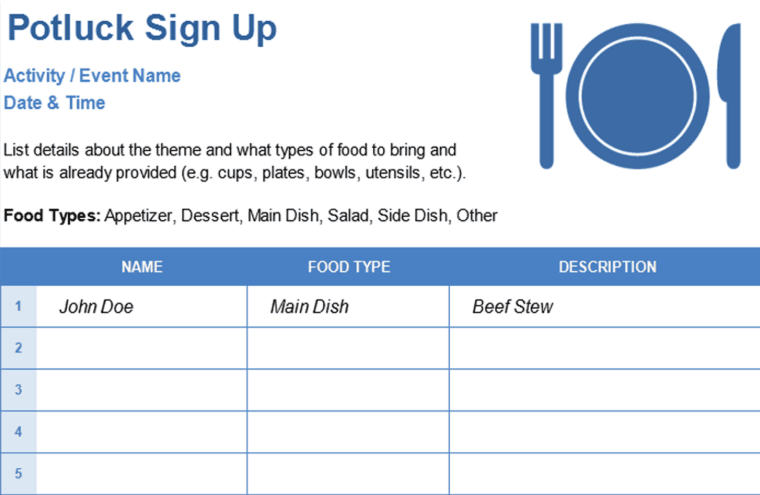
This Potluck
Sign Up Sheet is a clear and organized template for coordinating
any group meal or event. The template clearly lists the Activity/Event
Name and Date & Time, along with instructions for the theme. The
main sign-up table includes columns for the participant's Name, the Food
Type they are bringing, and a detailed Description of the item. This is
the perfect tool for ensuring a balanced and successful potluck.
Potluck Sign Up Sheet
2. Department Sign-Up Sheet
[Excel]
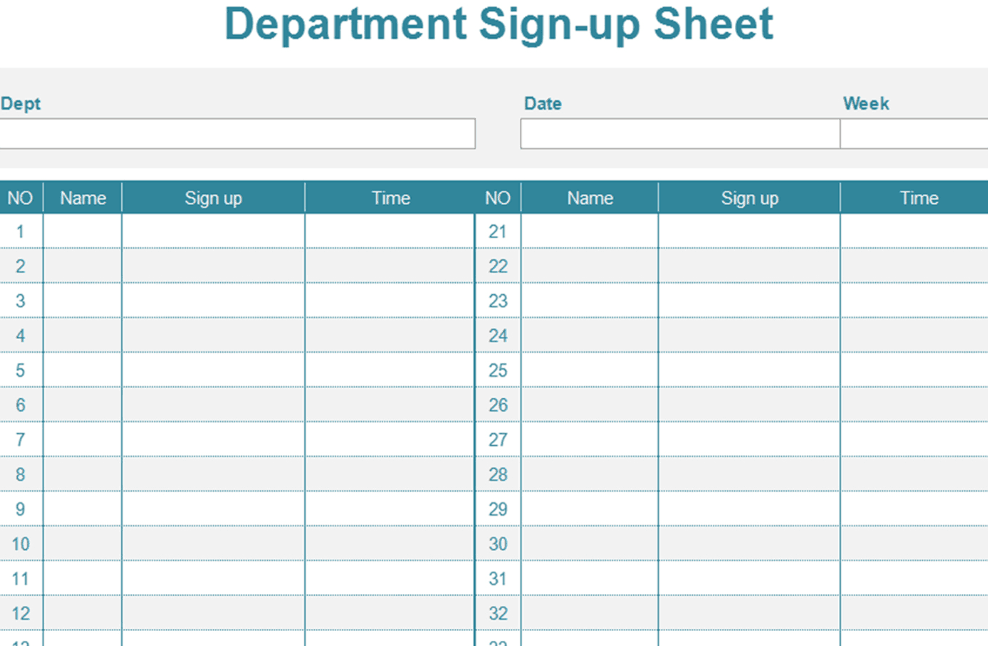
This Department
Sign-up Sheet is a highly efficient and streamlined spreadsheet
designed for internal team coordination, scheduling, or tracking tasks.
The two-column layout allows for up to 60 entries and includes essential
fields for the Name of the participant, a Sign-up column, and a Time
column for scheduling. With headers for Department, Date, and Week, it's
a versatile tool perfect for managing rotations, training sessions, or
internal event attendance.
Department Sign-Up Sheet
3. Simple Sign Up Sheet [Excel]
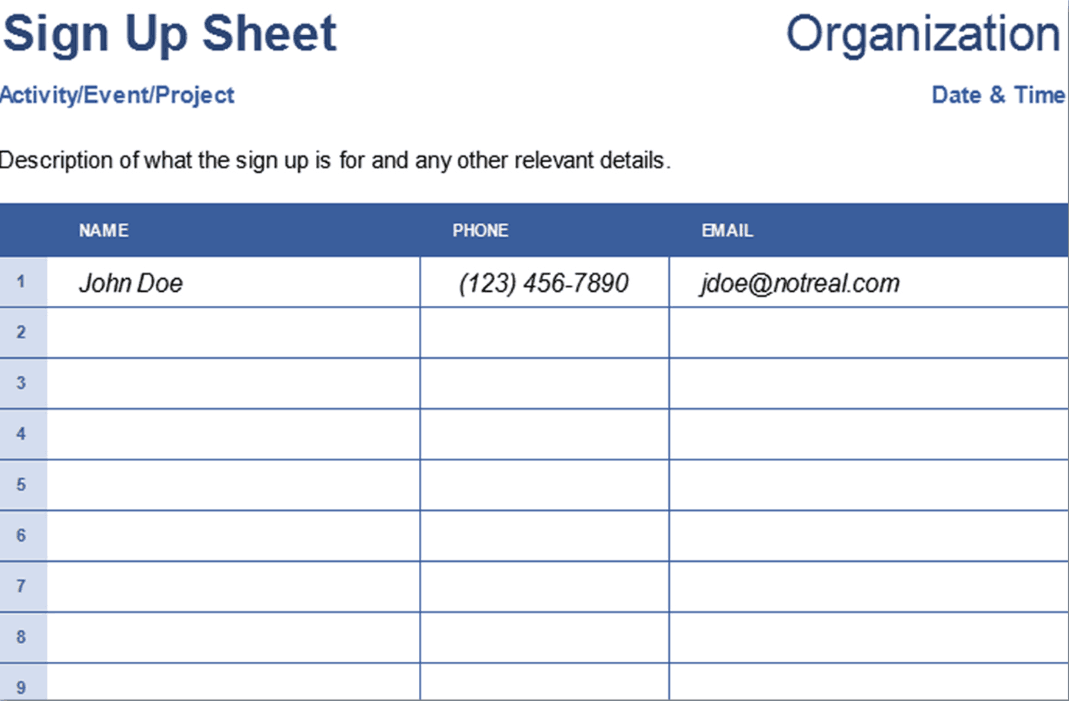
This Simple
Sign Up Sheet is a generic and versatile template ideal for
quickly gathering contact information for any activity, event, or
project. The clean, professional design features mandatory fields for
the participant's Name, Phone, and Email. With clearly defined space for
the Activity/Event/Project, Organization, and Date & Time, it's the
perfect solution for tracking attendance or building a contact list.
Simple Sign-Up Sheet
4. Printable Potluck Sign
Up Sheet [Excel]
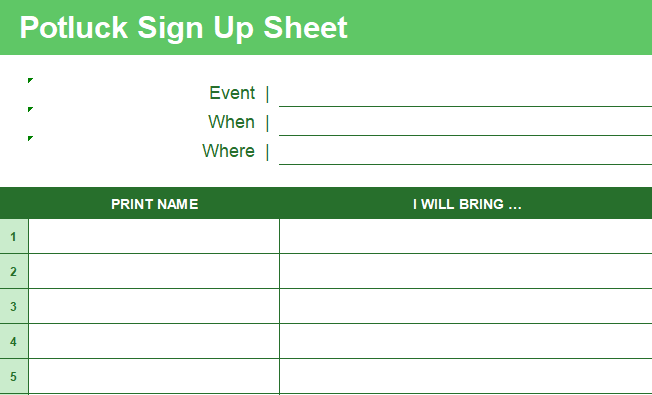
This Printable
Potluck Sign Up Sheet features a classic, professional
green-and-white design optimized for easy printing and physical sign-up.
The template provides clear fields for detailing the Event, When, and
Where. The main table uses simple columns for the participant's Print
Name and a broad I Will Bring... column, making it a flexible and
essential tool for coordinating food contributions for any event.
Printable Potluck Sign Up Sheet
5. Free Potluck Sign
Up Sheet Template 1 [PDF]
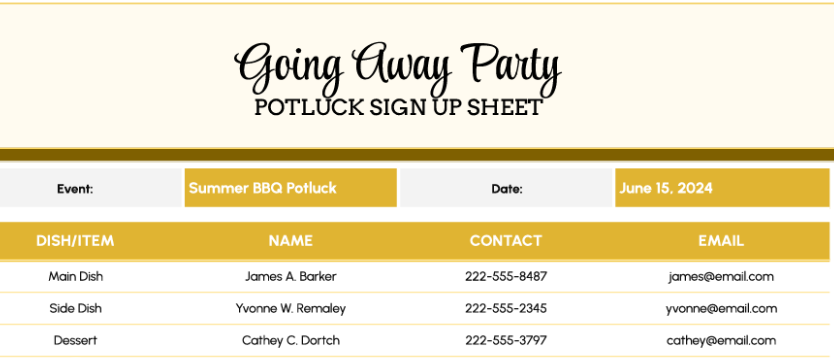
This Going
Away Party Potluck Sign Up Sheet features an attractive, festive
design with a gold and beige color scheme, making it perfect for
celebratory events. The template clearly organizes potluck contributions
by Dish/Item e.g., Main Dish, Side Dish, Dessert. It is designed to
gather key contact information, including the participant's Name,
Contact phone number, and Email, ensuring easy coordination for the
organizer.
Going Away Potluck Sign Up Sheet
6. Free Potluck Sign
Up Sheet Template 2 [PDF]
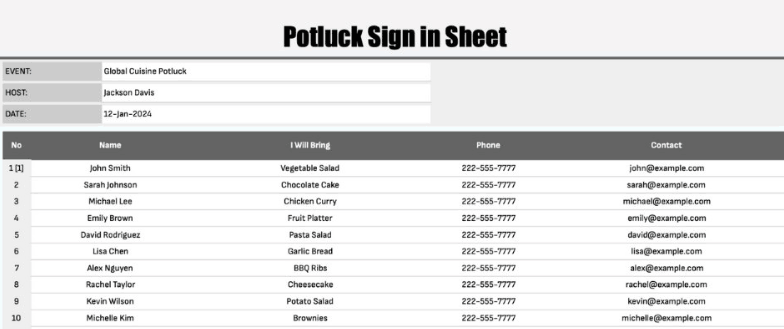
This Potluck
Sign In Sheet offers a professional, and well-organized table
for coordinating a group meal, such as a "Global Cuisine Potluck". The
header clearly lists the Event, Host, and Date. The main table is
designed to gather comprehensive details, including the participant's
Name, the dish they will bring, their phone number, and contact email
address, making it easy to manage communication and ensure a balanced
menu.
Sign Up Sheet Template 2
7. Thanksgiving Potluck
Sign Up Sheet [PDF]
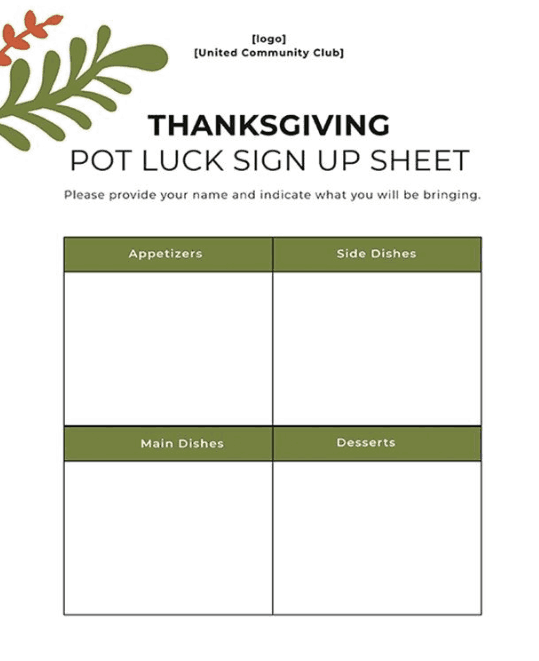
This Thanksgiving
Potluck Sign Up Sheet features a charming, holiday-themed
design, perfect for coordinating a festive group meal. The template uses
a clear, organized quadrant structure to categorize contributions into
four essential groups: Appetizers, Side Dishes, Main Dishes, and
Desserts. This design is ideal for ensuring a balanced and traditional
Thanksgiving meal while making it easy for participants to see what
categories still need filling.
Thanksgiving Sign Up Sheet
8. Christmas Potluck Sign
Up Sheet [PDF]
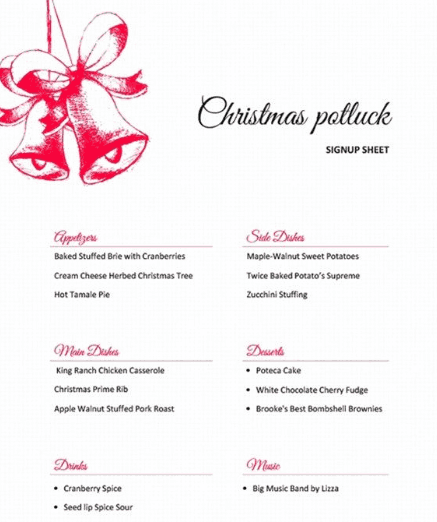
This festive Christmas
Potluck Sign Up Sheet features an elegant holiday design with a
beautiful red bell illustration, perfect for organizing a holiday party.
The template provides a clear structure for participants to list their
contributions across categories like Appetizers, Main Dishes, Side
Dishes, and Desserts. It also includes dedicated sections for planning
Drinks and Music, ensuring a comprehensive and coordinated festive
gathering.
Christmas Potluck Sign Up Sheet
9. Cinco De Mayo
Potluck Sign Up Sheet [PDF]
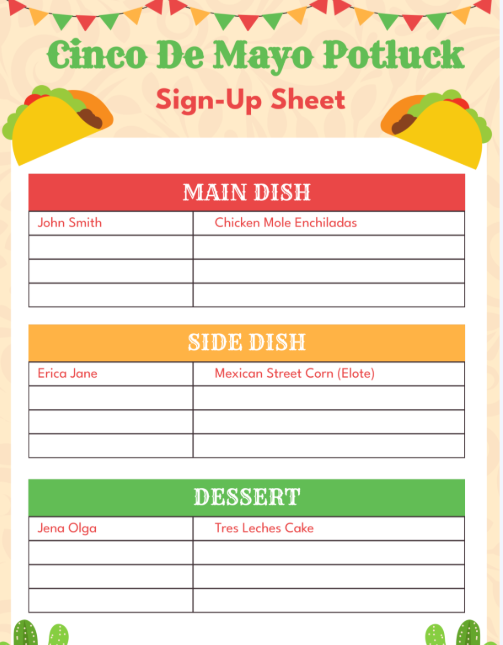
This Cinco
De Mayo Potluck Sign Up Sheet is a bright, festive template
featuring a taco and banner motif, perfect for coordinating a themed
celebration. The design is highly organized using color-coded, block
sections to ensure a balanced menu, including dedicated areas for Main
Dish, Side Dish, and Dessert. This clear structure makes it easy for the
host to manage contributions and for guests to see what items are
needed.
Cinco De Mayo Sign Up Sheet
10. Potluck Sign Up Sheet
[PosterMyWall]
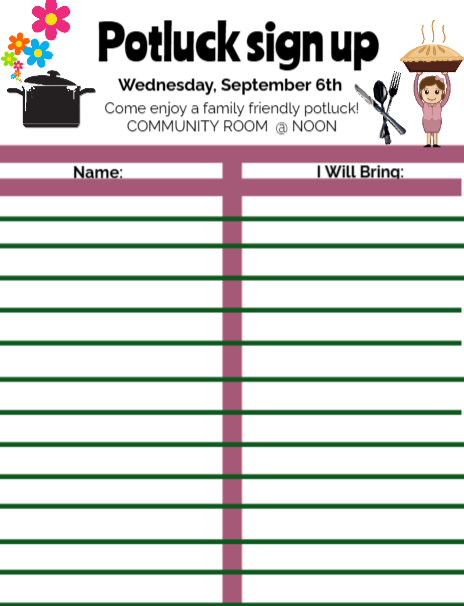
This Fun
Potluck Sign Up Sheet features a bright, playful design with
clip art of flowers, a pot, and a pie, making it perfect for a casual,
family-friendly gathering. The design is intentionally simple, with a
main table divided into clear columns for the participant's Name and the
dish they will bring. It clearly states the Date, Time, and Location at
the top, ensuring all guests have the essential event details.
PosterMyWall Sign Up Sheet
How to
Edit Your Potluck Sign Up Sheet Template Quickly
Even the best-designed digital potluck sign up sheet needs a few
changes before it’s ready to share. Maybe you want to add a “Dietary
Restrictions” column, change the color theme to match your company
event, or include a notes section for last-minute updates. The good news is that editing these
templates doesn’t require any advanced skills as you just need to know
where to click.
How to
Edit Your Potluck Sign Up Sheet Template in Excel
Editing your potluck sign up sheet in Excel is one of the fastest
ways to get it event-ready. I prefer WPS Excel because it lets you
organize details neatly, apply filters, and make quick changes without
messing up the layout. Here’s how to use it.
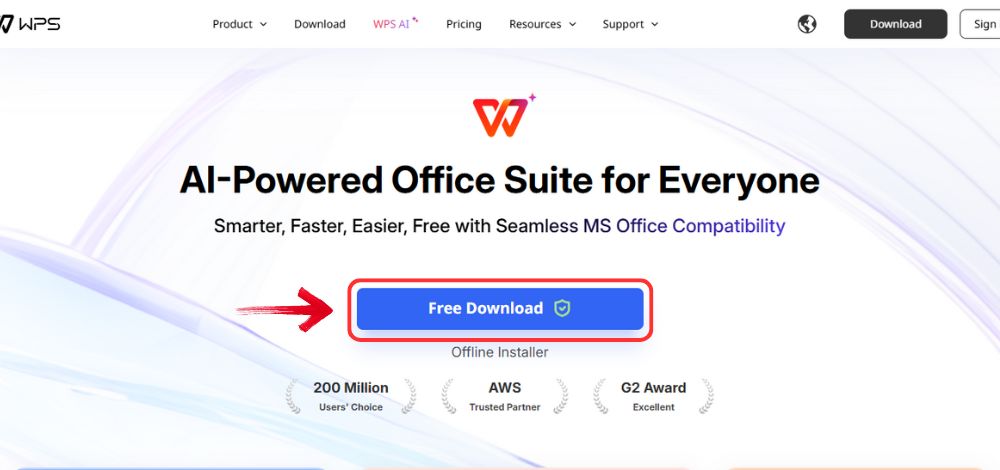
Step 1: Start by visiting WPS Office and click the "Free Download" button to begin the download.
Download WPS Office
Step 2: Once the download finishes, launch the
installation file like you would for any other app or software.
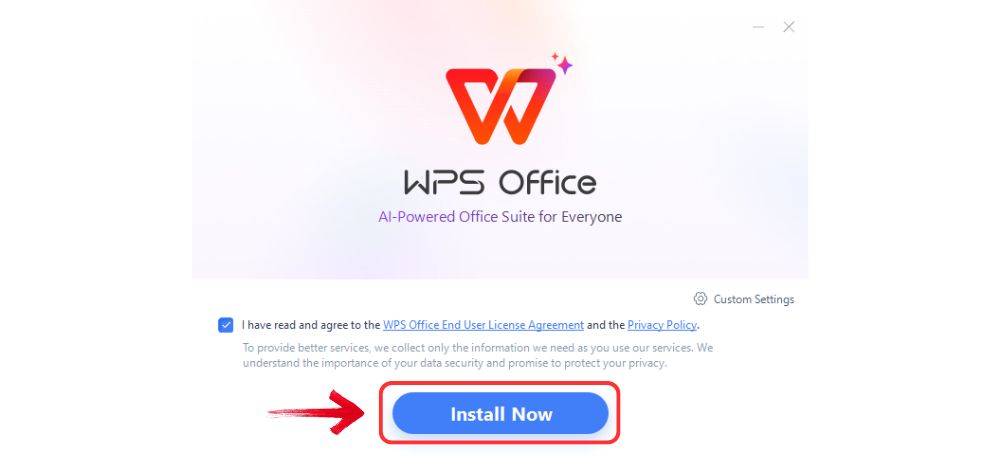
Step 3: Accept the terms and conditions which WPS
Office shows, then click the "Install" button to begin
the installation.
Install WPS Office
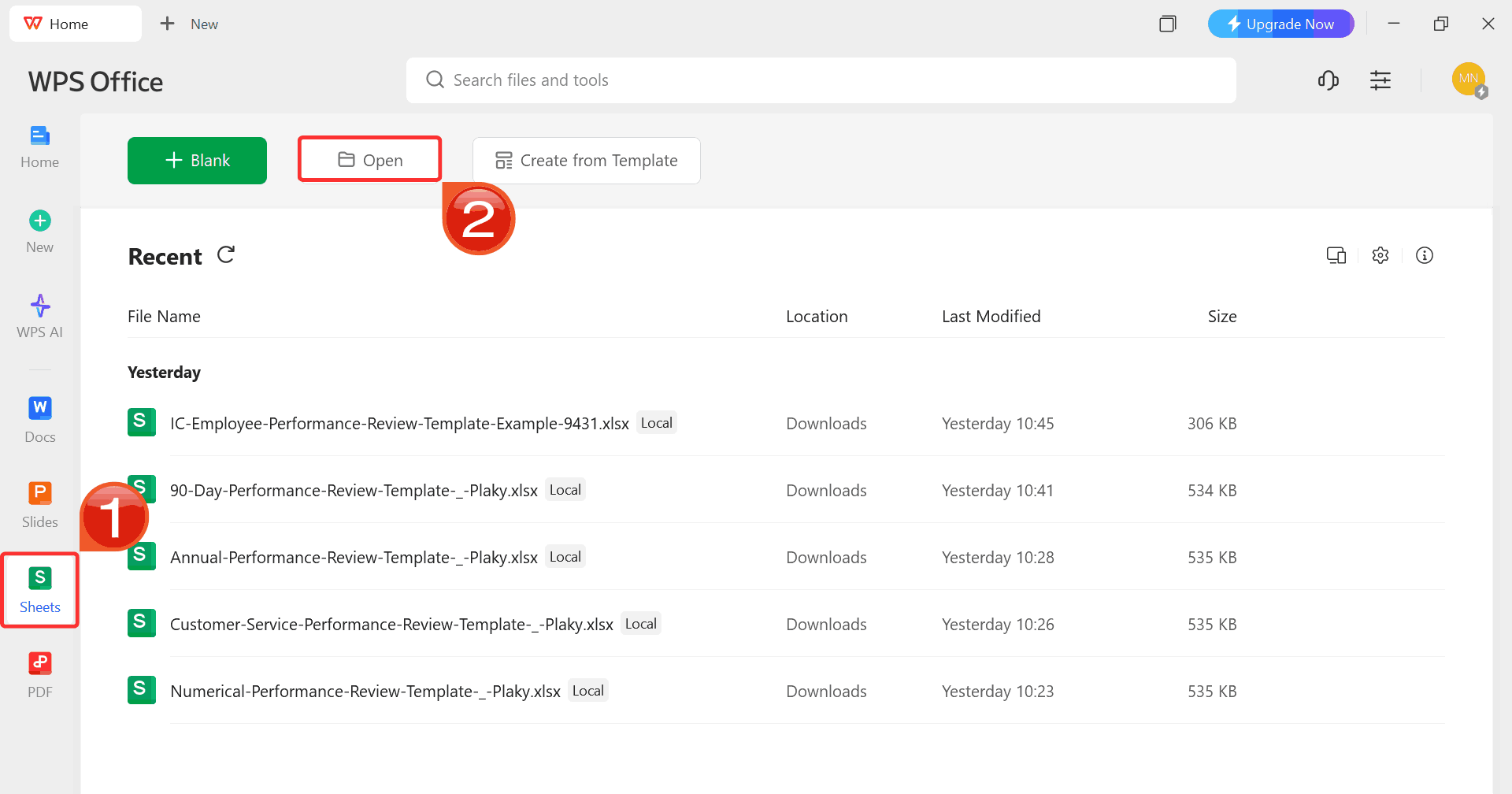
Step 4: After installation, on WPS Office, click “Sheets” from the left sidebar and hit “Open” to select your downloaded template.
WPS Spreadsheet Dashboard
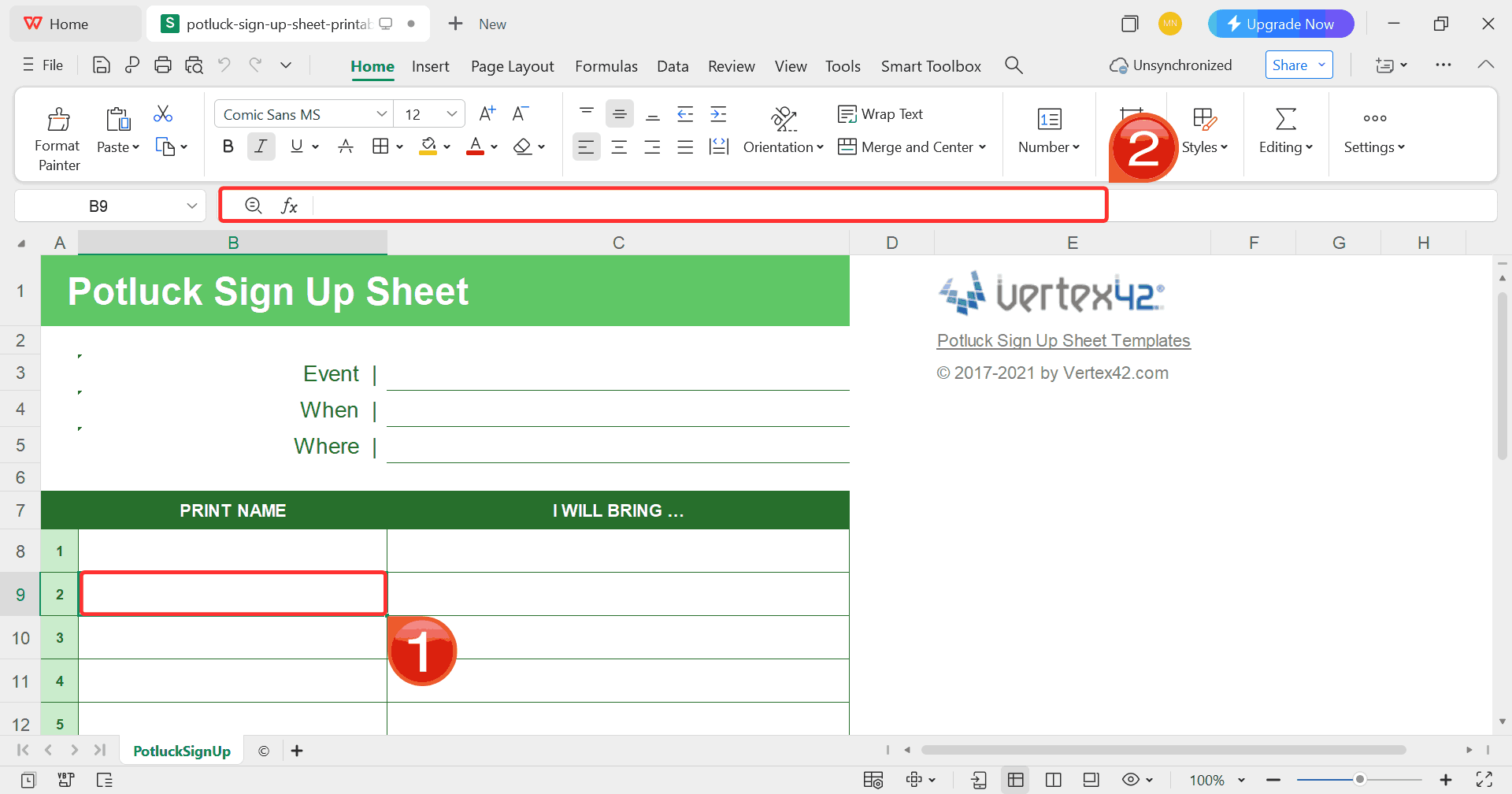
Step 5: Click on any cell you want to modify, then
use the toolbar to add text such as the name of the people invited to
the party.
Customize Template
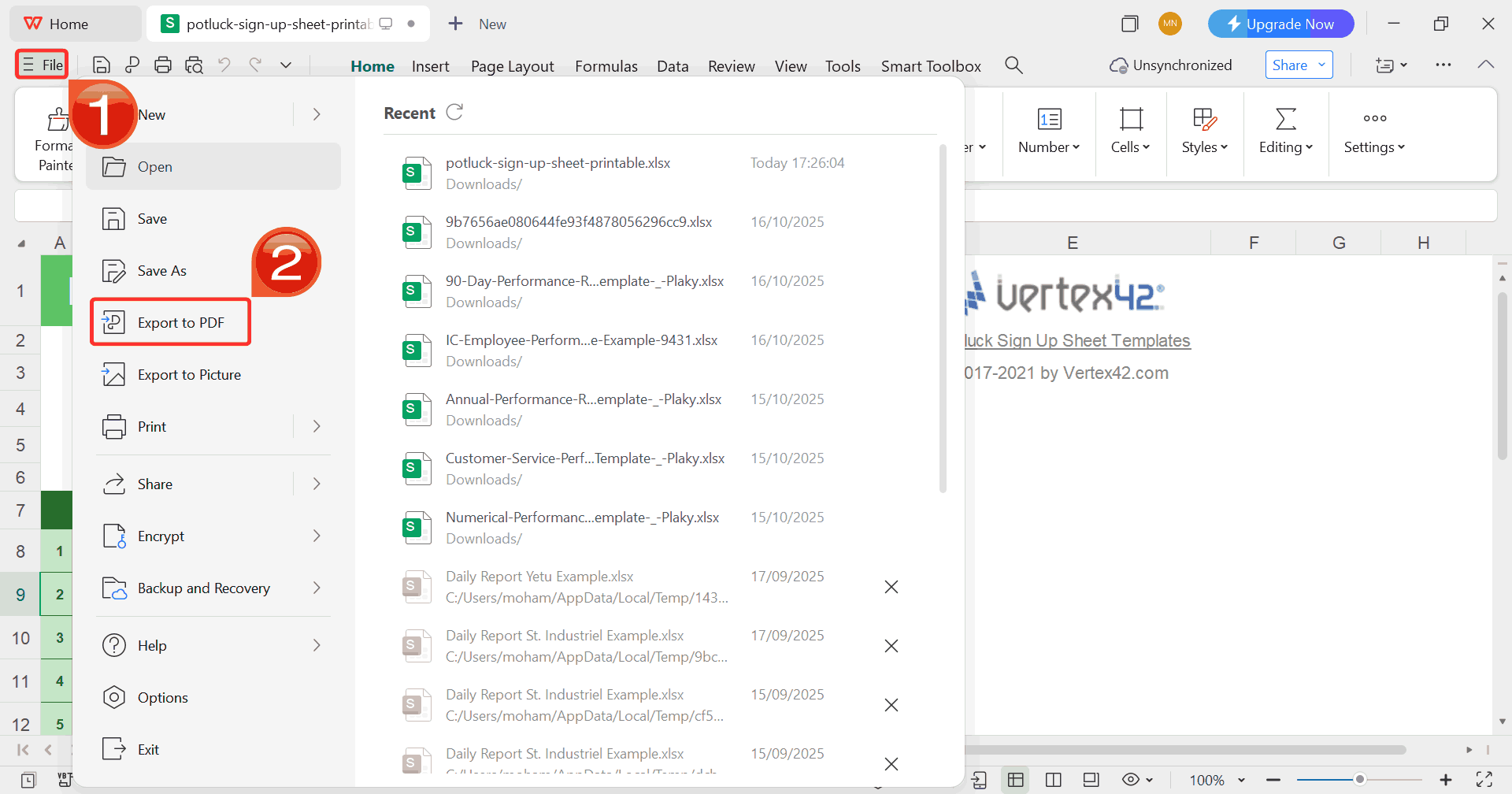
Step 6: After finishing your edits, click on “File” and choose “Export to PDF”.
This saves your review in a professional format that’s easy to share or
archive.
Export Template
How to
Edit Your Potluck Sign Up Sheet Template in Word
If you’ve chosen a Word-based potluck sign up sheet, like the
Christmas or Thanksgiving versions, editing is even more visual. I like
using WPS Writer for events where presentation matters like office
gatherings or holiday dinners because it’s easy to adjust fonts, add
headers, and include small design touches that make the sheet look
refined.
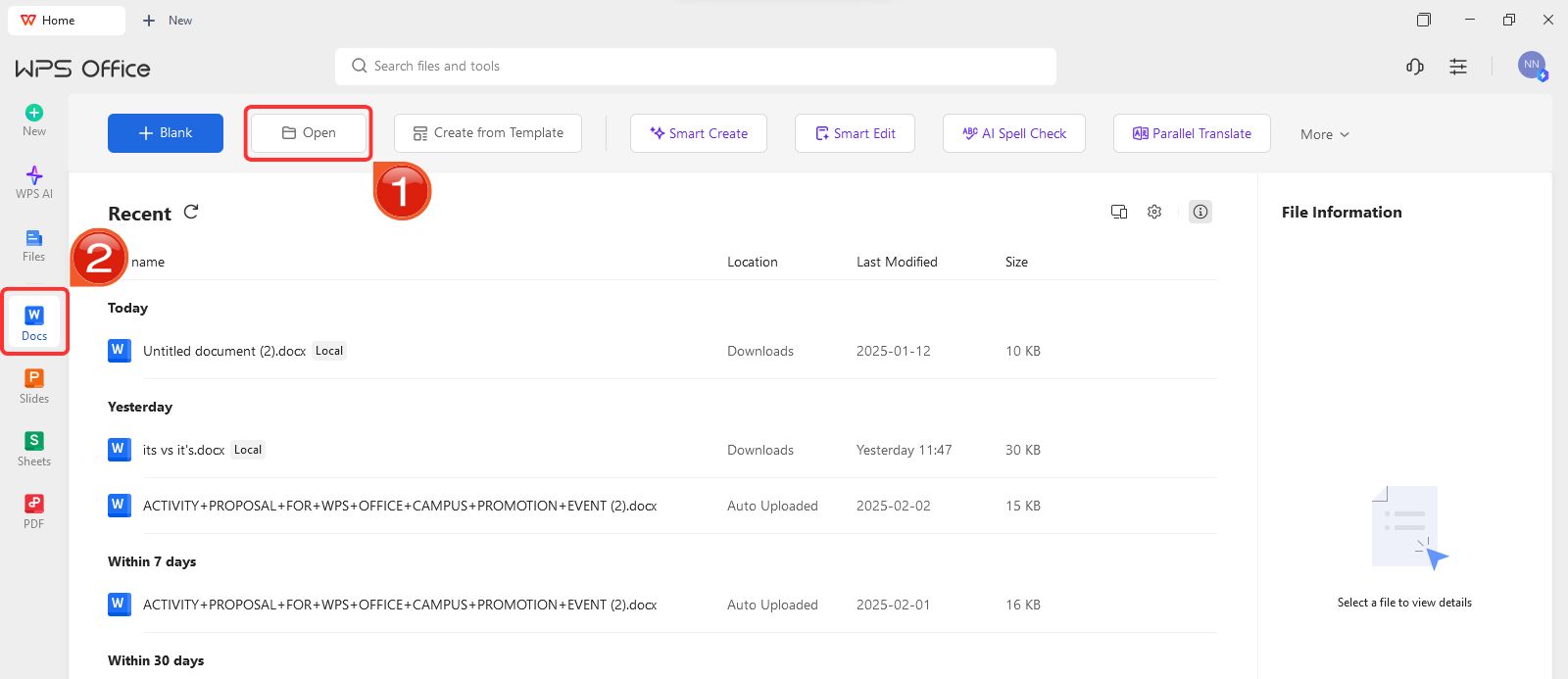
Step 1: On WPS Office, click on “Docs” from the left panel, then select “Open” to open a document.
Create new blank document
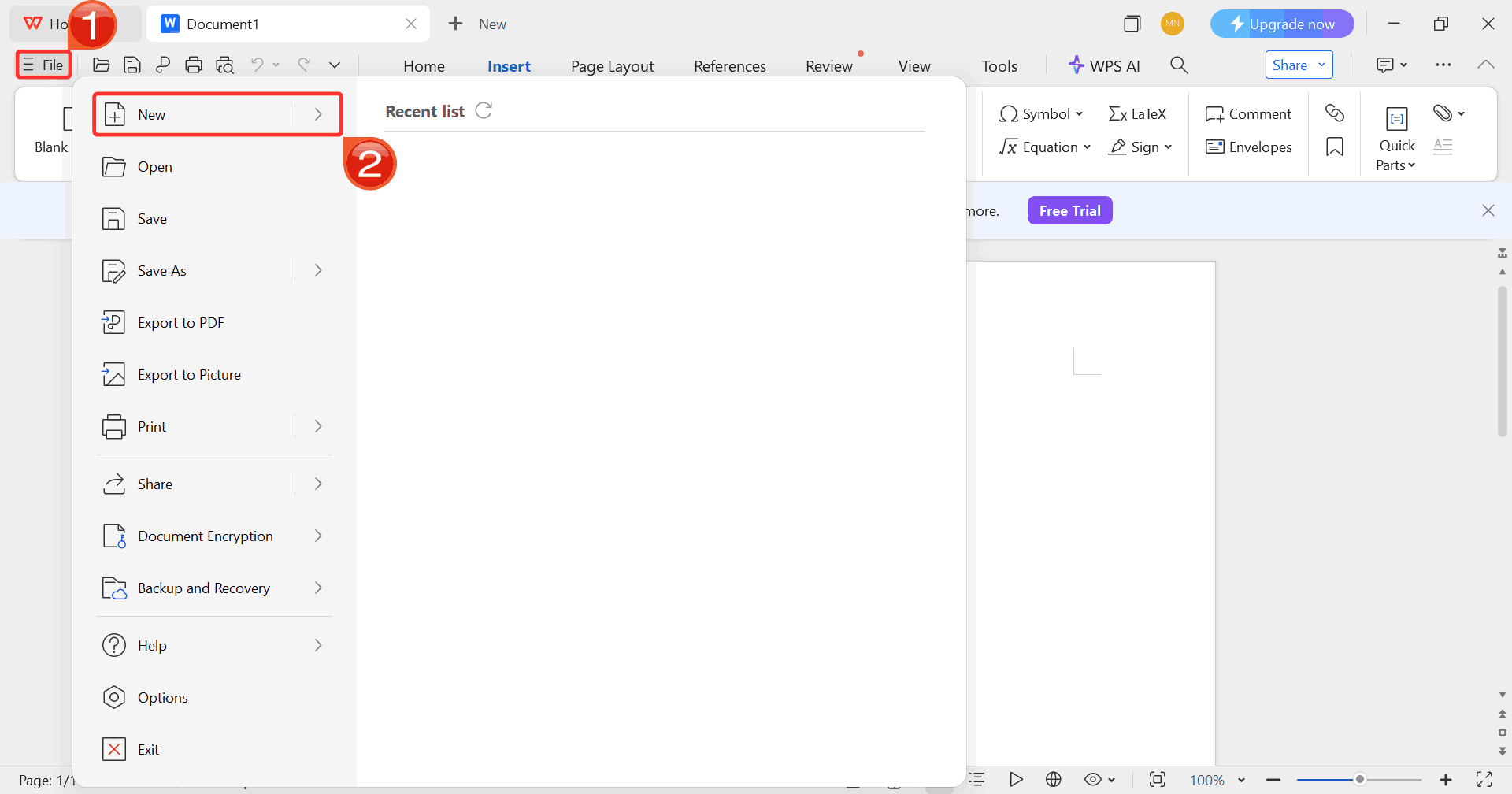
Step 2: Click on “File”, then click
on “New” to browse options for opening a blank document
or choosing from available templates.
Select New
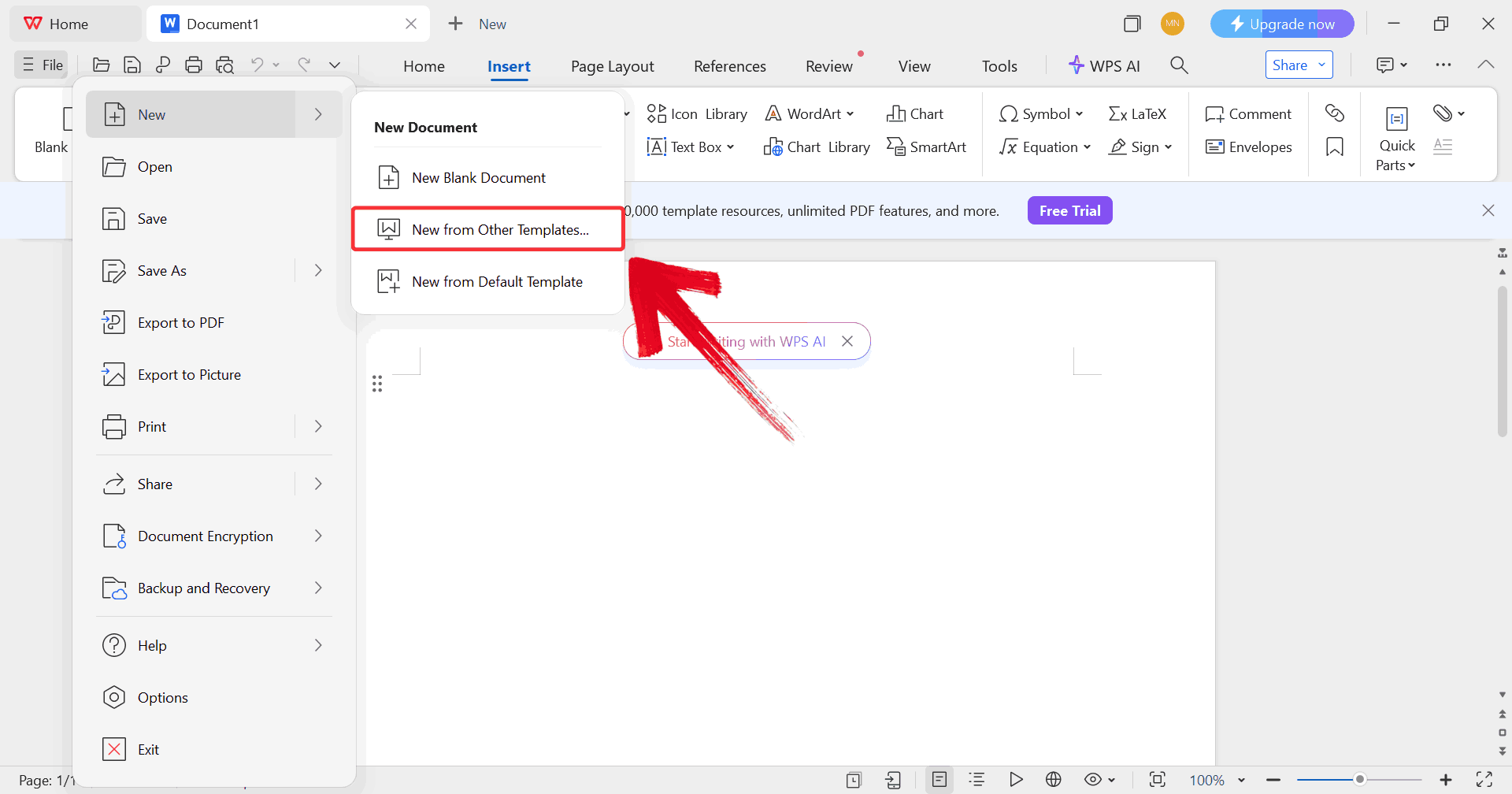
Step 3: Click on “New from other
templates” to upload your desired template, either from your
device or directly from the WPS template library.
Upload Template
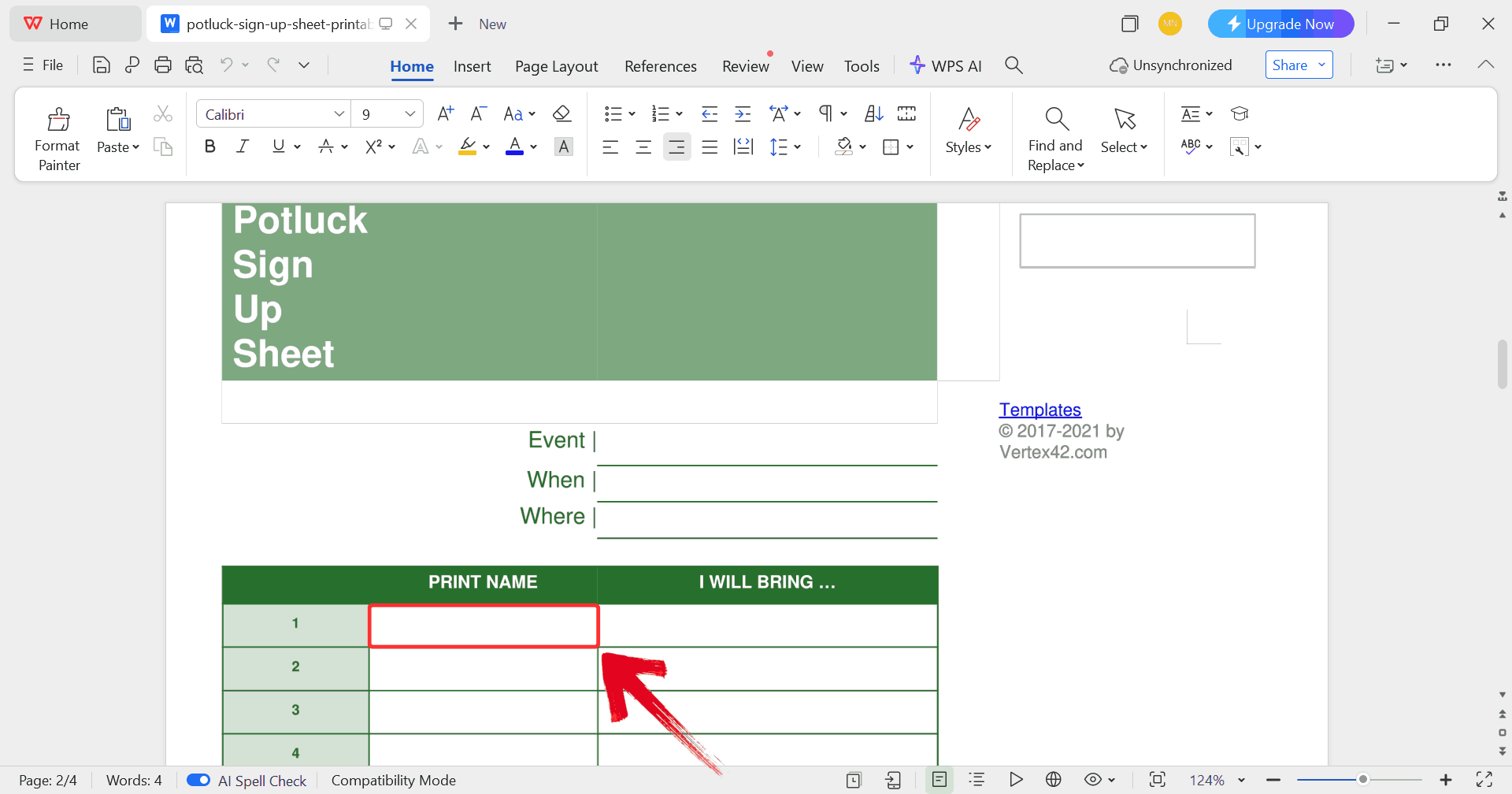
Step 4: In order to fill the form with details, just
click on any blank section you want to fill, such as the guest’s name
and start typing.
Edit Template
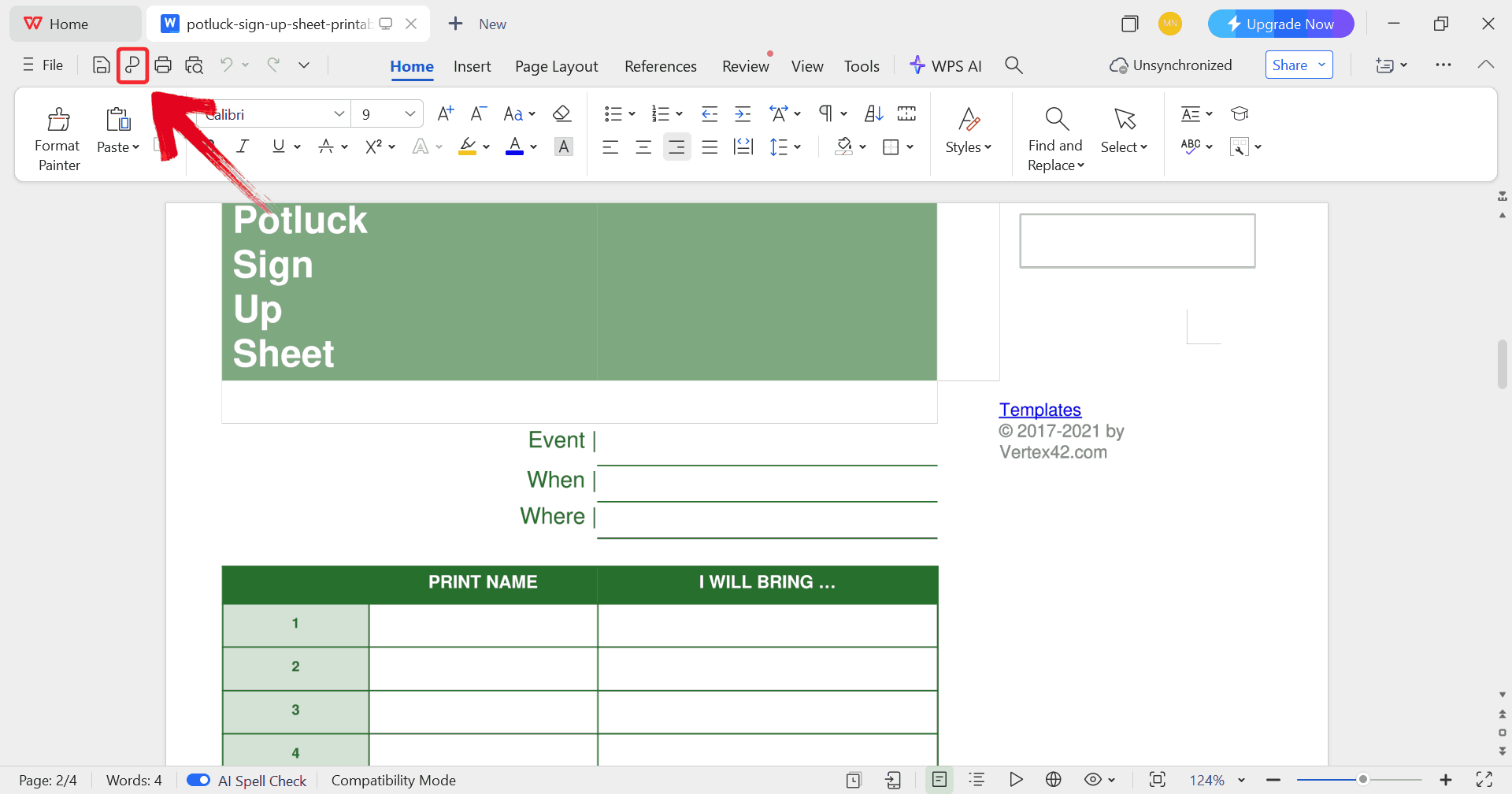
Step 5: Click on the “P” icon to
make sure your document is saved as a PDF.
Print Template
How to
Edit Your Potluck Sign Up Sheet Template in PDF
When you’re dealing with an online potluck sign up sheet, editing
might seem restrictive at first, but it’s actually quite flexible with
the right tools. I often use PDFs when I want a clean, fixed layout that
looks the same for everyone. With a PDF editor like WPS PDF, you can
quickly add text
boxes, adjust details, or even convert the file to Word or Excel
if you need more control.
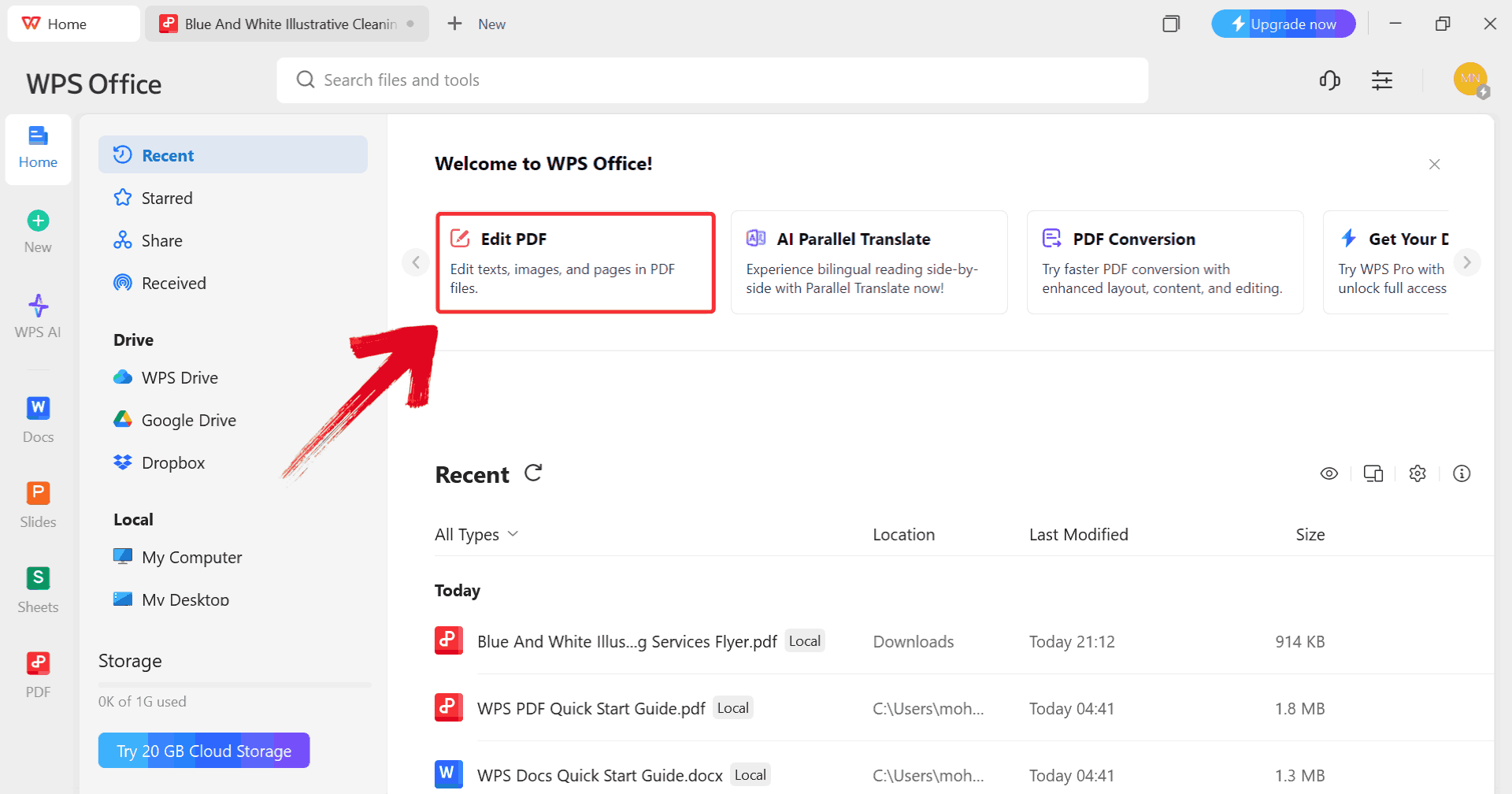
Step 1: Start by clicking on “Edit
PDF” on the WPS Office dashboard to import your template.
Click Edit PDF
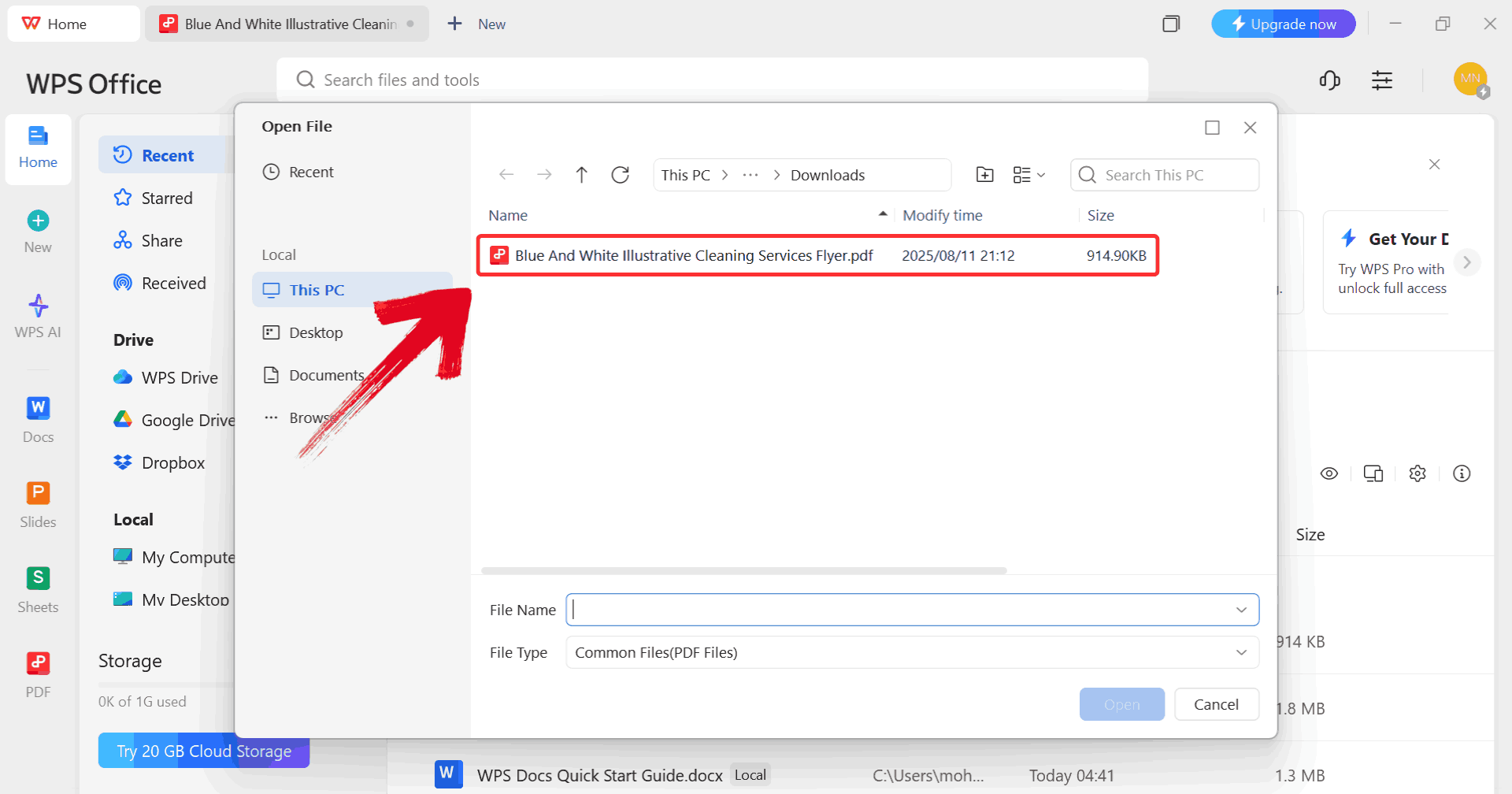
Step 2: When prompted, browse through your computer
and select the PDF file you want to edit.
Select PDF
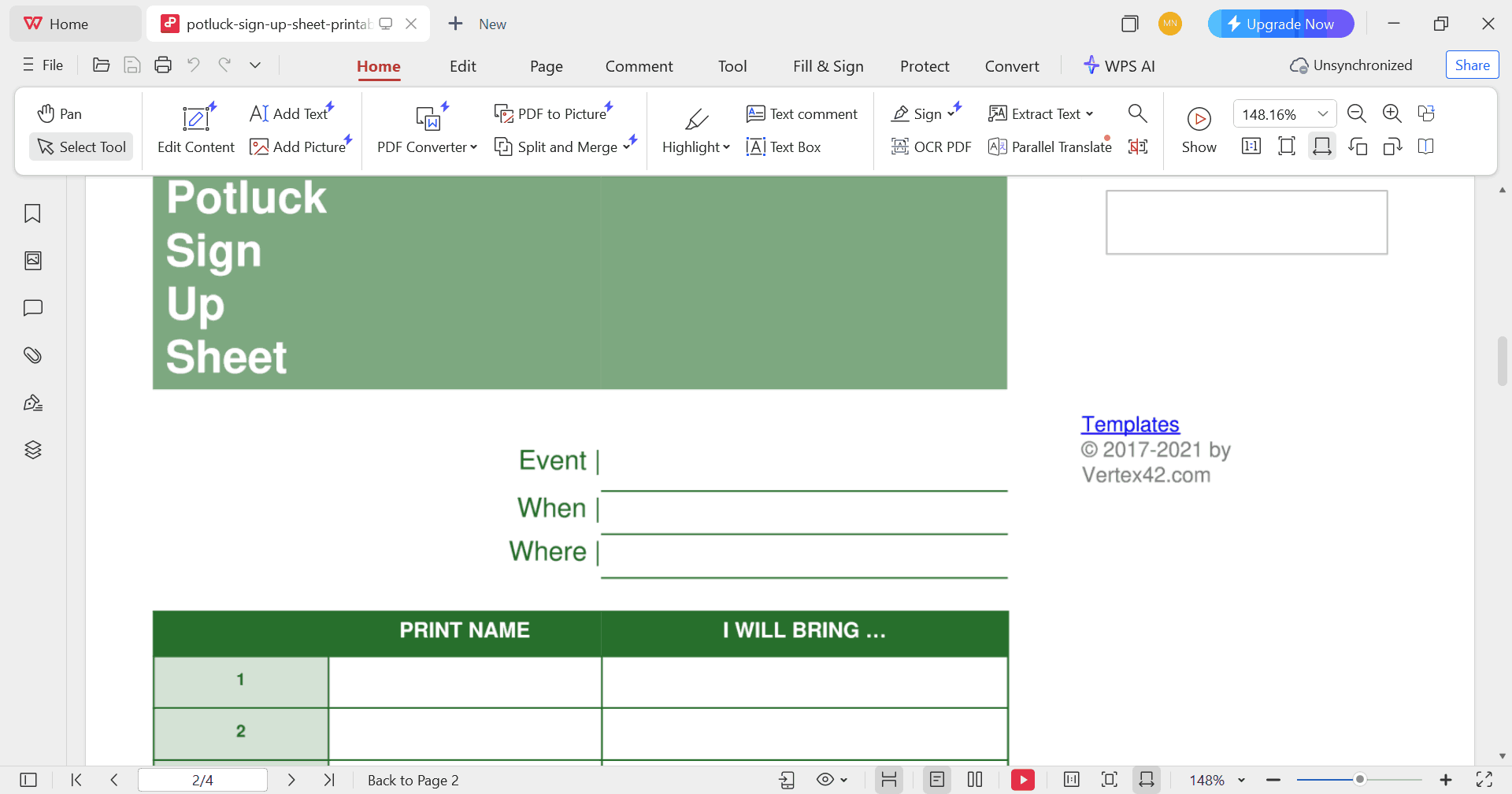
Step 3: Make any changes you want to the PDF using
the available editing tools such as the text font or size.
Edit PDF
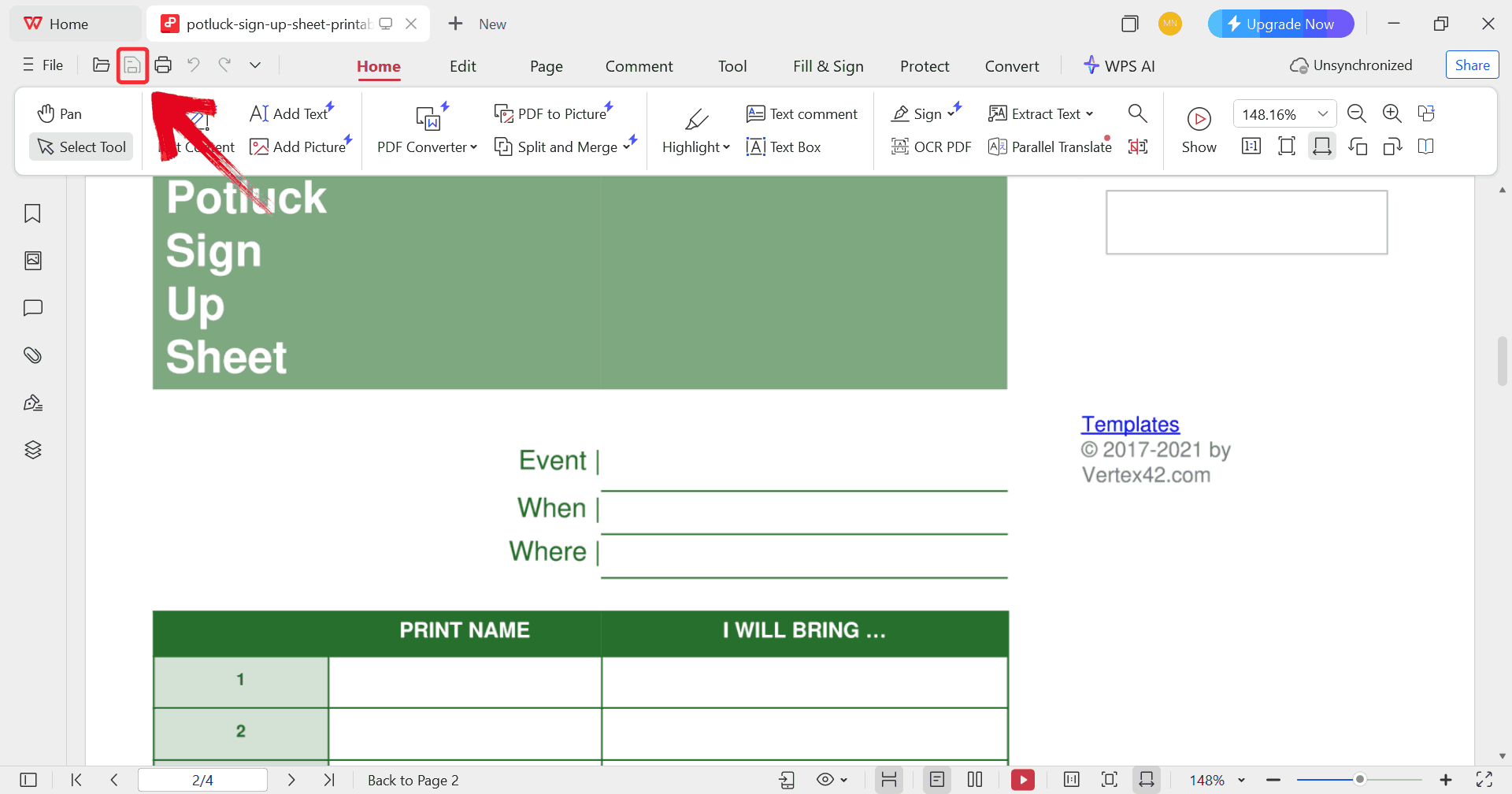
Step 4: Once you’ve made the changes, click on the “save” icon to make sure all the changes on the file
are saved on your device.
Print PDF
Simplify
Your Work with WPS Office All-in-One Suite
Managing potluck templates across different file types can get messy
fast: one version in Excel, another in Word, and maybe a few PDFs
floating around. I prefer using WPS
Office because it keeps everything in one place. You can open
and edit all three formats without losing formatting or switching apps,
which makes updating your potluck sign up sheet far smoother. It’s
practical when you’re finalizing details like names, dishes, or notes
just before the event and need quick edits across different
versions.
WPS PDF
Built-in template library: Access hundreds of free templates, including editable potluck sign up sheets and event planners.
Cloud integration: Sync your files across devices so you can make quick updates anytime, anywhere.
PDF editing tools: Add text, annotations, and highlights without converting files.
User-friendly interface: Navigate easily even if you’re switching between document types.
Lightweight and fast: Runs smoothly without consuming much system storage or memory.
These features make WPS Office a practical choice for anyone
organizing or managing group events. It keeps everything consistent,
organized, and easy to update, especially when working on a potluck RSVP
form or other shared templates.
100% secure
FAQs
1.
How can I share my potluck sign up sheet with participants?
You can share it via Google Drive, email, or collaborative Excel/Word
documents. You can even create a QR code for quick mobile access.
2. What should
I include in a potluck sign up sheet?
Include names, dish types, quantities, contact info, and dietary
restrictions. Optional notes can help participants mention special
ingredients or utensils.
3.
How do I update my potluck sign up sheet if someone changes their
dish?
Keep a master copy and highlight any updates. Notify participants via
email or group chat to avoid confusion.
4.
What are some tips for making a potluck sign up sheet more
effective?
Use color-coded sections, clear headers, and drop-down lists for food
categories. Regularly share updates to keep everyone on track.
Wrapping up the Feast with WPS
A well-designed potluck sign up sheet is your secret to hosting an energetic, organized event where everyone knows exactly what to bring. From Excel and Word to PDF templates, you can easily access these 10 free editable potluck sign up sheet templates to fit any occasion. And if you’re looking for an easy, all-in-one tool to edit, share, and manage these templates, WPS Office is the perfect choice. With its versatility and rich library of resources, it takes the stress out of coordination so you can focus on enjoying great food and even better company.
15 years of office industry experience, tech lover and copywriter. Follow me for product reviews, comparisons, and recommendations for new apps and software.


'%3e%3cpath%20d='M8%200C12.4183%200%2016%203.58172%2016%208C16%2012.4183%2012.4183%2016%208%2016C3.58172%2016%200%2012.4183%200%208C0%203.58172%203.58172%200%208%200ZM11.6162%204.38379C11.2257%203.99337%2010.5927%203.99338%2010.2021%204.38379L8%206.58594L5.79785%204.38379C5.40732%203.99334%204.77429%203.99329%204.38379%204.38379C3.99331%204.77429%203.99335%205.40733%204.38379%205.79785L6.58594%208L4.38379%2010.2021C3.99348%2010.5927%203.99341%2011.2257%204.38379%2011.6162C4.77426%2012.0066%205.40734%2012.0065%205.79785%2011.6162L8%209.41406L10.2021%2011.6162C10.5927%2012.0066%2011.2257%2012.0067%2011.6162%2011.6162C12.0067%2011.2257%2012.0066%2010.5927%2011.6162%2010.2021L9.41406%208L11.6162%205.79785C12.0066%205.40735%2012.0066%204.77429%2011.6162%204.38379Z'%20fill='%23080E17'%20fill-opacity='0.46'/%3e%3c/g%3e%3cdefs%3e%3cclipPath%20id='clip0_3761_713'%3e%3crect%20width='16'%20height='16'%20fill='white'/%3e%3c/clipPath%3e%3c/defs%3e%3c/svg%3e)




'%3e%3cpath%20fill-rule='evenodd'%20clip-rule='evenodd'%20d='M21.4999%2010.9993C21.4999%205.20009%2016.7986%200.498901%2010.9993%200.498901C5.19994%200.498901%200.498657%205.20009%200.498657%2010.9993C0.498657%2016.2404%204.33858%2020.5844%209.35855%2021.3722V14.0346H6.69238V10.9993H9.35855V8.68594C9.35855%206.05427%2010.9262%204.60062%2013.3248%204.60062C14.4736%204.60062%2015.6753%204.80571%2015.6753%204.80571V7.38979H14.3512C13.0468%207.38979%2012.64%208.19921%2012.64%209.0296V10.9993H15.5523L15.0867%2014.0346H12.64V21.3722C17.66%2020.5844%2021.4999%2016.2404%2021.4999%2010.9993Z'%20fill='%231568EA'/%3e%3c/g%3e%3c/svg%3e)


'%3e%3cpath%20d='M2.42045%2022.1876H6.31818V12.7217L0.75%208.54553V20.5171C0.75%2021.4414%201.49892%2022.1876%202.42045%2022.1876Z'%20fill='%234285F4'/%3e%3cpath%20d='M19.682%2022.1876H23.5797C24.5041%2022.1876%2025.2502%2021.4387%2025.2502%2020.5171V8.54553L19.682%2012.7217'%20fill='%2334A853'/%3e%3cpath%20d='M19.682%205.48293V12.7216L25.2502%208.54543V6.31816C25.2502%204.25236%2022.8921%203.07469%2021.2411%204.31361'%20fill='%23FBBC04'/%3e%3cpath%20d='M6.31824%2012.7217V5.48303L13.0001%2010.4944L19.6819%205.48303V12.7217L13.0001%2017.733'%20fill='%23EA4335'/%3e%3cpath%20d='M0.75%206.31816V8.54543L6.31818%2012.7216V5.48293L4.75909%204.31361C3.10534%203.07469%200.75%204.25236%200.75%206.31816Z'%20fill='%23C5221F'/%3e%3c/g%3e%3cdefs%3e%3cclipPath%20id='clip0_2954_7305'%3e%3crect%20width='24.5'%20height='18.375'%20fill='white'%20transform='translate(0.75%203.8125)'/%3e%3c/clipPath%3e%3c/defs%3e%3c/svg%3e)



'%3e%3cpath%20d='M19.9911%204.11386V6.471H18.5894C18.0775%206.471%2017.7322%206.57814%2017.5536%206.79243C17.3751%207.00671%2017.2858%207.32814%2017.2858%207.75671V9.44421H19.9019L19.5536%2012.0871H17.2858V18.8639H14.5536V12.0871H12.2769V9.44421H14.5536V7.49779C14.5536%206.39064%2014.8632%205.53201%2015.4822%204.92189C16.1013%204.31177%2016.9257%204.00671%2017.9554%204.00671C18.8304%204.00671%2019.509%204.04243%2019.9911%204.11386Z'%20fill='%23333333'/%3e%3c/g%3e%3cdefs%3e%3cclipPath%20id='clip0_2938_8199'%3e%3crect%20width='16'%20height='16'%20fill='white'%20transform='translate(8%204.00671)'/%3e%3c/clipPath%3e%3c/defs%3e%3c/svg%3e)
'%3e%3cpath%20d='M17.5237%2010.7813L23.4811%204H22.0699L16.8949%209.88693L12.7648%204H8L14.2469%2012.9029L8%2020.0133H9.4112L14.8725%2013.7952L19.2352%2020.0133H24M9.92053%205.04213H12.0885L22.0688%2019.0224H19.9003'%20fill='%23333333'/%3e%3c/g%3e%3cdefs%3e%3cclipPath%20id='clip0_2938_8200'%3e%3crect%20width='16'%20height='16.0134'%20fill='white'%20transform='translate(8%204)'/%3e%3c/clipPath%3e%3c/defs%3e%3c/svg%3e)


