When a child travels without both parents, whether for school trips,
vacations, or visits abroad, authorities often require written proof of
permission. Many parents are unsure what documents are legally
necessary, especially for international travel or when only one parent
is present. A child travel consent form which is free, customizable, and
ready to print, offers a simple way to authorize a minor’s travel safely
and legally, whether domestically or internationally.
Child Travel Consent Form
Free Child Travel Consent
Form
Border officials, immigration officers, and even some airlines may
ask for a child travel consent form internationally when a minor isn’t
accompanied by both parents or legal guardians. In the U.S., this isn’t
always legally mandated, but many countries and carriers strongly
recommend it to prevent misunderstandings or delays at customs. Having a
consent form filled out, signed, and in some cases notarized ahead of
time can mean the difference between a smooth departure and an
unexpected hold‑up at the gate or border crossing. I’ve gathered this
list of 10 free, ready‑to‑use child travel consent form templates you
can download and edit right now.
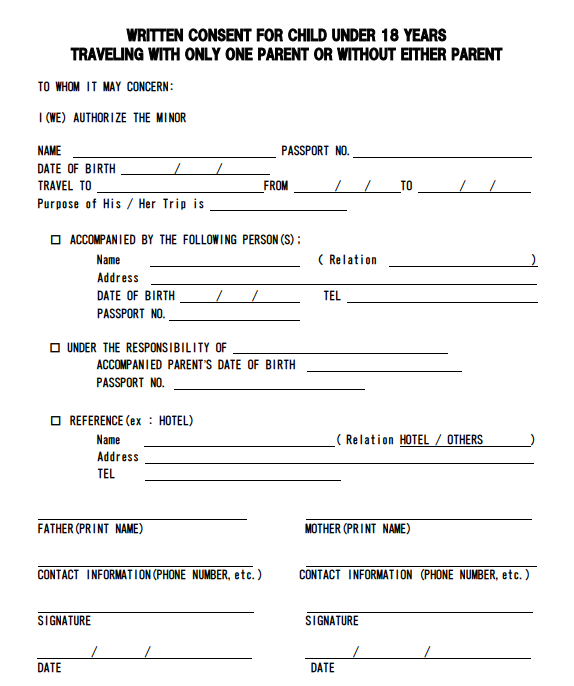
1.
Written Consent for Child Under 18 Years Travelling With Only One Parent
or Without Either Parent
This Minor
Child Travel Consent Form with one parent is a critical document
used to authorize a minor under the age of 18 to travel internationally
or domestically without both legal parents present. It is designed to
prevent child abduction and human trafficking by providing formal proof
that the child has permission to travel with one parent, a guardian, or
alone.
The form captures essential details, including the child's passport
information, the travel itinerary, and the identity of the accompanying
adult. It requires the signatures of the non-traveling parent(s) and is
often notarized to ensure authenticity at border crossings and
check-ins.
Consent Letter Travelling with Under 18
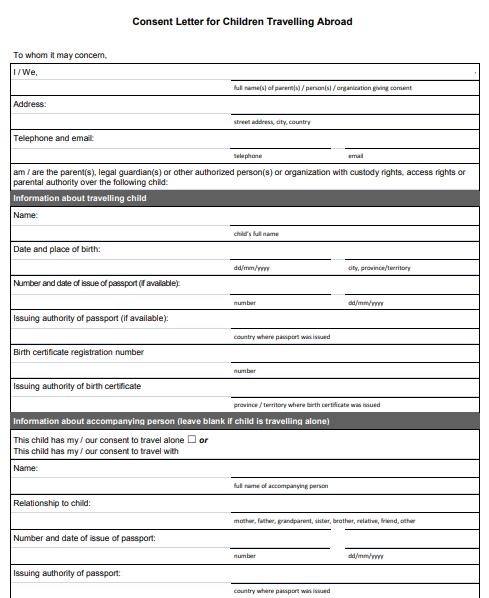
2. Consent Letter
for Children Travelling Abroad
This Consent
Letter for Children Travelling Abroad is a formal document used
to authorize a minor to travel internationally either alone or with a
designated accompanying person. It captures comprehensive identification
details, including the child’s full name, birth certificate registration
number, and passport information.
The form requires the full contact information and signatures of the
parents or legal guardians holding custody or parental authority. By
documenting the specific relationship of the accompanying adult and the
issuing authorities for the child’s travel papers, it serves as a
critical safeguard against international child abduction.
Consent Letter for Child Travelling Abroad
3.
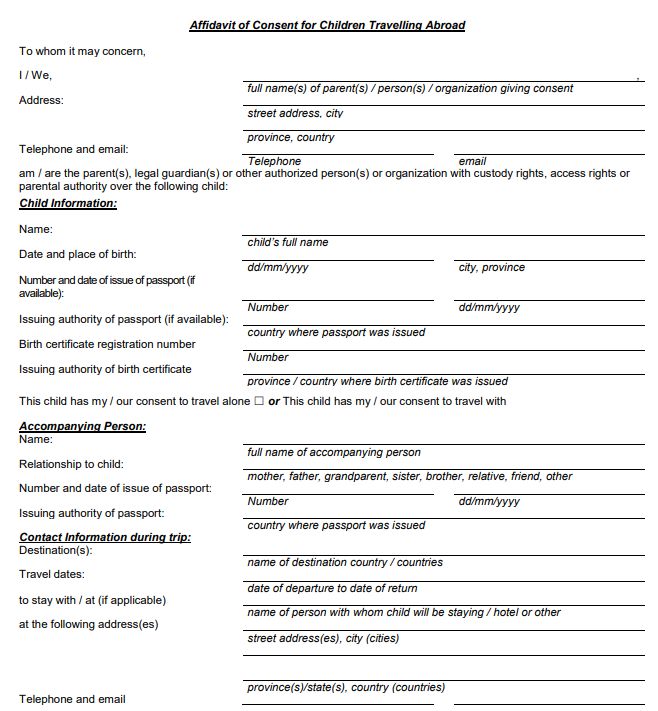
Affidavit of Consent for Children Travelling Abroad
This Affidavit
of Consent for Children Travelling Abroad is a critical legal
document used to authorize a minor under the age of 18 to travel
internationally without both legal parents or guardians present. It
serves as a vital safeguard to prevent international parental child
abduction and human trafficking by providing official proof of parental
permission to border officials and airlines.
The form captures comprehensive details, including the child’s birth
and passport information, the travel itinerary, and the identity and
relationship of any accompanying person. To ensure authenticity and
reduce travel delays, the document must be signed and sworn under oath
before an authorized official, such as a notary public.
Affidavit of Consent for Children Travelling Abroad
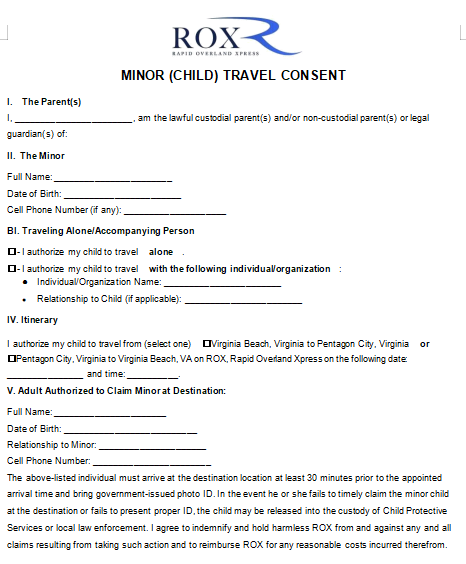
4. Minor Child Travel Consent
Form
This Minor
(Child) Travel Consent form is a specialized document for
passengers of Rapid Overland Xpress (ROX) that authorizes a minor to
travel between specific Virginia locations, such as Virginia Beach and
Pentagon City. It distinguishes between children traveling alone or with
an accompanying individual/organization, requiring the parent to specify
the relationship of any travel companion.
A critical safety feature of this form is the Adult Authorized to
Claim Minor section, which mandates that the person picking up the child
must arrive 30 minutes early with a government-issued photo ID.
Minor Child Travel Consent Form
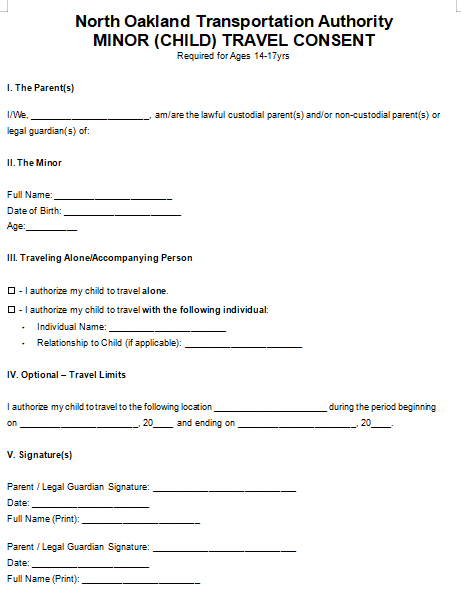
5. North Oakland Child
Travel Consent Form
This Minor
(Child) Travel Consent form is a specialized document for the
North Oakland Transportation Authority required for passengers aged
14–17 years. It authorizes a minor to travel either alone or with a
designated individual, requiring the parent or legal guardian to specify
the relationship of any travel companion.
A unique feature of this template is the Optional – Travel Limits
section, which allows for the definition of a specific destination and a
clear "beginning" and "ending" date for the authorized travel period.
The document concludes with a formal signature section for both parents
or legal guardians to provide their consent and printed names for
verification.
North Oakland Child Travel Consent Form
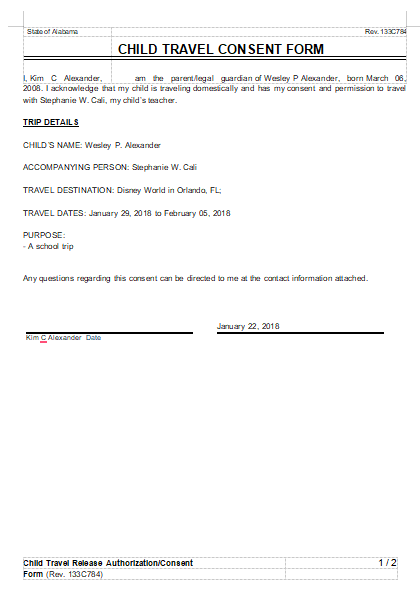
6. Child Travel Consent Form
This Alabama Child
Travel Consent Form is a formal authorization used by a parent
or legal guardian to permit a minor to travel domestically with a
designated individual. It clearly identifies the child, their birth
date, and the accompanying person, such as a teacher.
The document outlines specific Trip Details, including the
destination, travel dates, and the purpose of the trip, like a school
outing. By including the parent’s acknowledgement and contact
information, it serves as official proof of permission for the minor to
be under the care of another adult during the journey.
Child Travel Consent Form
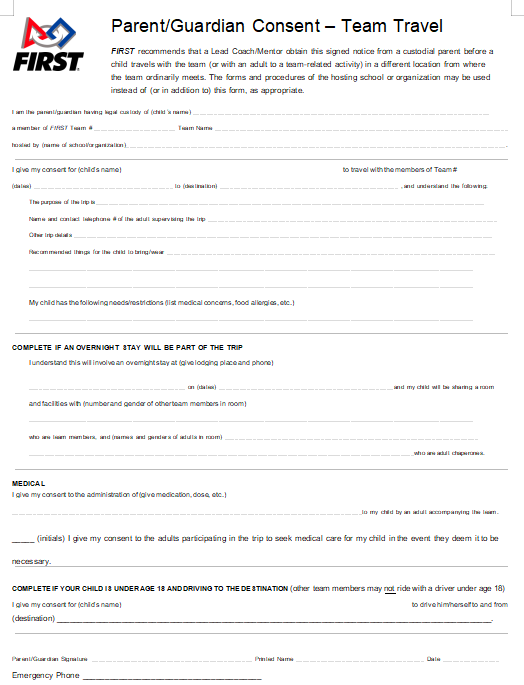
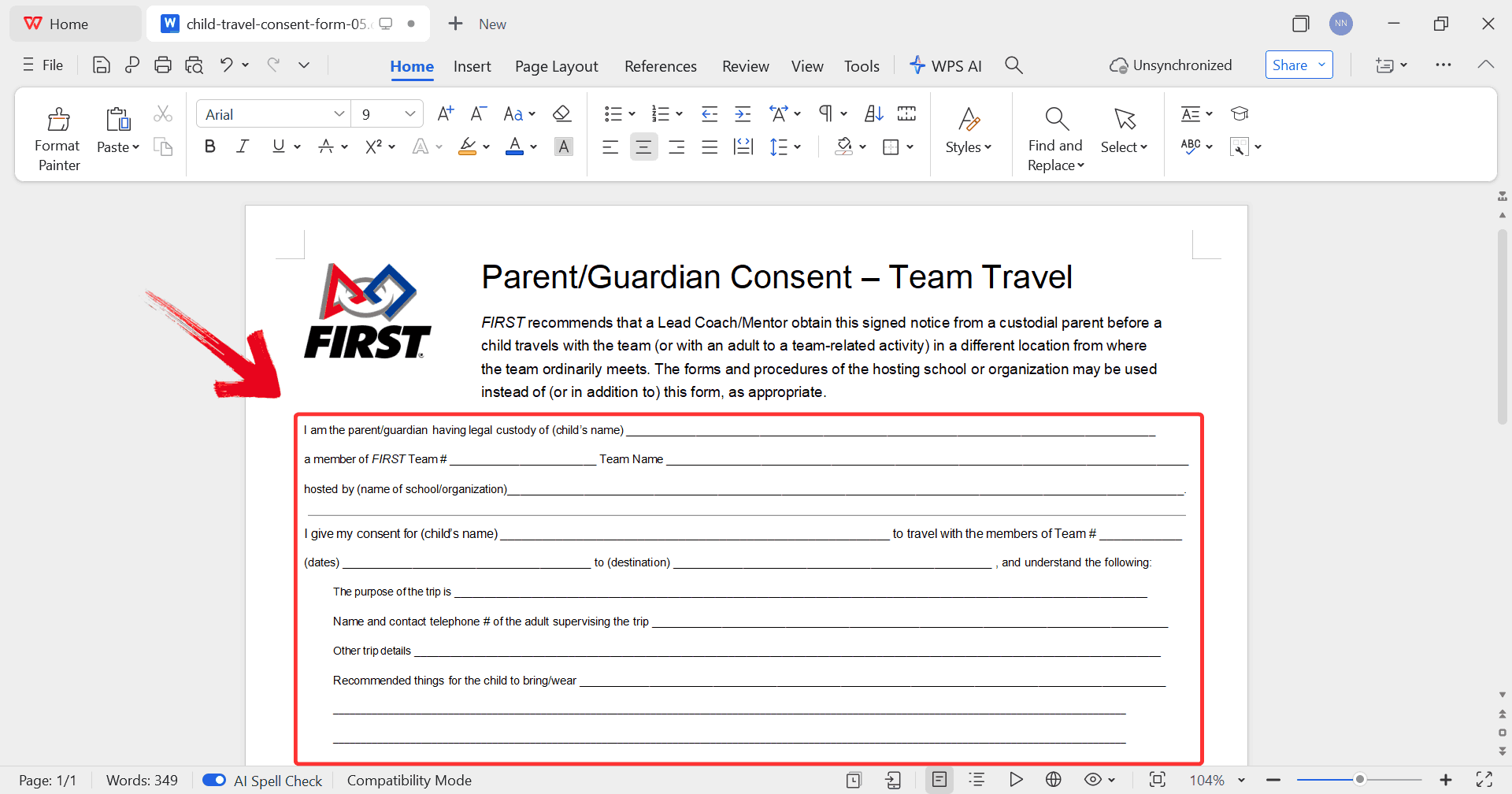
7. Child Travel Consent
Form – Team Travel
This Parent/Guardian
Consent – Team Travel form is a specialized document used for
minors participating in FIRST team events held at locations away from
their usual meeting site. It requires a custodial parent to authorize
travel for a specific child to a designated destination and provides
essential trip details, including the purpose, supervising adult's
contact information, and special needs or medical restrictions.
A unique feature is the Overnight Stay section, which captures
lodging details and specifies room-sharing arrangements with other team
members. Additionally, it includes critical Medical authorizations for
medication administration and emergency care, as well as a section for
parents of minors who will be driving themselves to the event.
Child Travel Team Travel Consent Form
8. Child Travel Consent
Form out of US
This Permission to
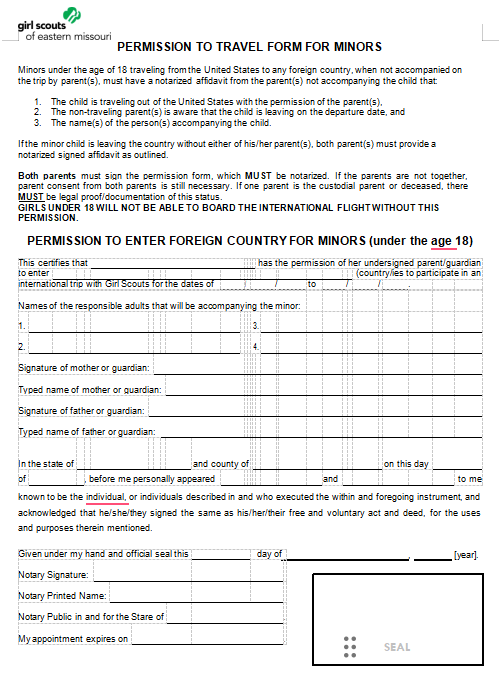
Travel Form for Minors is a specialized international travel
document required by the Girl Scouts of Eastern Missouri for all girls
under age 18 traveling from the United States to any foreign country. It
functions as a notarized affidavit certifying that the child has
explicit permission from both parents or legal guardians to participate
in an international Girl Scout trip on specified dates.
The form captures critical security data, including the child’s birth
information, passport details, and the names of up to four responsible
adults authorized to accompany the minor. To satisfy strict boarding
requirements, the document must be signed by both parents in the
presence of a notary public, or be accompanied by legal proof of sole
custody if applicable.
Child Travel Consent Form Out of US
9.
Affidavit of Support and Consent to Travel and Special Power of
Attorney
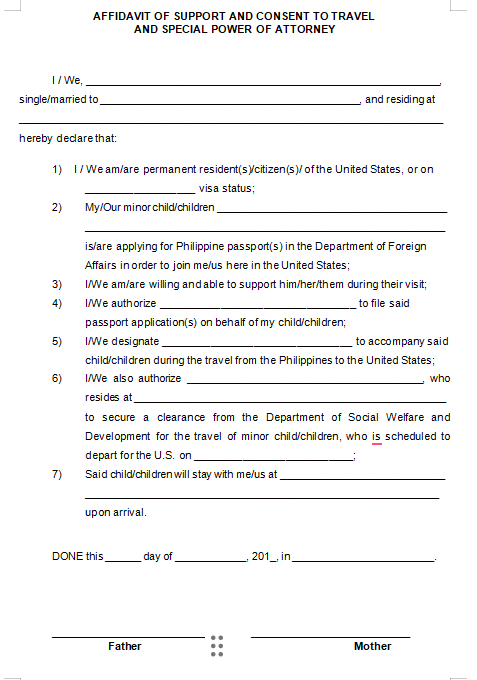
This Affidavit of
Support and Consent to Travel and Special Power of Attorney is a
multi-functional legal document primarily used by parents residing in
the United States to facilitate their child’s travel from the
Philippines. It serves as a formal declaration of the parents' US
residency or visa status and their financial commitment to support the
child during their visit. Crucially, it includes a Special Power of
Attorney section that designates a specific individual to file passport
applications, accompany the child during travel, and secure necessary
clearances from the Philippine Department of Social Welfare and
Development.
Affidavit of Support and Consent
10.
Consent Form For Minor Child to Travel Without Parent/Legal
Guardian
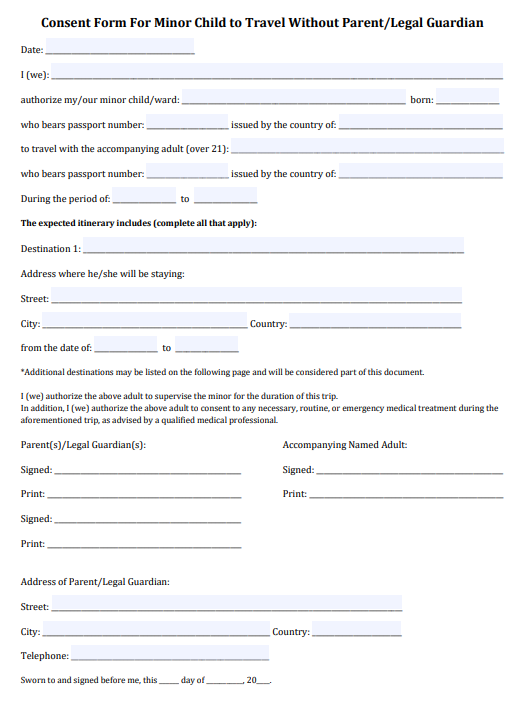
This Consent
Form For Minor Child to Travel Without Parent/Legal Guardian is
a comprehensive legal document used to authorize a minor to travel under
the supervision of an accompanying adult over age 21. It captures
critical identification data, including passport numbers and issuing
countries for both the child and the accompanying adult, along with a
detailed itinerary that specifies destinations and lodging
addresses.
A vital safety component is the inclusion of medical authorization,
which permits the designated adult to consent to necessary routine or
emergency medical treatment for the duration of the trip. To ensure its
legal validity, the form must be signed by the parents or legal
guardians and formally sworn and signed before an authorized
official.
Child Travel Consent for Minor Child
These child travel consent form free templates cover a variety of
situations. Most are editable in Word or PDF, so you can customize
travel dates, destinations, and emergency contacts.
How
to Edit and Print Free Child Travel Consent Form in Word & PDF
After you download a child travel consent form in Word or PDF, the
next hurdle many parents hit is filling it out correctly and making it
look official. Many free templates aren’t immediately editable on your
computer unless you use the right tools. For Word templates, WPS Writer
opens the document with full formatting intact and lets you type in
fields, adjustdates, and add contact information without breaking the layout. For PDF
forms, WPS PDF’s editor lets you insert text boxes directly on top of
the form, change fonts to match the original template, and even add a
signature field before export.
How to Edit in WPS Writer
(Word)
Editing a child travel consent form in WPS Writer is straightforward
and keeps the original formatting intact. Using WPS Writer, you can fill
in your child’s information, update travel details, and adjust contact
fields quickly, ensuring the form looks professional and is ready for
printing or sharing.
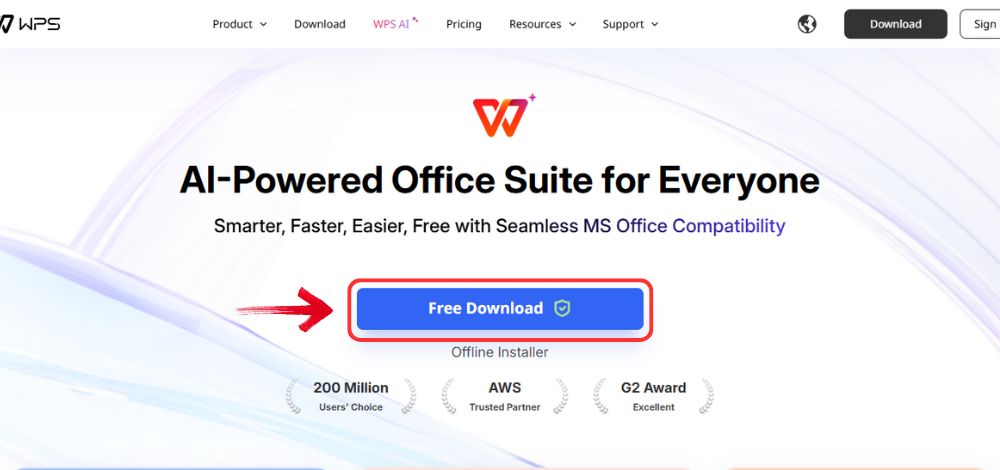
Step 1: Go to the WPS Office website and click the“Free Download” button to download the software on your
computer.
Download WPS Office
Step 2: Once the download is complete, open the
installer file like any standard program and follow the prompts to start
the setup.
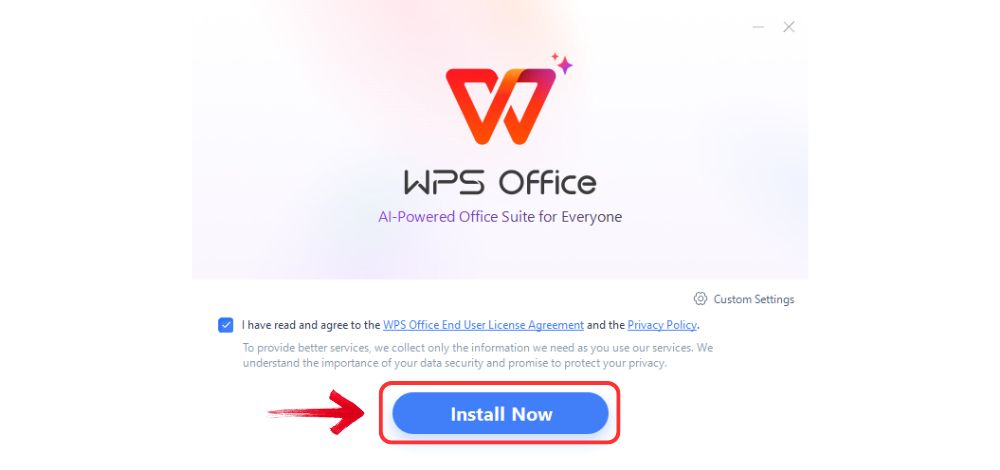
Step 3: Read through the license agreement, agree to
the terms, and select “Install Now”. The installation
process is quick and doesn’t require any advanced configuration.
Install WPS Office
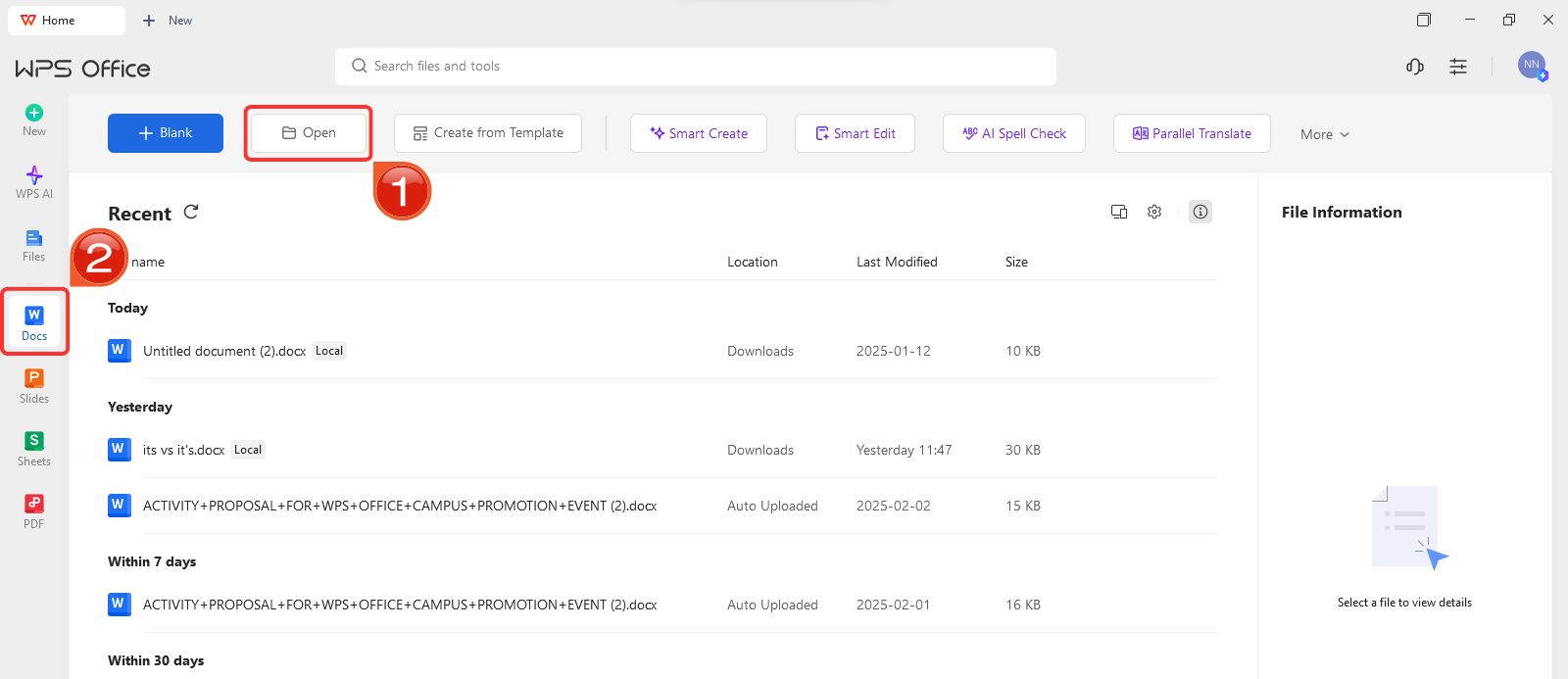
Step 4: Launch WPS Office, then select“Docs” from the left-hand menu and click“Open” to access an existing document or start a new
one.
Create new blank document
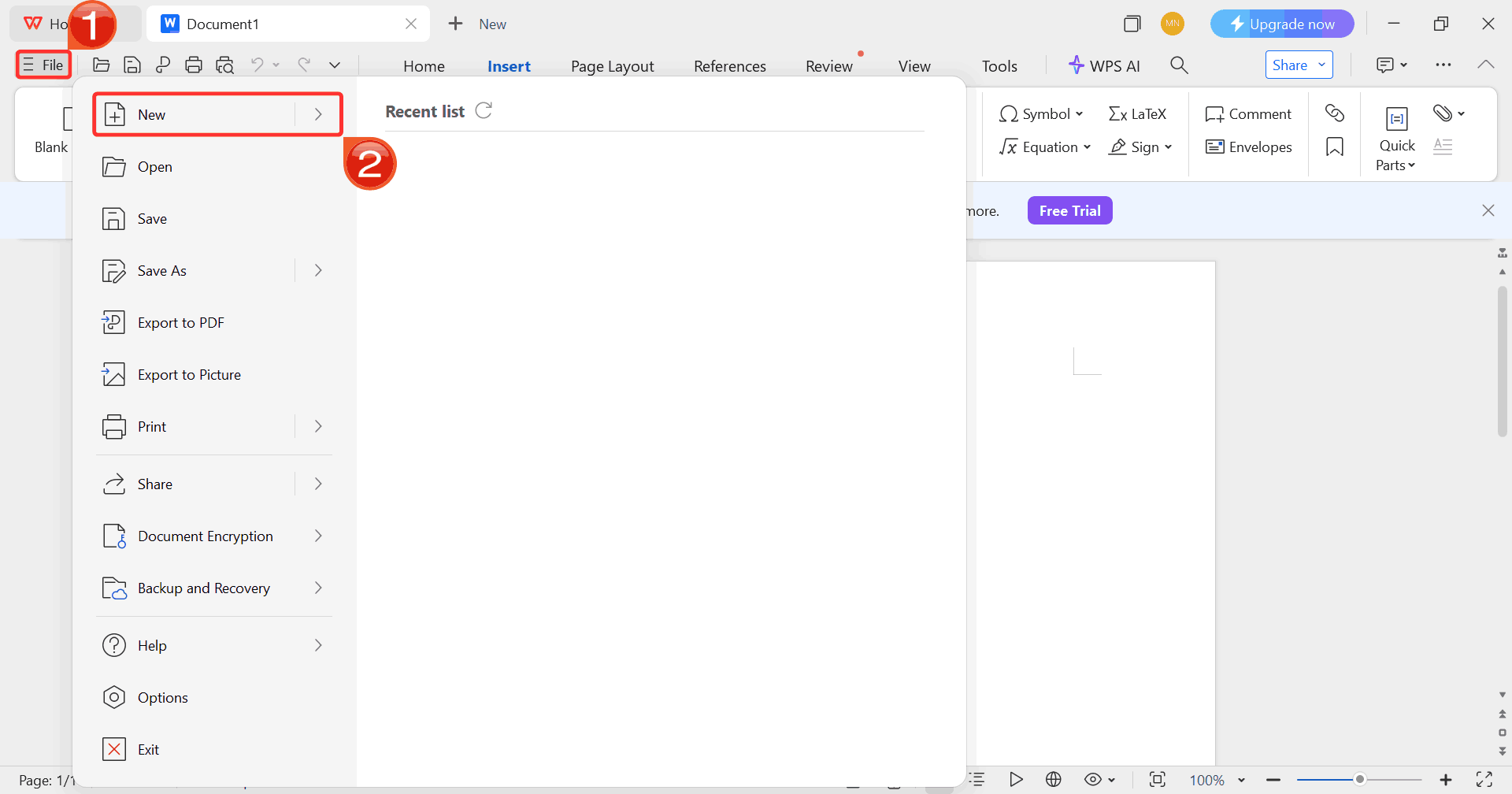
Step 5: Click on “File”, then“New” to create a blank document or explore templates
available within WPS.
Select New
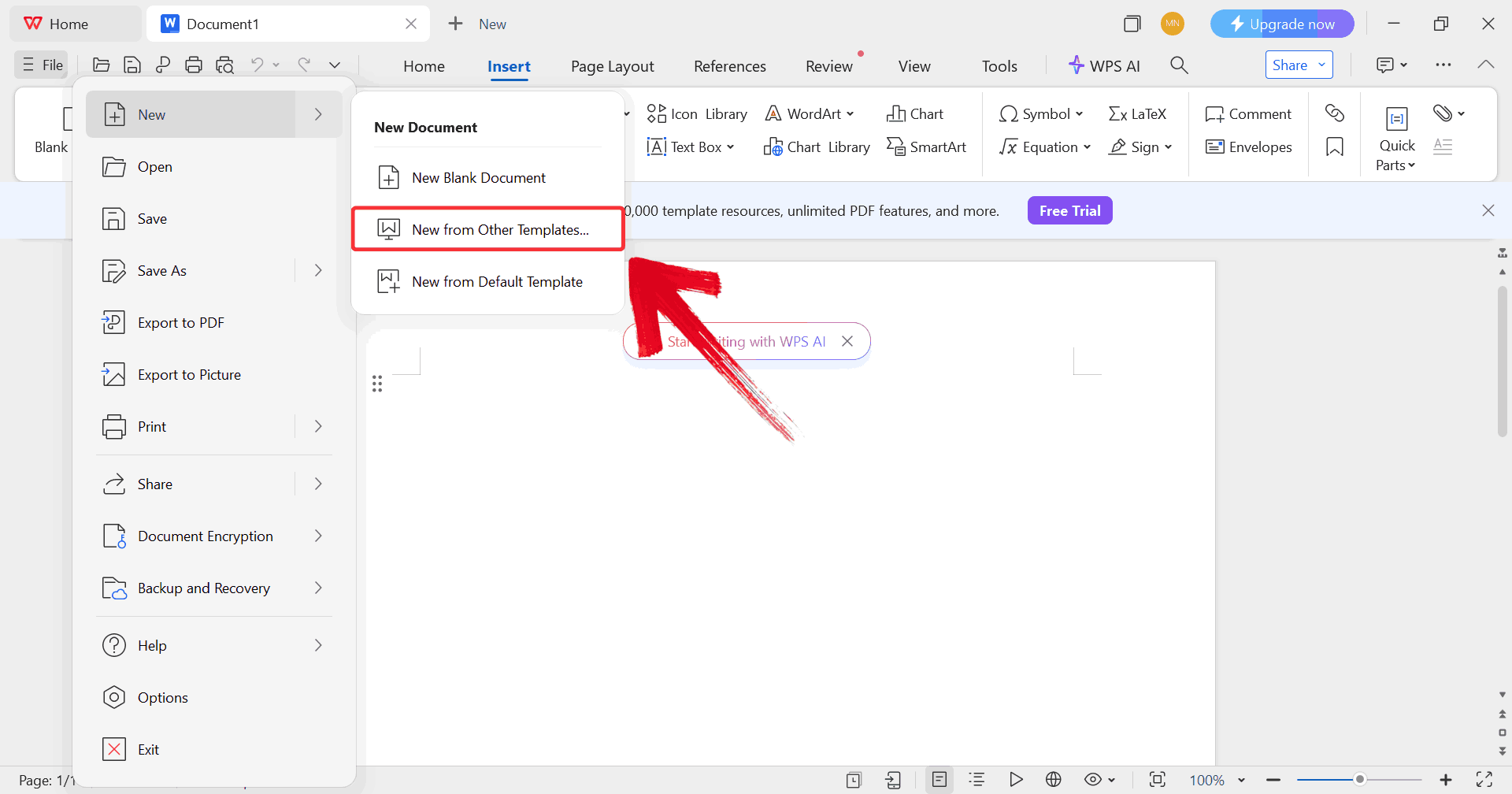
Step 6: Choose “New from Other
Templates” to either upload your downloaded child travel
consent form or pick one directly from the WPS template library.
Upload Template
Step 7: Fill in all required fields, including your
child’s information, travel dates, guardian details, and emergency
contacts. Make sure every section is accurate.
Edit Template
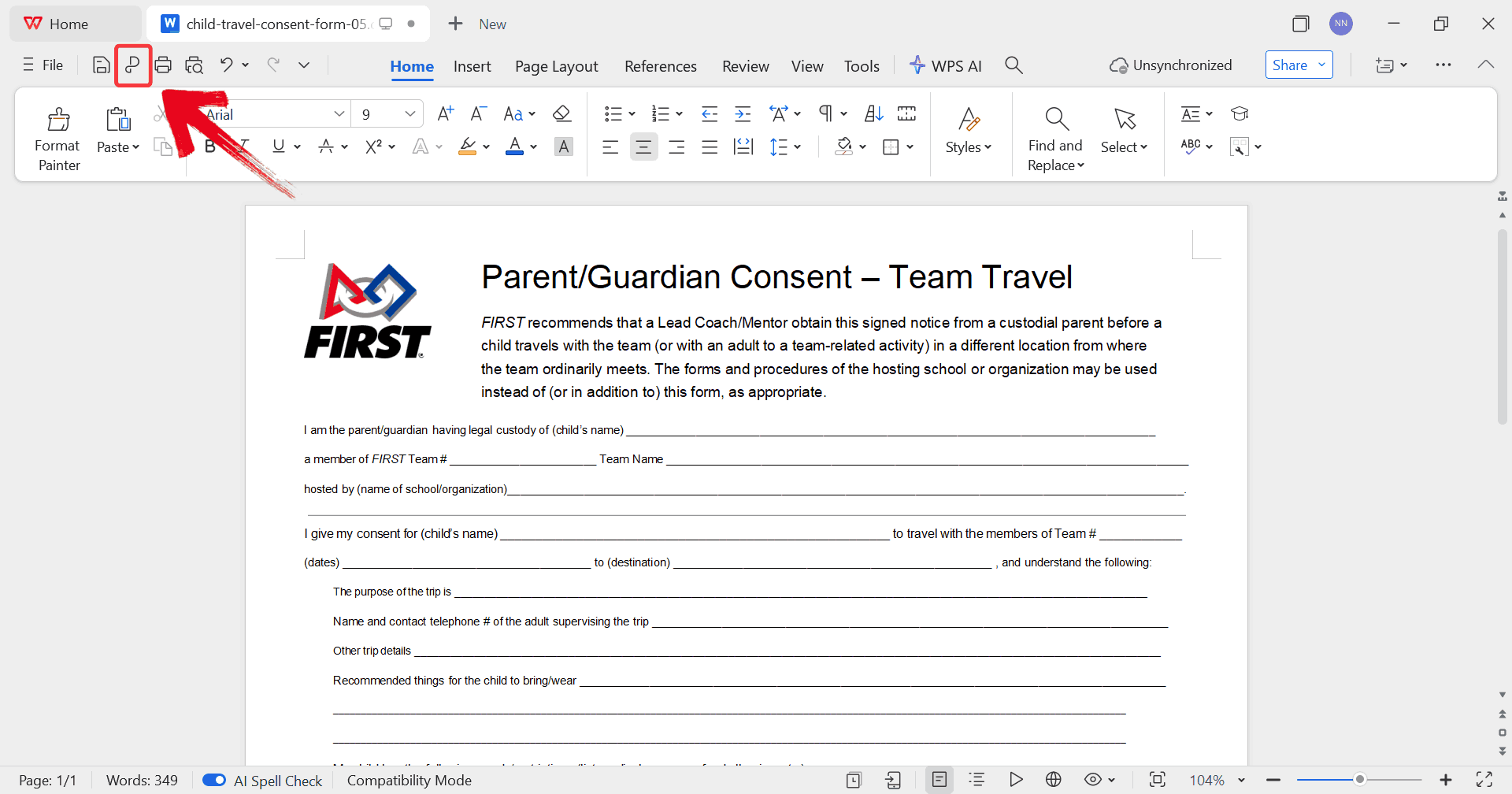
Step 8: After finishing your edits, click thePDF icon to convert your consent form to a PDF file,
preserving formatting for a professional copy.
Convert Template into PDF
How to Edit in WPS PDF
WPS PDF makes it easy to edit child travel consent forms without
converting them to Word. You can fill in details, add signatures, and
adjust text directly on the PDF, ensuring the form is accurate,
professional, and ready to save or share.
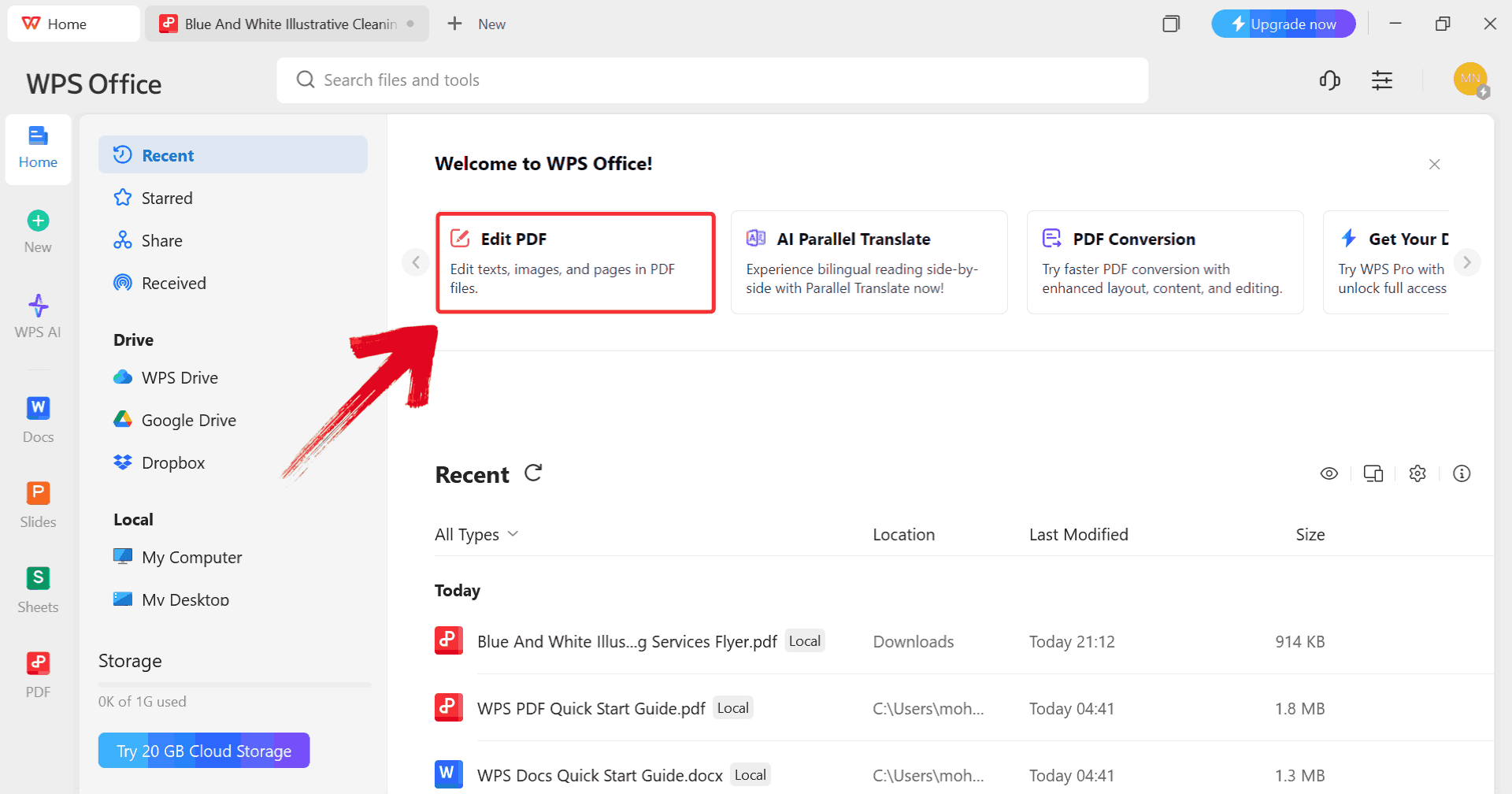
Step 1: From the WPS Office dashboard, select“Edit PDF” to open your child travel consent form for
editing.
Click Edit PDF
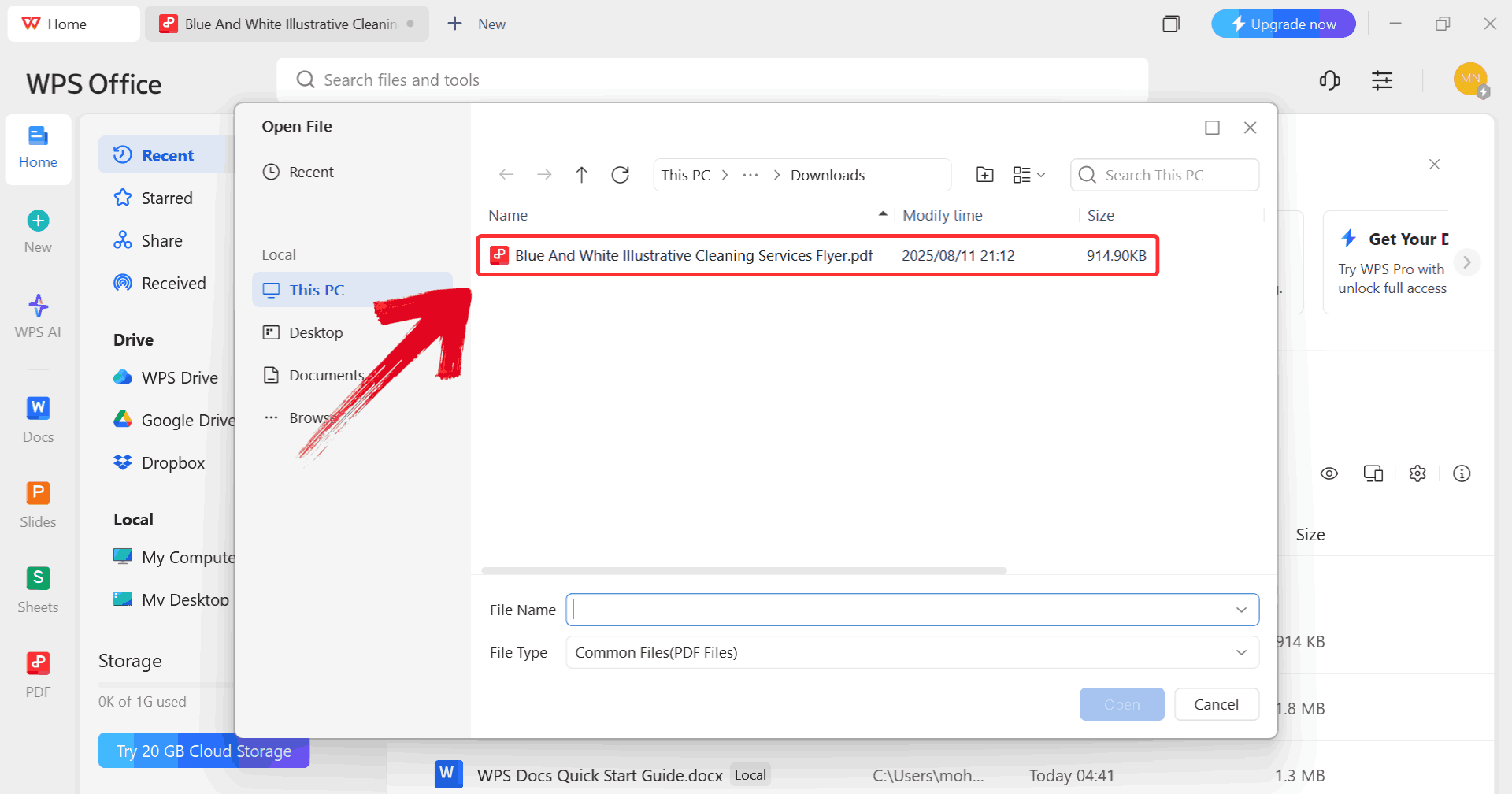
Step 2: Browse your computer to locate the PDF file
you want to work on and open it in WPS PDF.
Select PDF
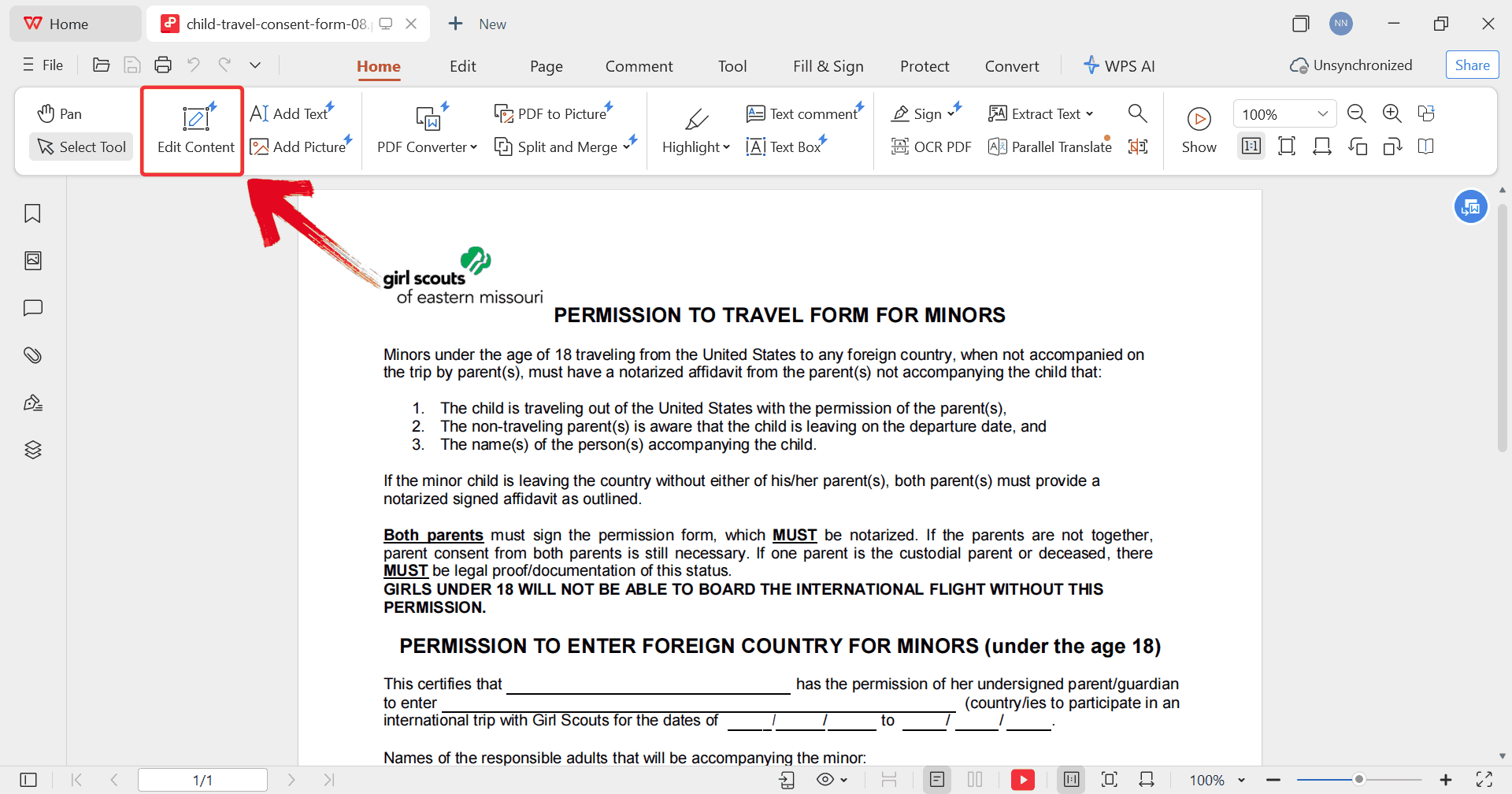
Step 3: Click “Edit Content” to
make the text fields editable. You can now modify existing text, adjust
fonts, and even add new text boxes or notes if needed.
Edit Content
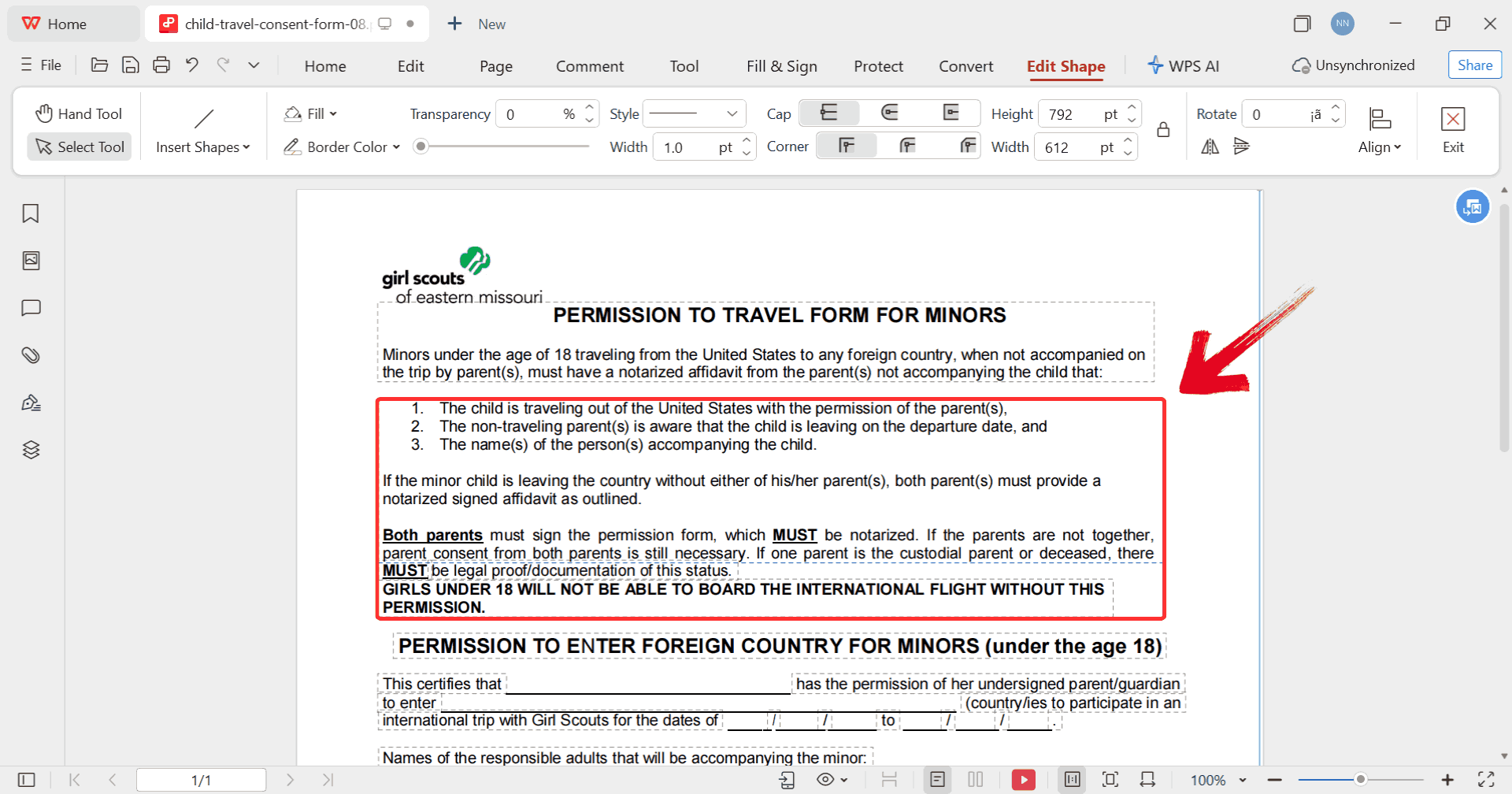
Step 4: Click on any text box and enter the
necessary information, such as your child’s details, travel dates, and
guardian contacts.
Text Box
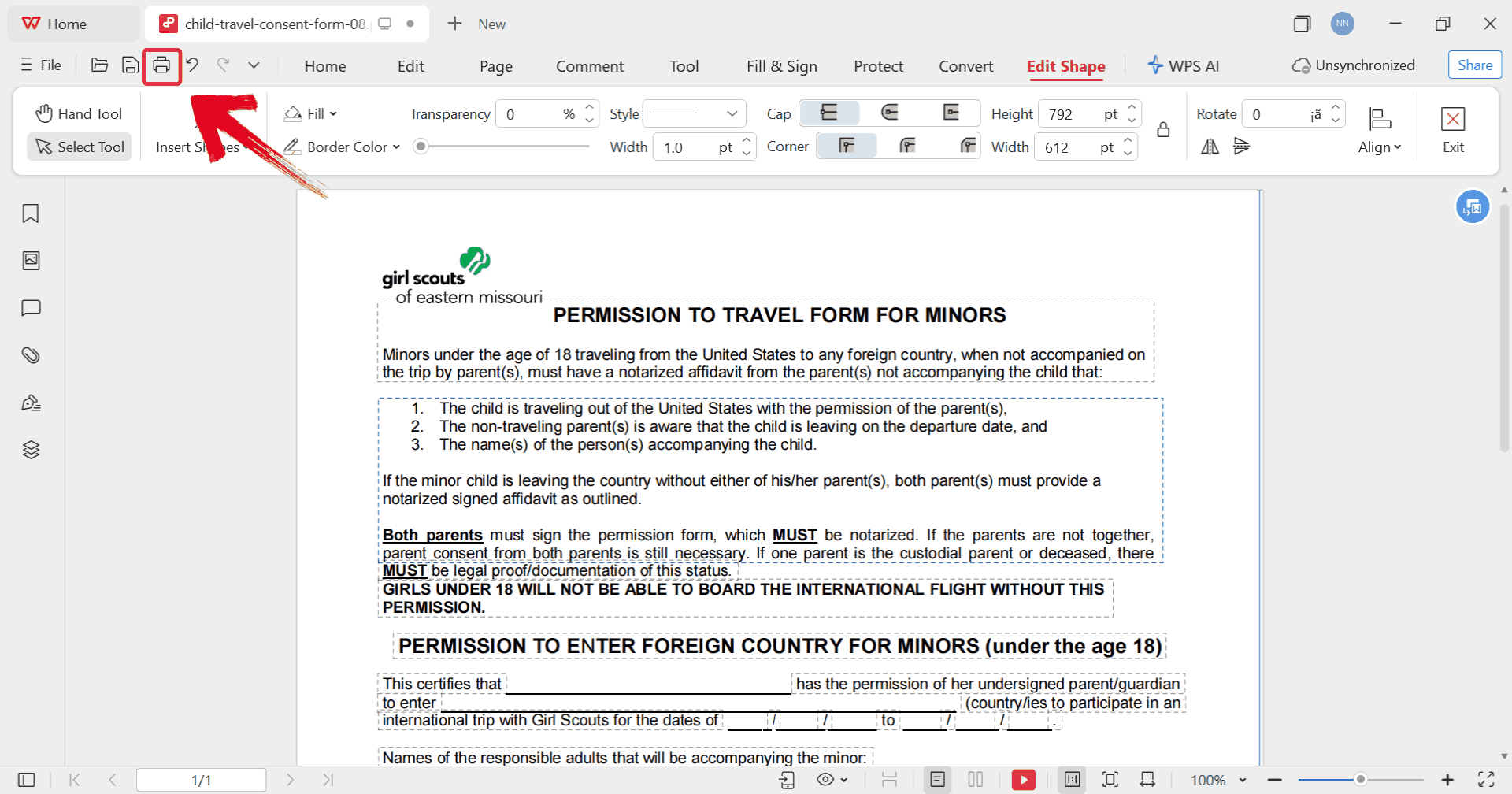
Step 5: Once all edits are complete, click theprinter icon to print your PDF. This ensures all
changes are correctly reflected in a professional, ready-to-use
copy.
Print PDF
By following these steps, you ensure that your child travel consent
form is accurate, legible, and legally presentable.
Free
Office Suite with Editable Free Child Travel Consent Form
When you’re handling important documents like child travel consent
forms, having a flexible, reliable tool to edit, save, and share them
makes all the difference. WPS
Office offers a complete suite that lets you work seamlessly
with Word documents, PDFs, and templates without worrying about
compatibility issues or formatting errors. You can quickly fill in
forms, adjust layouts, add signatures, and convert files between
formats. Its built-in template library also gives you access to a wide
range of ready-to-use forms, so whether you’re preparing a travel
consent, a school authorization, or any official document, everything
stays organized, professional, and ready to share or print in
minutes.
WPS Office
Features
AI-Assisted Writing: WPS AI can help you quickly
draft consent forms, letters, and other documents with professional
phrasing.
Powerful PDF Toolkit: Edit, convert, and
annotate PDFs directly without third-party software.
Rich Template Store: Thousands of templates,
including child travel consent forms, ready to edit.
Robust Functions: WPS Office offers tables,
charts, styles, and formatting options for professional
documents.
Online Document Support: Work and share your
forms in real-time with family or legal representatives.
Safe and Stable: WPS Office ensures secure
storage and stable performance.
Shareable Editing:Collaboratewith others through online links for instant review and
approval.
FAQs
1. Are the templates on
WPS free to use?
Yes, WPS Office offers a vast selection of free templates for
letters, resumes, presentations, and consent forms. A WPS Pro
subscription unlocks additional premium templates.
2. Do I need an
account to download templates?
Not always. Many templates are free to download without registration.
Some platforms may ask for login to access premium files.
3. Can I customize the
templates?
Absolutely. You can change text, layout, tables, and colors in Word
or edit PDFs directly in WPS PDF.
4. Can I travel
with my kids without their father?
For international travel, the non-custodial parent’s consent is
usually required. If consent is withheld, legal action or a court order
may be necessary.
5.
Is it advisable to obtain a consent letter from a non-accompanying
parent even with full custody?
Yes. Even when one parent has sole custody, a consent letter from the
other parent who has access rights ensures smooth international travel
and avoids potential legal issues.
Consent Made Simple with WPS
A child travel consent form is an essential document for ensuring
smooth, legal, and worry-free travel. These 10 free downloadable
templates prove to be ready-to-use solutions if your child is traveling
with one parent, abroad, or in a group. By following the step-by-step WPS Office tutorial, you can
edit, print, and share the forms safely in Word or PDF.
For even more templates, including editable child travel consent
forms, WPS Office offers a rich library of free templates that can be
downloaded, customized, and used immediately. Whether it may be for
personal, professional, or legal purposes, WPS templates are a reliable
resource to save time and maintain compliance while traveling with
minors.
7+ years in productivity tech. I test and review the latest tools to simplify your workflow. Follow for honest app comparisons, practical guides, and curated tech picks to boost efficiency.


'%3e%3cpath%20d='M8%200C12.4183%200%2016%203.58172%2016%208C16%2012.4183%2012.4183%2016%208%2016C3.58172%2016%200%2012.4183%200%208C0%203.58172%203.58172%200%208%200ZM11.6162%204.38379C11.2257%203.99337%2010.5927%203.99338%2010.2021%204.38379L8%206.58594L5.79785%204.38379C5.40732%203.99334%204.77429%203.99329%204.38379%204.38379C3.99331%204.77429%203.99335%205.40733%204.38379%205.79785L6.58594%208L4.38379%2010.2021C3.99348%2010.5927%203.99341%2011.2257%204.38379%2011.6162C4.77426%2012.0066%205.40734%2012.0065%205.79785%2011.6162L8%209.41406L10.2021%2011.6162C10.5927%2012.0066%2011.2257%2012.0067%2011.6162%2011.6162C12.0067%2011.2257%2012.0066%2010.5927%2011.6162%2010.2021L9.41406%208L11.6162%205.79785C12.0066%205.40735%2012.0066%204.77429%2011.6162%204.38379Z'%20fill='%23080E17'%20fill-opacity='0.46'/%3e%3c/g%3e%3cdefs%3e%3cclipPath%20id='clip0_3761_713'%3e%3crect%20width='16'%20height='16'%20fill='white'/%3e%3c/clipPath%3e%3c/defs%3e%3c/svg%3e)




'%3e%3cpath%20fill-rule='evenodd'%20clip-rule='evenodd'%20d='M21.4999%2010.9993C21.4999%205.20009%2016.7986%200.498901%2010.9993%200.498901C5.19994%200.498901%200.498657%205.20009%200.498657%2010.9993C0.498657%2016.2404%204.33858%2020.5844%209.35855%2021.3722V14.0346H6.69238V10.9993H9.35855V8.68594C9.35855%206.05427%2010.9262%204.60062%2013.3248%204.60062C14.4736%204.60062%2015.6753%204.80571%2015.6753%204.80571V7.38979H14.3512C13.0468%207.38979%2012.64%208.19921%2012.64%209.0296V10.9993H15.5523L15.0867%2014.0346H12.64V21.3722C17.66%2020.5844%2021.4999%2016.2404%2021.4999%2010.9993Z'%20fill='%231568EA'/%3e%3c/g%3e%3c/svg%3e)


'%3e%3cpath%20d='M2.42045%2022.1876H6.31818V12.7217L0.75%208.54553V20.5171C0.75%2021.4414%201.49892%2022.1876%202.42045%2022.1876Z'%20fill='%234285F4'/%3e%3cpath%20d='M19.682%2022.1876H23.5797C24.5041%2022.1876%2025.2502%2021.4387%2025.2502%2020.5171V8.54553L19.682%2012.7217'%20fill='%2334A853'/%3e%3cpath%20d='M19.682%205.48293V12.7216L25.2502%208.54543V6.31816C25.2502%204.25236%2022.8921%203.07469%2021.2411%204.31361'%20fill='%23FBBC04'/%3e%3cpath%20d='M6.31824%2012.7217V5.48303L13.0001%2010.4944L19.6819%205.48303V12.7217L13.0001%2017.733'%20fill='%23EA4335'/%3e%3cpath%20d='M0.75%206.31816V8.54543L6.31818%2012.7216V5.48293L4.75909%204.31361C3.10534%203.07469%200.75%204.25236%200.75%206.31816Z'%20fill='%23C5221F'/%3e%3c/g%3e%3cdefs%3e%3cclipPath%20id='clip0_2954_7305'%3e%3crect%20width='24.5'%20height='18.375'%20fill='white'%20transform='translate(0.75%203.8125)'/%3e%3c/clipPath%3e%3c/defs%3e%3c/svg%3e)



'%3e%3cpath%20d='M19.9911%204.11386V6.471H18.5894C18.0775%206.471%2017.7322%206.57814%2017.5536%206.79243C17.3751%207.00671%2017.2858%207.32814%2017.2858%207.75671V9.44421H19.9019L19.5536%2012.0871H17.2858V18.8639H14.5536V12.0871H12.2769V9.44421H14.5536V7.49779C14.5536%206.39064%2014.8632%205.53201%2015.4822%204.92189C16.1013%204.31177%2016.9257%204.00671%2017.9554%204.00671C18.8304%204.00671%2019.509%204.04243%2019.9911%204.11386Z'%20fill='%23333333'/%3e%3c/g%3e%3cdefs%3e%3cclipPath%20id='clip0_2938_8199'%3e%3crect%20width='16'%20height='16'%20fill='white'%20transform='translate(8%204.00671)'/%3e%3c/clipPath%3e%3c/defs%3e%3c/svg%3e)
'%3e%3cpath%20d='M17.5237%2010.7813L23.4811%204H22.0699L16.8949%209.88693L12.7648%204H8L14.2469%2012.9029L8%2020.0133H9.4112L14.8725%2013.7952L19.2352%2020.0133H24M9.92053%205.04213H12.0885L22.0688%2019.0224H19.9003'%20fill='%23333333'/%3e%3c/g%3e%3cdefs%3e%3cclipPath%20id='clip0_2938_8200'%3e%3crect%20width='16'%20height='16.0134'%20fill='white'%20transform='translate(8%204)'/%3e%3c/clipPath%3e%3c/defs%3e%3c/svg%3e)


