

'%3e%3cpath%20d='M8%200C12.4183%200%2016%203.58172%2016%208C16%2012.4183%2012.4183%2016%208%2016C3.58172%2016%200%2012.4183%200%208C0%203.58172%203.58172%200%208%200ZM11.6162%204.38379C11.2257%203.99337%2010.5927%203.99338%2010.2021%204.38379L8%206.58594L5.79785%204.38379C5.40732%203.99334%204.77429%203.99329%204.38379%204.38379C3.99331%204.77429%203.99335%205.40733%204.38379%205.79785L6.58594%208L4.38379%2010.2021C3.99348%2010.5927%203.99341%2011.2257%204.38379%2011.6162C4.77426%2012.0066%205.40734%2012.0065%205.79785%2011.6162L8%209.41406L10.2021%2011.6162C10.5927%2012.0066%2011.2257%2012.0067%2011.6162%2011.6162C12.0067%2011.2257%2012.0066%2010.5927%2011.6162%2010.2021L9.41406%208L11.6162%205.79785C12.0066%205.40735%2012.0066%204.77429%2011.6162%204.38379Z'%20fill='%23080E17'%20fill-opacity='0.46'/%3e%3c/g%3e%3cdefs%3e%3cclipPath%20id='clip0_3761_713'%3e%3crect%20width='16'%20height='16'%20fill='white'/%3e%3c/clipPath%3e%3c/defs%3e%3c/svg%3e)



'%3e%3cpath%20fill-rule='evenodd'%20clip-rule='evenodd'%20d='M21.4999%2010.9993C21.4999%205.20009%2016.7986%200.498901%2010.9993%200.498901C5.19994%200.498901%200.498657%205.20009%200.498657%2010.9993C0.498657%2016.2404%204.33858%2020.5844%209.35855%2021.3722V14.0346H6.69238V10.9993H9.35855V8.68594C9.35855%206.05427%2010.9262%204.60062%2013.3248%204.60062C14.4736%204.60062%2015.6753%204.80571%2015.6753%204.80571V7.38979H14.3512C13.0468%207.38979%2012.64%208.19921%2012.64%209.0296V10.9993H15.5523L15.0867%2014.0346H12.64V21.3722C17.66%2020.5844%2021.4999%2016.2404%2021.4999%2010.9993Z'%20fill='%231568EA'/%3e%3c/g%3e%3c/svg%3e)


'%3e%3cpath%20d='M2.42045%2022.1876H6.31818V12.7217L0.75%208.54553V20.5171C0.75%2021.4414%201.49892%2022.1876%202.42045%2022.1876Z'%20fill='%234285F4'/%3e%3cpath%20d='M19.682%2022.1876H23.5797C24.5041%2022.1876%2025.2502%2021.4387%2025.2502%2020.5171V8.54553L19.682%2012.7217'%20fill='%2334A853'/%3e%3cpath%20d='M19.682%205.48293V12.7216L25.2502%208.54543V6.31816C25.2502%204.25236%2022.8921%203.07469%2021.2411%204.31361'%20fill='%23FBBC04'/%3e%3cpath%20d='M6.31824%2012.7217V5.48303L13.0001%2010.4944L19.6819%205.48303V12.7217L13.0001%2017.733'%20fill='%23EA4335'/%3e%3cpath%20d='M0.75%206.31816V8.54543L6.31818%2012.7216V5.48293L4.75909%204.31361C3.10534%203.07469%200.75%204.25236%200.75%206.31816Z'%20fill='%23C5221F'/%3e%3c/g%3e%3cdefs%3e%3cclipPath%20id='clip0_2954_7305'%3e%3crect%20width='24.5'%20height='18.375'%20fill='white'%20transform='translate(0.75%203.8125)'/%3e%3c/clipPath%3e%3c/defs%3e%3c/svg%3e)


More AI does not always mean more productivity. G2 reviews show that what matters is where AI removes friction from the workday.
Writing assistants help people draft and refine faster. Meeting tools earn their value after the call through summaries and action items. Project tools automate repetitive work, but often require more setup. And for office and cloud tools, users still judge the basics: compatibility, sync, file access, and performance.
This guide looks at the value AI actually delivers in real workflows, not how many AI features a product can claim.
What are teams getting from AI productivity tools in 2026?
Across user reviews, the bigger productivity story is not full automation. AI is most useful when it removes a small step between finding information and doing something with it.
AI is reducing handoff work. The clearest gains happen between one step and the next: turning a blank page into a draft, a meeting into action items, project updates into a status view, or a long file into an answer.
The best AI features stay close to the work. Users get more value when AI can work with the document, meeting, project, or file already in front of them, rather than requiring information to be moved into a separate tool.
Core product quality still sets the ceiling. Reviewers may like the AI, but they still notice slow sync, complicated permissions, cluttered interfaces, learning curves, and performance issues. AI does not make those problems disappear.
Productivity gains are cumulative. The value is usually not one dramatic automation. It comes from saving a few minutes across drafting, searching, follow-ups, coordination, and other repetitive parts of the workday.
Reported payback is generally fast. Of the 12 products with a specific median payback period in the G2 Grid® Fall 2026 reports, 11 are at 12 months or less. These figures reflect overall product payback, not AI-specific ROI.


How did we look at the data?
We started with the G2 Grid® Fall 2026 reports, selecting the four highest-ranked products by G2 Score in each category:
Office suites: Google Workspace, Microsoft 365, WPS Office, WordPerfect
AI writing and productivity assistants: Grammarly, Notion, Gemini, Microsoft Copilot
Cloud content collaboration: Google Workspace, Microsoft OneDrive, Dropbox, Microsoft 365
Project management: Jira, Asana, Smartsheet, monday AI Work Platform
Video conferencing: Google Workspace, Microsoft Teams, Webex Suite, Zoom Workplace
Some products appear across multiple categories because users evaluate them for different jobs. We treated each category separately, focusing on the relevant use case, such as document creation for office suites, file sharing and sync for content collaboration, and meetings for video conferencing.
To compare products, we looked at G2 Score, Likelihood to Recommend, and NPS. G2 Score helped identify category leaders, while recommendation and NPS data gave us a clearer view of user satisfaction.
We then analyzed G2 reviews from the past 12 months to understand what drives those scores in practice. The Grid data shows how products compare; the reviews help explain why.
How are teams actually using AI productivity tools?
Across the five categories, AI is not taking over the main job of the software. It is being used at specific points where people would otherwise stop to write, read through information, document a conversation, or work out what has changed.
1. Writing AI is as much about editing as generating
Drafting remains a clear use case, but user reviews show that AI writing tools are also being used to improve grammar, clarity, tone, and sentence structure after the first draft already exists.
That changes what matters in the product experience. Reviewers value suggestions that improve the writing while preserving the original meaning and voice. When AI makes broader changes, the ability to review and control those edits becomes just as important as the quality of the suggestion itself.
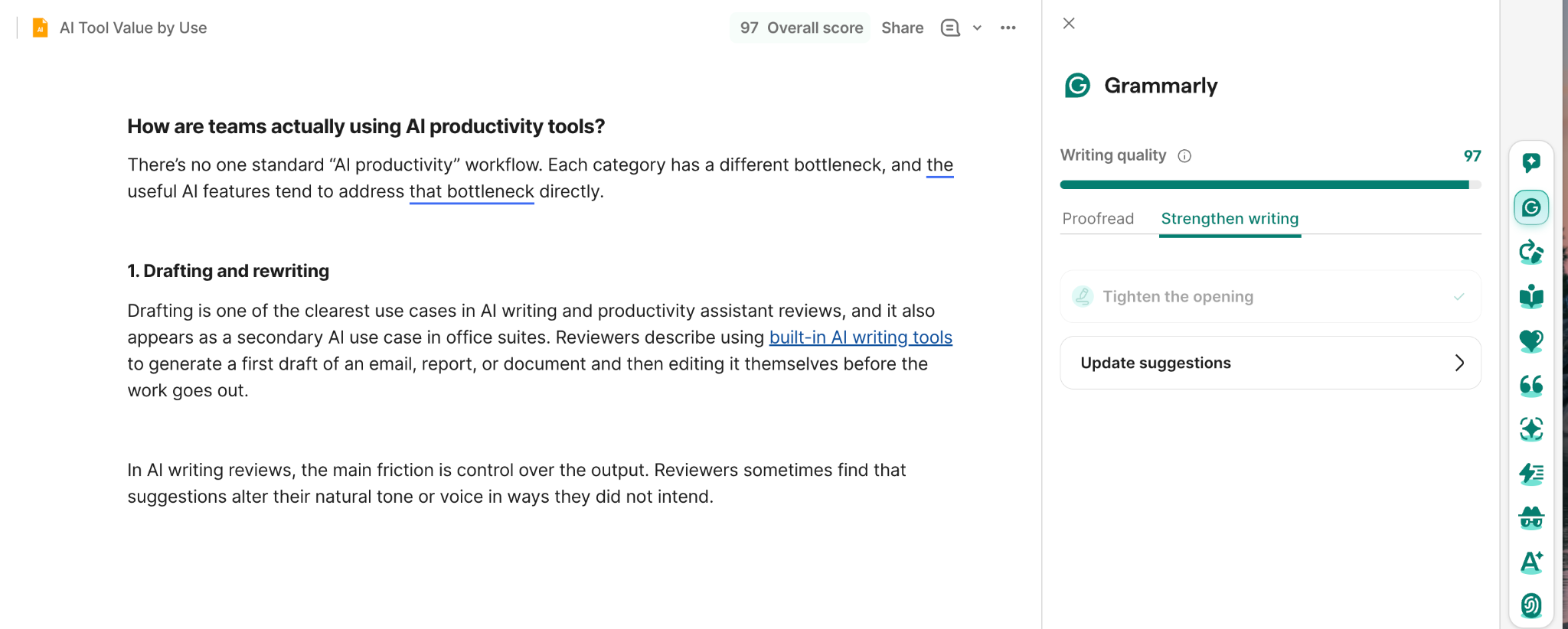
Grammarly writing suggestions in document
2. Summarization is becoming a way to reduce reading time
Summarization is used when the information already exists but takes too long to work through, such as long documents, transcripts, or large volumes of communication.
The useful part is not simply producing a shorter version. It is helping users get to the important points faster so they can decide what needs a closer look. Reviewers describe this as particularly helpful when they need to process a lot of information before responding or moving on to the next task.
This makes summarization less of a content-creation feature and more of an information-navigation feature.
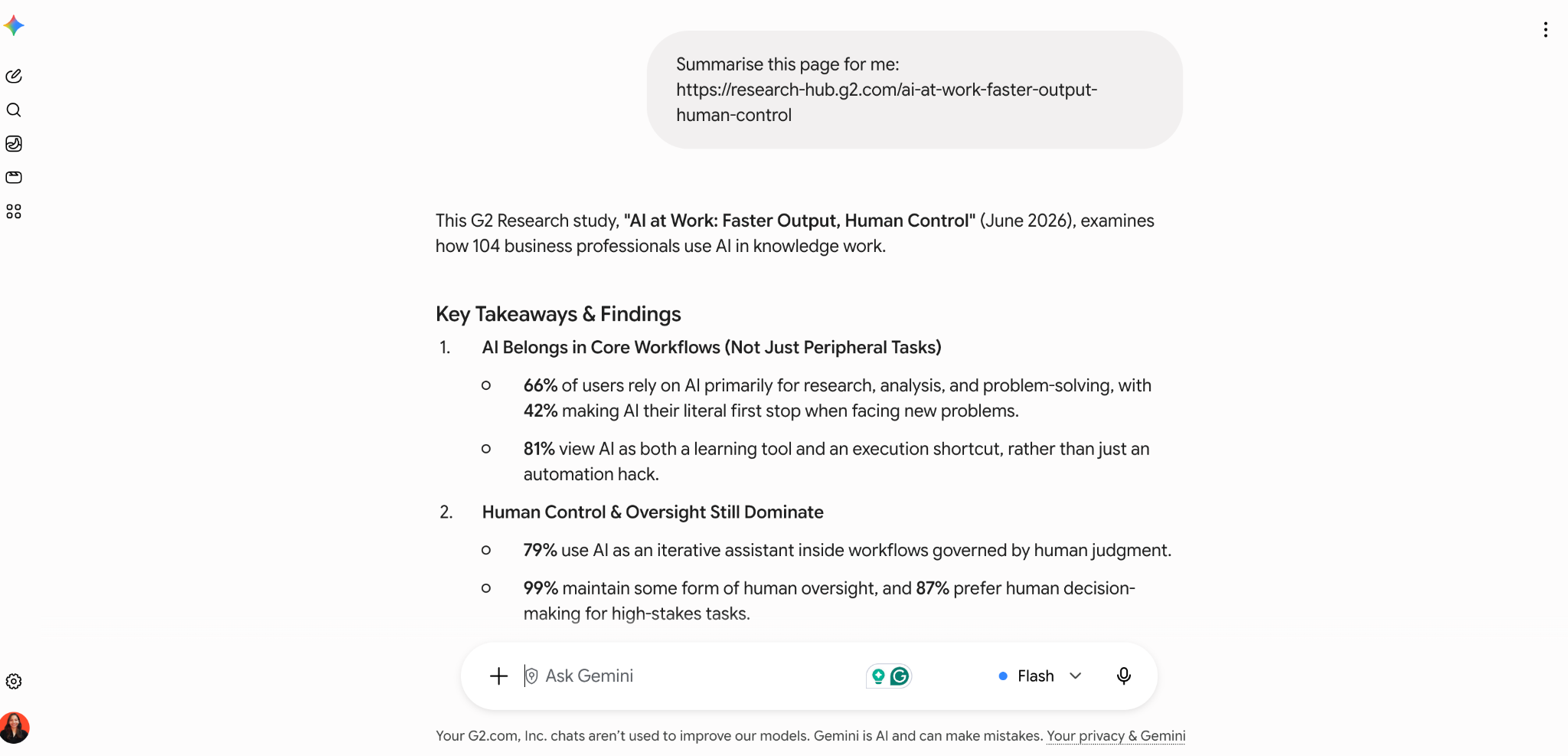
Gemini summarizing research page chat
3. Meeting AI is reducing the work that happens after the call
Recent video conferencing reviews show that AI is most useful once the meeting ends. Notes, transcripts, summaries, and action items reduce the need to manually reconstruct what was discussed and who agreed to do what.
That shifts part of the meeting workload from documentation to review. Instead of writing everything down from scratch, users can check the AI-generated record, confirm the important points, and move into follow-up faster.
During the call itself, though, users still judge the product on the basics: audio and video quality, connectivity, and ease of use. AI adds value around the meeting, but it does not replace the need for a reliable meeting experience.
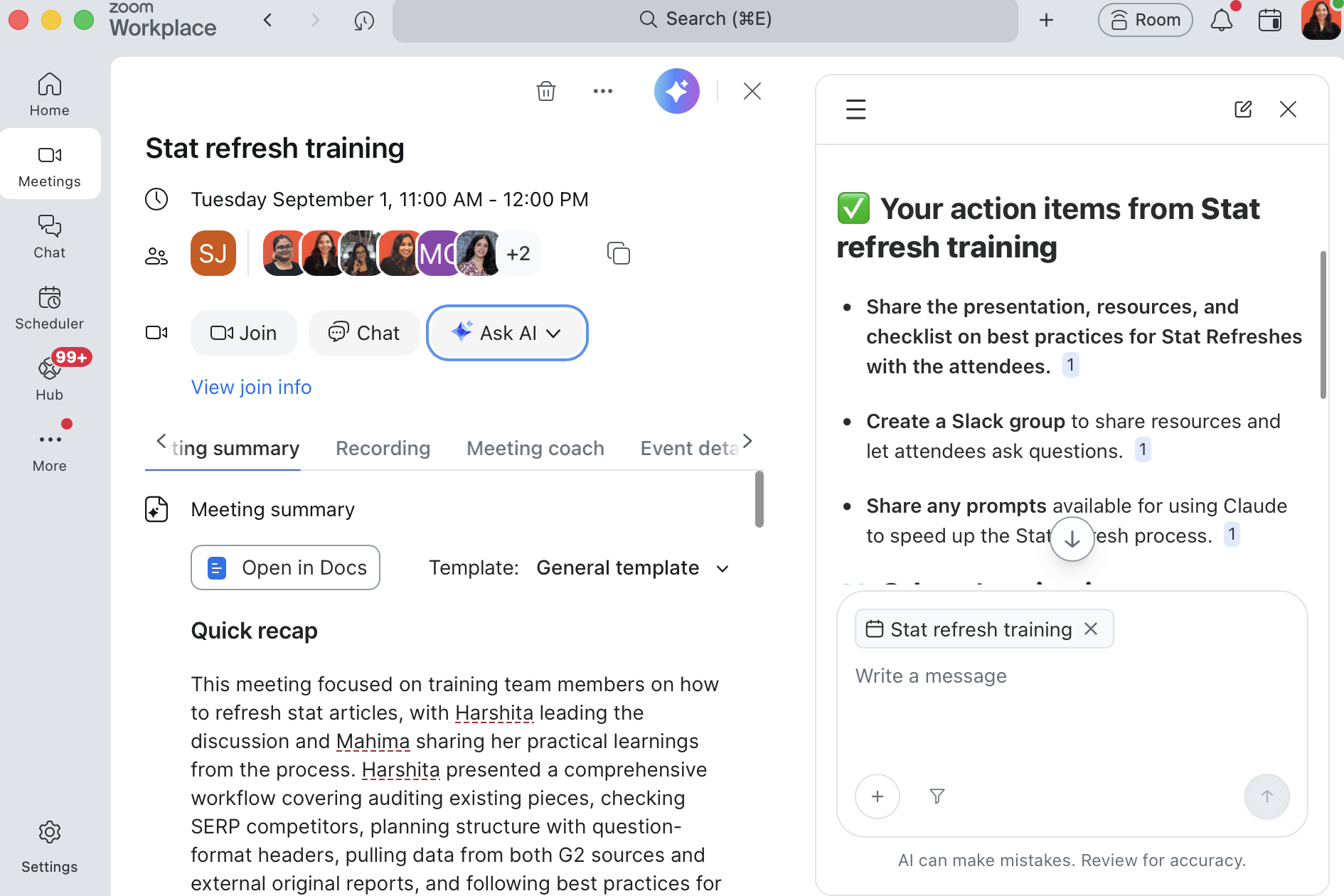
Zoom meeting AI summary recap
4. Project AI is making status easier to read
Project management tools already contain the information teams need: tasks, owners, due dates, comments, and status changes. The AI use case showing up in reviews is turning that activity into shorter summaries and updates that are easier to scan.
The important limitation is that the summary is only as reliable as the project data underneath it. If dates, task details, or ownership are not kept up to date, the AI can produce a neat summary of an inaccurate project picture.
So the real value here is not automated project management. It is faster visibility into work that is already being tracked.
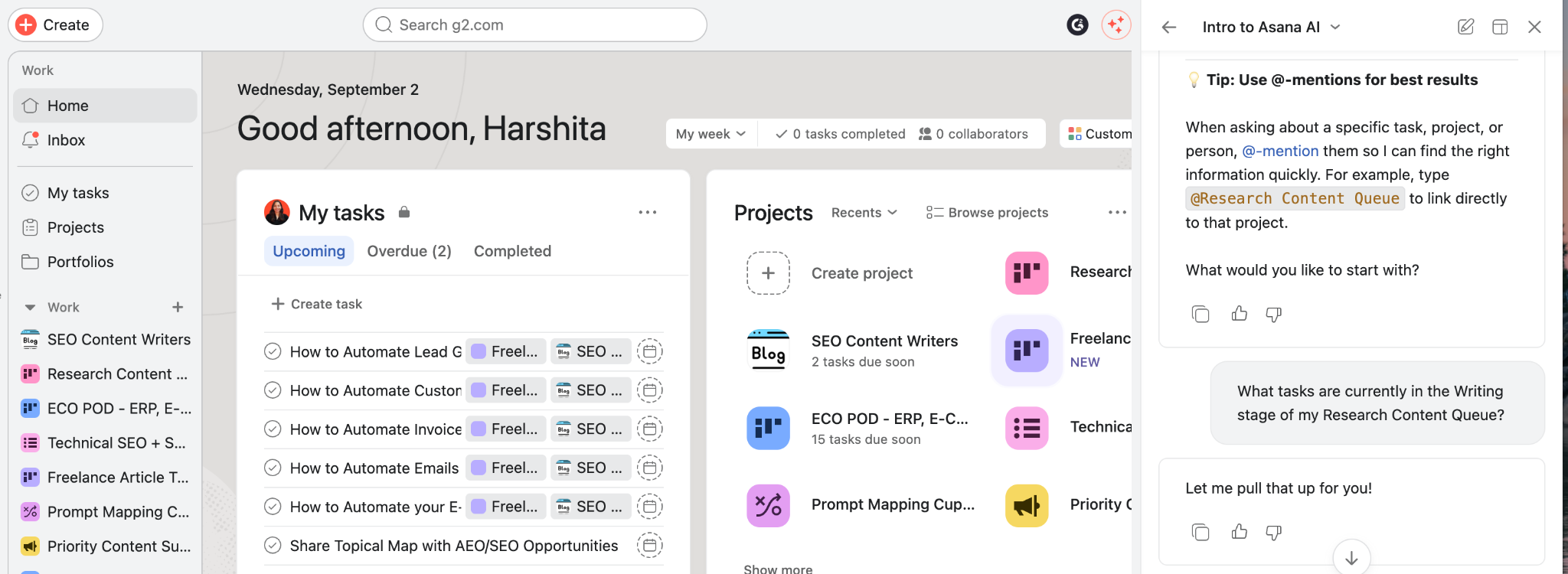
Asana AI assistant project dashboard
5. In office suites, AI is helping with smaller tasks inside the file
Office suite reviews still focus mainly on the core work: creating documents, collaborating, working across file types, and keeping information accessible. AI tends to support those tasks rather than become the main reason people use the suite.
Spreadsheet help is a good example. Reviewers mention features such as formula suggestions alongside familiar tools like filters and table formatting. The benefit is practical: users can solve a small problem, such as working out the right formula, without leaving the spreadsheet to search for it elsewhere.
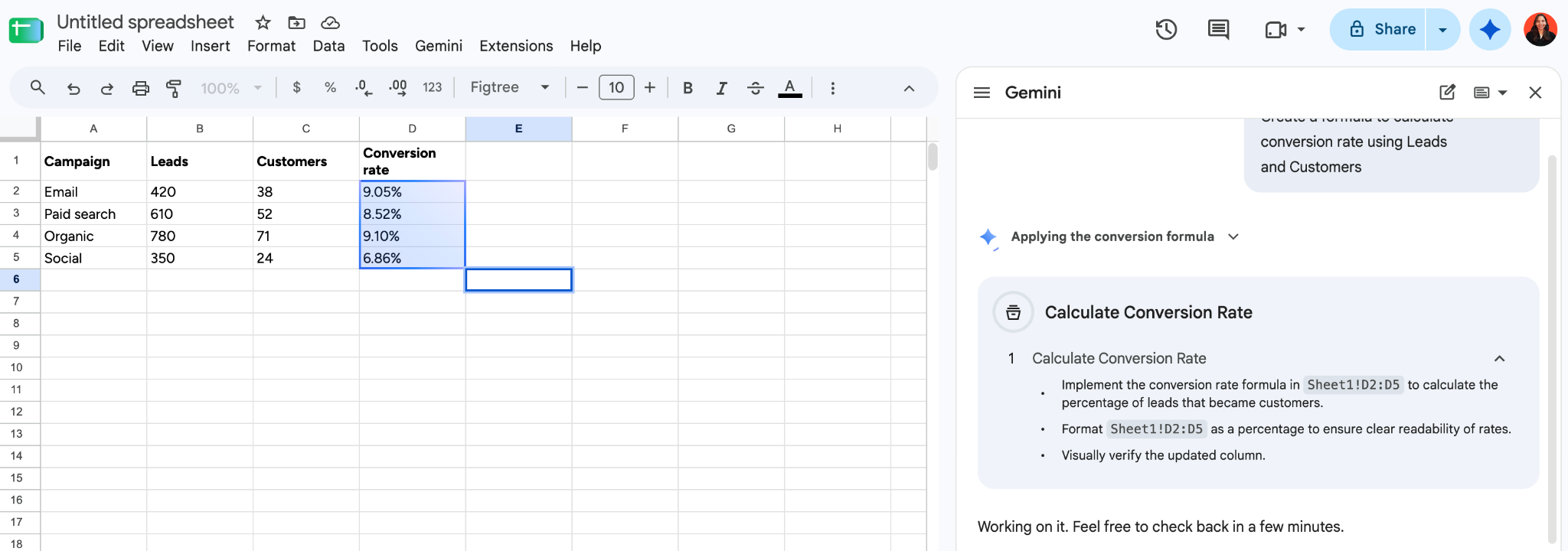
Spreadsheet AI formula suggestion panel
How the five AI productivity tool categories compare
Likelihood-to-recommend rates are tightly grouped at 89% to 94% across the five categories. The more meaningful differences are in where AI is useful and where friction appears.
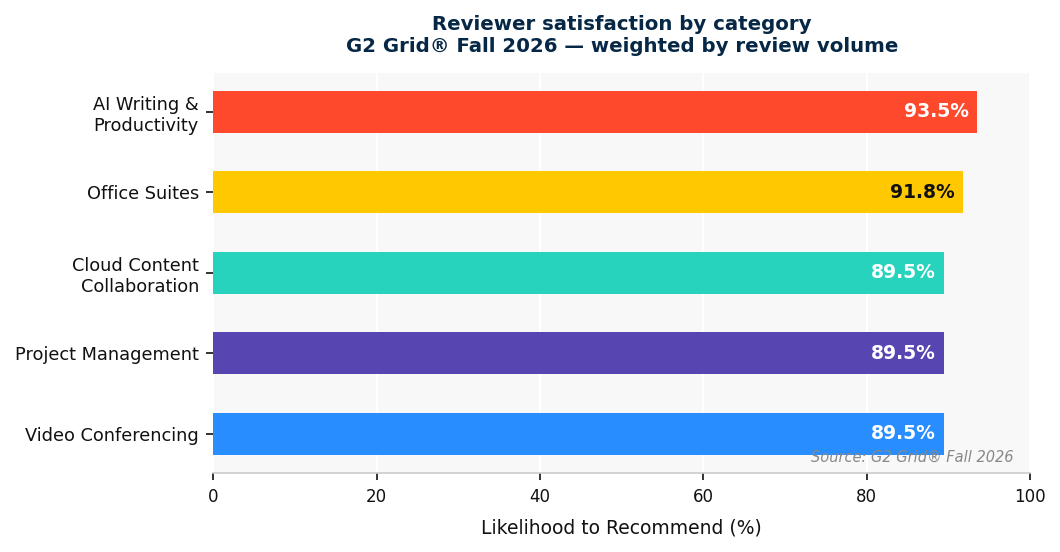
Reviewer satisfaction by category chart
AI plays a different role in each category. In some, such as AI writing and video conferencing, it is central to the use case. In others, reviewers value the underlying workflow first, with AI acting as an additional layer.
| Category | Where AI fits | Common reviewer friction |
|---|---|---|
| AI writing and productivity assistants | Drafting, rewriting, and content generation | AI suggestions alter tone or voice in ways users didn't intend |
| Office suites | Collaboration first, with AI drafting and formula help | Key AI features locked behind paid tiers |
| Video conferencing | Meeting notes, summaries, and action items | Resource strain on older hardware; growing interface complexity |
| Project management | Status visibility, update summaries, and project setup | Notifications, pricing, and learning curve |
| Cloud content collaboration | File access and sharing first, with AI summarization in some tools | Storage limits and pricing |
Who is using AI productivity tools?
The review data is dominated by people using these tools in their day-to-day work, not just by buyers or IT teams evaluating them from a distance.
Smaller companies make up the largest share of the reviewer base, followed by mid-market teams, while enterprise users account for a smaller share. The mix varies by product, with some tools skewing more toward small-business users and others drawing a comparatively larger enterprise audience.
Most reviewers are also end users rather than administrators. Their feedback tends to focus on practical questions: Does this save time? Is it easy to use? Does it make a recurring task easier? Some products skew heavily toward individual users, while others have a larger administrator presence because setup and ongoing configuration play a bigger role.
There are differences by industry, too. Software, IT services, and marketing appear frequently throughout the dataset, while some tools are more strongly represented by education, creative, or operational teams.
Overall, the review base gives us a useful view of how AI productivity tools perform in everyday work. It is less representative of formal enterprise procurement, but strong for understanding the experience of the people actually using these products.
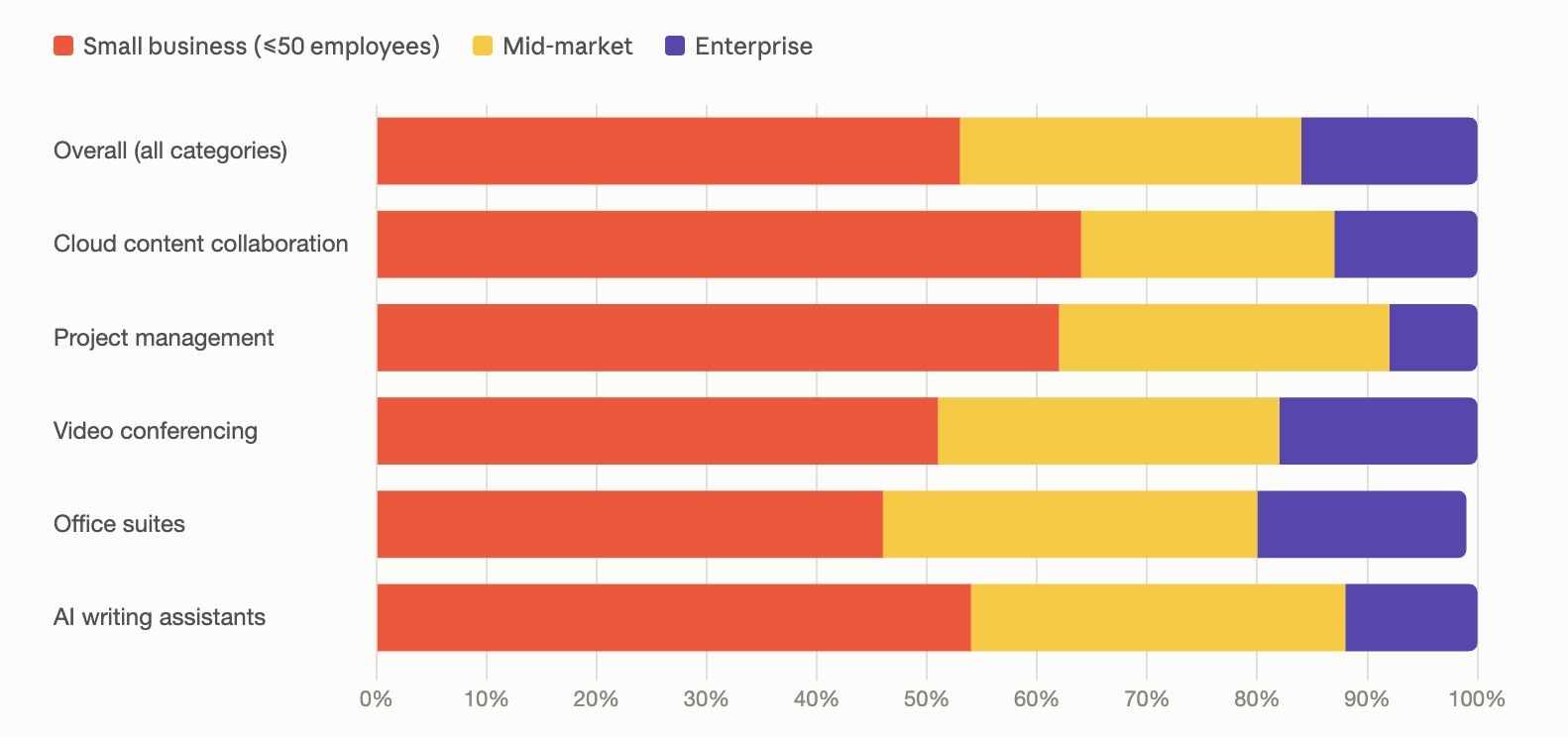
Reviewer company size distribution chart
Why is AI more useful when it has the context of your work?
The recent review data suggests that AI is most useful when it can work with information that is already inside the product. The stronger examples are not broad, open-ended prompts. They are narrower tasks grounded in existing content, such as summarizing a meeting transcript, pulling key points from a long document, or turning project activity into a shorter status update.
That matters because the user has less context to provide manually. A meeting tool already has the transcript. A project tool already has tasks, owners, dates, and updates. An office suite already has the document or spreadsheet on screen. The AI can start from that information instead of asking the user to recreate the background in a separate prompt.
The reviews also show the limitation of this model: better context does not automatically mean better output. In project management, for example, reviewers note that summaries can be less reliable when the underlying board is not kept clean or up to date. The AI can make existing information easier to process, but it still depends on the quality of the source data.
For buyers, that makes the depth of context more important than the number of AI features listed on a product page. A useful question is: what information can the AI actually work with, and does that remove a step from a task people already perform?
Where do AI productivity tools still fall short?
The biggest frustrations vary by category. AI writing users are more concerned with control over the output, while reviewers of broader productivity tools are more likely to flag cost, performance, complexity, or limits that show up as usage grows.
AI can change more than users intend. In AI writing reviews, users sometimes find that suggestions alter their natural tone or voice. The issue is less about AI making changes automatically and more about whether its recommendations preserve the writer’s intent.
Useful features can sit behind higher-priced plans. Office suite reviewers frequently mention advanced AI capabilities being reserved for higher tiers. For teams comparing productivity tools on a budget, it is worth checking which AI features are actually included in the plan they would deploy.
More features can add performance and interface friction. Video conferencing reviewers commonly mention heavier resource usage on older hardware, while some also find the interface more complex as new capabilities are added.
Scale can expose different limits. Project management reviewers mention a mix of notification volume, pricing, and learning curve, while cloud collaboration users more often flag storage limits and rising costs as usage grows.
How quickly do productivity suites achieve overall payback?
Payback is relatively quick across the products for which ROI data is available. Of the 12 with a reported median payback period, 11 come in at 12 months or less. Gemini and Microsoft Copilot are the fastest at five months, while WPS Office sits at 12 months, and Microsoft 365 is the only product above the one-year mark at 13 months.
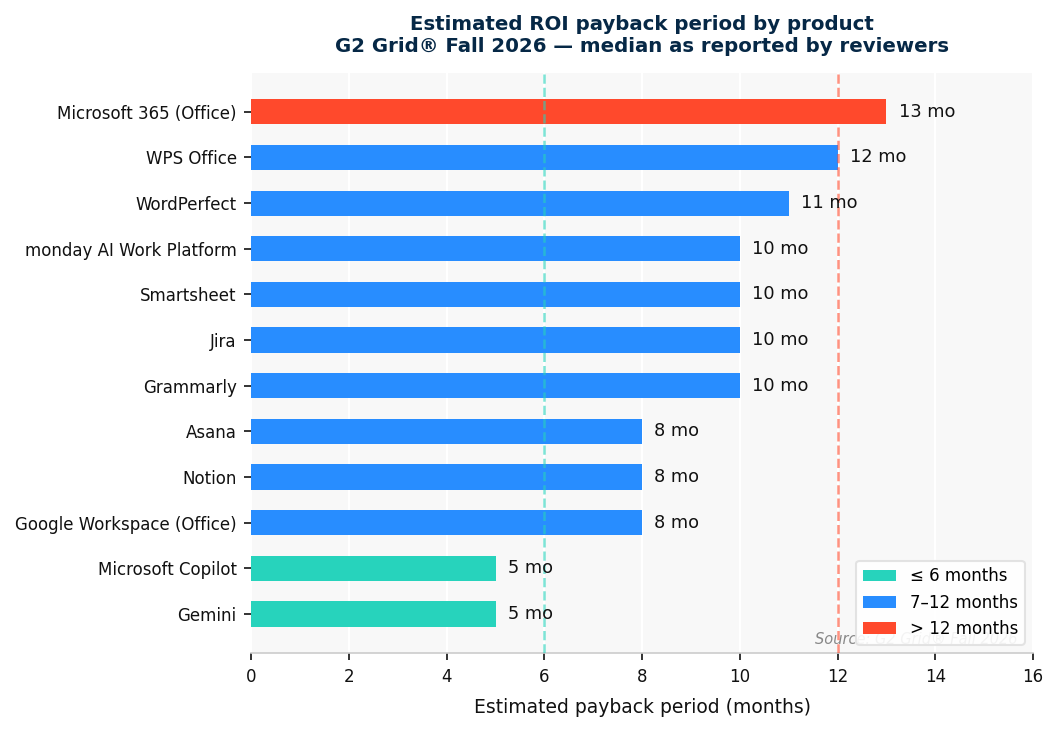
ROI payback period by product
The review feedback helps explain where that value comes from. Users point to time saved on repetitive work, faster access to information, fewer manual follow-ups, and less coordination overhead. Rather than one feature producing a dramatic return, the gains tend to come from small efficiencies repeated throughout the workday.
These payback figures reflect the overall value of the products, not AI features alone, and data is available for only a subset of the products analyzed. They are therefore best read as a directional view of how quickly these tools can justify their cost rather than a direct measure of AI-specific ROI.
For teams deciding which tasks are worth automating, see how teams are measuring AI automation impact.
What should you check before choosing an AI productivity tool?
Before committing, test the parts of the product that are easiest to overlook in a demo but most likely to create friction after rollout.
What is actually included in your plan. Check which AI features, usage limits, storage allowances, and advanced capabilities come with the tier you would buy. Several review complaints come from features being available only on higher-priced plans.
How the product behaves at your scale. Test it with realistic numbers of users, projects, meetings, files, and notifications. Performance issues, interface complexity, and notification volume can become more noticeable as usage grows.
Where costs can increase over time. Look beyond the starting price. Storage limits, additional seats, increased AI usage, and premium features can materially affect costs as adoption expands.
How easy it is to correct mistakes. Check whether users can undo changes, reject suggestions, restore earlier versions, or recover from an incorrect AI output without disrupting the work.
Whether the product introduces new friction elsewhere. Test the less-visible handoffs, too: file exports, integrations, device performance, onboarding, and anything else your team depends on outside the headline AI features.
For a broader comparison, check out G2's guide to AI productivity tools, which covers ratings, features, and user reviews across a wider range of options.
How does WPS Office fit as an AI productivity tool?
WPS Office is a strong contender among office-suite productivity tools, with a 4.4/5 rating from 325 reviews on G2. Its likelihood-to-recommend score is 88%, close to Google Workspace and Microsoft 365 at 92%, while its NPS is 67. Its reported median payback period is 12 months.
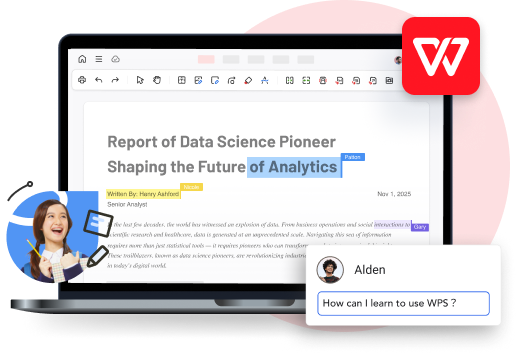
What reviewers value most is the range of everyday work they can handle in one place. WPS Office combines documents, spreadsheets, presentations, PDFs, and cloud file access, while its AI features sit alongside those core tools rather than functioning as a separate experience.
PDF work is one area where that becomes especially practical. Users can chat with a PDF directly inside WPS Office to find or summarize information from longer documents without moving the file into another tool.
One area worth checking is file compatibility. A few reviewers mention font substitution when opening files that use fonts not installed locally, so it may be helpful to test the file types your team works with most often before a wider rollout.
Frequently asked questions about AI productivity tools in 2026
Got more questions? Here are the answers.
How do AI productivity tools support hybrid and remote teams?
AI productivity tools can reduce some of the coordination work that comes with distributed teams. Features such as meeting summaries, shared document assistance, task updates, and searchable workspaces can help people catch up on decisions and progress without needing to be present for every conversation.
What security features should you check in an AI productivity tool?
Start with access controls, encryption, audit logs, data retention, and controls over what information the AI can access. For regulated teams, data residency, DLP, eDiscovery, SSO, and relevant compliance certifications may also matter when evaluating a tool.
Are AI productivity tools a good fit for small businesses?
They can be, especially when one platform covers several everyday needs such as document creation, file sharing, meetings, and task management. For smaller teams, the bigger question is whether the time saved justifies paying for AI features that will actually be used.
What is the difference between AI productivity software and project management software?
AI productivity software is broader and can include writing, documents, meetings, file management, and task assistance. Project management software is more focused on organizing work through tasks, deadlines, dependencies, resources, and project visibility. Some platforms increasingly combine both.
Should you choose a standalone AI tool or an AI built into software you already use?
A standalone tool can make sense when you need a specialized capability across several applications. Built-in AI can be more convenient when it can work directly with the documents, meetings, files, or projects already inside the product, reducing the need to move information between tools.
Summary
Data note: Satisfaction scores, G2 Scores, review counts, and payback periods are sourced from the G2 Grid® Fall 2026 reports for Office Suites, AI Writing Assistants, Cloud Content Collaboration, Project Management, and Video Conferencing. Ratings and review volumes may change over time.
Harshita is a Content Marketing Specialist on G2's SEO/AEO team, where she drives strategy to grow visibility across search and AI-powered platforms. She holds a Master's degree in Biotechnology and brings prior experience in sales and marketing from food tech and travel startups.

'%3e%3cpath%20d='M19.9911%204.11386V6.471H18.5894C18.0775%206.471%2017.7322%206.57814%2017.5536%206.79243C17.3751%207.00671%2017.2858%207.32814%2017.2858%207.75671V9.44421H19.9019L19.5536%2012.0871H17.2858V18.8639H14.5536V12.0871H12.2769V9.44421H14.5536V7.49779C14.5536%206.39064%2014.8632%205.53201%2015.4822%204.92189C16.1013%204.31177%2016.9257%204.00671%2017.9554%204.00671C18.8304%204.00671%2019.509%204.04243%2019.9911%204.11386Z'%20fill='%23333333'/%3e%3c/g%3e%3cdefs%3e%3cclipPath%20id='clip0_2938_8199'%3e%3crect%20width='16'%20height='16'%20fill='white'%20transform='translate(8%204.00671)'/%3e%3c/clipPath%3e%3c/defs%3e%3c/svg%3e)
'%3e%3cpath%20d='M17.5237%2010.7813L23.4811%204H22.0699L16.8949%209.88693L12.7648%204H8L14.2469%2012.9029L8%2020.0133H9.4112L14.8725%2013.7952L19.2352%2020.0133H24M9.92053%205.04213H12.0885L22.0688%2019.0224H19.9003'%20fill='%23333333'/%3e%3c/g%3e%3cdefs%3e%3cclipPath%20id='clip0_2938_8200'%3e%3crect%20width='16'%20height='16.0134'%20fill='white'%20transform='translate(8%204)'/%3e%3c/clipPath%3e%3c/defs%3e%3c/svg%3e)


