

'%3e%3cpath%20d='M8%200C12.4183%200%2016%203.58172%2016%208C16%2012.4183%2012.4183%2016%208%2016C3.58172%2016%200%2012.4183%200%208C0%203.58172%203.58172%200%208%200ZM11.6162%204.38379C11.2257%203.99337%2010.5927%203.99338%2010.2021%204.38379L8%206.58594L5.79785%204.38379C5.40732%203.99334%204.77429%203.99329%204.38379%204.38379C3.99331%204.77429%203.99335%205.40733%204.38379%205.79785L6.58594%208L4.38379%2010.2021C3.99348%2010.5927%203.99341%2011.2257%204.38379%2011.6162C4.77426%2012.0066%205.40734%2012.0065%205.79785%2011.6162L8%209.41406L10.2021%2011.6162C10.5927%2012.0066%2011.2257%2012.0067%2011.6162%2011.6162C12.0067%2011.2257%2012.0066%2010.5927%2011.6162%2010.2021L9.41406%208L11.6162%205.79785C12.0066%205.40735%2012.0066%204.77429%2011.6162%204.38379Z'%20fill='%23080E17'%20fill-opacity='0.46'/%3e%3c/g%3e%3cdefs%3e%3cclipPath%20id='clip0_3761_713'%3e%3crect%20width='16'%20height='16'%20fill='white'/%3e%3c/clipPath%3e%3c/defs%3e%3c/svg%3e)




'%3e%3cpath%20fill-rule='evenodd'%20clip-rule='evenodd'%20d='M21.4999%2010.9993C21.4999%205.20009%2016.7986%200.498901%2010.9993%200.498901C5.19994%200.498901%200.498657%205.20009%200.498657%2010.9993C0.498657%2016.2404%204.33858%2020.5844%209.35855%2021.3722V14.0346H6.69238V10.9993H9.35855V8.68594C9.35855%206.05427%2010.9262%204.60062%2013.3248%204.60062C14.4736%204.60062%2015.6753%204.80571%2015.6753%204.80571V7.38979H14.3512C13.0468%207.38979%2012.64%208.19921%2012.64%209.0296V10.9993H15.5523L15.0867%2014.0346H12.64V21.3722C17.66%2020.5844%2021.4999%2016.2404%2021.4999%2010.9993Z'%20fill='%231568EA'/%3e%3c/g%3e%3c/svg%3e)


'%3e%3cpath%20d='M2.42045%2022.1876H6.31818V12.7217L0.75%208.54553V20.5171C0.75%2021.4414%201.49892%2022.1876%202.42045%2022.1876Z'%20fill='%234285F4'/%3e%3cpath%20d='M19.682%2022.1876H23.5797C24.5041%2022.1876%2025.2502%2021.4387%2025.2502%2020.5171V8.54553L19.682%2012.7217'%20fill='%2334A853'/%3e%3cpath%20d='M19.682%205.48293V12.7216L25.2502%208.54543V6.31816C25.2502%204.25236%2022.8921%203.07469%2021.2411%204.31361'%20fill='%23FBBC04'/%3e%3cpath%20d='M6.31824%2012.7217V5.48303L13.0001%2010.4944L19.6819%205.48303V12.7217L13.0001%2017.733'%20fill='%23EA4335'/%3e%3cpath%20d='M0.75%206.31816V8.54543L6.31818%2012.7216V5.48293L4.75909%204.31361C3.10534%203.07469%200.75%204.25236%200.75%206.31816Z'%20fill='%23C5221F'/%3e%3c/g%3e%3cdefs%3e%3cclipPath%20id='clip0_2954_7305'%3e%3crect%20width='24.5'%20height='18.375'%20fill='white'%20transform='translate(0.75%203.8125)'/%3e%3c/clipPath%3e%3c/defs%3e%3c/svg%3e)


Juggling addresses for holiday cards, shipping labels, or client lists can feel like chasing a bunch of loose Post-its in a windstorm. You just want a free editable address template that’s neat and ready to roll, but building one from scratch is like piecing together a jigsaw puzzle when you’re already slammed. I’ve rounded up 10 free, super-easy-to-tweak address templates for Word, Excel, and PDF to save your sanity. I’ll walk you through customizing them in WPS Office, so you can sort contacts or whip up labels without pulling your hair out. Let’s get those addresses organized and make your day a little brighter.


Part 1. What Is an Address Template?
An address template is like that one friend who’s got all their contacts perfectly organized—names, phone numbers, emails, street addresses, cities, and zip codes, all in a neat little package. It’s a total lifesaver whether you’re sending out holiday cards, handling business mail, shipping packages, or keeping your client list straight. From printable labels for envelopes to spreadsheets for your contacts, a solid template saves you hours and keeps everything spot-on. It’s like having a super-organized buddy who loves keeping things tidy for you.
Types of Address Templates Commonly Used
I once spent hours formatting addresses for a holiday card list, and it was a mess—crooked labels and typos galore. Using a template for a client mailing later was a game-changer; it kept everything neat and saved me from a formatting nightmare. A good address template is like a shortcut to sanity.
Part 2. 10 Best Free Address Templates
I’ve hunted down 10 free address templates from WPS Office, Canva, and Microsoft Create, available in Word, Excel, or PDF. These cover everything from sleek mailing labels to detailed contact lists, so you’ll find one that fits your needs—whether you’re sending invites or managing client info. They’re super easy to customize, letting you add your details or branding in a snap. Download as PDF for printing or image for quick edits, depending on what works for you. Here’s a warm, honest take on each to help you pick the right one.
1. Simple Address Book
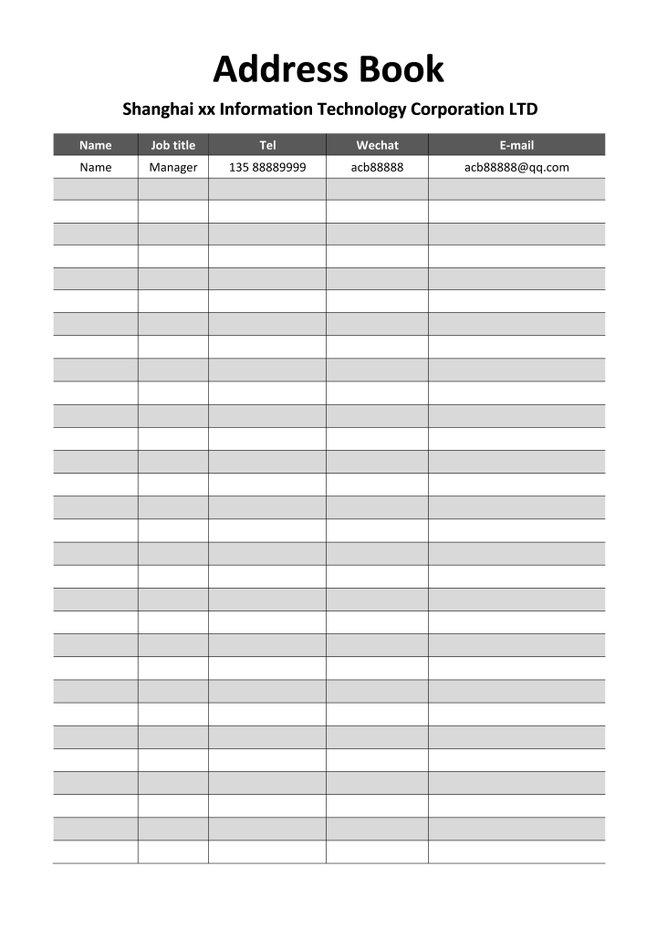
This template’s like that beat-up notebook you love because it just works—simple, clean, and perfect for keeping your contacts in order. It’s a Word-based address book with spots for names, addresses, and phone numbers, great for personal use or small businesses. Ideal for anyone who wants to stay organized without any drama. You can tweak it in a flash to make it your own.
I used this to sort out my family’s holiday card list, and it was like a hug from an old friend. Adding names and addresses was so quick, it felt like the template was practically doing the job for me.
2. Black and White Simple Generic Address Tags
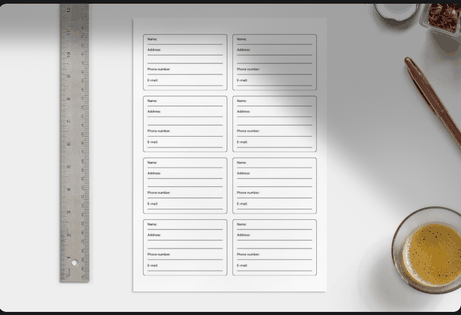
This Canva template’s like a classic black-and-white movie—timeless, versatile, and always looks good. It’s built for mailing labels, with a no-fuss layout for names and addresses, perfect for envelopes or packages. Great for businesses or personal mailings that need a sharp, pro vibe. You can customize it in minutes to fit your style.
I used this for a batch of client mailings, and the clean look made me feel like a pro. Tweaking the labels was so easy, and they printed like a dream.
3. Black and Cream Modern Address Label
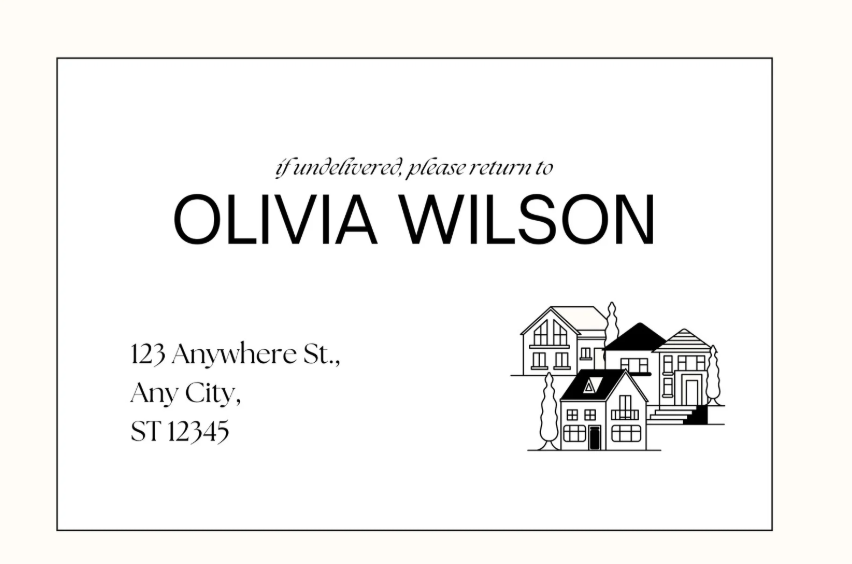
This template’s like the sign outside your favorite coffee shop—modern, warm, and just a little fancy with its cream and black palette. It’s perfect for mailing labels, with space for names, addresses, and a touch of your brand’s personality. Ideal for anyone wanting labels that look chic and polished. You can edit it quick to make it feel like yours.
This gave my small business’s shipping labels such a sleek vibe. Adding my logo was a cinch, and it made my packages look like they came from a high-end shop.
4. Beige & Black Simple Contact and Address Book Journal
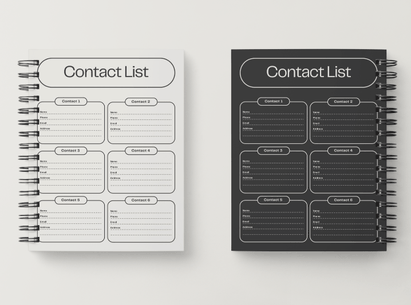
This Canva template’s like a cozy journal, with a beige and black design that’s perfect for an address book. It’s great for personal or small business contact lists, with fields for names, emails, and addresses. Ideal for keeping things organized with a touch of warmth. Customize it in a snap.
I used this to track client contacts, and the warm design felt so inviting. Adding details was quick, and it kept everything neat.
5. Cream Minimalist Border Contact Luggage Tag
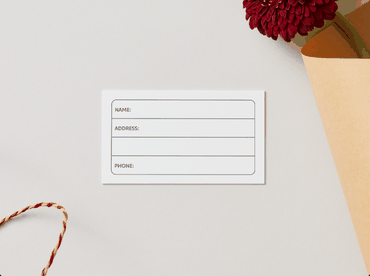
This template’s like a sleek luggage tag, with a minimalist cream design for contact details. It’s perfect for travel-related address needs or personal use, with space for names and addresses. Great for anyone wanting a clean, functional look. Tweak it fast for a personal touch.
I used this for a trip’s luggage tags, and it looked so sharp. Customizing it was a cinch, and it made my bags stand out.
6. Cream and Grey Simple Modern New Address Postcard
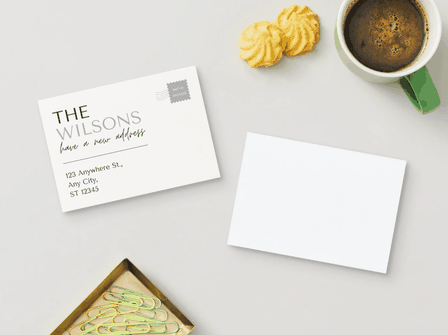
This Canva template’s like a friendly postcard, with a cream and grey design for sharing new addresses. It’s great for personal or business moves, with space for names, addresses, and a note. Perfect for a modern, welcoming vibe. Edit it quick to fit your needs.
This worked great for a business relocation notice. The modern look was spot-on, and tweaking it was so easy I had time to spare.
7. Green Cute Personal Address Label
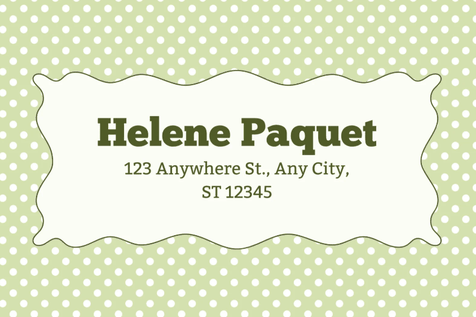
This template’s like a cheerful note, with a cute green design for personal address labels. It’s perfect for holiday cards or personal mailings, with space for names and addresses. Ideal for adding a fun, friendly touch. Customize it in minutes for a pop of personality.
I used this for holiday card labels, and the green vibe was so fun. Adding names was quick, and it made my cards feel extra special.
8. White and Black Modern Sophistication Church Mailing Label

This Canva template’s like a polished invitation, with a white and black design for mailing labels. It’s great for churches or formal organizations, with space for addresses and branding. Perfect for a sophisticated, pro look. Tweak it fast to match your style.
I used this for a community event mailing, and it looked so classy. Customizing it was a breeze, and the labels printed perfectly.
9. Address Book (Excel)
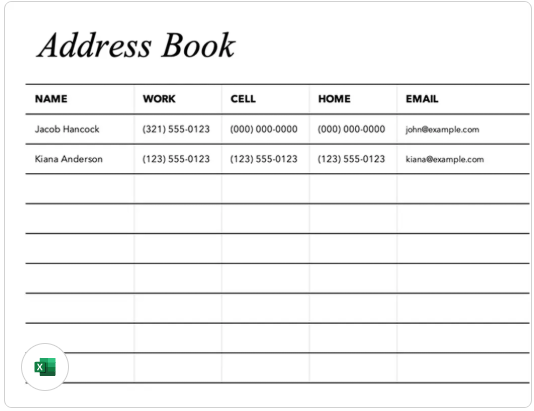
This Microsoft Create template’s like a trusty spreadsheet, organizing contacts with columns for names, addresses, and emails. It’s perfect for businesses or personal use needing a detailed contact list. Ideal for data-driven folks who love structure. Edit it quick to keep things tight.
I used this to manage client contacts, and the Excel layout was a lifesaver. Adding details was fast, and it kept everything organized.
10. Address and Phone List (Excel)
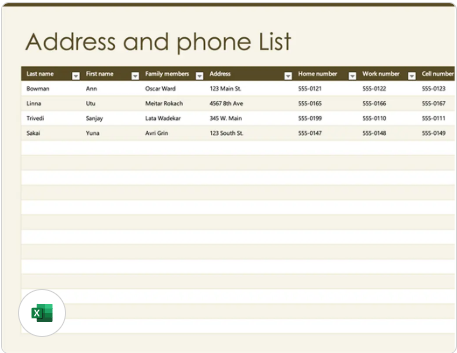
This Excel template’s like a super-organized planner, with columns for names, addresses, and phone numbers. It’s great for businesses or personal use, perfect for mailing lists or contact management. Ideal for keeping things clear and structured. Customize it in a snap.
This saved me for a bulk mailing project. The spreadsheet format was so easy to edit, and it kept my contacts neat and ready.
Tip: I’d pick the Simple Address Book for its no-fuss vibe—perfect for personal contacts. The Green Cute Personal Address Label adds a fun pop for holiday mailings. The Address and Phone List is great for data nerds who need structure. Download as PDF for printing or image for quick edits in WPS Office, depending on your needs.
Part 3. How to Further Edit and Print Optimized Address Templates with WPS
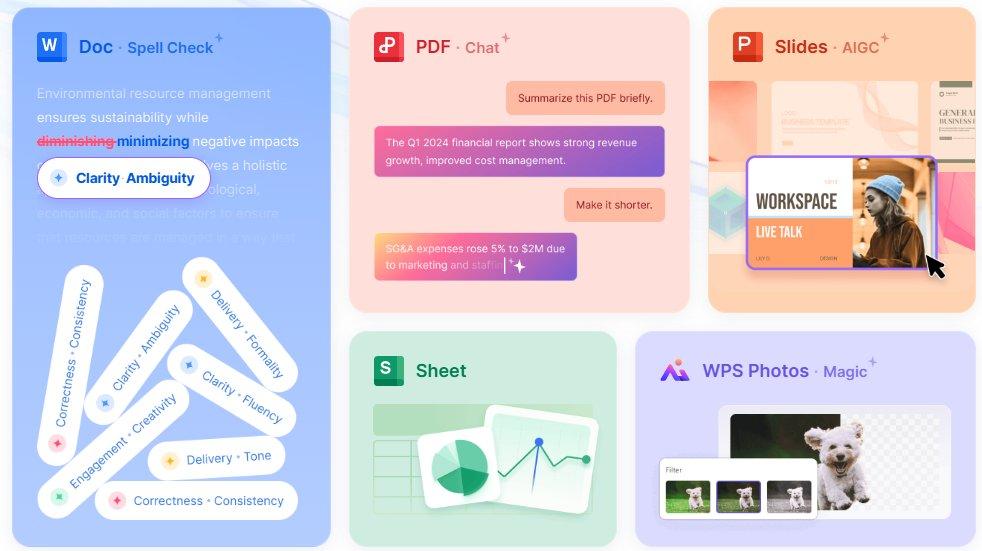
These 10 address templates offer practical, stylish ways to organize contacts or print labels, from minimalist postcards to detailed spreadsheets. Download them as PDFs for printing or images for fast digital tweaks, and personalize them to fit your needs. WPS Office makes editing a breeze with its Photo, PDF, Writer, and Spreadsheet tools. Here’s how to customize and print your address templates with simple steps.
How to Edit Address Templates in WPS Photo
Step 1: Open the Template in WPS Photo
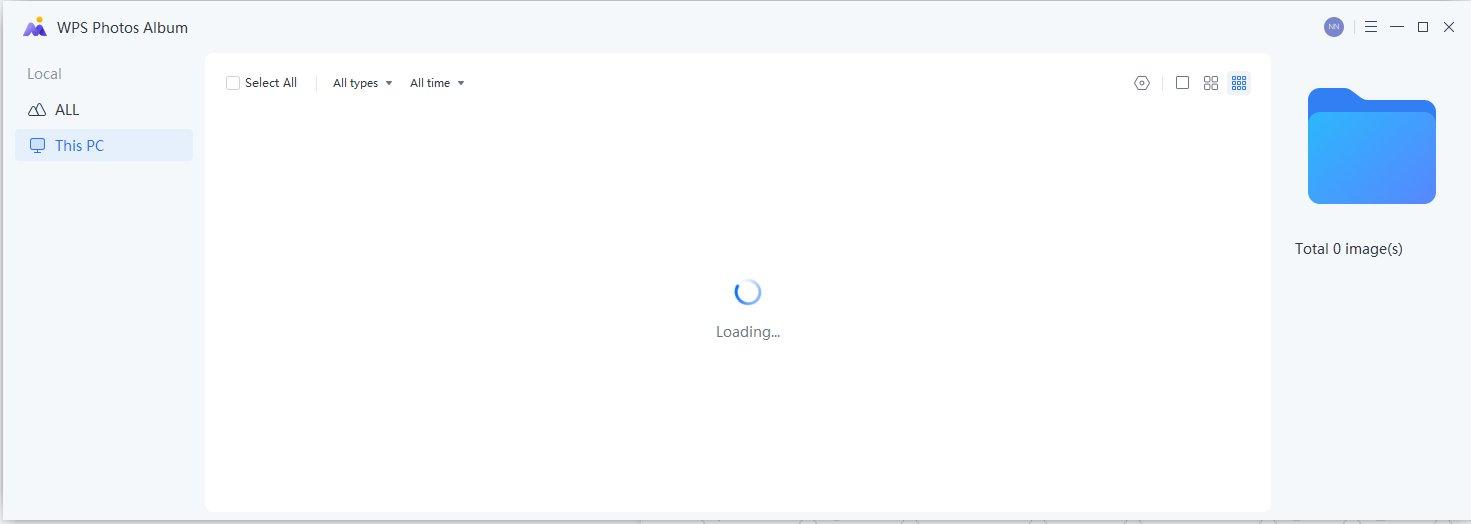
Download an image-based address template (PNG or JPG) from the links above. Open WPS Photo, part of WPS Office, at wps.com. Go to “File” > “Open” and pick your template. It loads instantly, ready for tweaks. Keep WPS updated for a smooth flow.
Step 2: Add or Replace Text
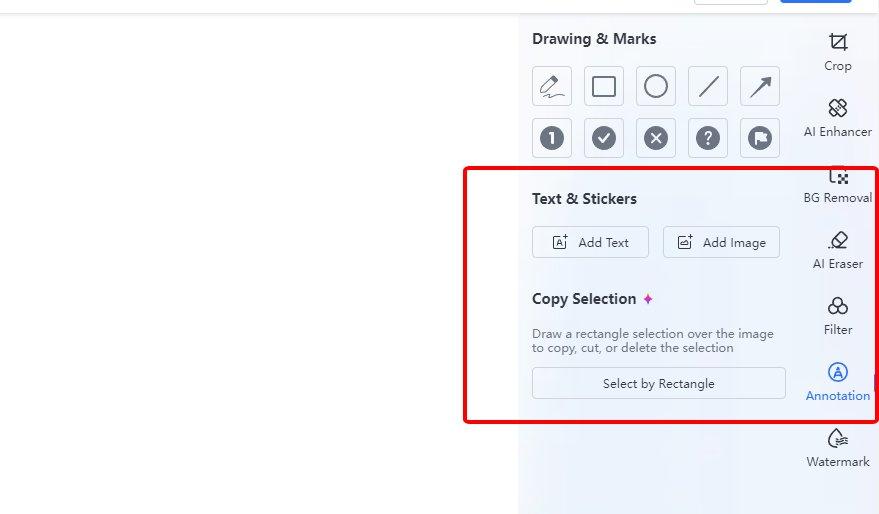
Click text areas to update names, addresses, or emails with WPS Photo’s AI text tools. Adjust fonts and sizes in the toolbar to match your style. The AI suggests formatting for a polished look. Save often to keep your changes safe.
Step 3: Enhance and Save
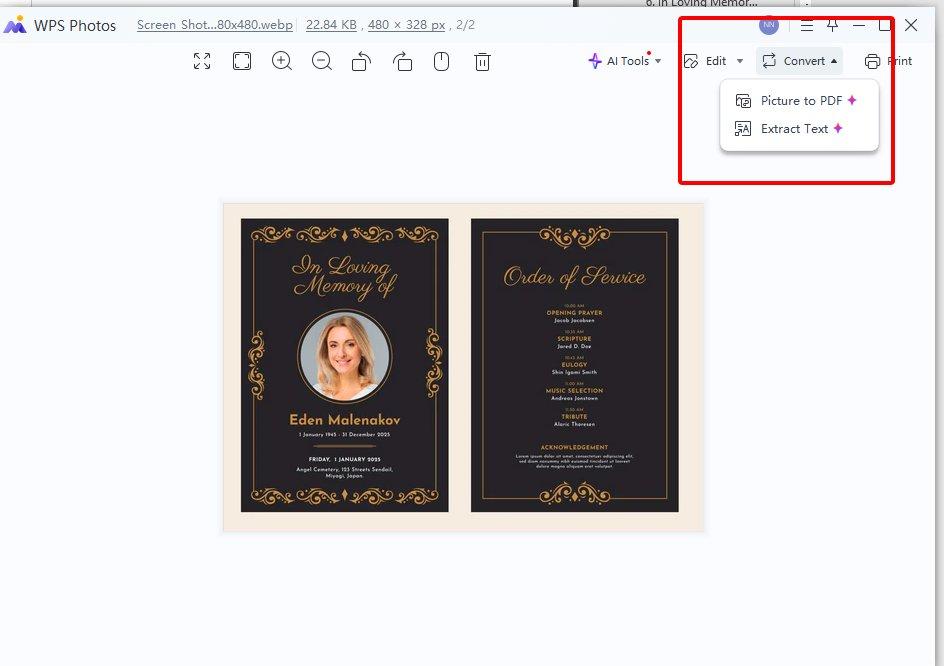
Use “Image Enhancer” or “Adjust Colors” to tweak visuals or match your vibe. Drag text or images to adjust the layout. Save as PNG or export to PDF via “File” > “Export.” Check clarity before finalizing. Your template’s ready to share or print.
How to Edit Address Templates in WPS PDF
Step 1: Import PDF Template into WPS PDF
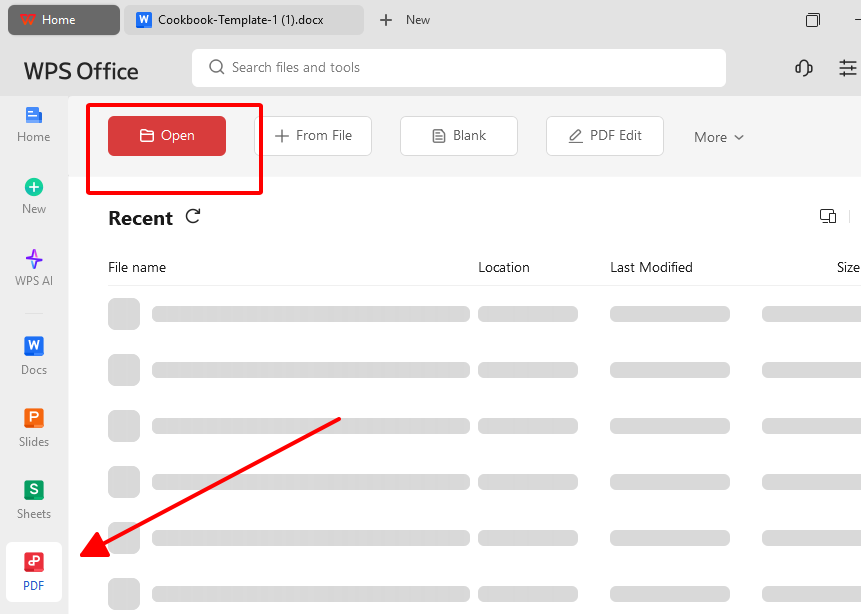
Download a PDF address template from the links above. Open WPS PDF, part of WPS Office. Go to “File” > “Open” and select your PDF. It loads clean, with formatting intact. WPS PDF is free and perfect for pro edits.
Step 2: Replace Text with Your Content
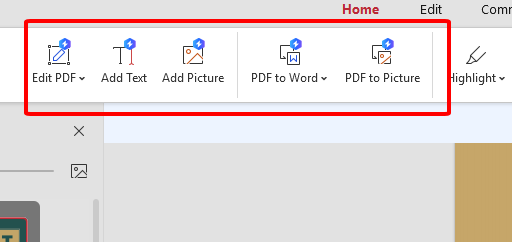
Click text fields to update names, addresses, or contact info with WPS PDF’s text tools. Add a logo via “Insert” > “Image” for branding. Adjust fonts to fit your style. Save frequently to secure your changes. Ensure it looks clean.
Step 3: Export or Print the PDF
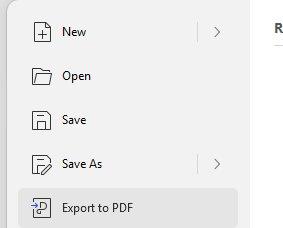
Save via “File” > “Save.” Go to “File” > “Export to PDF” for sharing or “Print” for hard copies. Generate a shareable link via WPS cloud for collaboration. Check formatting for a crisp output. Your template’s ready to go.
How to Edit Address Templates in WPS Writer
Step 1: Open the Template in WPS Writer
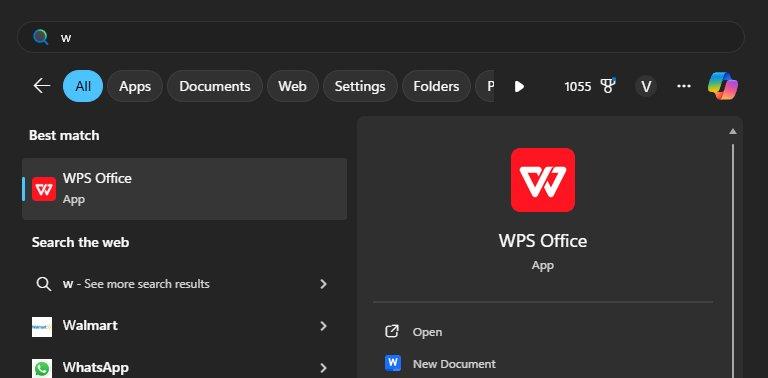
Download a Word-based address template from the links above. Open WPS Writer, part of WPS Office. Go to “File” > “Open” and pick your .docx file. It loads in a snap, ready to customize. Keep WPS updated for a smooth ride.
Step 2: Customize Text and Details
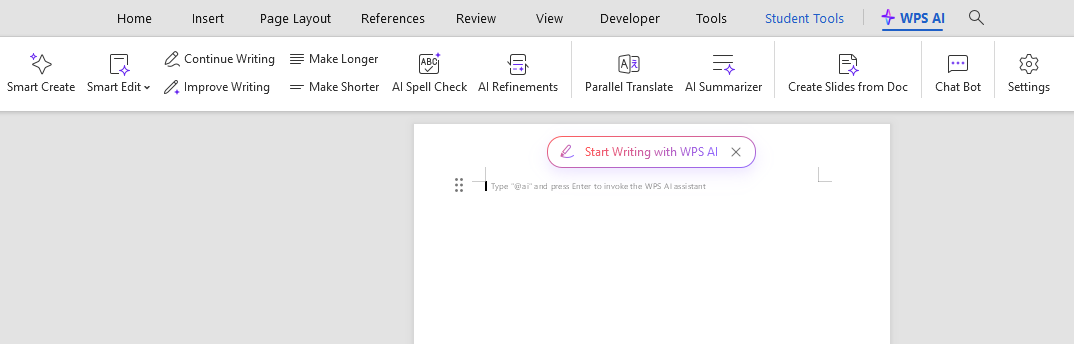
Click text fields to add names, addresses, or emails. Tweak fonts or colors in the toolbar to match your style. Add a logo or note as needed. WPS’s AI tools suggest formatting for a pro look. Save often to lock in changes.
Step 3: Save and Export to PDF
Save with “File” > “Save.” Go to “File” > “Export to PDF” for sharing or printing. Check formatting for a clean look. Use WPS cloud for a shareable link to collaborate. Your template’s ready to use.
How to Edit Address Templates in WPS Spreadsheet
Step 1: Open the Template in WPS Spreadsheet
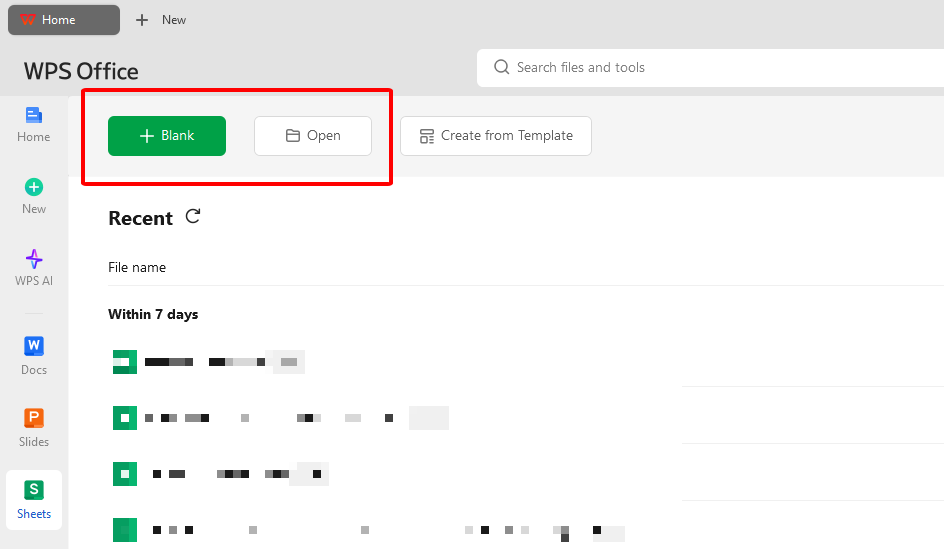
Download an Excel-based address template from the links above. Open WPS Spreadsheet, part of WPS Office. Go to “File” > “Open” and pick your .xlsx file. It loads fast, ready to tweak. Keep WPS updated for the best flow.
Step 2: Customize Cells and Details
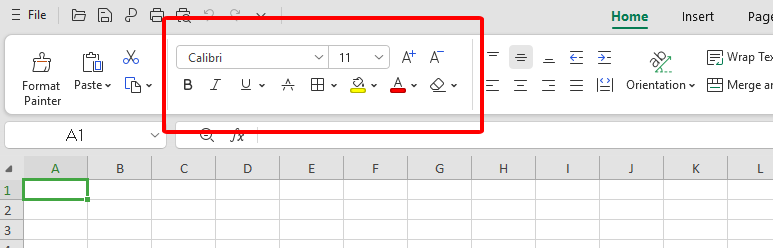
Click cells to update names, addresses, or contact info. Adjust fonts, colors, or cell sizes in the toolbar to fit your style. Add rows or columns for extra details. WPS’s AI tools suggest formatting for clarity. Save often to secure your work.
Step 3: Save and Export to PDF
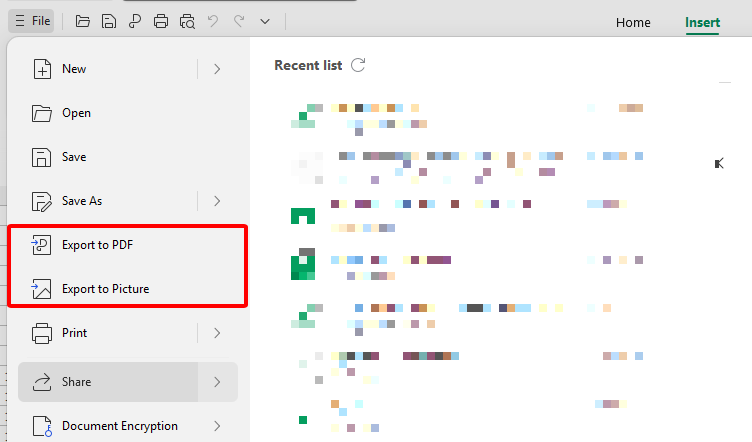
Save with “File” > “Save.” Go to “File” > “Export to PDF” for sharing or printing. Check formatting to avoid quirks. Use WPS cloud for a shareable link to collaborate. Your template’s good to go.
I customized an Excel address list spreadsheet template for a client mailing in WPS Spreadsheet, and it was like organizing my desk—quick and satisfying. Adding names and addresses was a breeze, and the AI formatting tips made it look pro. The PDF export gave me a sharp file ready for printing.
Part 4. Your Excellent Editing Helper–WPS Office
alt tag:
WPS Office is a free, all-in-one suite that makes crafting an address template feel like a quick coffee run. It handles Word, Excel, PDF, and Presentation files, syncing perfectly with Microsoft formats. Its lightweight 200MB size runs smoothly on Win7, 10, 11, macOS, Linux, and mobile. The template store’s packed with free address forms, and its tools are so simple you don’t need to be a tech pro. It’s like a buddy who’s got your back for any project.
Features
WPS Office saved my bacon for a last-minute mailing project. The template store had so many great address templates, and the AI tools helped me tweak them to look sharp. Cloud sharing let my team add input, and it ran like a dream on my old laptop. It made a tedious task feel like a breeze.
FAQs
1. Are these address templates really free to use in WPS?
Yup, most WPS templates are free to grab and edit. Some premium ones might need a Pro plan, but there’s tons of free address forms.
2. Can I print the label templates directly from WPS?
Totally, WPS Writer or Spreadsheet lets you print labels directly, no hassle.
3. Does WPS support mail merge for sending bulk letters?
Yes, WPS supports mail merge with address data from Excel or CSV, making bulk mailings a snap.
4. Can I use WPS templates on mobile?
Absolutely, WPS Office apps for Android and iOS let you edit templates on your phone or tablet.
5. Can I add my logo to the templates?
Yep, WPS makes it super easy to pop in a logo for a branded look, no design skills needed.

'%3e%3cpath%20d='M19.9911%204.11386V6.471H18.5894C18.0775%206.471%2017.7322%206.57814%2017.5536%206.79243C17.3751%207.00671%2017.2858%207.32814%2017.2858%207.75671V9.44421H19.9019L19.5536%2012.0871H17.2858V18.8639H14.5536V12.0871H12.2769V9.44421H14.5536V7.49779C14.5536%206.39064%2014.8632%205.53201%2015.4822%204.92189C16.1013%204.31177%2016.9257%204.00671%2017.9554%204.00671C18.8304%204.00671%2019.509%204.04243%2019.9911%204.11386Z'%20fill='%23333333'/%3e%3c/g%3e%3cdefs%3e%3cclipPath%20id='clip0_2938_8199'%3e%3crect%20width='16'%20height='16'%20fill='white'%20transform='translate(8%204.00671)'/%3e%3c/clipPath%3e%3c/defs%3e%3c/svg%3e)
'%3e%3cpath%20d='M17.5237%2010.7813L23.4811%204H22.0699L16.8949%209.88693L12.7648%204H8L14.2469%2012.9029L8%2020.0133H9.4112L14.8725%2013.7952L19.2352%2020.0133H24M9.92053%205.04213H12.0885L22.0688%2019.0224H19.9003'%20fill='%23333333'/%3e%3c/g%3e%3cdefs%3e%3cclipPath%20id='clip0_2938_8200'%3e%3crect%20width='16'%20height='16.0134'%20fill='white'%20transform='translate(8%204)'/%3e%3c/clipPath%3e%3c/defs%3e%3c/svg%3e)


