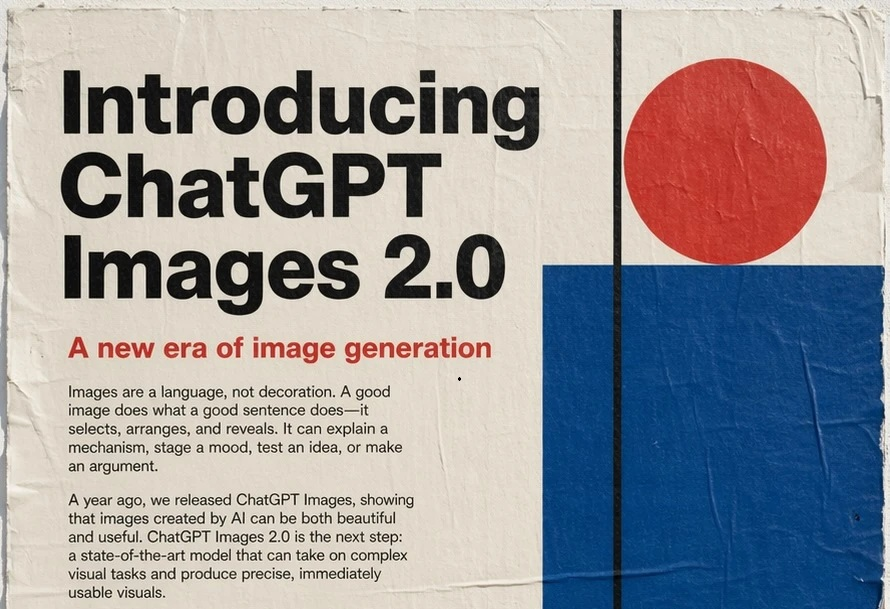
The landscape of AI-assisted creativity just shifted. On April 22, 2026, OpenAI officially launched ChatGPT Images 2.0—the most advanced multimodal image model to date, designed for complex visual tasks and precise, ready-to-use outputs. It marks a leap forward in instruction following, text rendering, and layout logic, moving AI images from "artistic experiments" to practical production assets.
introducing ChatGPT Images 2.0
What is ChatGPT Images
2.0?
ChatGPT Images 2.0is OpenAI’s next-generation image
generation model, integrated natively into ChatGPT. It’s the first
OpenAI image model with thinking capabilities—it can plan layouts,
reason about spatial relationships, and even verify outputs for
accuracy.
Unlike earlier models that only mimic pixels,ChatGPT Images
2.0understands context, object relationships, and multilingual
text with near-perfect precision. It supports text-to-image,
image-to-image editing, and consistent multi-image series.
Key Features of
ChatGPT Images 2.0
1.
Industry-Leading Instruction Following
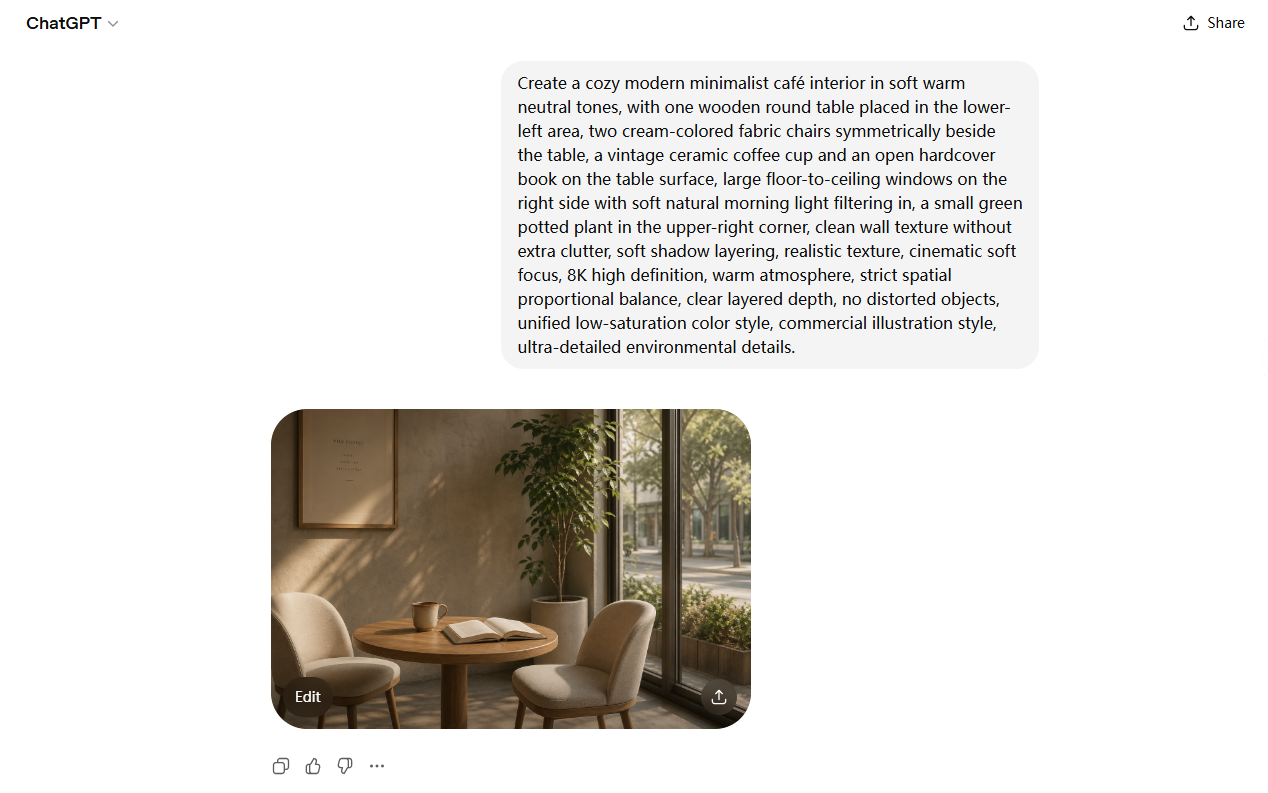
ChatGPT Images 2.0 excels at detailed prompt adherence,
accurately interpreting complex requests for composition, style, object
placement, and spatial logic. It follows long, structured prompts
reliably—no professional prompt engineering required.
GPT-Images2.0 follows complex prompts accurately
2. Flawless
Multilingual Text Rendering
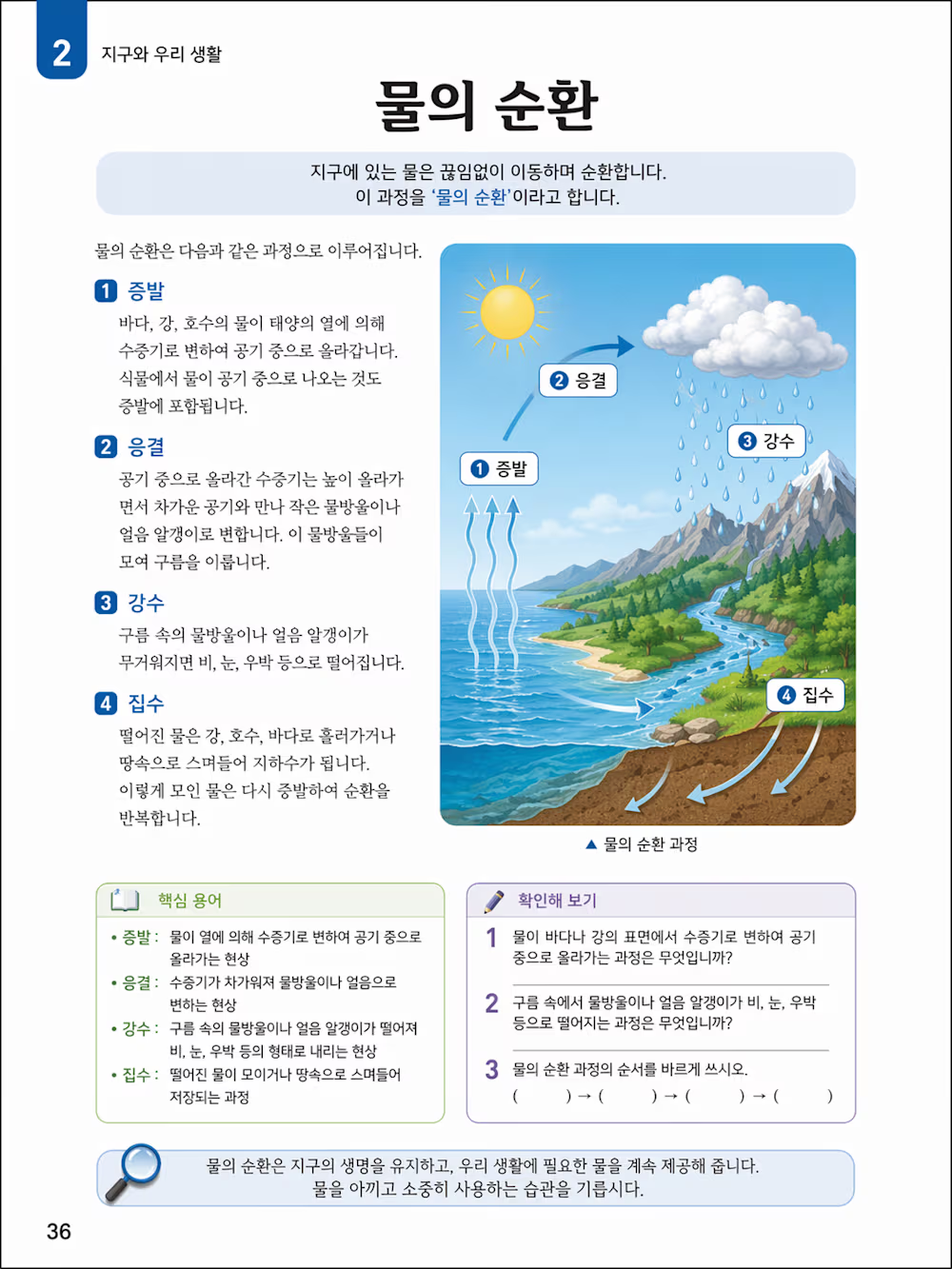
A major breakthrough: 99%+ accuracy for text in images,
including dense labels, small fonts, and non-Latin scripts. Menus,
posters, and UI elements no longer have garbled text or distorted
characters.
GPT-Images 2.0 renders complex Korean labels without distortion
Maintain perfect consistency across multiple images of the same
character, product, or scene—critical for marketing, comics, and UI
mockups.
How to Use ChatGPT Images
2.0?
Step
1: Access ChatGPT Images 2.0 and Open the Image
Generator
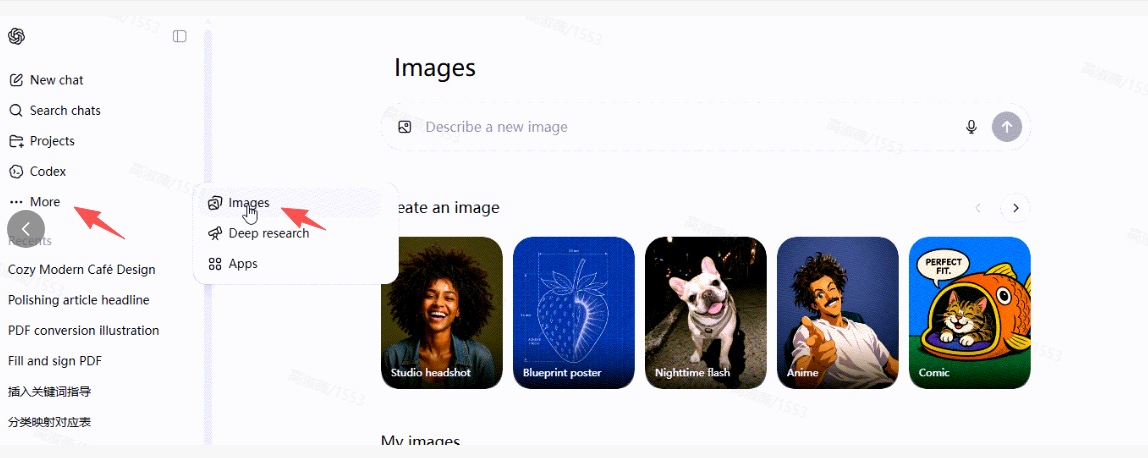
Open
browser and go to the ChatGPT website: https://chatgpt.com/, then log
in. Click on “More” and “Image”.
Access ChatGPT Images 2.0
Step 2:
Write a Clear Prompt & Generate
A clear prompt Include subject + scene + style + text +
composition for best results.
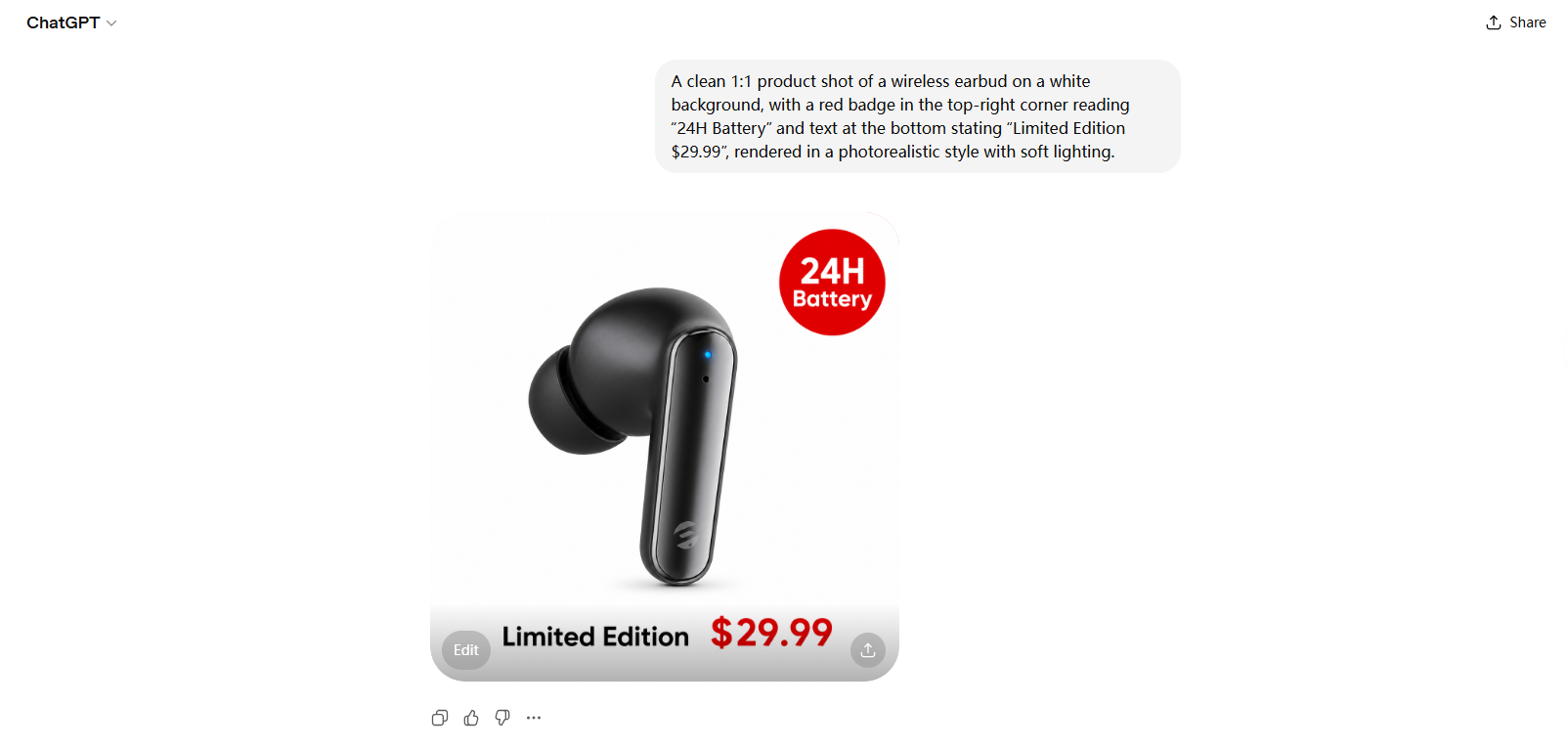
Example: A clean 1:1 product shot of a wireless earbud on a
white background, top-right red badge with "24H Battery," bottom text
"Limited Edition $29.99," photorealistic, soft lighting.
Please wait a moment and the image is being
generated.
Write a prompt and generate the image
Step 3: Edit &
Export
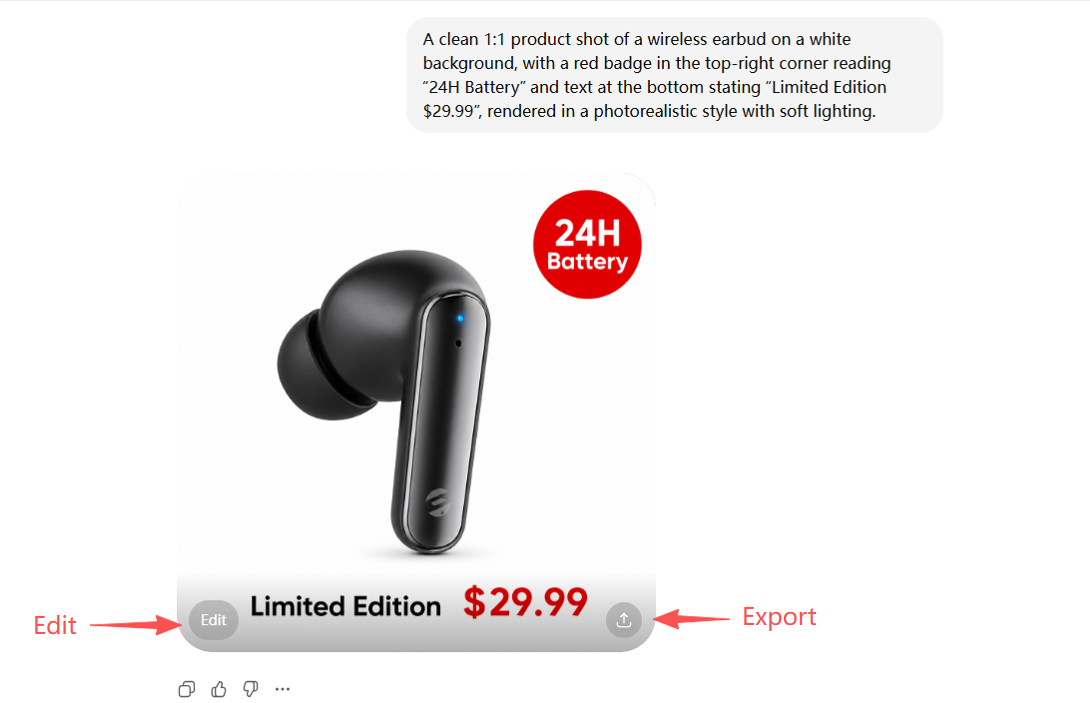
Click
on the generated image to open the editing panel, where you can adjust
the aspect ratio , make localised optimisations (e.g., "Make the text
bigger"), or generate a new image.
Edit and export the image
GPT-Images2.0 vs. Traditional AI Image Tools
Aspect
GPT-Image2
Older AI
Models
Text Rendering
Accurate, multilingual
Garbled/distorted
Instruction Following
Complex prompts, precise
layout
Basic prompts only
Reasoning
Thinking mode +
self-check
No logic, pixel-only
Resolution
Up to 2K
Max 1024x1024
Consistency
Multi-image coherence
Inconsistent details
Commercial Use
Production-ready
Limited usability
All-in-One Office Alternative: WPS AI Copilot
While GPT-Images2.0 excels at professional image creation, it
focuses solely on visuals and requires a separate ChatGPT subscription.
For users needing integrated document, presentation, spreadsheet, and AI
image tools, WPS AI Copilot offers a more efficient,
all-in-one solution.
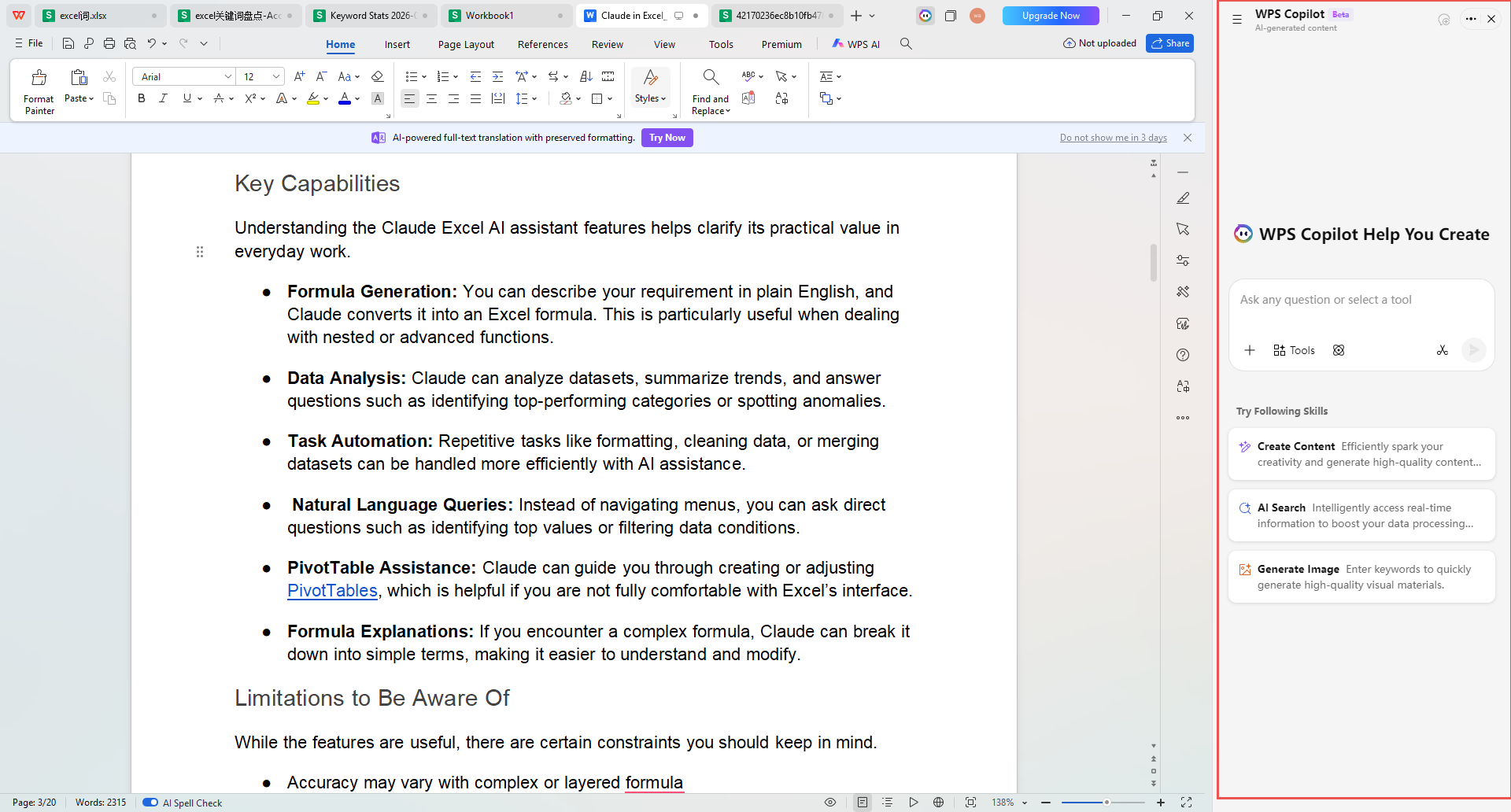
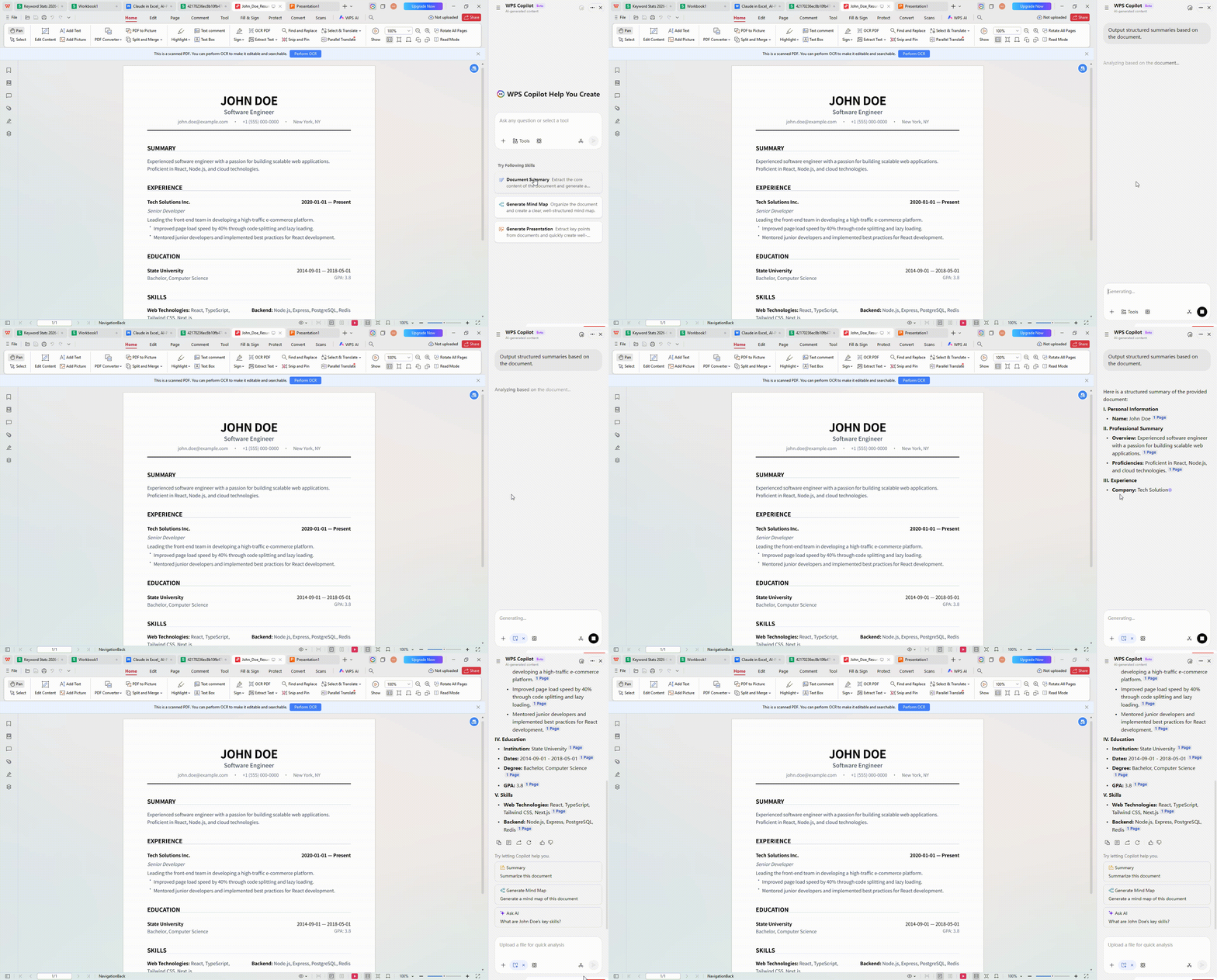
WPS AI Copilot
Why choose WPS AI
Copilot:
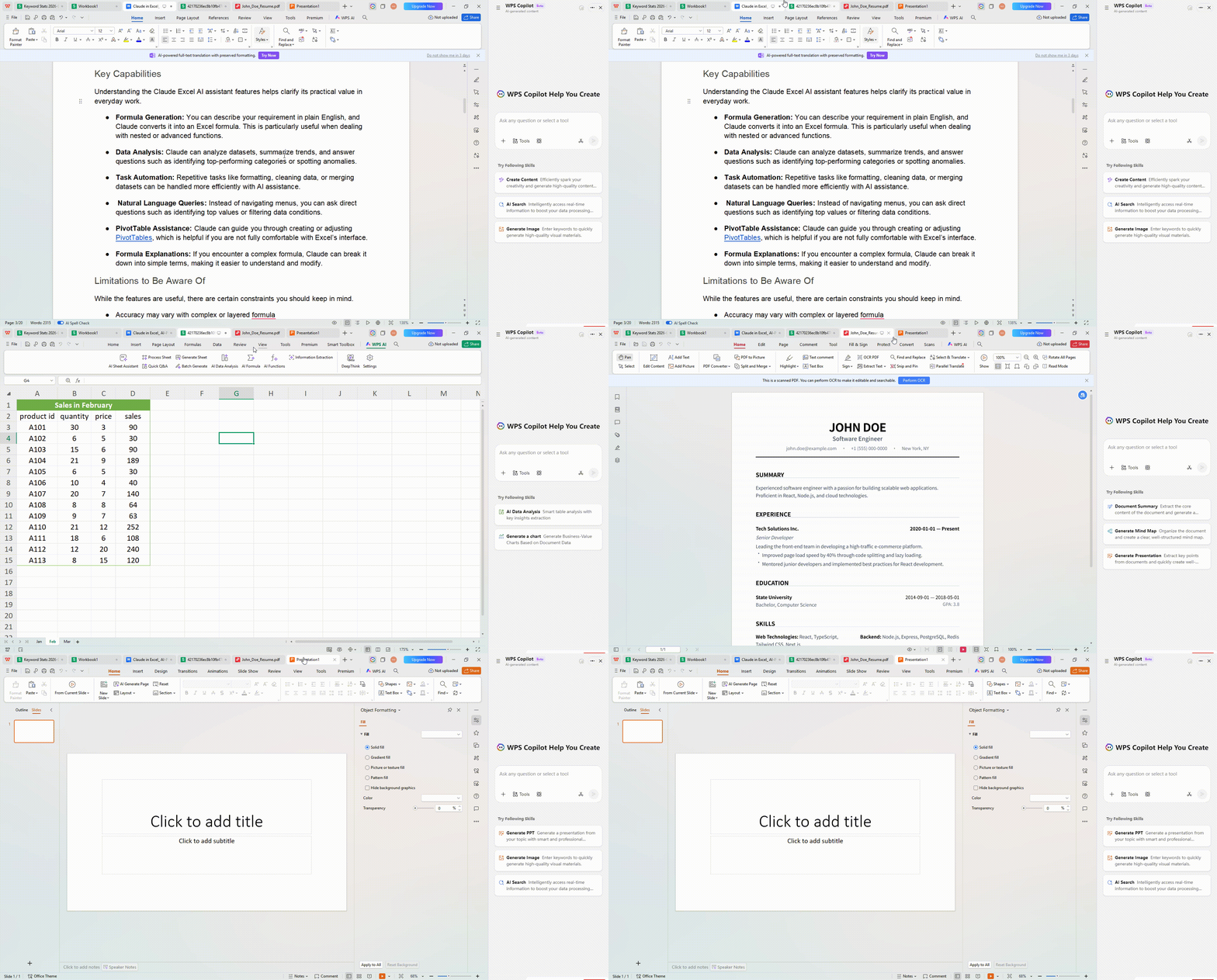
Universal AI Presence: In WPS Office, the
AI isn't just a sidebar add-on; it is a core component that works acrossDocs, Slides, Sheets, and a world-class PDF editor.
Advanced PDF Intelligence: While Word
plugins often struggle with fixed formats, WPS AI can summarize, extract
data from, and even rewrite scanned PDFs with ease.
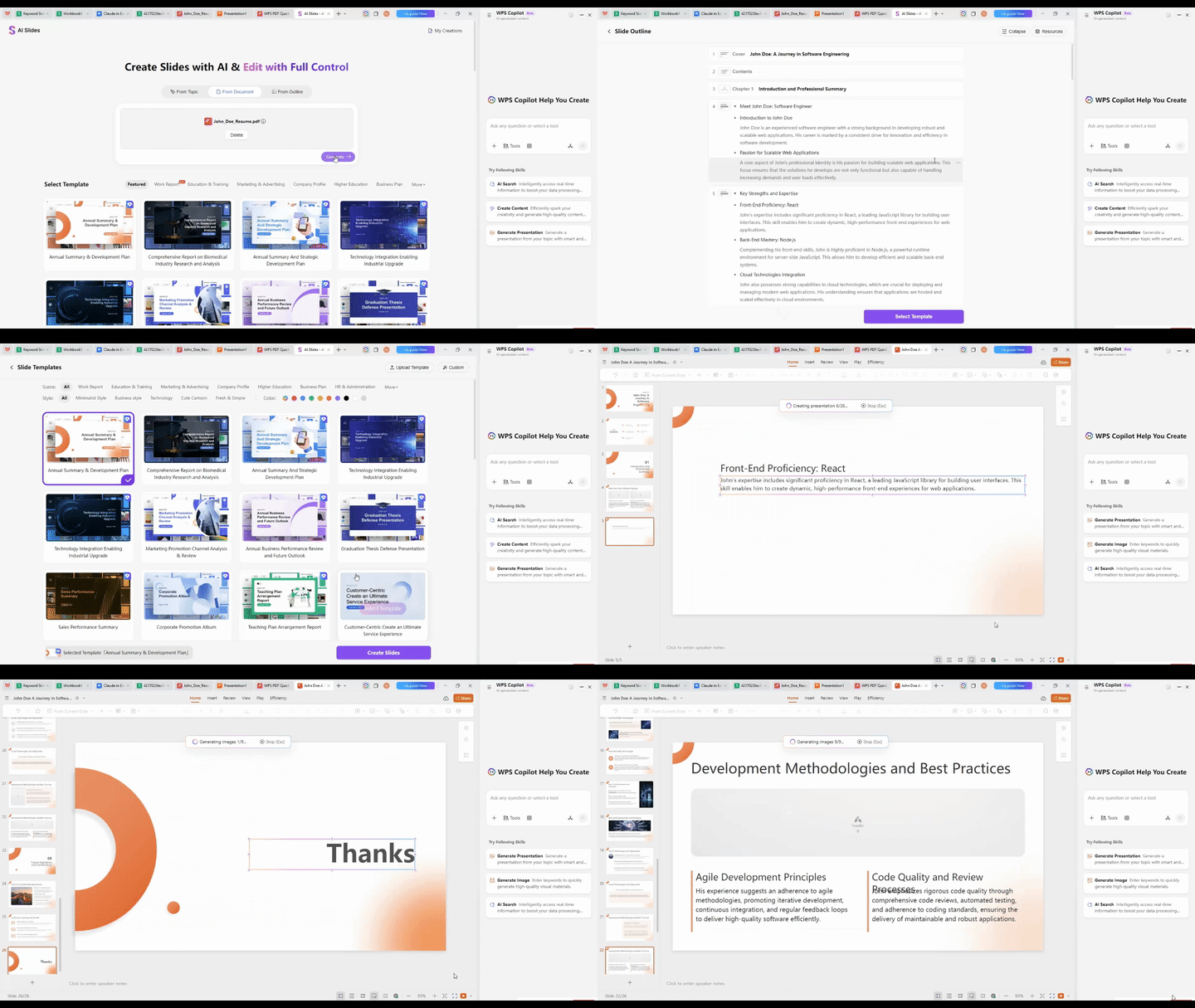
Seamless Creative Flow: Need to turn your
document into a presentation? WPS AI can generate an entire PPT deck
based on your Word content in seconds—something the current Claude
plugin cannot do.
Optimized for Global Workflows: WPS AI
offers localized support and a more accessible pricing structure, making
it the smarter choice for teams that need comprehensive AI tools without
the premium "enterprise-only" gatekeeping.
FAQ
1. Is GPT-Images2.0
free?
Free users get 3 basic generations/month; full features
(Thinking Mode, 2K) require ChatGPT Plus/Enterprise.
2.
Can I use GPT-Images2.0 for commercial projects?
Yes—within OpenAI’s terms, outputs are cleared for commercial
use (e.g., marketing, e-commerce, presentations).
3.
What’s the difference between GPT Images 1.0 and GPT Images
2.0?
GPT Images 1.0 was OpenAI’s first natively built image model,
introduced as part of the ChatGPT product in 2024. GPT Images 2.0 builds
on it with significantly better text rendering, stronger instruction
following, improved photorealism, and the ability to handle complex
multi-element layouts. For most practical use cases, GPT Images 2.0 is
the better choice.
4.
How should I prompt ChatGPT Images 2.0 for best
results?
Start with layout and structure, then describe style. Specify
exact text you want rendered. Use the conversational interface to
iterate — you don’t need a perfect prompt on the first try. Set aspect
ratio or format constraints at the beginning. Avoid vague aesthetic
descriptors and use specific, concrete language about what you want in
the image.
Conclusion:
GPT Images 2.0 sets a new standard for AI image generation,
combining precision, intelligence, and usability in one tool. Its
Thinking Mode, flawless text rendering, and consistent outputs make it
ideal for professionals and creators.
For those seeking unified AI office capabilities, WPS AI
Copilot complements GPT Images 2.0 by integrating image creation with
document, presentation, and data tools—all in one platform.
Whether you’re designing marketing visuals with GPT Images 2.0
or streamlining workflows with WPS AI Copilot, AI is making high-quality
creation faster and more accessible than ever.
15 ani de experiență în industria de birouri, iubitor de tehnologie și copywriter. Urmărește-mă pentru recenzii de produse, comparații și recomandări pentru aplicații și software noi.


'%3e%3cpath%20d='M8%200C12.4183%200%2016%203.58172%2016%208C16%2012.4183%2012.4183%2016%208%2016C3.58172%2016%200%2012.4183%200%208C0%203.58172%203.58172%200%208%200ZM11.6162%204.38379C11.2257%203.99337%2010.5927%203.99338%2010.2021%204.38379L8%206.58594L5.79785%204.38379C5.40732%203.99334%204.77429%203.99329%204.38379%204.38379C3.99331%204.77429%203.99335%205.40733%204.38379%205.79785L6.58594%208L4.38379%2010.2021C3.99348%2010.5927%203.99341%2011.2257%204.38379%2011.6162C4.77426%2012.0066%205.40734%2012.0065%205.79785%2011.6162L8%209.41406L10.2021%2011.6162C10.5927%2012.0066%2011.2257%2012.0067%2011.6162%2011.6162C12.0067%2011.2257%2012.0066%2010.5927%2011.6162%2010.2021L9.41406%208L11.6162%205.79785C12.0066%205.40735%2012.0066%204.77429%2011.6162%204.38379Z'%20fill='%23080E17'%20fill-opacity='0.46'/%3e%3c/g%3e%3cdefs%3e%3cclipPath%20id='clip0_3761_713'%3e%3crect%20width='16'%20height='16'%20fill='white'/%3e%3c/clipPath%3e%3c/defs%3e%3c/svg%3e)


'%3e%3cpath%20fill-rule='evenodd'%20clip-rule='evenodd'%20d='M21.4999%2010.9993C21.4999%205.20009%2016.7986%200.498901%2010.9993%200.498901C5.19994%200.498901%200.498657%205.20009%200.498657%2010.9993C0.498657%2016.2404%204.33858%2020.5844%209.35855%2021.3722V14.0346H6.69238V10.9993H9.35855V8.68594C9.35855%206.05427%2010.9262%204.60062%2013.3248%204.60062C14.4736%204.60062%2015.6753%204.80571%2015.6753%204.80571V7.38979H14.3512C13.0468%207.38979%2012.64%208.19921%2012.64%209.0296V10.9993H15.5523L15.0867%2014.0346H12.64V21.3722C17.66%2020.5844%2021.4999%2016.2404%2021.4999%2010.9993Z'%20fill='%231568EA'/%3e%3c/g%3e%3c/svg%3e)


'%3e%3cpath%20d='M2.42045%2022.1876H6.31818V12.7217L0.75%208.54553V20.5171C0.75%2021.4414%201.49892%2022.1876%202.42045%2022.1876Z'%20fill='%234285F4'/%3e%3cpath%20d='M19.682%2022.1876H23.5797C24.5041%2022.1876%2025.2502%2021.4387%2025.2502%2020.5171V8.54553L19.682%2012.7217'%20fill='%2334A853'/%3e%3cpath%20d='M19.682%205.48293V12.7216L25.2502%208.54543V6.31816C25.2502%204.25236%2022.8921%203.07469%2021.2411%204.31361'%20fill='%23FBBC04'/%3e%3cpath%20d='M6.31824%2012.7217V5.48303L13.0001%2010.4944L19.6819%205.48303V12.7217L13.0001%2017.733'%20fill='%23EA4335'/%3e%3cpath%20d='M0.75%206.31816V8.54543L6.31818%2012.7216V5.48293L4.75909%204.31361C3.10534%203.07469%200.75%204.25236%200.75%206.31816Z'%20fill='%23C5221F'/%3e%3c/g%3e%3cdefs%3e%3cclipPath%20id='clip0_2954_7305'%3e%3crect%20width='24.5'%20height='18.375'%20fill='white'%20transform='translate(0.75%203.8125)'/%3e%3c/clipPath%3e%3c/defs%3e%3c/svg%3e)



'%3e%3cpath%20d='M19.9911%204.11386V6.471H18.5894C18.0775%206.471%2017.7322%206.57814%2017.5536%206.79243C17.3751%207.00671%2017.2858%207.32814%2017.2858%207.75671V9.44421H19.9019L19.5536%2012.0871H17.2858V18.8639H14.5536V12.0871H12.2769V9.44421H14.5536V7.49779C14.5536%206.39064%2014.8632%205.53201%2015.4822%204.92189C16.1013%204.31177%2016.9257%204.00671%2017.9554%204.00671C18.8304%204.00671%2019.509%204.04243%2019.9911%204.11386Z'%20fill='%23333333'/%3e%3c/g%3e%3cdefs%3e%3cclipPath%20id='clip0_2938_8199'%3e%3crect%20width='16'%20height='16'%20fill='white'%20transform='translate(8%204.00671)'/%3e%3c/clipPath%3e%3c/defs%3e%3c/svg%3e)
'%3e%3cpath%20d='M17.5237%2010.7813L23.4811%204H22.0699L16.8949%209.88693L12.7648%204H8L14.2469%2012.9029L8%2020.0133H9.4112L14.8725%2013.7952L19.2352%2020.0133H24M9.92053%205.04213H12.0885L22.0688%2019.0224H19.9003'%20fill='%23333333'/%3e%3c/g%3e%3cdefs%3e%3cclipPath%20id='clip0_2938_8200'%3e%3crect%20width='16'%20height='16.0134'%20fill='white'%20transform='translate(8%204)'/%3e%3c/clipPath%3e%3c/defs%3e%3c/svg%3e)


