

'%3e%3cpath%20d='M8%200C12.4183%200%2016%203.58172%2016%208C16%2012.4183%2012.4183%2016%208%2016C3.58172%2016%200%2012.4183%200%208C0%203.58172%203.58172%200%208%200ZM11.6162%204.38379C11.2257%203.99337%2010.5927%203.99338%2010.2021%204.38379L8%206.58594L5.79785%204.38379C5.40732%203.99334%204.77429%203.99329%204.38379%204.38379C3.99331%204.77429%203.99335%205.40733%204.38379%205.79785L6.58594%208L4.38379%2010.2021C3.99348%2010.5927%203.99341%2011.2257%204.38379%2011.6162C4.77426%2012.0066%205.40734%2012.0065%205.79785%2011.6162L8%209.41406L10.2021%2011.6162C10.5927%2012.0066%2011.2257%2012.0067%2011.6162%2011.6162C12.0067%2011.2257%2012.0066%2010.5927%2011.6162%2010.2021L9.41406%208L11.6162%205.79785C12.0066%205.40735%2012.0066%204.77429%2011.6162%204.38379Z'%20fill='%23080E17'%20fill-opacity='0.46'/%3e%3c/g%3e%3cdefs%3e%3cclipPath%20id='clip0_3761_713'%3e%3crect%20width='16'%20height='16'%20fill='white'/%3e%3c/clipPath%3e%3c/defs%3e%3c/svg%3e)


'%3e%3cpath%20fill-rule='evenodd'%20clip-rule='evenodd'%20d='M21.4999%2010.9993C21.4999%205.20009%2016.7986%200.498901%2010.9993%200.498901C5.19994%200.498901%200.498657%205.20009%200.498657%2010.9993C0.498657%2016.2404%204.33858%2020.5844%209.35855%2021.3722V14.0346H6.69238V10.9993H9.35855V8.68594C9.35855%206.05427%2010.9262%204.60062%2013.3248%204.60062C14.4736%204.60062%2015.6753%204.80571%2015.6753%204.80571V7.38979H14.3512C13.0468%207.38979%2012.64%208.19921%2012.64%209.0296V10.9993H15.5523L15.0867%2014.0346H12.64V21.3722C17.66%2020.5844%2021.4999%2016.2404%2021.4999%2010.9993Z'%20fill='%231568EA'/%3e%3c/g%3e%3c/svg%3e)


'%3e%3cpath%20d='M2.42045%2022.1876H6.31818V12.7217L0.75%208.54553V20.5171C0.75%2021.4414%201.49892%2022.1876%202.42045%2022.1876Z'%20fill='%234285F4'/%3e%3cpath%20d='M19.682%2022.1876H23.5797C24.5041%2022.1876%2025.2502%2021.4387%2025.2502%2020.5171V8.54553L19.682%2012.7217'%20fill='%2334A853'/%3e%3cpath%20d='M19.682%205.48293V12.7216L25.2502%208.54543V6.31816C25.2502%204.25236%2022.8921%203.07469%2021.2411%204.31361'%20fill='%23FBBC04'/%3e%3cpath%20d='M6.31824%2012.7217V5.48303L13.0001%2010.4944L19.6819%205.48303V12.7217L13.0001%2017.733'%20fill='%23EA4335'/%3e%3cpath%20d='M0.75%206.31816V8.54543L6.31818%2012.7216V5.48293L4.75909%204.31361C3.10534%203.07469%200.75%204.25236%200.75%206.31816Z'%20fill='%23C5221F'/%3e%3c/g%3e%3cdefs%3e%3cclipPath%20id='clip0_2954_7305'%3e%3crect%20width='24.5'%20height='18.375'%20fill='white'%20transform='translate(0.75%203.8125)'/%3e%3c/clipPath%3e%3c/defs%3e%3c/svg%3e)


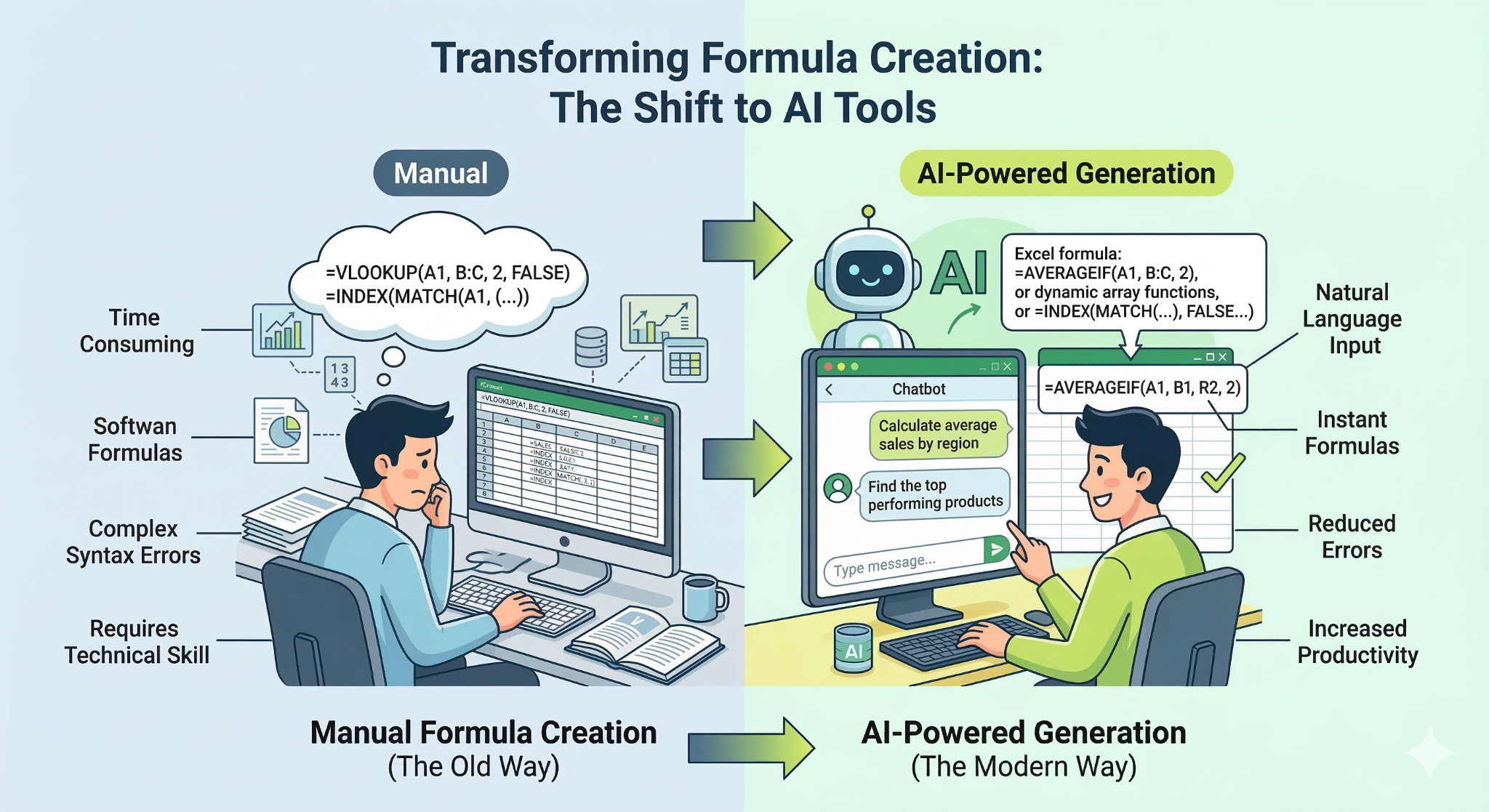
Excel is one of the most widely used tools for data analysis and everyday office tasks, but writing formulas; especially nested or conditional ones, can still be difficult. Many users know what they want to calculate but struggle to turn that logic into the correct formula. Searching online often leads to examples that don’t fit their spreadsheet structure. Today, several AI tools can generate Excel formulas from simple instructions. In this guide, we compare four popular options and explain why WPS AI Sheet stands out for real spreadsheet workflows.
4 Best Excel Formula AI Tools
Before choosing the right solution, it helps to understand what tools are currently available. Several platforms now offer AI-powered formula generation, each with slightly different features and workflows. The following tools are among the most commonly used options for creating and explaining Excel formulaswith AI.
WPS AI Sheet
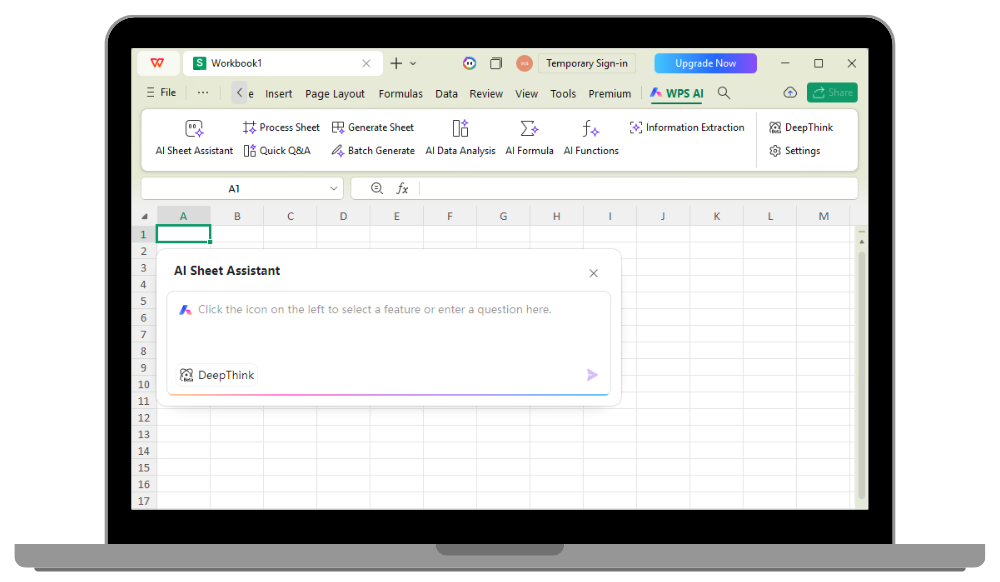
WPS AI Sheet is an AI-powered feature built into the WPS Office spreadsheet environment that helps users generate Excel-compatible formulas using natural language directly inside the spreadsheet interface. Instead of leaving your workbook to search for formulas online or recalling complex syntax, you can create, preview, and insert formulas instantly within the same sheet. The AI not only generates accurate formulas but can also explain how they work, making it easier to understand, learn, and trust the results.
Features:
Natural language formula generation Built-in formula explanation feature
Direct insertion into spreadsheet cells
Excel-compatible file support
AI assistance triggered inside the sheet interface
Strengths & Weaknesses of WPS AI Sheet:
| Pros | Cons |
|---|---|
| Works directly inside a spreadsheet environment | Some advanced AI features may require an internet connection |
| Generates and explains formulas clearly | Full functionality may depend on the latest WPS Office version |
| Compatible with Excel file formats | |
| Helpful for beginners and experienced users alike |
How to use WPS AI SHEET:
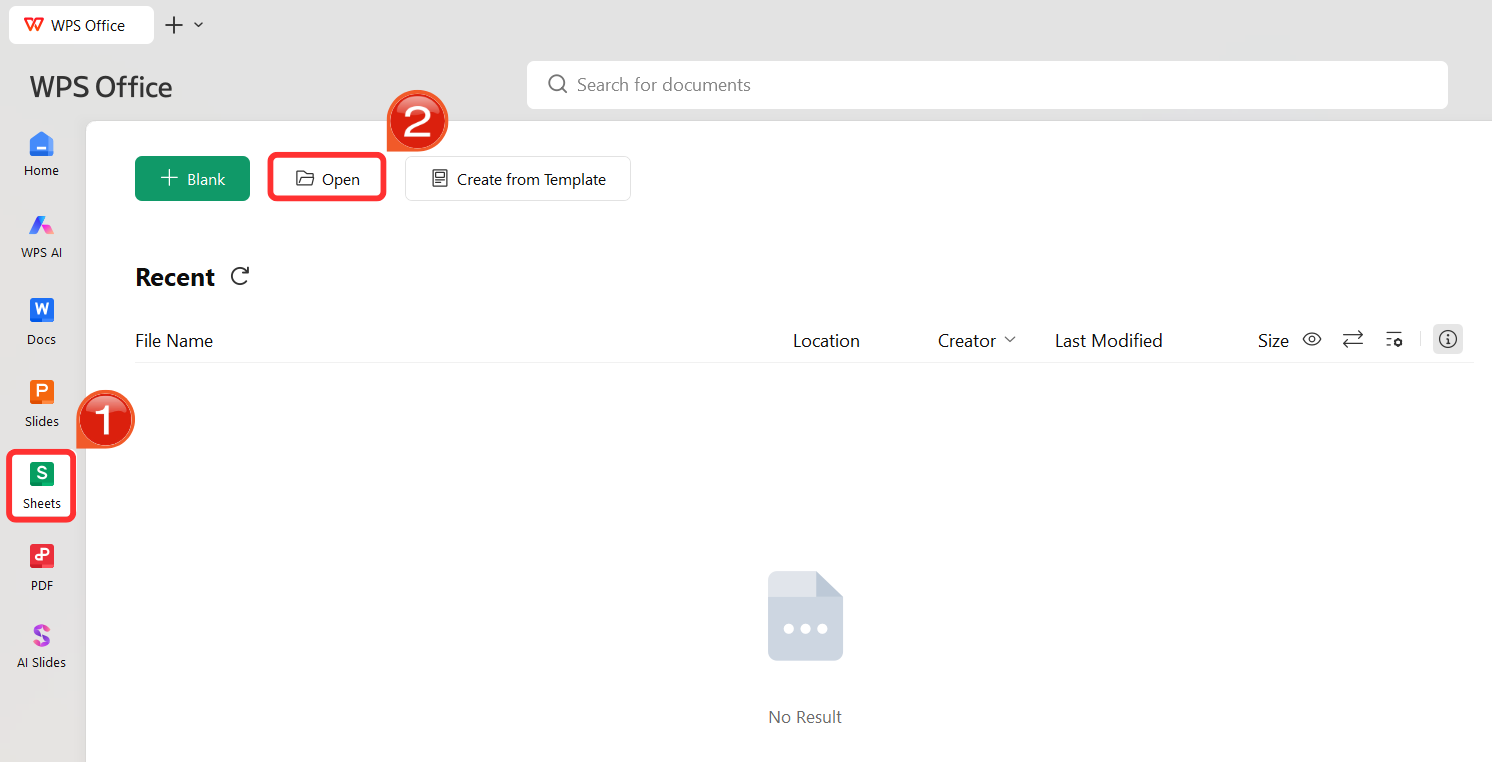
Step 1: Open WPS Spreadsheet andload your Excel file, or create a new one.
Step 2: Click on the cell where you want the formula.
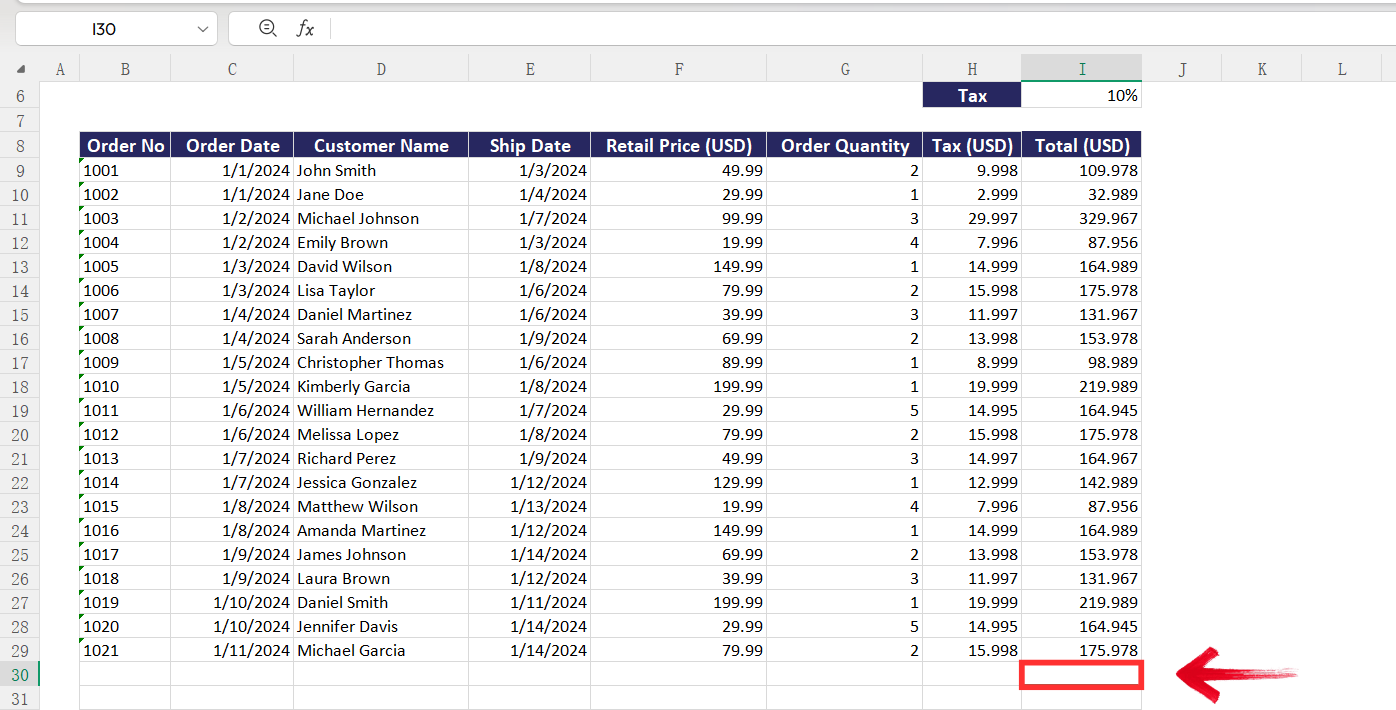
Step 3: Type “=” in the cell where you want the formula, and the “AI Formula” suggestion will pop up itself. You could choose to type the command in the cell.
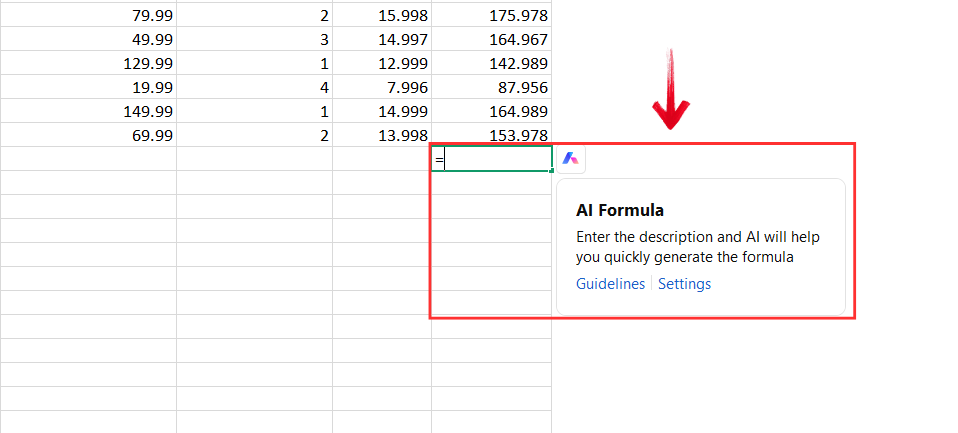
Alternatively, you could navigate to the WPS Toolbaron the top, and select “WPS AI” then click on “AI Formula” to type the command.
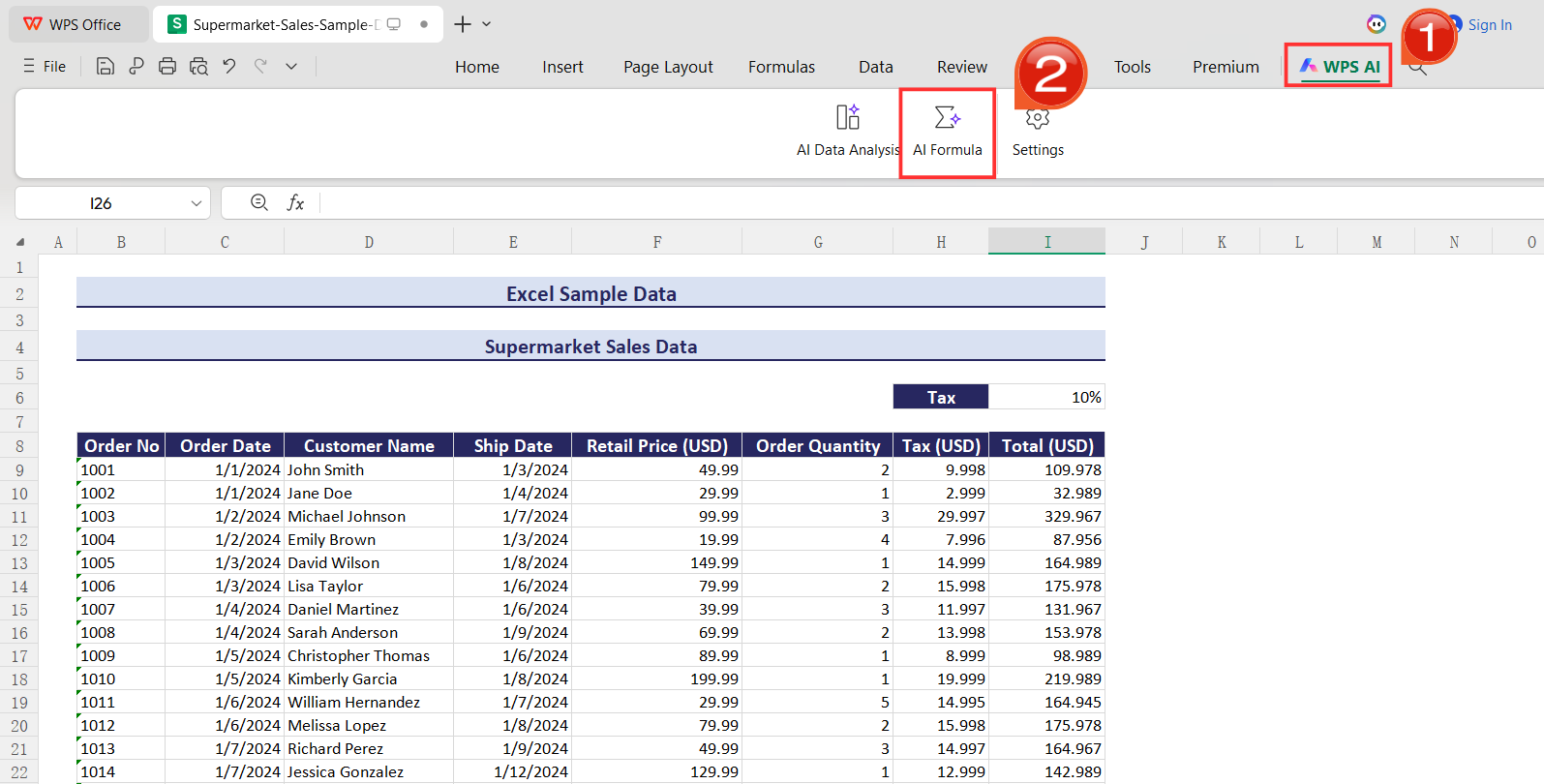
Step 4: Describe your calculation in simple words. For eg,
Prompt: sum sales for all orders in column ‘I’
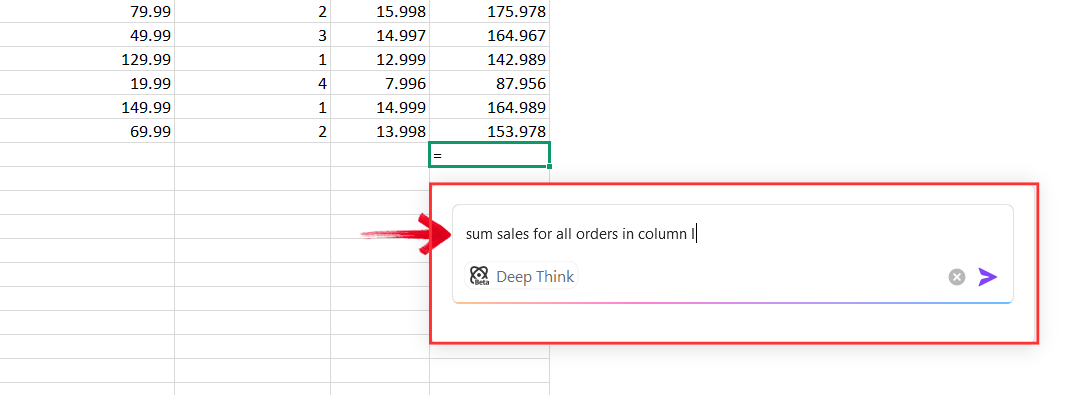
Step 5: Check the formula the AI gives you and insert it directly into the cell (or it will be automatically inserted in the selected cell)
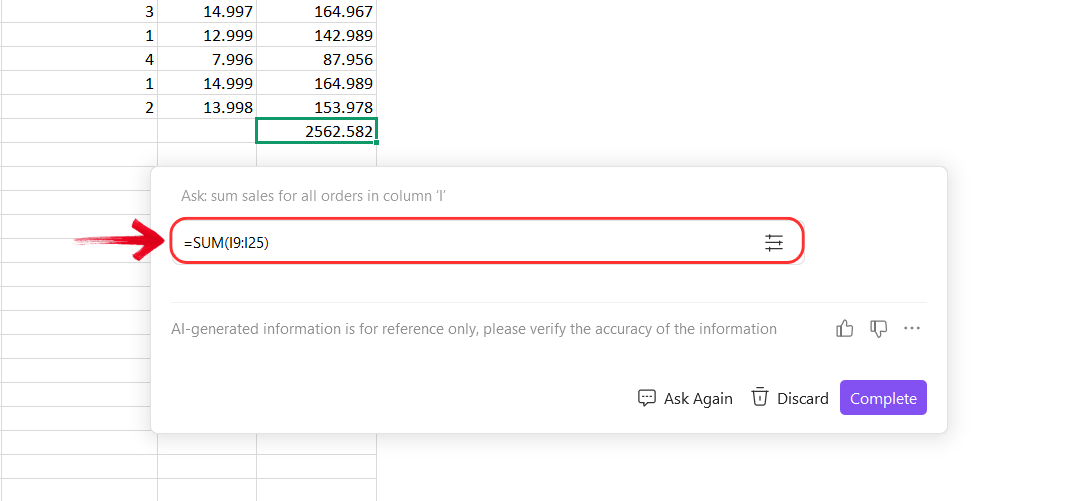
Tip: You can copy the formula given by theAI Formula Tool or fill it down across rows easily.
GPTExcel
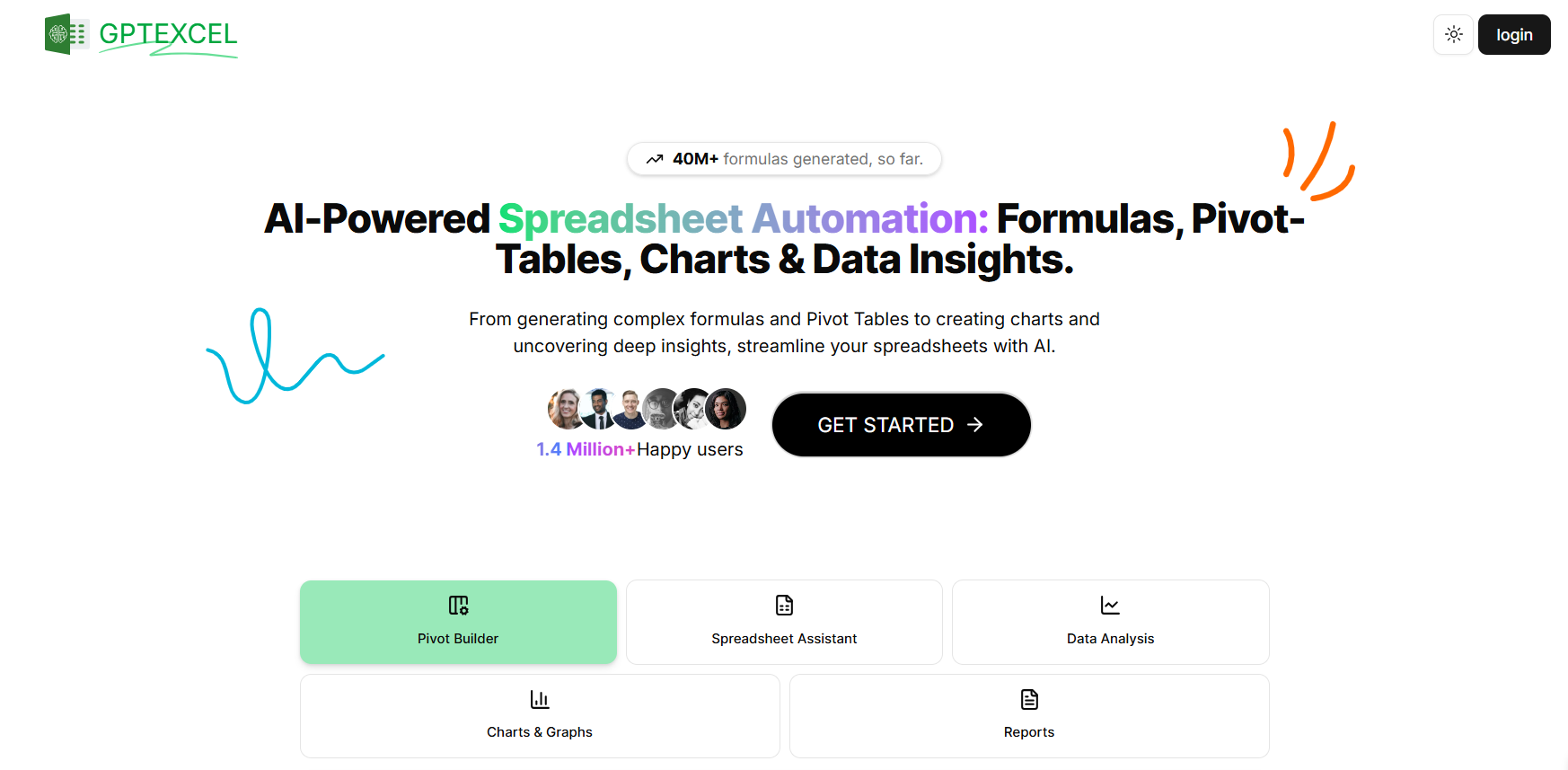
GPTExcel is an online AI tool designed to generate Excel and Google Sheets formulas from plain-language descriptions. It works as a standalone web platform where users type a request and receive a suggested formula. The tool also provides explanations for the formulas it generates, helping users understand the logic behind them. GPTExcel supports a wide range of functions, from basic calculations to advanced formulas like VLOOKUP, IF statements, and nested functions.
Features:
AI formula generation from text instructions
Support for Excel and Google Sheets formulas
Formula explanation capability
Simple browser-based interface
Strengths & Weaknesses of GPTExcel:
| Pros | Cons |
|---|---|
| Easy to use for quick formula generation | Requires copying formulas back into your spreadsheet |
| Supports multiple spreadsheet platforms | Workflow interruption when switching between tools |
| Provides explanations for generated formulas | Some advanced features require paid access |
Numerous AI Excel Formula Generator
Numerous AI is a productivity tool designed to automate repetitive spreadsheet tasks using artificial intelligence. Its AI Excel formula generator converts plain-language instructions into accurate formulas, helping users save time and reduce errors. In addition to formula generation, Numerous AI offers other AI-powered spreadsheet operations, such as data cleaning, formatting suggestions, and automation of routine tasks. While it may require a bit of setup for first-time users, its ability to handle both formulas and broader spreadsheet automation makes it a powerful option.

Features:
Natural language formula generation
AI-powered spreadsheet automation
Formula explanations and suggestions
Integration with spreadsheet workflows
| Pros | Cons |
|---|---|
| Strong automation capabilities | Setup may feel complex for beginners |
| Supports more than just formula generation | Some features require subscription plans |
| Useful for repetitive data tasks |
AI Excel Bot
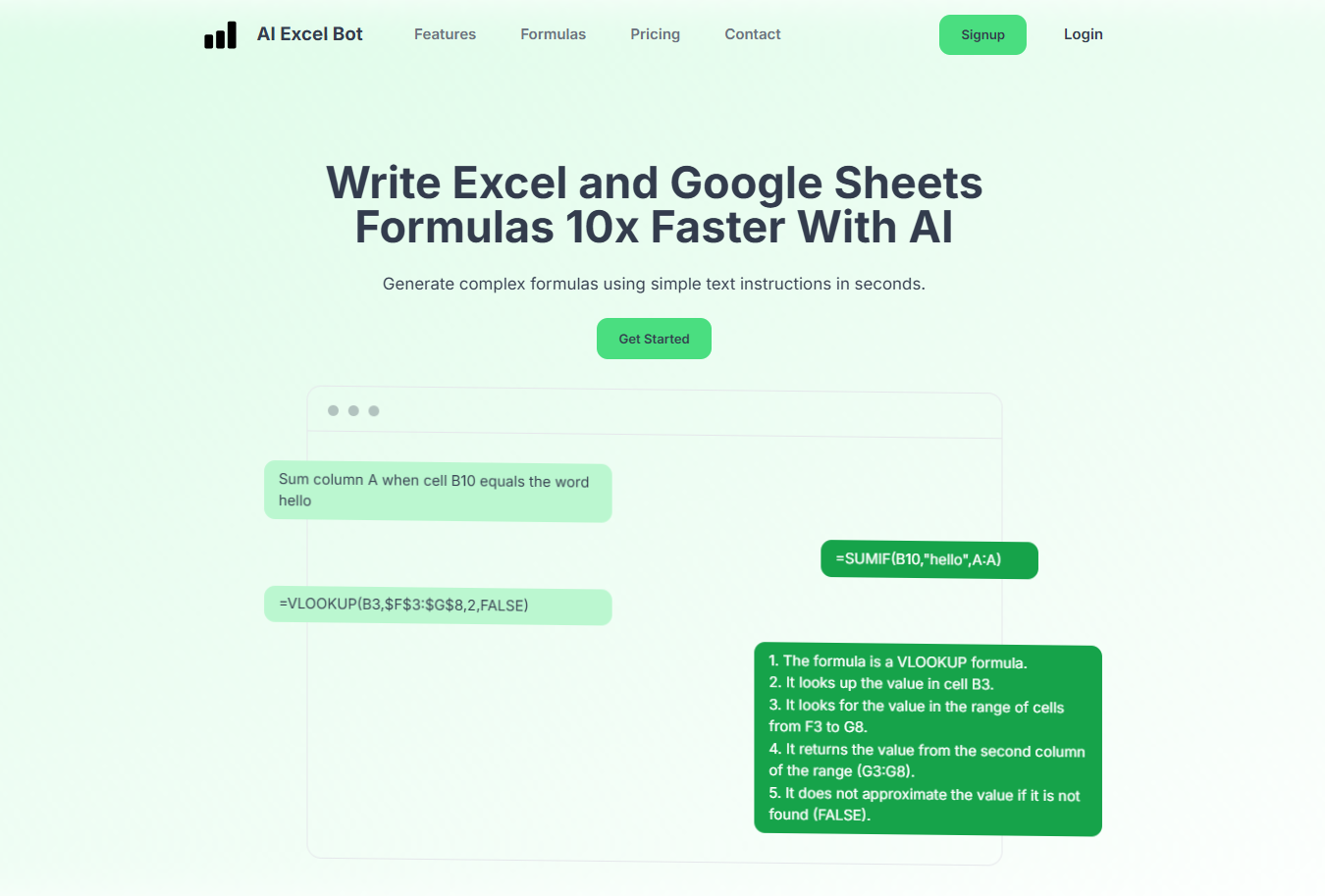
AI Excel Bot is a dedicated online tool built specifically for generating and explaining Excel formulas. Users can describe the calculation they want in plain language and receive both the corresponding formula and a clear explanation of how it works. The tool supports common Excel functions, including conditional logic, lookup functions, and text manipulations, making it useful for a variety of spreadsheet tasks. With its simple, beginner-friendly web interface, AI Excel Bot allows users to quickly create formulas without needing advanced Excel knowledge.
Features:
Text-to-formula generation
Formula explanation tools
Support for common Excel functions
Simple web-based interface
Strengths & Weaknesses of AI Excel Bot:
| Pros | Cons |
|---|---|
| Focused specifically on Excel formulas | External tool requiring copy-paste workflow |
| Simple and beginner-friendly interface | Limited features compared to full AI spreadsheet platforms |
| Provides formula explanations |
Excel Formula AI Tools Comparison Table
Below is a comparison of the four excel formula AI tools based on several important factors that affect real spreadsheet workflows.
| Feature | WPS AI Sheet | GPTExcel | Numerous AI | AI Excel Bot |
|---|---|---|---|---|
| Formula Generation Accuracy | High | High | High | Medium to high |
| Natural Language Understanding | Strong | Strong | Strong | Good |
| Formula Explanation | Yes | Yes | Yes | Yes |
| In-Sheet Use | Yes | No | Partial integration | No |
| Ease for Beginners | Very easy | Easy | Moderate | Easy |
| Excel Compatibility | Full Excel compatibility | Excel and Google Sheets | Spreadsheet platforms | Excel formulas |
| Pricing / Free Plan | Free with WPS + premium features | Free + paid plans | Paid plans available | Free + premium |
| Best Use Cases | Daily spreadsheet work | Quick formula generation | Automation tasks | Simple formula generation |
The comparison highlights that most Excel formula AI tools can generate formulas effectively, but they differ in how smoothly they integrate with real spreadsheet workflows. Understanding this difference helps explain why some tools feel more practical for everyday use.
Why WPS AI Sheet Fits Real Excel Formula Workflows
After comparing different Excel formula AI tools, one clear pattern emerges: many tools can generate formulas, but only a few truly support the way people actually work inside spreadsheets. In real situations, users rarely need just a formula. They need to understand it, modify it, and apply it across multiple rows without interrupting their workflow. This is where WPS AI Sheet stands out. Instead of acting as a separate formula generator, it integrates AI assistance directly into the spreadsheet environment, making formula creation faster, easier, and more practical for everyday Excel tasks.
Works directly inside the spreadsheet:
WPS AI Sheet integrates AI formula assistance directly into the Excel-style interface. Users can trigger AI help by typing “=” or using the built-in AI Formula feature without switching to external tools.
Turns natural language into usable formulas, and explains them
Users can describe calculations in plain language, and WPS AI generates the appropriate Excel formula. It can also explain formulas in simple terms so users understand how they work.
Designed for applying formulas at scale
Generated formulas can be inserted into cells and easily filled down across rows. This supports common tasks like rankings, averages, conditional calculations, and batch data processing.
Reduces trial-and-error and copy-paste dependency
Because formula generation happens inside the sheet, users spend less time searching online or testing multiple formulas that may not fit their spreadsheet.
Fits everyday Excel use cases
WPS AI Sheet supports students, office workers, analysts, and small teams who need faster formula creation within a familiar Excel-compatible environment.
FAQs
Q1. What is an Excel formula AI and how does it actually work?
An Excel formula AI uses natural language processing to understand what users want to calculate and then generates the appropriate Excel formula. Instead of memorizing syntax, users describe the logic in plain language and let the AI translate it into a usable formula.
Q2. Can AI-generated Excel formulas be trusted for important work?
AI-generated formulas are generally reliable for common calculations, conditions, and lookups. However, users should still review the logic; especially for financial, analytical, or business-critical tasks to ensure the formula matches their exact requirements.
Q3. Is Excel formula AI useful for learning Excel, or just for saving time?
It can do both. Beginners can use Excel formula AI to understand how formulas are structured through explanations, while experienced users can speed up their workflow by avoiding repetitive trial-and-error when building complex formulas.
Q4. Do Excel formula AI tools support advanced functions like IF, VLOOKUP, or nested formulas?
Most modern AI Excel tools support advanced and nested formulas, including conditional logic, lookups, text functions, and aggregations. The quality depends on how clearly the calculation goal is described in natural language.
Q5. What are the main differences between in-sheet AI tools and external Excel formula generators?
In-sheet AI tools work directly inside spreadsheet software, allowing formulas to be inserted, adjusted, and filled across cells immediately. External tools often require copying and pasting formulas, which can interrupt workflow and increase the chance of errors.
Q6. How should users choose the best Excel formula AI tool for their needs?
Users should consider factors such as formula accuracy, explanation clarity, ease of use, Excel compatibility, pricing, and whether the tool fits naturally into their existing spreadsheet workflow rather than forcing them to switch platforms.
Making Excel Formulas Easier with AI
Excel formulas are powerful but can be difficult to write, especially for users unfamiliar with advanced functions. Excel formula AI tools simplify this by turning natural language into working formulas and explaining how they work. For students, office professionals, and analysts, these tools can save time and reduce the frustration of troubleshooting formulas. Among the options available, WPS AI Sheet stands out as one of the easiest tools to use because it works directly inside the spreadsheet interface.

'%3e%3cpath%20d='M19.9911%204.11386V6.471H18.5894C18.0775%206.471%2017.7322%206.57814%2017.5536%206.79243C17.3751%207.00671%2017.2858%207.32814%2017.2858%207.75671V9.44421H19.9019L19.5536%2012.0871H17.2858V18.8639H14.5536V12.0871H12.2769V9.44421H14.5536V7.49779C14.5536%206.39064%2014.8632%205.53201%2015.4822%204.92189C16.1013%204.31177%2016.9257%204.00671%2017.9554%204.00671C18.8304%204.00671%2019.509%204.04243%2019.9911%204.11386Z'%20fill='%23333333'/%3e%3c/g%3e%3cdefs%3e%3cclipPath%20id='clip0_2938_8199'%3e%3crect%20width='16'%20height='16'%20fill='white'%20transform='translate(8%204.00671)'/%3e%3c/clipPath%3e%3c/defs%3e%3c/svg%3e)
'%3e%3cpath%20d='M17.5237%2010.7813L23.4811%204H22.0699L16.8949%209.88693L12.7648%204H8L14.2469%2012.9029L8%2020.0133H9.4112L14.8725%2013.7952L19.2352%2020.0133H24M9.92053%205.04213H12.0885L22.0688%2019.0224H19.9003'%20fill='%23333333'/%3e%3c/g%3e%3cdefs%3e%3cclipPath%20id='clip0_2938_8200'%3e%3crect%20width='16'%20height='16.0134'%20fill='white'%20transform='translate(8%204)'/%3e%3c/clipPath%3e%3c/defs%3e%3c/svg%3e)


