

'%3e%3cpath%20d='M8%200C12.4183%200%2016%203.58172%2016%208C16%2012.4183%2012.4183%2016%208%2016C3.58172%2016%200%2012.4183%200%208C0%203.58172%203.58172%200%208%200ZM11.6162%204.38379C11.2257%203.99337%2010.5927%203.99338%2010.2021%204.38379L8%206.58594L5.79785%204.38379C5.40732%203.99334%204.77429%203.99329%204.38379%204.38379C3.99331%204.77429%203.99335%205.40733%204.38379%205.79785L6.58594%208L4.38379%2010.2021C3.99348%2010.5927%203.99341%2011.2257%204.38379%2011.6162C4.77426%2012.0066%205.40734%2012.0065%205.79785%2011.6162L8%209.41406L10.2021%2011.6162C10.5927%2012.0066%2011.2257%2012.0067%2011.6162%2011.6162C12.0067%2011.2257%2012.0066%2010.5927%2011.6162%2010.2021L9.41406%208L11.6162%205.79785C12.0066%205.40735%2012.0066%204.77429%2011.6162%204.38379Z'%20fill='%23080E17'%20fill-opacity='0.46'/%3e%3c/g%3e%3cdefs%3e%3cclipPath%20id='clip0_3761_713'%3e%3crect%20width='16'%20height='16'%20fill='white'/%3e%3c/clipPath%3e%3c/defs%3e%3c/svg%3e)




'%3e%3cpath%20fill-rule='evenodd'%20clip-rule='evenodd'%20d='M21.4999%2010.9993C21.4999%205.20009%2016.7986%200.498901%2010.9993%200.498901C5.19994%200.498901%200.498657%205.20009%200.498657%2010.9993C0.498657%2016.2404%204.33858%2020.5844%209.35855%2021.3722V14.0346H6.69238V10.9993H9.35855V8.68594C9.35855%206.05427%2010.9262%204.60062%2013.3248%204.60062C14.4736%204.60062%2015.6753%204.80571%2015.6753%204.80571V7.38979H14.3512C13.0468%207.38979%2012.64%208.19921%2012.64%209.0296V10.9993H15.5523L15.0867%2014.0346H12.64V21.3722C17.66%2020.5844%2021.4999%2016.2404%2021.4999%2010.9993Z'%20fill='%231568EA'/%3e%3c/g%3e%3c/svg%3e)


'%3e%3cpath%20d='M2.42045%2022.1876H6.31818V12.7217L0.75%208.54553V20.5171C0.75%2021.4414%201.49892%2022.1876%202.42045%2022.1876Z'%20fill='%234285F4'/%3e%3cpath%20d='M19.682%2022.1876H23.5797C24.5041%2022.1876%2025.2502%2021.4387%2025.2502%2020.5171V8.54553L19.682%2012.7217'%20fill='%2334A853'/%3e%3cpath%20d='M19.682%205.48293V12.7216L25.2502%208.54543V6.31816C25.2502%204.25236%2022.8921%203.07469%2021.2411%204.31361'%20fill='%23FBBC04'/%3e%3cpath%20d='M6.31824%2012.7217V5.48303L13.0001%2010.4944L19.6819%205.48303V12.7217L13.0001%2017.733'%20fill='%23EA4335'/%3e%3cpath%20d='M0.75%206.31816V8.54543L6.31818%2012.7216V5.48293L4.75909%204.31361C3.10534%203.07469%200.75%204.25236%200.75%206.31816Z'%20fill='%23C5221F'/%3e%3c/g%3e%3cdefs%3e%3cclipPath%20id='clip0_2954_7305'%3e%3crect%20width='24.5'%20height='18.375'%20fill='white'%20transform='translate(0.75%203.8125)'/%3e%3c/clipPath%3e%3c/defs%3e%3c/svg%3e)


Creating presentations used to mean hours of formatting, aligning elements, and rewriting slide content. Today, professionals expect faster results without sacrificing clarity or structure. The challenge is that many AI tools focus heavily on visual polish while ignoring logical flow, data accuracy, or export flexibility.
So, are there truly the best AI tools for generating slide decks that balance speed, substance, and control? In this article, I’ll walk you through the best AI tools to generate slide decks, compare their strengths and limitations, and show you which option works best for real-world PowerPoint workflows.
Part 1. Top 5 AI Tools for Generating Slide Decks
1. WPS AI Slide
WPS AI Slide is an AI-powered presentation generator built directly into WPS Office, designed for users who want speed without giving up full PowerPoint control. Instead of producing locked or web-only slides, it creates fully editable PPTX files that fit naturally into professional workflows. This makes it especially suitable for users searching for the best AI tools for generating slide decks that still behave like traditional PowerPoint files.

Features
AI-generated slide outlines from prompts, documents, or topics
Automatic slide layout, structure, and visual hierarchy
Native PowerPoint (.pptx) output with full editability
Built-in theme, font, and color customization
AI-generated speaker notes for presentation support
Pricing
Free version available with basic AI slide generation
Premium plans unlock advanced AI usage, templates, and export flexibility
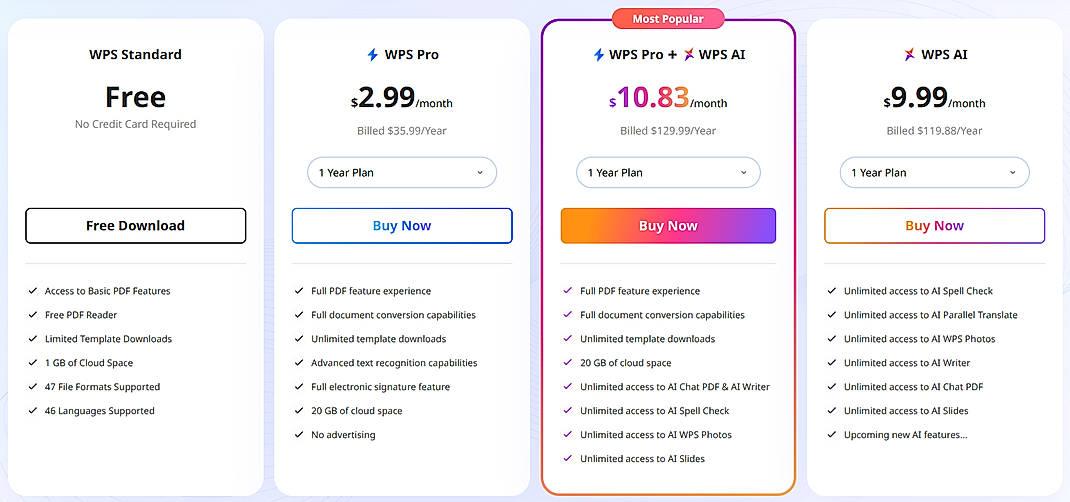
This makes it a strong candidate among free best AI tools for generating slide decks, especially for users who already work with office software.
Pros
Generates native, fully editable PPTX files
No learning curve for PowerPoint users
Balanced focus on content logic and visual layout
Works offline after file generation
Cons
Visual styles are more conservative than design-first tools
Requires WPS Office installation for the best experience
Step-by-Step: How to Generate Slide Decks with AI Tools Using WPS AI Slide
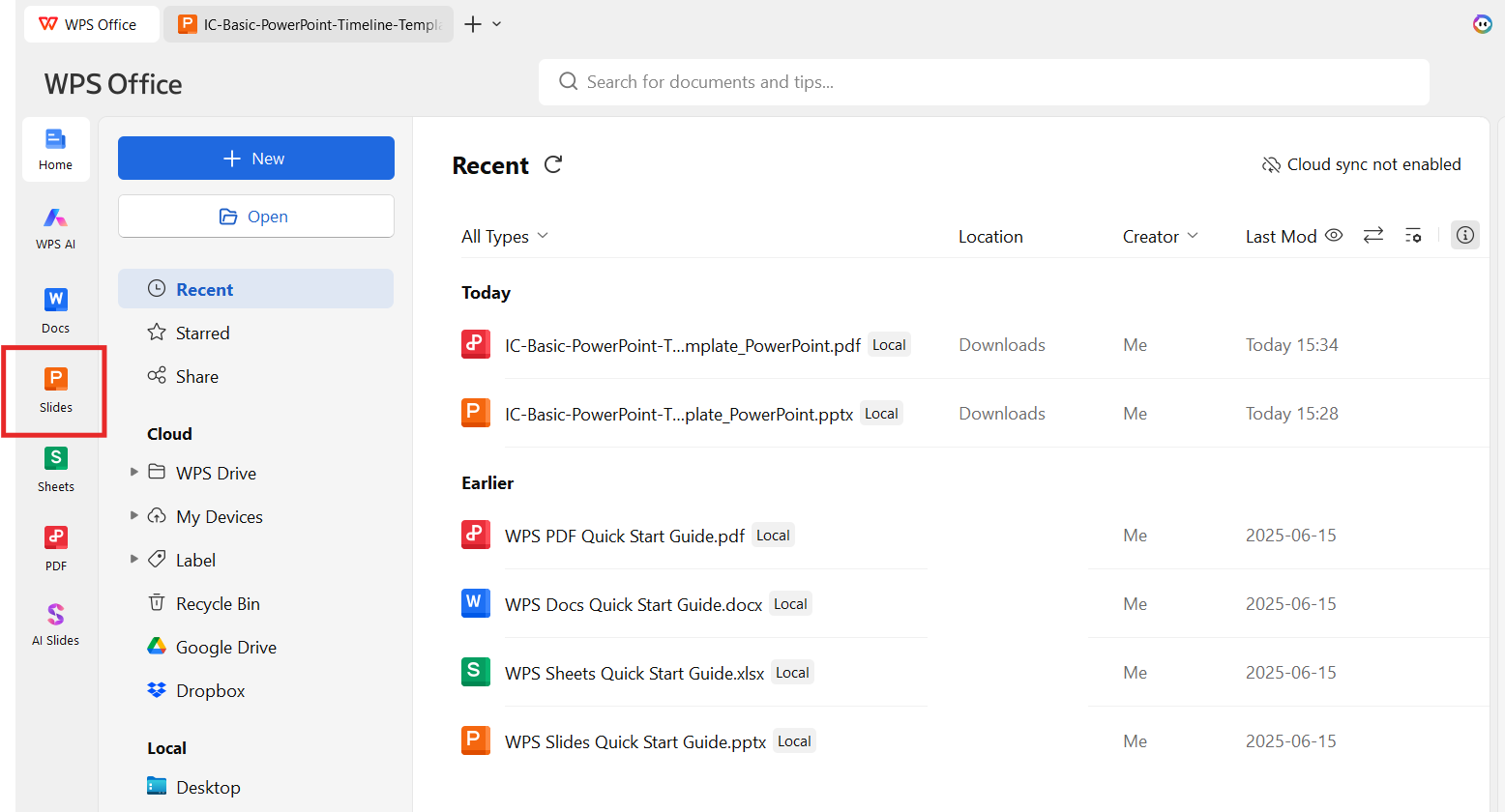
Step 1: Open WPS Presentation
Launch WPS Office and open the Presentation module.
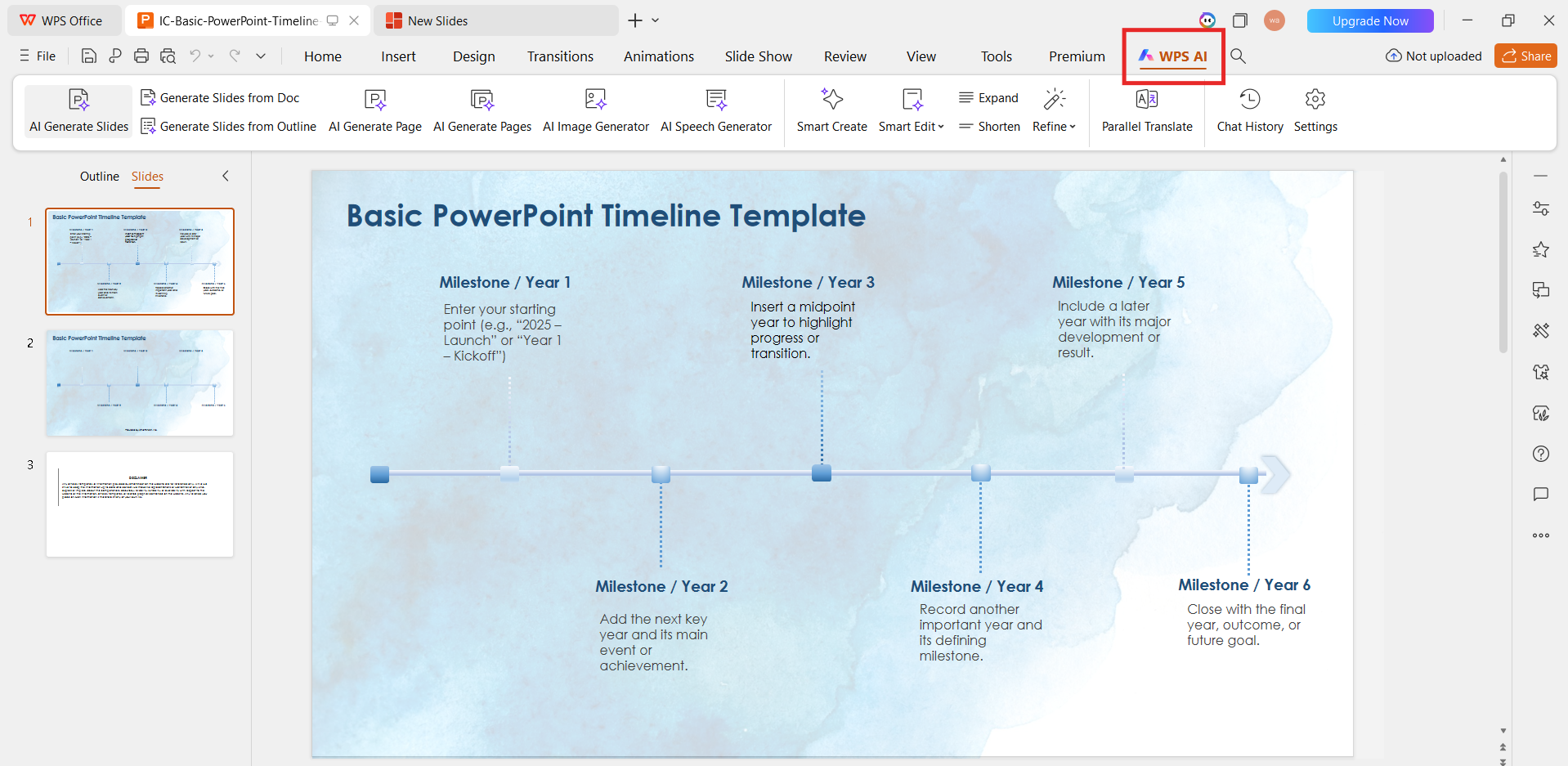
Step 2: Select WPS AI Slide
Click the AI option from the toolbar and choose slide generation.
Step 3: Enter Your Prompt or Outline
Describe your topic, audience, or paste structured content. This step is critical when learning how to generate slide decks with AI tools effectively.
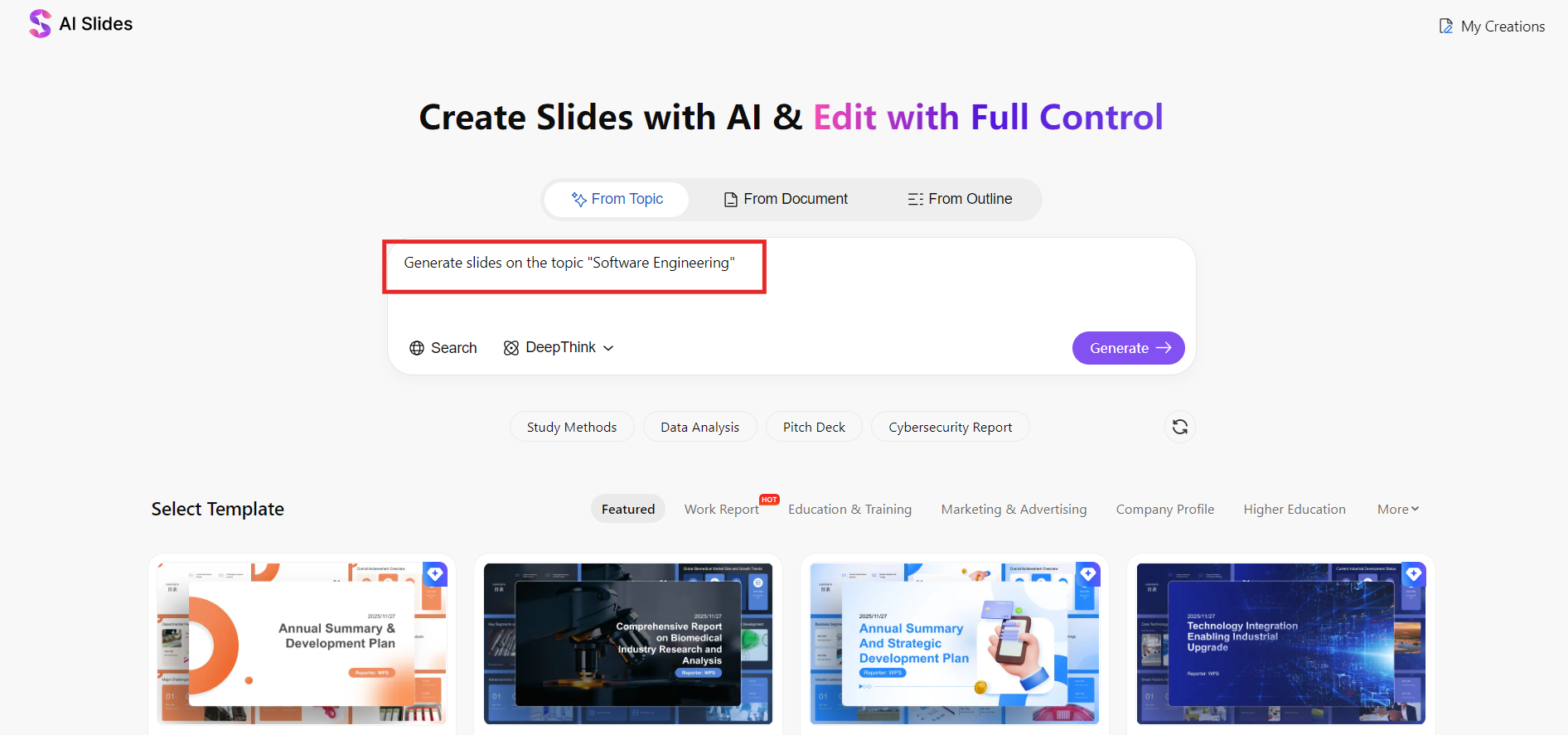
Step 4: Choose a Theme and Slide Length
Select the number of slides and a visual style that fits your presentation goal.
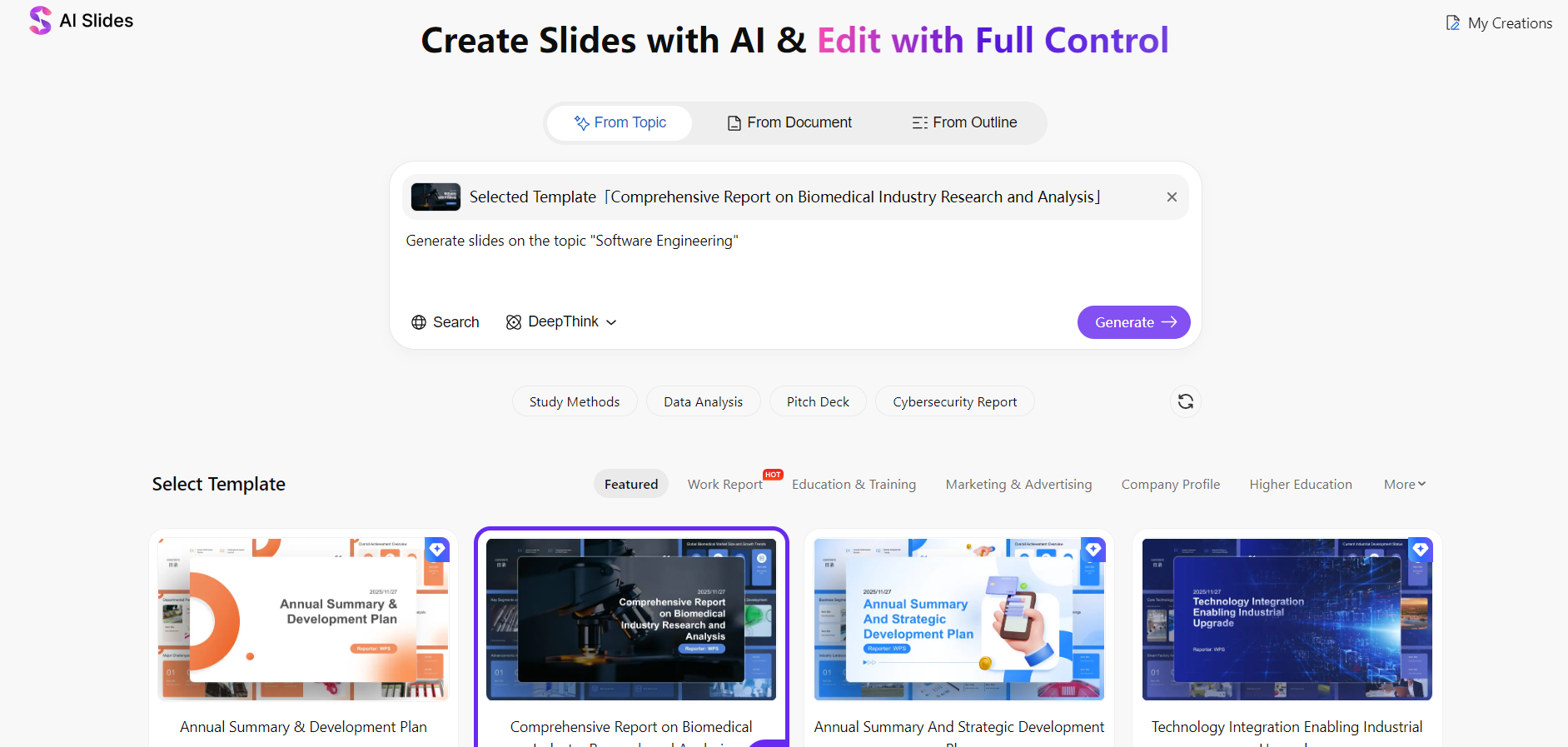
Step 5: Generate and Edit
The AI generates the slide deck instantly. You can now manually refine text, visuals, and structure like a standard PowerPoint file.
Personal Experience & Commentary
From my experience, WPS AI Slide feels closer to working with a smart assistant rather than a black-box generator. The biggest advantage is control. Unlike many tools that force you to redesign slides after export, WPS AI produces files that are ready for real-world editing. If your priority is efficiency without losing ownership of your slides, this is one of the best AI tools to generate slide decks I’ve used so far.
2. Canva
is a design-first platform that has rapidly integrated AI into its presentation workflow. With features like Magic Design and AI-assisted content generation, Canva is often recommended to users who prioritize visual appeal. For many beginners exploring the best AI tools for generating slide decks, Canva feels approachable because everything runs inside a browser with minimal setup.

Features
AI-generated slide layouts from short prompts
Large library of modern templates, icons, and stock images
Drag-and-drop slide editing with real-time collaboration
Web-based workflow with cloud storage
Export options include PPTX and PDF
Pricing
Free plan with basic AI and template access
Canva Pro unlocks advanced AI tools, brand kits, and premium assets

As a result, Canva is frequently listed among the best free AI tools for generating slide decks, though advanced AI features are limited on the free tier.
Pros
Very easy to use, even for non-designers
Strong visual quality and modern slide aesthetics
Excellent template and asset library
No software installation required
Cons
Content structure is often shallow and needs manual refinement
PPTX exports may require layout adjustments in PowerPoint
Less control over slide logic compared to office-native tools
Step-by-Step: How to Generate Slide Decks with AI Tools Using Canva
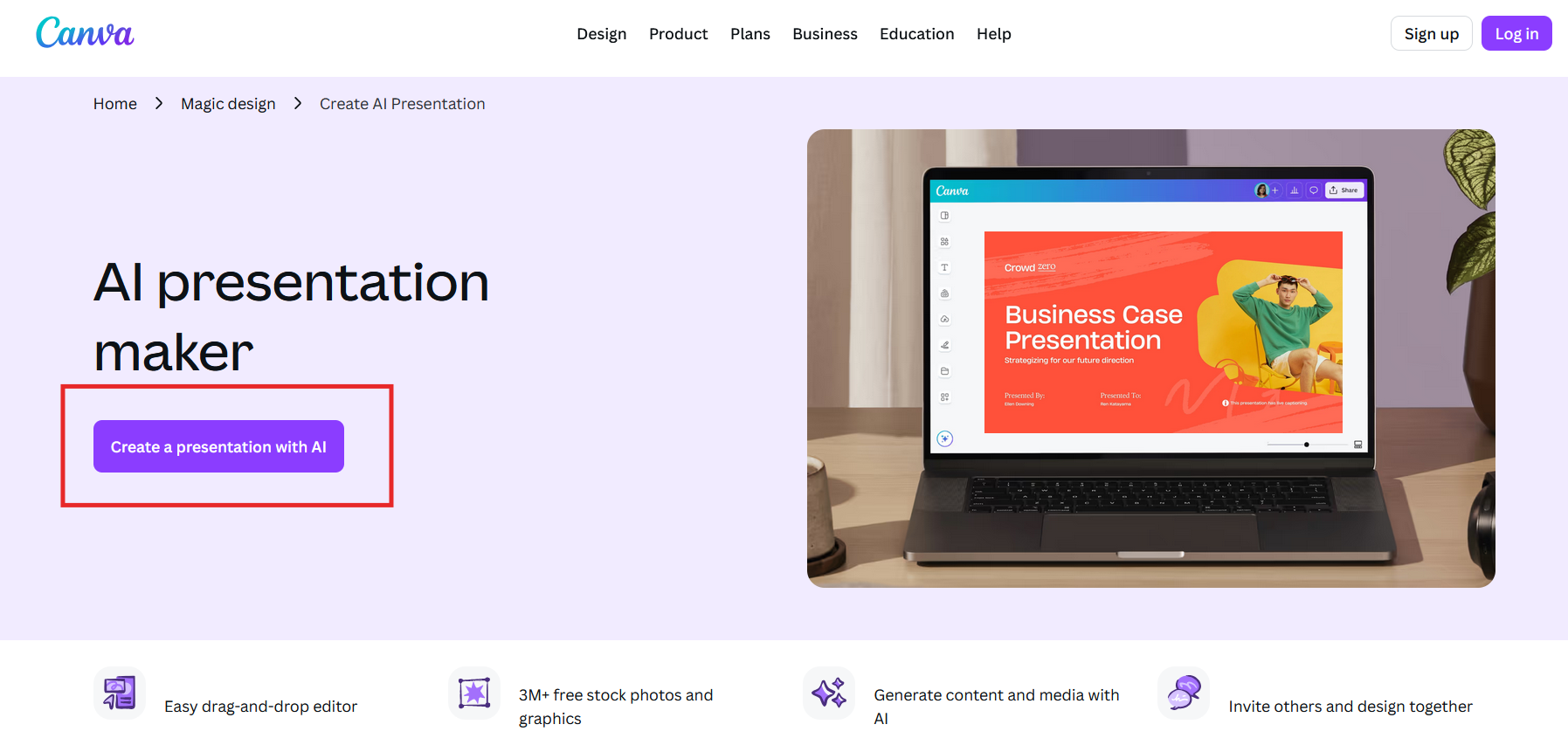
Step 1: Open Canva and Choose Presentation
Log in to Canva and select “Create Presentation with AI”.
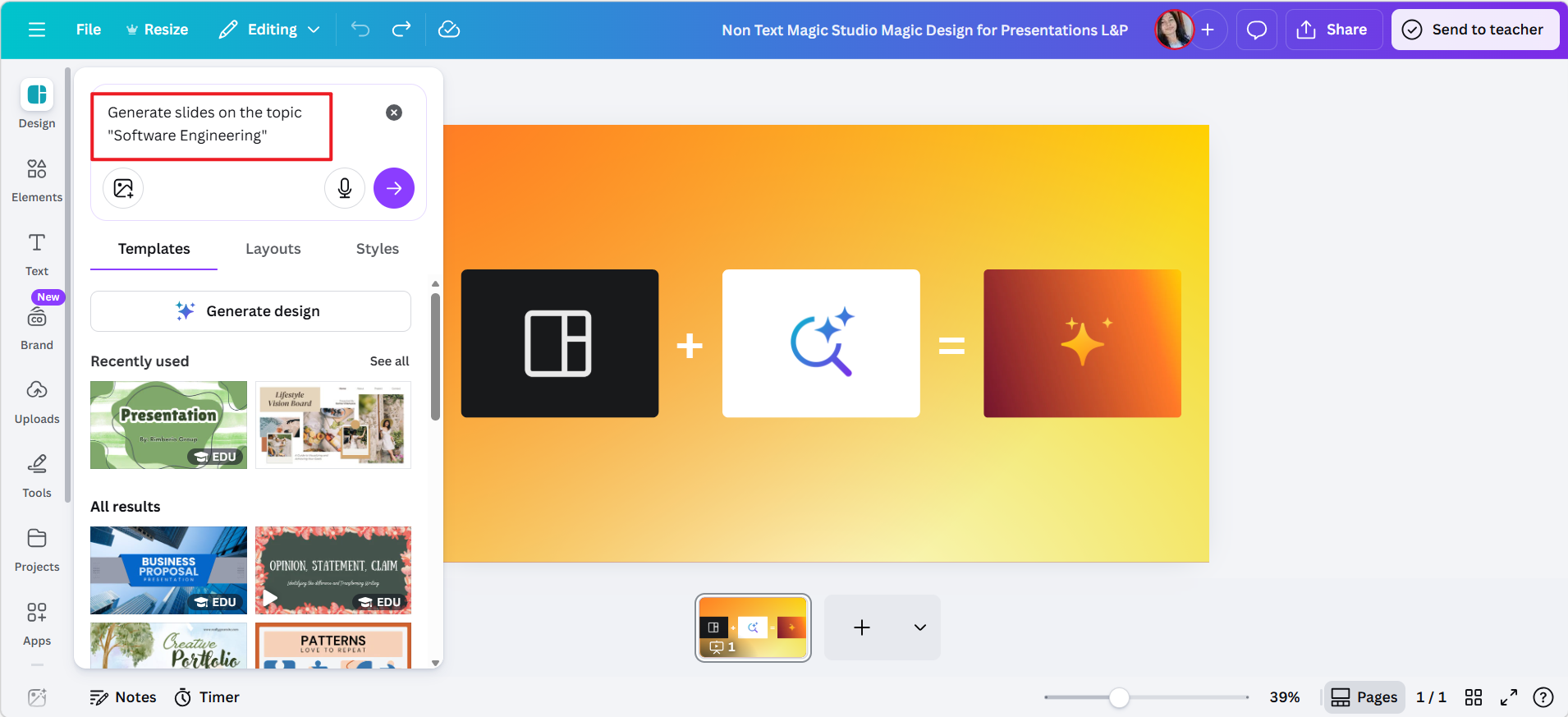
Step 2: Activate Magic Design
Enter a topic or short description to let the AI generate slide ideas.
Step 3: Click Generate Design
AI will generate the slide deck for you.
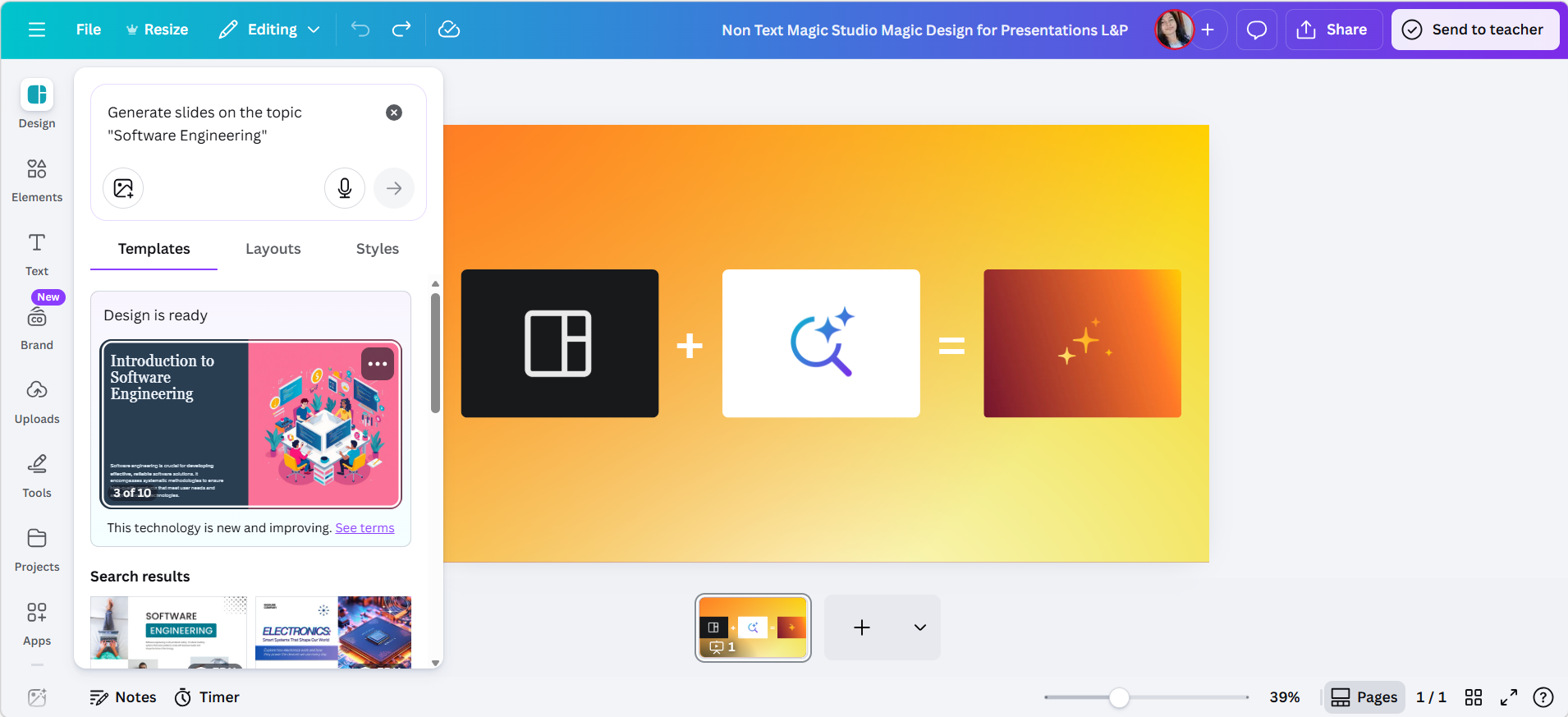
Step 4: Customize Content and Design
Edit text, images, icons, and spacing using Canva’s visual editor.
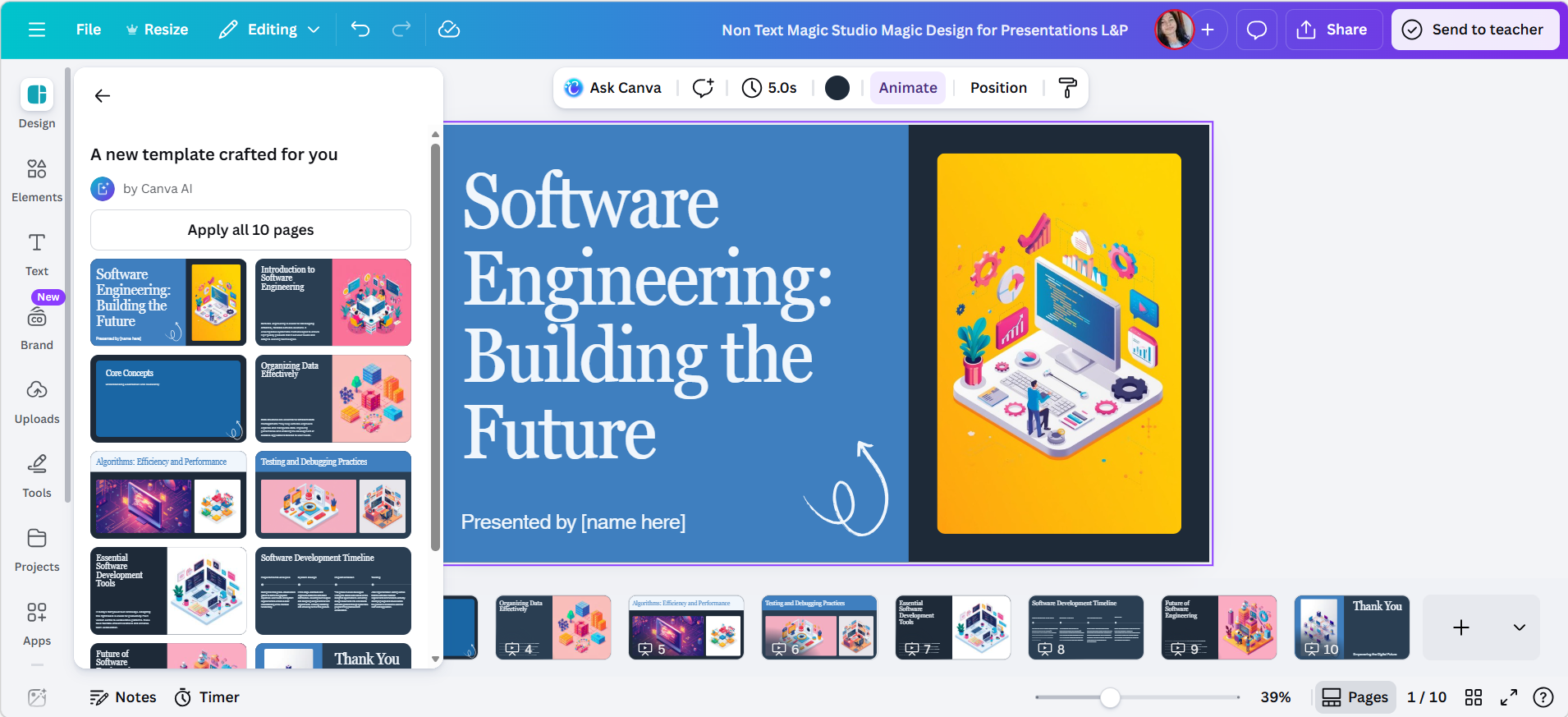
Step 5: Export the Slide Deck
Download the presentation as a PPTX or PDF file for sharing or presenting.

Personal Experience & Commentary
In my experience, Canva excels at speed and aesthetics but requires extra effort when accuracy and narrative flow matter. The AI is helpful for brainstorming layouts, yet I often need to rewrite slide content to improve clarity. If your goal is visual storytelling with minimal setup, Canva fits well among the best AI tools to generate slide decks, but it is less ideal for data-heavy or corporate presentations that demand precise PowerPoint control.
3. Gamma
Gamma is a web-based, AI-native presentation tool designed for fast content-to-slide transformation. Unlike traditional slide editors, Gamma treats presentations as dynamic documents rather than fixed layouts. It is often recommended to users exploring the best AI tools for generating slide decks who value storytelling and structured narratives over manual slide design.

Features
AI-generated slide decks from prompts or outlines
Automatic content structuring with clear headings and sections
Built-in visual themes optimized for readability
Web-based sharing with interactive presentation mode
Export options include PPTX and PDF
Pricing
Free plan with limited exports and branding
Paid plans unlock unlimited AI generation, advanced customization, and exports.
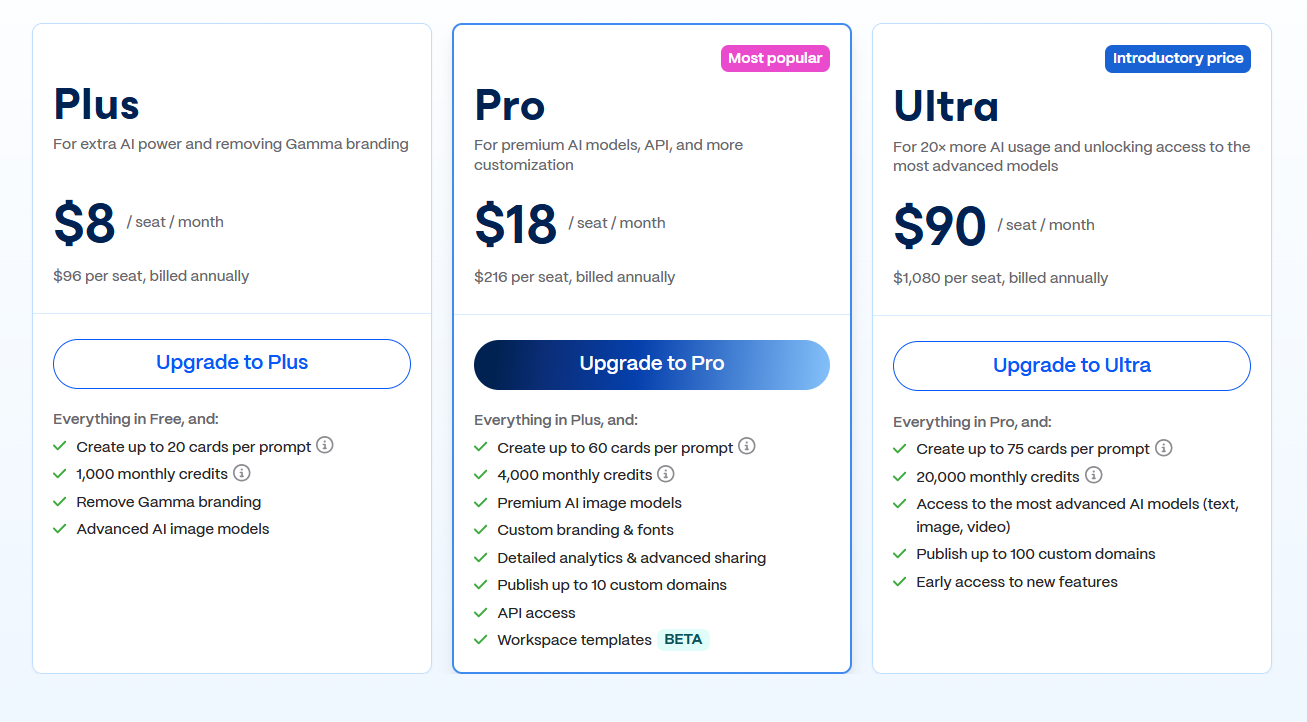
This makes Gamma appealing for users searching for free best AI tools for generating slide decks, though serious use usually requires a paid plan.
Pros
Excellent logical flow and content organization
Very fast generation from rough ideas or notes
Clean, modern presentation style
Minimal setup and no software installation
Cons
Less control over precise slide layouts
PPTX exports may need formatting adjustments
Not ideal for highly customized corporate templates
Step-by-Step: How to Generate Slide Decks with AI Tools Using Gamma
Step 1: Create a New Project
Log in to Gamma and start a new presentation.
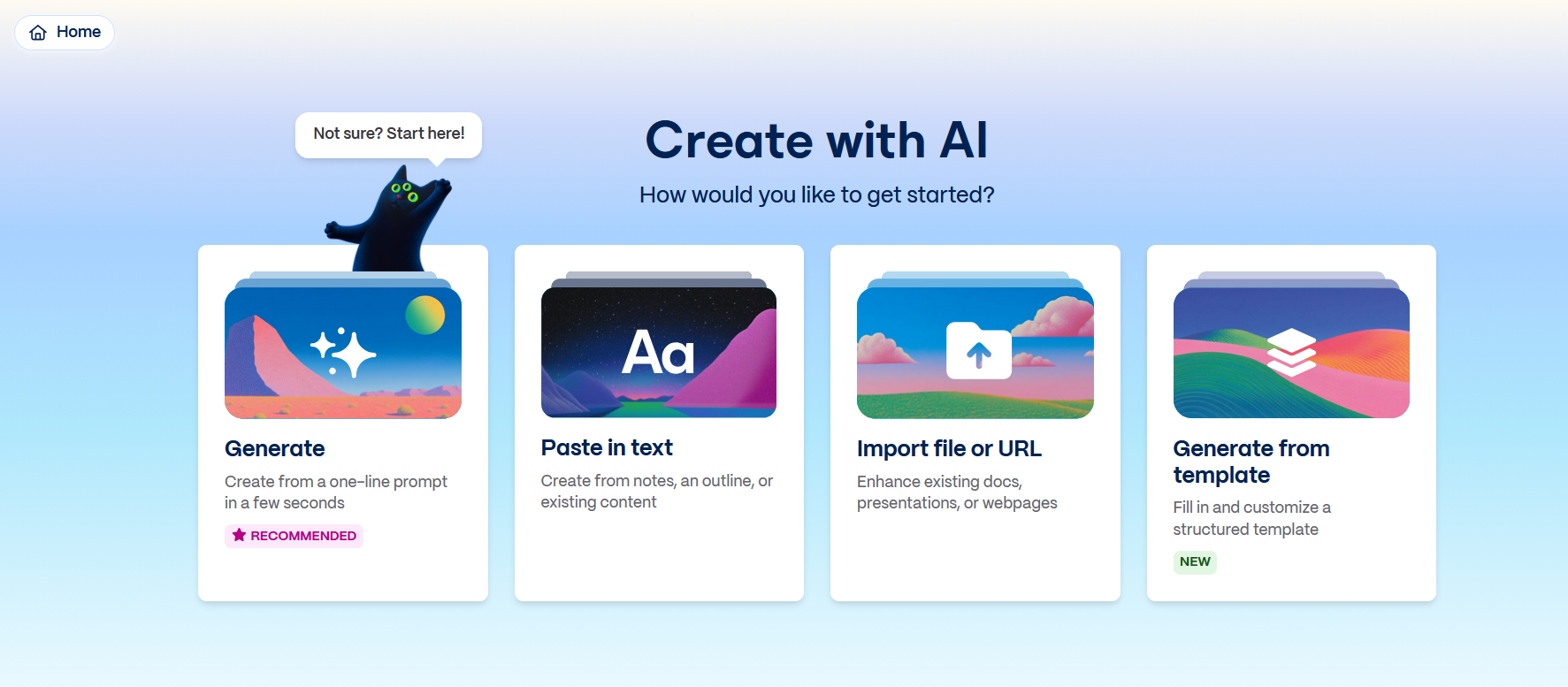
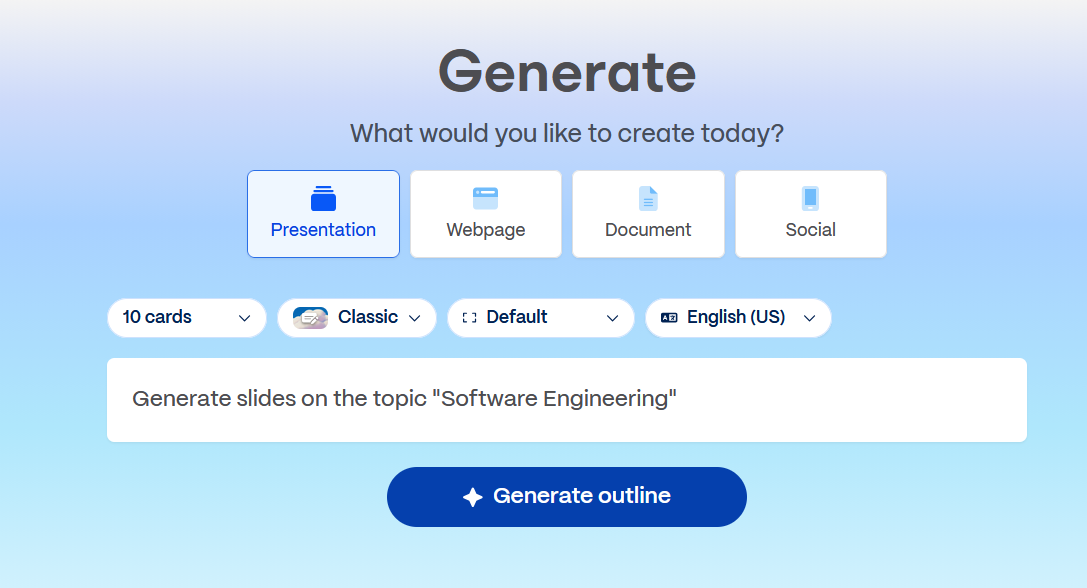
Step 2: Enter Your Topic or Outline
Provide a short, brief outline or prompt describing your presentation goal. This step plays a key role in learning how to generate slide decks with AI tools effectively.
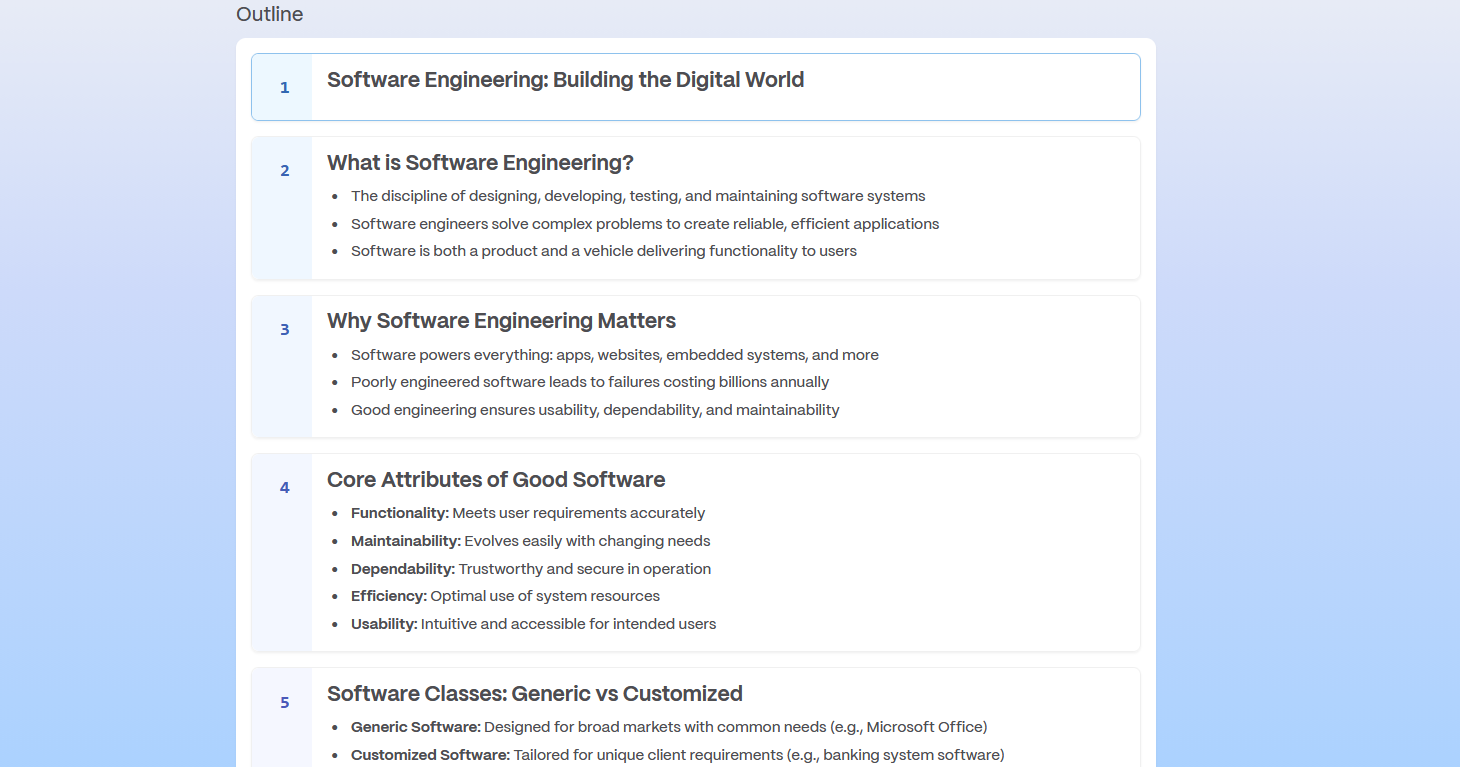
Step 3: Let the AI Structure the Content
Gamma automatically organizes your content as an outline.
Step 4: Click Generate, Refine Text, and Visual Style
Edit wording, reorder sections, and adjust visual themes inside the editor.

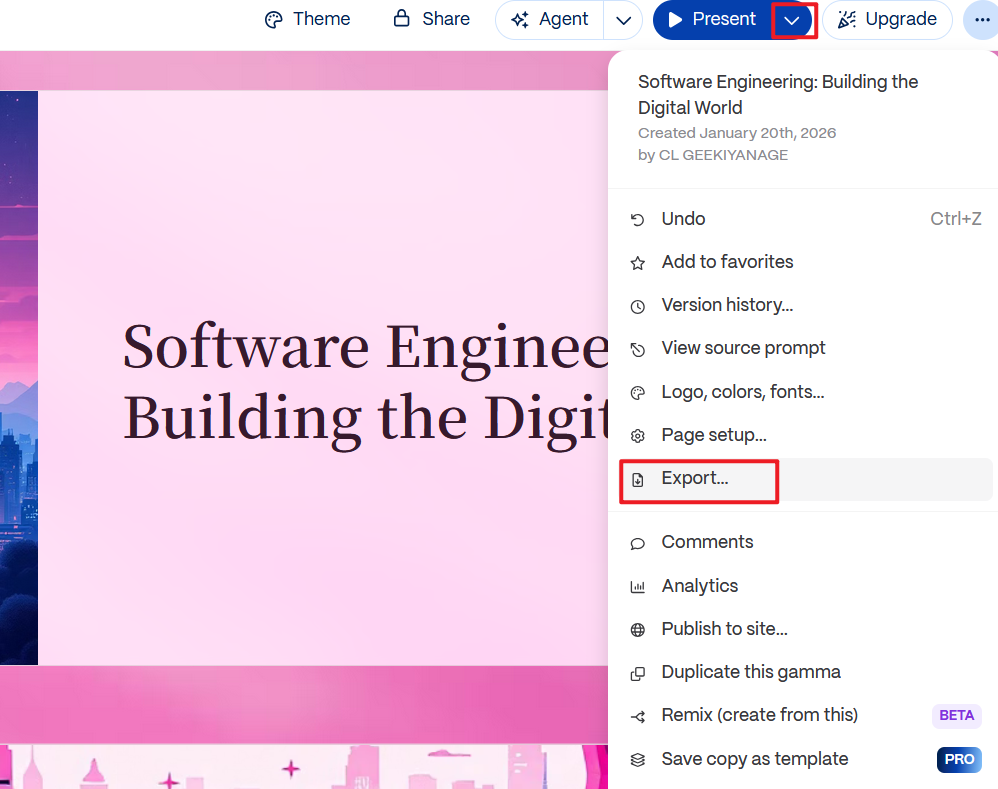
Step 5: Export or Present Online
Download the deck as a PPTX file or present directly from the browser.
Personal Experience & Commentary
Gamma is one of the few tools that consistently produces well-structured slide narratives. From my experience, it works best as a thinking and outlining assistant rather than a final PowerPoint editor. I often use Gamma to shape ideas quickly, then export and refine elsewhere. For content-first users, it stands out among the best AI tools to generate slide decks, especially when clarity matters more than visual polish.
4. Beautiful.AI
Beautiful.AI focuses on automated slide design, positioning itself as a tool that removes manual layout decisions entirely. Instead of adjusting elements yourself, the platform uses predefined design rules that automatically adapt content to the slide. This approach appeals to users looking for the best AI tools for generating slide decks with consistent visual quality and minimal design effort.

Features
Smart templates that auto-adjust layouts as content changes
AI-assisted slide creation from text input
Built-in charts, diagrams, and visual components
Brand control features for fonts, colors, and logos
Cloud-based collaboration and sharing
Pricing
Paid plans required for exports, branding, and advanced features
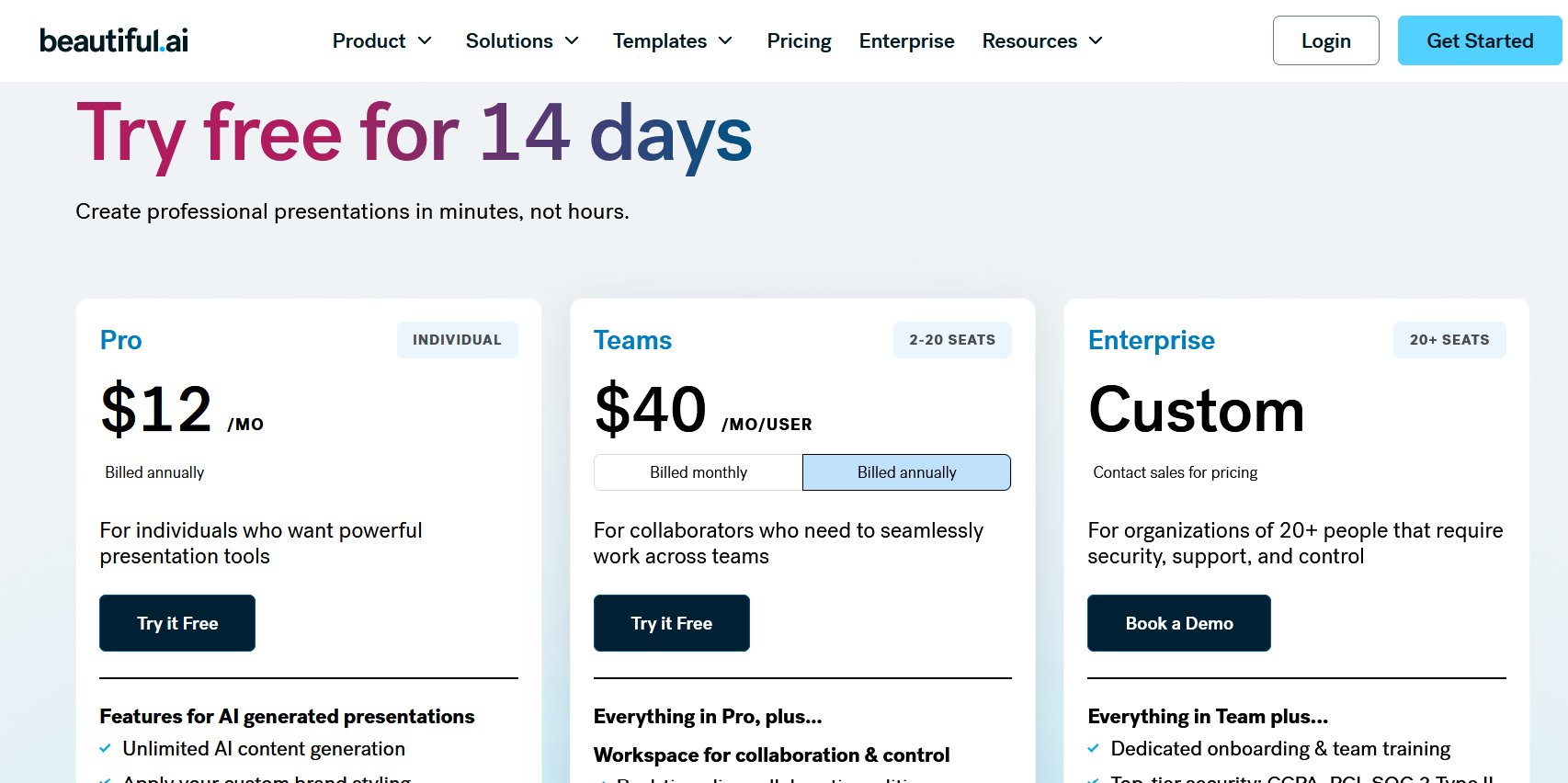
While it is not fully free, it is often evaluated alongside the best free AI tools for generating slide decks during trials.
Pros
Strong visual consistency across slides
Eliminates layout alignment and spacing work
Professional-looking results with minimal input
Good for marketing and executive presentations
Cons
Limited flexibility for custom layouts
Exported PPTX files are less editable
Subscription required for serious use
Step-by-Step: How to Generate Slide Decks with AI Tools Using Beautiful.AI
Step 1: Start a New Presentation
Sign in to Beautiful.AI and create a new deck.
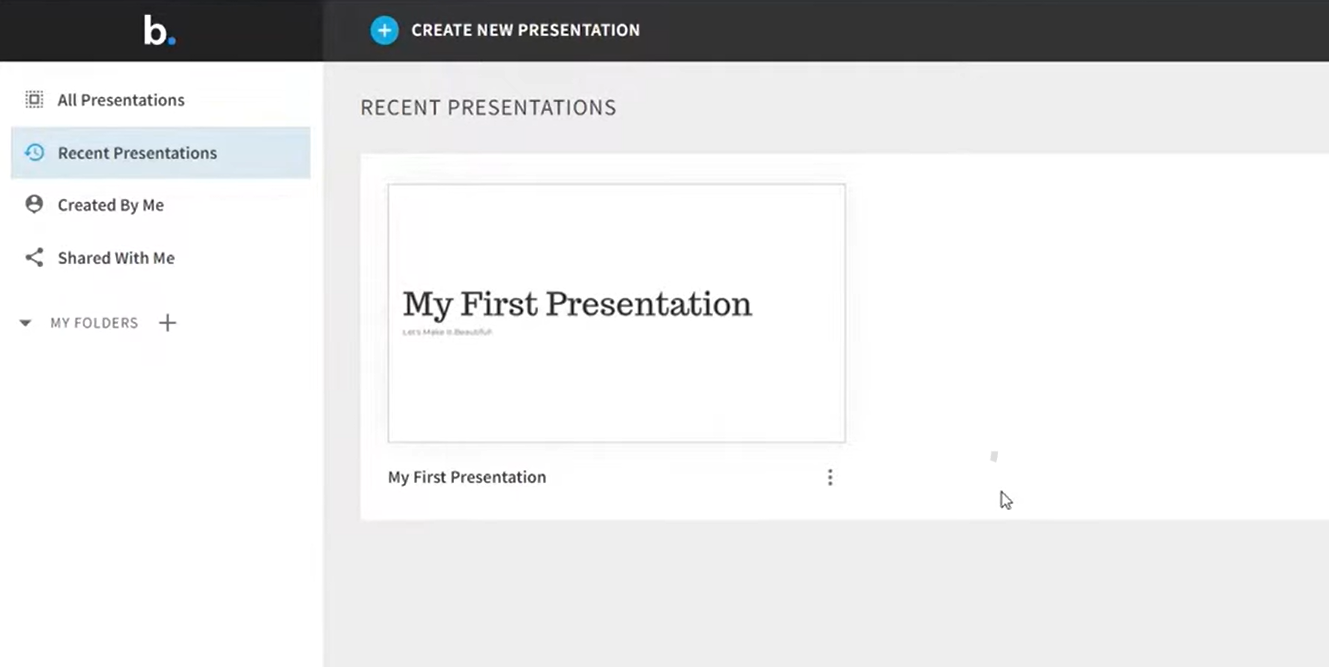
Step 2: Choose a Smart Template
Select a slide template designed to adapt automatically to your content.
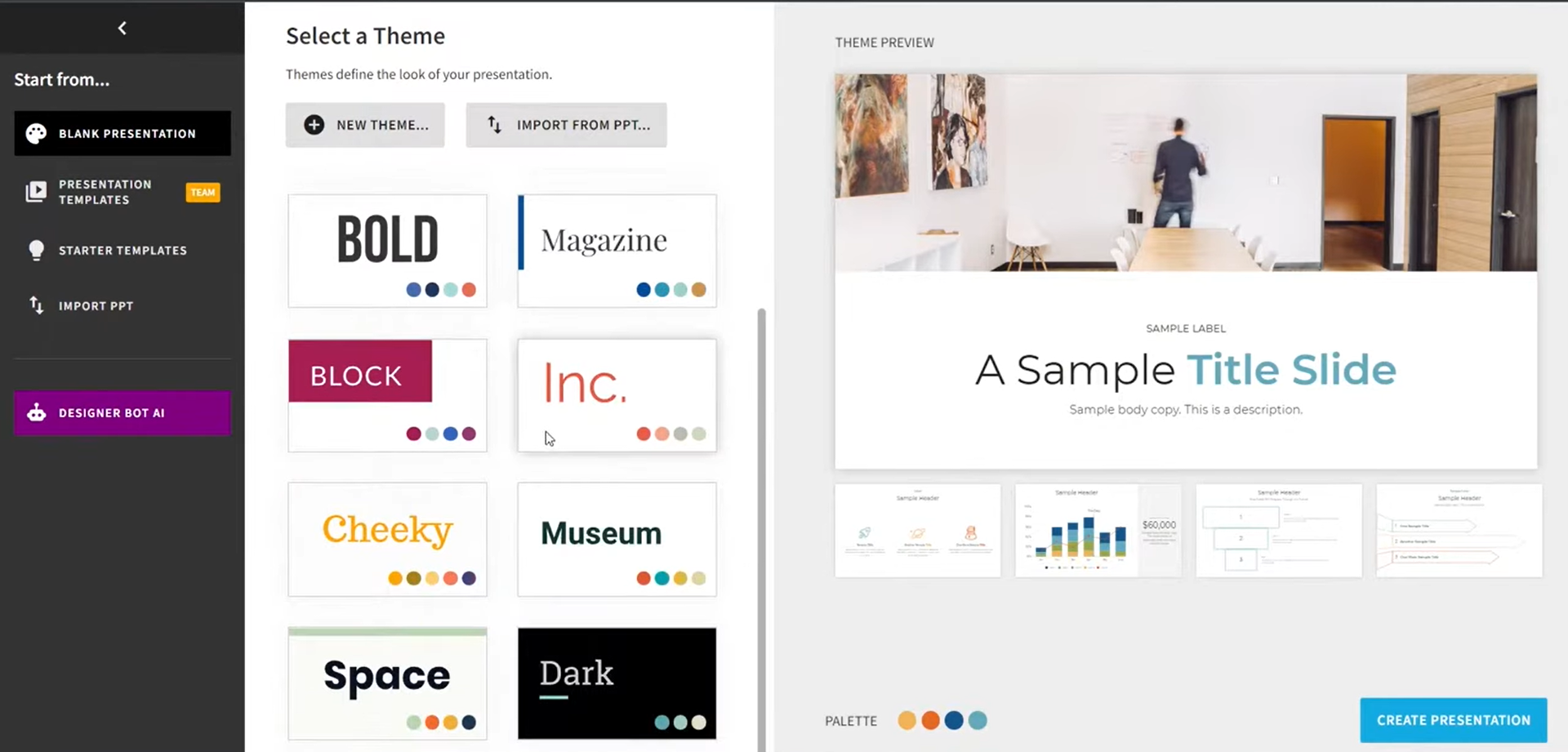
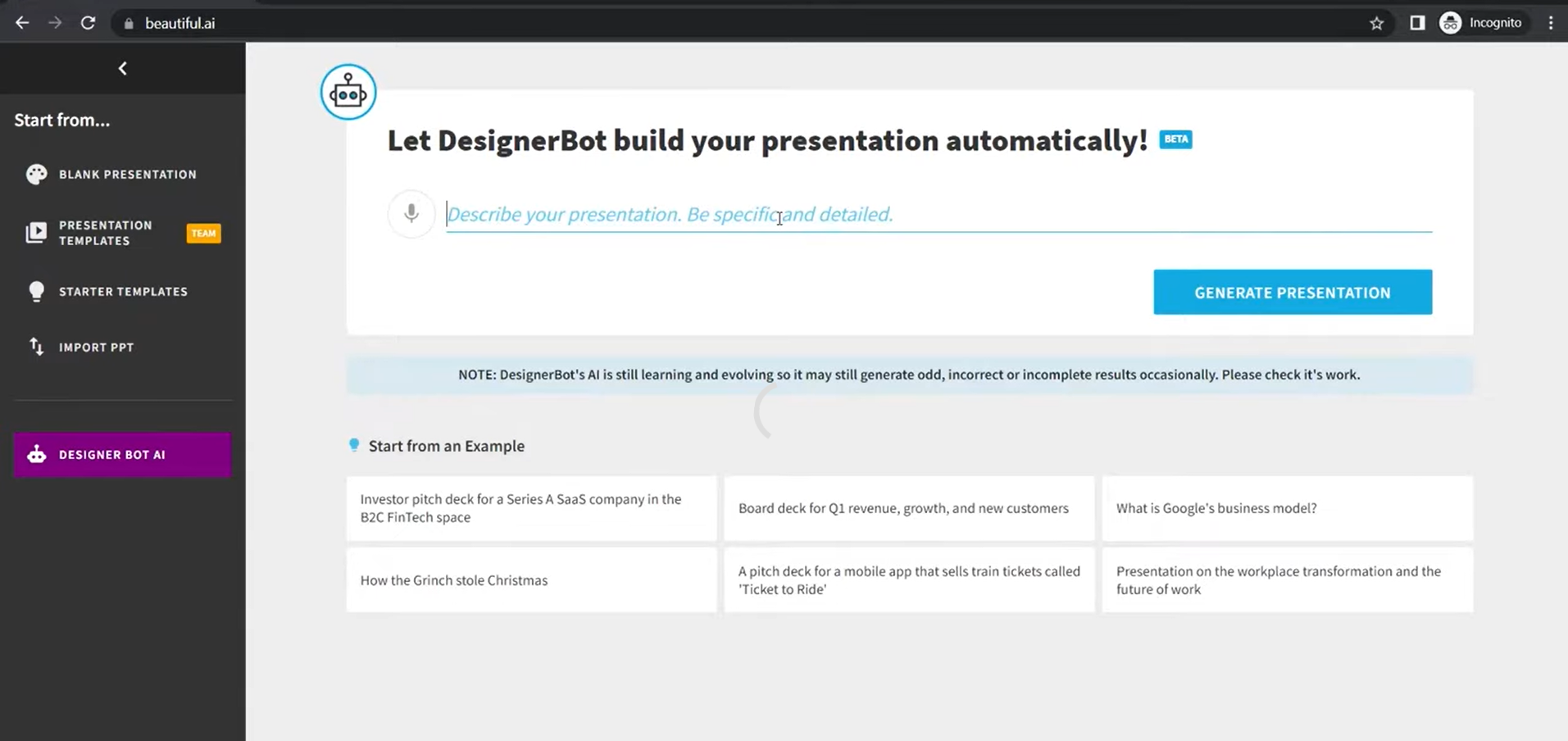
Step 3: Add or Generate Content
Enter text or let the AI suggest slide content and visual arrangements.
Step 4: Adjust Visual Elements
Modify charts, images, or diagrams within the template constraints.

Step 5: Export the Presentation
Download the slide deck in PPTX format or present online.
Personal Experience & Commentary
From my experience, Beautiful.AI is excellent for maintaining visual discipline but less effective when storytelling requires flexibility. The tool works best when the content already exists, and you want it to look polished quickly. Among the best AI tools to generate slide decks, it shines in design automation but may frustrate users who prefer manual control over slide structure.
5. Plus AI
Plus AI is an AI-powered presentation assistant designed specifically to work inside existing slide platforms. Instead of replacing PowerPoint or Google Slides, it enhances them by generating structured slides directly within the editor. This makes it attractive to users looking for the best AI tools for generating slide decks without changing their familiar workflow.
Features
AI slide generation inside PowerPoint and Google Slides
Prompt-based content creation and slide expansion
Outline-to-slide conversion with logical sequencing
Editable slides within native presentation software
Support for business, sales, and educational presentations
Pricing
Paid plans required for ongoing AI slide generation

Because of its trial availability, Plus AI is sometimes considered alongside free best AI tools for generating slide decks, though full functionality requires a subscription.
Pros
Works directly within PowerPoint and Google Slides
Maintains native file compatibility
Good balance between automation and manual editing
Ideal for iterative slide creation
Cons
Requires an active PowerPoint or Google Slides environment
AI output quality depends heavily on prompt clarity
Limited design customization compared to design-first platforms
Step-by-Step: How to Generate Slide Decks with AI Tools Using Plus AI
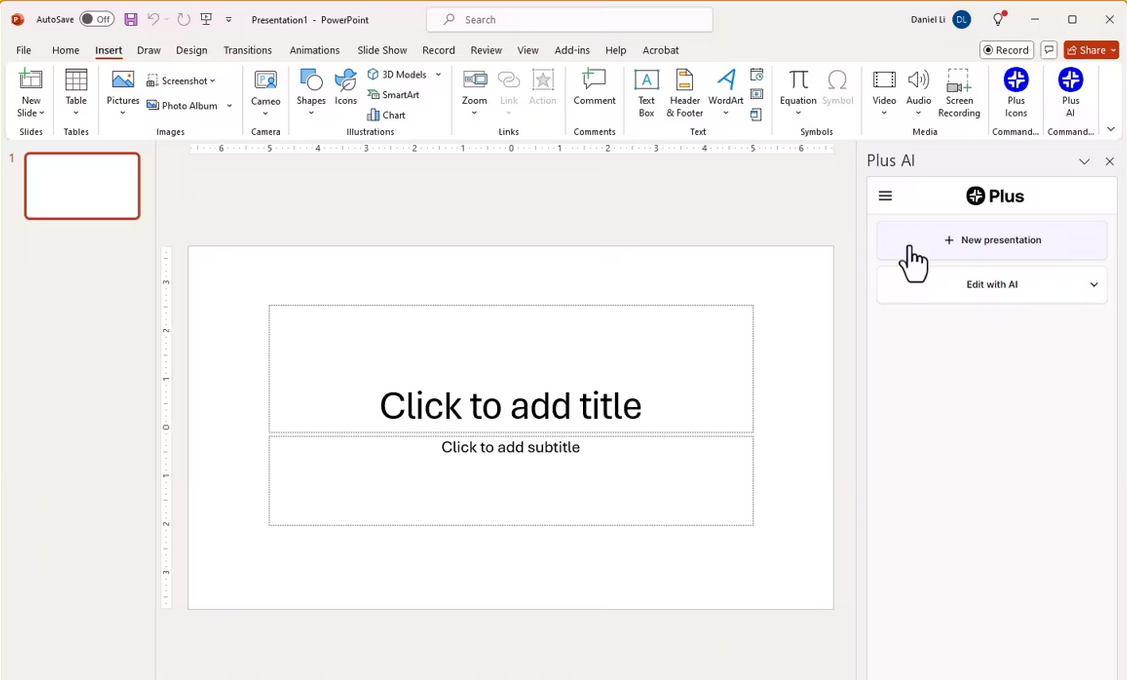
Step 1: Install Plus AI
Add Plus AI as an extension to PowerPoint or Google Slides.
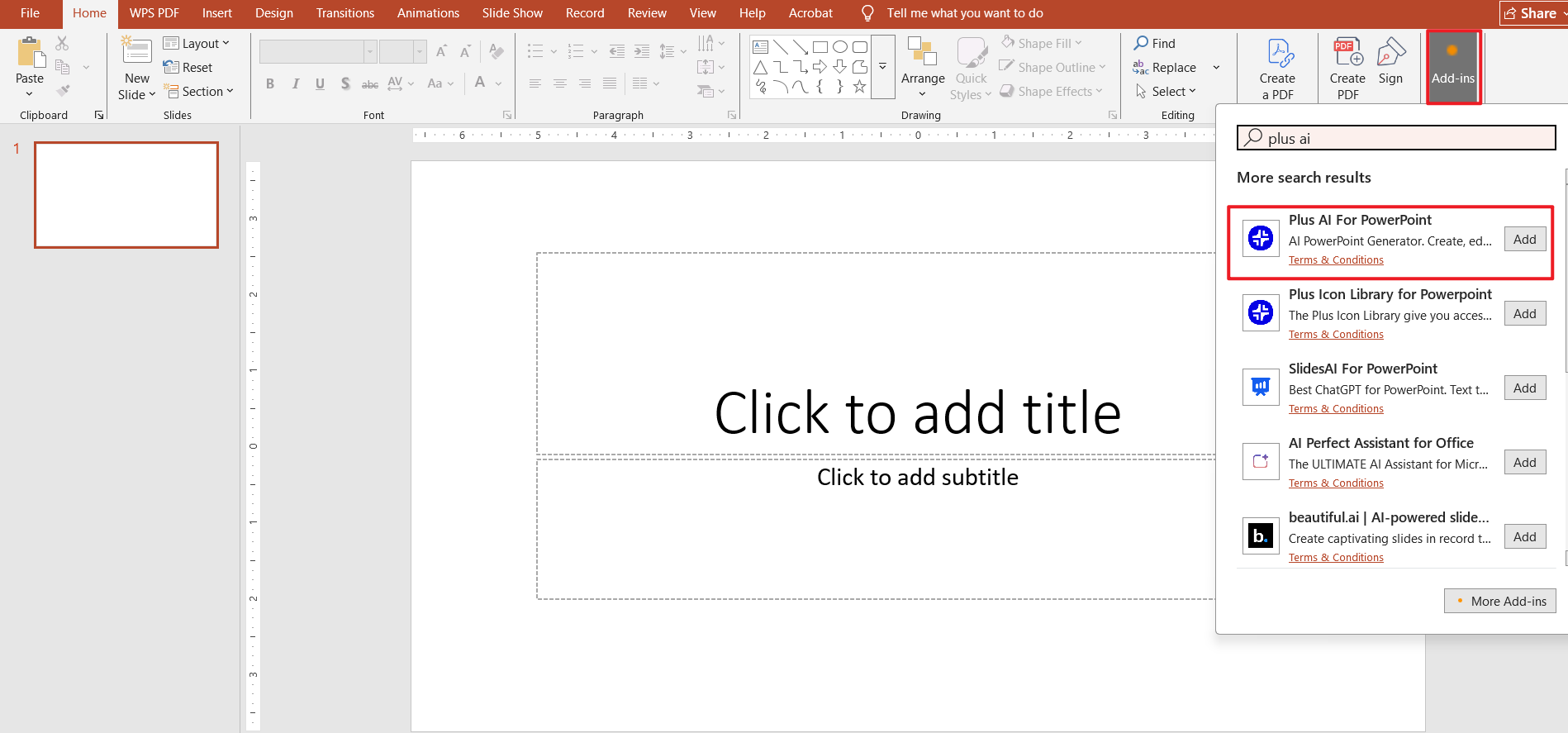
Step 2: Open an Existing or New Presentation
Launch your slide editor and open a deck where you want AI assistance.
Step 3: Enter a Prompt or Outline
Describe your presentation topic, audience, and structure. This step is crucial when learning how to generate slide decks with AI tools efficiently.
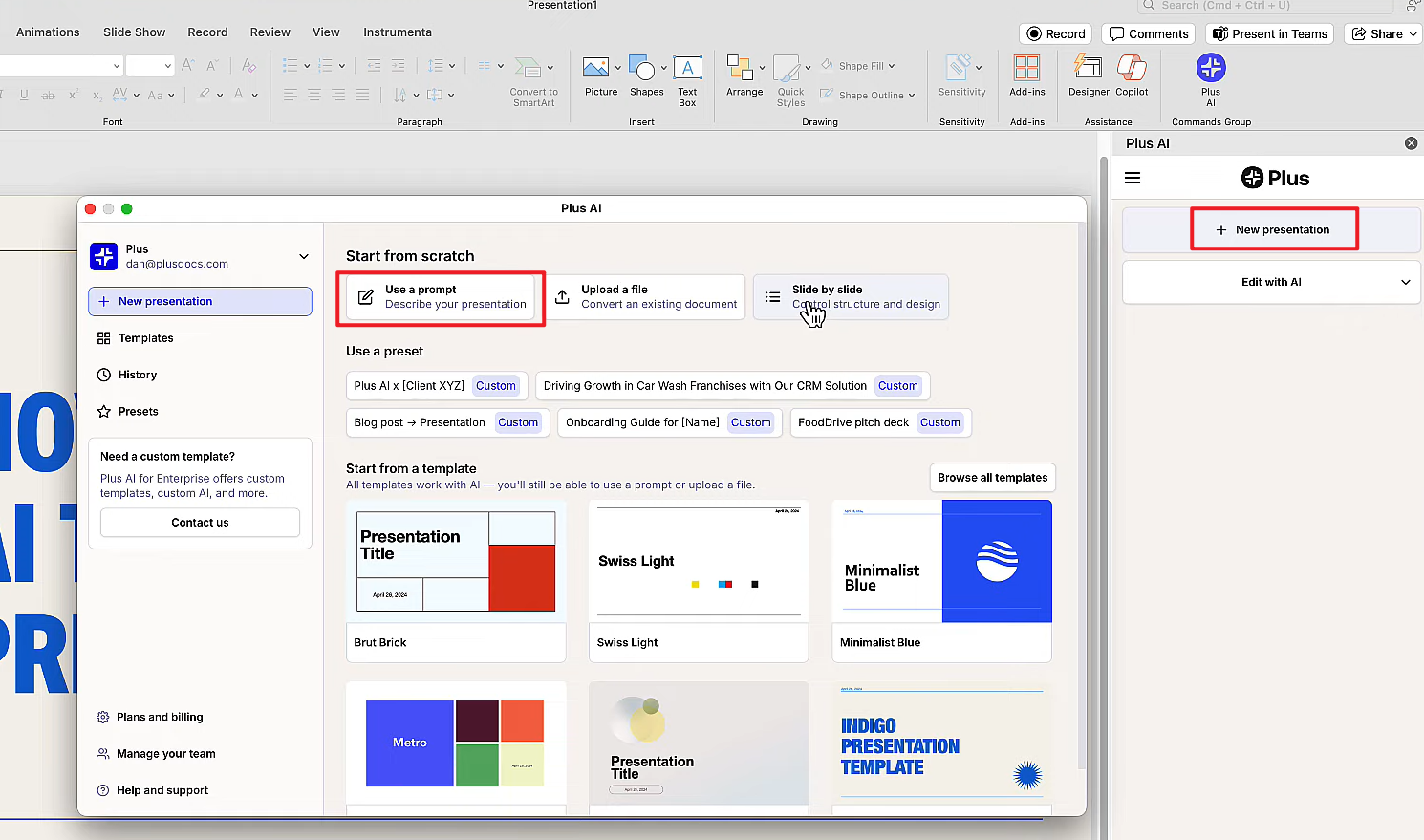
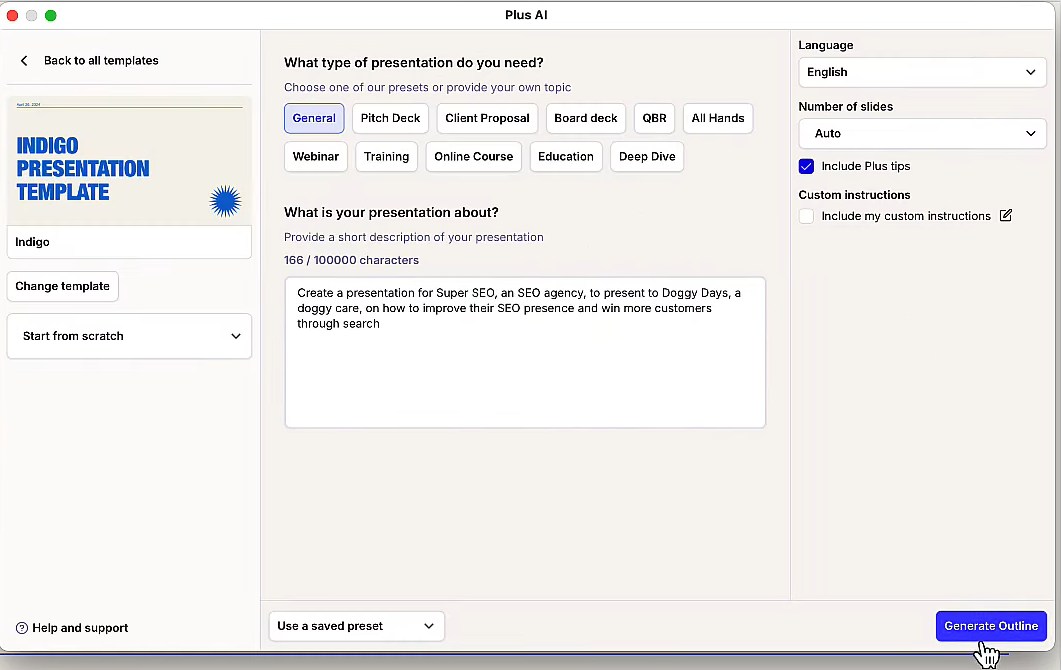
Step 4: Generate the Outline and Slides
Plus AI inserts AI-generated slides directly into your deck.
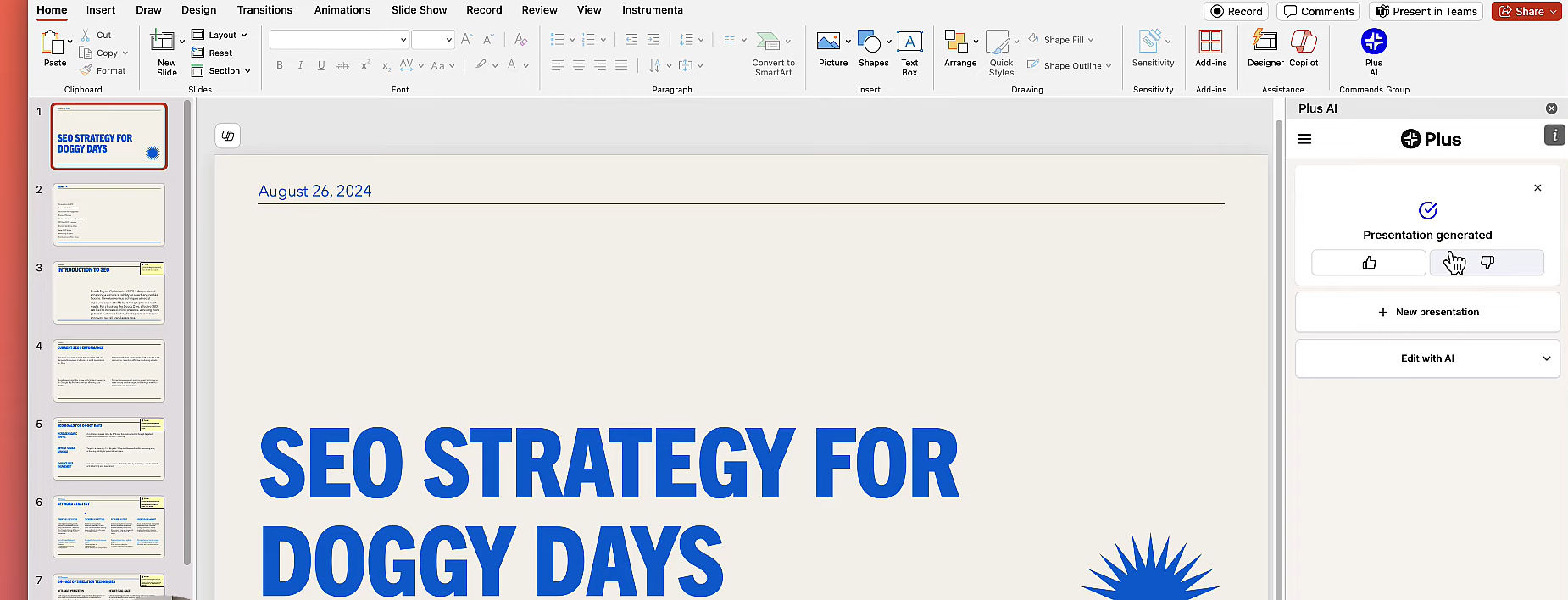
Step 5: Refine and Present
Edit text, visuals, and layout using your usual slide tools.
Personal Experience & Commentary
In practice, Plus AI feels like a productivity multiplier rather than a replacement tool. I’ve found it most useful when expanding rough outlines into structured slide decks inside PowerPoint. Among the best AI tools to generate slide decks, Plus AI stands out for users who prefer to stay inside their existing presentation environment rather than learning a new platform.
Part 2. Comparison Table of the Top 5 AI Tools for Generating Slide Decks
To make the differences clearer, I’ve summarized the core capabilities of each tool below. This comparison focuses on real-world usage, export flexibility, and how well each option supports professionals searching for the best AI tools for generating slide decks.
| Tool | Best For | PPTX Export | Editing Flexibility | Free Option | Overall Experience |
|---|---|---|---|---|---|
| WPS AI Slide | Office-first workflows and full PowerPoint control | Yes (native) | High | Yes | Strong balance between automation and manual editing |
| Canva | Visually appealing presentations | Yes | Medium | Yes | Fast design, but the content needs refinement |
| Gamma | Content structure and storytelling | Yes | Medium | Yes | Excellent outlines, limited layout control |
| Beautiful.AI | Automated visual consistency | Yes | Low | Trial | Polished visuals, restricted customization |
| Plus AI | Enhancing existing slide editors | Yes | High | Trial | Best for iterative slide creation inside PowerPoint |
Personal Experience & Commentary
When comparing these tools side by side, the difference comes down to control versus convenience. Canva and Beautiful.AI prioritize visual output, while Gamma focuses on narrative structure. Plus AI integrates smoothly with existing workflows but relies heavily on prompt quality.
From my experience, WPS AI Slide offers the most balanced approach. It delivers meaningful AI assistance without limiting how the final presentation can be edited. For users evaluating the best AI tools to generate slide decks, this balance often matters more than flashy design alone.
Part 3. Best AI Helper to Generate Slide Decks: WPS AI Slide
After comparing the top platforms, a clear pattern emerges. Some tools prioritize design, others focus on storytelling, and a few integrate directly into existing editors. However, very few manage to combine structure, flexibility, and native PowerPoint compatibility in one place. This is where WPS AI Slidestands out among the best AI tools for generating slide decks.

Why WPS AI Slide Stands Out
Based on hands-on use and comparison, WPS AI Slide addresses the most common pain points users face when learning how to generate slide decks with AI tools:
It creates logically structured slides rather than just visually attractive layouts
The output is a native PPTX file that remains fully editable
Users are not locked into a web-only editor or restricted templates
It supports real presentation workflows, from drafting to final delivery
For professionals searching for the best AI tools to generate slide decks, this balance between automation and control is often the deciding factor.
Why WPS AI Slide Is the Best Helper
WPS AI Slide works as an intelligent assistant rather than a replacement for human judgment. Instead of forcing predefined designs, it focuses on:
Turning outlines and prompts into coherent slide narratives
Preserving manual editing freedom after generation
Supporting speaker notes and presentation flow
Reducing time spent on formatting without sacrificing clarity
This makes it especially valuable for business presentations, training materials, and academic decks where accuracy matters as much as appearance.
Personal Experience & Commentary
In practical use, WPS AI Slide consistently feels more reliable than design-heavy alternatives. I rarely need to rebuild slides after generation, which saves time and reduces frustration. Compared to other best AI tools for generating slide decks, it supports a smoother transition from idea to polished presentation, especially for users who rely on PowerPoint-compatible formats.
FAQs
1. Do these tools export to standard PowerPoint (.pptx) format?
Most tools support PPTX export, but the quality varies. WPS AI Slide generates native PowerPoint files that remain fully editable, while web-based tools such as Gamma or Beautiful.AI may require layout adjustments after downloading.
2. Is the content generated by AI accurate?
AI works best as a first-draft assistant. While it can organize ideas quickly, it may occasionally include outdated or inaccurate information. Reviewing and refining content is essential when using the best AI tools for generating slide decks.
3. Do AI tools generate speaker notes along with slides?
Yes, many advanced tools do. WPS AI Slide and Gamma often generate suggested speaker notes, which help presenters prepare talking points and maintain presentation flow.
4. Are there free options available for AI slide generation?
Yes. Several platforms offer free plans or trials. WPS AI Slide, Canva, and Gamma provide limited free access, making them suitable for users exploring the best free AI tools for generating slide decks before committing to paid plans.
5. Can AI-generated slide decks be customized after creation?
Customization depends on the platform. Tools that export native PPTX files allow extensive manual editing, which is especially important when using the best AI tools for PowerPoint presentations free for professional or corporate use.
6. Who benefits the most from using AI slide tools?
AI slide generators are ideal for professionals, educators, marketers, and students who need to create presentations quickly while maintaining clarity and structure. They are particularly useful when deadlines are tight or when starting from a blank page feels inefficient.
Summary
AI-powered presentation tools have fundamentally changed how slide decks are created. Instead of starting from a blank canvas, users can now rely on automation to structure ideas, generate visuals, and speed up the entire workflow. In this article, we explored the best AI tools for generating slide decks, compared their strengths, and explained how to generate slide decks with AI tools in a practical, real-world context.
Among all the options reviewed, WPS AI Slidestands out as the most well-rounded solution. It combines intelligent content generation with full PowerPoint compatibility, allowing users to maintain control over their final output. For anyone searching for free best AI tools for generating slide decks that still support professional editing standards, WPS AI Slide remains the most reliable choice in 2026.

'%3e%3cpath%20d='M19.9911%204.11386V6.471H18.5894C18.0775%206.471%2017.7322%206.57814%2017.5536%206.79243C17.3751%207.00671%2017.2858%207.32814%2017.2858%207.75671V9.44421H19.9019L19.5536%2012.0871H17.2858V18.8639H14.5536V12.0871H12.2769V9.44421H14.5536V7.49779C14.5536%206.39064%2014.8632%205.53201%2015.4822%204.92189C16.1013%204.31177%2016.9257%204.00671%2017.9554%204.00671C18.8304%204.00671%2019.509%204.04243%2019.9911%204.11386Z'%20fill='%23333333'/%3e%3c/g%3e%3cdefs%3e%3cclipPath%20id='clip0_2938_8199'%3e%3crect%20width='16'%20height='16'%20fill='white'%20transform='translate(8%204.00671)'/%3e%3c/clipPath%3e%3c/defs%3e%3c/svg%3e)
'%3e%3cpath%20d='M17.5237%2010.7813L23.4811%204H22.0699L16.8949%209.88693L12.7648%204H8L14.2469%2012.9029L8%2020.0133H9.4112L14.8725%2013.7952L19.2352%2020.0133H24M9.92053%205.04213H12.0885L22.0688%2019.0224H19.9003'%20fill='%23333333'/%3e%3c/g%3e%3cdefs%3e%3cclipPath%20id='clip0_2938_8200'%3e%3crect%20width='16'%20height='16.0134'%20fill='white'%20transform='translate(8%204)'/%3e%3c/clipPath%3e%3c/defs%3e%3c/svg%3e)


