

'%3e%3cpath%20d='M8%200C12.4183%200%2016%203.58172%2016%208C16%2012.4183%2012.4183%2016%208%2016C3.58172%2016%200%2012.4183%200%208C0%203.58172%203.58172%200%208%200ZM11.6162%204.38379C11.2257%203.99337%2010.5927%203.99338%2010.2021%204.38379L8%206.58594L5.79785%204.38379C5.40732%203.99334%204.77429%203.99329%204.38379%204.38379C3.99331%204.77429%203.99335%205.40733%204.38379%205.79785L6.58594%208L4.38379%2010.2021C3.99348%2010.5927%203.99341%2011.2257%204.38379%2011.6162C4.77426%2012.0066%205.40734%2012.0065%205.79785%2011.6162L8%209.41406L10.2021%2011.6162C10.5927%2012.0066%2011.2257%2012.0067%2011.6162%2011.6162C12.0067%2011.2257%2012.0066%2010.5927%2011.6162%2010.2021L9.41406%208L11.6162%205.79785C12.0066%205.40735%2012.0066%204.77429%2011.6162%204.38379Z'%20fill='%23080E17'%20fill-opacity='0.46'/%3e%3c/g%3e%3cdefs%3e%3cclipPath%20id='clip0_3761_713'%3e%3crect%20width='16'%20height='16'%20fill='white'/%3e%3c/clipPath%3e%3c/defs%3e%3c/svg%3e)




'%3e%3cpath%20fill-rule='evenodd'%20clip-rule='evenodd'%20d='M21.4999%2010.9993C21.4999%205.20009%2016.7986%200.498901%2010.9993%200.498901C5.19994%200.498901%200.498657%205.20009%200.498657%2010.9993C0.498657%2016.2404%204.33858%2020.5844%209.35855%2021.3722V14.0346H6.69238V10.9993H9.35855V8.68594C9.35855%206.05427%2010.9262%204.60062%2013.3248%204.60062C14.4736%204.60062%2015.6753%204.80571%2015.6753%204.80571V7.38979H14.3512C13.0468%207.38979%2012.64%208.19921%2012.64%209.0296V10.9993H15.5523L15.0867%2014.0346H12.64V21.3722C17.66%2020.5844%2021.4999%2016.2404%2021.4999%2010.9993Z'%20fill='%231568EA'/%3e%3c/g%3e%3c/svg%3e)


'%3e%3cpath%20d='M2.42045%2022.1876H6.31818V12.7217L0.75%208.54553V20.5171C0.75%2021.4414%201.49892%2022.1876%202.42045%2022.1876Z'%20fill='%234285F4'/%3e%3cpath%20d='M19.682%2022.1876H23.5797C24.5041%2022.1876%2025.2502%2021.4387%2025.2502%2020.5171V8.54553L19.682%2012.7217'%20fill='%2334A853'/%3e%3cpath%20d='M19.682%205.48293V12.7216L25.2502%208.54543V6.31816C25.2502%204.25236%2022.8921%203.07469%2021.2411%204.31361'%20fill='%23FBBC04'/%3e%3cpath%20d='M6.31824%2012.7217V5.48303L13.0001%2010.4944L19.6819%205.48303V12.7217L13.0001%2017.733'%20fill='%23EA4335'/%3e%3cpath%20d='M0.75%206.31816V8.54543L6.31818%2012.7216V5.48293L4.75909%204.31361C3.10534%203.07469%200.75%204.25236%200.75%206.31816Z'%20fill='%23C5221F'/%3e%3c/g%3e%3cdefs%3e%3cclipPath%20id='clip0_2954_7305'%3e%3crect%20width='24.5'%20height='18.375'%20fill='white'%20transform='translate(0.75%203.8125)'/%3e%3c/clipPath%3e%3c/defs%3e%3c/svg%3e)


Looking for a W2 sample PDF to fill out but don't know where to find it? Look no further! Our informative article has all the answers you need. Discover the source of W2 sample PDFs and learn the easy steps to edit them effectively-including a faster AI-assisted workflow in WPS Office. Get ready to overcome your challenges and gain the knowledge you seek by diving into this article now!
If you also need a w9 2026 pdf, see our related guide.
Part 1: What is W2 Form PDF
The W-2 Form is an important document used for reporting employee wages and tax withholding to the Internal Revenue Service (IRS) in the United States. It provides a summary of an employee's annual earnings and the taxes withheld by their employer, including income tax, Social Security tax, and Medicare tax. The IRS provides a standard W-2 Form in PDF format.
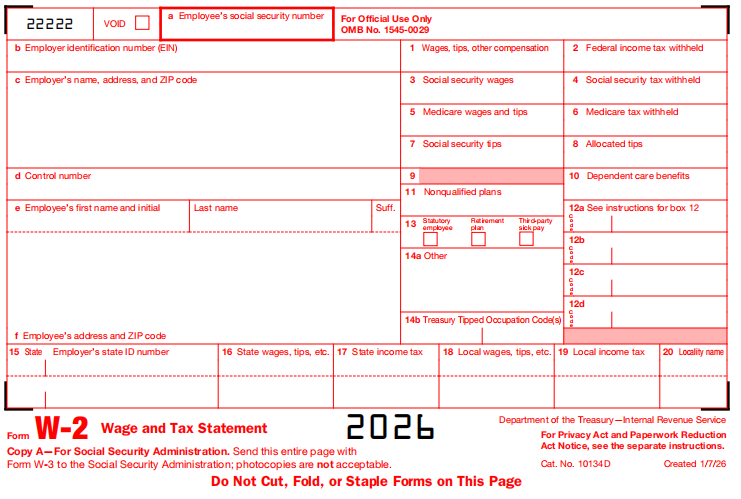
Part 2: What are W2 Form PDF Used for
The W-2 Form in PDF format is used for several purposes related to tax reporting and compliance. Here are some key uses:
Reporting your annual income and taxes withheld by your employer.
Filing accurate tax returns.
Allowing the IRS to verify your tax payments.
Providing information about Social Security and Medicare wages and taxes.
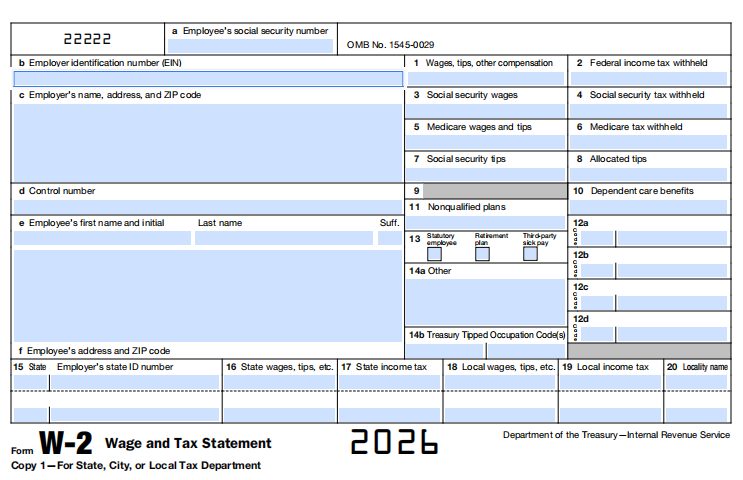
If you also need a free pdf filler, see our related guide.
Part 3: W2 Form PDF Sample
To fill out a W-2 Form, follow these steps:
1. Obtain the W-2 Form: You can download the official W-2 Form from the IRS website or obtain it from your employer.
2. Provide Employer and Employee Information: Enter your employer's name, address, and Employer Identification Number (EIN). Also, include your name, address, and Social Security Number (SSN).
3. Enter Wage and Tax Information:
Box 1: Report your total taxable wages, salaries, and tips for the year.
Box 2: Enter the federal income tax withheld from your wages.
Box 3: Report your total wages subject to Social Security tax.
Box 4: Enter the amount of Social Security tax withheld.
Box 5: Report your total wages subject to Medicare tax.
Box 6: Enter the amount of Medicare tax withheld.
Box 7: Provide any tips you received that were not included in Box 1.
Box 8: If applicable, enter allocated tips.
Box 10: Report any dependent care benefits provided by your employer.
Box 12: This box may include various codes indicating additional information, such as retirement plan contributions or special tax treatments.
Boxes 13-20: These boxes may include state and local tax information. Fill them out if required by your state or locality.
4. Review and Double-Check: Ensure that all the information you have entered is accurate and matches your records. Mistakes could lead to errors in your tax filing.
5. Submit Copies: Distribute the copies of the W-2 Form as follows:
Copy A: Send Copy A (with Form W-3) to the Social Security Administration (SSA).
Copy 1: Provide Copy 1 to your state, city, or local tax department, if applicable.
Copy B, C, and 2: Give these copies to the employee for their tax records.
To better understand how to fill out the W2 form, it is helpful to have a sample for reference. You can find an official sample W2 form PDF provided by the IRS at the following link: https://www.irs.gov/pub/irs-pdf/fw2vi.pdf
Part 4: How to Quickly Fill Out a W2 Form PDF
Above, we covered what a W2 Form PDF is, what it is used for, and which fields you need to complete. With that much information in hand, the next question is practical: how can you fill out the W2 Form PDF quickly and accurately?
One of the most efficient options is WPS Office. Beyond standard PDF editing, WPS includes an AI Form Filler (AI Smart Form) feature that can extract details from your source text or files and populate form fields for you-so you spend less time typing box by box and more time reviewing for accuracy.
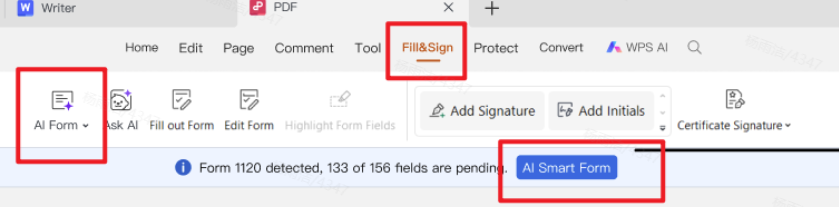
Recommended feature - AI Form Filler / AI Smart Form: In WPS PDF's Fill&Sign tab, open AI Form or click AI Smart Form when WPS detects pending form fields. Paste text, upload a file, or drag a document with the required information into AI Form Filler, then click Extract&Fill. Processing can run locally to help keep your usage secure.
Steps to quickly fill a W2 Form PDF with WPS AI Form Filler:
Step 1. Download the official IRS Form W-2 (or your employer-provided W-2 PDF) and save it to your computer.

Step 2. Install WPS Office, open the W-2 Form PDF, and switch to the PDF tab ? Fill&Sign.
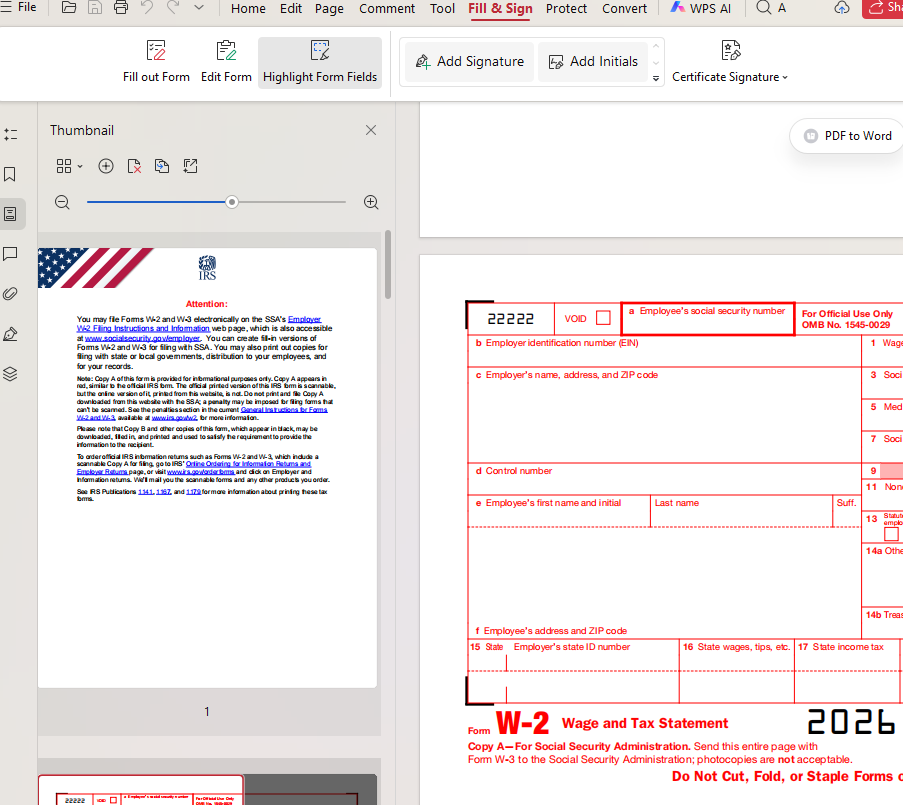
Step 3. Start AI Form / AI Smart Form. When WPS detects form fields (for example, fields pending), click AI Form in the ribbon or AI Smart Form on the prompt bar.
Step 4. In the AI Form Filler window, add your source information by pasting text, clicking + Upload File, or dragging a file that contains employer/employee wage details. You can also reuse a file from Past uploads if needed. Then click Extract&Fill.
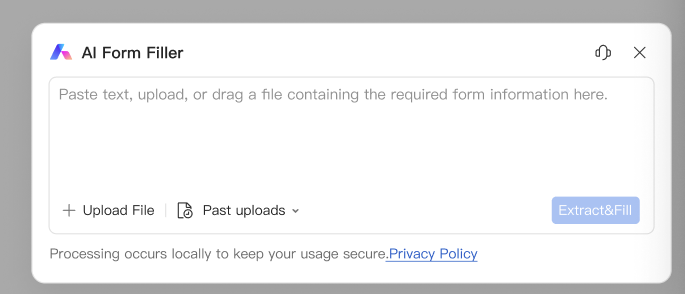
Step 5. WPS AI extracts matching details and fills the form fields automatically. Review every box (wages, withheld taxes, SSN/EIN, state fields) against your records.
Step 6. Save the completed PDF. Add a digital signature or print and sign if required, then distribute copies according to IRS/employer instructions.
Part 5: Why We Recommend WPS Office
We introduce WPS Office in this W2 Form PDF guide because filling tax forms is not only about knowing each box-it is about finishing the document quickly without sacrificing accuracy. Here is why WPS is the tool we highlight:

Pros & Cons of WPS Office's PDF editing (with AI Form Filler)
| Type | Item | Rating | Mark |
|---|---|---|---|
| Pro | AI Smart Form filling for multi-field PDFs (e.g. W-2 style forms) | ★★★★★ | ✓ |
| Pro | User-friendly Fill&Sign with clear form detection prompts | ★★★★★ | ✓ |
| Pro | Advanced PDF tools (view, edit, convert, annotate) | ★★★★☆ | ✓ |
| Pro | Compatibility with common office and PDF formats | ★★★★★ | ✓ |
| Pro | Cloud integration and cross-platform support | ★★★★☆ | ✓ |
| Con | Some advanced AI / PDF features may need Premium | ★★☆☆☆ | ✗ |
| Con | Complex PDFs may still need manual review after autofill | ★★★☆☆ | ✗ |
| Con | Tax figures must be double-checked — AI assists, you confirm | ★★★☆☆ | ✗ |
✓ = advantage | ✗ = limitation | ★ = relative strength
Built for real PDF form work. WPS PDF's Fill&Sign tools are designed for interactive forms, signatures, and field-by-field editing-exactly what a W2 Form PDF workflow needs.
AI Form Filler speeds up repetitive entry. Instead of retyping the same employer/employee details across many fields, you can paste or upload source information and let Extract&Fill populate matching fields, then review.
One free suite for the full process. Download the form, fill it, save it, convert or annotate if needed, and keep related documents in the same office suite.
Accessible across devices. Whether you start on a Windows PC or continue later on another platform, WPS helps you keep the workflow consistent.
Practical for employees and small teams. If you only need to complete or check a W2-related PDF occasionally, WPS gives you a capable free entry point without buying a separate PDF editor solely for form filling.
In short: Part 3 explains what to enter; Part 4 shows how to enter it faster with WPS AI Form pdf filler; this section explains why that recommendation fits a W2 Form PDF guide-backed by the pros and cons above.
FAQs
Q1: What is the difference between the IRS Form W-2 and IRS Form W-4?
The IRS Form W-2 and IRS Form W-4 serve different purposes in relation to income tax reporting. Here are the key differences between the two forms:
IRS Form W-2 | IRS Form W-4 | |
|---|---|---|
Issuer | Employers | Employees |
Purpose | Reports employee's wages, tips, and taxes withheld | Determines federal income tax withholding |
Recipient | Employees | Employers |
Filing | Submitted to IRS and provided to employees by employers | Kept on file by the employer |
Update | Employers file annually by January 31st | Employees can update at any time when personal or financial situation changes |
Q2: Can I print a blank W-2 form?
Yes, you can print a blank W-2 form. The Internal Revenue Service (IRS) provides printable versions of the W-2 form on their official website. You can visit the IRS website and search for Form W-2, then download and print the blank form.
Q3: Can I print a W-2 online?
Yes, you can print a W-2 form online. You can typically access and print your W-2 form through your employer's online portal or payroll service provider. Additionally, the IRS offers an online service called "Get Transcript" where you can view and print your tax documents, including W-2 forms. Some tax preparation software also allows you to import your W-2 information and generate printable copies of your W-2 form. If you're unsure, it's best to check with your employer or refer to the instructions provided by your payroll service or tax preparation software.
Q4: Can WPS AI Form Filler replace manual review on a W2 Form PDF?
No. AI Form Filler helps you fill fields faster, but you should always verify wages, tax amounts, identification numbers, and state/local boxes before saving or submitting. Treat AI as an accelerator, not a substitute for final review.


If you also need a create pdf fillable form, see our related guide.
Summary
In this guide, we covered what a W2 Form PDF is, what it is used for, and how to understand each major field. We then restructured the practical section around a clearer goal: how to fill the W2 Form PDF quickly using WPS Office-especially its AI Smart Form workflow in Fill&Sign. Finally, we explained why WPS is the tool recommended in this article. With these updates, you can move from understanding the form to completing it with more speed and confidence.
'%3e%3cpath%20d='M19.9911%204.11386V6.471H18.5894C18.0775%206.471%2017.7322%206.57814%2017.5536%206.79243C17.3751%207.00671%2017.2858%207.32814%2017.2858%207.75671V9.44421H19.9019L19.5536%2012.0871H17.2858V18.8639H14.5536V12.0871H12.2769V9.44421H14.5536V7.49779C14.5536%206.39064%2014.8632%205.53201%2015.4822%204.92189C16.1013%204.31177%2016.9257%204.00671%2017.9554%204.00671C18.8304%204.00671%2019.509%204.04243%2019.9911%204.11386Z'%20fill='%23333333'/%3e%3c/g%3e%3cdefs%3e%3cclipPath%20id='clip0_2938_8199'%3e%3crect%20width='16'%20height='16'%20fill='white'%20transform='translate(8%204.00671)'/%3e%3c/clipPath%3e%3c/defs%3e%3c/svg%3e)
'%3e%3cpath%20d='M17.5237%2010.7813L23.4811%204H22.0699L16.8949%209.88693L12.7648%204H8L14.2469%2012.9029L8%2020.0133H9.4112L14.8725%2013.7952L19.2352%2020.0133H24M9.92053%205.04213H12.0885L22.0688%2019.0224H19.9003'%20fill='%23333333'/%3e%3c/g%3e%3cdefs%3e%3cclipPath%20id='clip0_2938_8200'%3e%3crect%20width='16'%20height='16.0134'%20fill='white'%20transform='translate(8%204)'/%3e%3c/clipPath%3e%3c/defs%3e%3c/svg%3e)


