

'%3e%3cpath%20d='M8%200C12.4183%200%2016%203.58172%2016%208C16%2012.4183%2012.4183%2016%208%2016C3.58172%2016%200%2012.4183%200%208C0%203.58172%203.58172%200%208%200ZM11.6162%204.38379C11.2257%203.99337%2010.5927%203.99338%2010.2021%204.38379L8%206.58594L5.79785%204.38379C5.40732%203.99334%204.77429%203.99329%204.38379%204.38379C3.99331%204.77429%203.99335%205.40733%204.38379%205.79785L6.58594%208L4.38379%2010.2021C3.99348%2010.5927%203.99341%2011.2257%204.38379%2011.6162C4.77426%2012.0066%205.40734%2012.0065%205.79785%2011.6162L8%209.41406L10.2021%2011.6162C10.5927%2012.0066%2011.2257%2012.0067%2011.6162%2011.6162C12.0067%2011.2257%2012.0066%2010.5927%2011.6162%2010.2021L9.41406%208L11.6162%205.79785C12.0066%205.40735%2012.0066%204.77429%2011.6162%204.38379Z'%20fill='%23080E17'%20fill-opacity='0.46'/%3e%3c/g%3e%3cdefs%3e%3cclipPath%20id='clip0_3761_713'%3e%3crect%20width='16'%20height='16'%20fill='white'/%3e%3c/clipPath%3e%3c/defs%3e%3c/svg%3e)




'%3e%3cpath%20fill-rule='evenodd'%20clip-rule='evenodd'%20d='M21.4999%2010.9993C21.4999%205.20009%2016.7986%200.498901%2010.9993%200.498901C5.19994%200.498901%200.498657%205.20009%200.498657%2010.9993C0.498657%2016.2404%204.33858%2020.5844%209.35855%2021.3722V14.0346H6.69238V10.9993H9.35855V8.68594C9.35855%206.05427%2010.9262%204.60062%2013.3248%204.60062C14.4736%204.60062%2015.6753%204.80571%2015.6753%204.80571V7.38979H14.3512C13.0468%207.38979%2012.64%208.19921%2012.64%209.0296V10.9993H15.5523L15.0867%2014.0346H12.64V21.3722C17.66%2020.5844%2021.4999%2016.2404%2021.4999%2010.9993Z'%20fill='%231568EA'/%3e%3c/g%3e%3c/svg%3e)


'%3e%3cpath%20d='M2.42045%2022.1876H6.31818V12.7217L0.75%208.54553V20.5171C0.75%2021.4414%201.49892%2022.1876%202.42045%2022.1876Z'%20fill='%234285F4'/%3e%3cpath%20d='M19.682%2022.1876H23.5797C24.5041%2022.1876%2025.2502%2021.4387%2025.2502%2020.5171V8.54553L19.682%2012.7217'%20fill='%2334A853'/%3e%3cpath%20d='M19.682%205.48293V12.7216L25.2502%208.54543V6.31816C25.2502%204.25236%2022.8921%203.07469%2021.2411%204.31361'%20fill='%23FBBC04'/%3e%3cpath%20d='M6.31824%2012.7217V5.48303L13.0001%2010.4944L19.6819%205.48303V12.7217L13.0001%2017.733'%20fill='%23EA4335'/%3e%3cpath%20d='M0.75%206.31816V8.54543L6.31818%2012.7216V5.48293L4.75909%204.31361C3.10534%203.07469%200.75%204.25236%200.75%206.31816Z'%20fill='%23C5221F'/%3e%3c/g%3e%3cdefs%3e%3cclipPath%20id='clip0_2954_7305'%3e%3crect%20width='24.5'%20height='18.375'%20fill='white'%20transform='translate(0.75%203.8125)'/%3e%3c/clipPath%3e%3c/defs%3e%3c/svg%3e)


The i 130 Form Pdf, also known as the Petition for Alien Relative, is a U.S. Citizenship and Immigration Services (USCIS) form used to sponsor a foreign national relative for immigration to the United States. U.S. citizens or lawful permanent residents use the i 130 Form Pdf to initiate bringing their close relatives to the United States as immigrants. The form is available in PDF format on the USCIS website and with the help of WPS Office can easily be freely edited online and converted with a converter.
If you also need a ds 160 form pdf, see our related guide.
For a faster fill-and-sign workflow, try WPS pdf filler tools in WPS Office.
How Can WPS Office Help to Use The I 130 Form PDF?
WPS Office can be used to fill out a form in PDF format, such as the I-130 Form, by using the built-in PDF editor. Here are the steps you can follow to use WPS Office to fill out the I-130 Form PDF:
Open the I-130 Form PDF in the WPS Office.
Select the PDF option from the main menu and then select Edit PDF to open the PDF editor.
Use the Add Text tool to fill in the form fields with your information.
Use the Add Signature tool to sign the form if required.
Use the Save As option to save a copy of the completed form to your computer.
How to Download The I 130 Form PDF for Free?
The i 130 Form Pdf, Petition for Alien Relative, can be downloaded for free from the official website of the U.S. Citizenship and Immigration Services (USCIS). Here's how to download the form:

1. Go to the USCIS website at www.uscis.gov.
2. Click on Forms from the top menu to access the forms page.
3. In the search bar, type i 130 Form Pdf and enter.
4. Once you have located the i 130 Form Pdf, click on the Download button to download the form in PDF format.
5. Save the form to your computer or device for future reference.
If you also need a ds 260 form pdf, see our related guide.
How to Edit I 130 Form PDF Online?
To edit the i 130 Form Pdf, Petition for Alien Relative, you can use a PDF editor such as Adobe Acrobat or an online PDF editor such as SmallPDF. Here's a general process for editing the form using an online PDF editor:

Open the form: Visit the website of an online PDF editor and click on the Edit PDF button to upload the i 130 Form Pdf to the editor.
Make the necessary changes: Use the editing tools to make the required changes to the form. This may include typing in your personal information, adding or deleting text, and checking or unchecking boxes.
Save the form: Once you have made all the necessary changes, save the form by clicking on the Save button.
Download the edited form: Download the revised document to your computer or device and save it for future reference.
How to Use An I 130 Form PDF Converter?
An i 130 Form Pdf converter is a tool that can convert a PDF document into a different format, such as Microsoft Word or an editable PDF. It can be useful if you need to make changes to the i 130 Form Pdf but don't have a PDF editor. Here's a general process for using an i 130 Form Pdf converter:
Upload the i 130 Form Pdf: Visit the website of a PDF converter and click on the Choose file or Upload button to select the i 130 Form Pdf from your computer or device.
Choose the desired format: Choose the desired design that you would like to convert Form I-130 into. This may be Microsoft Word, an editable PDF, or another format.
Convert the form: Once you have chosen the desired format, click the Convert button to initiate the conversion process. This may take a few minutes, depending on the size of the form and your internet connection speed.
Download the converted form: Once the conversion is complete, download the corrected form to your computer or device and save it for future reference.
How to Use An I 130 Form PDF Form Filler?
An i 130 Form Pdf form filler is a tool that can be used to quickly and easily fill out Form I-130, Petition for Alien Relative, without having to manually type in the information. Here's a general process for using an i 130 Form Pdf form filler:

Visit the form filler website: Visit the website of an i 130 Form Pdf form filler and click on the Start Now or Get Started button to launch the form filler.
Upload the I-130 Form: Upload the i 130 Form Pdf to the form filler by clicking on the Choose file or Upload button.
Fill in the required information: Use the form filler to fill in the required information by typing in the information or selecting options from drop-down menus. The form filler may also include helpful tips and guidance to complete the form correctly.
Review and submit the form: Once you have filled in all the required information, review the form to ensure that all the notifications are accurate and complete. If you need to make any changes, you can use the form filler to edit the document. When you are ready to submit the form, click on the Submit button to send the form to USCIS.
Tips for Completing The I 130 Form PDF:
Here are some tips for completing the i 130 Form Pdf, Petition for Alien Relative, accurately and effectively:

1. Before filling out the form, read the instructions and guidelines to understand the required information and how to complete the form.
2. Gather all the required information, such as your personal information, your relative's information, and any supporting documentation, before filling out the form.
3. Fill out the form in either capital letters or legible handwriting. If you type the form, make sure to use a clear font that is easy to read.
4. Be precise and accurate when filling out the form. Provide complete and accurate information, and double-check your answers to avoid mistakes.
5. Before submitting the form, check the form carefully for errors, typos, and other inaccuracies. Ensure all the information is complete and correct and all the required fields have been filled out.
6. Make sure to include all the required supporting documentation with the form, such as birth certificates, marriage certificates, and other relevant documents.
7. Before submitting the form, make a copy for your records. This will help you track the status of your petition and refer to the form if necessary in the future.
Troubleshooting Common I 130 Form PDF Issues:
Here are some common issues that people may encounter when filling out the i 130 Form Pdf, Petition for Alien Relative, and some suggestions for troubleshooting:
Incorrect information: Double-check the form for errors, typos, and other inaccuracies, and ensure that all the information is complete and accurate.
Missing required information: Ensure to provide all the required information on the form, including your personal information, your relative's information, and any supporting documentation.
Unclear handwriting or font: Make sure to type or print legibly, using a clear font or writing that is easy to read.
Incomplete supporting documentation: Include all the required supporting documentation with the form, such as birth certificates, marriage certificates, and other relevant documents.
Missing signatures: Make sure you have signed and dated the form where required.
Incomplete payment: Make sure to pay the required fee and include proof of charge with the form.
Incorrect filing address: Make sure to file the form at the correct address specified by USCIS.
How to Quickly Fill Out an I-130 Form PDF with WPS AI Form Filler
After you understand the fields on a an I-130 Form, the next practical question is: how can you fill the form PDF quickly and accurately?
One of the most efficient options is WPS Office. Beyond standard PDF editing, WPS includes an AI Form Filler (AI Smart Form) feature that can extract details from your source text or files and populate form fields for you—so you spend less time typing field by field and more time reviewing for accuracy.
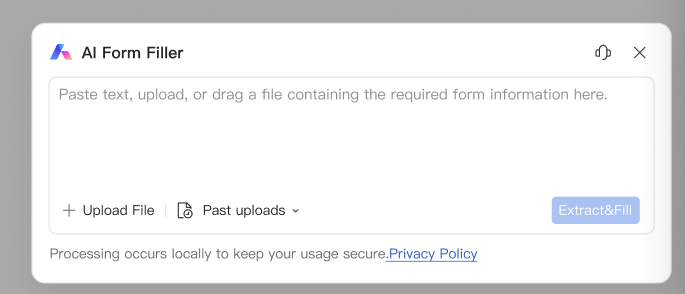
Recommended feature — AI Form Filler / AI Smart Form: In WPS PDF’s Fill&Sign tab, open AI Form or click AI Smart Form when WPS detects pending form fields. Paste text, upload a file, or drag a document with the required information into AI Form Filler, then click Extract&Fill. Always review every field before you save or submit.
Quick steps:
Step 1. Download or open your an I-130 Form PDF in WPS Office.
Step 2. Go to the PDF tab → Fill&Sign.
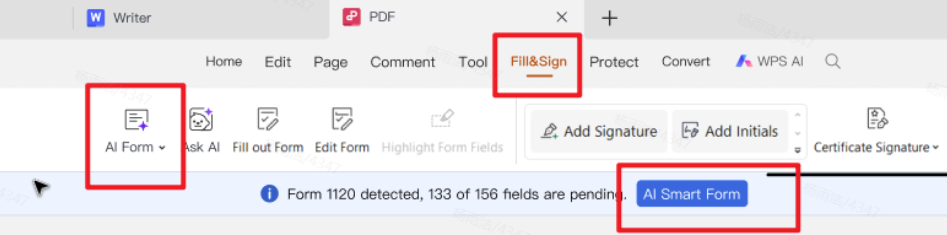
Step 3. Start AI Form / AI Smart Form, then paste or upload your source information and click Extract&Fill.
Step 4. Review all autofilled fields carefully, fix anything incorrect, then save the completed PDF.
WPS Office Is The Best Choice:
With the help of word processing software like WPS Office, creating a professional and effective i 130 Form Pdf. They can be found free through various websites edited and shared using free online Pdf editors and converters. Download free WPS Office.
If you also need a passport form pdf, see our related guide.

'%3e%3cpath%20d='M19.9911%204.11386V6.471H18.5894C18.0775%206.471%2017.7322%206.57814%2017.5536%206.79243C17.3751%207.00671%2017.2858%207.32814%2017.2858%207.75671V9.44421H19.9019L19.5536%2012.0871H17.2858V18.8639H14.5536V12.0871H12.2769V9.44421H14.5536V7.49779C14.5536%206.39064%2014.8632%205.53201%2015.4822%204.92189C16.1013%204.31177%2016.9257%204.00671%2017.9554%204.00671C18.8304%204.00671%2019.509%204.04243%2019.9911%204.11386Z'%20fill='%23333333'/%3e%3c/g%3e%3cdefs%3e%3cclipPath%20id='clip0_2938_8199'%3e%3crect%20width='16'%20height='16'%20fill='white'%20transform='translate(8%204.00671)'/%3e%3c/clipPath%3e%3c/defs%3e%3c/svg%3e)
'%3e%3cpath%20d='M17.5237%2010.7813L23.4811%204H22.0699L16.8949%209.88693L12.7648%204H8L14.2469%2012.9029L8%2020.0133H9.4112L14.8725%2013.7952L19.2352%2020.0133H24M9.92053%205.04213H12.0885L22.0688%2019.0224H19.9003'%20fill='%23333333'/%3e%3c/g%3e%3cdefs%3e%3cclipPath%20id='clip0_2938_8200'%3e%3crect%20width='16'%20height='16.0134'%20fill='white'%20transform='translate(8%204)'/%3e%3c/clipPath%3e%3c/defs%3e%3c/svg%3e)


