

'%3e%3cpath%20d='M8%200C12.4183%200%2016%203.58172%2016%208C16%2012.4183%2012.4183%2016%208%2016C3.58172%2016%200%2012.4183%200%208C0%203.58172%203.58172%200%208%200ZM11.6162%204.38379C11.2257%203.99337%2010.5927%203.99338%2010.2021%204.38379L8%206.58594L5.79785%204.38379C5.40732%203.99334%204.77429%203.99329%204.38379%204.38379C3.99331%204.77429%203.99335%205.40733%204.38379%205.79785L6.58594%208L4.38379%2010.2021C3.99348%2010.5927%203.99341%2011.2257%204.38379%2011.6162C4.77426%2012.0066%205.40734%2012.0065%205.79785%2011.6162L8%209.41406L10.2021%2011.6162C10.5927%2012.0066%2011.2257%2012.0067%2011.6162%2011.6162C12.0067%2011.2257%2012.0066%2010.5927%2011.6162%2010.2021L9.41406%208L11.6162%205.79785C12.0066%205.40735%2012.0066%204.77429%2011.6162%204.38379Z'%20fill='%23080E17'%20fill-opacity='0.46'/%3e%3c/g%3e%3cdefs%3e%3cclipPath%20id='clip0_3761_713'%3e%3crect%20width='16'%20height='16'%20fill='white'/%3e%3c/clipPath%3e%3c/defs%3e%3c/svg%3e)




'%3e%3cpath%20fill-rule='evenodd'%20clip-rule='evenodd'%20d='M21.4999%2010.9993C21.4999%205.20009%2016.7986%200.498901%2010.9993%200.498901C5.19994%200.498901%200.498657%205.20009%200.498657%2010.9993C0.498657%2016.2404%204.33858%2020.5844%209.35855%2021.3722V14.0346H6.69238V10.9993H9.35855V8.68594C9.35855%206.05427%2010.9262%204.60062%2013.3248%204.60062C14.4736%204.60062%2015.6753%204.80571%2015.6753%204.80571V7.38979H14.3512C13.0468%207.38979%2012.64%208.19921%2012.64%209.0296V10.9993H15.5523L15.0867%2014.0346H12.64V21.3722C17.66%2020.5844%2021.4999%2016.2404%2021.4999%2010.9993Z'%20fill='%231568EA'/%3e%3c/g%3e%3c/svg%3e)


'%3e%3cpath%20d='M2.42045%2022.1876H6.31818V12.7217L0.75%208.54553V20.5171C0.75%2021.4414%201.49892%2022.1876%202.42045%2022.1876Z'%20fill='%234285F4'/%3e%3cpath%20d='M19.682%2022.1876H23.5797C24.5041%2022.1876%2025.2502%2021.4387%2025.2502%2020.5171V8.54553L19.682%2012.7217'%20fill='%2334A853'/%3e%3cpath%20d='M19.682%205.48293V12.7216L25.2502%208.54543V6.31816C25.2502%204.25236%2022.8921%203.07469%2021.2411%204.31361'%20fill='%23FBBC04'/%3e%3cpath%20d='M6.31824%2012.7217V5.48303L13.0001%2010.4944L19.6819%205.48303V12.7217L13.0001%2017.733'%20fill='%23EA4335'/%3e%3cpath%20d='M0.75%206.31816V8.54543L6.31818%2012.7216V5.48293L4.75909%204.31361C3.10534%203.07469%200.75%204.25236%200.75%206.31816Z'%20fill='%23C5221F'/%3e%3c/g%3e%3cdefs%3e%3cclipPath%20id='clip0_2954_7305'%3e%3crect%20width='24.5'%20height='18.375'%20fill='white'%20transform='translate(0.75%203.8125)'/%3e%3c/clipPath%3e%3c/defs%3e%3c/svg%3e)


The Passport Application Form Pdf is a standard form used by individuals to apply for a passport, which is an official government-issued document that verifies a person's identity and citizenship. The form must be filled out correctly to ensure that the applicant's passport application is processed smoothly and efficiently. With the help of WPS Office, this form can be easily edited online and converted with a converter.
If you also need a ds 160 form pdf, see our related guide.
For a faster fill-and-sign workflow, try WPS pdf filler tools in WPS Office.
How Can WPS Office Help to Use the Passport Application Form PDF?
WPS Office is a productivity suite that can be used to edit PDF documents, including the Passport Application Form PDF. The following steps outline how you can use WPS Office to fill out a Passport Application Form PDF:
Open WPS Office and select the PDF to Word option. This will allow you to convert the PDF form into an editable Word document.
Once the conversion is complete, the form will appear as a Word document and you can start filling out the form by typing the required information into the designated fields.
You can also use the Insert menu to add your signature or any other images that are required in the form.
How to Download A Passport Application Form PDF?
You can download a Passport Application Form Pdf from the official website of the country's government agency responsible for issuing passports. Here is a general process for downloading the form:
Go to the official government website: Go to the official website of the government agency responsible for issuing passports in your country.
Find the Forms or Downloads section: Look for a quote on the website labelled Forms or Downloads. This is usually where you can find the Passport Application Form Pdf.
Download the form: Click on the Passport Application Form Pdf link and follow the instructions to download the form to your computer. The condition may be in PDF format or a similar electronic format.
Save the form: Once the form has finished downloading, save it to your computer or another secure location.
If you also need a i 130 form pdf, see our related guide.
How to Edit A Passport Application Form PDF?
Editing a Passport Application Form Pdf can sometimes be challenging, as many PDF forms are not designed to be edited electronically. However, there are several ways to edit a Passport Application Form Pdf, depending on the type of form and the tools available to you:

Use Adobe Acrobat: Adobe Acrobat is a popular PDF editing software that allows you to edit text and fill in forms electronically. If you have Adobe Acrobat, you can open the Passport Application Form Pdf and make changes directly on the form.
Try WPS AI Form Filler: When filling a passport application form, you usually need to enter a lot of personal details in exactly the right fields. That can feel stressful if you’re unsure where each answer belongs—or if you simply want to finish faster. A simple time-saving option is WPS Office: its AI Smart Form can help place your prepared information into matching PDF fields, so you spend less time hunting for the next box and more time checking accuracy before you submit.
Use an online PDF editor: Several online PDF editors are available that allow you to edit PDF files without downloading software. Upload the Passport Application Form Pdf to the online editor and make the necessary changes.
Print the form and fill: If the document cannot be edited electronically, you can print the form and fill it in by hand using a pen or pencil. Make sure to fill in all required information legibly and accurately.
How to Convert A Passport Application Form PDF?
To convert a Passport Application Form Pdf, you will need to use a PDF converter tool that can change the PDF file format into a different file type. WPS Office provides free converter online tools. Here are the steps to convert a Passport Application Form Pdf using online tools:

Go to an online PDF converter website: There are many online PDF converter websites available, such as SmallPDF, ZAMZAR, or Online-Convert.
Upload the Passport Application Form Pdf: Select the PDF file you want to convert and upload it to the website.
Choose the desired output format: Select the output from the options available on the website. Common output formats include Microsoft Word, Excel, and image formats like JPG or PNG.
Convert the file: Once you have selected the desired output format, click the Convert button to start the conversion process. The website will convert the Passport Application Form Pdf into the chosen design.
Download the converted file: After completing the conversion, you can download the converted file to your computer.
How to Fill out A Passport Application Form Filler?
Filling out a Passport Application Form filler can seem like a daunting task. Still, it is straightforward if you have all the required information and follow the instructions carefully. Here are some general steps to help you fill out a Passport Application form filler:
Gather required documents: Before filling out the form, ensure you have all the required documents, such as proof of citizenship and two passport photos.
Read the instructions: Carefully read the instructions on the form filler and make sure you understand what information is required in each section.
Fill in personal information: Start by filling in your personal information, such as your full name, date of birth, place of birth, and current address.
Provide information about your parents or legal guardians: You may need to provide information about your parents or legal guardians, including their names, dates of birth, and places of birth.
Provide information about any previous passports: If you have held a passport before, you will need to provide information about it, such as the passport number and the date it was issued.
Attach required documents: Make sure to attach all necessary documents to the form, such as proof of citizenship and passport photos.
Sign and date the form: After filling out the form, sign and date it in the designated spaces.
Submit the form and fees: Submit the completed form and the required fees to the passport acceptance facility.
Simple steps:
Step 1. Open your passport application PDF in WPS Office.
Step 2. Go to PDF → Fill&Sign.
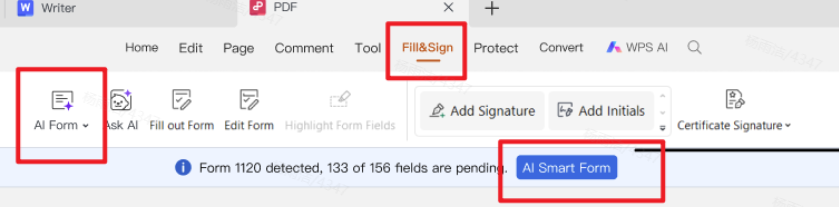
Step 3. When fields are detected, click AI Form or AI Smart Form.
Step 4. Paste your prepared information (or upload a source file), then click Extract&Fill.
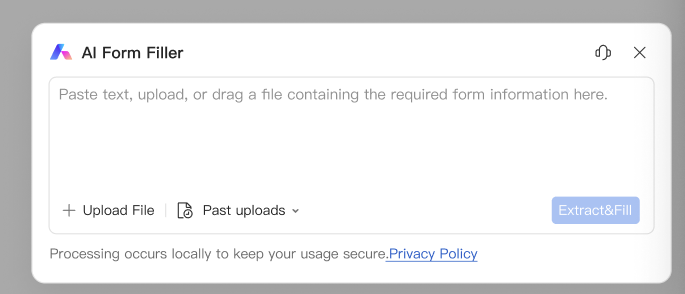
Step 5. Review every autofilled field carefully, fix anything incorrect, and save the PDF before you submit.
How to Print A Passport Application Form PDF?
To print a Passport Application Form Pdf, you will need access to a printer and a computer with PDF reader software installed. WPS Office is one of the best choice. Here are the steps to print a Passport Application Form Pdf:

Open the Passport Application Form Pdf: Open the PDF file using PDF reader software, such as Adobe Acrobat Reader or a web browser with a built-in PDF viewer.
Check the print settings: Before printing, check the print settings to ensure the form will print at the correct size and orientation. You may also need to adjust the page margins and scaling to fit the document onto the page.
Print the form: Once the print settings are set, click on the Print button in the PDF reader software or web browser to start the printing process.
Check the printed form: After printing, carefully review the printed form to ensure all the information is legible and the condition is complete.
Where to Find Free Passport Application Form PDF?
Free Passport Application Forms are readily available online and can be easily found on government websites. It is important to ensure that you are downloading a Passport Application Form Pdf from a reputable and official government source to use the most up-to-date and accurate form.
If you also need a create pdf fillable form, see our related guide.
FAQs about Passport Application Form PDF
Q1. Can I fill a passport application form PDF on my computer?
Yes. If the PDF has fillable fields, open it in a PDF editor such as WPS Office Fill&Sign and type into the highlighted fields. If it is not fillable, you may need to add text boxes or print and complete it by hand.
Q2. How can WPS help when the passport form has many fields?
WPS AI Form Filler is useful when you already have your details ready and want help placing them into the correct fields more quickly. Always review names, passport numbers, and dates before saving or submitting.
Q3. Is every WPS PDF feature free?
Core PDF viewing/editing and Fill&Sign tools cover many everyday tasks for free. Some advanced AI features may require membership, while basic form editing remains available without relying on AI.



Learn More about WPS Office:
With the help of word processing software like WPS Office, creating a professional and effective Passport Application Form Pdf. They can be found free through various websites edited and shared using free online Pdf editors and converters. Download free WPS Office.
'%3e%3cpath%20d='M19.9911%204.11386V6.471H18.5894C18.0775%206.471%2017.7322%206.57814%2017.5536%206.79243C17.3751%207.00671%2017.2858%207.32814%2017.2858%207.75671V9.44421H19.9019L19.5536%2012.0871H17.2858V18.8639H14.5536V12.0871H12.2769V9.44421H14.5536V7.49779C14.5536%206.39064%2014.8632%205.53201%2015.4822%204.92189C16.1013%204.31177%2016.9257%204.00671%2017.9554%204.00671C18.8304%204.00671%2019.509%204.04243%2019.9911%204.11386Z'%20fill='%23333333'/%3e%3c/g%3e%3cdefs%3e%3cclipPath%20id='clip0_2938_8199'%3e%3crect%20width='16'%20height='16'%20fill='white'%20transform='translate(8%204.00671)'/%3e%3c/clipPath%3e%3c/defs%3e%3c/svg%3e)
'%3e%3cpath%20d='M17.5237%2010.7813L23.4811%204H22.0699L16.8949%209.88693L12.7648%204H8L14.2469%2012.9029L8%2020.0133H9.4112L14.8725%2013.7952L19.2352%2020.0133H24M9.92053%205.04213H12.0885L22.0688%2019.0224H19.9003'%20fill='%23333333'/%3e%3c/g%3e%3cdefs%3e%3cclipPath%20id='clip0_2938_8200'%3e%3crect%20width='16'%20height='16.0134'%20fill='white'%20transform='translate(8%204)'/%3e%3c/clipPath%3e%3c/defs%3e%3c/svg%3e)


