

'%3e%3cpath%20d='M8%200C12.4183%200%2016%203.58172%2016%208C16%2012.4183%2012.4183%2016%208%2016C3.58172%2016%200%2012.4183%200%208C0%203.58172%203.58172%200%208%200ZM11.6162%204.38379C11.2257%203.99337%2010.5927%203.99338%2010.2021%204.38379L8%206.58594L5.79785%204.38379C5.40732%203.99334%204.77429%203.99329%204.38379%204.38379C3.99331%204.77429%203.99335%205.40733%204.38379%205.79785L6.58594%208L4.38379%2010.2021C3.99348%2010.5927%203.99341%2011.2257%204.38379%2011.6162C4.77426%2012.0066%205.40734%2012.0065%205.79785%2011.6162L8%209.41406L10.2021%2011.6162C10.5927%2012.0066%2011.2257%2012.0067%2011.6162%2011.6162C12.0067%2011.2257%2012.0066%2010.5927%2011.6162%2010.2021L9.41406%208L11.6162%205.79785C12.0066%205.40735%2012.0066%204.77429%2011.6162%204.38379Z'%20fill='%23080E17'%20fill-opacity='0.46'/%3e%3c/g%3e%3cdefs%3e%3cclipPath%20id='clip0_3761_713'%3e%3crect%20width='16'%20height='16'%20fill='white'/%3e%3c/clipPath%3e%3c/defs%3e%3c/svg%3e)




'%3e%3cpath%20fill-rule='evenodd'%20clip-rule='evenodd'%20d='M21.4999%2010.9993C21.4999%205.20009%2016.7986%200.498901%2010.9993%200.498901C5.19994%200.498901%200.498657%205.20009%200.498657%2010.9993C0.498657%2016.2404%204.33858%2020.5844%209.35855%2021.3722V14.0346H6.69238V10.9993H9.35855V8.68594C9.35855%206.05427%2010.9262%204.60062%2013.3248%204.60062C14.4736%204.60062%2015.6753%204.80571%2015.6753%204.80571V7.38979H14.3512C13.0468%207.38979%2012.64%208.19921%2012.64%209.0296V10.9993H15.5523L15.0867%2014.0346H12.64V21.3722C17.66%2020.5844%2021.4999%2016.2404%2021.4999%2010.9993Z'%20fill='%231568EA'/%3e%3c/g%3e%3c/svg%3e)


'%3e%3cpath%20d='M2.42045%2022.1876H6.31818V12.7217L0.75%208.54553V20.5171C0.75%2021.4414%201.49892%2022.1876%202.42045%2022.1876Z'%20fill='%234285F4'/%3e%3cpath%20d='M19.682%2022.1876H23.5797C24.5041%2022.1876%2025.2502%2021.4387%2025.2502%2020.5171V8.54553L19.682%2012.7217'%20fill='%2334A853'/%3e%3cpath%20d='M19.682%205.48293V12.7216L25.2502%208.54543V6.31816C25.2502%204.25236%2022.8921%203.07469%2021.2411%204.31361'%20fill='%23FBBC04'/%3e%3cpath%20d='M6.31824%2012.7217V5.48303L13.0001%2010.4944L19.6819%205.48303V12.7217L13.0001%2017.733'%20fill='%23EA4335'/%3e%3cpath%20d='M0.75%206.31816V8.54543L6.31818%2012.7216V5.48293L4.75909%204.31361C3.10534%203.07469%200.75%204.25236%200.75%206.31816Z'%20fill='%23C5221F'/%3e%3c/g%3e%3cdefs%3e%3cclipPath%20id='clip0_2954_7305'%3e%3crect%20width='24.5'%20height='18.375'%20fill='white'%20transform='translate(0.75%203.8125)'/%3e%3c/clipPath%3e%3c/defs%3e%3c/svg%3e)


Poor job descriptions are one of the biggest mistakes companies make when they’re trying to hire employees. However, manually formatting and editing a job description can be incredibly time-consuming and challenging. So, how can you find reliable job description templates? In this article, I’ll be covering 10 free editable job description template download, and introducing WPS Office to further enhance your formatting experience.


Why a Job Description Template is Essential for Hiring
If you’re just starting a business, then manually writing an entire job description can be really difficult, especially without a job description template for small business. You need to have an attractive job posting that attracts as many potential employees as possible, and having a pre-made template helps smooth this entire process. In this section, I’ll be highlighting some ways a job description template will help your recruitment process.
Importance
Quick and easy so you don’t have to waste any time
Ensures consistency across your entire post
Improves potential hires by reaching out to your target audience
Highlights the responsibilities and requirements clearly
10 Ready-to-Use Job Description Templates for Instant Use
When I was trying to hire employees for myself, I went through a lot of hassle. Manually writing everything took too much of my time, and the customizable job description templates in Word I found were either hidden behind paywalls or of poor quality. I did a lot of research and narrowed down the templates to 10 reliable and ready-to-use examples. In this section, I’ll be covering each of them, highlighting their key uses so you can decide which one to pick for yourself.
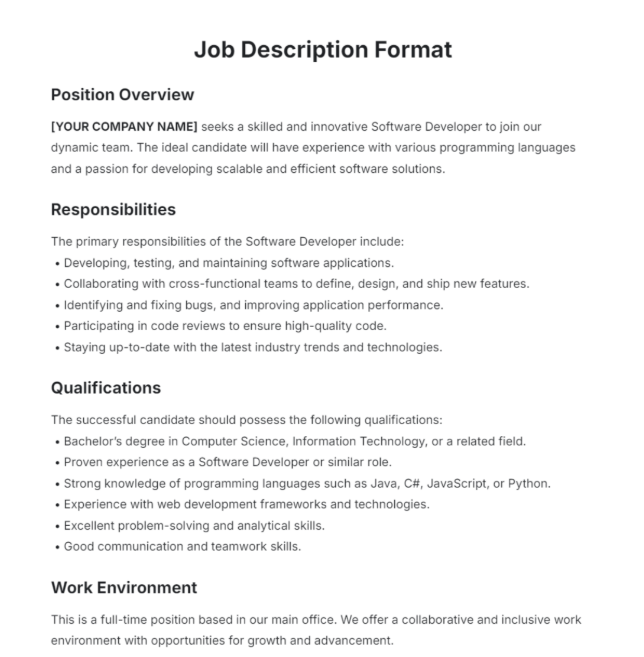
1. Free Job Description Format Template
The Free Job Description Format Template is one of the most reliable and detailed examples I came across. It features a minimalistic black and white layout, clearly highlighting the headings and content without any clutter.
Key Sections
Position Overview
Responsibilities
Qualifications
Work Environment
Ideal Use
Universal; can be used for any job position.
2. Manager Job Description Template
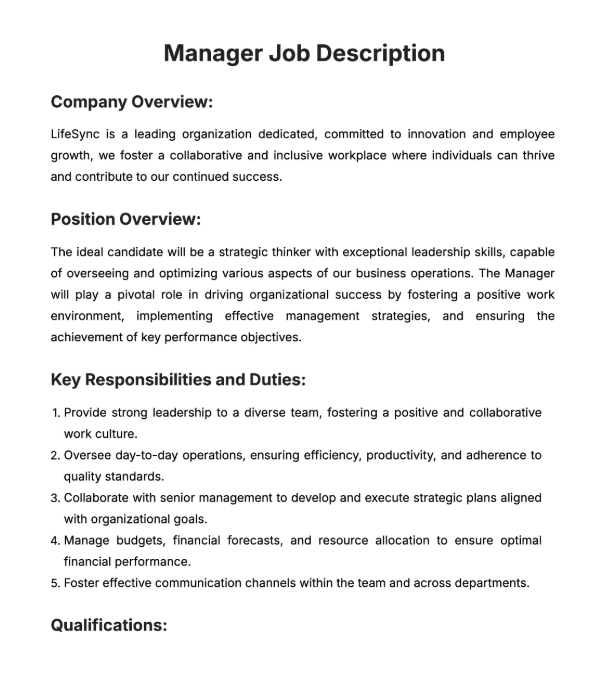
If your company is looking to recruit someone for a management position, then the Manager Job Description Template would serve you well. It features a straightforward layout that highlights the important information clearly, so any potential employees can understand everything easily.
Key Sections
Company Overview
Position Overview
Key Responsibilities and Duties
Qualifications
Ideal Use
Management recruitment
3. Employee Job Description Template
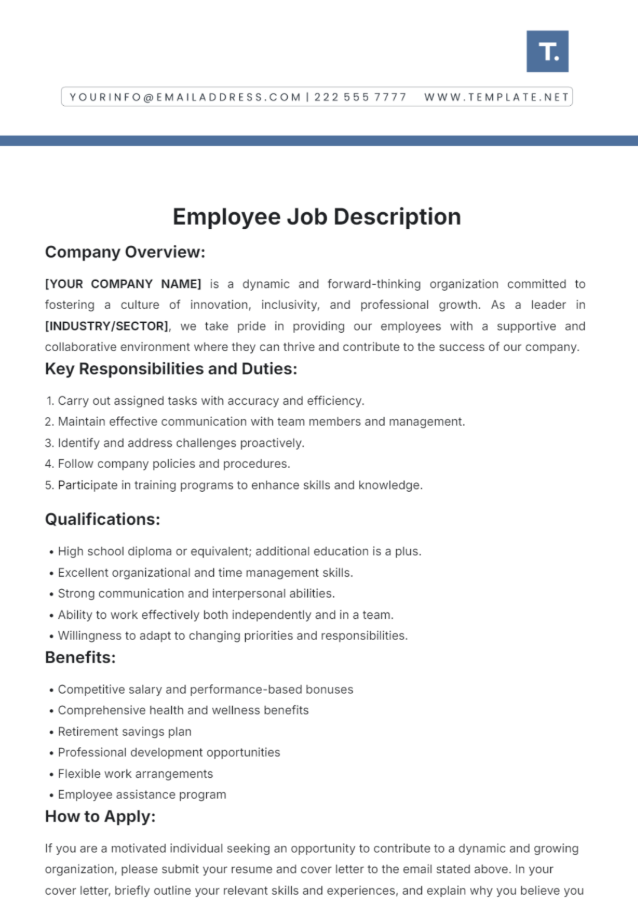
For managers and administrators who are trying to hire standard workers for their business, the Employee Job Description might be a good fit. It features straightforward descriptions of the company and the job, along with highlighting the benefits and qualifications required for it.
Key Sections
Company Overview
Key Responsibilities and Duties
Qualifications
Benefits
How to Apply
Ideal Use
Hiring workers for businesses
4. Administrative Assistant Job Description for Resume
The Administrative Assistant Job Description for Resume is a perfect template for managers and professionals trying to recruit an assistant to help them. It features direct and attractive descriptions, along with clearly highlighting the job details and requirements.
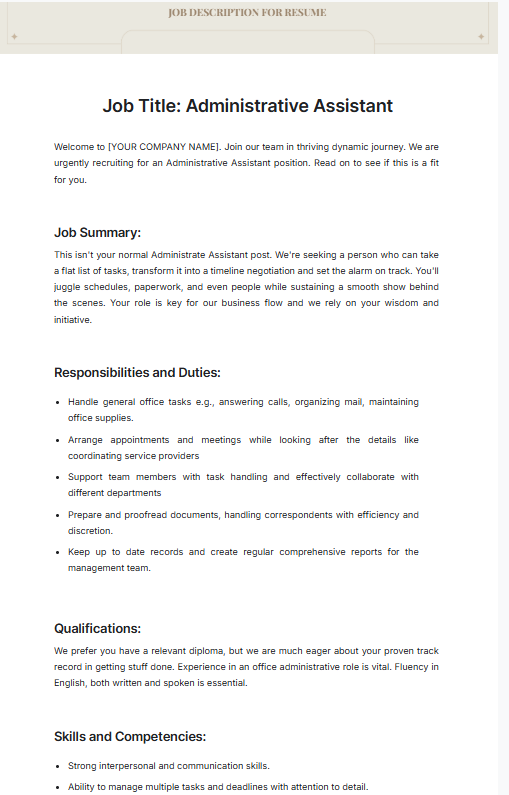
Key Sections
Job Summary
Responsibilities and Duties
Qualifications
Skills and Competencies
Ideal Use
Managers and administrators looking to recruit an assistant
5. Construction Job Description
If you’re a construction company or a contractor short on workers for your project, you can make up a job posting using the Construction Job Description template. It includes all the necessary sections needed to inform your candidates about the requirements and responsibilities for the job, along with highlighting the benefits they will receive.
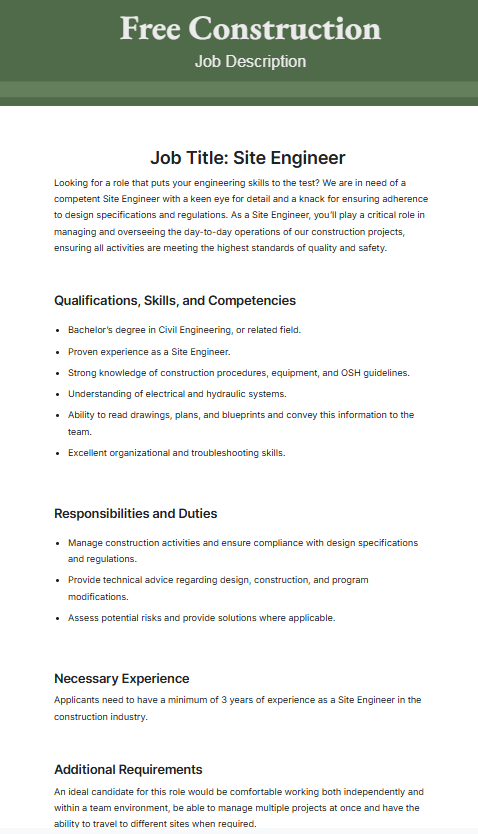
Key Sections
Qualifications, Skills, and Competencies
Responsibilities and Duties
Necessary Experience
Additional Requirements
Benefits and Perks
Ideal Use
Construction companies looking to hire extra help on a project
6. Sales Executive Job Description Template
The Sales Executive Job Description Template is perfect for companies trying to expand their sales team with experienced salesmen. It includes an attractive job description and benefits, along with clearly mentioning the eligibility criteria for that specific job. You can customize it however you like to fit your own job description.
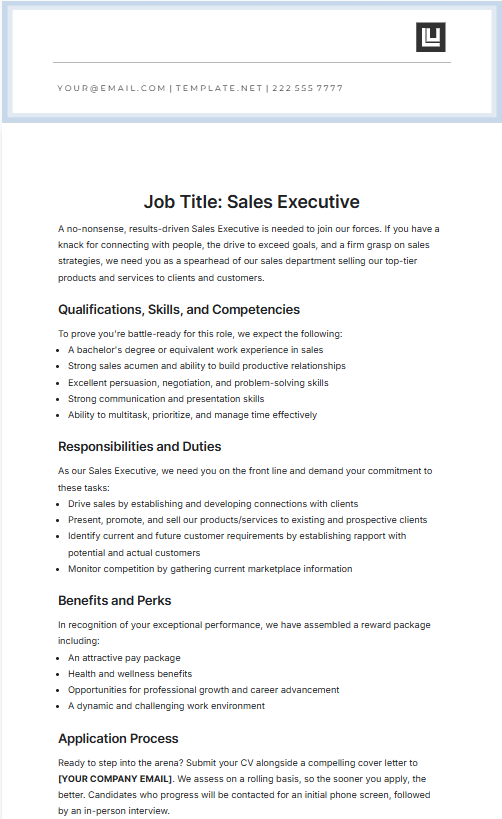
Key Sections
Qualifications, Skills, and Competencies
Responsibilities and Duties
Benefits and Perks
Application Process
Ideal Use
Companies looking to expand their sales staff
7. Professional HR Job Description Template
The Professional HR Job Description is perfect for companies that want to hire a human resources professional for their staff. It highlights all the required details clearly, even going as far as mentioning the working conditions of the job so candidates know what they’re signing up for.
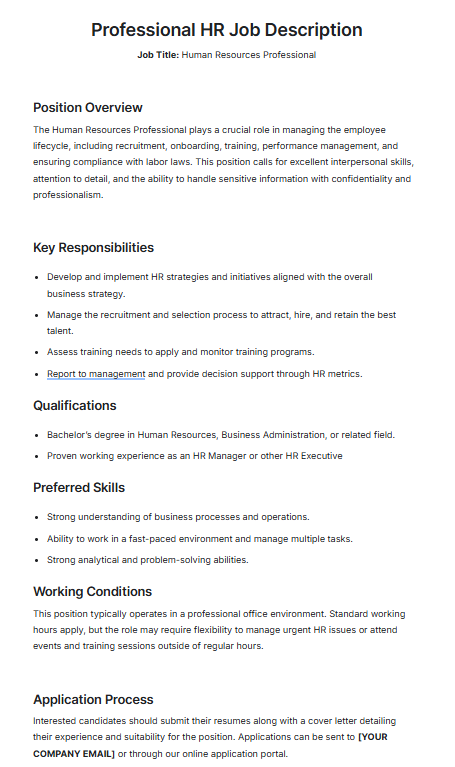
Key Sections
Position Overview
Key Responsibilities
Qualifications
Preferred Skills
Working Conditions
Application Process
Ideal Use
Human resources staff recruitment
8. Virtual Assistant Job Description Template
If you’re a professional with a hectic schedule, doing routine tasks like checking your email and making appointments by yourself can be a chore. Using the Virtual Assistant Job Description Template, you can hire an online helper who will do all that for you. It highlights all the important job details clearly for any potential candidates to see.
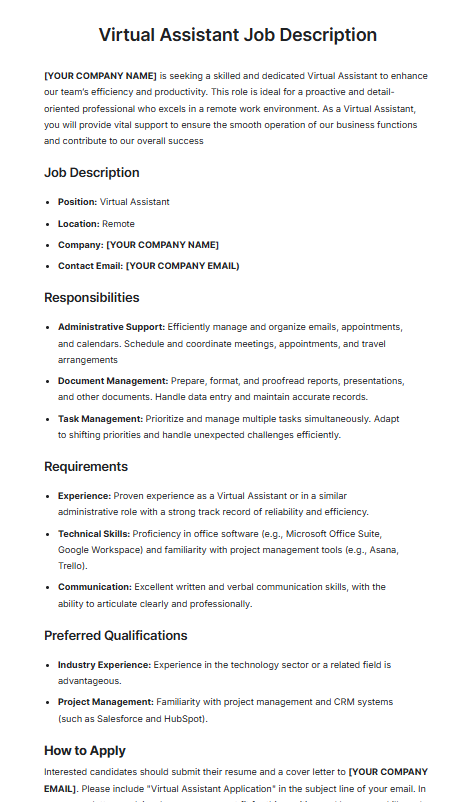
Key Sections
Job Description
Responsibilities
Requirements
Preferred Qualifications
How to Apply
Ideal Use
Busy professionals looking for virtual help through assistants
9. Printable Job Description for Nurses Template
For hospitals and other healthcare institutions that are short in staff, the Printable Job Description for Nurses Template can be used to hire extra help. This template features thorough details about the job, along with highlighting the working conditions and the application process for confused candidates.
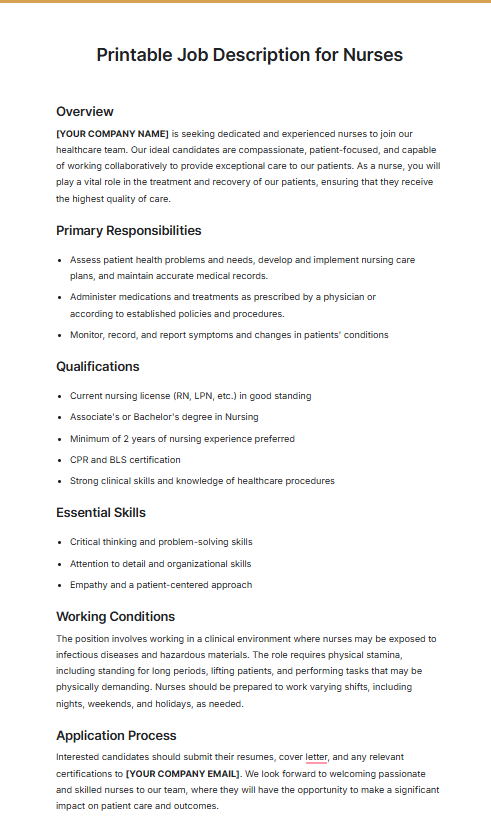
Key Sections
Overview
Primary Responsibilities
Qualifications
Essential Skills
Working Conditions
Application Process
Ideal Use
Hospitals looking to hire nurses for extra assistance
10. Barista Job Description Template
The Barista Job Description Template is a good option if you have a cafe and need some extra help. It includes responsibilities, qualifications, and even the benefits your employees will get. You can customize this however you like to match the description of the job and to target the specific candidates you’re looking for.
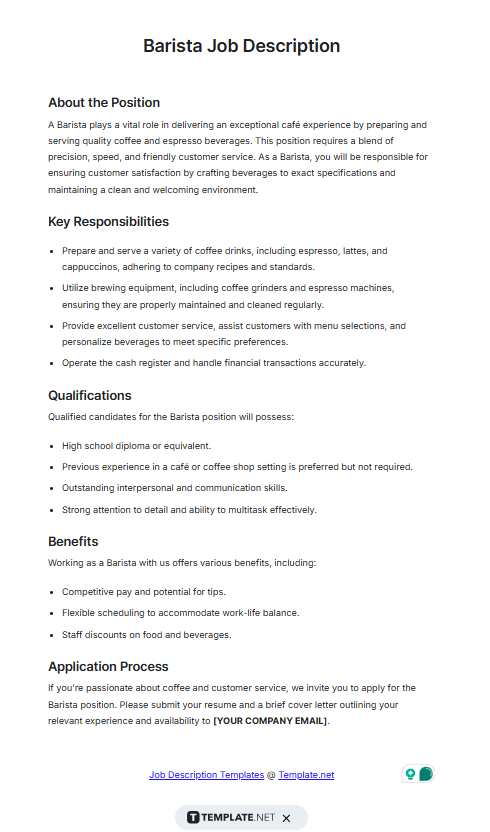
Key Sections
About this Position
Key Responsibilities
Qualifications
Benefits
Application Process
Ideal Use
Cafes and restaurants looking to hire a barista
How to Customize Job Description Templates Easily
Once you’ve chosen the job description template you want to use for your post, the next step is actually editing it to fit your own details. Regardless of the format your job description template is in, you can use WPS Office to simplify the entire formatting process. In this section, I’ll highlight all the steps required to customize your job description templates using WPS Office Suite.
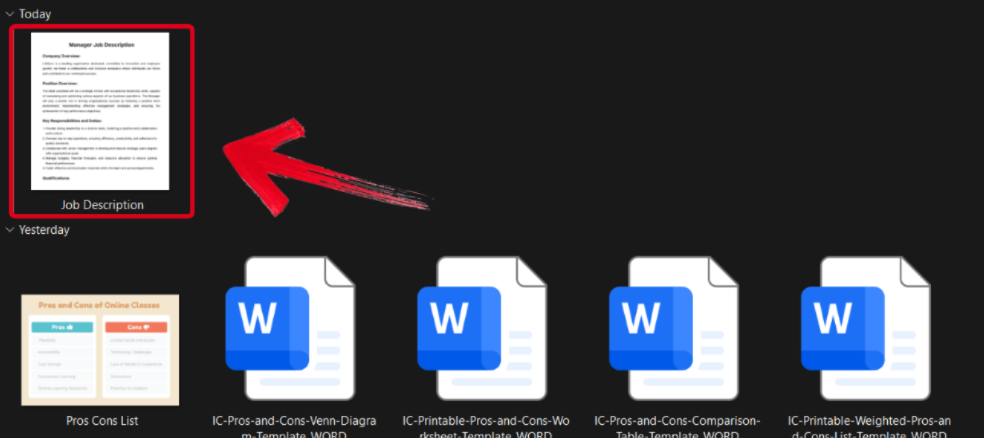
How to Edit the Job Description Template in WPS Photo
If your job description template is in an image format, then you can edit it to further enhance it using WPS Photo. The process is incredibly simple, and I’ll walk you through each step myself.
Step 1: Open the downloaded job description template through WPS Photos to get started.
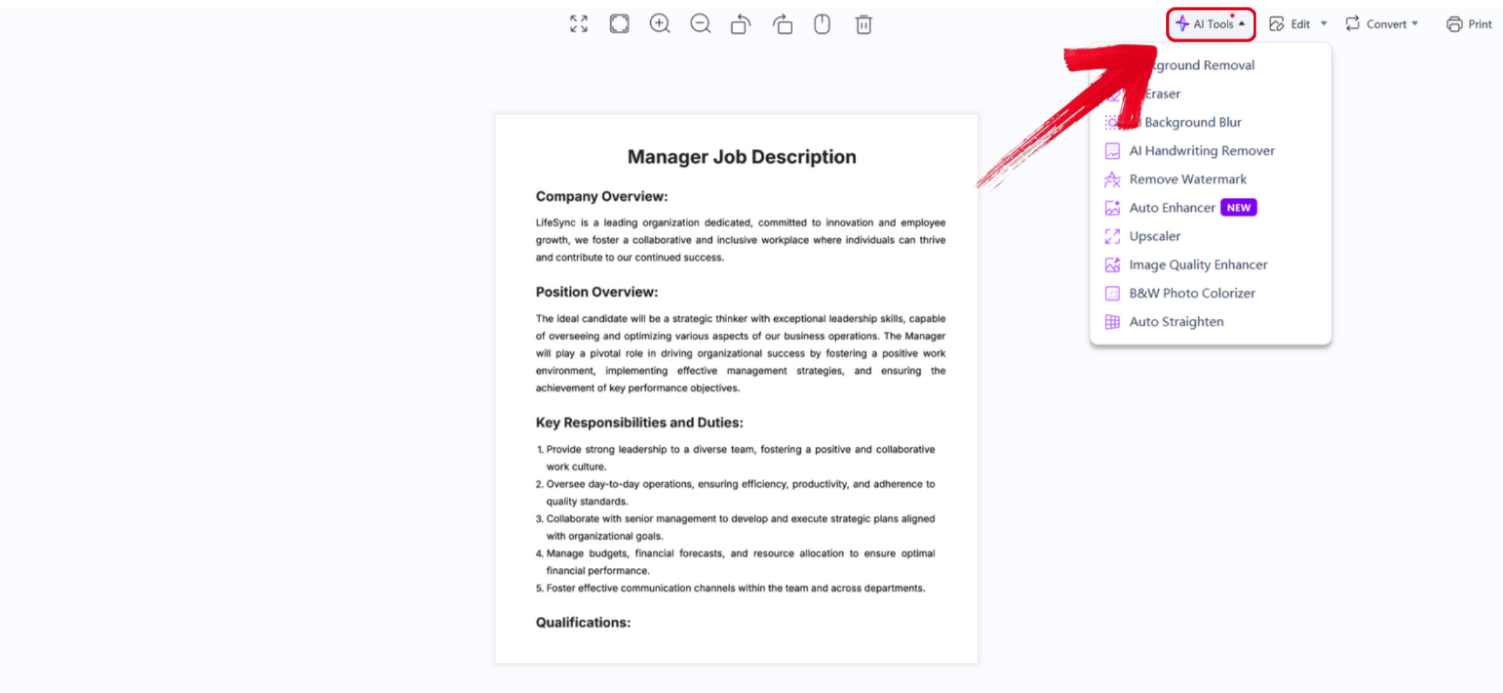
Step 2: In the WPS Photos window, you’ll see a bunch of editing tools given to you, including smart AI Tools to help you enhance your photos.
AI Image Enhancer: Improve the quality of your image using AI enhancement.
AI Upscaler: Bring life back into old photos by restoring them through the AI upscaler.
AI Watermark Removal: If there are any watermarks on your template, you can elevate the visual appeal with the watermark removal tool.
AI Background Blur: Emphasize focus on the main subjects of your photo by blurring the background.
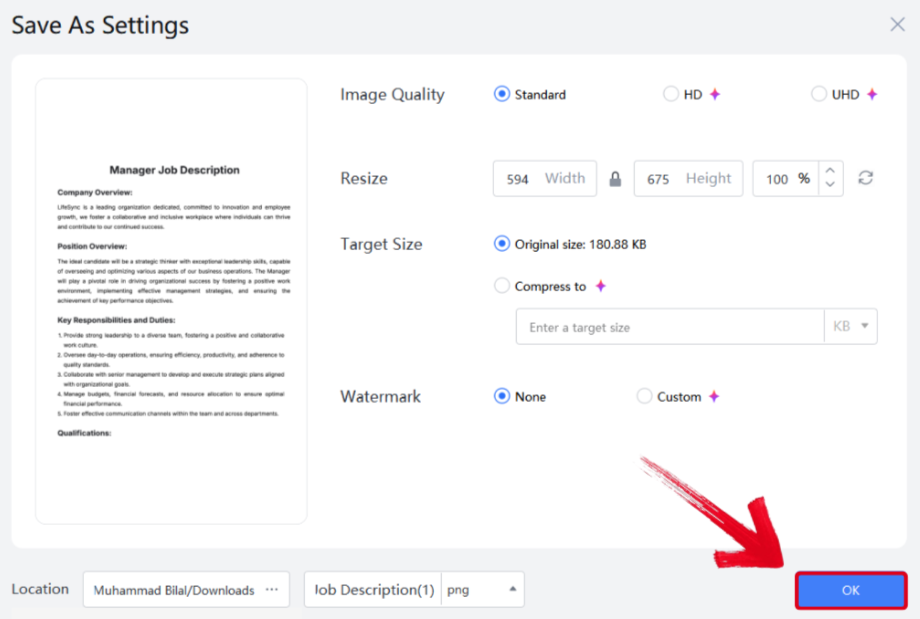
Step 3: Press Ctrl + S to open the Save As window. Adjust the image quality, size, and format, and then press OK to finish.
How to Edit the Job Description Template in WPS PDF
If your job description template is saved as a PDF, editing it is much easier and you can have much more control over it. WPS PDF allows me to easily edit any PDF document, and I’ll walk you through every step to get rid of any confusion.
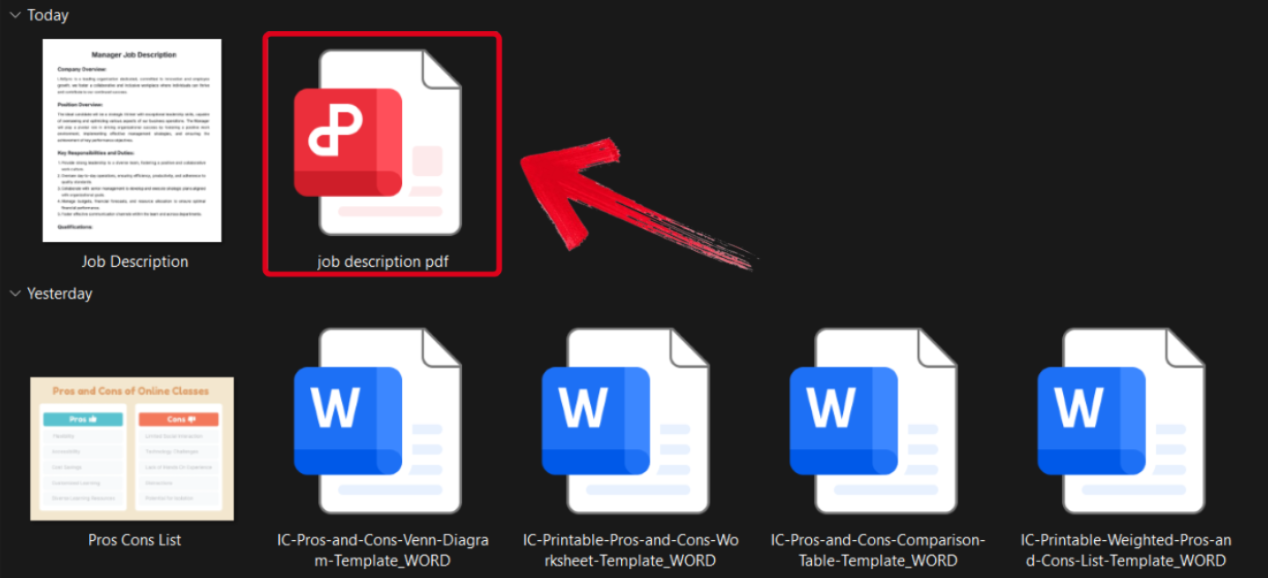
Step 1: Download the job description template you want to use as a PDF and open it using WPS Office.
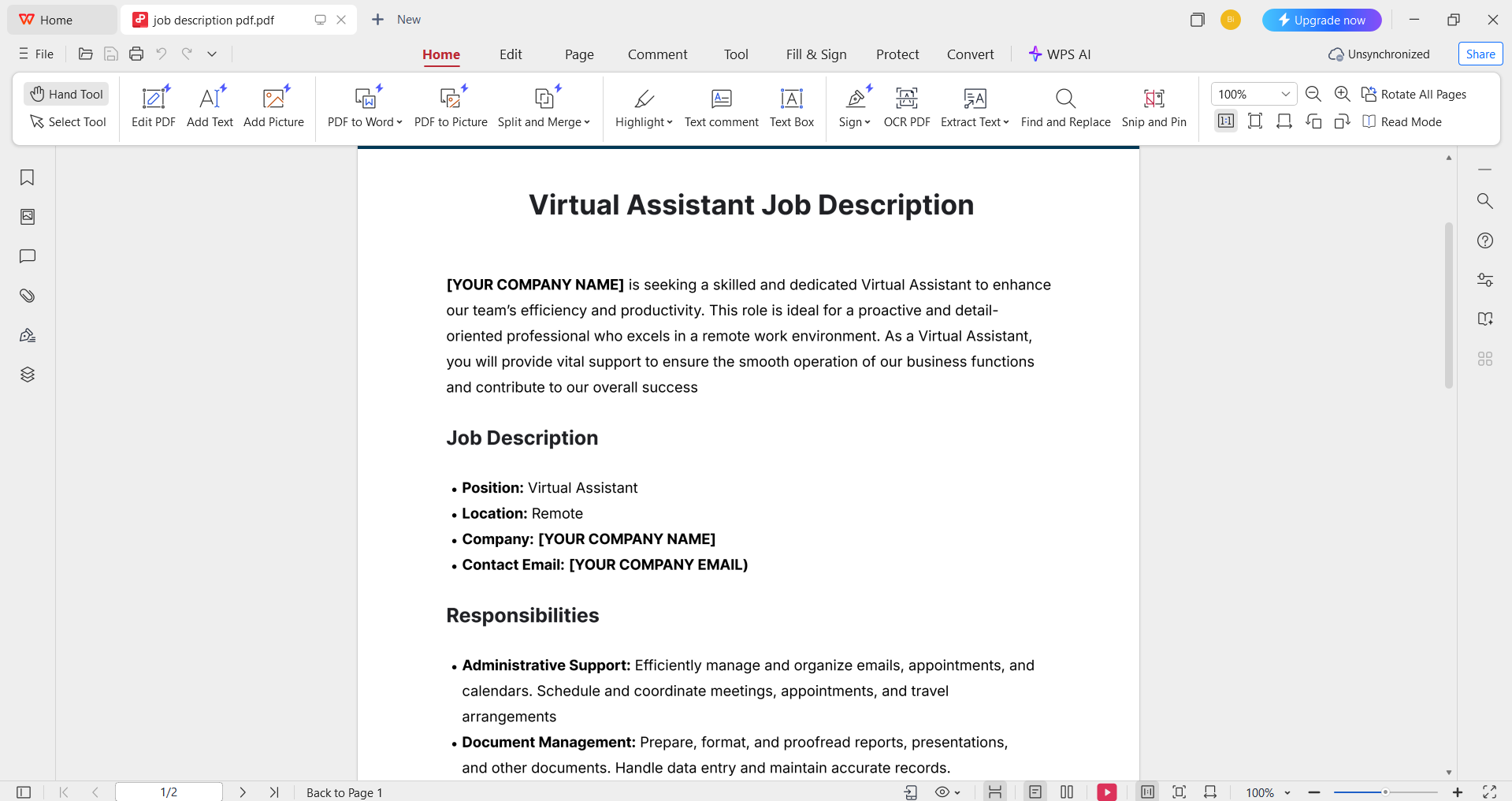
Step 2: Change the description details to match your own. You can customize the font, text size, and even the color scheme.
Step 3: Once you’ve finished editing, press the File button in the top-right corner and then hit Save As.
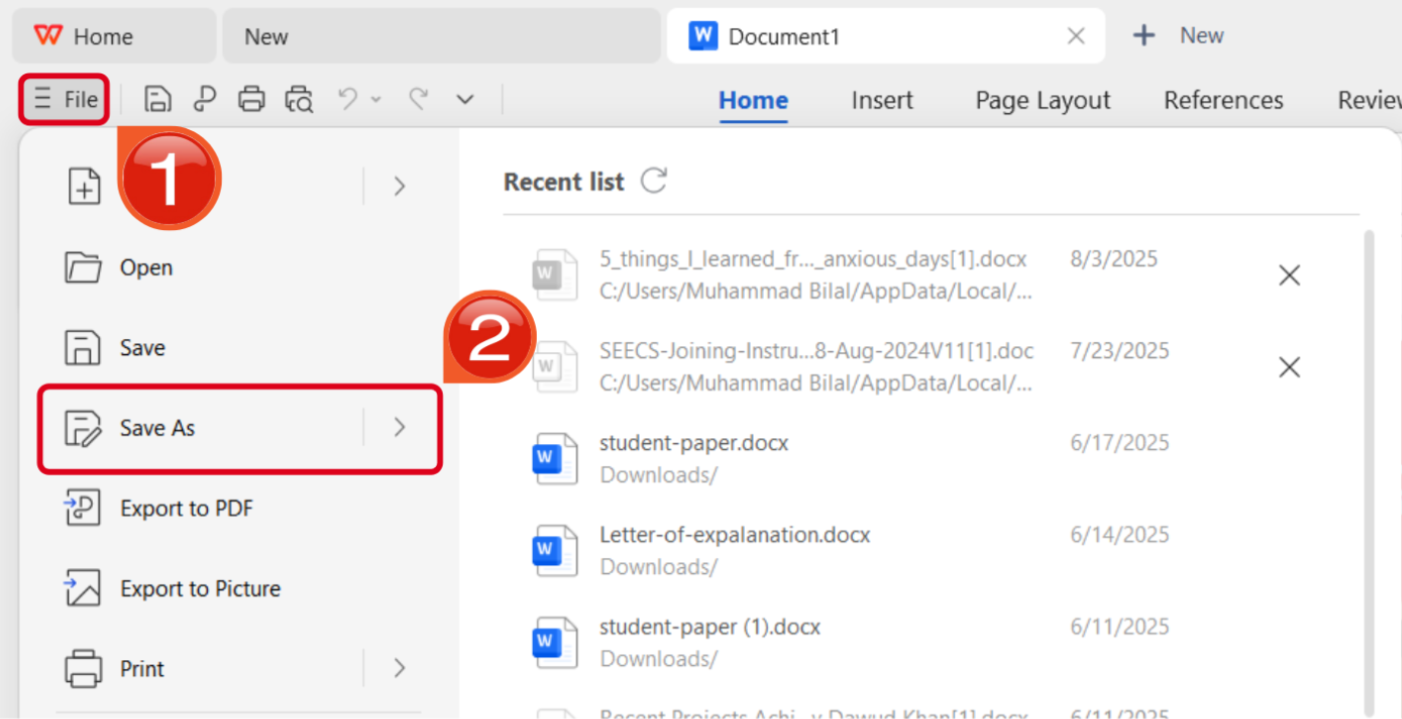
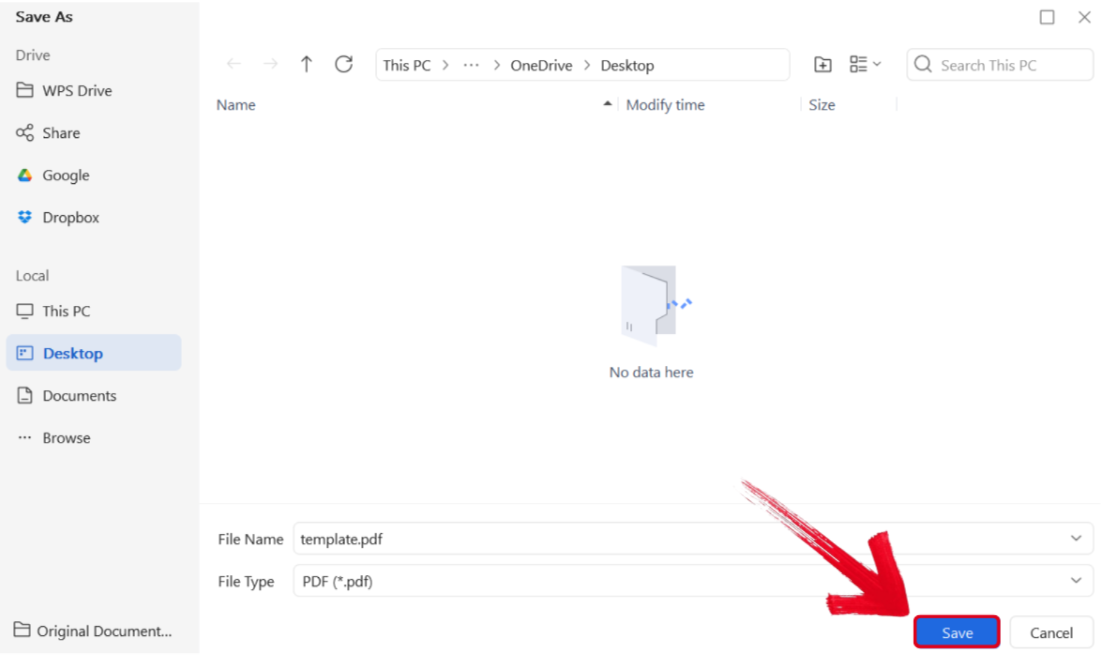
Step 4: Select the folder you want your PDF downloaded in, then press Save.
If you want to share the newly edited template directly through a link, it’s very simple as well. Simply follow the steps I’ll be showing you below.
Step 1: In the top-right corner of your screen, you’ll see a Share button. Press it.

Step 2: Edit the viewer permissions and then press Copy Link. You will now have a newly generated online link in your clipboard, ready to be shared.
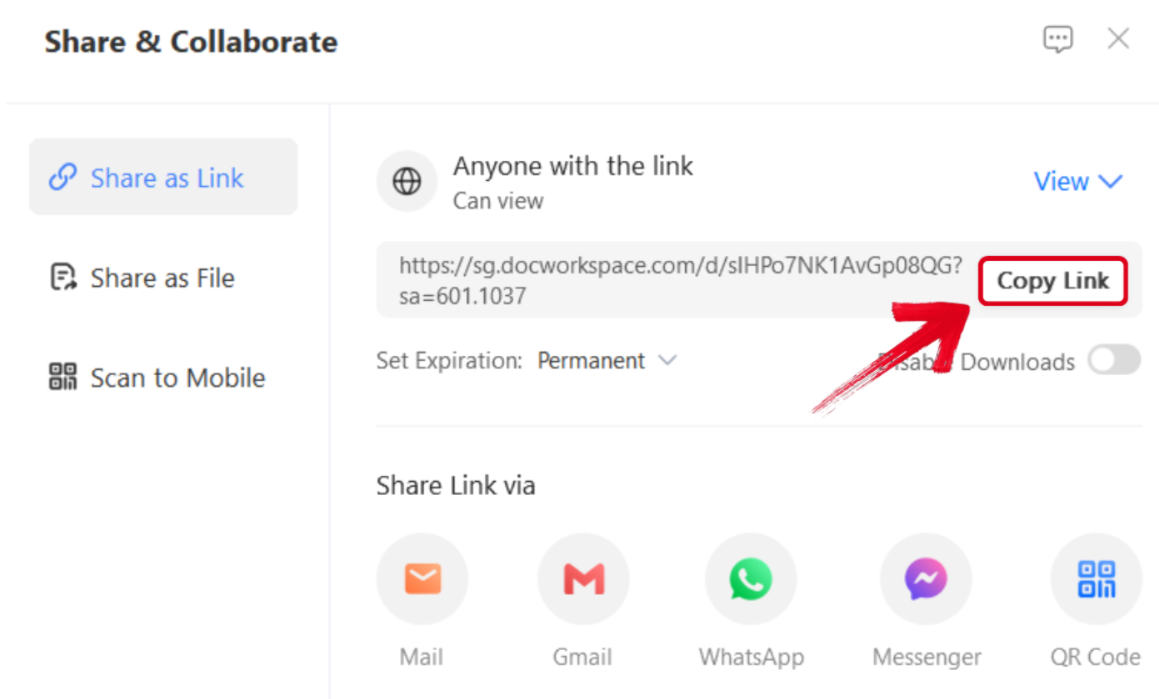
Tip: You can also directly share through Email, WhatsApp, Messenger, and even a QR Code.
Common Mistakes to Avoid When Using Job Description Templates
When you’re trying to edit your job description templates in a hurry, your job posting will be prone to many mistakes. These mistakes can cause you to lose a lot of potential candidates, as a faulty job posting gives off an unprofessional impression to whoever reads it. In this section, I’ll cover some of the most common mistakes people make when customizing job description templates so you can avoid them.
Mistakes
Copy-Pasting Templates: You should customize every part of the template so your job description template actually fits the required details.
Using Technical Wording: A good job description is straightforward and direct, so candidates can understand the requirements and responsibilities of the work.
Lengthy Descriptions: Use brief and concise bullet points to highlight the details of the job instead of long paragraphs.
WPS Office – Your All-in-One Solution for Job Description Templates
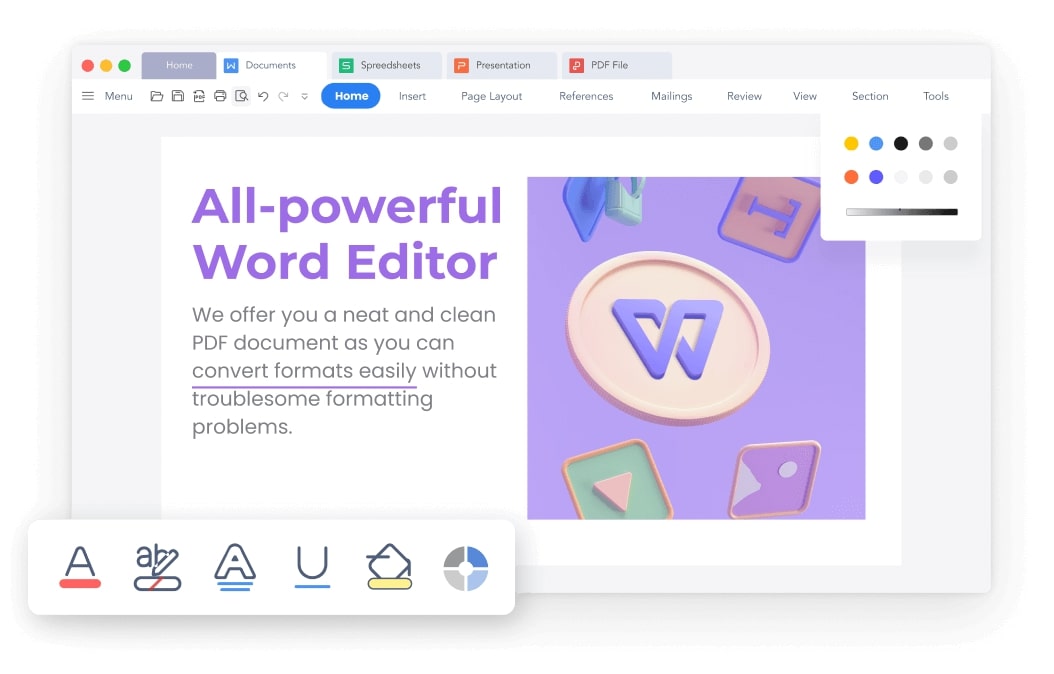
When I’m trying to get my job description advertisement posted quickly, I can’t waste any time dealing with tools that slow me down even more. This is why I resort to WPS Office to streamline the entire formatting process and customize my job description templates easily. It allows me to access a wide library of countless templates and edit them in a few simple steps, saving me a ton of time. In this section, I’ll highlight some of the notable features of WPS Office that make it an essential part of my workflow.
Features
Simple and beginner-friendly interface
Countless customizable examples for lists and documents
Compatible with all office formats, including Word, Excel, PPT, and even PDF
Smart AI assistance and formatting features
Offers a large library of free templates
WPS has become my all-in-one solution for all my work. Whether I’m trying to make a job description advertisement or manage my employee database, WPS has a tool for every need of mine.
FAQs
Q1: Why should I use a job description template instead of writing from scratch?
If you’re writing everything from scratch, it can be incredibly frustrating and can waste a lot of time. By using a customizable template, you can save a lot of time while making your job posting more attractive and well-structured.
Q2: What sections should a good job description template include?
A strong template typically has sections for job title, responsibilities, qualifications, required skills, work schedule, and compensation details.
Q3: How often should I update my job description templates?
It’s best to review and update templates at least once a year or whenever there are changes in job roles, responsibilities, or company policies.
Q4: Is WPS Office better than Microsoft Word for editing templates?
WPS Office offers the same compatibility as Word but adds free access to a large template library, AI-powered writing assistance, and cloud collaboration.

'%3e%3cpath%20d='M19.9911%204.11386V6.471H18.5894C18.0775%206.471%2017.7322%206.57814%2017.5536%206.79243C17.3751%207.00671%2017.2858%207.32814%2017.2858%207.75671V9.44421H19.9019L19.5536%2012.0871H17.2858V18.8639H14.5536V12.0871H12.2769V9.44421H14.5536V7.49779C14.5536%206.39064%2014.8632%205.53201%2015.4822%204.92189C16.1013%204.31177%2016.9257%204.00671%2017.9554%204.00671C18.8304%204.00671%2019.509%204.04243%2019.9911%204.11386Z'%20fill='%23333333'/%3e%3c/g%3e%3cdefs%3e%3cclipPath%20id='clip0_2938_8199'%3e%3crect%20width='16'%20height='16'%20fill='white'%20transform='translate(8%204.00671)'/%3e%3c/clipPath%3e%3c/defs%3e%3c/svg%3e)
'%3e%3cpath%20d='M17.5237%2010.7813L23.4811%204H22.0699L16.8949%209.88693L12.7648%204H8L14.2469%2012.9029L8%2020.0133H9.4112L14.8725%2013.7952L19.2352%2020.0133H24M9.92053%205.04213H12.0885L22.0688%2019.0224H19.9003'%20fill='%23333333'/%3e%3c/g%3e%3cdefs%3e%3cclipPath%20id='clip0_2938_8200'%3e%3crect%20width='16'%20height='16.0134'%20fill='white'%20transform='translate(8%204)'/%3e%3c/clipPath%3e%3c/defs%3e%3c/svg%3e)


