

'%3e%3cpath%20d='M8%200C12.4183%200%2016%203.58172%2016%208C16%2012.4183%2012.4183%2016%208%2016C3.58172%2016%200%2012.4183%200%208C0%203.58172%203.58172%200%208%200ZM11.6162%204.38379C11.2257%203.99337%2010.5927%203.99338%2010.2021%204.38379L8%206.58594L5.79785%204.38379C5.40732%203.99334%204.77429%203.99329%204.38379%204.38379C3.99331%204.77429%203.99335%205.40733%204.38379%205.79785L6.58594%208L4.38379%2010.2021C3.99348%2010.5927%203.99341%2011.2257%204.38379%2011.6162C4.77426%2012.0066%205.40734%2012.0065%205.79785%2011.6162L8%209.41406L10.2021%2011.6162C10.5927%2012.0066%2011.2257%2012.0067%2011.6162%2011.6162C12.0067%2011.2257%2012.0066%2010.5927%2011.6162%2010.2021L9.41406%208L11.6162%205.79785C12.0066%205.40735%2012.0066%204.77429%2011.6162%204.38379Z'%20fill='%23080E17'%20fill-opacity='0.46'/%3e%3c/g%3e%3cdefs%3e%3cclipPath%20id='clip0_3761_713'%3e%3crect%20width='16'%20height='16'%20fill='white'/%3e%3c/clipPath%3e%3c/defs%3e%3c/svg%3e)




'%3e%3cpath%20fill-rule='evenodd'%20clip-rule='evenodd'%20d='M21.4999%2010.9993C21.4999%205.20009%2016.7986%200.498901%2010.9993%200.498901C5.19994%200.498901%200.498657%205.20009%200.498657%2010.9993C0.498657%2016.2404%204.33858%2020.5844%209.35855%2021.3722V14.0346H6.69238V10.9993H9.35855V8.68594C9.35855%206.05427%2010.9262%204.60062%2013.3248%204.60062C14.4736%204.60062%2015.6753%204.80571%2015.6753%204.80571V7.38979H14.3512C13.0468%207.38979%2012.64%208.19921%2012.64%209.0296V10.9993H15.5523L15.0867%2014.0346H12.64V21.3722C17.66%2020.5844%2021.4999%2016.2404%2021.4999%2010.9993Z'%20fill='%231568EA'/%3e%3c/g%3e%3c/svg%3e)


'%3e%3cpath%20d='M2.42045%2022.1876H6.31818V12.7217L0.75%208.54553V20.5171C0.75%2021.4414%201.49892%2022.1876%202.42045%2022.1876Z'%20fill='%234285F4'/%3e%3cpath%20d='M19.682%2022.1876H23.5797C24.5041%2022.1876%2025.2502%2021.4387%2025.2502%2020.5171V8.54553L19.682%2012.7217'%20fill='%2334A853'/%3e%3cpath%20d='M19.682%205.48293V12.7216L25.2502%208.54543V6.31816C25.2502%204.25236%2022.8921%203.07469%2021.2411%204.31361'%20fill='%23FBBC04'/%3e%3cpath%20d='M6.31824%2012.7217V5.48303L13.0001%2010.4944L19.6819%205.48303V12.7217L13.0001%2017.733'%20fill='%23EA4335'/%3e%3cpath%20d='M0.75%206.31816V8.54543L6.31818%2012.7216V5.48293L4.75909%204.31361C3.10534%203.07469%200.75%204.25236%200.75%206.31816Z'%20fill='%23C5221F'/%3e%3c/g%3e%3cdefs%3e%3cclipPath%20id='clip0_2954_7305'%3e%3crect%20width='24.5'%20height='18.375'%20fill='white'%20transform='translate(0.75%203.8125)'/%3e%3c/clipPath%3e%3c/defs%3e%3c/svg%3e)


In my experience, ID cards are far more than a piece of plastic with your photo on it, they're a daily necessity in schools, workplaces, and events. But designing one from scratch? That can be a time-consuming hassle, especially when you just need something simple yet professional. The reality is, many "free" templates online either lock the best features behind paywalls, have poor formatting, or aren’t beginner-friendly. So, where can you find high-quality, printable blank ID card templates for free? And more importantly, how can you edit them without advanced design skills? In this article, I’ll share 10 free blank ID card templates and walk you through how to customize them effortlessly using WPS Office, my go-to, AI-powered productivity suite.
Top 10 Free Printable Blank ID Card Templates
Below, I’ve curated ten excellent templates you can download for free. Each one has a link, format, and ideal use case so you can pick the perfect fit. You’ll find options for corporate offices, schools, healthcare facilities, and even event-specific passes. This list also includes a print-ready editable employee ID card template in Word format and a blank student ID card template PDF free, so you can customize and print without any extra hassle.
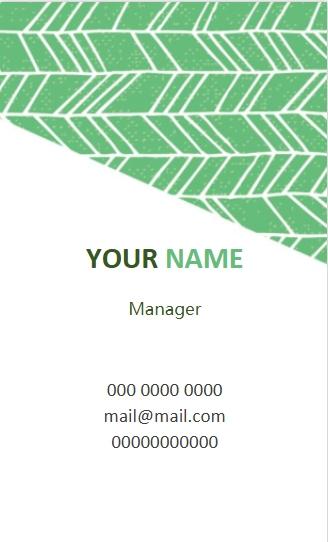
1. Simple Green ID Card
The Simple Green ID Card template comes in DOCX format, making it easy to open in common word processors. It offers full editing flexibility with ready-to-use text, logo, and photo placeholders, so you can personalize it in minutes. It’s ideal for creating professional corporate or school staff ID cards that look polished and ready for use. The clean green design also adds a fresh, modern touch to your IDs. Its balanced layout ensures all essential details remain clear and easy to read.
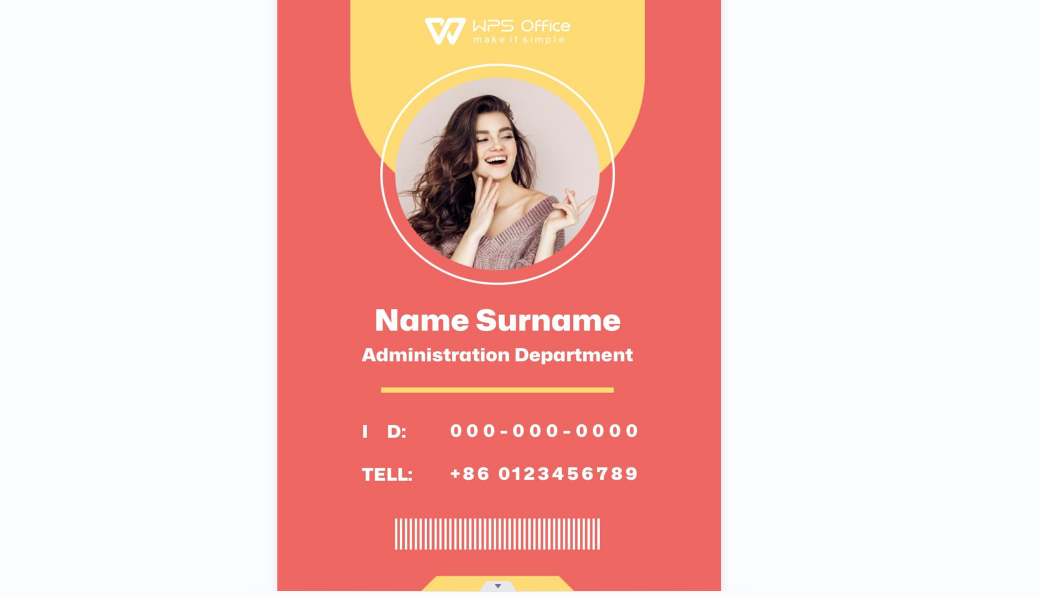
2. Red ID Cards
The Red ID Card is available in DOCX format, this template allows fully editable text and images, giving you complete control over the design. You can easily adapt it for branding, personalize attendee details, and include event-specific visuals. It’s perfect for crafting professional event or visitor passes that leave a great first impression. The bold red color makes it highly noticeable, ensuring quick identification in busy environments. Its structured layout also keeps information organized and easy to scan.
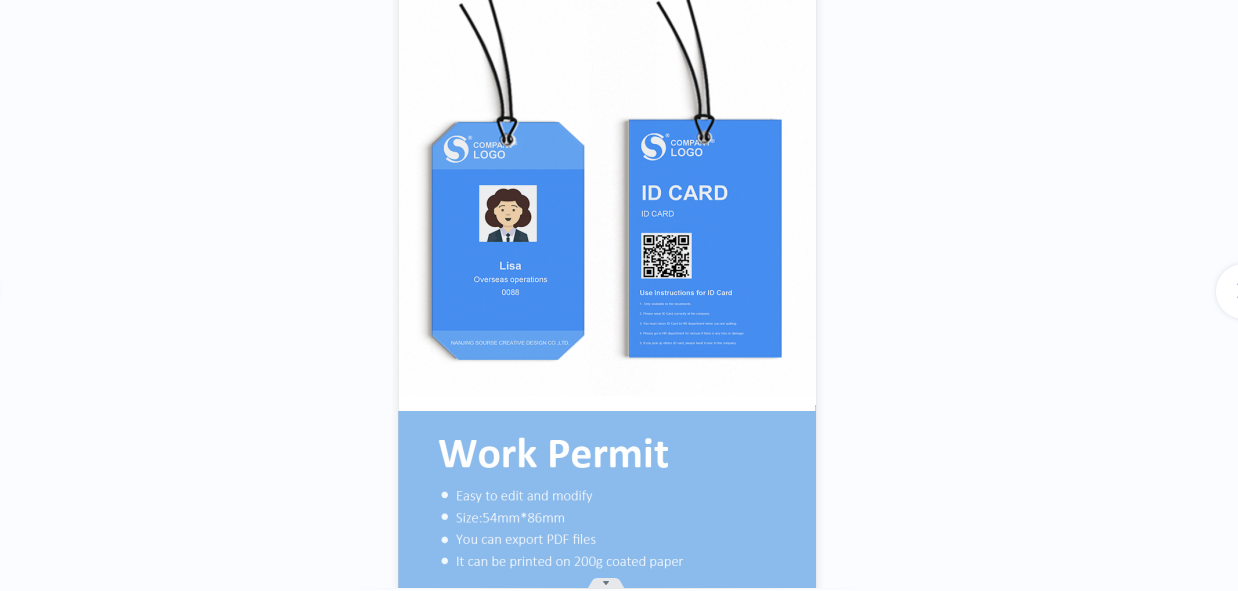
3. Blue ID Card
This DOCX format Blue ID Card template has a simple layout with customizable fields for names, roles, and photos. The blue design conveys trust and professionalism, making it one of the best free printable blank ID card templates for employees. It’s ideal for office employees or volunteer ID cards. Its clean structure ensures clarity, and it’s ideal for office employees or volunteer ID cards that need to look professional and well-organized.
4. Blue Red ID Card
The Blue Red ID Cards are available in DOCX format, and this template lets you swap colors, logos, and text with ease. Its two-tone style creates an energetic, modern vibe that stands out in any setting. Ideal for security or event team ID cards, it combines bold design with practical functionality for quick recognition. The contrasting colors make it easy to spot from a distance, which is perfect for high-traffic environments. Its flexible layout also allows for adding barcodes or QR codes if needed.
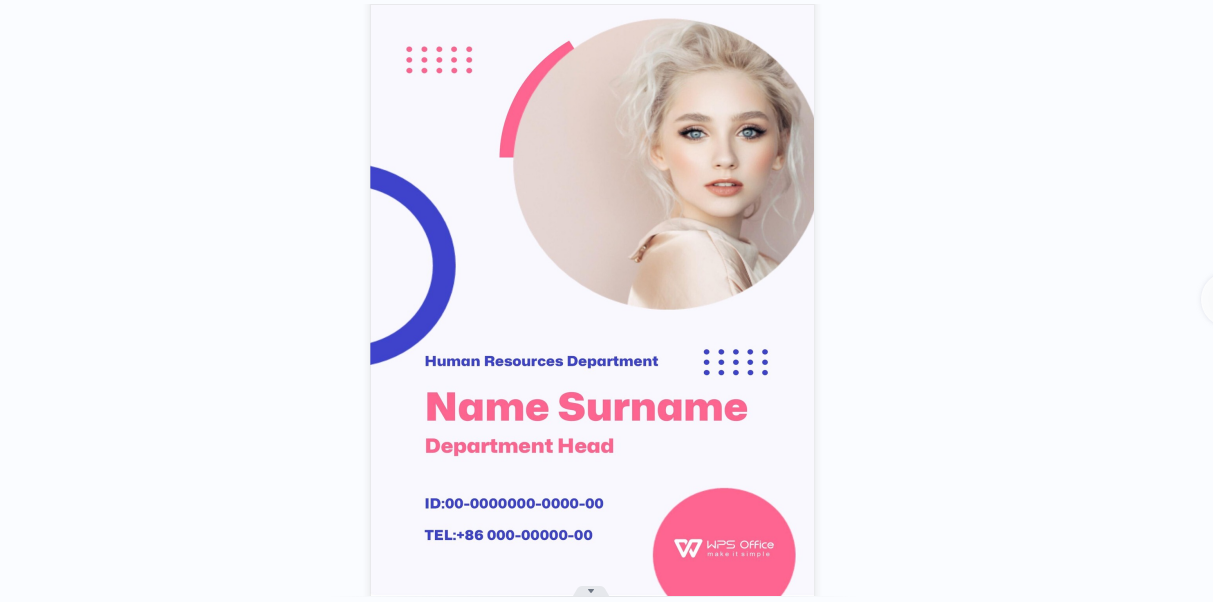
5. Reddish Violet ID Cards
This DOCX format Reddish Violet ID Card template allows you to easily change all text andgraphics. Its vibrant colors suit dynamic workplaces perfectly.Ideal for creative industries or student ID cards, it helps your design stand out while staying functional. The bold color palette also makes it easier to identify cardholders at a glance.
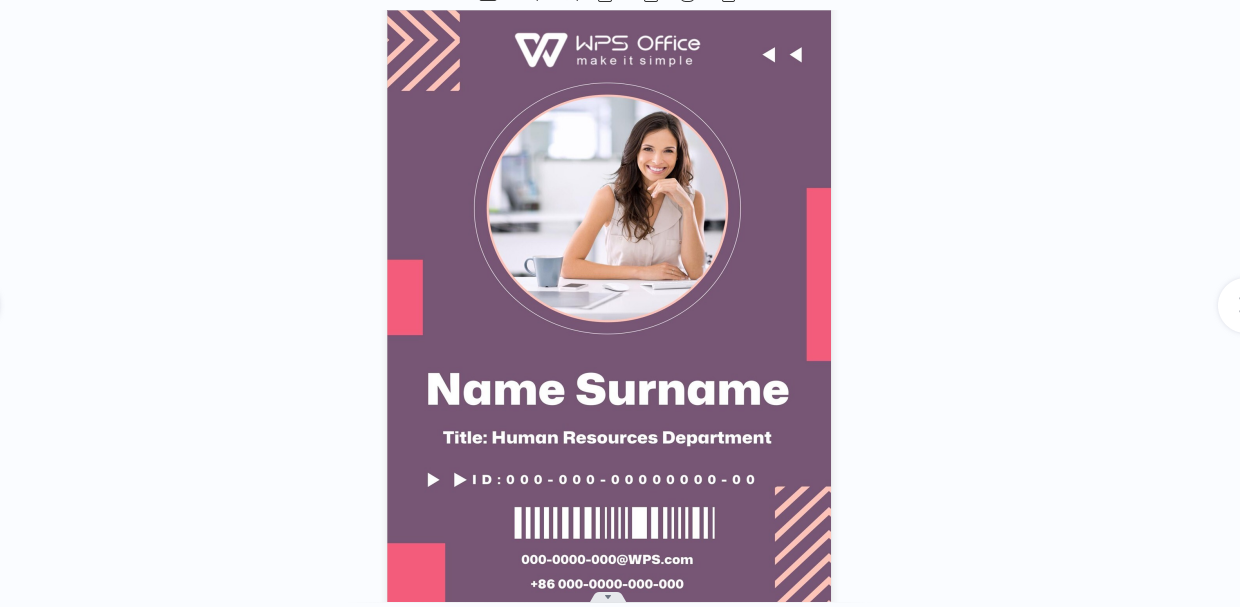
6. Purple Yellow ID Cards
The Purple Yellow ID Card available In DOCX format, this template offers customizable text, image, and branding elements for quick personalization. Its striking color combo ensures high visibility. Perfect for schools or academic event ID cards, it also helps distinguish staff or participants at large gatherings. The vibrant contrast adds a creative touch while keeping essential details easy to read.
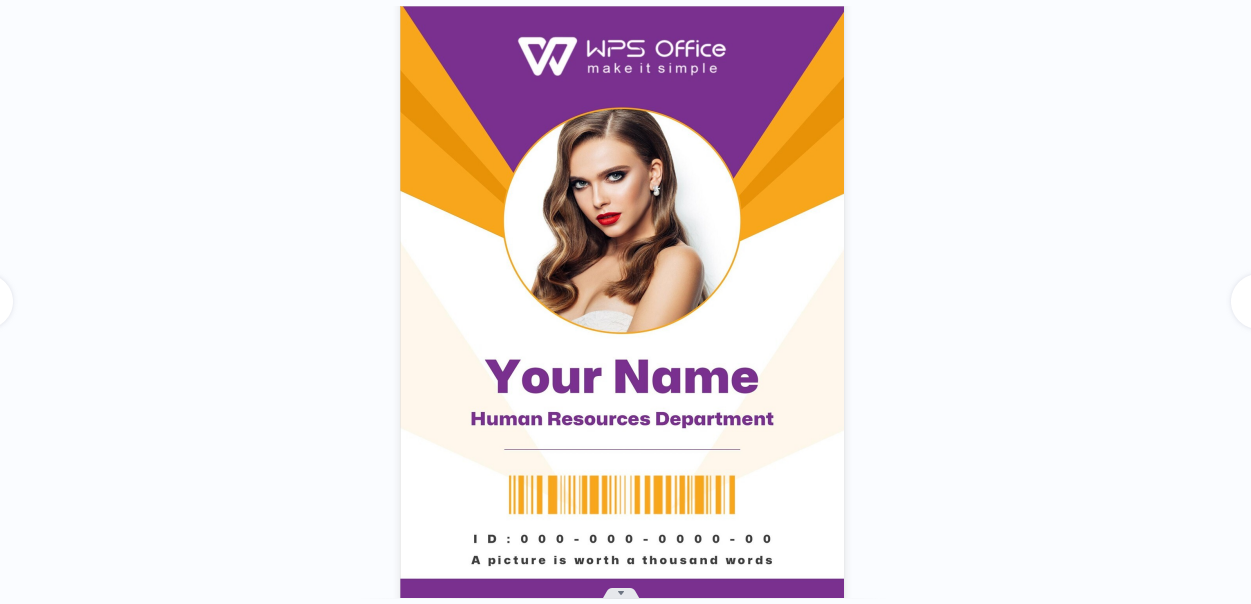
7. ID Cards
This ID Card available in DOCX format template features replaceable fields for name, photo, and role. Its minimalist design works for nearly any situation. Ideal for creating general-purpose ID cards quickly and professionally, it offers a clean, distraction-free layout. The simplicity also makes it easy to adapt for different departments or events without redesigning from scratch.

8. Green ID Card
In DOCX format, the Green ID Card template allows color and layout adjustments to match your branding. Its eco-friendly look appeals to nature-oriented brands. Ideal for work badges or membership cards, it’s a great choice for organizations promoting sustainability. The clean, natural tones also give it a calming, professional appearance.
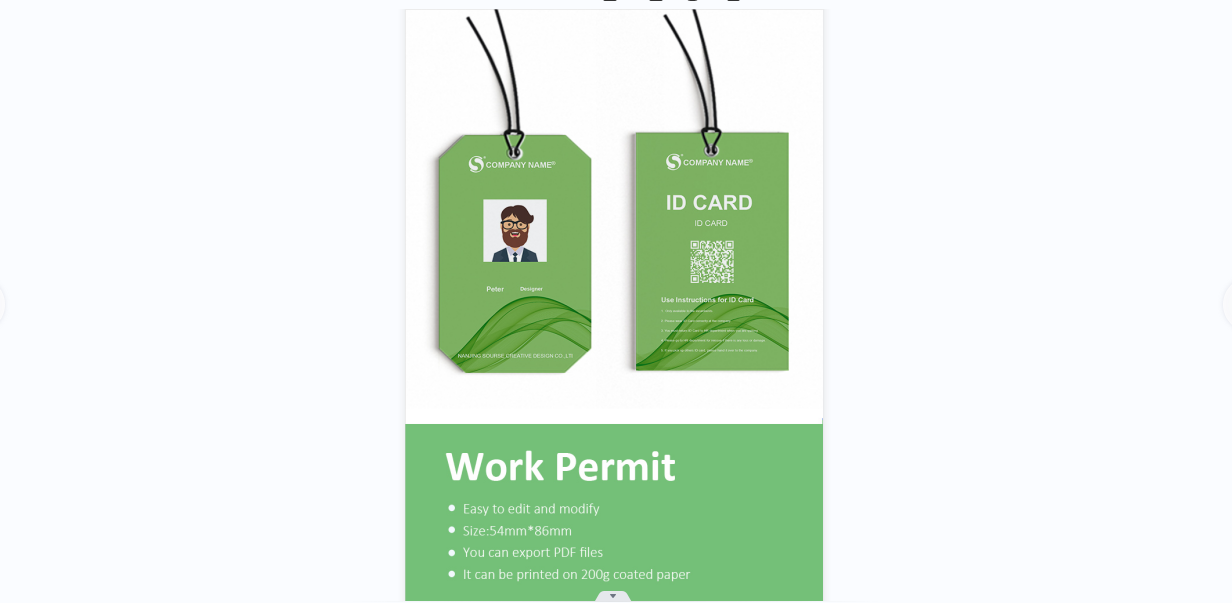
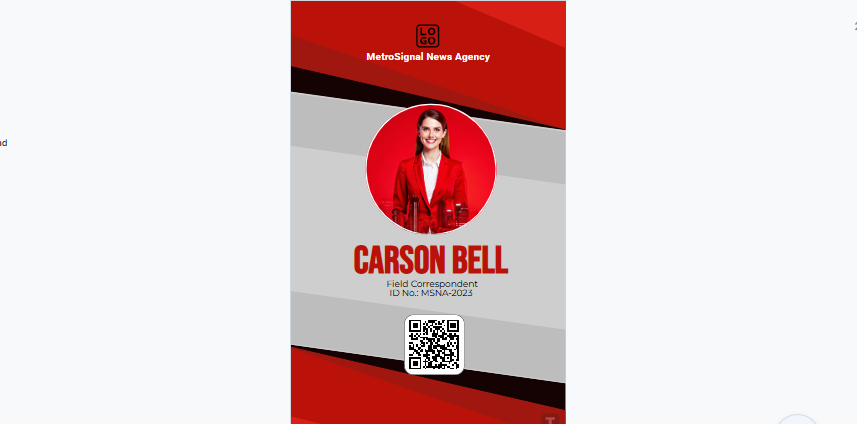
9. Press Journalist ID Card Template
The Press Journalist ID Card Template is editable online and can be exported to PDF for printing. It offers full customization for name, photo, and media house details. Ideal for journalists or press teams, it projects authority and professionalism. Its clear, well-structured layout ensures quick identification in the field. You can also incorporate accreditation details or QR codes for enhanced security.
10. Psychiatrist ID Card
The Psychiatrist ID Card Template is editable online with PDF export for easy printing. You can change all text and imagery to suit your needs. Ideal for healthcare professionals, it balances trust and empathy with its soft color tones. The design also leaves space for important credentials or certifications. Its gentle aesthetic helps create a welcoming and reassuring impression for patients.

I’ve used several of these for event coordination, and having ready-made fields for photos and details really speeds up the process. This streamlined setup not only saves time but also ensures a consistent and professional appearance across all IDs.
How to Edit a Printable ID Card Template
Once you’ve picked your template, editing it is straightforward. Here’s how I usually do it in WPS Office. With its intuitive interface, even first-time users can customize layoutswith ease. This process works perfectly for a custom blank ID card template for small businesses, allowing you to brand and personalize without hiring a designer.
Here’s a simple step-by-step guide on how to edit your template.
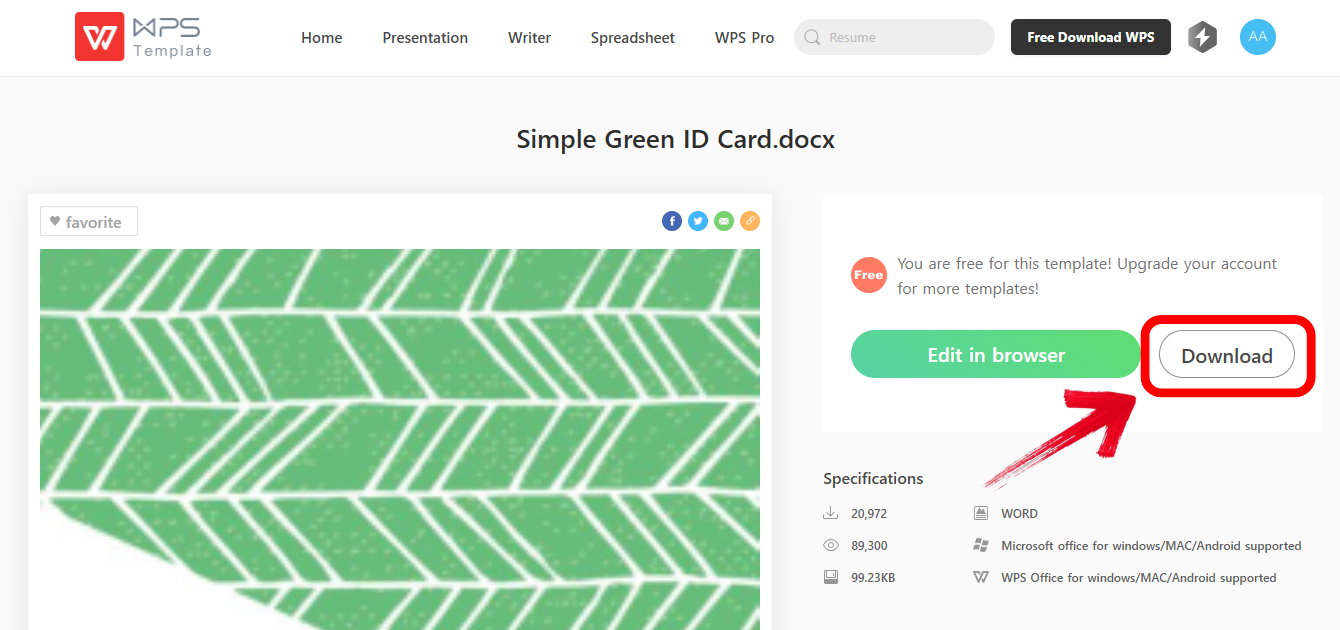
Step 1: First of all, simply click any link above and click the "Download" option to download the template. Once done, open it in WPS writer.
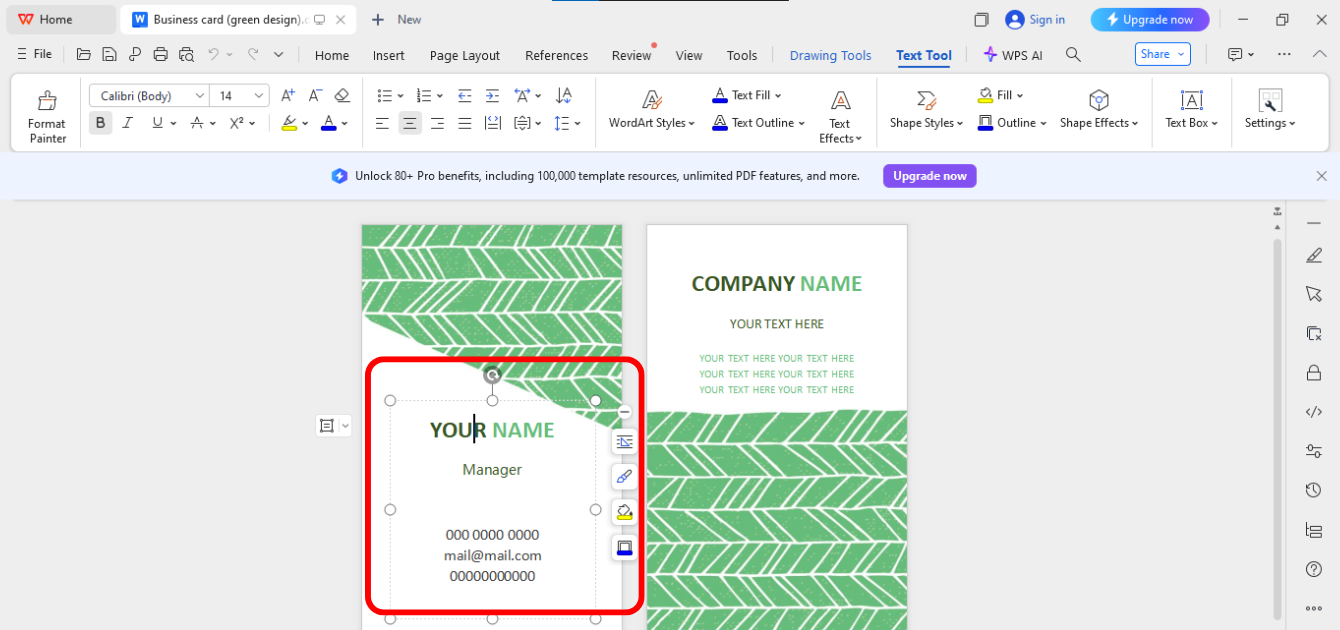
Step 2: Now, to change names, ID numbers, departments, or any other details, simply click on the field and edit it.
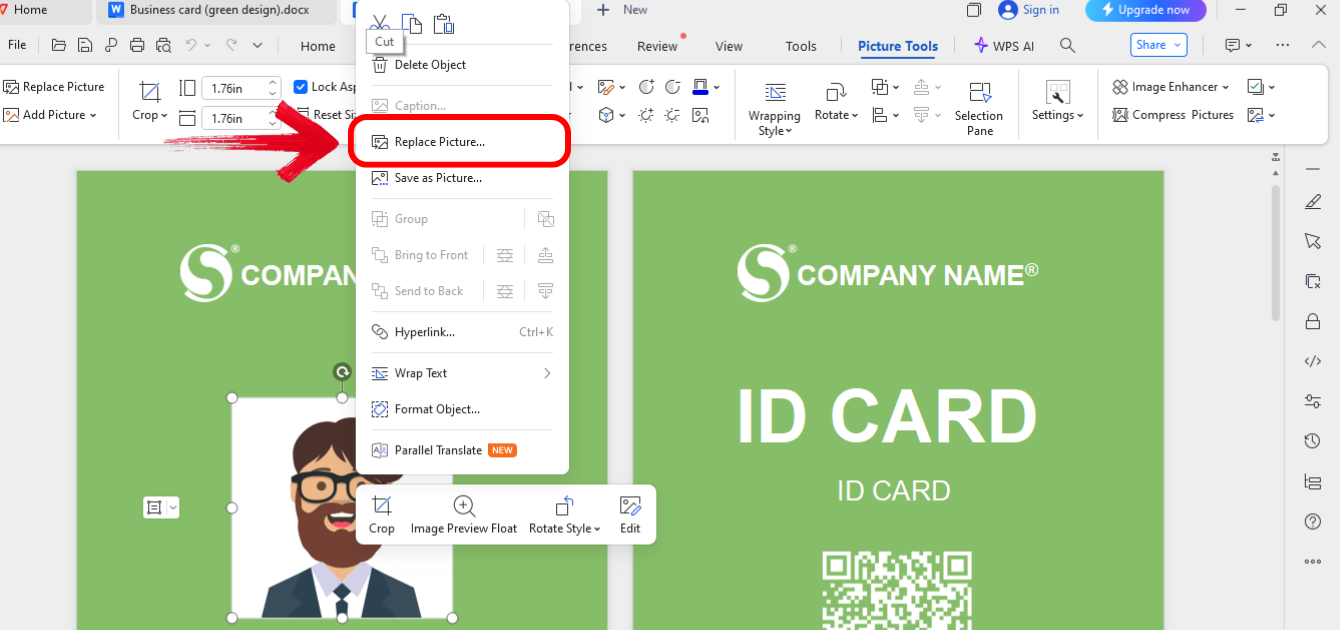
Step 3: If your template supports adding pictures on the card, right click on the image and click “Replace Picture” and then add your picture.
Step 4: Once done, adjust fonts or tweak colors from the panel above your template to match your brand identity.
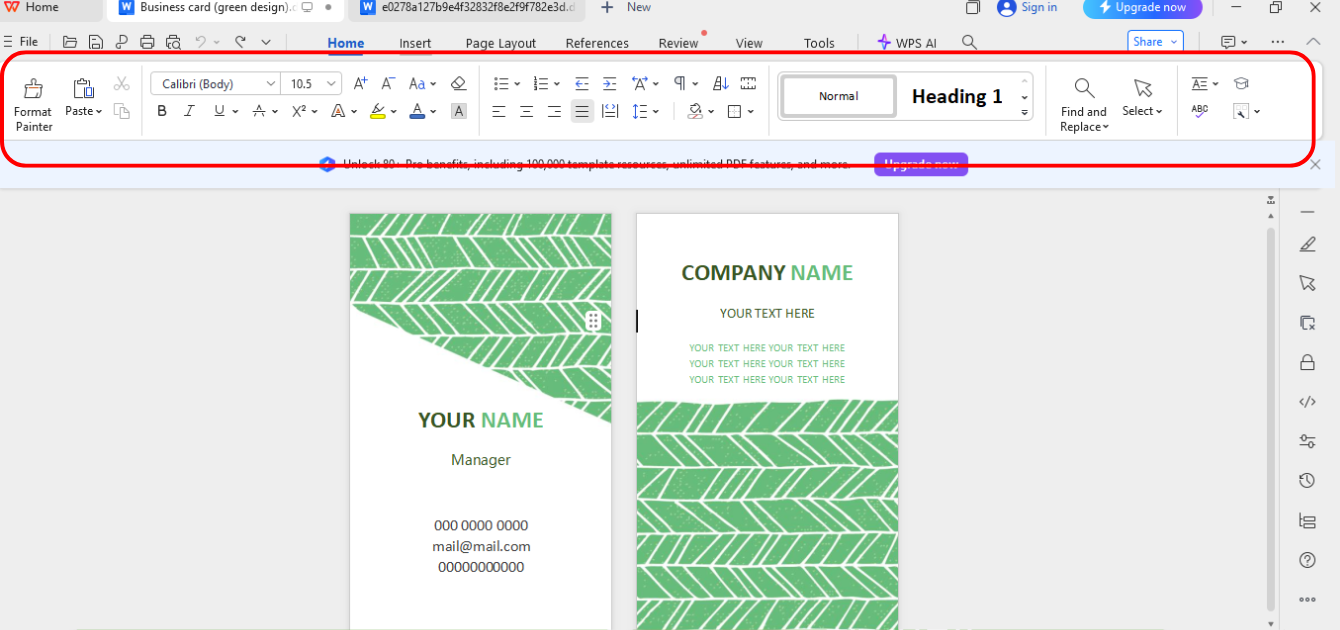
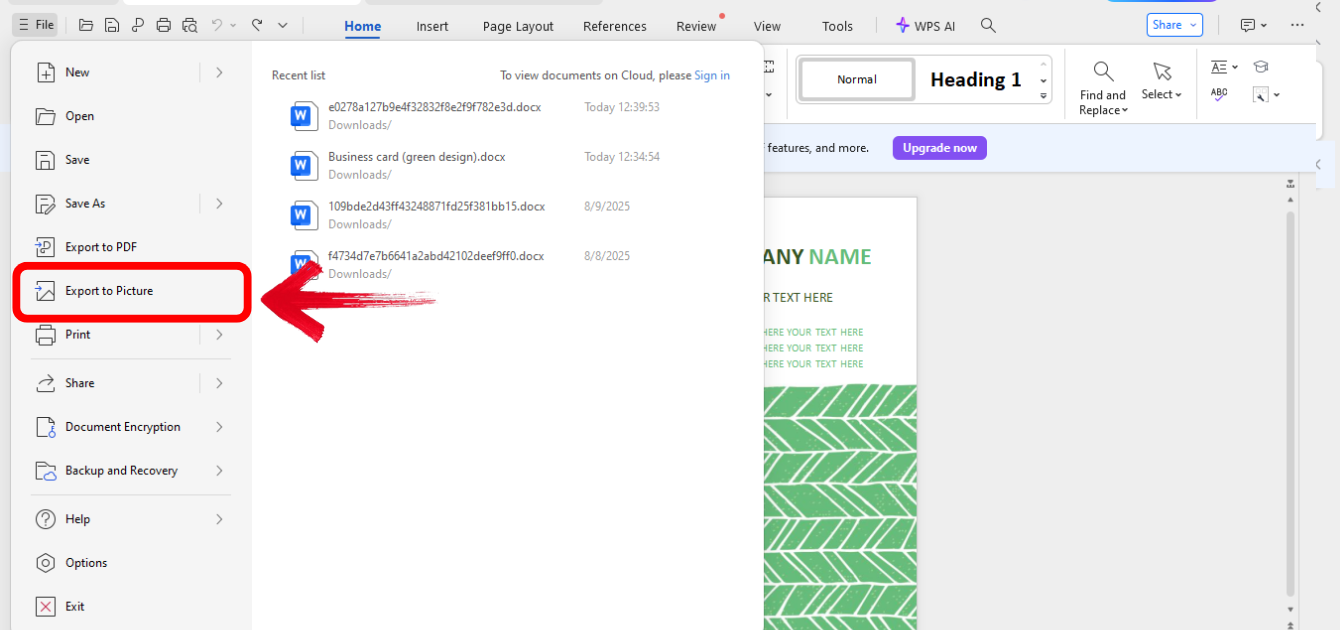
Step 5:Once finalized, go to the“File” option on the top left of your interface and then click “Export to PDF” to save the ID card in PDF form.
I like that WPS Writer feels intuitive, and even someone with minimal design skills can pull off a professional look in minutes. Its built-in tools and smart layout features make the customization process seamless, ensuring your ID cards, such as an editable blank ID badge template for office, look polished and on-brand every time.
WPS Office – Boost Productivity with Free AI Office Tools
WPS Office isn’t just another Microsoft Office alternative. It’s an all-in-one productivity suite that lets you edit Word, Excel, PDF, and images without constantly switching apps. What makes it stand out for me is the balance between professional features and ease of use. You don’t need a steep learning curve to create something visually appealing. It also comes packed with thousands of free, ready-to-use templates, making document creation faster than ever.
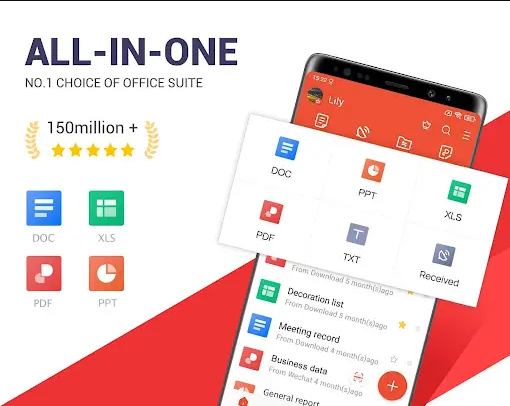
The AI-powered tools help with writing, formatting, and even image enhancement, so your work looks polished with minimal effort. Plus, its cross-platform compatibility means you can start editing a printable blank ID card template on your laptop and finish on your phone without losing any progress.
Pros:
Extensive free template library
Built-in AI features for text and image editing
Multi-format compatibility (DOCX, PDF, XLSX)
Cons:
Some advanced features require a premium subscription
Mobile version has fewer editing options
Heavy templates may load slower on older devices
For ID cards, I can handle the whole process inside WPS Office—from editing the text to enhancing the photo with the AI image tool.
FAQs
Q1: What size should I use for a standard ID card?
CR80: 85.60 × 53.98 mm, similar to a credit card.
Q2: Can I customize ID card templates without design skills?
Yes. Tools like WPS Office let you edit text, images, and layouts easily.
Q3: Can I use these templates for schools, companies, and events?
Absolutely. They are adaptable for students, employees, guests, or attendees.
Q4: Can I use WPS Office to generate barcodes or QR codes for ID cards?
Yes. WPS Office supports barcode fonts and lets you insert QR codes from external sources.
Your Fast-Track to Pro-Level ID Cards
In this guide, I’ve shared my top 10 picks for free printable blank ID card templates, covering formats, customization options, and best use cases. We explored how to edit them step-by-step using WPS Office, a versatile, AI-powered platform that makes template editing quick and simple. With its wide template library and built-in editing tools, WPS Office remains my first choice for professional, ready-to-print ID cards.

'%3e%3cpath%20d='M19.9911%204.11386V6.471H18.5894C18.0775%206.471%2017.7322%206.57814%2017.5536%206.79243C17.3751%207.00671%2017.2858%207.32814%2017.2858%207.75671V9.44421H19.9019L19.5536%2012.0871H17.2858V18.8639H14.5536V12.0871H12.2769V9.44421H14.5536V7.49779C14.5536%206.39064%2014.8632%205.53201%2015.4822%204.92189C16.1013%204.31177%2016.9257%204.00671%2017.9554%204.00671C18.8304%204.00671%2019.509%204.04243%2019.9911%204.11386Z'%20fill='%23333333'/%3e%3c/g%3e%3cdefs%3e%3cclipPath%20id='clip0_2938_8199'%3e%3crect%20width='16'%20height='16'%20fill='white'%20transform='translate(8%204.00671)'/%3e%3c/clipPath%3e%3c/defs%3e%3c/svg%3e)
'%3e%3cpath%20d='M17.5237%2010.7813L23.4811%204H22.0699L16.8949%209.88693L12.7648%204H8L14.2469%2012.9029L8%2020.0133H9.4112L14.8725%2013.7952L19.2352%2020.0133H24M9.92053%205.04213H12.0885L22.0688%2019.0224H19.9003'%20fill='%23333333'/%3e%3c/g%3e%3cdefs%3e%3cclipPath%20id='clip0_2938_8200'%3e%3crect%20width='16'%20height='16.0134'%20fill='white'%20transform='translate(8%204)'/%3e%3c/clipPath%3e%3c/defs%3e%3c/svg%3e)


