In the fast‑moving world of home repairs and maintenance, every job
you complete deserves a clear, professional invoice that details labour,
materials and payment terms. According to industry sources, beautifully
formatted invoices not only reduce client questions and delays, but also
protect your cash flow and reputation. That’s why using a purpose‑built
handyman invoice template is a smart move as it saves time, elevates
your branding and helps you get paid faster. In this guide, you’ll
discover how to create invoices and access free handyman invoice
templates.
Use Word, Excel, and PPT for FREE
Best Handyman Invoice Template
What Is a Handyman Invoice
Template?
A specialised handyman invoice template is designed to capture both
the hours spent drilling, fixing, and installing, as well as the
materials used on-site. It provides a structured document to list labour
hours, hourly rates or flat fees, all parts supplied from screws to LED
fixtures, taxes, and payment
terms. Well-designed templates save time and also help ensure
faster payments and reduce the risk of client misunderstandings.
Handyman Invoice Template
A typical handyman invoice template includes:
Service provider and client contact information
Detailed service descriptions
Labor hours and hourly rates
Parts or materials used
Total cost, tax, and payment terms
Additional notes or instructions
By using an editable or printable handyman invoice template, you can maintain accuracy, speed up billing, and ensure that
every charge is properly itemized.
Many handymen don’t realize how much time is wasted formatting
invoices from scratch for every job. That’s why a collection of
ready-to-use handyman invoice templates is so valuable, these can be
downloaded instantly, customized in Word, and sent directly to clients.
Beyond just looking professional, the templates include pre-set sections
for labor, materials, taxes, payment terms, and more, allowing you to
skip the hard work and invoice accurately and efficiently every
time.
Printable Handyman
Invoice Templates [Word]
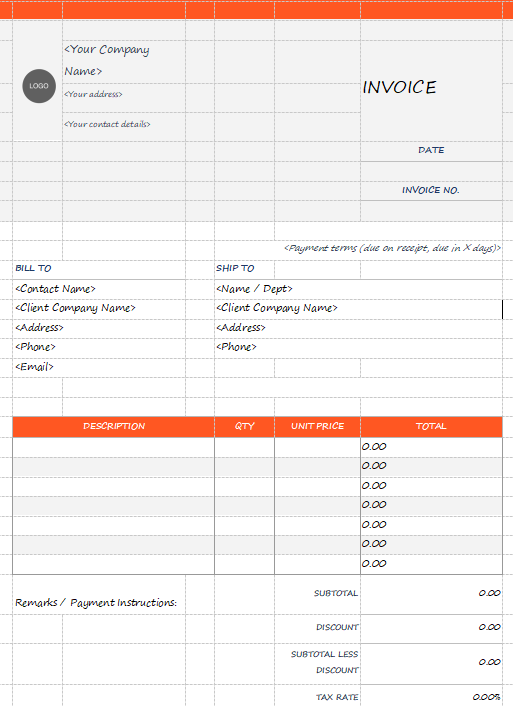
This vibrant, high-contrast invoice uses bold orange headers to structure the itemized table and the top
banner. It provides distinct sections for the seller's details and
segregated client information under BILL TO and SHIP TO. The financial
summary is highly detailed, calculating Subtotal, Discount, Subtotal
Less Discount, Tax Rate, and Total.
Printable Handyman Invoice Template
Blank Handyman Invoice
Templates [Word]
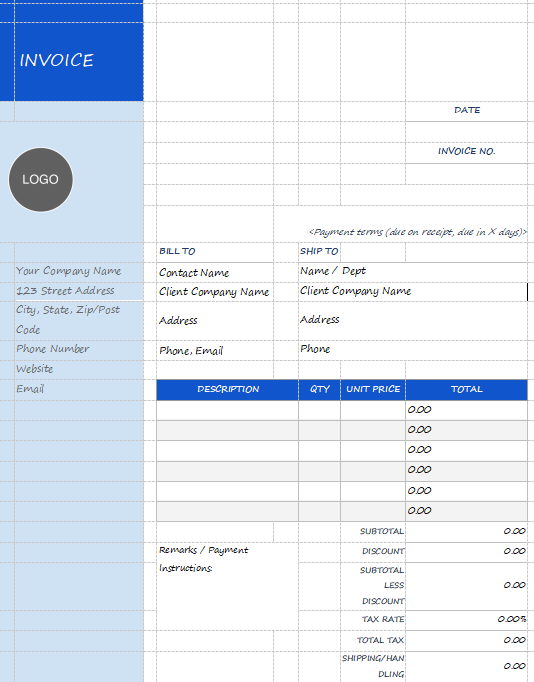
This invoice uses a classic grid structure, defined by a bold vertical blue sidebar
containing the company logo and contact details. The layout cleanly
separates Bill To and Ship To sections, providing ample detail for
client contact information. The itemized table features a contrasting
blue header and a detailed financial summary below, calculating
Subtotal, Discount, and Tax Rate before determining the Balance Due.
Blank Handyman Invoice Template
Editable Handyman
Invoice Templates [Word]
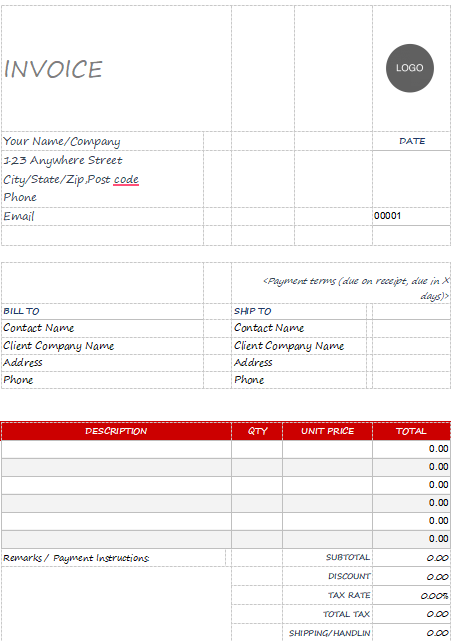
This invoice uses a grid-based layout defined by a vibrant red header for the
itemized table and a thin red line accenting the top banner. The
seller's contact details are placed below the header, while client
information is split into structured BILL TO and SHIP TO sections. The
financial summary details Subtotal, Discount, Tax Rate, Total Tax, and
Shipping/Handling, ensuring a transparent calculation of the Balance
Due.
Editable Handyman Invoice Template
Professional
Handyman Invoice Templates [Word]
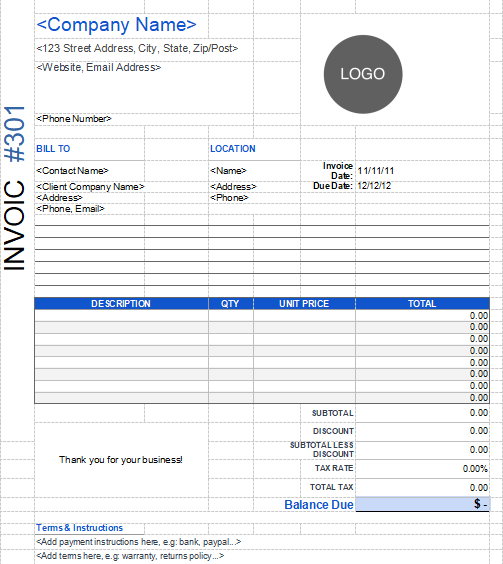
This invoice uses a clear spreadsheet grid for easy data entry and is defined by a
large vertical invoice #301 label on the left. The header features a
Logo placeholder and aligned company contact details, while client
information is cleanly separated by Bill To and Location fields. The
detailed financial summary includes Discount, Tax Rate, Total Tax, and a
prominent Balance Due section.
Professional Handyman Invoice Template
Handyman Invoice Template 1
[Word]
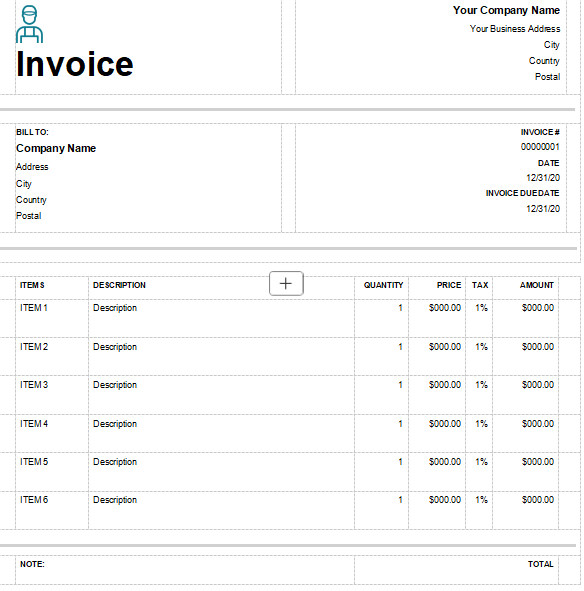
This minimalist invoice uses a large icon and Invoice title on the upper left, while the
seller's business address is aligned to the upper right. Client
information is placed in a separate Bill To block, with key invoice
dates such as Invoice #, Date, Due Date aligned to the right. The
itemized table is simple and clear, providing columns for Quantity,
Price, Tax, and Amount.
Handyman Invoice Template 1
Handyman Invoice Template 2
[Word]
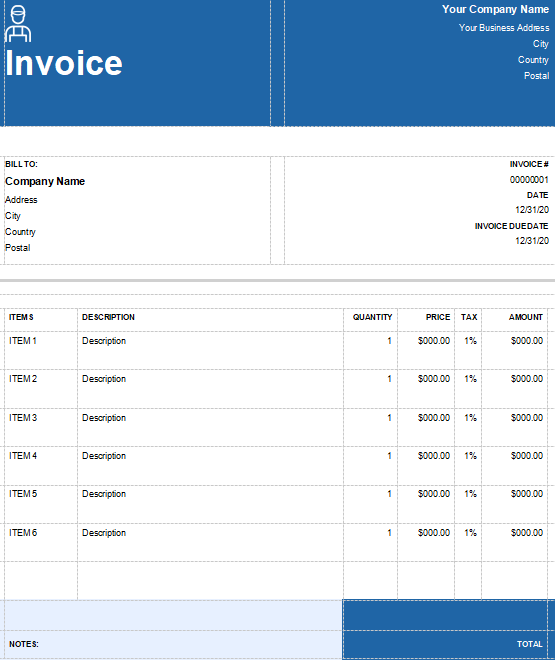
This invoice uses a full-width dark blue header across the top, featuring the Invoice
title and an icon aligned left. The seller's business address is aligned
right within the header block, maximizing visibility. The layout cleanly
separates the client's Bill To information from the Invoice #, Date, and
Due Date in the middle section. The itemized grid table is simple and
clear, leading down to a final bold blue block for the Total amount.
Handyman Invoice Template 2
Handyman Invoice Template 3
[Word]
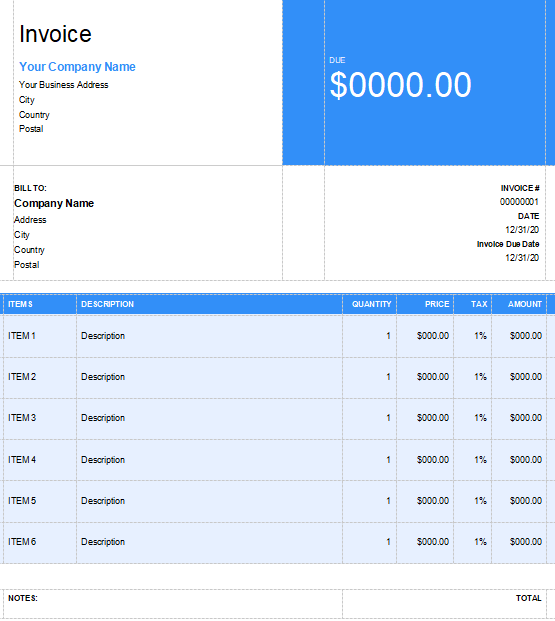
This visually high-impact invoice uses a royal blue color for its header, which is split to feature the
company name on the left and a large, prominent Due amount on the right.
The client's Bill To information is aligned directly below the company
details. The itemized table is structured as a clear grid with six item
lines, including specific columns for Quantity, Price, Tax, and
Amount.
Handyman Invoice Template 3
Handyman Invoice Template 4
[Word]
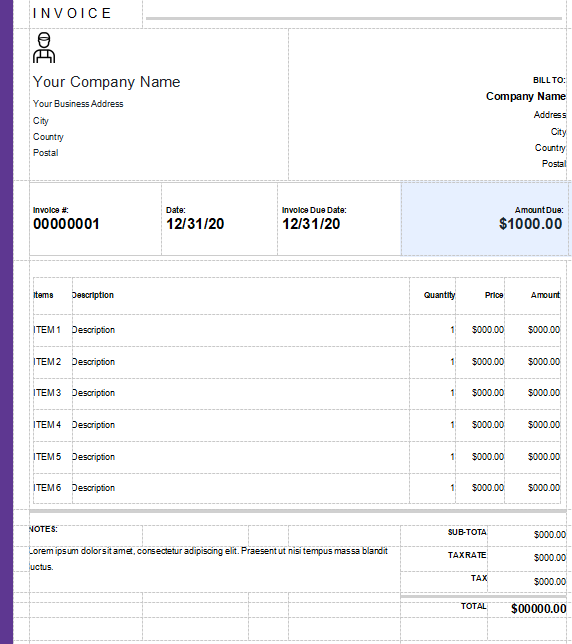
This professional invoice features a large icon and company name on the upper left, while the
client's Bill To information is aligned right. Key payment data such as
Invoice #, Date, Due Date, and Amount Due are clearly segmented in a
blue-accented center bar. The document uses a simple, grayscale itemized
table for services, leading to a detailed financial summary at the
bottom, calculating Sub-Total, Tax
Rate, Tax, and Total.
Handyman Invoice Template 4
Handyman Invoice Template 5
[Word]
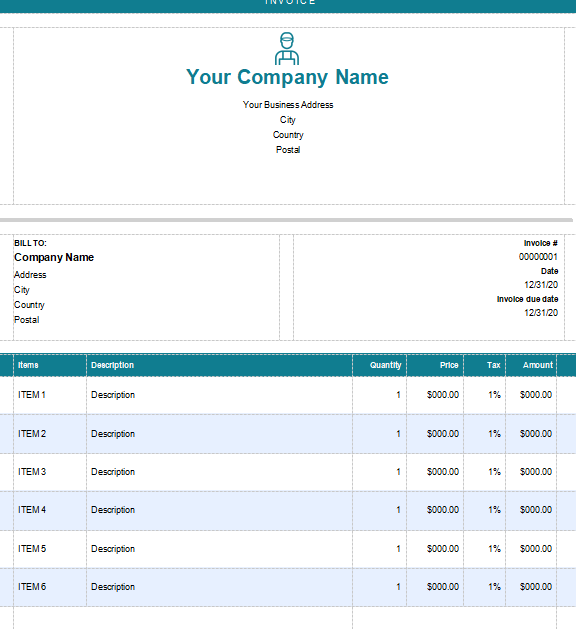
This invoice is characterized by its prominent centered icon and Company Name, framed
by a thin teal header bar at the very top. The layout separates the
client's Bill To information on the left from the Invoice #, Date, and
Due Date on the right. The itemized table features a teal header and a
grid structure with columns for Quantity, Price, Tax, and Amount to
clearly detail all service charges.
Handyman Invoice Template 5
Handyman Invoice Template 6
[Word]
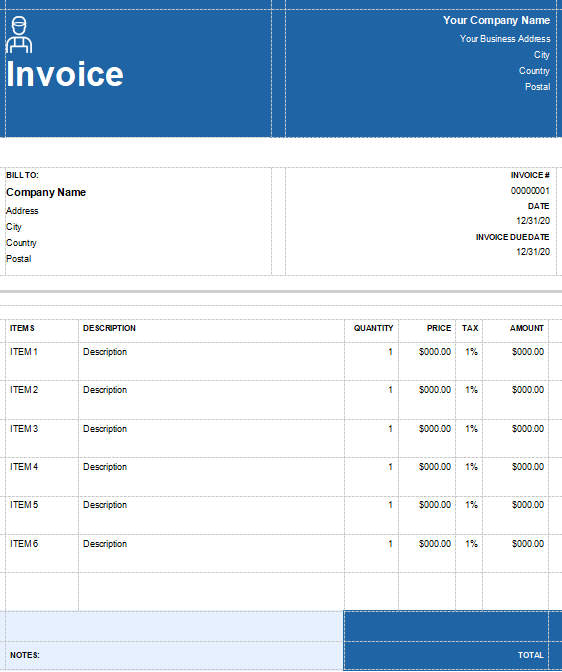
This invoice uses a deep blue split header, prominently featuring the Invoice title
and an icon on the left, with the seller's address on the right. The
layout cleanly separates client Bill To information from the Invoice #,
Date, and Due Date. The itemized table is simple and clear, leading to a
dark blue footer block that highlights the final total amount.
Handyman Invoice Template 6
A
Smarter Way to Create Handyman Invoices: WPS Invoice Generator
When it comes to invoicing for handyman work, using a simple document
isn’t always enough as you need something that adapts to multiple jobs,
tracks materials and labour, and still looks clean and professional. The WPS Invoice
Generator fits that role by offering a simple way to build
invoices that reflect the actual scope of your services, from hours
worked to parts used. With built-in templates, customization of brand
elements, and direct export options, it removes much of the manual
formatting and helps you maintain consistency across every
client‑bill.
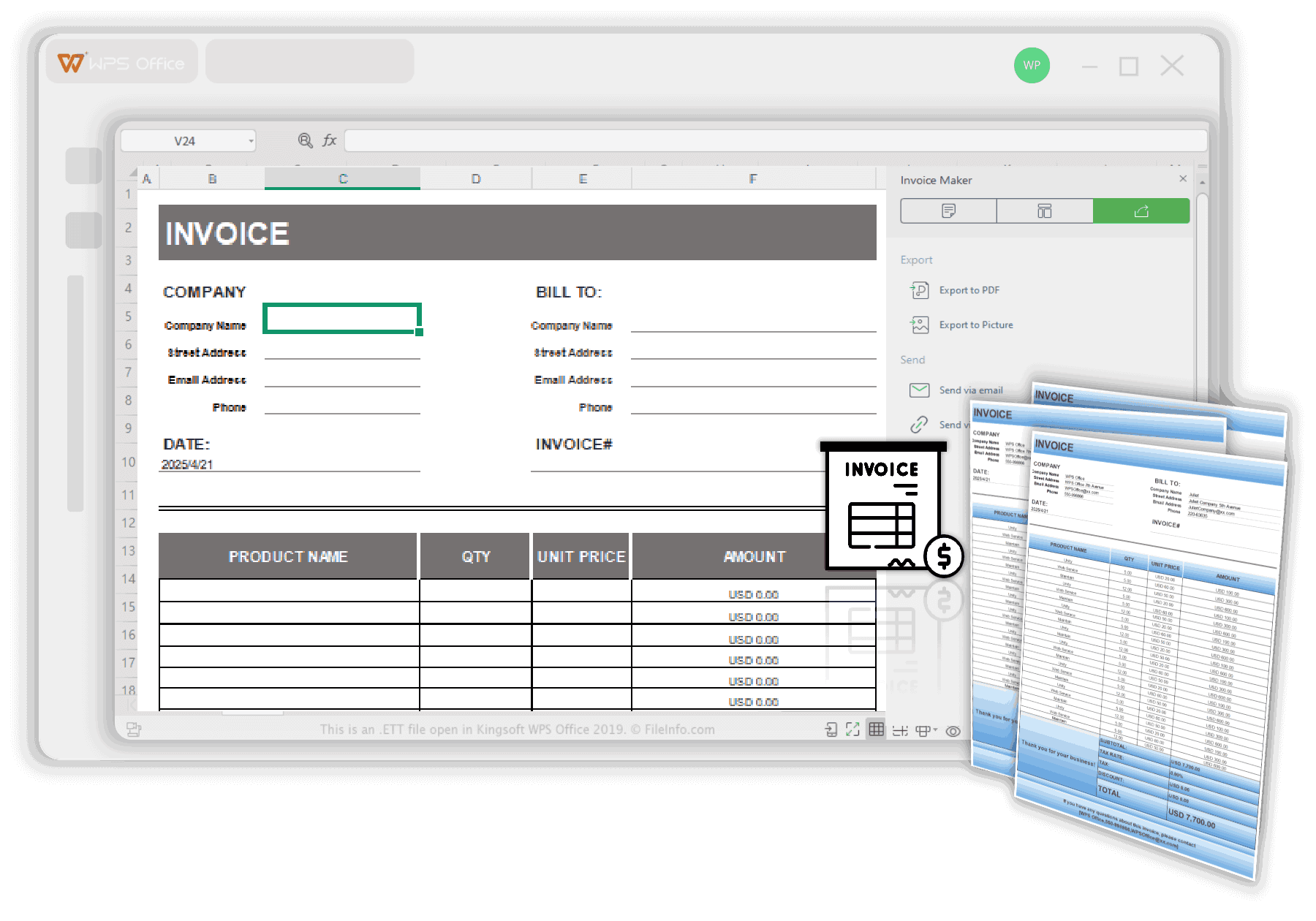
WPS Invoice Generator
Features
Support for brand customization, allowing you to upload your logo and apply your brand’s colours to invoices.
A reusable template system, so once you build an invoice format, you can reuse it for future jobs rather than recreating from scratch.
Automatic calculations including totals, taxes, discounts, and invoice numbers, which reduces manual errors.
Export options to PDF and in some cases as images, enabling you to send non‑editable invoices directly to clients.
Included within the WPS Office suite, this tool is free, easy to use,
and works seamlessly with Word-compatible formats. It lets you create
and customize a handyman invoice template editable to your business
needs allowing you to adjust sections, add branding, and fine-tune every
detail for a professional finish. Once done, you can export the invoice
as a client-ready PDF. Getting started is straightforward and can be
done in just a few steps:
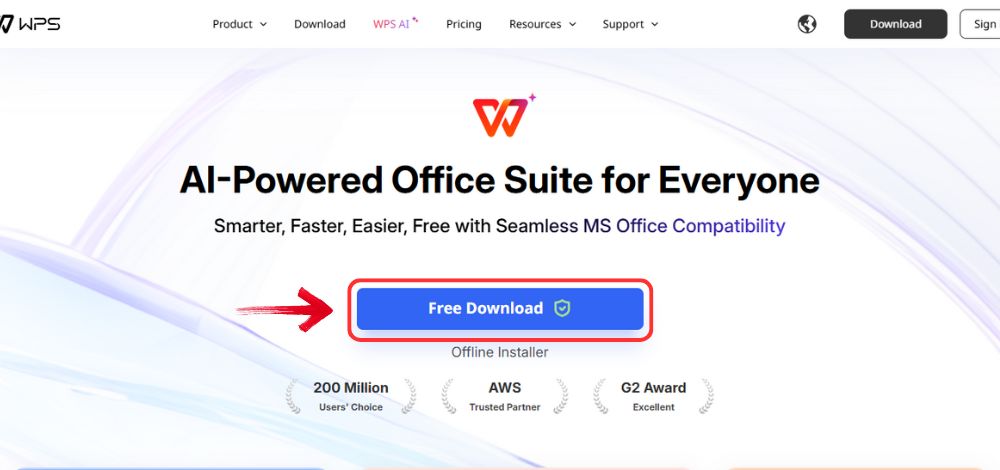
Step 1: Go to WPS
Office, and click the “Free Download” button to
install WPS Office on your computer.
Download WPS Office
Step 2: Once the download is complete, run the setup
file as you would with any other app. Follow the on-screen instructions
to install it.
Install WPS Office
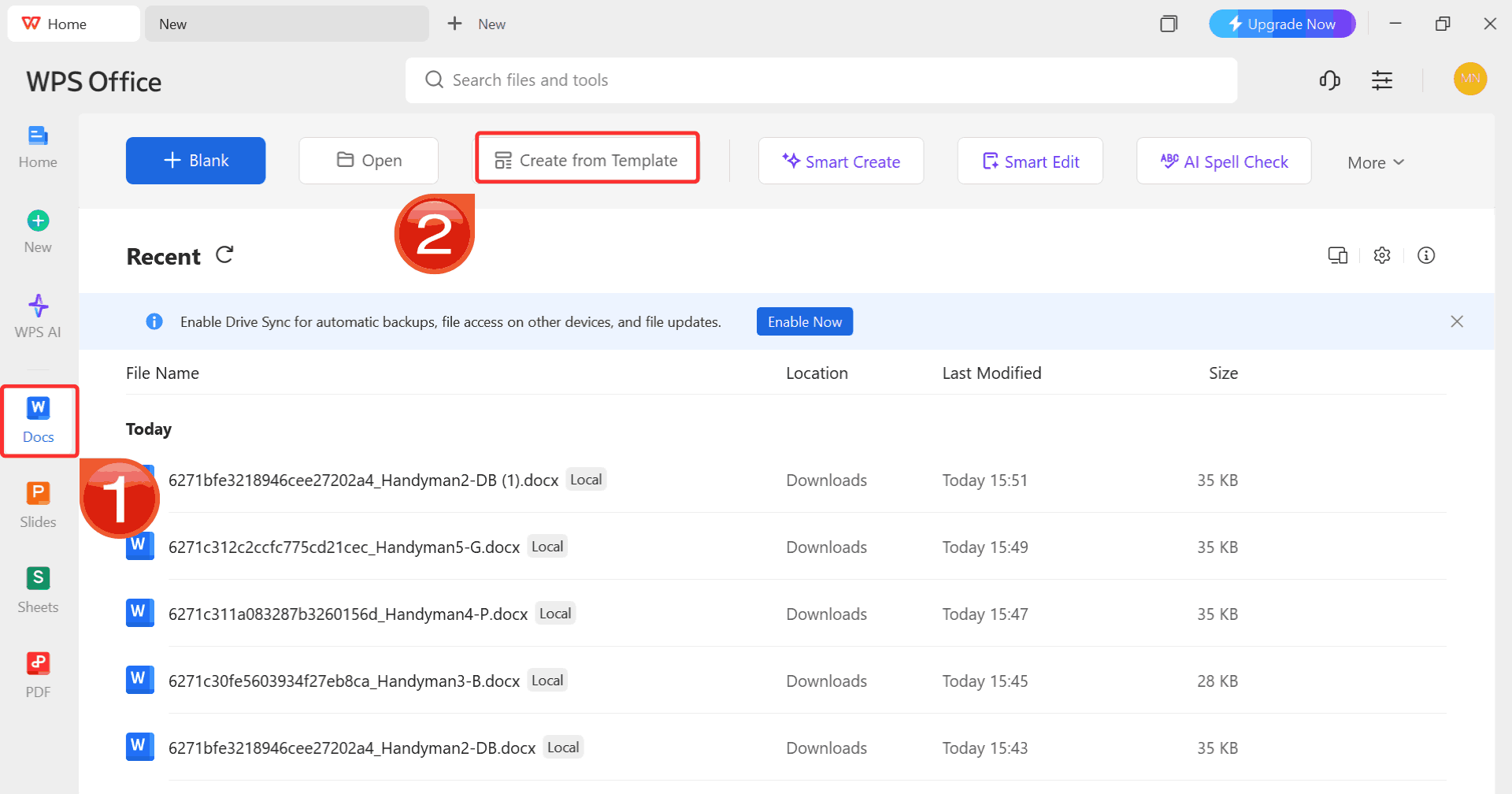
Step 3: On the WPS Office dashboard, click “Docs” from the left sidebar and hit “Create
from Template” to launch WPS Docs using your desired
template.
WPS Word Dashboard
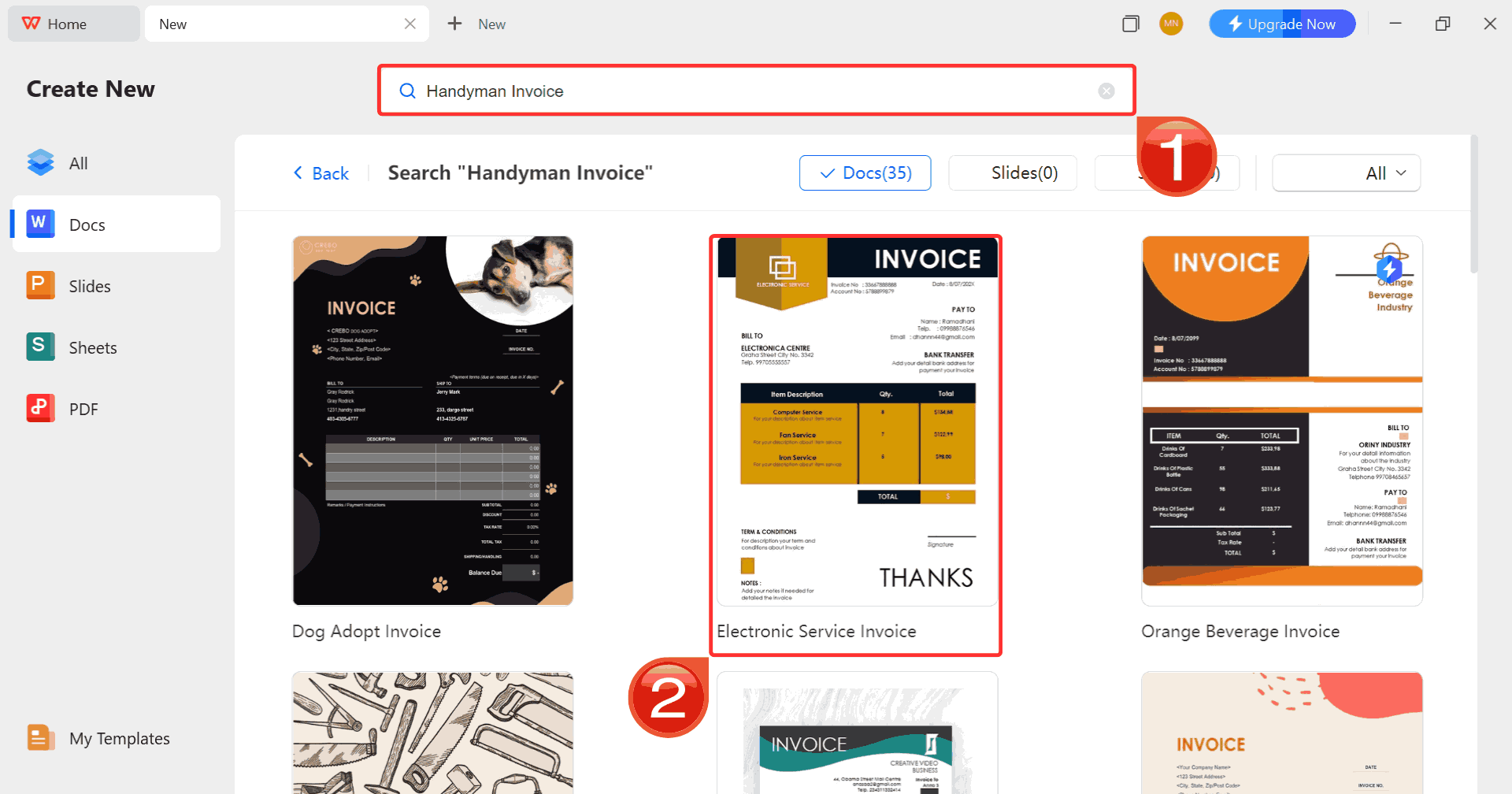
Step 4: In the template gallery’s search bar, you
can search for any invoice such as “handyman invoice” and just click on any template that fits your needs to open it.
Search Template
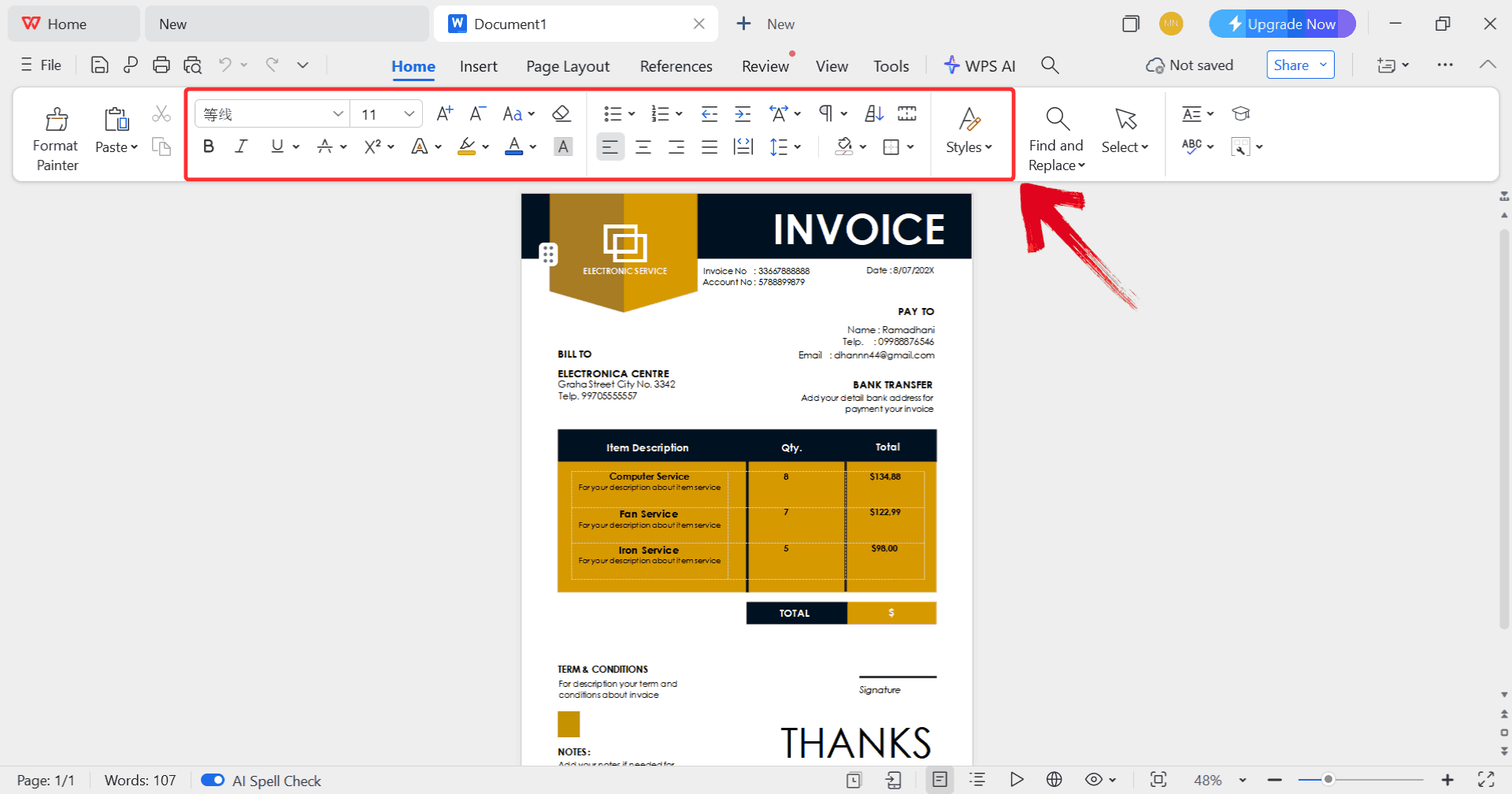
Step 5: Select any text in your document, and then
use the menu at the top to make whatever changes you need like adjusting
formatting, editing text, or changing font.
Customize Template
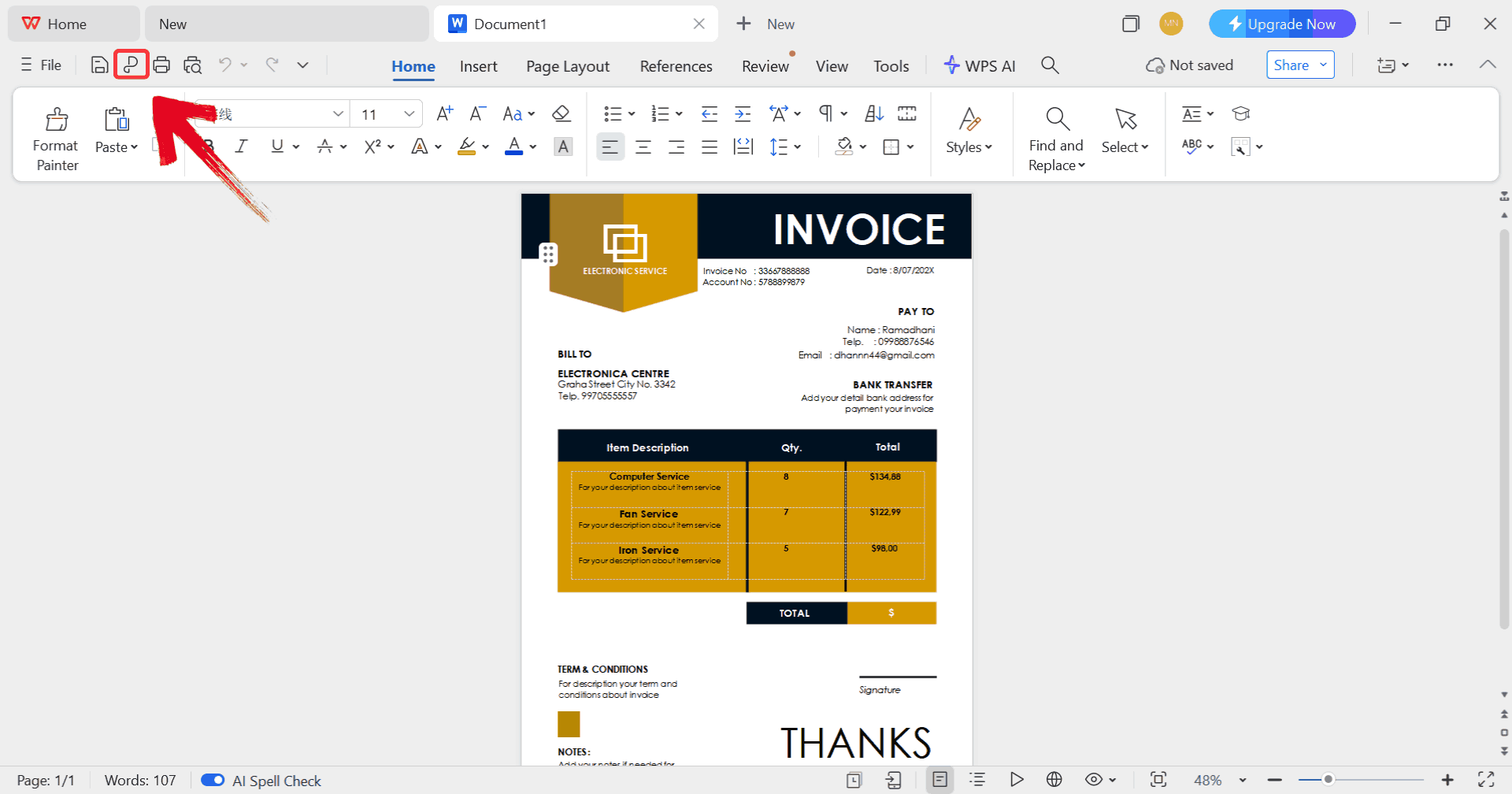
Step 6: Click on the “P” icon to
make sure your document is saved as a PDF, keeping the layout intact and
ready for printing or sharing digitally.
Export Template
100% secure
FAQs
1. Can
I customize handyman invoice templates with my logo?
Yes, every handyman invoice template Word version listed here is
fully customizable. You can add your logo, contact info, and brand
colors easily.
2.
Are these templates suitable for solo handymen and small teams?
Absolutely. They’re flexible enough for both individual professionals
and small handyman businesses.
3. How do I send invoices to
clients?
You can save them as PDFs and email directly or print a hard copy if
you prefer handing out invoices in person.
4. Do these
templates include tax or VAT fields?
Yes, most templates have optional tax or VAT fields that you can
adjust according to your location.
Quick & Clean Invoices with WPS
With a handyman invoice template free download, you can create clean, accurate, and branded invoices without spending hours formatting spreadsheets. Editable Word versions and printable templates alike, these 10 options help simplify your work and keep your invoicing organized. But if you want to take it a step further, the WPS Invoice Generator is the smarter, modern alternative. It saves time, eliminates manual errors, and gives your invoices a refined, business-ready look that clients appreciate. Try it once, and you might never go back to old-school invoicing again.
7+ years in productivity tech. I test and review the latest tools to simplify your workflow. Follow for honest app comparisons, practical guides, and curated tech picks to boost efficiency.


'%3e%3cpath%20d='M8%200C12.4183%200%2016%203.58172%2016%208C16%2012.4183%2012.4183%2016%208%2016C3.58172%2016%200%2012.4183%200%208C0%203.58172%203.58172%200%208%200ZM11.6162%204.38379C11.2257%203.99337%2010.5927%203.99338%2010.2021%204.38379L8%206.58594L5.79785%204.38379C5.40732%203.99334%204.77429%203.99329%204.38379%204.38379C3.99331%204.77429%203.99335%205.40733%204.38379%205.79785L6.58594%208L4.38379%2010.2021C3.99348%2010.5927%203.99341%2011.2257%204.38379%2011.6162C4.77426%2012.0066%205.40734%2012.0065%205.79785%2011.6162L8%209.41406L10.2021%2011.6162C10.5927%2012.0066%2011.2257%2012.0067%2011.6162%2011.6162C12.0067%2011.2257%2012.0066%2010.5927%2011.6162%2010.2021L9.41406%208L11.6162%205.79785C12.0066%205.40735%2012.0066%204.77429%2011.6162%204.38379Z'%20fill='%23080E17'%20fill-opacity='0.46'/%3e%3c/g%3e%3cdefs%3e%3cclipPath%20id='clip0_3761_713'%3e%3crect%20width='16'%20height='16'%20fill='white'/%3e%3c/clipPath%3e%3c/defs%3e%3c/svg%3e)




'%3e%3cpath%20fill-rule='evenodd'%20clip-rule='evenodd'%20d='M21.4999%2010.9993C21.4999%205.20009%2016.7986%200.498901%2010.9993%200.498901C5.19994%200.498901%200.498657%205.20009%200.498657%2010.9993C0.498657%2016.2404%204.33858%2020.5844%209.35855%2021.3722V14.0346H6.69238V10.9993H9.35855V8.68594C9.35855%206.05427%2010.9262%204.60062%2013.3248%204.60062C14.4736%204.60062%2015.6753%204.80571%2015.6753%204.80571V7.38979H14.3512C13.0468%207.38979%2012.64%208.19921%2012.64%209.0296V10.9993H15.5523L15.0867%2014.0346H12.64V21.3722C17.66%2020.5844%2021.4999%2016.2404%2021.4999%2010.9993Z'%20fill='%231568EA'/%3e%3c/g%3e%3c/svg%3e)


'%3e%3cpath%20d='M2.42045%2022.1876H6.31818V12.7217L0.75%208.54553V20.5171C0.75%2021.4414%201.49892%2022.1876%202.42045%2022.1876Z'%20fill='%234285F4'/%3e%3cpath%20d='M19.682%2022.1876H23.5797C24.5041%2022.1876%2025.2502%2021.4387%2025.2502%2020.5171V8.54553L19.682%2012.7217'%20fill='%2334A853'/%3e%3cpath%20d='M19.682%205.48293V12.7216L25.2502%208.54543V6.31816C25.2502%204.25236%2022.8921%203.07469%2021.2411%204.31361'%20fill='%23FBBC04'/%3e%3cpath%20d='M6.31824%2012.7217V5.48303L13.0001%2010.4944L19.6819%205.48303V12.7217L13.0001%2017.733'%20fill='%23EA4335'/%3e%3cpath%20d='M0.75%206.31816V8.54543L6.31818%2012.7216V5.48293L4.75909%204.31361C3.10534%203.07469%200.75%204.25236%200.75%206.31816Z'%20fill='%23C5221F'/%3e%3c/g%3e%3cdefs%3e%3cclipPath%20id='clip0_2954_7305'%3e%3crect%20width='24.5'%20height='18.375'%20fill='white'%20transform='translate(0.75%203.8125)'/%3e%3c/clipPath%3e%3c/defs%3e%3c/svg%3e)




'%3e%3cpath%20d='M19.9911%204.11386V6.471H18.5894C18.0775%206.471%2017.7322%206.57814%2017.5536%206.79243C17.3751%207.00671%2017.2858%207.32814%2017.2858%207.75671V9.44421H19.9019L19.5536%2012.0871H17.2858V18.8639H14.5536V12.0871H12.2769V9.44421H14.5536V7.49779C14.5536%206.39064%2014.8632%205.53201%2015.4822%204.92189C16.1013%204.31177%2016.9257%204.00671%2017.9554%204.00671C18.8304%204.00671%2019.509%204.04243%2019.9911%204.11386Z'%20fill='%23333333'/%3e%3c/g%3e%3cdefs%3e%3cclipPath%20id='clip0_2938_8199'%3e%3crect%20width='16'%20height='16'%20fill='white'%20transform='translate(8%204.00671)'/%3e%3c/clipPath%3e%3c/defs%3e%3c/svg%3e)
'%3e%3cpath%20d='M17.5237%2010.7813L23.4811%204H22.0699L16.8949%209.88693L12.7648%204H8L14.2469%2012.9029L8%2020.0133H9.4112L14.8725%2013.7952L19.2352%2020.0133H24M9.92053%205.04213H12.0885L22.0688%2019.0224H19.9003'%20fill='%23333333'/%3e%3c/g%3e%3cdefs%3e%3cclipPath%20id='clip0_2938_8200'%3e%3crect%20width='16'%20height='16.0134'%20fill='white'%20transform='translate(8%204)'/%3e%3c/clipPath%3e%3c/defs%3e%3c/svg%3e)


