For sole traders and freelancers, a sleek, accurate invoice can be
just as vital as your next client brief because it signals
professionalism, speeds payment, and builds trust. According to industry
sources, invoices do much more than ask for money: they serve as a clear
record of your services, support better cash-flow control, and help you
stay on solid fiscal footing. In the following guide, I’ll show you ten
sole trader invoice templates you can download right away, plus a
smarter invoicing tool to boost your process.
Use Word, Excel, and PPT for FREE
Best Sole Trader Invoice Template
What Is a Sole Trader
Invoice Template?
A sole trader invoice template is simply a pre-formatted form
designed to help freelancers and self-employed professionals bill their
clients accurately and consistently. In the UK, using a proper template
becomes especially important because certain items, like your name and
legal address, must appear on the invoice for compliance. When you
choose a template built
for sole traders, you save time, reduce the risk of missing required
details, and make it easier to get paid promptly and stay organised.
Sole Trader Invoice Template
Unlike generic invoice forms, these templates are tailored for
one-person businesses. You’ll find fields that cover the essentials for
a clear, professional invoice, including:
This setup saves you time and also ensures every invoice looks
consistent and reliable which is something clients always
appreciate.
10 Free Sole Trader
Invoice Template Options
When I switched from typing up each invoice from scratch to using a
sole trader invoice template, the difference was immediate. I stopped
worrying about missing fields or formatting errors and could send
professional invoices in minutes. Below are ten free sole trader invoice
templates I’ve found practical for freelancers and small business
owners. Each one is structured to include essential details like client
information, service descriptions, and payment terms, so you can focus
on your work instead of redoing layouts every time you bill a
client.
Free Sole Trader Invoice
Template
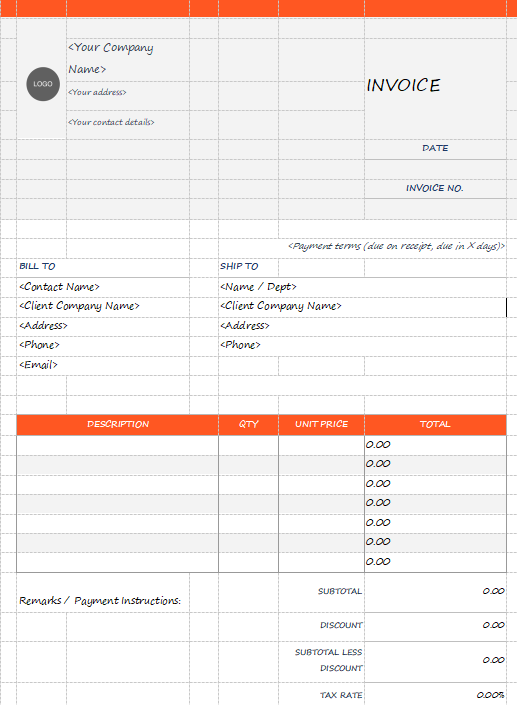
This template clearly organizes ‘Bill To’ and ‘Ship To’ client information and uses a
traditional itemized table. The financial summary details Discount, Tax
Rate, and Shipping/Handling before calculating the final balance
due.
Free Sole Trader Invoice Template
Printable Sole Trader
Invoice Template
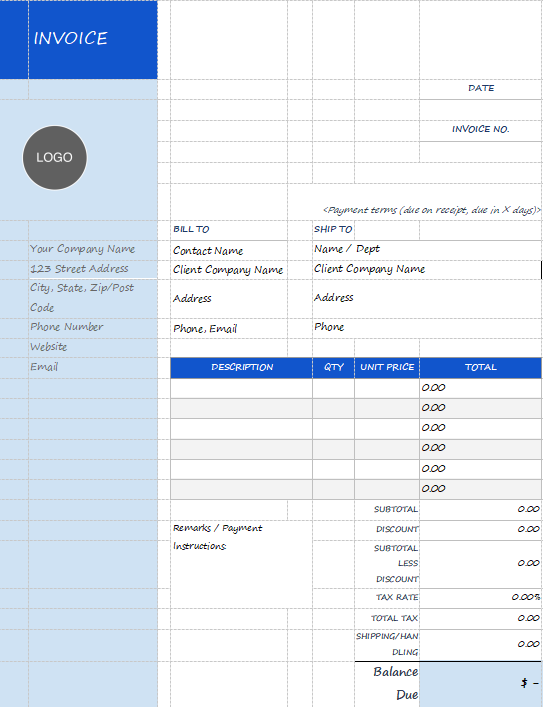
This template provides space for the company logo, detailed seller and client contact
information, and payment terms. The financial summary calculates
Discount, Tax Rate, and Shipping/Handling to determine the final Balance
Due
Printable Sole Trader Invoice Template
Blank Sole Trader Invoice
Template
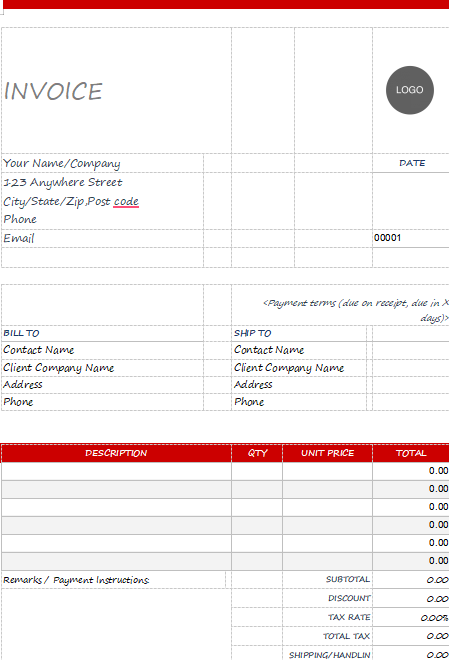
This invoice uses a minimalist design with a clean white and gray layout, accented by
a single red itemized table header. It features a large placeholder for
a logo and detailed seller information at the top. The template provides
clear sections for Bill To and Ship To addresses, and a comprehensive
summary for calculating taxes and the final Balance Due.
Blank Sole Trader Invoice Template
Fillable Sole Trader
Invoice Template
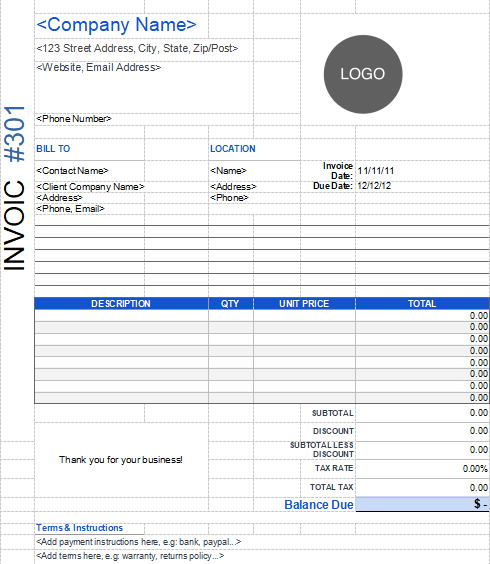
This template uses a classic spreadsheet grid structure for clear organization,
featuring a prominent logo placeholder and a blue-accented header and
itemized table. It provides distinct sections for the seller's location
and the client's Bill To information, including their contact
details.
Fillable Sole Trader Invoice Template
Sole Trader Invoice Template
1
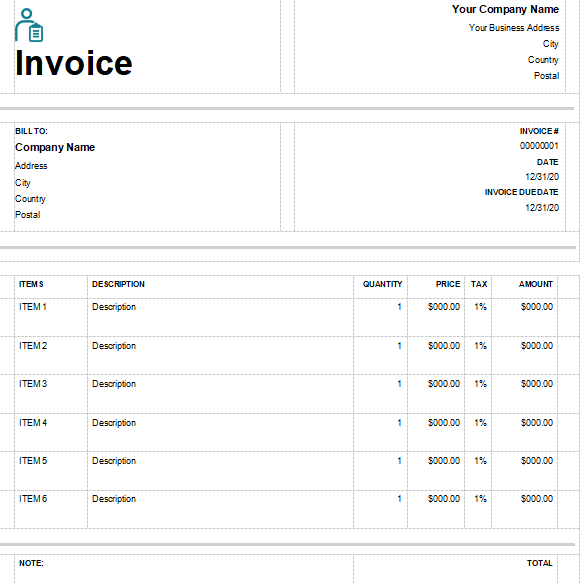
This template features an exceptionally clean, high-contrast black-and-white design
with a small icon and large 'Invoice' title. It clearly separates the
seller's business address from the client's BILL TO information. The
itemized table is detailed, including columns for Item #, Description,
Quantity, Price, Tax, and Amount, ensuring comprehensive billing
clarity.
Sole Trader Invoice Template 1
Sole Trader Invoice Template
2
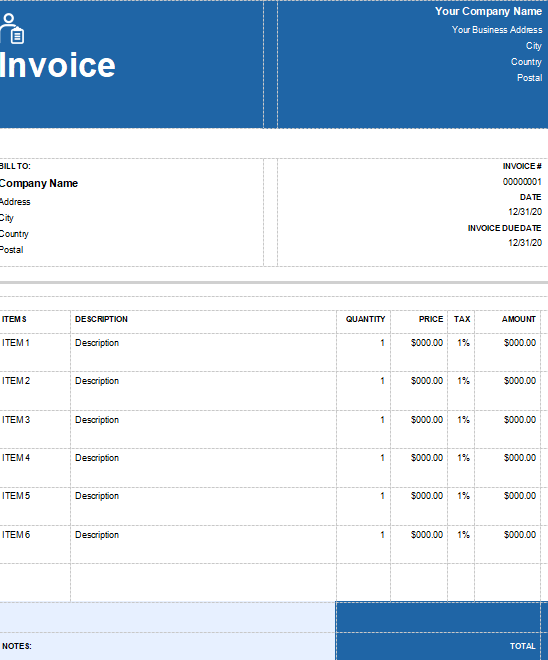
This invoice uses a striking, solid blue header spanning the full width of the
document, making it highly visible and professional. It clearly defines
the seller's address and the client's BILL TO information. The itemized
table is detailed, featuring columns for Item #, Description, Quantity,
Price, Tax, and Amount to ensure accurate totals.
Sole Trader Invoice Template 2
Sole Trader Invoice Template
3
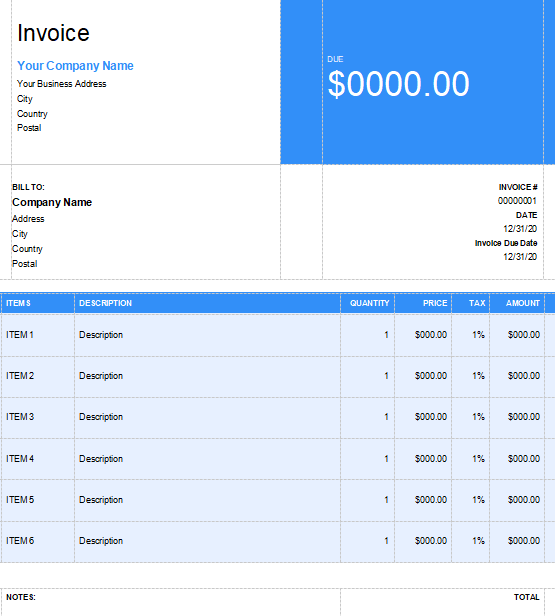
This visually striking template uses a large, solid blue block to prominently display the Due amount at
the top, immediately drawing attention to the outstanding balance. It
clearly defines the seller's company name and business address and the
client's Bill To information.
Sole Trader Invoice Template 3
Sole Trader Invoice Template
4
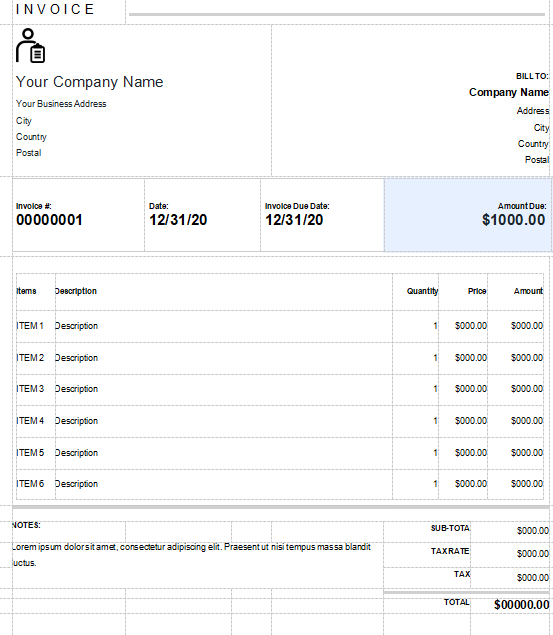
This invoice features a simple, bold icon and the Company Name and address aligned
left, with client Bill To information aligned right. It prominently
highlights key dates and the Amount Due in a dedicated blue-accented
section, ensuring payment terms are immediately clear. The document
includes space for Notes and provides a precise financial summary
calculating Sub-Total, Tax Rate, Tax, and Total.
Sole Trader Invoice Template 4
Sole Trader Invoice Template
5
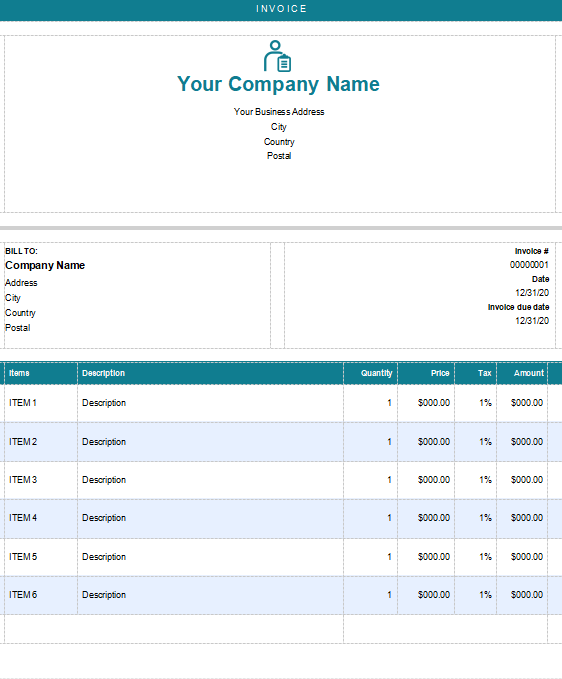
This invoice uses a soothing teal color palette, featuring a prominent centered icon
and Company Name at the top. It clearly separates the client's Bill To
information on the left from the Invoice #, Date, and Due Date on the
right. The itemized table features a bold teal header and a grid
structure with columns for Quantity, Price, Tax, and Amount to detail
all charges.
Sole Trader Invoice Template 5
Sole Trader Invoice Template
6
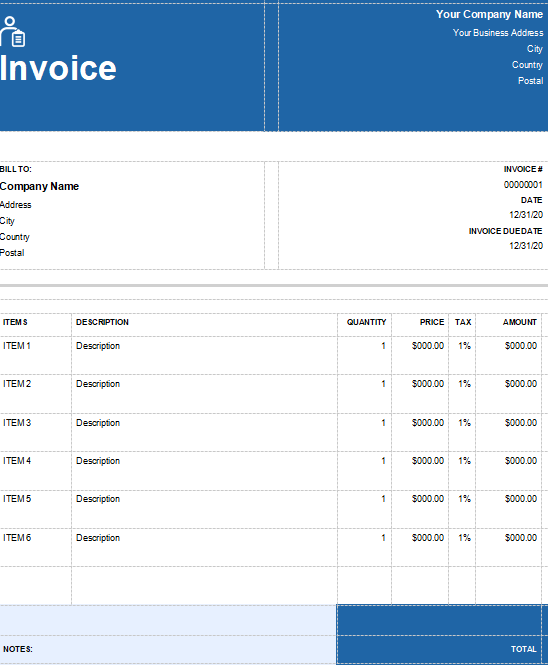
This invoice uses a dark blue header split into two blocks, prominently featuring the
Invoice title and a stylized icon on the left. The seller's contact
details are aligned right within the header, maximizing the use of
vertical space. Key dates like Invoice #, Date, and Invoice Due Date are
clearly located next to the client's Bill To information.
Sole Trader Invoice Template 6
A
Smarter Way to Create Sole Trader Invoices: WPS Invoice Generator
When you're managing multiple clients as a sole trader, invoicing
becomes a linchpin of your cash flow. Instead of editing a document
every time, you can turn to WPS Invoice
Generator which lets you build and send professional-looking
invoices in just a few steps. It handles everything from automatic total
and tax calculations, to client data reuse and branded layouts. With
this tool, you keep your focus on your services while maintaining
accuracy, consistency and a refined presentation.
WPS Invoice Generator
Advantages
Ease of Use: You can generate invoices in just a few clicks without worrying about design or structure.
Professionalism: Every invoice looks polished, ensuring your business appears credible and organized.
Efficiency: Manage multiple clients and projects simultaneously, all in one dashboard.
Customization: Add your business logo, brand colors, or even new fields specific to your industry.
AI Assistance: Automatically formats complex billing scenarios, so your invoices are always accurate.
With these advantages in mind, the next step is understanding how to
create your own invoices efficiently and accurately. Here’s how to do
it.
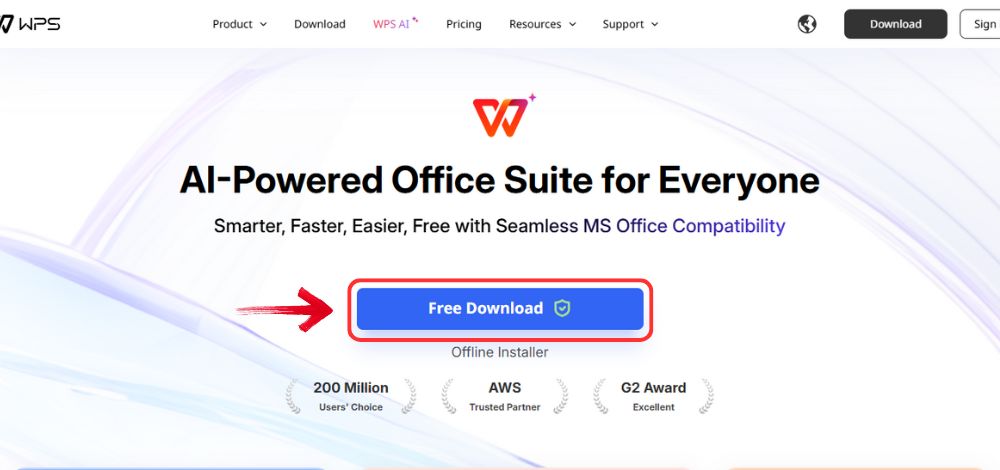
Step 1: Go to WPS
Office, and click the “Free Download” button to
install WPS Office on your computer.
Download WPS Office
Step 2: Once the download is complete, run the setup
file as you would with any other app. Follow the on-screen instructions
to install it.
Install WPS Office
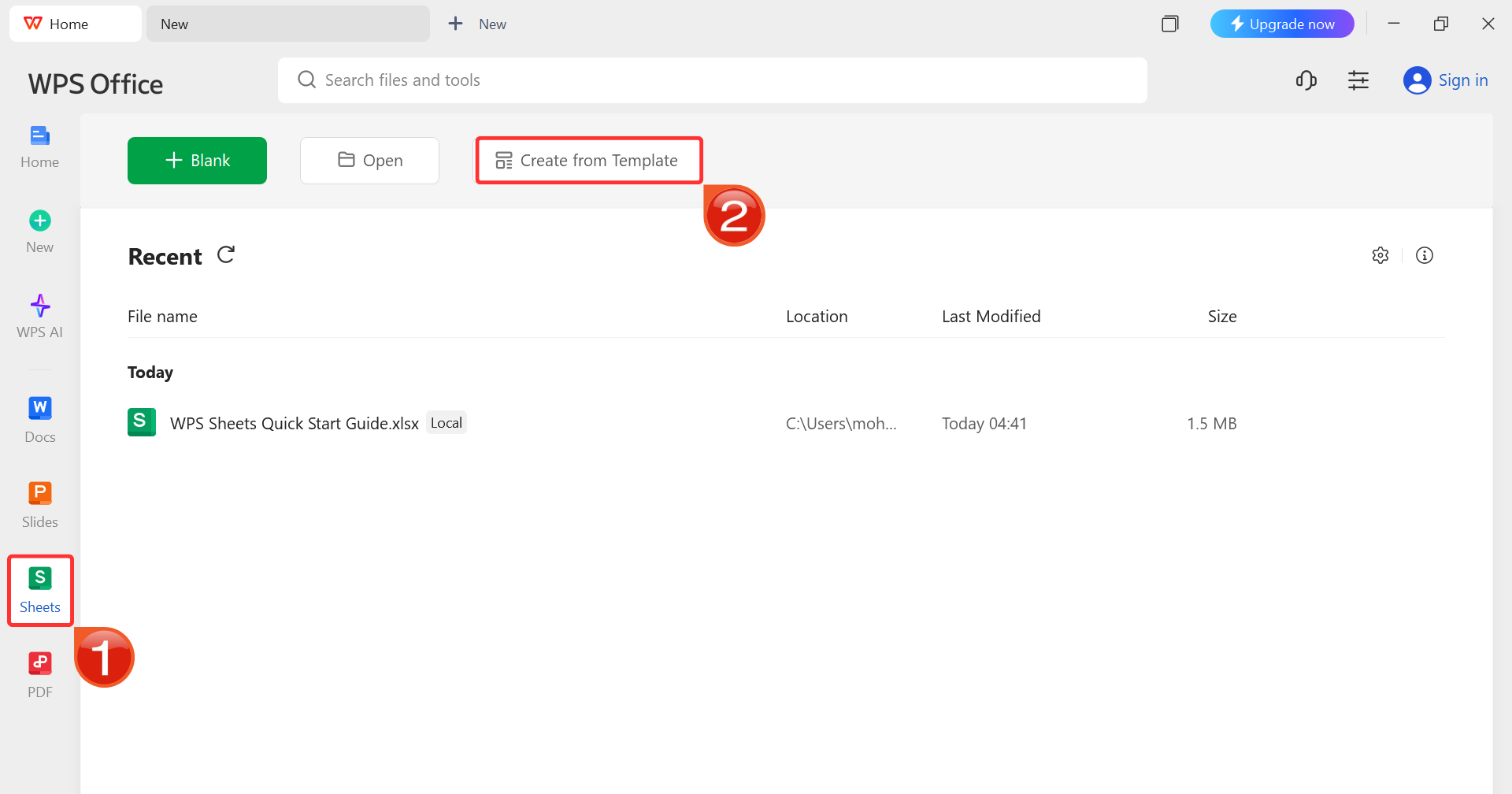
Step 3: On the WPS Office dashboard, click “Sheets” from the left sidebar and hit “Create
from Template” to launch WPS Spreadsheet using your desired
template.
WPS Spreadsheet Dashboard
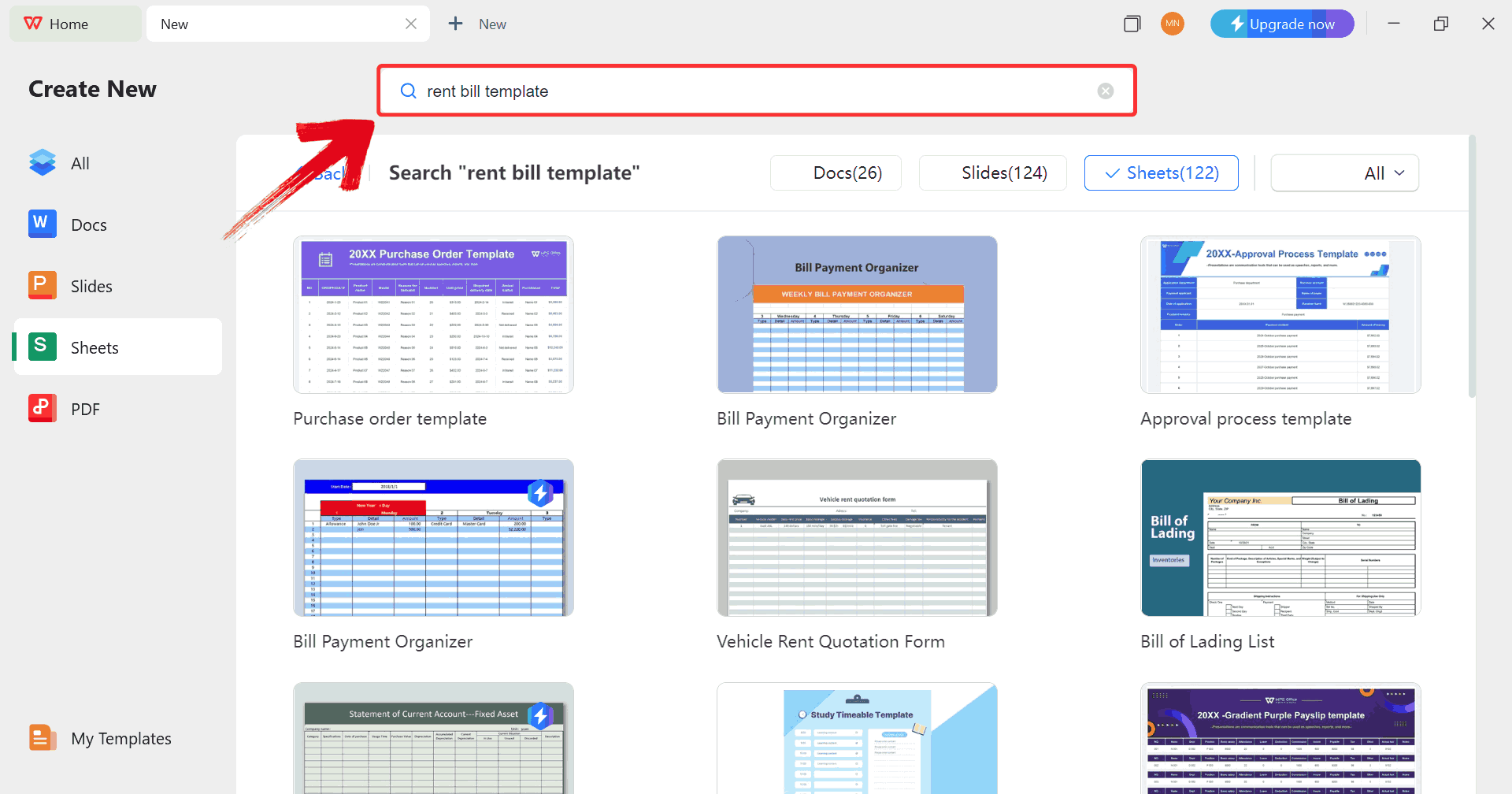
Step 4: In the template gallery’s search bar, you
can search for any invoice such as “rent bill template” to see all available rent bill invoices ready for use.
Search Template
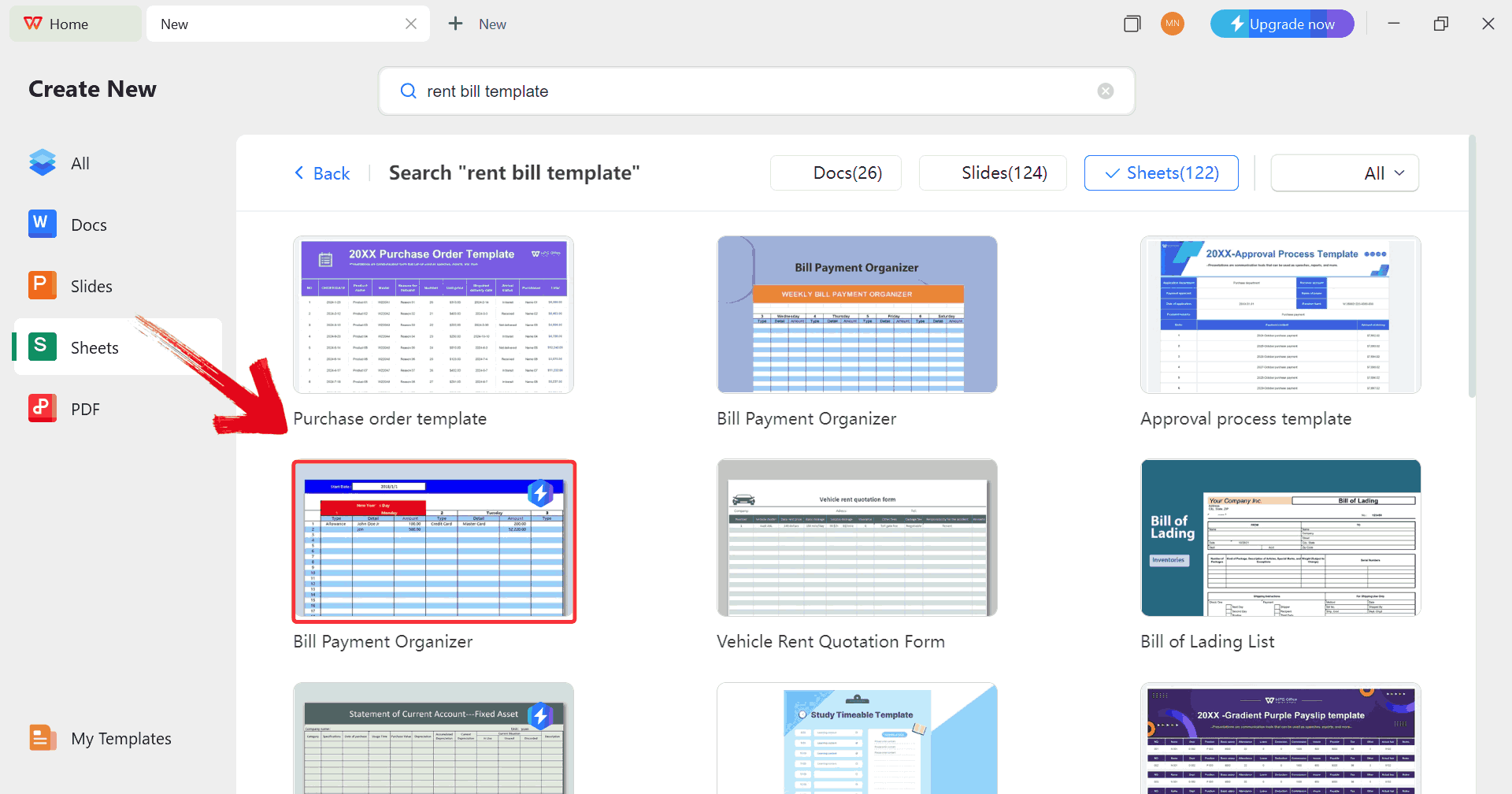
Step 5: Just click on any template that fits your
needs to open it and start customizing your template right away.
Choose Template
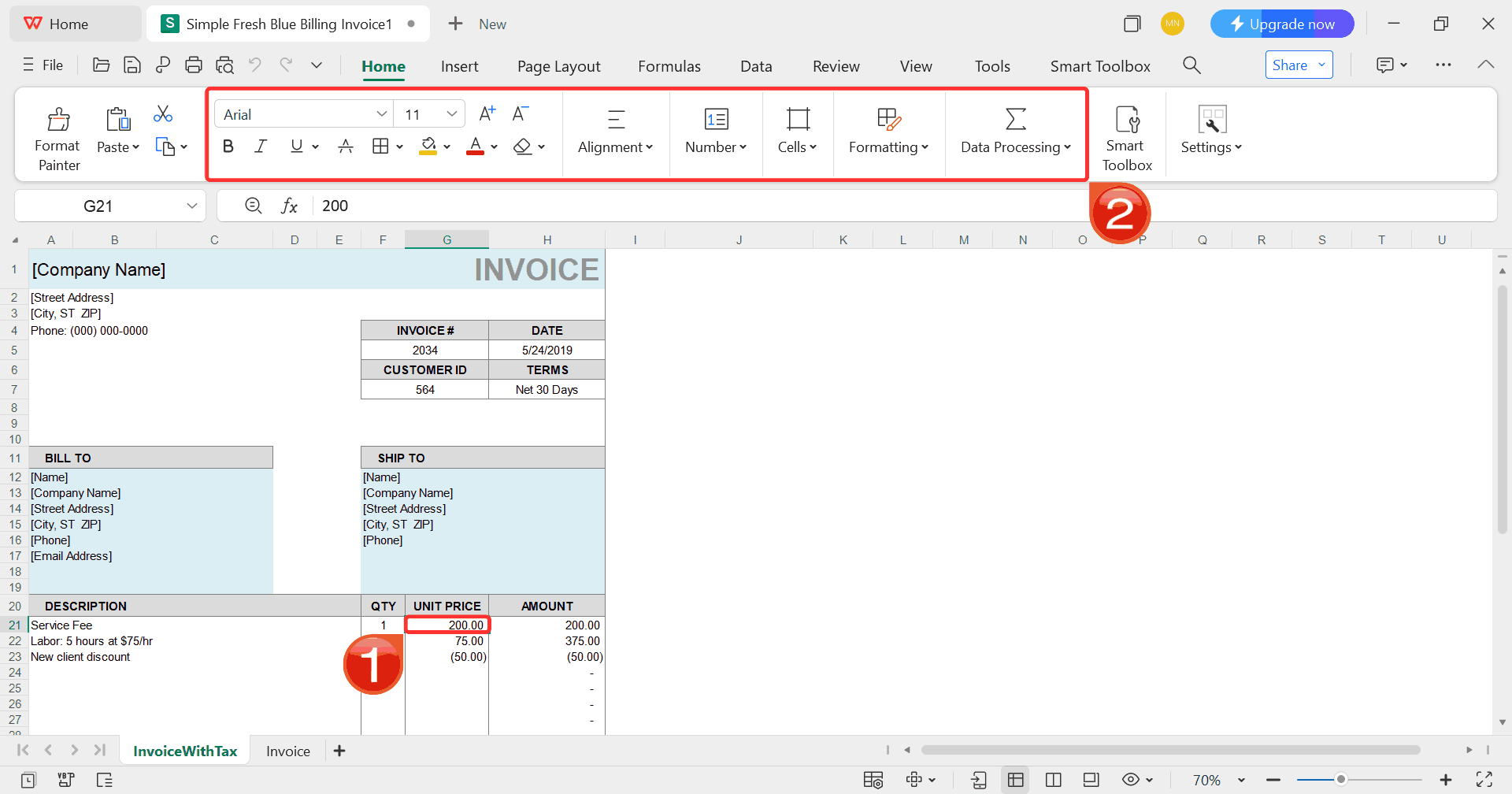
Step 6: Select any cell in your spreadsheet, and
then use the menu at the top to make whatever changes you need like
adjusting formatting, editing text, or changing formulas.
Customize Template
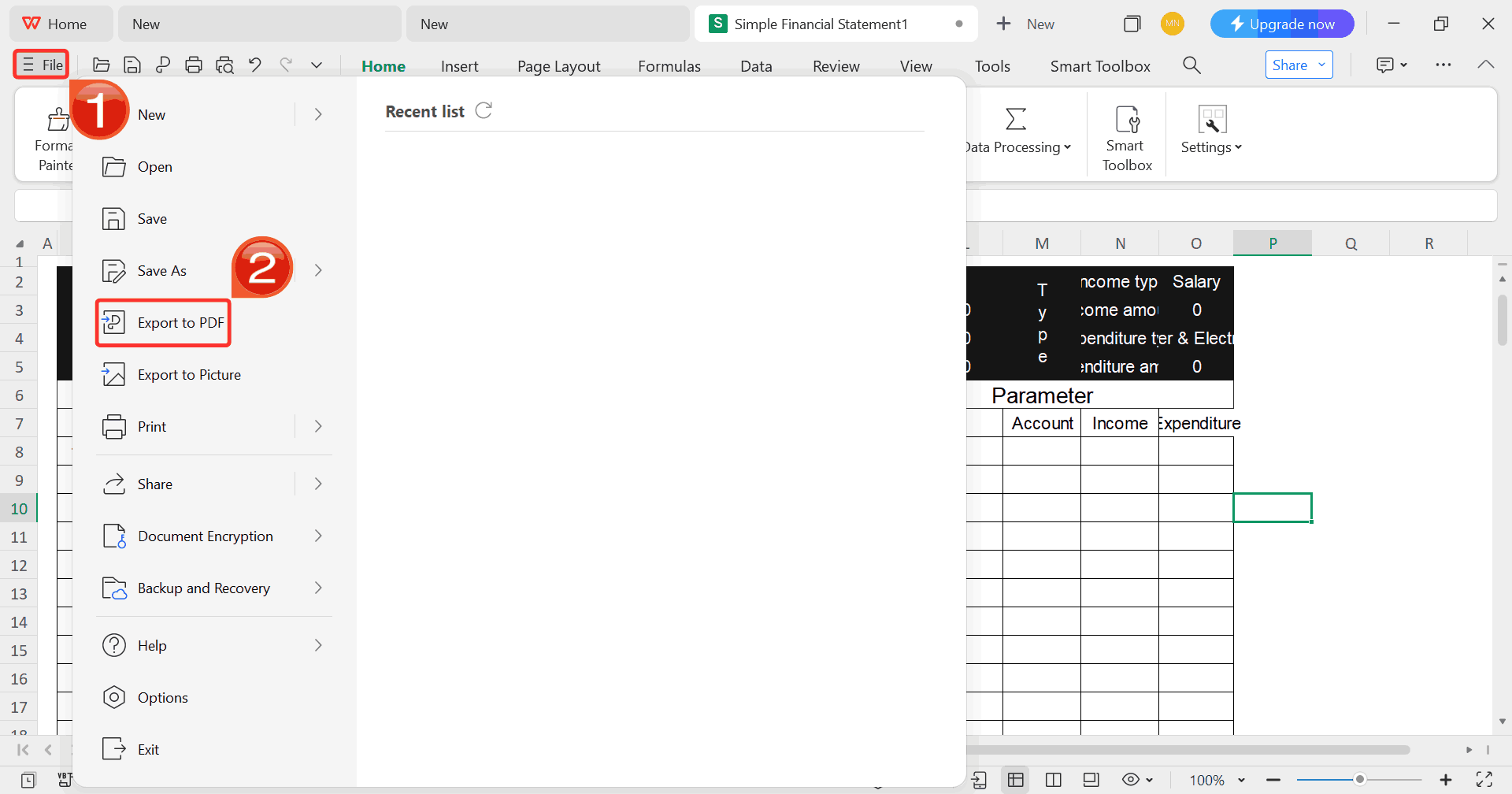
Step 7: Once you’re done customizing your template,
click on “File”, then select “Export to
PDF” to save your rent bill in a shareable format.
Export Template
100% secure
FAQs
1.
Can I customize a sole trader invoice template with my own
branding?
Yes, every template is fully customizable. You can easily add your
logo, brand colors, and specific payment terms.
2.
Are these templates suitable for both freelancers and small
businesses?
Absolutely. These templates adapt easily to your needs.
3. Do these
templates include tax or VAT fields?
Yes, most templates include optional tax or VAT fields you can enable
or disable depending on your country’s requirements.
4. How can I
send the completed invoice to a client?
You can save it as a PDF and email it directly or print a hard copy
using a printable sole trader invoice template.
Smart Invoicing, Simplified
Using a sole trader invoice template lets you organize details, calculate totals, and present your services with clarity and professionalism, all in minutes. The ten free templates shared above cover every need, from printable to fillable and blank sole trader invoice templates, so you can pick one that matches your needs. But if you’re ready to move beyond manual editing, WPS Invoice Generator offers the convenience of automated invoicing with refined, client-ready results. It’s a practical step toward managing payments efficiently, maintaining brand consistency, and freeing up time to focus without any distractions.
7+ years in productivity tech. I test and review the latest tools to simplify your workflow. Follow for honest app comparisons, practical guides, and curated tech picks to boost efficiency.


'%3e%3cpath%20d='M8%200C12.4183%200%2016%203.58172%2016%208C16%2012.4183%2012.4183%2016%208%2016C3.58172%2016%200%2012.4183%200%208C0%203.58172%203.58172%200%208%200ZM11.6162%204.38379C11.2257%203.99337%2010.5927%203.99338%2010.2021%204.38379L8%206.58594L5.79785%204.38379C5.40732%203.99334%204.77429%203.99329%204.38379%204.38379C3.99331%204.77429%203.99335%205.40733%204.38379%205.79785L6.58594%208L4.38379%2010.2021C3.99348%2010.5927%203.99341%2011.2257%204.38379%2011.6162C4.77426%2012.0066%205.40734%2012.0065%205.79785%2011.6162L8%209.41406L10.2021%2011.6162C10.5927%2012.0066%2011.2257%2012.0067%2011.6162%2011.6162C12.0067%2011.2257%2012.0066%2010.5927%2011.6162%2010.2021L9.41406%208L11.6162%205.79785C12.0066%205.40735%2012.0066%204.77429%2011.6162%204.38379Z'%20fill='%23080E17'%20fill-opacity='0.46'/%3e%3c/g%3e%3cdefs%3e%3cclipPath%20id='clip0_3761_713'%3e%3crect%20width='16'%20height='16'%20fill='white'/%3e%3c/clipPath%3e%3c/defs%3e%3c/svg%3e)




'%3e%3cpath%20fill-rule='evenodd'%20clip-rule='evenodd'%20d='M21.4999%2010.9993C21.4999%205.20009%2016.7986%200.498901%2010.9993%200.498901C5.19994%200.498901%200.498657%205.20009%200.498657%2010.9993C0.498657%2016.2404%204.33858%2020.5844%209.35855%2021.3722V14.0346H6.69238V10.9993H9.35855V8.68594C9.35855%206.05427%2010.9262%204.60062%2013.3248%204.60062C14.4736%204.60062%2015.6753%204.80571%2015.6753%204.80571V7.38979H14.3512C13.0468%207.38979%2012.64%208.19921%2012.64%209.0296V10.9993H15.5523L15.0867%2014.0346H12.64V21.3722C17.66%2020.5844%2021.4999%2016.2404%2021.4999%2010.9993Z'%20fill='%231568EA'/%3e%3c/g%3e%3c/svg%3e)


'%3e%3cpath%20d='M2.42045%2022.1876H6.31818V12.7217L0.75%208.54553V20.5171C0.75%2021.4414%201.49892%2022.1876%202.42045%2022.1876Z'%20fill='%234285F4'/%3e%3cpath%20d='M19.682%2022.1876H23.5797C24.5041%2022.1876%2025.2502%2021.4387%2025.2502%2020.5171V8.54553L19.682%2012.7217'%20fill='%2334A853'/%3e%3cpath%20d='M19.682%205.48293V12.7216L25.2502%208.54543V6.31816C25.2502%204.25236%2022.8921%203.07469%2021.2411%204.31361'%20fill='%23FBBC04'/%3e%3cpath%20d='M6.31824%2012.7217V5.48303L13.0001%2010.4944L19.6819%205.48303V12.7217L13.0001%2017.733'%20fill='%23EA4335'/%3e%3cpath%20d='M0.75%206.31816V8.54543L6.31818%2012.7216V5.48293L4.75909%204.31361C3.10534%203.07469%200.75%204.25236%200.75%206.31816Z'%20fill='%23C5221F'/%3e%3c/g%3e%3cdefs%3e%3cclipPath%20id='clip0_2954_7305'%3e%3crect%20width='24.5'%20height='18.375'%20fill='white'%20transform='translate(0.75%203.8125)'/%3e%3c/clipPath%3e%3c/defs%3e%3c/svg%3e)





'%3e%3cpath%20d='M19.9911%204.11386V6.471H18.5894C18.0775%206.471%2017.7322%206.57814%2017.5536%206.79243C17.3751%207.00671%2017.2858%207.32814%2017.2858%207.75671V9.44421H19.9019L19.5536%2012.0871H17.2858V18.8639H14.5536V12.0871H12.2769V9.44421H14.5536V7.49779C14.5536%206.39064%2014.8632%205.53201%2015.4822%204.92189C16.1013%204.31177%2016.9257%204.00671%2017.9554%204.00671C18.8304%204.00671%2019.509%204.04243%2019.9911%204.11386Z'%20fill='%23333333'/%3e%3c/g%3e%3cdefs%3e%3cclipPath%20id='clip0_2938_8199'%3e%3crect%20width='16'%20height='16'%20fill='white'%20transform='translate(8%204.00671)'/%3e%3c/clipPath%3e%3c/defs%3e%3c/svg%3e)
'%3e%3cpath%20d='M17.5237%2010.7813L23.4811%204H22.0699L16.8949%209.88693L12.7648%204H8L14.2469%2012.9029L8%2020.0133H9.4112L14.8725%2013.7952L19.2352%2020.0133H24M9.92053%205.04213H12.0885L22.0688%2019.0224H19.9003'%20fill='%23333333'/%3e%3c/g%3e%3cdefs%3e%3cclipPath%20id='clip0_2938_8200'%3e%3crect%20width='16'%20height='16.0134'%20fill='white'%20transform='translate(8%204)'/%3e%3c/clipPath%3e%3c/defs%3e%3c/svg%3e)


