

'%3e%3cpath%20d='M8%200C12.4183%200%2016%203.58172%2016%208C16%2012.4183%2012.4183%2016%208%2016C3.58172%2016%200%2012.4183%200%208C0%203.58172%203.58172%200%208%200ZM11.6162%204.38379C11.2257%203.99337%2010.5927%203.99338%2010.2021%204.38379L8%206.58594L5.79785%204.38379C5.40732%203.99334%204.77429%203.99329%204.38379%204.38379C3.99331%204.77429%203.99335%205.40733%204.38379%205.79785L6.58594%208L4.38379%2010.2021C3.99348%2010.5927%203.99341%2011.2257%204.38379%2011.6162C4.77426%2012.0066%205.40734%2012.0065%205.79785%2011.6162L8%209.41406L10.2021%2011.6162C10.5927%2012.0066%2011.2257%2012.0067%2011.6162%2011.6162C12.0067%2011.2257%2012.0066%2010.5927%2011.6162%2010.2021L9.41406%208L11.6162%205.79785C12.0066%205.40735%2012.0066%204.77429%2011.6162%204.38379Z'%20fill='%23080E17'%20fill-opacity='0.46'/%3e%3c/g%3e%3cdefs%3e%3cclipPath%20id='clip0_3761_713'%3e%3crect%20width='16'%20height='16'%20fill='white'/%3e%3c/clipPath%3e%3c/defs%3e%3c/svg%3e)




'%3e%3cpath%20fill-rule='evenodd'%20clip-rule='evenodd'%20d='M21.4999%2010.9993C21.4999%205.20009%2016.7986%200.498901%2010.9993%200.498901C5.19994%200.498901%200.498657%205.20009%200.498657%2010.9993C0.498657%2016.2404%204.33858%2020.5844%209.35855%2021.3722V14.0346H6.69238V10.9993H9.35855V8.68594C9.35855%206.05427%2010.9262%204.60062%2013.3248%204.60062C14.4736%204.60062%2015.6753%204.80571%2015.6753%204.80571V7.38979H14.3512C13.0468%207.38979%2012.64%208.19921%2012.64%209.0296V10.9993H15.5523L15.0867%2014.0346H12.64V21.3722C17.66%2020.5844%2021.4999%2016.2404%2021.4999%2010.9993Z'%20fill='%231568EA'/%3e%3c/g%3e%3c/svg%3e)


'%3e%3cpath%20d='M2.42045%2022.1876H6.31818V12.7217L0.75%208.54553V20.5171C0.75%2021.4414%201.49892%2022.1876%202.42045%2022.1876Z'%20fill='%234285F4'/%3e%3cpath%20d='M19.682%2022.1876H23.5797C24.5041%2022.1876%2025.2502%2021.4387%2025.2502%2020.5171V8.54553L19.682%2012.7217'%20fill='%2334A853'/%3e%3cpath%20d='M19.682%205.48293V12.7216L25.2502%208.54543V6.31816C25.2502%204.25236%2022.8921%203.07469%2021.2411%204.31361'%20fill='%23FBBC04'/%3e%3cpath%20d='M6.31824%2012.7217V5.48303L13.0001%2010.4944L19.6819%205.48303V12.7217L13.0001%2017.733'%20fill='%23EA4335'/%3e%3cpath%20d='M0.75%206.31816V8.54543L6.31818%2012.7216V5.48293L4.75909%204.31361C3.10534%203.07469%200.75%204.25236%200.75%206.31816Z'%20fill='%23C5221F'/%3e%3c/g%3e%3cdefs%3e%3cclipPath%20id='clip0_2954_7305'%3e%3crect%20width='24.5'%20height='18.375'%20fill='white'%20transform='translate(0.75%203.8125)'/%3e%3c/clipPath%3e%3c/defs%3e%3c/svg%3e)


Planning a conference but drowning in schedule chaos? Attendees lost, speakers clashing times, everyone frustrated. You just want conference agenda template free options that download fast, edit easy, and look pro without hours wasted. This guide hands you 10 ready templates plus simple steps for how to create conference agenda template that nails your event.


What is a Conference Agenda
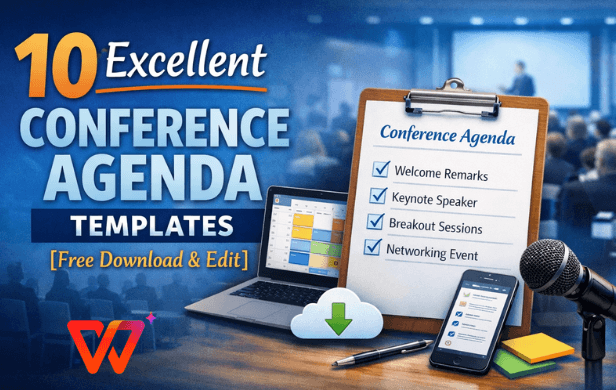
Think of a conference agenda template as your event's GPS, mapping every session, break, and mingle spot so nothing derails. It packs in defining the purpose right up top to align everyone, outline of sessions with exact times and speakers, networking opportunities to spark real connections, interactive elements like Q&A or polls, plus special announcements for Wi-Fi codes or venue tips.
Without one, events turn messy, but a solid agenda keeps things humming, cuts confusion, and leaves folks impressed. It sets expectations, prevents overruns, and makes you look like a pro organizer every time.
10 Excellent Conference Agenda Templates
These conference agenda templates hit free download status in flexible PDF or crisp image formats, built for everything from intimate workshops to massive corporate blowouts. No design degree needed, they boot up polished and beg for your custom tweaks to match event themes perfectly.
1. Agenda Slide Presentation in Lilac Yellow Green Cream Style
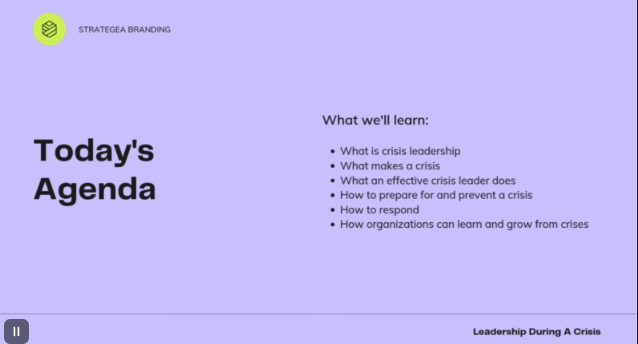
Soft lilac melting into sunny yellow, fresh green, and warm cream creates a relaxed creative vibe perfect for design workshops, creative brainstorms, and artsy conferences. Plenty of breathing room lets you fit session titles, descriptions, timings, and speaker names without feeling crowded. The airy layout keeps things organized yet playful. Works beautifully printed as PDF for handouts or displayed as image on big screens during events.
2. Agenda Slide Presentation in Mint Green Light Blue White Style
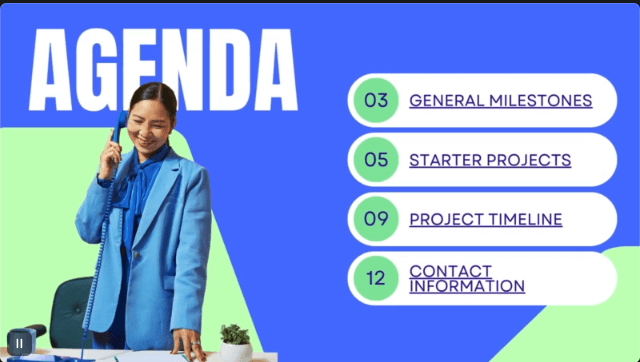
Cool mint green flowing with light blue and crisp white delivers a fresh, focused modern feel ideal for tech workshops, developer meetups, and innovation talks. The streamlined design puts key details front and center for quick scanning even during busy registration. Clean layout prevents clutter and keeps speakers on track. Print as PDF for delegate packets or share image format for digital distribution.
3. Agenda Slide Presentation in Blue Light Blue Dark Blue Style

Layered blues shifting from light to deep dark build instant trust and professionalism, perfect for corporate summits, board strategy sessions, and finance conferences. Generous spacing accommodates speaker bios, detailed topic breakdowns, room numbers, and contingency notes easily. The sophisticated gradient scales beautifully from small meeting rooms to large auditorium screens. PDF shines for formal printed distributions, image format rules for presentation walls.
4. Agenda Slide Presentation in Mustard Black White Style
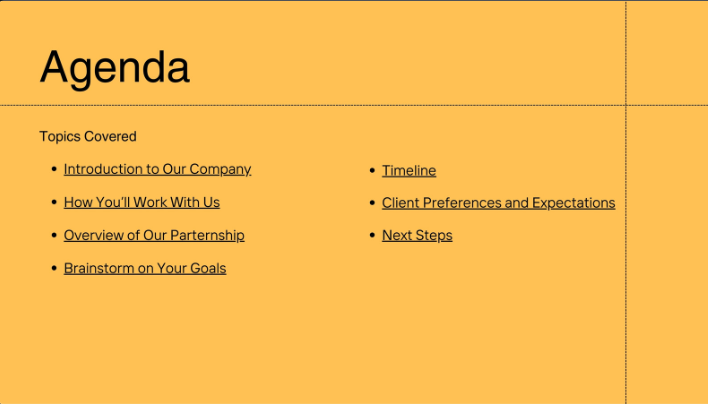
Punchy mustard bursts against stark black and white for killer contrast that reads crystal clear from any distance, ideal for packed agendas in legal briefings and high-stakes events. The rigid grid structure keeps even dense multi-track schedules organized and precise. Headers snap everything into sharp order. PDF delivers razor-sharp handouts for printing, images adapt to any display setting seamlessly.
5. Agenda Slide Presentation in Bright Orange Orange Light Orange Style

Fiery bright orange cascading through mid-tones to lighter shades pumps pure energy into startup pitches, marketing events, and hype-driven networking sessions. Bold yet balanced design makes sessions leap off the page while carving inviting breaks that promise recharge without killing momentum. The vibrant palette screams action and engagement. Create PDF flyers for lobby displays or image decks for pitch projector presentations.
6. Agenda Slide Presentation in Bright Green Pastel Green Dark Green Style
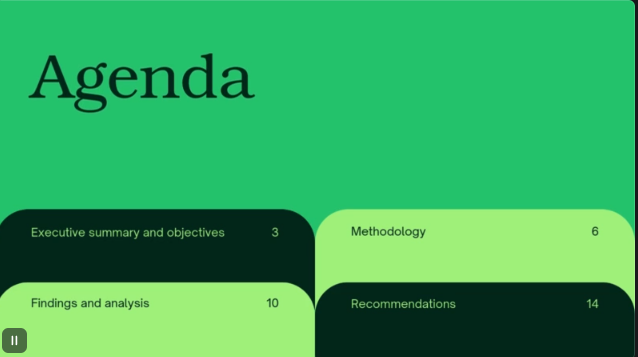
Vibrant bright green easing into soothing pastel then grounding dark green channels growth and harmony, spot-on for sustainability summits, wellness retreats, and environmental conferences. The fluid layout mirrors natural event pacing, weaving sessions, panels, and breaks seamlessly together. Earth tones print beautifully without excessive ink waste. Use PDF for eco-conscious printed packets or image for immersive visual presentations during events.
7. Blue White Professional Gradients Team Meeting Agenda Business Presentation
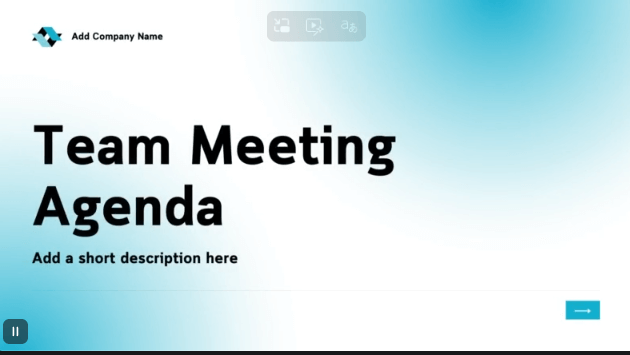
Silky smooth gradients gliding from rich blue to pristine white radiate collaborative polish, crafted for cross-team strategy huddles, quarterly reviews, and agile planning sessions. Dedicated zones capture follow-ups, assignees, and deadlines right alongside timings for clarity. The effortless flow moves from agenda straight to outcomes naturally. PDF fits binders perfectly for record-keeping, image elevates any conference room screen impressively.
8. Beige Monotone Minimalist Agenda Document
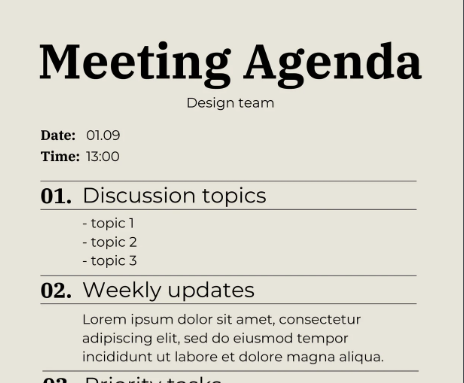
Subtle warm beige in pure minimalist form peels away distractions to spotlight content elegantly, perfect for upscale executive retreats, academic symposia, and high-level VIP dinners. Clean subtle lines guide eyes naturally through dense schedules without causing visual fatigue. The understated design whispers sophistication louder than bold colors. PDF becomes the refined document of record, image slides convey understated class and elegance.
9. Red Grey Modern Business Event Agenda Poster
.
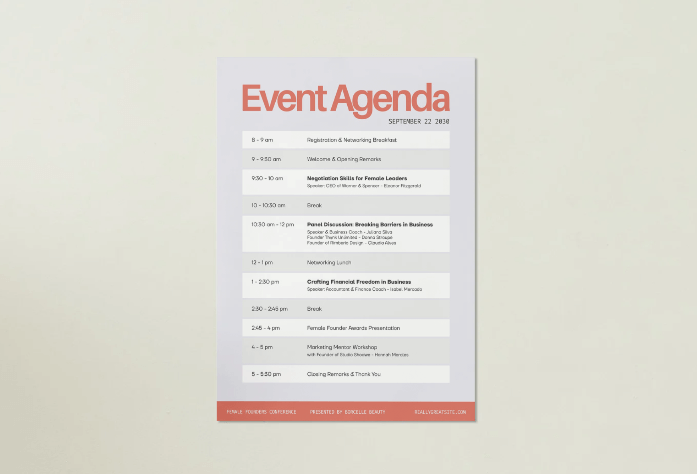
Electric red slicing through sophisticated grey forges modern poster power that commands lobbies, hallways, and email signatures, perfect for trade shows and product launches. Oversized text blocks paired with scannable elements ensure nobody misses keynote slots or VIP receptions. The design delivers impact without visual chaos. PDF scales beautifully to massive poster sizes for printing, image fuels digital campaigns across channels.
10. Orange and Wine Modern and Corporate Startup Business Agenda
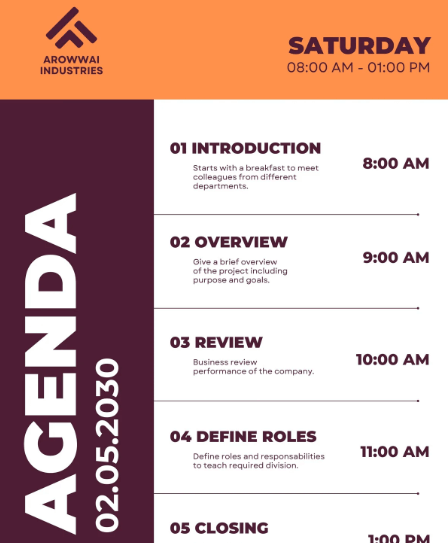
Rich orange warming into deep wine tones blend innovation spark with corporate gravitas, handling multi-session startup roadmaps, investor days, and scale-up forums perfectly. Spacious yet organized canvas absorbs parallel tracks, sponsor integrations, and demo slots flawlessly without feeling cramped. The color combo builds quiet excitement and confidence. PDF prints with luxurious depth for premium feel, image energizes virtual events and digital sharing.
Edit and Print Templates
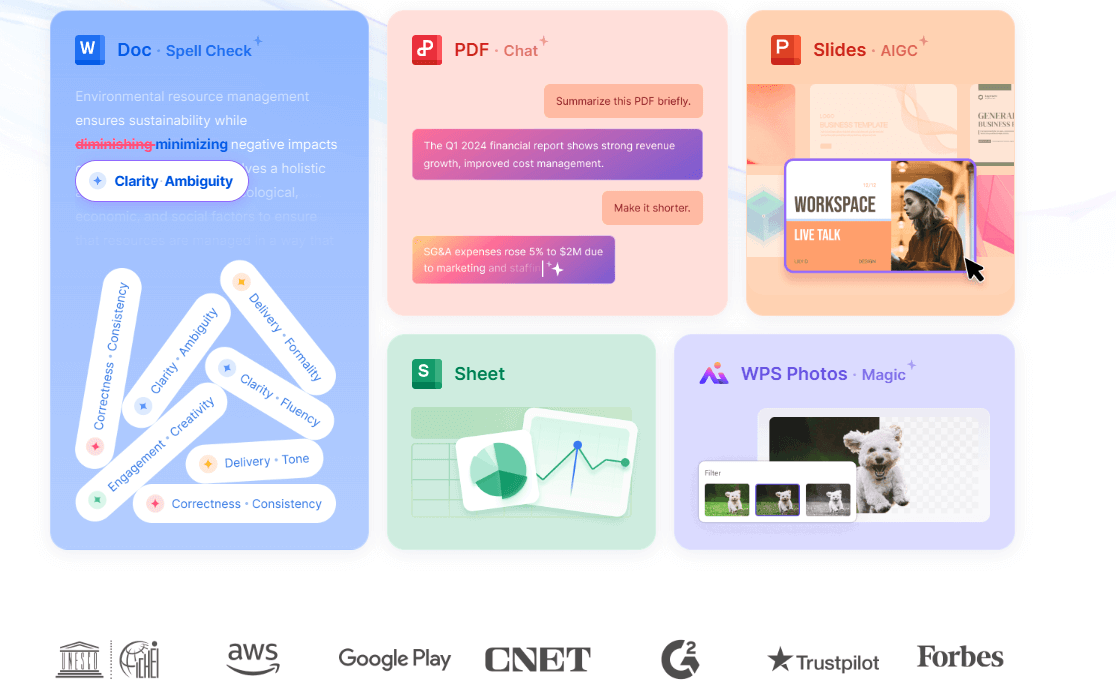
Those handpicked conference agenda templates launch you ahead with instant free downloads primed for your personal spin. Now supercharge them using WPS toolkit for bespoke printables that turn heads and run like clockwork, skipping the usual formatting fights entirely.
Create in WPS Writer
WPS Writer turns blank pages into pro conference agenda templates fast. Download free from wps.com, drag in tables for time, sessions, and speakers. Add colors and themes with one click. Preview and save as PDF. Works for any event size, simple and smooth.
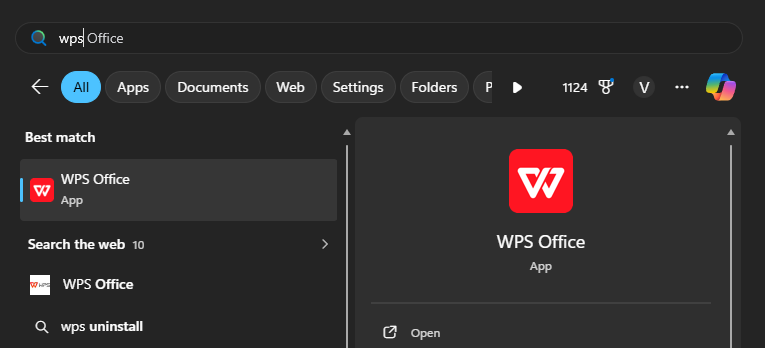
Step 1: Fire up WPS Writer, start fresh document.
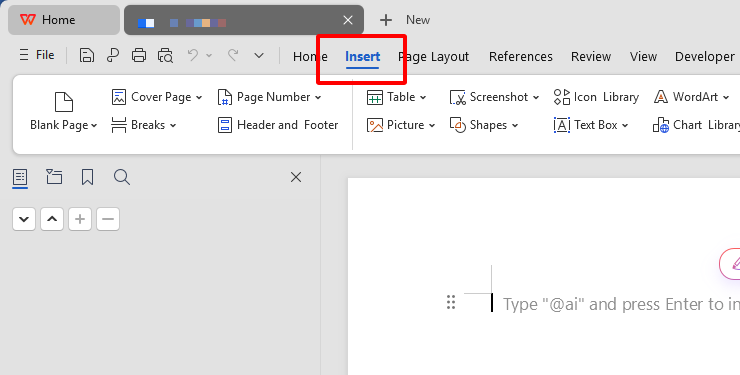
Step 2: Insert > Table, customize columns: Time, Session, Speaker, Room, Notes.
Step 3: Populate details, apply Home > Themes for instant polish.
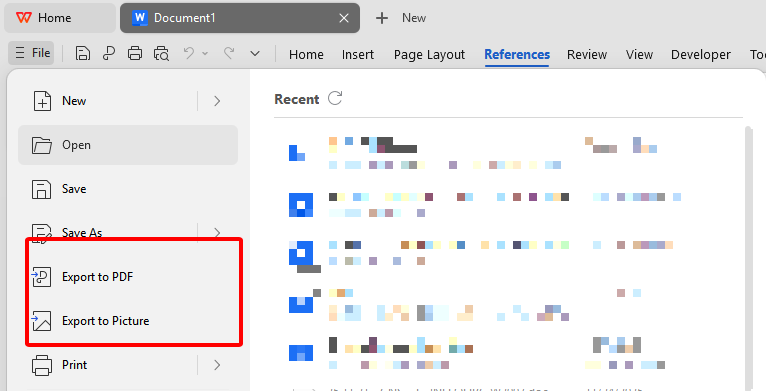
Step 4: File > Save As > PDF, optimize for print.
Edit PDF in WPS PDF
WPS PDF opens Canva downloads easily. Edit text, swap images, adjust layout without quality loss. Add logos or QR codes. AI fixes fonts. Align everything perfectly. Export print-ready PDFs with proper margins. No more locked files.
Step 1: Launch WPS PDF, import downloaded template.
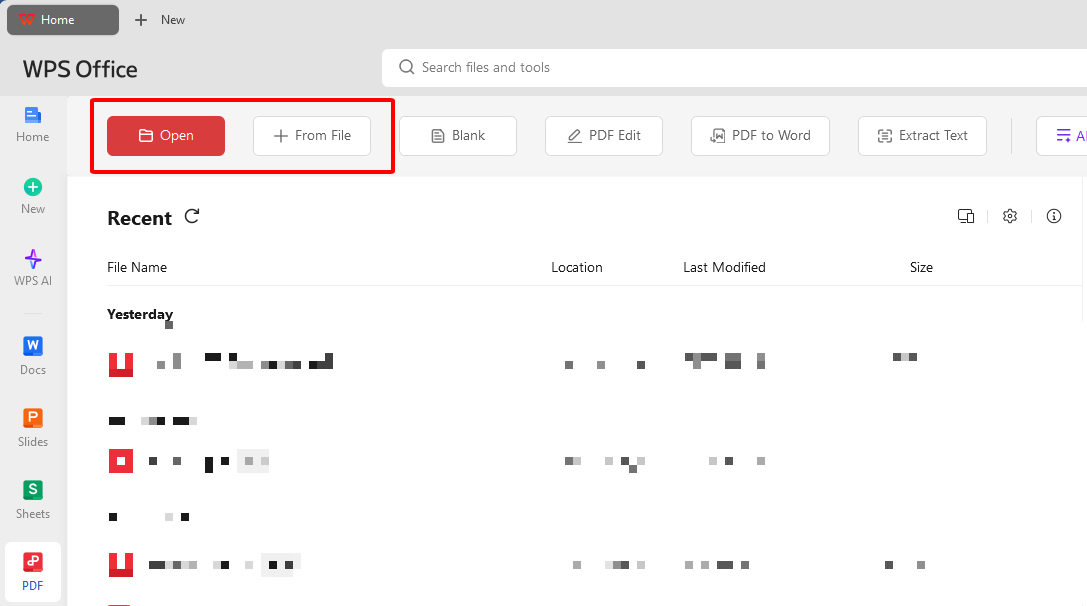
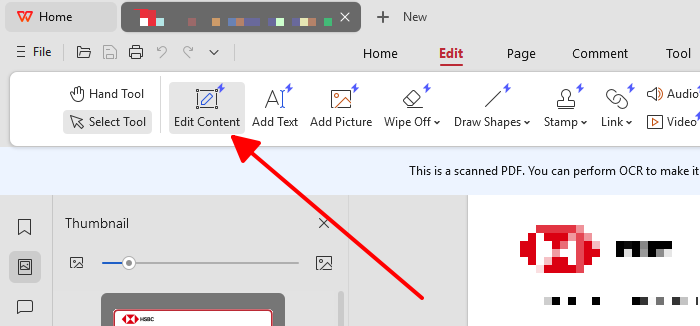
Step 2: Switch to Edit mode, select and modify text blocks or images.
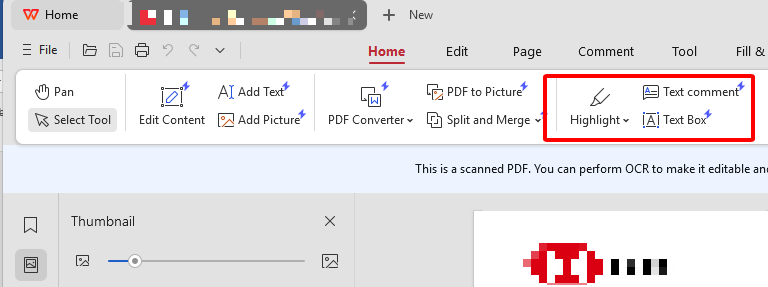
Step 3: Drag-resize elements, add annotations or highlights.
Step 4: Export > Optimized PDF for professional printing.
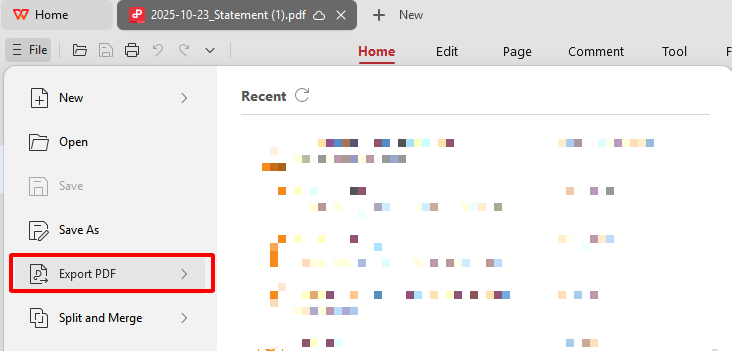
Edit Images in WPS Photo
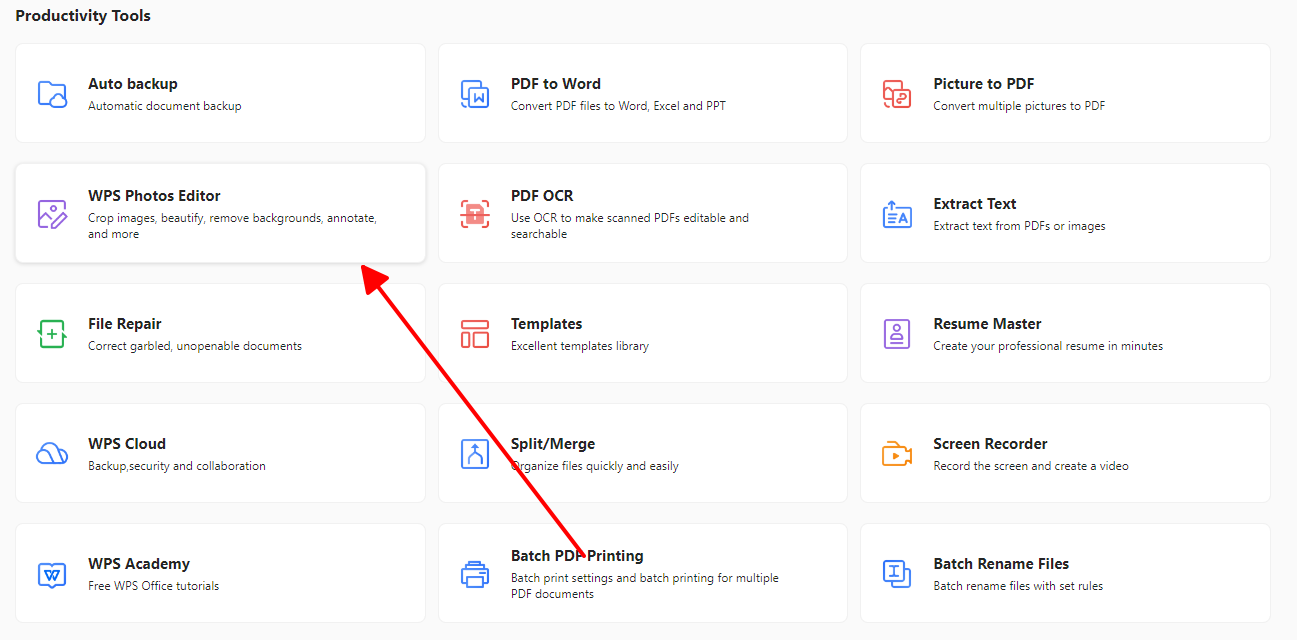
WPS Photo fixes image agendas with AI. Sharpen blurry spots, balance colors to match your brand, remove watermarks. Upload, auto-enhance, tweak sliders, upscale for big screens. Handles batches fast. Slides look sharp and pro.
Step 1: Open WPS Photo, upload image template.
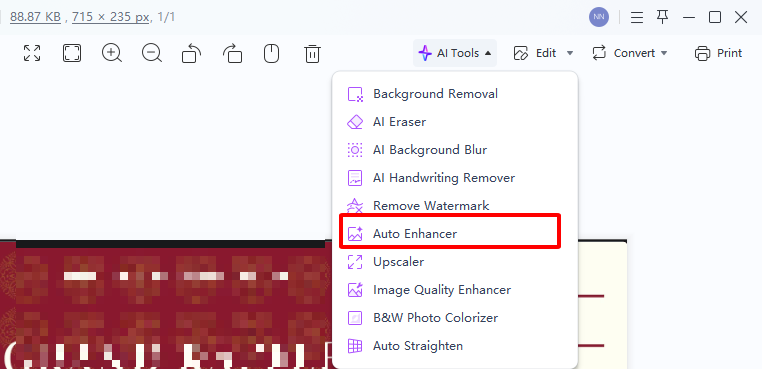
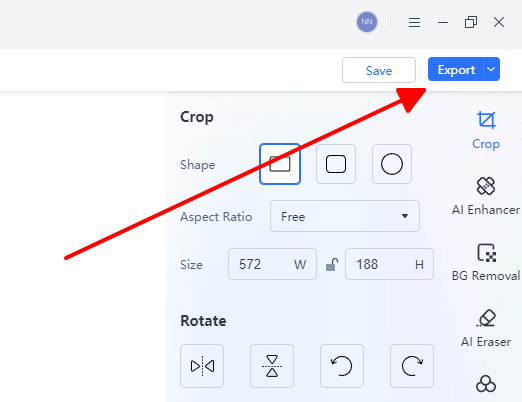
Step 2: Hit AI Enhancer to boost clarity and detail instantly.
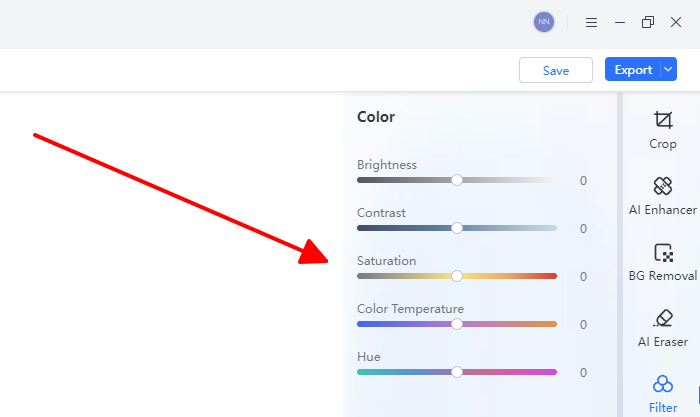
Step 3: Dial Color Adjust for perfect hue matches, crop distractions.
Step 4: Export high-res PNG/JPG ready for anywhere.
Free Office Suite: WPS for Agendas

WPS Office rewrites the rules as your free powerhouse suite, bundling Writer, PDF wizardry, and Photo AI into one seamless download from wps.com that crushes conference agenda templates without touching your wallet. Jump into vast free template vaults, let AI draft session teasers or full outlines, collaborate live with remote teams, sync across devices flawlessly, all wrapped in bulletproof stability that never crashes mid-print job.
FAQs
Can I use these templates for a multi-day event?
Totally, just copy daily blocks in WPS Writer and swap dates or themes, keeps the look consistent across pages. No reformatting mess, handles three-day marathons smooth.
How can an agenda template prevent schedule conflicts?
Color rooms or speakers in the table, overlaps scream at you before print, quick fix in WPS. Saves scrambling day-of, keeps your rep golden.
What formats should I download for different uses?
PDF locks layouts for handouts that survive printers, images flex for slides or posts with full color punch. WPS swaps them no sweat.
Is WPS Office compatible with other file types?
Yep, slurps Word, Excel, PDFs, pics without hiccups, mix Canva grabs with your notes easy. Workflow stays fast, no file fights.

'%3e%3cpath%20d='M19.9911%204.11386V6.471H18.5894C18.0775%206.471%2017.7322%206.57814%2017.5536%206.79243C17.3751%207.00671%2017.2858%207.32814%2017.2858%207.75671V9.44421H19.9019L19.5536%2012.0871H17.2858V18.8639H14.5536V12.0871H12.2769V9.44421H14.5536V7.49779C14.5536%206.39064%2014.8632%205.53201%2015.4822%204.92189C16.1013%204.31177%2016.9257%204.00671%2017.9554%204.00671C18.8304%204.00671%2019.509%204.04243%2019.9911%204.11386Z'%20fill='%23333333'/%3e%3c/g%3e%3cdefs%3e%3cclipPath%20id='clip0_2938_8199'%3e%3crect%20width='16'%20height='16'%20fill='white'%20transform='translate(8%204.00671)'/%3e%3c/clipPath%3e%3c/defs%3e%3c/svg%3e)
'%3e%3cpath%20d='M17.5237%2010.7813L23.4811%204H22.0699L16.8949%209.88693L12.7648%204H8L14.2469%2012.9029L8%2020.0133H9.4112L14.8725%2013.7952L19.2352%2020.0133H24M9.92053%205.04213H12.0885L22.0688%2019.0224H19.9003'%20fill='%23333333'/%3e%3c/g%3e%3cdefs%3e%3cclipPath%20id='clip0_2938_8200'%3e%3crect%20width='16'%20height='16.0134'%20fill='white'%20transform='translate(8%204)'/%3e%3c/clipPath%3e%3c/defs%3e%3c/svg%3e)


