

'%3e%3cpath%20d='M8%200C12.4183%200%2016%203.58172%2016%208C16%2012.4183%2012.4183%2016%208%2016C3.58172%2016%200%2012.4183%200%208C0%203.58172%203.58172%200%208%200ZM11.6162%204.38379C11.2257%203.99337%2010.5927%203.99338%2010.2021%204.38379L8%206.58594L5.79785%204.38379C5.40732%203.99334%204.77429%203.99329%204.38379%204.38379C3.99331%204.77429%203.99335%205.40733%204.38379%205.79785L6.58594%208L4.38379%2010.2021C3.99348%2010.5927%203.99341%2011.2257%204.38379%2011.6162C4.77426%2012.0066%205.40734%2012.0065%205.79785%2011.6162L8%209.41406L10.2021%2011.6162C10.5927%2012.0066%2011.2257%2012.0067%2011.6162%2011.6162C12.0067%2011.2257%2012.0066%2010.5927%2011.6162%2010.2021L9.41406%208L11.6162%205.79785C12.0066%205.40735%2012.0066%204.77429%2011.6162%204.38379Z'%20fill='%23080E17'%20fill-opacity='0.46'/%3e%3c/g%3e%3cdefs%3e%3cclipPath%20id='clip0_3761_713'%3e%3crect%20width='16'%20height='16'%20fill='white'/%3e%3c/clipPath%3e%3c/defs%3e%3c/svg%3e)




'%3e%3cpath%20fill-rule='evenodd'%20clip-rule='evenodd'%20d='M21.4999%2010.9993C21.4999%205.20009%2016.7986%200.498901%2010.9993%200.498901C5.19994%200.498901%200.498657%205.20009%200.498657%2010.9993C0.498657%2016.2404%204.33858%2020.5844%209.35855%2021.3722V14.0346H6.69238V10.9993H9.35855V8.68594C9.35855%206.05427%2010.9262%204.60062%2013.3248%204.60062C14.4736%204.60062%2015.6753%204.80571%2015.6753%204.80571V7.38979H14.3512C13.0468%207.38979%2012.64%208.19921%2012.64%209.0296V10.9993H15.5523L15.0867%2014.0346H12.64V21.3722C17.66%2020.5844%2021.4999%2016.2404%2021.4999%2010.9993Z'%20fill='%231568EA'/%3e%3c/g%3e%3c/svg%3e)


'%3e%3cpath%20d='M2.42045%2022.1876H6.31818V12.7217L0.75%208.54553V20.5171C0.75%2021.4414%201.49892%2022.1876%202.42045%2022.1876Z'%20fill='%234285F4'/%3e%3cpath%20d='M19.682%2022.1876H23.5797C24.5041%2022.1876%2025.2502%2021.4387%2025.2502%2020.5171V8.54553L19.682%2012.7217'%20fill='%2334A853'/%3e%3cpath%20d='M19.682%205.48293V12.7216L25.2502%208.54543V6.31816C25.2502%204.25236%2022.8921%203.07469%2021.2411%204.31361'%20fill='%23FBBC04'/%3e%3cpath%20d='M6.31824%2012.7217V5.48303L13.0001%2010.4944L19.6819%205.48303V12.7217L13.0001%2017.733'%20fill='%23EA4335'/%3e%3cpath%20d='M0.75%206.31816V8.54543L6.31818%2012.7216V5.48293L4.75909%204.31361C3.10534%203.07469%200.75%204.25236%200.75%206.31816Z'%20fill='%23C5221F'/%3e%3c/g%3e%3cdefs%3e%3cclipPath%20id='clip0_2954_7305'%3e%3crect%20width='24.5'%20height='18.375'%20fill='white'%20transform='translate(0.75%203.8125)'/%3e%3c/clipPath%3e%3c/defs%3e%3c/svg%3e)


AI-powered presentation tools are changing the way we create slides, making it faster and easier to craft visually appealing content. Among them, Tome AI stands out as a Tome AI presentation maker capable of turning simple prompts into cohesive presentations. However, it has both strengths and limitations that are important to understand before committing. This review breaks down the Tome AI presentation tool features, pricing, pros and cons, and also looks at why WPS AI Slides might be a better fit for everyday presentation needs. By the end, readers will have a clear sense of which tool best fits their workflow.

What Is Tome AI and How Does It Work?
Tome AI is an AI-powered presentation platform designed to turn your ideas into compelling visual stories quickly. The core idea is simple: feed the AI prompts, and it generates presentations, complete with narrative flow and visuals. It’s aimed at creators, marketers, educators, and startup teams who need to communicate ideas effectively without spending hours designing slides.
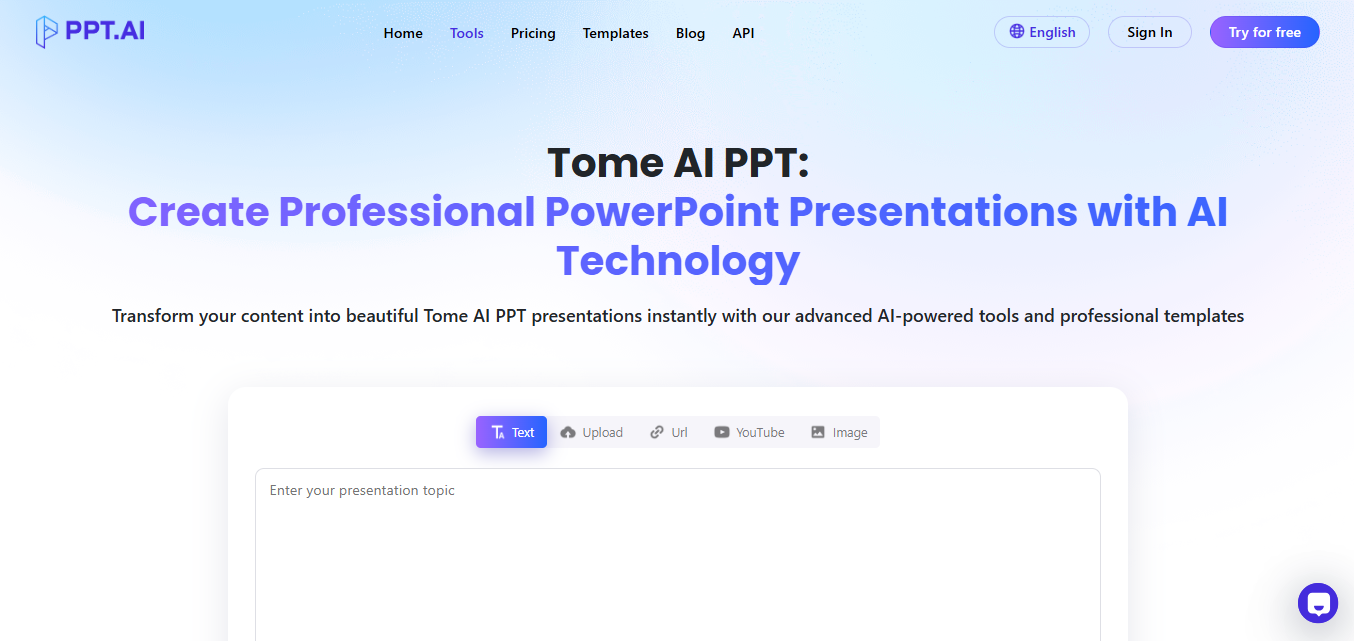
Tome AI thrives on generating storytelling-driven presentations. As a Tome AI presentation tool, it uses AI to structure your slides and suggest layouts, imagery, and flow based on your input. If you are pitching an idea, teaching a class, or presenting a project, Tome AI presentation features aim to reduce the friction of traditional slide creation. However, it leans heavily on the AI’s interpretation, which means you might not always get the exact layout or style you imagined.
I found Tome AI impressive in how quickly it could take a few prompts and produce a presentation with a narrative arc. As a Tome AI presentation maker, it feels like having a design assistant that understands visual storytelling, though some fine-tuning is always needed to perfect the slides.
Tome AI Pros and Cons
Before deciding if Tome AI is right for you, it helps to weigh its strengths and weaknesses. Like any tool, it has areas where it truly shines and others where it can fall short. Understanding the Tome AI presentation tool features gives you a clear picture of what to expect from your tome presentation experience. I’ll break down the main pros and cons from a real user perspective so you can make an informed choice.
Pros:
Ease of Use: Tome AI’s interface is intuitive, letting you jump right into creating presentations. You don’t need to be a design expert.
AI Storytelling: It structures your content and suggests visual narratives, making your slides look polished and engaging.
Modern Design: Templates and AI-generated layouts feel contemporary, which is great for startups and creative presentations.
Cons:
Limited Customization: You can’t always tweak the AI-generated layouts extensively, which may be frustrating for precise design requirements.
Export Options: The ability to export in fully editable PowerPoint or PDF formats is limited, restricting flexibility.
Pricing Concerns: Some features are locked behind paid plans, and it may feel expensive if you only need basic AI slide generation.
If you want fast, creative presentations without worrying about layout details, Tome AI works well. But for detailed control or complex, data-heavy slides, it may feel restrictive.
I loved how quick storytelling presentations were created. Still, when I needed to adjust layouts or add complex charts, I had to compromise or recreate slides elsewhere.
Tome AI Pricing Plans Explained
Tome AI offers a free plan and tiered paid plans. The free version allows limited access to templates and AI features, sufficient for casual experimentation or small presentations. It’s a good way to test the Tome AI presentation capabilities without committing financially. However, if you plan to create more complex or frequent slides, the paid tiers provide essential features like advanced AI generation, premium templates, and improved export options.
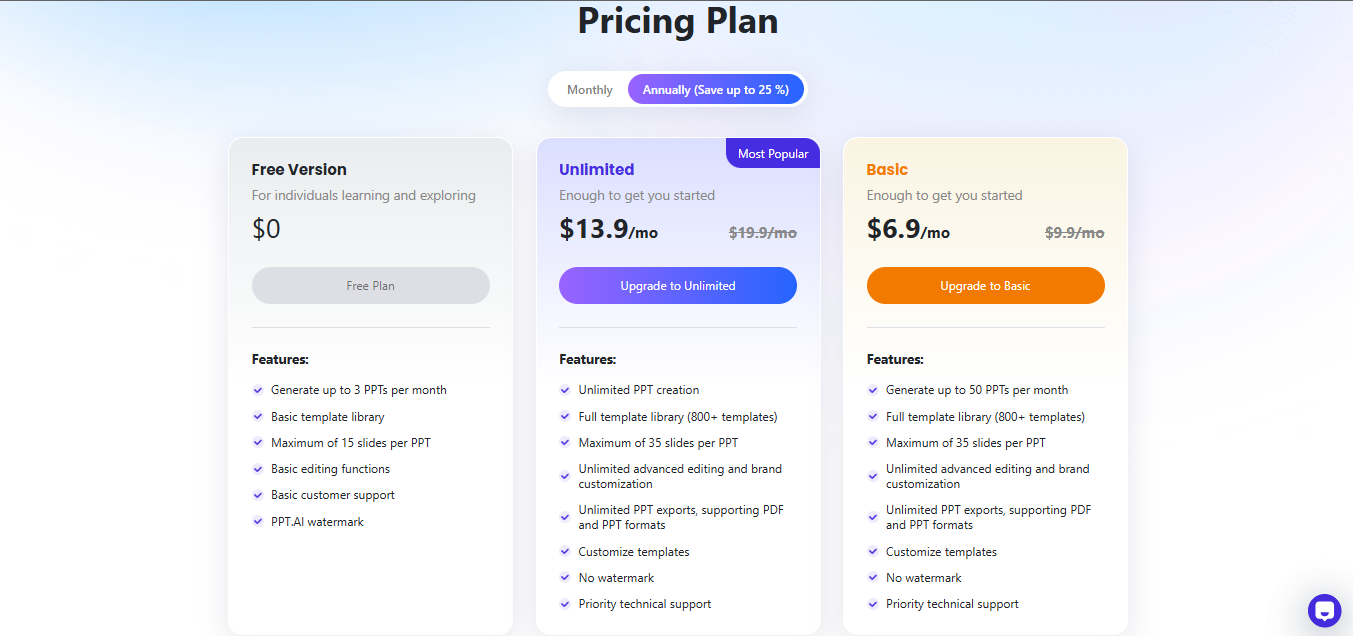
Paid plans unlock full AI slide generation, premium templates, higher export capabilities, and priority support. For individuals, the cost might feel steep if used occasionally, while teams or businesses can benefit from collaboration features and more robust options.
Key points:
Free Plan: Limited AI features, basic templates, and standard export options.
Paid Plans: Full AI generation, premium designassets, priority support, and advanced exporting.
Value Assessment: While functional, users who need regular presentations or extensive customization might find better value in alternatives like WPS AI Slides.
The paid plan does provide more freedom, but I quickly realized that for regular work or professional presentations, a tool that integrates with traditional PowerPoint workflows is often more efficient.
How to Use Tome AI Step by Step
Creating presentations with Tome AI is straightforward once you understand the workflow. With just a few prompts, you can generate slides that tell a cohesive story. Minor tweaks can make your presentation look polished and professional in minutes. Here’s a step-by-step guide:
Steps:
Step 1: Firstly, create a free account or log into your paid plan. Your dashboard shows template options and AI features.

Step 2: Now simply enter your text, ideas, or key points and click “Submit”. The AI interprets your input to create slides.
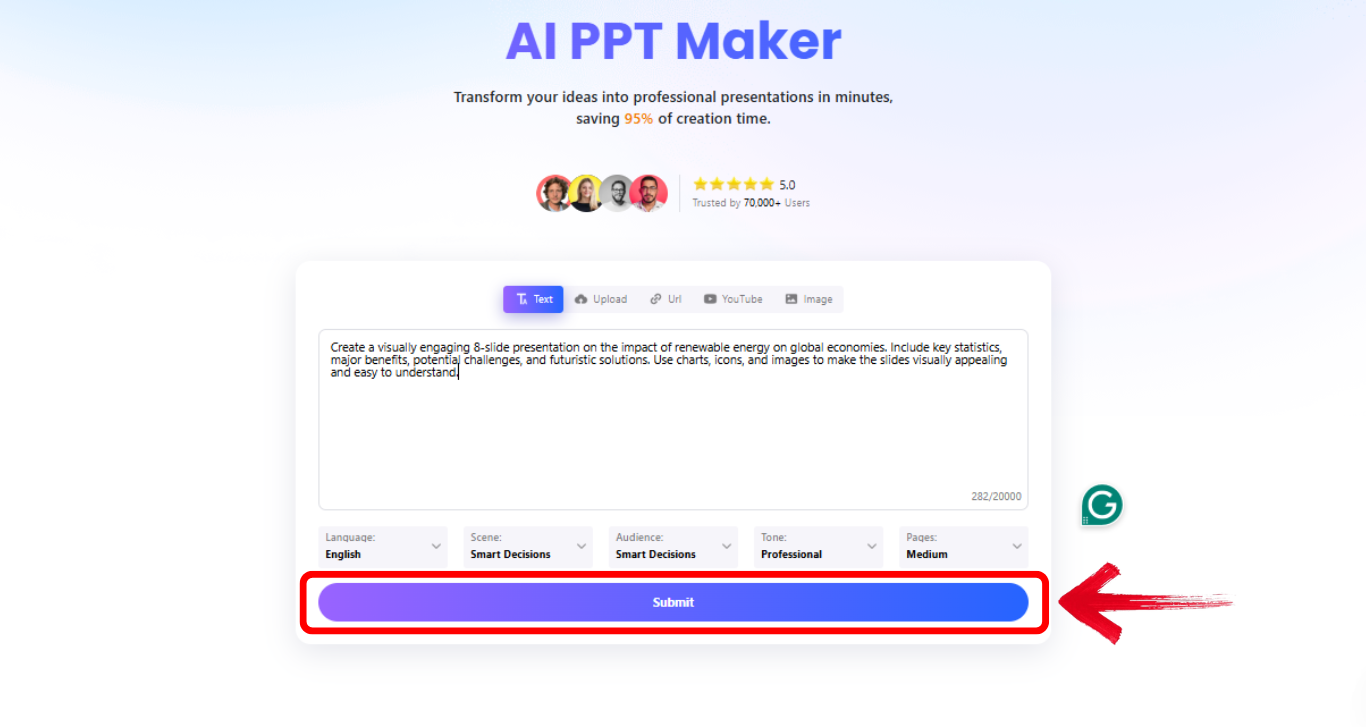
Step 3: Once you have clicked“Submit”, and let Tome AI create slides based on your prompts. You can preview and adjust content.
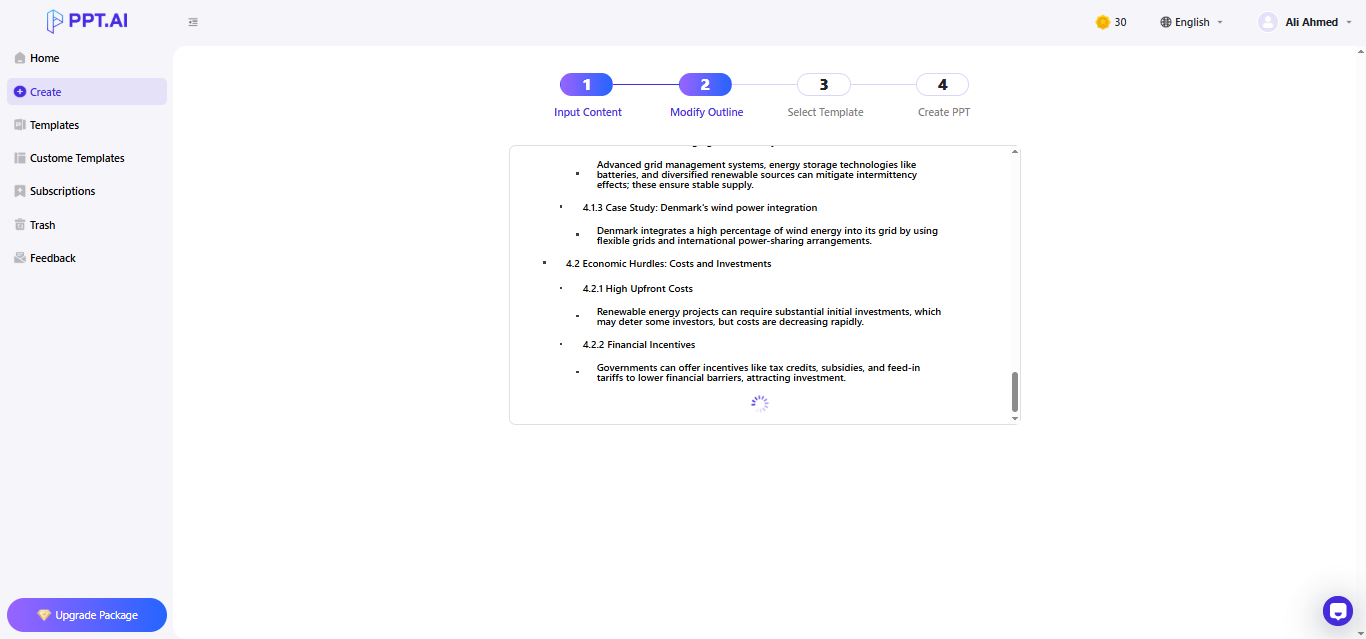
Step 4: Once slides have been generated, make adjustments to text, images, or flow. Note that customization options are somewhat limited compared to traditional tools.
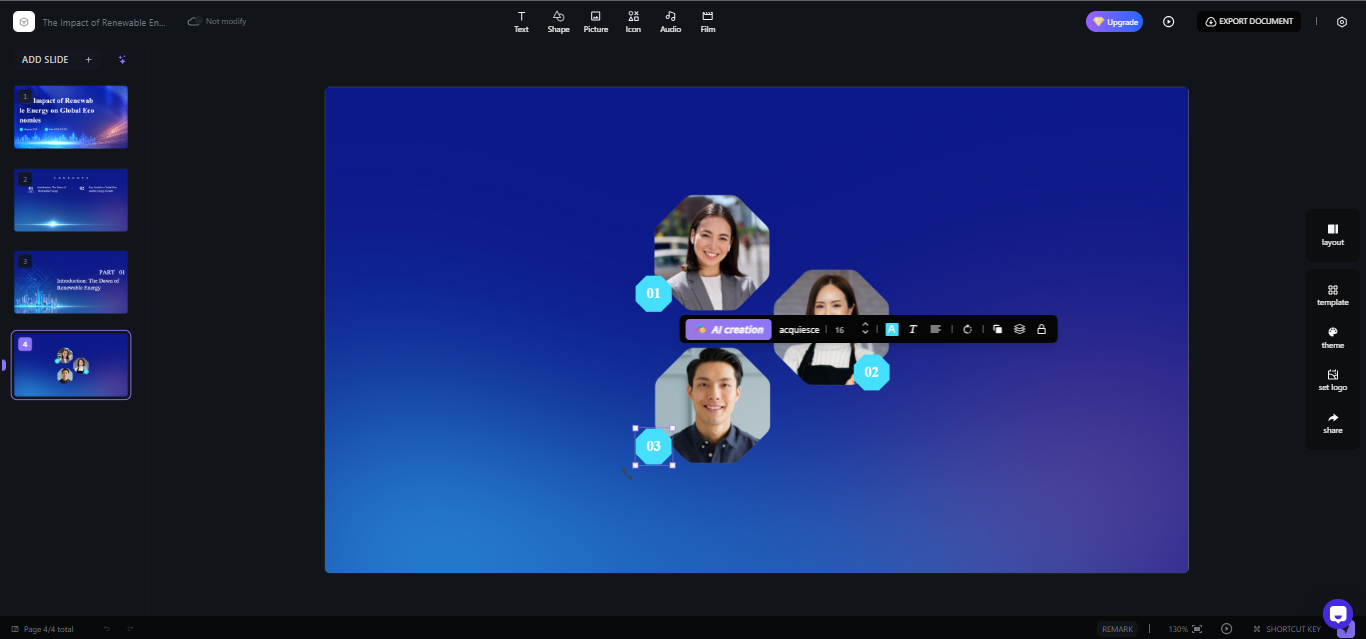
Following these steps, I could generate creative presentations quickly. However, for slides requiring precise design or heavy data visualization, additional work outside Tome was needed.
Why WPS AI Slides Is the Best Alternative to Tome AI
While Tome AI is intriguing, I noticed many practical limitations, especially in customization, export, and integration. This is where WPS AI Slides becomes a clear alternative. Designed for professionals, students, and educators, WPS AI Slides merges AI generation with traditional slide editing, providing speed and control.
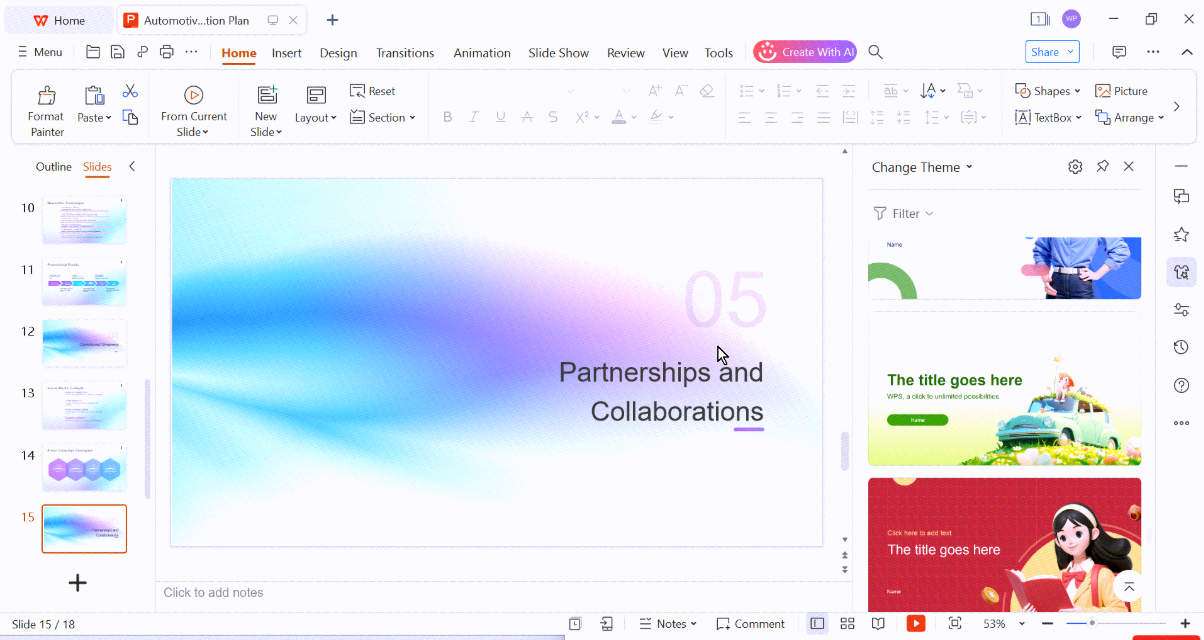
WPS AI Slides lets you generate slides in one click while keeping full editing freedom. You can adjust layouts, move elements, edit fonts, and incorporate data without fighting the AI. It’s cross-platform, compatible with Windows, Mac, Android, and iOS, and exports seamlessly to editable PPT or PDF formats.
How to create slide with WPS AI Slide:
Here’s an easy step by step guide on how to use WPS AI Sides.
Step 1: First of all, open WPS office and click AI Slides from the panel on the left side of your screen.
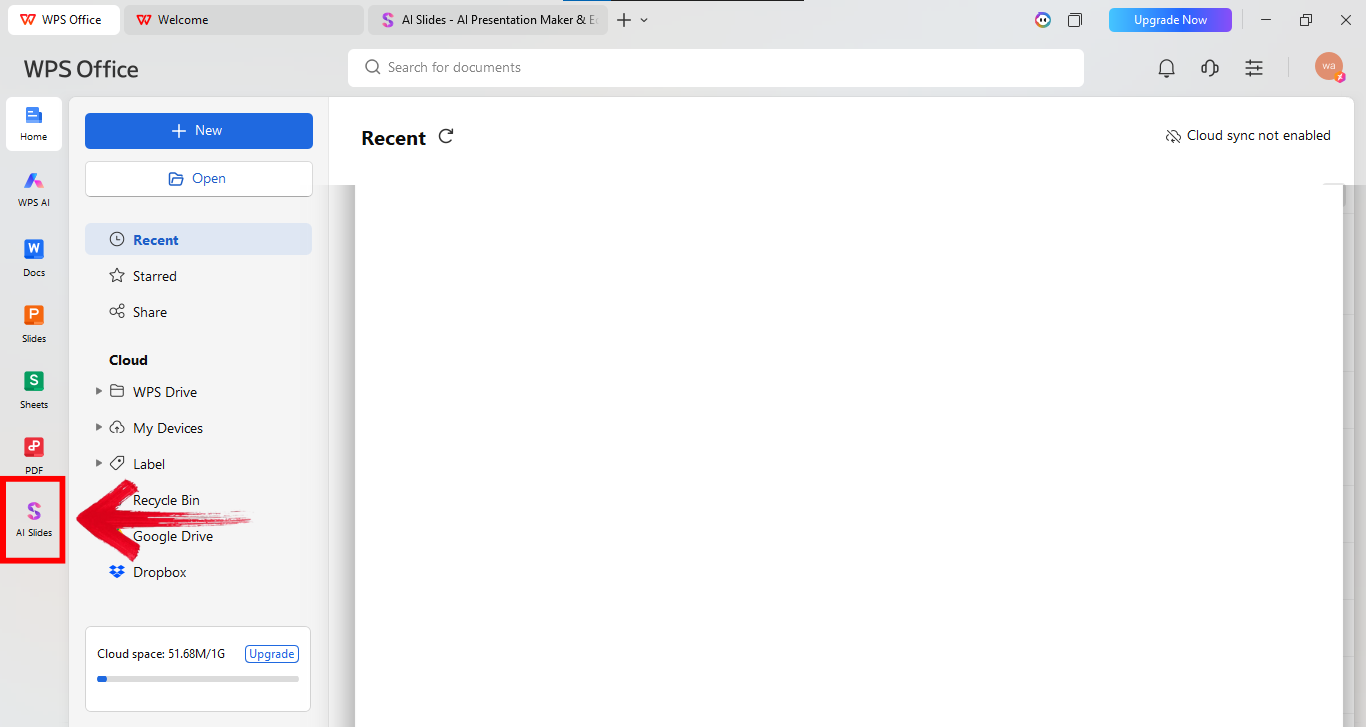
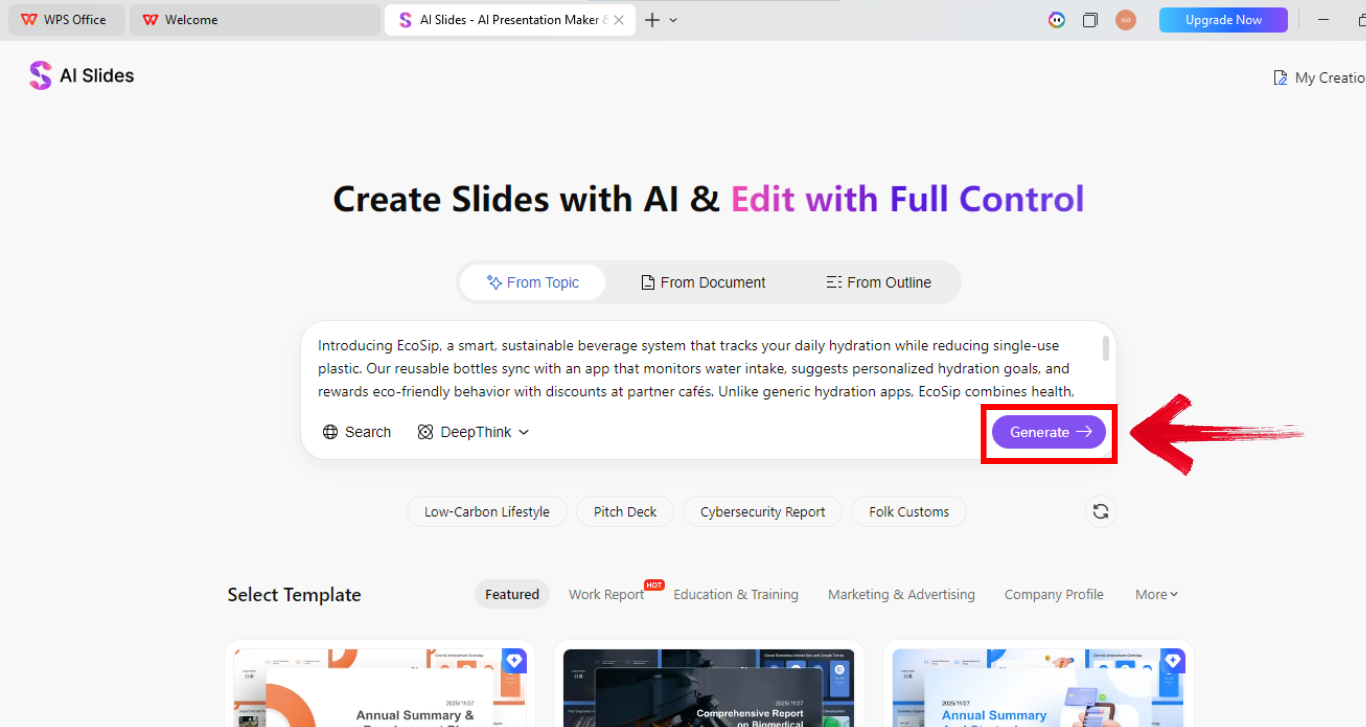
Step 2: Now explain your startup in the prompt box. Give details about the audience, and goal. Longer prompts work better here. Once done, click “Generate” to bring the presentation to life.
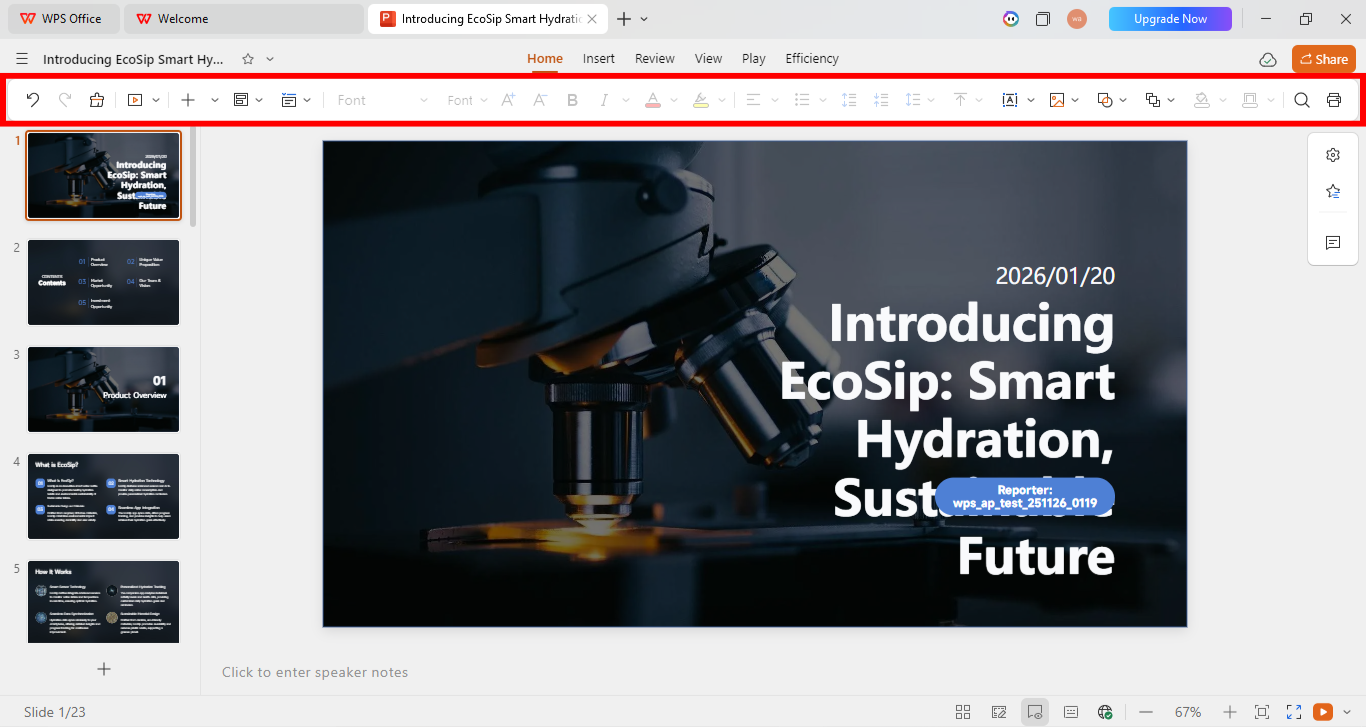
Step 3: Once the presentation is there, use the editing panel above your presentation to make relevant changes.
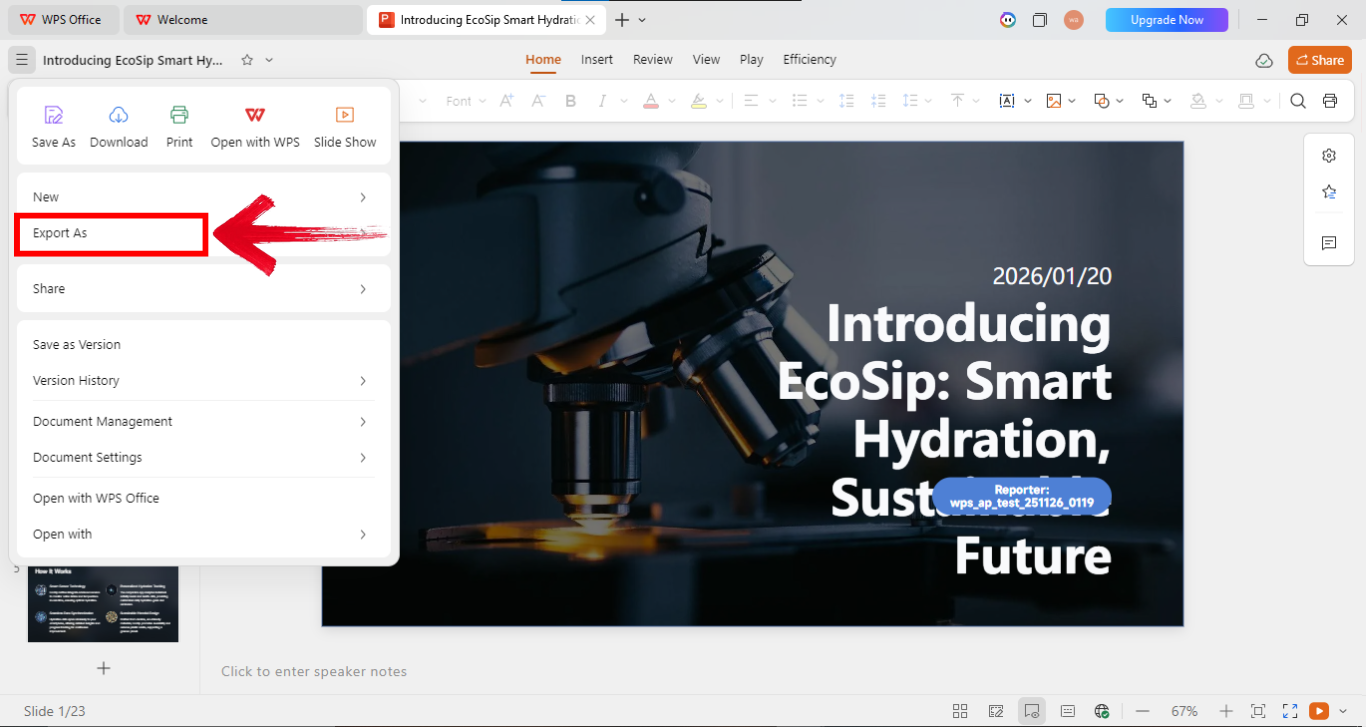
Step 4: Now go to the options on the top left of your screen and click “Export as” to export the file in your preferred file type.
Key strengths:
One-click AI slide generation.
Fully editable layouts for complete control.
Cross-platform support for flexible workflows.
Integration with existing PowerPoint projects.
Suitable for professionals, students, educators, and business users.
AI-driven storytelling without losing manual control.
Efficient for daily presentation creation.
I found WPS AI Slides to be much faster for day-to-day presentation work. I could generate slides, tweak them to exact specifications, and present confidently without compromise.
WPS AI Slides vs Tome AI
In the age of AI-poweredproductivity, presentation tools are evolving fast. WPS AI Slides and Tome AI are two popular platforms that promise to transform how we create slides. While both leverage artificial intelligence to save time and boost creativity, they differ in features, design flexibility, and workflow integration. Choosing the right tool depends on your priorities; speed, style, or automation.
| Feature | Tome AI | WPS AI Slides |
|---|---|---|
| Ease of Use | Simple interface for quick generation | User-friendly with AI and manual controls |
| AI Slide Quality | Strong for storytelling | High-quality slides for story and data-driven decks |
| Customization | Limited layout control | Fully editable layouts and elements |
| Export Formats | Limited, mostly PDF | PPT, PDF, fully editable |
| Cross-Platform | Web-based | Windows, Mac, Android, iOS |
| Pricing & Value | Free & paid tiers, some limitations | Integrated within WPS Office, more cost-effective for regular users |
| Best Use Cases | Creative storytelling | Business, education, marketing, reports, daily presentations |
The table makes it clear. For fast, story-oriented work, Tome AI is fun. For real-life, repeatable, professional slides, WPS AI Slides wins every time.
FAQs
1. Is Tome AI suitable for creating professional business presentations?
Tome AI excels at storytelling and early-stage presentations. For formal business decks with strict brand requirements or detailed layouts, WPS AI Slides offers more control.
2. Does Tome AI allow full control over slide layout and design?
It prioritizes AI-driven flow over manual adjustments. Users needing full layout control find WPS AI Slides more suitable.
3. Can Tome AI presentations be easily exported and edited elsewhere?
Export options are limited, making external editing challenging. WPS AI Slides ensures editable PPT files, easing collaboration.
4. How does Tome AI pricing compare to other AI presentation tools?
Paid plans unlock key features but can be expensive for occasional users. WPS AI Slides provides AI features within a full office suite, improving cost-effectiveness.
5. Is Tome AI better for storytelling or data-driven presentations?
It shines in storytelling. For data-heavy reports, charts, and structured business decks, WPS AI Slides integrates AI with traditional slide editing.
6. Should I choose Tome AI or WPS AI Slides for daily presentation work?
For experimentation and creative storytelling, Tome AI is fine. For regular work demanding speed, control, and cross-platform compatibility, WPS AI Slides is the better choice.
Fast Track Insights
Creating presentations can be exciting, but without the right tool, it’s easy to spend hours tweaking slides and still fall short of a polished result. Tome AI, as a Tome AI presentation maker, makes it simple to generate story-driven slides quickly, offering a creative edge for experimentation. Yet, its customization limits, export options, and cost can hold users back. For everyday, professional-ready presentations, WPS AI Slides provides one-click AI generation, editable layouts, and smooth PowerPoint integration, making it a more practical choice for students, educators, and professionals.

'%3e%3cpath%20d='M19.9911%204.11386V6.471H18.5894C18.0775%206.471%2017.7322%206.57814%2017.5536%206.79243C17.3751%207.00671%2017.2858%207.32814%2017.2858%207.75671V9.44421H19.9019L19.5536%2012.0871H17.2858V18.8639H14.5536V12.0871H12.2769V9.44421H14.5536V7.49779C14.5536%206.39064%2014.8632%205.53201%2015.4822%204.92189C16.1013%204.31177%2016.9257%204.00671%2017.9554%204.00671C18.8304%204.00671%2019.509%204.04243%2019.9911%204.11386Z'%20fill='%23333333'/%3e%3c/g%3e%3cdefs%3e%3cclipPath%20id='clip0_2938_8199'%3e%3crect%20width='16'%20height='16'%20fill='white'%20transform='translate(8%204.00671)'/%3e%3c/clipPath%3e%3c/defs%3e%3c/svg%3e)
'%3e%3cpath%20d='M17.5237%2010.7813L23.4811%204H22.0699L16.8949%209.88693L12.7648%204H8L14.2469%2012.9029L8%2020.0133H9.4112L14.8725%2013.7952L19.2352%2020.0133H24M9.92053%205.04213H12.0885L22.0688%2019.0224H19.9003'%20fill='%23333333'/%3e%3c/g%3e%3cdefs%3e%3cclipPath%20id='clip0_2938_8200'%3e%3crect%20width='16'%20height='16.0134'%20fill='white'%20transform='translate(8%204)'/%3e%3c/clipPath%3e%3c/defs%3e%3c/svg%3e)


