

'%3e%3cpath%20d='M8%200C12.4183%200%2016%203.58172%2016%208C16%2012.4183%2012.4183%2016%208%2016C3.58172%2016%200%2012.4183%200%208C0%203.58172%203.58172%200%208%200ZM11.6162%204.38379C11.2257%203.99337%2010.5927%203.99338%2010.2021%204.38379L8%206.58594L5.79785%204.38379C5.40732%203.99334%204.77429%203.99329%204.38379%204.38379C3.99331%204.77429%203.99335%205.40733%204.38379%205.79785L6.58594%208L4.38379%2010.2021C3.99348%2010.5927%203.99341%2011.2257%204.38379%2011.6162C4.77426%2012.0066%205.40734%2012.0065%205.79785%2011.6162L8%209.41406L10.2021%2011.6162C10.5927%2012.0066%2011.2257%2012.0067%2011.6162%2011.6162C12.0067%2011.2257%2012.0066%2010.5927%2011.6162%2010.2021L9.41406%208L11.6162%205.79785C12.0066%205.40735%2012.0066%204.77429%2011.6162%204.38379Z'%20fill='%23080E17'%20fill-opacity='0.46'/%3e%3c/g%3e%3cdefs%3e%3cclipPath%20id='clip0_3761_713'%3e%3crect%20width='16'%20height='16'%20fill='white'/%3e%3c/clipPath%3e%3c/defs%3e%3c/svg%3e)




'%3e%3cpath%20fill-rule='evenodd'%20clip-rule='evenodd'%20d='M21.4999%2010.9993C21.4999%205.20009%2016.7986%200.498901%2010.9993%200.498901C5.19994%200.498901%200.498657%205.20009%200.498657%2010.9993C0.498657%2016.2404%204.33858%2020.5844%209.35855%2021.3722V14.0346H6.69238V10.9993H9.35855V8.68594C9.35855%206.05427%2010.9262%204.60062%2013.3248%204.60062C14.4736%204.60062%2015.6753%204.80571%2015.6753%204.80571V7.38979H14.3512C13.0468%207.38979%2012.64%208.19921%2012.64%209.0296V10.9993H15.5523L15.0867%2014.0346H12.64V21.3722C17.66%2020.5844%2021.4999%2016.2404%2021.4999%2010.9993Z'%20fill='%231568EA'/%3e%3c/g%3e%3c/svg%3e)


'%3e%3cpath%20d='M2.42045%2022.1876H6.31818V12.7217L0.75%208.54553V20.5171C0.75%2021.4414%201.49892%2022.1876%202.42045%2022.1876Z'%20fill='%234285F4'/%3e%3cpath%20d='M19.682%2022.1876H23.5797C24.5041%2022.1876%2025.2502%2021.4387%2025.2502%2020.5171V8.54553L19.682%2012.7217'%20fill='%2334A853'/%3e%3cpath%20d='M19.682%205.48293V12.7216L25.2502%208.54543V6.31816C25.2502%204.25236%2022.8921%203.07469%2021.2411%204.31361'%20fill='%23FBBC04'/%3e%3cpath%20d='M6.31824%2012.7217V5.48303L13.0001%2010.4944L19.6819%205.48303V12.7217L13.0001%2017.733'%20fill='%23EA4335'/%3e%3cpath%20d='M0.75%206.31816V8.54543L6.31818%2012.7216V5.48293L4.75909%204.31361C3.10534%203.07469%200.75%204.25236%200.75%206.31816Z'%20fill='%23C5221F'/%3e%3c/g%3e%3cdefs%3e%3cclipPath%20id='clip0_2954_7305'%3e%3crect%20width='24.5'%20height='18.375'%20fill='white'%20transform='translate(0.75%203.8125)'/%3e%3c/clipPath%3e%3c/defs%3e%3c/svg%3e)


Most of business now is done over the phone, from cold calling to following up on prospective customers, which can be painful if you’re managing everything manually. Without a structured template, I found I was constantly missing important details during crucial follow ups costing me losses in my work. This is exactly where a phone call log template Word can come in handy. Using the 10 free templates, you’ll find it easy to track all your calls with these replicable logs.
What Should be Included in a Call Log Template?
Before we dive into the downloads, let's get on the same page. When I talk about a call log, what do I mean?
What is a Call Log Template?
A call log template is a pre-made, structured document. I use it to record all the details from a client, patient, or sales phonecall. Its whole purpose is to make sure I don't miss a single critical detail. It's a lifesaver for remembering who said what and when.
The Benefits of Client Call Log Templates
Honestly, once I started using these, my workflow got so much better. It just cleans things up.
It makes my client management feel so much smoother. For example, I can instantly look up what we discussed last month right before a new call, instead of scrambling for old notes.
I find I actually remember all my follow-ups now. No more of those "Oh, I forgot to send that quote" moments at the end of the day.
It's also great for teamwork. We can all see who’s talked to who, so two of us don't accidentally call the same client about the same issue.
Plus, and this is a big one, if there's ever a dispute. If a client says, "You never told me that," I can pull up the log with the exact date and the notes from our conversation.
Tips for Improving Client Call Logging
Over the years, I've found a few non-negotiables for my own logs. Make sure you always include:
You've always got to include the basics, like the date, the time, and how long you actually talked.
Make sure you record who's who, meaning the caller's name and the person they spoke to.
You absolutely need to note down the 'why' of the call: its purpose, any action items you agreed on, and what the next steps are.
My biggest tip is to customize the template. A sales log looks way different from a patient log, so you have to make it fit your specific industry. A simple template is often the best place to start.
10 Free Call Log Templates [Download in Word]
Alright, here's the part you've been waiting for. I've gathered 10 fantastic, free templatesyou can download right now. I've used several of these as a starting point. Finding a good free call log template Word file online can be a pain, so I've put the best ones right here. Just find the one that fits your needs, and you're good to go.
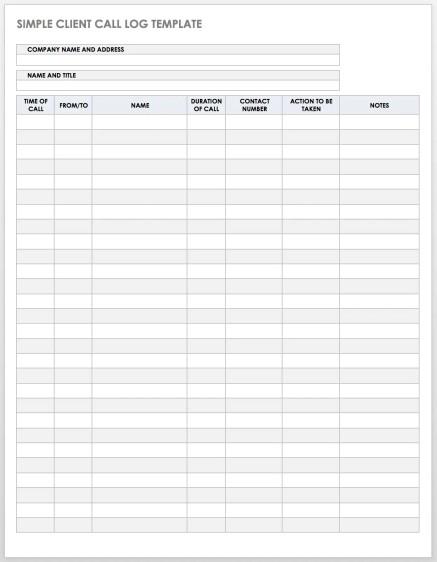
1. Simple Client Call Log:
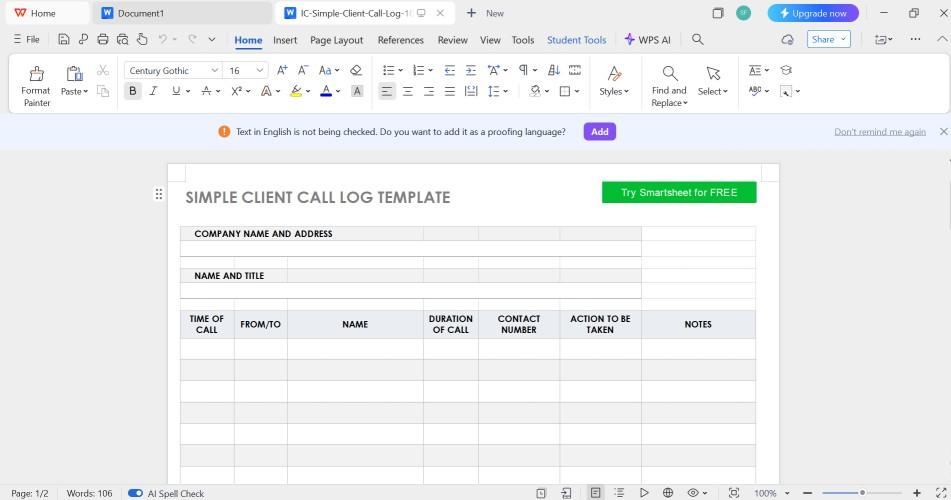
I found this templateto be very straightforward, bundled with all the essentials you may need for a call log template. It’s black and white in color with a classic grid layout, making it easy on the eyes. At the very top, you can put in the “company name and address” and “name and title,” making it easy to remember who you might be referring to. This one is perfect for a more general use if you aren't looking for a more industry-specific call log.
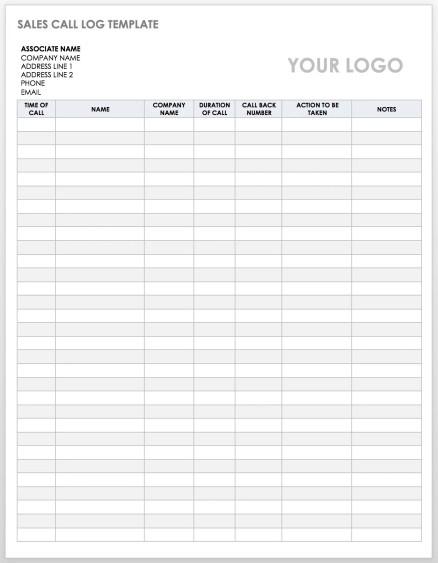
2. Sales Call Log:
This templateis designed for a sales team or a more formal corporate setting. It’s got that clean, grid layout and a simple black-and-white design. The most obvious feature is the big "YOUR LOGO" placeholder in the corner, so you can brand it for your own company. It’s also a bit different from the last template. It has a specific column for the client’s "COMPANY NAME" and asks for a "CALL BACK NUMBER", which tells me this is perfect for B2B sales or a support desk logging incoming calls.
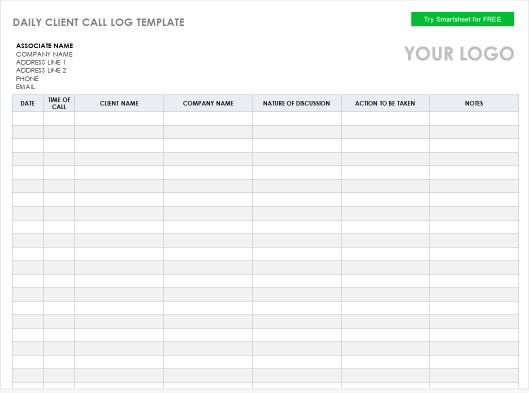
3. Daily Client Call Log:
This oneis built for someone who's on the phone all day, and helps you dump info quickly before you jump to the next call. I really like the"NATURE OF DISCUSSION" column, as it neatly separates the topic from the action items. This is the one I’d give to an account manager or a busy sales rep.
4. Business Call Log:
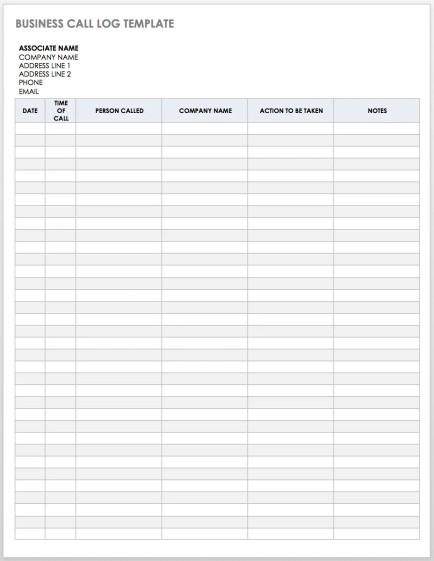
The designis super clean and professional, just a black and white grid with a lightly shaded header, making it very printer-friendly. It skips things like call duration, focusing instead on the essential "ACTION TO BE TAKEN" and "NOTES". It's great for internal use or trackingcalls for multiple projects.
5. Patient Call Log:
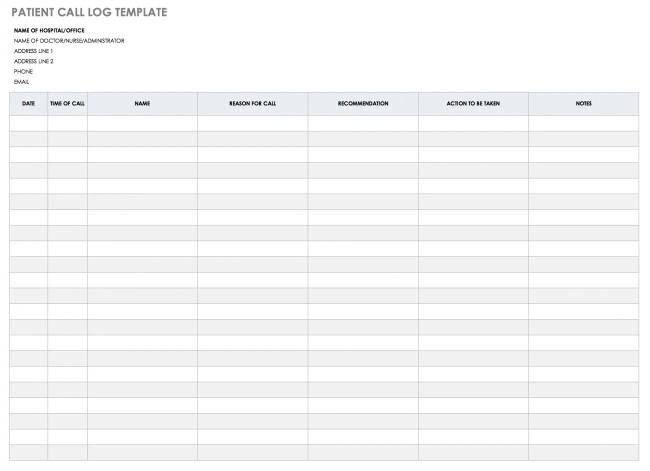
The designis very clean and minimalist, which is exactly what you want in a professional medical setting. The fields at the top, like "NAME OF HOSPITAL/OFFICE", make it an official record. What really stands out are the columns: it has "REASON FOR CALL"and, crucially, "RECOMMENDATION". This is perfect for a healthcare provider to document their medical advice and separate it from the final "ACTION TO BE TAKEN".
6. Client Phone Log Template:
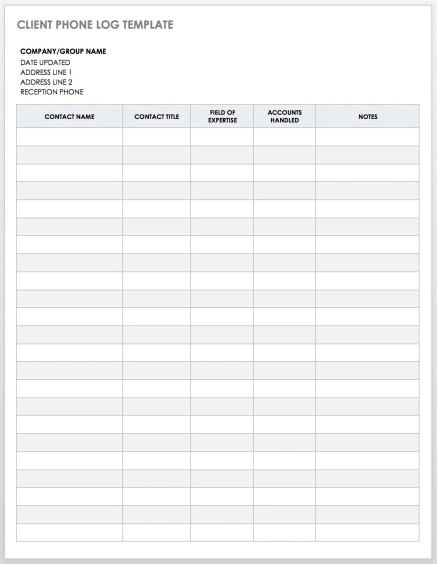
This oneis very client-centric. It lets you know exactly when you’ve updated it, so that when making a new entry, you’d be able to keep track of when you exactly updated your phone log. You can also assign roles to each company according to their fields of expertise, which means whenever you want to find a company in a specific industry, you won't be confused anymore.
7. Printable Client Call Log:
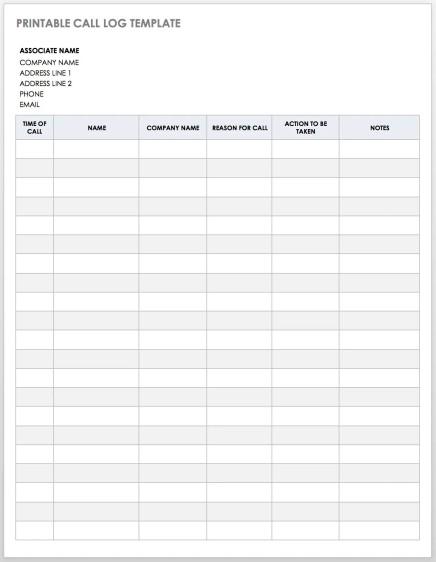
This templateis clearly designed with printing in mind, just as its"PRINTABLE CALL LOG TEMPLATE" title suggests. The design is minimalist; it’s black and white with a simple light grey header row, so it won’t waste any ink. It’s a great general-purpose log, but the key column it adds is "REASON FOR CALL," which lets you categorise your call and makes follow-ups easy.
8. Sample Call Log:
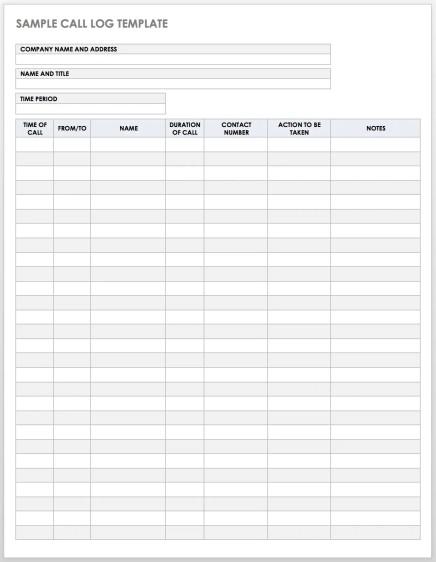
A great all-rounder. It has a bit of everything and is a fantastic starting point if you're not sure what you need yet. What’s unique here is the "TIME PERIOD" field at the top. This is a smart addition, as it lets you define the scope of the log, like "Q4 2025" or "Project Alpha", making it incredibly flexible for managers or for organizing your logs by project.
9. Client Call Log Form Template:
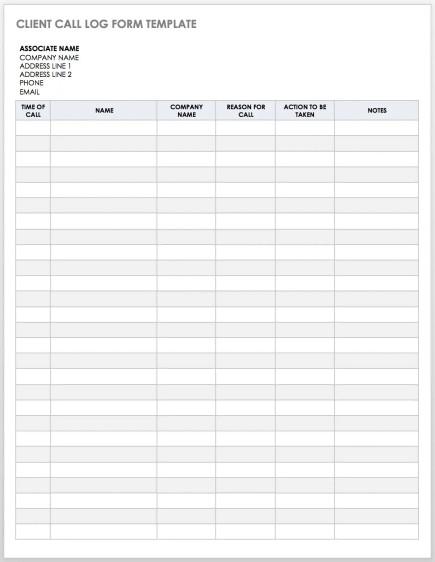
The Client Call Log Form template combines a little bit of everything. The design is standard, classic, and minimalistic, which makes it perfect for printing, but what I love is that you can find multiple unique features you might find in other templates you’ll have in one roof.
10. Client Prospect Contact Log:
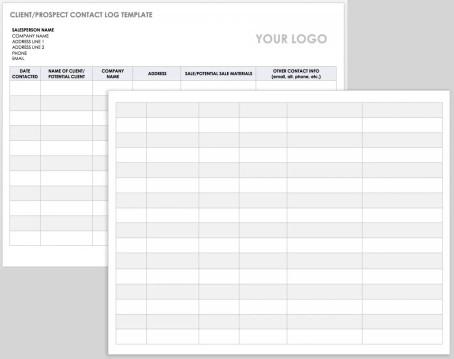
This is another sales-focused one, but it’s more about theinitial contact. It's an excellent templatewhen you’re reaching out to new clients, as it has a separate column for“Potential Sale Materials,” guaranteeing that you or whoever picks up this list has a good understanding of the prospect before calling them. Great for tracking new leads before they become active clients.
How to Edit and Print Call Log Templates
So you've downloaded your template. Now what? The whole point is to make it yours. I use WPS Writer for this, it's part of the WPS Office suite, and frankly, it’s just as powerful as Word but free. It's also way more straightforward than trying to build a log inExcel.
Here’s my super-simple process. It’s so easy, you’ll be done in 60 seconds.
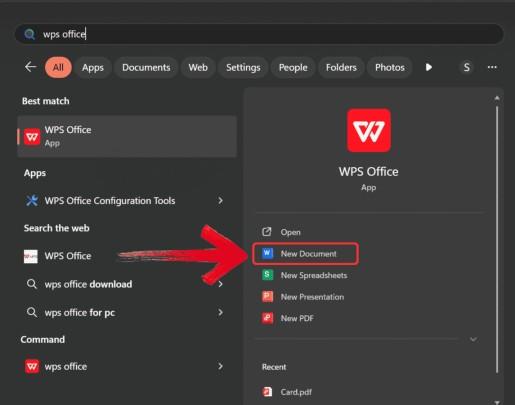
Step 1: First, open WPS Writer from the start menu.
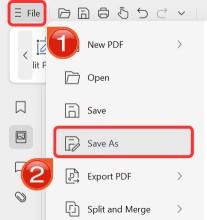
Step 2: Then, open the template you want to edit in the WPS Writer. Click on the file icon on the top left of your ribbon. There should be no problem in opening the document as it is in docx format.

Step 3: Now, just click on any text you want to change. You can add or delete columns, change fonts. whatever you need.
Step 4: Finally, when you’re done, click on file and then click Save As to download this poster onto your device.
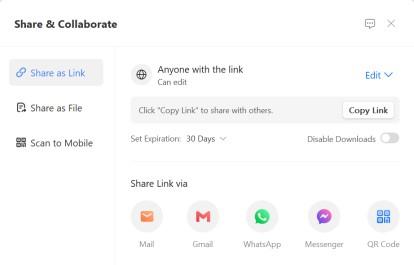
Step 5: You can also share the link to your document with others to enable collaborative work in case they want to make their own changes as well.
Free Office Suite with Abundant Templates
I've mentioned WPS Office a few times, and I want to be clear on why I recommend it. As someone who works with documents all day, I need tools that are reliable and don't cost a fortune. WPS Office is my daily driver.
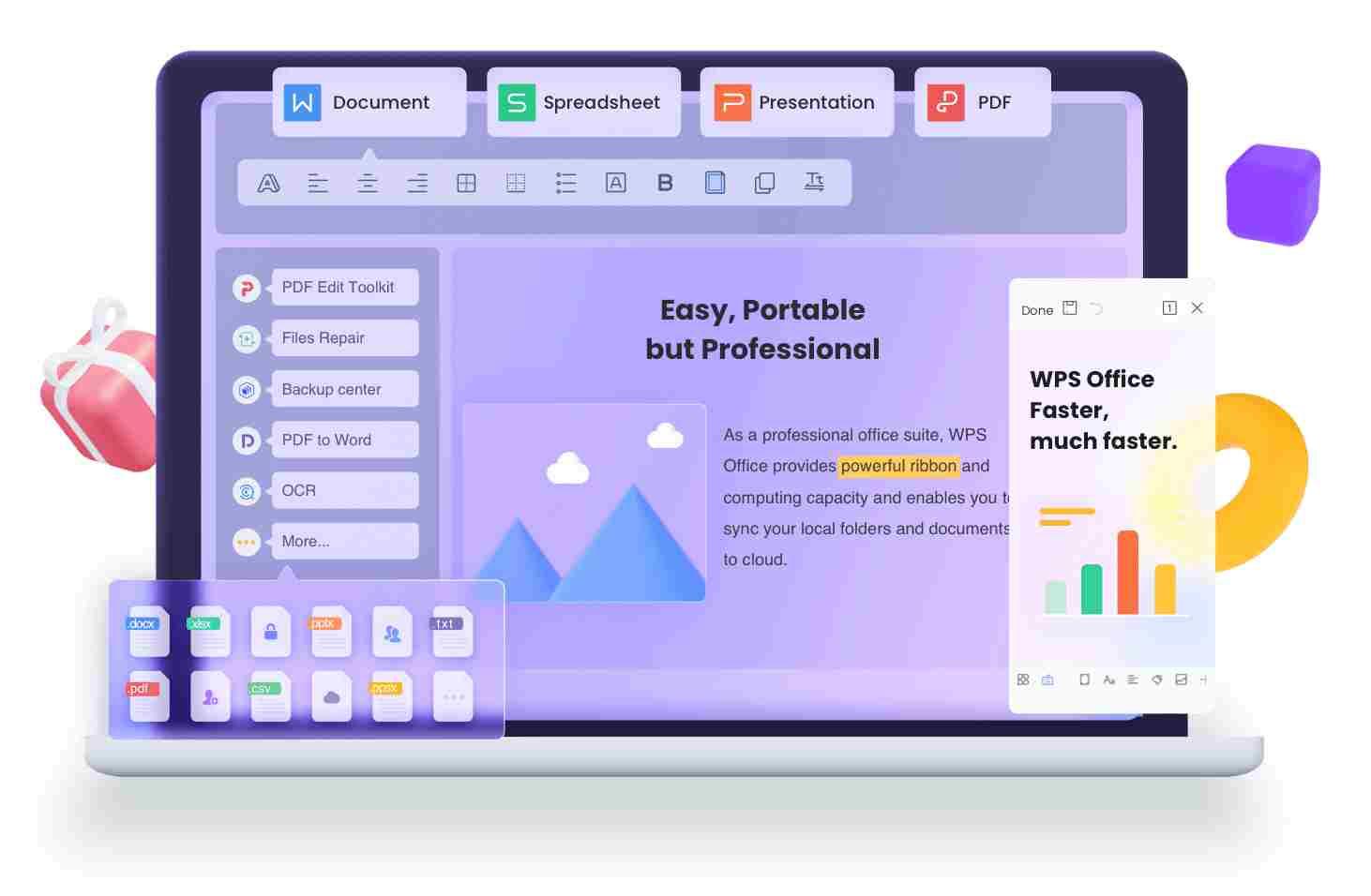
It's a complete, free office suite (Writer for docs, Spreadsheets, and Presentation) that feels light. It doesn't bog down my system. But the main reason I stick with it is compatibility.
Key Advantages:
It’s truly free: This is the biggest one for me. It's not some 30-day trial where they suddenly ask for my credit card. I get all the core features I need, like writing, editing, and saving in all the standard formats, without paying a cent. For a professional or a small business, that's a huge cost saving right there.
It handles everything: This is all about compatibility. I can open DOC files from colleagues using Word, PPTs from the marketingteam, and even edit a PDF right in the app. I never have that dreaded "file not supported" error, which saves me so much time and hassle.
Built-in templates: While I'm showing you templates from the web, WPS Office has a massive library of its ownright inside the app. If I need a quick invoice, resume, or memo, I just open WPS and search. It's so much faster than hunting online for a good starting point.
It works everywhere: My work isn't just at my desk. I use WPS on my PC, but I also have the app on my phone. This means I can pull up a log and add a quick note right after I hang up in my car, and it all syncs up. That kind of flexibility is essential for me.
Honestly, for everyday professional tasks like editing a call log template Word file, you just don't need to pay for a heavy-duty, system-hogging, expensive office suite. I've found WPS Office is the perfect balance. It’s lightweight, fast, and does everything I need, like editing Word docs, creating PDFs, and managing spreadsheets—quickly and cleanly. It’s for professionals who just want to get the job done without any fuss.
FAQs
Q1: How do I create a call log in Word?
Don't start from scratch. Just download one of the templates I listed. Open it in WPS Writer (or Word), click the fields, and type in your own. That's it!
Q2: What is the best call log format?
From my experience, the 'best' one is the one you'll actually use. But it must have: date, time, who you spoke to, why you called, and what you have to do next.
Q3: Can I use call logs for business reporting?
Absolutely. I do it all the time. Managers love them for tracking sales activity and client health. They're concrete proof of your team's communication.
Q4: How to share call logs with team members online?
Easy. You can save the completed log as a 'PDF' from WPS Writer and email it. Or, if your team uses WPS Cloud, you can'share it directly' for real-time collaboration.
Q5: Is WPS free to use for editing call log templates?
Yep. 100%. You can download WPS Office, open the Word template, edit it, and save it, all for free.
Get Organized with the Right Tools
Tracking calls doesn't have to be a messy, time-consuming task. Grabbing a pre-built template is the smartest move you can make to stay organized, look professional, and ensure no follow-up ever falls through the cracks. When it comes to editing your call log template Word file, I genuinely recommend WPS Office. It’s free, powerful, and handles every file type seamlessly. Download your template and WPS Office, and you’ll be more organized in five minutes.

'%3e%3cpath%20d='M19.9911%204.11386V6.471H18.5894C18.0775%206.471%2017.7322%206.57814%2017.5536%206.79243C17.3751%207.00671%2017.2858%207.32814%2017.2858%207.75671V9.44421H19.9019L19.5536%2012.0871H17.2858V18.8639H14.5536V12.0871H12.2769V9.44421H14.5536V7.49779C14.5536%206.39064%2014.8632%205.53201%2015.4822%204.92189C16.1013%204.31177%2016.9257%204.00671%2017.9554%204.00671C18.8304%204.00671%2019.509%204.04243%2019.9911%204.11386Z'%20fill='%23333333'/%3e%3c/g%3e%3cdefs%3e%3cclipPath%20id='clip0_2938_8199'%3e%3crect%20width='16'%20height='16'%20fill='white'%20transform='translate(8%204.00671)'/%3e%3c/clipPath%3e%3c/defs%3e%3c/svg%3e)
'%3e%3cpath%20d='M17.5237%2010.7813L23.4811%204H22.0699L16.8949%209.88693L12.7648%204H8L14.2469%2012.9029L8%2020.0133H9.4112L14.8725%2013.7952L19.2352%2020.0133H24M9.92053%205.04213H12.0885L22.0688%2019.0224H19.9003'%20fill='%23333333'/%3e%3c/g%3e%3cdefs%3e%3cclipPath%20id='clip0_2938_8200'%3e%3crect%20width='16'%20height='16.0134'%20fill='white'%20transform='translate(8%204)'/%3e%3c/clipPath%3e%3c/defs%3e%3c/svg%3e)


