Managing time in 30-minute blocks can turn a hectic day into one that
runs peachy. Professionals use these calendars to handle back-to-back
meetings, students balance classes and study sessions, and parents track
family routines with precision. The problem is that most planners only
offer hourly divisions, leaving half your commitments squeezed in
without space. That’s why a weekly calendar with half hour blank slots
has become vital. In this guide, I’ll show 10 free templates with
30-minute intervals, plus tips for editing, printing, and customizing
them.
Use Word, Excel, and PPT for FREE
Weekly Calendar Templates with Half-Hour Intervals
What
Should Be Included in a Weekly Calendar with Half-Hour Blocks
When I compared an hourly planner to a weekly calendar with half hour
blank slots, the difference was immediate. Suddenly, tasks that used to
blur together like a quick check-in call before a lecture or a 20-minute
commute between errands actually had space on my schedule. That clarity
not only helped me stay on track; it reduced the mental stress of
constantly trying to “squeeze things in”. From that experience, I came
to know that a truly effective half-hour planner needs a few specific
elements built in. Without those, you end up with a pretty template that
doesn’t actually work in real life.
Weekly Schedule
When you download or create one, here’s what should be included:
Clear Time Intervals: Each day should be divided
into 30-minute segments so you can plan appointments, classes, or tasks
with precision.
Date and Day Labels: A proper weekly overview
means you can easily track Monday through Sunday (or your custom work
week).
Space for Notes: You’ll want a section to note
down reminders,
priorities, or tasks that don’t fit neatly into a time slot.
Start and End Times: Some people start their day
at 6 a.m., while others prefer 9 a.m. Customizable calendars let you
define the range.
Color Coding Options: Even if you’re using a
blank template, having formatting that supports highlighting or
categories makes it more practical.
Holiday Integration: For those coordinating work or travel in specific regions, it’s helpful to cross-reference your weekly slots with important public holidays. For instance, if you are managing a team or planning events in South Asia, staying updated with the 2026 india festival calendar can help you avoid scheduling high-priority meetings on major national holidays like Diwali or Republic Day.
Basically, a printable weekly calendar 30-minute interval gives you
the precision of a digital calendar, but with the flexibility of
printing, editing, and personalizing it to fit your lifestyle.
10
Free Weekly Calendar Templates with Half-Hour Intervals [Download]
After figuring out what makes a weekly calendar actually useful, the
next challenge I faced was finding templates that weren’t just pretty
but also practical. A lot of the ones I stumbled across online looked
nice at first glance, but they either locked me into rigid hourly slots
or weren’t easy to edit. Over time, I curated a set of templates that
checked all the boxes: clear time intervals, editable layouts, and easy
export options for printing or sharing. I’ve put together 10 free
templates that you can download right away. Some are in Word, others in
Excel, but all of them can be customizedto fit the way you actually work.
1. Weekly Schedule
Template Hourly [Word]
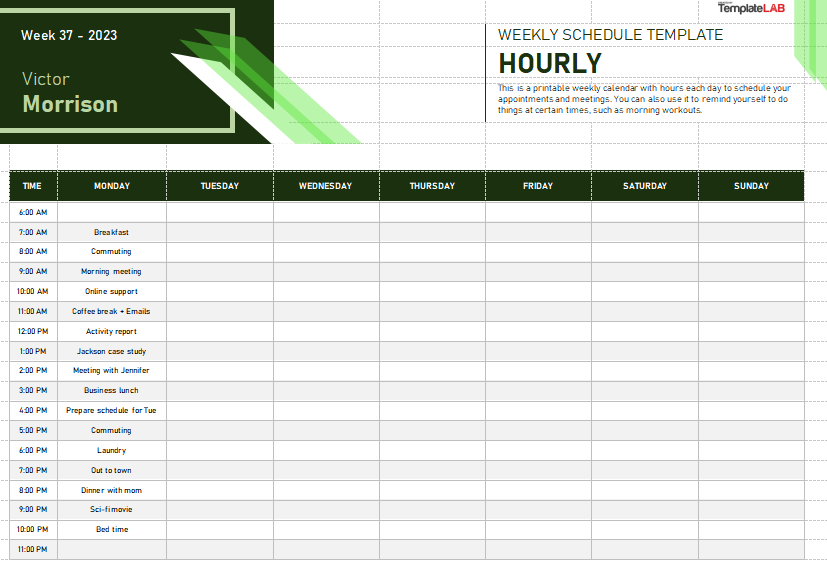
This Weekly
Schedule Template Hourly offers a professional and highly
organized solution for meticulous time management. The document features
a clean, green-themed design and a comprehensive grid that breaks down
each day into hourly slots from morning to night. It is ideal for anyone
needing to schedule appointments, meetings, or personal tasks with
precision. This printable template is an excellent tool for maintaining
a structured and well-planned week.
Weekly Schedule Template Hourly
2. Hourly Weekly Schedule
[Word]
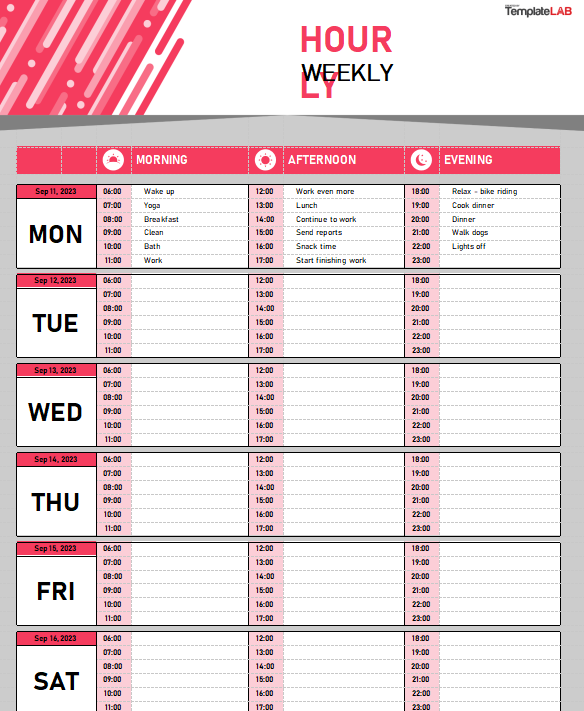
This Hourly
Weekly Schedule template provides a professional and
well-organized solution for time management. Its clean design uses a
distinct grid format to break down each day into morning, afternoon, and
evening sections, with hourly slots for detailed planning. The template
is ideal for anyone who needs to meticulously plan their appointments
and daily tasks from Monday to Saturday. The pre-filled examples help to
illustrate its practical use for both personal and professional
scheduling.
Hourly Weekly Schedule
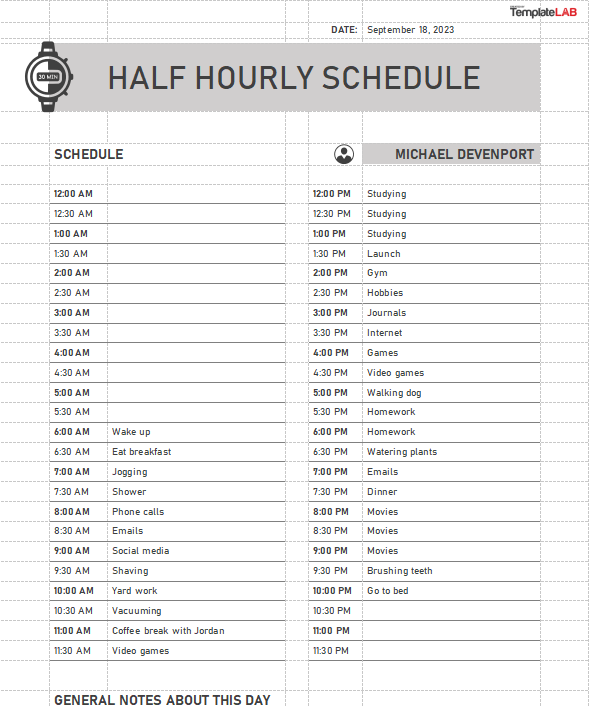
3. Half Hourly Schedule [Word]
This Half Hourly
Scheduletemplate provides a comprehensive and highly
detailed solution for managing a single day. The document features a
professional grid layout that breaks down every hour into 30-minute
intervals, from 12:00 AM to 11:30 PM. It is ideal for anyone who needs
to meticulously plan appointments, meetings, or personal tasks with
great precision. This functional template is an excellent tool for
maximizing productivity and maintaining a structured daily routine.
Half Hourly Schedule
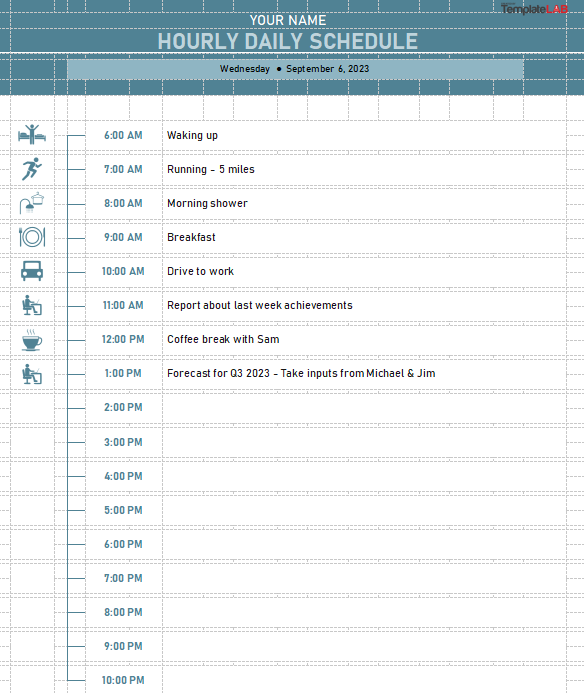
4. Hourly Daily Schedule [Word]
This Hourly Daily
Schedule template is a professional and visually engaging tool
for managing your day. The document features a clean, gray-blue design
with a unique vertical column of icons to represent different
activities. The main grid provides an hourly breakdown, allowing for
meticulous planning of everything from "Running - 5 miles" to "Coffee
break with Sam". This functional template is perfect for anyone seeking
to optimize their daily routine with both structure and style.
Hourly Daily Schedule
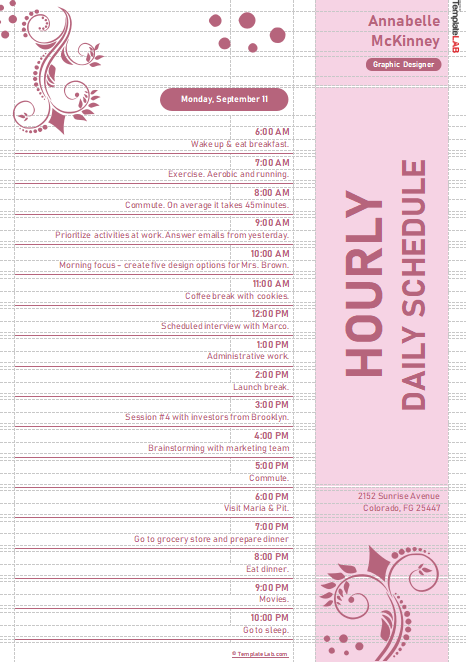
5. Hourly Daily Schedule Pink
[Word]
This Hourly Daily
Scheduletemplate offers a stylish and elegant solution
for managing a single day's tasks. The document features a soft pink and
white color scheme and decorative, floral-like patterns that add a
unique flair to the design. The central grid provides a clear hourly
breakdown, making it easy to schedule everything from "Exercise" to
"Administrative work". This template is a perfect tool for anyone
looking to organize their daily routine with a blend of practicality and
aesthetic appeal.
Hourly Daily Schedule Pink
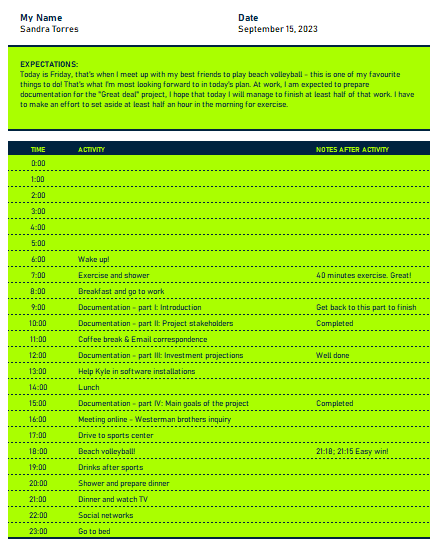
6. 24 Hour Schedule [Excel]
This 24 Hour
Scheduletemplate is a highly detailed and functional
tool for daily planning. The document features a vibrant lime green and
navy blue color scheme and a comprehensive grid with hourly slots from
midnight to 11 PM. It includes a unique "Expectations" section at the
top for goal-setting and a "Notes After Activity" column for a
post-activity review. This template is an excellent resource for anyone
seeking to plan their day with precision and reflect on their
productivity.
24 Hour Schedule
7. Employee Hourly Schedule
[Excel]
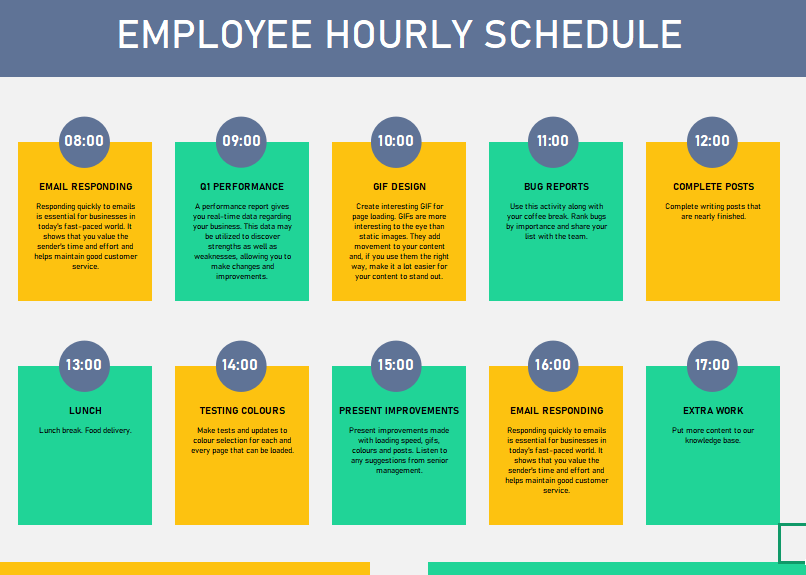
This Employee
Hourly Scheduletemplate provides a professional and
visually engaging solution for daily work planning. The document
features a modern, color-coded design that breaks down the workday into
distinct hourly blocks, making it easy to see and manage tasks. Each
block includes a specific time, a task title, and a brief description,
such as "Q1 Performance" or "Lunch". This template is an excellent tool
for employees and managers to maintain an organized and efficient
workday.
Employee Hourly Schedule
8. Smartsheet Weekly Schedule
[Excel]
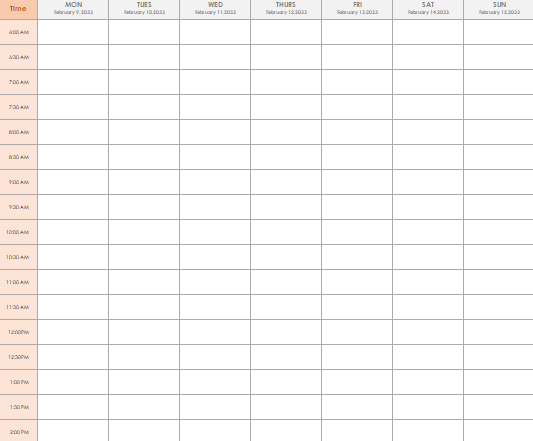
This Smartsheet
Weekly Schedule template provides a clean and highly detailed
solution for managing time on a weekly basis. The document features a
professional, minimalist design with a clear grid that breaks down each
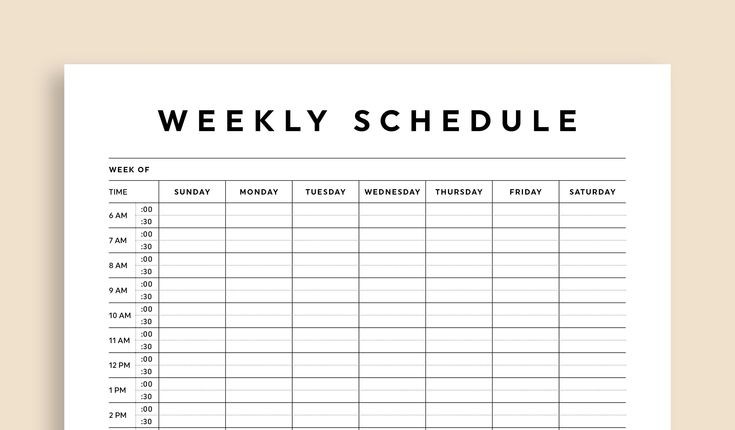
day into precise half-hour intervals. This functional, blank canvas is
perfect for anyone needing to meticulously plan their entire week, from
professional appointments to personal tasks. Its straightforward layout
ensures that all your activities can be easily organized and
tracked.
Smartsheet Weekly Schedule
9. Smartsheet Excel Online
[Excel]
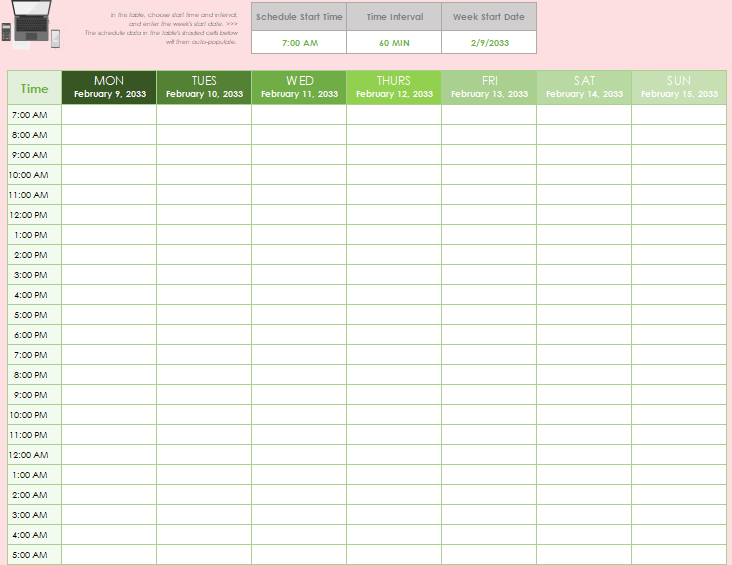
This Smartsheet
Excel Online template is a dynamic and professional solution for
weekly scheduling. The document's clean design allows for easy
customization via input fields at the top, enabling users to set the
"Schedule Start Time," "Time Interval," and "Week Start Date". The grid
features a flexible, hour-by-hour breakdown for each day of the week,
from Monday to Sunday. This is an ideal tool for users who need a
flexible and reusable template to manage their time with precision.
This Smartsheet
Excel Sample is a comprehensive and multi-faceted tool for
personal and professional organization. Its unique design combines a
detailed hourly schedule with dedicated sections for "Top Priorities",
"Contacts", and "Meals". The grid provides a clear breakdown of each day
from morning to night, while the left-side sections ensure that
important information is always at hand. This template is an excellent
resource for anyone looking to manage their time, tasks, and essential
information in a single document.
Smartsheet Excel Sample
How
to Edit and Print a Weekly Calendar with Half Hour Blank in Word &
Excel
100% secure
Once I had my template downloaded, the real test was making it mine.
At first, I thought it would be as simple as typing over the
placeholders but in Word and Excel, that can easily mess up the
alignment or formatting. What actually works is knowing a couple of
small tricks: in Word, editing through text boxes instead of typing
directly keeps the layout intact, while in Excel, adjusting columnwidths and freezing rows makes the schedule easier to read and print.
Learning these shortcuts not only saved me time but also gave me a clean
calendar I could reuse week after week without starting from
scratch.
Editing in WPS Writer
(Word Alternative)
If you’re using WPS Writer instead of Word, the good news is the
editing process feels almost identical but with a few handy shortcuts.
I’ve found that dragging and dropping text boxes is smoother here, and
the built-in alignment guides keep everything from looking uneven. Plus,
saving directly as PDF is just a click away, which makes printing
cleaner and quicker. Here’s how to use it:
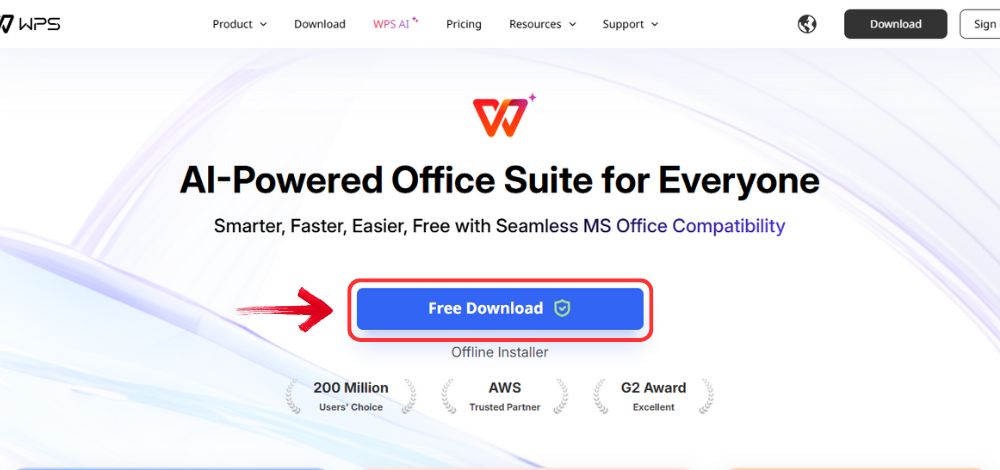
Step 1: First, open your browser to visit WPS Office and click the"Free Download" button to start the download.
Download WPS Office
Step 2: The download will finish in a few seconds.
Once done, run the installation file like you would for any other app or
software.
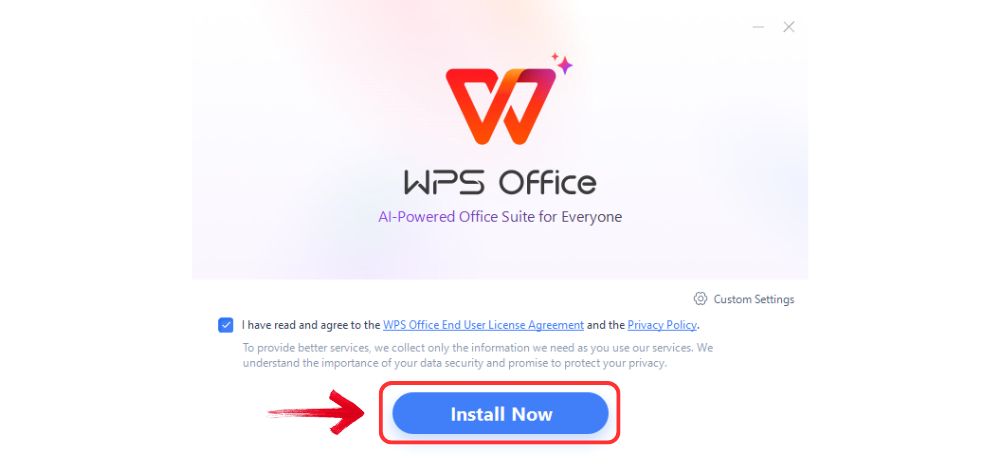
Step 3: WPS Office will show you a few simple terms
and conditions. Accept them, then click the "Install"button to begin the installation.
Install WPS Office
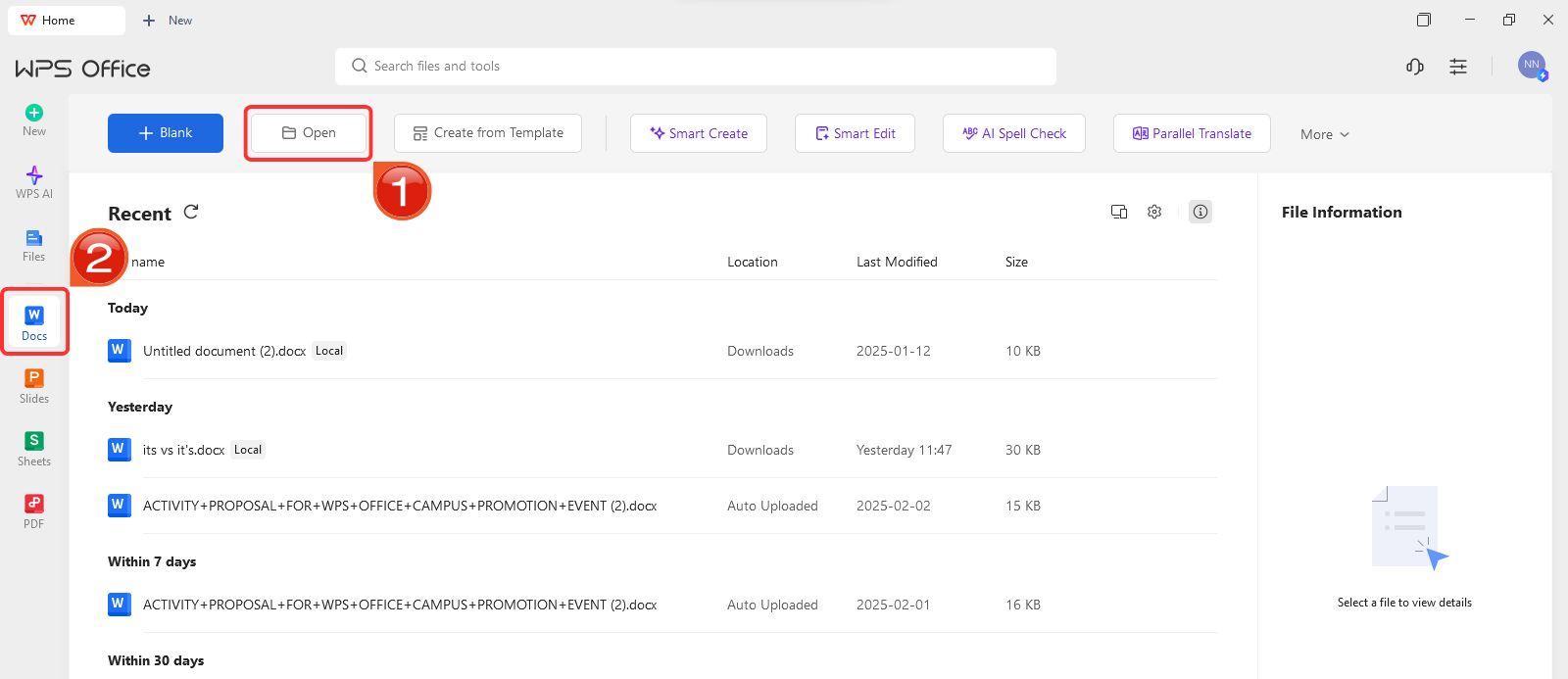
Step 4: After installation, on WPS Office, click on“Docs” from the left panel, then select“Open” to open a document in WPS Office.
Create new blank document
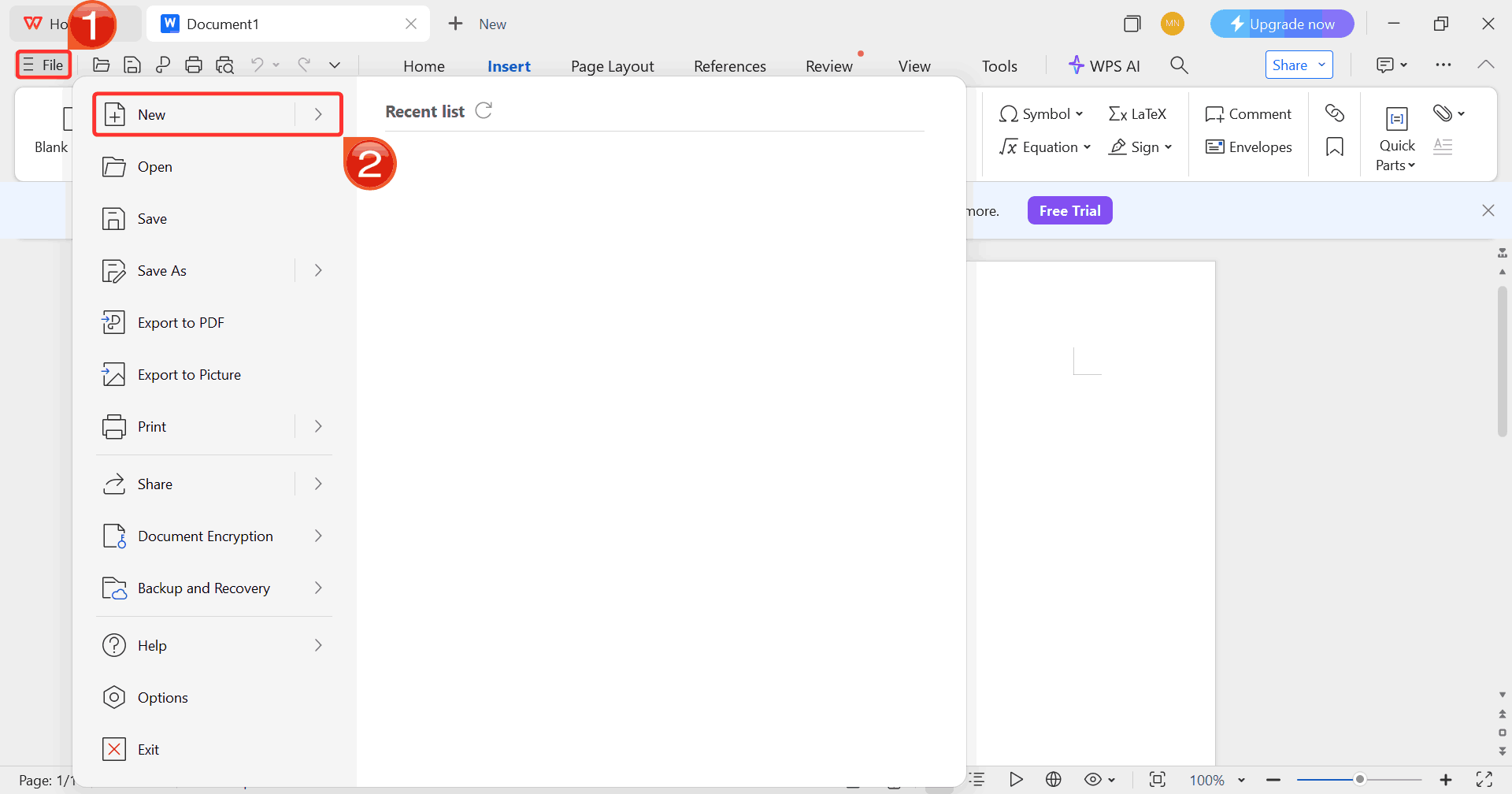
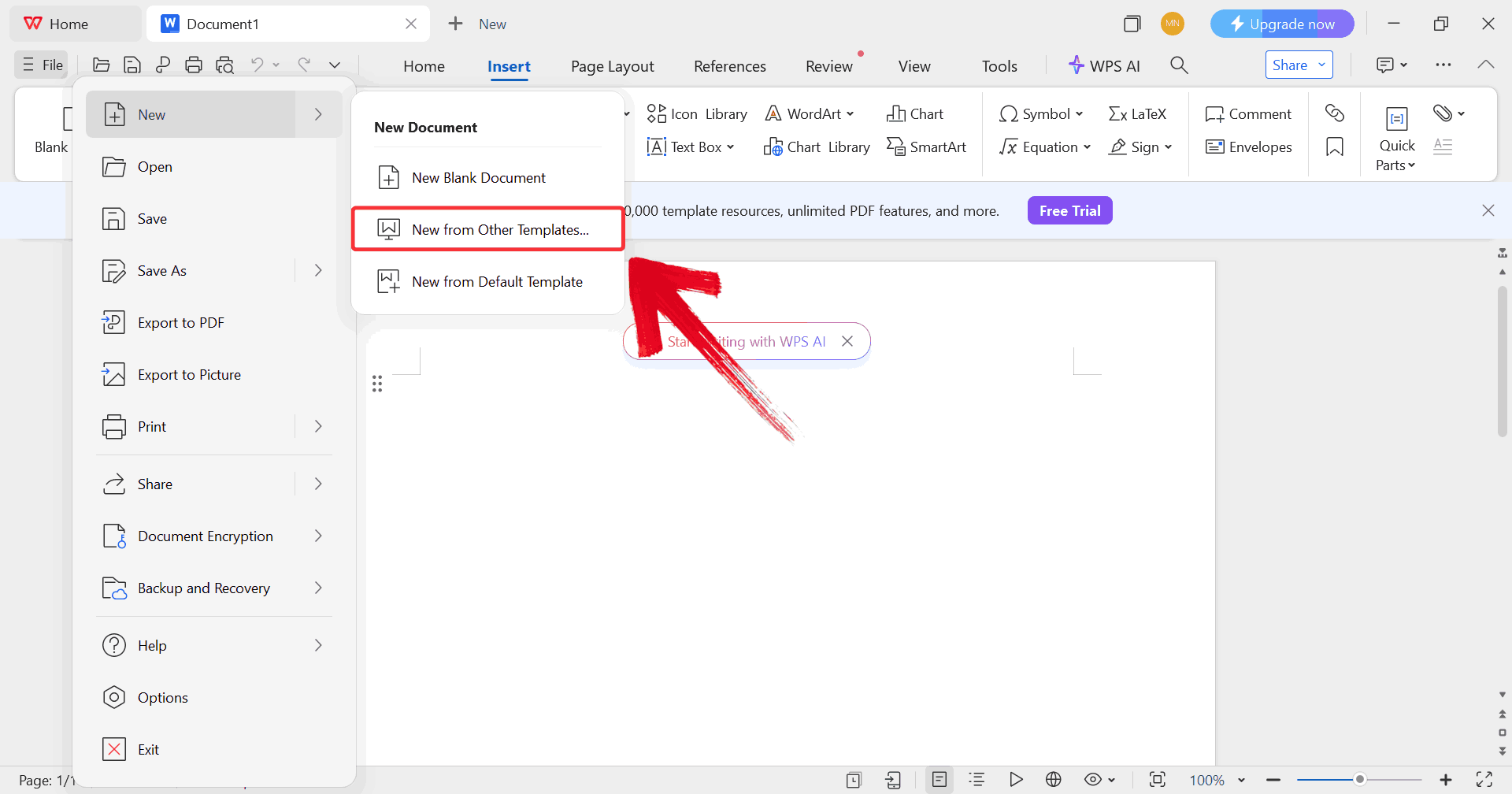
Step 5: Click on “File”, then click
on “New” to browse options for opening a blank document
or choosing from available templates.
Select New
Step 6: Click on “New from other
templates” to upload your desired template, either from your
device or directly from the WPS template library.
Upload Template
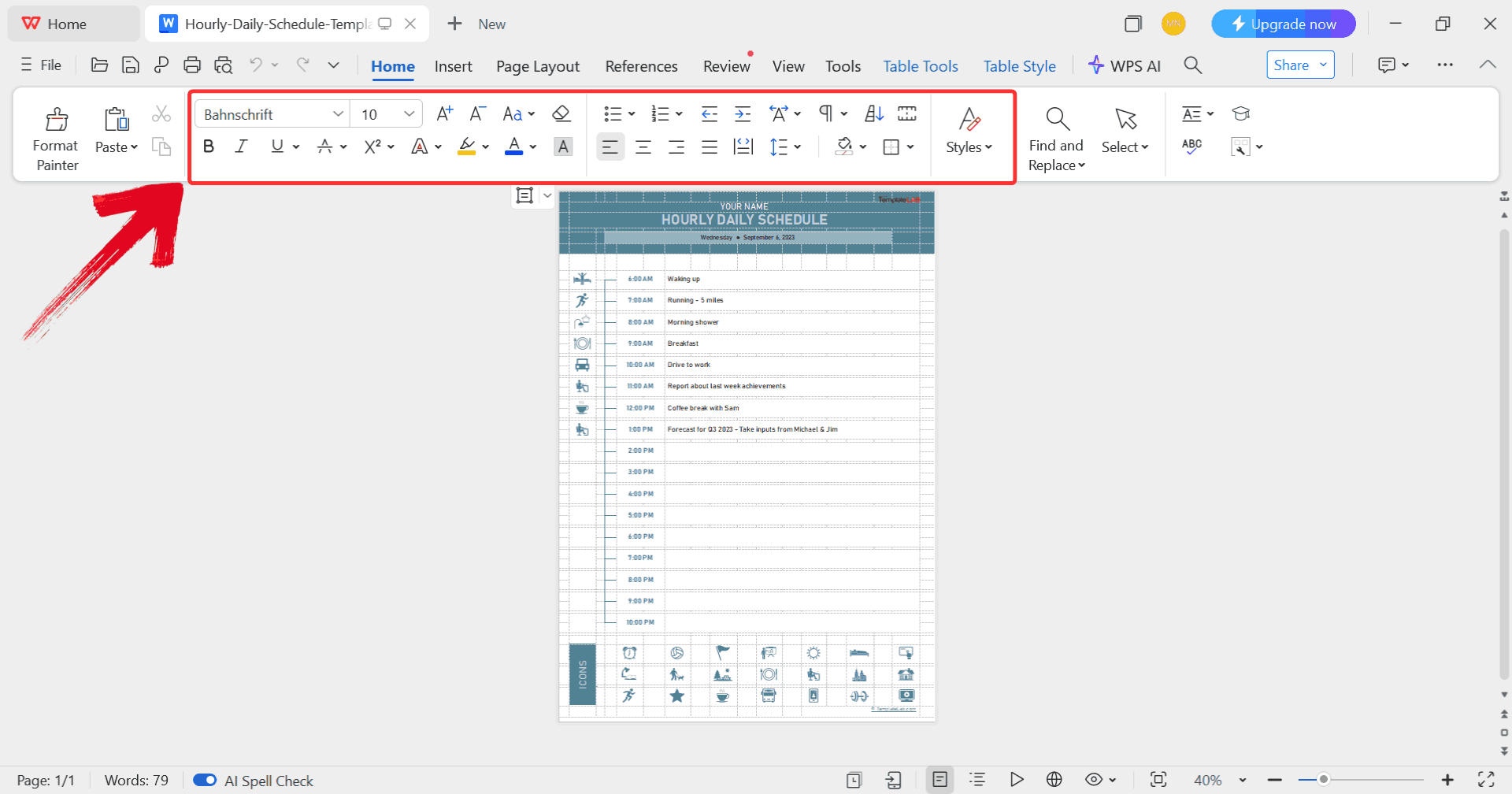
Step 7: After uploading the template, use the
toolbar at the top to edit text, swap images, change colors, and
customize other elements to match your vision.
Edit Template
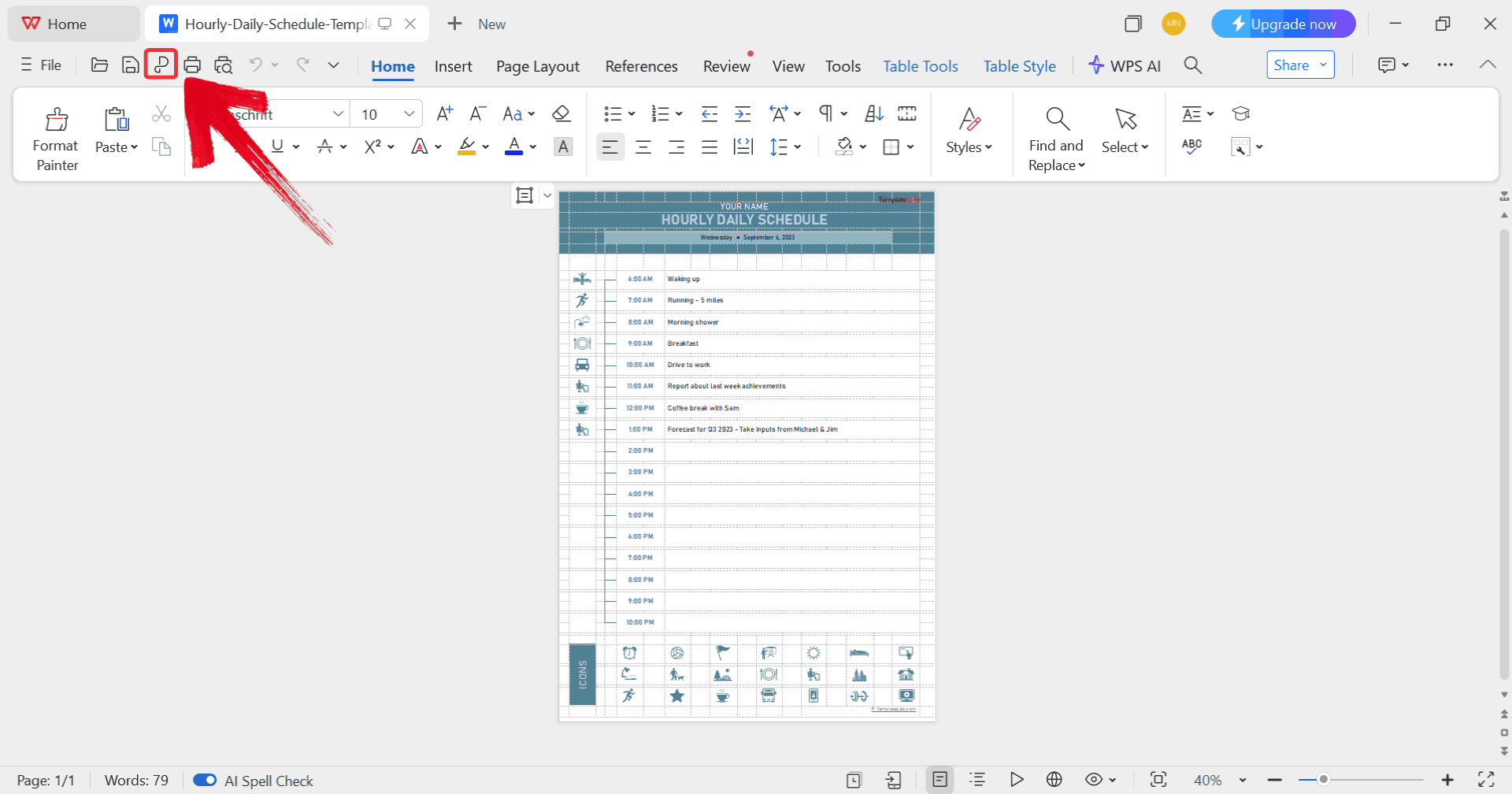
Step 8: Click on the “P” icon to
convert your template into a PDF.
Print Template
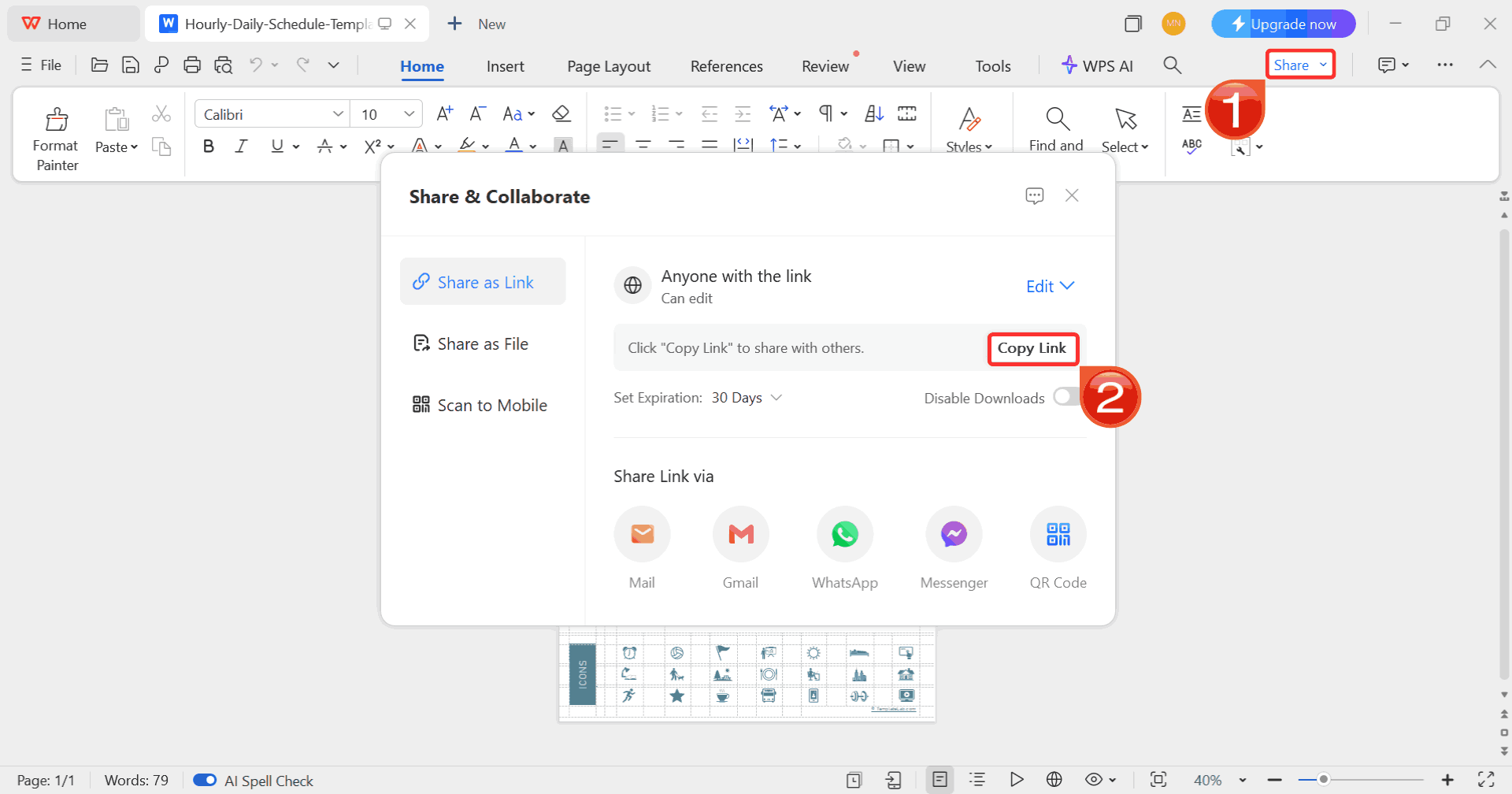
Step 9: Click on the “Share” button
then click on “Copy Link” to instantly generate a
shareable version of your template.
Copy Link
Editing in WPS
Spreadsheet (Excel Alternative)
When I switch over to WPS Spreadsheet, I like how it gives me more
control over structure especially if I want to adjust time slots or add
extra rows for notes. The grid makes it easy to keep things neat, and
simple tools like merging cells or color-coding blocks help the calendar
feel more personalized without turning messy. Here’s how to go about
it:
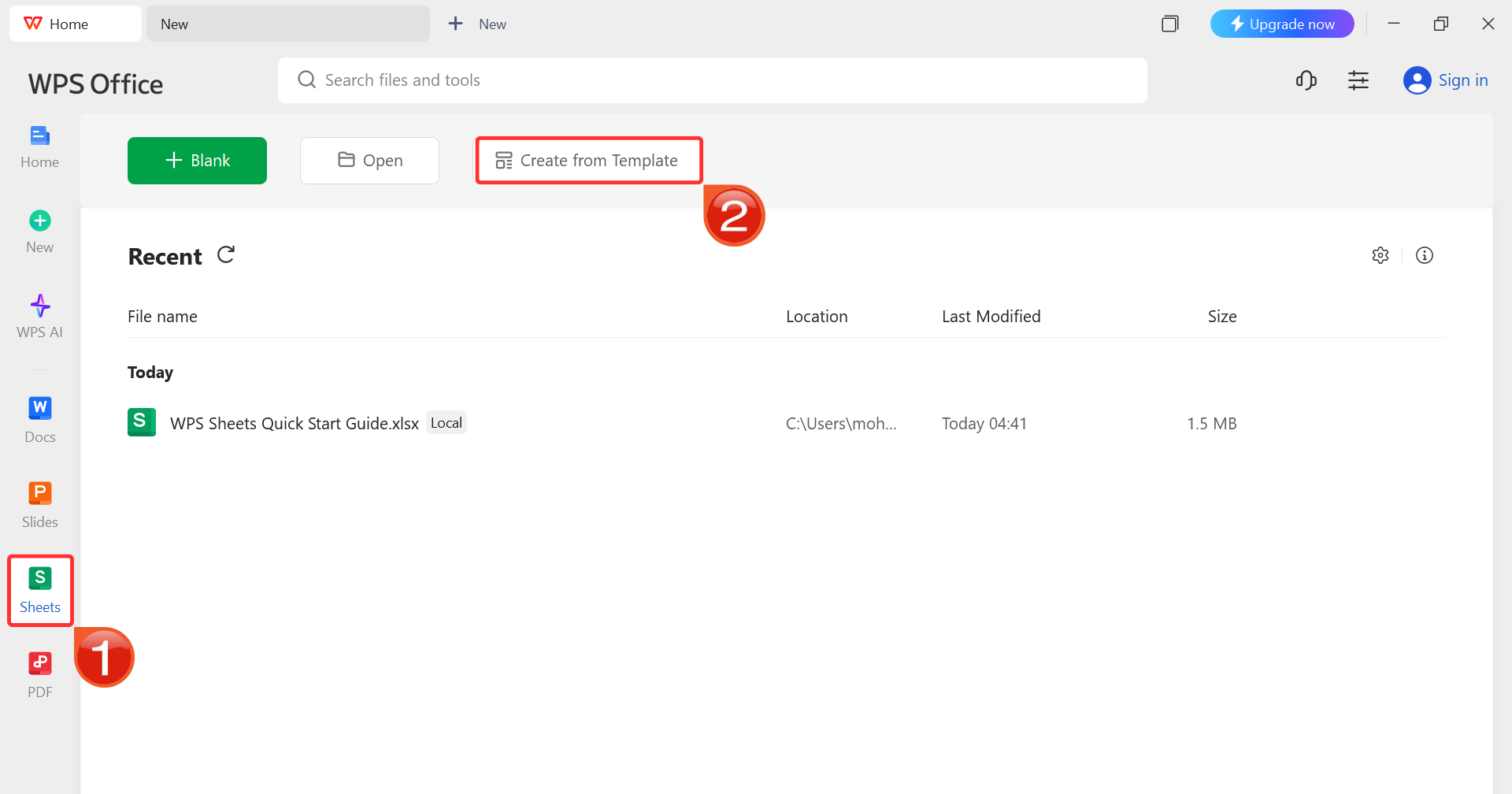
Step 1: Once you’ve launched WPS Office, click“Sheets” from the left sidebar and hit “Create
from Template” to launch WPS Spreadsheet using your desired
template.
WPS Spreadsheet Dashboard
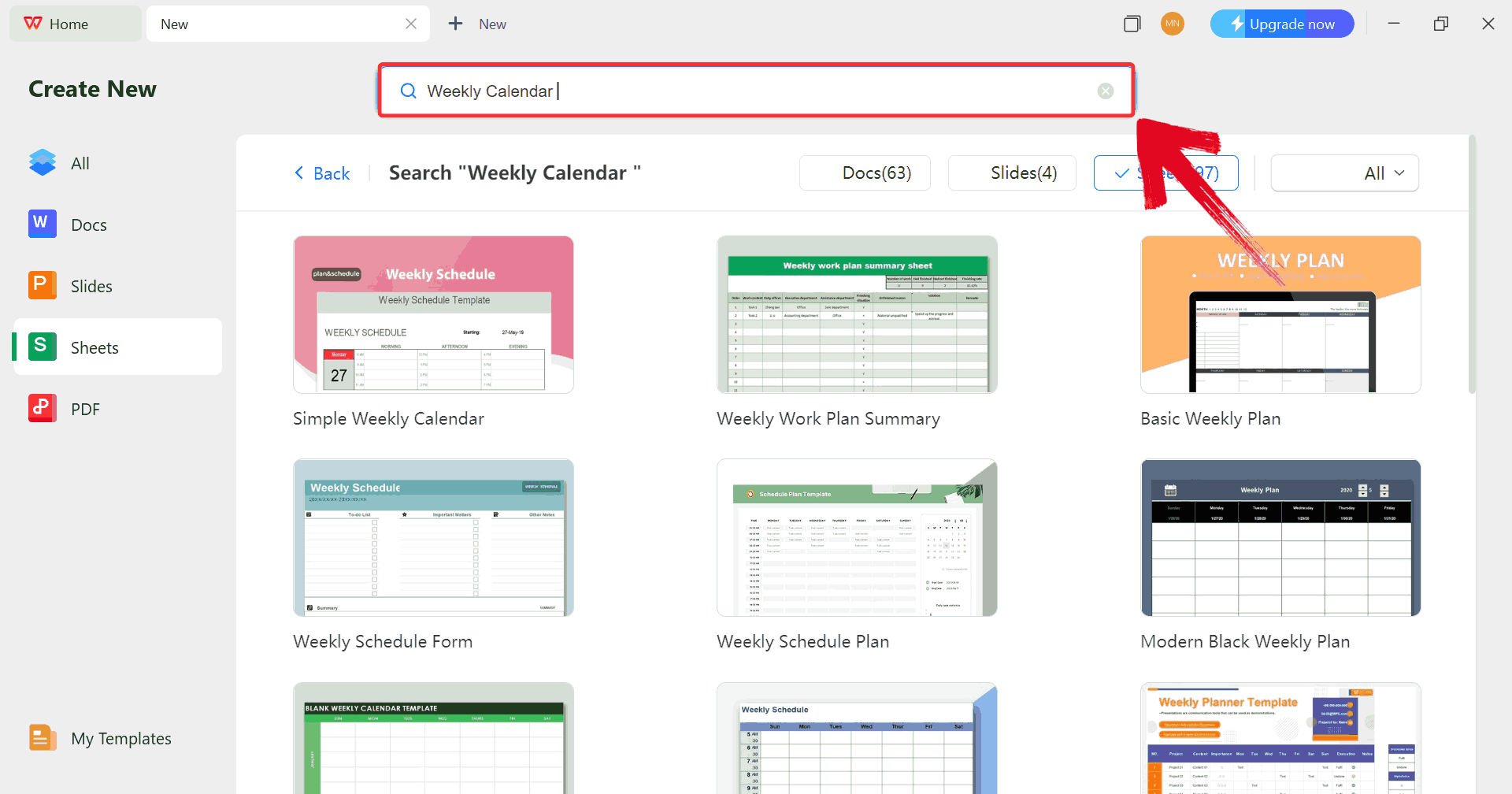
Step 2: In the template gallery’s search bar, type“weekly calendar” to see all available cash flow
statement templates ready for use.
Search Template
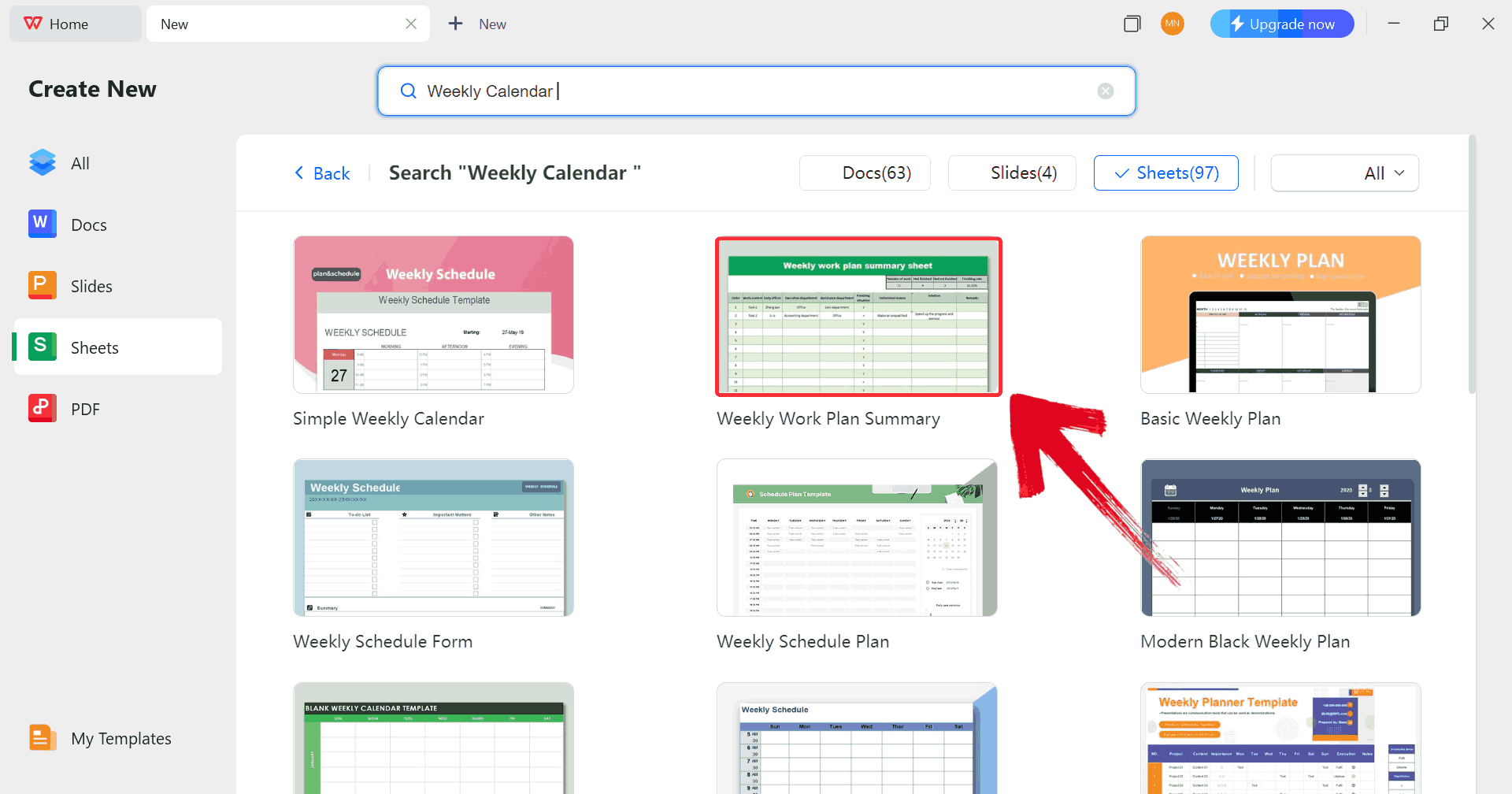
Step 3: Just click on any template that fits your
needs to open it and start customizing your template right away.
Choose Template
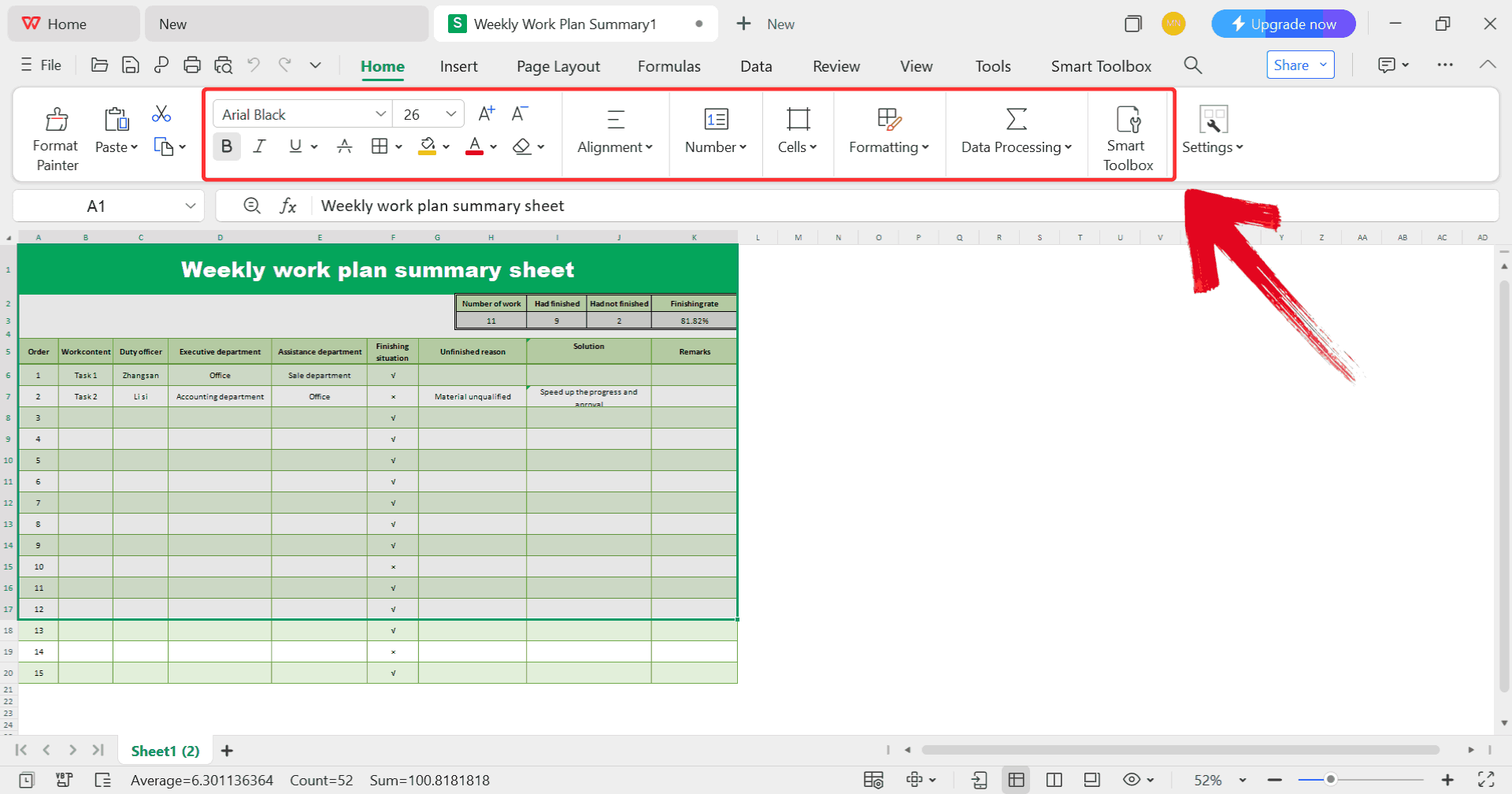
Step 4: Customize your template by entering your own
schedule, adjusting dates, and modifying categories to match your
specific routine.
Customize Template
Step 5: Once you’re done customizing your template,
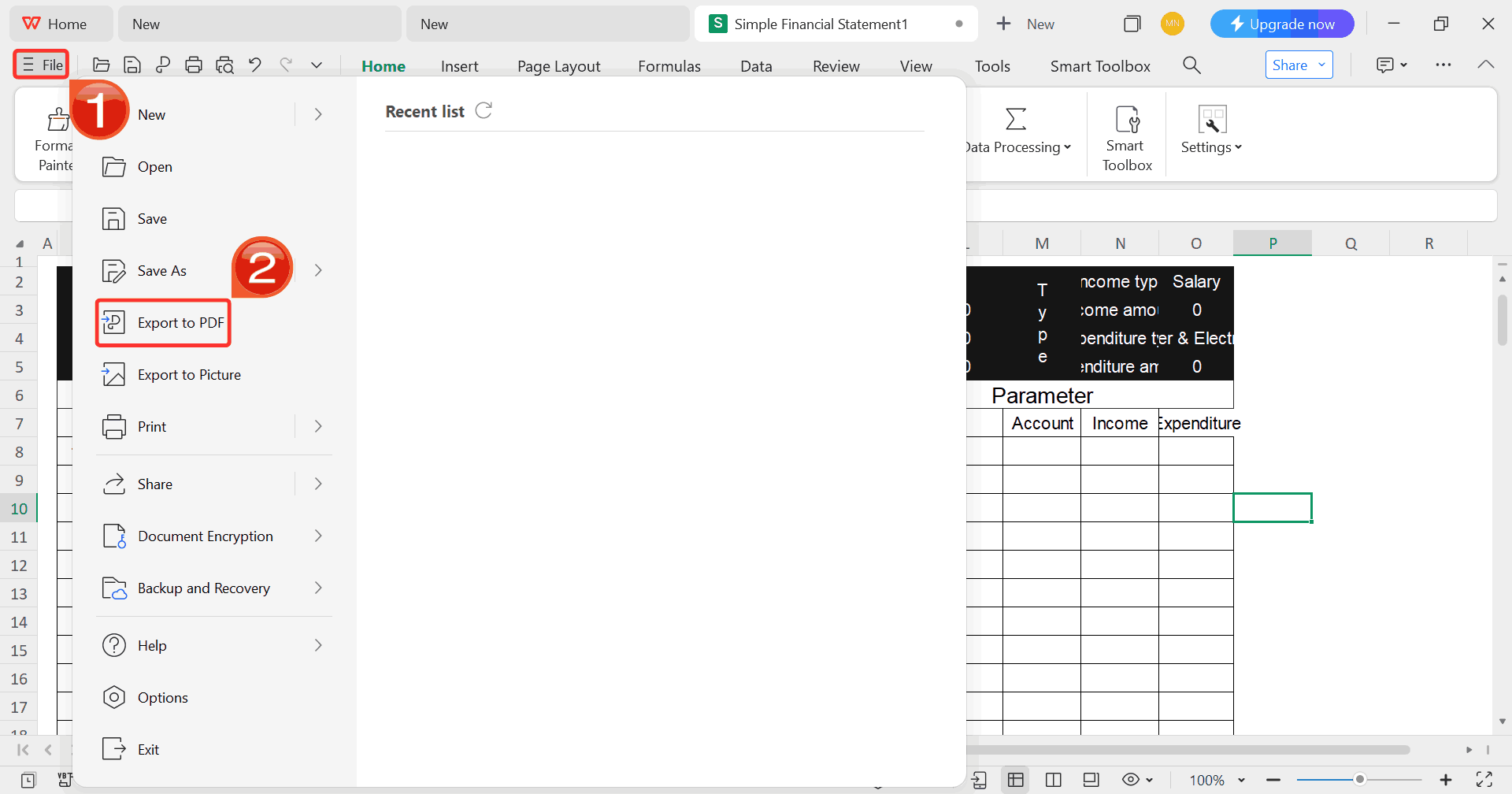
click on “File”, then select “Export to
PDF” to save your cash flow statement in a polished, shareable
format.
Export Template
Free Office
Suite with Abundant Schedule Templates
By the time I’ve figured out my schedule and set up the blocks, I
don’t want to waste extra time dealing with awful software. I need
something that lets me plan, edit, and store everything in one place.
That’s why I use WPS Office,
it’s a free suite that feels familiar if you’ve worked with Word or
Excel, but it keeps things simpler. The best part is that it already has
tons of ready-made templates, so instead of building a calendar from
scratch, I can just open one and adjust it to fit my week. It also makes
it easy to manage without the formatting getting messy.
WPS Office
Advantages:
Free and lightweight software that runs steadily on most
devices
Offers dozens of editable flyer templates to jumpstart your
design
Supports easy PDF
export and printing directly from the suite
Available in both web and desktop versions for flexible
access
If you need a quick solution for editing a half hour schedule
template without getting into advanced tools like Adobe, WPS Office is
the best option.
FAQs
1.
Where can I get free weekly calendars with half-hour intervals?
You can find them at Calendarpedia, TemplateLab, and Smartsheet.
2. Can I edit these
calendars in Word or Excel?
Yes. Both Microsoft Office and WPS Office allow you to edit templates
easily.
3. How do I customize the
time blocks?
In Excel, insert extra rows for 30-minute intervals. In Word, split
the table cells into two.
4. Can I print these
templates?
Absolutely. Once saved as PDF or Word, you can print them
directly.
5. What if the
template is hourly, not half-hour?
You can modify it. Just insert extra rows or split cells to create
30-minute slots.
6. Are online
calendars better than printable ones?
It depends. Online calendars are great for collaboration, but
printable weekly calendars with half-hour blanks are useful if you like
having something physical on your desk.
Summary
A weekly calendar with half hour blank slots adds structure to your day in ways a standard planner can’t. It’s a practical tool for bringing order to busy schedules. Professionals managing back-to-back meetings and students balancing study time rely on these calendars for the precision that hourly planners often miss. With the 10 free templates above, you don’t have to worry about building one from scratch and focus directly on planning your week.
Editing is simple too. WPS Office makes it easy to customize layouts, adjust time blocks, and add personal touches without technical roadblocks. You can save your schedule as a PDF for printing or share it online for collaboration. Its lightweight design and built-in library of templates give you flexibility across devices. By using these ready-to-go tools, you’ll always have a clear, structured overview of your week. With the right templates and WPS Office at hand, time management becomes not only efficient but almost effortless.
7+ years in productivity tech. I test and review the latest tools to simplify your workflow. Follow for honest app comparisons, practical guides, and curated tech picks to boost efficiency.


'%3e%3cpath%20d='M8%200C12.4183%200%2016%203.58172%2016%208C16%2012.4183%2012.4183%2016%208%2016C3.58172%2016%200%2012.4183%200%208C0%203.58172%203.58172%200%208%200ZM11.6162%204.38379C11.2257%203.99337%2010.5927%203.99338%2010.2021%204.38379L8%206.58594L5.79785%204.38379C5.40732%203.99334%204.77429%203.99329%204.38379%204.38379C3.99331%204.77429%203.99335%205.40733%204.38379%205.79785L6.58594%208L4.38379%2010.2021C3.99348%2010.5927%203.99341%2011.2257%204.38379%2011.6162C4.77426%2012.0066%205.40734%2012.0065%205.79785%2011.6162L8%209.41406L10.2021%2011.6162C10.5927%2012.0066%2011.2257%2012.0067%2011.6162%2011.6162C12.0067%2011.2257%2012.0066%2010.5927%2011.6162%2010.2021L9.41406%208L11.6162%205.79785C12.0066%205.40735%2012.0066%204.77429%2011.6162%204.38379Z'%20fill='%23080E17'%20fill-opacity='0.46'/%3e%3c/g%3e%3cdefs%3e%3cclipPath%20id='clip0_3761_713'%3e%3crect%20width='16'%20height='16'%20fill='white'/%3e%3c/clipPath%3e%3c/defs%3e%3c/svg%3e)




'%3e%3cpath%20fill-rule='evenodd'%20clip-rule='evenodd'%20d='M21.4999%2010.9993C21.4999%205.20009%2016.7986%200.498901%2010.9993%200.498901C5.19994%200.498901%200.498657%205.20009%200.498657%2010.9993C0.498657%2016.2404%204.33858%2020.5844%209.35855%2021.3722V14.0346H6.69238V10.9993H9.35855V8.68594C9.35855%206.05427%2010.9262%204.60062%2013.3248%204.60062C14.4736%204.60062%2015.6753%204.80571%2015.6753%204.80571V7.38979H14.3512C13.0468%207.38979%2012.64%208.19921%2012.64%209.0296V10.9993H15.5523L15.0867%2014.0346H12.64V21.3722C17.66%2020.5844%2021.4999%2016.2404%2021.4999%2010.9993Z'%20fill='%231568EA'/%3e%3c/g%3e%3c/svg%3e)


'%3e%3cpath%20d='M2.42045%2022.1876H6.31818V12.7217L0.75%208.54553V20.5171C0.75%2021.4414%201.49892%2022.1876%202.42045%2022.1876Z'%20fill='%234285F4'/%3e%3cpath%20d='M19.682%2022.1876H23.5797C24.5041%2022.1876%2025.2502%2021.4387%2025.2502%2020.5171V8.54553L19.682%2012.7217'%20fill='%2334A853'/%3e%3cpath%20d='M19.682%205.48293V12.7216L25.2502%208.54543V6.31816C25.2502%204.25236%2022.8921%203.07469%2021.2411%204.31361'%20fill='%23FBBC04'/%3e%3cpath%20d='M6.31824%2012.7217V5.48303L13.0001%2010.4944L19.6819%205.48303V12.7217L13.0001%2017.733'%20fill='%23EA4335'/%3e%3cpath%20d='M0.75%206.31816V8.54543L6.31818%2012.7216V5.48293L4.75909%204.31361C3.10534%203.07469%200.75%204.25236%200.75%206.31816Z'%20fill='%23C5221F'/%3e%3c/g%3e%3cdefs%3e%3cclipPath%20id='clip0_2954_7305'%3e%3crect%20width='24.5'%20height='18.375'%20fill='white'%20transform='translate(0.75%203.8125)'/%3e%3c/clipPath%3e%3c/defs%3e%3c/svg%3e)


 10. Smartsheet Excel Sample
[Excel]
10. Smartsheet Excel Sample
[Excel]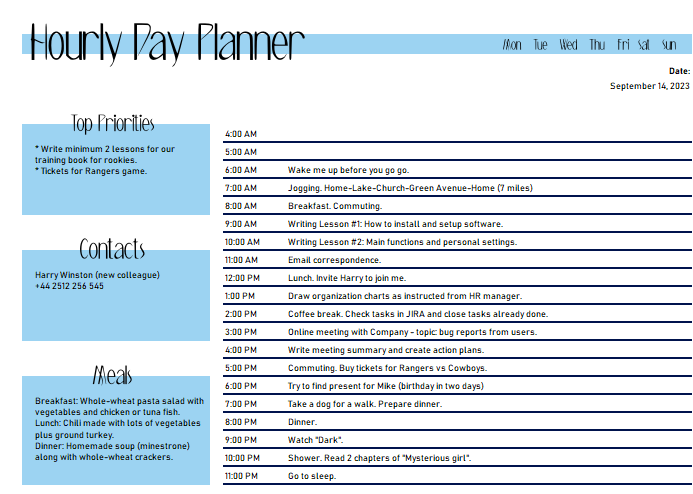

'%3e%3cpath%20d='M19.9911%204.11386V6.471H18.5894C18.0775%206.471%2017.7322%206.57814%2017.5536%206.79243C17.3751%207.00671%2017.2858%207.32814%2017.2858%207.75671V9.44421H19.9019L19.5536%2012.0871H17.2858V18.8639H14.5536V12.0871H12.2769V9.44421H14.5536V7.49779C14.5536%206.39064%2014.8632%205.53201%2015.4822%204.92189C16.1013%204.31177%2016.9257%204.00671%2017.9554%204.00671C18.8304%204.00671%2019.509%204.04243%2019.9911%204.11386Z'%20fill='%23333333'/%3e%3c/g%3e%3cdefs%3e%3cclipPath%20id='clip0_2938_8199'%3e%3crect%20width='16'%20height='16'%20fill='white'%20transform='translate(8%204.00671)'/%3e%3c/clipPath%3e%3c/defs%3e%3c/svg%3e)
'%3e%3cpath%20d='M17.5237%2010.7813L23.4811%204H22.0699L16.8949%209.88693L12.7648%204H8L14.2469%2012.9029L8%2020.0133H9.4112L14.8725%2013.7952L19.2352%2020.0133H24M9.92053%205.04213H12.0885L22.0688%2019.0224H19.9003'%20fill='%23333333'/%3e%3c/g%3e%3cdefs%3e%3cclipPath%20id='clip0_2938_8200'%3e%3crect%20width='16'%20height='16.0134'%20fill='white'%20transform='translate(8%204)'/%3e%3c/clipPath%3e%3c/defs%3e%3c/svg%3e)


