

'%3e%3cpath%20d='M8%200C12.4183%200%2016%203.58172%2016%208C16%2012.4183%2012.4183%2016%208%2016C3.58172%2016%200%2012.4183%200%208C0%203.58172%203.58172%200%208%200ZM11.6162%204.38379C11.2257%203.99337%2010.5927%203.99338%2010.2021%204.38379L8%206.58594L5.79785%204.38379C5.40732%203.99334%204.77429%203.99329%204.38379%204.38379C3.99331%204.77429%203.99335%205.40733%204.38379%205.79785L6.58594%208L4.38379%2010.2021C3.99348%2010.5927%203.99341%2011.2257%204.38379%2011.6162C4.77426%2012.0066%205.40734%2012.0065%205.79785%2011.6162L8%209.41406L10.2021%2011.6162C10.5927%2012.0066%2011.2257%2012.0067%2011.6162%2011.6162C12.0067%2011.2257%2012.0066%2010.5927%2011.6162%2010.2021L9.41406%208L11.6162%205.79785C12.0066%205.40735%2012.0066%204.77429%2011.6162%204.38379Z'%20fill='%23080E17'%20fill-opacity='0.46'/%3e%3c/g%3e%3cdefs%3e%3cclipPath%20id='clip0_3761_713'%3e%3crect%20width='16'%20height='16'%20fill='white'/%3e%3c/clipPath%3e%3c/defs%3e%3c/svg%3e)




'%3e%3cpath%20fill-rule='evenodd'%20clip-rule='evenodd'%20d='M21.4999%2010.9993C21.4999%205.20009%2016.7986%200.498901%2010.9993%200.498901C5.19994%200.498901%200.498657%205.20009%200.498657%2010.9993C0.498657%2016.2404%204.33858%2020.5844%209.35855%2021.3722V14.0346H6.69238V10.9993H9.35855V8.68594C9.35855%206.05427%2010.9262%204.60062%2013.3248%204.60062C14.4736%204.60062%2015.6753%204.80571%2015.6753%204.80571V7.38979H14.3512C13.0468%207.38979%2012.64%208.19921%2012.64%209.0296V10.9993H15.5523L15.0867%2014.0346H12.64V21.3722C17.66%2020.5844%2021.4999%2016.2404%2021.4999%2010.9993Z'%20fill='%231568EA'/%3e%3c/g%3e%3c/svg%3e)


'%3e%3cpath%20d='M2.42045%2022.1876H6.31818V12.7217L0.75%208.54553V20.5171C0.75%2021.4414%201.49892%2022.1876%202.42045%2022.1876Z'%20fill='%234285F4'/%3e%3cpath%20d='M19.682%2022.1876H23.5797C24.5041%2022.1876%2025.2502%2021.4387%2025.2502%2020.5171V8.54553L19.682%2012.7217'%20fill='%2334A853'/%3e%3cpath%20d='M19.682%205.48293V12.7216L25.2502%208.54543V6.31816C25.2502%204.25236%2022.8921%203.07469%2021.2411%204.31361'%20fill='%23FBBC04'/%3e%3cpath%20d='M6.31824%2012.7217V5.48303L13.0001%2010.4944L19.6819%205.48303V12.7217L13.0001%2017.733'%20fill='%23EA4335'/%3e%3cpath%20d='M0.75%206.31816V8.54543L6.31818%2012.7216V5.48293L4.75909%204.31361C3.10534%203.07469%200.75%204.25236%200.75%206.31816Z'%20fill='%23C5221F'/%3e%3c/g%3e%3cdefs%3e%3cclipPath%20id='clip0_2954_7305'%3e%3crect%20width='24.5'%20height='18.375'%20fill='white'%20transform='translate(0.75%203.8125)'/%3e%3c/clipPath%3e%3c/defs%3e%3c/svg%3e)


Making a profit and loss statement takes a lot of energy and work, and having something that can cut down that effort is a game changer. Profit and loss statement templates do just that by giving you ready-made statements, but the problem is that some of them are not editable and others are not free. In this guide, I’ll walk you through everything you need to know about profit and loss statements and share 10 of the best free templates that are also editable. On top of that, I’ll also introduce you to WPS Office, which makes editing these templates very easy.
How to Create a Profit and Loss Statement
Before getting into all the details of where you can find the bestprofit and loss statement templates and how to easily edit them, let’s first look at what a profit and loss statement actually is and what purpose it serves.
What is a Profit and Loss Statement
A profit and loss statement is a financial tool that helps you record your company’s revenues, costs, expenses, and overall profit or loss for a specific period. It makes it easier to calculate profit and see if the business is actually running at a gain or a loss. These statements also let you compare your company’s performance with others in the same industry, or even track your own progress against last month or last year.
Different Types of a Profit and Loss Statement
There are essentially two types of profit and loss statements: the cash method and the accrual method.
Cash method:
The cash method is when you only account for cash received and cash paid. Revenue is recorded only when you actually receive the cash, and liabilities are recorded only when the cash is paid.
Accrual method:
The accrual method works a bit differently. In this method, revenueis recorded when the company is expected to receive the cash, even if it hasn’t been received yet. Similarly, liabilities are recorded when an expense is expected, even if it hasn’t been paid yet.
Components of a Profit and Loss Statement
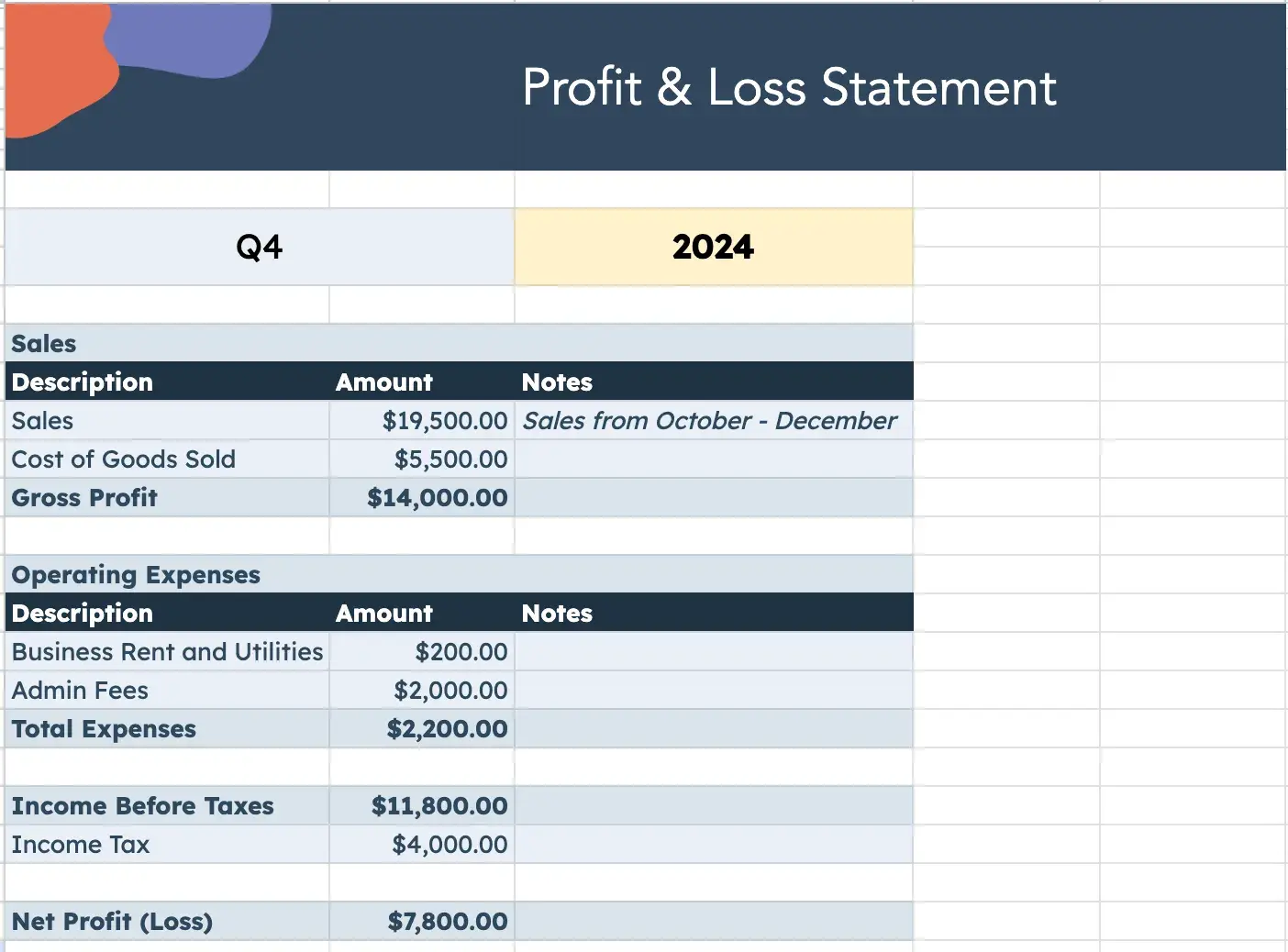
A typical loss statement is built around four key elements. It starts with revenue or sales, which capture the total income earned. The second is cost of goods sold (COGS), covering direct costs tied to production. Subtracting COGS leads to gross profit, which shows earnings before expenses. The fourth element is operating expenses, such as rent, salaries, and utilities.
Beyond these, additional elements may include interest expenses, taxes, and non-operating items. Together, these sections lead to the final figure: net income, showing whether the business has achieved a profit or incurred a loss.
Top 10 Editable Profit and Loss Statement Templates [Free Download]
When I was searching for profit and loss statement templates, I came across a lot of them. After filtering and testing, I finally picked out the 10 best editable profit and loss statement templates, and I’ll go through each of them one by one.
1. Financial Income and Expenditure Accounting Statement
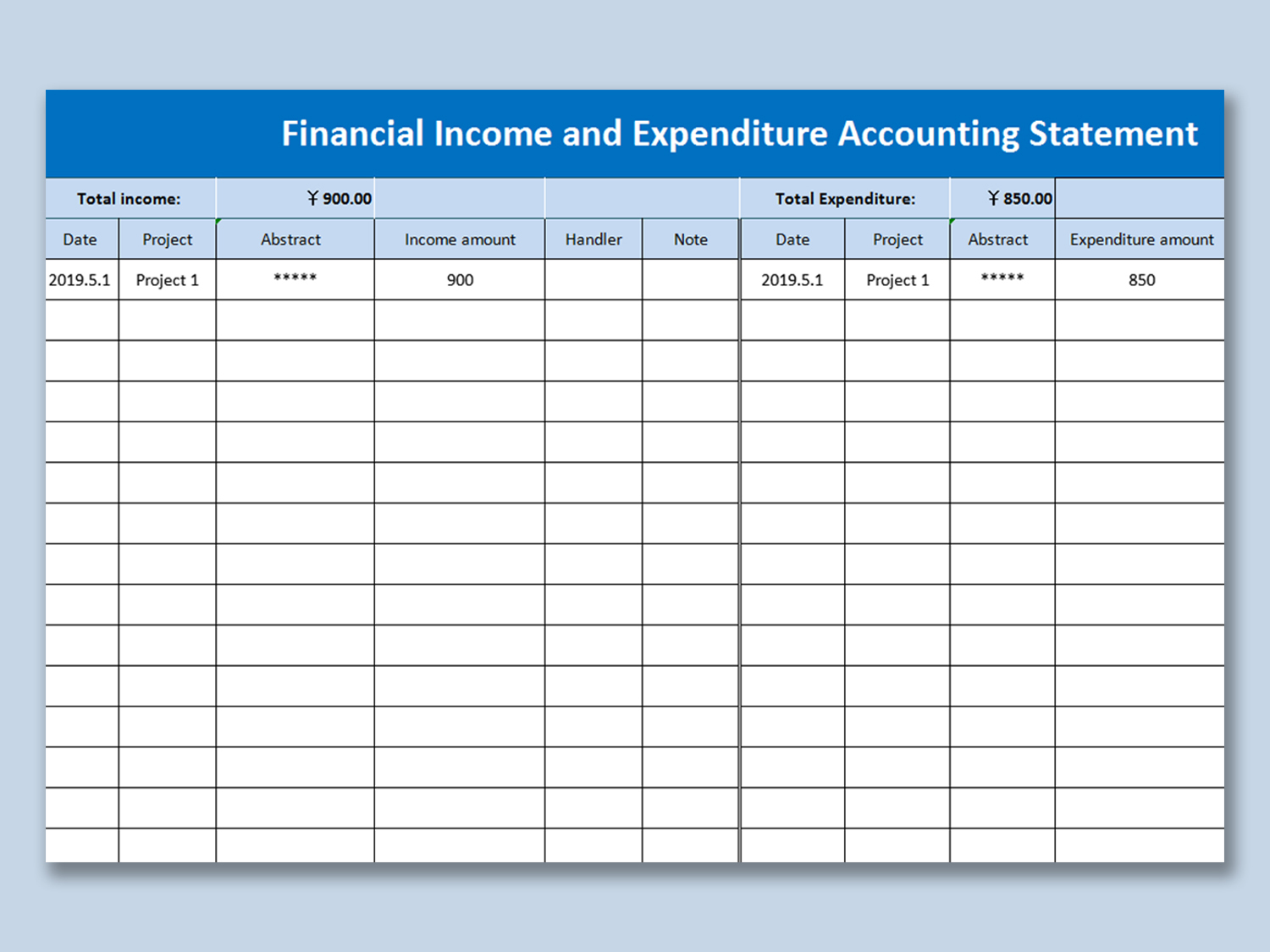
Financial Income and Expenditure Accounting Statement is a free profitand loss statement template. It works like a generic profit and loss statement, but the unique part is that it has a separate space for notes and the handler’s name.
2. Store Profit and Loss Analysis Table
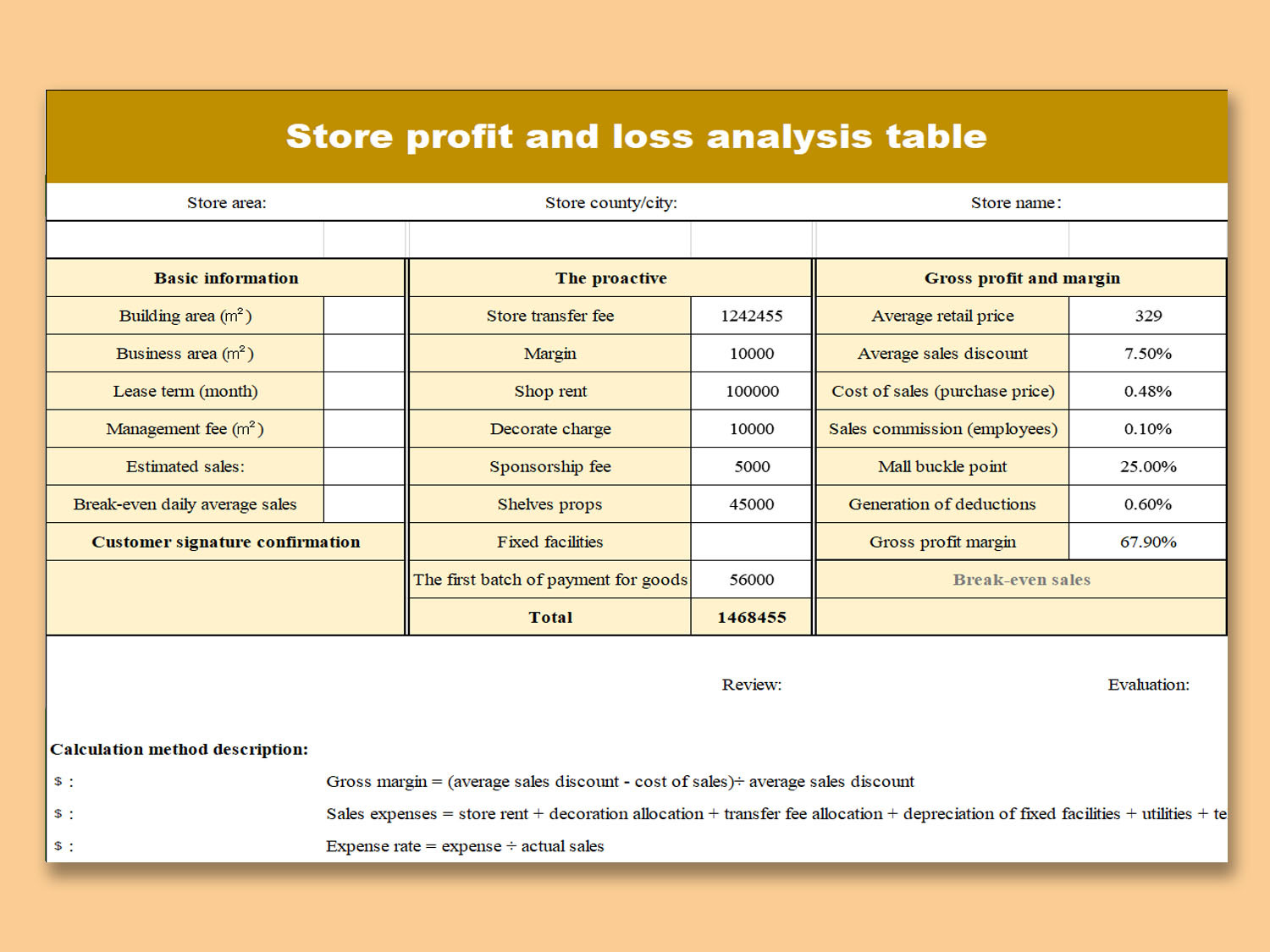
Store Profit and Loss Analysis Table is the best profit and loss statement if you are a store owner. It has a separate space for gross profit margins and store information, which makes it a perfect fit for managing store finances.
3. Profit and Loss statement (with logo)
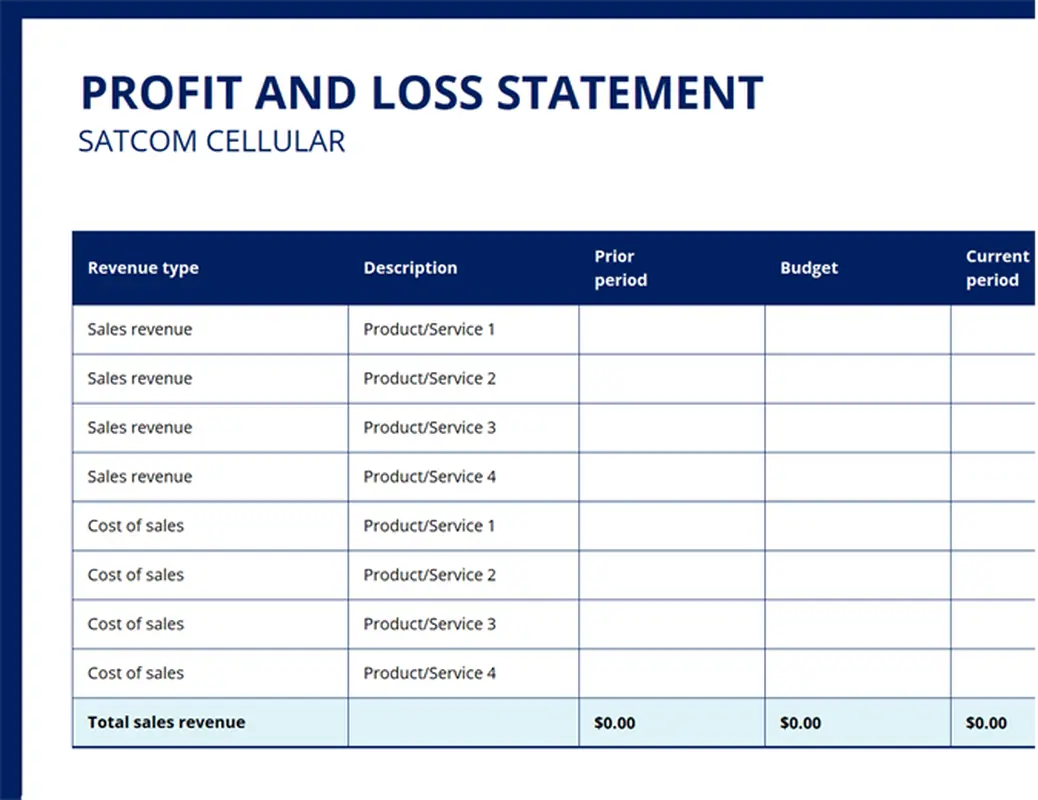
Profit and Loss Statement (with Logo) is another good template. The best part about it is that it’s more detailed. It gives you space to add revenue types, descriptions, budgets, and even allows you to paste your own logo on the statement.
4. Profit and Loss Income Statement
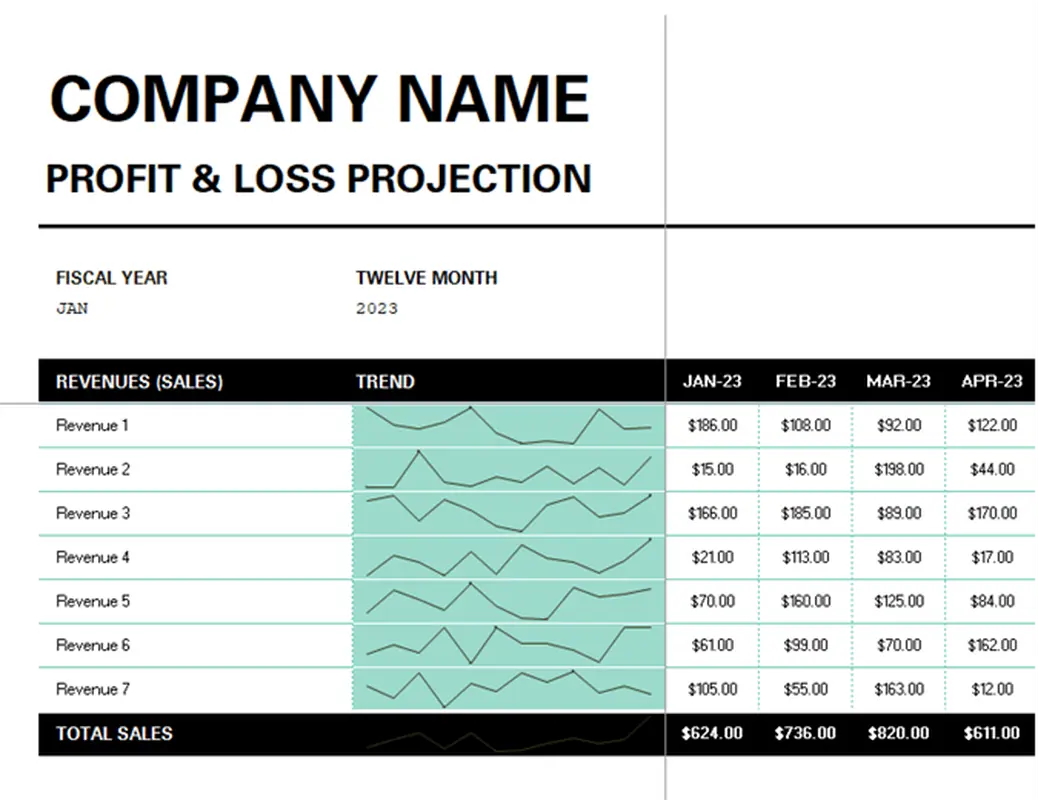
Profit and Loss Income Statement is best if you want to project your profit and loss. It helps you track profits or losses month by month and even provides a trend line for better analysis.
5. Simple Profit and Loss Statement
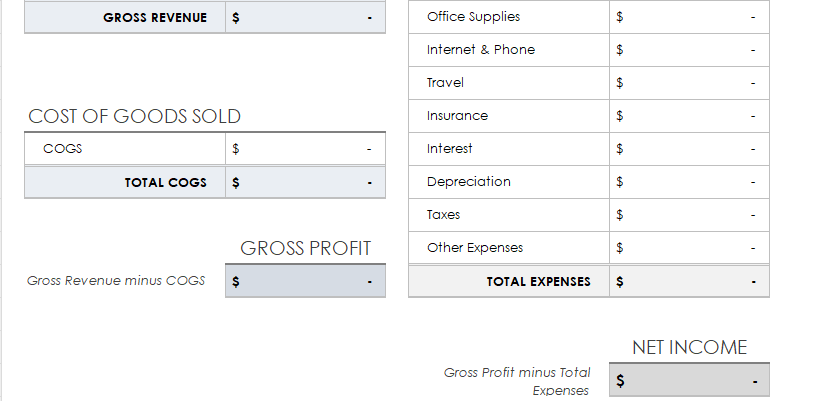
Simple Profit and Loss Statement is best if you don’t like clutter. It separates each component clearly, which makes it easier to read the profit and loss statement and analyze your business performance.
6. Monthly Profit and Loss Template
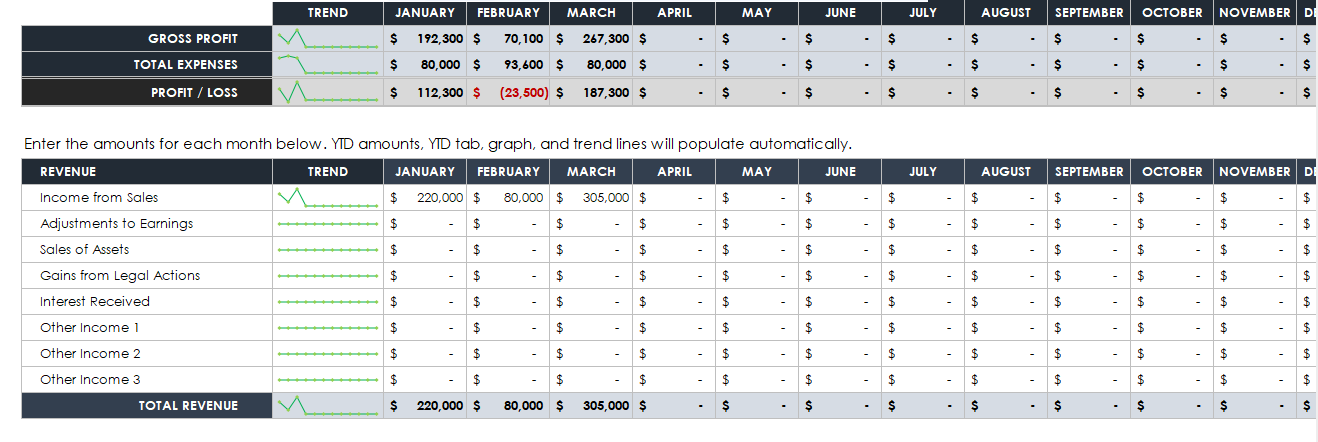
Monthly Profit and Loss Template is another good option that helps you project your revenue, expenses, and profit in detail. It also makes it easy to compare your profit with previous months.
7. Annual Profit and Loss Template Sample
Annual Profit and Loss Template Sample is like a normal generic profit and loss statement, but the unique thing about it is that it helps you compare your current profit and loss with your projected profit and loss statements for the coming years.
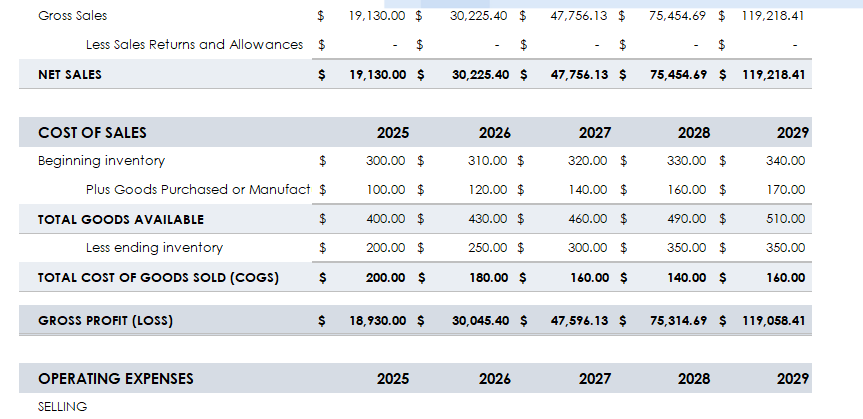
8. Quarterly Profit and Loss Statement
Quarterly Profit and Loss Statement is best if you want to divide your statement into quarters and assess your performance every three months.
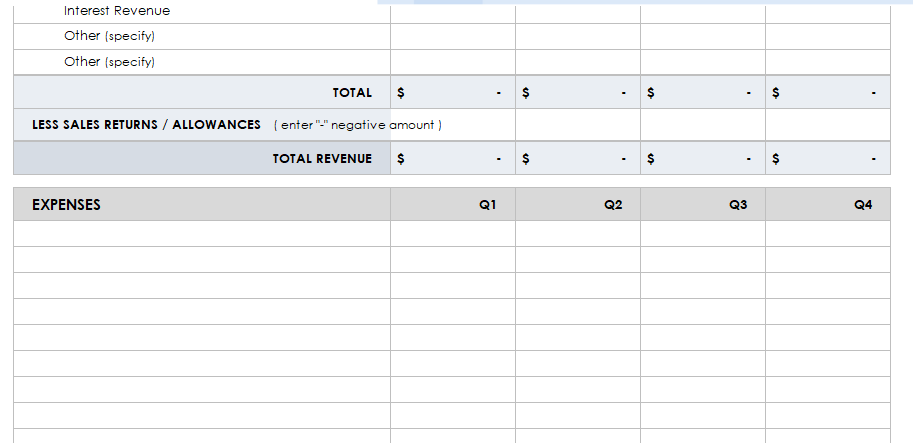
9. Self-Employed Profit and Loss Template
Self-Employed Profit and Loss Template is perfect if you want to record your income in more detail, like which client paid how much. It even has a separate table for tracking your taxes.
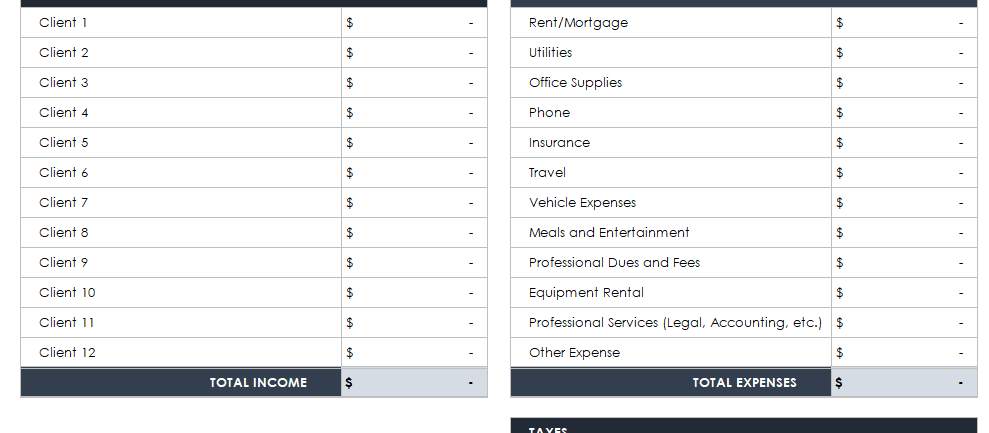
10. Hotel Profit and Loss Statement
Hotel Profit and Loss Statement is the best template if you are a hotel owner. It includes everything you’ll need, from guest reservations to staff wages, all in one place.
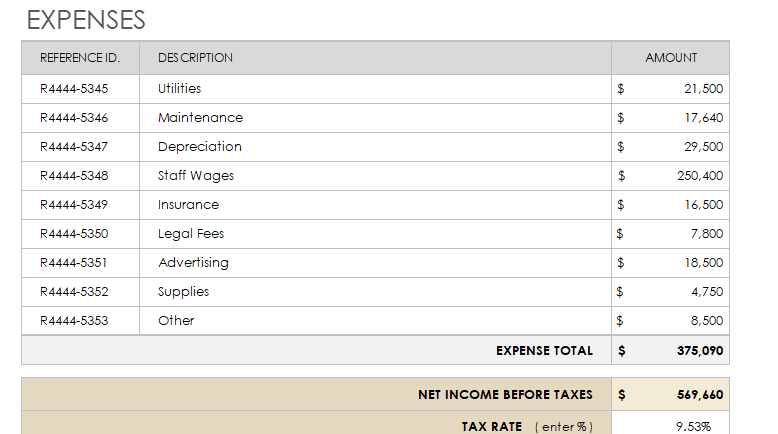
How to Edit and Print Profit and Loss Statement Template in Excel
Now that you have gone through the profit and loss statement examplesand chosen the templates that best suit your needs, let’s look at how you can edit them easily using WPS Office.
Step 1: Open your chosen templatein WPS Spreadsheet.
Step 2: Click on the cells and start entering your data like revenue, expenses, and profit.
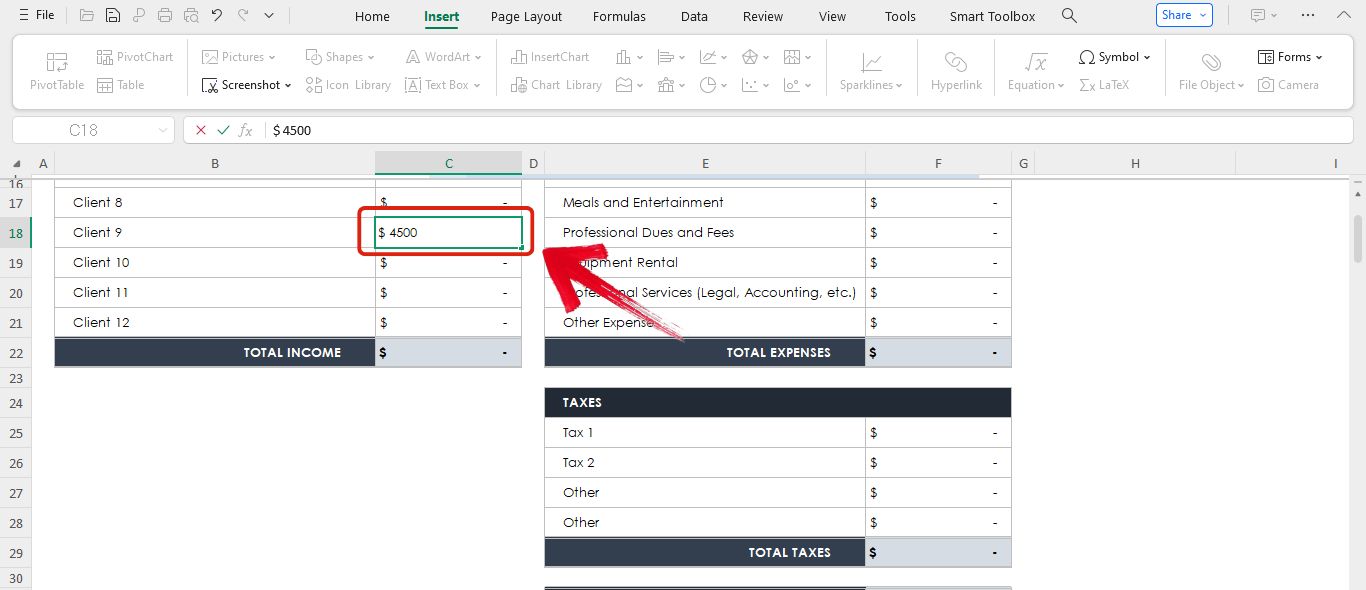
Step 3: If you want to insert a row or a column for categories like notes, just right click on the table, go to Insert, and then add the row below.
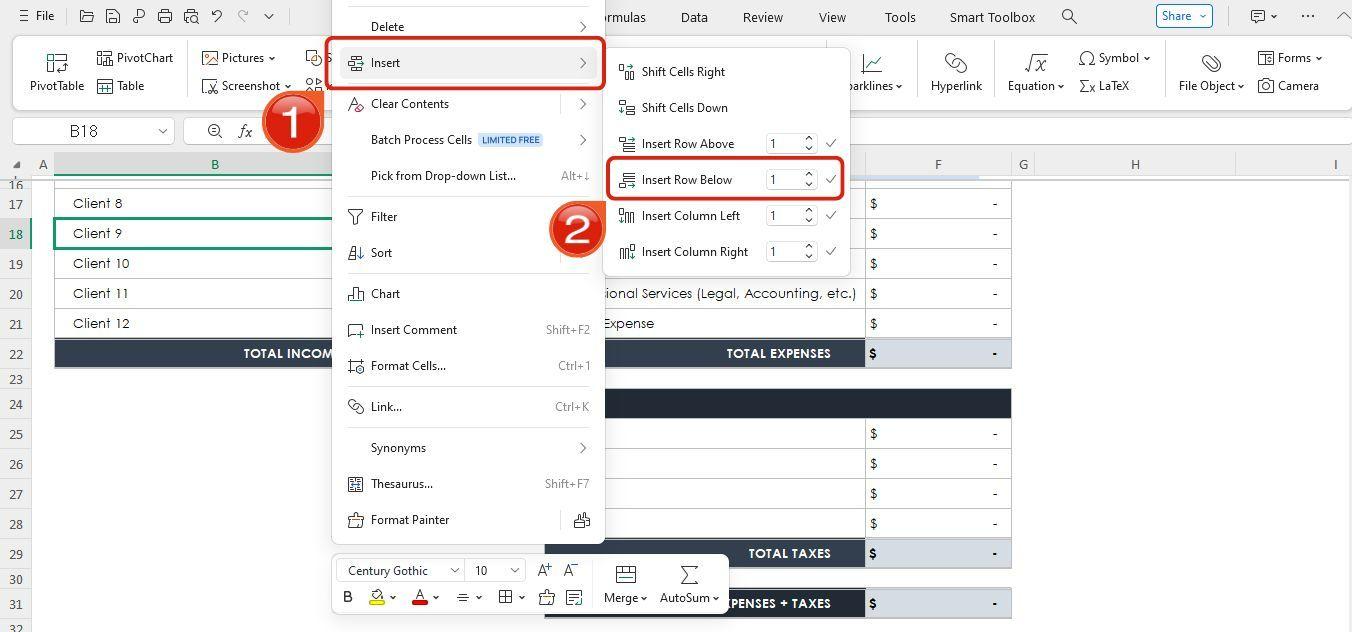
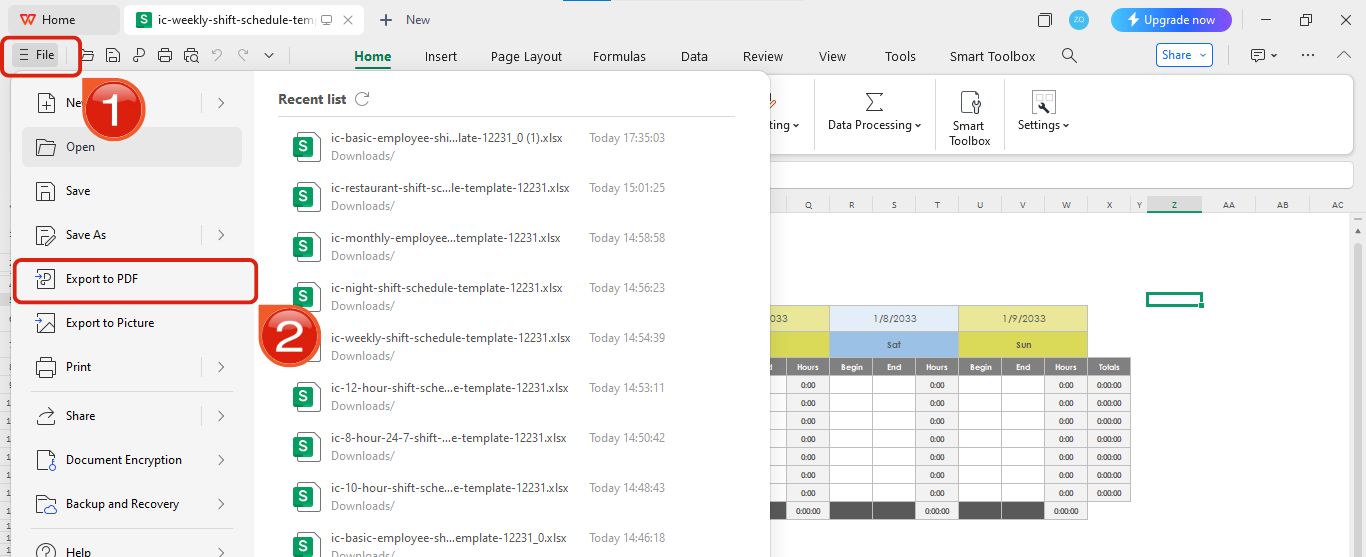
Step 4: Once you’re done filling it up, click on the three lines icon in the top left, then select Export to PDF.
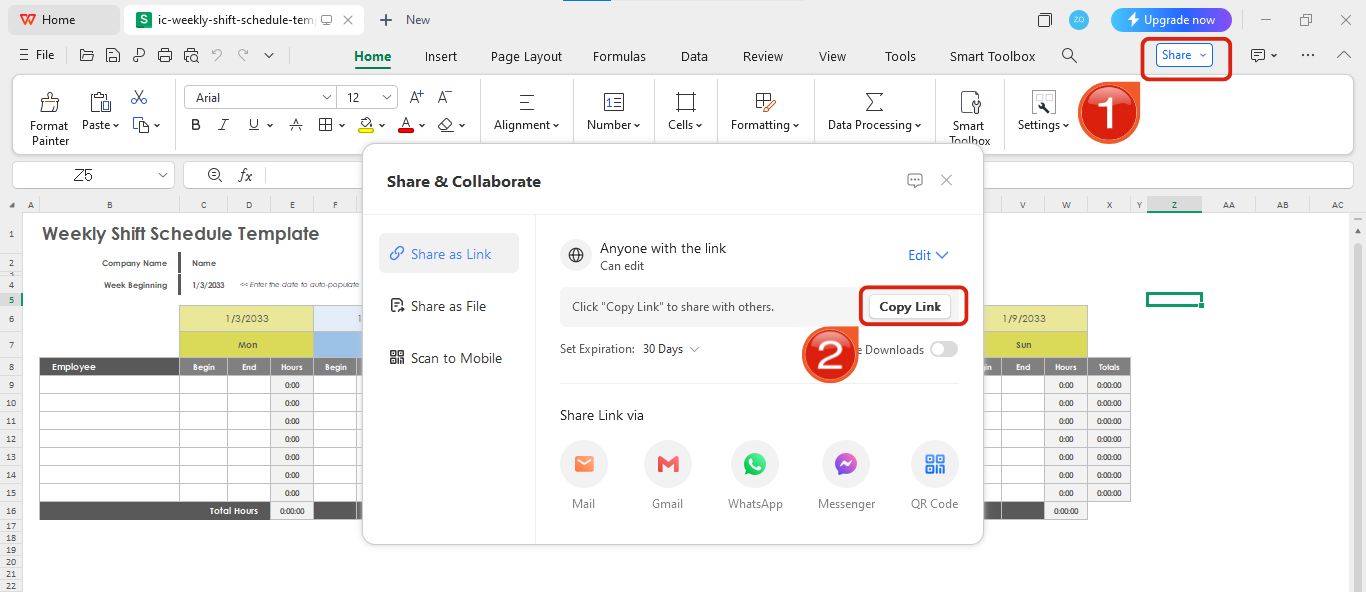
Step 5: If you want to share an online link of this template, simply click on Share and then Copy Link.
Tips for Creating a Profit and Loss Statement
After knowing how to create a profit and loss statement, let’s look at some tips that will help you create a better one next time.
Tip 1: Select your preferred period
Before jumping into creating a profit and loss statement, choose your preferred period like whether you want a monthly profit and loss statement, a quarterly one, or a yearly one.
Tip 2: Be clear with categories
When making a profit and loss statement don’t just throw everything under one heading. Separate your revenue streams and expenses properly so it’s easier to analyze later.
Tip 3: Keep receipts and records ready
Before you start filling the statement make sure you have all your receipts, invoices, and payment proofs ready. This will save you a lot of confusion.
Tip 4: Don’t ignore small expenses
Even the little costs like software subscriptions or coffee for meetings matter. Add them up because they also affect your actual profit.
Tip 5: Review and compare regularly
Once your statement is ready don’t just save it and forget. Compare it with last month or last year’s statement to see if your business is actually growing.
Free Office Suite with Editable Templates & Smart AI
If you're looking for a free and reliable office suite then WPS Office is the way to go. It’s not just for opening or viewing documents. It actually lets you edit almost any kind of filewith ease. Compared to other options out there, WPS Office really stands out, especially because of its built-in AI tools that make everything tentimes easier and faster. Plus its simple interface makes it super easy to navigate things.
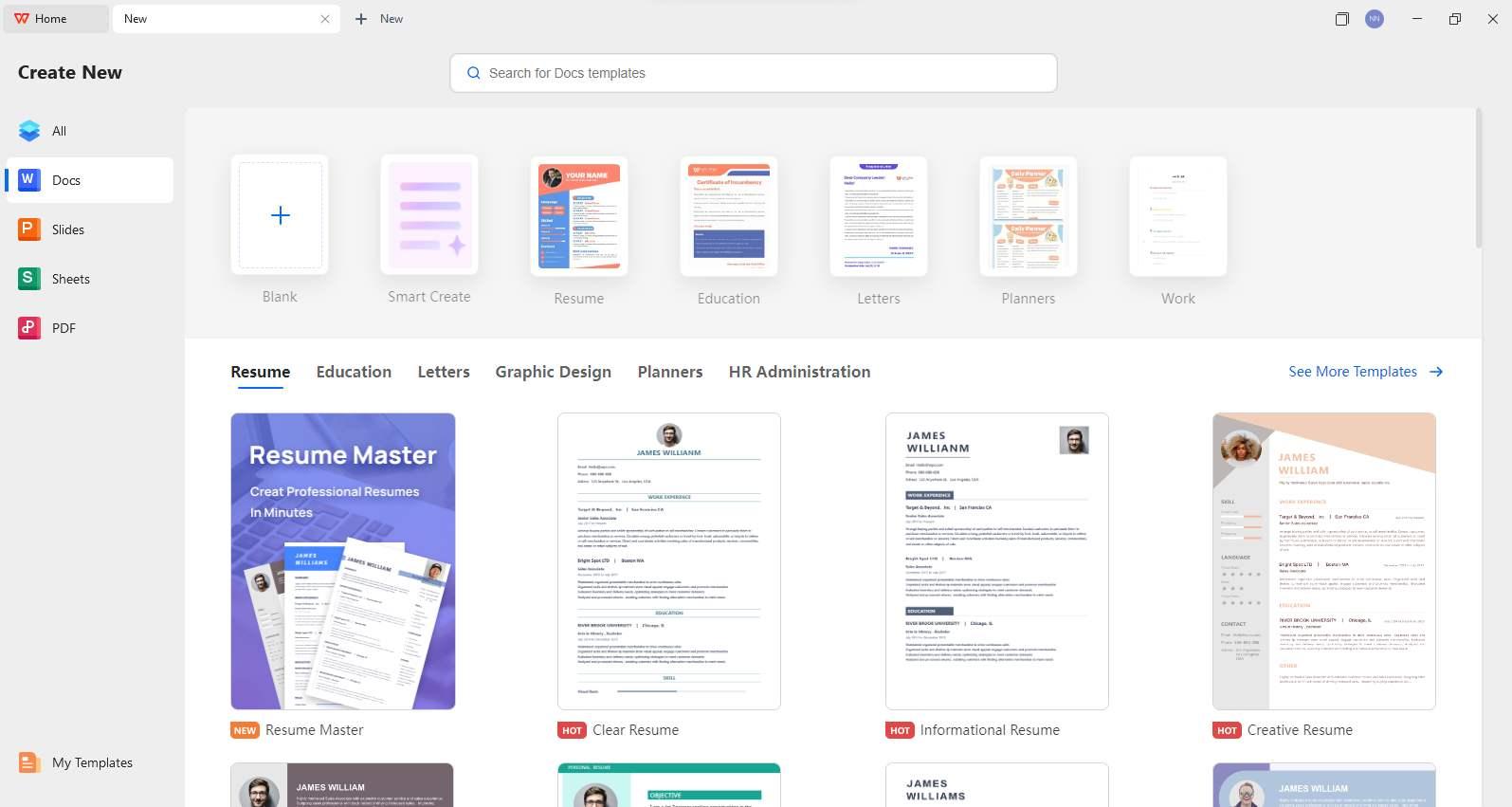
What sets WPS Office apart is that it doesn’t just let you edit any type of document. It also provides templates for almost any kind of document you want to create. This makes finding and editing templates super easy. Just search for the type of template you need, pick one, and start editing. It’s that simple with no extra steps.
Features of WPS Office
Cross Platform Compatibility: You can use it on Windows, Mac, Linux, iOS, or Android. WPS works wherever you are.
Microsoft Office Friendly: Open, edit, and save DOCX, XLSX, PPTX, PDF, and many more formats without any fuss.
AI Powered Tools: WPS AI gives you smart spell checks, translation, writing prompts, presentation creation, chatting with PDFs, and even content generation.
Fully Packed Toolset: It comes with nearly 100 built in tools like photo editors, PDF OCR, file converters, and resume builders all inside one app.
Lightweight and Fast: It is quick to launch, takes up very little space, and runs smoothly even on lower spec devices.
FAQs
1. Can a P&L statement help with tax planning?
Yes, it can. A profit and loss statement shows exactly how much revenue you earned and what expenses you had, so it becomes easier to calculate taxable income. When you have all numbers clearly written down, you can also spot areas where you might qualify for deductions and save on taxes.
2. How to read a profit and loss statement?
Start from the top with revenue which tells you how much money your business brought in. Then look at expenses which show where your money went. After that check the gross profit which is your income after covering direct costs. Finally look at net profit or loss to see the actual bottom line. Reading it step by step makes it simple to understand where your business stands financially.
3. Do I need an accountant to make a profit and loss statement?
Not really. While an accountant can make things easier and more accurate you can easily create your own P&L statement using templates. Tools like WPS Office and free profit and loss statement templates already do most of the formatting for you. You just need to enter your numbers honestly and double check them.
Profit and Loss Statement Templates Made Simple
When it comes to profit and loss statement templates, the actual problem is not just finding one, it is finding one that you can customize easily. Creating or editing a template from scratch can be time-consuming and confusing, and that is where editable templates make all the difference. They save time, reduce effort, and help you track your business performance more smoothly. To make the process even easier, WPS Office is the best tool you can use as it lets you open, edit, and personalize your profit and loss statement templates quickly and with ease.

'%3e%3cpath%20d='M19.9911%204.11386V6.471H18.5894C18.0775%206.471%2017.7322%206.57814%2017.5536%206.79243C17.3751%207.00671%2017.2858%207.32814%2017.2858%207.75671V9.44421H19.9019L19.5536%2012.0871H17.2858V18.8639H14.5536V12.0871H12.2769V9.44421H14.5536V7.49779C14.5536%206.39064%2014.8632%205.53201%2015.4822%204.92189C16.1013%204.31177%2016.9257%204.00671%2017.9554%204.00671C18.8304%204.00671%2019.509%204.04243%2019.9911%204.11386Z'%20fill='%23333333'/%3e%3c/g%3e%3cdefs%3e%3cclipPath%20id='clip0_2938_8199'%3e%3crect%20width='16'%20height='16'%20fill='white'%20transform='translate(8%204.00671)'/%3e%3c/clipPath%3e%3c/defs%3e%3c/svg%3e)
'%3e%3cpath%20d='M17.5237%2010.7813L23.4811%204H22.0699L16.8949%209.88693L12.7648%204H8L14.2469%2012.9029L8%2020.0133H9.4112L14.8725%2013.7952L19.2352%2020.0133H24M9.92053%205.04213H12.0885L22.0688%2019.0224H19.9003'%20fill='%23333333'/%3e%3c/g%3e%3cdefs%3e%3cclipPath%20id='clip0_2938_8200'%3e%3crect%20width='16'%20height='16.0134'%20fill='white'%20transform='translate(8%204)'/%3e%3c/clipPath%3e%3c/defs%3e%3c/svg%3e)


