

'%3e%3cpath%20d='M8%200C12.4183%200%2016%203.58172%2016%208C16%2012.4183%2012.4183%2016%208%2016C3.58172%2016%200%2012.4183%200%208C0%203.58172%203.58172%200%208%200ZM11.6162%204.38379C11.2257%203.99337%2010.5927%203.99338%2010.2021%204.38379L8%206.58594L5.79785%204.38379C5.40732%203.99334%204.77429%203.99329%204.38379%204.38379C3.99331%204.77429%203.99335%205.40733%204.38379%205.79785L6.58594%208L4.38379%2010.2021C3.99348%2010.5927%203.99341%2011.2257%204.38379%2011.6162C4.77426%2012.0066%205.40734%2012.0065%205.79785%2011.6162L8%209.41406L10.2021%2011.6162C10.5927%2012.0066%2011.2257%2012.0067%2011.6162%2011.6162C12.0067%2011.2257%2012.0066%2010.5927%2011.6162%2010.2021L9.41406%208L11.6162%205.79785C12.0066%205.40735%2012.0066%204.77429%2011.6162%204.38379Z'%20fill='%23080E17'%20fill-opacity='0.46'/%3e%3c/g%3e%3cdefs%3e%3cclipPath%20id='clip0_3761_713'%3e%3crect%20width='16'%20height='16'%20fill='white'/%3e%3c/clipPath%3e%3c/defs%3e%3c/svg%3e)



'%3e%3cpath%20fill-rule='evenodd'%20clip-rule='evenodd'%20d='M21.4999%2010.9993C21.4999%205.20009%2016.7986%200.498901%2010.9993%200.498901C5.19994%200.498901%200.498657%205.20009%200.498657%2010.9993C0.498657%2016.2404%204.33858%2020.5844%209.35855%2021.3722V14.0346H6.69238V10.9993H9.35855V8.68594C9.35855%206.05427%2010.9262%204.60062%2013.3248%204.60062C14.4736%204.60062%2015.6753%204.80571%2015.6753%204.80571V7.38979H14.3512C13.0468%207.38979%2012.64%208.19921%2012.64%209.0296V10.9993H15.5523L15.0867%2014.0346H12.64V21.3722C17.66%2020.5844%2021.4999%2016.2404%2021.4999%2010.9993Z'%20fill='%231568EA'/%3e%3c/g%3e%3c/svg%3e)


'%3e%3cpath%20d='M2.42045%2022.1876H6.31818V12.7217L0.75%208.54553V20.5171C0.75%2021.4414%201.49892%2022.1876%202.42045%2022.1876Z'%20fill='%234285F4'/%3e%3cpath%20d='M19.682%2022.1876H23.5797C24.5041%2022.1876%2025.2502%2021.4387%2025.2502%2020.5171V8.54553L19.682%2012.7217'%20fill='%2334A853'/%3e%3cpath%20d='M19.682%205.48293V12.7216L25.2502%208.54543V6.31816C25.2502%204.25236%2022.8921%203.07469%2021.2411%204.31361'%20fill='%23FBBC04'/%3e%3cpath%20d='M6.31824%2012.7217V5.48303L13.0001%2010.4944L19.6819%205.48303V12.7217L13.0001%2017.733'%20fill='%23EA4335'/%3e%3cpath%20d='M0.75%206.31816V8.54543L6.31818%2012.7216V5.48293L4.75909%204.31361C3.10534%203.07469%200.75%204.25236%200.75%206.31816Z'%20fill='%23C5221F'/%3e%3c/g%3e%3cdefs%3e%3cclipPath%20id='clip0_2954_7305'%3e%3crect%20width='24.5'%20height='18.375'%20fill='white'%20transform='translate(0.75%203.8125)'/%3e%3c/clipPath%3e%3c/defs%3e%3c/svg%3e)


Building a resume should highlight your skills—not burn hours on formatting. Yet many job seekers spend evenings adjusting margins, fonts, and spacing, then still worry the final file looks unprofessional. A cluttered layout can bury your strongest achievements and make recruiters stop reading within seconds.
This guide solves that problem with a ready-to-use simple resume format PDF download. Below you will find ten free, clean templates you can open, edit, and export as PDF—no design skills required. Each layout is one-page friendly, ATS-aware, and built for fast scanning by hiring managers.


What Is a Simple Resume Format?
A simple resume format is a clean, single-page layout that puts your experience and skills front and center. It usually avoids photos, heavy graphics, multi-column designs, and decorative fonts. Instead, you get clear section headings, consistent spacing, and a logical flow: contact details, summary, experience, education, and skills.
In practice, “simple” does not mean incomplete. It means every line earns its place. White space guides the eye, bullet points stay short, and your most recent or relevant roles appear first. Recruiters can find what they need in under 10 seconds—exactly how most first-pass reviews work. Contact information sits at the top in plain text; section titles use standard wording so both humans and software understand your story without guessing.
Why does this format win so often? Two reasons stand out. First, it is ATS-friendly. Applicant Tracking Systems parse plain text more reliably when your file avoids text boxes, tables with nested cells, and image-based headings. A simple resume format PDF (or an editable Word version saved correctly) keeps keywords readable so your application is not filtered out before a human sees it. Second, it matches how HR actually reads: skimming job titles, dates, and quantified results. Fancy designs may look impressive on social media, but they rarely help inside corporate screening pipelines where hundreds of files compete for attention.
Use a simple resume format when you apply to corporate roles, graduate programs, government posts, or any listing that asks for a PDF upload. It works for freshers and experienced professionals alike—only the content depth changes, not the structure. If you need to tailor for multiple openings, keep one master simple template and swap keywords rather than rebuilding the design each time. Think of simplicity as a strategy: fewer visual risks, faster edits, and a document that still looks intentional when someone prints it in black and white.

10 Free Simple Resume Templates PDF Download
Choose one of the ten free templates below for your next application. Each card includes a preview thumbnail, who it fits best, three to five feature highlights, and a direct download button. Open the file in WPS Office, replace the sample text with your details, then export a polished PDF. You can also keep a Word copy for future edits. All options support a true simple resume format PDF download workflow—from template to submission—without paid design tools.
1. Classic Simple — Best for Fresh Graduates
Best for: Freshers, interns, and first-job applicants who need a trustworthy, traditional look that still feels complete on one page.
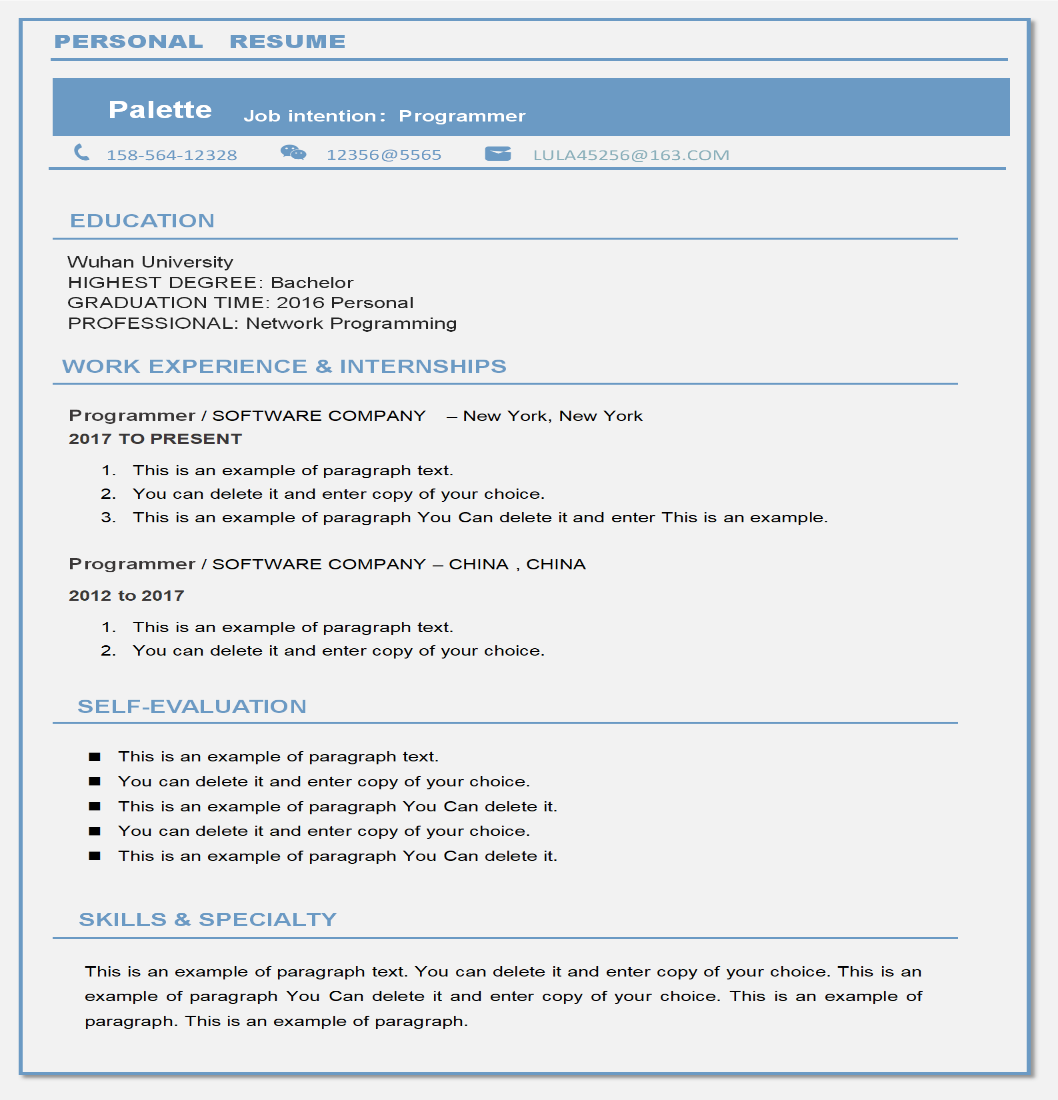
This classic simple resume format PDF download keeps education near the top, then skills, projects, and internships. It is ideal when you have limited full-time history but strong coursework, campus leadership, or volunteer work.
Traditional single-column layout recruiters recognize instantly
Education and projects emphasized without looking sparse or padded
No photo or graphics—safe for conservative industries and ATS portals
Easy to keep on one page with short, achievement-focused bullets
Fully free PDF download from the WPS Template library
2. Modern Minimal — Best for Working Professionals
Best for: Mid-level professionals updating a career resume for corporate, product, or tech-adjacent roles.
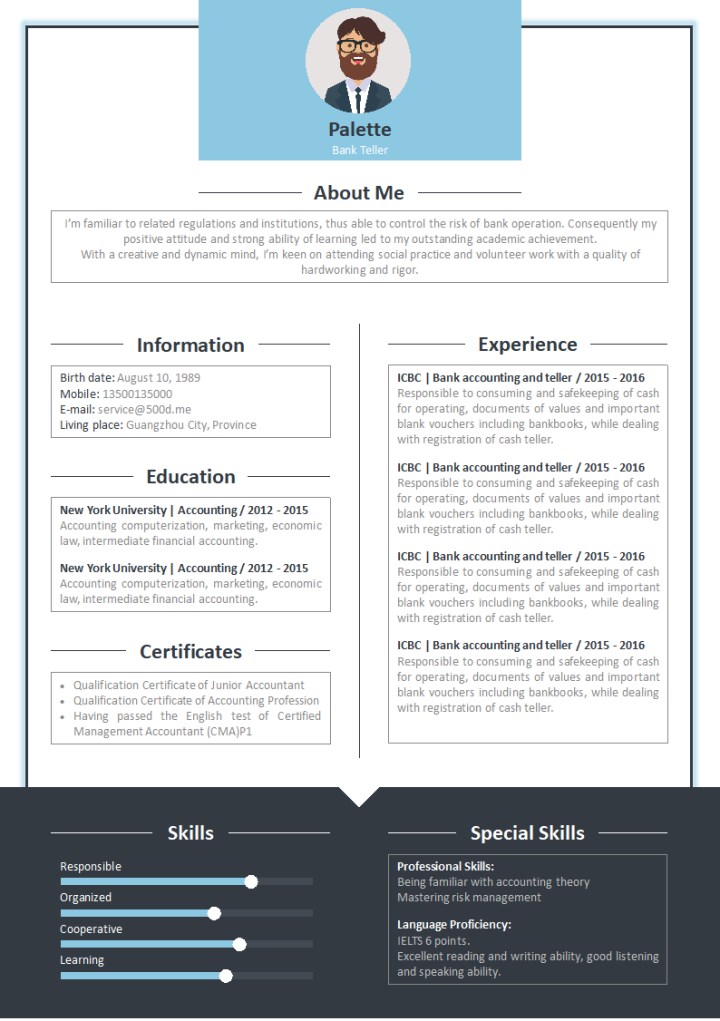
Modern Minimal balances polish with restraint. Subtle visual hierarchy highlights experience and achievements while staying simple enough for ATS screening and PDF submission. Use this when you have several years of relevant work and want the page to feel current—without icons, skill bars, or multi-column traps that break parsing.
Clean modern spacing with clear professional hierarchy
Experience-first section order for career movers and job switchers
Skills listed for quick keyword matching against job descriptions
Looks current without decorative distractions or photo headers
Editable in WPS Writer, then export as a submission-ready PDF
3. ATS-Optimized Simple — Best for Big-Company Applications
Best for: Applicants targeting large enterprises, consulting firms, shared service centers, and high-volume job portals.
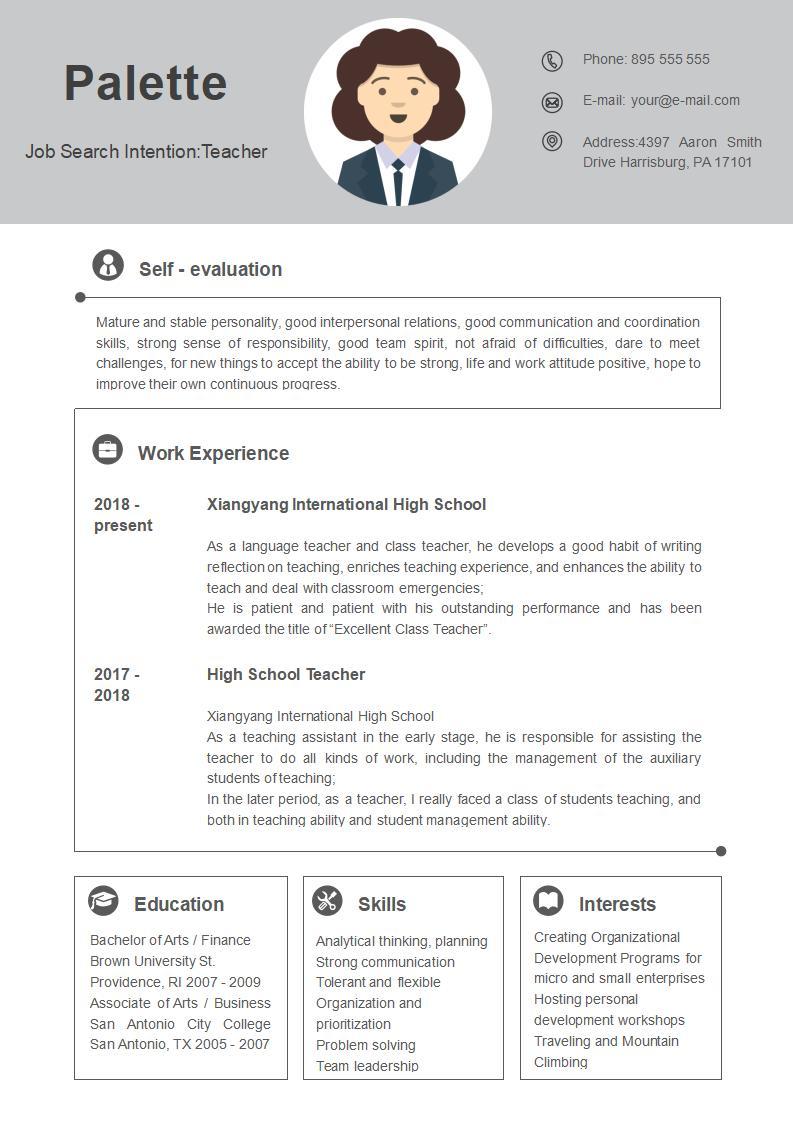
This ATS-optimized simple resume format focuses on parseable text, standard headings, and a PDF that preserves selectable content. Use it whenever the posting says “upload resume” through Workday, Taleo, Greenhouse, or similar systems. Mirror the language of the job description where it is truthful so automated screens pass you through.
Standard section titles ATS tools recognize (Experience, Education, Skills)
Minimal formatting that survives automated parsing and copy-paste tests
Keyword-friendly skills block placed near relevant experience
Black-and-white styling that prints and uploads cleanly
Direct simple resume format PDF download—no redesign needed
4. One-Page Simple — Best for Concise Experience
Best for: Candidates who must trim older roles and keep everything on a single page without losing impact.
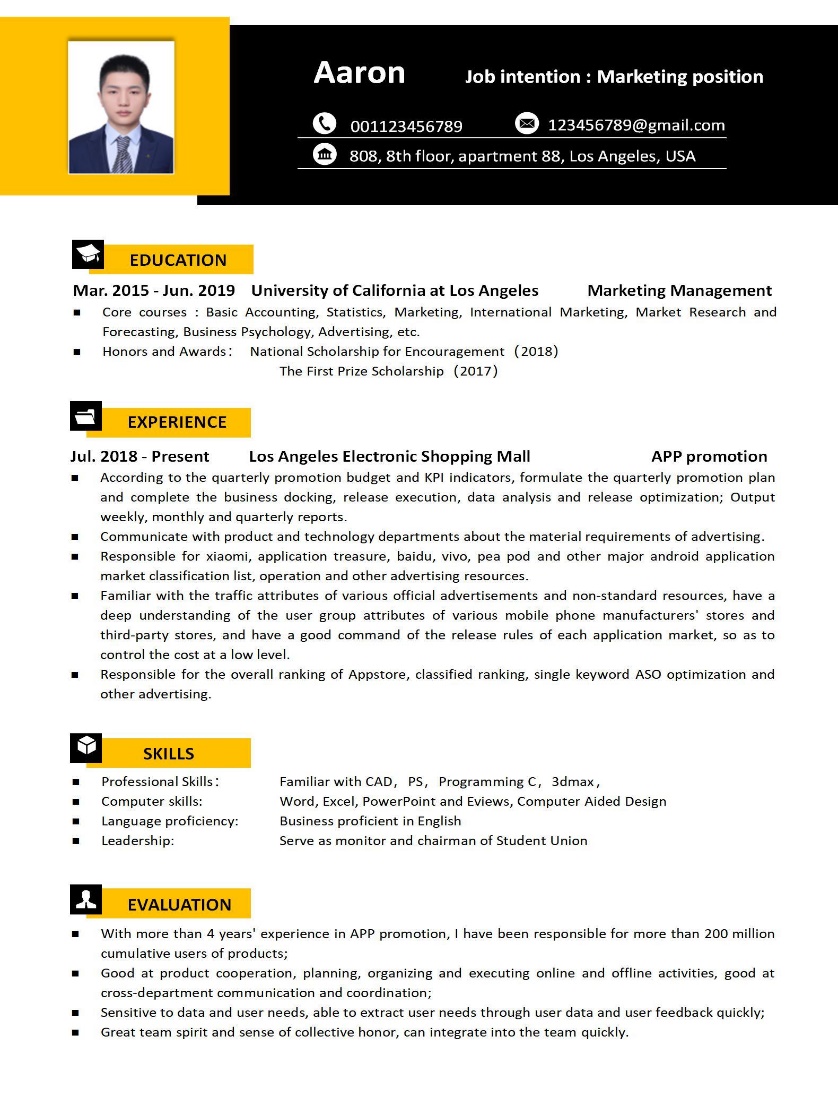
One-Page Simple is built for density without clutter. Use tight bullets and selective detail so hiring managers see impact immediately—perfect when listings explicitly request a one-page resume PDF. Drop early jobs that no longer support your target role and prioritize results over task lists.
Strict one-page frame that discourages overwriting and filler
Compact section spacing suited to about 5–8 years of relevant work
Achievement-focused bullets instead of long duty paragraphs
Works well for career switches with curated, targeted history
Free download and quick PDF export in WPS Office
5. Editable Simple — Word + PDF Dual Format
Best for: Anyone who wants to edit freely in Word/WPS Writer and still submit a perfect PDF every time.
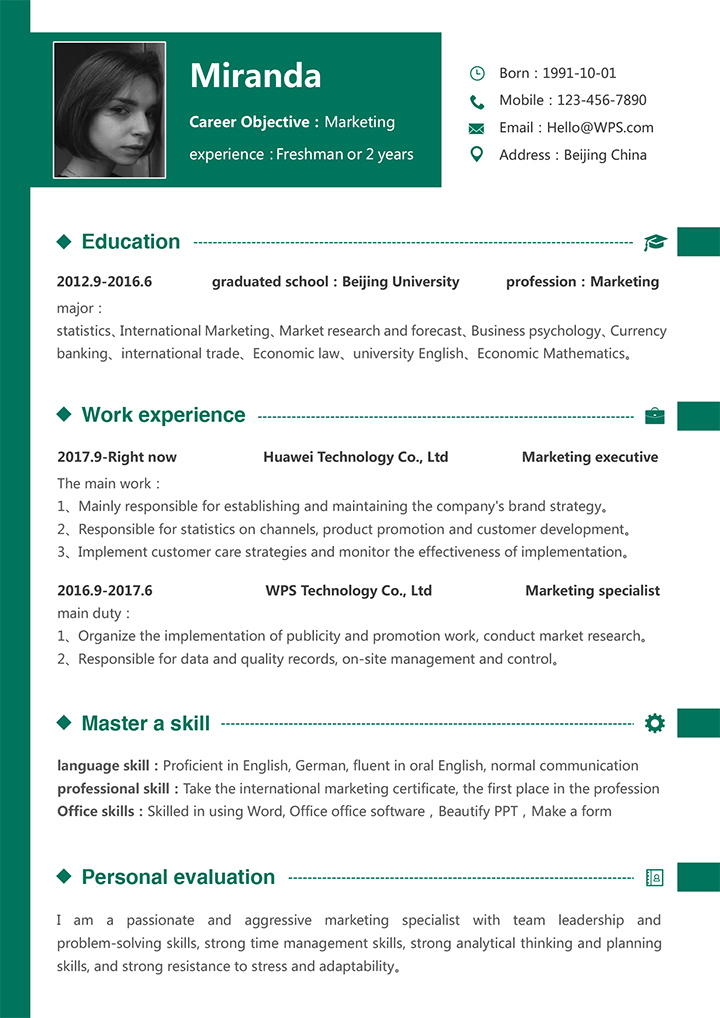
Editable Simple gives you flexibility: start from a Word-compatible template, customize fonts and bullets, then save as PDF for applications that reject .docx. Keep both files—treat the Word file as your living master and the PDF as the locked snapshot you attach to emails or portals.
Word (.docx) template for frictionless editing and versioning
Matching PDF option for final portal or email submission
Compatible with WPS Office on Windows, Mac, and mobile
Reusable for multiple job versions without redesigning layout
Ideal end-to-end workflow from edit to ATS-ready PDF
6. AI-Powered Simple — Best for People Who Struggle to Write Resumes
Best for: Job seekers who know their experience but freeze when writing bullet points, summaries, or achievement statements.

An AI-powered simple resume keeps the clean one-page structure while using AI to draft stronger wording. You still control the facts; the AI helps turn rough notes into clear, professional bullets. This is a practical path if you want a free AI resume builder style workflow without abandoning a simple, ATS-safe layout.
Uses AI to turn rough notes into polished resume bullets
Preserves a clean, photo-free simple resume structure
Helps write professional summaries faster for people who dislike writing
Easy to revise tone for different job descriptions
Pairs well with WPS AI for drafting, then export as PDF
7. Data-Driven Simple — Best for Sales, Ops, and Marketing Roles
Best for: Sales, operations, growth, and marketing candidates with clear performance metrics to showcase.
A data-driven resume template still looks simple, but every section is designed to surface numbers: quota attainment, conversion rate, pipeline growth, retention, or process efficiency. If you have quantified results, this format helps hiring managers see proof fast—especially useful when searching for quantified resume examples or a sales resume with metrics.
Promotes metrics-first bullet writing (%, $, volume, time saved)
Clear space for KPIs under each role
Keeps a simple layout so numbers stay easy to scan
Ideal for sales, ops, growth, and performance marketing resumes
Exports cleanly as a results-focused PDF
8. Expert-Recommended Simple — Best for Conservative Industries
Best for: Finance, legal, government, accounting, and other traditional fields that prefer proven formats.
This expert-recommended resume format follows the traditional structure hiring specialists still recommend: reverse-chronological experience, clear headings, and restrained styling. If you need a traditional resume format for finance or a conservative resume template for law or public-sector roles, this is the safest choice.
Validated traditional structure preferred by conservative recruiters
Reverse-chronological experience with clear date ranges
No photos, icons, or heavy color blocks
Strong fit for finance, legal, government, and audit roles
Prints and uploads as a reliable professional PDF
9. Visual Simple — Best for Design, Marketing, and Multinational Roles
Best for: Design, marketing, brand, and multinational roles that allow light visual differentiation.
A visual simple resume template adds restrained color, stronger typography contrast, or a lightly differentiated header—while staying far simpler than a fully creative CV. It is a strong option when you want a creative minimal resume that still feels professional, especially for a resume for design marketing applications or international companies that expect a polished first impression.
Subtle visual differentiation without heavy graphics
Stronger visual hierarchy for brand, design, and marketing roles
Still mostly one-column and easy to skim
Better for human-reviewed applications than dense ATS portals
Editable and exportable as a clean PDF
10. Free Open-Source Simple — Best for Budget and Privacy-First Users
Best for: Budget-conscious candidates, privacy-first users, and technically comfortable applicants who want full control.
A free open source resume template approach prioritizes zero cost, transparency, and control. You can start from free WPS templates or open formats, edit locally, and avoid uploading sensitive career data to unknown builders. This is especially useful for developers and privacy-minded users looking for a privacy friendly resume workflow, including Markdown-based or fully local editing before PDF export.
Completely free to start—no paid design subscription required
Local editing supports stronger privacy control over personal data
Works well for technical users who prefer plain, portable formats
Easy to version, reuse, and convert into PDF on your own device
Ideal when budget and data ownership matter as much as design
How to Choose the Right Simple Resume Format
By industry: Finance, law, government, and consulting usually prefer Classic Simple, Expert-Recommended Simple, or ATS-Optimized—conservative, photo-free, and text-forward. Tech, product, and operations teams often accept Modern Minimal or Data-Driven Simple if keywords and metrics stay crystal clear. Design, marketing, and many multinational roles can use Visual Simple for light differentiation. Education and healthcare lean toward clean formats where licenses, degrees, and certifications are easy to spot in the first scan.
By experience level: Freshers should pick Classic Simple or AI-Powered Simple and lead with education, projects, and internships. Professionals with roughly 3–8 years of relevant work fit Modern Minimal, Data-Driven Simple, or One-Page Simple. Senior applicants targeting large or conservative companies should default to Expert-Recommended or ATS-Optimized Simple and compress older roles to one line each. If budget or privacy is the priority, Free Open-Source Simple keeps full local control. If you customize weekly for different postings, Editable Simple (Word + PDF) saves the most time.
When unsure, start with ATS-Optimized Simple for any online application, then use Visual Simple or Modern Minimal only when a recruiter asks for a stronger first impression after an initial screen. Matching format to channel—portal upload versus email to a hiring manager—reduces risk and keeps your simple resume format consistent across the funnel.
Tips for Using Simple Resume Templates
Keep it to one page whenever possible. Cut older jobs that no longer support your target role, trim soft-skill fluff, and convert duties into quantified achievements (numbers, percentages, tools, and outcomes). Recruiters rarely read page two on the first pass, and many ATS views show a short preview first.
Choose readable fonts. Stick to Arial or Calibri at 10–12 pt for body text. Headings can be slightly larger (12–14 pt) and bold. Avoid script, ultra-thin, or novelty fonts that break ATS parsing and look unprofessional once flattened to PDF. Consistency matters more than style: one font family for the whole document is enough.
Set margins between 0.5 and 1 inch. Margins under 0.5 inch may clip when printed or previewed in browsers; margins over 1 inch waste space and force awkward wrapping. Aim for balanced white space so sections breathe without looking empty. Align dates consistently on the right or in a clear inline pattern so the timeline is scannable.
Write for scanners, then for readers. Lead each bullet with a strong verb, place tools and technologies where they match the job description, and keep the professional summary to two or three lines. Delete anything that does not help you get the interview—hobbies, full street addresses, and outdated software lists rarely help.
Save to PDF the right way. In WPS Writer, use File → Export to PDF (or Save As → PDF). Confirm text remains selectable—not an image snapshot—so ATS tools can read keywords. Name the file professionally (for example, FirstName_LastName_Resume.pdf), open it once to check line breaks and heading spacing, then upload. Keep your editable .docx master so you can tweak keywords for each role without rebuilding the layout from scratch.
FAQ
What is the best simple resume format for freshers?
The best simple resume format for freshers is a one-page, photo-free Classic Simple layout that leads with education, projects, and internships. Keep bullets short, highlight measurable outcomes from campus or volunteer work, and download a free PDF template so formatting stays consistent across applications.
Can I download simple resume format in PDF for free?
Yes. All ten templates in this article support a free simple resume format PDF download from the WPS Template library (or free AI/open workflows). Open the template page, download the file, edit it in WPS Office, and export your final PDF at no cost for basic personal use.
Is simple resume format ATS-friendly?
A well-built simple resume format is highly ATS-friendly because it uses standard headings, plain text, and minimal graphics. Avoid text boxes and complex tables; save a clean PDF with selectable text so keywords and dates parse correctly.
How do I edit a simple resume PDF template?
If you only have a PDF, open it in WPS PDF or convert it to Word inside WPS Office, then edit sections and re-export to PDF. Prefer starting from the Editable Simple Word template, customize content there, and save the finished version as PDF for applications—this avoids layout drift.
Conclusion
Stop wrestling with formatting—download one of the ten free simple resume PDF templates above, edit it in WPS Office, and submit an ATS-ready file today.

'%3e%3cpath%20d='M19.9911%204.11386V6.471H18.5894C18.0775%206.471%2017.7322%206.57814%2017.5536%206.79243C17.3751%207.00671%2017.2858%207.32814%2017.2858%207.75671V9.44421H19.9019L19.5536%2012.0871H17.2858V18.8639H14.5536V12.0871H12.2769V9.44421H14.5536V7.49779C14.5536%206.39064%2014.8632%205.53201%2015.4822%204.92189C16.1013%204.31177%2016.9257%204.00671%2017.9554%204.00671C18.8304%204.00671%2019.509%204.04243%2019.9911%204.11386Z'%20fill='%23333333'/%3e%3c/g%3e%3cdefs%3e%3cclipPath%20id='clip0_2938_8199'%3e%3crect%20width='16'%20height='16'%20fill='white'%20transform='translate(8%204.00671)'/%3e%3c/clipPath%3e%3c/defs%3e%3c/svg%3e)
'%3e%3cpath%20d='M17.5237%2010.7813L23.4811%204H22.0699L16.8949%209.88693L12.7648%204H8L14.2469%2012.9029L8%2020.0133H9.4112L14.8725%2013.7952L19.2352%2020.0133H24M9.92053%205.04213H12.0885L22.0688%2019.0224H19.9003'%20fill='%23333333'/%3e%3c/g%3e%3cdefs%3e%3cclipPath%20id='clip0_2938_8200'%3e%3crect%20width='16'%20height='16.0134'%20fill='white'%20transform='translate(8%204)'/%3e%3c/clipPath%3e%3c/defs%3e%3c/svg%3e)


