Losing a loved one is one of the hardest things any of us can face,
and the pressure to organize a perfect memorial can be too much. Many
families struggle to design a program from scratch while processing
their grief, which is the last thing you should have to worry about. In
Loving Memory templates offer a structured, respectful way to honor a
life without the stress of starting from a blank page. This guide will
share 10 beautiful designs and show you how to customize them quickly so
you can focus on remembering your loved ones.
In Loving Memory Templates
Top 10 Free In Loving
Memory Templates
Finding the right design to honor a loved one shouldn't add to your
stress during such a difficult time. This collection of free in loving
memory templates provides you with dignified, high-quality options that
are easy to customize.
Whether you need a simple card or a full service program, these designs
cover a range of styles, from traditional to modern, so you can find the
perfect tribute without starting from scratch.
1. Classic Memorial Program
Template
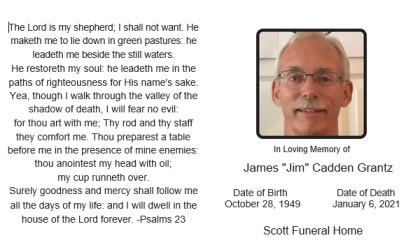
Designed for families and funeral directors, this Classic Memorial Program
Template facilitates the creation of dignified prayer cards or
service handouts. The landscape layout features a large Scripture Text
Block on the left for verses like Psalm 23, balanced by a right-sided
Portrait container alongside Deceased Name, Birth Date, Death Date, and
Funeral Home Info. This concise, single-pane design distinguishes itself
from multi-page booklets by offering a focused, portable keepsake that
prioritizes immediate readability of spiritual comfort and personal
remembrance.
Classic Memorial Program Template
2. Elegant Floral In
Loving Memory Template
Tailored for charitable donors, this Elegant Floral In Loving
Memory Template utilizes a consistent white sans-serif font set
against a warm floral background. The layout centers a bold
commemorative heading above a uniform donation acknowledgment section
and organization URL to ensure high contrast without changing text
colors. This design distinguishes itself from the previous
black-and-white card by using a full-bleed photograph to convey warmth
while maintaining a strict single-color typography style for a cohesive,
modern look.
Elegant Floral In Loving Memory Template
3. Minimalist Funeral
Program Template
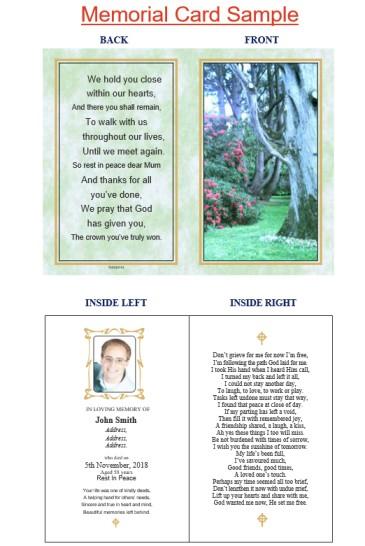
Designed for families requiring a comprehensive service handout, thisMinimalist Funeral
Program Template features a structured bi-fold layout with
distinct front, back, and interior panels. The design incorporates a
scenic nature cover, a dedicated interior portrait area with vital
statistics, and extensive space for lengthy readings like the "Don't
Grieve for Me" poem. Unlike the single-pane classic template, this
folding brochure format provides expanded capacity for biographical
details and multiple spiritual verses while maintaining a clean,
organized presentation.
Minimalist Funeral Program Template
4. Traditional In Loving
Memory Card
Designed for families desiring a gentle aesthetic, this Traditional In Loving
Memory Card features a soft pink heart-patterned background and
a distinct floral wreath photo frame. The layout highlights a central
portrait above a customizable funeral prayer heading and name
placeholder, creating a warm and affectionate focal point. Unlike the
stark black-and-white classic template or the nature-themed brochure,
this design uses delicate pastel colors and decorative motifs to offer a
more personal, intimate tribute.
Traditional In Loving Memory Card
5. Modern Black & White
Design Template
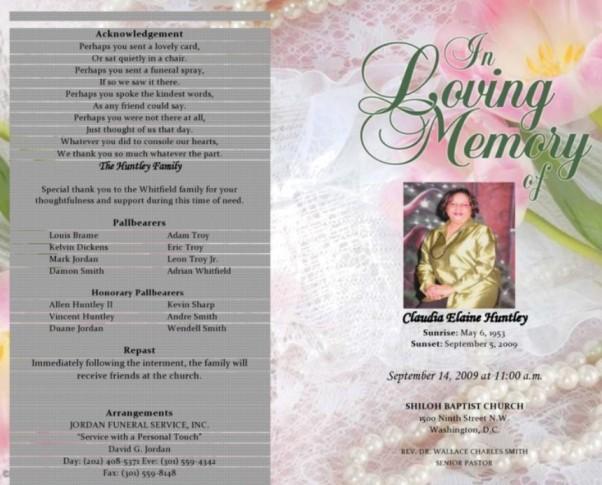
Designed for families organizing a formal service, this Modern Black & White
Design Template features a dual-sided layout that contrasts a
structured, grey-toned information panel with a soft floral cover. The
design organizes logistical details like pallbearers, acknowledgements,
and repast info on a modern grid background. This combination of a
functional, data-heavy reverse side with a decorative, sentimental front
distinguishes it from the fully thematic designs of the previous nature
and heart templates, offering a clear separation between service
logistics and personal remembrance.
Modern Black & White Design Template
6. Celebration of Life
Program Template
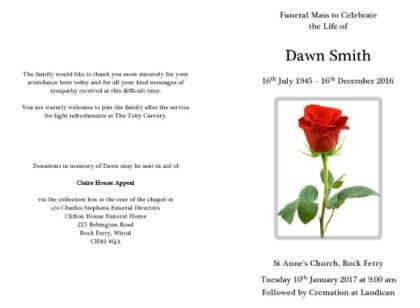
Designed for families organizing a traditional funeral mass, this Celebration of Life
Program Template features a pristine white background with
classical serif typography and a prominent red rose illustration. The
layout functions as a clean bi-fold cover, displaying the service
location and time on the front, while the back panel provides structured
space for acknowledgements, reception details, and donation information.
Unlike the photo-centric or scenic brochures, this template utilizes
negative space and a single symbolic image to offer a dignified,
understated alternative that prioritizes clarity and essential
logistics.
Celebration of Life Program Template
7. Photo Collage In
Loving Memory Template
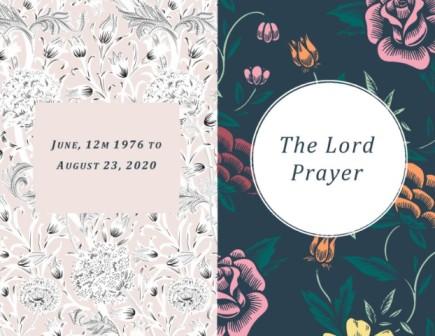
Designed for families seeking a visually balanced tribute, this Photo Collage In Loving
Memory Template features a striking split-panel design that
contrasts a light, intricate floral pattern on the left with a dark,
colorful botanical background on the right. The layout organizes
essential timeline details in a centered pink date box while
highlighting spiritual elements like "The Lord's Prayer" in a prominent
white circular frame. Unlike the single-image or uniform background
designs previously described, this template uses a dual-tone artistic
approach to create a dynamic yet cohesive separation between
biographical dates and religious focus.
Photo Collage In Loving Memory Template
8. Religious Theme Memorial
Template
Designed for families and funeral directors coordinating service
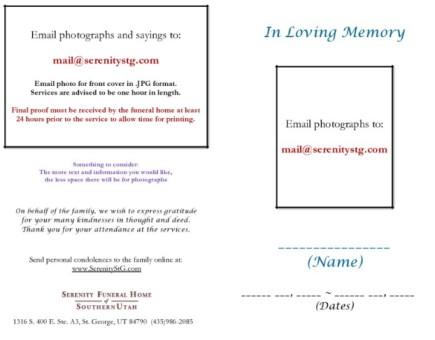
details, this Religious Theme Memorial
Template utilizes a clean, minimal layout focused on content
submission and verification. The design features a stark white
background with distinct color-coded text: blue for headings like "In
Loving Memory" and red for critical deadlines, alongside outlined
placeholders for the deceased's portrait and vital statistics. This
functional approach distinguishes it from the decorative floral and
scenic templates by acting as a clear, instructional guide for gathering
essential photos and sentiments prior to final production.
Religious Theme Memorial Template
9. Elegant Gold Accent
Template
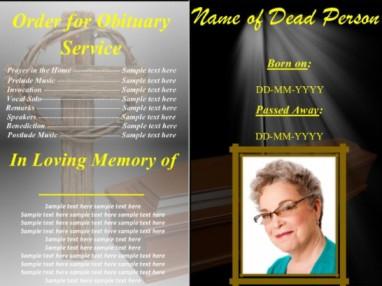
Designed for solemn religious ceremonies, this Elegant Gold Accent
Template features a high-contrast split layout that pairs a grey
service schedule with a black tribute section. The design emphasizes
spiritual themes through a prominent wooden cross with a crown of thorns
on the left, while the right side illuminates the deceased's framed
portrait and vital statistics under symbolic heavenly light rays and
bright yellow typography. Unlike the delicate pastel or minimalist white
templates previously described, this layout uses bold, dark backgrounds
and vivid accent colors to create a striking, reverent visual
statement.
Elegant Gold Accent Template
10. Simple Printable Funeral
Template
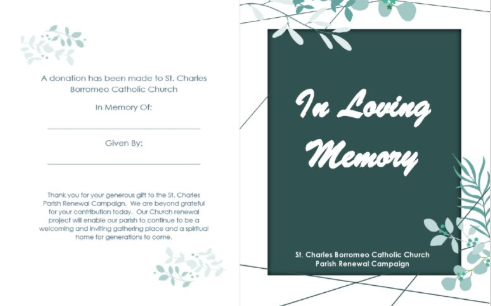
Designed for church communities and donors, this Simple Printable Funeral
Template features a modern geometric background accented by soft
green botanical illustrations. The layout centers a dark teal title
block with white script typography for the heading, alongside a
dedicated section for recording donation details and donor names. Unlike
the portrait-focused memorial cards previously described, this design
prioritizes the acknowledgement of charitable gifts, offering a clean,
text-driven format that serves as a formal receipt or thank-you card
rather than a biographical program.
Simple Printable Funeral Template
How to Edit and Print in
Word
Once you have chosen your in loving memory template, the next step is
personalizing it. I know that dealing with formattingsoftware can be frustrating, especially when you need to get things done
quickly. Using WPS Office simplifies this process, allowing you to drag
and drop photos and edit text smoothly.
How to Edit in Word:
Getting started with the WPS Writer is
incredibly straightforward. Here’s how to write in loving memory program
in WPS Office.
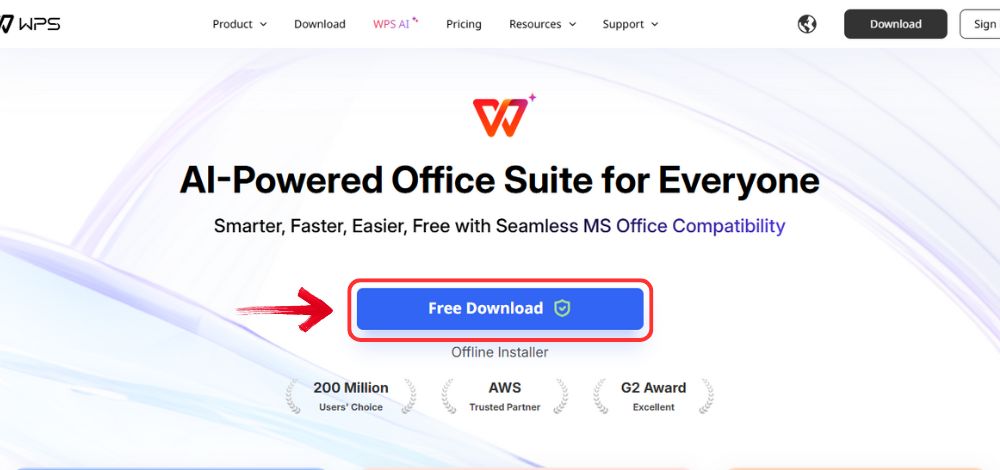
Step 1: Open your browser to visit WPS Office and click the"Free Download" button to start the download.
Download WPS Office
Step 2: The download will finish in a few seconds.
Once done, run the installation file like you would for any other app or
software.
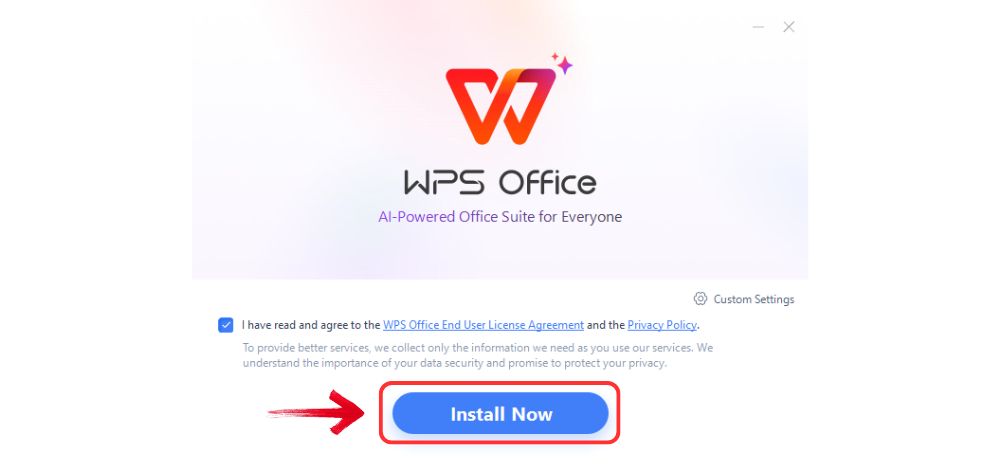
Step 3: WPS Office will show you a few simple terms
and conditions. Accept them, then click the "Install
Now" button to begin the installation.
Install WPS Office
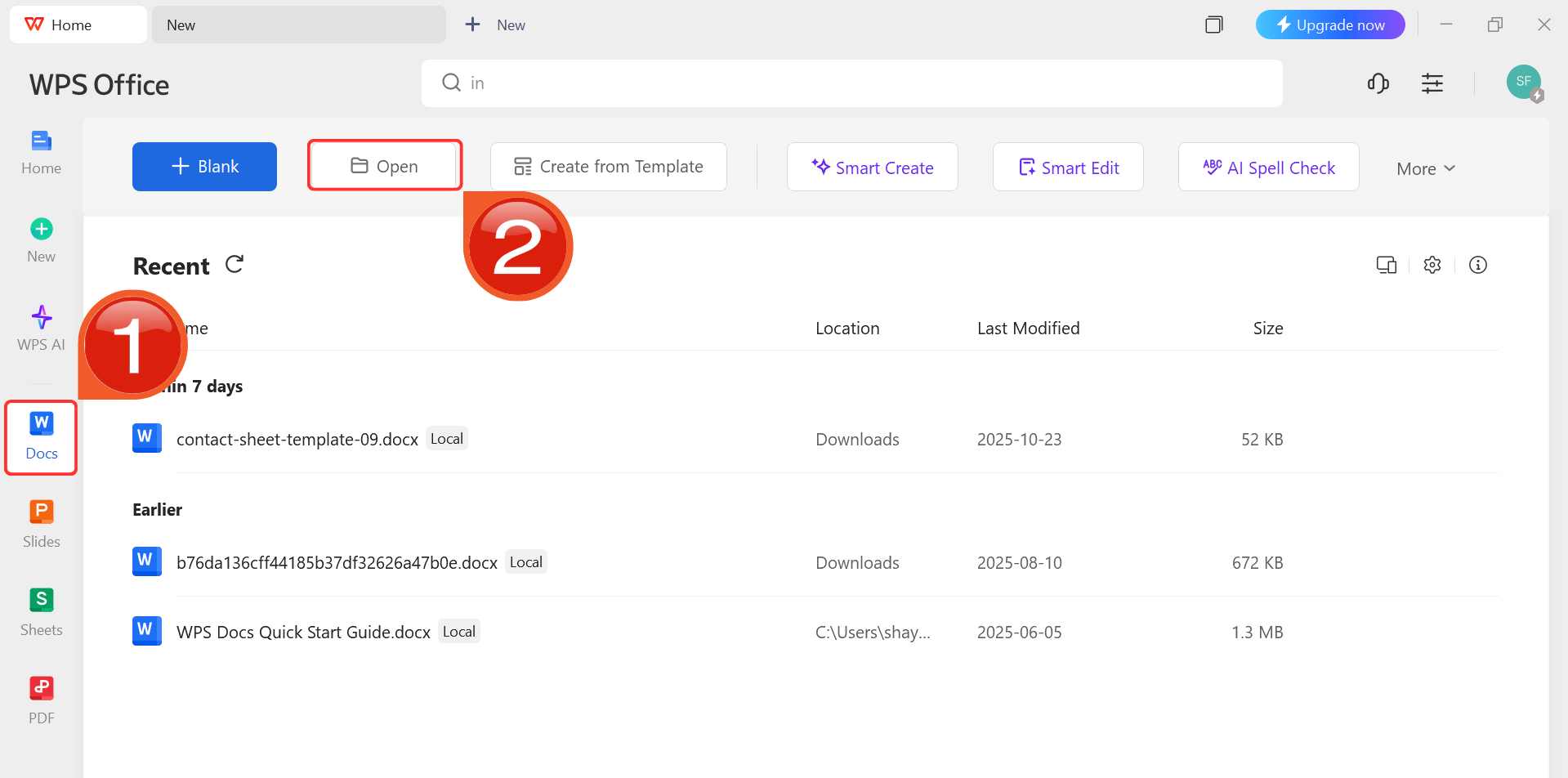
Step 4: After installation, in WPS Office, click“Docs” from the left sidebar and hit“Open” to select your downloaded template or select
from the template library in WPS Office.
WPS Docs Dashboard
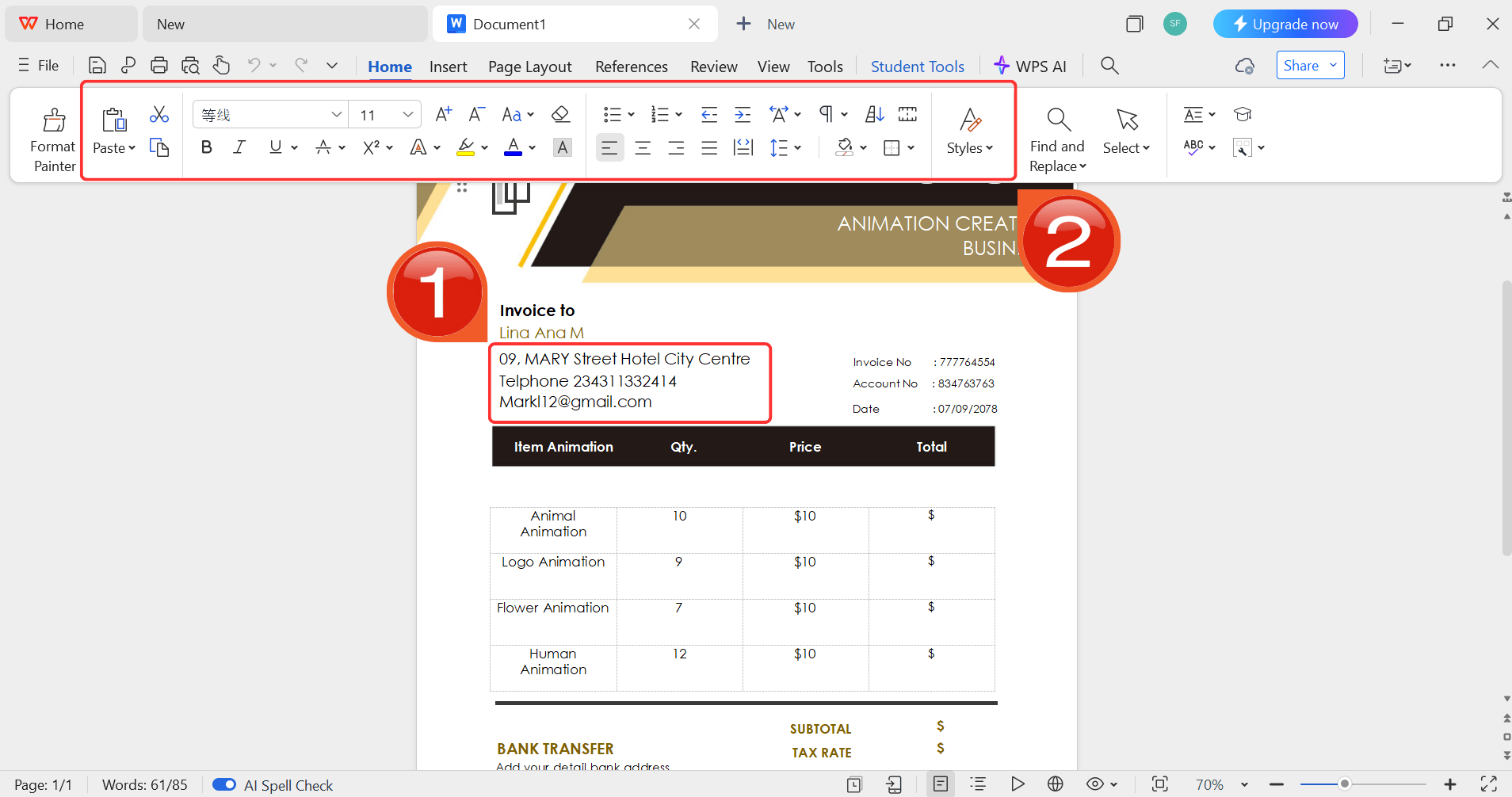
Step 5: Then click on the text you want to modify
and just enter your details within it by using the Ribbon above.
Customize your template
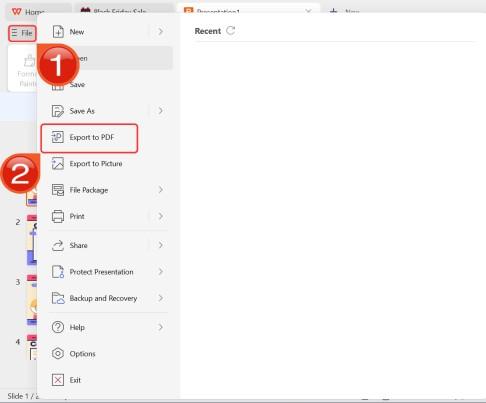
Step 6: After you’re done modifying the template,
head to “File” and choose “Export to
PDF” to save the template in your desired format.
Export as PDF
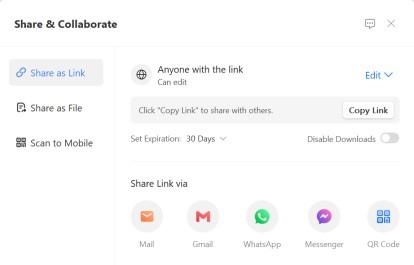
Step 7: You can also share the link to your document
with others to enable collaborative work in case they want to make their
own changes as well.
Share link
Free Office Suite
with Abundant Templates
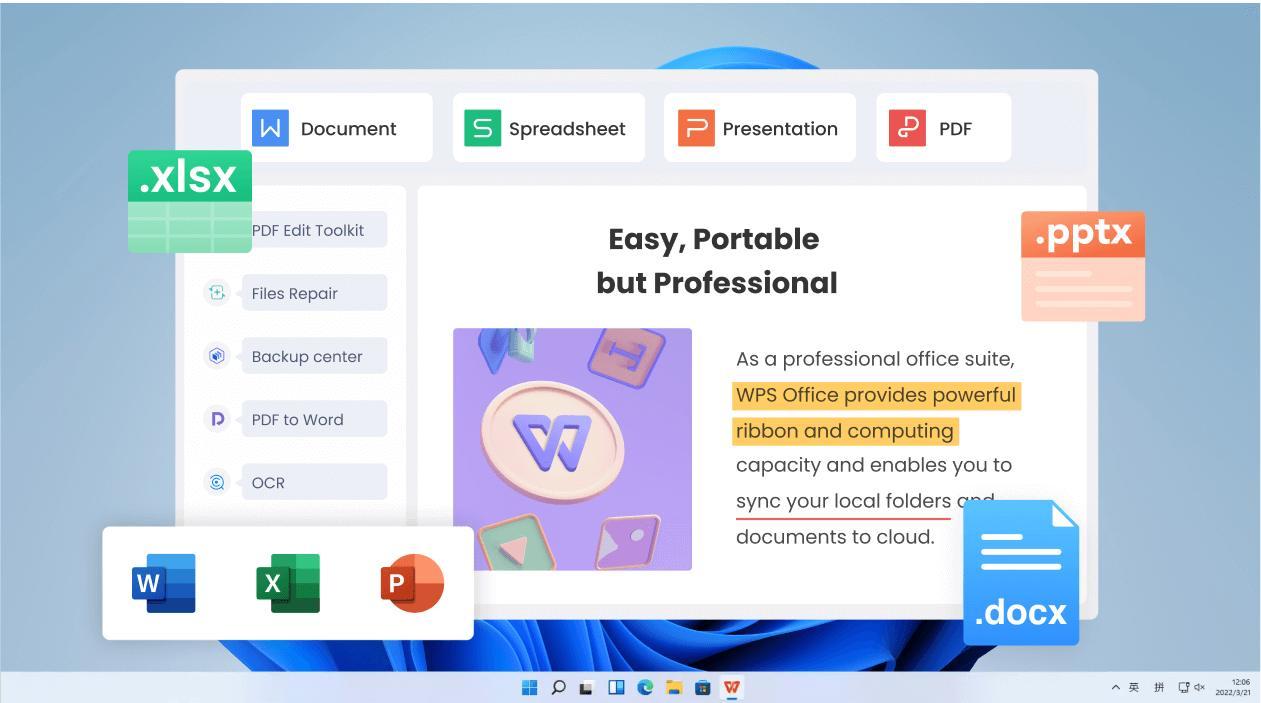
Selecting the right software is crucial for efficiently customizing
your templates, and WPS Officeoffers the perfect solution. As a comprehensive, free productivity
suite, it integrates Writer, Spreadsheets, and Presentation into a
single lightweight application. By consolidating these essential tools,
it eliminates the need to switch between different programs, offering a
unified workspace that rivals premium office software without the
expensive subscriptions.
WPS Office
WPS Office is a free, all-in-one productivitysuite, designed as a lightweight and powerful alternative to other
office software. It's a single application that includes Writer (for
Word documents), Spreadsheets (Excel), and Presentation (PowerPoint).
Its key advantage is compatibility, allowing you to open, edit, and save
files from other platforms, while also offering a robust cloud service
for collaboration and a huge library of built-in templates for free
download.
Key Advantages:
Free and Lightweight: Downloads quickly and runs
smoothly on any computer.
Format Support: Fully compatible with DOC, PPT,
PDF, and JPG formats.
Template Library: Access to a vast collection of
flyer and card templates.
Cross-Platform: Works on Windows, Mac, Android,
and iOS, allowing you to edit on the go.
FAQs
Q1: What is an
“In Loving Memory” template used for?
It is used to quickly design respectful funeral programs, memorial
cards, or service sheets that honor a deceased loved one.
Q2: Are these templates
editable?
Yes, most templates are designed to be fully customizable in word
processors like WPS Writer or Microsoft Word.
Q3: Can I print these
templates at home?
Absolutely. These templates are formatted for standard paper sizes,
making them easy to print on a home printer or at a local print
shop.
Q4: Do these templates
include images?
They typically come with placeholder images that you can easily
replace with personal photographs of your loved one.
Q5: Are the templates free?
Yes, the in loving memory template options listed in
this article are free to download and use.
Q6: How do I
write a biography for the program?
Keep it concise. Include their date of birth, passing, key life
achievements, surviving family members, and a brief sentiment about
their legacy.
Designing a
Heartfelt Tribute Without the Stress
Creating a memorial tribute is a final act of love, and it doesn't
have to be a stressful design challenge. By using a pre-designed in
loving memory template and simple tools like WPS Office, you can create a
professional and touching program that honors your loved one’s
legacy.
I'm Maira, experienced in using office suite tools and technology to support professional tasks. My regular use of Office software has helped me develop strong command over these tools, especially in drafting legal instruments and helpful content.


'%3e%3cpath%20d='M8%200C12.4183%200%2016%203.58172%2016%208C16%2012.4183%2012.4183%2016%208%2016C3.58172%2016%200%2012.4183%200%208C0%203.58172%203.58172%200%208%200ZM11.6162%204.38379C11.2257%203.99337%2010.5927%203.99338%2010.2021%204.38379L8%206.58594L5.79785%204.38379C5.40732%203.99334%204.77429%203.99329%204.38379%204.38379C3.99331%204.77429%203.99335%205.40733%204.38379%205.79785L6.58594%208L4.38379%2010.2021C3.99348%2010.5927%203.99341%2011.2257%204.38379%2011.6162C4.77426%2012.0066%205.40734%2012.0065%205.79785%2011.6162L8%209.41406L10.2021%2011.6162C10.5927%2012.0066%2011.2257%2012.0067%2011.6162%2011.6162C12.0067%2011.2257%2012.0066%2010.5927%2011.6162%2010.2021L9.41406%208L11.6162%205.79785C12.0066%205.40735%2012.0066%204.77429%2011.6162%204.38379Z'%20fill='%23080E17'%20fill-opacity='0.46'/%3e%3c/g%3e%3cdefs%3e%3cclipPath%20id='clip0_3761_713'%3e%3crect%20width='16'%20height='16'%20fill='white'/%3e%3c/clipPath%3e%3c/defs%3e%3c/svg%3e)




'%3e%3cpath%20fill-rule='evenodd'%20clip-rule='evenodd'%20d='M21.4999%2010.9993C21.4999%205.20009%2016.7986%200.498901%2010.9993%200.498901C5.19994%200.498901%200.498657%205.20009%200.498657%2010.9993C0.498657%2016.2404%204.33858%2020.5844%209.35855%2021.3722V14.0346H6.69238V10.9993H9.35855V8.68594C9.35855%206.05427%2010.9262%204.60062%2013.3248%204.60062C14.4736%204.60062%2015.6753%204.80571%2015.6753%204.80571V7.38979H14.3512C13.0468%207.38979%2012.64%208.19921%2012.64%209.0296V10.9993H15.5523L15.0867%2014.0346H12.64V21.3722C17.66%2020.5844%2021.4999%2016.2404%2021.4999%2010.9993Z'%20fill='%231568EA'/%3e%3c/g%3e%3c/svg%3e)


'%3e%3cpath%20d='M2.42045%2022.1876H6.31818V12.7217L0.75%208.54553V20.5171C0.75%2021.4414%201.49892%2022.1876%202.42045%2022.1876Z'%20fill='%234285F4'/%3e%3cpath%20d='M19.682%2022.1876H23.5797C24.5041%2022.1876%2025.2502%2021.4387%2025.2502%2020.5171V8.54553L19.682%2012.7217'%20fill='%2334A853'/%3e%3cpath%20d='M19.682%205.48293V12.7216L25.2502%208.54543V6.31816C25.2502%204.25236%2022.8921%203.07469%2021.2411%204.31361'%20fill='%23FBBC04'/%3e%3cpath%20d='M6.31824%2012.7217V5.48303L13.0001%2010.4944L19.6819%205.48303V12.7217L13.0001%2017.733'%20fill='%23EA4335'/%3e%3cpath%20d='M0.75%206.31816V8.54543L6.31818%2012.7216V5.48293L4.75909%204.31361C3.10534%203.07469%200.75%204.25236%200.75%206.31816Z'%20fill='%23C5221F'/%3e%3c/g%3e%3cdefs%3e%3cclipPath%20id='clip0_2954_7305'%3e%3crect%20width='24.5'%20height='18.375'%20fill='white'%20transform='translate(0.75%203.8125)'/%3e%3c/clipPath%3e%3c/defs%3e%3c/svg%3e)






'%3e%3cpath%20d='M19.9911%204.11386V6.471H18.5894C18.0775%206.471%2017.7322%206.57814%2017.5536%206.79243C17.3751%207.00671%2017.2858%207.32814%2017.2858%207.75671V9.44421H19.9019L19.5536%2012.0871H17.2858V18.8639H14.5536V12.0871H12.2769V9.44421H14.5536V7.49779C14.5536%206.39064%2014.8632%205.53201%2015.4822%204.92189C16.1013%204.31177%2016.9257%204.00671%2017.9554%204.00671C18.8304%204.00671%2019.509%204.04243%2019.9911%204.11386Z'%20fill='%23333333'/%3e%3c/g%3e%3cdefs%3e%3cclipPath%20id='clip0_2938_8199'%3e%3crect%20width='16'%20height='16'%20fill='white'%20transform='translate(8%204.00671)'/%3e%3c/clipPath%3e%3c/defs%3e%3c/svg%3e)
'%3e%3cpath%20d='M17.5237%2010.7813L23.4811%204H22.0699L16.8949%209.88693L12.7648%204H8L14.2469%2012.9029L8%2020.0133H9.4112L14.8725%2013.7952L19.2352%2020.0133H24M9.92053%205.04213H12.0885L22.0688%2019.0224H19.9003'%20fill='%23333333'/%3e%3c/g%3e%3cdefs%3e%3cclipPath%20id='clip0_2938_8200'%3e%3crect%20width='16'%20height='16.0134'%20fill='white'%20transform='translate(8%204)'/%3e%3c/clipPath%3e%3c/defs%3e%3c/svg%3e)


