Performance reviews are the backbone of any healthy workplace. They
help you recognize achievements, address gaps, and set future goals. But
beyond the usual checklists and ratings, they tell a story about each
employee’s journey. When captured effectively, this story not only
informs promotions and raises but also inspires growth and engagement
across the team. In this guide, I’ll introduce 10 ready-to-use
performance review templates, show you how to customize them for your
team, and explain how WPS Office can make the process faster and
smarter.
Performance Review Templates
Top 10
Performance Review Templates to Use Today
The hardest part about managing annual performance review forms isn’t
giving feedback as most people think. It’s having a structured,
easy-to-use form that captures the full picture. I’ve compiled 10 free
performance review templates that I actually use or recommend for teams
of all sizes.
Each one is editable, professional, and practical, letting you spend
less time formatting and more time focusing on evaluating performance
effectively.
1. Employee
Performance Evaluation Form [Excel]
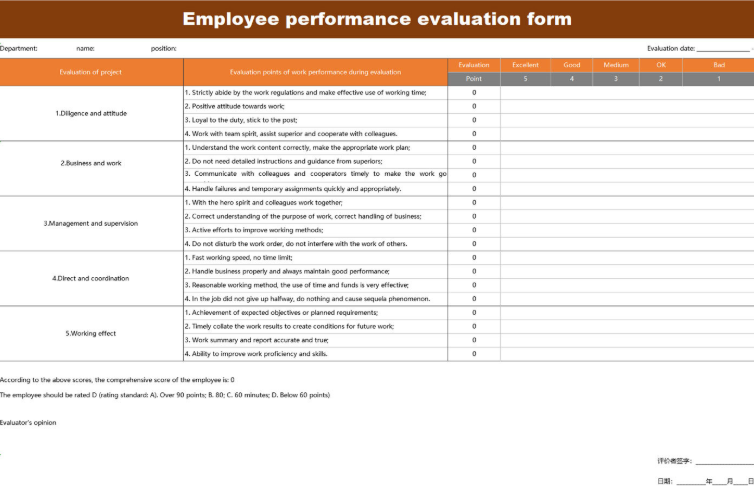
This detailed Employee
Performance Evaluation Form provides a robust, multi-criteria
assessment tool using a clear 5-point rating scale. The spreadsheet is
organized into five main categories, including Diligence and attitude
and Business and work, with a total of 17 distinct evaluation points.
The form includes an automatic scoring mechanism and space for the
evaluator's final opinion, making it ideal for thorough, objective, and
consistent annual reviews.
Employee Performance Evaluation Form
2. Performance Evaluation
Plan [Excel]
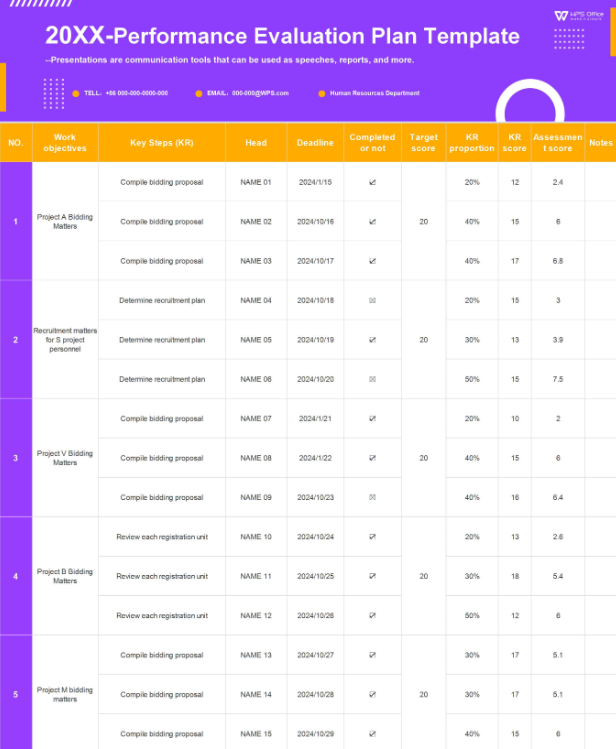
This Performance
Evaluation Plan Template is a powerful spreadsheet designed for
objective, metrics-driven assessments, heavily utilizing the Key Results
methodology. The template allows managers to set multiple Work
objectives and define the Key Steps needed to achieve them. It tracks
and calculates progress using a weighted system of KR proportion and KR
score, providing a quantitative and transparent way to evaluate
performance based on strategic goals.
Performance Evaluation Form
3. Employee Performance
Assessment [Excel]
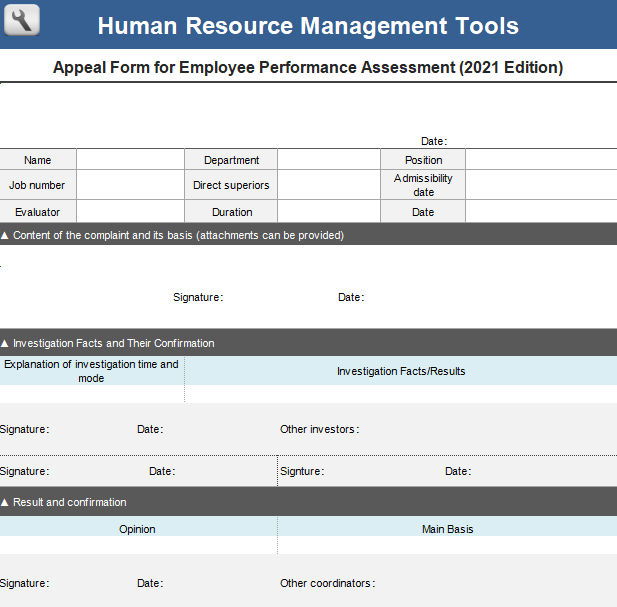
This Appeal
Form for Employee Performance Assessment provides a formal,
structured process for employees to challenge a performance review
decision. The document clearly separates the Content of the complaint
and its basis from the Investigation Facts and Their Confirmation,
ensuring a fair review process. This official tool is essential for
maintaining transparency and resolving disputes within a company's human
resource management system.
Employee Performance Assessment
4.
Employee 360-Degree Performance Evaluation Form [Excel]
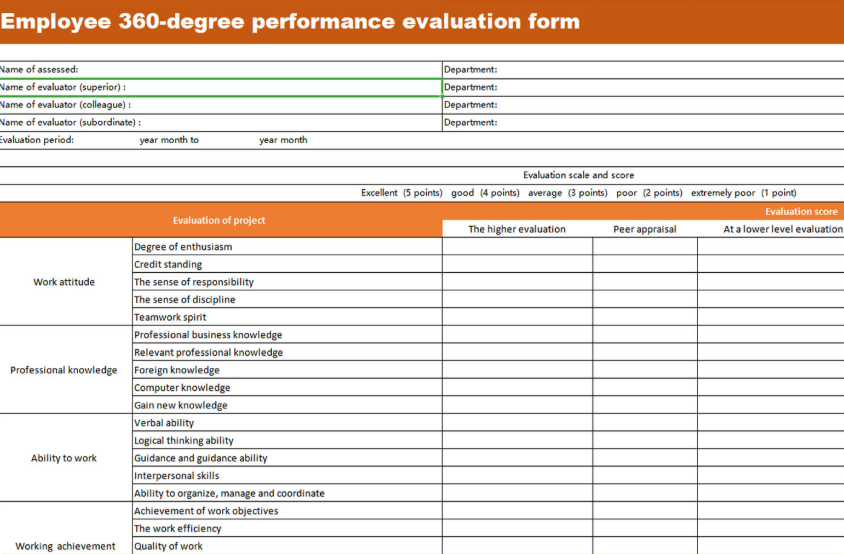
This Employee
360-Degree Review Template is a comprehensive tool that gathers
feedback from multiple perspectives: superior, colleague, and
subordinate. It assesses 18 detailed criteria across four main sections,
including Work attitude and Professional knowledge, using a 5-point
rating scale. This template is ideal for generating a holistic,
well-rounded view of an employee's overall performance and impact.
Employee 360 Degree Performance Template
5. New
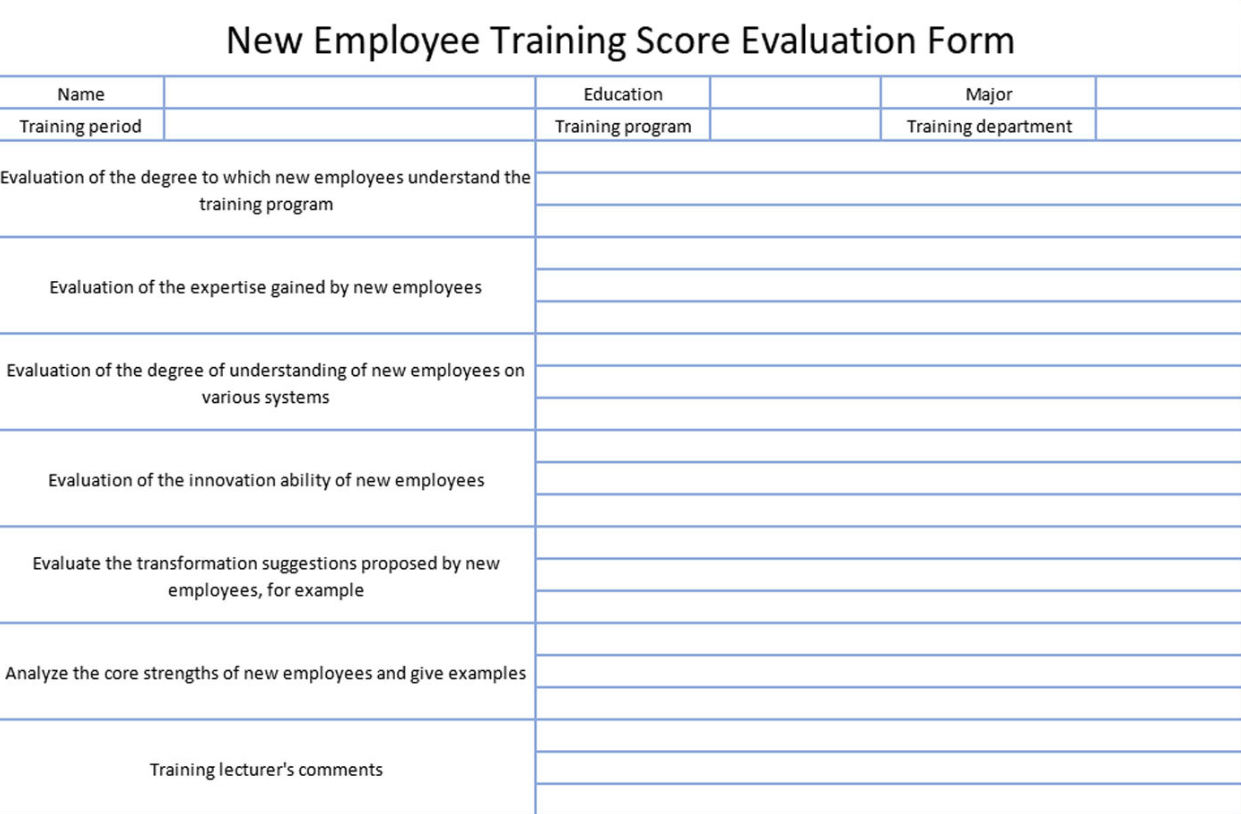
Employee Training Score Evaluation Form [Excel]
This New
Employee Training Score Evaluation Form is a specialized tool
for assessing a new hire's proficiency immediately following a training
program. It evaluates critical areas like understanding the training
program, expertise gained, and understanding of new systems. The form
also encourages feedback on innovation ability and transformation
suggestions, making it an essential tool for measuring training
effectiveness and a new employee's potential value.
New Employee Training Score Template
6. Supplier
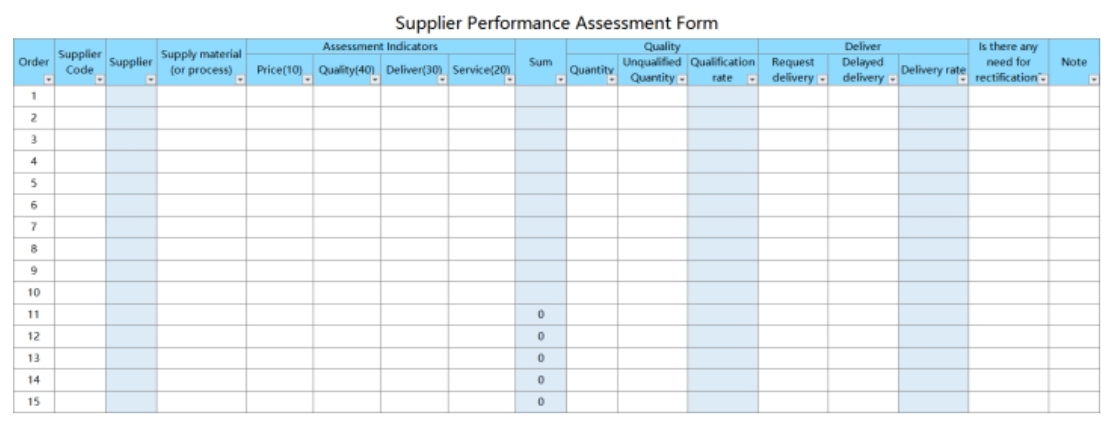
Performance Assessment Form [Excel]
This Supplier
Performance Assessment Form is a detailed, quantitative
spreadsheet for evaluating vendor quality and efficiency. It uses
weighted Assessment Indicators like Price, Quality, and Delivery to
calculate a total score. The form tracks key metrics like Delivery Rate,
Unqualified Quantity, and includes space for necessary rectification
notes, making it a vital tool for objective supplier management and
quality control.
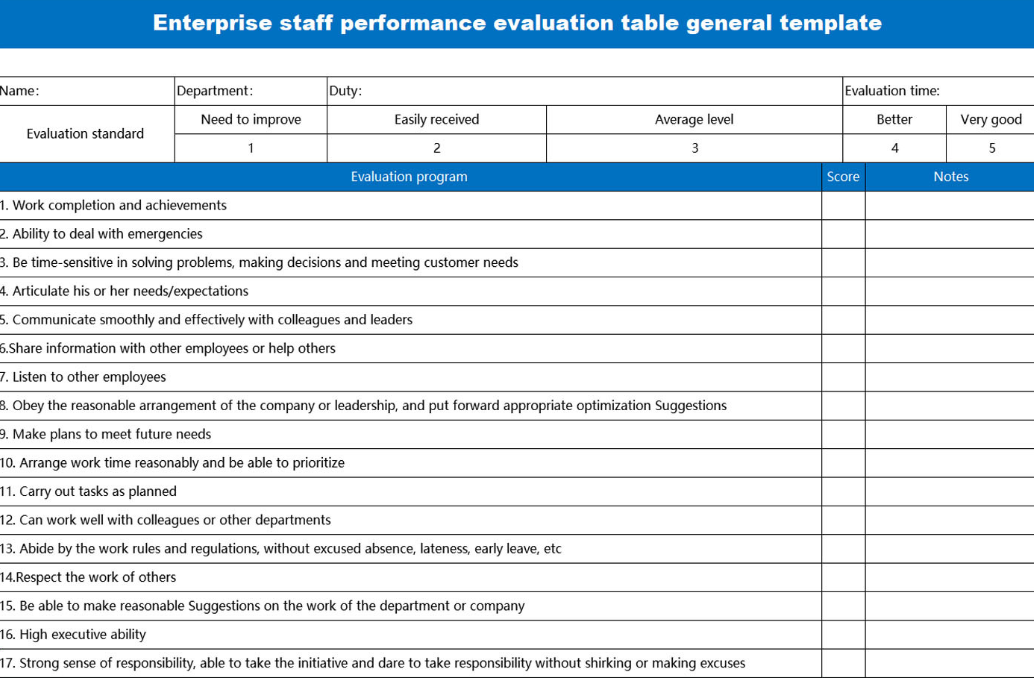
This Enterprise
Staff Performance Evaluation Table is a comprehensive,
quantitative review form designed for broad use across an organization.
It features a clear 5-point rating scale and assesses 17 key performance
indicators, from Work completion and achievements to Ability to deal
with emergencies and High executive ability. This structured,
metric-based template is an excellent tool for ensuring consistency and
objectivity in annual staff evaluations.
Enterprise Staff Performance Table
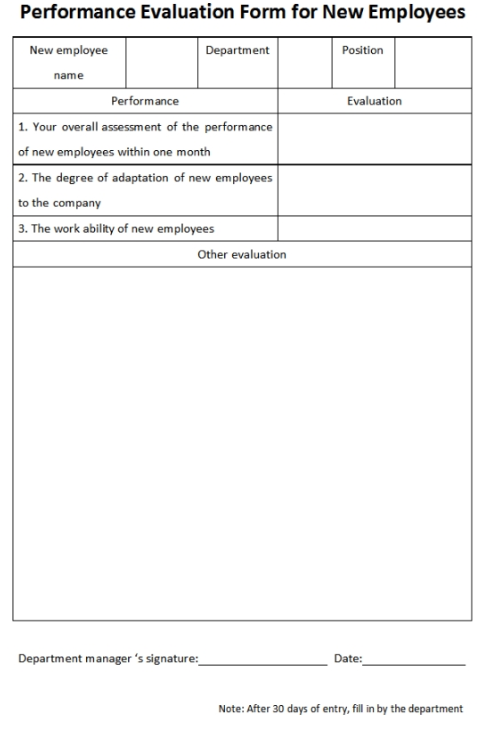
8. Performance Evaluation Form
[Word]
This Performance
Evaluation Form for new employees is a concise and essential
tool for managers assessing a new hire after their first month of entry.
It focuses on three critical early-stage factors: the new employee's
overall performance, their degree of adaptation to the company, and
their work ability. Its simple, professional layout ensures that
feedback is targeted and documented promptly, aiding in a smooth
onboarding and integration process.
Performance Evaluation Form
9. Performance Review Template
[PDF]
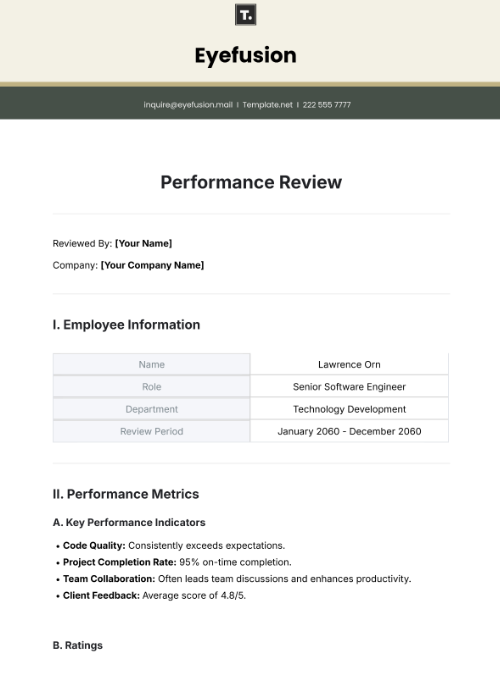
This Performance
Review Template presents a classic, professional format for
comprehensive employee evaluation. It is structured with dedicated
sections for Employee Information and Performance Metrics, including
space for key performance indicators like Code Quality, Project
Completion Rate, and Team Collaboration. This clean, organized template
is ideal for generating formal, professional, and well-documented annual
or semi-annual employee reviews.
Performance Review Template
10. Employee
Performance Review Template [PDF]
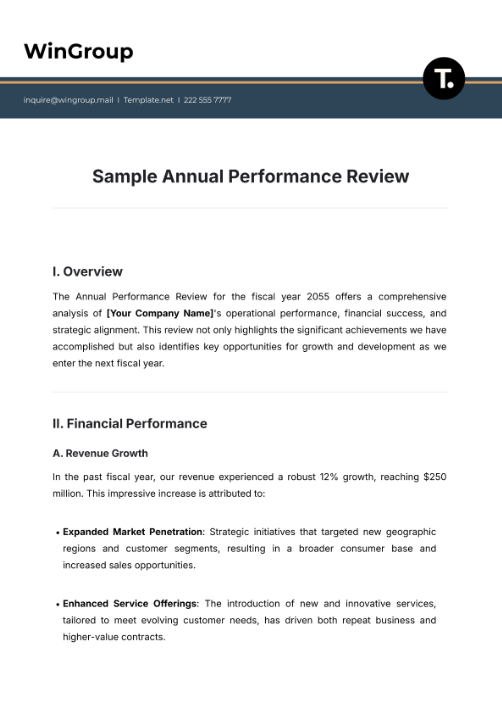
This Employee
Performance Review template offers a detailed, narrative-driven
approach to employee evaluation, ideal for executive or strategic
reviews. The document uses a formal, report-like structure with sections
like Overview and Financial Performance. It focuses on strategic
accomplishments, such as Expanded Market Penetration and Enhanced
Service Offerings, making it perfect for documenting high-level,
corporate-focused performance and achievements.
Sample Performance Review
How to
Edit a Performance Review Template for Your Team
Customizing an editable performance review template goes beyond just
filling in names and dates. I usually start by updating rating scales,
adding company branding, and including any new performance criteria
relevant to the team. With WPS Office, this process is simple. You can
change colors to match different departments, lock sections for
manager-only input, and even use built-in Excel
formulas to automatically calculate scores. Once everything is
tailored, the templates can be exported or printed for easy sharing and
record-keeping, ensuring your reviews stay organized and ready for the
next evaluation cycle.
How to Edit
a Performance Review Template in Excel
Editing a performance review template in Excel gives you full control
over scoring, metrics, and layout. With the right approach, you can
quickly tailor the form to match your team’s goals while keeping
calculations and formatting consistent. Here’s how to go about it:
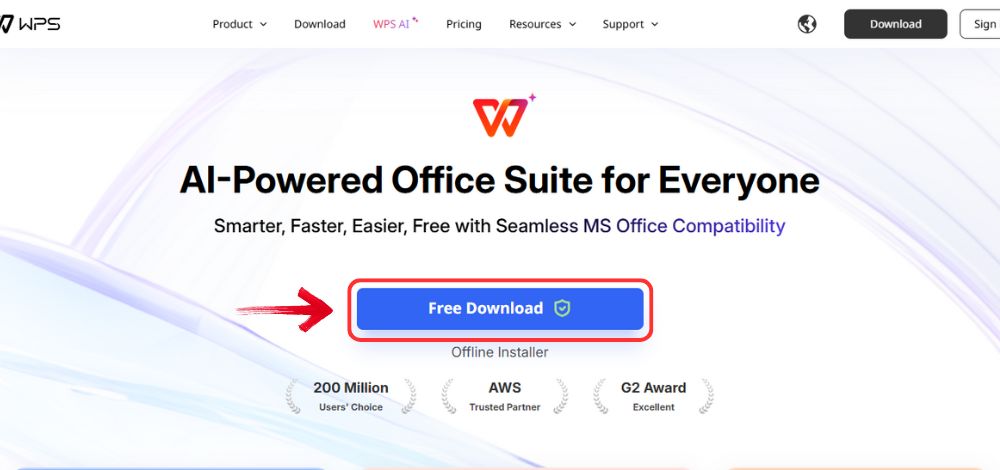
Step 1: First, open your browser to visit WPS Office and click the "Free Download" button to start the download.
Download WPS Office
Step 2: The download will finish in a few seconds.
Once done, run the installation file like you would for any other app or
software.
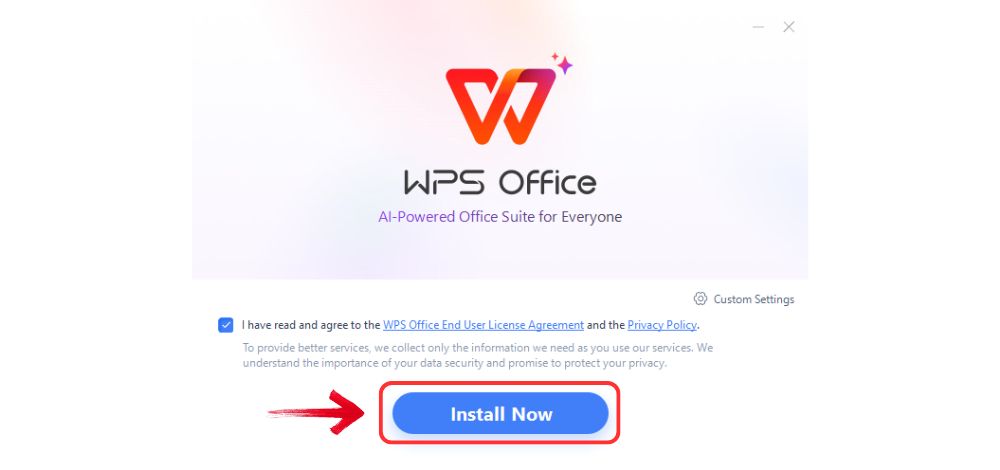
Step 3: WPS Office will show you a few simple terms
and conditions. Accept them, then click the "Install" button to begin the installation.
Install WPS Office
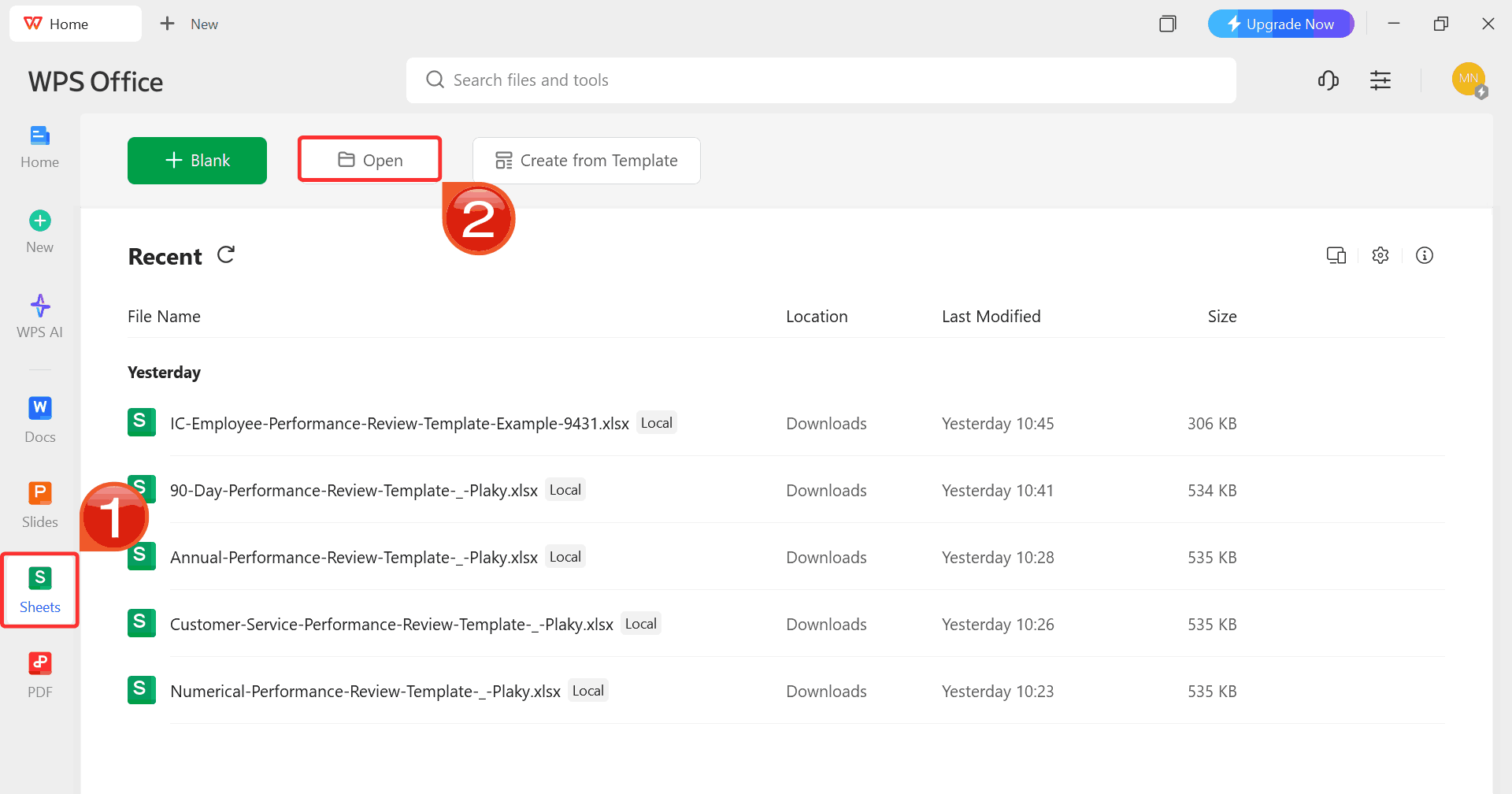
Step 4: After installation, on WPS Office, click “Sheets” from the left sidebar and hit “Open” to select your downloaded template.
WPS Spreadsheet Dashboard
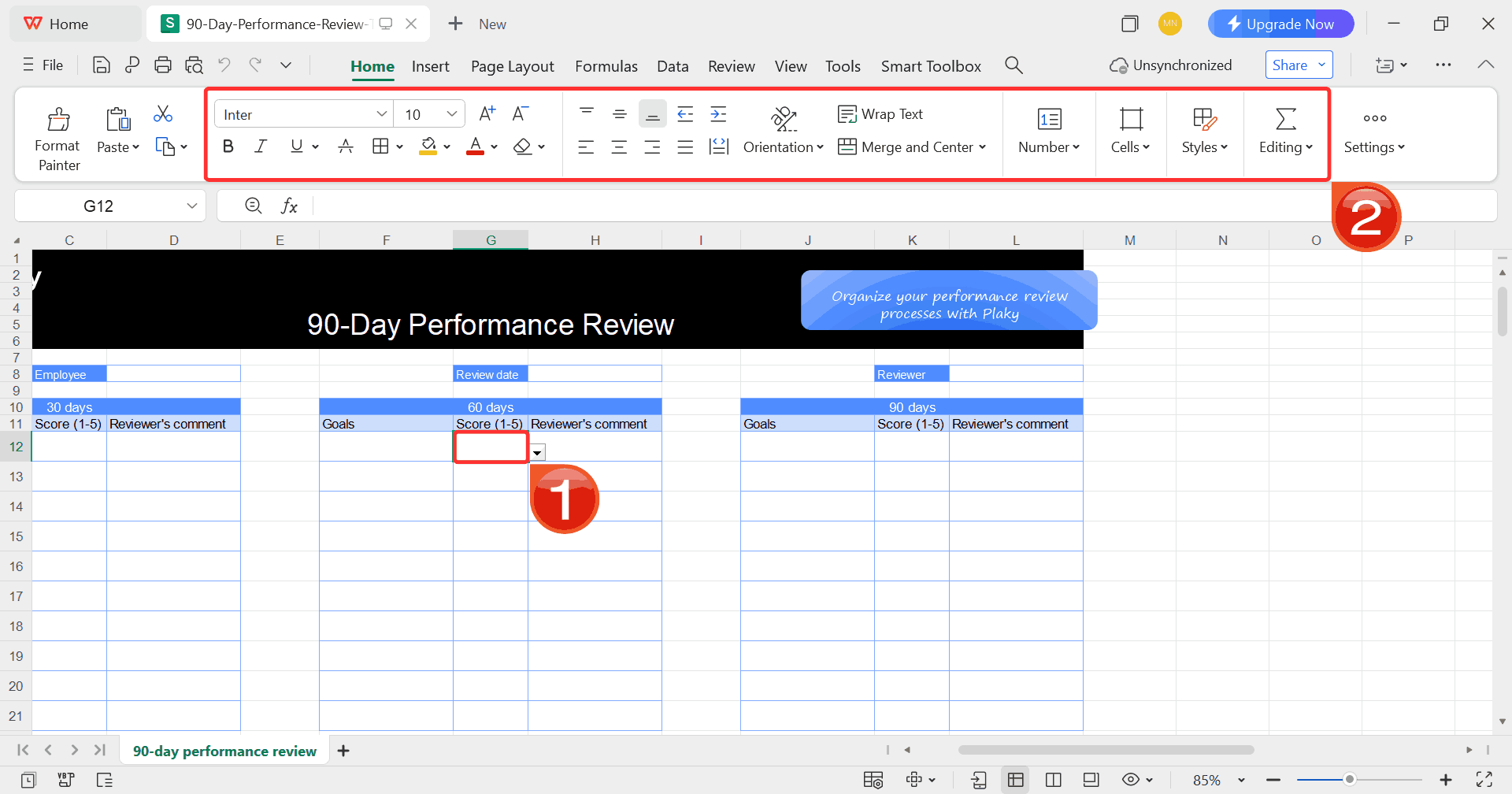
Step 5: Click on any cell you want to modify, then
use the toolbar to update text, tweak formatting, or adjust formulas as
needed.
Customize Template
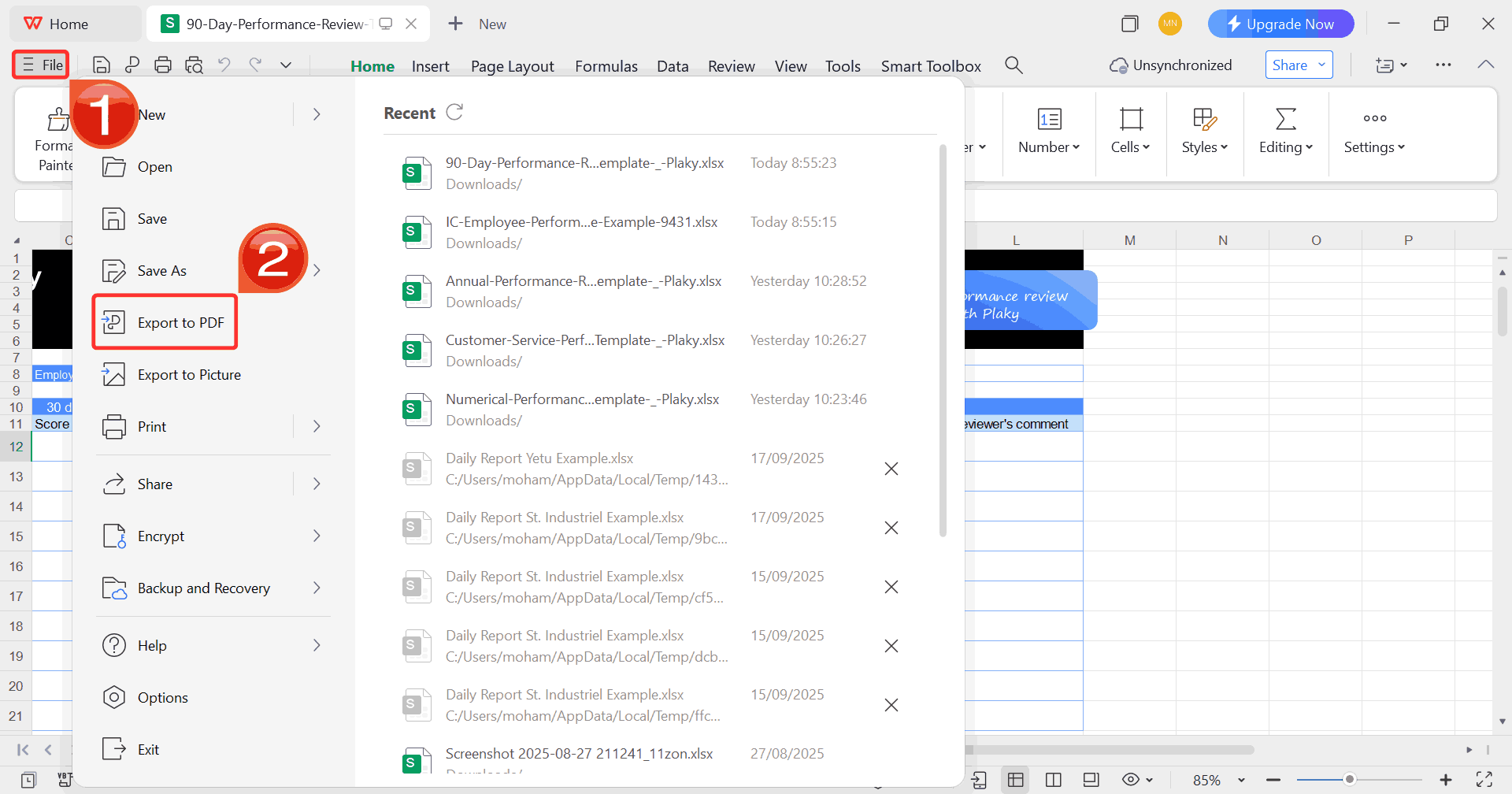
Step 6: After finishing your edits, head to “File” and choose “Export to PDF”.
This saves your review in a clean, professional format that’s easy to
share or archive.
Export Template
How to Edit a
Performance Review Template in Word
Editing a performance review template in Word gives you more control
over layout and tone. It’s ideal when you want to adjust section
headers, refine wording, or add your company’s branding. With WPS
Office, you can make these updates quickly without affecting the
document’s structure or formatting.
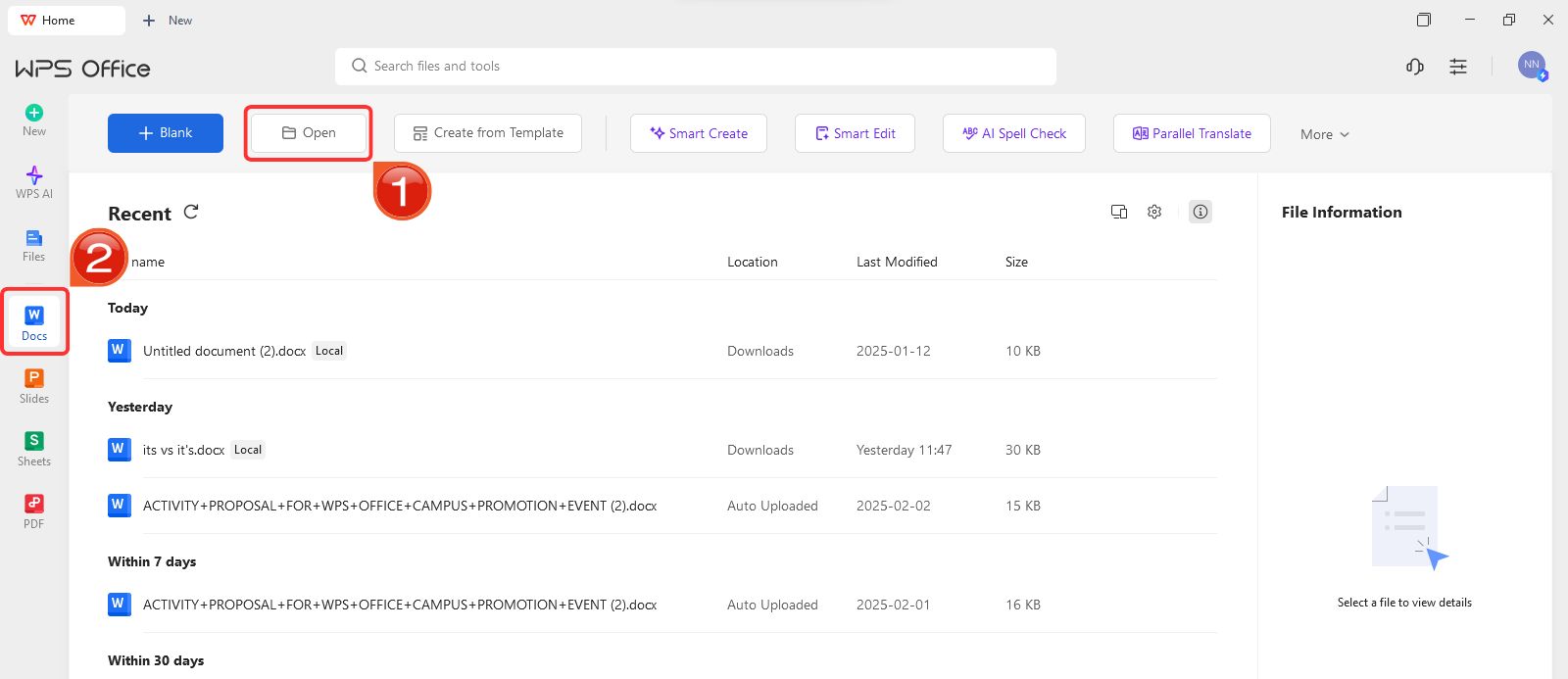
Step 1: On WPS Office, click on “Docs” from the left panel, then select “Open” to open a document.
Create new blank document
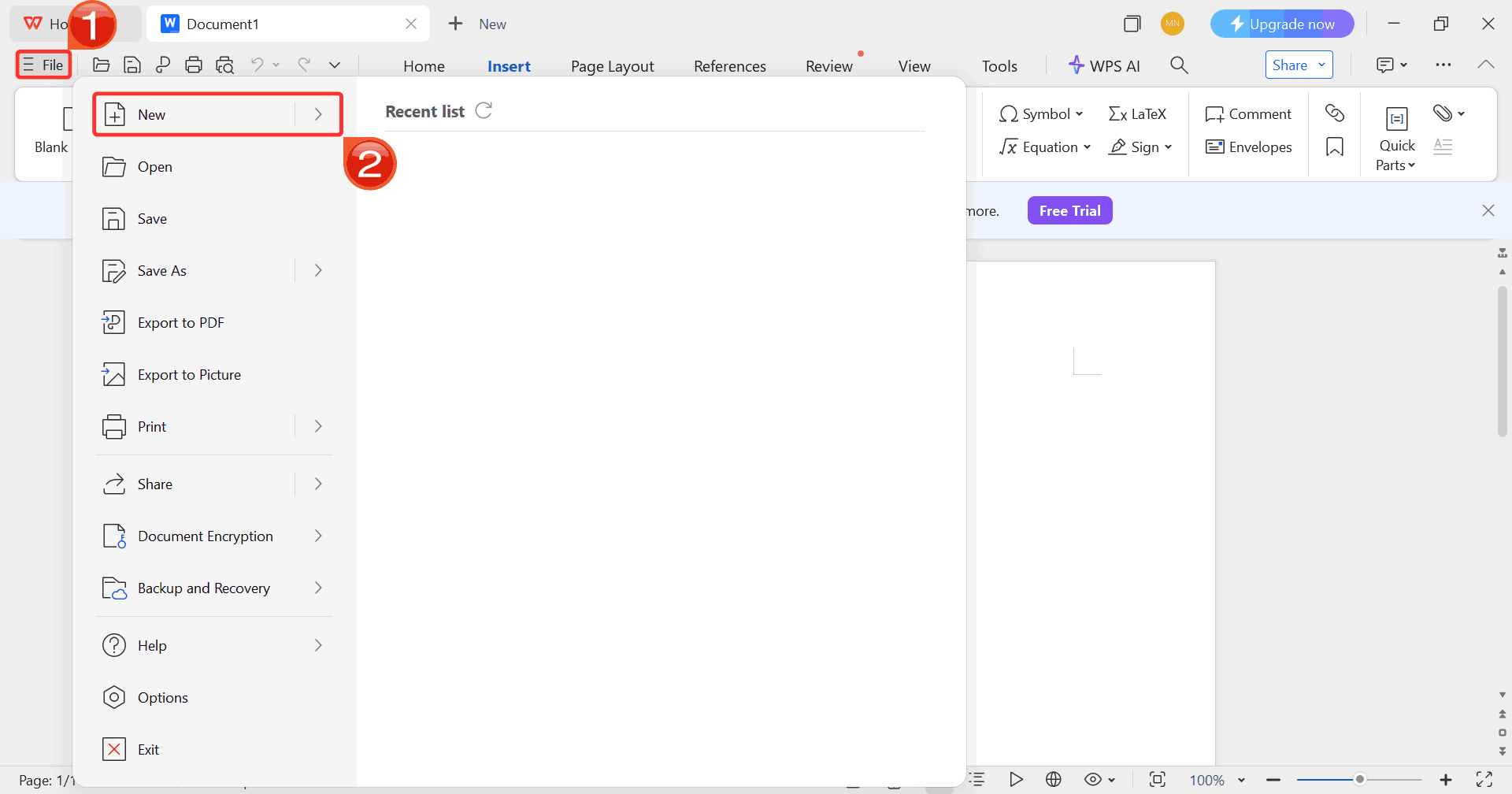
Step 2: Click on “File”, then click
on “New” to browse options for opening a blank document
or choosing from available templates.
Select New
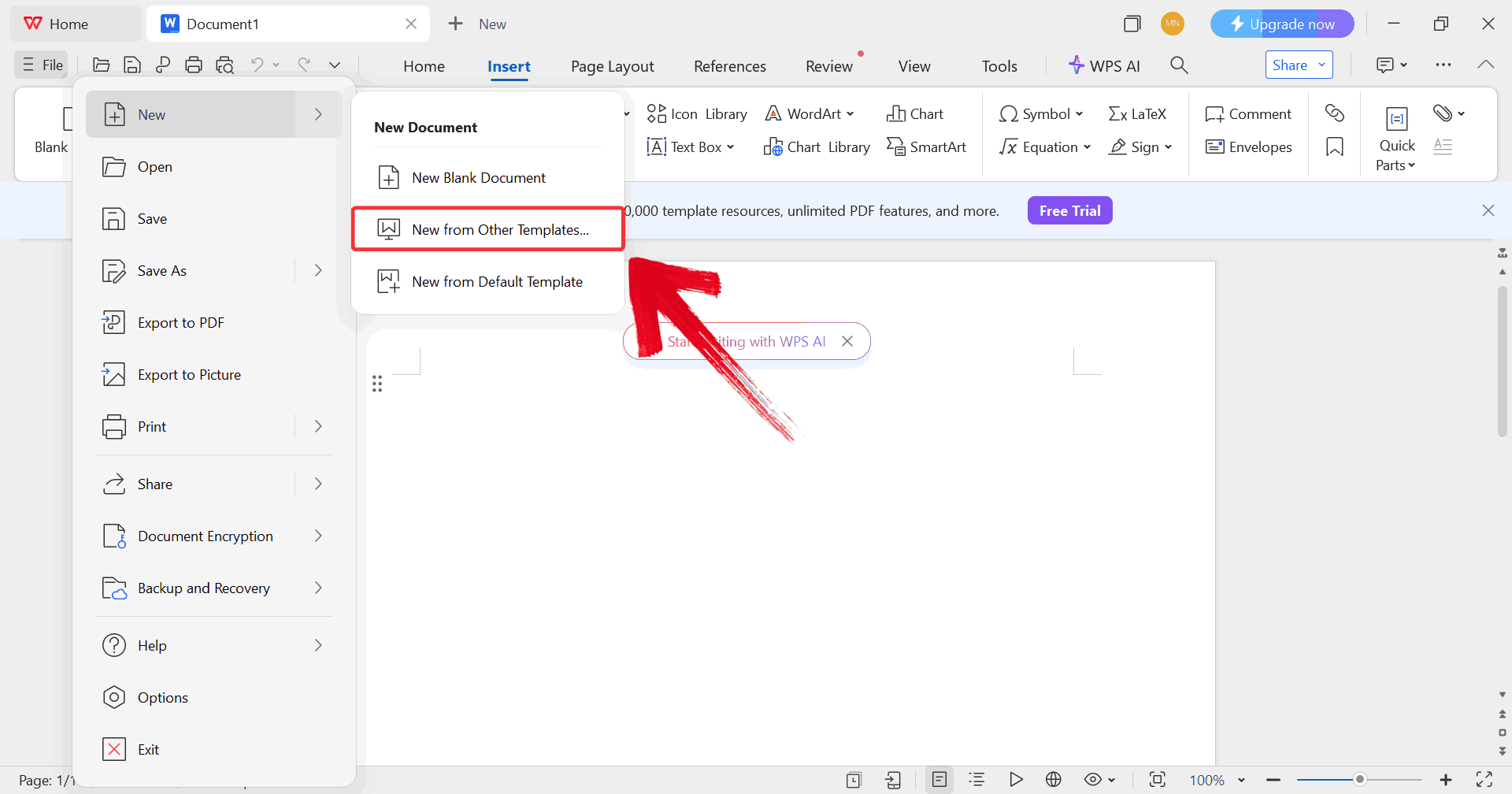
Step 3: Click on “New from other
templates” to upload your desired template, either from your
device or directly from the WPS template library.
Upload Template
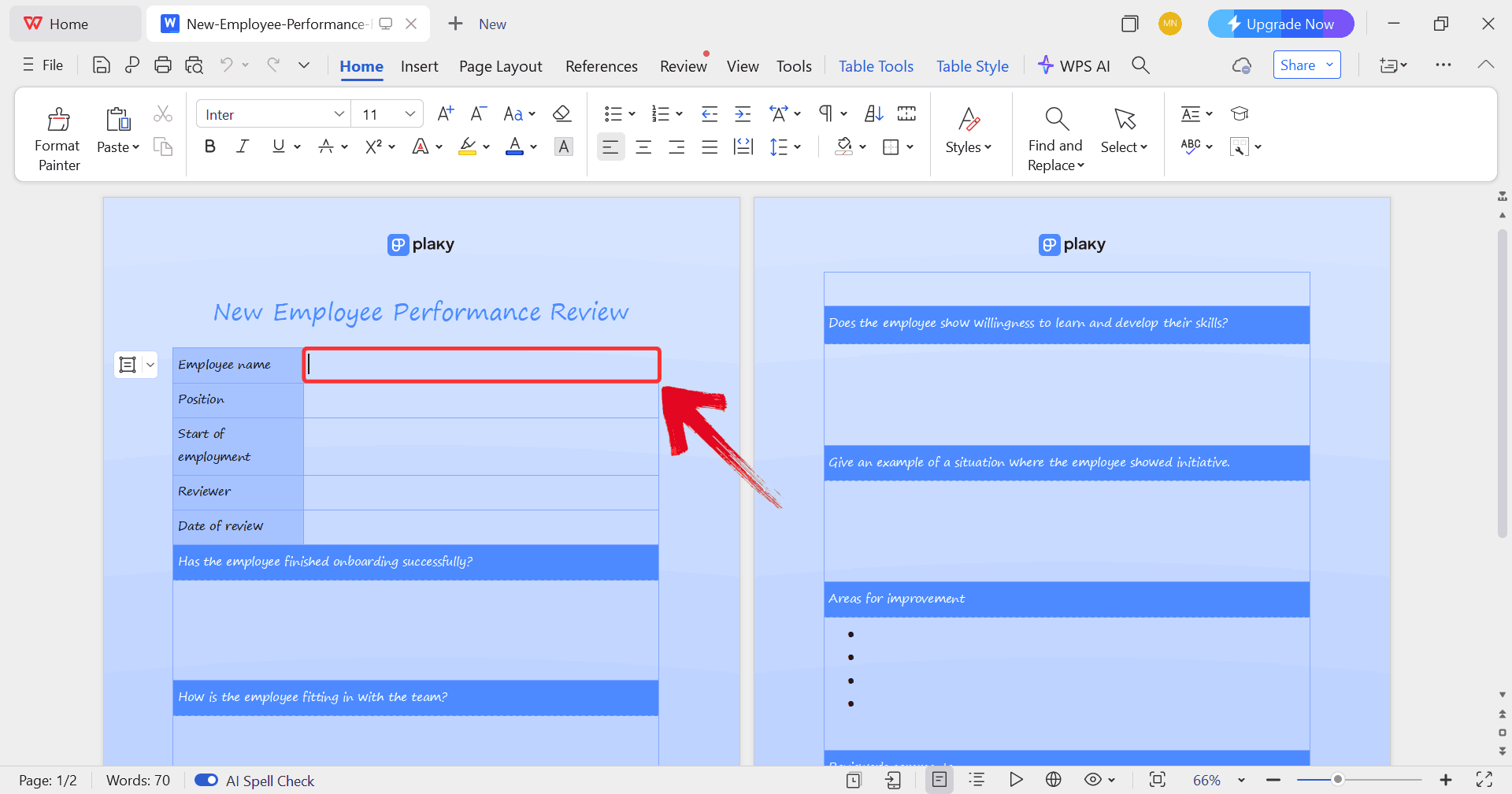
Step 4: In order to fill the form with real details,
just click on any blank section you want to fill, such as the employee’s
name, department, or review period.
Edit Template
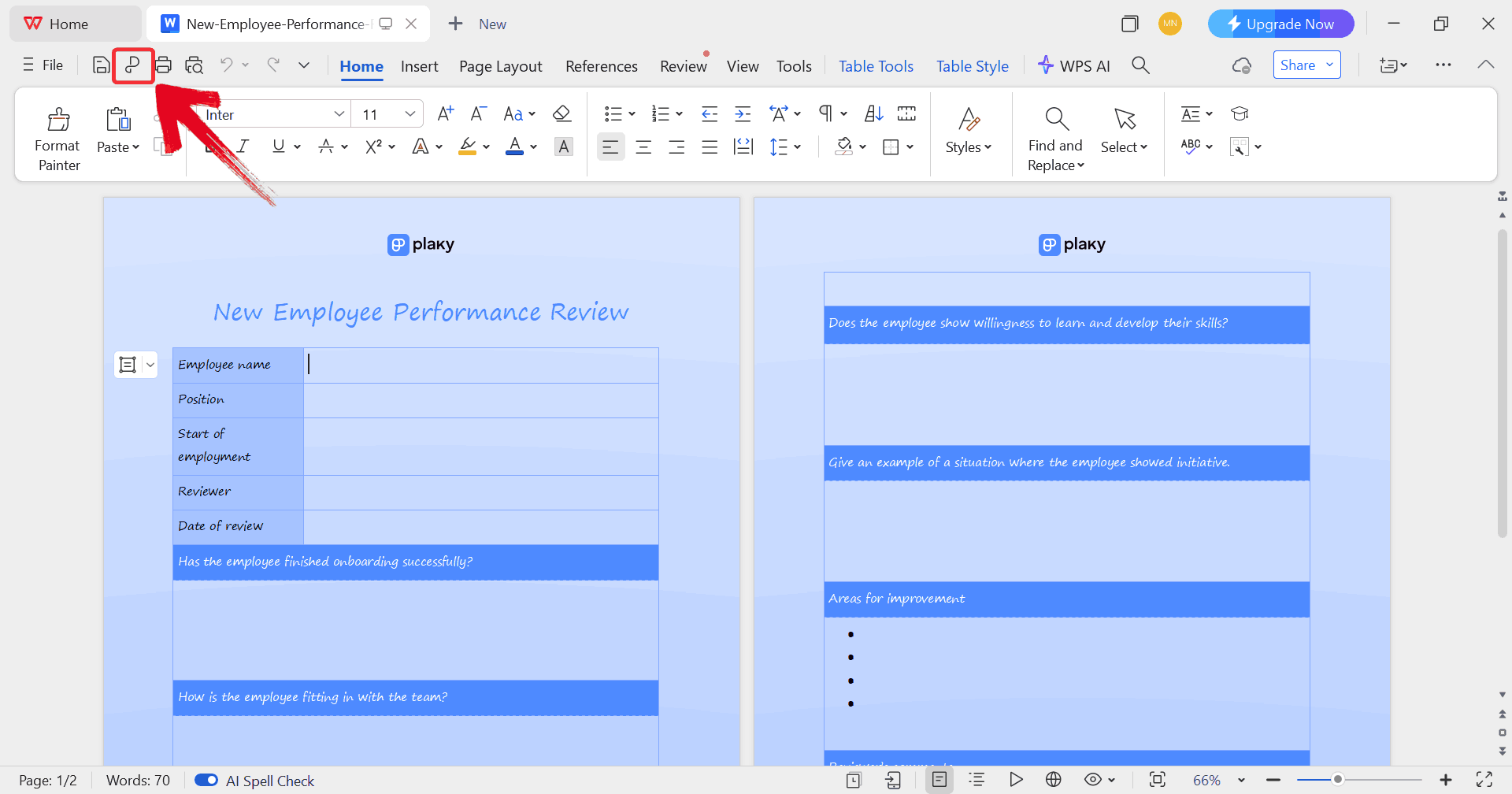
Step 5: Click on the “P” icon to
make sure your document is saved as a PDF, keeping the layout intact and
ready for printing or sharing digitally.
Print Template
How to Edit a
Performance Review Template in PDF
Editing a performance review template in PDF works well when you need
minor updates or want to keep formatting perfectly intact. With WPS
Office, you can tweak text, add digital signatures, or highlight
sections for feedback without converting the file or disrupting its
layout.
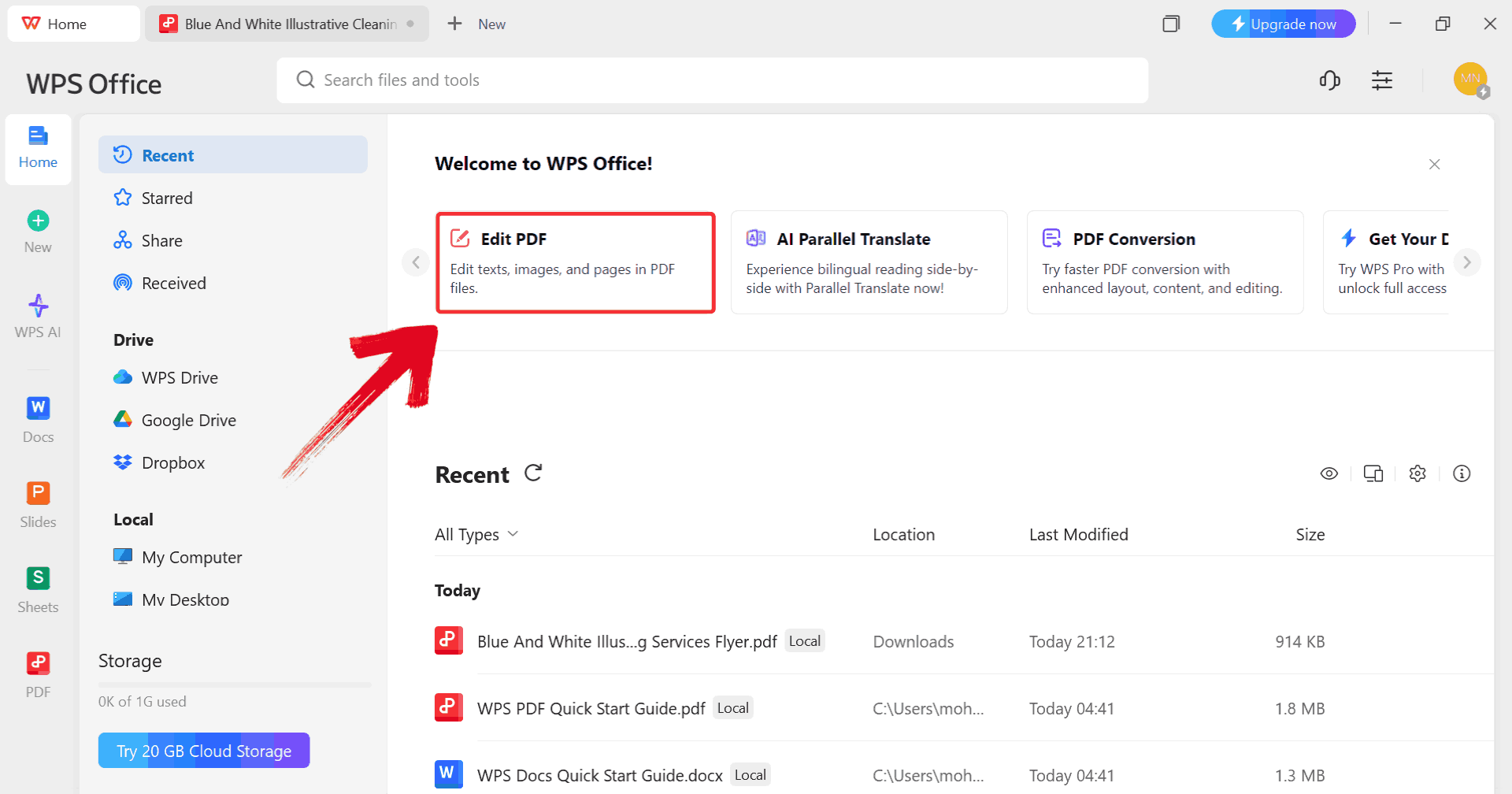
Step 1: Start by clicking on “Edit
PDF” on the WPS Office dashboard to import your template.
Click Edit PDF
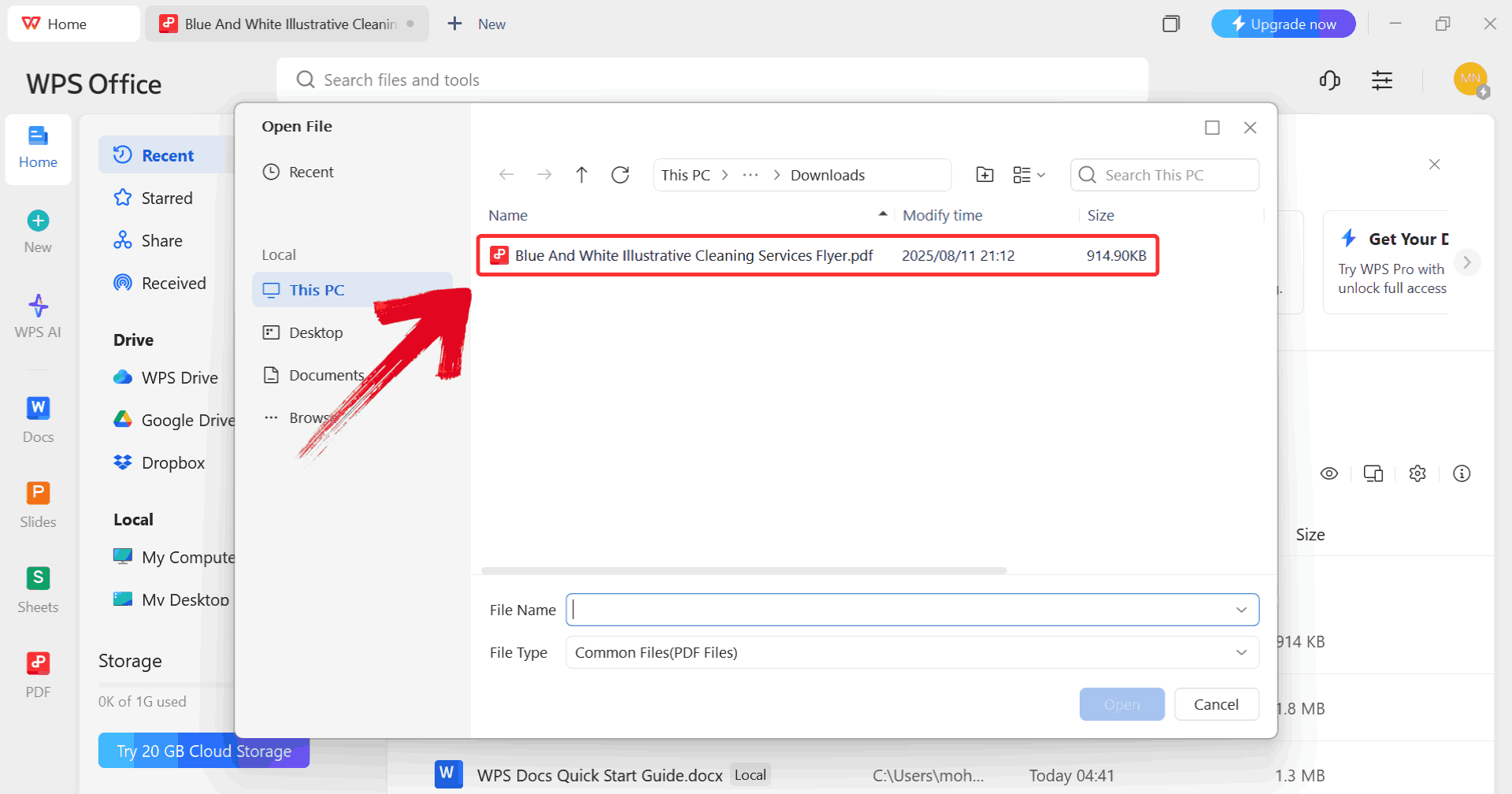
Step 2: When prompted, browse through your computer
and select the PDF file you want to edit.
Select PDF
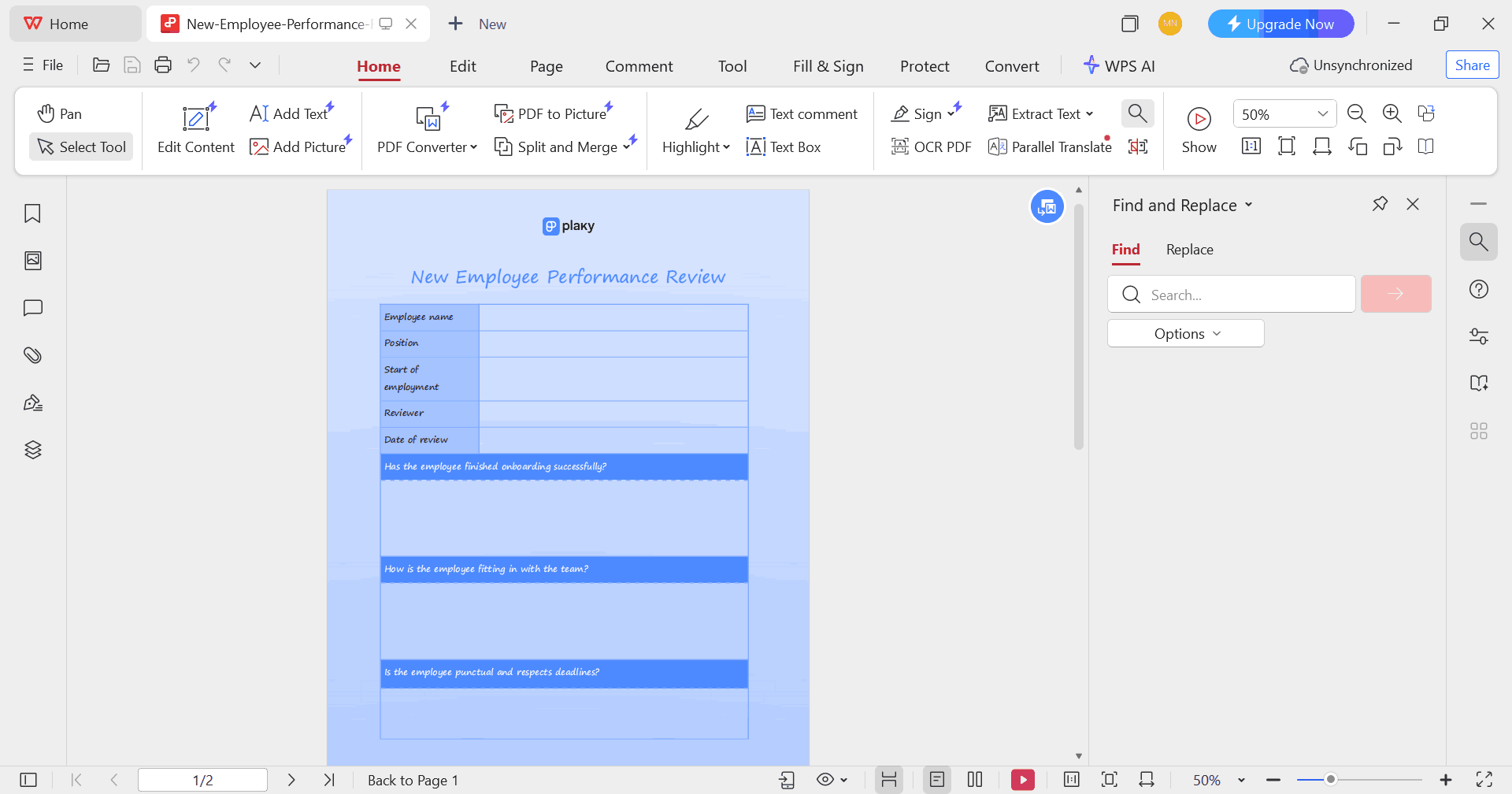
Step 3: Make any changes you want to the PDF using
the available editing tools such as the text font or size.
Edit PDF
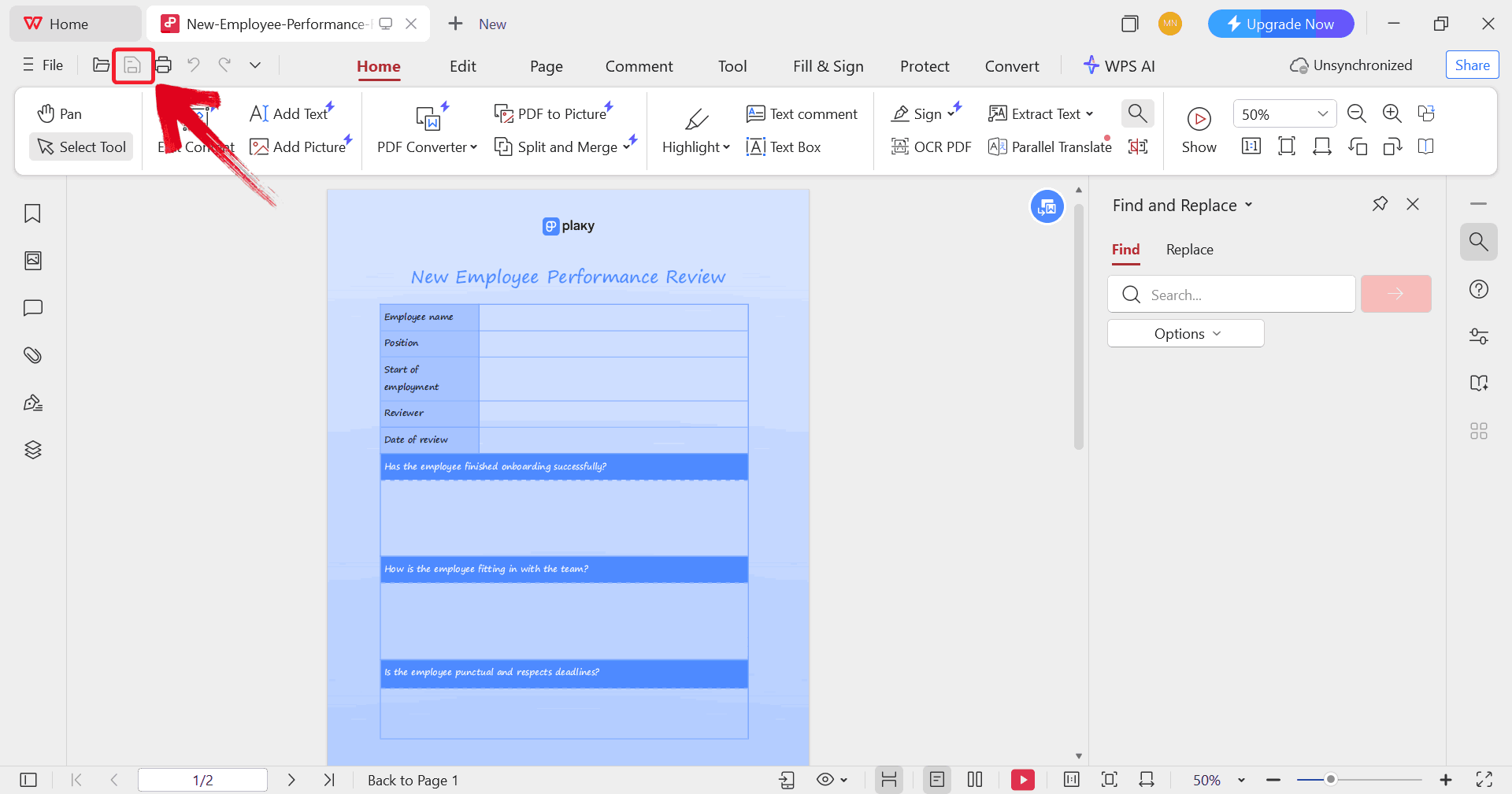
Step 4: Once you’ve made the changes, click on the “printer” icon to start printing your template but make
sure your printer is connected to your device.
Print PDF
Enhance
Your Templates with WPS AI-Powered Office Suite
Once your templates are ready, WPS
Office makes managing and refining them much smoother. Its clean
interface allows you to move easily between Word, Excel, and PDF files
without worrying about formatting issues. You can use Excel to automate
scoring and performance averages, Word to draft and finalize feedback
forms, and PDF tools to secure and share completed reviews. Features
like cloud storage, version tracking, and cross-device syncing ensure
every update stays organized and accessible for HR teams, making the
entire review cycle more efficient and reliable.
WPS Office Features
Here’s what makes it stand out:
Free Access to Templates: Thousands of free templates, including employee performance review forms, business reports, and HR documents.
Cross-Format Compatibility: You can open and edit Word, Excel, and PDF files seamlessly without switching software.
Built-in AI Tools: Generate summaries, auto-format text, or rephrase feedback to make reviews more precise and readable.
Cloud Integration: Store templates securely in the WPS Cloud and share them with your team instantly.
For teams looking to boost their review process, WPS Office provides
a practical and cost-effective solution that fits both small businesses
and enterprise-level HR needs.
100% secure
FAQs
Q1: Where
can I find free performance review templates?
You can find free templates on platforms like WPS Office, HR resource
sites, and professional template directories such as Template.net.
Q2:
Should templates include both self-assessment and manager feedback?
Yes. Including both gives a complete picture, fosters accountability,
and encourages open communication.
Q3:
What are the common sections in a performance review template?
Most templates include employee details, job responsibilities, goals,
strengths, areas for improvement, and overall performance ratings.
Q4:
How do I ensure my performance review template is fair and
unbiased?
Use objective criteria, standardized scoring systems, and specific
comment sections. Avoid vague language and ensure every evaluator
follows the same structure.
WPS Being the Performance Pulse
Performance review templates make evaluating your team simpler and more organized by replacing scattered spreadsheets with a clear, structured format. These editable templates can help you track goals, add scoring systems, and customize layouts easily. And WPS Office makes this process of editing and sharing reviews even more effortless and discreet.
7+ years in productivity tech. I test and review the latest tools to simplify your workflow. Follow for honest app comparisons, practical guides, and curated tech picks to boost efficiency.


'%3e%3cpath%20d='M8%200C12.4183%200%2016%203.58172%2016%208C16%2012.4183%2012.4183%2016%208%2016C3.58172%2016%200%2012.4183%200%208C0%203.58172%203.58172%200%208%200ZM11.6162%204.38379C11.2257%203.99337%2010.5927%203.99338%2010.2021%204.38379L8%206.58594L5.79785%204.38379C5.40732%203.99334%204.77429%203.99329%204.38379%204.38379C3.99331%204.77429%203.99335%205.40733%204.38379%205.79785L6.58594%208L4.38379%2010.2021C3.99348%2010.5927%203.99341%2011.2257%204.38379%2011.6162C4.77426%2012.0066%205.40734%2012.0065%205.79785%2011.6162L8%209.41406L10.2021%2011.6162C10.5927%2012.0066%2011.2257%2012.0067%2011.6162%2011.6162C12.0067%2011.2257%2012.0066%2010.5927%2011.6162%2010.2021L9.41406%208L11.6162%205.79785C12.0066%205.40735%2012.0066%204.77429%2011.6162%204.38379Z'%20fill='%23080E17'%20fill-opacity='0.46'/%3e%3c/g%3e%3cdefs%3e%3cclipPath%20id='clip0_3761_713'%3e%3crect%20width='16'%20height='16'%20fill='white'/%3e%3c/clipPath%3e%3c/defs%3e%3c/svg%3e)




'%3e%3cpath%20fill-rule='evenodd'%20clip-rule='evenodd'%20d='M21.4999%2010.9993C21.4999%205.20009%2016.7986%200.498901%2010.9993%200.498901C5.19994%200.498901%200.498657%205.20009%200.498657%2010.9993C0.498657%2016.2404%204.33858%2020.5844%209.35855%2021.3722V14.0346H6.69238V10.9993H9.35855V8.68594C9.35855%206.05427%2010.9262%204.60062%2013.3248%204.60062C14.4736%204.60062%2015.6753%204.80571%2015.6753%204.80571V7.38979H14.3512C13.0468%207.38979%2012.64%208.19921%2012.64%209.0296V10.9993H15.5523L15.0867%2014.0346H12.64V21.3722C17.66%2020.5844%2021.4999%2016.2404%2021.4999%2010.9993Z'%20fill='%231568EA'/%3e%3c/g%3e%3c/svg%3e)


'%3e%3cpath%20d='M2.42045%2022.1876H6.31818V12.7217L0.75%208.54553V20.5171C0.75%2021.4414%201.49892%2022.1876%202.42045%2022.1876Z'%20fill='%234285F4'/%3e%3cpath%20d='M19.682%2022.1876H23.5797C24.5041%2022.1876%2025.2502%2021.4387%2025.2502%2020.5171V8.54553L19.682%2012.7217'%20fill='%2334A853'/%3e%3cpath%20d='M19.682%205.48293V12.7216L25.2502%208.54543V6.31816C25.2502%204.25236%2022.8921%203.07469%2021.2411%204.31361'%20fill='%23FBBC04'/%3e%3cpath%20d='M6.31824%2012.7217V5.48303L13.0001%2010.4944L19.6819%205.48303V12.7217L13.0001%2017.733'%20fill='%23EA4335'/%3e%3cpath%20d='M0.75%206.31816V8.54543L6.31818%2012.7216V5.48293L4.75909%204.31361C3.10534%203.07469%200.75%204.25236%200.75%206.31816Z'%20fill='%23C5221F'/%3e%3c/g%3e%3cdefs%3e%3cclipPath%20id='clip0_2954_7305'%3e%3crect%20width='24.5'%20height='18.375'%20fill='white'%20transform='translate(0.75%203.8125)'/%3e%3c/clipPath%3e%3c/defs%3e%3c/svg%3e)




'%3e%3cpath%20d='M19.9911%204.11386V6.471H18.5894C18.0775%206.471%2017.7322%206.57814%2017.5536%206.79243C17.3751%207.00671%2017.2858%207.32814%2017.2858%207.75671V9.44421H19.9019L19.5536%2012.0871H17.2858V18.8639H14.5536V12.0871H12.2769V9.44421H14.5536V7.49779C14.5536%206.39064%2014.8632%205.53201%2015.4822%204.92189C16.1013%204.31177%2016.9257%204.00671%2017.9554%204.00671C18.8304%204.00671%2019.509%204.04243%2019.9911%204.11386Z'%20fill='%23333333'/%3e%3c/g%3e%3cdefs%3e%3cclipPath%20id='clip0_2938_8199'%3e%3crect%20width='16'%20height='16'%20fill='white'%20transform='translate(8%204.00671)'/%3e%3c/clipPath%3e%3c/defs%3e%3c/svg%3e)
'%3e%3cpath%20d='M17.5237%2010.7813L23.4811%204H22.0699L16.8949%209.88693L12.7648%204H8L14.2469%2012.9029L8%2020.0133H9.4112L14.8725%2013.7952L19.2352%2020.0133H24M9.92053%205.04213H12.0885L22.0688%2019.0224H19.9003'%20fill='%23333333'/%3e%3c/g%3e%3cdefs%3e%3cclipPath%20id='clip0_2938_8200'%3e%3crect%20width='16'%20height='16.0134'%20fill='white'%20transform='translate(8%204)'/%3e%3c/clipPath%3e%3c/defs%3e%3c/svg%3e)


