

'%3e%3cpath%20d='M8%200C12.4183%200%2016%203.58172%2016%208C16%2012.4183%2012.4183%2016%208%2016C3.58172%2016%200%2012.4183%200%208C0%203.58172%203.58172%200%208%200ZM11.6162%204.38379C11.2257%203.99337%2010.5927%203.99338%2010.2021%204.38379L8%206.58594L5.79785%204.38379C5.40732%203.99334%204.77429%203.99329%204.38379%204.38379C3.99331%204.77429%203.99335%205.40733%204.38379%205.79785L6.58594%208L4.38379%2010.2021C3.99348%2010.5927%203.99341%2011.2257%204.38379%2011.6162C4.77426%2012.0066%205.40734%2012.0065%205.79785%2011.6162L8%209.41406L10.2021%2011.6162C10.5927%2012.0066%2011.2257%2012.0067%2011.6162%2011.6162C12.0067%2011.2257%2012.0066%2010.5927%2011.6162%2010.2021L9.41406%208L11.6162%205.79785C12.0066%205.40735%2012.0066%204.77429%2011.6162%204.38379Z'%20fill='%23080E17'%20fill-opacity='0.46'/%3e%3c/g%3e%3cdefs%3e%3cclipPath%20id='clip0_3761_713'%3e%3crect%20width='16'%20height='16'%20fill='white'/%3e%3c/clipPath%3e%3c/defs%3e%3c/svg%3e)




'%3e%3cpath%20fill-rule='evenodd'%20clip-rule='evenodd'%20d='M21.4999%2010.9993C21.4999%205.20009%2016.7986%200.498901%2010.9993%200.498901C5.19994%200.498901%200.498657%205.20009%200.498657%2010.9993C0.498657%2016.2404%204.33858%2020.5844%209.35855%2021.3722V14.0346H6.69238V10.9993H9.35855V8.68594C9.35855%206.05427%2010.9262%204.60062%2013.3248%204.60062C14.4736%204.60062%2015.6753%204.80571%2015.6753%204.80571V7.38979H14.3512C13.0468%207.38979%2012.64%208.19921%2012.64%209.0296V10.9993H15.5523L15.0867%2014.0346H12.64V21.3722C17.66%2020.5844%2021.4999%2016.2404%2021.4999%2010.9993Z'%20fill='%231568EA'/%3e%3c/g%3e%3c/svg%3e)


'%3e%3cpath%20d='M2.42045%2022.1876H6.31818V12.7217L0.75%208.54553V20.5171C0.75%2021.4414%201.49892%2022.1876%202.42045%2022.1876Z'%20fill='%234285F4'/%3e%3cpath%20d='M19.682%2022.1876H23.5797C24.5041%2022.1876%2025.2502%2021.4387%2025.2502%2020.5171V8.54553L19.682%2012.7217'%20fill='%2334A853'/%3e%3cpath%20d='M19.682%205.48293V12.7216L25.2502%208.54543V6.31816C25.2502%204.25236%2022.8921%203.07469%2021.2411%204.31361'%20fill='%23FBBC04'/%3e%3cpath%20d='M6.31824%2012.7217V5.48303L13.0001%2010.4944L19.6819%205.48303V12.7217L13.0001%2017.733'%20fill='%23EA4335'/%3e%3cpath%20d='M0.75%206.31816V8.54543L6.31818%2012.7216V5.48293L4.75909%204.31361C3.10534%203.07469%200.75%204.25236%200.75%206.31816Z'%20fill='%23C5221F'/%3e%3c/g%3e%3cdefs%3e%3cclipPath%20id='clip0_2954_7305'%3e%3crect%20width='24.5'%20height='18.375'%20fill='white'%20transform='translate(0.75%203.8125)'/%3e%3c/clipPath%3e%3c/defs%3e%3c/svg%3e)


When drilling and tapping threads, accuracy depends heavily on using the correct drill size. A single mismatch can result in weak threads, broken taps, or wasted material, a costly mistake for professionals and DIY users alike. Without a reliable drill and tap chart, choosing the right size quickly becomes confusing.
So how can machinists, engineers, or hobbyists avoid errors and save time? The answer lies in ready-to-use resources. By downloading drill and tap chart PDF templates, users can instantly reference both metric drill and tap chart and imperial drill and tap chart data, ensuring every thread is cut to the correct size.


Part 1. Top 10 Drill and Tap Chart Templates
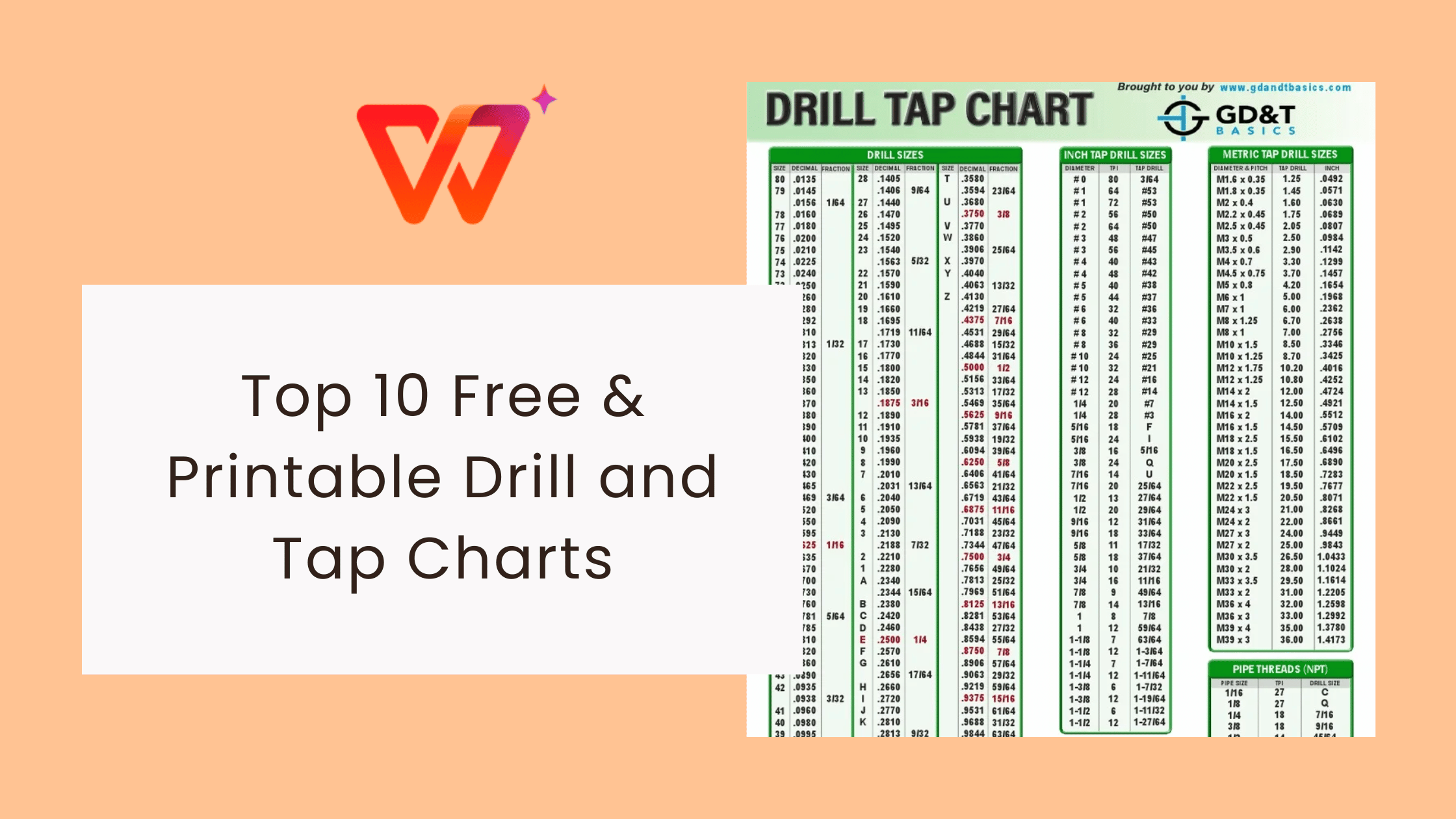
Here are ten reliable and free templates you can download, print, and use in your workshop or office. Each drill and tap chart includes essential information to help you quickly find the correct drill size for tapping threads, reducing errors and saving time.
1. Tap and Drill Selection Chart
A comprehensive tap and drill selection guide that covers common metric and imperial threads. Suitable for quick reference in professional workshops.
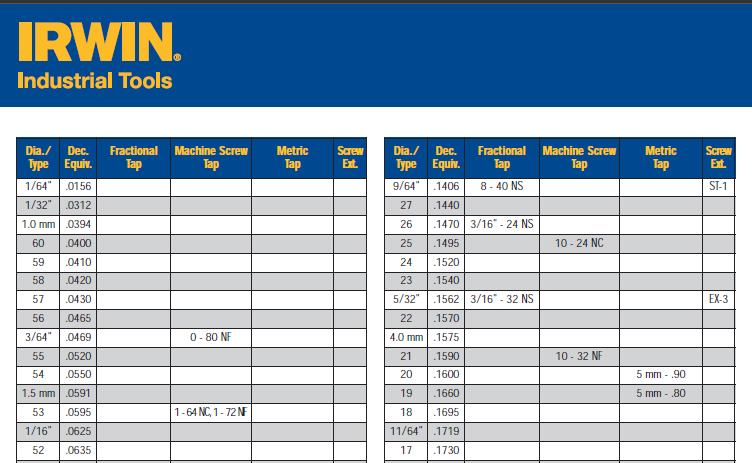
2. Tap Drill Sizes for Fractional Size Threads
This tap drill sizes chart focuses on fractional sizes, making it especially useful for machinists who work primarily with inch-based standards.
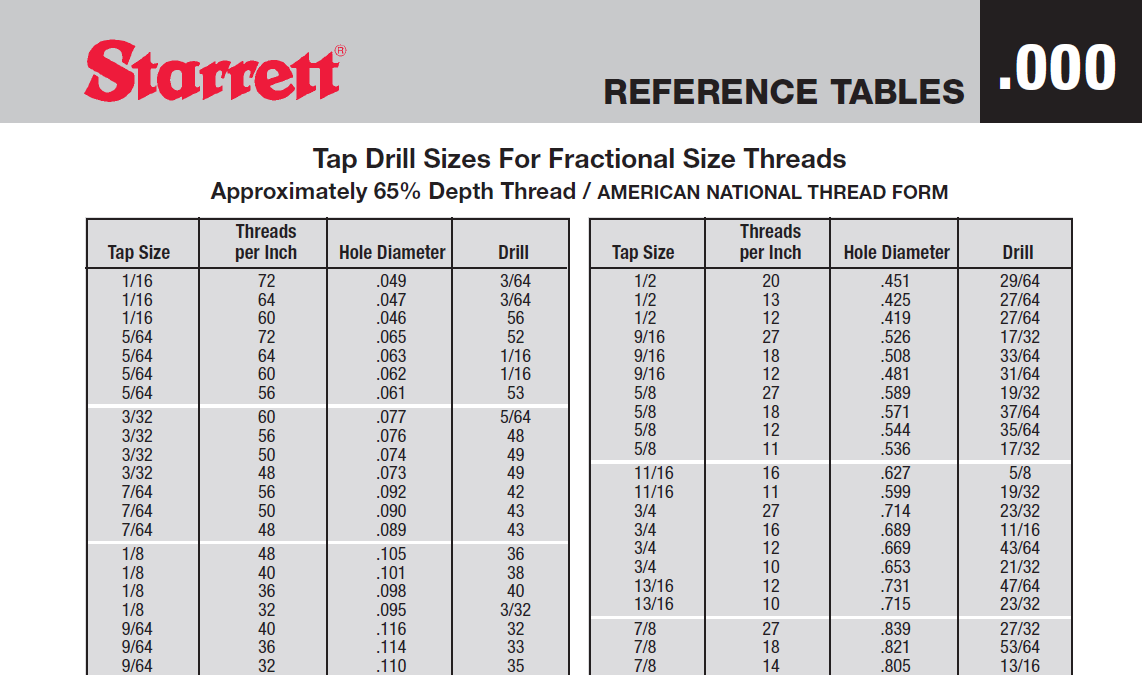
3. Tapping Drill Sizes
A straightforward and printable reference sheet for common tapping drill sizes, ideal for students and DIY users.
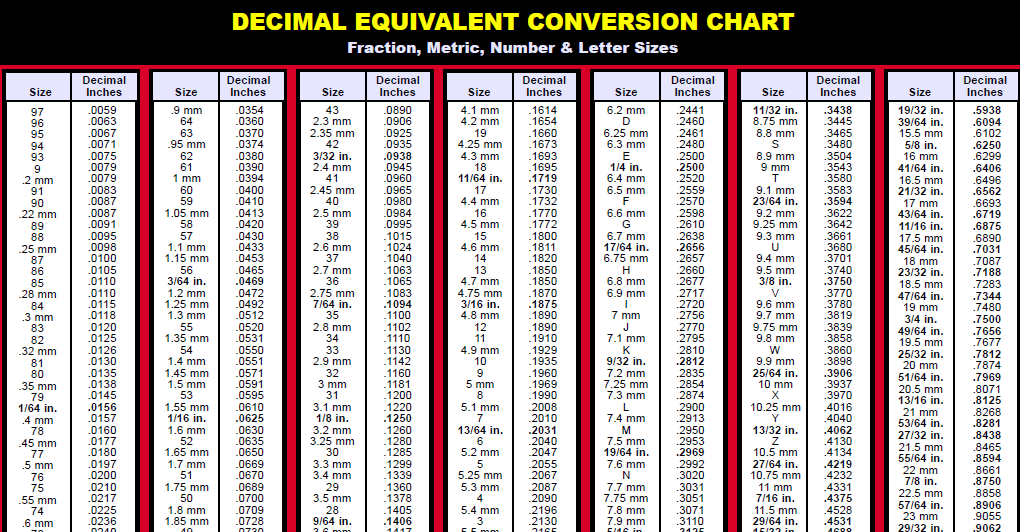
4. Tap and Drill Chart
A clear and simple drill and tap chart standard covering a wide range of thread sizes. Designed for quick use in fast-paced machining environments.
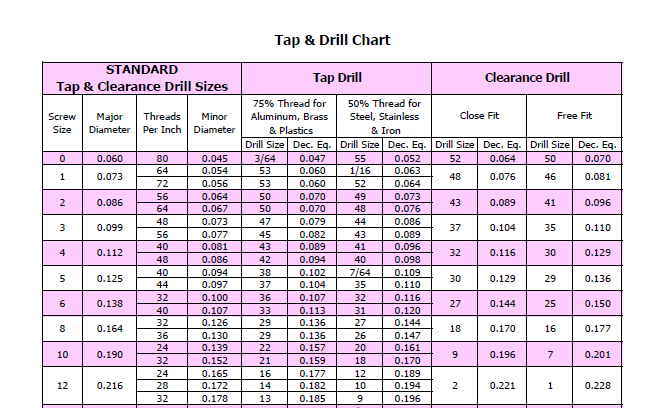
5. Tap and Drill Chart (Extended Version)
This expanded version includes additional details for less common threads. It’s helpful for users who need both drill and tap chart metric and imperial coverage in one file.
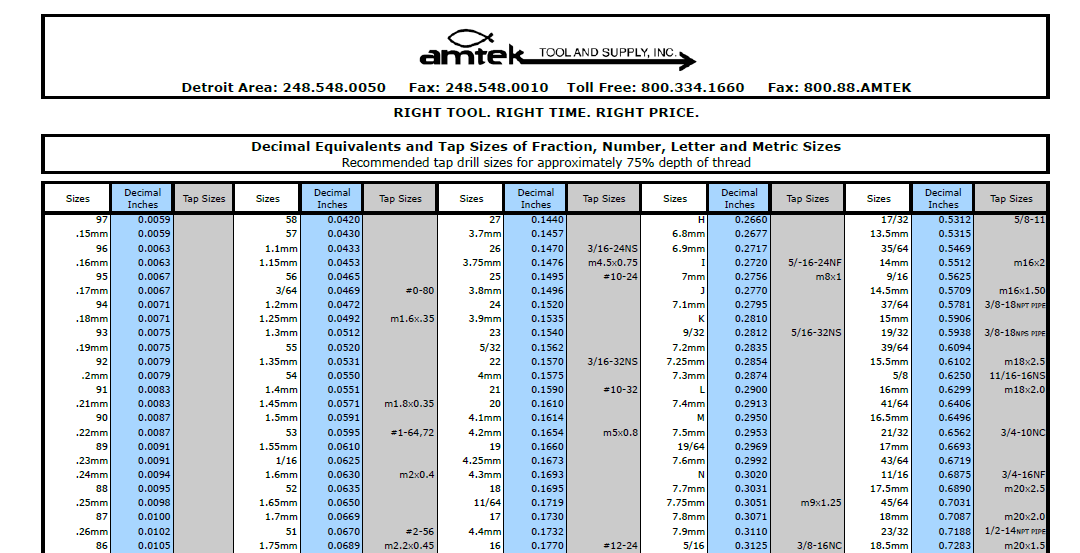
6. Tap-Drill Recommendations
A professional-grade chart that recommends the best drill sizes for different tapping operations. Perfect for reducing tool wear and increasing accuracy.
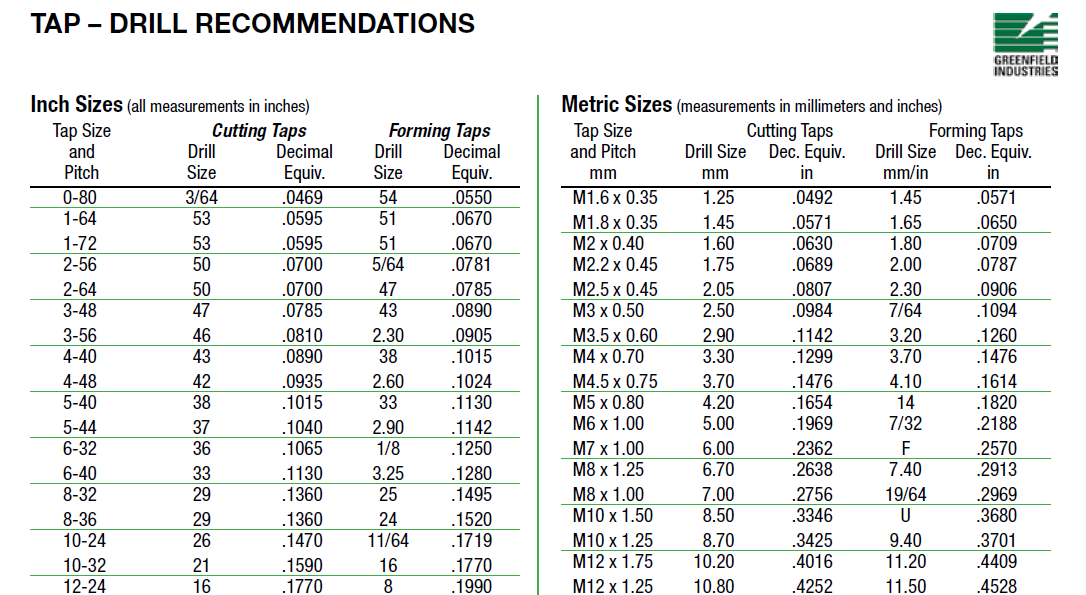
7. Metric Tap Drill Sizes
A dedicated metric drill and tap chart that focuses solely on metric standards. Ideal for industries or regions where metric threads are the default.
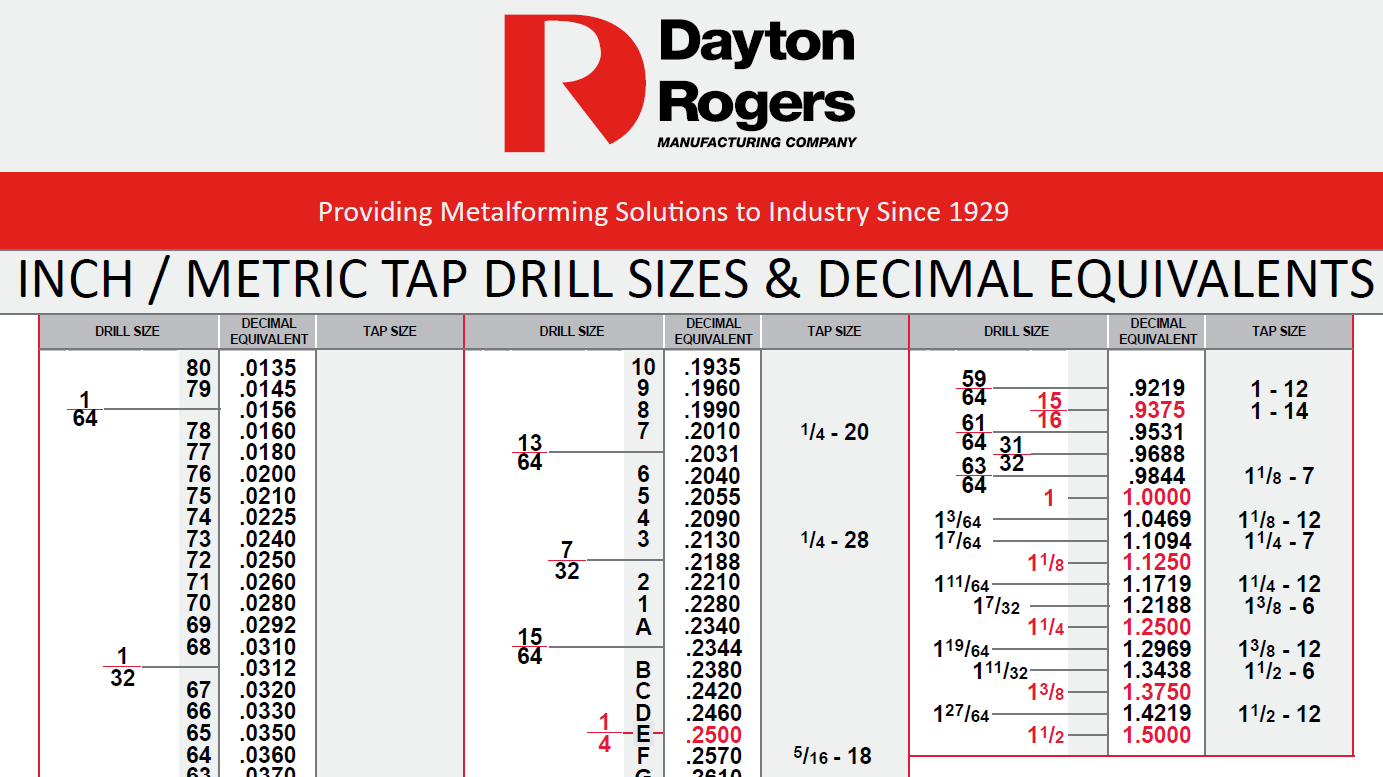
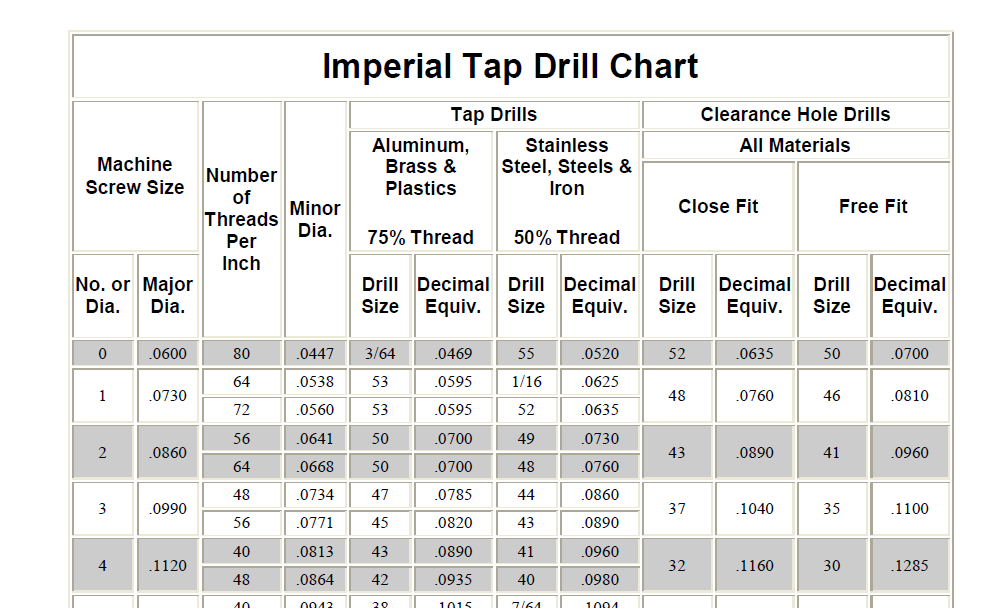
8. Imperial Tap Drill Chart
This imperial drill and tap chart organizes all inch-based thread sizes in one easy-to-read format. It’s a staple for U.S. machinists and workshops.
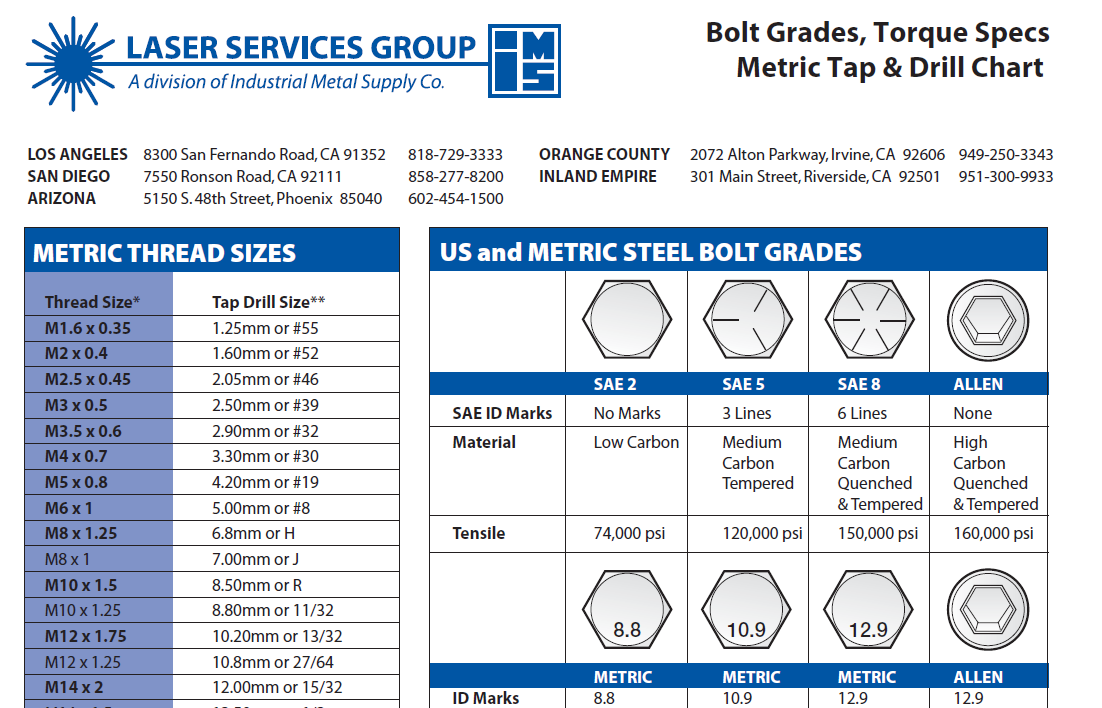
9. Metric Tap and Drill Chart
An extended drill and tap chart printable for metric sizes. It can be laminated and kept near machines for quick reference during daily work.
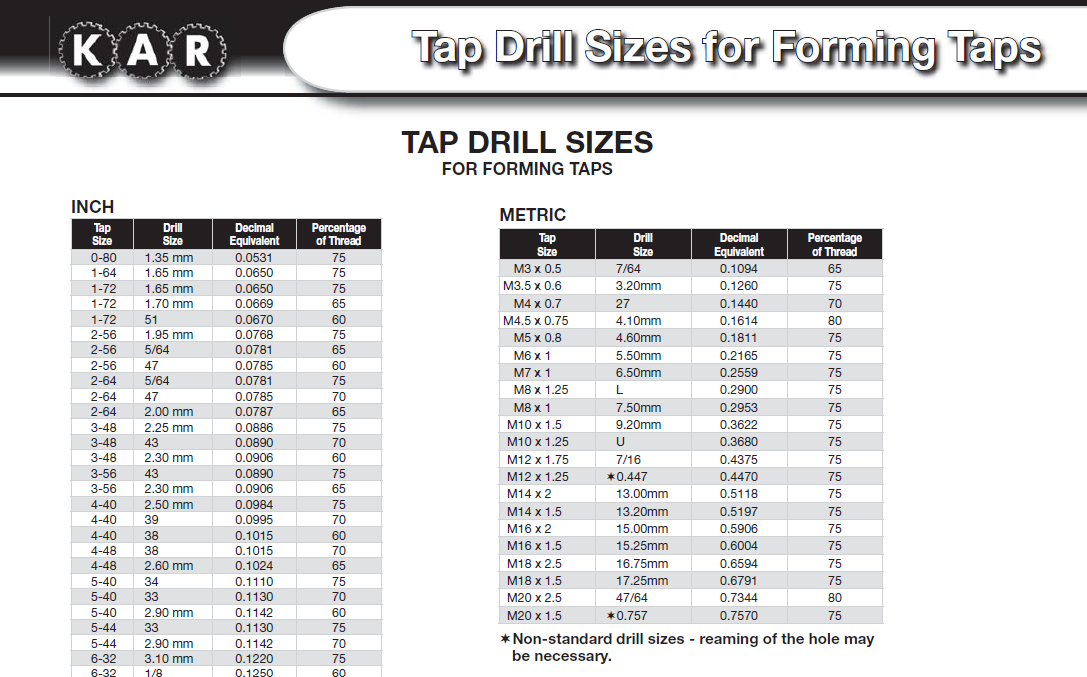
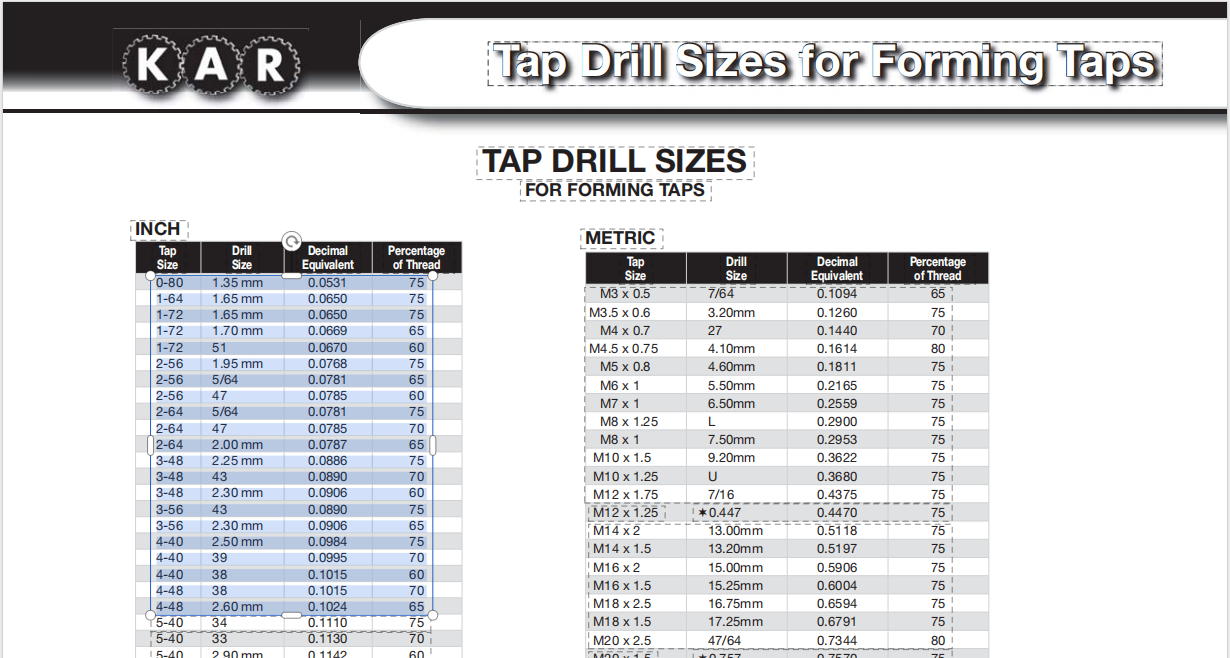
10. Tap Drill Sizes for Forming Taps
This specialized tap drill sizes chart is designed for forming taps, helping to ensure proper material displacement without thread cutting.
Part 2. How to Edit Drill and Tap Chart in PDF
Once you’ve downloaded a drill and tap chart PDF, you may want to customize it, highlight frequently used thread sizes, add workshop notes, or adjust the layout before printing. With WPS Office, editing a drill and tap chart printable is quick and simple.
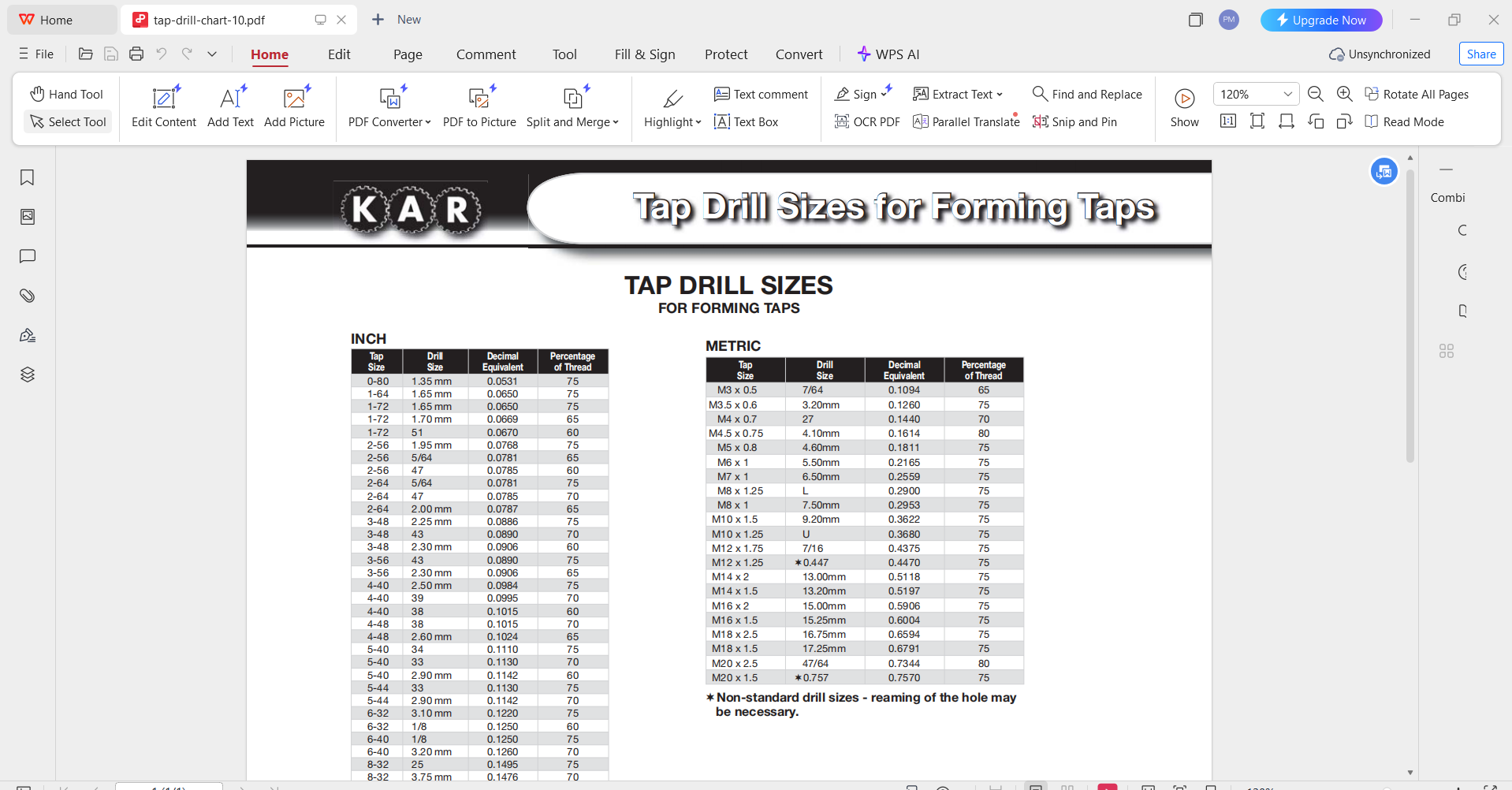
Step 1: Open PDF Templates with WPS PDF
Open WPS Office and select PDF Editor from the home screen. Drag your downloaded tap drill chart PDF into the editor or click Open File to browse.
Step 2: Highlight or Annotate Important Data
Use the Highlight tool to mark critical values, such as preferred metric or imperial threads. You can also add annotations or text boxes to create a personalized tap and drill selection guide for your specific projects.
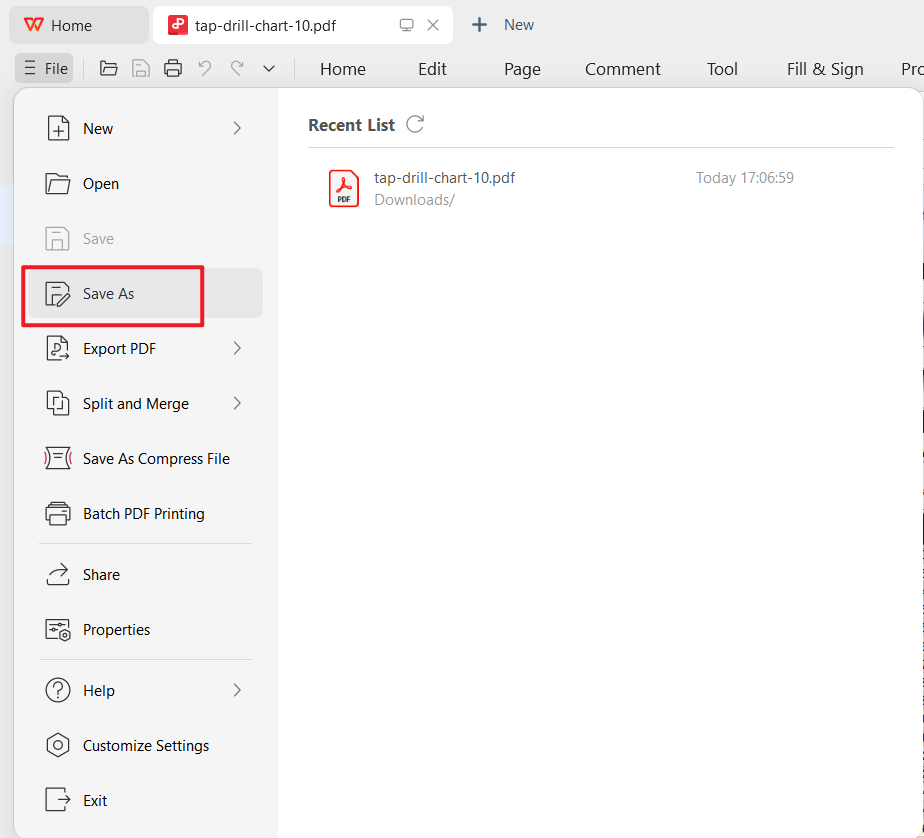
Step 3: Save the Customized Chart for Reuse or Print
When you’re done editing, click File > Save As. WPS lets you export the chart as an updated PDF, a Word file, or even an image for quick printing. This flexibility makes it easy to reuse your tap drill sizes chart across multiple devices.
Tip: I often save two versions, one laminated drill and tap chart standard for the workshop, and one digital version for quick reference on my laptop. WPS makes switching between print and digital formats seamless.
Part 3. A Smarter Office Suite to Support Technical Documentation Needs
Working with technical references such as a drill and tap chart requires software that is lightweight, versatile, and reliable. WPS Office provides exactly that, a full office suite designed for professionals, students, and workshop users who need efficiency without complexity.

Supports Multiple File Formats
WPS Office works with Word, Excel, PowerPoint, and PDF files, making it easy to handle any version of a drill and tap chart printable. Whether you download a metric drill and tap chart in PDF or an imperial drill and tap chart in Excel, WPS can open and edit it seamlessly.
Easy Editing Tools for Technical Charts
Its PDF editing and annotation features allow you to highlight specific thread sizes, add notes, or adjust layouts to create a personalized tap drill sizes chart. For engineers and machinists, this means fewer errors and faster decision-making.
Built-in PDF Features
Unlike many office tools, WPS offers direct PDF annotation, conversion, and merging. This is particularly useful when combining multiple tap and drill selection guide files into a single reference document.
Cloud Storage and Device Sync
Your edited charts don’t have to stay on one computer. WPS Office integrates with cloud storage, so you can access your drill and tap chart standard from a laptop in the office or a tablet in the workshop.
AI-Powered Assistance
Formatting technical data can be time-consuming. WPS Office’s AI tools help refine layouts, check clarity, and polish documents so your tap drill chart PDF looks professional and easy to follow.
Note: In my experience, WPS is more than just an editor. I’ve used it to annotate machining charts, prepare instructional guides, and even convert data tables into printable formats, all within one suite. This makes it a smarter choice compared to juggling multiple apps.
FAQs
1. What is a drill and tap chart used for?
A drill and tap chart is used to match the correct drill bit size with the tap size when cutting threads. This ensures that threads are strong, accurate, and long-lasting.
2. Do drill and tap charts include both metric and imperial sizes?
Yes. Many downloadable templates include both a metric drill and tap chart and an imperial drill and tap chart so users can work with different standards.
3. Can I edit a drill and tap chart template?
Absolutely. Templates in Excel or PDF format, such as a tap drill chart PDF, can be opened and customized using WPS Office. You can highlight important data, add notes, or reformat the chart for your projects.
4. Can I print a drill and tap chart for workshop use?
Yes. Most drill and tap chart printable templates are designed for printing. For durability, many professionals laminate them so they last longer in busy workshop environments.

'%3e%3cpath%20d='M19.9911%204.11386V6.471H18.5894C18.0775%206.471%2017.7322%206.57814%2017.5536%206.79243C17.3751%207.00671%2017.2858%207.32814%2017.2858%207.75671V9.44421H19.9019L19.5536%2012.0871H17.2858V18.8639H14.5536V12.0871H12.2769V9.44421H14.5536V7.49779C14.5536%206.39064%2014.8632%205.53201%2015.4822%204.92189C16.1013%204.31177%2016.9257%204.00671%2017.9554%204.00671C18.8304%204.00671%2019.509%204.04243%2019.9911%204.11386Z'%20fill='%23333333'/%3e%3c/g%3e%3cdefs%3e%3cclipPath%20id='clip0_2938_8199'%3e%3crect%20width='16'%20height='16'%20fill='white'%20transform='translate(8%204.00671)'/%3e%3c/clipPath%3e%3c/defs%3e%3c/svg%3e)
'%3e%3cpath%20d='M17.5237%2010.7813L23.4811%204H22.0699L16.8949%209.88693L12.7648%204H8L14.2469%2012.9029L8%2020.0133H9.4112L14.8725%2013.7952L19.2352%2020.0133H24M9.92053%205.04213H12.0885L22.0688%2019.0224H19.9003'%20fill='%23333333'/%3e%3c/g%3e%3cdefs%3e%3cclipPath%20id='clip0_2938_8200'%3e%3crect%20width='16'%20height='16.0134'%20fill='white'%20transform='translate(8%204)'/%3e%3c/clipPath%3e%3c/defs%3e%3c/svg%3e)


