

'%3e%3cpath%20d='M8%200C12.4183%200%2016%203.58172%2016%208C16%2012.4183%2012.4183%2016%208%2016C3.58172%2016%200%2012.4183%200%208C0%203.58172%203.58172%200%208%200ZM11.6162%204.38379C11.2257%203.99337%2010.5927%203.99338%2010.2021%204.38379L8%206.58594L5.79785%204.38379C5.40732%203.99334%204.77429%203.99329%204.38379%204.38379C3.99331%204.77429%203.99335%205.40733%204.38379%205.79785L6.58594%208L4.38379%2010.2021C3.99348%2010.5927%203.99341%2011.2257%204.38379%2011.6162C4.77426%2012.0066%205.40734%2012.0065%205.79785%2011.6162L8%209.41406L10.2021%2011.6162C10.5927%2012.0066%2011.2257%2012.0067%2011.6162%2011.6162C12.0067%2011.2257%2012.0066%2010.5927%2011.6162%2010.2021L9.41406%208L11.6162%205.79785C12.0066%205.40735%2012.0066%204.77429%2011.6162%204.38379Z'%20fill='%23080E17'%20fill-opacity='0.46'/%3e%3c/g%3e%3cdefs%3e%3cclipPath%20id='clip0_3761_713'%3e%3crect%20width='16'%20height='16'%20fill='white'/%3e%3c/clipPath%3e%3c/defs%3e%3c/svg%3e)




'%3e%3cpath%20fill-rule='evenodd'%20clip-rule='evenodd'%20d='M21.4999%2010.9993C21.4999%205.20009%2016.7986%200.498901%2010.9993%200.498901C5.19994%200.498901%200.498657%205.20009%200.498657%2010.9993C0.498657%2016.2404%204.33858%2020.5844%209.35855%2021.3722V14.0346H6.69238V10.9993H9.35855V8.68594C9.35855%206.05427%2010.9262%204.60062%2013.3248%204.60062C14.4736%204.60062%2015.6753%204.80571%2015.6753%204.80571V7.38979H14.3512C13.0468%207.38979%2012.64%208.19921%2012.64%209.0296V10.9993H15.5523L15.0867%2014.0346H12.64V21.3722C17.66%2020.5844%2021.4999%2016.2404%2021.4999%2010.9993Z'%20fill='%231568EA'/%3e%3c/g%3e%3c/svg%3e)


'%3e%3cpath%20d='M2.42045%2022.1876H6.31818V12.7217L0.75%208.54553V20.5171C0.75%2021.4414%201.49892%2022.1876%202.42045%2022.1876Z'%20fill='%234285F4'/%3e%3cpath%20d='M19.682%2022.1876H23.5797C24.5041%2022.1876%2025.2502%2021.4387%2025.2502%2020.5171V8.54553L19.682%2012.7217'%20fill='%2334A853'/%3e%3cpath%20d='M19.682%205.48293V12.7216L25.2502%208.54543V6.31816C25.2502%204.25236%2022.8921%203.07469%2021.2411%204.31361'%20fill='%23FBBC04'/%3e%3cpath%20d='M6.31824%2012.7217V5.48303L13.0001%2010.4944L19.6819%205.48303V12.7217L13.0001%2017.733'%20fill='%23EA4335'/%3e%3cpath%20d='M0.75%206.31816V8.54543L6.31818%2012.7216V5.48293L4.75909%204.31361C3.10534%203.07469%200.75%204.25236%200.75%206.31816Z'%20fill='%23C5221F'/%3e%3c/g%3e%3cdefs%3e%3cclipPath%20id='clip0_2954_7305'%3e%3crect%20width='24.5'%20height='18.375'%20fill='white'%20transform='translate(0.75%203.8125)'/%3e%3c/clipPath%3e%3c/defs%3e%3c/svg%3e)


When I first tried to make an amortization schedule on my own, I quickly realized it wasn’t as simple as plugging numbers into a calculator. An amortization schedule is supposed to make your financial journey clearer, but setting one up from scratch can feel overwhelming. Missteps in formulas or small math errors can lead to major confusion. If you’re asking yourself, are there free amortization schedule templates I can use and edit easily? The answer is yes. In this guide, I’ll not only share 10 free amortization schedule template examples but also walk you through how to create, edit, and make the most of them.
How to Create an Amortization Schedule
Before we jump into the templates, it’s important to understand what an amortization schedule really is and how it can help you. Think of it as your roadmap for loan repayment, it shows you how much of each payment goes to interest and how much reduces your principal. If you’ve been wondering how to create an amortization schedule that’s both simple and accurate, this guide will walk you through the essentials before moving on to free template options.
What is an Amortization Schedule?
An amortizationschedule is a detailed table that outlines every loan payment over time. Each row shows how much you’re paying in interest and how much is chipping away at your principal. This schedule is particularly valuable for loans like mortgages, auto loans, or student loans.
Benefits of an Amortization Schedule
Financial clarity: It helps you understand exactly where your money is going.
Debt management: You can track progress and stay motivated as you see the principal shrink.
Planning tool: It helps you make better decisions about early repayments or refinancing.
Components of an Amortization Schedule
Payment number: Lists out each payment chronologically.
Payment amount: Shows the total payment you make each period.
Principal portion: The chunk that reduces your loan balance.
Interest portion: The cost of borrowing.
Remaining balance: The outstanding loan after each payment.
When I created my first schedule, I learned the importance of clearly separating principal and interest. Without that, it’s easy to miscalculate how much debt is really left.
Top 10 Editable Amortization Schedule Templates [Download]
Here are 10 free amortization schedule template examples that you can download and edit. Each has its own strengths, so you can choose the one that fits your situation. If you’re looking for a free amortization schedule template in Excel, these options will save you time and keep your loan details organized.
1. Useful Loan Amortization Schedule
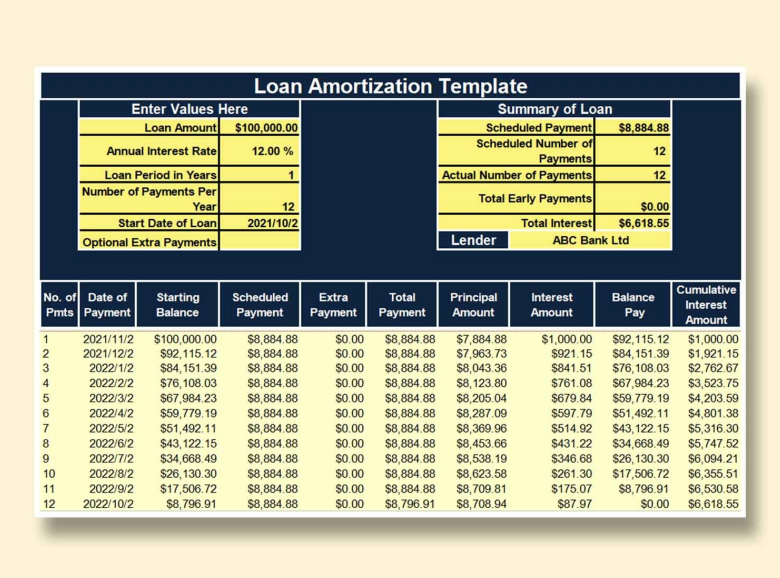
The Useful Loan Amortization Schedule is a straightforward and reliable template designed for anyone managing loan payments. It automatically calculates interest and principal portions for each installment, so you don’t have to worry about errors. The clean layout makes it easy to track balances at a glance. If you’re new to financial planning, this template is a simple starting point that keeps everything clear.
2. Loan Amortization Schedule by Microsoft
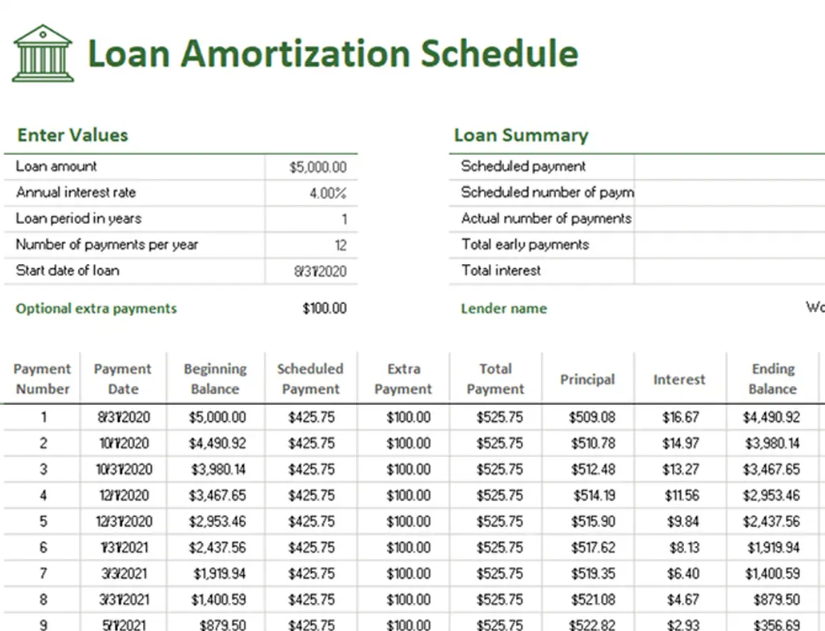
The Loan Amortization Schedule by Microsoft is a classic template that balances simplicity with functionality. It calculates payments automatically once you input your loan details, saving you from manual math. The design is clean and easy to understand, making it ideal for personal or business use. If you want a reliable spreadsheet backed by Microsoft, this is a solid option.
3. Calorie Amortization Schedule
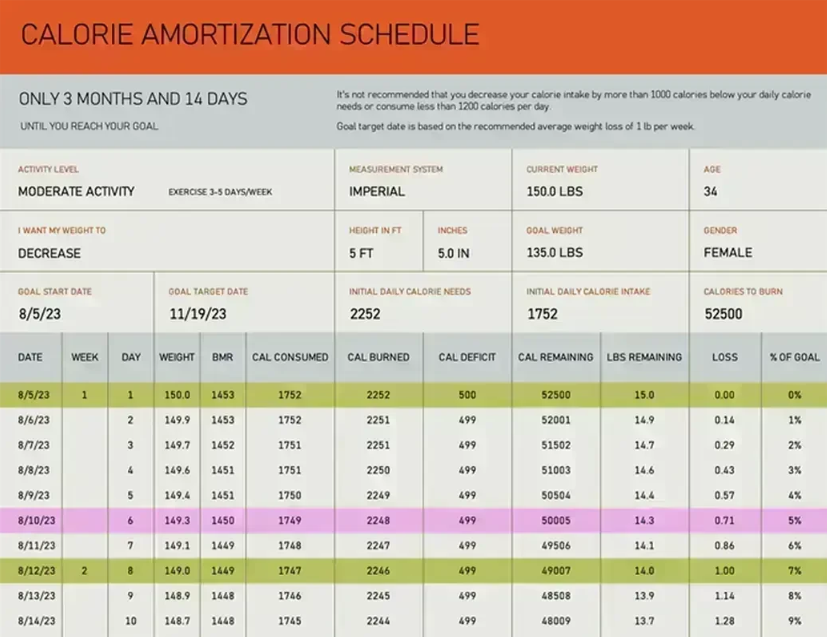
The Calorie Amortization Schedule is a unique twist on the traditional loan template, designed to help you track daily calorie intake like loan payments. Instead of money, it organizes your calories into manageable portions, showing progress over time. The layout is intuitive, making it easy to stay on top of diet goals. If you like structured tracking, this template turns health management into a clear, visual plan.
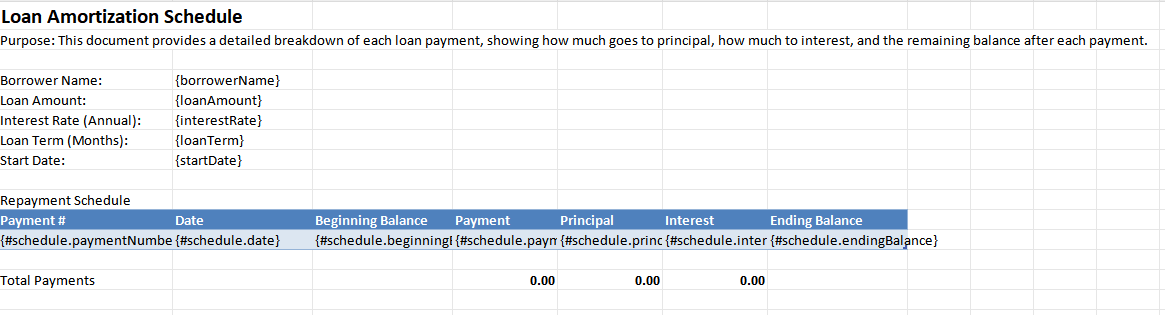
4. Loan Amortization Schedule Spreadsheet (Documentero)
The Loan Amortization Schedule Spreadsheet from Documentero is a professional template built for detailed loan tracking. It breaks down payments clearly into principal and interest, while also showing remaining balances at each stage. The spreadsheet is flexible, allowing you to adjust figures based on your loan terms. If you want a customizable and accurate tool, this template is an excellent choice.
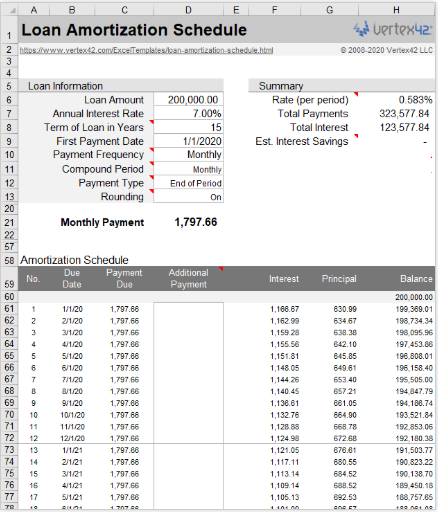
5. Vertex42 Loan Amortization Schedule
The Vertex42 Loan Amortization Schedule is one of the most trusted templates available for loan management. It offers detailed breakdowns of payments, interest, and balances in a clean Excel format. The template is highly customizable, letting you adjust payment frequency and loan terms with ease. If you need a dependable and flexible schedule, this Vertex42 tool is a great option.
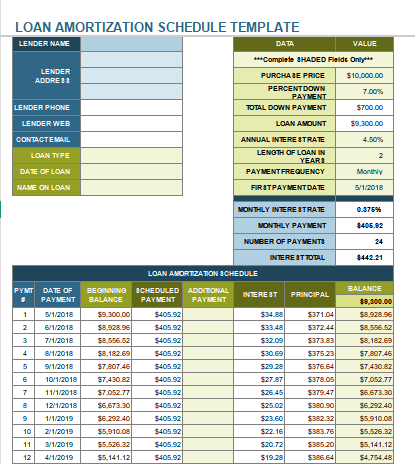
6. General Loan Amortization Schedule Template (Smartsheet)
The General Loan Amortization Schedule Template from Smartsheet is a versatile option that works for different types of loans. It lays out payments in a structured way, showing you exactly how each installment impacts your balance. The spreadsheet is simple enough for beginners yet detailed enough for business use. If you want a straightforward and adaptable tool, this template delivers.
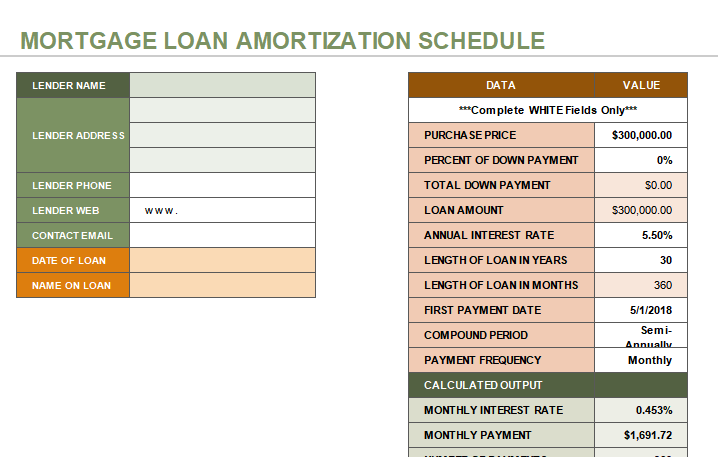
7. Mortgage Loan Amortization Schedule Template
The Mortgage Loan Amortization Schedule Template from Smartsheet is designed specifically for home loan planning. It helps you visualize how monthly mortgage payments are split between interest and principal. The template also shows how your outstanding balance decreases over time, which is great for long-term tracking. If you’re managing a mortgage, this template gives you a clear financial roadmap.
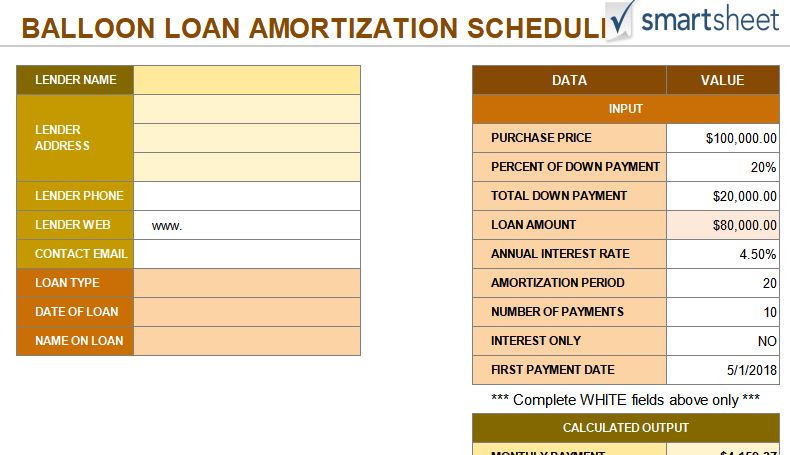
8. Balloon Loan Amortization Schedule Template
The Balloon Loan Amortization Schedule Template from Smartsheet is tailored for loans with large end-of-term payments. It shows how regular installments cover interest and part of the principal, while highlighting the final balloon payment. The layout makes it easy to see the financial impact of this type of loan structure. If you’re handling balloon loans, this template keeps repayment details transparent and manageable.
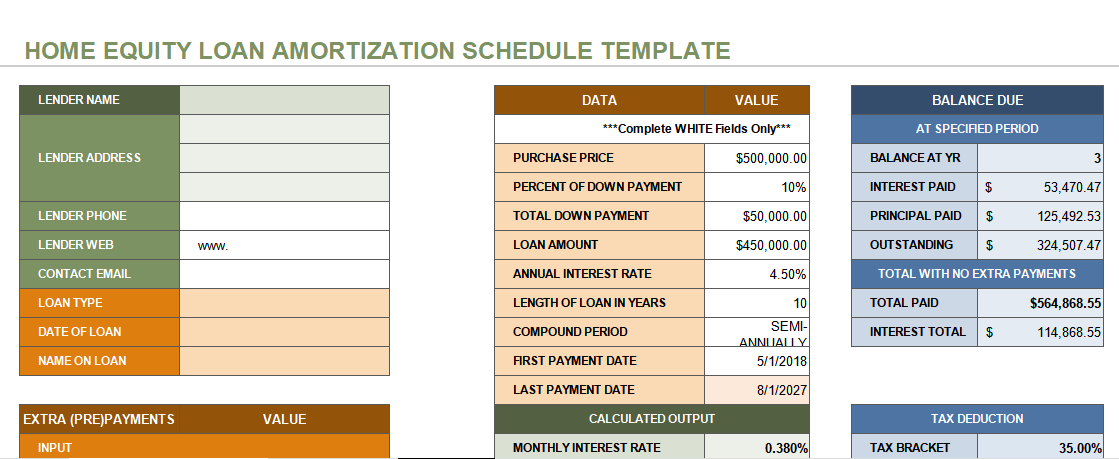
9. Home Equity Loan Amortization Schedule Template
The Home Equity Loan Amortization Schedule Template from Smartsheet is crafted to help homeowners manage equity-based borrowing. It clearly shows how each payment reduces both interest and principal, giving you insight into how much equity you retain. The template is easy to edit, so you can adjust loan terms or amounts as needed. If you want a reliable way to track home equity loans, this template is a practical solution.
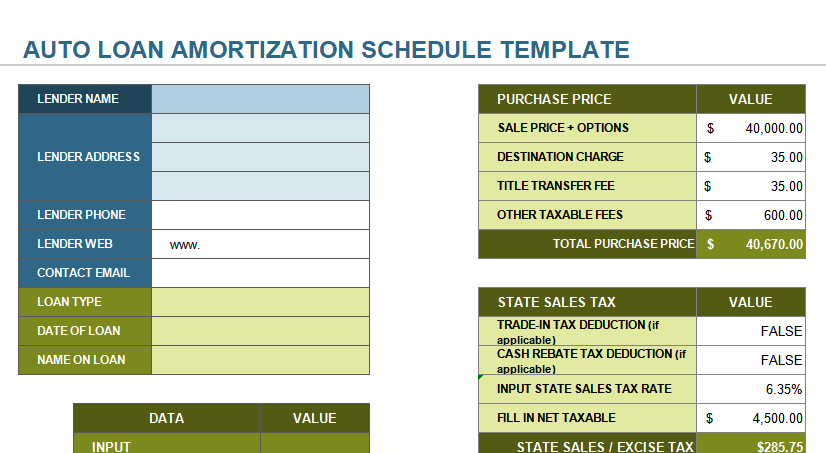
10. Auto Loan Amortization Schedule Template
The Auto Loan Amortization Schedule Template from Smartsheet is built specifically for car financing. It helps you calculate monthly installments, breaking them down into principal and interest portions. The design makes it easy to see how your balance decreases over the life of the loan. If you’re purchasing a vehicle on financing, this template gives you a clear repayment plan.
I’ve tested several of these, and Vertex42’s template stood out to me because of its accuracy and ease of use. Still, for beginners, the WPS and Microsoft versions are the most approachable.
How to Edit and Print Amortization Schedule Template in Excel
Once you’ve picked your free amortization schedule template, the next step is editing it to match your loan details. Customizing the figures ensures the schedule reflects your actual repayment plan and avoids confusion down the line. If you’re not sure where to start, using a downloadable amortization schedule template with formulas makes the process much easier since the math updates automatically.
Here’s a step-by-step guide using WPS Spreadsheet.
Step 1: To begin, select any of the links provided above and hit the “Download” button to save the template. After downloading, open the file directly in WPS Writer to start working on it.
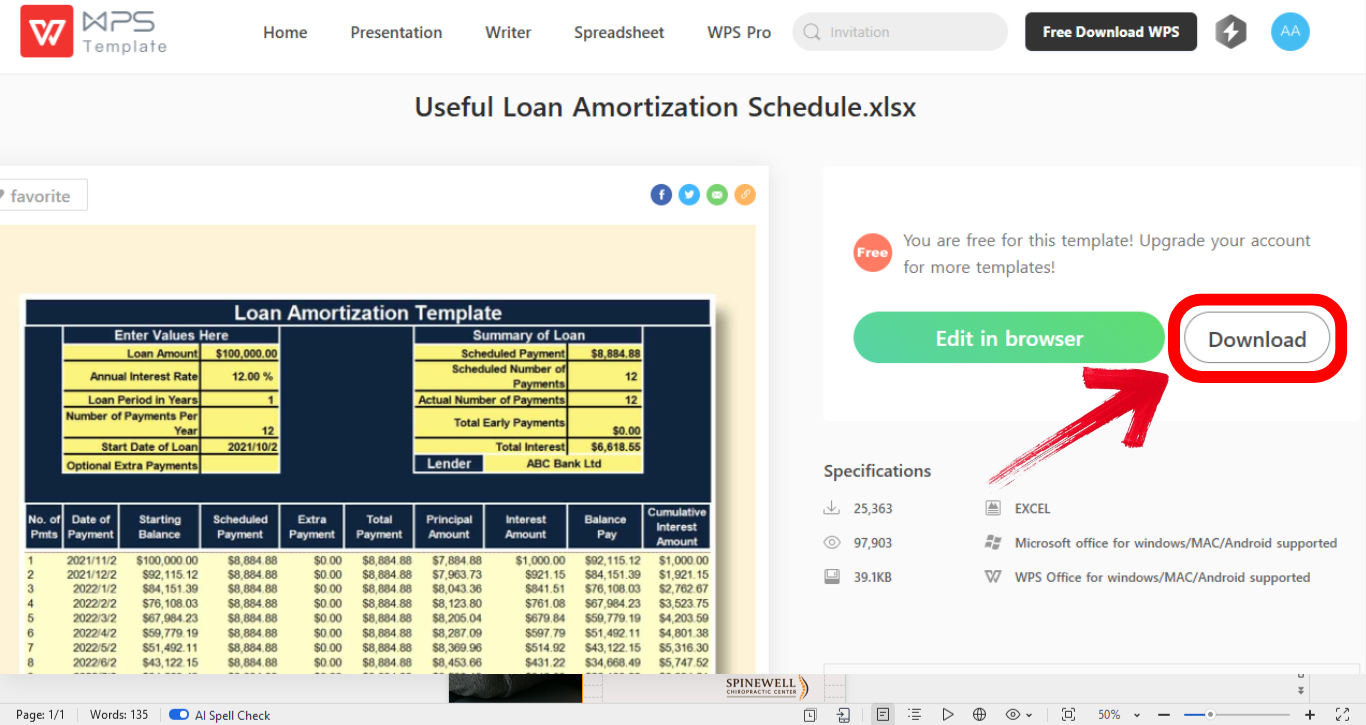
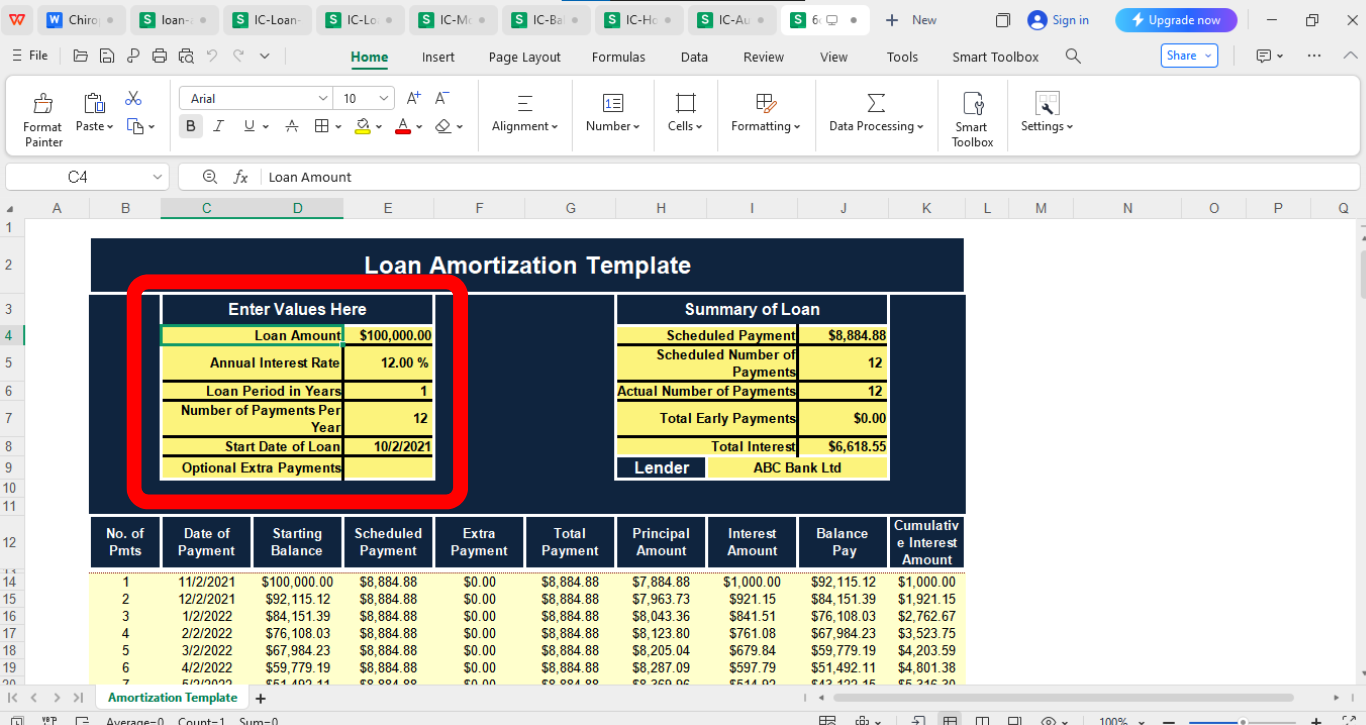
Step 2: Now enter the principal amount, interest rate, loan term, and payment frequency by simply clicking on the spreadsheet cell. The sheet will auto-update.
Step 3: After finishing your edits, head to the“File” menu in the top-left corner and choose“Export to PDF” to save your document in PDF
format.
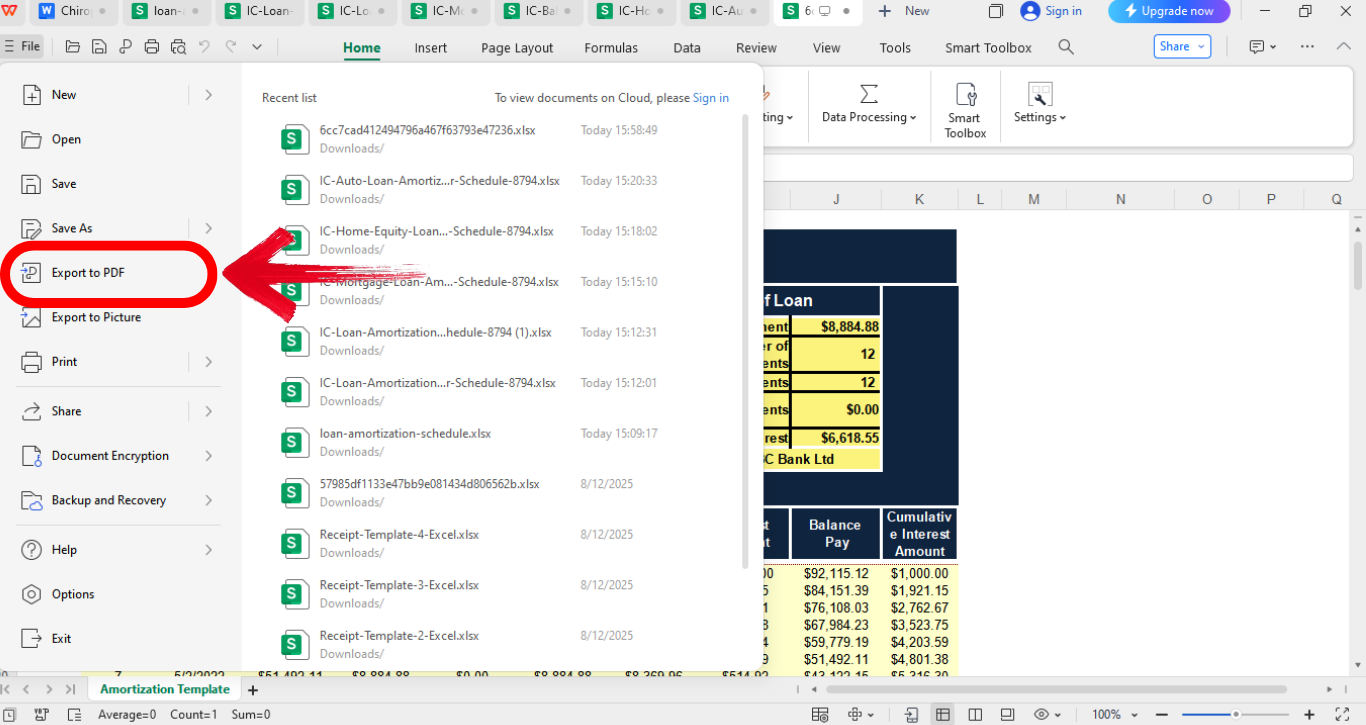
Editing on WPS Spreadsheet felt intuitive compared to Excel. I liked how quickly I could save as PDF and generate a shareable link. The streamlined interface made the entire process efficient, reducing the time it usually takes to finalize and share documents.
Tips for Using an Amortization Schedule
An amortization schedule is only useful if you know how to apply it effectively in your financial planning. Many people download a template but don’t maximize its potential for tracking and decision-making. By following a few simple strategies, you can turn it into a powerful planning tool. Here are some key tips to get the most from your printable loan amortization schedule template:
Update regularly: Recalculate if you make extra payments or change terms.
Compare scenarios: Use the template to test how faster repayments impact your balance.
Keep a backup: Save multiple versions to avoid losing progress.
Use it for budgeting: Align your monthly budget with your repayment schedule.
Stay realistic: Don’t underestimate the impact of interest, plan conservatively.
I found that testing different repayment scenarios kept me motivated. Seeing how a small extra payment each month cut years off my loan was eye-opening.
Free Office Suite with Editable Templates & Smart AI
When working with an amortization schedule, the software you choose can make a big difference in how smoothly the process goes. A good platform should let you edit with ease, save in multiple formats, and share without hassle. Many users get frustrated when tools lock important features behind subscriptions, making it harder to stay consistent with financial tracking.
That’s why I’ve leaned on WPS Office for handling templates. It gives me access to a wide library of free templates, along with editing tools that feel both simple and powerful. Beyond spreadsheets, it also includes word processing, presentation software, and a complete PDF toolkit. With built-in cloud sharing and even AI writing support, it’s more than just a free alternative, it’s a practical solution for everyday work.
Features:
Free templates: Access thousands of customizable templates for finance, business, education, and more, ready to edit without starting from scratch.
PDF toolkit: Handle all your PDF needs in one place, from merging and converting to editing, without relying on extra third-party apps.
Cloud sharing: Instantly create secure links to share and collaborate on files in real time, making teamwork seamless across different locations.
Pros:
Wide range of free templates.
Easy to use and lightweight.
Strong PDF tools included.
Cons:
Some advanced features require premium.
Large files may load slower.
Limited third-party add-ons.
After trying Microsoft and Google Docs, I settled on WPS because of its balance between free features and usability. The template store saved me time countless times.
FAQs
Q1. How can an amortization schedule help me?
It allows you to track debt progress, understand payments, and plan financially with clarity.
Q2. What if my interest rate changes?
For variable loans, you can input the new rate and recalculate, but projections only apply from that point forward.
Q3. Can I use an amortization schedule for multiple loans?
Yes, by creating separate schedules for each loan. Some templates even allow multiple tabs for comparisons.
Q4. Do I need Excel to use these templates?
No, you can also use WPS Spreadsheet, Google Sheets, or other compatible tools.
Q5. Can I print my schedule easily?
Yes, just save as PDF and print directly. Most templates are formatted for clean printing.
Wrapping Up Your Loan Journey
In this article, I’ve walked you through how to create an amortization schedule, provided 10 free amortization schedule template examples, and explained how to edit and print them in Excel or WPS. These templates are invaluable for planning and staying on top of your finances. Personally, I recommend WPS Office for editing, since it combines free templates with powerful tools. If you’d like to explore more options, the WPS template website offers countless ready-to-use templates, there’s always one that will fit your needs perfectly.

'%3e%3cpath%20d='M19.9911%204.11386V6.471H18.5894C18.0775%206.471%2017.7322%206.57814%2017.5536%206.79243C17.3751%207.00671%2017.2858%207.32814%2017.2858%207.75671V9.44421H19.9019L19.5536%2012.0871H17.2858V18.8639H14.5536V12.0871H12.2769V9.44421H14.5536V7.49779C14.5536%206.39064%2014.8632%205.53201%2015.4822%204.92189C16.1013%204.31177%2016.9257%204.00671%2017.9554%204.00671C18.8304%204.00671%2019.509%204.04243%2019.9911%204.11386Z'%20fill='%23333333'/%3e%3c/g%3e%3cdefs%3e%3cclipPath%20id='clip0_2938_8199'%3e%3crect%20width='16'%20height='16'%20fill='white'%20transform='translate(8%204.00671)'/%3e%3c/clipPath%3e%3c/defs%3e%3c/svg%3e)
'%3e%3cpath%20d='M17.5237%2010.7813L23.4811%204H22.0699L16.8949%209.88693L12.7648%204H8L14.2469%2012.9029L8%2020.0133H9.4112L14.8725%2013.7952L19.2352%2020.0133H24M9.92053%205.04213H12.0885L22.0688%2019.0224H19.9003'%20fill='%23333333'/%3e%3c/g%3e%3cdefs%3e%3cclipPath%20id='clip0_2938_8200'%3e%3crect%20width='16'%20height='16.0134'%20fill='white'%20transform='translate(8%204)'/%3e%3c/clipPath%3e%3c/defs%3e%3c/svg%3e)


