

'%3e%3cpath%20d='M8%200C12.4183%200%2016%203.58172%2016%208C16%2012.4183%2012.4183%2016%208%2016C3.58172%2016%200%2012.4183%200%208C0%203.58172%203.58172%200%208%200ZM11.6162%204.38379C11.2257%203.99337%2010.5927%203.99338%2010.2021%204.38379L8%206.58594L5.79785%204.38379C5.40732%203.99334%204.77429%203.99329%204.38379%204.38379C3.99331%204.77429%203.99335%205.40733%204.38379%205.79785L6.58594%208L4.38379%2010.2021C3.99348%2010.5927%203.99341%2011.2257%204.38379%2011.6162C4.77426%2012.0066%205.40734%2012.0065%205.79785%2011.6162L8%209.41406L10.2021%2011.6162C10.5927%2012.0066%2011.2257%2012.0067%2011.6162%2011.6162C12.0067%2011.2257%2012.0066%2010.5927%2011.6162%2010.2021L9.41406%208L11.6162%205.79785C12.0066%205.40735%2012.0066%204.77429%2011.6162%204.38379Z'%20fill='%23080E17'%20fill-opacity='0.46'/%3e%3c/g%3e%3cdefs%3e%3cclipPath%20id='clip0_3761_713'%3e%3crect%20width='16'%20height='16'%20fill='white'/%3e%3c/clipPath%3e%3c/defs%3e%3c/svg%3e)




'%3e%3cpath%20fill-rule='evenodd'%20clip-rule='evenodd'%20d='M21.4999%2010.9993C21.4999%205.20009%2016.7986%200.498901%2010.9993%200.498901C5.19994%200.498901%200.498657%205.20009%200.498657%2010.9993C0.498657%2016.2404%204.33858%2020.5844%209.35855%2021.3722V14.0346H6.69238V10.9993H9.35855V8.68594C9.35855%206.05427%2010.9262%204.60062%2013.3248%204.60062C14.4736%204.60062%2015.6753%204.80571%2015.6753%204.80571V7.38979H14.3512C13.0468%207.38979%2012.64%208.19921%2012.64%209.0296V10.9993H15.5523L15.0867%2014.0346H12.64V21.3722C17.66%2020.5844%2021.4999%2016.2404%2021.4999%2010.9993Z'%20fill='%231568EA'/%3e%3c/g%3e%3c/svg%3e)


'%3e%3cpath%20d='M2.42045%2022.1876H6.31818V12.7217L0.75%208.54553V20.5171C0.75%2021.4414%201.49892%2022.1876%202.42045%2022.1876Z'%20fill='%234285F4'/%3e%3cpath%20d='M19.682%2022.1876H23.5797C24.5041%2022.1876%2025.2502%2021.4387%2025.2502%2020.5171V8.54553L19.682%2012.7217'%20fill='%2334A853'/%3e%3cpath%20d='M19.682%205.48293V12.7216L25.2502%208.54543V6.31816C25.2502%204.25236%2022.8921%203.07469%2021.2411%204.31361'%20fill='%23FBBC04'/%3e%3cpath%20d='M6.31824%2012.7217V5.48303L13.0001%2010.4944L19.6819%205.48303V12.7217L13.0001%2017.733'%20fill='%23EA4335'/%3e%3cpath%20d='M0.75%206.31816V8.54543L6.31818%2012.7216V5.48293L4.75909%204.31361C3.10534%203.07469%200.75%204.25236%200.75%206.31816Z'%20fill='%23C5221F'/%3e%3c/g%3e%3cdefs%3e%3cclipPath%20id='clip0_2954_7305'%3e%3crect%20width='24.5'%20height='18.375'%20fill='white'%20transform='translate(0.75%203.8125)'/%3e%3c/clipPath%3e%3c/defs%3e%3c/svg%3e)


Credit card authorization forms are essential for businesses that need secure, permission-based payments, especially when the cardholder is not physically present. These forms help prevent disputes by clearly outlining what a customer authorizes and why. Yet many people hesitate because poorly designed templates can expose sensitive data or fail legal requirements.
After reviewing many options, I’ve learned that the best templates are clear, transparent, and easy to edit. In this guide, I’ll walk you through reliable downloads and show you how to safely customize them for professional use.
Part 1: Free Credit Card Authorization Form Templates
When people search for a credit card authorization form, their priority is usually quick access to a reliable file they can download, customize, and use immediately. To simplify this process, here are 10 free and ready-to-use templates in Word or PDF format. Each option is suitable for business payments, hotels, recurring billing, or one-time authorizations. These files also serve users looking for a free credit card authorization resource or a convenient credit card authorization PDF.
Before you download, make sure your credit card authorization form includes these essentials so the file is usable and dispute-ready:
Cardholder details — full name, billing address, phone, and email
Payment details — card number, expiration date, and CVV only if your process requires it
Authorization scope — one-time amount or recurring schedule with start/end dates
Purpose of charge — goods, services, deposit, incidentals, or fees
Signature and date — wet ink or e-signature for clear consent
Prefer editing inside WPS? Browse more business forms in the WPS Template Store, or follow our related guide: how to use a credit card authorization form PDF.
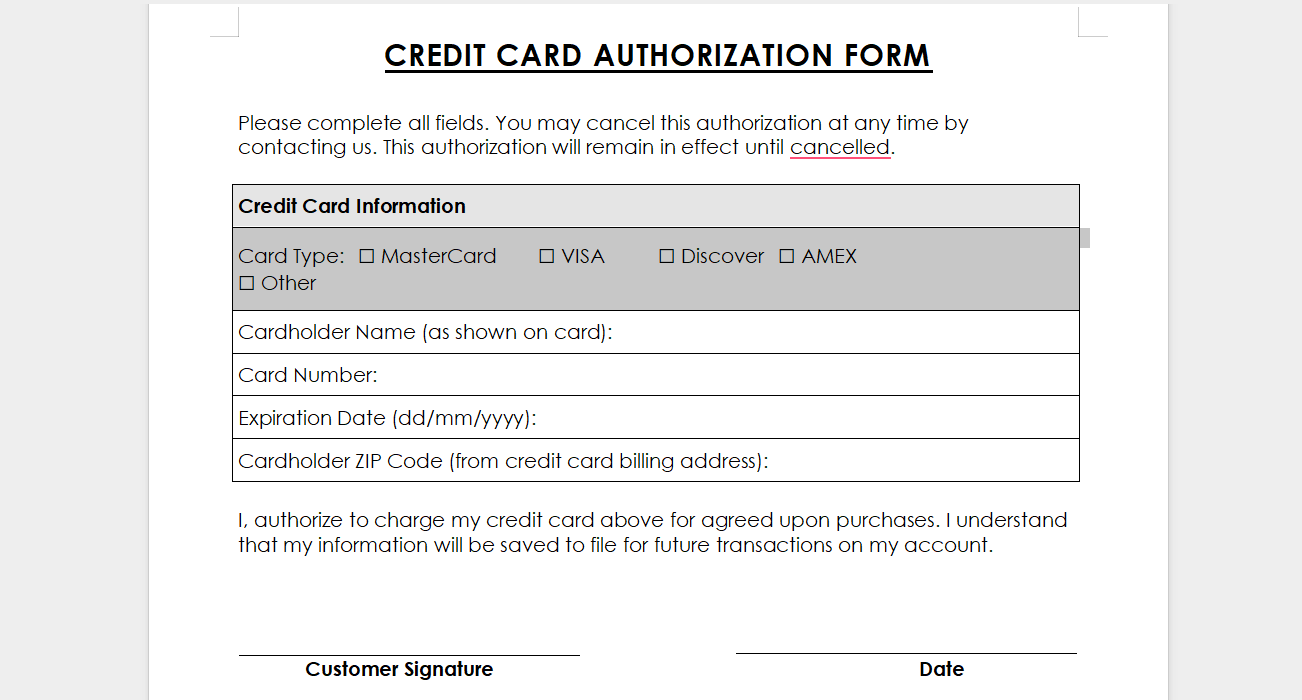
1. Credit Card Authorization with Chart
This template offers a structured layout that clearly organizes cardholder details, payment purpose, and authorization terms. It is a strong starting point when you need a visual, chart-style credit card authorization form for in-person or remote billing reviews.
Best for: offices that want a clear payment purpose section and easy-to-scan fields.
Format tip: open the file in WPS Writer, replace placeholders, then export a locked PDF for sharing.
Download: Download Credit Card Authorization with Chart (Word)
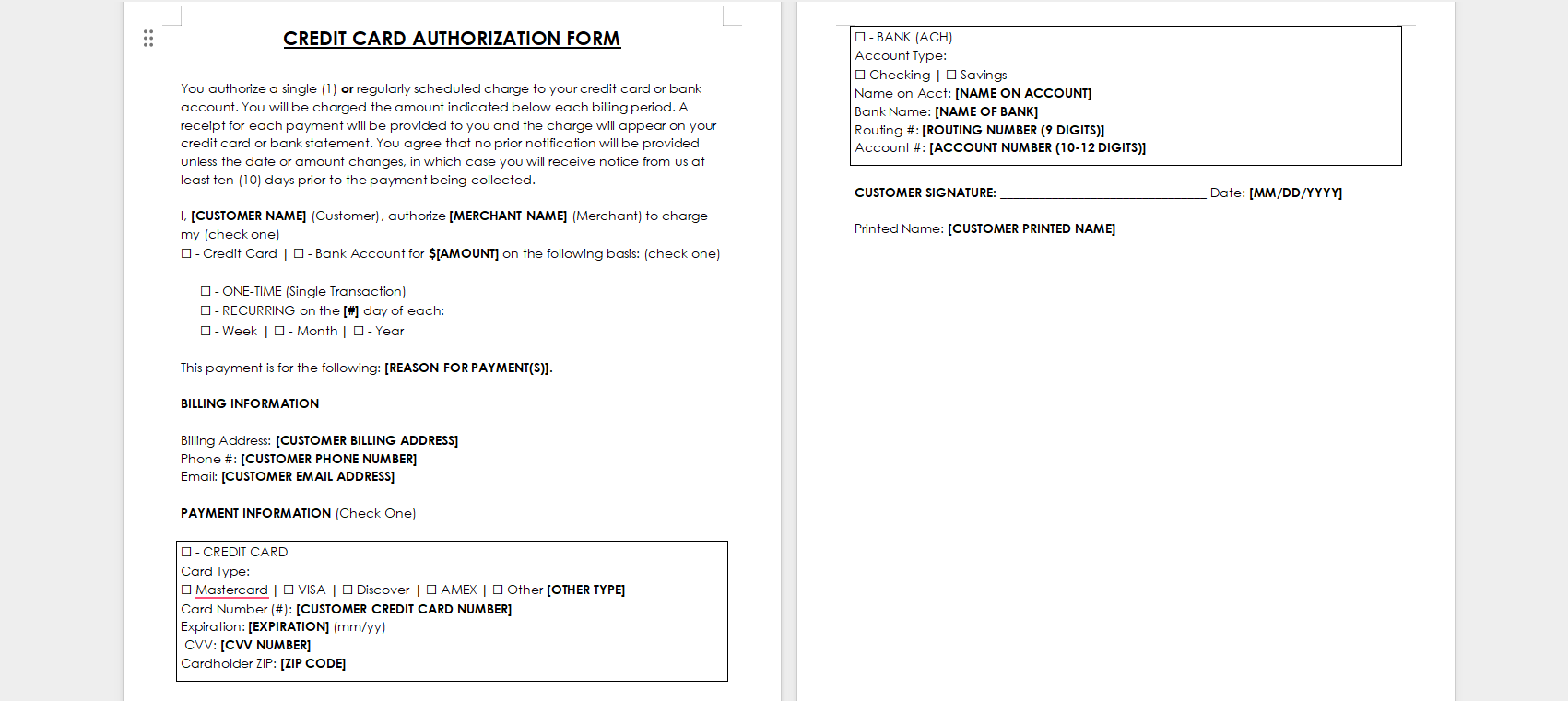
2. Credit Card Authorization 2
A straightforward credit card authorization form suitable for small businesses processing single or occasional payments. The layout keeps required fields short so customers can complete it quickly without confusion.
Best for: freelancers, clinics, and local service providers.
Format tip: keep the authorization amount and service description precise to reduce chargebacks.
Download:
Download Simple Credit Card Authorization Form (Word)
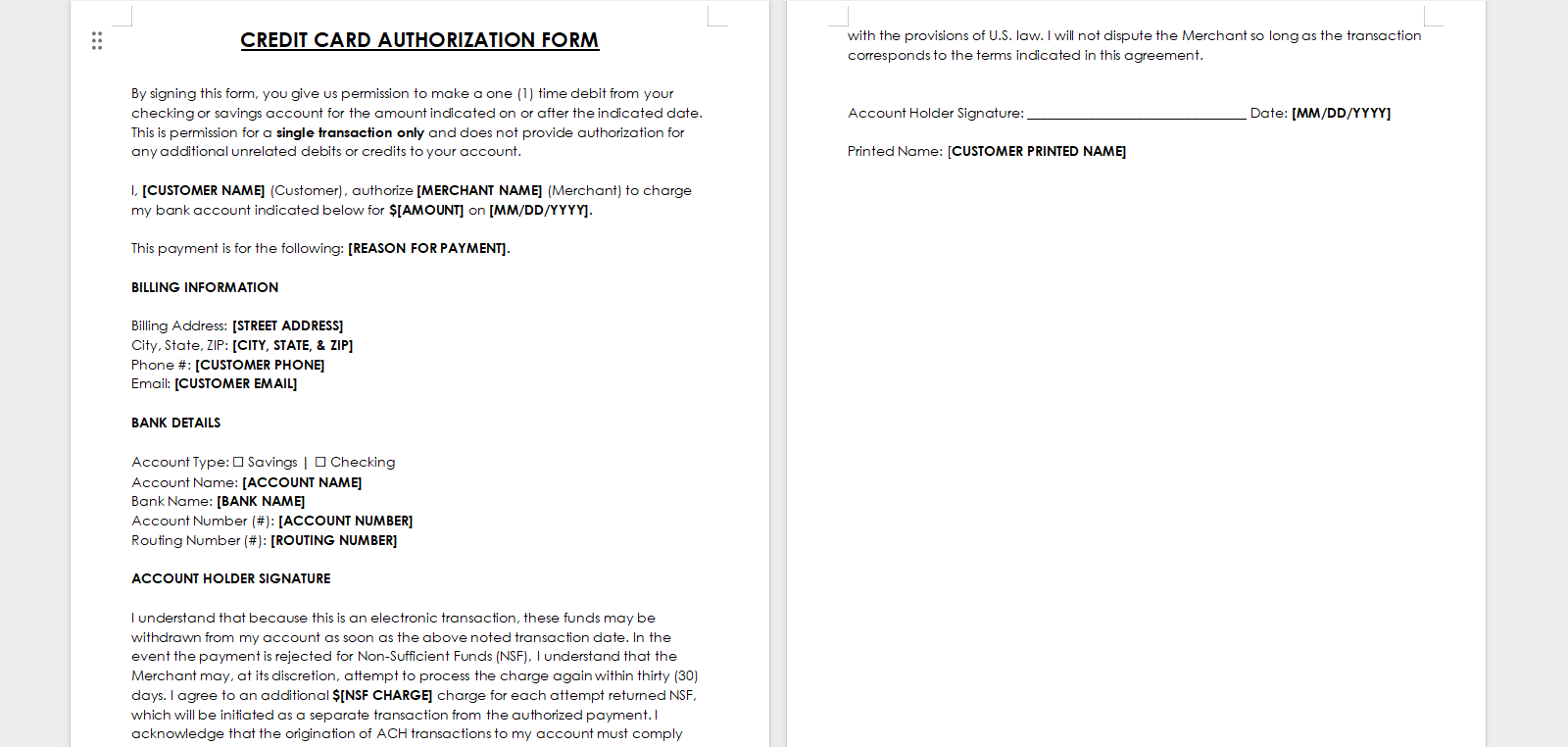
3. Credit Card Authorization 3
A clean template ideal for service providers who need a quick and professional way to document payment approval. Use it when you need a simple printable credit card authorization form without complex recurring-billing language.
Best for: consultants, repair shops, and appointment-based businesses.
Format tip: add your business logo and contact block in WPS Writer before sending.
Download:
Download Clean Credit Card Authorization Form (Word)
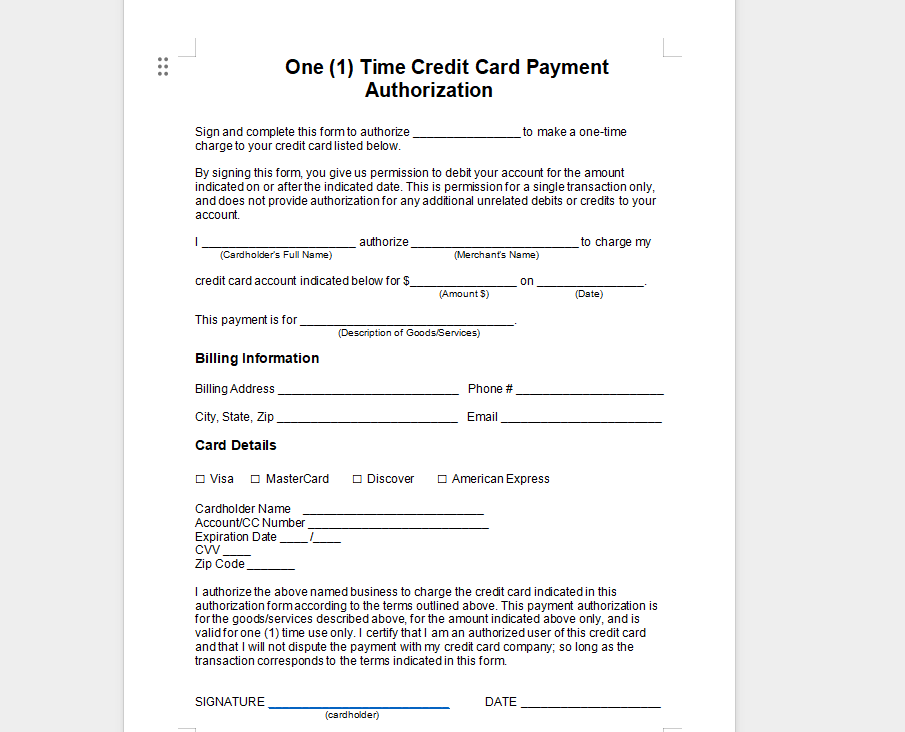
4. One-Time Credit Card Authorization in Word
Useful for one-time transactions, online orders, or remote billing. This editable Word credit card authorization form helps when you need a download you can customize, then convert to PDF for secure delivery.
Best for: one-off invoices, deposits, and phone/mail orders.
Format tip: after editing in WPS Writer, use Export to PDF so formatting stays consistent.
Download:
Download One-Time Credit Card Authorization (Word)
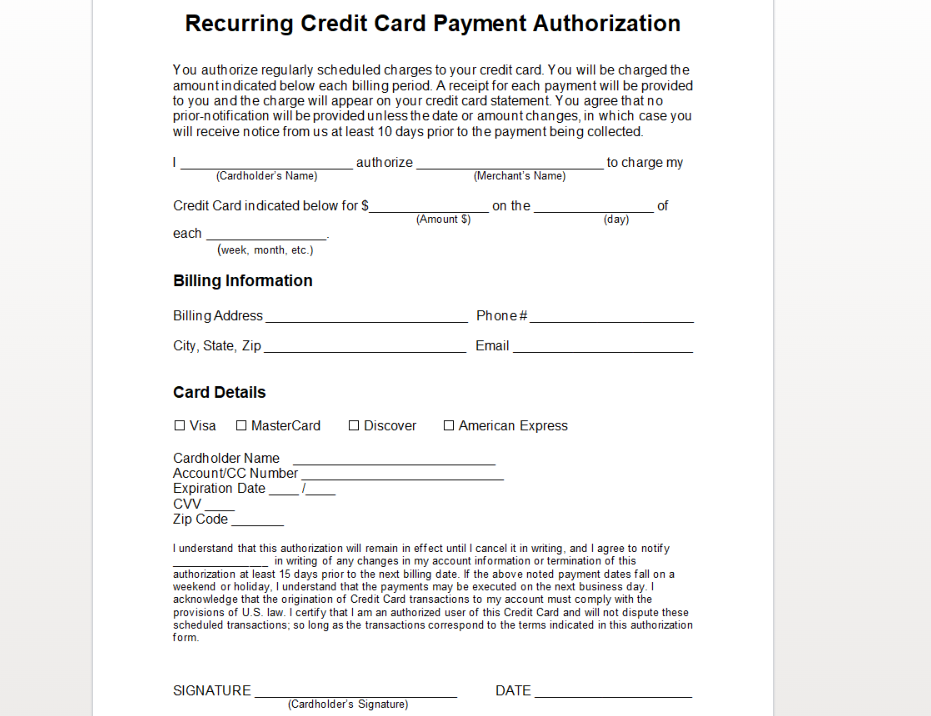
5. Recurring Credit Card Authorization in Word
Designed for monthly billing cycles or subscription-based payments. Businesses offering ongoing services often depend on this structure to maintain consistent payment records and clear renewal terms.
Best for: memberships, retainers, SaaS-style billing, and installment plans.
Format tip: spell out frequency, amount, and cancellation terms before collecting a signature.
Download:
Download Recurring Credit Card Authorization (Word)
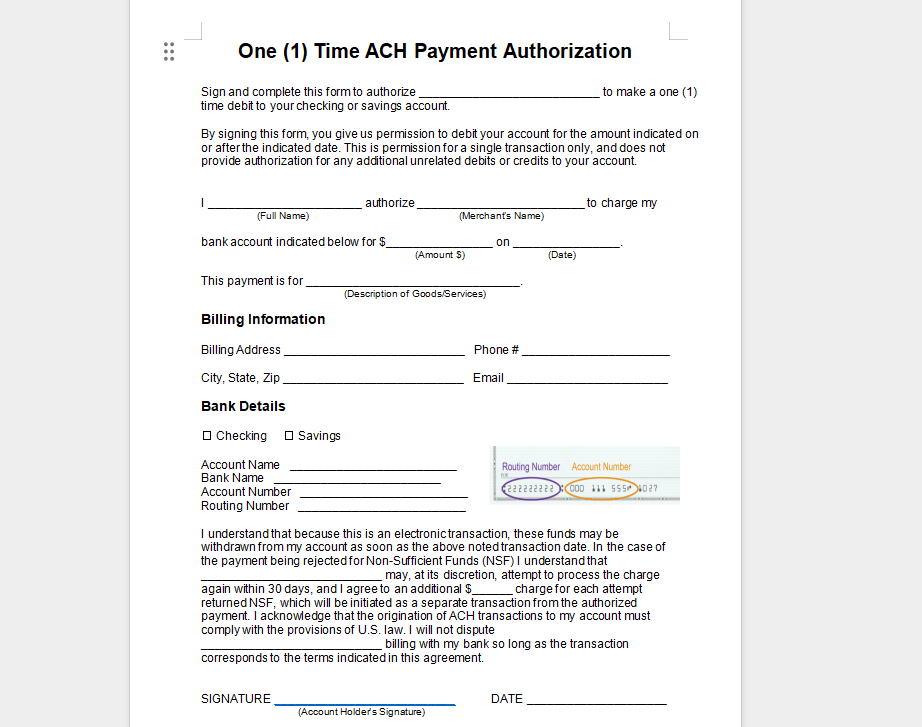
6. One-Time ACH Authorization
For users who prefer ACH over credit card charging, this template authorizes a single electronic withdrawal from a customer’s bank account. It is helpful when card fees are high or bank transfer is the preferred method.
Best for: one-time bank withdrawals and invoice settlements.
Format tip: double-check routing/account fields and keep the completed file encrypted.
Download:
Download One-Time ACH Authorization (Word)
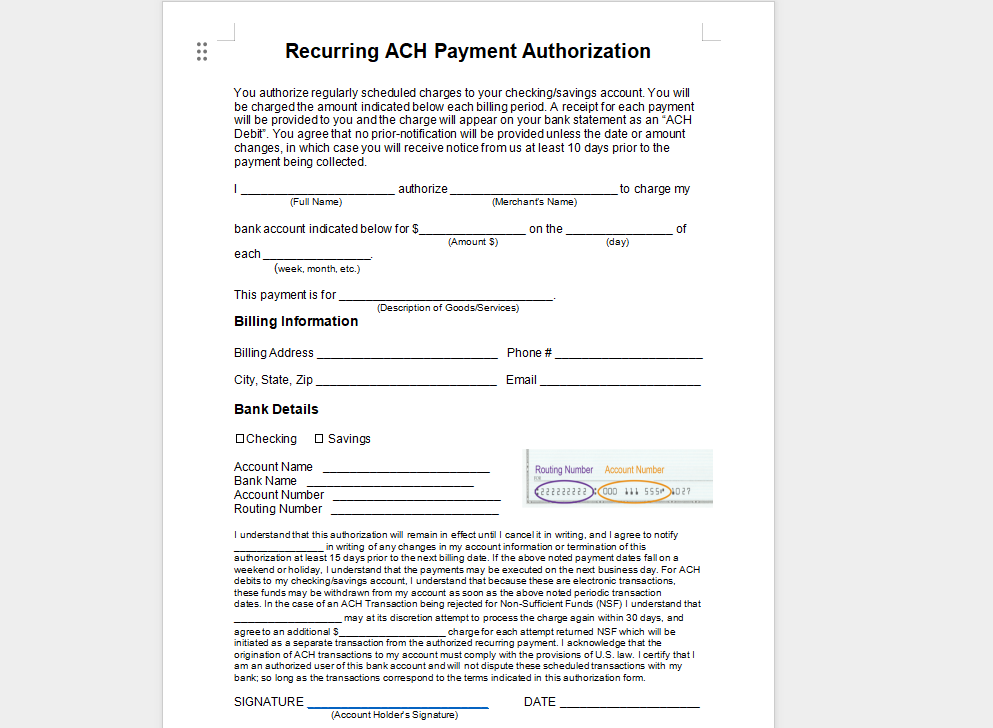
7. Recurring ACH Authorization
Designed for repeated ACH transactions, ensuring consistency for businesses handling scheduled payments. Pair it with clear billing dates so customers understand each upcoming transfer.
Best for: rent, tuition plans, and subscription services paid by bank transfer.
Format tip: include the schedule, amount, and how customers can revoke authorization.
Download:
Download Recurring ACH Authorization (Word)
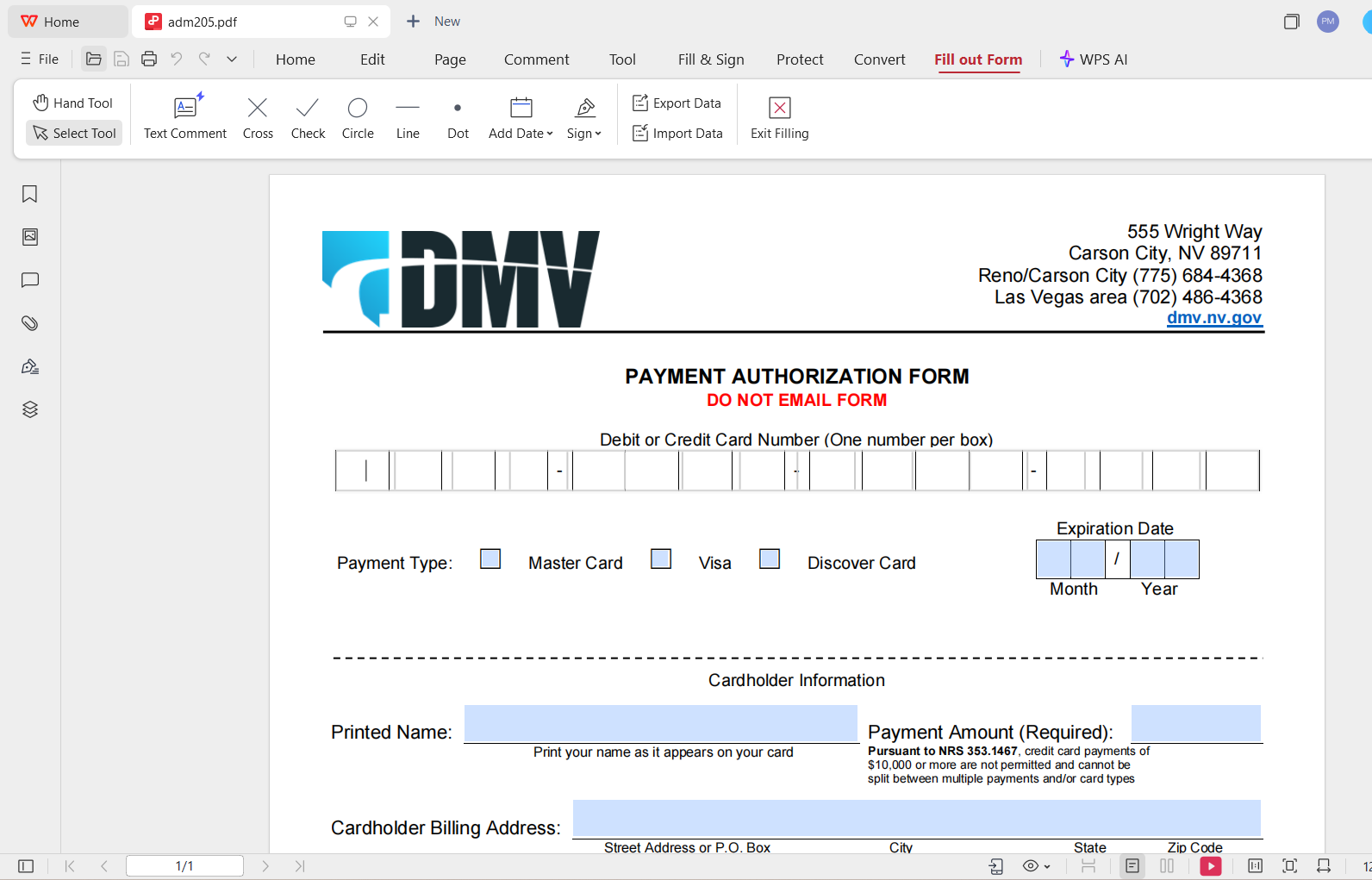
8. DMV Credit Card Authorization
A practical form for state-level use cases such as DMV payments, renewals, or administrative fees. Always confirm the latest official form version for your state before submitting.
Best for: vehicle registration, renewals, and agency fee payments.
Format tip: open the PDF in WPS PDF, fill required fields, then print or save a signed copy.
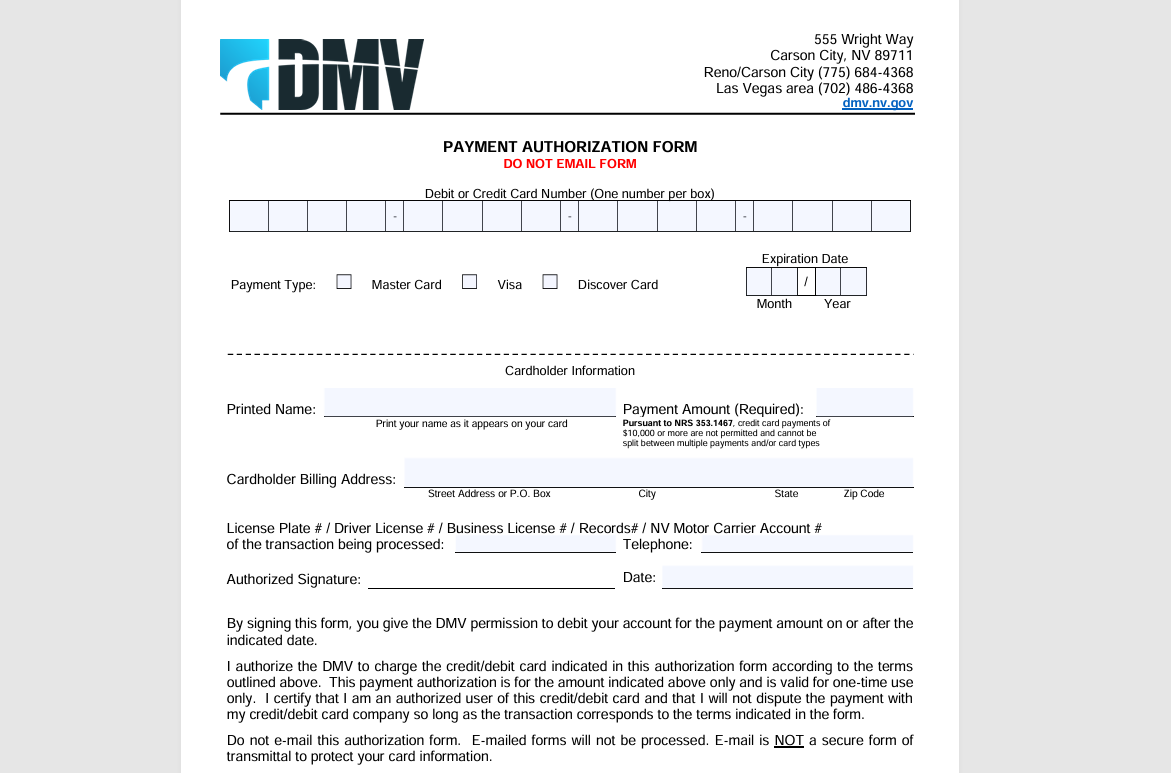
DOWNLOAD: ADM 205 Credit Card Authorization Form
9. One-Time Credit Card Payment Authorization Form
Another simple and legally clear layout for authorizing a single payment, suitable for freelancers, small shops, or online service providers. Use this when you only need one charge and do not want recurring language on the form.
Best for: single purchases, setup fees, and project kickoff deposits.
Format tip: fill and sign in WPS PDF, then password-protect before emailing.
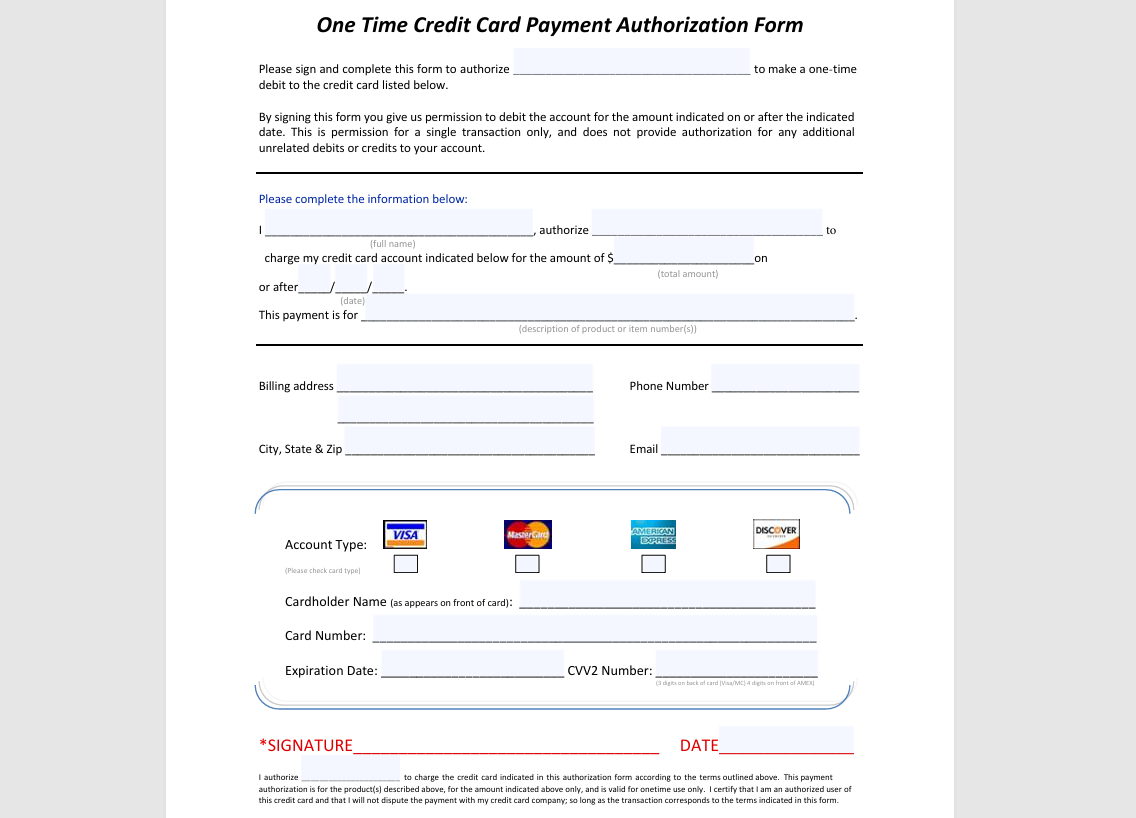
DOWNLOAD: One (1) Time Credit Card Authorization Form
10. Sundry Hotel Credit Card Authorization Forms
Hotels frequently require pre-authorization for reservations, incidentals, or corporate bookings. This set of templates meets the needs of readers searching for a hotel credit card authorization form in PDF or Word.
Best for: hotel front desks, travel agencies, and corporate travel arrangers.
Format tip: clarify whether the authorization covers room rate only, incidentals, or both.
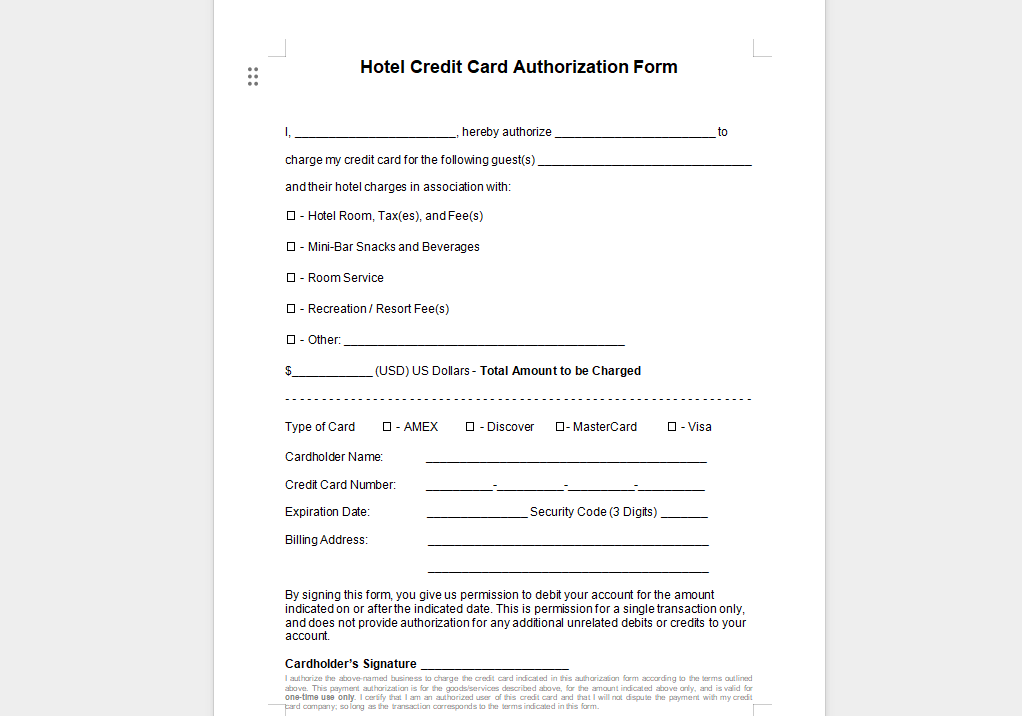
DOWNLOAD: Free Hotel Credit Card Authorization Forms - PDF | Word – eForms
These templates give you everything you need to quickly generate a professional credit card authorization form, whether you require Word, PDF, Excel, or ACH variations. For more layouts you can open directly in WPS Office, explore the WPS Template Store — it includes free and premium business forms you can edit, sign, and export as PDF.
Part 2: How to Edit and Print a Credit Card Authorization Form in Word & PDF
Once you download a credit card authorization form, the next step is customizing it for your business. WPS Office allows you to edit both Word and PDF versions easily. Whether you prefer WPS Writer or WPS PDF, the process is simple and works even for first-time users. Below is a practical walkthrough using one of the templates from Part 1 as an example.
Edit a Credit Card Authorization Form in WPS Writer (Word)
WPS Writer offers a familiar interface similar to Microsoft Word, making it ideal for editing authorization forms that need text adjustments, branding, or formatting updates.
Step 1: Open the Template in WPS Writer
Download any preferred credit card authorization form from Part 1, then double-click it to open it in WPS Writer automatically.
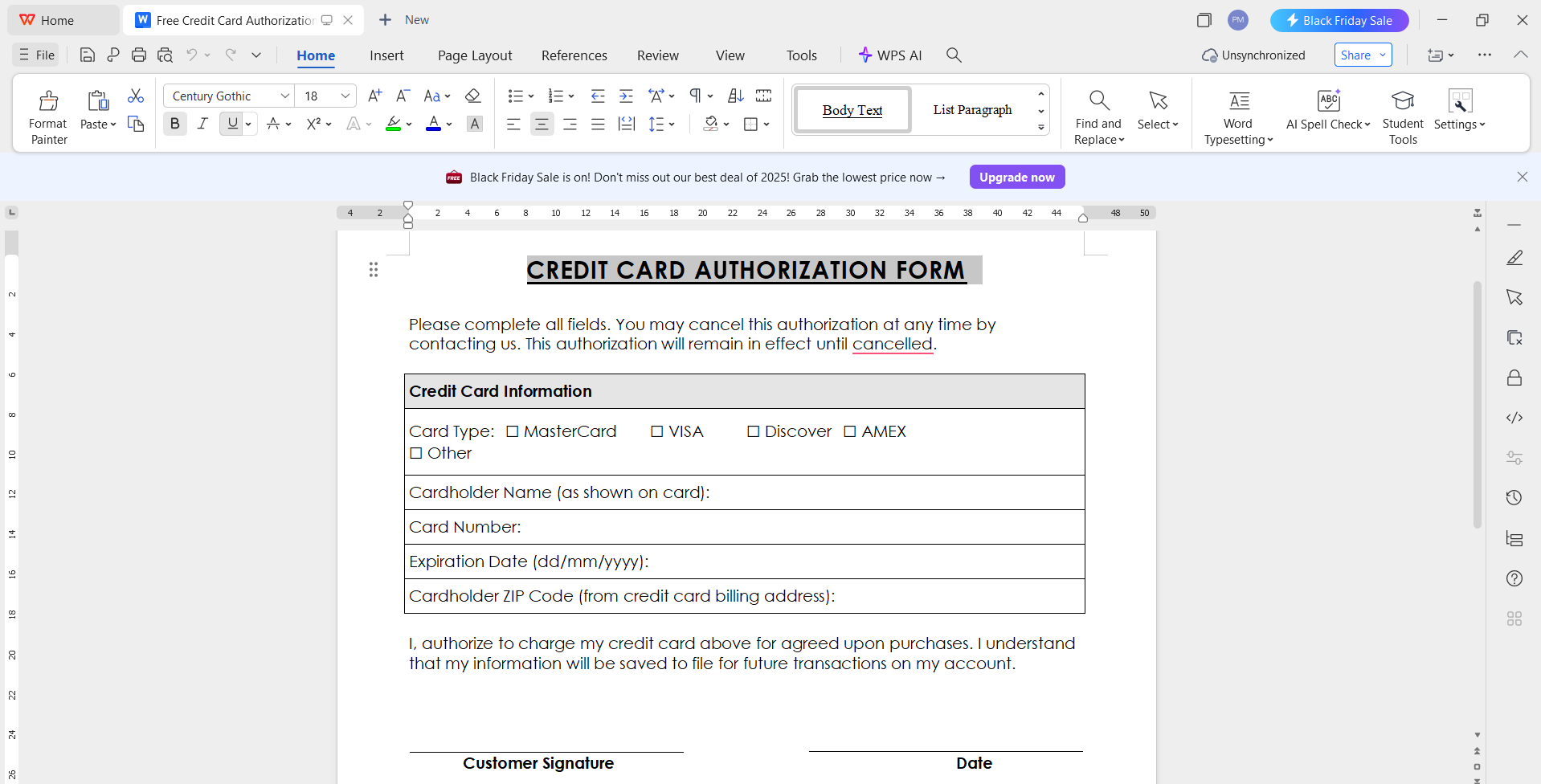
Step 2: Replace Placeholder Information
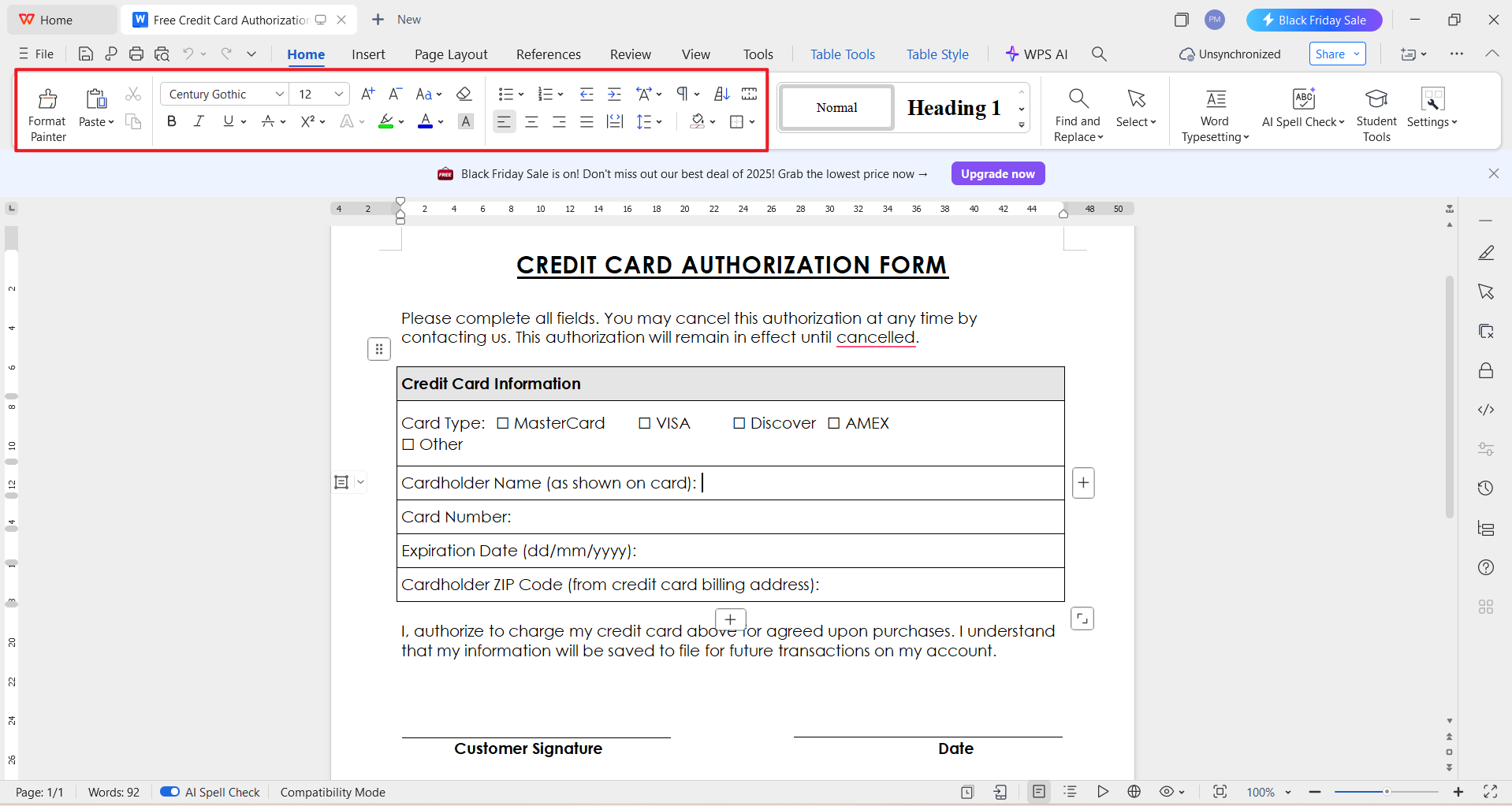
Click inside any text field and begin typing your business name, cardholder details, billing address, authorization amount, or payment terms. Use the top toolbar to change font size, color, or alignment.
Step 3: Add a Digital Signature or Space for Handwriting
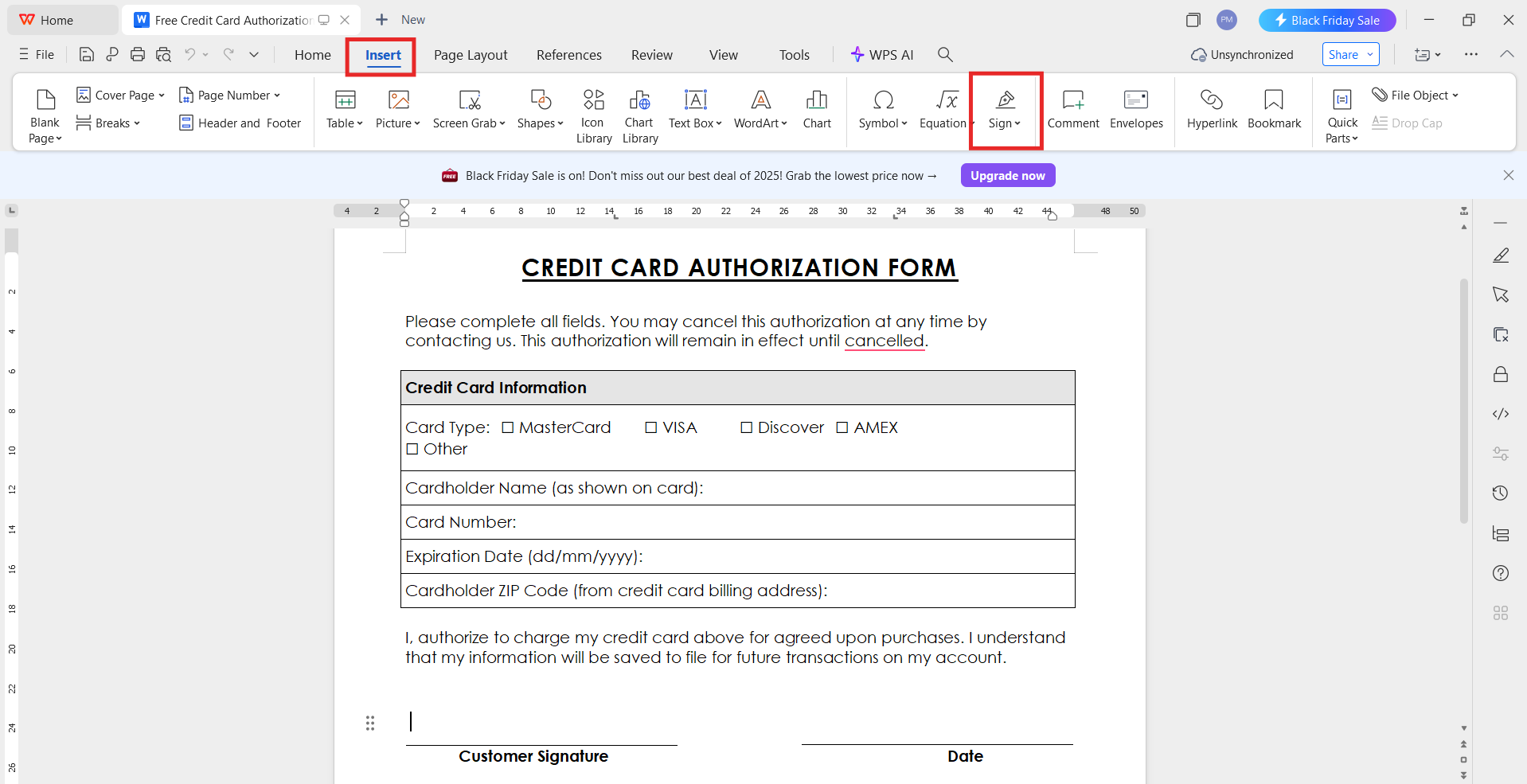
If your business requires signatures, insert a signature line through Insert > Signature Line or leave space for handwritten signing after printing.
Step 4: Save or Export as PDF
Once the content is finalized:
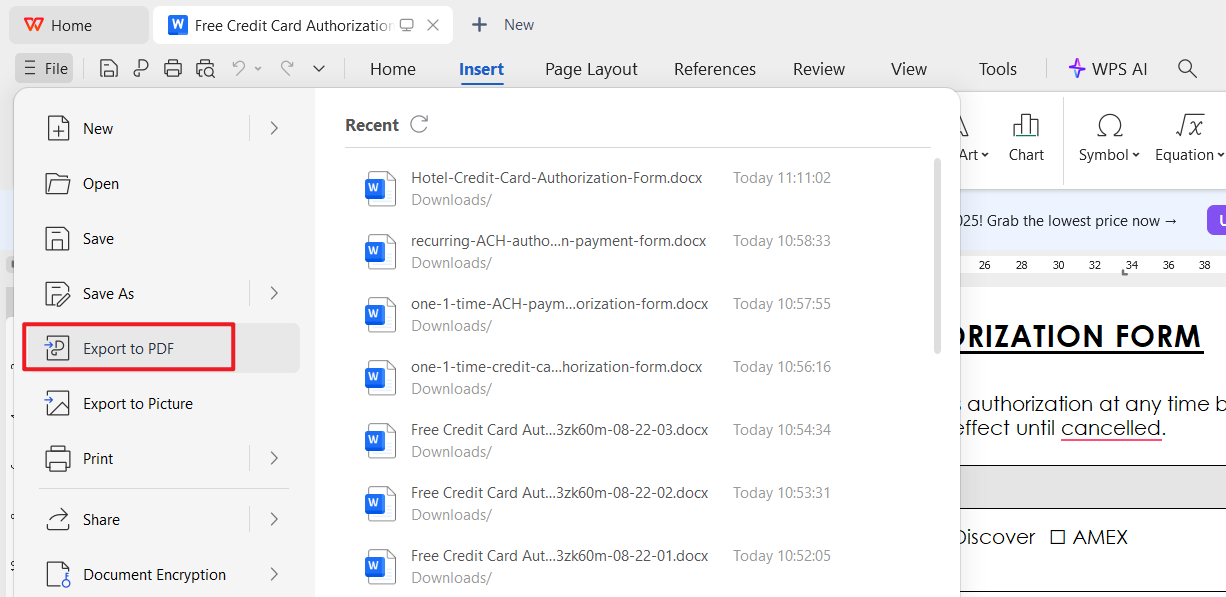
Click File
Select Export to PDF
Choose a file name and location
Click Export
Creating a credit card authorization form PDF ensures the formatting stays consistent when shared.
Step 5: Print the Authorization Form
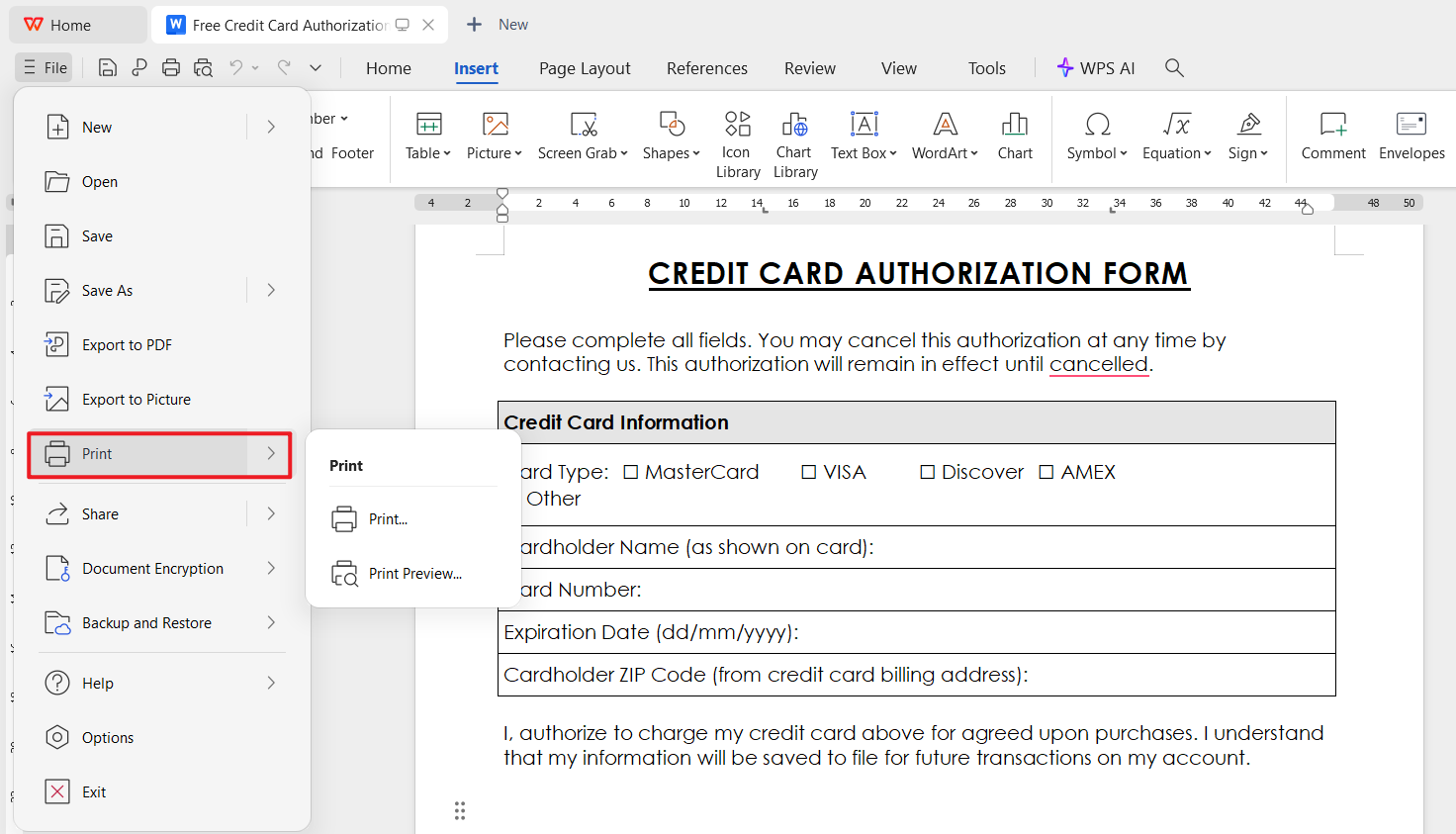
Go to File > Print, choose your printer, adjust orientation, and select Print.
Share Your Edited Form via Online Link (WPS Cloud)
WPS Office also lets you generate a secure online link for collaboration.
Step 1: Save to Cloud
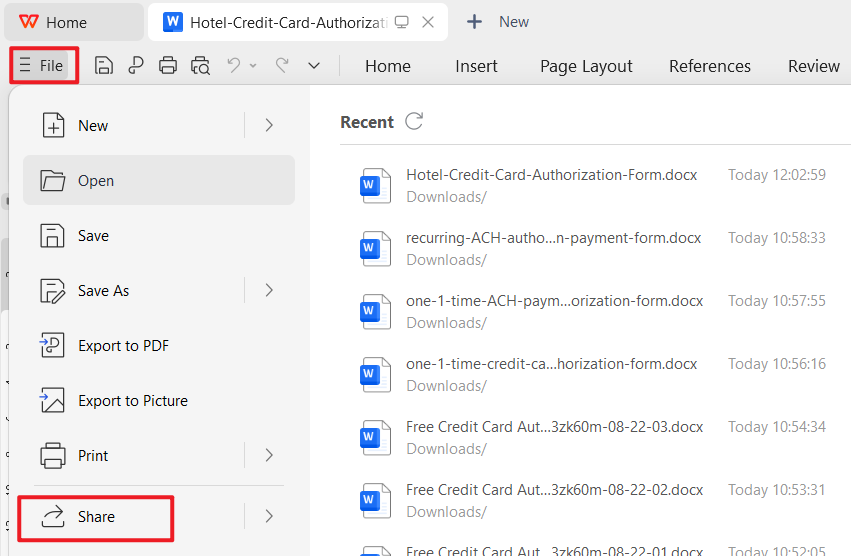
Click File > Share.
Step 2: Generate Share Link
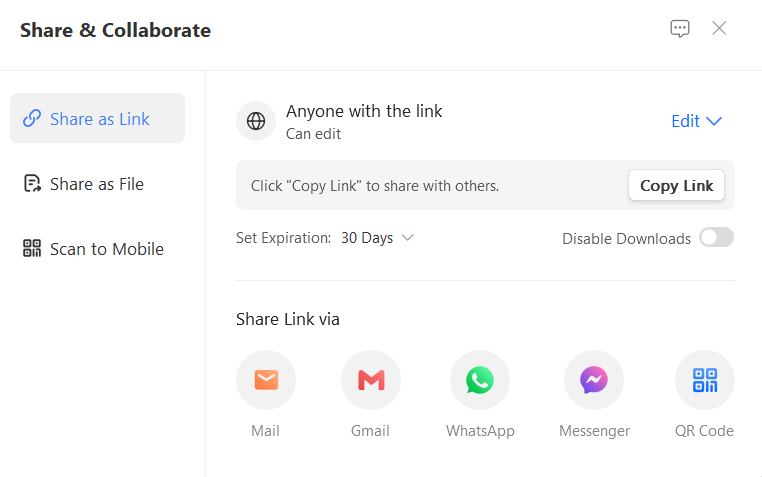
Click Share in the upper-right corner, then choose:
View Only
Editable
Depending on what access you want to give.
Step 3: Send Link to Team or Clients
Copy the link and share it via email or messaging apps. This is ideal when multiple people need to review the authorization details before printing.
Edit a Credit Card Authorization Form in WPS PDF
If you downloaded the file in PDF format, WPS PDF provides several tools for editing text, adding signatures, and preparing the file for printing.
Step 1: Open the PDF in WPS Office
Right-click the PDF and select Open with WPS Office.
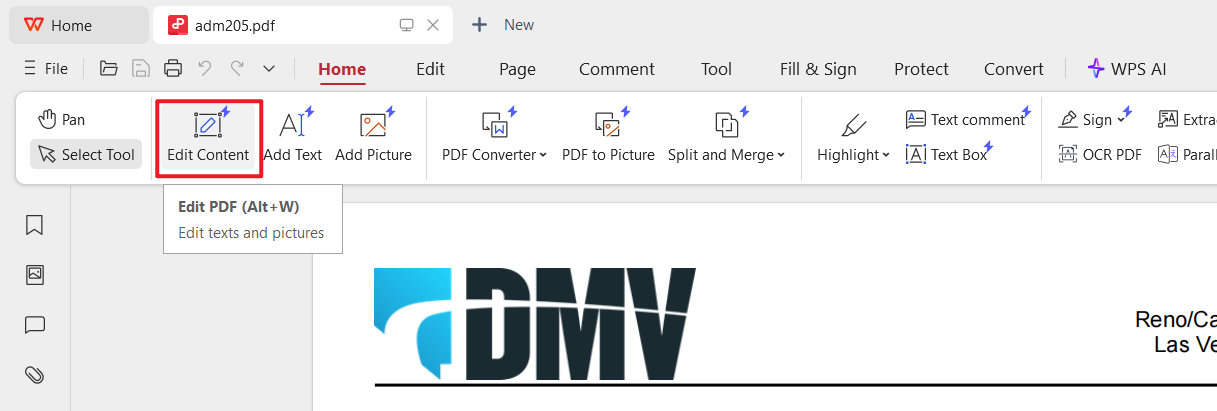
Step 2: Enable PDF Editing
Click Edit PDF from the top toolbar. You can now modify text, fill in fields, insert checkboxes, or adjust formatting.
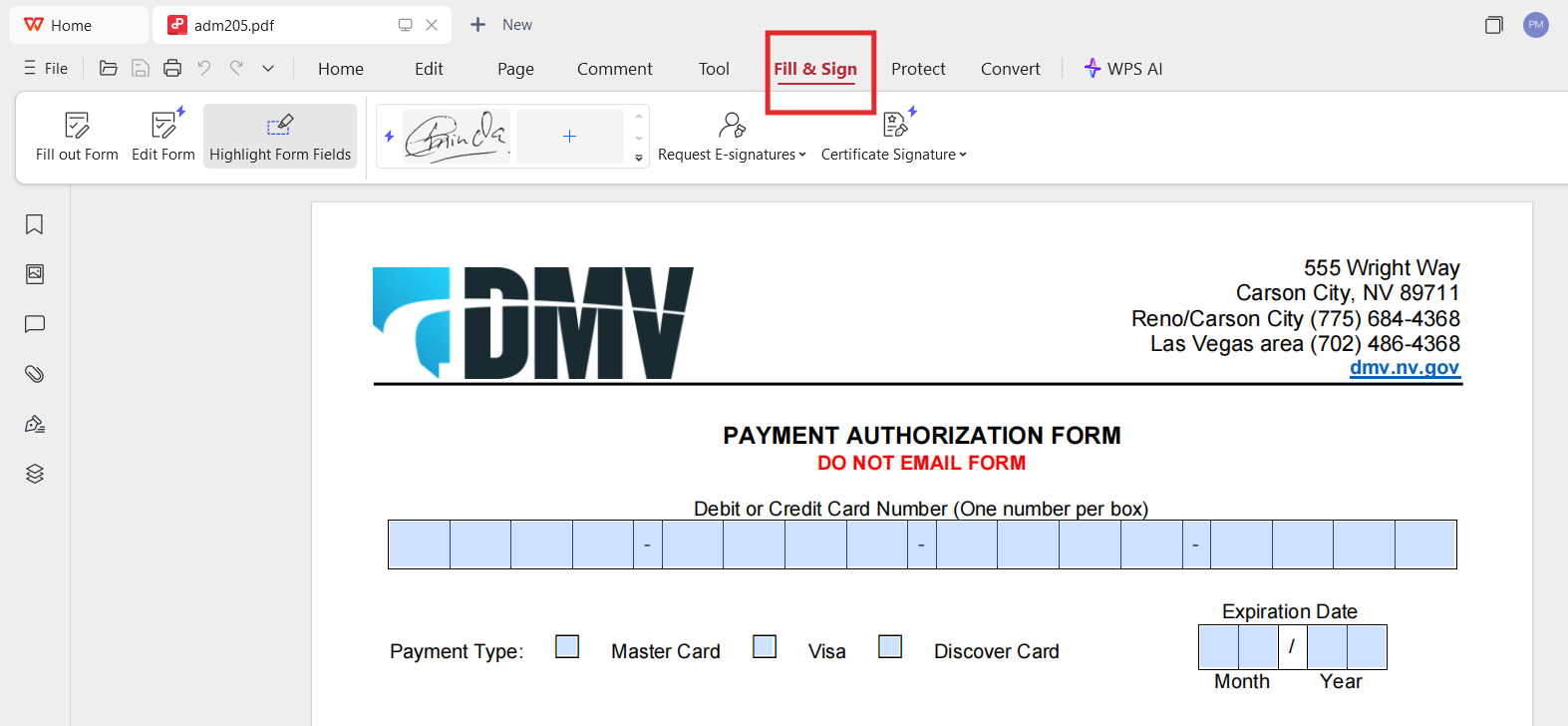
Step 3: Add Signature or Company Stamp
Use the Fill & Sign tool to upload a digital signature or draw one directly.
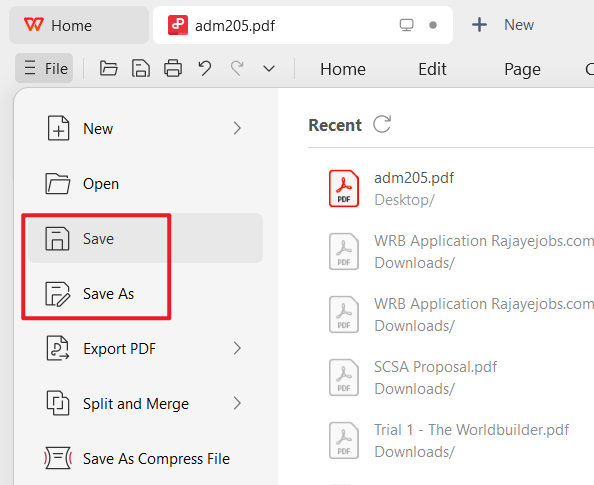
Step 4: Save the Updated PDF
Click Save As, choose your folder, and rename the edited version.
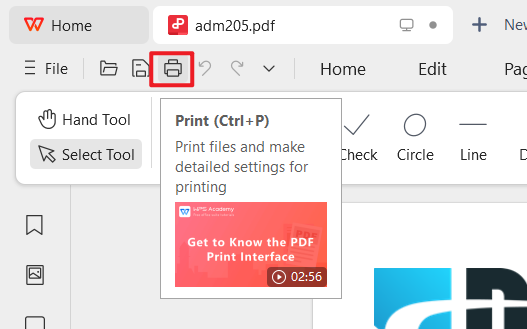
Step 5: Print the Authorization Form
Open the Print window, check the preview, and click Print.
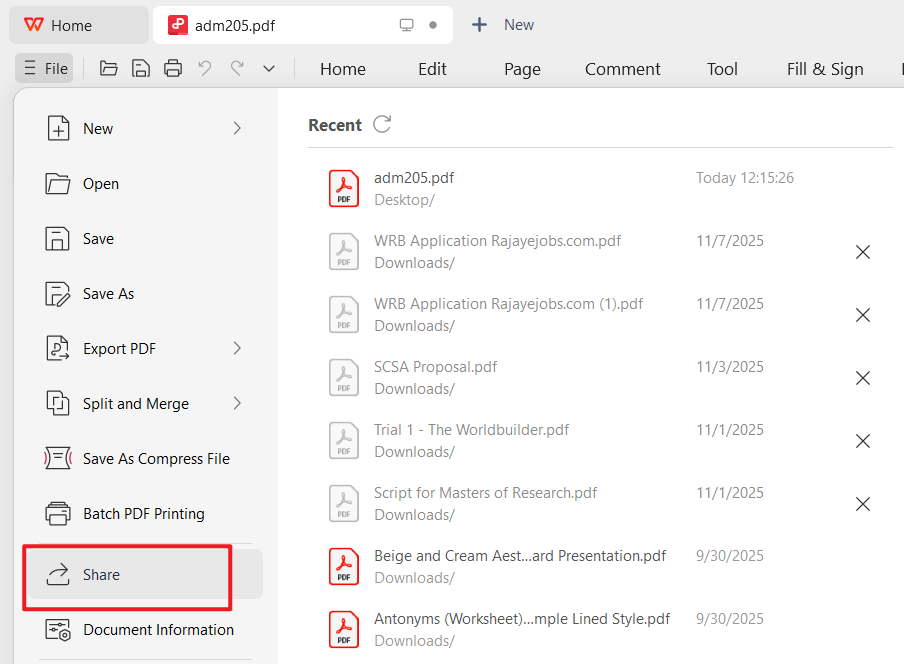
Create an Online Link for the PDF
You can share the updated PDF through the WPS Cloud system.
Click Share
Select permission level
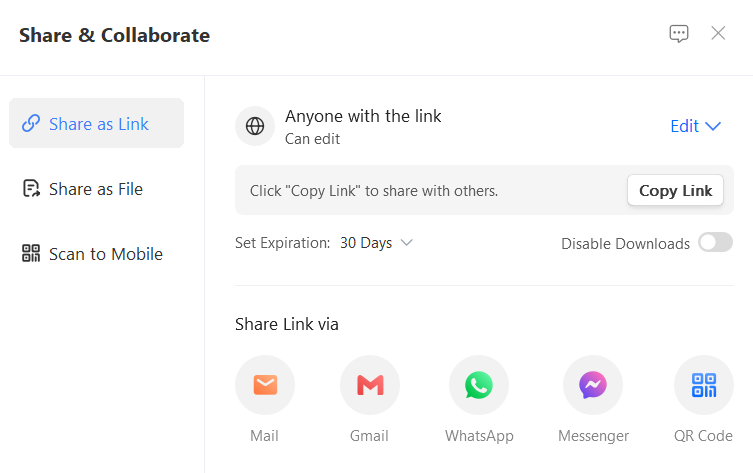
Copy and send the link
This makes collaboration convenient when legal teams or finance departments need to verify the authorization details.
Saving Notes from Personal Experience
After editing several forms across Word and PDF, I’ve found that WPS Writer is best when the original template needs structural changes, like adding company logos, rearranging tables, or adjusting instructions.
WPS PDF, on the other hand, works smoothly when the layout is fixed and only the data changes. Sharing via online link is especially helpful for businesses that routinely send authorization forms to clients for approval before billing.


Part 3: Free Office Suite with Editable Credit Card Authorization Form
When working with a credit card authorization form, most users prefer tools that are reliable, free to download, and simple to edit. WPS Office meets these expectations by offering a complete productivity suite that supports Word, Excel, and PDF formats, making it practical for anyone who needs fast and accurate document customization.

Whether you want to update template fields, adjust formatting, add signatures, or save your file as a credit card authorization form PDF, WPS Office provides the flexibility and stability necessary for business documentation.
Features of WPS Office
Free Download and Full Office Suite
WPS Office includes Writer, Spreadsheets, and Presentation tools, allowing you to work with Word, Excel, and PPT files at no cost. This makes it easy to modify authorization forms, especially when users search for a credit card authorization form template Word or a credit card authorization form template free Excel.
Powerful PDF Toolkit
The built-in WPS PDF editor is ideal for users downloading a free credit card authorization form in PDF format. You can edit text, insert form fields, sign documents, annotate, compress, and export updated versions ready for printing or sharing.
Rich Template Store
WPS Office provides thousands of customizable templates, including forms, contracts, invoices, and business documents. This gives users alternatives beyond the templates listed earlier, with many layouts designed for authorization, billing, or customer approval processes.
AI-Assisted Writing
WPS AI helps rewrite sentences, format content, and generate documentation. This is helpful if you need to refine instructions, correct grammar, or prepare polished business communication that accompanies your authorization form.
Online Documents and Collaboration
WPS Office allows documents to be saved to the cloud and shared through online links. Multiple team members can review payment authorization details, which is especially important when handling sensitive authorization processes, whether for general use or specific cases like a credit card authorization form for USCIS review.
Stable and Secure Environment
Security matters when working with financial information. WPS Office ensures encrypted cloud storage, secure sharing settings, and stable performance across devices, reducing the risk of data loss or unauthorized access.
Shareable Editing
You can generate an editable link so others can fill in their information directly. This is particularly useful for hotels, agencies, or businesses that routinely send a credit card authorization form or hotel file to customers for confirmation.
FAQs
Q1. Are the templates on WPS free to use?
Yes. Many templates in the WPS Template Store are free to download and edit in WPS Office. A WPS Pro subscription unlocks additional premium templates and advanced features, but most everyday authorization forms can be completed with the free tools.
Q2. Do I need an account to download and edit these forms?
You can open and edit Word or PDF authorization forms locally in WPS Office without creating an online account. An account is only needed if you want cloud sync, online sharing links, or Template Store downloads tied to your WPS profile.
Q3. Can I customize my credit card authorization form?
Yes. In WPS Writer you can change text, tables, branding, and layout. In WPS PDF you can fill fields, add signatures or stamps, annotate, and export an updated credit card authorization form PDF for printing or secure sharing.
Q4. What should a credit card authorization form include?
A solid form usually includes cardholder contact details, card information, the authorized amount or recurring schedule, a description of goods or services, merchant details, and a dated signature that shows clear consent.
Q5. What is the difference between card authorization and capturing?
Authorization is the issuer’s temporary approval that funds are available; no money is transferred yet. Capturing is the later step that moves the reserved amount to the merchant. Authorization holds often expire in about 5–10 days, so capture before the hold ends.
Q6. Is a signed authorization form enough to charge a card?
A signed credit card authorization form documents consent, but you still need a compliant payment process and any region-specific requirements your business follows. Keep completed forms secure, limit access, and retain only what your policy requires.

Summary
This guide shared 10 free credit card authorization form downloads and showed how to edit, print, sign, and customize them with WPS Office. Whether you need Word, PDF, hotel, one-time, recurring, or ACH versions, you can prepare a clear authorization file quickly and keep formatting consistent when you export to PDF.
If you need more layouts, the WPS Template Store offers hundreds of options ready to download and edit directly inside WPS Office.

'%3e%3cpath%20d='M19.9911%204.11386V6.471H18.5894C18.0775%206.471%2017.7322%206.57814%2017.5536%206.79243C17.3751%207.00671%2017.2858%207.32814%2017.2858%207.75671V9.44421H19.9019L19.5536%2012.0871H17.2858V18.8639H14.5536V12.0871H12.2769V9.44421H14.5536V7.49779C14.5536%206.39064%2014.8632%205.53201%2015.4822%204.92189C16.1013%204.31177%2016.9257%204.00671%2017.9554%204.00671C18.8304%204.00671%2019.509%204.04243%2019.9911%204.11386Z'%20fill='%23333333'/%3e%3c/g%3e%3cdefs%3e%3cclipPath%20id='clip0_2938_8199'%3e%3crect%20width='16'%20height='16'%20fill='white'%20transform='translate(8%204.00671)'/%3e%3c/clipPath%3e%3c/defs%3e%3c/svg%3e)
'%3e%3cpath%20d='M17.5237%2010.7813L23.4811%204H22.0699L16.8949%209.88693L12.7648%204H8L14.2469%2012.9029L8%2020.0133H9.4112L14.8725%2013.7952L19.2352%2020.0133H24M9.92053%205.04213H12.0885L22.0688%2019.0224H19.9003'%20fill='%23333333'/%3e%3c/g%3e%3cdefs%3e%3cclipPath%20id='clip0_2938_8200'%3e%3crect%20width='16'%20height='16.0134'%20fill='white'%20transform='translate(8%204)'/%3e%3c/clipPath%3e%3c/defs%3e%3c/svg%3e)


