

'%3e%3cpath%20d='M8%200C12.4183%200%2016%203.58172%2016%208C16%2012.4183%2012.4183%2016%208%2016C3.58172%2016%200%2012.4183%200%208C0%203.58172%203.58172%200%208%200ZM11.6162%204.38379C11.2257%203.99337%2010.5927%203.99338%2010.2021%204.38379L8%206.58594L5.79785%204.38379C5.40732%203.99334%204.77429%203.99329%204.38379%204.38379C3.99331%204.77429%203.99335%205.40733%204.38379%205.79785L6.58594%208L4.38379%2010.2021C3.99348%2010.5927%203.99341%2011.2257%204.38379%2011.6162C4.77426%2012.0066%205.40734%2012.0065%205.79785%2011.6162L8%209.41406L10.2021%2011.6162C10.5927%2012.0066%2011.2257%2012.0067%2011.6162%2011.6162C12.0067%2011.2257%2012.0066%2010.5927%2011.6162%2010.2021L9.41406%208L11.6162%205.79785C12.0066%205.40735%2012.0066%204.77429%2011.6162%204.38379Z'%20fill='%23080E17'%20fill-opacity='0.46'/%3e%3c/g%3e%3cdefs%3e%3cclipPath%20id='clip0_3761_713'%3e%3crect%20width='16'%20height='16'%20fill='white'/%3e%3c/clipPath%3e%3c/defs%3e%3c/svg%3e)




'%3e%3cpath%20fill-rule='evenodd'%20clip-rule='evenodd'%20d='M21.4999%2010.9993C21.4999%205.20009%2016.7986%200.498901%2010.9993%200.498901C5.19994%200.498901%200.498657%205.20009%200.498657%2010.9993C0.498657%2016.2404%204.33858%2020.5844%209.35855%2021.3722V14.0346H6.69238V10.9993H9.35855V8.68594C9.35855%206.05427%2010.9262%204.60062%2013.3248%204.60062C14.4736%204.60062%2015.6753%204.80571%2015.6753%204.80571V7.38979H14.3512C13.0468%207.38979%2012.64%208.19921%2012.64%209.0296V10.9993H15.5523L15.0867%2014.0346H12.64V21.3722C17.66%2020.5844%2021.4999%2016.2404%2021.4999%2010.9993Z'%20fill='%231568EA'/%3e%3c/g%3e%3c/svg%3e)


'%3e%3cpath%20d='M2.42045%2022.1876H6.31818V12.7217L0.75%208.54553V20.5171C0.75%2021.4414%201.49892%2022.1876%202.42045%2022.1876Z'%20fill='%234285F4'/%3e%3cpath%20d='M19.682%2022.1876H23.5797C24.5041%2022.1876%2025.2502%2021.4387%2025.2502%2020.5171V8.54553L19.682%2012.7217'%20fill='%2334A853'/%3e%3cpath%20d='M19.682%205.48293V12.7216L25.2502%208.54543V6.31816C25.2502%204.25236%2022.8921%203.07469%2021.2411%204.31361'%20fill='%23FBBC04'/%3e%3cpath%20d='M6.31824%2012.7217V5.48303L13.0001%2010.4944L19.6819%205.48303V12.7217L13.0001%2017.733'%20fill='%23EA4335'/%3e%3cpath%20d='M0.75%206.31816V8.54543L6.31818%2012.7216V5.48293L4.75909%204.31361C3.10534%203.07469%200.75%204.25236%200.75%206.31816Z'%20fill='%23C5221F'/%3e%3c/g%3e%3cdefs%3e%3cclipPath%20id='clip0_2954_7305'%3e%3crect%20width='24.5'%20height='18.375'%20fill='white'%20transform='translate(0.75%203.8125)'/%3e%3c/clipPath%3e%3c/defs%3e%3c/svg%3e)


Running a business or pitching an idea can feel like juggling chaos, your vision’s clear, but getting it on paper isn’t easy. I’ve watched entrepreneurs and students pour their hearts into ideas that lose impact just because the layout doesn’t click. That’s where a business model canvas template steps in. It gives your thoughts structure, turning messy concepts into a visual plan that actually makes sense. In this guide, I’ll show you how to use these templates smartly and how WPS Office can make building your canvas faster and more effortless.


What is a Business Model Canvas?
A business model canvas is a strategic tool that helps visualize how a business creates, delivers, and captures value. It’s essentially a one-page blueprint that breaks your idea down into nine key building blocks, giving you a clear overview of how everything connects.
Each block provides clarity, making it easier to evaluate what’s working and what needs improvement. When you visualize these on a single page, your business strategy becomes far easier to refine.
When I first used a business canvas template, I realized how much easier it was to see gaps in my planning. It turned vague ideas into something tangible and actionable.
10 Business Model Canvas Templates You Can Use Now
Here are ten of the most effective business model canvas templates that you can start editing right away. Each one is designed for a specific industry or goal.
1. Social Enterprise Business Model Canvas Template
The Social Enterprise Business Model Canvas Template is ideal for organizations balancing profit with purpose. It helps you define key partners, revenue streams, and impact-driven value propositions. With customizable sections, you can quickly structure your business operations while aligning with your mission. This template is particularly useful for NGOs, foundations, and social entrepreneurs.
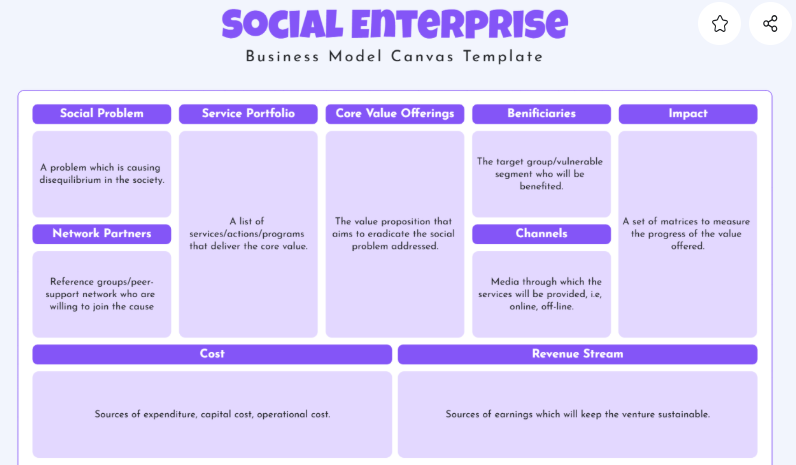
This template helped me refine a social impact idea I was working on. It forced me to think deeply about sustainability, not just intent.
2. Food Truck Business Model Canvas Template
The Food Truck Business Model Canvas Template focuses on small mobile food ventures. It allows you to outline supply chains, cost controls, and location strategies clearly. The editable format helps visualize marketing plans and target audiences. It’s perfect for entrepreneurs testing culinary concepts on wheels.
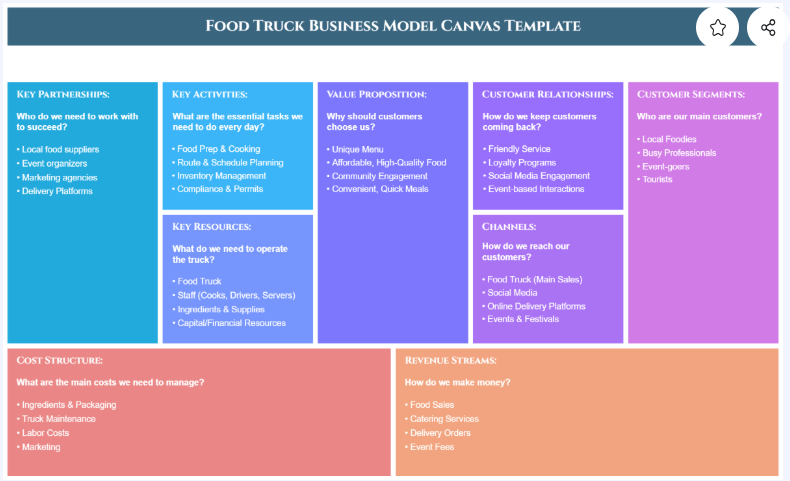
I once used this for a café startup project, it gave me clarity on recurring costs and mobile operations logistics.
3. Real Estate Business Model Canvas Template
The Real Estate Business Model Canvas Template is great for agencies or investors managing multiple projects. It simplifies customer relationships, investment strategies, and partnership models. Each section can be customized to suit commercial, residential, or rental businesses. The structured visuals make presenting to stakeholders easier.
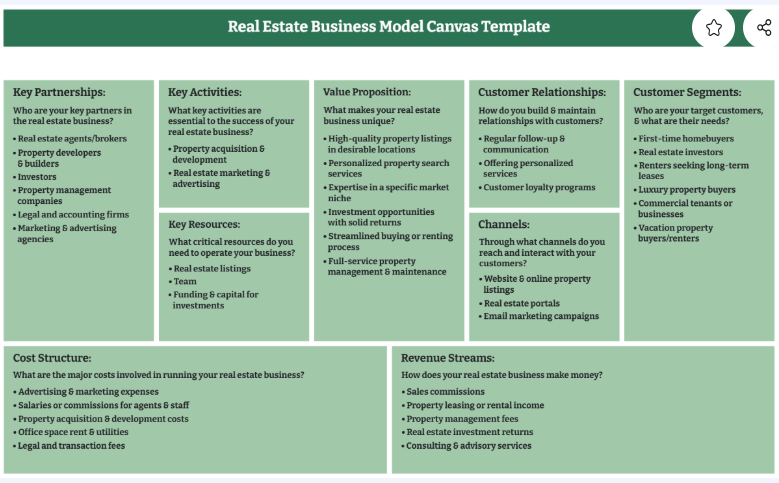
I helped a client use this to break down their brokerage strategy. The outcome is clearer roadmap and smoother investor communication.
4. Coffee Shop Business Model Canvas Template
The Coffee Shop Business Model Canvas Template helps aspiring café owners refine branding and supply management. It highlights your unique value proposition and customer engagement strategies. The design makes it simple to visualize partnerships, pricing, and recurring customer flows.
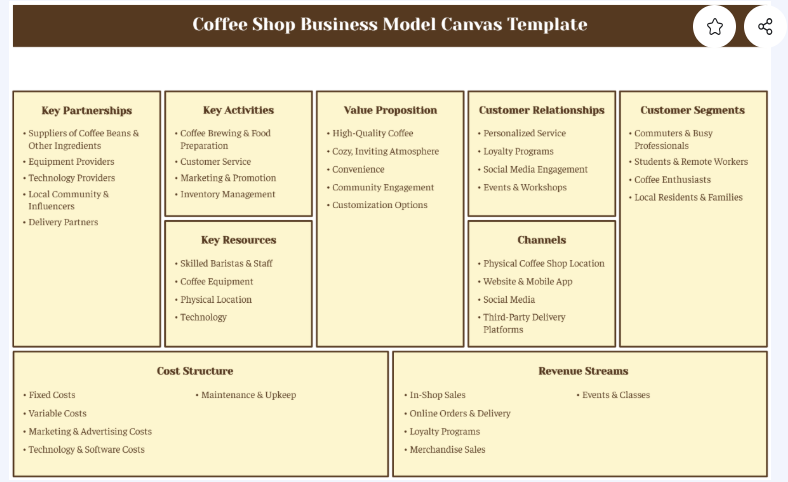
I used it to teach my students about consumer segmentation, it made the concept super visual and relatable.
5. Law Firm Business Model Canvas Template
The Law Firm Business Model Canvas Template helps legal practices structure their client services efficiently. It outlines partnership networks, key resources, and revenue models in a simple layout. This design works well for law firms managing multiple departments or client groups.
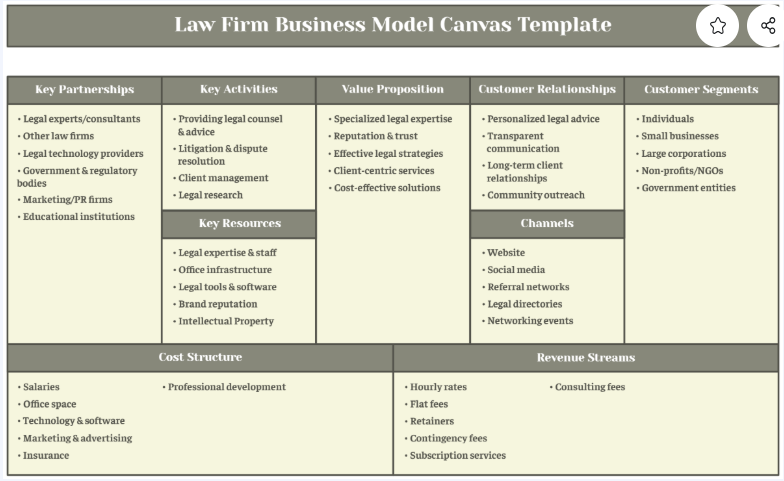
I used this for a consultancy project, it provided clarity on managing recurring clients and fixed retainers.
6. Simple Business Model Canvas Template
The Simple Business Model Canvas Template is perfect for quick idea mapping and brainstorming. It’s minimal and clean, allowing you to focus purely on strategy. Downloadable in Word, it’s ideal for classrooms or early-stage startups experimenting with different ideas.
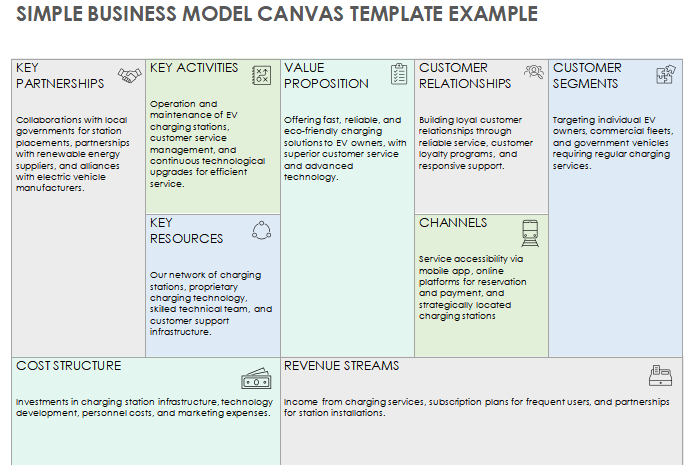
I used it during an entrepreneurship workshop. It made idea pitching more fluid and less intimidating.
7. Lean Business Model Canvas Template
The Lean Business Model Canvas Template is made for startups that thrive on agility. It highlights customer problems, metrics, and solutions in a crisp visual layout. You can adapt it to focus on what’s most essential to early growth.
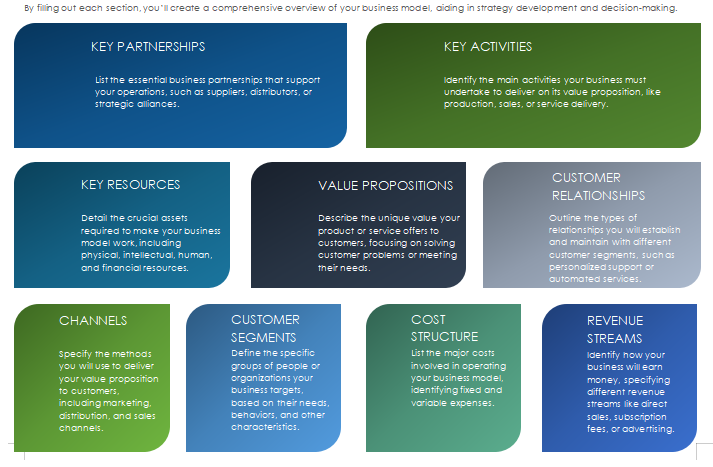
I love this one, it helped me focus on what really mattered in a lean setup.
8. Social Enterprise Business Model Canvas Template (Smartsheet)
The Social Enterprise Business Model Canvas Template is another professional option for purpose-driven ventures. It integrates sustainability and impact measurement fields into the standard model. It’s a great option for presenting to donors or investors.
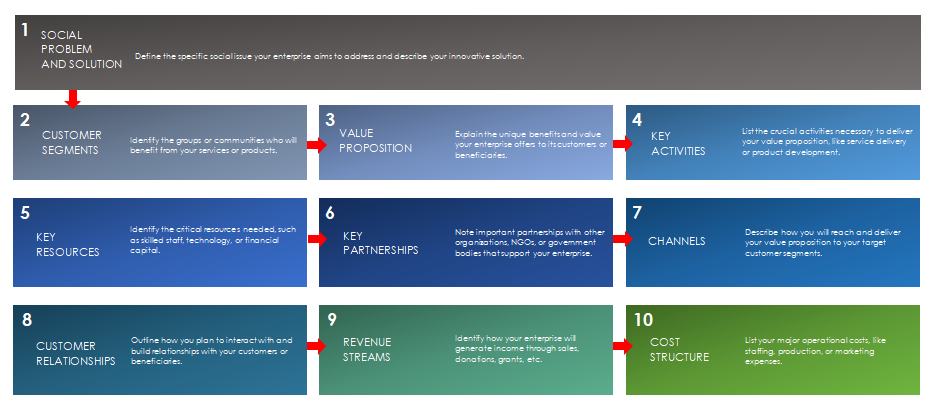
I used it for a community-driven project and found the measurable outcome section particularly valuable.
9. Tech Startup Business Model Canvas Template
The Tech Startup Business Model Canvas Template helps innovation-focused entrepreneurs build scalable plans. It highlights funding streams, key metrics, and value propositions aligned with technology goals. You can easily modify it for SaaS or AI-based startups.
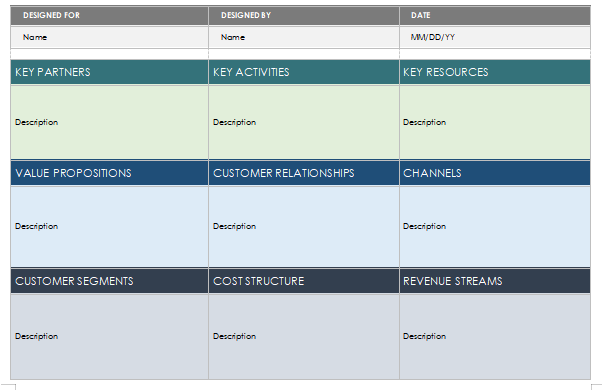
I found it extremely helpful when I was mapping out an AI-based business model. It keeps everything tech-aligned.
10. Customer-Focused Canvas Template
The Customer-Focused Canvas Template emphasizes understanding and improving customer experience. It allows you to plan engagement and feedback strategies effectively. Its layout helps visualize relationships between customer needs and your business solutions.
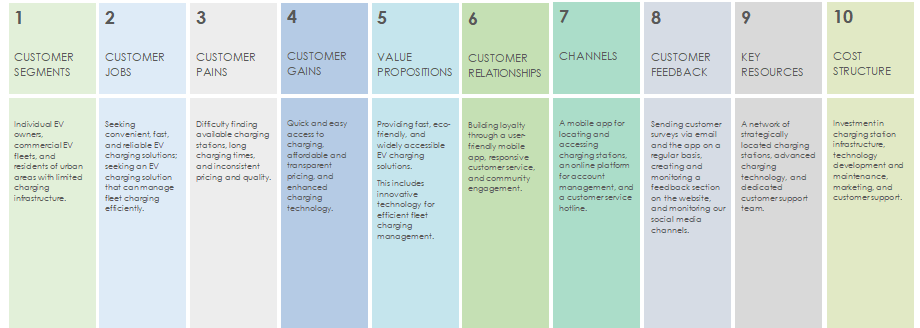
I used this to improve client feedback systems, it worked wonders for retention planning.
How to Customize Your Business Model Canvas Template In PNG/Word
When you choose a template, customizing it to match your brand and information is the next step. Below I’ll walk you through two practical workflows, editing a PNG in WPS Photo and editing a Word template in WPS Writer. Each tool section starts with a short, human-focused introduction about what the tool does and why I use it, followed by step-by-step instructions. I’ll keep each step concise and practical.
How to Edit Business Model Canvas Template in WPS Photo
Use WPS Photo when you’ve downloaded a canvas as an image and need to elevate its visual quality quickly.
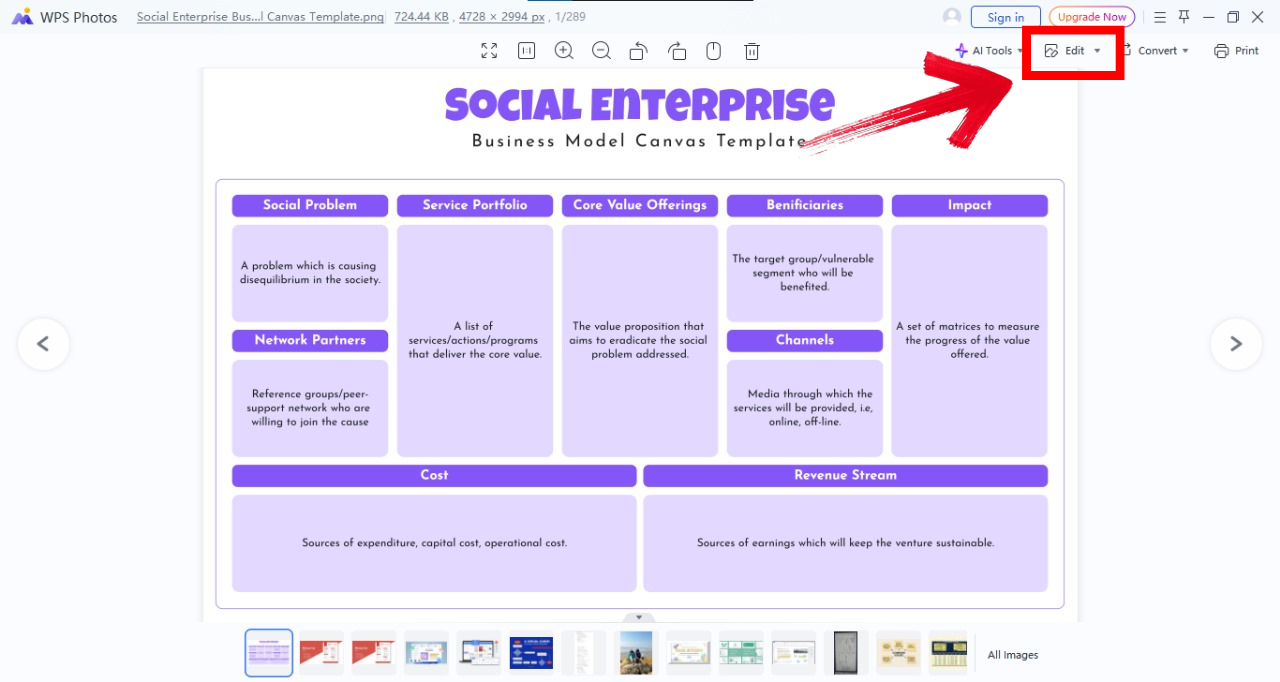
Step 1: First of all, open the downloaded image in WPS Photos.
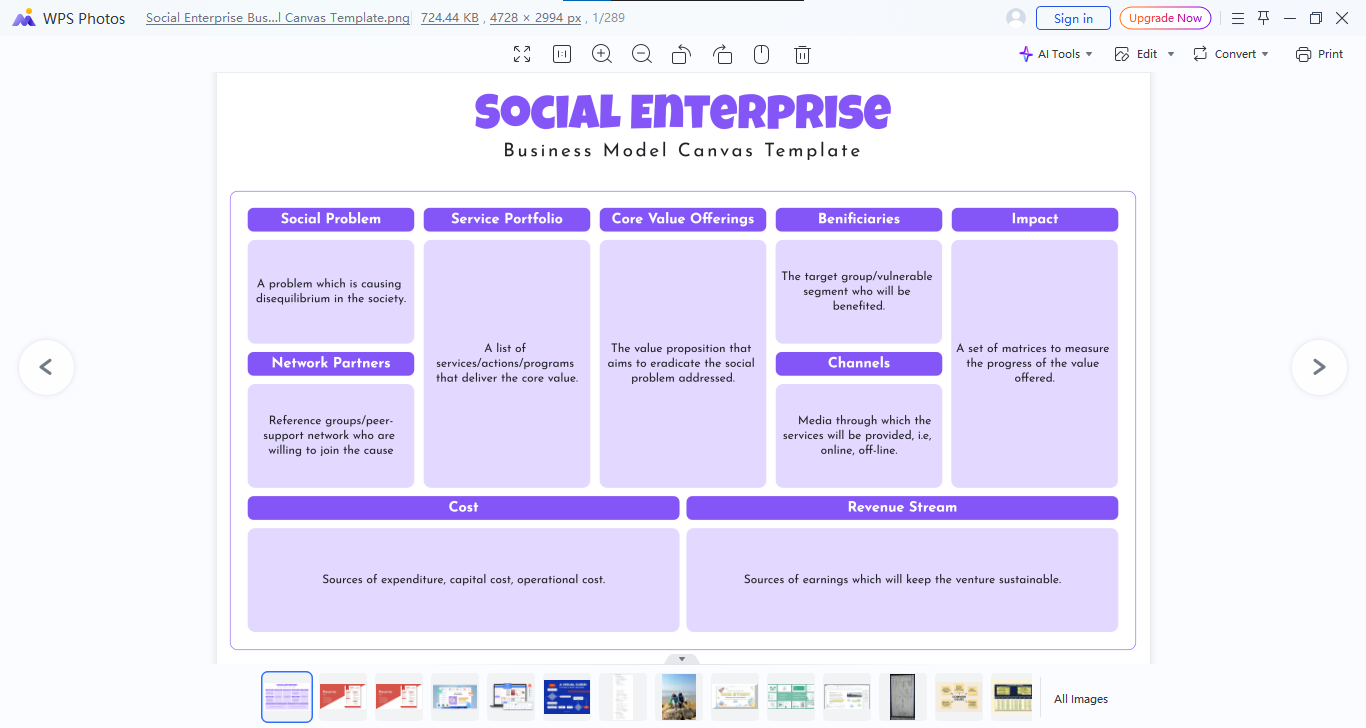
Step 2: Now click “Edit” from the top right of your screen and you’ll see an editing panel on the right side of your screen.
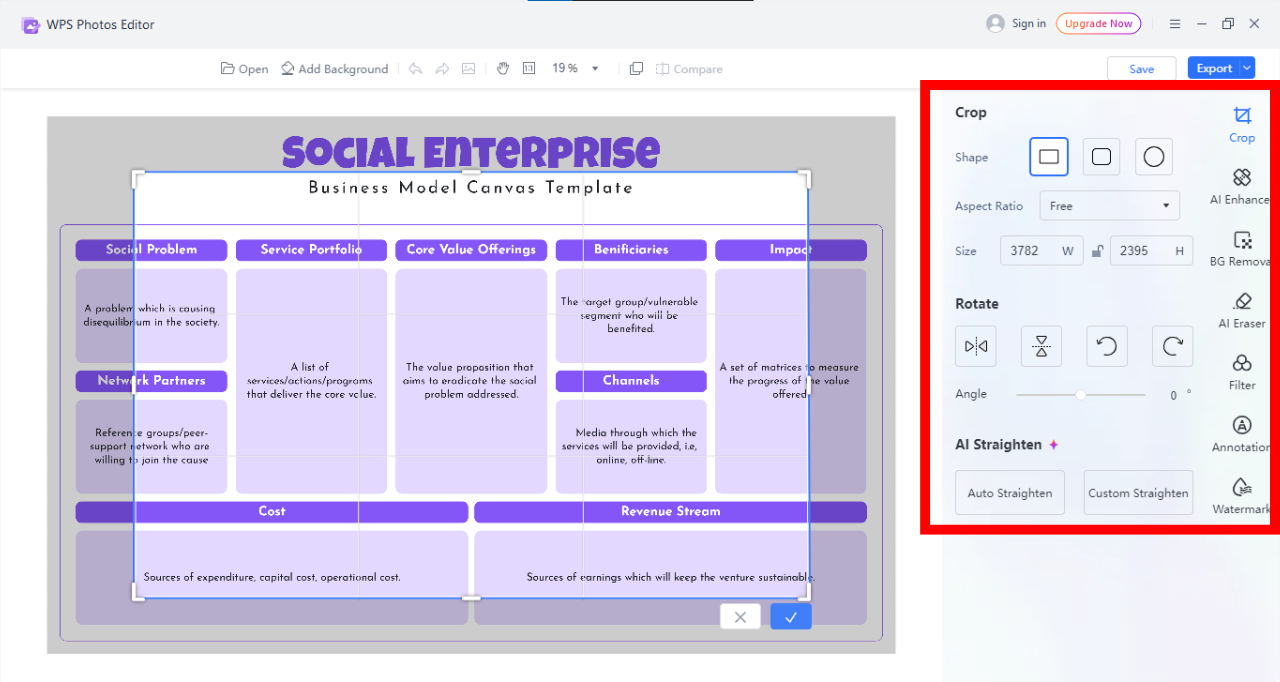
Step 3: Now use the panel on your right to implement different features to edit the image according to your preference.
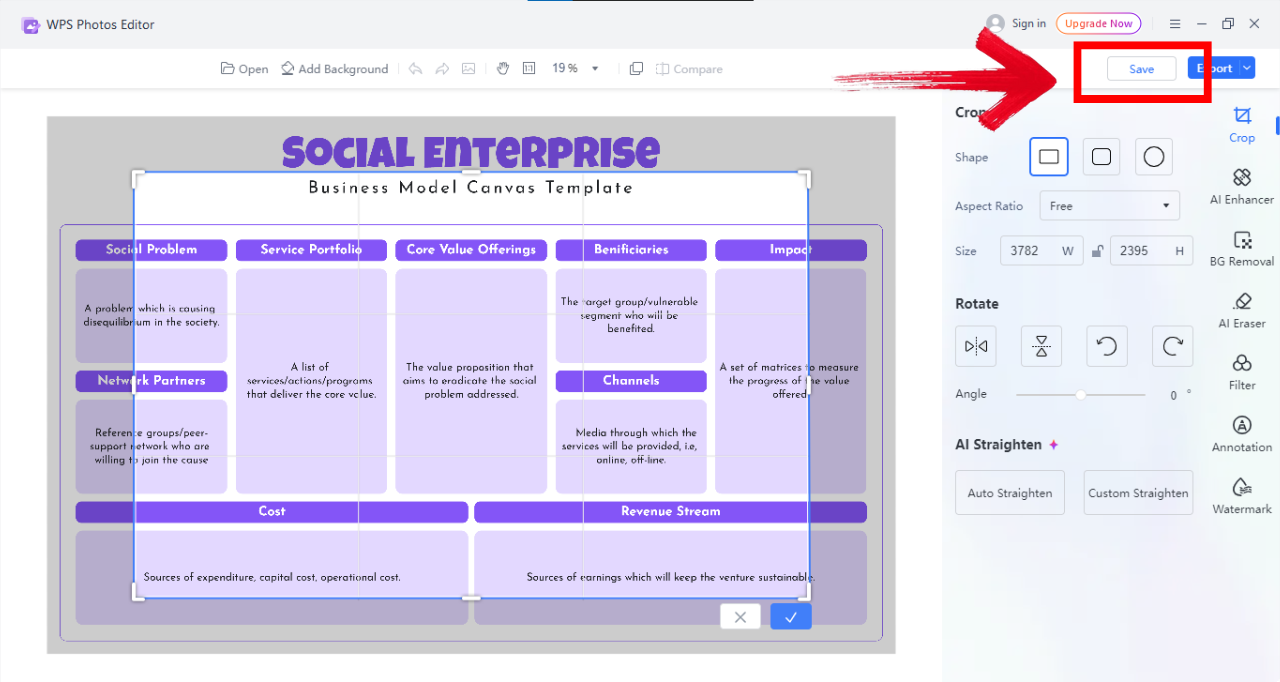
Step 4: Once you’ve explored all editing options, click on “Save” on the top right of your screen to save the image.
I’ve cleaned multiple low-res canvases this way; the AI tools cut my editing time dramatically and made slides look professional without heavy design skills.
How to Edit Business Model Canvas Template in WPS Writer
Use WPS Writer when you need editable text fields, tables, and consistent formatting for printing or pitching.
Step 1: Firstly, open the downloaded DOCX template in WPS Writer.
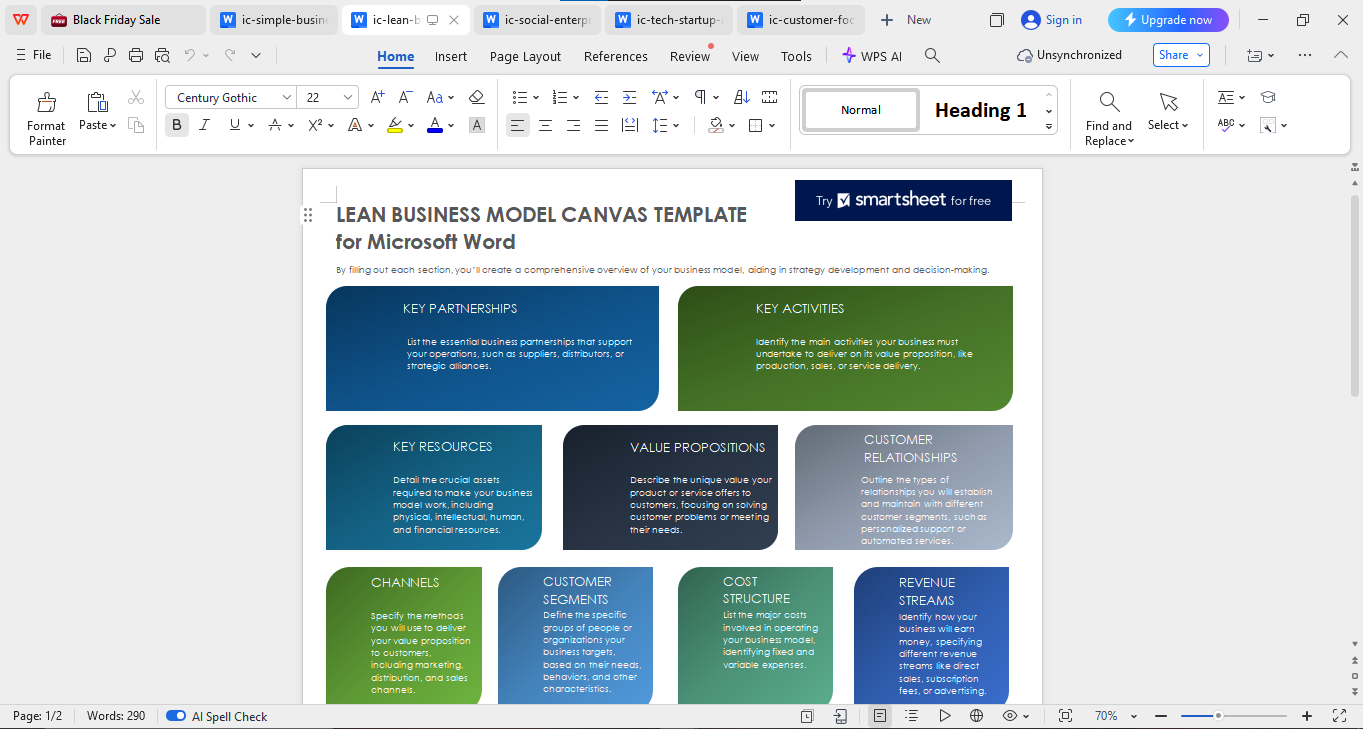
Step 2: Replace placeholder text with your business details (customer segments, value propositions, etc.).
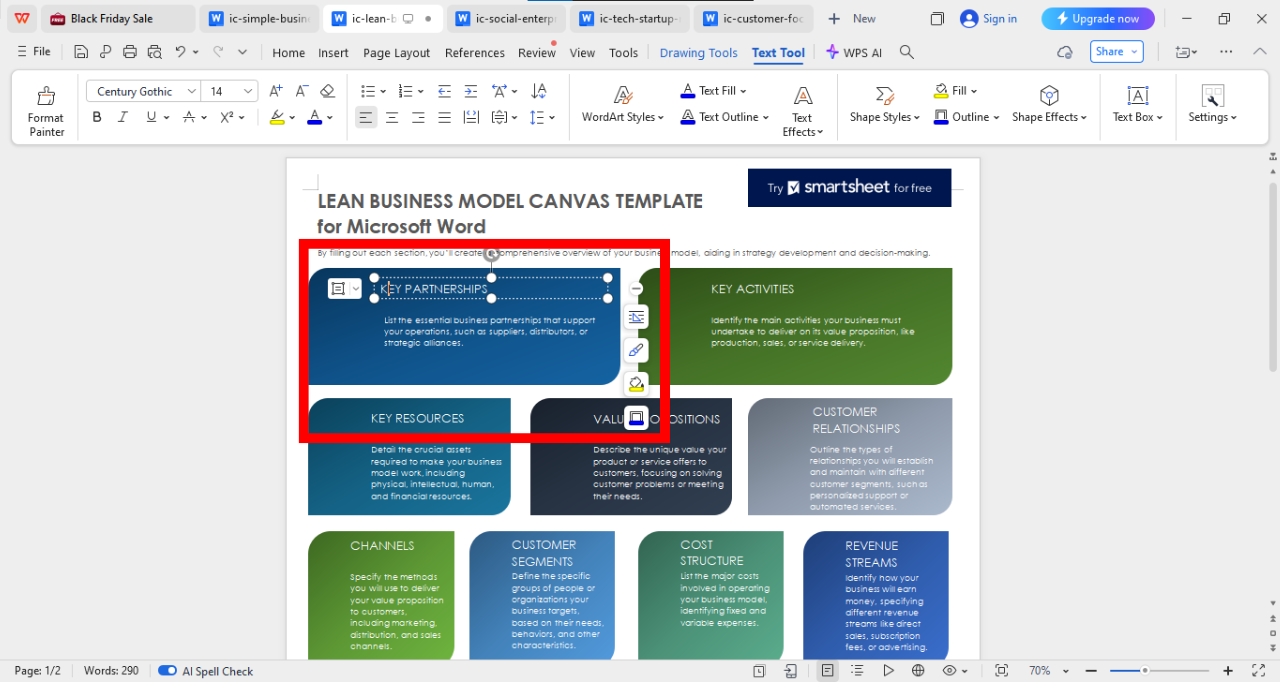
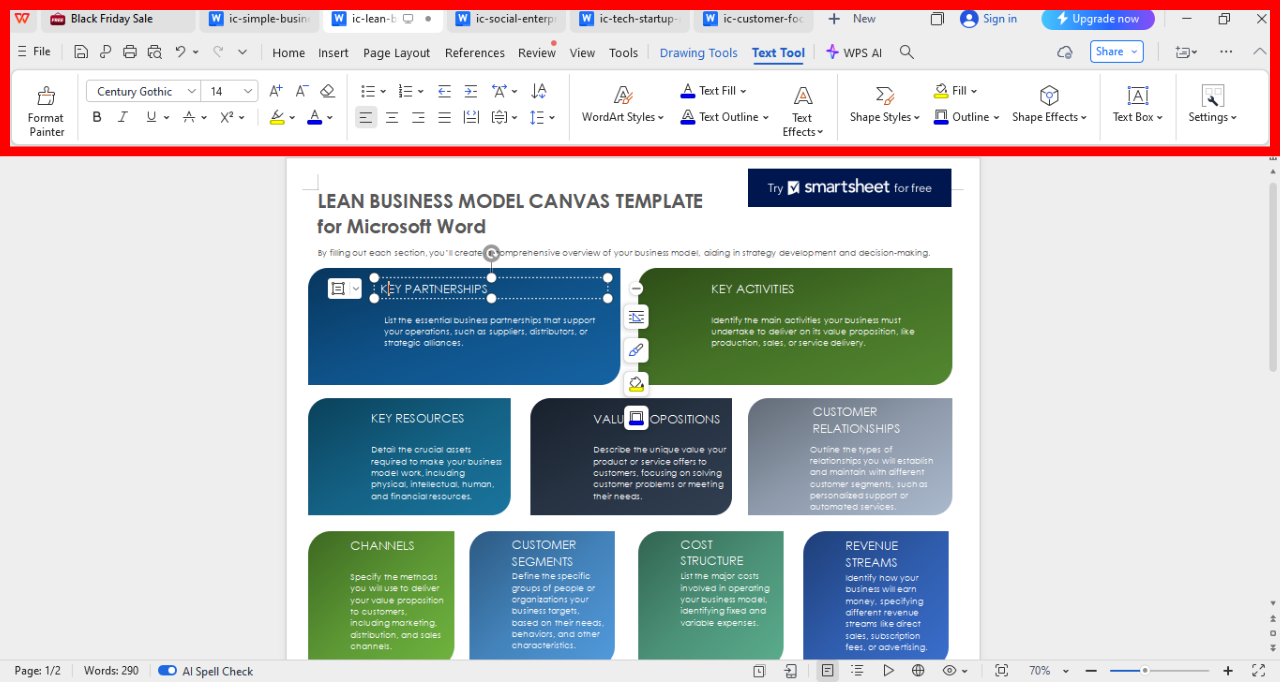
Step 3: Now from the editing panel on the top of your screen, customize fonts and colors to match your brand; update Heading styles to keep consistency.
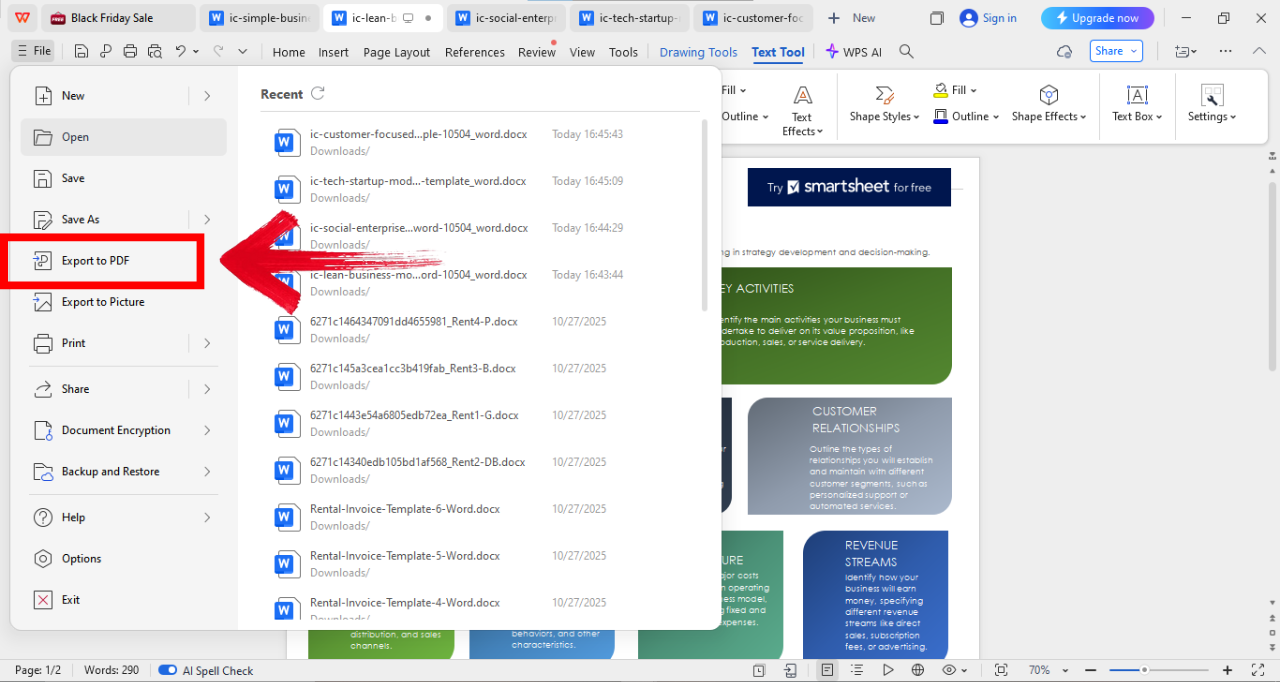
Step 4: Now click on “File” on the top left of your screen and then click “Export to PDF”to save the file as PDF.
Editing in Writer lets me iterate quickly with teammates; the real-time comments and consistent export make the final pitch deck much cleaner.
Make Business Model Canvas Easier with WPS Office
WPS Office is more than a document editor; it’s a compact productivity suite that works across devices. I rely on it when I need templates, collaboration, and light AI help without complex setup. The suite gives you fast access to editable canvases, image editing, and cloud syncing, which keeps the version history tidy. For students and founders working on budgets and presentations, WPS strikes a nice balance between features and simplicity. It’s budget-friendly, fast on older machines, and integrates well with standard Office formats.
It also offers built-in PDF editing and conversion, saving you from juggling multiple apps. Plus, its AI tools and cloud storage make team projects smoother by keeping everyone aligned in one workspace.
WPS Office streamlines the whole process. From grabbing a template to co-editing with a partner and exporting for a pitch, it keeps everything in one place and reduces friction.
FAQs
Q1: What’s the advantage of using templates instead of creating one from scratch?
Templates save time, provide a professional structure, and let you focus on your business ideas instead of wasting time formatting.
Q2: What’s the difference between a business model canvas and a model business canvas template?
They share the same function, but a model business canvas template is typically pre-designed and editable, making it easier to use instantly.
Q3: How can I collaborate on a canvas template with my team?
Platforms like WPS Office allow real-time team editing, ensuring everyone can contribute seamlessly.
Q4: Does WPS Office offer AI tools for business planning?
Yes, WPS has built-in AI tools for brainstorming business strategies and refining your model.

'%3e%3cpath%20d='M19.9911%204.11386V6.471H18.5894C18.0775%206.471%2017.7322%206.57814%2017.5536%206.79243C17.3751%207.00671%2017.2858%207.32814%2017.2858%207.75671V9.44421H19.9019L19.5536%2012.0871H17.2858V18.8639H14.5536V12.0871H12.2769V9.44421H14.5536V7.49779C14.5536%206.39064%2014.8632%205.53201%2015.4822%204.92189C16.1013%204.31177%2016.9257%204.00671%2017.9554%204.00671C18.8304%204.00671%2019.509%204.04243%2019.9911%204.11386Z'%20fill='%23333333'/%3e%3c/g%3e%3cdefs%3e%3cclipPath%20id='clip0_2938_8199'%3e%3crect%20width='16'%20height='16'%20fill='white'%20transform='translate(8%204.00671)'/%3e%3c/clipPath%3e%3c/defs%3e%3c/svg%3e)
'%3e%3cpath%20d='M17.5237%2010.7813L23.4811%204H22.0699L16.8949%209.88693L12.7648%204H8L14.2469%2012.9029L8%2020.0133H9.4112L14.8725%2013.7952L19.2352%2020.0133H24M9.92053%205.04213H12.0885L22.0688%2019.0224H19.9003'%20fill='%23333333'/%3e%3c/g%3e%3cdefs%3e%3cclipPath%20id='clip0_2938_8200'%3e%3crect%20width='16'%20height='16.0134'%20fill='white'%20transform='translate(8%204)'/%3e%3c/clipPath%3e%3c/defs%3e%3c/svg%3e)


