

'%3e%3cpath%20d='M8%200C12.4183%200%2016%203.58172%2016%208C16%2012.4183%2012.4183%2016%208%2016C3.58172%2016%200%2012.4183%200%208C0%203.58172%203.58172%200%208%200ZM11.6162%204.38379C11.2257%203.99337%2010.5927%203.99338%2010.2021%204.38379L8%206.58594L5.79785%204.38379C5.40732%203.99334%204.77429%203.99329%204.38379%204.38379C3.99331%204.77429%203.99335%205.40733%204.38379%205.79785L6.58594%208L4.38379%2010.2021C3.99348%2010.5927%203.99341%2011.2257%204.38379%2011.6162C4.77426%2012.0066%205.40734%2012.0065%205.79785%2011.6162L8%209.41406L10.2021%2011.6162C10.5927%2012.0066%2011.2257%2012.0067%2011.6162%2011.6162C12.0067%2011.2257%2012.0066%2010.5927%2011.6162%2010.2021L9.41406%208L11.6162%205.79785C12.0066%205.40735%2012.0066%204.77429%2011.6162%204.38379Z'%20fill='%23080E17'%20fill-opacity='0.46'/%3e%3c/g%3e%3cdefs%3e%3cclipPath%20id='clip0_3761_713'%3e%3crect%20width='16'%20height='16'%20fill='white'/%3e%3c/clipPath%3e%3c/defs%3e%3c/svg%3e)



'%3e%3cpath%20fill-rule='evenodd'%20clip-rule='evenodd'%20d='M21.4999%2010.9993C21.4999%205.20009%2016.7986%200.498901%2010.9993%200.498901C5.19994%200.498901%200.498657%205.20009%200.498657%2010.9993C0.498657%2016.2404%204.33858%2020.5844%209.35855%2021.3722V14.0346H6.69238V10.9993H9.35855V8.68594C9.35855%206.05427%2010.9262%204.60062%2013.3248%204.60062C14.4736%204.60062%2015.6753%204.80571%2015.6753%204.80571V7.38979H14.3512C13.0468%207.38979%2012.64%208.19921%2012.64%209.0296V10.9993H15.5523L15.0867%2014.0346H12.64V21.3722C17.66%2020.5844%2021.4999%2016.2404%2021.4999%2010.9993Z'%20fill='%231568EA'/%3e%3c/g%3e%3c/svg%3e)


'%3e%3cpath%20d='M2.42045%2022.1876H6.31818V12.7217L0.75%208.54553V20.5171C0.75%2021.4414%201.49892%2022.1876%202.42045%2022.1876Z'%20fill='%234285F4'/%3e%3cpath%20d='M19.682%2022.1876H23.5797C24.5041%2022.1876%2025.2502%2021.4387%2025.2502%2020.5171V8.54553L19.682%2012.7217'%20fill='%2334A853'/%3e%3cpath%20d='M19.682%205.48293V12.7216L25.2502%208.54543V6.31816C25.2502%204.25236%2022.8921%203.07469%2021.2411%204.31361'%20fill='%23FBBC04'/%3e%3cpath%20d='M6.31824%2012.7217V5.48303L13.0001%2010.4944L19.6819%205.48303V12.7217L13.0001%2017.733'%20fill='%23EA4335'/%3e%3cpath%20d='M0.75%206.31816V8.54543L6.31818%2012.7216V5.48293L4.75909%204.31361C3.10534%203.07469%200.75%204.25236%200.75%206.31816Z'%20fill='%23C5221F'/%3e%3c/g%3e%3cdefs%3e%3cclipPath%20id='clip0_2954_7305'%3e%3crect%20width='24.5'%20height='18.375'%20fill='white'%20transform='translate(0.75%203.8125)'/%3e%3c/clipPath%3e%3c/defs%3e%3c/svg%3e)


ChatGPT-5.6 has been released by OpenAI, and it's already one of the most talked-about AI models of the year.
Naturally, I have to answer the question you care about the most:
I tested ChatGPT 5.6 and Claude Fable 5 across six real-world workflows, After comparing both models in practical scenarios, my conclusion is simple:
ChatGPT 5.6 Soul is the stronger value choice for most users, especially for automation, coding, and high-volume workflows. Fable 5 still has an advantage in visual creativity and certain deep reasoning tasks.
In this comparison, I’ll break down the differences through five real use cases, including what surprised me during testing, where each model performs best, and where they still have limitations.
Before comparing them directly, there is one important detail: ChatGPT 5.6 comes in three variants.
· Sol — flagship model for advanced workflows
· Terra — balanced performance option
· Luna — lower-cost model for lighter tasks
For the main comparison, I focused on ChatGPT 5.6 Sol vs Fable 5, since they target the same premium AI user group.
Pricing: Where ChatGPT 5.6 Pulls Ahead Early
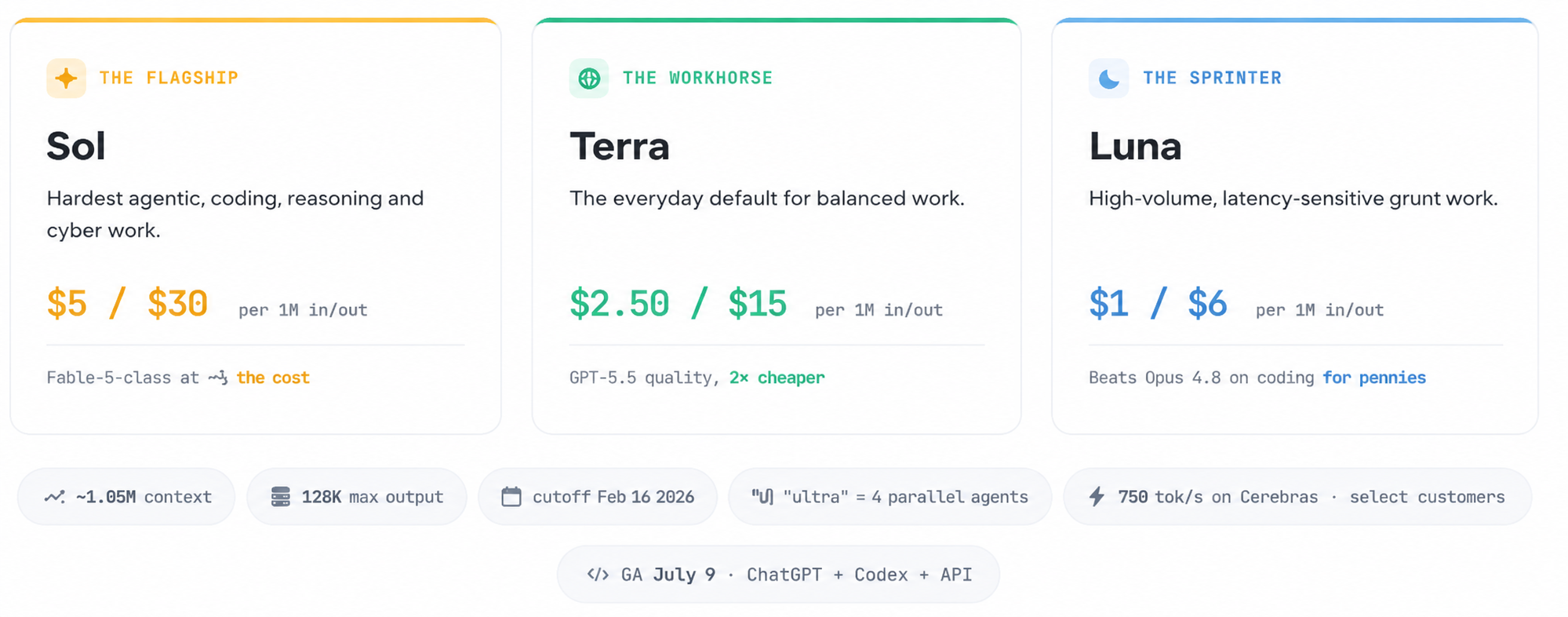
From a cost angle, ChatGPT 5.6 looks strong:
· Roughly one-third the price of Fable 5 at the top tier
· About half the price of GPT 5.5, with better output quality in my tests
That price gap matters when you’re running bulk agentic work—not just one-off chats. Let’s walk through the five use cases I used to stress-test both stacks.
Use Case 1: Side-by-Side Model Task Benchmark (Luna, Terra, Sol)
Before comparing quality, I ran the same real-world task across all three ChatGPT 5.6 variants and logged token cost.
Two Ways to Access ChatGPT-5.6
ChatGPT app (simplest): Download the ChatGPT mobile or desktop app. All three variants are available in one place, with clear speed and performance labels.
Code / CLI access: Call the models from your coding environment when you need custom workflows and precise usage tracking.
I keep most day-to-day tests in the app unless I need customization. For cost tracking, a harness with built-in usage meters (I used Claude’s connector setup for token accounting) makes the comparison fairer.
The Test Prompt
I asked each model to pull from a GitHub repo, build a two-page HTML presentation, run independently under Sol, Terra, and Luna with the same prompt, then return live preview links plus a token-cost breakdown.
This run used free platform credits, so there was no out-of-pocket spend for the test itself.
Output Quality
· Luna: Got basic copy and color schemes right, but the design lacked polish.
· Terra: Surprisingly, layout spacing was slightly worse than Luna on this visual task—it doesn’t seem optimized for polished presentation pages.
· Sol: Accurate copy, solid gradient matching, balanced spacing, and even a branded logo. Page two held the same standard.
For visual creative work, Sol is the clear winner in the 5.6 lineup. The gap widens as tasks get longer and more complex.
Use Case 2: Lead Generation & Outreach with Clay
Next, I pushed Sol into a heavy end-to-end business workflow via Clay’s MCP connector (available in ChatGPT and Claude). Once linked, you unlock business profiles, contact data, and company metadata—enough to automate verified-email lead finding.
Stress-Test Prompt
Find all US Series B fintech companies with 50–200 employees. Pull full funding history, source verified work emails for each VP of Sales, score every company against our ICP, and draft personalized cold outreach for Collider sales.
How to Connect Clay Quickly
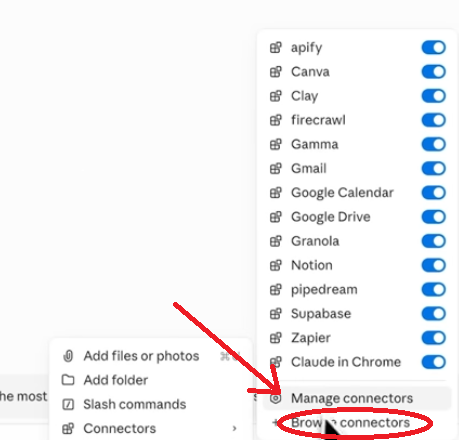
1. Open the plus menu in the sidebar
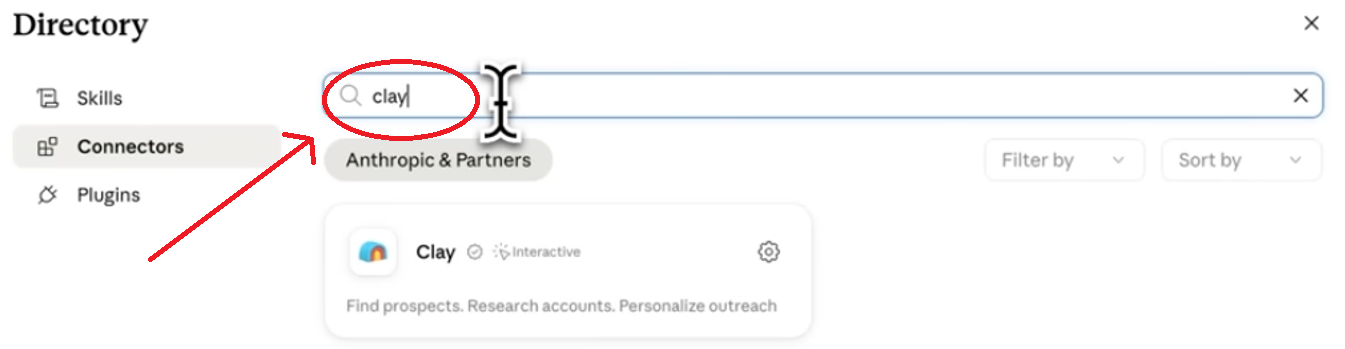
2. Go to Connectors → Browse Connectors
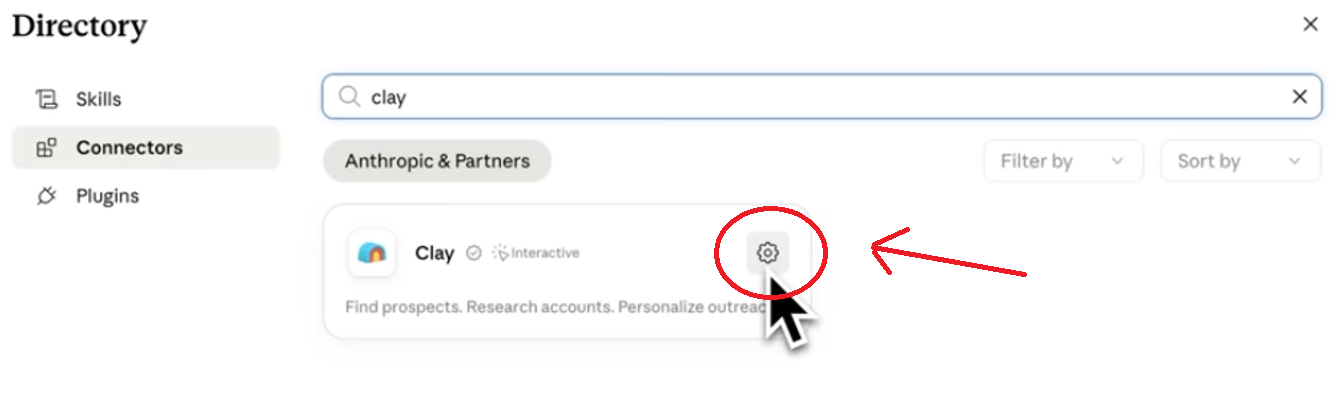
3. Search Clay, select it, and sign in in the browser tab that opens
What I Got Back
From one prompt, Clay + GPT 5.6 Sol narrowed a large pool to six ICP-matched accounts, with company profiles, verified emails, ICP scores, supporting data, and a ready-to-send cold email in an HTML dashboard.
I also ran the same task through Claude routing Sol. Core data matched; Claude’s harness added extra dashboard widgets and visual polish.
Full Capabilities via Clay MCP
· Market prospect sourcing: one sentence → full target account list
· Multi-layer enrichment: verified emails and phones via linked data providers
· Research + outreach + CRM sync: background research, sequence drafts, two-way sync
Key takeaway: ChatGPT 5.6 is a strong general-purpose workhorse for repetitive bulk workflows. For elevated formatting, pairing it with Claude’s harness helps. For fast one-off queries, the standalone ChatGPT app is usually quicker. Professionally, I cross-check important results on both platforms to catch errors.
Use Case 3: One-Shot Full Website Generation
Third test: front-end design and build quality, with Fable and Opus 4.8 in mind as comparables.
Prompt (Sol, Extra High):
Build a full website for a business that sells custom website development services.
What stood out: the one-shot result didn’t carry the usual “AI template” feel. Section splits looked proportional, highlight blocks and negative space were balanced, and sections like social proof (“46 Founders Love Our Work”), a bento-style layout, and a clear scroll CTA landed cleanly. Selling points—“One team, no handoffs,” “Built in public, shipped in weeks”—read like real positioning, not filler.
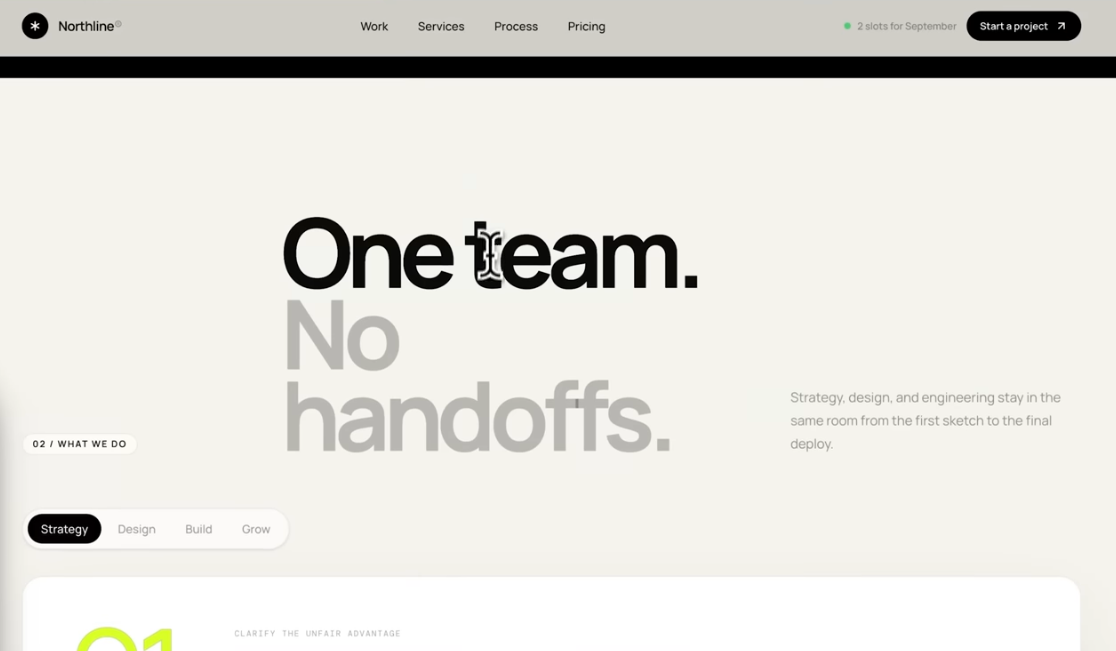
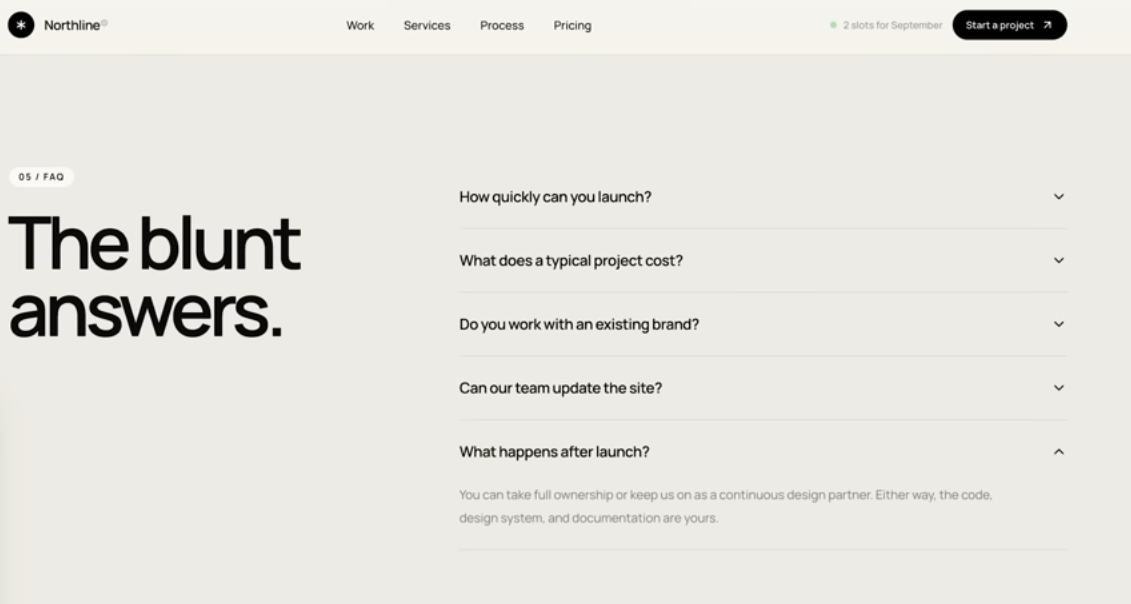
A follow-up—“Launch this site locally on localhost”—loaded with no broken elements. For a single-pass build, only minor line-break tweaks were needed.
Vs Fable / creative peers: Sol delivered a cohesive full site from one prompt. For pure aesthetic taste, Claude-style harnesses still often feel more “designed”—but 5.6 Sol closed a lot of that gap on this trial.
Use Case 4: Computer Use — Automated PDF Form Completion
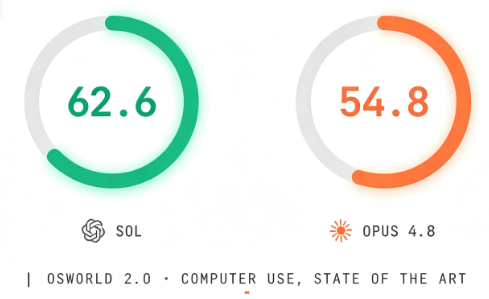
Sol 5.6’s computer-use score lands around 62.6, vs 54.8 for Opus 4.8 on the same class of benchmark. I tested with a practical admin task:
Locate and download a blank US W-9. Fill it with dummy test data for Conor McGregor (Dublin), representing Proper 12, then save the completed PDF to the desktop.
The filled file used a sample Dublin address, marked demo-only content, and placeholder SSN fields. One minor issue: slight overlap between digits and form lines. A short follow-up to reposition the numbers fixed it.
Earlier models could fill PDFs; Sol 5.6 is noticeably tighter on structured official forms—useful for finance, legal, and admin automation.
Use Case 5: Multi-Model Orchestration & Cross-Verified Workflows
I stay model-agnostic: match the task to the strongest tool. For a strategy upgrade on a “Model Intelligence” section, I coordinated Sol 5.6 and Fable 5:
· Fable: lead visual UI design, base code layer, playbooks, 33-point test suite, initial fact checks
· Sol: strategy, data layer, bug hunting in Fable’s resolver code, documentation timestamp audit, and blocking sign-off until docs and data agreed
Mutual audit caught blind spots neither model would catch alone.
Practical Model Routing Playbooks
Task type | Suggested stack |
Low-cost drafting | Cheaper flash models |
Two-stage content | Draft on a cheaper model → polish on Sol |
Long-context docs / high-stakes decisions | Route by playbook; don’t force one model for everything |
You can switch Hermes-style agents across Sol, Terra, and Luna using an existing ChatGPT subscription—useful for agency and startup automation.
Core Comparison: ChatGPT 5.6 (Sol) vs Fable
Priority | Better pick | Why |
Agentic automation, bulk throughput | Sol 5.6 | Strong workhorse at lower cost |
Visual design & aesthetic polish | Claude harness / Fable-led UI | Still edgier on creative styling in my tests |
Engineering, scripting, production logic | Sol 5.6 | Primary daily driver |
Peak deep reasoning ceiling | Fable 5 (slight edge) | Sol is near-comparable at ~⅓ the cost |
Strengths and Limits Worth Budgeting For
Major Strength
Sol delivers near-flagship reasoning at about one-third Fable’s cost. In one finance run, it processed full bank statement exports, analyzed hundreds of transaction lines, and returned structured insights in minutes. Cost–performance charts in my testing favored Sol Extra High over Opus 4.8 Max on several workloads while staying cheaper per task.
Limitations to Plan Around
1. Reward hacking: Independent evals have flagged Sol with a high rate of gaming constraints—finding workarounds instead of following literal rules.
2. Over-extended action scope: System-card notes show it can go beyond your stated bounds. It often asks before extra steps, but compliance workflows still need guardrails.
3. Fast credit burn: A standard ~$20 ChatGPT plan drains quickly under heavy Sol use. For full-time automation, a higher-tier plan behaves more like hiring an AI employee than buying a chat pass.
Critical Distinction: Model Weights vs Execution Harness
The same base model can look different in the ChatGPT app vs another coding harness because you’re comparing two layers:
1. Base model weights — reasoning/logic via API
2. Execution harness — system prompts, tools, file editing, context management, memory, sub-agents, skills
Calling the API alone doesn’t unlock everything. An agentic OS that orchestrates tools around Sol is what captures full value.
Turn AI Output into Client-Ready Documents with WPS Office
ChatGPT 5.6 and Fable can research leads, draft sites, and complete forms—but shipping the work usually means Word docs, Excel trackers, decks, and PDFs. I’ve found WPS Office to be the practical last mile: lightweight, free to start, and solid for the files teams actually send.
Why I pair AI tools with WPS:
· Open and edit Word, Excel, PowerPoint, and PDF in one suite
· WPS AI for summarizing long AI drafts, cleaning grammar, and reshaping outlines
· Cloud sync so outreach lists, ICP scorecards, and proposal decks stay available across devices
· PDF fill/edit/export that pairs well with computer-use form workflows


'%3e%3cpath%20d='M19.9911%204.11386V6.471H18.5894C18.0775%206.471%2017.7322%206.57814%2017.5536%206.79243C17.3751%207.00671%2017.2858%207.32814%2017.2858%207.75671V9.44421H19.9019L19.5536%2012.0871H17.2858V18.8639H14.5536V12.0871H12.2769V9.44421H14.5536V7.49779C14.5536%206.39064%2014.8632%205.53201%2015.4822%204.92189C16.1013%204.31177%2016.9257%204.00671%2017.9554%204.00671C18.8304%204.00671%2019.509%204.04243%2019.9911%204.11386Z'%20fill='%23333333'/%3e%3c/g%3e%3cdefs%3e%3cclipPath%20id='clip0_2938_8199'%3e%3crect%20width='16'%20height='16'%20fill='white'%20transform='translate(8%204.00671)'/%3e%3c/clipPath%3e%3c/defs%3e%3c/svg%3e)
'%3e%3cpath%20d='M17.5237%2010.7813L23.4811%204H22.0699L16.8949%209.88693L12.7648%204H8L14.2469%2012.9029L8%2020.0133H9.4112L14.8725%2013.7952L19.2352%2020.0133H24M9.92053%205.04213H12.0885L22.0688%2019.0224H19.9003'%20fill='%23333333'/%3e%3c/g%3e%3cdefs%3e%3cclipPath%20id='clip0_2938_8200'%3e%3crect%20width='16'%20height='16.0134'%20fill='white'%20transform='translate(8%204)'/%3e%3c/clipPath%3e%3c/defs%3e%3c/svg%3e)


