

'%3e%3cpath%20d='M8%200C12.4183%200%2016%203.58172%2016%208C16%2012.4183%2012.4183%2016%208%2016C3.58172%2016%200%2012.4183%200%208C0%203.58172%203.58172%200%208%200ZM11.6162%204.38379C11.2257%203.99337%2010.5927%203.99338%2010.2021%204.38379L8%206.58594L5.79785%204.38379C5.40732%203.99334%204.77429%203.99329%204.38379%204.38379C3.99331%204.77429%203.99335%205.40733%204.38379%205.79785L6.58594%208L4.38379%2010.2021C3.99348%2010.5927%203.99341%2011.2257%204.38379%2011.6162C4.77426%2012.0066%205.40734%2012.0065%205.79785%2011.6162L8%209.41406L10.2021%2011.6162C10.5927%2012.0066%2011.2257%2012.0067%2011.6162%2011.6162C12.0067%2011.2257%2012.0066%2010.5927%2011.6162%2010.2021L9.41406%208L11.6162%205.79785C12.0066%205.40735%2012.0066%204.77429%2011.6162%204.38379Z'%20fill='%23080E17'%20fill-opacity='0.46'/%3e%3c/g%3e%3cdefs%3e%3cclipPath%20id='clip0_3761_713'%3e%3crect%20width='16'%20height='16'%20fill='white'/%3e%3c/clipPath%3e%3c/defs%3e%3c/svg%3e)




'%3e%3cpath%20fill-rule='evenodd'%20clip-rule='evenodd'%20d='M21.4999%2010.9993C21.4999%205.20009%2016.7986%200.498901%2010.9993%200.498901C5.19994%200.498901%200.498657%205.20009%200.498657%2010.9993C0.498657%2016.2404%204.33858%2020.5844%209.35855%2021.3722V14.0346H6.69238V10.9993H9.35855V8.68594C9.35855%206.05427%2010.9262%204.60062%2013.3248%204.60062C14.4736%204.60062%2015.6753%204.80571%2015.6753%204.80571V7.38979H14.3512C13.0468%207.38979%2012.64%208.19921%2012.64%209.0296V10.9993H15.5523L15.0867%2014.0346H12.64V21.3722C17.66%2020.5844%2021.4999%2016.2404%2021.4999%2010.9993Z'%20fill='%231568EA'/%3e%3c/g%3e%3c/svg%3e)


'%3e%3cpath%20d='M2.42045%2022.1876H6.31818V12.7217L0.75%208.54553V20.5171C0.75%2021.4414%201.49892%2022.1876%202.42045%2022.1876Z'%20fill='%234285F4'/%3e%3cpath%20d='M19.682%2022.1876H23.5797C24.5041%2022.1876%2025.2502%2021.4387%2025.2502%2020.5171V8.54553L19.682%2012.7217'%20fill='%2334A853'/%3e%3cpath%20d='M19.682%205.48293V12.7216L25.2502%208.54543V6.31816C25.2502%204.25236%2022.8921%203.07469%2021.2411%204.31361'%20fill='%23FBBC04'/%3e%3cpath%20d='M6.31824%2012.7217V5.48303L13.0001%2010.4944L19.6819%205.48303V12.7217L13.0001%2017.733'%20fill='%23EA4335'/%3e%3cpath%20d='M0.75%206.31816V8.54543L6.31818%2012.7216V5.48293L4.75909%204.31361C3.10534%203.07469%200.75%204.25236%200.75%206.31816Z'%20fill='%23C5221F'/%3e%3c/g%3e%3cdefs%3e%3cclipPath%20id='clip0_2954_7305'%3e%3crect%20width='24.5'%20height='18.375'%20fill='white'%20transform='translate(0.75%203.8125)'/%3e%3c/clipPath%3e%3c/defs%3e%3c/svg%3e)


The document is ready, but the computer printer never appears in the list—or it prints to the wrong tray. Most issues are setup on Windows or Mac, not the essay itself. WPS Writer uses the same system print queue as Microsoft Word once the driver is installed.
This guide walks through adding a USB or network printer, setting a default device, and printing a test page from WPS Writer. Menu labels may read File → Print or a printer icon on the quick toolbar depending on your build.
Keep a PDF copy of the file before you chase hardware. If the queue fails, you can still hand off a PDF to another machine that already talks to the printer.
Label printers, plotters, and “Print to PDF” queues all appear in the same list. Naming your physical device clearly in Windows reduces the chance that a roommate’s Bluetooth label printer becomes the default after an update.
Remote desktop and VPN sessions can hide local USB printers until you redirect devices in the session toolbar. If Writer shows no queues while Word on the host does, enable printer redirection before you blame the document.
Computer Printer Setup: Print a Document from Your PC
Add a Computer Printer on Windows
Connect the printer with USB or join the same Wi‑Fi network as the PC.
Open Settings → Bluetooth & devices → Printers & scanners.
Click Add device and wait for the model name. Install the manufacturer driver if Windows offers only a generic queue.
Print a Windows test page from the printer properties to confirm the cable or IP address.
Network printers need the correct subnet. Corporate VLANs sometimes block discovery; ask IT for the queue name or IP.
USB hubs can hide printers from Windows until you plug directly into the laptop for the first driver install. After setup succeeds, moving back to the hub usually works.
Windows Printers and scanners list
Set Default Printer for WPS Writer
When multiple queues exist—office copier, label printer, PDF writer—Windows prints to the default unless you pick another each time.
In Printers & scanners, open the device you use daily and click Set as default.
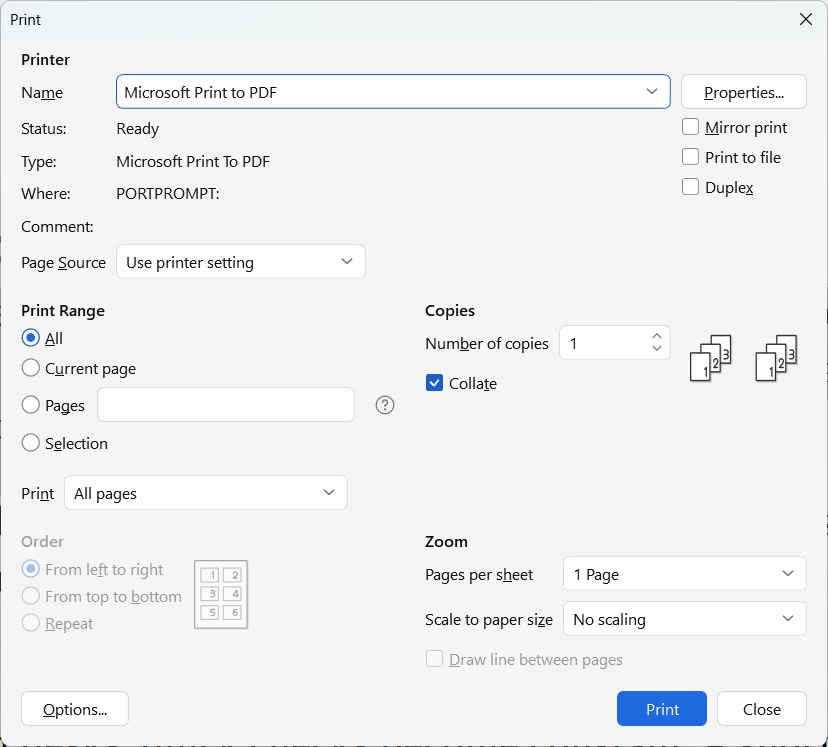
In WPS Writer, open File → Print and confirm the name matches before you click OK.
For one-off letterhead, change the printer in the dialog without changing the system default.
Mac users choose System Settings → Printers & Scanners and set the default printer there; Writer reads the same list.
Color ink is expensive for draft essays. Switch to grayscale in the print dialog for proof copies, then turn color back on for the final portfolio piece.
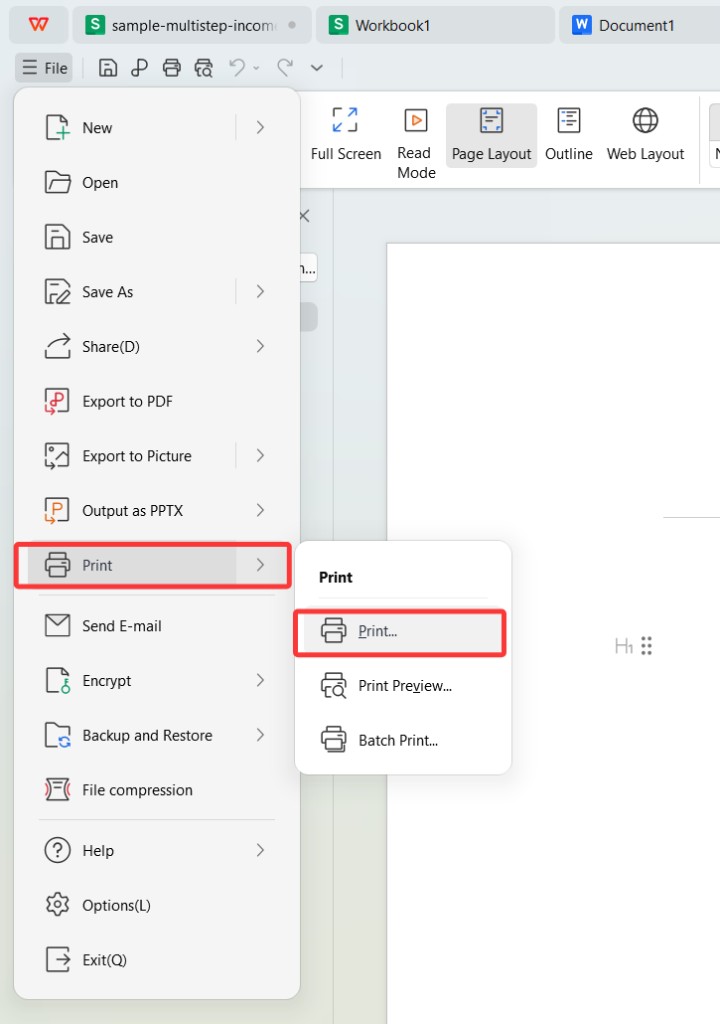
Open Print from the File menu in WPS Writer
Print a Document from WPS Writer
Open the .docx in WPS Writer.
Use File → Print or Ctrl+P (Windows) / Cmd+P (Mac).
Choose pages, copies, and color or grayscale. Click Print.
If the job stays in queue, open the system printer app and resume or clear stuck jobs.
Margins that look fine on screen can clip on narrow printers. Use Print Preview when the syllabus demands one-inch borders.
Double-sided printing saves paper; enable it in the printer properties, not only in Writer, when the driver supports duplex.
Custom paper sizes—legal envelopes, statement envelopes—live in the printer driver’s advanced tab. Writer passes your page size choice to that driver; if the tray lacks the paper, the job pauses with a blinking error light.
Fix Common Computer Printer Problems
Printer offline: Wake the device, check USB, or ping the network IP.
Blank pages: Toner or ink low; run cleaning from the driver panel.
Wrong orientation: Toggle portrait/landscape in Print Preview before you reprint a long table.
PDF instead of paper: Another app may be the default queue—reset default as above.
Reinstall the vendor driver when Windows updates break an older queue. Generic drivers often miss tray selection and stapling options.
For shared lab printers, log the queue name on your USB drive note so group projects do not send drafts to the color plotter by accident.
Wireless printers that sleep deeply may need a wake-up print after long weekends. Send a one-page test from Writer before you print a 40-page thesis chapter.
Student print quotas on campus networks may count by page even when you cancel a job. Clear the queue in Windows before you retry a jammed copy.
Faculty offices sometimes share one queue name posted on the door—photograph that label when you visit so your laptop profile matches the room.
Print Handouts and Slides from the Same Suite
Essays live in Writer, but group projects often add Presentation slides. Each app sends jobs to the same Windows or Mac queue once the computer printer is configured.
From Presentation, use File → Print and choose handouts or full slides. Collated copies matter when each packet should be student-ready. Writer and Presentation both respect the system default unless you override in the dialog.
When a lab bans color printing, set grayscale in the driver for every app in the suite so nobody accidentally sends a chart in full color during a budget crunch.
Scan-to-email workflows on multifunction printers are separate from Writer printing, but they share the same network queue. If scan works but print does not, suspect driver corruption rather than a WPS bug.
The Best Free Office Alternative: WPS Office
Computer printer setup is a system task; WPS Writer is where you finish the document that actually goes to the tray.
| WPS Writer + system printer | Print via browser upload | |
|---|---|---|
| Layout control | Print Preview matches .docx pagination. | Upload may reflow fonts. |
| Privacy | File stays local until the spooler sends it. | Third-party servers see the document. |
| Headers and footers | Writer prints them as designed. | Web tools may drop page numbers. |
| Offline | Print when the LAN queue is reachable. | Needs upload bandwidth. |
| Cost | Uses existing office driver. | Per-page fees on some sites. |
Print .docx and .wps files with familiar Word-style dialogs.
Export PDF when the recipient only needs a digital copy.
Spreadsheet and Presentation print from the same suite when the handout mixes charts.
Download WPS Writer, connect the printer once at the OS level, then print every draft from the same app you edited.
FAQs
Why does WPS Writer not show my printer?
Install the printer in Windows or Mac settings first. Restart Writer after the driver finishes. If the queue appears in Windows but not Writer, update WPS to the latest build and sign out of any remote session that lacks printer redirection.
Can I print to PDF instead of paper?
Yes. Choose Microsoft Print to PDF or a PDF printer queue in the Print dialog.
Does WPS support duplex printing?
When the printer driver supports duplex, the option appears in the system print properties linked from Writer.
Is a computer printer setup different for USB and Wi‑Fi?
USB is plug-and-play after drivers install. Wi‑Fi needs the printer on the same network and often an IP or discovery step.
Will my Word document print correctly from WPS?
Most .docx files open with the same margins and fonts you set in Word; always use Print Preview before a large print run. Embedded fonts travel with the .docx; if a rare font substitutes, install the font on the PC or switch to a shared classroom typeface before printing 30 copies.


Summary: Computer Printer Setup
Install the printer at the operating system, set the default queue, then print from WPS Writer with Preview.
Clear stuck jobs in the system app, reinstall drivers when needed, and export PDF when hardware is unavailable.

'%3e%3cpath%20d='M19.9911%204.11386V6.471H18.5894C18.0775%206.471%2017.7322%206.57814%2017.5536%206.79243C17.3751%207.00671%2017.2858%207.32814%2017.2858%207.75671V9.44421H19.9019L19.5536%2012.0871H17.2858V18.8639H14.5536V12.0871H12.2769V9.44421H14.5536V7.49779C14.5536%206.39064%2014.8632%205.53201%2015.4822%204.92189C16.1013%204.31177%2016.9257%204.00671%2017.9554%204.00671C18.8304%204.00671%2019.509%204.04243%2019.9911%204.11386Z'%20fill='%23333333'/%3e%3c/g%3e%3cdefs%3e%3cclipPath%20id='clip0_2938_8199'%3e%3crect%20width='16'%20height='16'%20fill='white'%20transform='translate(8%204.00671)'/%3e%3c/clipPath%3e%3c/defs%3e%3c/svg%3e)
'%3e%3cpath%20d='M17.5237%2010.7813L23.4811%204H22.0699L16.8949%209.88693L12.7648%204H8L14.2469%2012.9029L8%2020.0133H9.4112L14.8725%2013.7952L19.2352%2020.0133H24M9.92053%205.04213H12.0885L22.0688%2019.0224H19.9003'%20fill='%23333333'/%3e%3c/g%3e%3cdefs%3e%3cclipPath%20id='clip0_2938_8200'%3e%3crect%20width='16'%20height='16.0134'%20fill='white'%20transform='translate(8%204)'/%3e%3c/clipPath%3e%3c/defs%3e%3c/svg%3e)


