Job seekers today need more than just a resume, they need a
professional, refined document that stands out to employers while being
easy to create and update. Finding high-quality, editable resume
templates that export cleanly to PDF can be challenging, and
time-consuming. In this guide, I’ll show 10 editable resume template PDF
and teach you how to customize them using WPS Office, so you can produce
resumes ready for any job application in just a few steps.
Editable Resume Template PDF
10 Free Editable
Resume Templates to Download
When it comes to updating resumes for different job applications, it
can be quite time-consuming to design a professional layout from
scratch. You want a format that highlights your skills, experience, and
education without looking cluttered or amateurish, but many free
templates online either compromise on design or aren’t editable enough
for customization. That’s why I turned to WPS’s collection of free,
editable resume template PDFs. These templates are thoughtfully
structured for a variety of careers from entry-level positions and
internships to executive roles so you can focus on refining your content
rather than wrestling with formatting.
1. Free PDF Resume Template
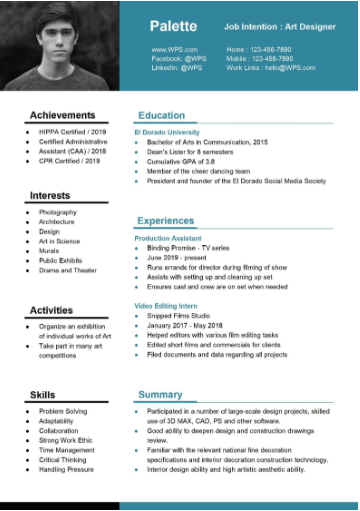
This template is a professional and modern two-column resume template, designed for an
Art Designer and utilizing a teal and black color palette for a
sophisticated look. The layout efficiently separates key quick-reference
sections like Skills, Interests, and Activities in the narrow left
column, ensuring they are instantly noticeable. The right column details
professional history, including Education, Experiences, and a concise
Summary. The design is contemporary and highly scannable, successfully
making vital contact and background information immediately accessible
to a hiring manager.
Free PDF Resume
2. Simple PDF Resume Template
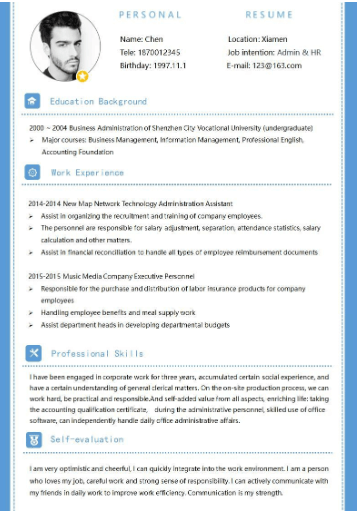
This template is a traditional, single-column resume template, ideal for candidates
applying for Admin & HR roles, featuring a minimal design with light
blue accents. The layout prioritizes chronological work history and
education, starting with an undergraduate degree in Business
Administration and outlining detailed responsibilities under two
previous job titles. Key professional competencies are highlighted in
the Professional Skills section, emphasizing clerical experience and
office software proficiency. The document concludes with a positive
Self-evaluation paragraph that stresses optimism, strong work ethic, and
responsibility.
Simple PDF Resume
3. Traditional PDF Resume
Template
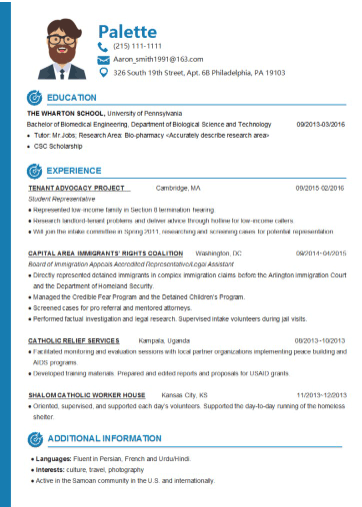
This is a modern resume template,
clearly highlighting a background in Biomedical Engineering and Legal
Advocacy, perfect for a candidate transitioning between academic and
public service fields. The design is clean and structured, utilizing a
light blue color scheme for headings and featuring a fun, illustrated
profile picture icon. The template emphasizes extensive Work Experience
across four different organizations, detailing roles in tenant advocacy,
immigration rights, and relief services. It concludes with an Additional
Information section that lists fluency in multiple languages and various
interests, adding depth to the candidate's profile.
Traditional PDF Resume
4. Basic PDF Resume Template
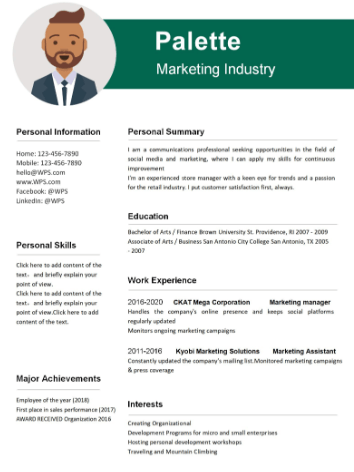
This is a modern resume template designed for a Marketing Industry professional, featuring a distinctive
green and white color scheme with a professional illustrated profile
picture. The document is divided into clear sections, prominently
displaying a detailed Personal Summary which highlights communication
skills and experience in social media and retail. Key information like
Personal Information and Major Achievements are separated on the left,
while Education and Work Experience are organized in the main right
column. The template effectively uses professional font choices and
spacing for high readability and a polished, contemporary feel.
Basic PDF Resume
5. College PDF Resume Template
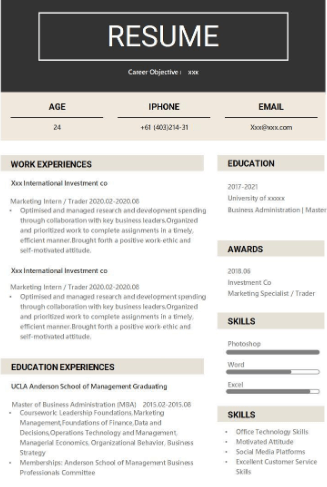
This resume template features a bold, classic, and high-impact design utilizing a strong
black header and clear dividing lines, making it excellent for a career
in Finance or Investment. The structure is highly organized, listing
Work Experiences and Education Experiences separately for clarity. Key
skills like Photoshop, Word, and Excel are visually represented with
progress bars, adding a professional data-driven element. The template
focuses on optimizing and managing investment spending and highlights
foundational coursework in finance and management.
College PDF Resume
6. Executive PDF Resume
Template
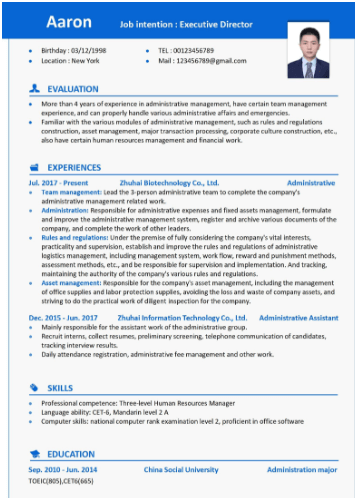
This resume template is clearly designed for a senior candidate seeking an Executive Director
position, featuring a formal and organized layout with a strong blue
header and professional photo. The document begins with a detailed
Evaluation section summarizing over four years of experience in
administrative management and team leadership. The Experiences section
provides comprehensive details on roles at a Biotechnology company and
an Information Technology company, highlighting responsibilities in
administrative support, regulatory compliance, and personnel
management.
Executive PDF Resume
7. Functional Resume Template
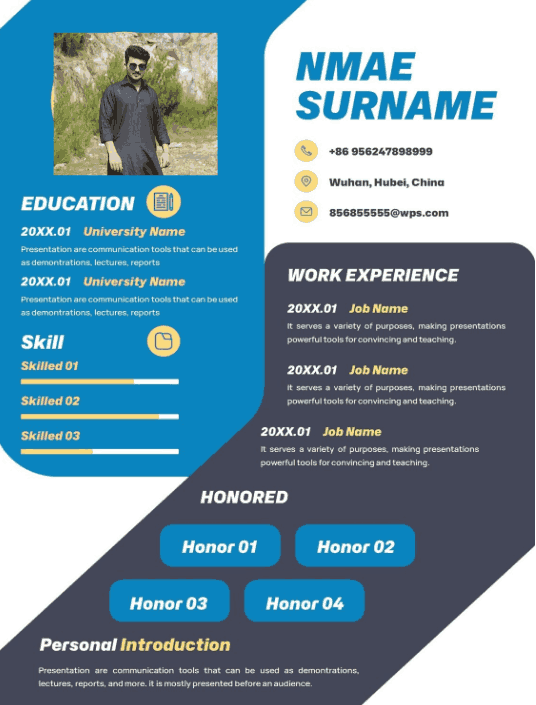
This is a visually striking resume template that utilizes dynamic curved shapes and a high-contrast blue and
yellow-green color scheme to capture attention. The design is split into
clear sections, prominently featuring a professional photo next to the
candidate's name and contact information. The left side emphasizes
Education and Skills, while the right side details Work Experience and a
prominent Honored section for key awards. A detailed Personal
Introduction at the bottom emphasizes communication and presentation
skills.
Functional PDF Resume
8. Professional PDF Resume
Template
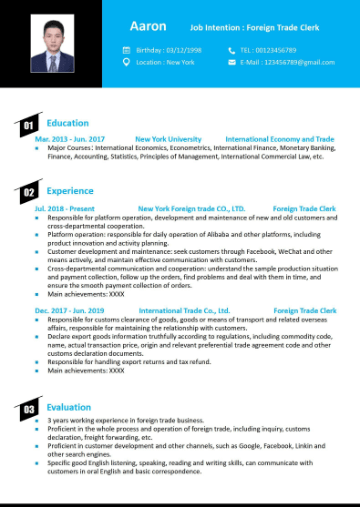
This is a functional and clear resume template designed for a candidate pursuing a role as a Foreign Trade Clerk,
featuring a professional blue and black color scheme with a prominent
profile picture. The layout is highly organized into three numbered
sections: Education, Experience, and Evaluation. It details extensive
work experience in platform operation, customer development, and
managing customs clearance and export documents for an international
trade company. The Evaluation section highlights three years of working
experience in foreign trade business and proficiency in various
marketing channels and spoken English.
Professional PDF Resume
9. Red Artistic Resume
Template
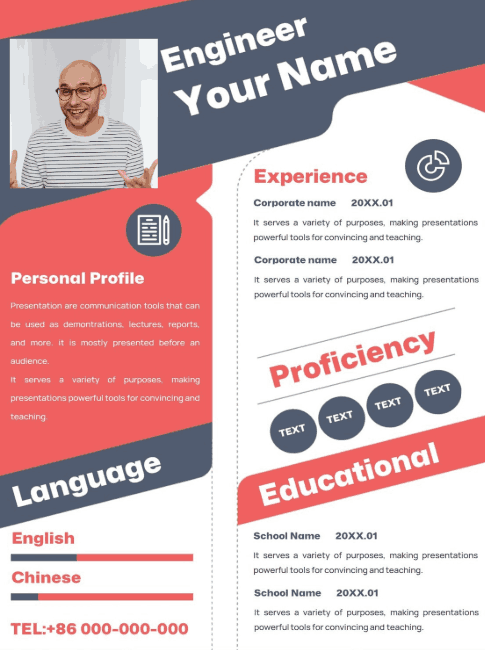
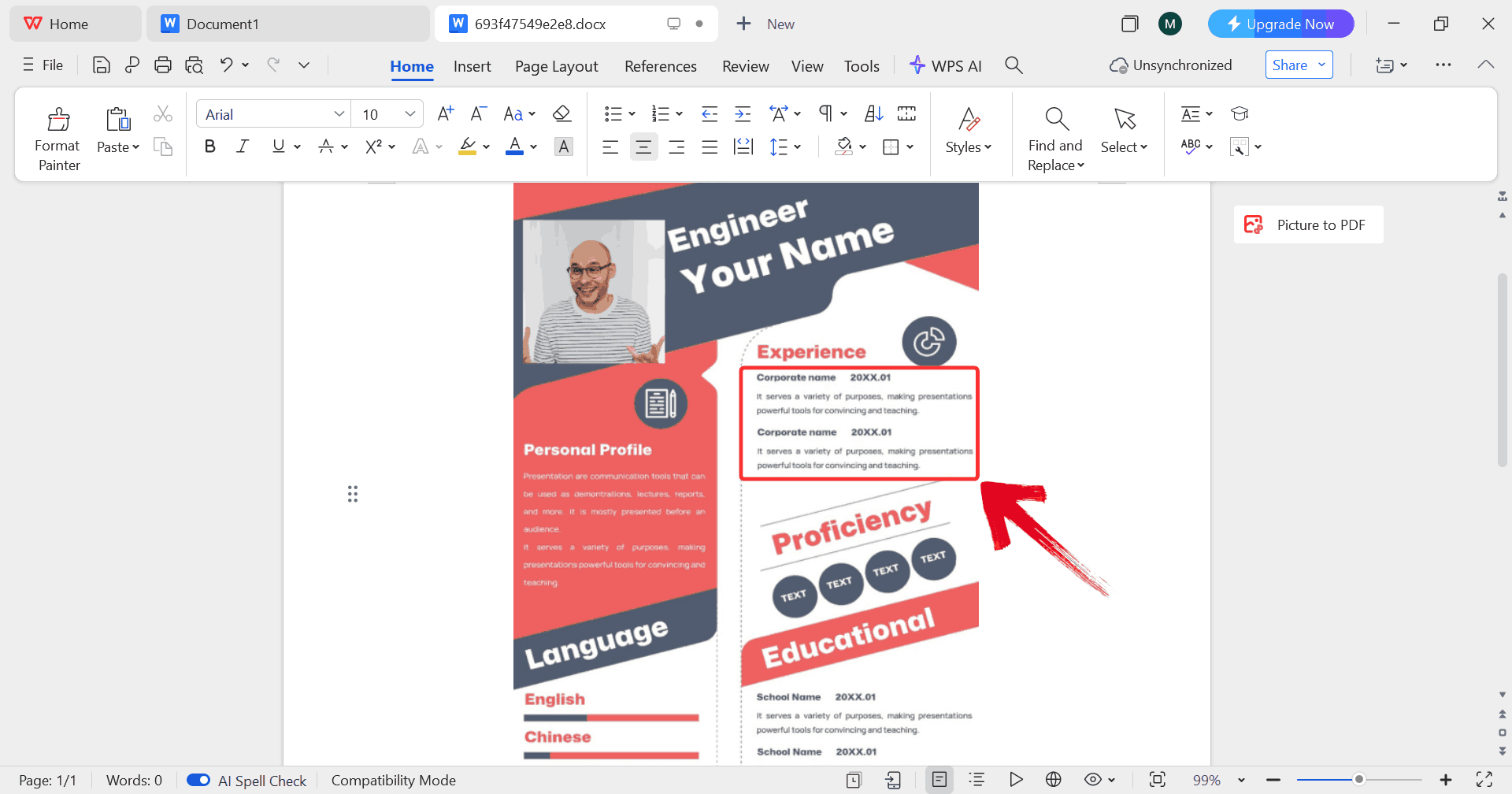
This is a dynamic, asymmetrical resume template specifically formatted for an Engineer, using a strong, high-contrast
scheme of dark blue/grey, white, and coral red. The design heavily
utilizes diagonal lines and large text to visually separate sections,
with the Personal Profile and Language proficiency bars placed
prominently on the left. The right column is dedicated to structured
sections for Experience, key Proficiency tags, and Educational history.
The layout is bold and modern, designed to immediately highlight the
candidate's name and expertise.
Red Artistic PDF Resume
10. American PDF Resume
Template
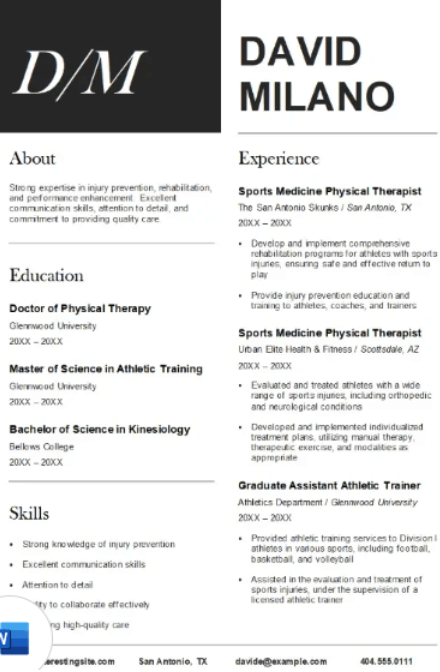
This is a classic, two-column professional resume template designed for a Sports Medicine Physical Therapist, featuring a strong
black and white color scheme with a prominent "D/M" monogram logo. The
layout clearly separates About, Education, and Skills from Experience,
providing high readability and professionalism. The Education section
details degrees in Doctor of Physical Therapy, Master of Science in
Athletic Training, and Bachelor of Science in Kinesiology. The
Experience section highlights roles as a Sports Medicine Physical
Therapist and Graduate Assistant Athletic Trainer, focusing on
rehabilitation, injury prevention, and comprehensive training programs
for athletes.
American PDF Resume
How to Use &
Edit Resume Templates in WPS Word
After you’ve chosen and downloaded an editable resume template PDF
that matches your style and career goals, the next task is turning that
file into a custom document that’s truly yours. The crucial first step
is understanding how WPS Word handles templates: when you open a
downloaded resume from the WPS Template library, it doesn’t just dump
text on the screen as it loads it as a fully editable Word document
where every section, field,
and layout element can be modified to reflect your experience and voice.
WPS Office’s template system is designed so that what you see is what
you edit.
Edit in WPS Word
With your template open in WPS Word, you can easily edit every
section to fit your profile, keeping your resume clean and professional.
Here’s how to get started.
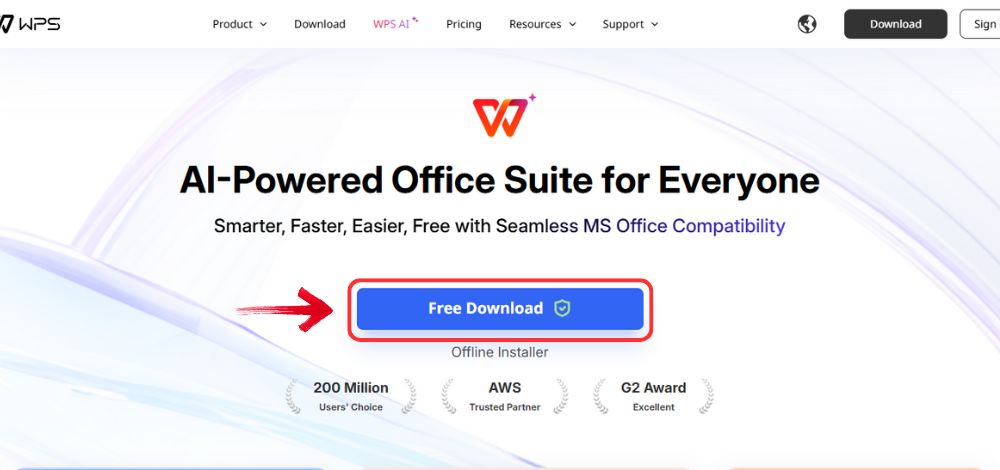
Step 1: Visit the WPS Office website and click the “Free Download” button to start downloading the
software.
Download WPS Office
Step 2: Once the download is complete, open the
installation file just like you would for any other program on your
computer.
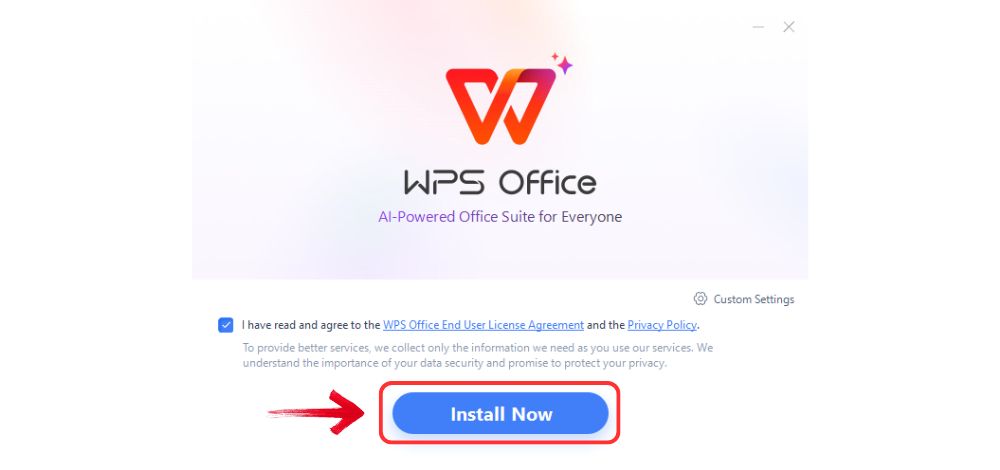
Step 3: Read and accept the terms and conditions,
then click “Install Now” to begin the setup. The
process only takes a few minutes.
Install WPS Office
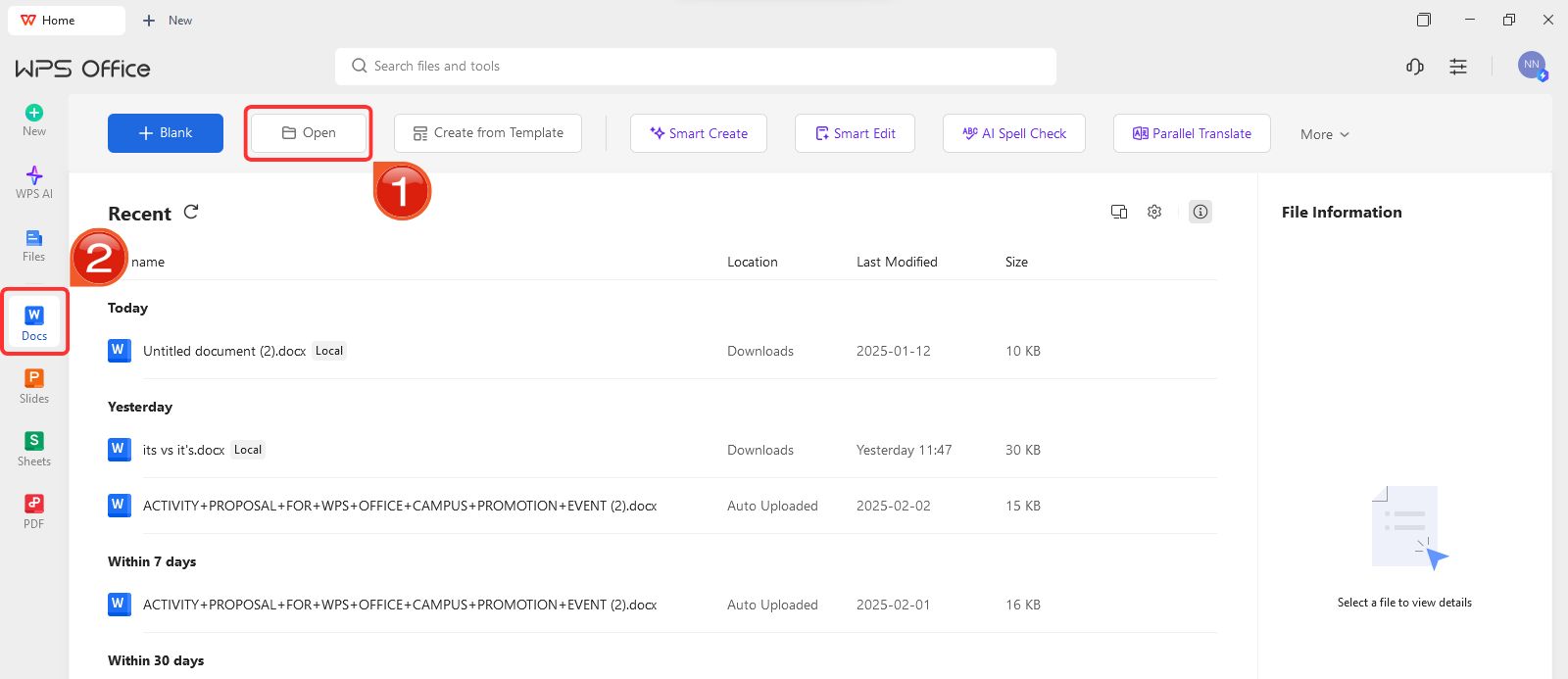
Step 4: On WPS Office, click on “Docs” from the left panel, then select “Open” to launch a document.
Create new blank document
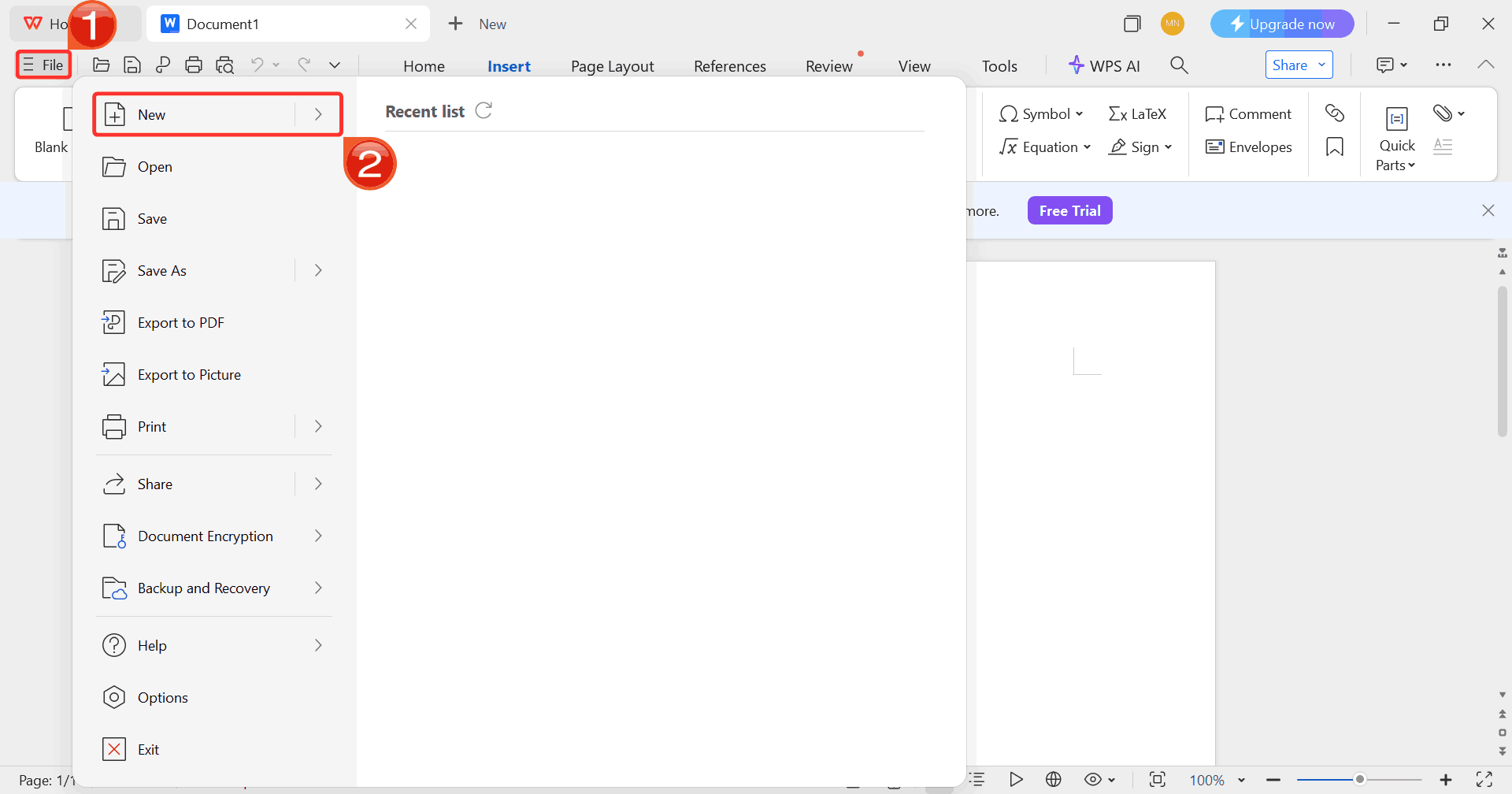
Step 5: Click on “File”, then click
on “New” to go through options for opening a blank
document or choosing from available templates.
Select New
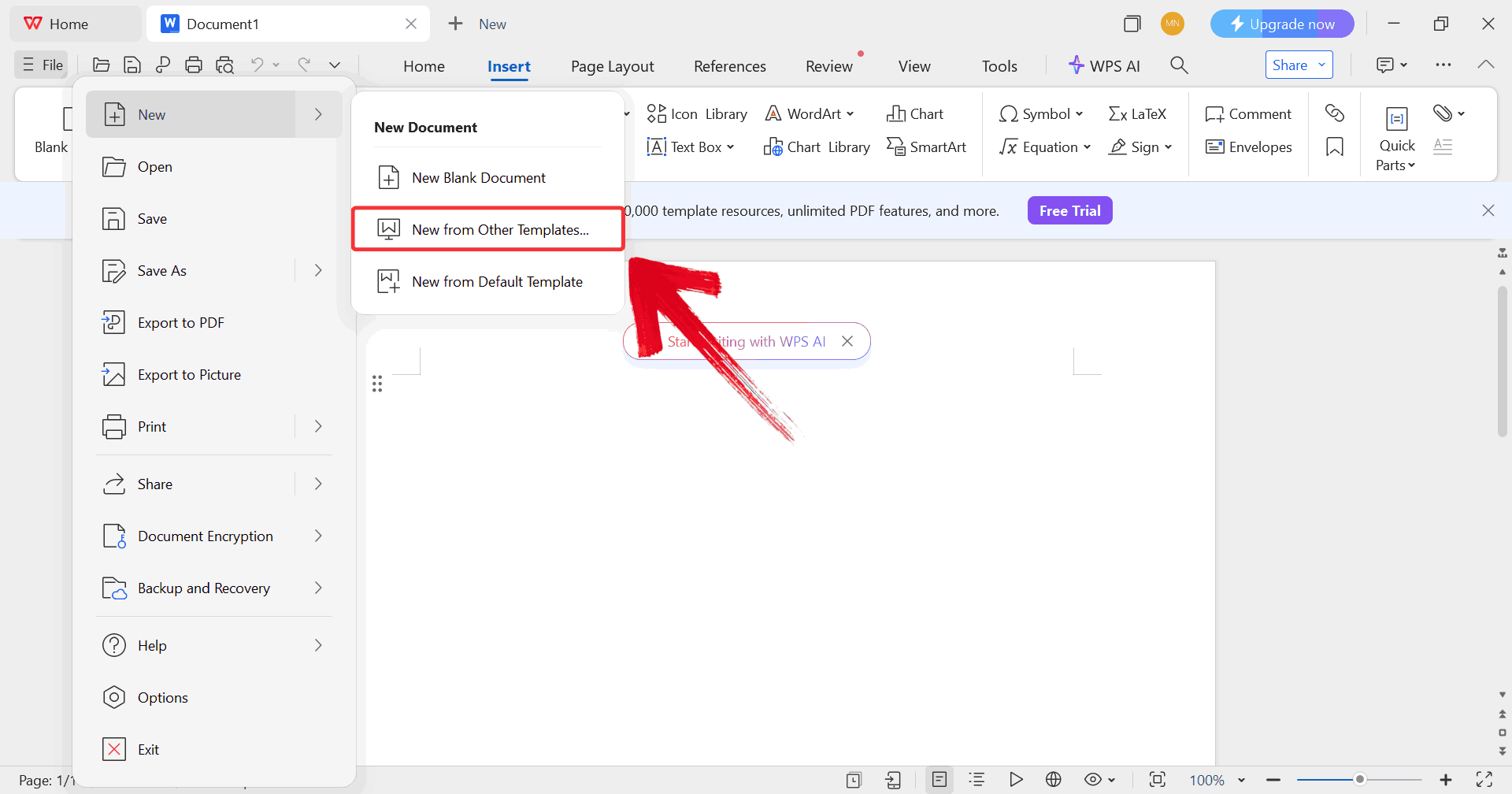
Step 6: Click on “New from other
templates” to upload your desired resume template, either from
your device or directly from the WPS template library.
Upload Template
Step 7: In order to fill the resume with real
details, start by clicking on any text you want to change, such as your
experience and start typing.
Edit Template
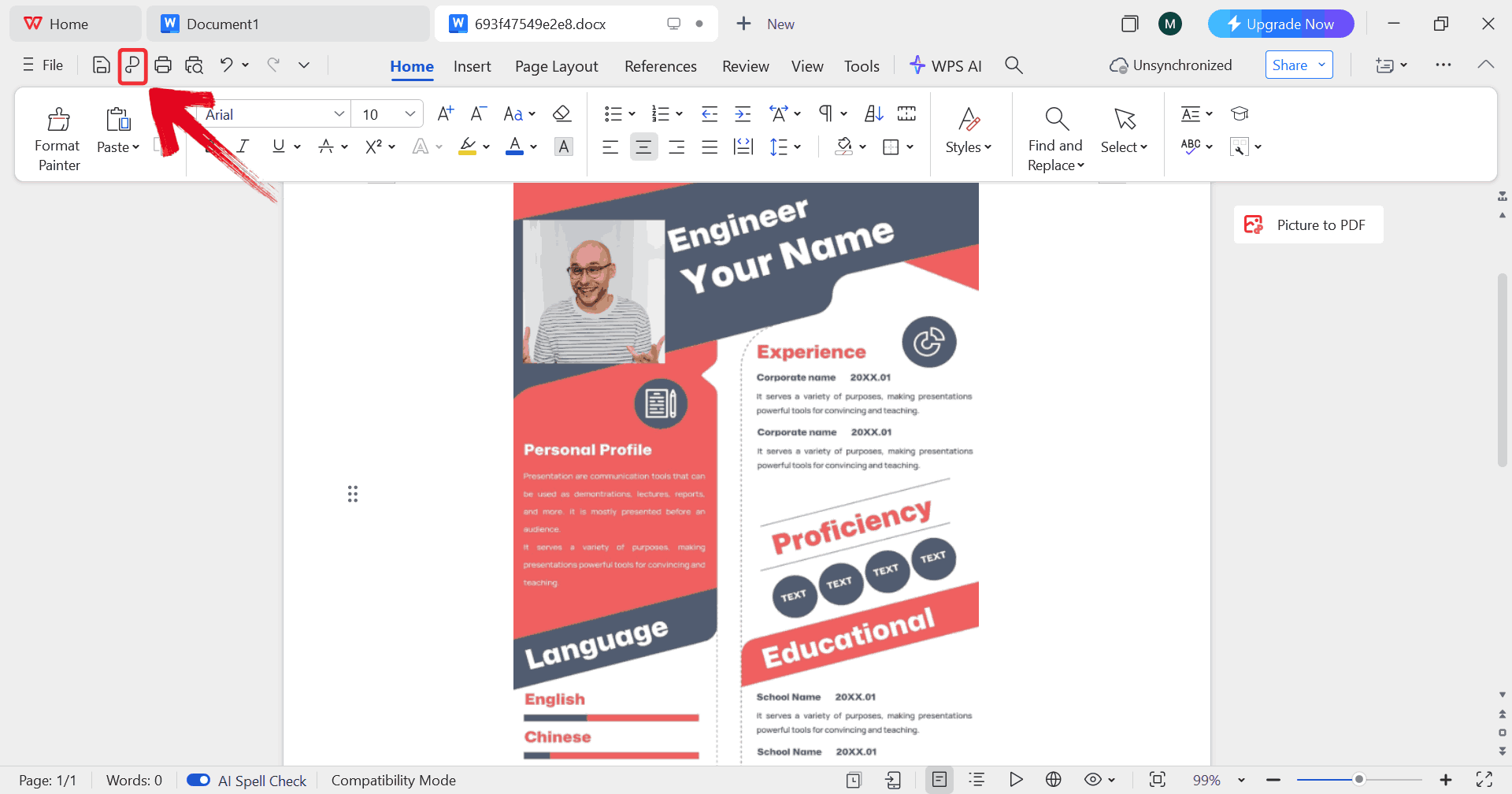
Step 8: Click on the “P” icon to
make sure your resume is saved as a PDF, keeping the layout intact and
ready for printing or sharing digitally.
Print Resume
Tip: You can also click on the printer icon beside the P sign to start printing your tax donation receipt template.
Advanced Resume
Editing Features in WPS Word
WPS Word also offers advanced tools to enhance your resume’s layout
and style, making it easier to create a polished, professional document.
Here’s how to take advantage of these advanced features.
Step 1: On WPS Office, click on “Docs” from the left panel, then select “Open” to launch a document.
Open new blank document
Step 2: Click on “File”, then click
on “New” to go through options for opening a blank
document or choosing from available templates.
Click New
Step 3: Click on “New from other
templates” to upload your desired resume template, either from
your device or directly from the WPS template library.
Select Template
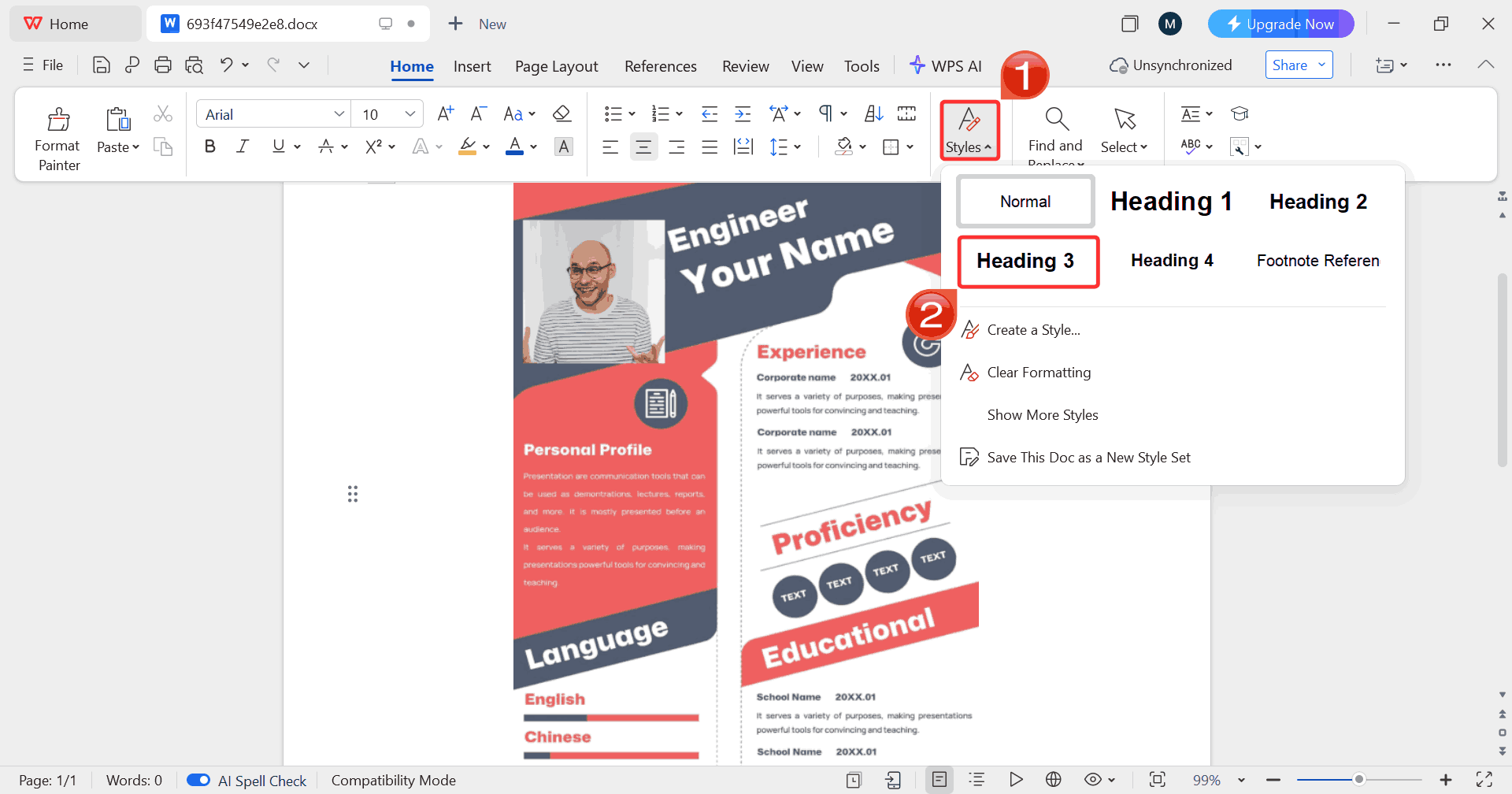
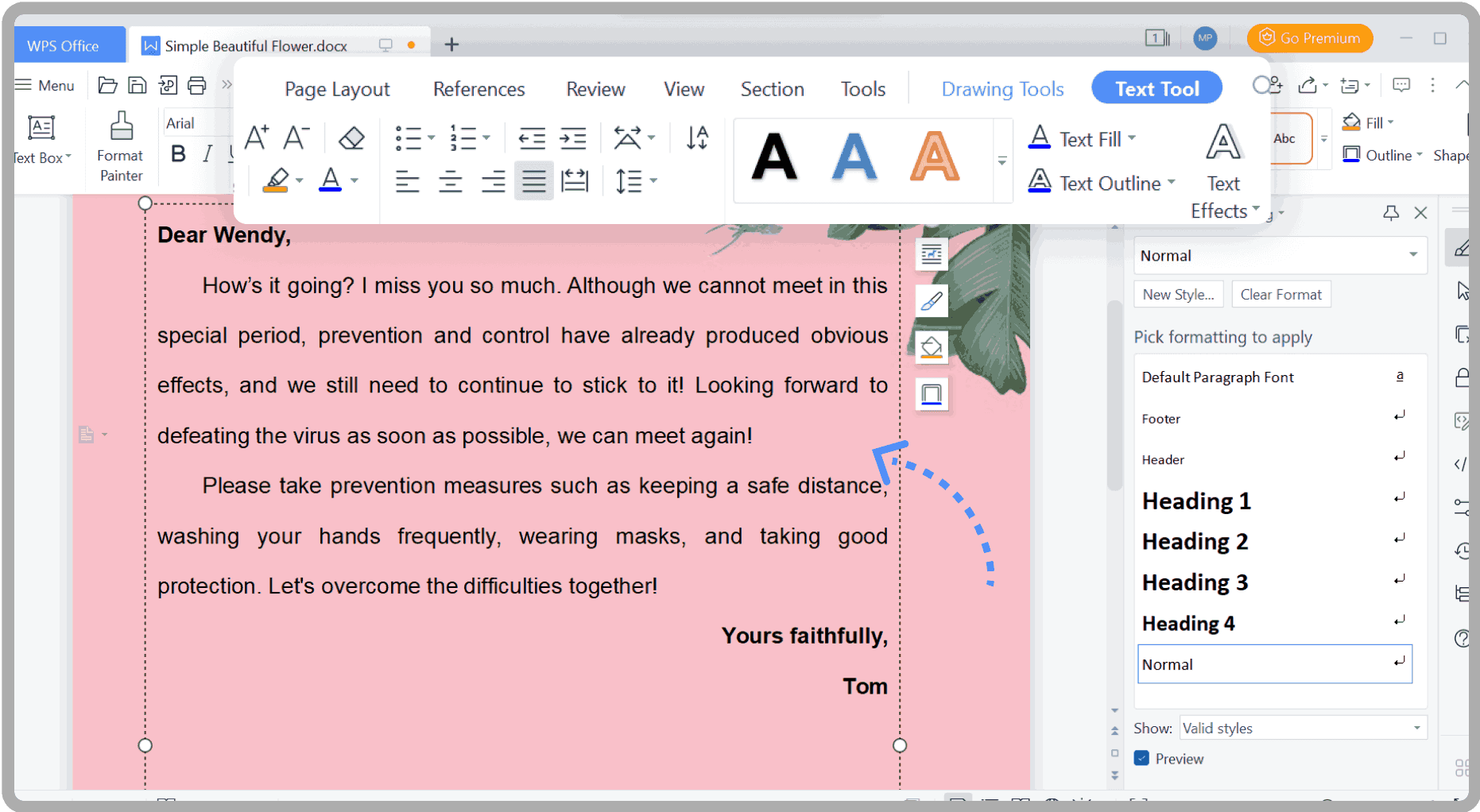
Step 4: To select a pre-designed style, click on the “Styles” group then choose your preferred formatting to
apply consistent headings and body text throughout your resume.
Adjust Styles
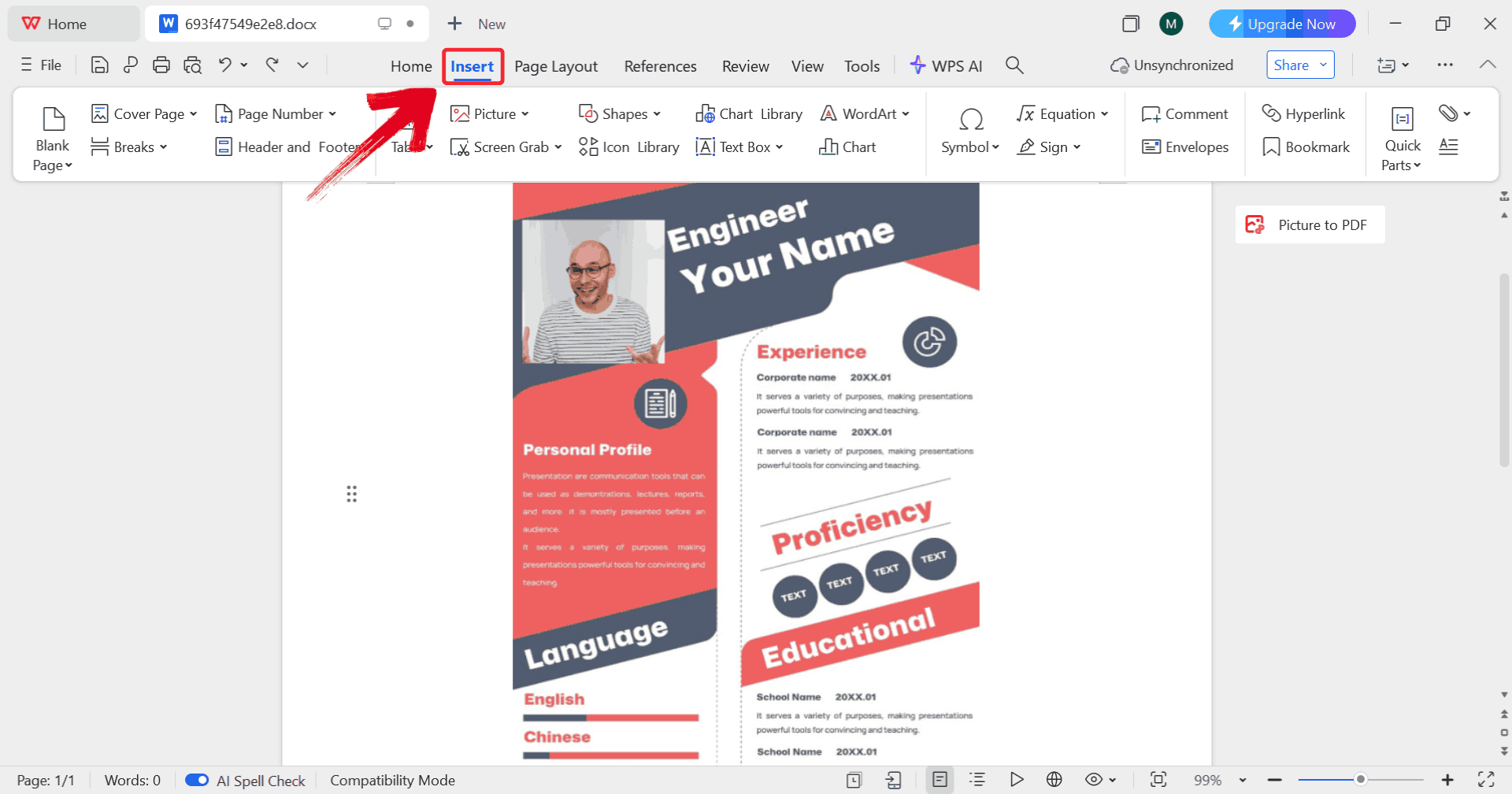
Step 5: Click on “Insert” to access
tables, icons, and other elements that help you enhance your resume’s
layout and design.
Choose Insert
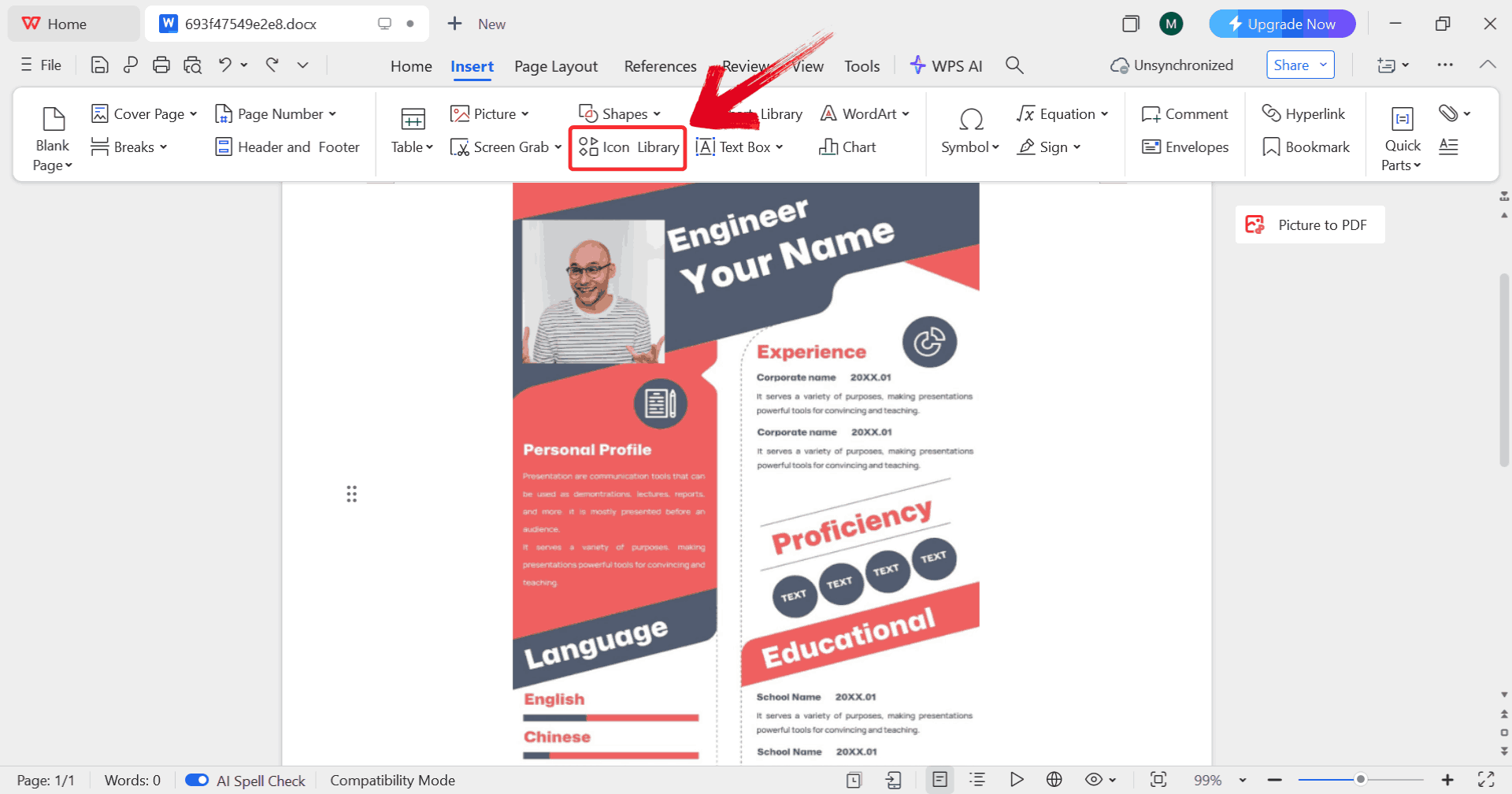
Step 6: Click on "Icon Library” to
browse and insert professional icons that improve your resume’s visual
appeal and readability.
Insert Icons
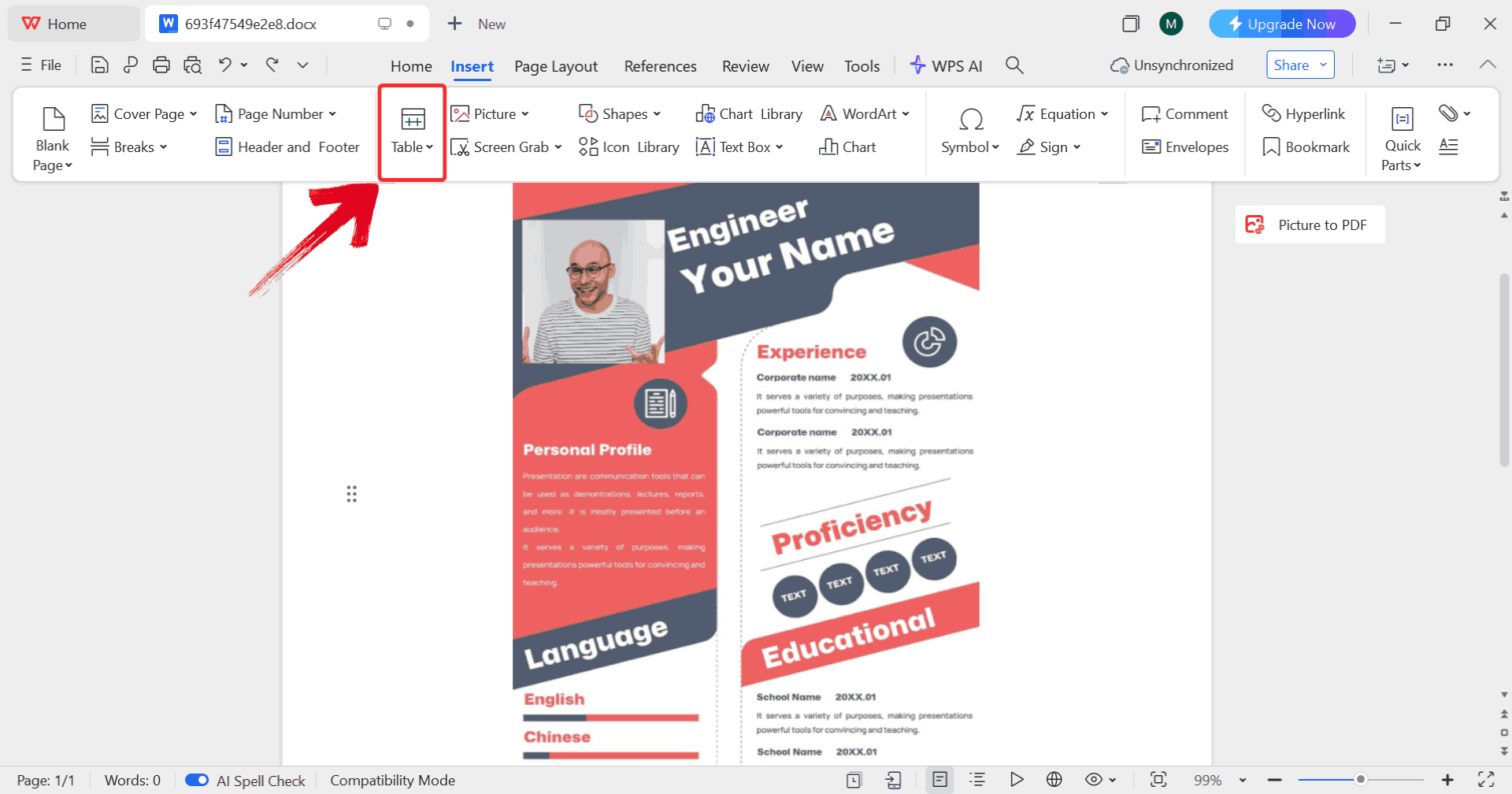
Step 7: Click on “Table” to insert
and organize information neatly, keeping your resume sections structured
and easy to read.
Insert Table
Step 8: Click on “P” to save your
resume, ensuring all formatting, icons, and tables remain intact for
printing.
Click P
How to Export Your
Resume to PDF Format
A PDF resume keeps your fonts, spacing, and design consistent on
every device and operating system, prevents accidental edits by
recipients, and is the format most employers expect when submitting
applications online or via email. Because PDFs embed all elements of
your document, you don’t have to worry about text shifting or icons
moving when a recruiter opens your file. It also typically results in a
smaller, more email‑friendly
file size than a Word document.
Step 1: On WPS Office, click on “Docs” from the left panel, then select “Open” to launch a document.
Blank document
Step 2: Click on “File”, then click
on “New” to go through options for opening a blank
document or choosing from available templates.
Select File
Step 3: Click on “New from other
templates” to upload your desired resume template, either from
your device or directly from the WPS template library.
Insert Template
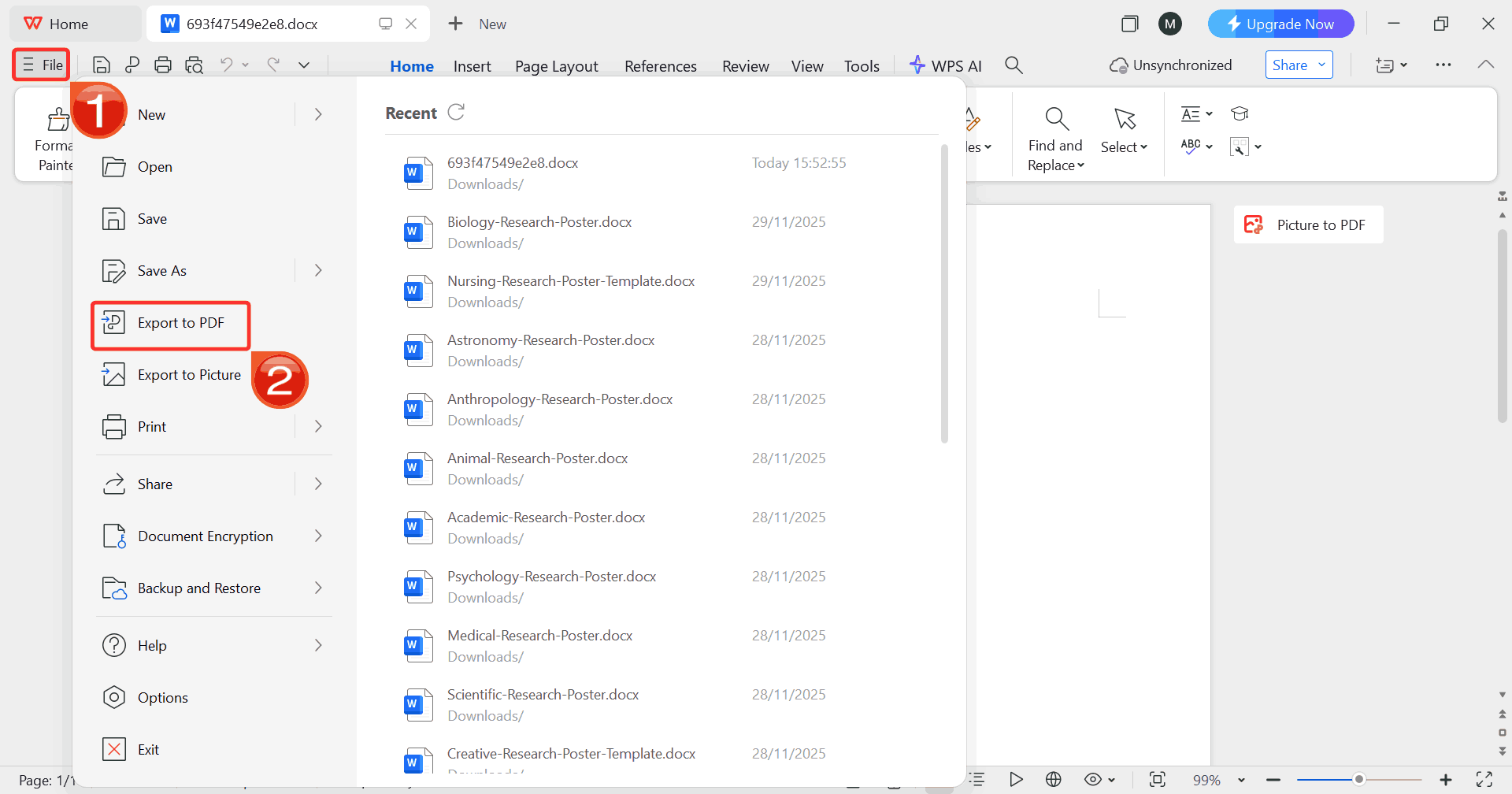
Step 4: Once you’ve finished editing your resume,
click on “File” then choose “Export to
PDF” to save your document as a PDF, keeping the formatting,
layout, and design intact for sharing or printing.
Export to PDF
Free
Office Suite: Create Professional Resumes with WPS
When people think of creating a professional resume, the first thing
that comes to their mind is managing multiple apps or dealing with
formatting glitches. With WPS Writer, you can
manage every element of your resume in one place from precise text
alignment to subtle spacing adjustments without the distractions of
overly complex menus. Its interface is designed to give you a simple
workspace, letting you focus on refining your content and layout while
maintaining full control over your document’s structure.
Beyond simple editing, WPS Writer also makes it easy to experiment
with different section arrangements, headings, and typography, helping
you craft a resume that looks intentional, polished, and tailored to
your target role.
WPS Writer
Features
Clean Workspace: WPS Writer provides a distraction-free interface, allowing you to focus on refining your resume content and structure.
Flexible Section Management: Easily rearrange sections like work experience, education, and skills without breaking the layout.
Precise Typography Control: Adjust fonts, sizes, and spacing with fine-tuned control to ensure your resume looks polished and professional.
Smart Alignment Tools: Align text, tables, and icons perfectly without manual guesswork, giving your resume a neat, organized appearance.
Template Integration: Seamlessly apply pre-designed resume templates while retaining full flexibility to customize each element.
Cross-Platform Editing: Work on your resume from desktop, web, or mobile, ensuring access wherever you need it.
With WPS Writer, modifying an editable resume template free download
becomes a streamlined, flexible process. Its intuitive tools, precise
formatting options, and seamless template integration allow you to focus
on presenting your skills and experience effectively, without worrying
about technical hurdles.
100% secure
FAQs
1. Can
I completely customize these resume templates in WPS?
Yes. All templates are fully editable, allowing you to change text,
layout, colors, and design.
2. Are these
resume templates really free to use?
Yes. All featured templates are free for personal and professional
use.
3. Can I use
WPS Office if I don’t have Microsoft Word?
Absolutely. WPS Office is free and fully compatible with Word
documents, making it ideal for resume creation.
4. How do I
export my resume to PDF in WPS Office?
Go to File then Export to PDF, select your settings, and ensure the
exported resume maintains proper formatting.
5. Can I
use the templates for multiple job applications?
Yes. You can reuse the templates and adjust them for different
positions without losing formatting.
Polish & Submit with WPS
Creating a professional resume has never been easier, thanks to WPS Office and free editable resume template PDFs. From basic layouts for students to executive-level designs, these templates allow full customization, ensuring your resume aligns perfectly with any job application. By following simple steps to edit, format, and export in PDF, you can submit resumes with confidence. WPS tools not only save time and money but also help maintain a polished, professional appearance across all devices making your job search smoother and more efficient.
7+ years in productivity tech. I test and review the latest tools to simplify your workflow. Follow for honest app comparisons, practical guides, and curated tech picks to boost efficiency.


'%3e%3cpath%20d='M8%200C12.4183%200%2016%203.58172%2016%208C16%2012.4183%2012.4183%2016%208%2016C3.58172%2016%200%2012.4183%200%208C0%203.58172%203.58172%200%208%200ZM11.6162%204.38379C11.2257%203.99337%2010.5927%203.99338%2010.2021%204.38379L8%206.58594L5.79785%204.38379C5.40732%203.99334%204.77429%203.99329%204.38379%204.38379C3.99331%204.77429%203.99335%205.40733%204.38379%205.79785L6.58594%208L4.38379%2010.2021C3.99348%2010.5927%203.99341%2011.2257%204.38379%2011.6162C4.77426%2012.0066%205.40734%2012.0065%205.79785%2011.6162L8%209.41406L10.2021%2011.6162C10.5927%2012.0066%2011.2257%2012.0067%2011.6162%2011.6162C12.0067%2011.2257%2012.0066%2010.5927%2011.6162%2010.2021L9.41406%208L11.6162%205.79785C12.0066%205.40735%2012.0066%204.77429%2011.6162%204.38379Z'%20fill='%23080E17'%20fill-opacity='0.46'/%3e%3c/g%3e%3cdefs%3e%3cclipPath%20id='clip0_3761_713'%3e%3crect%20width='16'%20height='16'%20fill='white'/%3e%3c/clipPath%3e%3c/defs%3e%3c/svg%3e)




'%3e%3cpath%20fill-rule='evenodd'%20clip-rule='evenodd'%20d='M21.4999%2010.9993C21.4999%205.20009%2016.7986%200.498901%2010.9993%200.498901C5.19994%200.498901%200.498657%205.20009%200.498657%2010.9993C0.498657%2016.2404%204.33858%2020.5844%209.35855%2021.3722V14.0346H6.69238V10.9993H9.35855V8.68594C9.35855%206.05427%2010.9262%204.60062%2013.3248%204.60062C14.4736%204.60062%2015.6753%204.80571%2015.6753%204.80571V7.38979H14.3512C13.0468%207.38979%2012.64%208.19921%2012.64%209.0296V10.9993H15.5523L15.0867%2014.0346H12.64V21.3722C17.66%2020.5844%2021.4999%2016.2404%2021.4999%2010.9993Z'%20fill='%231568EA'/%3e%3c/g%3e%3c/svg%3e)


'%3e%3cpath%20d='M2.42045%2022.1876H6.31818V12.7217L0.75%208.54553V20.5171C0.75%2021.4414%201.49892%2022.1876%202.42045%2022.1876Z'%20fill='%234285F4'/%3e%3cpath%20d='M19.682%2022.1876H23.5797C24.5041%2022.1876%2025.2502%2021.4387%2025.2502%2020.5171V8.54553L19.682%2012.7217'%20fill='%2334A853'/%3e%3cpath%20d='M19.682%205.48293V12.7216L25.2502%208.54543V6.31816C25.2502%204.25236%2022.8921%203.07469%2021.2411%204.31361'%20fill='%23FBBC04'/%3e%3cpath%20d='M6.31824%2012.7217V5.48303L13.0001%2010.4944L19.6819%205.48303V12.7217L13.0001%2017.733'%20fill='%23EA4335'/%3e%3cpath%20d='M0.75%206.31816V8.54543L6.31818%2012.7216V5.48293L4.75909%204.31361C3.10534%203.07469%200.75%204.25236%200.75%206.31816Z'%20fill='%23C5221F'/%3e%3c/g%3e%3cdefs%3e%3cclipPath%20id='clip0_2954_7305'%3e%3crect%20width='24.5'%20height='18.375'%20fill='white'%20transform='translate(0.75%203.8125)'/%3e%3c/clipPath%3e%3c/defs%3e%3c/svg%3e)



'%3e%3cpath%20d='M19.9911%204.11386V6.471H18.5894C18.0775%206.471%2017.7322%206.57814%2017.5536%206.79243C17.3751%207.00671%2017.2858%207.32814%2017.2858%207.75671V9.44421H19.9019L19.5536%2012.0871H17.2858V18.8639H14.5536V12.0871H12.2769V9.44421H14.5536V7.49779C14.5536%206.39064%2014.8632%205.53201%2015.4822%204.92189C16.1013%204.31177%2016.9257%204.00671%2017.9554%204.00671C18.8304%204.00671%2019.509%204.04243%2019.9911%204.11386Z'%20fill='%23333333'/%3e%3c/g%3e%3cdefs%3e%3cclipPath%20id='clip0_2938_8199'%3e%3crect%20width='16'%20height='16'%20fill='white'%20transform='translate(8%204.00671)'/%3e%3c/clipPath%3e%3c/defs%3e%3c/svg%3e)
'%3e%3cpath%20d='M17.5237%2010.7813L23.4811%204H22.0699L16.8949%209.88693L12.7648%204H8L14.2469%2012.9029L8%2020.0133H9.4112L14.8725%2013.7952L19.2352%2020.0133H24M9.92053%205.04213H12.0885L22.0688%2019.0224H19.9003'%20fill='%23333333'/%3e%3c/g%3e%3cdefs%3e%3cclipPath%20id='clip0_2938_8200'%3e%3crect%20width='16'%20height='16.0134'%20fill='white'%20transform='translate(8%204)'/%3e%3c/clipPath%3e%3c/defs%3e%3c/svg%3e)


