

'%3e%3cpath%20d='M8%200C12.4183%200%2016%203.58172%2016%208C16%2012.4183%2012.4183%2016%208%2016C3.58172%2016%200%2012.4183%200%208C0%203.58172%203.58172%200%208%200ZM11.6162%204.38379C11.2257%203.99337%2010.5927%203.99338%2010.2021%204.38379L8%206.58594L5.79785%204.38379C5.40732%203.99334%204.77429%203.99329%204.38379%204.38379C3.99331%204.77429%203.99335%205.40733%204.38379%205.79785L6.58594%208L4.38379%2010.2021C3.99348%2010.5927%203.99341%2011.2257%204.38379%2011.6162C4.77426%2012.0066%205.40734%2012.0065%205.79785%2011.6162L8%209.41406L10.2021%2011.6162C10.5927%2012.0066%2011.2257%2012.0067%2011.6162%2011.6162C12.0067%2011.2257%2012.0066%2010.5927%2011.6162%2010.2021L9.41406%208L11.6162%205.79785C12.0066%205.40735%2012.0066%204.77429%2011.6162%204.38379Z'%20fill='%23080E17'%20fill-opacity='0.46'/%3e%3c/g%3e%3cdefs%3e%3cclipPath%20id='clip0_3761_713'%3e%3crect%20width='16'%20height='16'%20fill='white'/%3e%3c/clipPath%3e%3c/defs%3e%3c/svg%3e)




'%3e%3cpath%20fill-rule='evenodd'%20clip-rule='evenodd'%20d='M21.4999%2010.9993C21.4999%205.20009%2016.7986%200.498901%2010.9993%200.498901C5.19994%200.498901%200.498657%205.20009%200.498657%2010.9993C0.498657%2016.2404%204.33858%2020.5844%209.35855%2021.3722V14.0346H6.69238V10.9993H9.35855V8.68594C9.35855%206.05427%2010.9262%204.60062%2013.3248%204.60062C14.4736%204.60062%2015.6753%204.80571%2015.6753%204.80571V7.38979H14.3512C13.0468%207.38979%2012.64%208.19921%2012.64%209.0296V10.9993H15.5523L15.0867%2014.0346H12.64V21.3722C17.66%2020.5844%2021.4999%2016.2404%2021.4999%2010.9993Z'%20fill='%231568EA'/%3e%3c/g%3e%3c/svg%3e)


'%3e%3cpath%20d='M2.42045%2022.1876H6.31818V12.7217L0.75%208.54553V20.5171C0.75%2021.4414%201.49892%2022.1876%202.42045%2022.1876Z'%20fill='%234285F4'/%3e%3cpath%20d='M19.682%2022.1876H23.5797C24.5041%2022.1876%2025.2502%2021.4387%2025.2502%2020.5171V8.54553L19.682%2012.7217'%20fill='%2334A853'/%3e%3cpath%20d='M19.682%205.48293V12.7216L25.2502%208.54543V6.31816C25.2502%204.25236%2022.8921%203.07469%2021.2411%204.31361'%20fill='%23FBBC04'/%3e%3cpath%20d='M6.31824%2012.7217V5.48303L13.0001%2010.4944L19.6819%205.48303V12.7217L13.0001%2017.733'%20fill='%23EA4335'/%3e%3cpath%20d='M0.75%206.31816V8.54543L6.31818%2012.7216V5.48293L4.75909%204.31361C3.10534%203.07469%200.75%204.25236%200.75%206.31816Z'%20fill='%23C5221F'/%3e%3c/g%3e%3cdefs%3e%3cclipPath%20id='clip0_2954_7305'%3e%3crect%20width='24.5'%20height='18.375'%20fill='white'%20transform='translate(0.75%203.8125)'/%3e%3c/clipPath%3e%3c/defs%3e%3c/svg%3e)


PDF files keep their formatting locked in place and look the same on any device—perfect for sharing, printing, and official submissions. Google Docs lets you convert Word files to PDF in seconds, with no extra software required.
In this guide, you'll learn two simple ways to turn a Word document into a PDF directly through Google Docs.
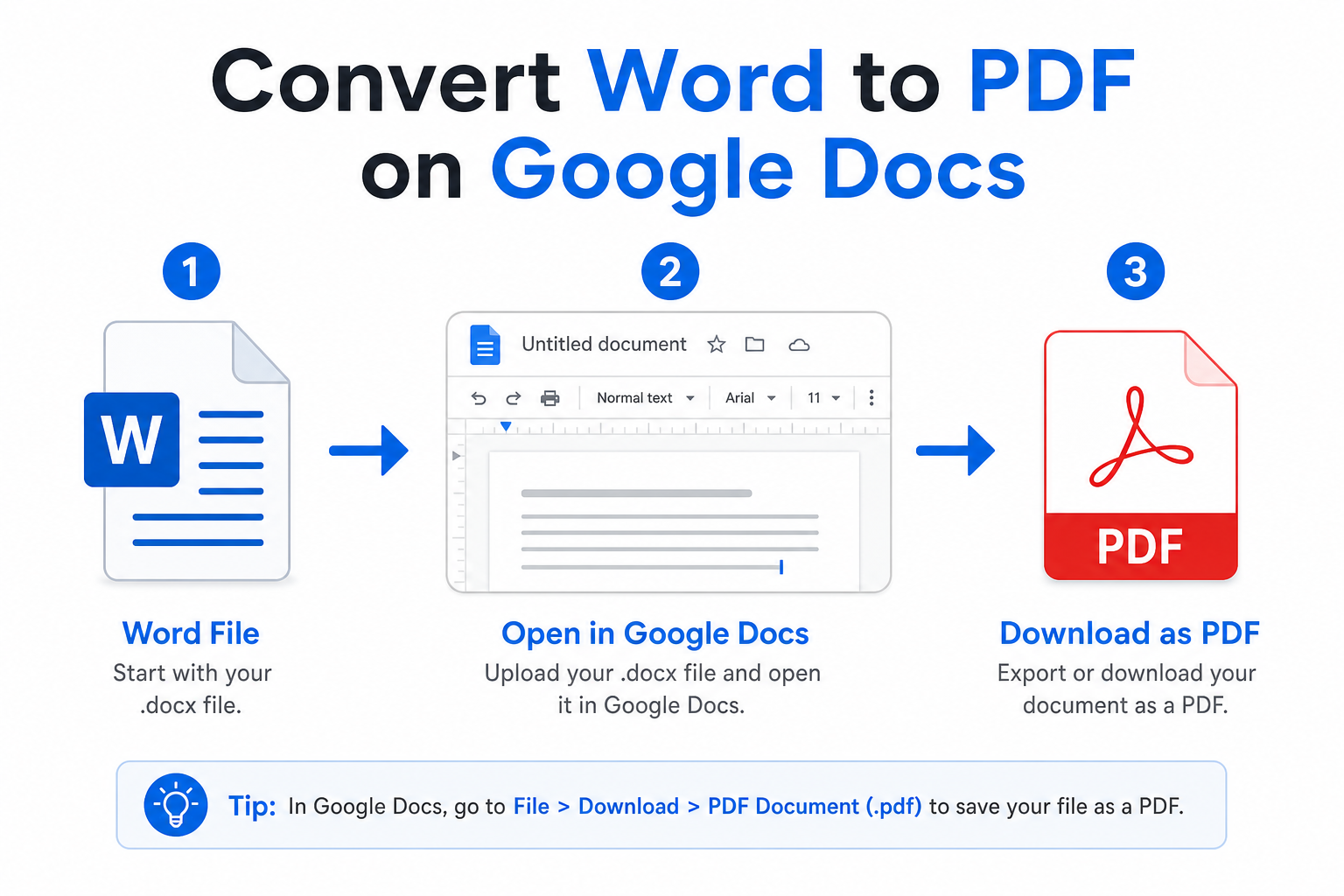
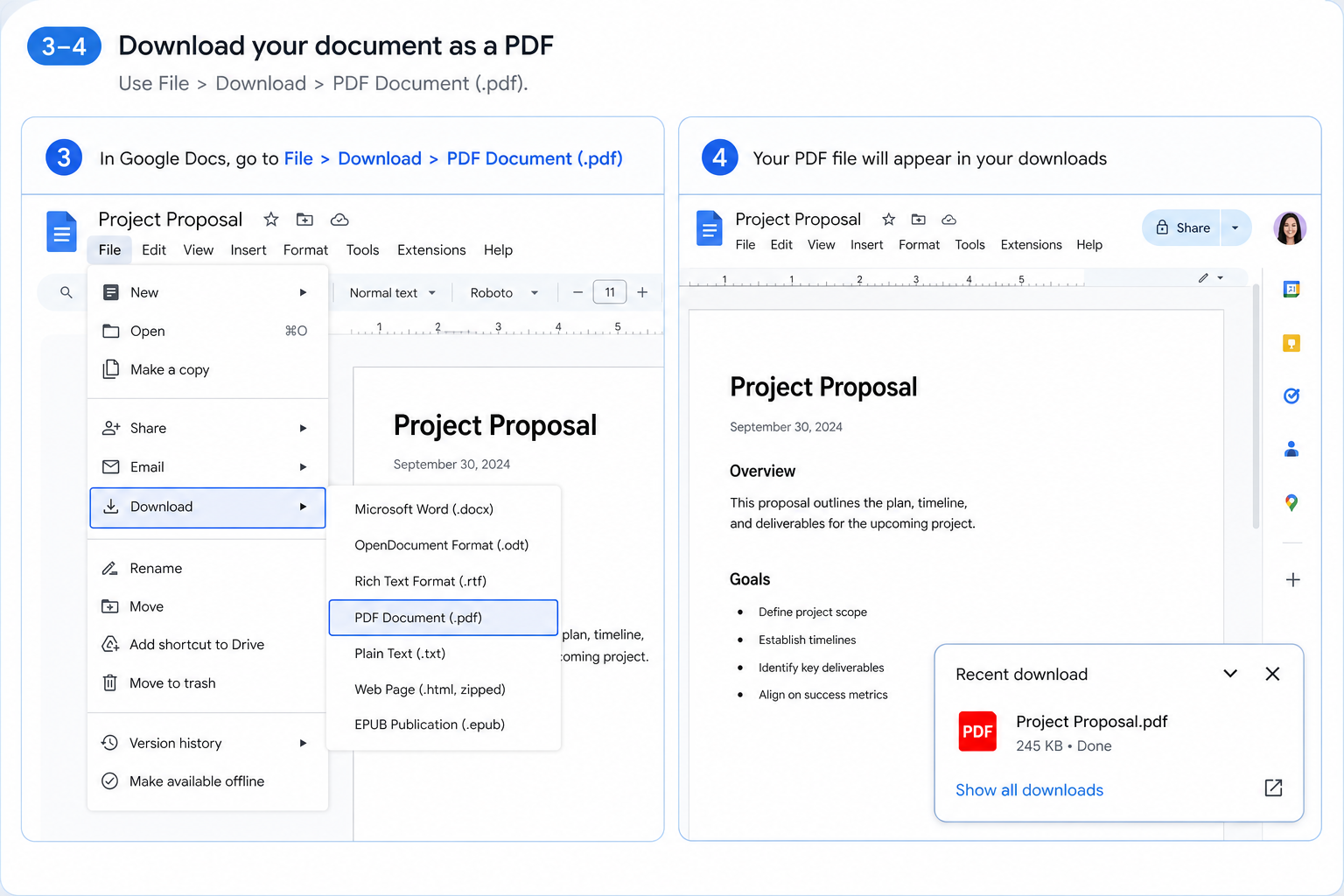
Quick answer: Upload your Word file to Google Drive, open it in Google Docs, then click File → Download → PDF Document (.pdf).
Why Convert Word to PDF on Google Docs?
Converting through Google Docs gives you four practical advantages for everyday work:
No extra software — Everything you need is built into Google Workspace.
Stable formatting — Tables, images, and layouts stay intact in the exported PDF.
Cloud sync — Store and manage converted files directly on Google Drive.
Completely free — Works for personal and business use at no cost.
Before You Start
Upload your .doc or .docx file to Google Drive, then open it with Google Docs. Once the file loads, you're ready to export.


Method 1: Direct PDF Export (Fastest)
Use this method when you've finished editing your document in Google Docs and want to download it as a PDF.
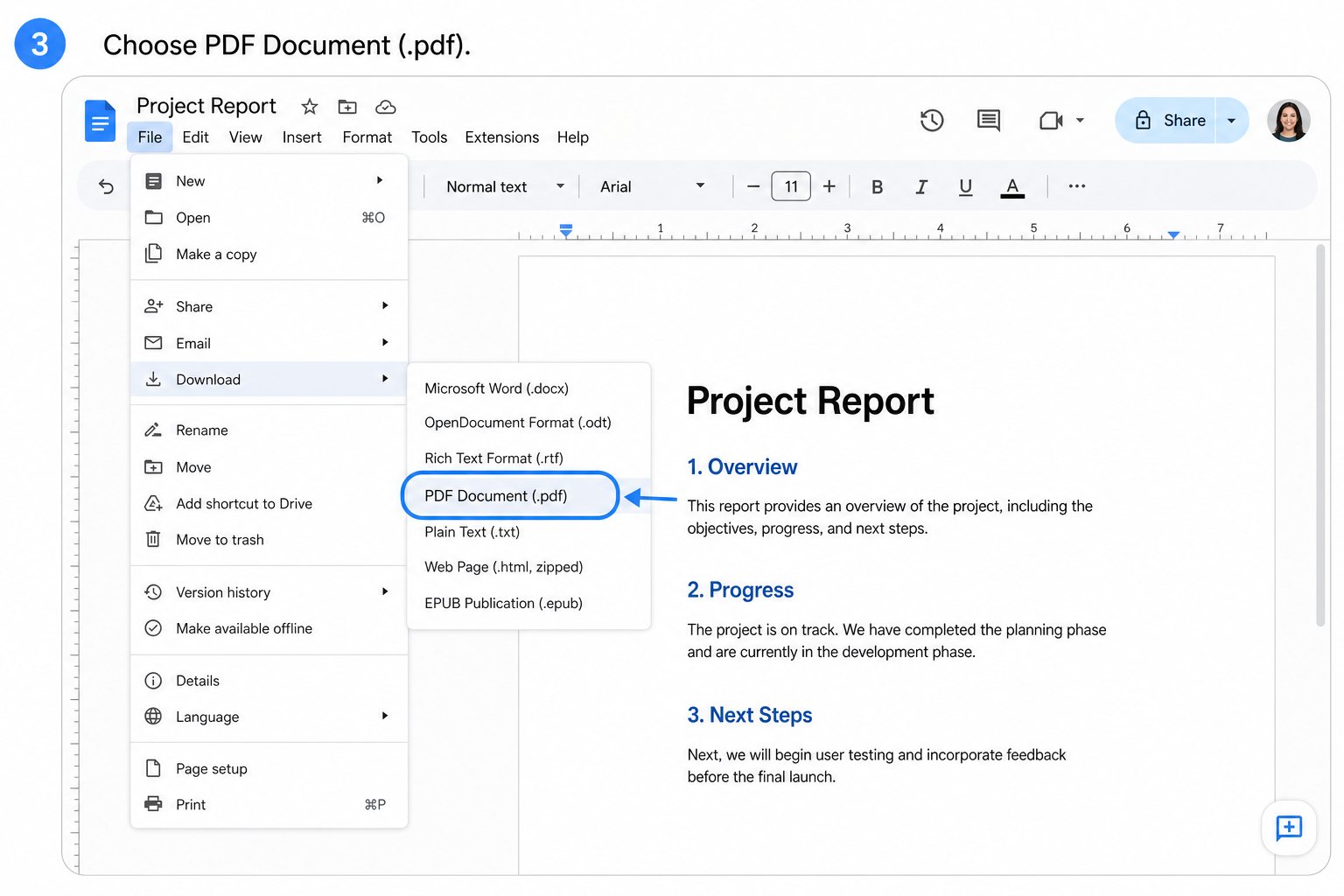
Open your Word file in Google Docs.
Click File in the top menu bar.
Select Download → PDF Document (.pdf).
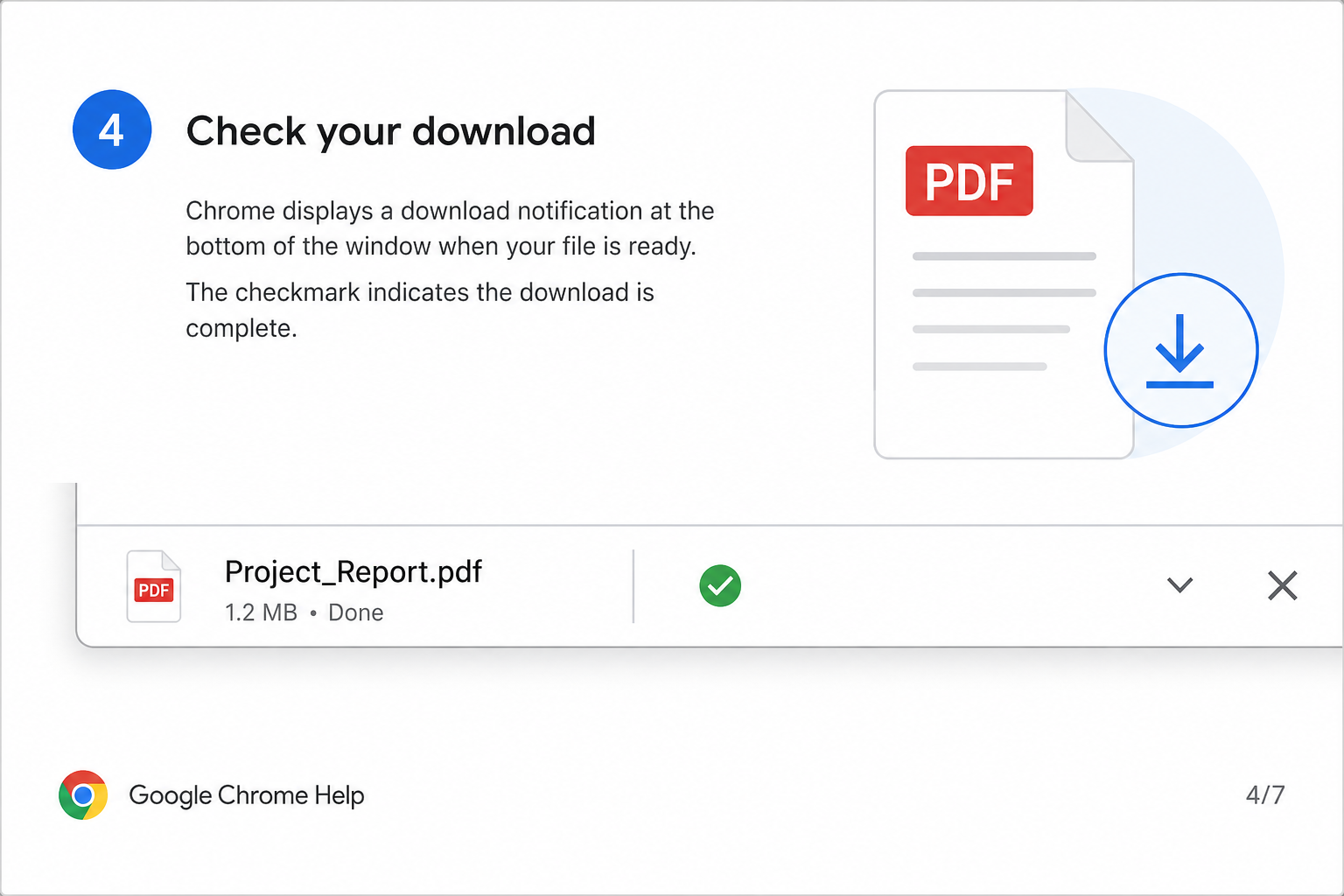
The PDF saves automatically to your computer's default download folder.
Best for: Documents you've already edited or reviewed in Google Docs.
Method 2: Convert Without Editing
Need a quick conversion with no changes? Skip the editing step and export straight from Drive.
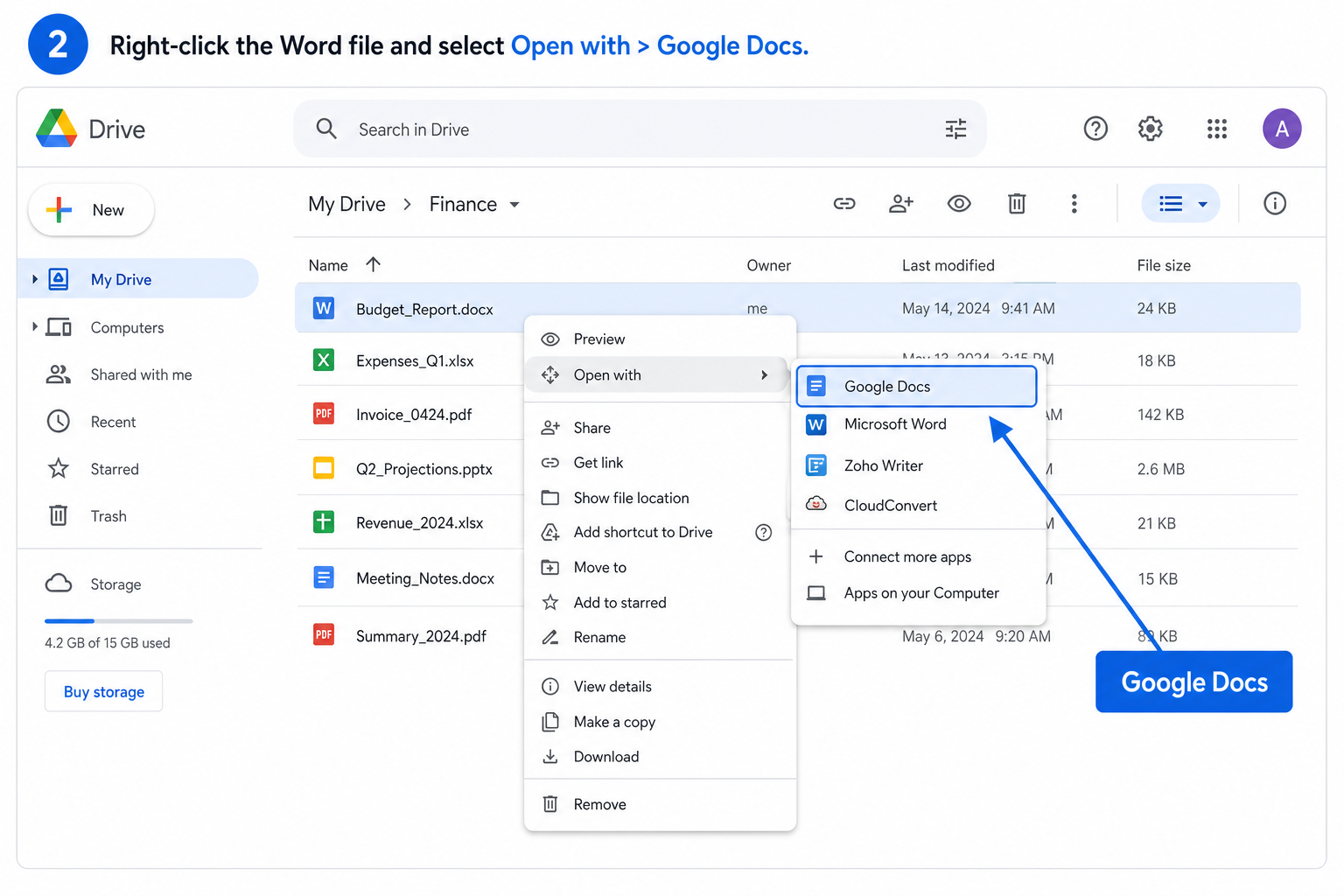
Find your Word file in Google Drive.
Right-click the file and select Open with → Google Docs.
Once the file loads, click File → Download → PDF Document (.pdf).
Save the downloaded PDF to your preferred location.
Best for: One-click conversion when you don't need to edit the content first.
Practical Tips
Preview before exporting — Scroll through your doc to catch broken images or layout issues.
Stick to standard fonts — Arial, Times New Roman, and Calibri export cleanly; custom fonts may not render correctly.
Allow extra time for large files — Big documents with many images may take longer to load and download.
Keep PDFs on Drive — Upload the exported file back to Google Drive for easy sharing and team access.
Frequently Asked Questions (FAQ)
Will Google Docs Change My Original Word File?
No. Google Docs creates a separate editable copy. Your original .docx file on Google Drive stays untouched.
Can I Convert a Password-Protected Word File?
No. Remove the password before uploading the file to Google Drive. Google Docs cannot open encrypted Word documents.
Why Does My Exported PDF Look Messy?
Usually the cause is custom fonts, complex layouts, or page settings that Google Docs doesn't fully support. Simplify the document, switch to standard fonts, and preview before downloading.
Conclusion
Converting Word to PDF on Google Docs is free, fast, and reliable for everyday office work. Export an edited document with Method 1, or convert a raw file in a few clicks with Method 2.
Either way, you'll get a polished PDF that's easy to share, print, and submit—without installing anything extra.
Prefer to keep editing in the cloud instead of exporting? Learn how to convert a Word document to a Google Doc for real-time collaboration and automatic cloud saving.
Use Word, Excel, and PPT for FREE

'%3e%3cpath%20d='M19.9911%204.11386V6.471H18.5894C18.0775%206.471%2017.7322%206.57814%2017.5536%206.79243C17.3751%207.00671%2017.2858%207.32814%2017.2858%207.75671V9.44421H19.9019L19.5536%2012.0871H17.2858V18.8639H14.5536V12.0871H12.2769V9.44421H14.5536V7.49779C14.5536%206.39064%2014.8632%205.53201%2015.4822%204.92189C16.1013%204.31177%2016.9257%204.00671%2017.9554%204.00671C18.8304%204.00671%2019.509%204.04243%2019.9911%204.11386Z'%20fill='%23333333'/%3e%3c/g%3e%3cdefs%3e%3cclipPath%20id='clip0_2938_8199'%3e%3crect%20width='16'%20height='16'%20fill='white'%20transform='translate(8%204.00671)'/%3e%3c/clipPath%3e%3c/defs%3e%3c/svg%3e)
'%3e%3cpath%20d='M17.5237%2010.7813L23.4811%204H22.0699L16.8949%209.88693L12.7648%204H8L14.2469%2012.9029L8%2020.0133H9.4112L14.8725%2013.7952L19.2352%2020.0133H24M9.92053%205.04213H12.0885L22.0688%2019.0224H19.9003'%20fill='%23333333'/%3e%3c/g%3e%3cdefs%3e%3cclipPath%20id='clip0_2938_8200'%3e%3crect%20width='16'%20height='16.0134'%20fill='white'%20transform='translate(8%204)'/%3e%3c/clipPath%3e%3c/defs%3e%3c/svg%3e)


