

'%3e%3cpath%20d='M8%200C12.4183%200%2016%203.58172%2016%208C16%2012.4183%2012.4183%2016%208%2016C3.58172%2016%200%2012.4183%200%208C0%203.58172%203.58172%200%208%200ZM11.6162%204.38379C11.2257%203.99337%2010.5927%203.99338%2010.2021%204.38379L8%206.58594L5.79785%204.38379C5.40732%203.99334%204.77429%203.99329%204.38379%204.38379C3.99331%204.77429%203.99335%205.40733%204.38379%205.79785L6.58594%208L4.38379%2010.2021C3.99348%2010.5927%203.99341%2011.2257%204.38379%2011.6162C4.77426%2012.0066%205.40734%2012.0065%205.79785%2011.6162L8%209.41406L10.2021%2011.6162C10.5927%2012.0066%2011.2257%2012.0067%2011.6162%2011.6162C12.0067%2011.2257%2012.0066%2010.5927%2011.6162%2010.2021L9.41406%208L11.6162%205.79785C12.0066%205.40735%2012.0066%204.77429%2011.6162%204.38379Z'%20fill='%23080E17'%20fill-opacity='0.46'/%3e%3c/g%3e%3cdefs%3e%3cclipPath%20id='clip0_3761_713'%3e%3crect%20width='16'%20height='16'%20fill='white'/%3e%3c/clipPath%3e%3c/defs%3e%3c/svg%3e)



'%3e%3cpath%20fill-rule='evenodd'%20clip-rule='evenodd'%20d='M21.4999%2010.9993C21.4999%205.20009%2016.7986%200.498901%2010.9993%200.498901C5.19994%200.498901%200.498657%205.20009%200.498657%2010.9993C0.498657%2016.2404%204.33858%2020.5844%209.35855%2021.3722V14.0346H6.69238V10.9993H9.35855V8.68594C9.35855%206.05427%2010.9262%204.60062%2013.3248%204.60062C14.4736%204.60062%2015.6753%204.80571%2015.6753%204.80571V7.38979H14.3512C13.0468%207.38979%2012.64%208.19921%2012.64%209.0296V10.9993H15.5523L15.0867%2014.0346H12.64V21.3722C17.66%2020.5844%2021.4999%2016.2404%2021.4999%2010.9993Z'%20fill='%231568EA'/%3e%3c/g%3e%3c/svg%3e)


'%3e%3cpath%20d='M2.42045%2022.1876H6.31818V12.7217L0.75%208.54553V20.5171C0.75%2021.4414%201.49892%2022.1876%202.42045%2022.1876Z'%20fill='%234285F4'/%3e%3cpath%20d='M19.682%2022.1876H23.5797C24.5041%2022.1876%2025.2502%2021.4387%2025.2502%2020.5171V8.54553L19.682%2012.7217'%20fill='%2334A853'/%3e%3cpath%20d='M19.682%205.48293V12.7216L25.2502%208.54543V6.31816C25.2502%204.25236%2022.8921%203.07469%2021.2411%204.31361'%20fill='%23FBBC04'/%3e%3cpath%20d='M6.31824%2012.7217V5.48303L13.0001%2010.4944L19.6819%205.48303V12.7217L13.0001%2017.733'%20fill='%23EA4335'/%3e%3cpath%20d='M0.75%206.31816V8.54543L6.31818%2012.7216V5.48293L4.75909%204.31361C3.10534%203.07469%200.75%204.25236%200.75%206.31816Z'%20fill='%23C5221F'/%3e%3c/g%3e%3cdefs%3e%3cclipPath%20id='clip0_2954_7305'%3e%3crect%20width='24.5'%20height='18.375'%20fill='white'%20transform='translate(0.75%203.8125)'/%3e%3c/clipPath%3e%3c/defs%3e%3c/svg%3e)


If you want to use Claude AI for content creation, don't start with “write a blog post about X.”
Start with a brief. Give Claude the right source material and examples, approve the outline, draft one section at a time, and then review the result for accuracy, specificity, and voice.
A reliable Claude content creation workflow looks like this:
Brief → sources → outline → draft → review → final edit
Claude can help with blog posts, social media copy, emails, marketing content, reports, and other long-form writing. But the quality of the final piece depends heavily on the information and constraints you give it.
The goal isn't to publish more AI-generated text. The goal is to use AI to get to a better finished piece of content with less wasted editing time.
Quick answer: Use Claude for brainstorming, research synthesis, outlining, drafting, and revision. Keep human control over important facts, claims, examples, brand judgment, and the final edit.

What Can You Create With Claude?
Claude can support most stages of a content workflow, from a blank page to a finished draft.
Content task | How Claude can help | What you should provide |
Blog posts | Research synthesis, outlines, section drafts, rewrites | Audience, search intent, sources, outline, examples |
Social media | Hooks, post structures, captions, variations | Platform, audience, voice, CTA, examples |
Marketing copy | Headlines, product copy, landing-page sections | Product facts, positioning, audience, claims to avoid |
Emails | Drafts, rewrites, subject lines, tone adjustments | Recipient, purpose, tone, key points |
Reports | Summaries, structure, section drafts, editing | Source documents, requirements, data |
Existing drafts | Rewriting, tightening, restructuring, proofreading | The original draft and specific editing goal |
The workflow that tends to cause problems is:
Generate everything → skim it → publish it.
A better approach is:
Give Claude context → approve the structure → draft in stages → review the output → make the final editorial decisions.
That keeps AI useful without handing over responsibility for the finished content.
Claude vs. ChatGPT for Content Creation
There is no universal winner for content creation. The better tool depends on the task, the model you use, the quality of your inputs, and how much editing the final draft requires.
Instead of asking which AI tool is “better,” run the same test in both.
Give each tool:
The same content brief
The same source material
The same audience
The same writing sample
The same tone requirements
The same content constraints
Then compare the results on:
Accuracy: Does the draft stay consistent with the supplied information?
Instruction following: Did it actually follow the brief?
Voice: Does the writing sound appropriate for your audience?
Structure: Does each section have a clear purpose?
Specificity: Does it provide useful information rather than generic advice?
Editing required: How much work remains before publication?
Claude can be particularly useful when a writing task depends on detailed instructions, substantial reference material, or repeated work within a defined project. Anthropic's current documentation describes Projects as workspaces where users can organize project knowledge and instructions for ongoing conversations.
ChatGPT may be the better fit for another workflow. The point is not to pick a winner based on internet arguments. Pick the tool that gets your particular content closer to publishable quality with less correction.
How to Use Claude AI for Content Creation: A 6-Step Workflow
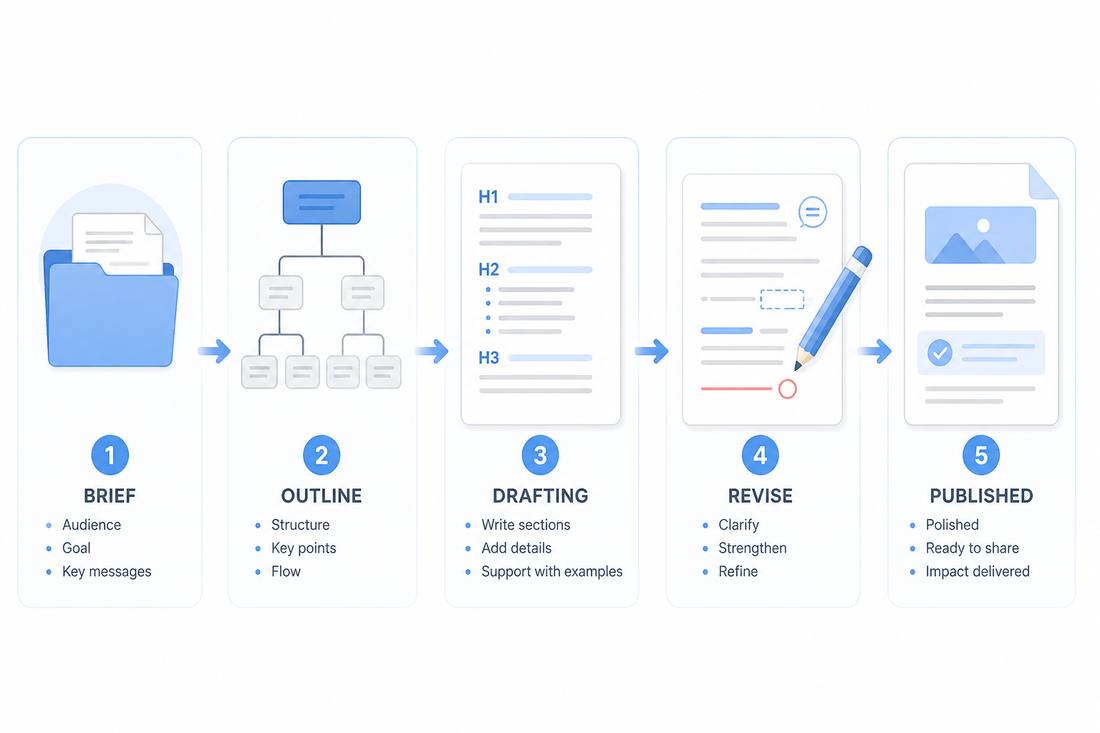
Step 1: Build a content brief
Don't ask Claude to write before you define the job.
A useful brief should tell Claude:
What you are creating
Who will read it
What the reader needs
What you want the content to achieve
What format you need
The desired tone
The important points to cover
The claims or topics to avoid
Relevant keywords, if SEO matters
Reliable source material
Examples of your existing writing, if voice matters
For an SEO article, you can also provide the primary keyword, supporting topics, search intent, and pages that need internal links.
Claude prompt: Create a content brief
Help me create a content brief for a [content type] about [topic].
Audience: [audience]
Goal: [goal]
Search intent: [intent]
Primary topic: [topic]
Key points to cover: [points]
Tone: [tone]
Target length: [length]
Required sources: [sources]
Before drafting anything, identify the audience's main questions, recommend a logical structure, and flag any information that needs verification.
The important part is not prompt complexity. It is giving Claude enough information to understand what a successful result looks like.
Step 2: Give Claude Useful Source Material
A better prompt cannot compensate for weak source material.
Depending on the project, provide:
Research notes
Product documentation
Brand guidelines
Previous articles
Customer interviews
Product specifications
Approved messaging
Data or reports
Relevant reference documents
If you repeatedly create content around the same subject, Claude Projects can help keep project-specific knowledge and instructions together. Check Anthropic's current documentation for the features available to your Claude plan.
Don't upload every file you have just because you can. Give Claude the information relevant to the task.
More context is not automatically better context.
Step 3: Generate the outline before the article
A strong outline prevents a common AI-writing problem: producing a lot of text before deciding what the article is actually trying to say.
Ask Claude to define the purpose of each section before writing it.
Claude prompt: Build an outline
Create an outline for this article. For every H2, state:
the question it answers,
the information the reader needs,
the evidence or example we should include,
the action the reader should take next.
Avoid repeated sections, generic introductions, and filler. Do not draft the article yet.
Then review the outline yourself.
If a section has no clear job, remove it before drafting.
That is much cheaper than rewriting 800 words later.
Step 4: Draft one section at a time
Once the outline is approved, work through the article section by section.
This gives you more control over:
Length
Tone
Accuracy
Examples
Structure
Repetition
Keyword usage
It also makes revisions easier. If one section is weak, you can replace that section without asking Claude to regenerate the entire article.
Claude prompt: Draft a section
Write only the following section: [section name].
Purpose of the section: [purpose]
Audience: [audience]
Required points: [points]
Source material: [sources]
Use direct, specific language. Avoid generic introductions and unnecessary summaries. Do not add factual claims that are not supported by the supplied information.
Keep the section focused on the reader's question.
This is usually more useful than:
“Write a 2,000-word article about X.”
The second prompt asks the model to make too many decisions at once.
Step 5: Run a Separate Editorial Review
Don't simply ask Claude to “make the article better.”
Give it a specific review task.
Claude prompt: Review a draft
Review this draft as a strict editor.
Identify:
Unsupported factual claims
Vague statements
Repeated ideas
Generic AI phrasing
Unnecessary introductions
Missing examples
Sections that do not answer the reader's question
Claims that need stronger evidence
Do not rewrite the entire article.
First list the problems. Then suggest specific improvements for the sections that need them.
This creates a useful separation:
Drafting: Produce ideas and language.
Editing: Find weaknesses.
Human review: Decide what should actually be published.
That last step matters. Fluent text is not automatically accurate, original, or useful.
Step 6: Move the approved copy into a document
Claude is useful for thinking, drafting, and revising. Your final content still needs a place where you can manage headings, tables, images, comments, page layout, and file exports.
Move approved content into WPS Office when you're ready to format and deliver the document.
The goal isn't to produce more AI text. It's to produce a better finished piece of content with less wasted editing time.
What Claude Does Well for Content Creation
Claude is most useful when you give it a clearly defined job rather than treating it as a replacement for the entire writing process.

Working from substantial reference material
Claude Projects can organize project knowledge and instructions for recurring work. That can be useful when the same brand information, research, or reference material is needed across multiple content tasks.
Following detailed writing constraints
Instead of saying:
“Make this professional.”
Define what professional means for your audience.
For example:
Use short paragraphs, avoid promotional language, explain technical terms in plain English, and use examples where they clarify the recommendation.
Specific constraints are easier to evaluate than vague instructions.
Revising existing drafts
AI is often more useful as an editor than as a blank-page replacement.
Instead of asking:
“Write this better.”
Try:
“Make this paragraph 30% shorter without removing the example or changing the factual meaning.”
Or:
“Rewrite this for a nontechnical reader while preserving all factual claims.”
A specific editing objective gives Claude a much narrower problem to solve.
Creating reusable content assets
Claude's Artifacts feature is designed for substantial standalone content that can be worked with separately from the main conversation. Depending on the task, this can be useful for reusable content and structured outputs.
The key is still the same: use the feature because it improves the workflow, not simply because it exists.
Where Claude Can Still Slow You Down?
Claude can reduce writing time, but it does not remove the work.
Output still needs fact-checking
A fluent sentence can contain an incorrect claim.
For important content, verify facts against reliable sources before publication. This is especially important for statistics, product specifications, pricing, laws, medical information, financial information, and claims about other products.
Long context still needs organization
A large amount of context does not automatically produce a better article.
Keep the brief, source material, outline, and instructions organized. Remove information that is irrelevant to the current task.
Voice requires examples
“Sound natural” is not enough.
Give Claude examples of your real writing and explain what should be preserved:
Sentence length
Vocabulary
Formality
Rhythm
Preferred terminology
Level of detail
Then review the result yourself.
AI can still produce generic writing
A polished paragraph can still say very little.
Look for:
Specific examples
Original observations
Evidence
Numbers
Customer language
Concrete recommendations
Clear explanations
If a paragraph could appear unchanged in 500 other articles, it probably needs work.
Chat is not necessarily the final publishing environment
A content draft still needs formatting, editing, file management, and final delivery.
That's where a document workflow matters.
Claude Prompts for Content Creation
You don't need complicated prompt engineering to get useful results from Claude.
You need enough context for Claude to understand the task.
Prompt 1: Create a Content Brief
Help me create a content brief for [topic].
Audience: [audience]
Goal: [goal]
Content type: [blog/social/email/report]
Main question: [question]
Key points: [points]
Tone: [tone]
Sources: [sources]
Return the brief with the audience, search intent, key questions, recommended structure, required evidence, and information that needs verification.
Prompt 2: Build an Outline
Create an outline for the approved brief.
Use H2 and H3 headings where appropriate.
For each section, explain the question it answers and the information that should be included.
Avoid repeated ideas, generic introductions, and sections that do not contribute to the reader's goal.
Do not draft the article yet.
Prompt 3: Draft a Section
Write only this section: [section name].
Purpose: [purpose]
Audience: [audience]
Required points: [points]
Source material: [sources]
Use direct language. Keep the section focused. Do not introduce unsupported claims or information that is outside the brief.
Prompt 4: Improve an Existing Draft
Edit the following passage for clarity and concision.
Preserve the original meaning and factual claims.
Remove filler, repetition, vague language, and unnecessary qualifiers.
Return:
The revised version
The three most important changes
Any claim that still needs verification
Prompt 5: Check for Generic AI Writing
Review this draft for generic AI writing patterns.
Flag:
Repetitive sentence structures
Vague claims
Empty transitions
Unnecessary summaries
Exaggerated language
Repeated conclusions
Phrases that do not sound like our brand
Suggest specific replacements. Do not rewrite the entire article.
Prompt 6: Turn Research Into an Outline
Analyze the supplied research and identify the most useful information for [audience].
Separate:
Facts
Expert opinions
Examples
Statistics
Claims that require verification
Information that is not useful for this audience
Then create an outline using only the information that supports the content goal.
The best prompt is not necessarily the longest prompt.
It is the one that makes the task clear enough to evaluate.
How to Review AI-Written Content Before Publishing
Don't judge AI-written content only by whether an AI detector flags it.
A stronger editorial review asks whether the content is actually good.
Before publishing, check:
Accuracy: Are important claims supported?
Originality: Does the article add something beyond generic summaries?
Experience: Does it include useful examples, observations, or practical guidance?
Specificity: Are recommendations concrete?
Structure: Does every section answer a real reader question?
Voice: Does it sound appropriate for the intended audience?
Clarity: Can a reader understand the answer without rereading it?
Editing: Has a human reviewed the final version?
If you use an AI Detector during editorial review, treat the result as one signal rather than proof of authorship.
The more important question is whether a human has checked the content and made meaningful editorial decisions.
Finish Claude Content in WPS Office
Claude can help you think through a content task, organize information, draft sections, and revise copy.
WPS Office can help you finish the work inside a document.
With WPS AI Writer, you can generate articles and outlines, draft emails and other copy, summarize and paraphrase text, and improve writing directly in WPS Writer.
A practical division of work looks like this:
Task | Best place to do it |
Brainstorming | Claude or another AI assistant |
Research synthesis | Claude |
Content outline | Claude |
Section drafting | Claude |
Fact-checking | Human editor |
Final editing | WPS Writer |
Grammar and clarity | WPS AI Writer |
PDF editing and export | WPS Office |
Final file delivery | WPS Office |
If you already have a Claude draft, you don't need to start over.
Bring the approved content into WPS Writer and use the tools available there to refine and format it.
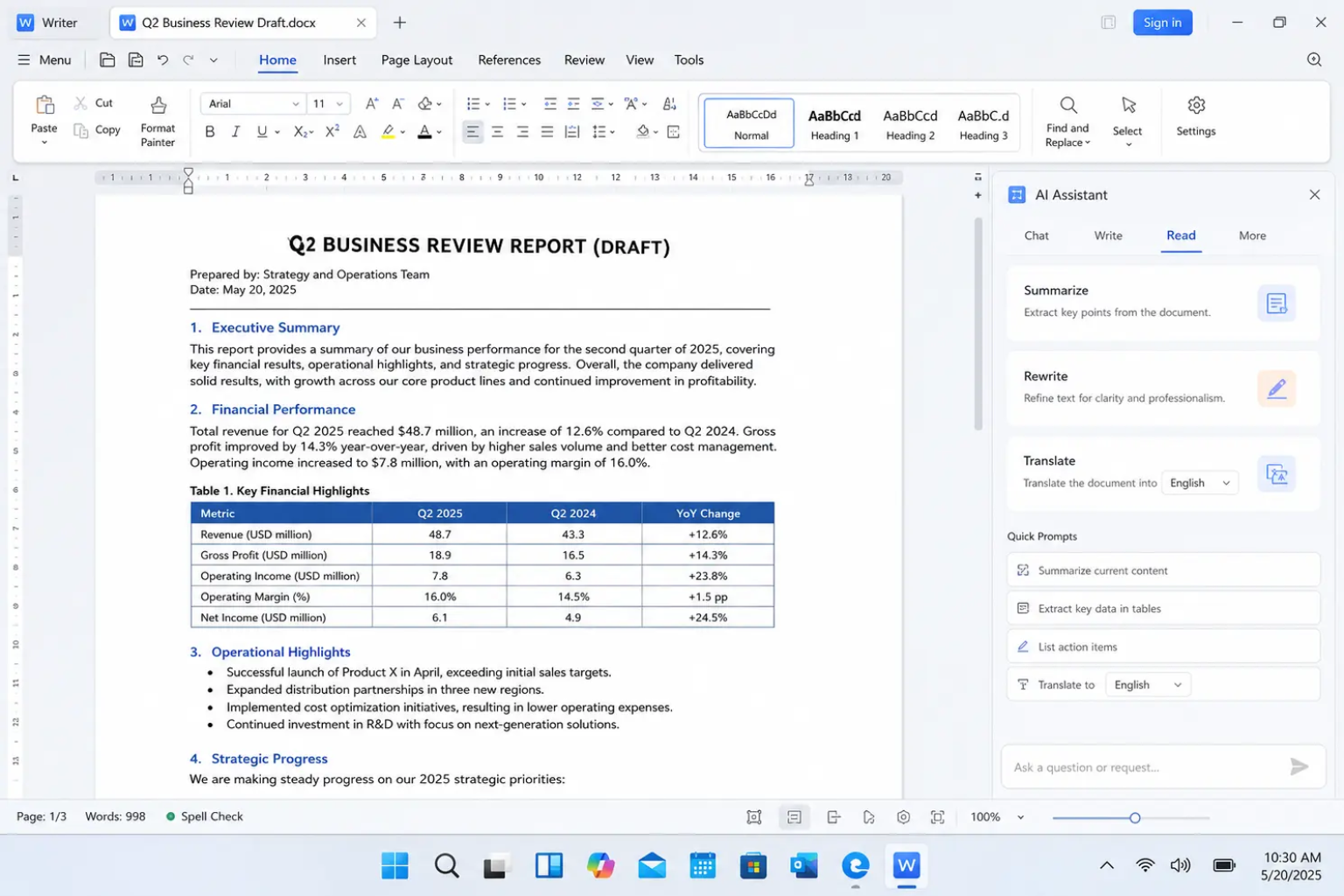
WPS AI Writer can help generate and refine content directly inside WPS Writer, so the writing and document-editing stages can happen in the same environment.
For more detail on using WPS AI Writer, see the WPS AI Writer guide.
If the Claude draft already works, use WPS to finish it rather than generating the same content again.


Ready to park Claude drafts in a real document instead of a chat scroll? Download the international version of WPS Office and finish Writer, Spreadsheet, PDF, and Presentation files next to whatever model you use.
A Simple Claude + WPS Content Workflow
For regular content production, the entire process can be reduced to seven stages:
1. Define the brief
Set the audience, goal, topic, search intent, tone, and requirements.
2. Gather the sources
Give Claude the information it is allowed to use.
3. Plan the structure
Create and approve the outline before drafting.
4. Draft with Claude
Work through the article section by section.
5. Review the content
Check facts, repetition, specificity, voice, and unsupported claims.
6. Edit in WPS Writer
Polish the language, format the document, and make the final editorial changes.
7. Deliver the finished file
Save or export the final document in the format your audience needs.
The important distinction is simple:
Claude helps with the content-generation process. WPS helps you turn approved content into a finished document.
FAQs About Using Claude AI for Content Creation
Is Claude good for content creation?
Yes. Claude can help with brainstorming, research synthesis, outlining, drafting, rewriting, and editing. The quality depends heavily on the brief, source material, and examples you provide. Important facts and claims should still be reviewed before publication.
How do I use Claude to write a blog post?
Start with a content brief containing the audience, goal, topic, search intent, required points, sources, and tone. Ask Claude for an outline first. After approving the structure, draft one section at a time and finish with a fact-checking and human editing pass.
What is the best prompt for Claude content creation?
There is no single best prompt. A useful prompt clearly defines the audience, goal, content type, required information, tone, constraints, and source material. For long-form content, asking for the outline before the draft usually gives you more control.
How do I make Claude writing sound more like me?
Give Claude two or three representative samples of your writing and explain what should be preserved, such as sentence length, vocabulary, tone, structure, and level of formality. Then review the output yourself rather than publishing it unchanged.
Can Claude create long-form content?
Yes. Claude can assist with long-form writing, but large projects are easier to manage when you separate planning, drafting, and revision instead of asking for one giant response.
What are Claude Projects?
Claude Projects are workspaces that let users organize project knowledge and instructions for ongoing work. They can be useful when you repeatedly create content around the same subject or need Claude to work from a consistent set of reference materials.
What are Claude Artifacts?
Artifacts are standalone pieces of content that Claude can create and work with separately from the main conversation. They can be useful for substantial or reusable outputs, depending on the task and features available to your Claude account.
Can I use Claude content with WPS Office?
Yes. A practical workflow is to use Claude for research, outlining, drafting, and revision, then move the approved content into WPS Writer for editing, formatting, and final delivery. WPS AI Writer can also help generate, rewrite, summarize, and improve content inside WPS Writer.
Should I use an AI detector on Claude-written content?
An AI detector can be one part of an editorial review, but it should not be treated as definitive proof of whether content was written by AI. A stronger review checks factual accuracy, originality, source quality, specificity, and whether a human has meaningfully edited the final version.
Summary
The most reliable way to use Claude AI for content creation is to treat it as a writing partner, not an automatic publishing system.
Use this workflow:
Brief → sources → outline → section drafts → fact-check → human edit → finished document
Give Claude enough context to understand the audience, purpose, voice, and factual boundaries. Approve the structure before generating the full draft, and ask for specific revisions instead of repeatedly regenerating the entire article.
Then bring the approved content into WPS Writer to edit, format, polish, and prepare the final document.
The goal isn't to produce more AI-generated text.
The goal is to create useful, accurate, specific content faster—and finish it as a document you can actually use.

'%3e%3cpath%20d='M19.9911%204.11386V6.471H18.5894C18.0775%206.471%2017.7322%206.57814%2017.5536%206.79243C17.3751%207.00671%2017.2858%207.32814%2017.2858%207.75671V9.44421H19.9019L19.5536%2012.0871H17.2858V18.8639H14.5536V12.0871H12.2769V9.44421H14.5536V7.49779C14.5536%206.39064%2014.8632%205.53201%2015.4822%204.92189C16.1013%204.31177%2016.9257%204.00671%2017.9554%204.00671C18.8304%204.00671%2019.509%204.04243%2019.9911%204.11386Z'%20fill='%23333333'/%3e%3c/g%3e%3cdefs%3e%3cclipPath%20id='clip0_2938_8199'%3e%3crect%20width='16'%20height='16'%20fill='white'%20transform='translate(8%204.00671)'/%3e%3c/clipPath%3e%3c/defs%3e%3c/svg%3e)
'%3e%3cpath%20d='M17.5237%2010.7813L23.4811%204H22.0699L16.8949%209.88693L12.7648%204H8L14.2469%2012.9029L8%2020.0133H9.4112L14.8725%2013.7952L19.2352%2020.0133H24M9.92053%205.04213H12.0885L22.0688%2019.0224H19.9003'%20fill='%23333333'/%3e%3c/g%3e%3cdefs%3e%3cclipPath%20id='clip0_2938_8200'%3e%3crect%20width='16'%20height='16.0134'%20fill='white'%20transform='translate(8%204)'/%3e%3c/clipPath%3e%3c/defs%3e%3c/svg%3e)


