

'%3e%3cpath%20d='M8%200C12.4183%200%2016%203.58172%2016%208C16%2012.4183%2012.4183%2016%208%2016C3.58172%2016%200%2012.4183%200%208C0%203.58172%203.58172%200%208%200ZM11.6162%204.38379C11.2257%203.99337%2010.5927%203.99338%2010.2021%204.38379L8%206.58594L5.79785%204.38379C5.40732%203.99334%204.77429%203.99329%204.38379%204.38379C3.99331%204.77429%203.99335%205.40733%204.38379%205.79785L6.58594%208L4.38379%2010.2021C3.99348%2010.5927%203.99341%2011.2257%204.38379%2011.6162C4.77426%2012.0066%205.40734%2012.0065%205.79785%2011.6162L8%209.41406L10.2021%2011.6162C10.5927%2012.0066%2011.2257%2012.0067%2011.6162%2011.6162C12.0067%2011.2257%2012.0066%2010.5927%2011.6162%2010.2021L9.41406%208L11.6162%205.79785C12.0066%205.40735%2012.0066%204.77429%2011.6162%204.38379Z'%20fill='%23080E17'%20fill-opacity='0.46'/%3e%3c/g%3e%3cdefs%3e%3cclipPath%20id='clip0_3761_713'%3e%3crect%20width='16'%20height='16'%20fill='white'/%3e%3c/clipPath%3e%3c/defs%3e%3c/svg%3e)




'%3e%3cpath%20fill-rule='evenodd'%20clip-rule='evenodd'%20d='M21.4999%2010.9993C21.4999%205.20009%2016.7986%200.498901%2010.9993%200.498901C5.19994%200.498901%200.498657%205.20009%200.498657%2010.9993C0.498657%2016.2404%204.33858%2020.5844%209.35855%2021.3722V14.0346H6.69238V10.9993H9.35855V8.68594C9.35855%206.05427%2010.9262%204.60062%2013.3248%204.60062C14.4736%204.60062%2015.6753%204.80571%2015.6753%204.80571V7.38979H14.3512C13.0468%207.38979%2012.64%208.19921%2012.64%209.0296V10.9993H15.5523L15.0867%2014.0346H12.64V21.3722C17.66%2020.5844%2021.4999%2016.2404%2021.4999%2010.9993Z'%20fill='%231568EA'/%3e%3c/g%3e%3c/svg%3e)


'%3e%3cpath%20d='M2.42045%2022.1876H6.31818V12.7217L0.75%208.54553V20.5171C0.75%2021.4414%201.49892%2022.1876%202.42045%2022.1876Z'%20fill='%234285F4'/%3e%3cpath%20d='M19.682%2022.1876H23.5797C24.5041%2022.1876%2025.2502%2021.4387%2025.2502%2020.5171V8.54553L19.682%2012.7217'%20fill='%2334A853'/%3e%3cpath%20d='M19.682%205.48293V12.7216L25.2502%208.54543V6.31816C25.2502%204.25236%2022.8921%203.07469%2021.2411%204.31361'%20fill='%23FBBC04'/%3e%3cpath%20d='M6.31824%2012.7217V5.48303L13.0001%2010.4944L19.6819%205.48303V12.7217L13.0001%2017.733'%20fill='%23EA4335'/%3e%3cpath%20d='M0.75%206.31816V8.54543L6.31818%2012.7216V5.48293L4.75909%204.31361C3.10534%203.07469%200.75%204.25236%200.75%206.31816Z'%20fill='%23C5221F'/%3e%3c/g%3e%3cdefs%3e%3cclipPath%20id='clip0_2954_7305'%3e%3crect%20width='24.5'%20height='18.375'%20fill='white'%20transform='translate(0.75%203.8125)'/%3e%3c/clipPath%3e%3c/defs%3e%3c/svg%3e)


Have you ever wanted lined papers for journaling or schoolwork but felt like generic notebooks just aren’t worth the cost. Plus, they don’t give you the freedom to pick your own line spacing. That’s where lined sheets of paper printable come in. The problem is, finding free templates that you can actually edit and print isn’t always easy. That’s why I’ve tracked down the best place to get them. This guide walks you through the top sources for free lined paper templates and how you can customize and edit them using WPS Office.
Best 10 Recommended Templates for Lined Paper
Whenever I’ve needed a template, I’ve always gone with WPS Office. And when it comes to lined sheets of paper printable, WPS Office has a wide variety to choose from. The best part is it doesn’t just stop at providing templates. It also lets you edit them however you want and download them easily too. They’re fully compatible with Word and come in styles that are both professionaland minimalistic. But even if you can’t find the exact template you’re looking for on WPS Office, don’t worry. Below are all the sites I’ve personally used for templates. Each site has its own specialty and variety that you can pick from.
1. Vertex42 Word Lined Paper Templates
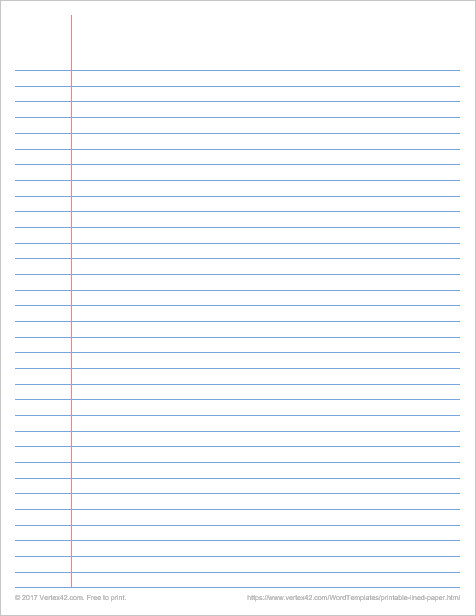
Vertex42 Word Lined Paper gives you that classic notebook feel. You really can’t go wrong with it. It’s one of the most used lined paper templates out there for schoolwork, journaling, or even handwriting practice. What makes it stand out is that it lets you customize things like line height and line color, so you can adjust it just the way you want.
Benefits:
You can edit the line spacing to fit how big or small you want your handwriting to be
You can change the color of the lines to give your notes or journaling pages a more personalized look
Works perfectly for school assignments journaling and daily writing
Since it's a Word file you can open it in both Microsoft Word and WPS Office without any problem
It gives you a clean and professional feel while still being super beginner friendly
2. Suncatcher Studio Decorative Lined Stationery
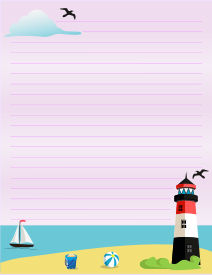
Suncatcher Studio Decorative Lined Stationery has a wide range of decorative papers that can actually make writing feel fun. It’s great if you want to download lined sheets for handwriting practice, especially for kids. These cute and colorful pages can get them excited to write more. And if you’re someone who enjoys themed or seasonal paper, Suncatcher is definitely worth checking out.
Benefits:
Makes writing more fun for kids
Offers beautiful themed designs like floral and seasonal styles
Great for personal journaling, letters, or creative writing
Available in both PDF and PNG formats for easy printing
3. Madison’s Paper Lined Handwriting Paper
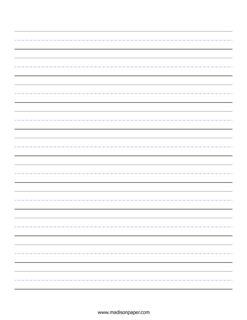
Madison’s Paper Lined Handwriting Paper is the best if you’re looking for handwriting sheets. These papers are perfect for kids, especially those in first or second grade. The lines help them understand the height of lowercase letters and really improve their handwriting over time.
Benefits:
Great for early handwriting practice
Helps kids learn letter sizing with dashed midlines
Simple layout designed specifically for beginners
Available as easy-to-print PDFs
4. World of Printables Multi-Style Lined Templates
World of Printables Multi-Style Lined Templates gives you a whole pack of lined paper options to pick from. You’ll find wide lines, narrow lines, Cornell-style notes, and even two- or three-column formats. It works great if you like to switch things up based on what you're writing, like class notes, study guides, or work journals.

Benefits:
Gives you multiple lined styles in one place
Includes Cornell, legal, and multi-column layouts
Great for organized note-taking or structured writing
All templates are easy to download and print
5. FirstPrintable.com – 30+ Lined Styles Collection
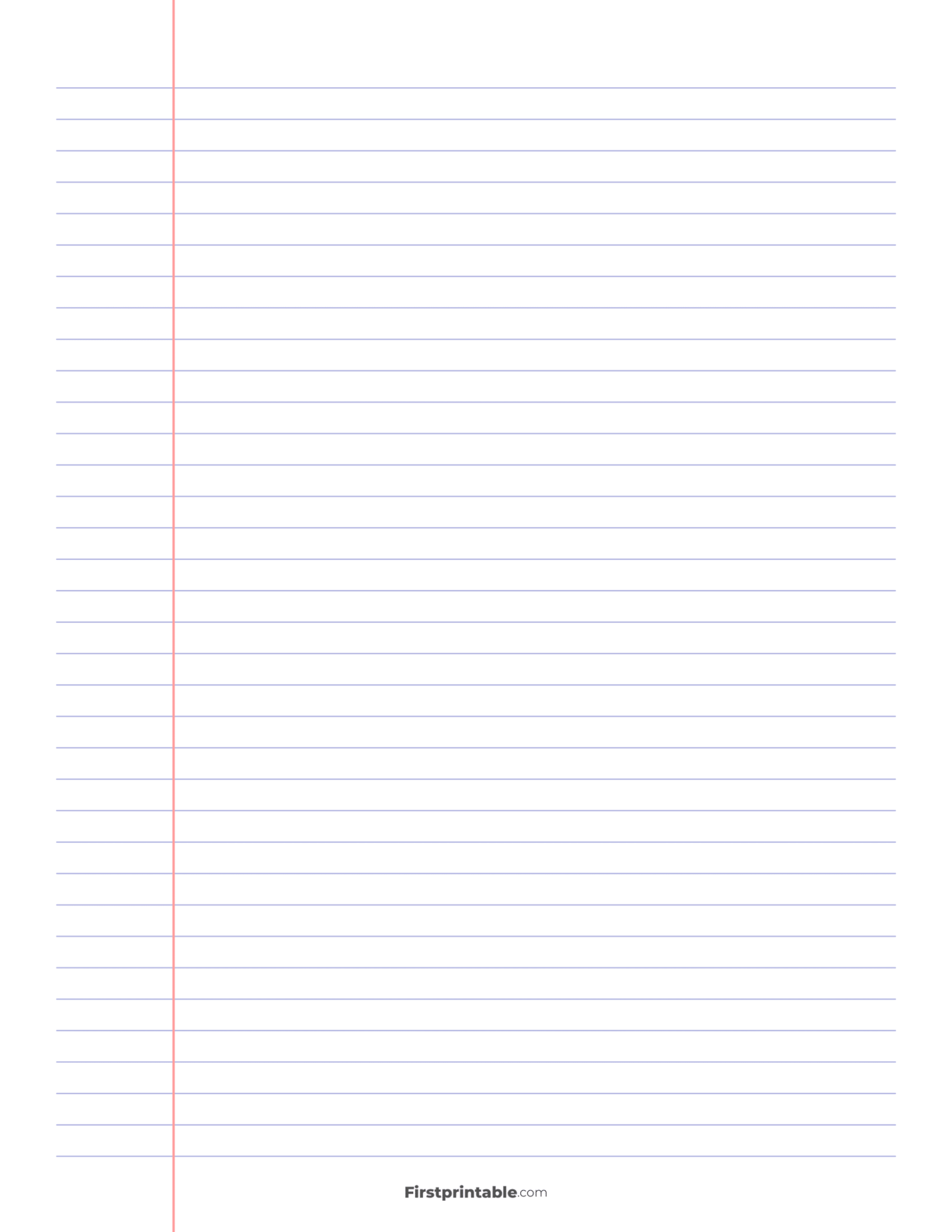
FirstPrintable.com 30+ Lined Styles Collection is another good option if you are looking for free printable lined paper templates. It offers a wide variety of lined paper styles from college ruled to kindergarten handwriting paper. They have it all. Their templates can be used for all sorts of things like calligraphy, music notation, note taking, essay writing, and more.
Benefits:
Great variety for all ages, from kids learning to write to college students
Perfect for handwriting, calligraphy, journaling, or even music practice
Templates are free and ready to print right away
Simple and clean layouts that are easy to use
Works well for both personal and school use
6. Printablee 14-Line Writing Paper PDF Pack
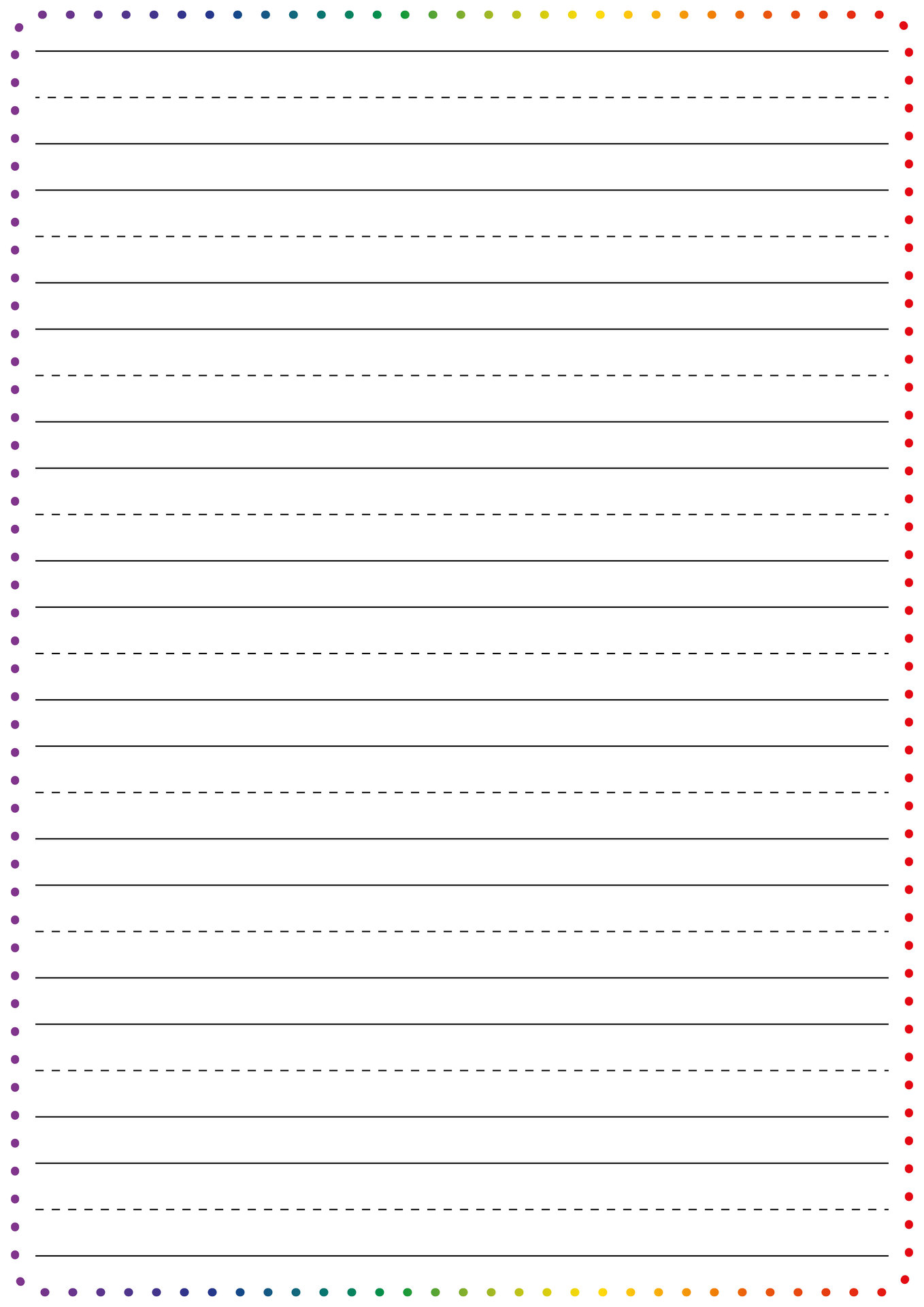
If you’re helping a child learn cursive or just looking for simple lined paper for kids, the Printablee14-Line Writing Paper PDF Pack is a great pick. It’s made especially for students who don’t have access to lined papers at home. They offer a wide variety, from basic lined sheets to handwriting practice paper for kids. Some templates even include fun pictures to keep kids interested and make writing more enjoyable.
Benefits:
Easy to download and use at home or in class
Offers both simple and fun templates for kids
Great for students learning cursive or improving handwriting
Helps keep kids engaged with picture-based designs
No need to buy expensive notebooks or handwriting books
7. ThePinkCraftBox Ruled Paper Templates
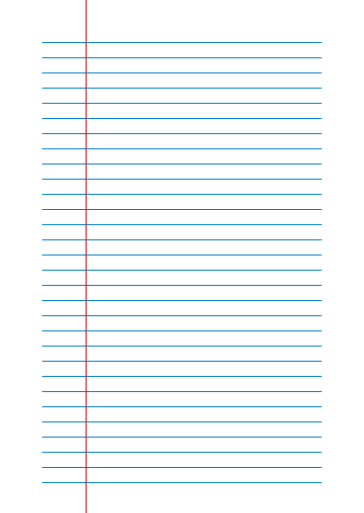
ThePinkCraftBoxhas a wide range of straight and dotted lined papers with different row heights and colors. These templates are super flexible. You can use them for just about anything from writing school projects to making to-do lists or even noting down your grocery list.
Benefits:
Comes in both dotted and straight line styles
Includes various row heights to match your needs
Available in multiple colors
Perfect for schoolwork journaling or everyday notes
Can be used for both kids and adults
8. FormAndTemplate – 30 Lined Paper DOCX Files
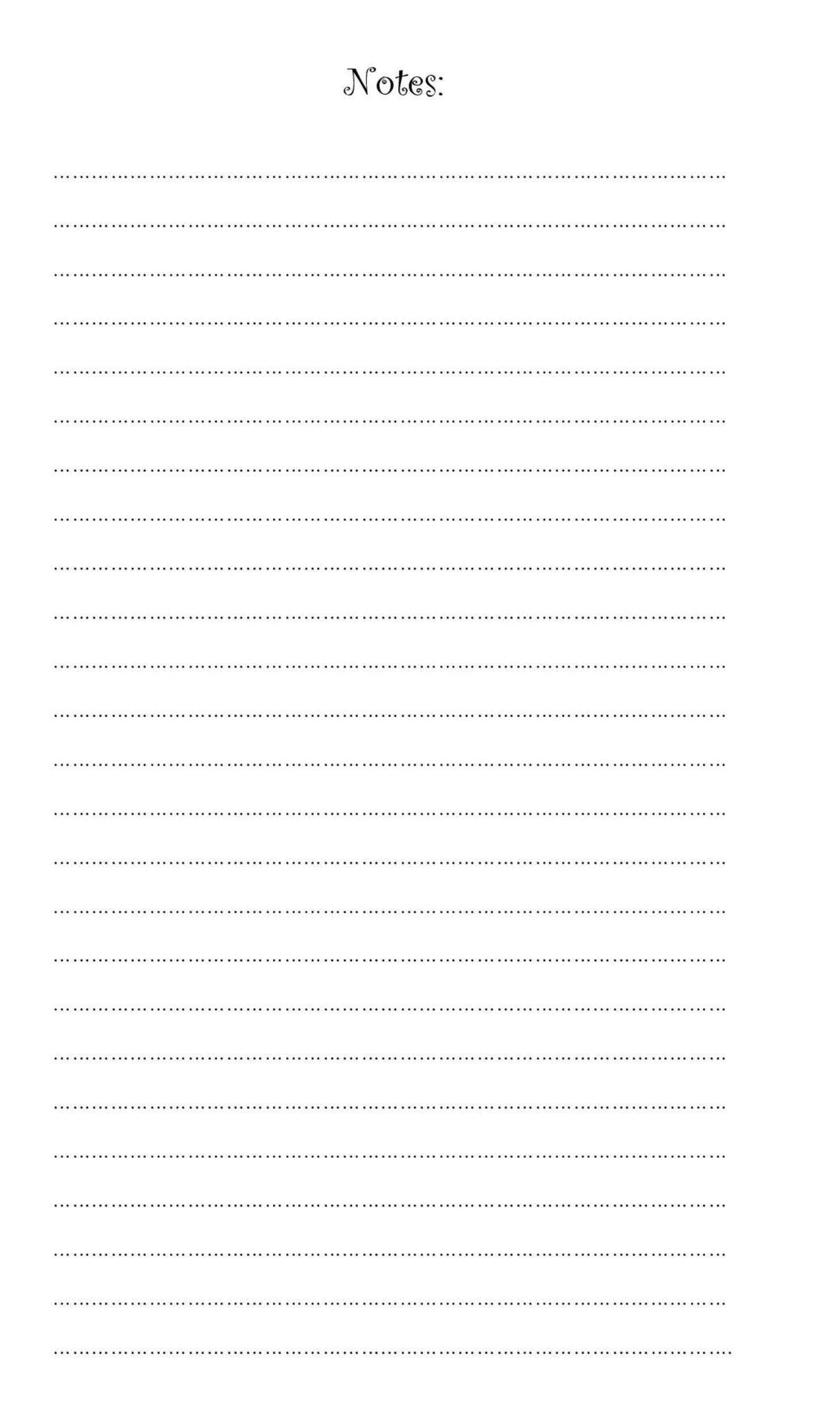
FormAndTemplategives you access to over 30 different lined paper templates in Word format. What makes their collection interesting is the variety. They don’t just stick to basic lines. You’ll find templates with unique row heights, some made for letter writing and even a few for creating question papers. And if you’re looking for something beyond lined papers they’ve got templates for brochures, flyers and even Christmas cards.
Benefits:
Offers more than 30 free Word templates
Includes letter writing and exam paper layouts
All templates are editable in Word
Great variety in row height and spacing
Also provides non-paper designs like flyers and brochures
9. DIY Craft Club – Creative & Themed Lined Templates
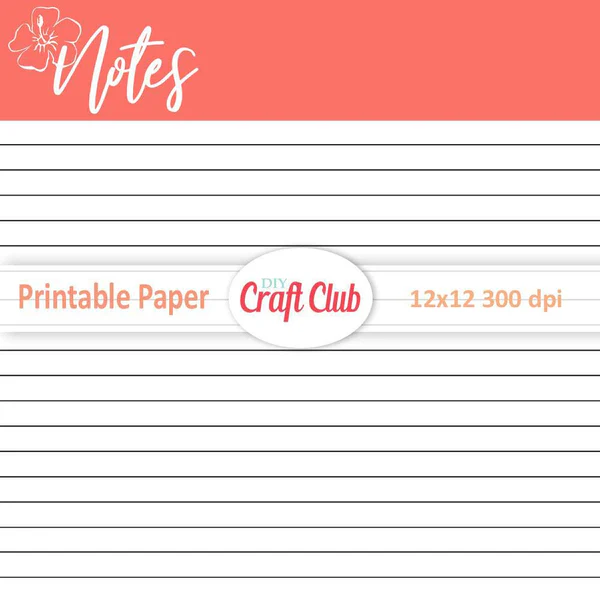
If you’re someone who enjoys writing on decorated pages instead of plain lines, then DIY Craft Club’s collection is worth checking out. They offer lined paper with pretty themes like floral borders, lemon headers, and filigree designs. These templates are great if you’re journaling, writing letters, or even working on creative school projects.
Benefits:
Beautiful decorative headers and themed designs
Great for creative journaling and letter writing
Makes writing feel more personal and enjoyable
Available in ready-to-print formats
10. Reddit Shared Digital Lined Templates (GoodNotes/Notability)
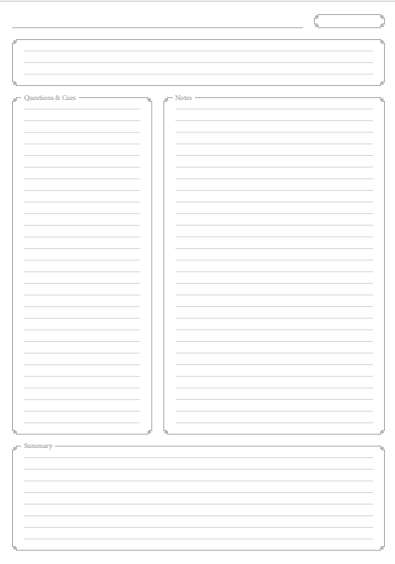
If you take notes digitally or use apps like GoodNotes or Notability,Reddit has tons of shared lined paper templates. These include standard lines, Cornell-style layouts, and two-column formats. They're perfect for digital journaling, organizing class notes, or creating structured study guides.
Benefits:
Free to download and use
Compatible with digital note-taking apps
Includes multiple styles like two-column and Cornell
Ideal for digital journaling and organized notes
How to Edit Printable Lined Paper in WPS PDF
Now that you know where to find the best templates and have picked the one you like, let’s look at how to customizeit to your liking. For that, there’s WPS PDF Editor. This tool makes your life so much easier. You can easily add a title, adjust margins, or just insert extra space into your lined sheets.
Step-by-step: Editing in WPS PDF Editor
WPS PDF Editor makes customizing lined papers so easy. Just follow the steps I’ll show you, and then you can easily customize your lined paper to your liking.
Step 1: Open the lined paper template that you want to customize.
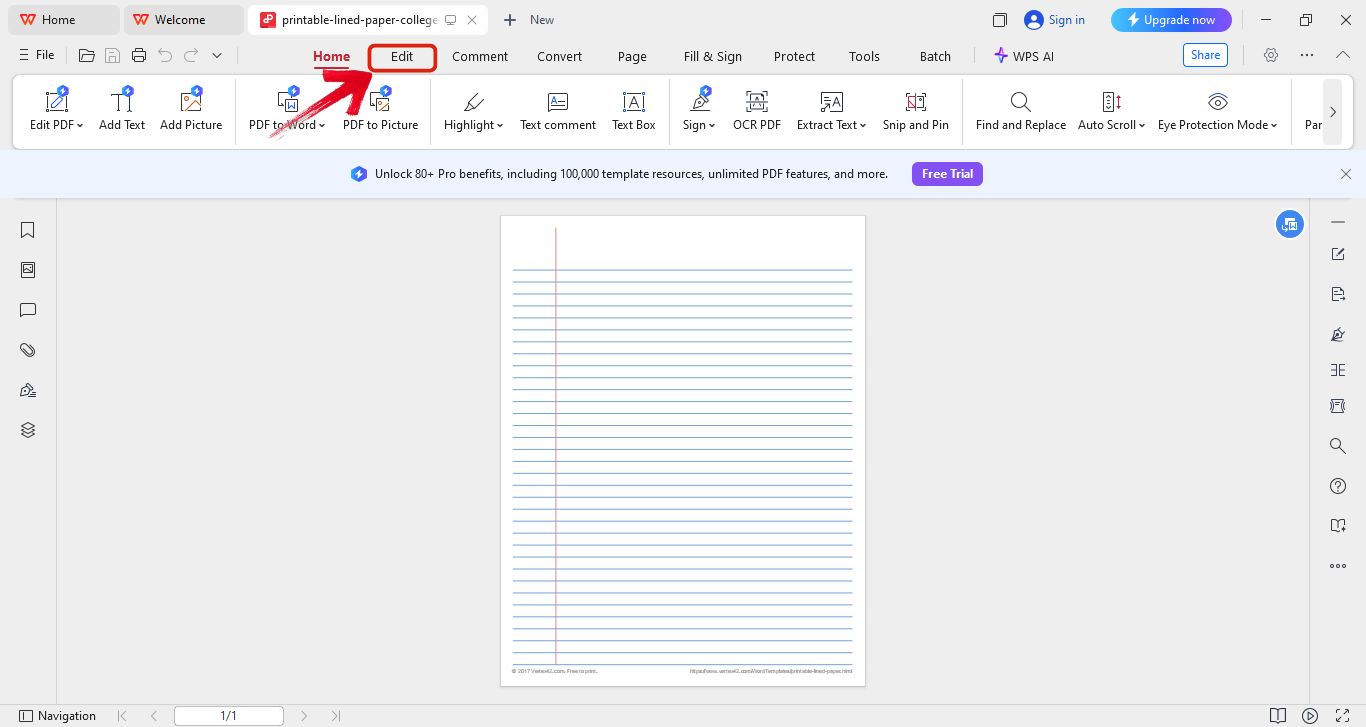
Step 2: Once the PDF is opened, look at the top menu and click on Edit.
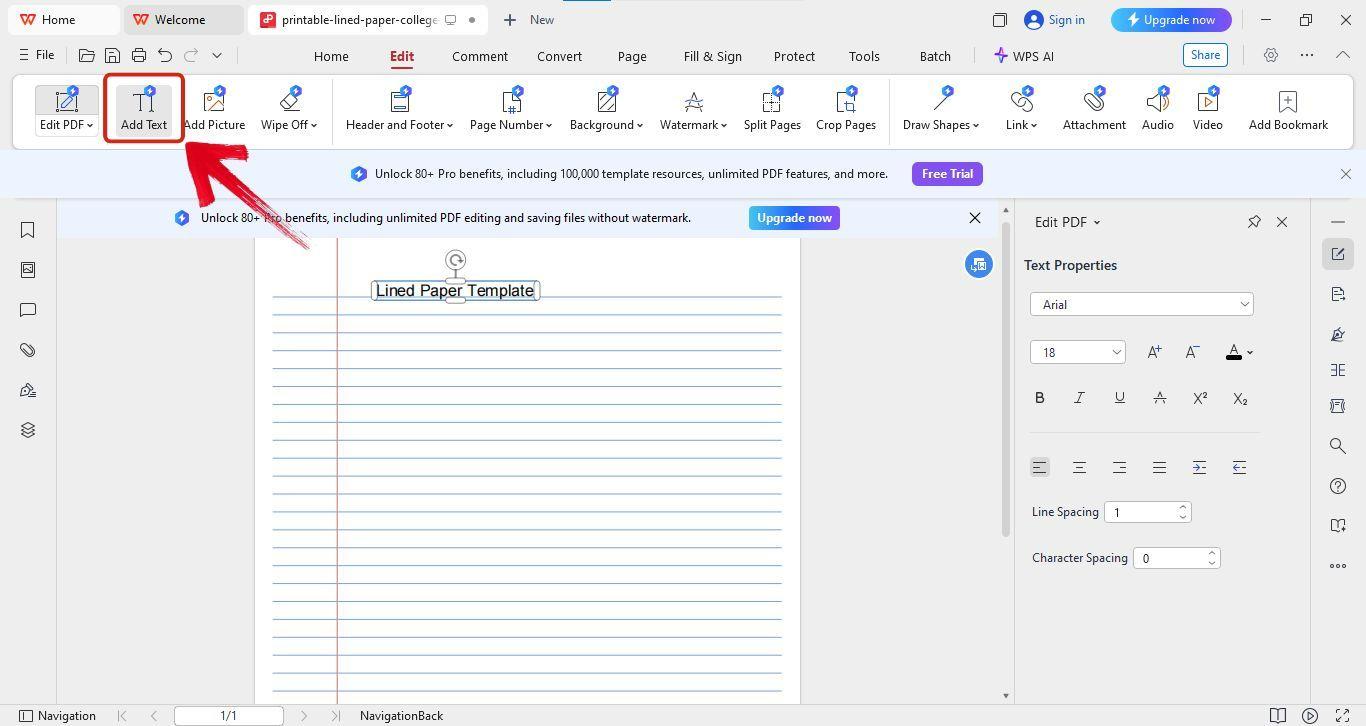
Step 3: If you want to add a heading or write something on the sheet, just click Add Text and tap anywhere you want to place your text.
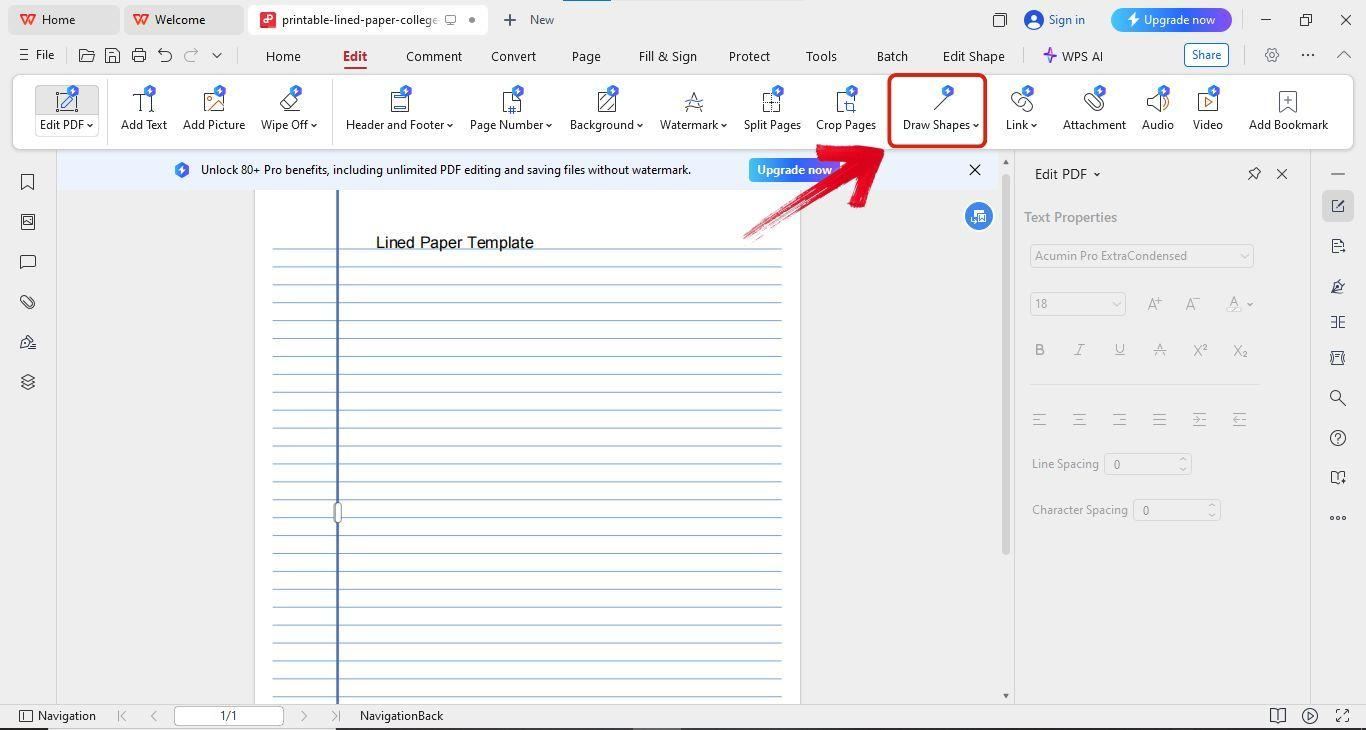
Step 4: To add shapes, click on Draw Shapes, choose the shape you like, and draw it wherever you want.
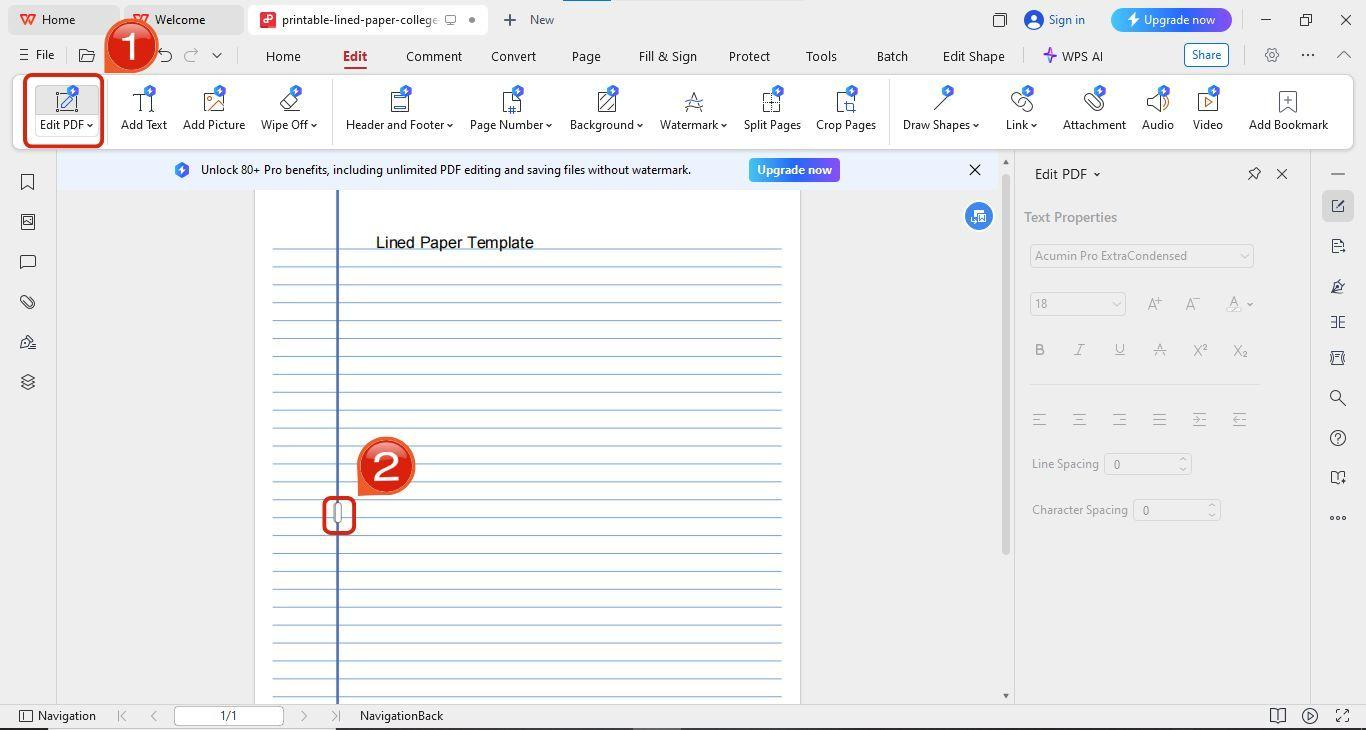
Step 5: If you want to adjust the margins, click onEdit PDF and drag the lines to resize the margins the way you want.
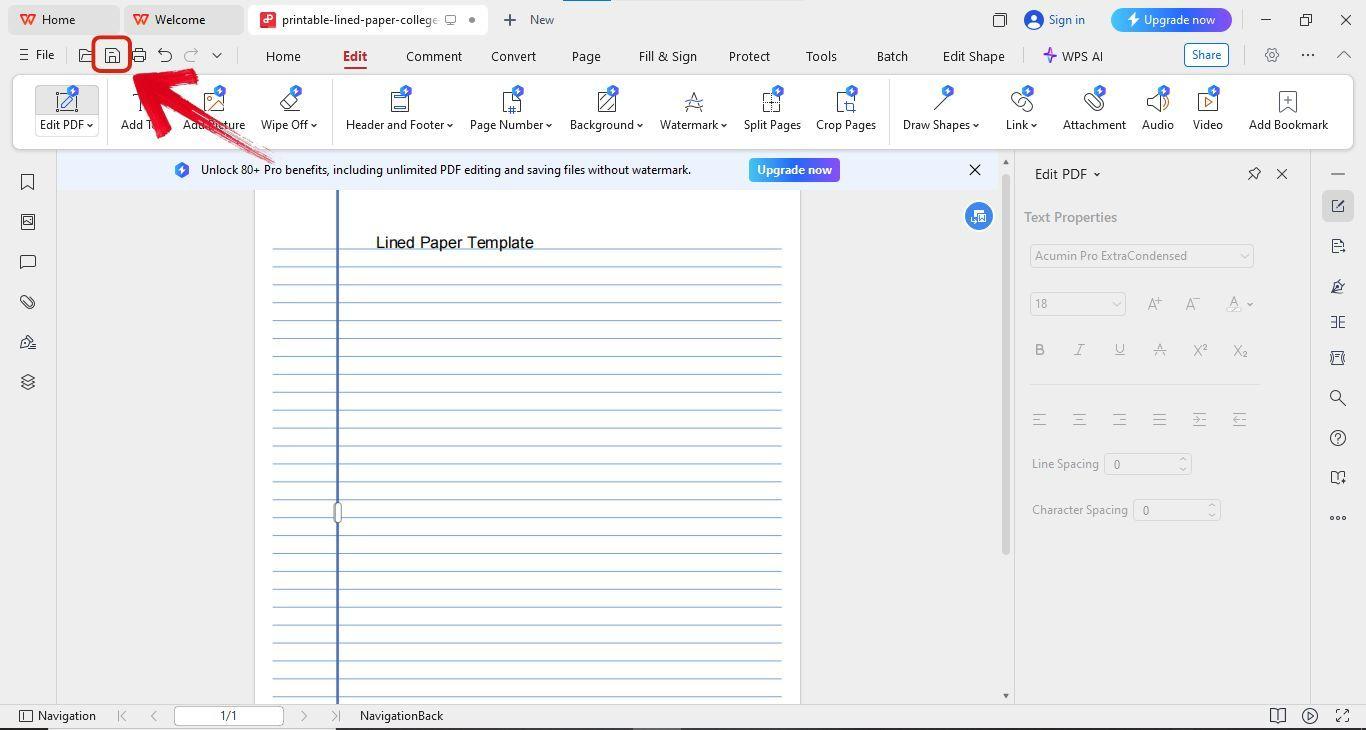
Step 6: After you're done editing your template, just click the Save button next to theFile tab.
How to Create Printable Lined Paper in Word
If you’re someone who can’t find the exact template you’re looking for, there’s nothing to worry about. Instead of searching for lined paper templates, you can create your own from scratch, tailor made to your liking using WPS Word. You have full control with it. Maybe you want to changethe font, resize the margins or adjust the line spacing. You can easily do all of that using WPS Word.
Step-by-step guide
Now that you’ve decided to create your own lined paper, it’s pretty easy. Just follow the steps I’ll show you below.
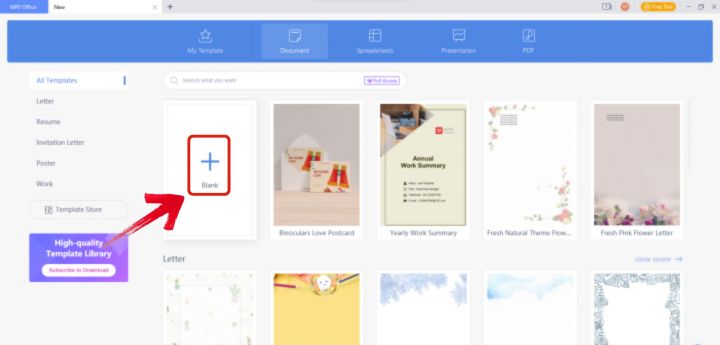
Step 1: Open WPS Office and create a blank document.
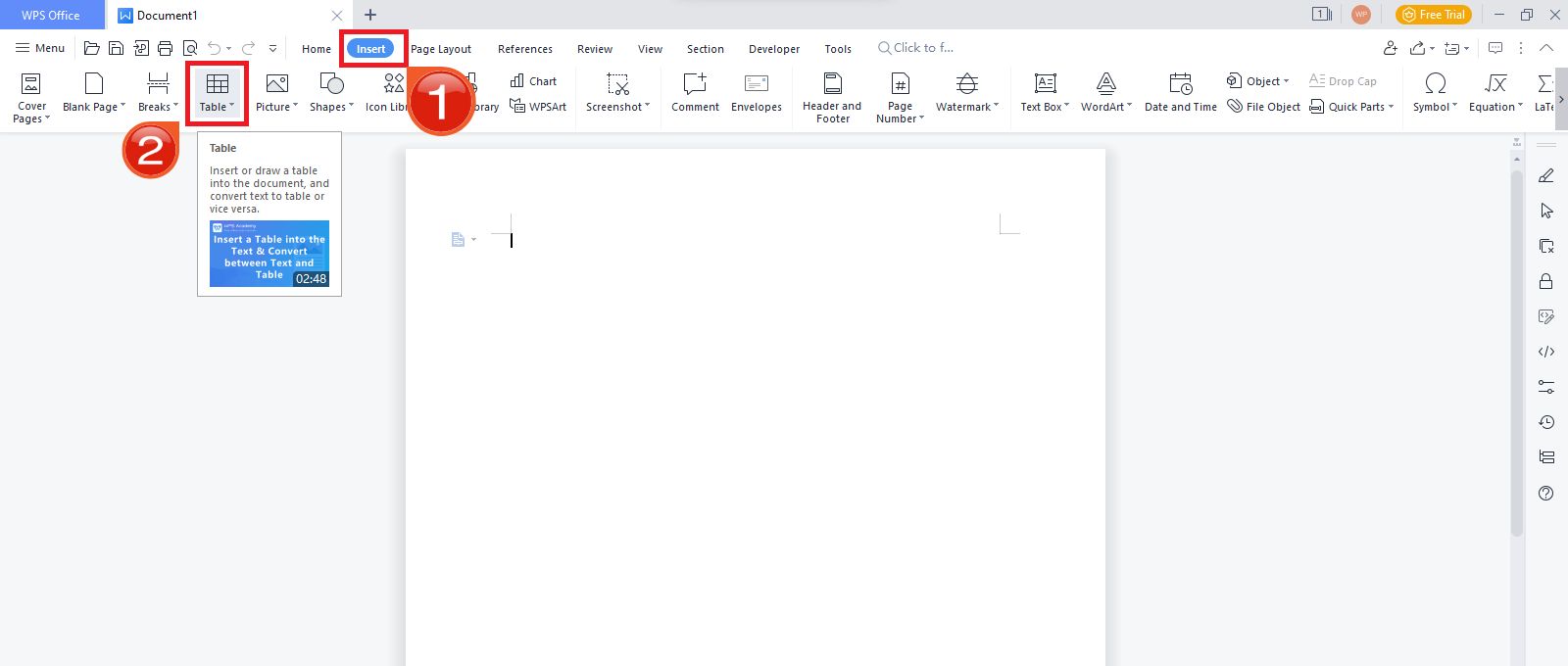
Step 2: Now to get started, go to theInsert tab and click on Table.
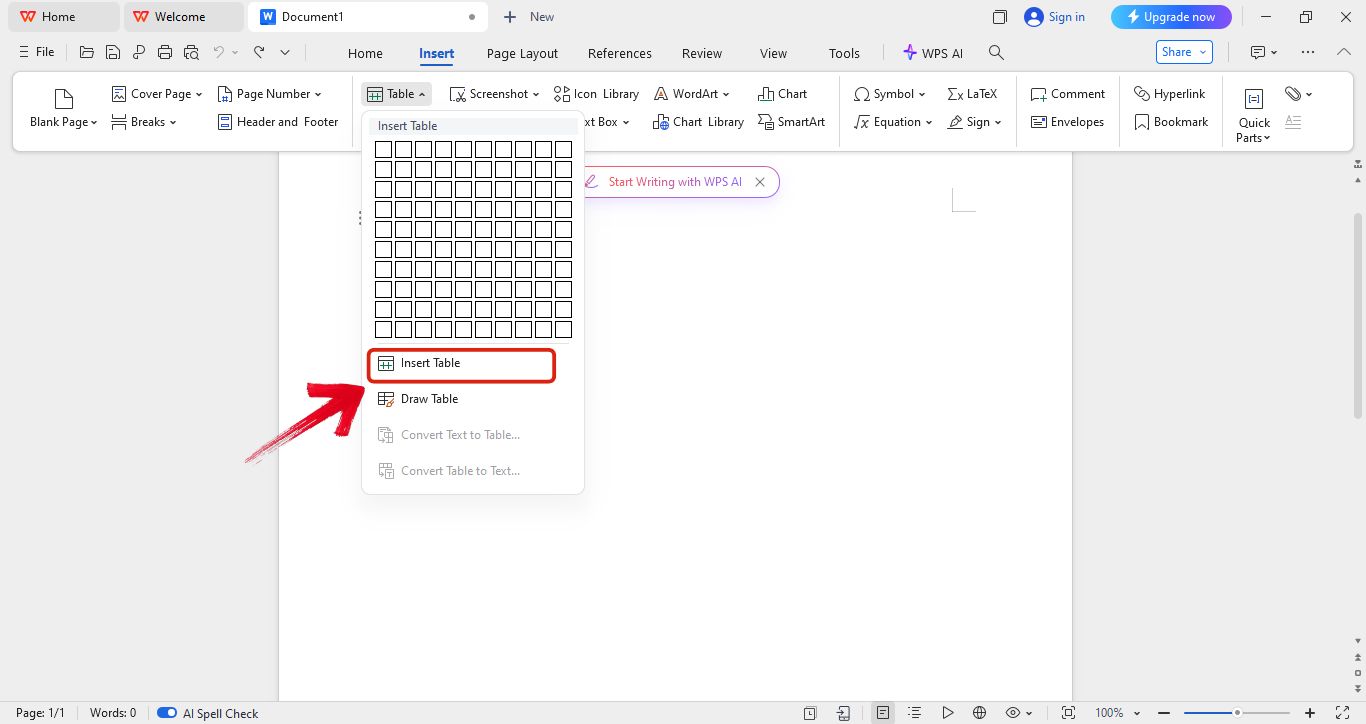
Step 3: From the dropdown menu, selectInsert Table.
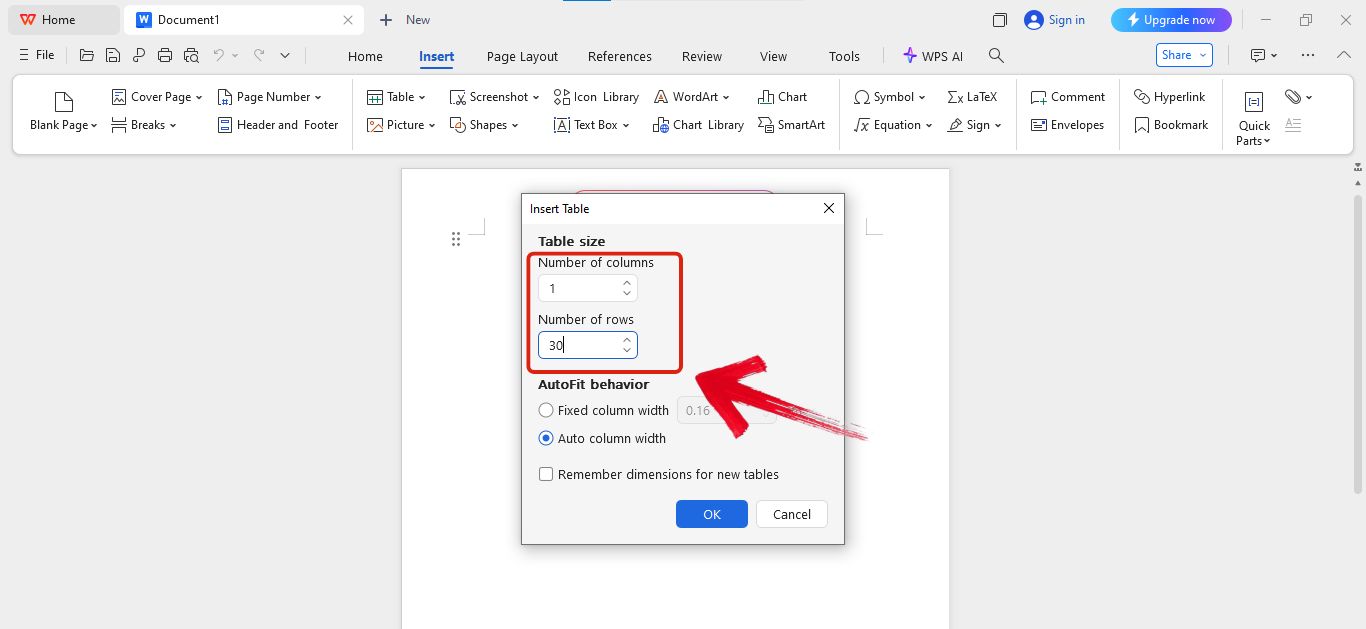
Step 4: Next, decide how many lines you want on your paper. For example, you can choose 1 column and 30 rows to make a full page of lines.
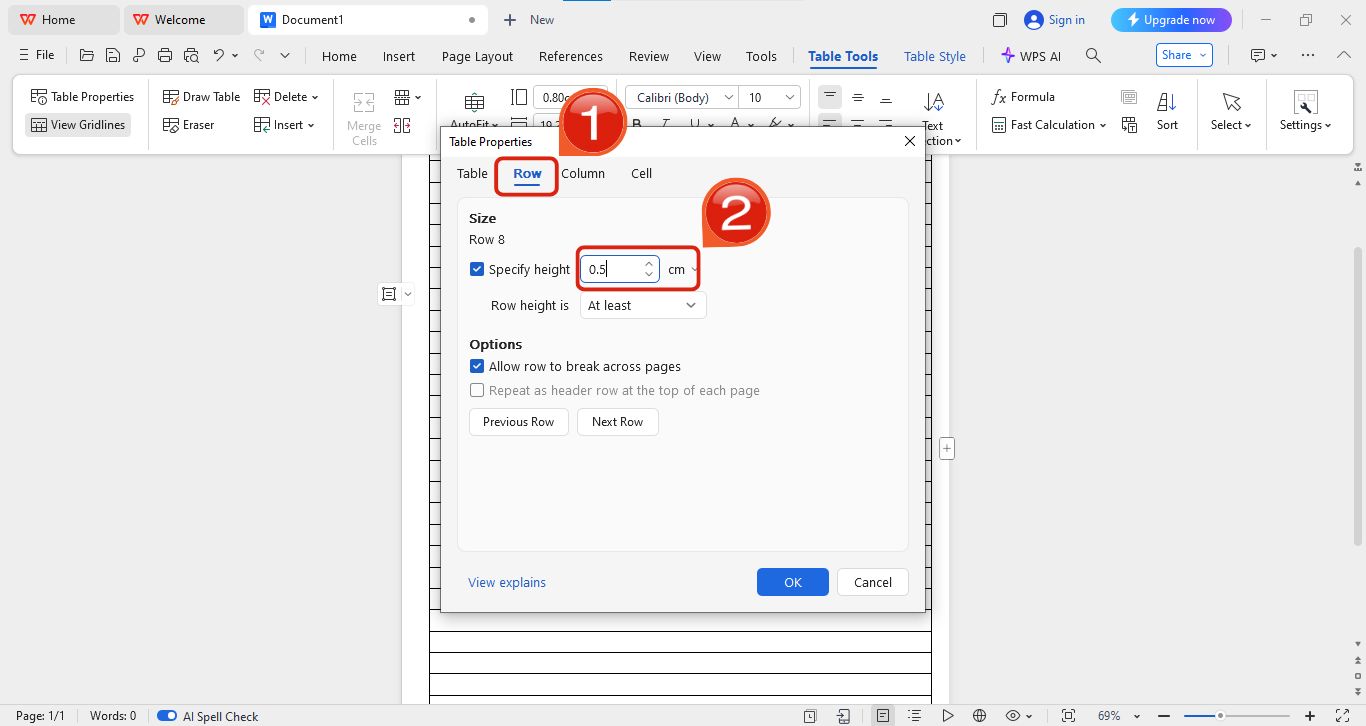
Step 5: To adjust the row height, right-click on the table and select Table Properties from the menu.
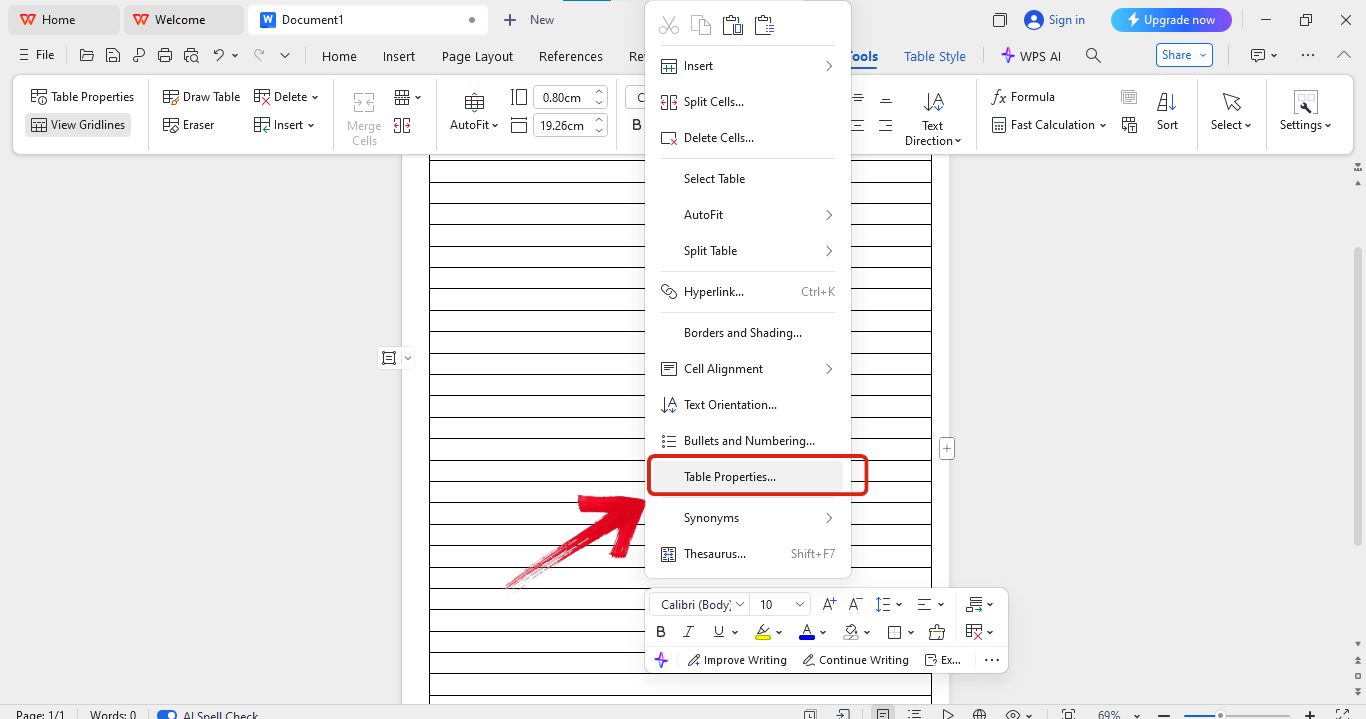
Step 6: Now go to the Row tab and set the height. I usually set it to 0.5 cm so it looks just like lined paper.
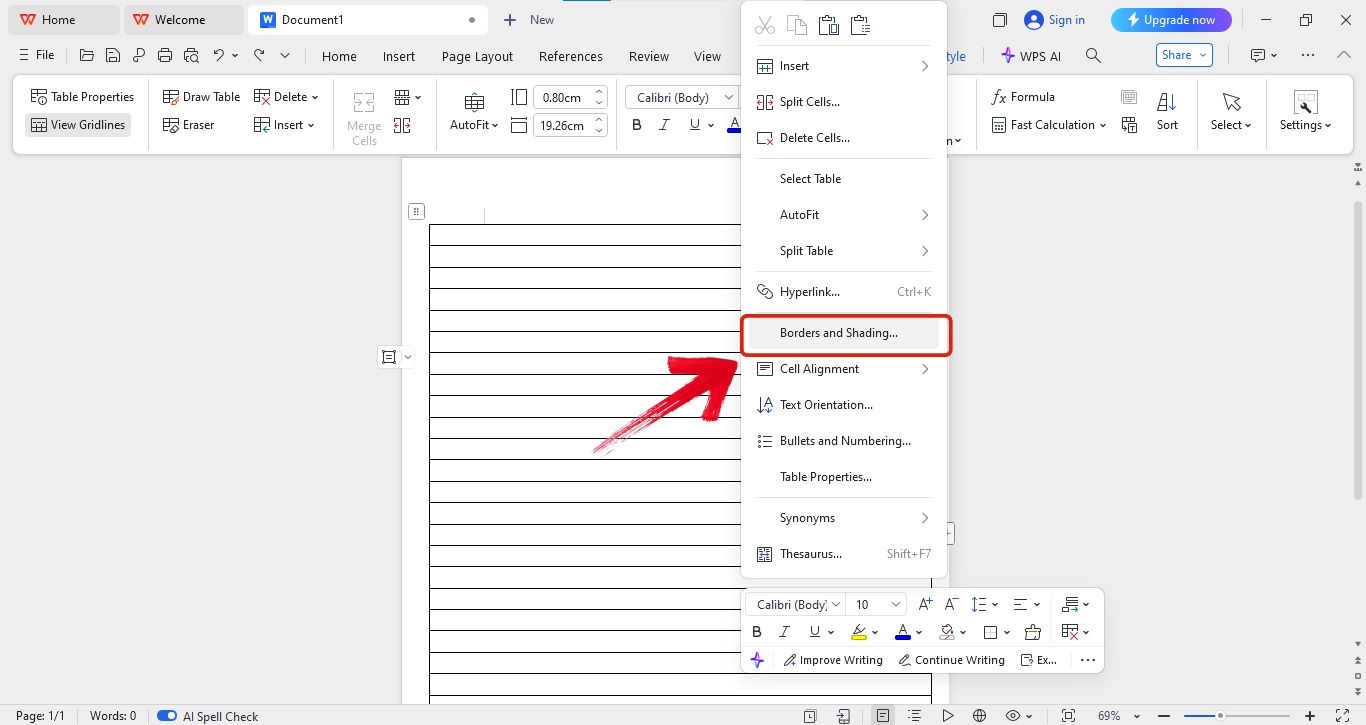
Step 7: If you want to remove the side borders, just right-click on the table and select Borders and Shading.
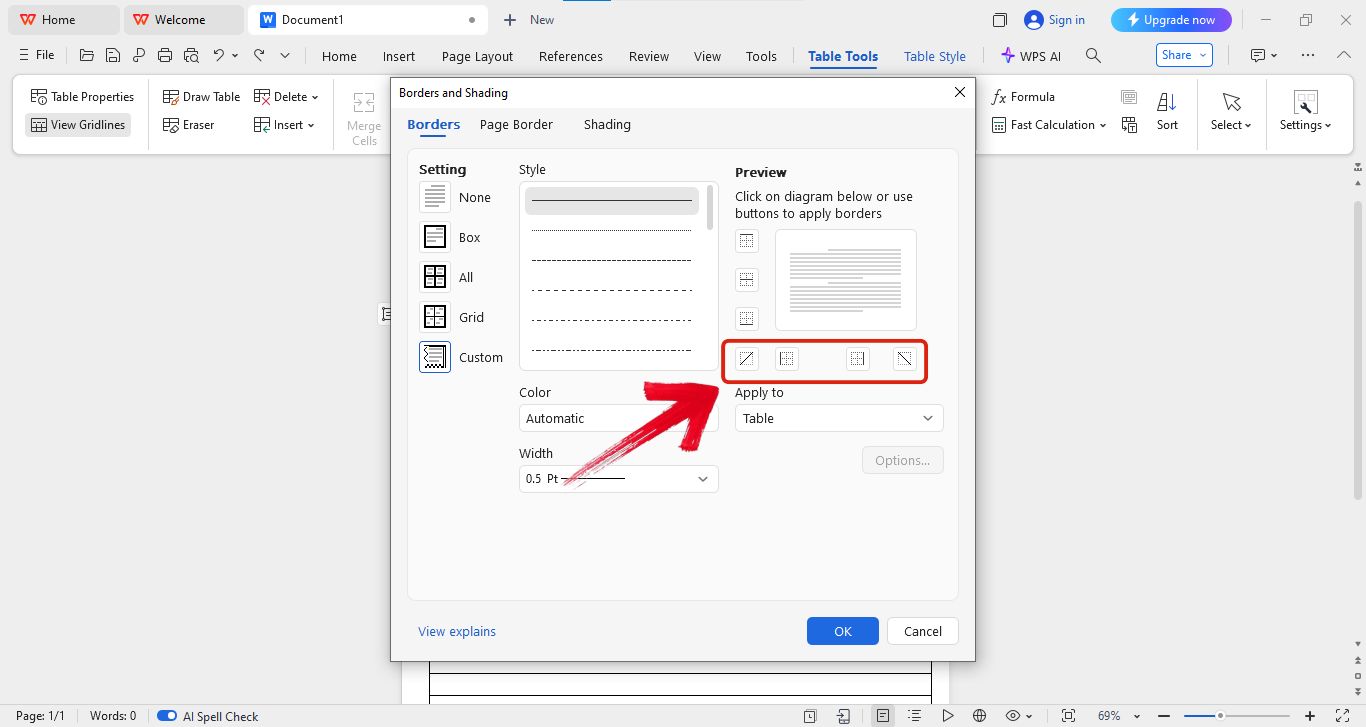
Step 8: Now you can easily customize the borders the way you like. You can remove the left and right lines to make it look more like regular lined paper.
Free Office Suite with Editable Christmas Flyer
If you're looking for a free and reliable office suite then WPS Office is the way to go. It’s not just for opening or viewing documents. It actually lets you edit almost any kind of file with ease. Compared to other options out there, WPS Office really stands out, especially because of its built-in AI tools that make everything ten times easier and faster. Plus its simple interface makes it super easy to navigate things.
Another thing I love is the huge collection of ready-to-use templates. You’ll find everything from professional and minimalist designs to fun ones like Christmas flyers. So instead of wasting time searching all over Google, you can just grab a template directly inside WPS Office and start editing right away. It saves a lot of time and effort.
Pros of Using WPS Office
Works on both desktop and mobile
Lets you open, edit, and create all kinds of documents easily
Comes with smart AI tools to help write, correct grammar, and summarize
Offers a huge library of free editable templates, including flyers and resumes
Super beginner-friendly with a simple interface
You don’t need to install separate apps for PDF, Word, or Excel.
Supports online collaboration and document sharing
Regular updates and stable performance
Most features are free to use without needing a premium plan
FAQs
1. Can I print lined paper in A4 or Letter size?
Yes, most templates are available in letter or A4 size, so most of the time you don’t need to worry about the size format. But it’s better to take precautions and check before using it.
2. Can I change line spacing on the printable sheet?
Yes, changing the line spacing of templates is possible. The only catch is that the template should be an editable one. Then you can easily upload it in WPS Word and edit it to your liking.
3. Is it okay to use these printable sheets commercially?
This depends on where you are downloading your templates from. Some sites allow you to use their templates commercially without any copyright problems, but some do restrict it. So it’s better to check copyright notices before doing anything.
4. Do I need to sign up or pay to use these templates?
No, most of the sites I’ve recommended give you free templates. You don’t need to sign up or pay to use them. But if you go with some other random site, they might charge you for their templates, so it’s better to double-check beforehand.
Final Thoughts on Using Printable Lined Sheets
When I was tutoring some kid, I always ran into one problem. They couldn’t write in a straight line and had trouble with their handwriting. So I started looking for notebooks that could help fix this, but they were expensive and didn’t give me the freedom to customize the paper based on each student’s needs.
To solve that, I began searching for lined sheets of paper printable. During my search, I found the best site to get these templates, and on top of that, I discovered the easiest way to customize and edit those lined sheet papers. In this guide, I’ll show you the exact sites I use to get lined sheet paper templates and how I edit and personalize them using WPS Office so I can tweak them to fit my students perfectly.

'%3e%3cpath%20d='M19.9911%204.11386V6.471H18.5894C18.0775%206.471%2017.7322%206.57814%2017.5536%206.79243C17.3751%207.00671%2017.2858%207.32814%2017.2858%207.75671V9.44421H19.9019L19.5536%2012.0871H17.2858V18.8639H14.5536V12.0871H12.2769V9.44421H14.5536V7.49779C14.5536%206.39064%2014.8632%205.53201%2015.4822%204.92189C16.1013%204.31177%2016.9257%204.00671%2017.9554%204.00671C18.8304%204.00671%2019.509%204.04243%2019.9911%204.11386Z'%20fill='%23333333'/%3e%3c/g%3e%3cdefs%3e%3cclipPath%20id='clip0_2938_8199'%3e%3crect%20width='16'%20height='16'%20fill='white'%20transform='translate(8%204.00671)'/%3e%3c/clipPath%3e%3c/defs%3e%3c/svg%3e)
'%3e%3cpath%20d='M17.5237%2010.7813L23.4811%204H22.0699L16.8949%209.88693L12.7648%204H8L14.2469%2012.9029L8%2020.0133H9.4112L14.8725%2013.7952L19.2352%2020.0133H24M9.92053%205.04213H12.0885L22.0688%2019.0224H19.9003'%20fill='%23333333'/%3e%3c/g%3e%3cdefs%3e%3cclipPath%20id='clip0_2938_8200'%3e%3crect%20width='16'%20height='16.0134'%20fill='white'%20transform='translate(8%204)'/%3e%3c/clipPath%3e%3c/defs%3e%3c/svg%3e)


