A Malay draft that reads perfectly to you can still land badly: one doubled plural after para, one adalah where ialah belongs, and the reader quietly downgrades the whole document. The fastest check is two passes in WPS Writer: set Bahasa Melayu as the proofing language, then run AI Spell Check over the text and work through the Correctness list item by item.
Malay Grammar Checker: Proofread Malay in WPS Writer
100% secure
Use a Malay Grammar Checker Inside WPS Writer, Step by Step
The order matters. If the document is still tagged as English, WPS underlines every correct Malay word and hides the two errors that actually matter, so fix the language first and read the suggestions second.
Open the draft in WPS Writer and select the Malay text, or press Ctrl+A when the whole file is in Malay.
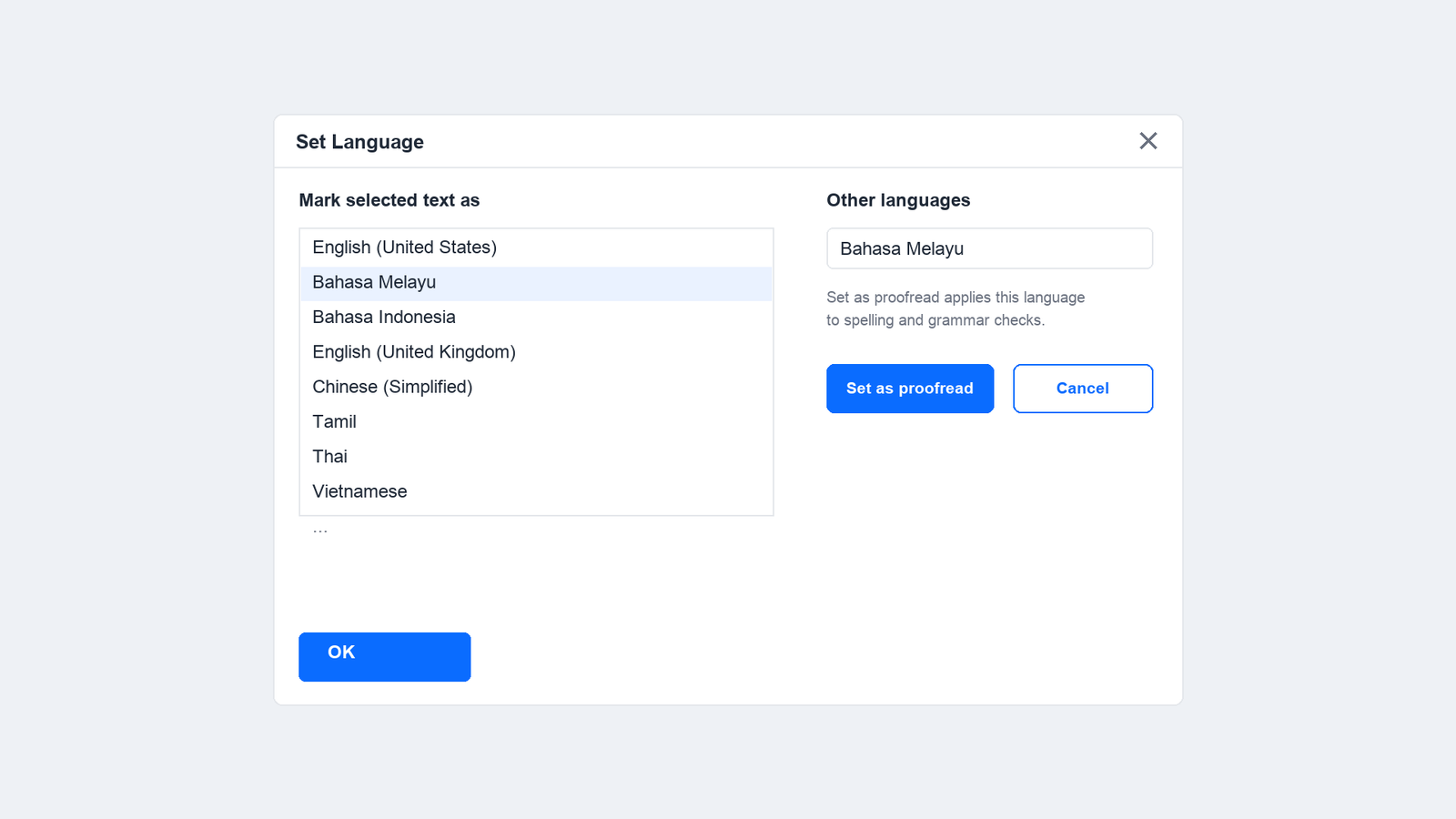
Go to Review, open Spell Check, and choose Set Language. The dialog lists the languages your build already recognises, plus an Other languages area for the rest.
Pick Bahasa Melayu and click Set as proofread, then confirm with OK. That single step is what turns the red and blue underlines from noise into a usable list of errors.
Read the new underlines before you accept anything. Correct Malay prose should now be clean; anything still flagged is worth a second look, not an automatic click.
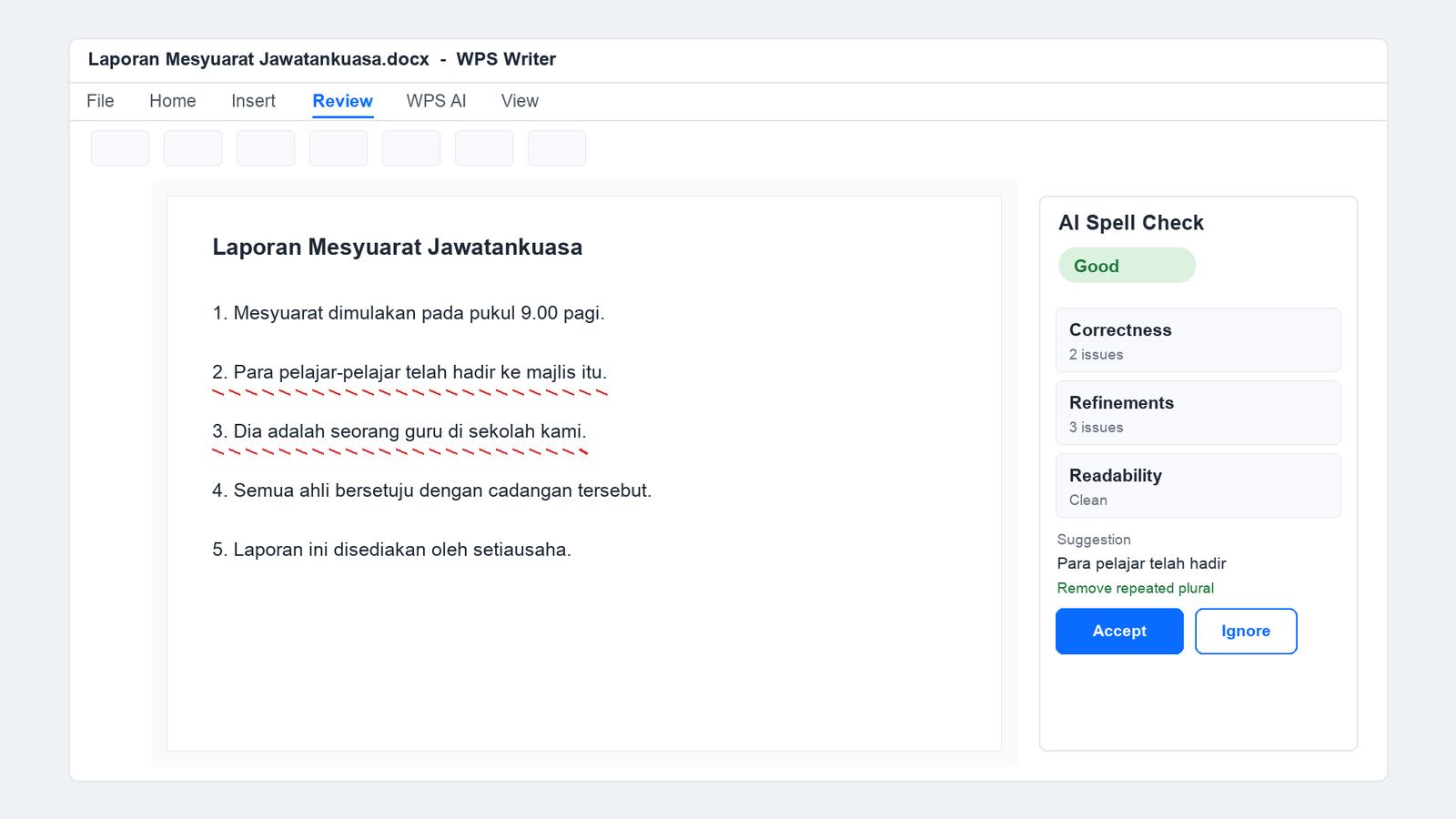
Open WPS AI and turn on AI Spell Check. The panel reports a score, then lists issues under Correctness and Refinements.
WPS Writer Malay grammar check panel
Work the Correctness list one entry at a time, accepting, editing, or dismissing. Bulk accept is the last step, never the first, because a suggestion you cannot explain in Malay is a suggestion you should not take.
Finish with a read-aloud pass. Agreement and register are easier to hear than to see, and no checker hears them for you.
Use Word, Excel, and PPT for FREE
What a Malay Grammar Checker Catches, and What It Leaves to You
A checker compares your sentence with patterns it has seen, which makes it strong on spelling and weak on meaning. Malay adds a few specific traps that survive every automated pass.
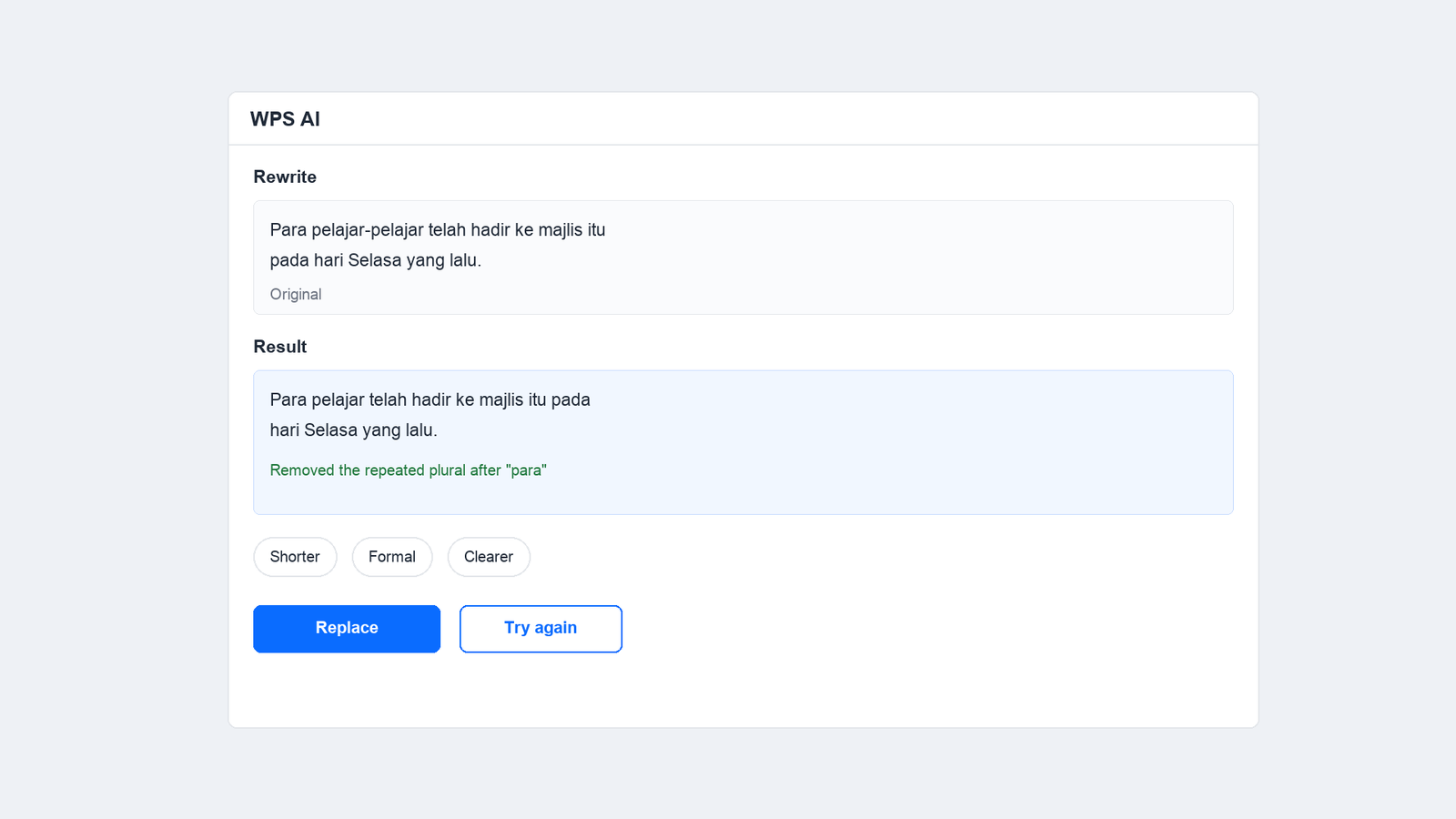
Doubled plurals.Para pelajar-pelajar repeats the plural twice; para pelajar is correct, the same way semua buku beats semua buku-buku.
Ialah and adalah.Ialah links two noun phrases, adalah introduces a description. Dia ialah seorang guru is right; Dia adalah seorang guru is the version a checker rarely flags.
Imbuhan that changes the verb.MeN- assimilates to the first letter of the root: menyapu, menulis, memukul, mengambil. A wrong prefix still reads as a real word, so nothing gets underlined.
Kata sendi choices.Di marks place, di dalam marks an enclosed space, and dalam on its own can mean inside or within. All three are grammatical; only one fits your sentence.
Register and loanword spelling.Komputer, telefon, stesen follow Malay spelling even when the English form is everywhere in your source material.
Three recurring Malay grammar error types
100% secure
Set the Malay Grammar Checker Up Before You Write
Setting the language once at the start saves the same dialog three times at the end, and it keeps mixed documents readable: an English abstract with a Malay body needs both languages marked, or one half of the file stays underlined forever.
Mark only what is Malay. Select the Malay section, apply the language, and leave English paragraphs untouched.
Check what the dialog offers. Your WPS build lists the languages it already has; anything else belongs in Other languages, where Set as proofread adds it for this document.
Do not fight a correct name. Place names, company names and Jawi transliterations will keep a squiggle. Ignore them once, and stop re-reading the same line.
Pasted text carries its old language. Text copied from a website often keeps the source language attribute; reapplying Bahasa Melayu to the pasted block clears a page of false errors in one click.
Set Bahasa Melayu as proofing language
Use Word, Excel, and PPT for FREE
Pair the Malay Grammar Checker With WPS AI Rewrite
Spell check handles mechanics; rewrite handles the sentence. When a paragraph is grammatical but heavy, select it and ask WPS AI to rewrite it, then compare the two versions before replacing anything.
Rewrite one paragraph, not the document. A whole-document rewrite flattens your voice into one register and makes the edit impossible to audit.
State the register you need. A ministry letter, a class assignment and a shop listing live in different registers, and the model will guess wrong unless you say so.
Read the diff line by line. If the rewrite drops an imbuhan or tightens yang into something ambiguous, keep your original and move on.
Keep the source text. Replace only after you have compared both versions; the original is the only thing you can check a rewrite against.
WPS AI rewrite Malay sentence panel
100% secure
The Best Free Word Alternative: WPS Office
Most Malay grammar checkers want your paragraph pasted into a browser box, which strips the headings, footnotes and tables that give the text its meaning. WPS Office keeps the check inside the file you are already editing.
AI Spell Check inside Writer. Spelling, grammar and readability suggestions appear in the same window as the draft, with a score you can track as you fix.
Multi-language documents. Malay and English sections can live in one .docx without either half being mis-flagged.
Rewrite and translate alongside the check. Useful when a Malay summary has to sit next to an English report.
Microsoft-like interface and 100% file compatibility, so a Malay file from a colleague opens with its formatting intact.
Free for personal use on desktop, web and mobile.
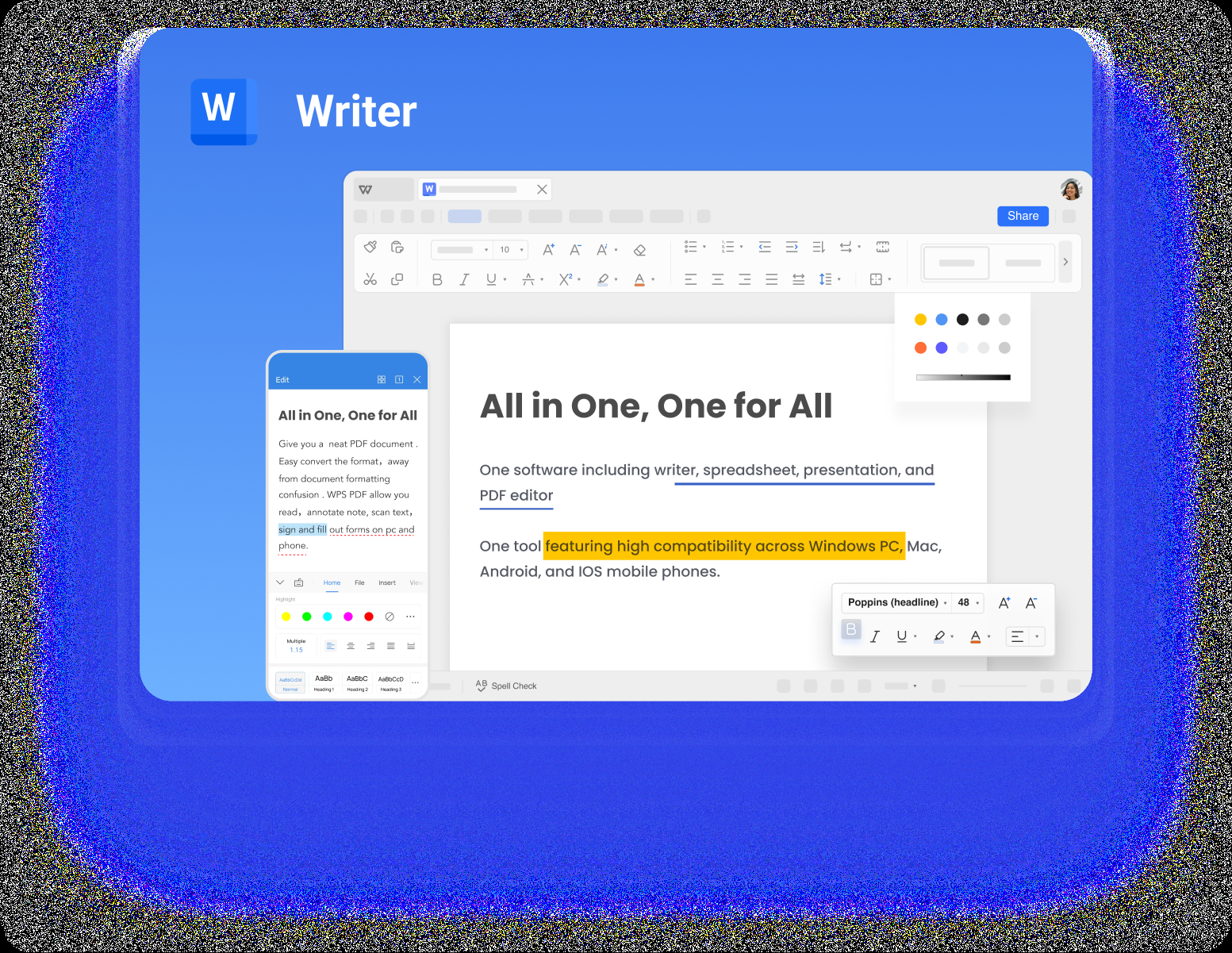
WPS Writer editor interface
Use Word, Excel, and PPT for FREE
FAQs
Does WPS Writer check Malay spelling and grammar?
Yes. Open Review, choose Spell Check, then Set Language, pick Bahasa Melayu in the Other languages area and click Set as proofread. WPS AI Spell Check then reviews the Malay text with spelling, grammar and readability suggestions.
Why does the checker underline correct Malay words?
The text is probably still tagged as English. Select it, set Bahasa Melayu as the proofing language, and the false underlines disappear in one pass.
Can a Malay grammar checker fix imbuhan mistakes?
Rarely. A wrong prefix such as menulis versus menulisi still forms a real word, so it is not flagged. Read the verbs that carry the action in each paragraph yourself.
Is adalah always wrong?
No, but it is often misused. Use ialah to link two noun phrases and adalah for descriptions, then check each sentence where you used either.
Should I still read the document after an AI check?
Yes. The automated pass clears spelling and obvious agreement errors; meaning, register and the choice between similar connectives still need your own read.
Free Office Download
Use Word, Excel, and PPT for FREE, No Ads.
Edit PDF files with the powerful PDF toolkit.
Microsoft-like interface. Easy to learn. 100% Compatibility.
Boost your productivity with WPS's abundant free Word, Excel, PPT, and CV templates.
100% secure
Algirdas Jasaitis
Summary
A Malay grammar checker works best in two passes: set Bahasa Melayu as the proofing language so the underlines mean something, then run WPS AI Spell Check and read the Correctness list item by item.
The errors that survive automation are the ones worth learning: doubled plurals after para, adalah where ialah belongs, assimilated meN- prefixes, and the difference between di and di dalam.
Open your next Malay draft in WPS Office, set the language once, and let the checker clear the mechanics while you keep the judgement calls.
15 years of office industry experience, tech lover and copywriter. Follow me for product reviews, comparisons, and recommendations for new apps and software.


'%3e%3cpath%20d='M8%200C12.4183%200%2016%203.58172%2016%208C16%2012.4183%2012.4183%2016%208%2016C3.58172%2016%200%2012.4183%200%208C0%203.58172%203.58172%200%208%200ZM11.6162%204.38379C11.2257%203.99337%2010.5927%203.99338%2010.2021%204.38379L8%206.58594L5.79785%204.38379C5.40732%203.99334%204.77429%203.99329%204.38379%204.38379C3.99331%204.77429%203.99335%205.40733%204.38379%205.79785L6.58594%208L4.38379%2010.2021C3.99348%2010.5927%203.99341%2011.2257%204.38379%2011.6162C4.77426%2012.0066%205.40734%2012.0065%205.79785%2011.6162L8%209.41406L10.2021%2011.6162C10.5927%2012.0066%2011.2257%2012.0067%2011.6162%2011.6162C12.0067%2011.2257%2012.0066%2010.5927%2011.6162%2010.2021L9.41406%208L11.6162%205.79785C12.0066%205.40735%2012.0066%204.77429%2011.6162%204.38379Z'%20fill='%23080E17'%20fill-opacity='0.46'/%3e%3c/g%3e%3cdefs%3e%3cclipPath%20id='clip0_3761_713'%3e%3crect%20width='16'%20height='16'%20fill='white'/%3e%3c/clipPath%3e%3c/defs%3e%3c/svg%3e)



'%3e%3cpath%20fill-rule='evenodd'%20clip-rule='evenodd'%20d='M21.4999%2010.9993C21.4999%205.20009%2016.7986%200.498901%2010.9993%200.498901C5.19994%200.498901%200.498657%205.20009%200.498657%2010.9993C0.498657%2016.2404%204.33858%2020.5844%209.35855%2021.3722V14.0346H6.69238V10.9993H9.35855V8.68594C9.35855%206.05427%2010.9262%204.60062%2013.3248%204.60062C14.4736%204.60062%2015.6753%204.80571%2015.6753%204.80571V7.38979H14.3512C13.0468%207.38979%2012.64%208.19921%2012.64%209.0296V10.9993H15.5523L15.0867%2014.0346H12.64V21.3722C17.66%2020.5844%2021.4999%2016.2404%2021.4999%2010.9993Z'%20fill='%231568EA'/%3e%3c/g%3e%3c/svg%3e)


'%3e%3cpath%20d='M2.42045%2022.1876H6.31818V12.7217L0.75%208.54553V20.5171C0.75%2021.4414%201.49892%2022.1876%202.42045%2022.1876Z'%20fill='%234285F4'/%3e%3cpath%20d='M19.682%2022.1876H23.5797C24.5041%2022.1876%2025.2502%2021.4387%2025.2502%2020.5171V8.54553L19.682%2012.7217'%20fill='%2334A853'/%3e%3cpath%20d='M19.682%205.48293V12.7216L25.2502%208.54543V6.31816C25.2502%204.25236%2022.8921%203.07469%2021.2411%204.31361'%20fill='%23FBBC04'/%3e%3cpath%20d='M6.31824%2012.7217V5.48303L13.0001%2010.4944L19.6819%205.48303V12.7217L13.0001%2017.733'%20fill='%23EA4335'/%3e%3cpath%20d='M0.75%206.31816V8.54543L6.31818%2012.7216V5.48293L4.75909%204.31361C3.10534%203.07469%200.75%204.25236%200.75%206.31816Z'%20fill='%23C5221F'/%3e%3c/g%3e%3cdefs%3e%3cclipPath%20id='clip0_2954_7305'%3e%3crect%20width='24.5'%20height='18.375'%20fill='white'%20transform='translate(0.75%203.8125)'/%3e%3c/clipPath%3e%3c/defs%3e%3c/svg%3e)







'%3e%3cpath%20d='M19.9911%204.11386V6.471H18.5894C18.0775%206.471%2017.7322%206.57814%2017.5536%206.79243C17.3751%207.00671%2017.2858%207.32814%2017.2858%207.75671V9.44421H19.9019L19.5536%2012.0871H17.2858V18.8639H14.5536V12.0871H12.2769V9.44421H14.5536V7.49779C14.5536%206.39064%2014.8632%205.53201%2015.4822%204.92189C16.1013%204.31177%2016.9257%204.00671%2017.9554%204.00671C18.8304%204.00671%2019.509%204.04243%2019.9911%204.11386Z'%20fill='%23333333'/%3e%3c/g%3e%3cdefs%3e%3cclipPath%20id='clip0_2938_8199'%3e%3crect%20width='16'%20height='16'%20fill='white'%20transform='translate(8%204.00671)'/%3e%3c/clipPath%3e%3c/defs%3e%3c/svg%3e)
'%3e%3cpath%20d='M17.5237%2010.7813L23.4811%204H22.0699L16.8949%209.88693L12.7648%204H8L14.2469%2012.9029L8%2020.0133H9.4112L14.8725%2013.7952L19.2352%2020.0133H24M9.92053%205.04213H12.0885L22.0688%2019.0224H19.9003'%20fill='%23333333'/%3e%3c/g%3e%3cdefs%3e%3cclipPath%20id='clip0_2938_8200'%3e%3crect%20width='16'%20height='16.0134'%20fill='white'%20transform='translate(8%204)'/%3e%3c/clipPath%3e%3c/defs%3e%3c/svg%3e)


