

'%3e%3cpath%20d='M8%200C12.4183%200%2016%203.58172%2016%208C16%2012.4183%2012.4183%2016%208%2016C3.58172%2016%200%2012.4183%200%208C0%203.58172%203.58172%200%208%200ZM11.6162%204.38379C11.2257%203.99337%2010.5927%203.99338%2010.2021%204.38379L8%206.58594L5.79785%204.38379C5.40732%203.99334%204.77429%203.99329%204.38379%204.38379C3.99331%204.77429%203.99335%205.40733%204.38379%205.79785L6.58594%208L4.38379%2010.2021C3.99348%2010.5927%203.99341%2011.2257%204.38379%2011.6162C4.77426%2012.0066%205.40734%2012.0065%205.79785%2011.6162L8%209.41406L10.2021%2011.6162C10.5927%2012.0066%2011.2257%2012.0067%2011.6162%2011.6162C12.0067%2011.2257%2012.0066%2010.5927%2011.6162%2010.2021L9.41406%208L11.6162%205.79785C12.0066%205.40735%2012.0066%204.77429%2011.6162%204.38379Z'%20fill='%23080E17'%20fill-opacity='0.46'/%3e%3c/g%3e%3cdefs%3e%3cclipPath%20id='clip0_3761_713'%3e%3crect%20width='16'%20height='16'%20fill='white'/%3e%3c/clipPath%3e%3c/defs%3e%3c/svg%3e)




'%3e%3cpath%20fill-rule='evenodd'%20clip-rule='evenodd'%20d='M21.4999%2010.9993C21.4999%205.20009%2016.7986%200.498901%2010.9993%200.498901C5.19994%200.498901%200.498657%205.20009%200.498657%2010.9993C0.498657%2016.2404%204.33858%2020.5844%209.35855%2021.3722V14.0346H6.69238V10.9993H9.35855V8.68594C9.35855%206.05427%2010.9262%204.60062%2013.3248%204.60062C14.4736%204.60062%2015.6753%204.80571%2015.6753%204.80571V7.38979H14.3512C13.0468%207.38979%2012.64%208.19921%2012.64%209.0296V10.9993H15.5523L15.0867%2014.0346H12.64V21.3722C17.66%2020.5844%2021.4999%2016.2404%2021.4999%2010.9993Z'%20fill='%231568EA'/%3e%3c/g%3e%3c/svg%3e)


'%3e%3cpath%20d='M2.42045%2022.1876H6.31818V12.7217L0.75%208.54553V20.5171C0.75%2021.4414%201.49892%2022.1876%202.42045%2022.1876Z'%20fill='%234285F4'/%3e%3cpath%20d='M19.682%2022.1876H23.5797C24.5041%2022.1876%2025.2502%2021.4387%2025.2502%2020.5171V8.54553L19.682%2012.7217'%20fill='%2334A853'/%3e%3cpath%20d='M19.682%205.48293V12.7216L25.2502%208.54543V6.31816C25.2502%204.25236%2022.8921%203.07469%2021.2411%204.31361'%20fill='%23FBBC04'/%3e%3cpath%20d='M6.31824%2012.7217V5.48303L13.0001%2010.4944L19.6819%205.48303V12.7217L13.0001%2017.733'%20fill='%23EA4335'/%3e%3cpath%20d='M0.75%206.31816V8.54543L6.31818%2012.7216V5.48293L4.75909%204.31361C3.10534%203.07469%200.75%204.25236%200.75%206.31816Z'%20fill='%23C5221F'/%3e%3c/g%3e%3cdefs%3e%3cclipPath%20id='clip0_2954_7305'%3e%3crect%20width='24.5'%20height='18.375'%20fill='white'%20transform='translate(0.75%203.8125)'/%3e%3c/clipPath%3e%3c/defs%3e%3c/svg%3e)


Managing stakeholders effectively is essential for the success of any project, whether it’s a product launch or a planned event. However, most users often struggle to find reliable templates to help them design their stakeholder analyses. So, where can you find a free stakeholder analysis matrix template for project management? In this guide, I’ll be highlighting 10 stakeholder analysis templates and walk you through the exact editing process.
10 Free Stakeholder Analysis Templates to Download
Making stakeholder analysis documents from scratch can be a big hassle, especially if you’re someone without any design or data analysisexperience. I’ve been there, and I know how stressful it can be, but don’t worry. I found some reliable templates that helped me figure out how to use stakeholder mapping template and simplify the process. In this section, I’ll be highlighting 10 of the most effective options and helping you choose the right one for your workflow needs.
1. Basic Stakeholder Analysis Template
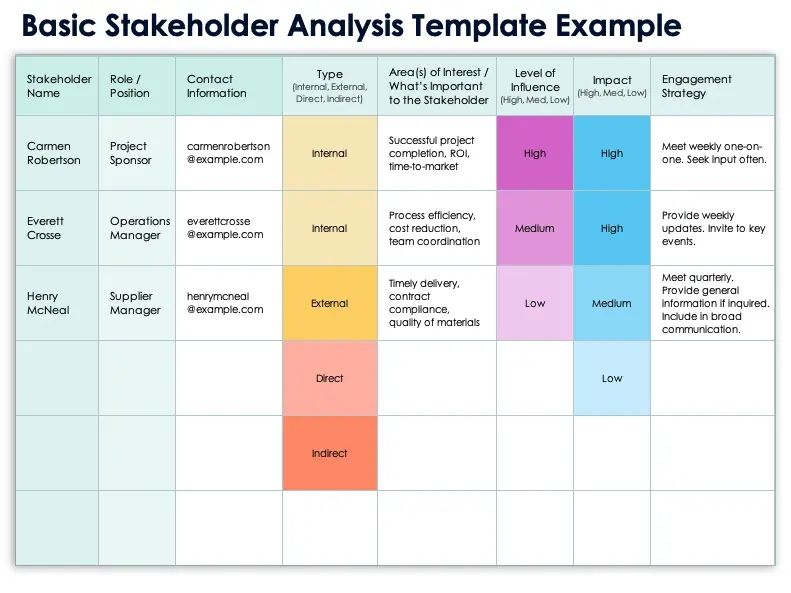
If you’re looking for a basic and simplistic stakeholder analysis template that isn’t too complicated or overwhelming, then going for theBasic Stakeholder Analysis Template is one of the best choices. It defines the interests, influence, and value of each stakeholder in clean and polished layouts, elevating your project management.
2. Stakeholder Analysis Template
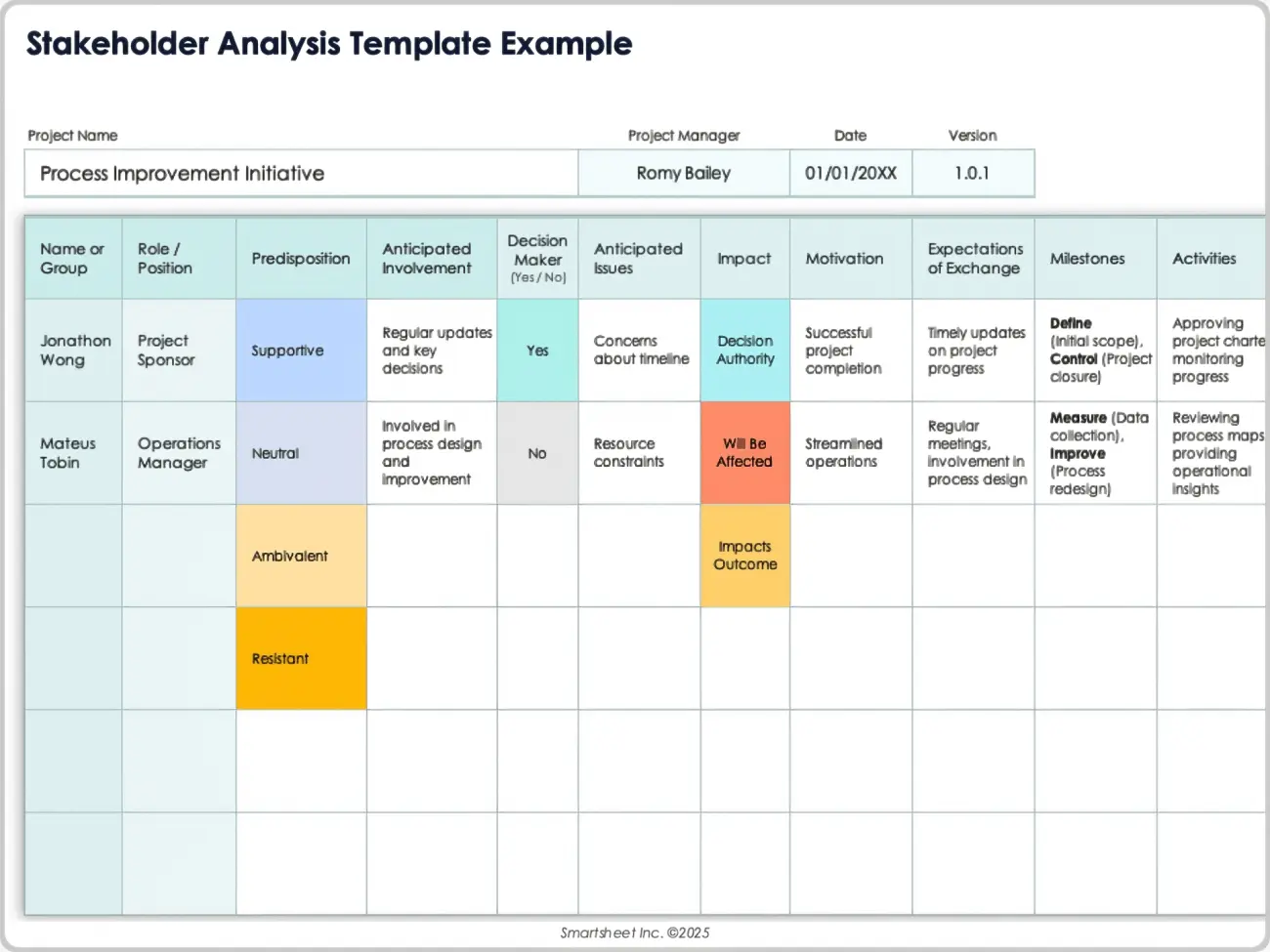
The Stakeholder Analysis Template is an excellent option for those looking for a detailed stakeholder format template for their company or business. It features the basic details of your project and project management, along with defining the roles and support levels of key individuals in a clear and easy-to-understand manner.
3. Six Sigma Stakeholder Analysis Template
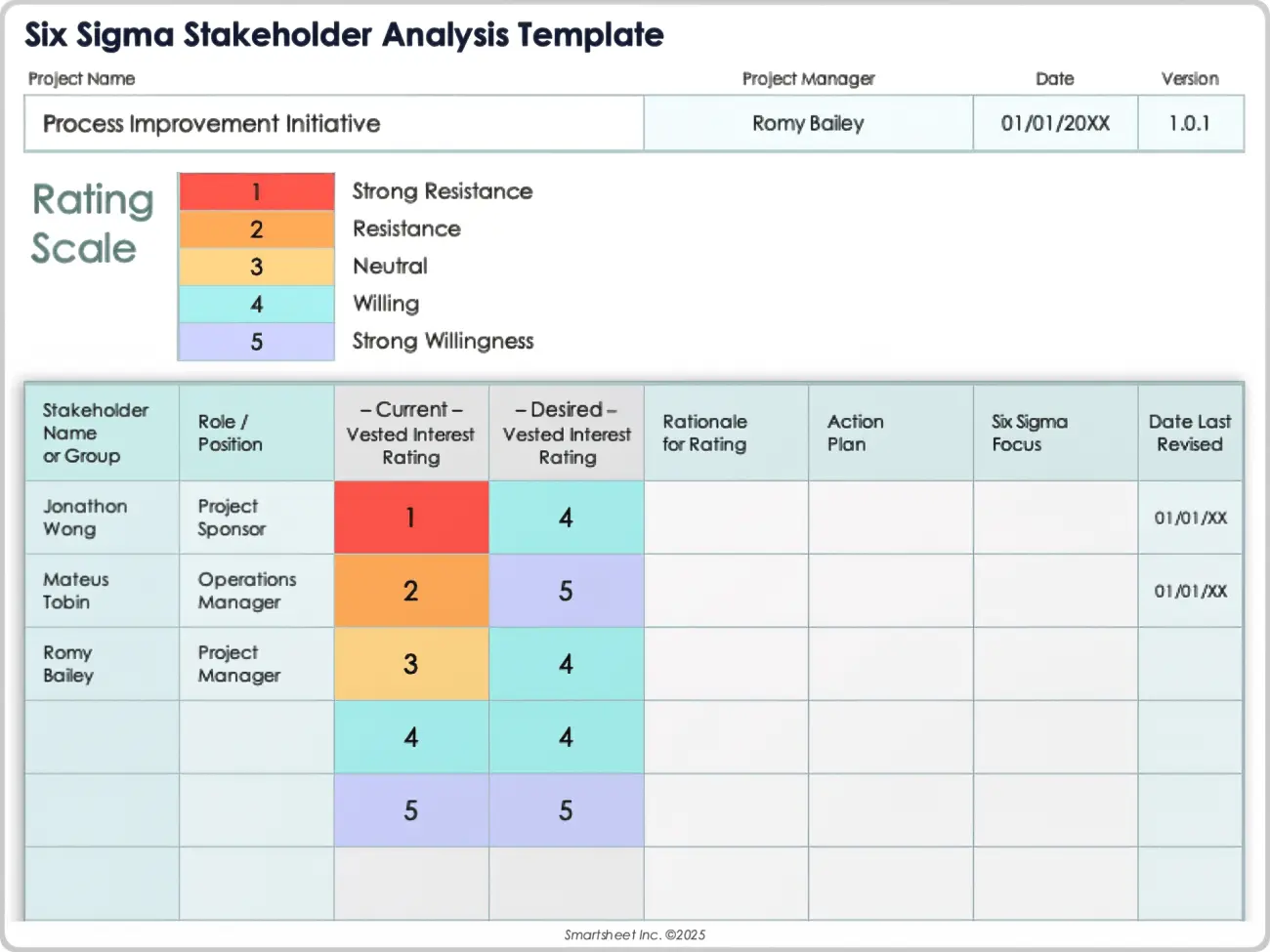
The Six Sigma Stakeholder Analysis Template is a polished and streamlined sample you can use to help boost your productivity and save time in your stakeholder analysis. It features an elegant design to maintain a professional look while also including all the essential data points required for the analysis.
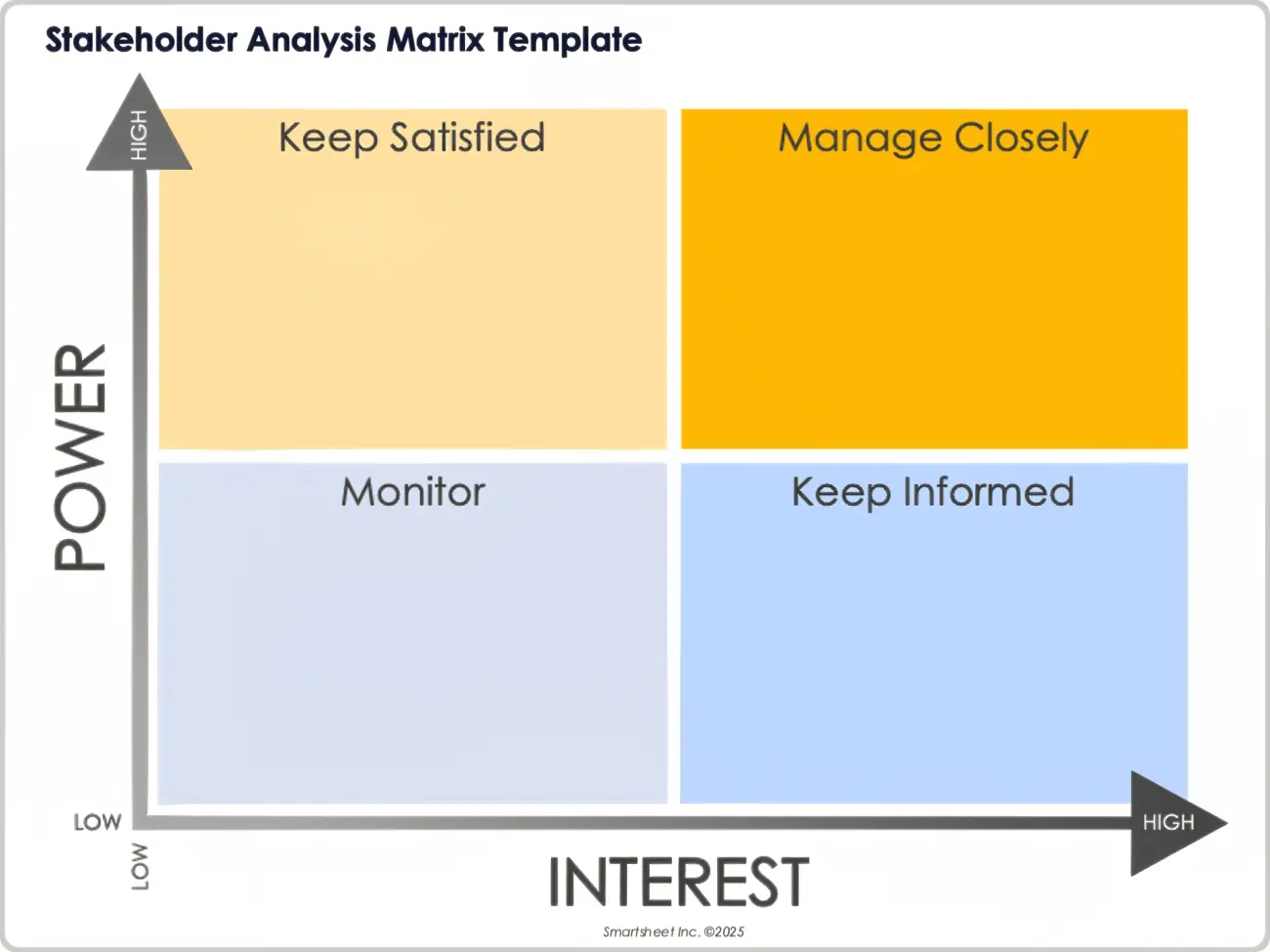
4. Stakeholder Analysis Matrix Template
If you’re looking for a simple but effective way to visualize the power and interest of your project to elevate your project and stakeholder management, you can use the Stakeholder Analysis Matrix Template for yourself. It features a clear grid layout that helps you categorize individuals clearly, making sure there’s no confusion left.
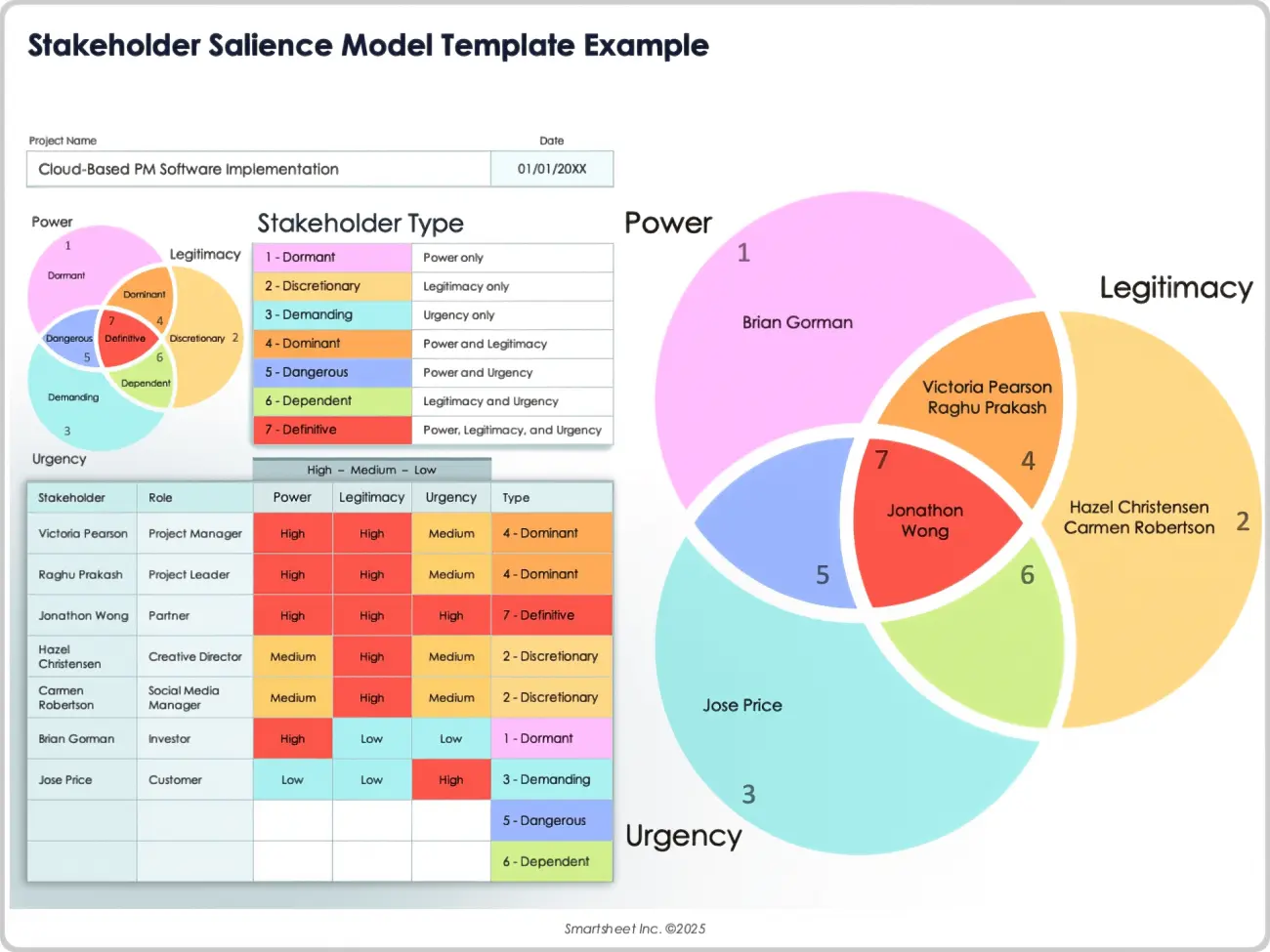
5. Stakeholder Salience Model Template
For project managers looking for a detailed and comprehensive analysis to prioritize stakeholders based on power, legitimacy, and urgency, the Stakeholder Salience Model Template is one of the best choices. It features a professional and elaborate design that makes the data look much more appealing, along with including all the key sections for an organized analysis.
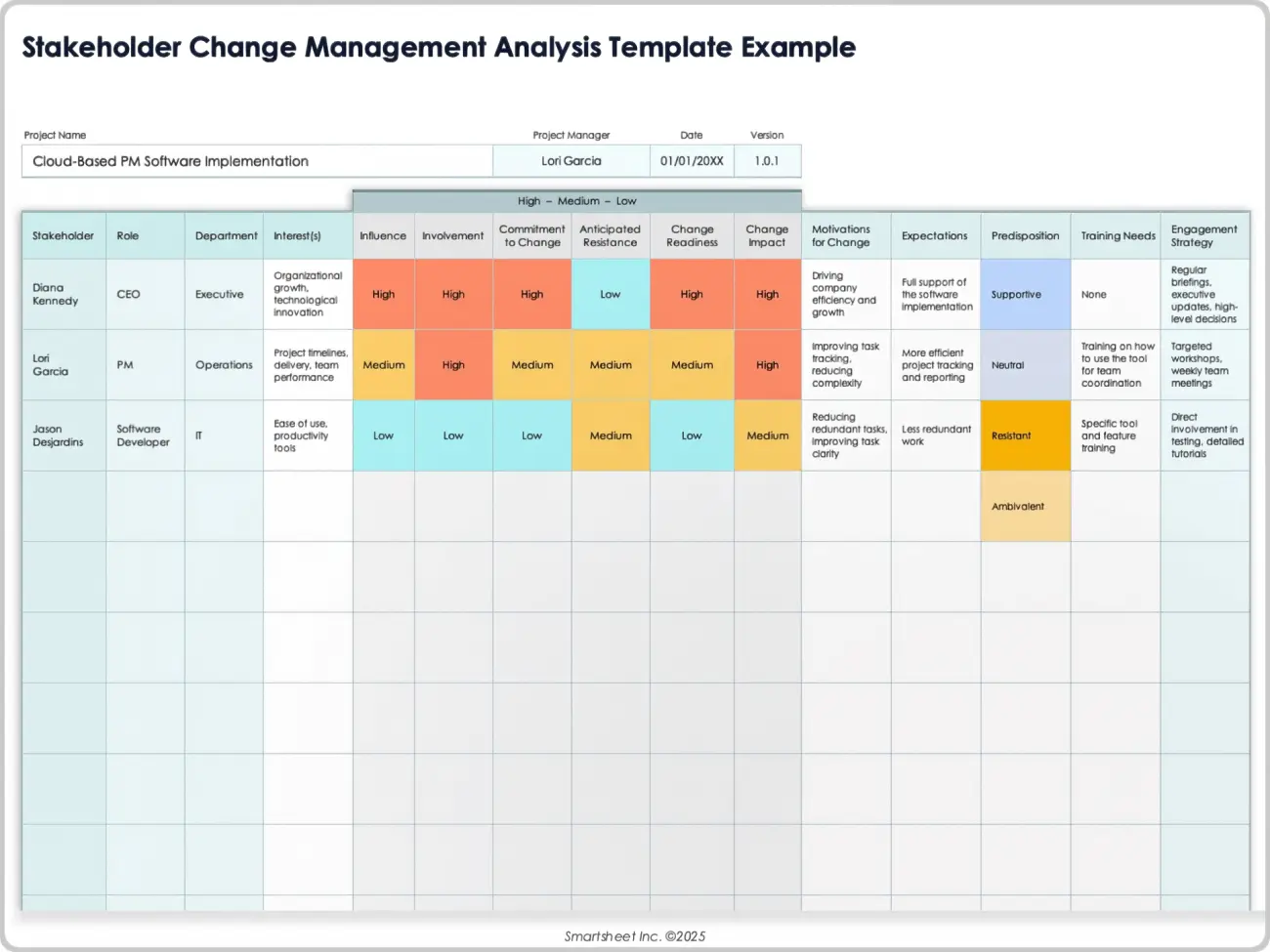
6. Stakeholder Change Management Analysis Template
If you’re managing a major transition in your company and need something to help you save time and streamline your workflow, then going for the Stakeholder Change Management Analysis Template will not disappoint you. It features an incredibly practical design that you can fully customize to track how your stakeholders are reacting to project changes.
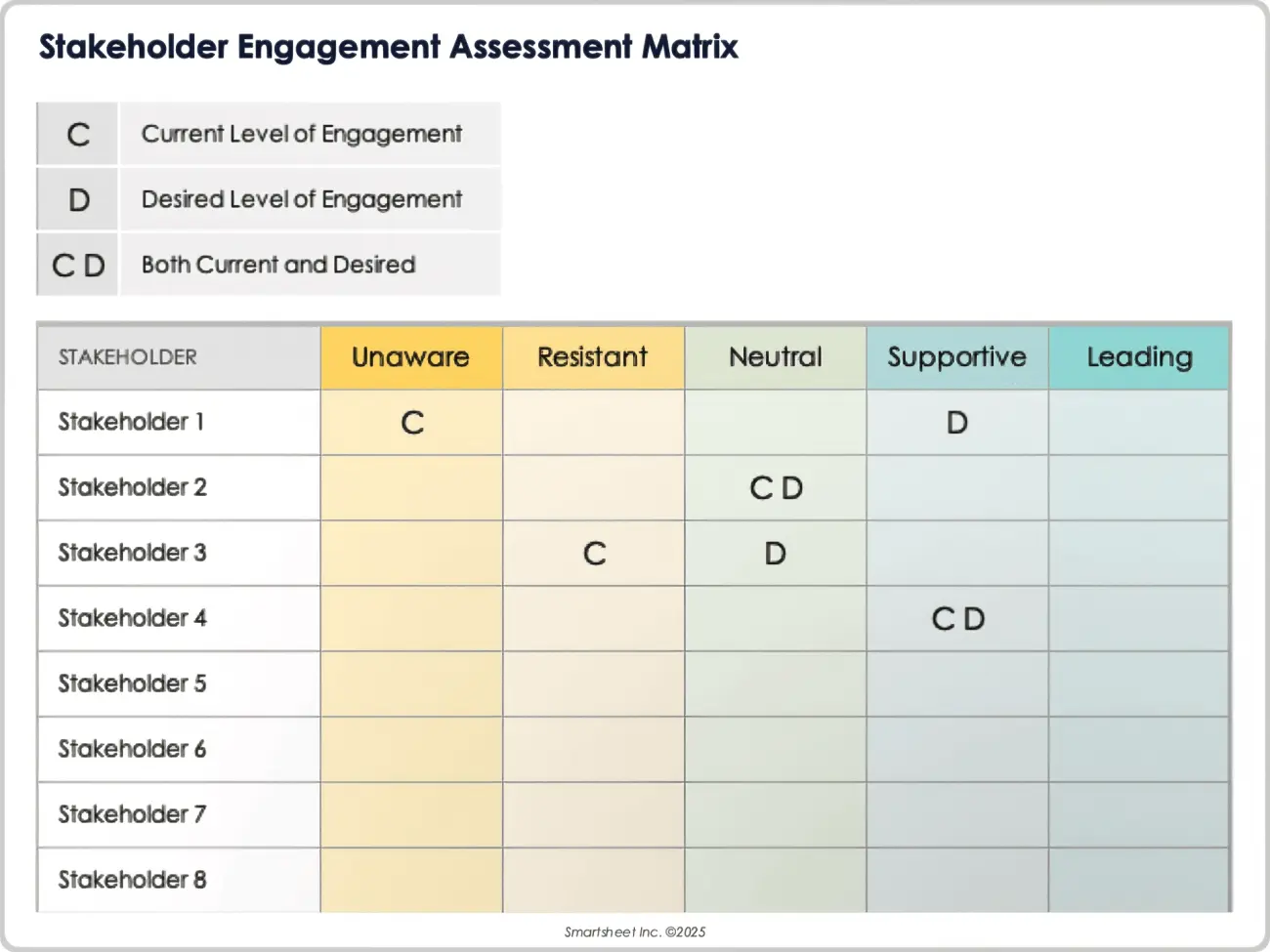
7. Stakeholder Engagement Assessment Matrix
The Stakeholder Engagement Assessment Matrix is an ideal choice for business professionals looking to visualize the engagement levels of your stakeholders and reach the desired levels. It features a unique and colorful layout that makes it very appealing, while also highlighting all the necessary project details required to simplify your communication.
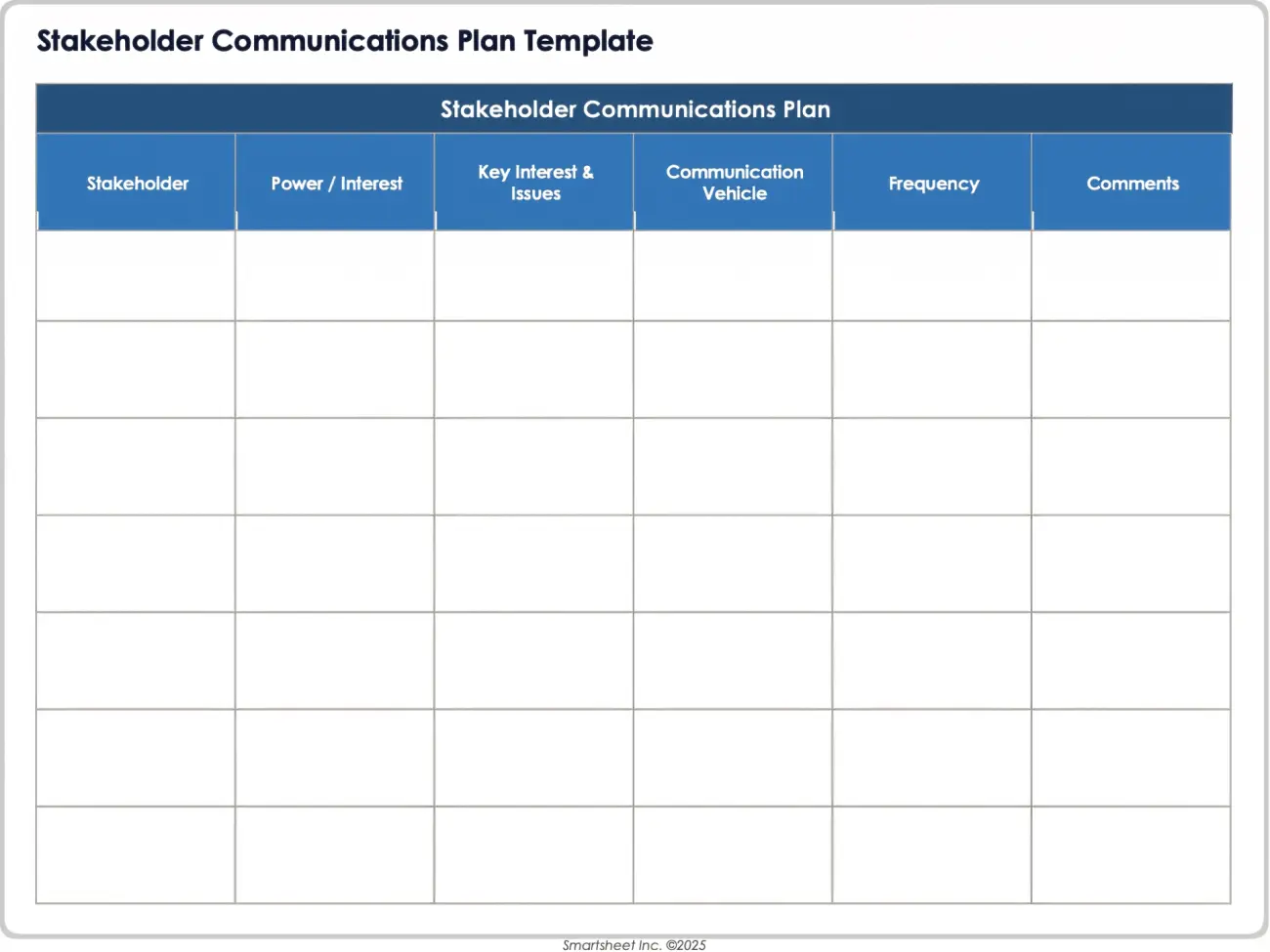
8. Stakeholder Communications Plan Template
For those in the management business, the Stakeholder Communications Plan Template will be a good choice to simplify your workflow and add more productivity without going through much hassle. You can fully customize it, however you want to change the frequency to match the requirements of your project.
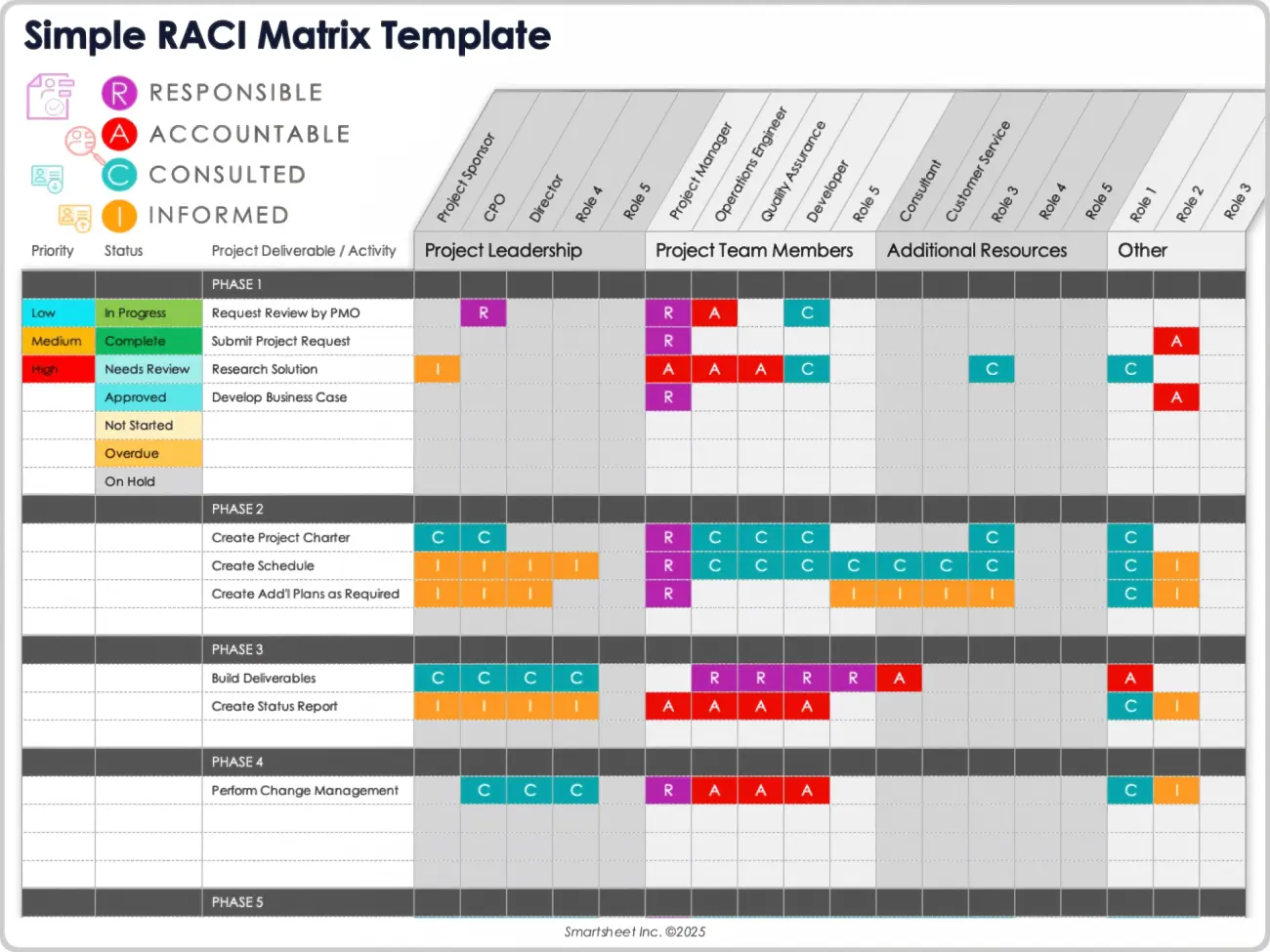
9. Simple RACI Matrix Template
If you’re looking for an in-depth and comprehensive breakdown of all the roles and responsibilities of your project, while also highlighting each accountable individual, then you should go for the Simple RACI Matrix Template. It features a clean layout and fully editable sections, making sure you can adjust it without putting in any extra effort.
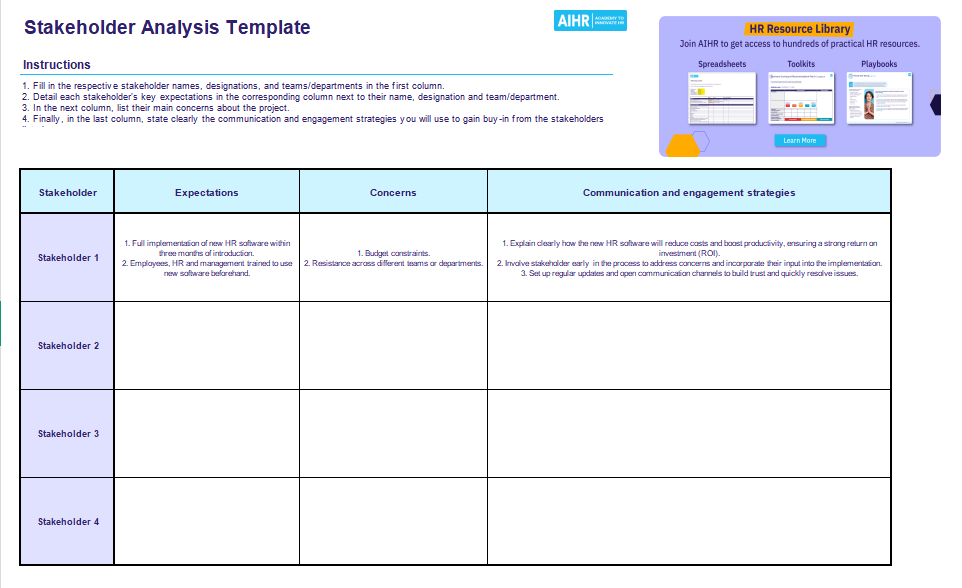
10. Stakeholder Analysis Template
The Stakeholder Analysis Template is a streamlined project management template you can use to boost your productivity while eliminating any slowdowns in your project. It features a plain and straightforward design that you can easily customize, making sure every key individual in your project is identified clearly.
How to Edit and Customize Your Template in WPS Spreadsheet
Once you’ve settled on the free stakeholder analysis template Excel download you want to use for your project, the next step is figuring out how to edit it. You can choose from a variety of tools for this project, but I’ve found a lot of the options available to be really unreliable. I personally rely on WPS Spreadsheet for a hassle-free and quick editing process. In this section, I’ll be highlighting the step-by-step processof editing and customizing your templates in WPS Spreadsheet.
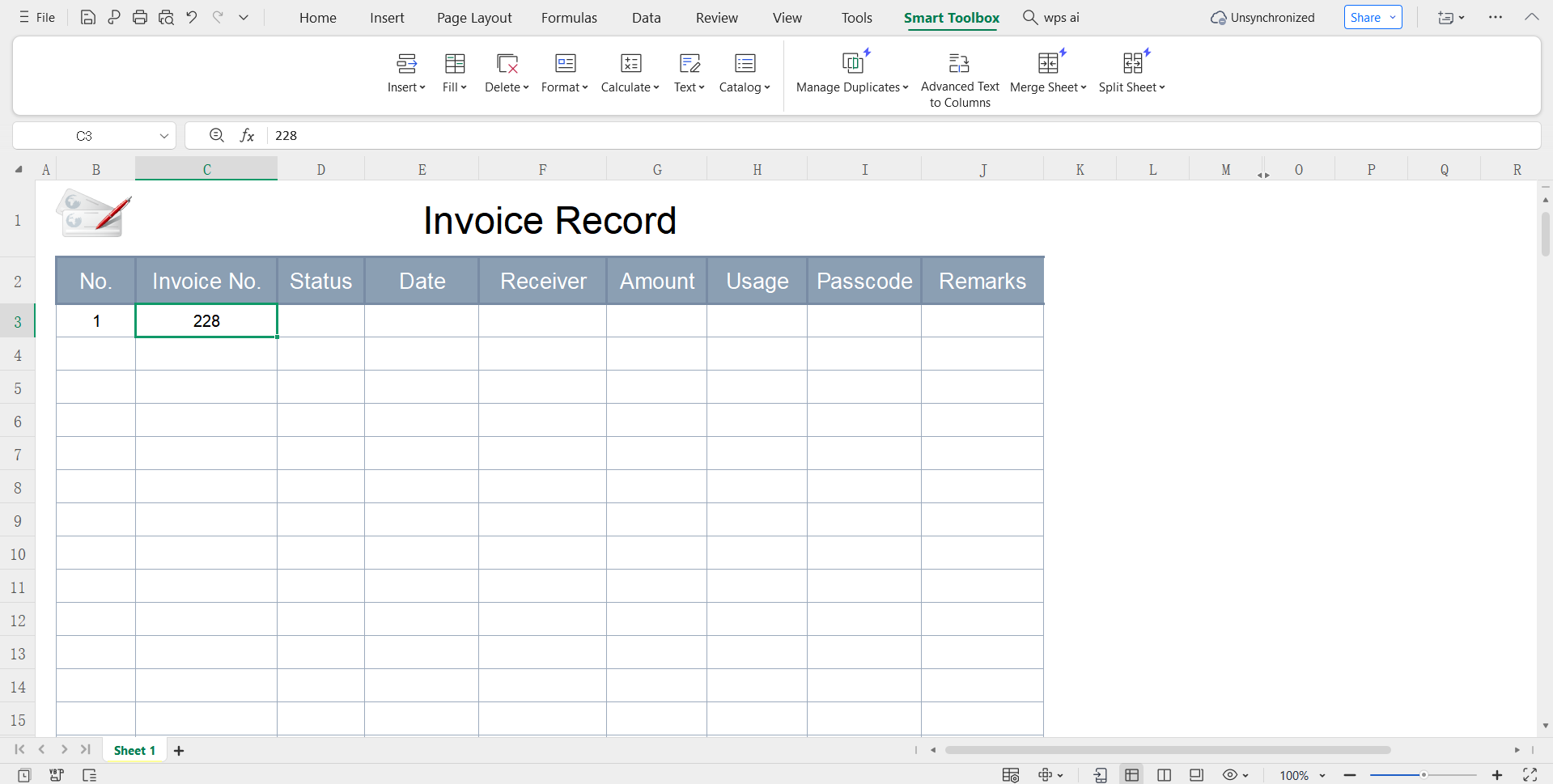
Step 1: Open your Excel template in WPS Office to get started.
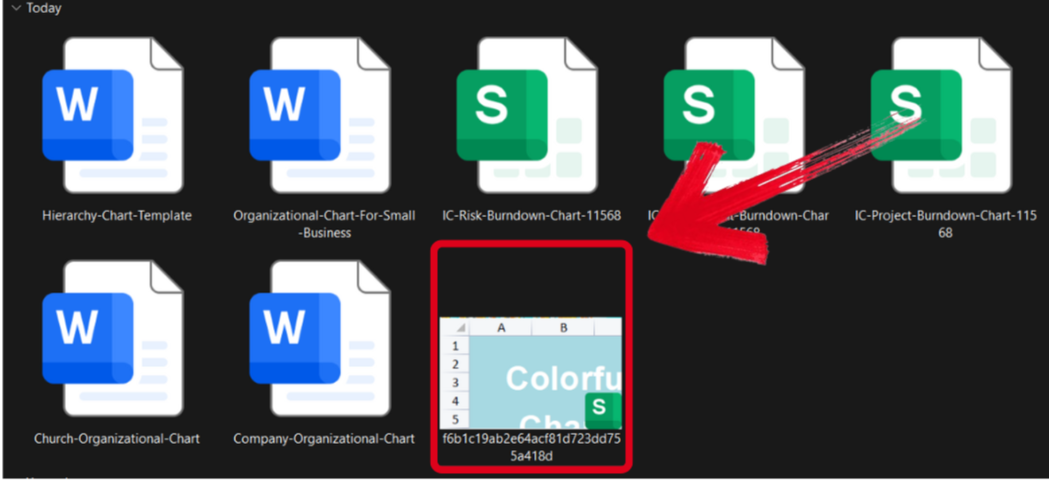
Step 2: Edit the template and add your project details and customize it however you want.
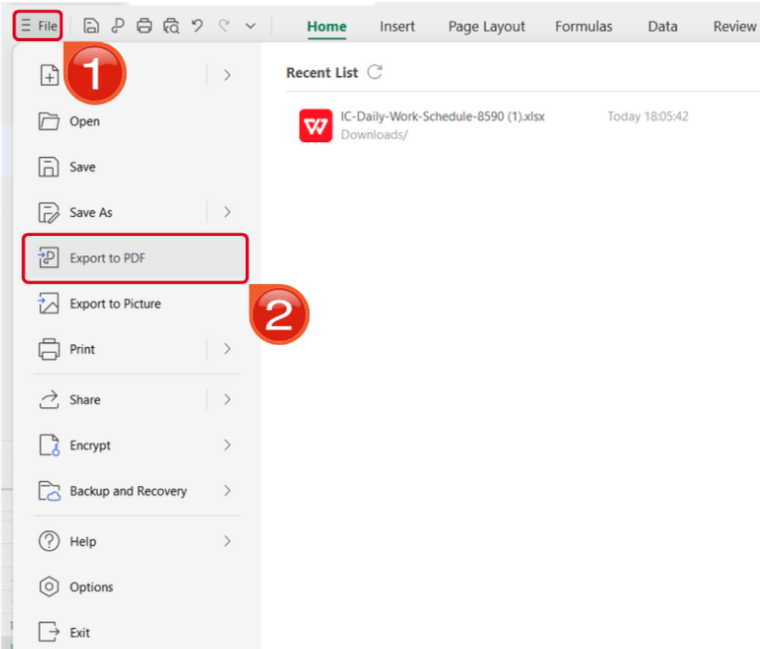
Step 3: Open the Files menu and select Export to PDF to convert your template to a PDF document.
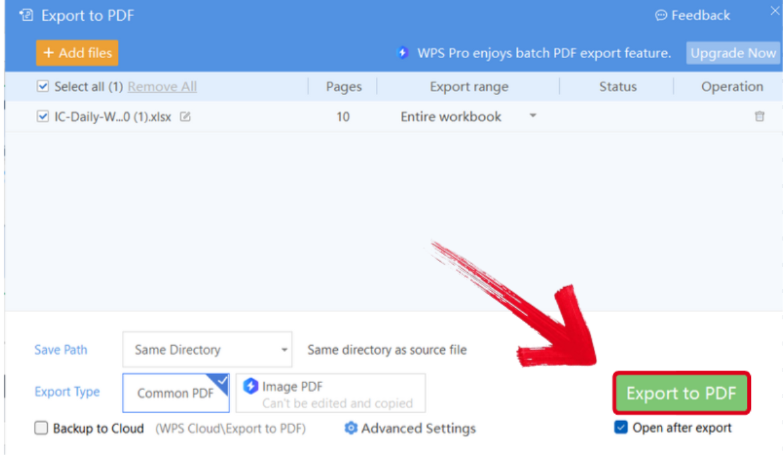
Step 4: Your Excel file will now start conversion into a PDF file. Press Export to PDF to save it to your device.
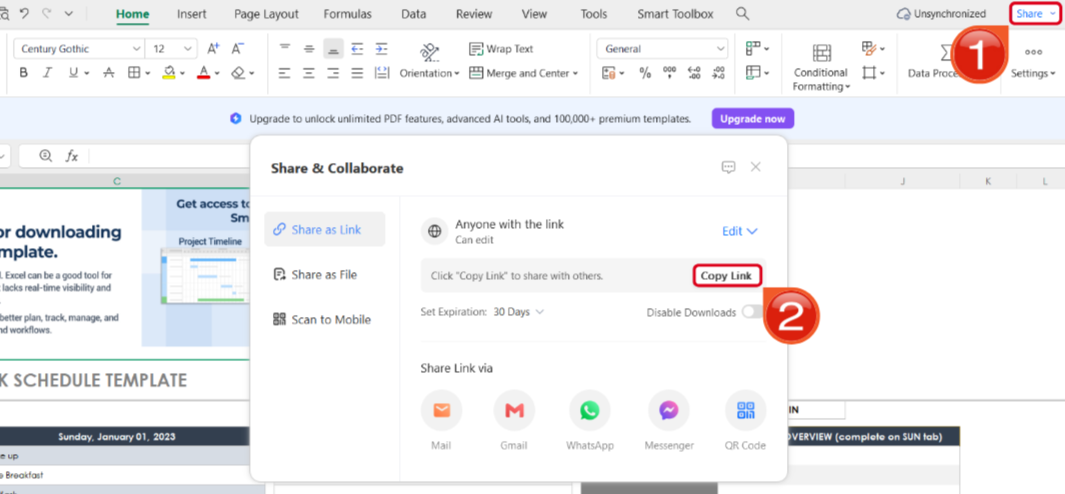
Step 5: Once you’re done saving it as a PDF, pressShare to generate an online link for your file. Then press Copy Link to copy it to your clipboard and share it with others.
Free Office Suite for Managing Stakeholder Templates
Dealing with templates and documents on a regular basis can be stressful, and having the right tools at your disposal is essential for an efficient and streamlined workflow. This is why I rely on WPS Office for all my productivity needs, whether I need to edit stakeholder templates or design professional presentations for my work. It’s completely free and gives me all the AI features I need for a smooth and hassle-free workflow, making it an essential asset to my toolset.
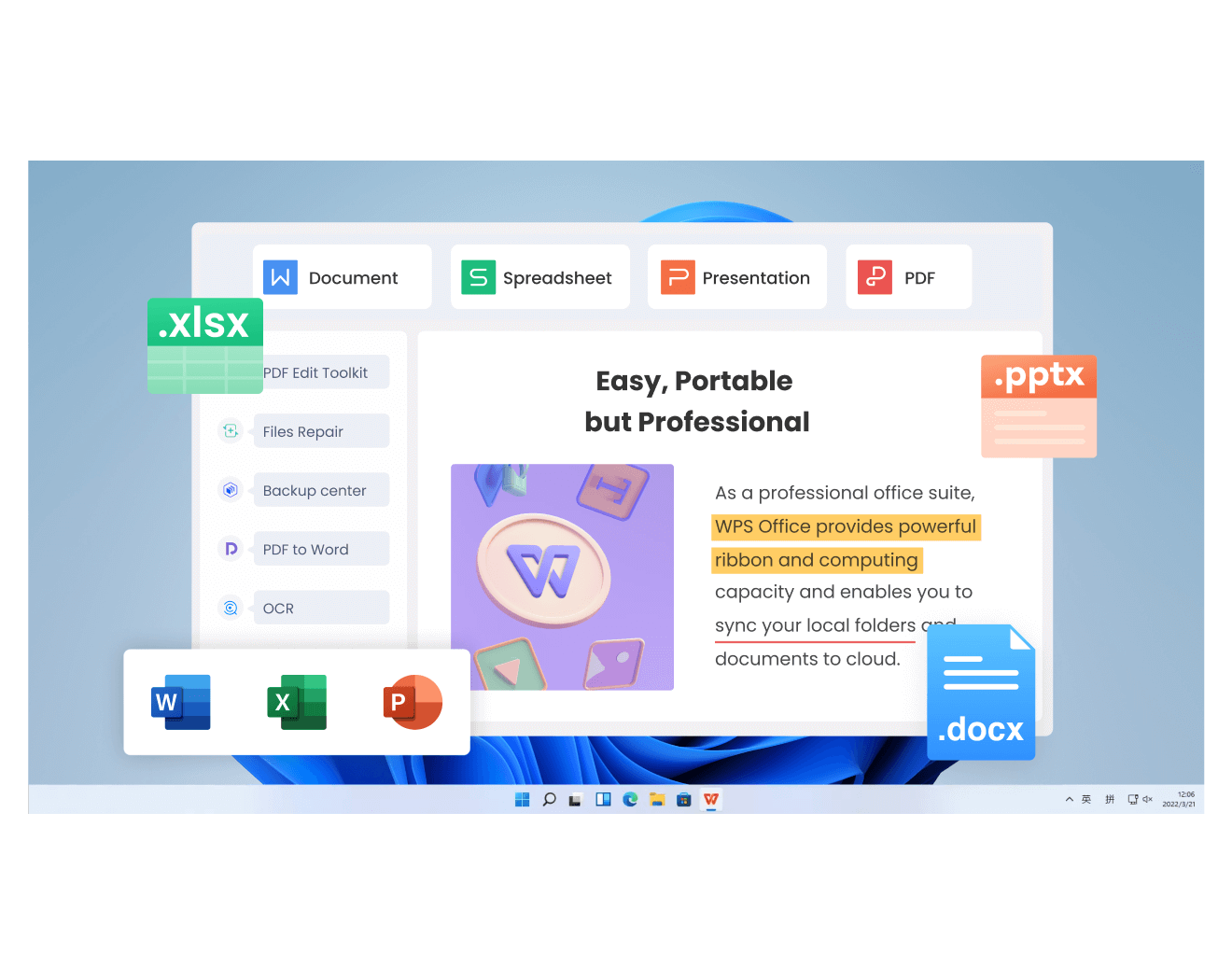
Key Advantages
Vast Free Template Library: Offers a massive collection of high-quality professional templates.
Excellent Format Compatibility: Compatibility with formats like .docx, .xlsx, and even .pptx, ensuring a hassle-free editing process.
Integrated Editing Experience: All-in-one solution for all your document editing needs.
Cross-Platform & Cloud Sync: Supports Windows, macOS, Linux, iOS, and Android.
High Cost-Effectiveness: Completely free core functionality, with advanced features offered at reasonable prices.
FAQs
Q1. Can I view and do basic edits on these templates on my phone or tablet?
Yes. Download the WPS Office mobile app from the official app store, log in with the same account, and you can access and perform basic edits on template files stored in the cloud or locally.
Q2. What is the most common type of stakeholder analysis template?
The Power/Interest Grid (or Power/Interest Matrix) is the most widely used. It categorizes stakeholders into four quadrants (e.g., Manage Closely, Keep Informed, Keep Satisfied, Monitor) based on their level of power and interest in the project, providing a clear visual for prioritization.
Q3. I downloaded an Excel template, but the charts look wrong when I add my data. How do I fix this?
This usually happens when the chart's data range isn't updated. Click on the chart to select it. Look for a "Select Data" or "Edit Data" option (often in the Chart Design menu or by right-clicking). In the dialog box, ensure the "Chart data range" includes all the rows and columns containing your new information, not just the original sample data.
Q4. Are free stakeholder analysis templates really suitable for professional projects?
Yes, many are. The key is to choose a template with a solid structure (clear categories for influence, interest, impact, current vs. desired engagement) from a reputable source. A well-designed free template provides an excellent framework; its value comes from your accurate analysis and data, not its price tag.
Q5. Can I customize these stakeholder analysis templates to match my organization’s branding?
Yes. Most templates allow you to easily change colors, fonts, logos, and layouts. In tools like WPS Office, PowerPoint, or Excel, you can apply your brand colors and fonts so the template aligns with your organization’s visual identity.
Q6. What information should I prepare before filling out a stakeholder analysis template?
You should identify key stakeholders first and then gather details such as their role, level of influence, level of interest, expectations, and potential impact on the project. Having this information ready makes the analysis more accurate and meaningful.
Simplifying Stakeholder Management
Having effective stakeholder management is essential for the success of any project, regardless of the field you’re working in. You can simplify the process for yourself by using professionally designed stakeholder analysis templates, eliminating the need to manually design everything from scratch. In this guide, I’ve covered 10 of the most effective options I found for your workflow needs. You can further enhance your templates and documents using WPS Office. It’s incredibly powerful and gives you all the functionality you need for a smooth and hassle-free workflow.

'%3e%3cpath%20d='M19.9911%204.11386V6.471H18.5894C18.0775%206.471%2017.7322%206.57814%2017.5536%206.79243C17.3751%207.00671%2017.2858%207.32814%2017.2858%207.75671V9.44421H19.9019L19.5536%2012.0871H17.2858V18.8639H14.5536V12.0871H12.2769V9.44421H14.5536V7.49779C14.5536%206.39064%2014.8632%205.53201%2015.4822%204.92189C16.1013%204.31177%2016.9257%204.00671%2017.9554%204.00671C18.8304%204.00671%2019.509%204.04243%2019.9911%204.11386Z'%20fill='%23333333'/%3e%3c/g%3e%3cdefs%3e%3cclipPath%20id='clip0_2938_8199'%3e%3crect%20width='16'%20height='16'%20fill='white'%20transform='translate(8%204.00671)'/%3e%3c/clipPath%3e%3c/defs%3e%3c/svg%3e)
'%3e%3cpath%20d='M17.5237%2010.7813L23.4811%204H22.0699L16.8949%209.88693L12.7648%204H8L14.2469%2012.9029L8%2020.0133H9.4112L14.8725%2013.7952L19.2352%2020.0133H24M9.92053%205.04213H12.0885L22.0688%2019.0224H19.9003'%20fill='%23333333'/%3e%3c/g%3e%3cdefs%3e%3cclipPath%20id='clip0_2938_8200'%3e%3crect%20width='16'%20height='16.0134'%20fill='white'%20transform='translate(8%204)'/%3e%3c/clipPath%3e%3c/defs%3e%3c/svg%3e)


