

![Microsoft Excel 2019 Free Download [Full Version]](https://res-academy.cache.wpscdn.com/upload/seo-engine-admin/2026-03-06/362ed588339e1cc11aa4ee6db1ac8d06.png)
Feb 15, 2026
Microsoft Excel 2019 Free Download [Full Version]Get Excel 2019 free download on Windows or Mac with this step-by-step guide. Discover legal methods, safe tips, and free modern alternatives.
Read more
Download the original Microsoft Excel 2010 (32/64-bit) offline installer. A classic spreadsheet tool known for introducing Slicers and Sparklines. Important: Activation requires a valid 25-digit product key. As support ended in 2020, we recommend downloading the free Excel 2010 alternative for security.
Opens .xls/.xlsx files securely. Best for Windows 10/11.
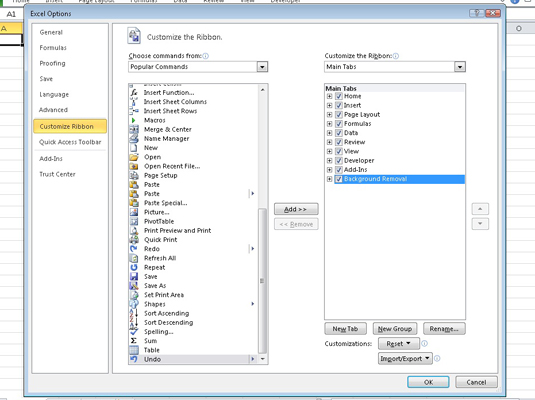
Microsoft Excel 2010 was a major leap forward for data analysis, introducing powerful features like Sparklines and Slicers. It also refined the Ribbon interface and introduced the Backstage view for file management. For the first time, a native 64-bit version was available, allowing users to work with massive datasets.
However, Excel 2010 reached its End of Life (EOL) on October 13, 2020. This means Microsoft no longer provides security updates, making it a significant risk on modern, internet-connected PCs. For safe and efficient spreadsheet work, downloading the free WPS Spreadsheets is the recommended modern solution. To compare all Excel download options, visit Microsoft Excel Free Download for a complete guide across all versions and platforms.
| HRPDM-9C238-7YD9V-DBBR7-QB6BQ | PKXTJ-DCM9D-6MM3V-G86P8-MJ8CY |
| BV7VC-RMR6B-26P6Y-BTQDG-DX2KQ | TVGHB-QY8T9-H6J2B-QB7MR-32QQ |
| 7XC2X-JWJ94-MCHBW-W9XXP-J9WPT | HRBHB-8DD9T-RHQ92-F2VCX-Y7QQP |
| YF79C-7Y4B4-PGM89-6BKGJ-46PBT | PYMDW-8DFY2-Y68BB-XHDGD-CT443 |
| 2pwhy-kt4x6-96pyw-xqr7v-hw2w9 | GCBKQ-XD3M6-9PX9D-WGFT7-3TRTX |
Downloading Microsoft Excel 2010 is popular for users who prefer a one-time purchase model and a classic, non-subscription experience. It remains a powerful tool for complex calculations and data analysis, with features like PivotTables, Slicers, and the introduction of a 64-bit version making it a workhorse for its time.
Critical Security Warning: It's essential to know that Excel 2010 is unsupported software. Since its end-of-life in October 2020, Microsoft has stopped releasing security patches. Using it online poses a direct threat to your data and system security. For all practical purposes on a modern PC, downloading the free and secure WPS Spreadsheets is the responsible choice.
| Feature | Excel 2010 | WPS Spreadsheets |
|---|---|---|
| Security Updates | None (Ended 2020) | Yes, Continuous |
| Product Key | Required (Hard to find) | Not Required |
| Windows 11 Support | No (Unstable) | Yes (Optimized) |
| AI Features | None | Yes (Integrated) |
| Cloud Integration | Limited (via add-ins) | Yes, Built-in (WPS Cloud) |
Verdict: Excel 2010 was great for its time, but is now obsolete and insecure. For real work, download WPS Office for a free, safe, and more powerful experience without needing a product key.
To get a Microsoft Excel download 2010 for free, users can follow these simple steps:
Go to the Microsoft Office 2010 download page: Users can download Microsoft Office 2010 by visiting the official Microsoft website and clicking on the "Get Office 2010" button.
Enter the product key: Users will need to enter a valid product key to activate Microsoft Office 2010. The product key can be purchased online or from a retail store.
Choose the language and version: Users can select the language and version of Office 2010 they want to download, including the 32-bit or 64-bit version.
Download and install: Once the user selects the language and version, they can click on the "Download" button to download the software. Once the download is complete, users can double-click on the downloaded file to start the installation process.
Microsoft Excel 2010 free downloads can be done by downloading Microsoft Office 2010 from the official Microsoft website. Users will need to enter a valid product key and select the language and version they want to download before downloading and installing the software.
To install Office 2010 and get access to Excel 2010, users can follow these simple steps:
Download the installation file: Users can download the Office 2010 installation file from the official Microsoft website or from a reputable third-party website.
Run the installation file: Once the installation file is downloaded, users can run it by double-clicking on it.
Enter the product key: Users will be prompted to enter a valid product key to activate Office 2010. The product key can be purchased online or from a retail store.
Choose the installation type: Users can choose between a typical installation or a custom installation. A typical installation installs all the Office 2010 programs, including excel 2010 free download for windows.
Complete the installation: Once the installation process is complete, users can open Excel 2010 by clicking on its icon in the Start menu or by searching for it in the search bar.
There will now be some hidden issues with the microsoft excel 2010 free downloads version offered by third-party pages since Microsoft has formally discontinued the service for Excel 2010.
Phishing websites—if you click on them—will prevent you from successfully downloading Excel 2010.
Links to other adverts on the website negatively impact user experience
Difficulties with data retention and security
Installing Office 2010 is a straightforward process that allows users to access Excel 2010 and other Microsoft Office 2010 programs. Users will need a valid product key to activate Office 2010 and can choose between a typical or custom installation. Once the installation is complete, Excel 2010 can be opened and used to manage and analyse data.
Go to the Microsoft website
Click on the "Products" tab
Select "Excel 365" from the list of products
Click on the "Buy now" button and follow the instructions to purchase the software
Once purchased, you can download and install the software on your device.
Yes, you can find archival download links for the Excel 2010 installer. However, its support ended in October 2020, and it requires a 25-character product key that is no longer sold by Microsoft. For a modern, secure, and genuinely free experience, we recommend using WPS Spreadsheets.
While Excel 2010 might install on Windows 11, it is not officially supported and can be unstable. More importantly, it no longer receives security updates, making your computer vulnerable. A modern suite like WPS Office is fully compatible and recommended for Windows 11.
No. It is not safe. Support and security updates ended in 2020. Using Excel 2010, especially on a PC connected to the internet, exposes you to malware and data theft risks. It is unsafe for any professional or personal use today.
Excel 2010 introduced significant improvements over 2007, including Sparklines for in-cell data visualization, Slicers for easier PivotTable filtering, a more refined Ribbon UI with a Backstage view, and a native 64-bit version for handling much larger datasets.

Don't risk using outdated Excel 2010. Get WPS Spreadsheets for free—it's fully compatible, modern, and safe.
The classic spreadsheet application. (Unsupported)
Legacy spreadsheet with new features. (Unsupported)
Another classic version, also unsupported.
The modern, subscription-based Office suite with Excel.
Best free, secure, and modern alternative to Office.
A powerful and free tool to read, edit, and convert PDFs.
Get Excel 2019 free download on Windows or Mac with this step-by-step guide. Discover legal methods, safe tips, and free modern alternatives.
Read more![Free Download Microsoft Excel 2016 [Step-by-step Guide]](https://res-academy.cache.wpscdn.com/upload/seo-engine-admin/2026-03-06/ab15d8fae75fffd54402b172d5853669.png)
Here is a step-by-step guide to Microsoft Excel 2016 free download. We have also given details about some best alternatives to Microsoft Excel 2016.
Read more
Get the Microsoft Excel 2021 free download with this updated 2025 guide. Learn how to install it safely or explore the best free alternative.
Read moreWhy use insecure, outdated software like Excel 2010? Get a complete, modern office suite that's fully compatible with all Microsoft formats (.xlsx, .docx) for free. Experience a lightweight, powerful, and secure solution.
* Basic components (Writer, Spreadsheet, Presentation) are permanently free.
Open, edit, and save Word, Excel, and PowerPoint files seamlessly.