Even the most capable teams can lose momentum when roles aren’t
clearly defined. Without a shared understanding of who’s responsible for
what, even simple projects can drift off course. That’s what the RACI
framework templates are for as they turn vague responsibilities into
clear, trackable roles. It brings structure to collaboration and
prevents those last-minute scrambles that derail progress. In this
guide, I’ll introduce 10 free RACI framework templates in Excel and show
you how to edit them easily.
RACI Framework Template
What Does the RACI Matrix
Stand for?
When it comes to managing projects or combined tasks, clarity is
everything and that’s where a responsibility chartproves its worth. It turns complex group efforts into structured,
transparent systems where everyone knows their part, creating a visual
roadmap that defines who contributes, who decides, and who stays
informed. So building responsibility charts isn’t just about
organization as it’s also about creating accountability and momentum
that keeps projects moving forward.
RACI Matrix
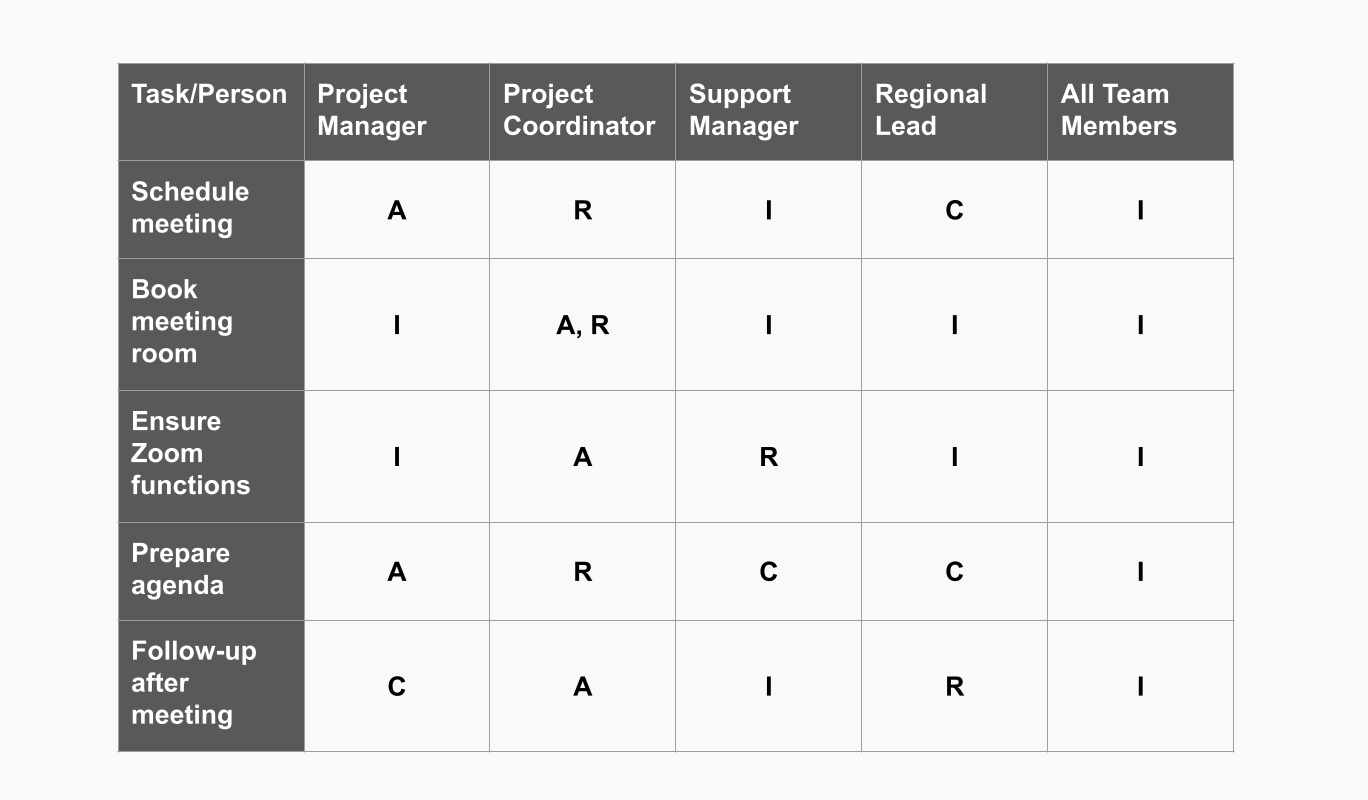
The acronym RACI breaks down into four keyroles that define who does what:
Responsible: These are the people who perform
the work. They handle the task directly and ensure it’s completed on
time.
Accountable: This person owns the outcome. They
make final decisions and are answerable for the results.
Consulted: Team members who provide expertise,
feedback, or insight. Their input is essential but they don’t execute
the work.
Informed: Individuals or stakeholders who need
updates on progress and results but aren’t directly involved in
decision-making.
A RACI framework template lets you assign these roles across
different tasks or deliverables, eliminating confusion and making
accountability crystal clear.
Pros and Cons of the RACI
Framework
One misconception about the RACI framework that should be cleared is
that it isn’t a one-size-fits-all solution. It brings structure, yes but
it can also add layersof complexity if not applied thoughtfully. Some projects benefit from
its clear role definitions, but others feel slowed down by the extra
documentation. Understanding both the advantages and the drawbacks is
key to using RACI effectively. Knowing where it shines and where it can
overcomplicate things helps you decide when it’s worth implementing and
when a simpler approach might work better.
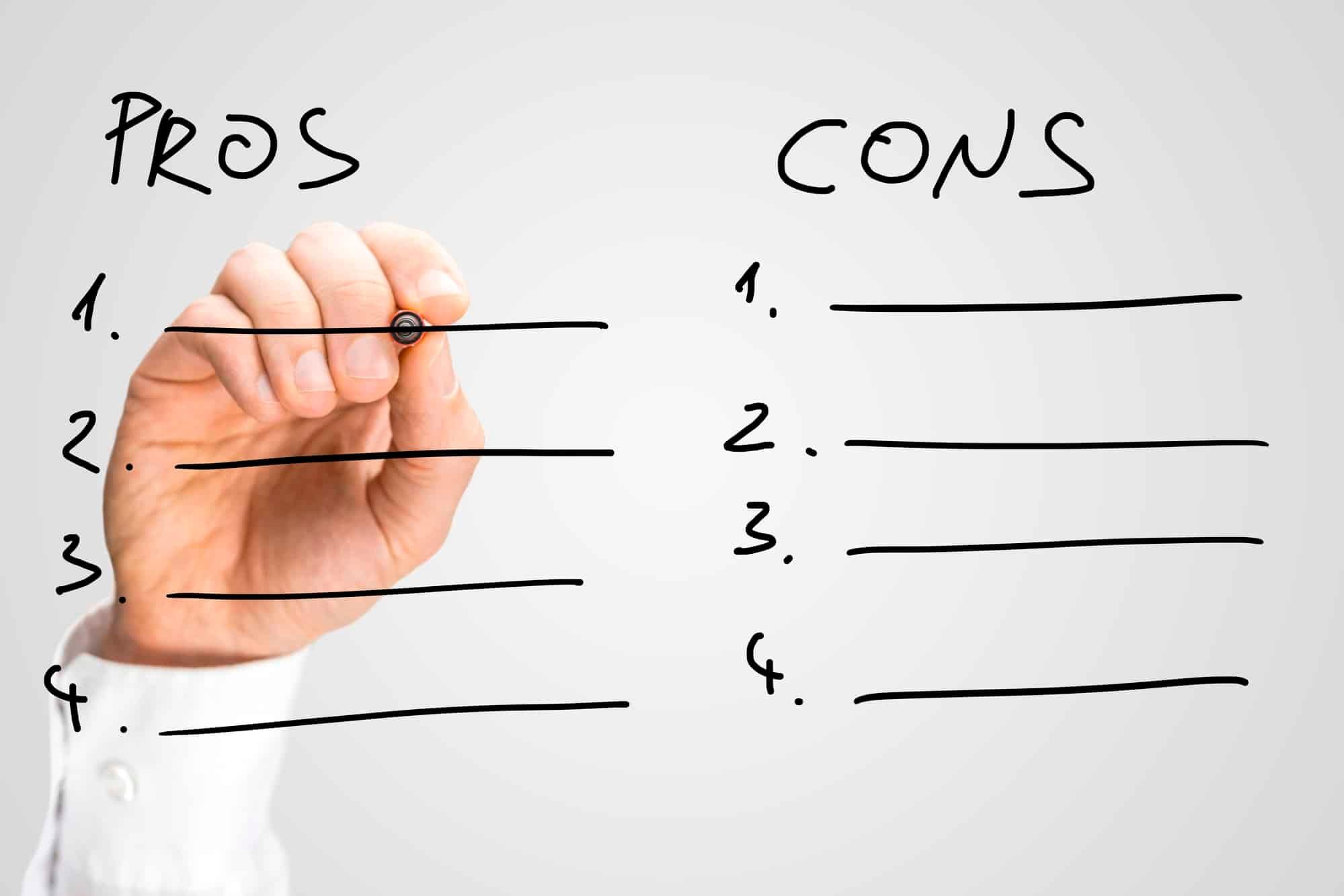
Pros and Cons
Pros:
Clarity: Everyone knows their exact
responsibilities and whom to consult.
Efficiency: Reduces duplicated work and speeds
up decision-making.
Scalability: Works across departments and
project sizes.
Alignment: Ensures all stakeholders are informed
about their role in achieving project goals.
Cons:
Over-Simplification: Not all tasks fit neatly
into one of the four categories.
Potential Conflicts: Assigning “Accountable” to
more than one person can cause confusion.
Maintenance: Larger projects require regular updatesto keep the matrix accurate.
Limited Flexibility: Doesn’t capture nuances of
shared or evolving responsibilities.
Despite these minor drawbacks, the RACI framework template remains a
gold standard for collaboration and defining roles in complex
projects.
10 Free
Ready-to-Use RACI Framework Templates in Excel
Most RACI Framework templates I came across online were either overly
complicated or lacked the flexibility to match my project needs. That’s
why I started looking for templates designed in Excel as they’re easy to
customize, share,
and update without dealing with buffering tools. The ones I’ve listed
below are free, beginner-friendly, and ready to use, saving you the
effort of building one from scratch while still letting you adjust every
detail to fit your team’s needs.
1. RACI for Change
Management Template
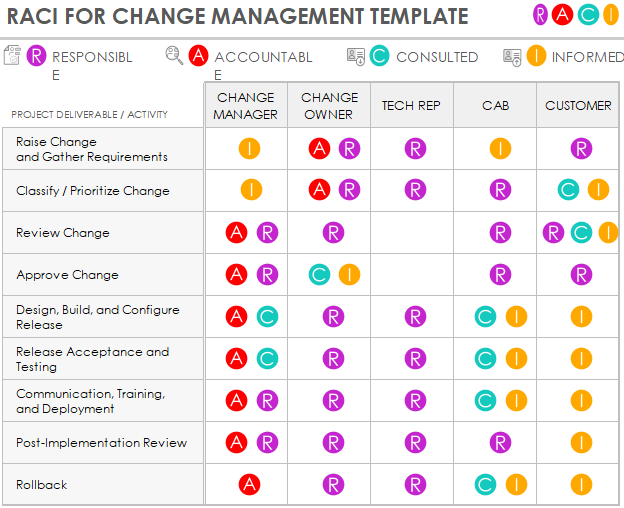
This RACI
for Change Management Template is a visual and color-coded
matrix designed to clarify roles and responsibilities during an
organizational change project. The template tracks various Project
Deliverables / Activities, from "Raise Change and Gather Requirements"
to "Rollback", and clearly assigns the appropriate RACI role to
stakeholders like the Change Manager, Change Owner, Tech Rep, CAB, and
Customer. This tool is essential for simplifying communication and
ensuring accountability throughout the change process.
RACI Change Management Template
2. ITIL RACI Template with
Gantt Chart
This ITIL
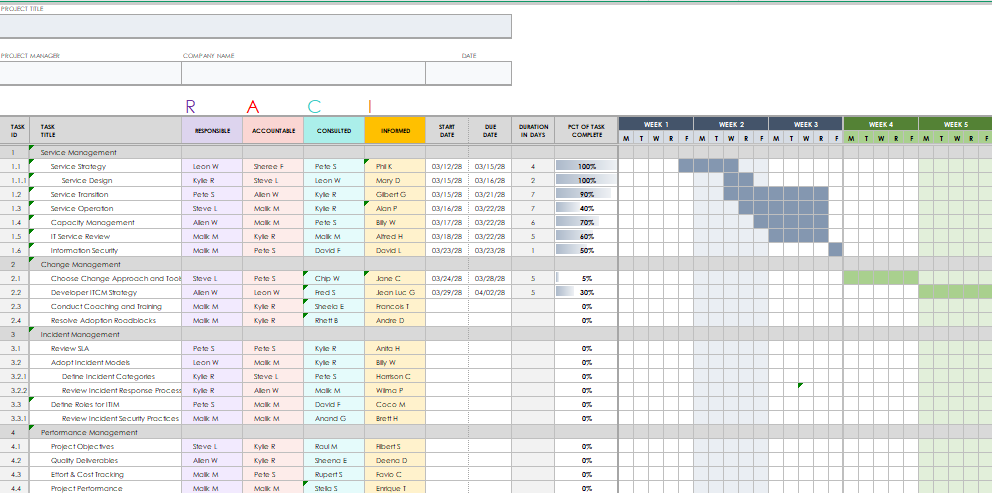
RACI Template is an advanced project management spreadsheet that
merges the RACI matrix with a Gantt chart for visual scheduling and task
accountability. The template is highly structured, organizing tasks into
major sections such as Service Management, Change Management, Incident
Management, and Performance Management. For each task, it assigns the
Responsible, Accountable, Consulted, and Informed parties and plots the
project timeline, duration in days, and percentage complete on the
integrated Gantt chart, making it ideal for complex IT projects.
IT RACI Template
3.
Responsibility Chart for Management and Sourcing
This Sales
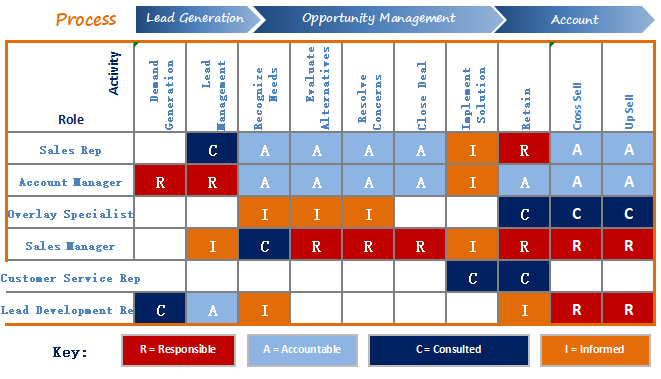
Process RACI Matrix is a colorful, process-oriented chart
designed to map roles and responsibilities across the entire customer
lifecycle, from initial lead to upsell. The matrix clearly groups
activities into three stages: Lead Generation, Opportunity Management,
and Account. Stakeholders like the Sales Rep, Account Manager, and Sales
Manager are assigned one of the four key roles for each activity,
ensuring clear ownership and efficient process flow in the sales
department.
Management RACI Template
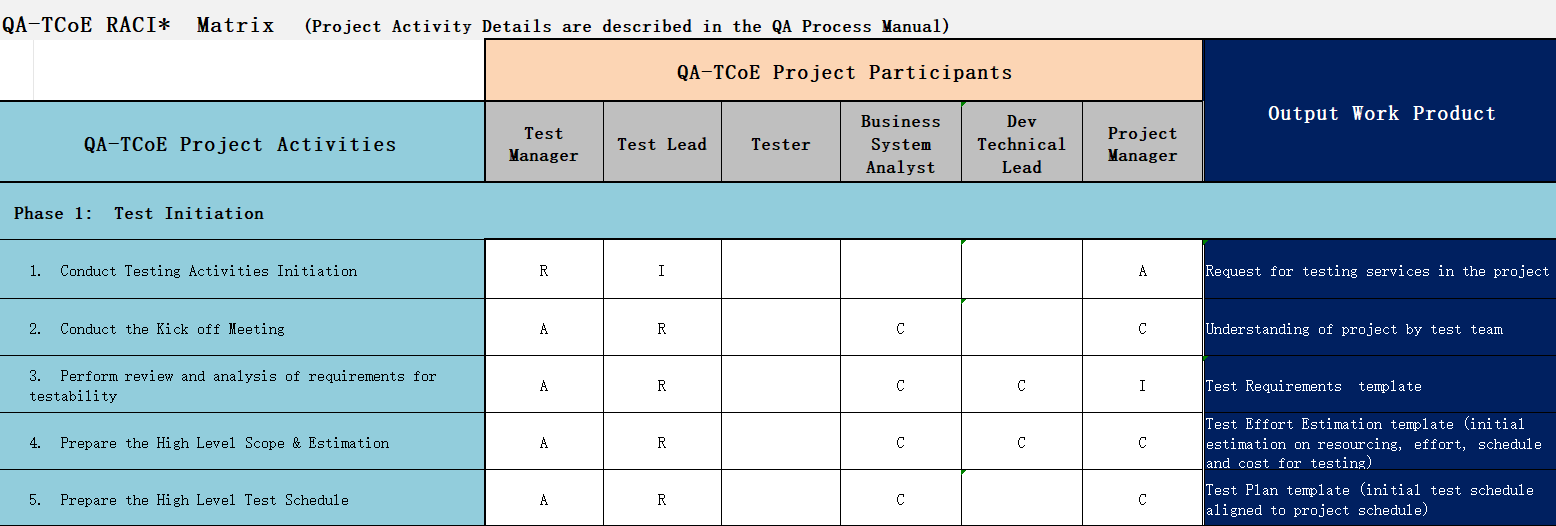
4. Multi-Role Responsibility
Chart
This Project
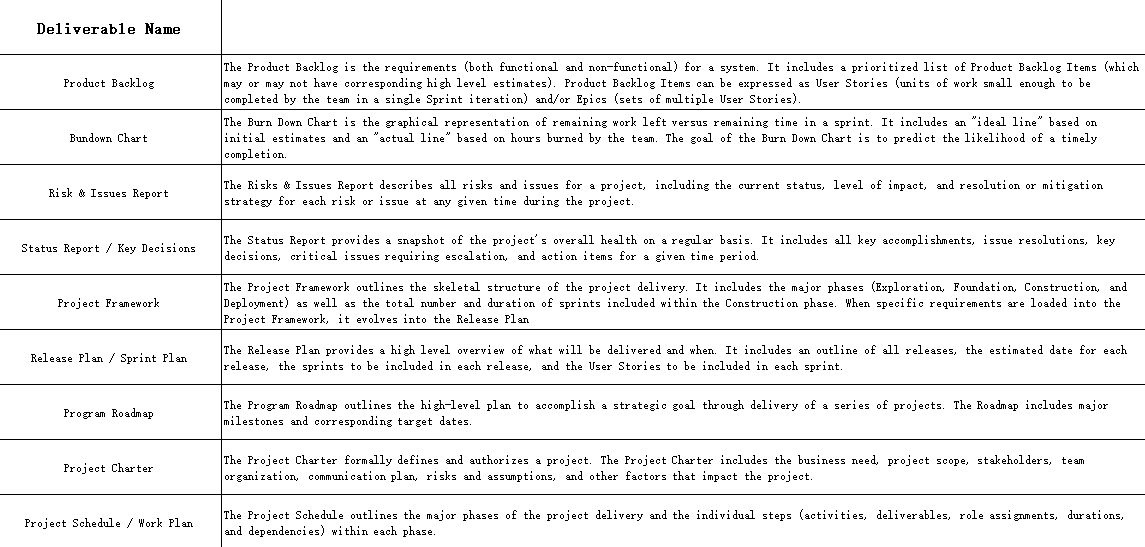
Deliverables Responsibility Matrix is a textual chart designed
to define and document key products and documents within a project
lifecycle. It provides detailed descriptions for a range of
deliverables, including the Product Backlog, Burndown Chart, Risk &
Issues Report, and Project Charter. This tool is essential for any
project manager needing to establish a clear shared understanding of
what each deliverable entails, its purpose, and its role in the overall
project framework.
Multi-Role Responsibility Chart
5. Strategy Responsibility
Chart
This Strategy
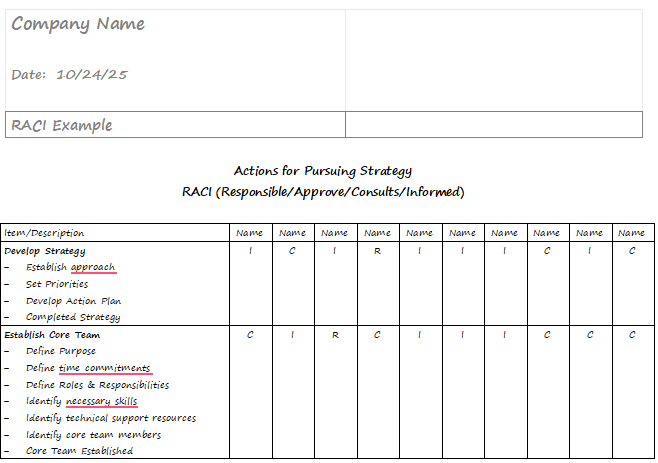
Execution RACI Chart is a simple template designed to assign
clear roles for high-level tasks related to company strategy. The chart
breaks down the strategy work into two main categories: Develop Strategy
and Establish Core Team. For each sub-task, the matrix uses the RACI
model to ensure that every key action has an assigned owner, minimizing
confusion and boosting the execution of new initiatives.
Strategy Responsibility Chart
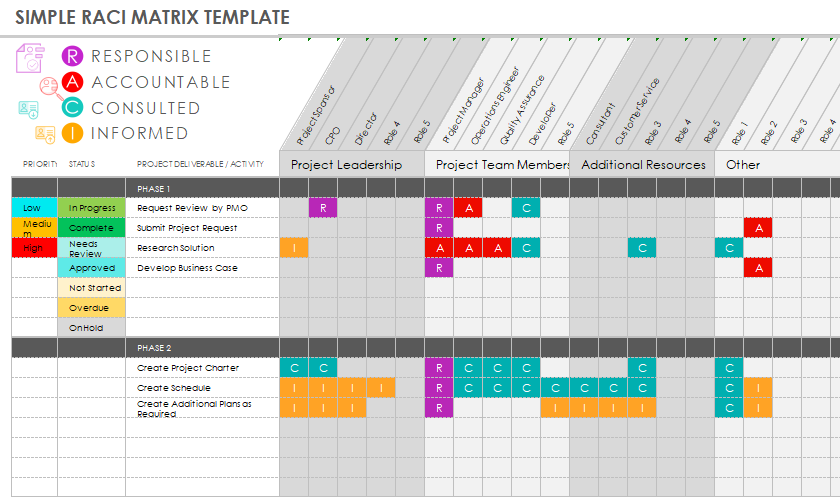
6. Simple RACI Matrix Template
This Simple
RACI Framework Template is an adaptable, color-coded chart
designed to clarify roles and track project progress across different
phases. It clearly defines the four core roles and uses diagonal
headings to accommodate various team roles, from Project Sponsor to
Developer. The template also includes columns to track the Priority and
Status of each deliverable, making it a highly visual and efficient tool
for project leadership.
Simple RACI Matrix Template
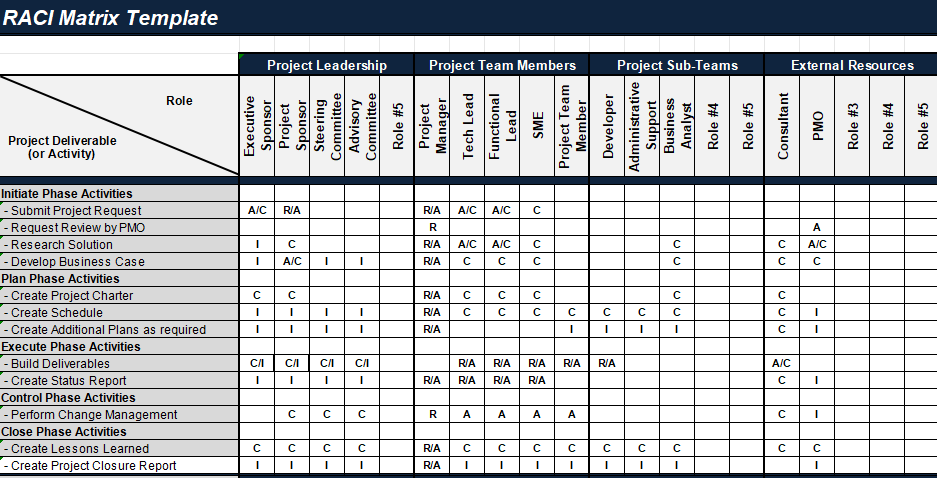
7. Black and White RACI
Chart Template
This Comprehensive
RACI Matrix Template is a highly detailed spreadsheet designed
to manage roles and responsibilities across the entire project
lifecycle, from initiation to closure. The chart breaks down the project
into five key phases and specifies numerous sub-activities within each.
It accommodates an extensive list of stakeholders, including Project
Leadership, Project Team Members, Project Sub-Teams, and External
Resources, ensuring that the Responsible, Accountable, Consulted, and
Informed parties are clearly defined for every single task.
Black and White RACI Template
8. Monthly Bill Payment Chart
This Monthly
Bill Payment Chart is a practical and essential financial
management tool designed to track due dates and payment statuses for
recurring monthly expenses. The chart clearly lists various bills and
features columns for the Amount Due, Due Date, Payment Method, and a
checklist for Paid. This simple, clear layout helps users avoid late
fees and manage their cash flow efficiently by providing an instant
snapshot of monthly financial obligations.
Monthly Bill Payment Chart
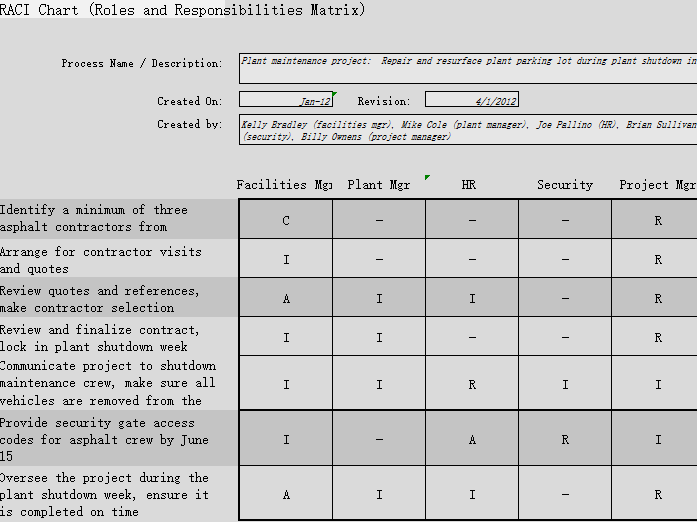
9. Simple RACI Chart Template
09
This Plant
Maintenance RACI Chart is a focused, project-specific matrix
designed to manage responsibilities for facility maintenance activities,
such as "Repair and resurface plant parking lot during plant shutdown".
The chart clearly outlines all steps, from identifying contractors to
overseeing the final project. It assigns roles to key departments such
as Facilities Mgr, Plant Mgr, HR, Security, and Project Mgr ensuring
clarity on who is Responsible, Accountable, Consulted, and Informed
throughout the project lifecycle.
Plant Maintenance RACI Chart
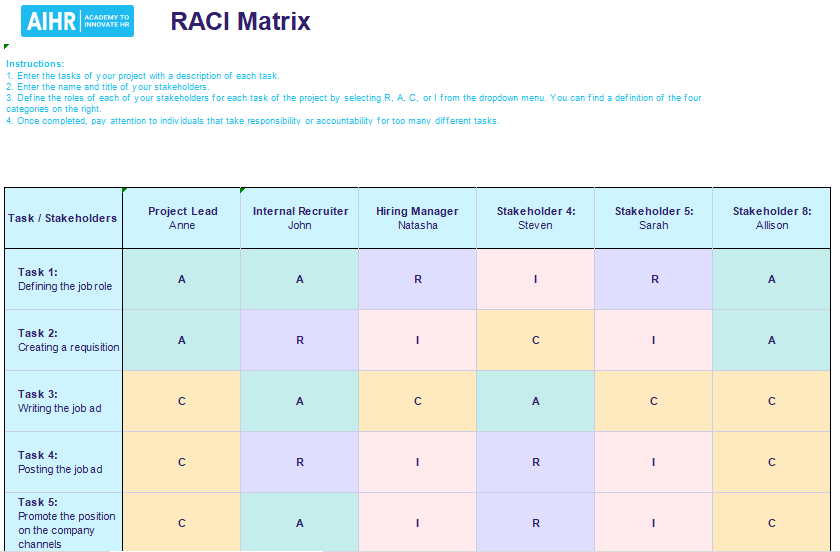
10. Azure RACI Template Excel
This Azure
RACI Matrix is a specialized, color-coded chart designed to
clarify roles across the hiring and talent management lifecycle. The
template breaks down key tasks, such as "Defining the job role",
"Creating a requisition", and "Posting the job ad", and assigns a clear
role to stakeholders like the Project Lead, Internal Recruiter, and
Hiring Manager. The color-coding and clear instructions make it an ideal
tool for standardizing HR processes and ensuring accountability for
tasks.
Azure RACI Template Excel
Each of these RACI matrix framework templates helps you bring
structure to teamwork without starting from scratch.
How to Edit RACI
Framework Template in Excel
Making edits in Excel becomes quite intuitive once you get familiar
with it. You can reorganize task sections, rename role headers, or add
color highlightsto make responsibilities clearer during team check-ins. I like to begin
by revisiting the project’s main goals, then refine each column to match
who’s actually handling what. After that, I secure the layout to keep
things consistent as the project moves forward. These small changes
might seem minor, but they make the difference between a static chart
and one that genuinely supports your team.
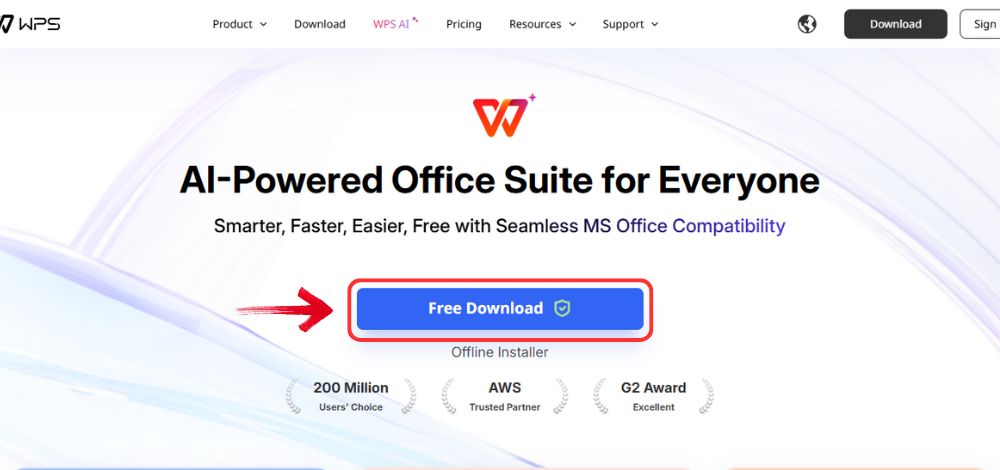
Step 1: Head over to WPS Office and click on the“Free Download” button to begin downloading the office
suite.
Download WPS Office
Step 2: Once your download is done, launch the
installation file just like you would for any other program on your
computer.
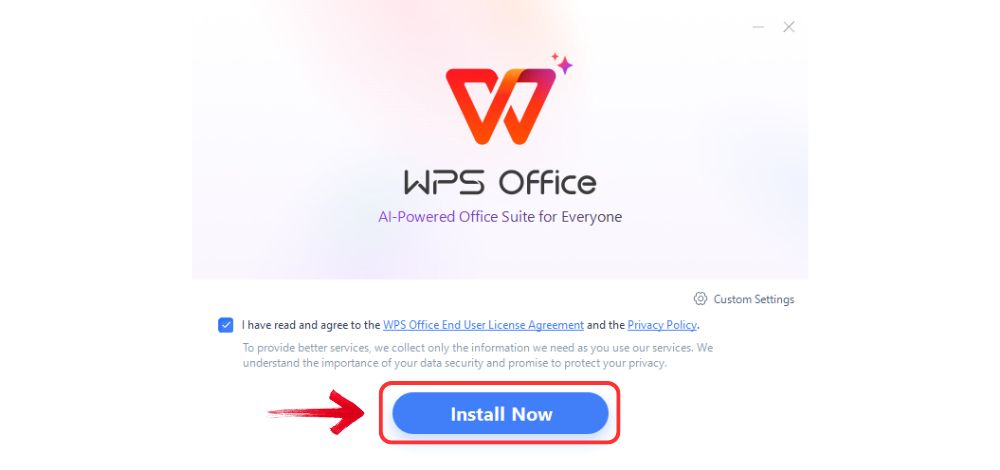
Step 3: Read and accept the terms and conditions,
then click “Install Now” to begin the setup.
Install WPS Office
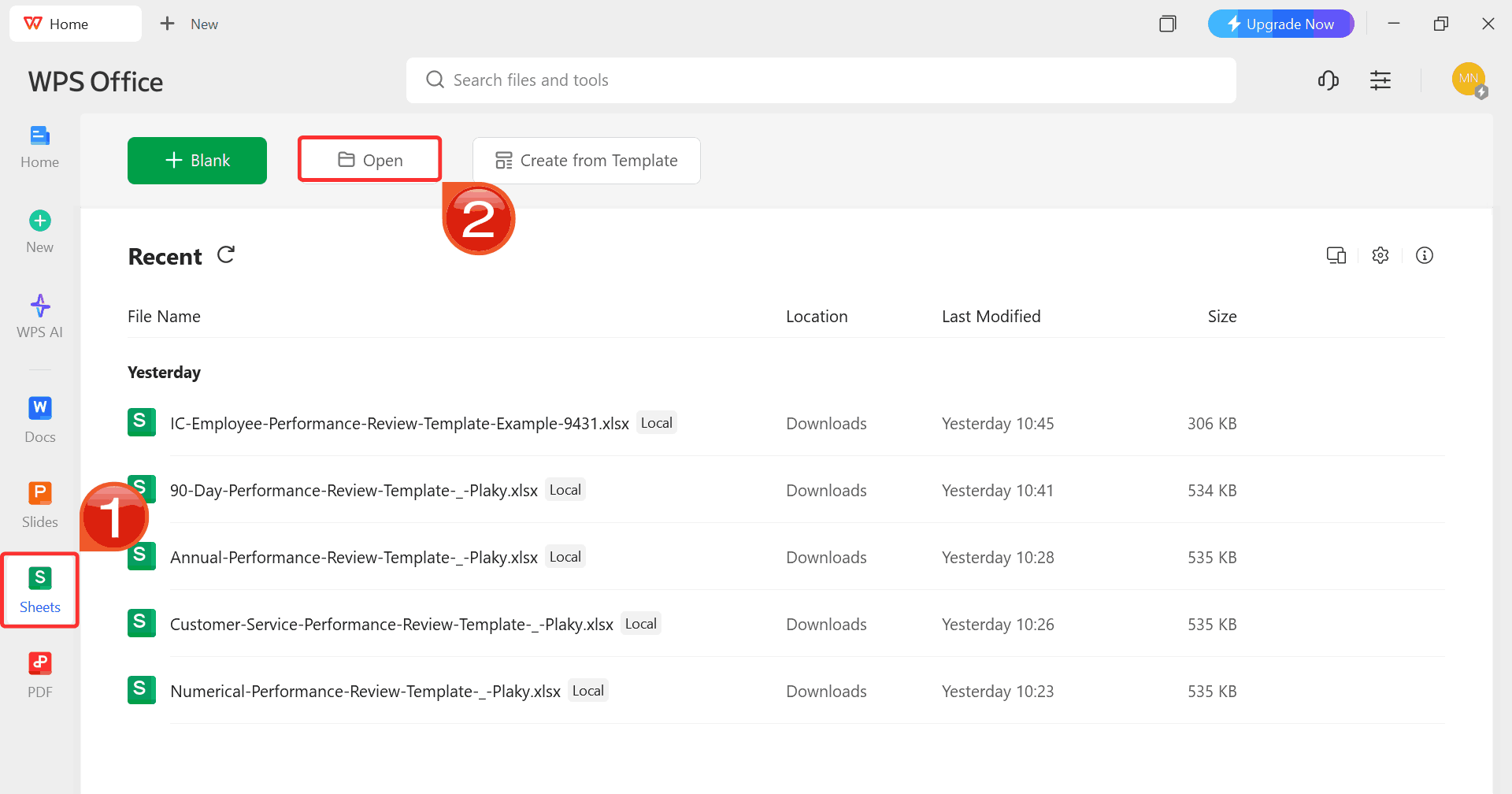
Step 4: Once you open WPS Office, select“Sheets” on the left sidebar and click“Open” to access your downloaded RACI framework
template.
WPS Spreadsheet Dashboard
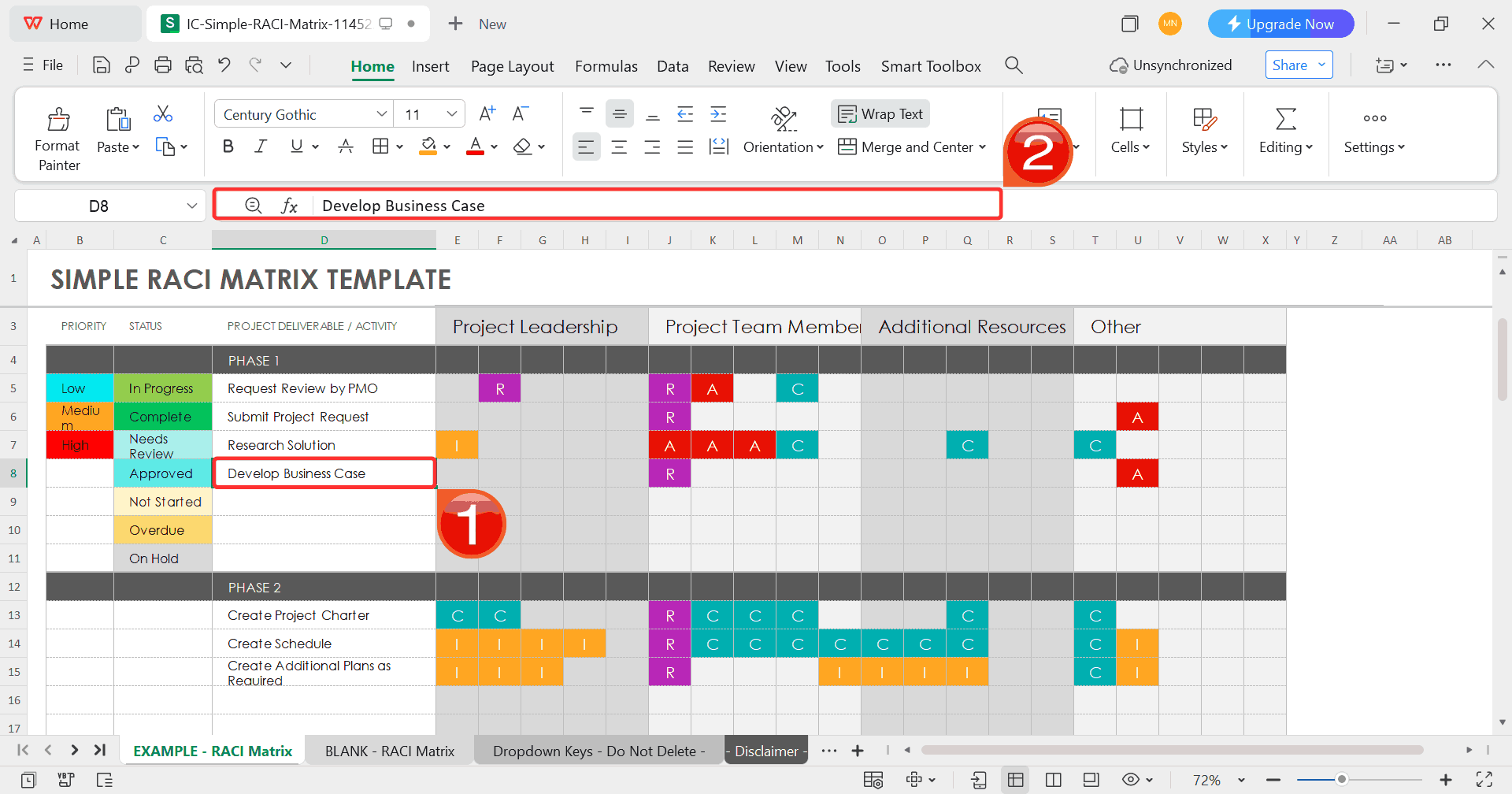
Step 5: Click on any cell you want to modify. Use
the toolbar to rename tasks, assign roles, or add details such as
deadlines or progress updates to fit your framework’s purpose.
Customize Template
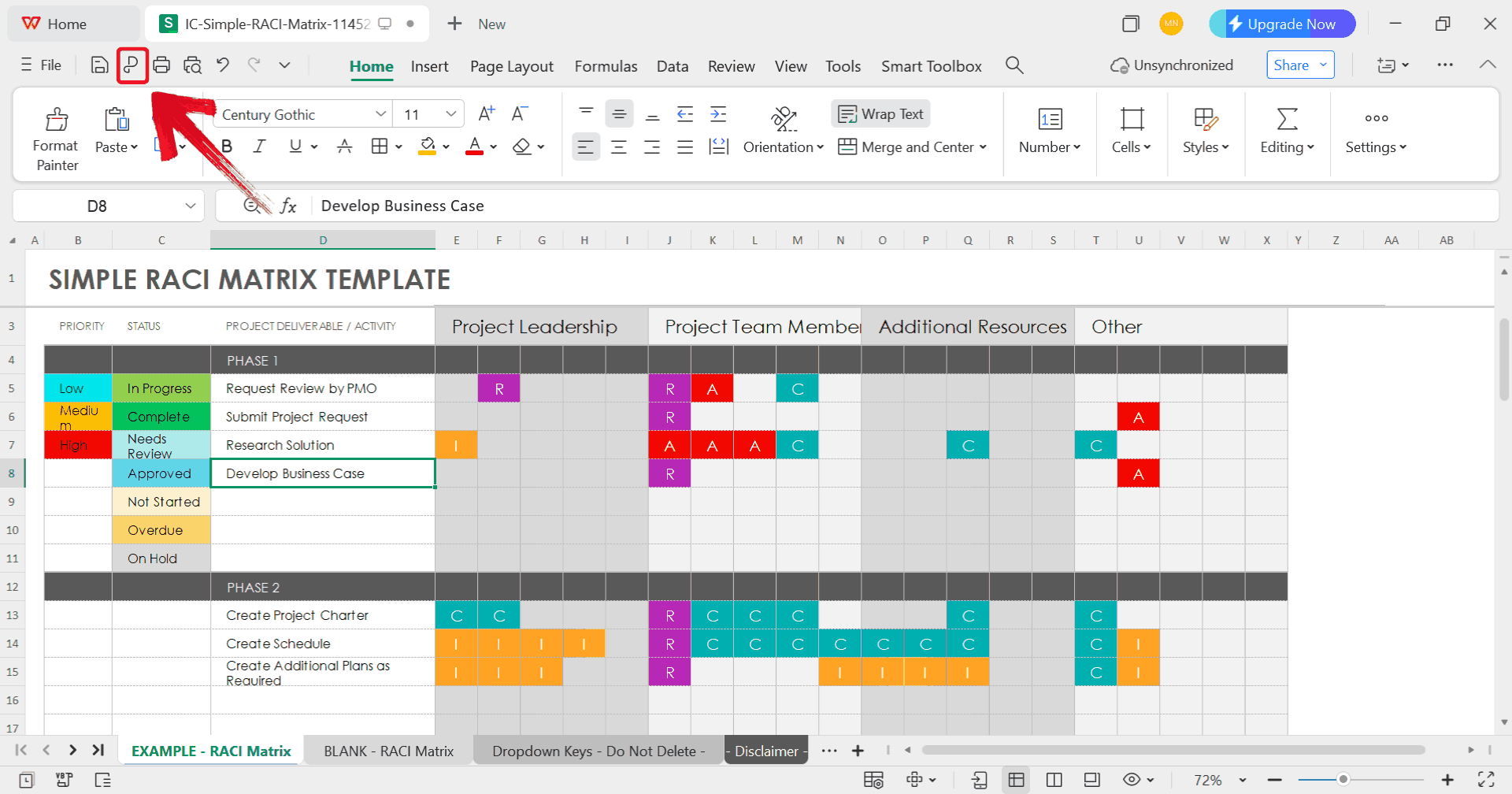
Step 6: After finishing your edits, click on the“P” sign to save your template in a professional format
that’s easy to share or archive.
Export Template
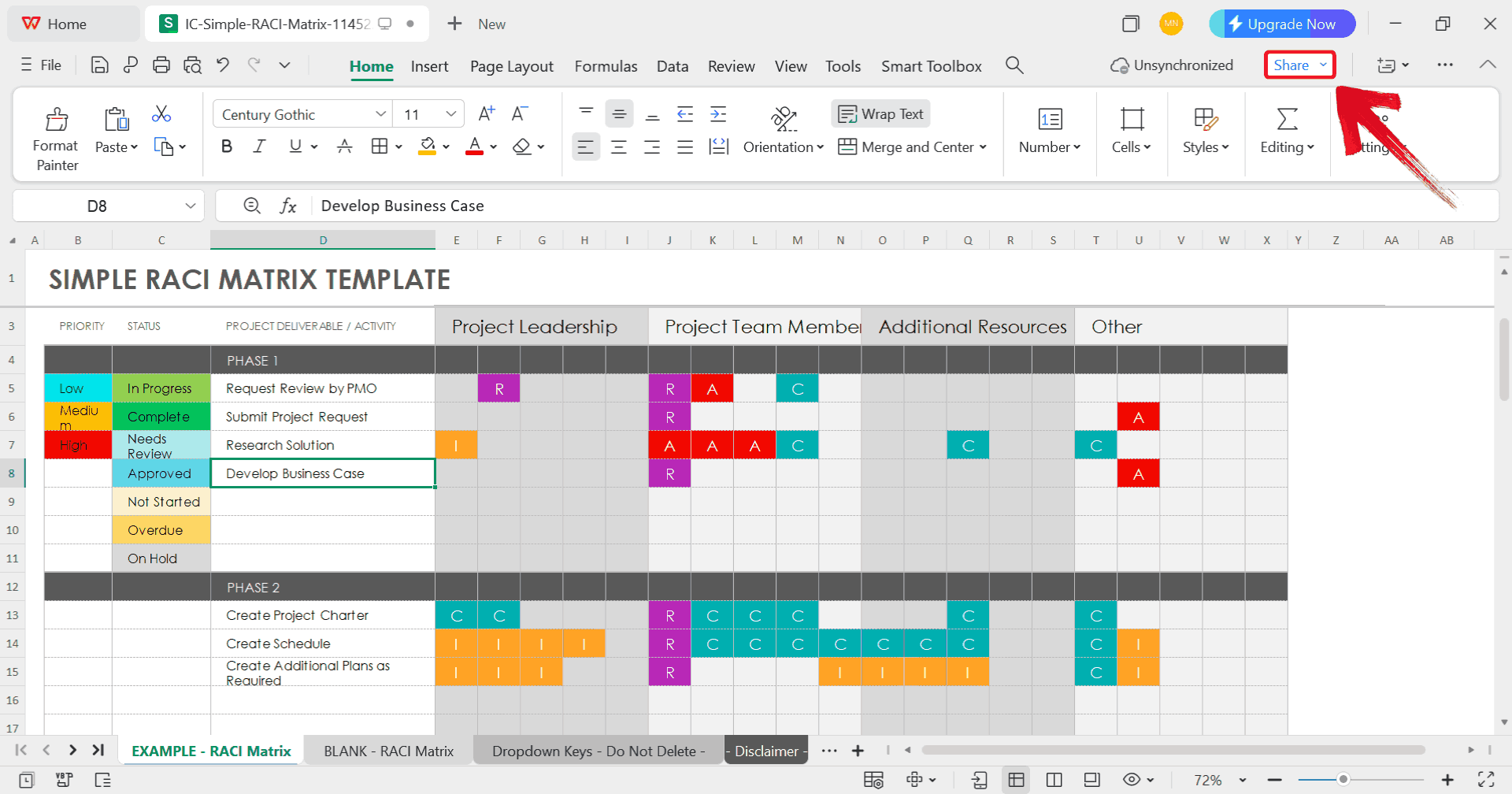
Step 7: Click the “Share” button at
the top right corner of WPS Office to generate an online link for your
chart.
Click Share
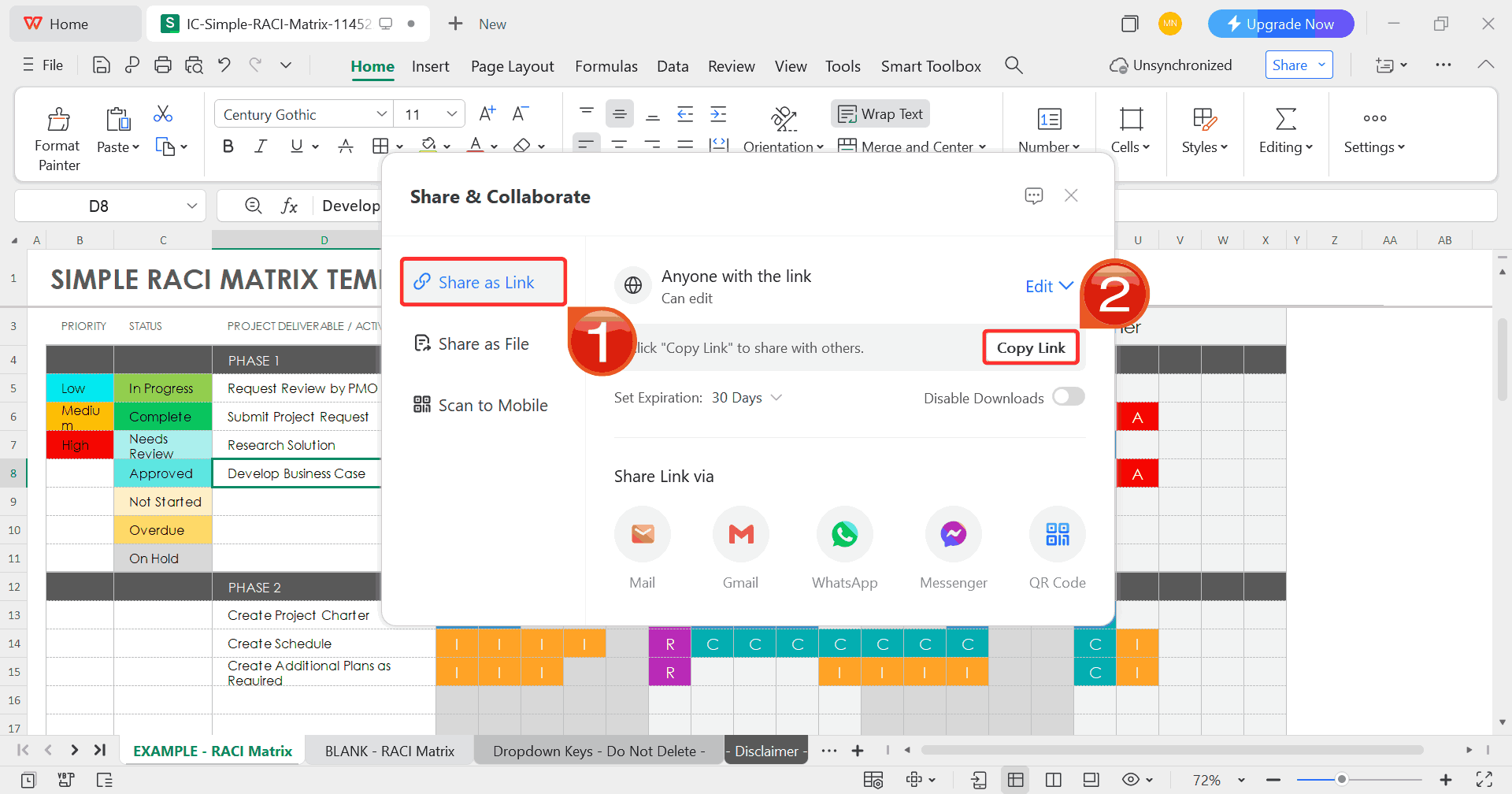
Step 8: When the window appears, select“Share as Link” and then click “Copy
Link”. You can now share this link with anyone for easy online
viewing or collaboration.
Copy Link
Free
Office Suite with Editable RACI Framework Template
As someone who’s tested a lot of different tools to manage and edit
RACI charts, using an all-in-one office suite saves a lot of time.
Instead of switching between programs, I prefer working in WPS Office because it supports
Excel formats natively and offers templates that open without formatting
errors. Its interface feels familiar if you’ve used Microsoft Office,
but it adds small conveniences like tabbed documents, built-in PDF
export, and AI-assisted formatting. These features make it easier to
customize RACI templates, share updates instantly, and keep everything
aligned without needing extra plugins or software.
Key Features
AI-powered writing assistance: Improve clarity
and consistency in your documentation with smart suggestions that refine
tone, structure, and readability in real time.
Free and fully compatible: Download and use WPS
Office at no cost while maintaining complete compatibility with
Microsoft Word, Excel, and PowerPoint files.
Extensive template library: Access thousands of
ready-to-use templates for project management, reports,
and RACI charts, all easily customizable.
Seamless online collaboration: Share files
through secure links, gather feedback, and edit documents together
without email back-and-forth.
You can access these templates anytime from WPS Office and manage all
your RACI-related documentation without switching platforms.
FAQs
1. Are the templates on
WPS free to use?
Yes. WPS Office offers a wide selection of free templates, though a
Pro subscription gives you access to even more designs.
2. Do I need an
account to download templates?
Not always. Some sites allow direct downloads, while others may ask
for a quick registration.
3. Can I customize
my RACI framework template?
Absolutely. You can modify colors, columns, or add icons to suit your
team’s style.
4. Can
I use digital RACI charts instead of printable ones?
Yes. WPS and other platforms allow online collaboration and real-time
updates.
5. What’s the
difference between RACI and RASCI?
RASCI adds an extra “S” for Supportive, those who assist in
completing a task.
WPS Making RACI Simple
A well-structured RACI framework template eliminates confusion,
strengthens accountability, and keeps every project on track. These
templates simplify how teams work together. The ten free options shared
above are a great starting point, but you don’t have to stop there. WithWPS Office, you can explore an
even wider collection of editable RACI templates, ready to open directly
in WPS Excel. Its intuitive interface, AI-powered tools, and real-time
sharing features make editing and teamwork effortless. You can easily
manage work, assign roles, and export your chart as a PDF all within one
secure, unified platform. WPS Office is a smarter, faster way to manage
every stage of your project with clarity and confidence.
7+ years in productivity tech. I test and review the latest tools to simplify your workflow. Follow for honest app comparisons, practical guides, and curated tech picks to boost efficiency.


'%3e%3cpath%20d='M8%200C12.4183%200%2016%203.58172%2016%208C16%2012.4183%2012.4183%2016%208%2016C3.58172%2016%200%2012.4183%200%208C0%203.58172%203.58172%200%208%200ZM11.6162%204.38379C11.2257%203.99337%2010.5927%203.99338%2010.2021%204.38379L8%206.58594L5.79785%204.38379C5.40732%203.99334%204.77429%203.99329%204.38379%204.38379C3.99331%204.77429%203.99335%205.40733%204.38379%205.79785L6.58594%208L4.38379%2010.2021C3.99348%2010.5927%203.99341%2011.2257%204.38379%2011.6162C4.77426%2012.0066%205.40734%2012.0065%205.79785%2011.6162L8%209.41406L10.2021%2011.6162C10.5927%2012.0066%2011.2257%2012.0067%2011.6162%2011.6162C12.0067%2011.2257%2012.0066%2010.5927%2011.6162%2010.2021L9.41406%208L11.6162%205.79785C12.0066%205.40735%2012.0066%204.77429%2011.6162%204.38379Z'%20fill='%23080E17'%20fill-opacity='0.46'/%3e%3c/g%3e%3cdefs%3e%3cclipPath%20id='clip0_3761_713'%3e%3crect%20width='16'%20height='16'%20fill='white'/%3e%3c/clipPath%3e%3c/defs%3e%3c/svg%3e)




'%3e%3cpath%20fill-rule='evenodd'%20clip-rule='evenodd'%20d='M21.4999%2010.9993C21.4999%205.20009%2016.7986%200.498901%2010.9993%200.498901C5.19994%200.498901%200.498657%205.20009%200.498657%2010.9993C0.498657%2016.2404%204.33858%2020.5844%209.35855%2021.3722V14.0346H6.69238V10.9993H9.35855V8.68594C9.35855%206.05427%2010.9262%204.60062%2013.3248%204.60062C14.4736%204.60062%2015.6753%204.80571%2015.6753%204.80571V7.38979H14.3512C13.0468%207.38979%2012.64%208.19921%2012.64%209.0296V10.9993H15.5523L15.0867%2014.0346H12.64V21.3722C17.66%2020.5844%2021.4999%2016.2404%2021.4999%2010.9993Z'%20fill='%231568EA'/%3e%3c/g%3e%3c/svg%3e)


'%3e%3cpath%20d='M2.42045%2022.1876H6.31818V12.7217L0.75%208.54553V20.5171C0.75%2021.4414%201.49892%2022.1876%202.42045%2022.1876Z'%20fill='%234285F4'/%3e%3cpath%20d='M19.682%2022.1876H23.5797C24.5041%2022.1876%2025.2502%2021.4387%2025.2502%2020.5171V8.54553L19.682%2012.7217'%20fill='%2334A853'/%3e%3cpath%20d='M19.682%205.48293V12.7216L25.2502%208.54543V6.31816C25.2502%204.25236%2022.8921%203.07469%2021.2411%204.31361'%20fill='%23FBBC04'/%3e%3cpath%20d='M6.31824%2012.7217V5.48303L13.0001%2010.4944L19.6819%205.48303V12.7217L13.0001%2017.733'%20fill='%23EA4335'/%3e%3cpath%20d='M0.75%206.31816V8.54543L6.31818%2012.7216V5.48293L4.75909%204.31361C3.10534%203.07469%200.75%204.25236%200.75%206.31816Z'%20fill='%23C5221F'/%3e%3c/g%3e%3cdefs%3e%3cclipPath%20id='clip0_2954_7305'%3e%3crect%20width='24.5'%20height='18.375'%20fill='white'%20transform='translate(0.75%203.8125)'/%3e%3c/clipPath%3e%3c/defs%3e%3c/svg%3e)



'%3e%3cpath%20d='M19.9911%204.11386V6.471H18.5894C18.0775%206.471%2017.7322%206.57814%2017.5536%206.79243C17.3751%207.00671%2017.2858%207.32814%2017.2858%207.75671V9.44421H19.9019L19.5536%2012.0871H17.2858V18.8639H14.5536V12.0871H12.2769V9.44421H14.5536V7.49779C14.5536%206.39064%2014.8632%205.53201%2015.4822%204.92189C16.1013%204.31177%2016.9257%204.00671%2017.9554%204.00671C18.8304%204.00671%2019.509%204.04243%2019.9911%204.11386Z'%20fill='%23333333'/%3e%3c/g%3e%3cdefs%3e%3cclipPath%20id='clip0_2938_8199'%3e%3crect%20width='16'%20height='16'%20fill='white'%20transform='translate(8%204.00671)'/%3e%3c/clipPath%3e%3c/defs%3e%3c/svg%3e)
'%3e%3cpath%20d='M17.5237%2010.7813L23.4811%204H22.0699L16.8949%209.88693L12.7648%204H8L14.2469%2012.9029L8%2020.0133H9.4112L14.8725%2013.7952L19.2352%2020.0133H24M9.92053%205.04213H12.0885L22.0688%2019.0224H19.9003'%20fill='%23333333'/%3e%3c/g%3e%3cdefs%3e%3cclipPath%20id='clip0_2938_8200'%3e%3crect%20width='16'%20height='16.0134'%20fill='white'%20transform='translate(8%204)'/%3e%3c/clipPath%3e%3c/defs%3e%3c/svg%3e)


