Tasks and responsibilities often multiply faster than we can keep
track of them. Tasks get missed, deadlines are overlooked, and everyone
starts to get irritated when they don’t know who’s supposed to do what.
Without a clear system, even small tasks can spiral into unnecessary
stress and confusion. Imagine having a tool that organizes everything
neatly, highlights who’s accountable, and even makes it easy to share or
print. In this guide, I’ll introduce 10 responsibility chart templates
that are ready to use, customizable, and adaptable.
Responsibility Chart Templates
What Does the RACI Matrix
Stand For?
When someone talks about a responsibility chart, one term you’ll
often hear is RACI. It’s a straightforward system that assigns
ownership, tracks progress, and clarifies who should be involved at each
step, breaking every task down into clear roles. Using RACI helped me
create responsibility chartsthat are not only organized but also actionable, so everyone knows
exactly what they’re accountable for.
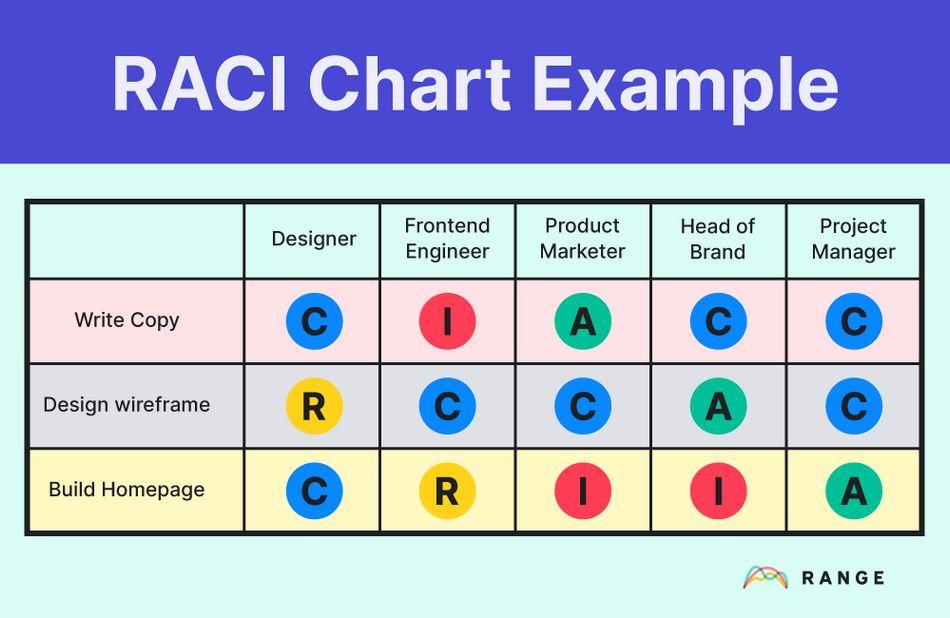
RACI Chart Example
RACI stands for:
Responsible: The person or people who actually
do the work. They are the ones completing the task on a day-to-day basis
and ensuring each step is executed correctly.
Accountable: The individual who owns the outcome
and ensures it gets done. This person signsoff on the work, makes final decisions, and is ultimately answerable for
success or failure.
Consulted: Those whose advice or input is sought
during the task. They provide expertise, guidance, or feedback to help
the responsible party make informed decisions.
Informed: Individuals who need updates on
progress or results. They don’t perform the work but must be kept aware
of milestones, changes, or final outcomes.
Using a RACI framework in a responsibility chart for adults ensures
every task has clear ownership, avoiding overlaps and confusion.
10 Responsibility Chart
Templates
Knowing the roles is one thing, but having a structured chart makes
assigning and tracking tasks far more manageable. I could see at a
glance who was responsible, who needed to be consulted, and what
deadlines were approaching. That clarity became even more useful when
coordinating multiple people whether for household chores or team
projects. To make this process easier, I started using pre-designed
responsibility chart templates, which already include sections for tasks,
roles, and timelines.
1. Medical Care Team Smart
Schedule
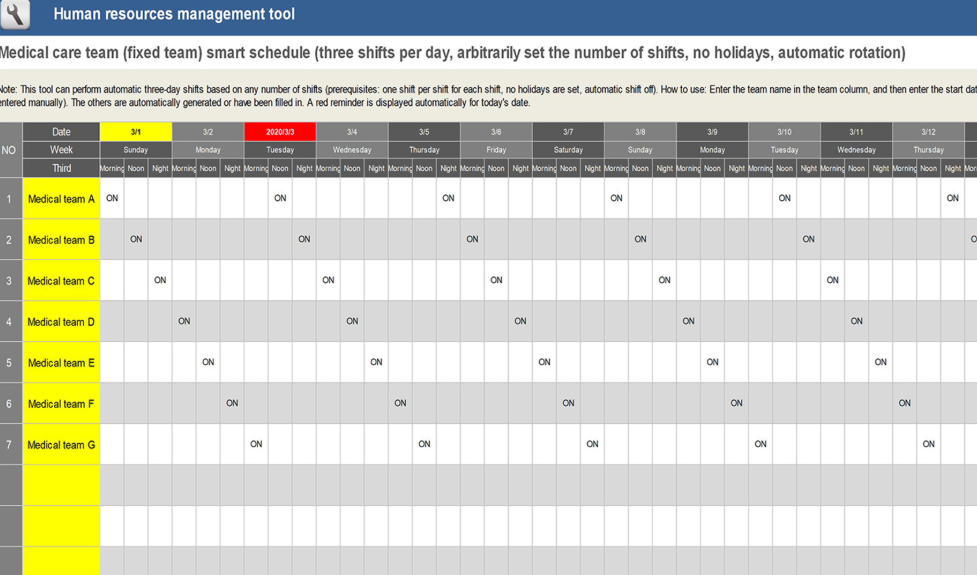
This Medical
Care Team Smart Schedule is a sophisticated human resources
management tool designed for organizing three shifts per day with an
automatic rotation feature. The spreadsheet tracks a full week, Monday
through Sunday, and clearly marks which Medical Team is on duty for each
shift, accommodating complex scheduling needs. This tool is essential
for managing a fixed, rotating schedule in a high-demand environment
like medical care, where automatic rotation and clear oversight are
critical.
Medical Care Team Smart Schedule
2. RACI for Change
Management Template
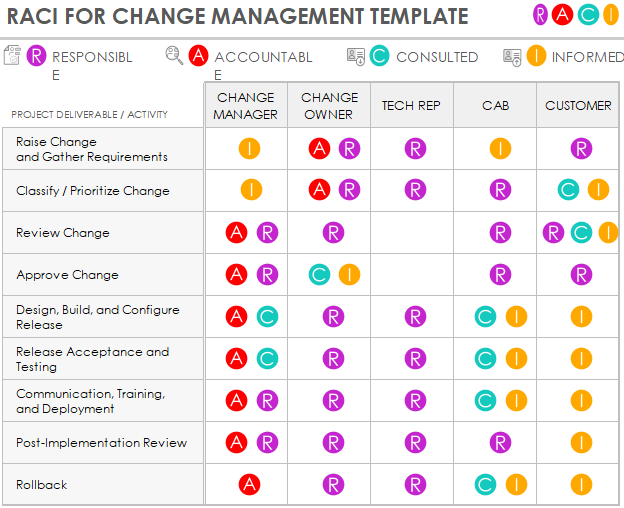
This RACI
for Change Management Template is a visual and color-coded
matrix designed to clarify roles and responsibilities during an
organizational change project. The template tracks various Project
Deliverables / Activities, from "Raise Change and Gather Requirements"
to "Rollback", and clearly assigns the appropriate RACI role to
stakeholders like the Change Manager, Change Owner, Tech Rep, CAB, and
Customer. This tool is essential for simplifying communication and
ensuring accountability throughout the change process.
RACI Change Management Template
3. ITIL RACI Template with
Gantt Chart
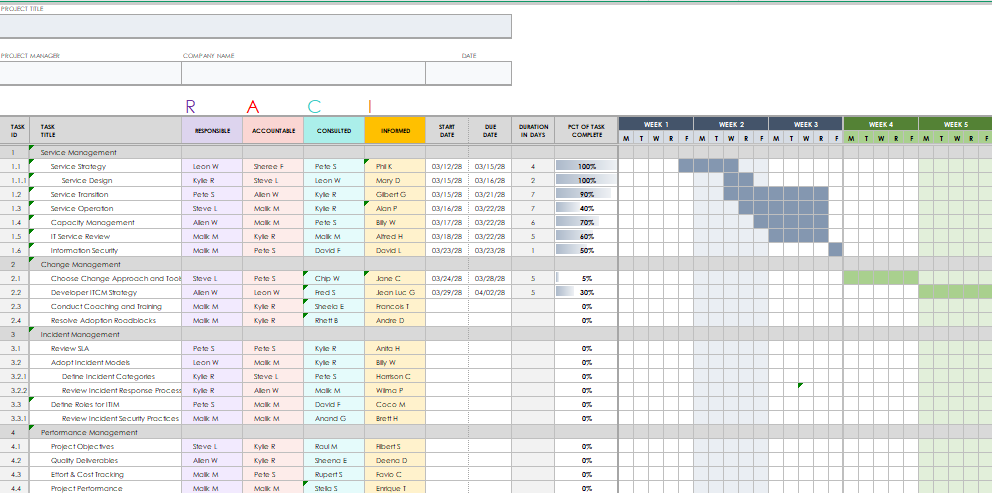
This ITIL
RACI Template is an advanced project management spreadsheet that
merges the RACI matrix with a Gantt chart for visual scheduling and task
accountability. The template is highly structured, organizing tasks into
major sections such as Service Management, Change Management, Incident
Management, and Performance Management. For each task, it assigns the
Responsible, Accountable, Consulted, and Informed parties and plots the
project timeline, duration in days, and percentage complete on the
integrated Gantt chart, making it ideal for complex IT projects.
IT RACI Template
4.
Responsibility Chart for Management and Sourcing
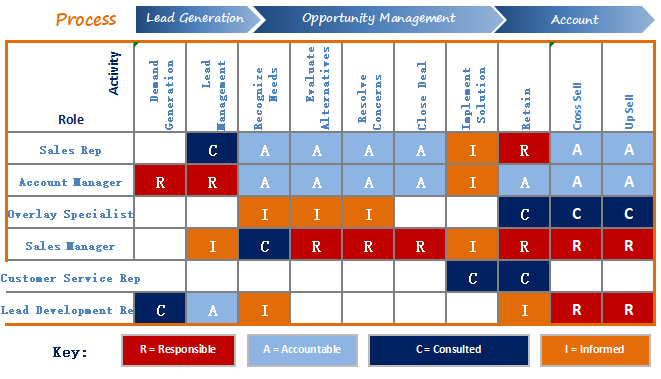
This Sales
Process RACI Matrix is a colorful, process-oriented chart
designed to map roles and responsibilities across the entire customer
lifecycle, from initial lead to upsell. The matrix clearly groups
activities into three stages: Lead Generation, Opportunity Management,
and Account. Stakeholders like the Sales Rep, Account Manager, and Sales
Manager are assigned one of the four key roles for each activity,
ensuring clear ownership and efficient process flow in the sales
department.
Management RACI Template
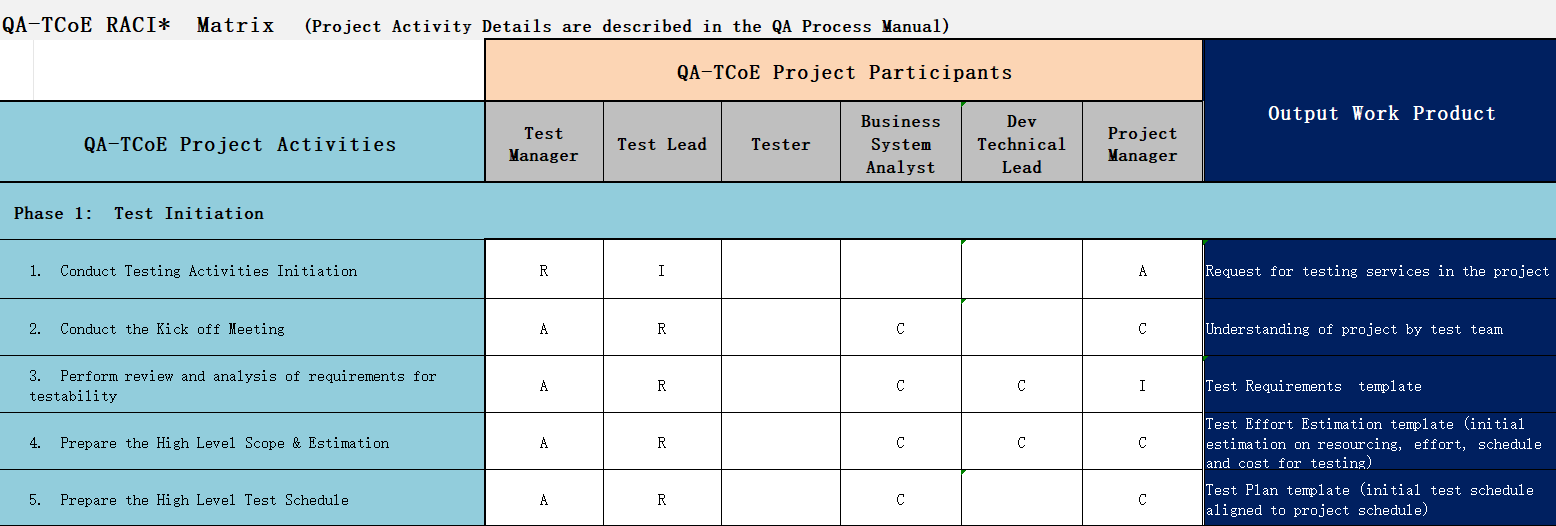
5. Multi-Role Responsibility
Chart
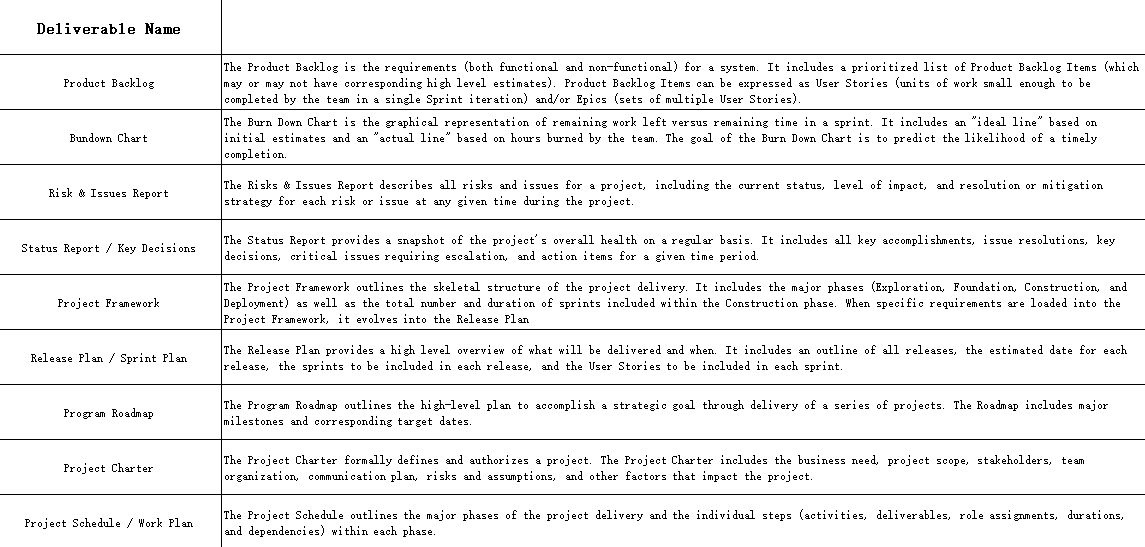
This Project
Deliverables Responsibility Matrix is a textual chart designed
to define and document key products and documents within a project
lifecycle. It provides detailed descriptions for a range of
deliverables, including the Product Backlog, Burndown Chart, Risk &
Issues Report, and Project Charter. This tool is essential for any
project manager needing to establish a clear shared understanding of
what each deliverable entails, its purpose, and its role in the overall
project framework.
Multi-Role Responsibility Chart
6. Strategy Responsibility
Chart
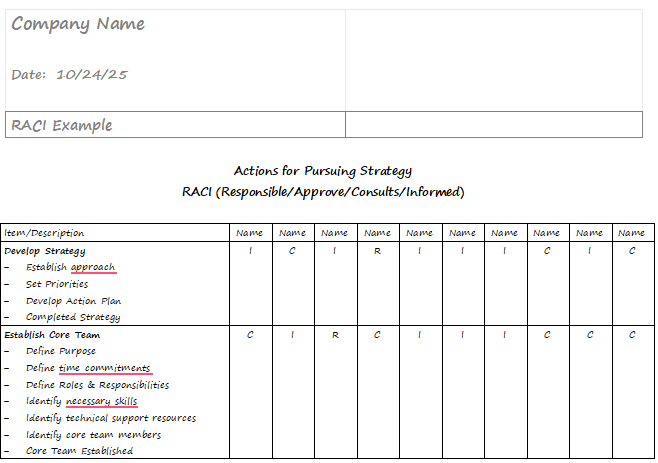
This Strategy
Execution RACI Chart is a simple template designed to assign
clear roles for high-level tasks related to company strategy. The chart
breaks down the strategy work into two main categories: Develop Strategy
and Establish Core Team. For each sub-task, the matrix uses the RACI
model to ensure that every key action has an assigned owner, minimizing
confusion and boosting the execution of new initiatives.
Strategy Responsibility Chart
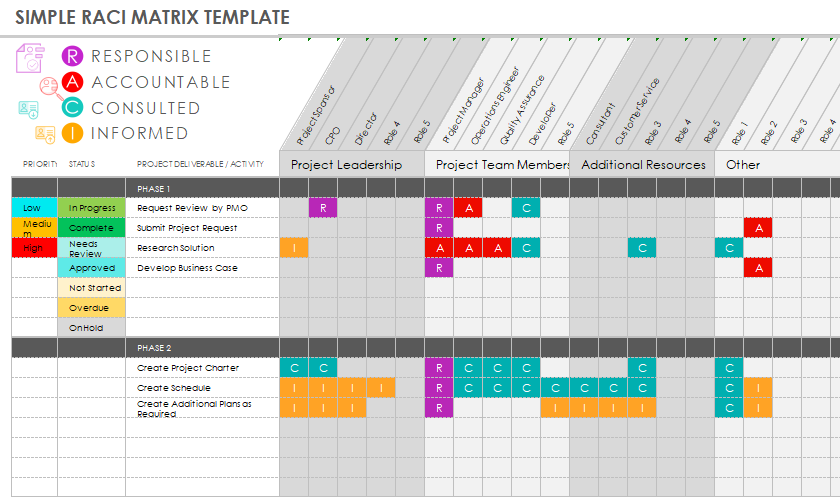
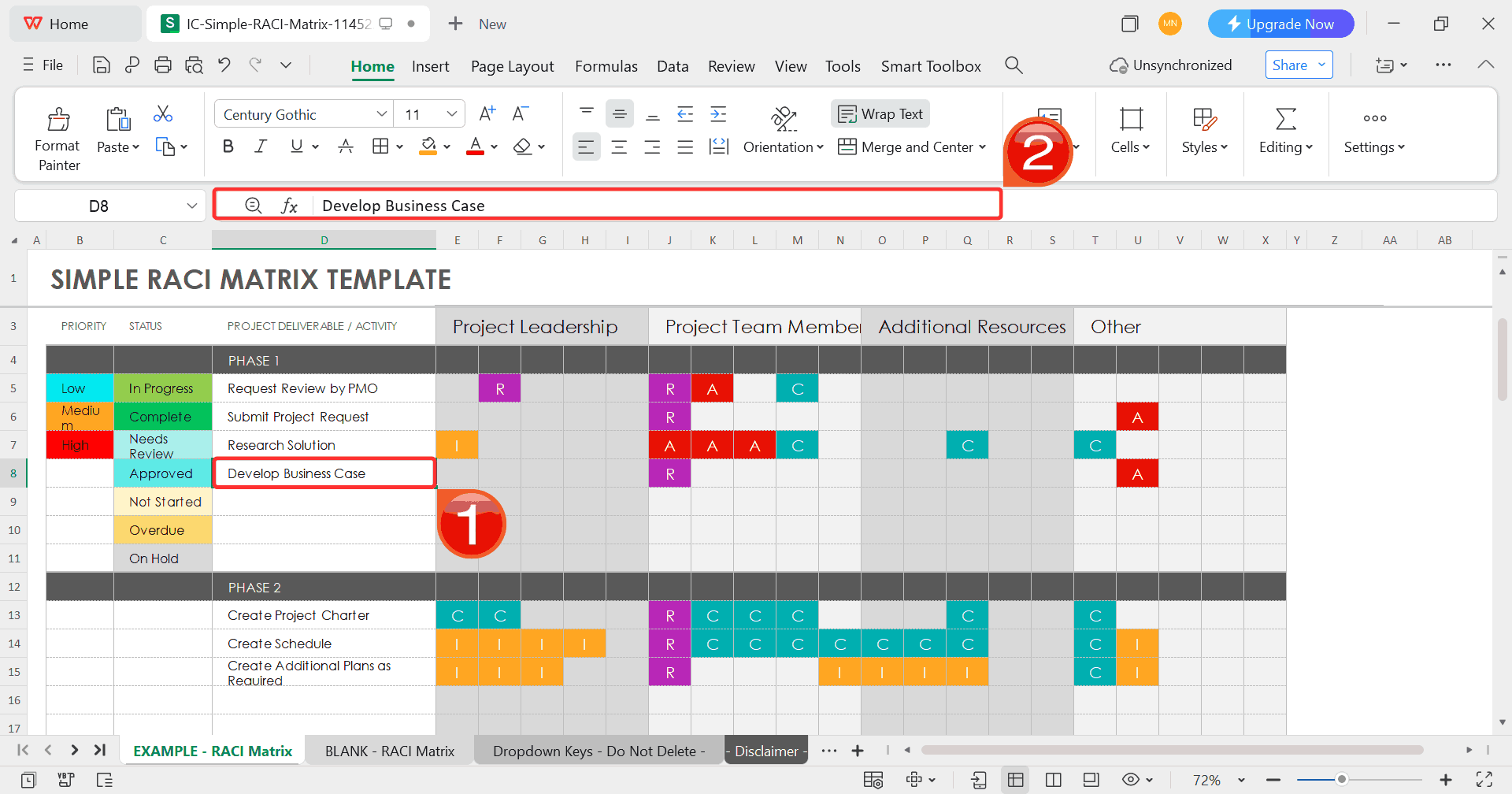
7. Simple RACI Matrix Template
This Simple
RACI Matrix Template is an adaptable, color-coded chart designed
to clarify roles and track project progress across different phases. It
clearly defines the four core roles and uses diagonal headings to
accommodate various team roles, from Project Sponsor to Developer. The
template also includes columns to track the Priority and Status of each
deliverable, making it a highly visual and efficient tool for project
leadership.
Simple RACI Matrix Template
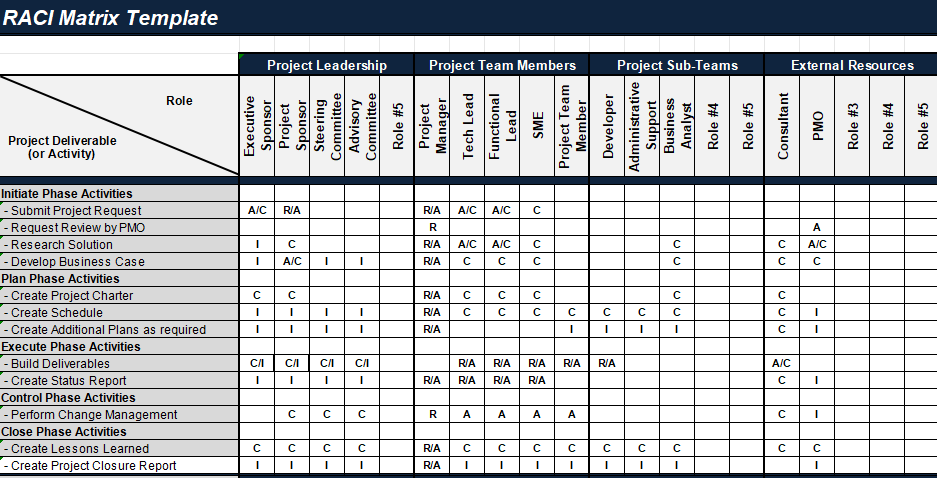
8. Black and White RACI
Chart Template
This Comprehensive
RACI Matrix Template is a highly detailed spreadsheet designed
to manage roles and responsibilities across the entire project
lifecycle, from initiation to closure. The chart breaks down the project
into five key phases and specifies numerous sub-activities within each.
It accommodates an extensive list of stakeholders, including Project
Leadership, Project Team Members, Project Sub-Teams, and External
Resources, ensuring that the Responsible, Accountable, Consulted, and
Informed parties are clearly defined for every single task.
Black and White RACI Template
9. Monthly Bill Payment Chart
This Monthly
Bill Payment Chart is a practical and essential financial
management tool designed to track due dates and payment statuses for
recurring monthly expenses. The chart clearly lists various bills and
features columns for the Amount Due, Due Date, Payment Method, and a
checklist for Paid. This simple, clear layout helps users avoid late
fees and manage their cash flow efficiently by providing an instant
snapshot of monthly financial obligations.
Monthly Bill Payment Chart
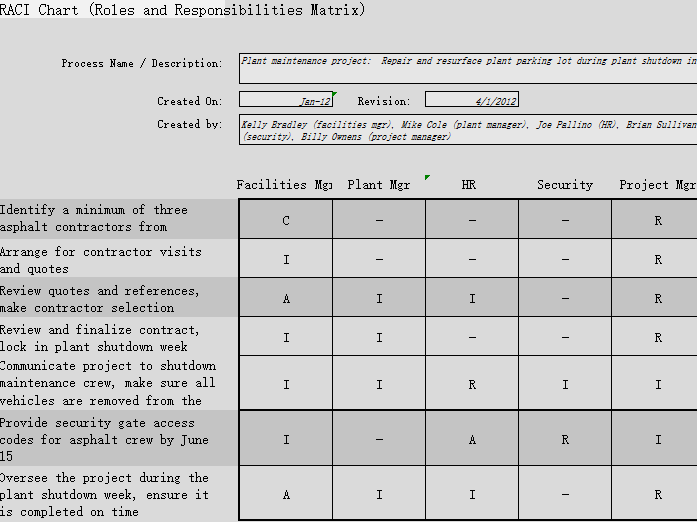
10. Simple RACI Chart Template
09
This Plant
Maintenance RACI Chart is a focused, project-specific matrix
designed to manage responsibilities for facility maintenance activities,
such as "Repair and resurface plant parking lot during plant shutdown".
The chart clearly outlines all steps, from identifying contractors to
overseeing the final project. It assigns roles to key departments such
as Facilities Mgr, Plant Mgr, HR, Security, and Project Mgr ensuring
clarity on who is Responsible, Accountable, Consulted, and Informed
throughout the project lifecycle.
Plant Maintenance RACI Chart
How to
Edit a Responsibility Chart Template in Excel
Choosing a responsibility chart template is just the start. The real
value comes from adapting it to fit your exact tasks, roles, and
schedules. In one of my family chore charts, I added columns for
weekends and overlapping duties, while in a work project chart, color-coding
made it easier to track progress. The responsibility chart editing
template in WPS Office makes this simple as it’s pre-formatted yet
flexible, so you can adjust columns, labels, and colors in minutes,
turning a ready-made chart into one that fits how your team or household
actually operates.
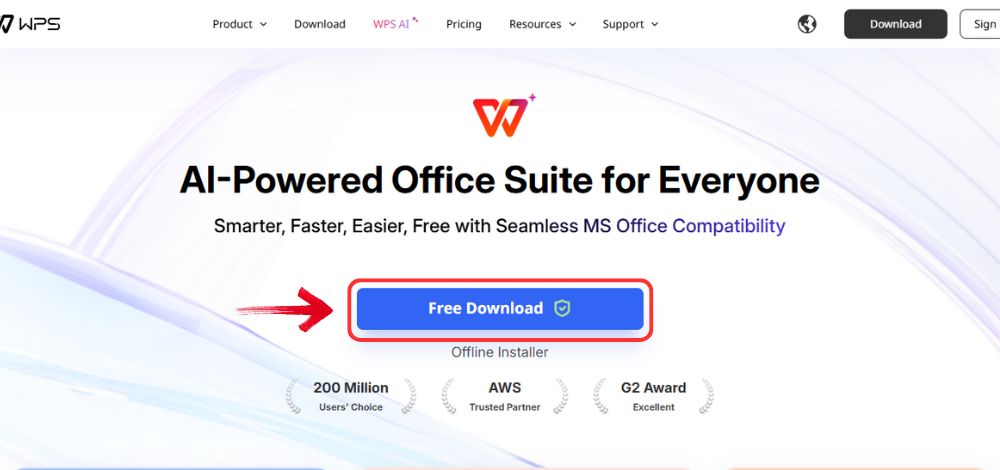
Step 1: Visit the WPS Office website and click the“Free Download” button to start downloading the
software.
Download WPS Office
Step 2: Once the download is complete, open the
installation file just like you would for any other program on your
computer.
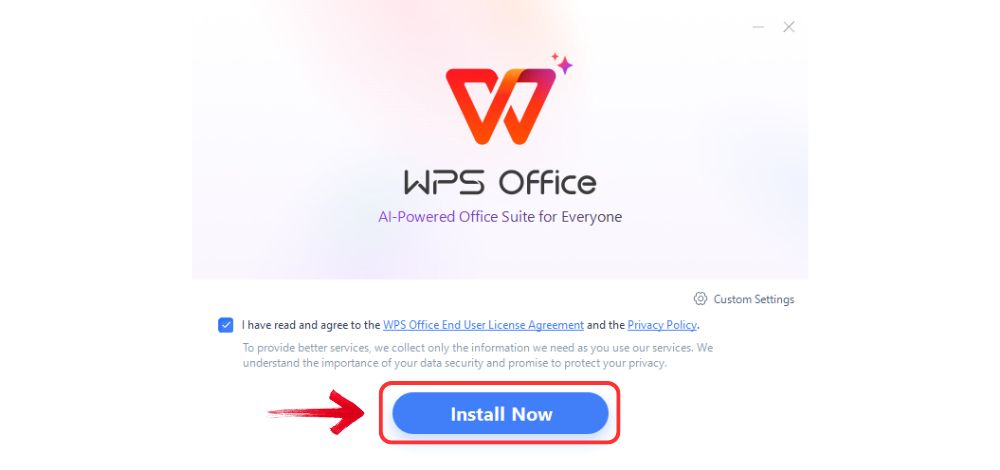
Step 3: Read and accept the terms and conditions,
then click “Install Now” to begin the setup. The
process only takes a few minutes.
Install WPS Office
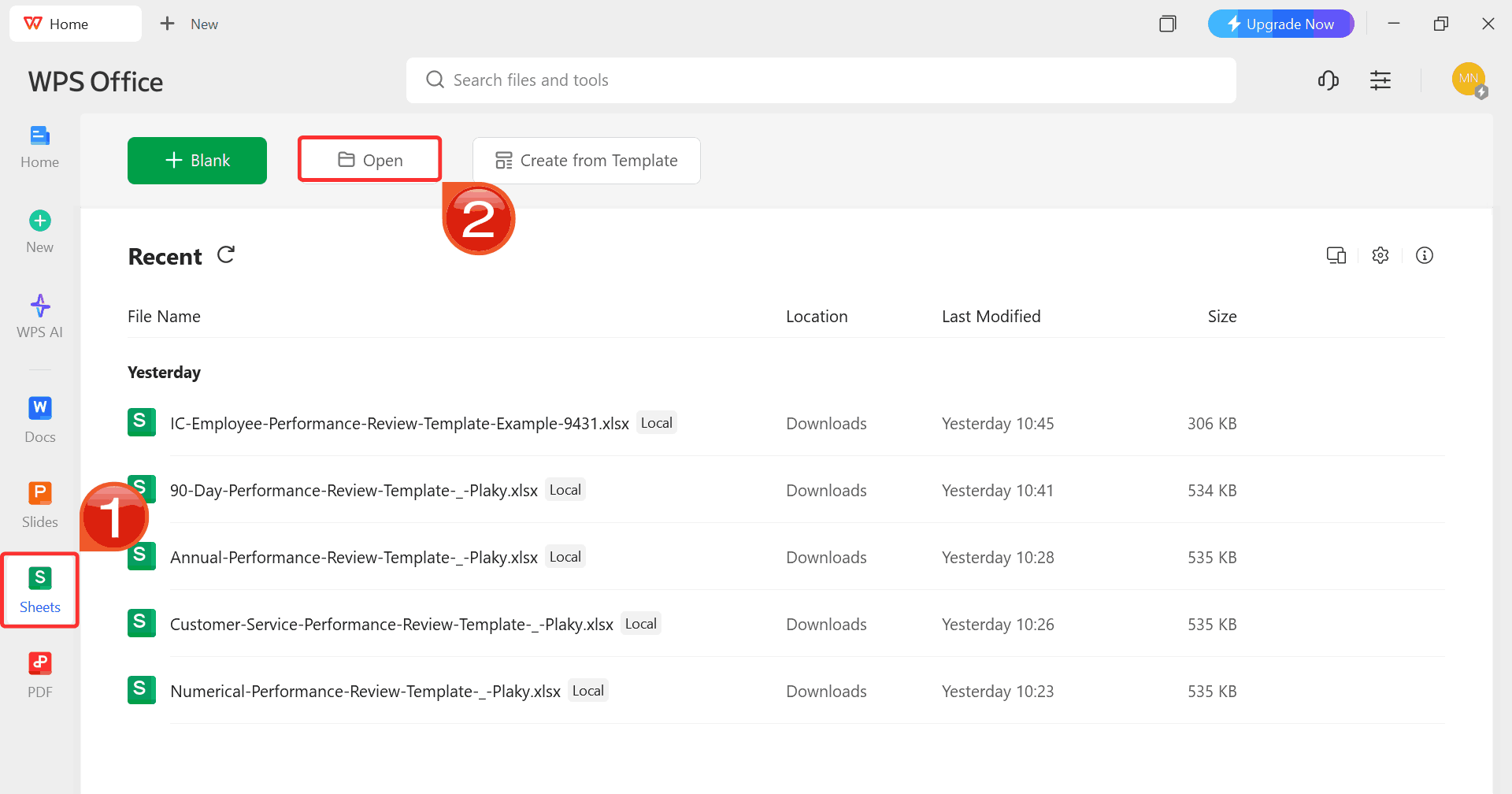
Step 4: From the main menu on WPS Office, select“Sheets” on the left sidebar and click“Open” to access your downloaded responsibility chart
template.
WPS Spreadsheet Dashboard
Step 5: Click on any cell you want to modify. Use
the toolbar to rename tasks, assign roles, or add details such as
deadlines or progress updates to fit your chart’s purpose.
Customize Template
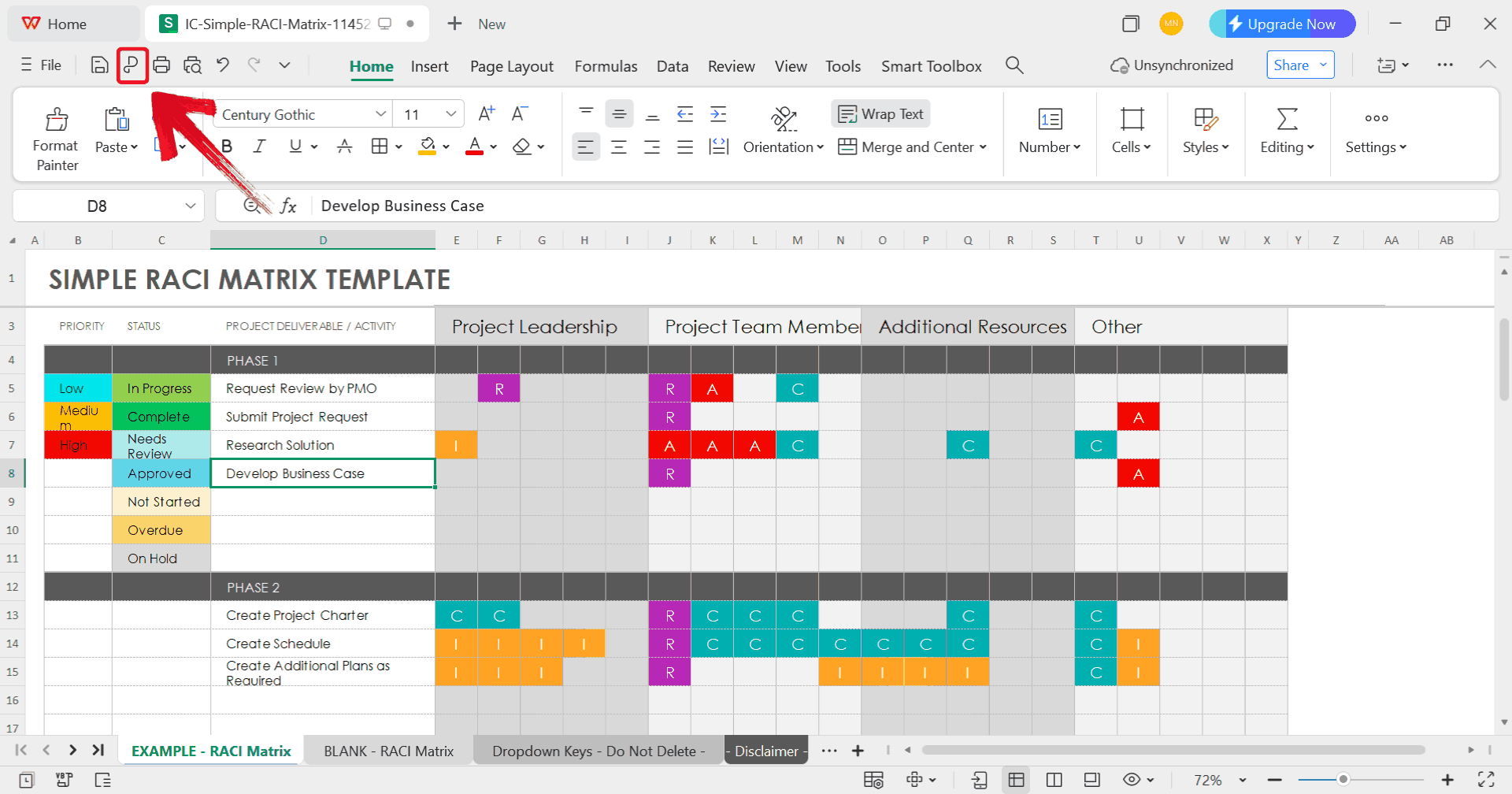
Step 6: After finishing your edits, click on the“P” sign to save your chart in a professional format
that’s easy to share or archive.
Export Template
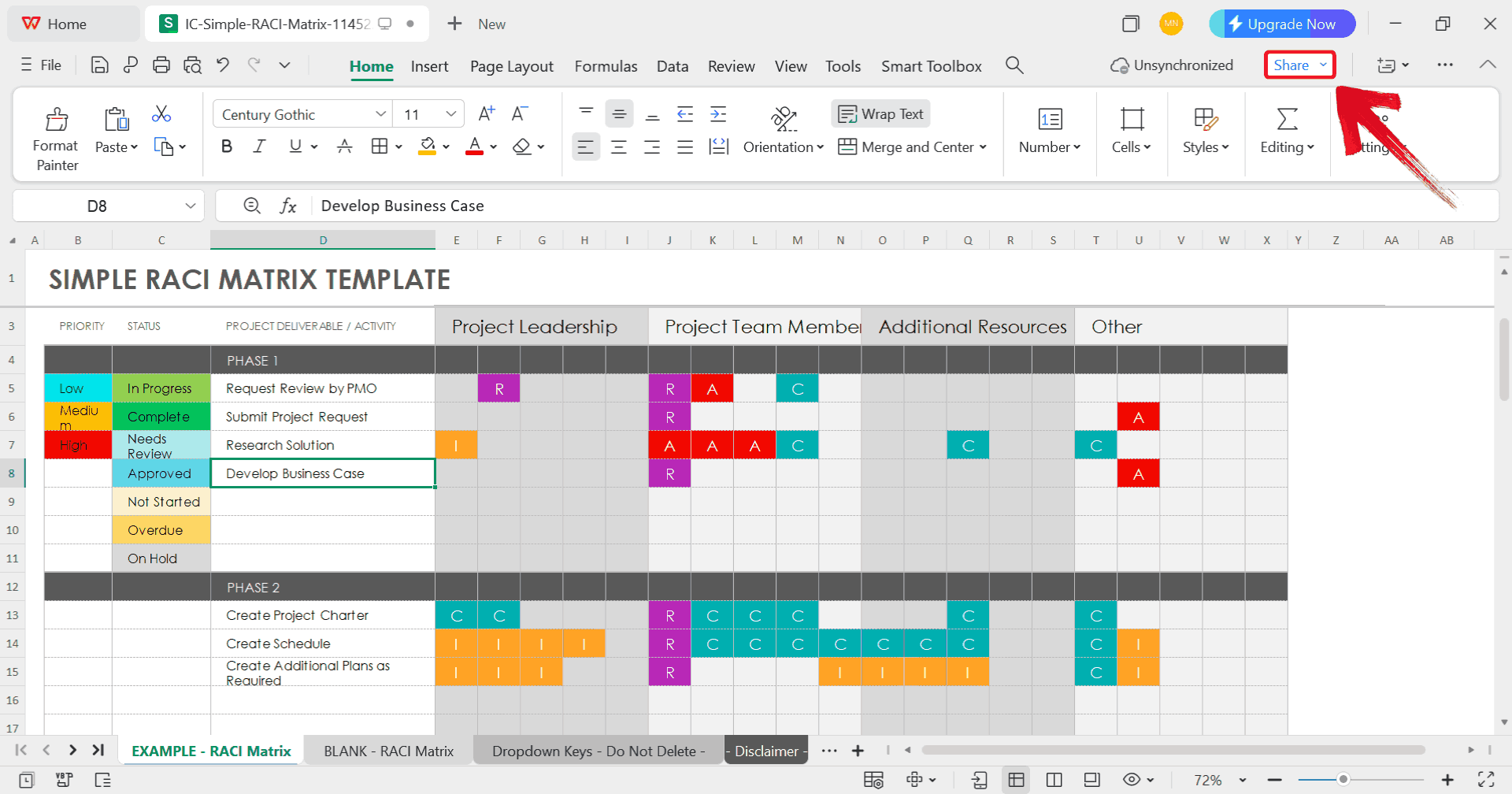
Step 7: To generate an online link for your chart,
click the “Share” button at the top right corner of WPS
Office.
Click Share
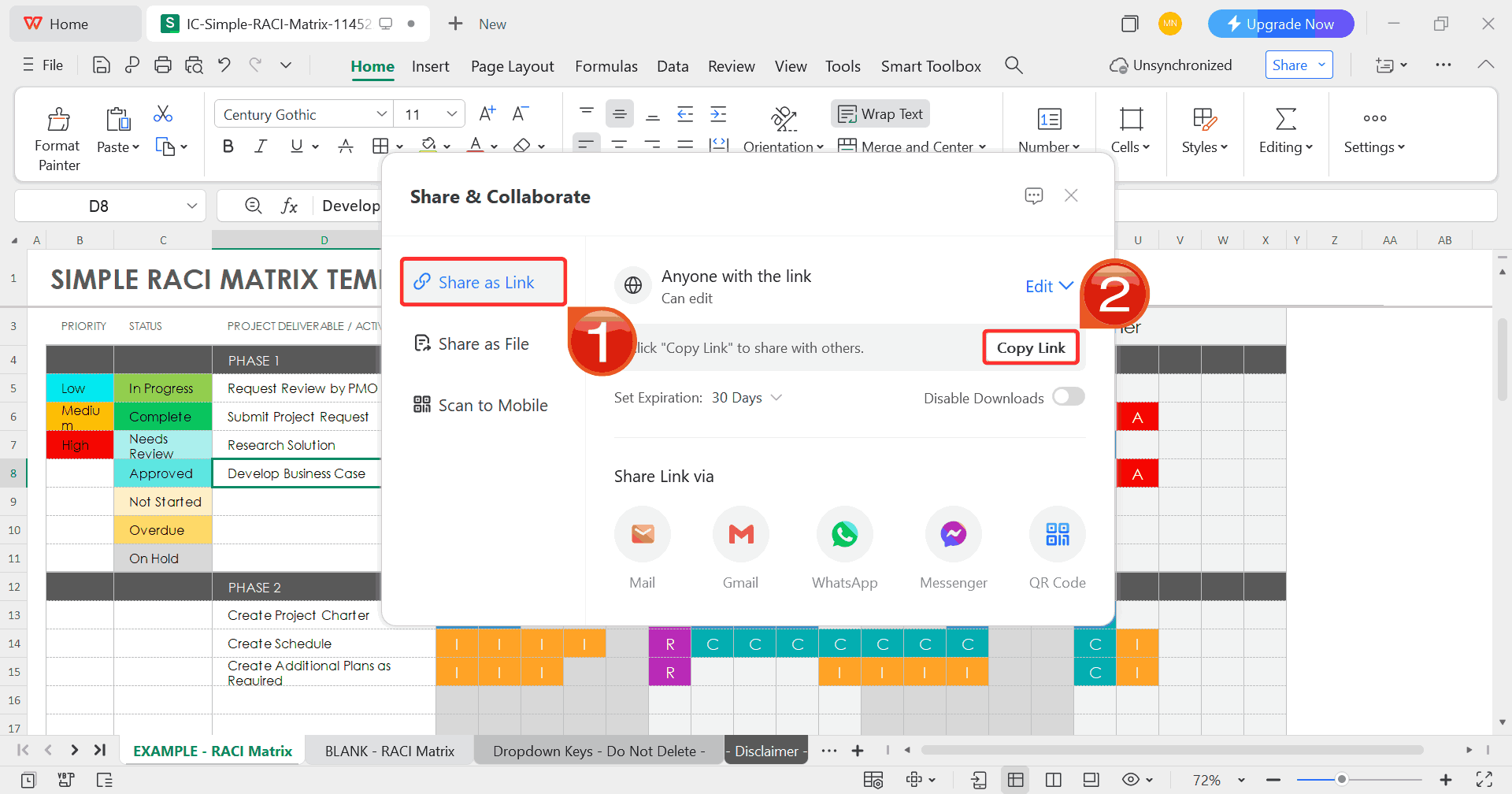
Step 8: When the Share and
Collaborate window appears, select “Share as
Link” and then click “Copy Link”. You can now
share this link with anyone for easy online viewing or
collaboration.
Copy Link
Free
Office Suite with Editable Responsibility Chart Template
By this point, it’s clear that creating and maintaining an editable
responsibility chart is not only about design but making sure it’s easy
to update and share it as well. That’s why I prefer working in WPSOffice for this part
of the process. It lets you open, edit, and export responsibility chart
templates without worrying about formatting breaking or data getting
lost between devices. I’ve used it to manage both small team projects
and personal schedules, and the editable features like adjustable
columns, role tags, and built-in color tools save a lot of time. It’s
simple, but it does exactly what you need when organizing roles and
accountability.
WPS Spreadsheet
Features:
Seamless Excel Compatibility: Open, edit, and
save .xlsx files without breaking formulas or losing
formatting.
Professional Templates, Preloaded: From budget
sheets to calendars and schedules, there’s a wide variety of
ready-to-use designs to get started fast.
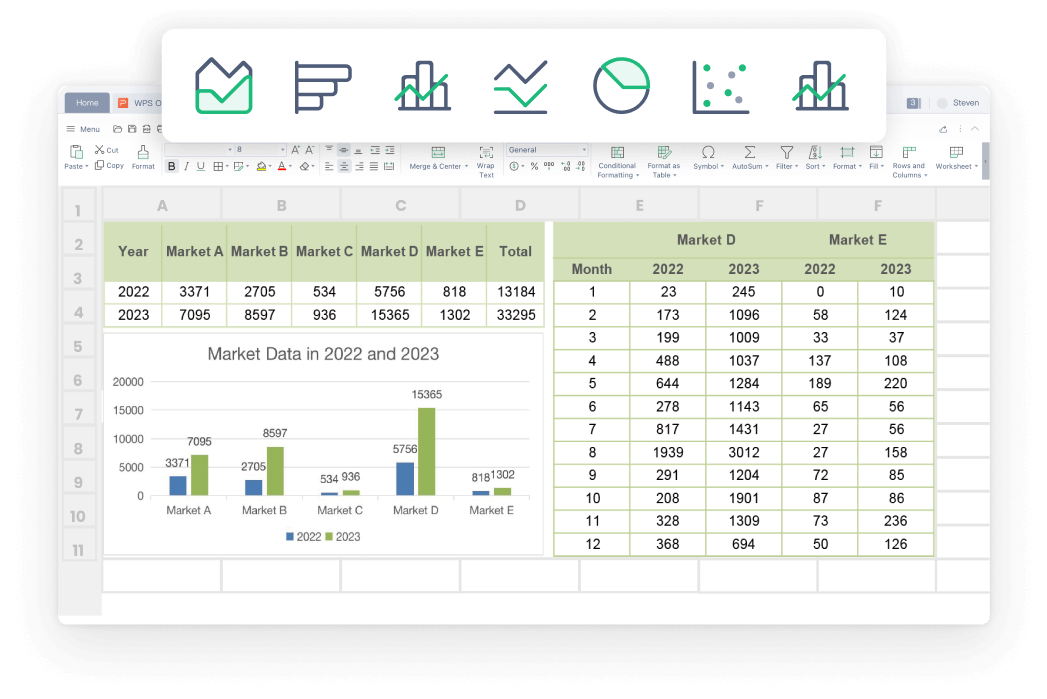
Advanced Data Features: WPS covers all the Excel
essentials: pivot tables, smart autofill,
dynamic charts and more.
One-Click PDF Export: Turn your spreadsheets
into refined PDFs without needing any add-ons or third-party
tools.
FAQs
1. Are the templates on
WPS free to use?
Yes, WPS offers numerous free templates for documents, spreadsheets,
and presentations. Premium templates require a subscription, but most
basic charts are free.
2. Do I need an
account to download templates?
Not always. Some platforms like Microsoft Create or SlidesCarnival
allow free downloads without registration.
3. Can I customize it?
Absolutely. You can adjust colors, columns, layout, and even add
graphics. PDFs can be printed or edited using PDF software.
4. How do I organize printed
logs?
Keep them in a binder with tabs, on a clipboard, or a wall-mounted
folder for easy reference.
5. Can I add pictures or
icons?
Yes, visuals make the chart more engaging, particularly for kids or
visual learners.
Chart Your Way with WPS
A responsibility chart template helps you assign roles clearly, track
progress, and makes collaboration easy both at home and at work. UsingWPS Office, you can access
editable Excel charts and printable templates that are easy to customize
and update. These templates work for family chores, project management,
or personal goal tracking, and digital versions let you share and
collaborate in real time. PDF exports keep a neat record, while WPS’s
template library offers a variety of designs to suit any need. By
relying on ready-made charts in WPS Office, you save time, maintain
accountability, and streamline responsibilities efficiently.
7+ years in productivity tech. I test and review the latest tools to simplify your workflow. Follow for honest app comparisons, practical guides, and curated tech picks to boost efficiency.


'%3e%3cpath%20d='M8%200C12.4183%200%2016%203.58172%2016%208C16%2012.4183%2012.4183%2016%208%2016C3.58172%2016%200%2012.4183%200%208C0%203.58172%203.58172%200%208%200ZM11.6162%204.38379C11.2257%203.99337%2010.5927%203.99338%2010.2021%204.38379L8%206.58594L5.79785%204.38379C5.40732%203.99334%204.77429%203.99329%204.38379%204.38379C3.99331%204.77429%203.99335%205.40733%204.38379%205.79785L6.58594%208L4.38379%2010.2021C3.99348%2010.5927%203.99341%2011.2257%204.38379%2011.6162C4.77426%2012.0066%205.40734%2012.0065%205.79785%2011.6162L8%209.41406L10.2021%2011.6162C10.5927%2012.0066%2011.2257%2012.0067%2011.6162%2011.6162C12.0067%2011.2257%2012.0066%2010.5927%2011.6162%2010.2021L9.41406%208L11.6162%205.79785C12.0066%205.40735%2012.0066%204.77429%2011.6162%204.38379Z'%20fill='%23080E17'%20fill-opacity='0.46'/%3e%3c/g%3e%3cdefs%3e%3cclipPath%20id='clip0_3761_713'%3e%3crect%20width='16'%20height='16'%20fill='white'/%3e%3c/clipPath%3e%3c/defs%3e%3c/svg%3e)




'%3e%3cpath%20fill-rule='evenodd'%20clip-rule='evenodd'%20d='M21.4999%2010.9993C21.4999%205.20009%2016.7986%200.498901%2010.9993%200.498901C5.19994%200.498901%200.498657%205.20009%200.498657%2010.9993C0.498657%2016.2404%204.33858%2020.5844%209.35855%2021.3722V14.0346H6.69238V10.9993H9.35855V8.68594C9.35855%206.05427%2010.9262%204.60062%2013.3248%204.60062C14.4736%204.60062%2015.6753%204.80571%2015.6753%204.80571V7.38979H14.3512C13.0468%207.38979%2012.64%208.19921%2012.64%209.0296V10.9993H15.5523L15.0867%2014.0346H12.64V21.3722C17.66%2020.5844%2021.4999%2016.2404%2021.4999%2010.9993Z'%20fill='%231568EA'/%3e%3c/g%3e%3c/svg%3e)


'%3e%3cpath%20d='M2.42045%2022.1876H6.31818V12.7217L0.75%208.54553V20.5171C0.75%2021.4414%201.49892%2022.1876%202.42045%2022.1876Z'%20fill='%234285F4'/%3e%3cpath%20d='M19.682%2022.1876H23.5797C24.5041%2022.1876%2025.2502%2021.4387%2025.2502%2020.5171V8.54553L19.682%2012.7217'%20fill='%2334A853'/%3e%3cpath%20d='M19.682%205.48293V12.7216L25.2502%208.54543V6.31816C25.2502%204.25236%2022.8921%203.07469%2021.2411%204.31361'%20fill='%23FBBC04'/%3e%3cpath%20d='M6.31824%2012.7217V5.48303L13.0001%2010.4944L19.6819%205.48303V12.7217L13.0001%2017.733'%20fill='%23EA4335'/%3e%3cpath%20d='M0.75%206.31816V8.54543L6.31818%2012.7216V5.48293L4.75909%204.31361C3.10534%203.07469%200.75%204.25236%200.75%206.31816Z'%20fill='%23C5221F'/%3e%3c/g%3e%3cdefs%3e%3cclipPath%20id='clip0_2954_7305'%3e%3crect%20width='24.5'%20height='18.375'%20fill='white'%20transform='translate(0.75%203.8125)'/%3e%3c/clipPath%3e%3c/defs%3e%3c/svg%3e)



'%3e%3cpath%20d='M19.9911%204.11386V6.471H18.5894C18.0775%206.471%2017.7322%206.57814%2017.5536%206.79243C17.3751%207.00671%2017.2858%207.32814%2017.2858%207.75671V9.44421H19.9019L19.5536%2012.0871H17.2858V18.8639H14.5536V12.0871H12.2769V9.44421H14.5536V7.49779C14.5536%206.39064%2014.8632%205.53201%2015.4822%204.92189C16.1013%204.31177%2016.9257%204.00671%2017.9554%204.00671C18.8304%204.00671%2019.509%204.04243%2019.9911%204.11386Z'%20fill='%23333333'/%3e%3c/g%3e%3cdefs%3e%3cclipPath%20id='clip0_2938_8199'%3e%3crect%20width='16'%20height='16'%20fill='white'%20transform='translate(8%204.00671)'/%3e%3c/clipPath%3e%3c/defs%3e%3c/svg%3e)
'%3e%3cpath%20d='M17.5237%2010.7813L23.4811%204H22.0699L16.8949%209.88693L12.7648%204H8L14.2469%2012.9029L8%2020.0133H9.4112L14.8725%2013.7952L19.2352%2020.0133H24M9.92053%205.04213H12.0885L22.0688%2019.0224H19.9003'%20fill='%23333333'/%3e%3c/g%3e%3cdefs%3e%3cclipPath%20id='clip0_2938_8200'%3e%3crect%20width='16'%20height='16.0134'%20fill='white'%20transform='translate(8%204)'/%3e%3c/clipPath%3e%3c/defs%3e%3c/svg%3e)


