

'%3e%3cpath%20d='M8%200C12.4183%200%2016%203.58172%2016%208C16%2012.4183%2012.4183%2016%208%2016C3.58172%2016%200%2012.4183%200%208C0%203.58172%203.58172%200%208%200ZM11.6162%204.38379C11.2257%203.99337%2010.5927%203.99338%2010.2021%204.38379L8%206.58594L5.79785%204.38379C5.40732%203.99334%204.77429%203.99329%204.38379%204.38379C3.99331%204.77429%203.99335%205.40733%204.38379%205.79785L6.58594%208L4.38379%2010.2021C3.99348%2010.5927%203.99341%2011.2257%204.38379%2011.6162C4.77426%2012.0066%205.40734%2012.0065%205.79785%2011.6162L8%209.41406L10.2021%2011.6162C10.5927%2012.0066%2011.2257%2012.0067%2011.6162%2011.6162C12.0067%2011.2257%2012.0066%2010.5927%2011.6162%2010.2021L9.41406%208L11.6162%205.79785C12.0066%205.40735%2012.0066%204.77429%2011.6162%204.38379Z'%20fill='%23080E17'%20fill-opacity='0.46'/%3e%3c/g%3e%3cdefs%3e%3cclipPath%20id='clip0_3761_713'%3e%3crect%20width='16'%20height='16'%20fill='white'/%3e%3c/clipPath%3e%3c/defs%3e%3c/svg%3e)



'%3e%3cpath%20fill-rule='evenodd'%20clip-rule='evenodd'%20d='M21.4999%2010.9993C21.4999%205.20009%2016.7986%200.498901%2010.9993%200.498901C5.19994%200.498901%200.498657%205.20009%200.498657%2010.9993C0.498657%2016.2404%204.33858%2020.5844%209.35855%2021.3722V14.0346H6.69238V10.9993H9.35855V8.68594C9.35855%206.05427%2010.9262%204.60062%2013.3248%204.60062C14.4736%204.60062%2015.6753%204.80571%2015.6753%204.80571V7.38979H14.3512C13.0468%207.38979%2012.64%208.19921%2012.64%209.0296V10.9993H15.5523L15.0867%2014.0346H12.64V21.3722C17.66%2020.5844%2021.4999%2016.2404%2021.4999%2010.9993Z'%20fill='%231568EA'/%3e%3c/g%3e%3c/svg%3e)


'%3e%3cpath%20d='M2.42045%2022.1876H6.31818V12.7217L0.75%208.54553V20.5171C0.75%2021.4414%201.49892%2022.1876%202.42045%2022.1876Z'%20fill='%234285F4'/%3e%3cpath%20d='M19.682%2022.1876H23.5797C24.5041%2022.1876%2025.2502%2021.4387%2025.2502%2020.5171V8.54553L19.682%2012.7217'%20fill='%2334A853'/%3e%3cpath%20d='M19.682%205.48293V12.7216L25.2502%208.54543V6.31816C25.2502%204.25236%2022.8921%203.07469%2021.2411%204.31361'%20fill='%23FBBC04'/%3e%3cpath%20d='M6.31824%2012.7217V5.48303L13.0001%2010.4944L19.6819%205.48303V12.7217L13.0001%2017.733'%20fill='%23EA4335'/%3e%3cpath%20d='M0.75%206.31816V8.54543L6.31818%2012.7216V5.48293L4.75909%204.31361C3.10534%203.07469%200.75%204.25236%200.75%206.31816Z'%20fill='%23C5221F'/%3e%3c/g%3e%3cdefs%3e%3cclipPath%20id='clip0_2954_7305'%3e%3crect%20width='24.5'%20height='18.375'%20fill='white'%20transform='translate(0.75%203.8125)'/%3e%3c/clipPath%3e%3c/defs%3e%3c/svg%3e)


AI image-to-video tools are making it easier for creators to turn static images into engaging visual content without advanced editing skills. From animated portraits to short social media clips, these tools open up new creative possibilities. a1.art is such a tool. This article explores its key features, pros and cons, use guide, and practical applications for AI-powered image and video creation.
What Is a1.art
a1.art is an AI-powered creative platform that offers ready-made applications for generating images, transforming photos, and experimenting with visual effects. It is suitable for beginners, social media creators, designers, and anyone who wants to create visual content without mastering professional editing software.
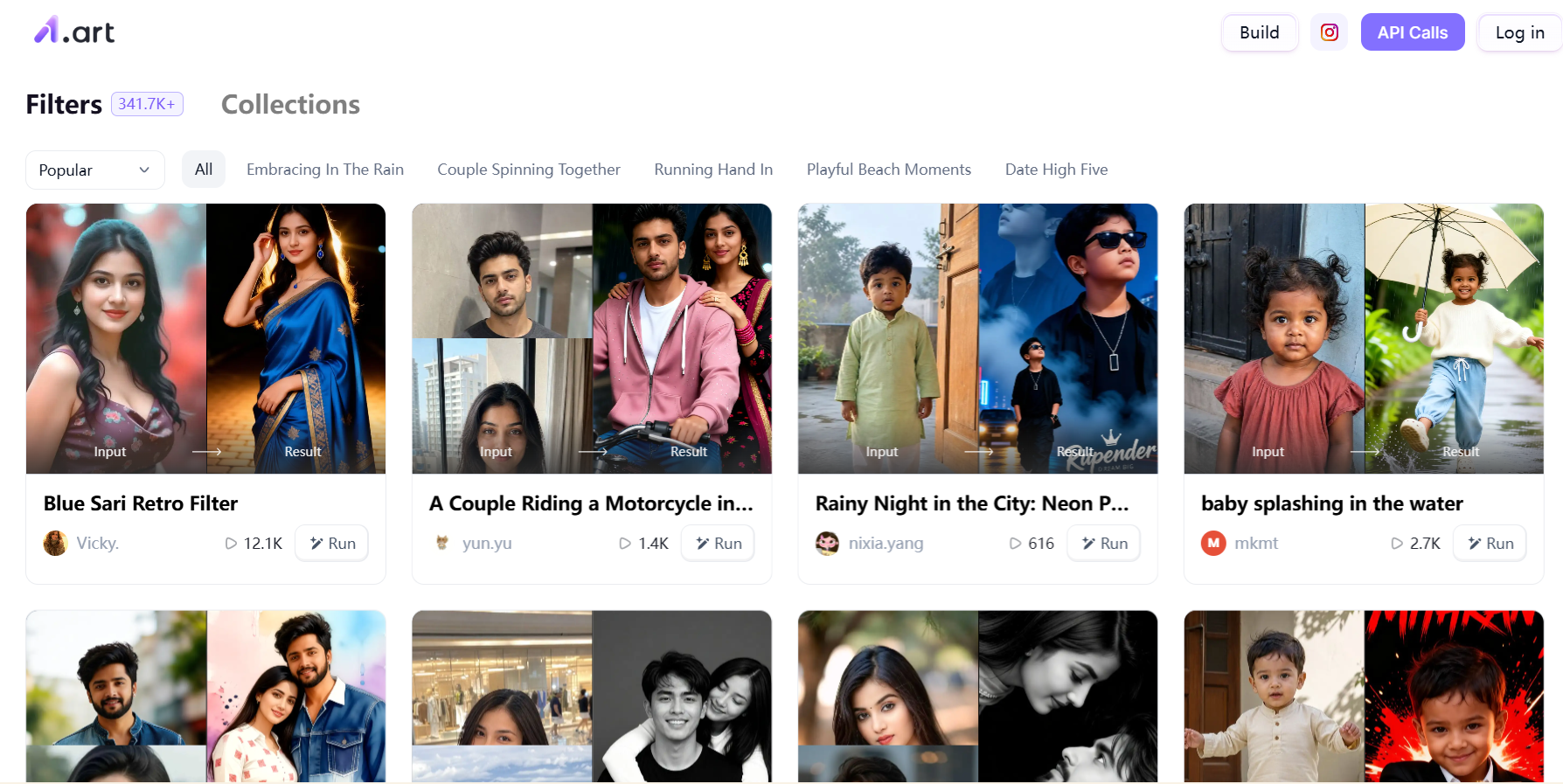
Key Features:
AI image generation: Create visuals from text prompts or explore applications designed for different creative needs.
Ready-made templates: Choose from a variety of artistic styles, including cartoon portraits, 3D-inspired characters, and trending visual effects.
Image transformation: Apply creative effects to existing photos and experiment with different appearances.
AI video creation: Explore supported applications that turn images into video-related content, depending on the selected feature.
Community-created applications: Discover creative tools made by other users or explore options for building your own AI applications.
Pricing
a1.art offers free ways to explore its creative applications, while additional computing power may be required for certain features, such as enhancing image quality or removing watermarks. Subscription options are available for users who need more resources.
Pros and Cons of a1.art
a1.art makes AI-powered creativity accessible through ready-made applications and a wide range of visual styles. Its convenience may come with limitations for users who need precise control over generated content or advanced video editing capabilities.
| Pros | Cons |
|---|---|
| Beginner-friendly interface and simple workflows | Limited control over some fine details |
| A wide selection of templates and trending styles | Results can vary depending on the application and input |
| Quick experimentation with different creative effects | Complex scenes may require several attempts |
| Useful for short-form visual content | Not a replacement for professional long-form video editing |
Overall, a1.art is a practical option for quick image to video AI generation. Users who need detailed motion control, complex transitions, or extended video timelines may benefit from combining it with a dedicated video editor.
How to Use a1.art for Video Generation: Stey-by-Step
The exact workflow depends on the application you select. The following steps explain how to use a1.art for video generation.
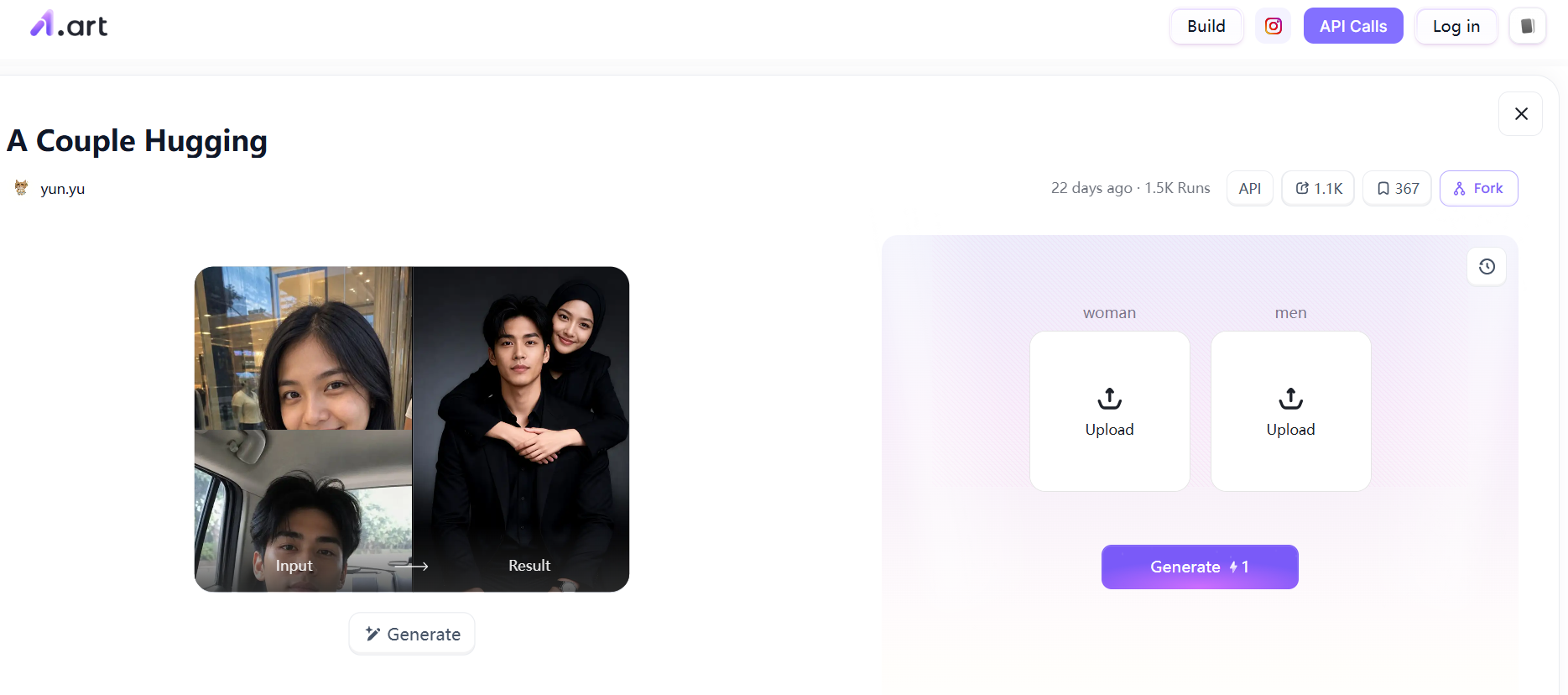
Step 1. Sign Up and Choose an App
Visit a1.art and log in or create an account if required. Browse theDiscover Apps section to find ready-made templates and effects that match your creative goals.
Step 2. Upload an Image
Select an application and provide the required input. Depending on the feature, you may upload an existing photo, enter a text prompt, or use both to guide the generation process.
Step 3. Generate Your Content
Start generating and review the result. Experiment with different styles, prompts, or available settings to improve the output. For image-to-video creation, choose a feature that supports animation and check whether it meets your needs.
Step 4. Download and Share Your Creation
Once you are satisfied with the result, use the available options to download or share your work. Check the output quality and format before publishing it on social media or using it in other creative projects.
Best Use Cases for Image to Video AI
Image-to-video AI helps creators repurpose existing visuals and develop new content without recording every scene from scratch. With a1.art's creative applications and other image-to-video tools, users can explore several practical workflows.
1. Social Media Posts and Short Videos
Static photos can be less engaging in fast-moving social feeds. Creators can experiment with animated portraits, stylized visuals, and short clips to give posts a more dynamic appearance.
2. Product Marketing
Small businesses can use AI-generated visuals to explore different product presentation styles. For example, an existing product photo can serve as the starting point for a promotional concept. Always review generated details to ensure the product remains accurately represented.
3. Portrait Animation
Portraits are a natural starting point for creative AI effects. Users can transform selfies into illustrations or experiment with supported animation features to create expressive content for profile pictures and personal projects.
4. Educational Presentations
Teachers, students, and presenters can turn selected illustrations into short animated visuals to introduce a concept or make a presentation more engaging. Subtle motion can help draw attention to an important subject without overwhelming the message.
5. Digital Storytelling
Writers and content creators can use AI-generated scenes and animated images to explore characters, settings, and visual narratives. Short clips can help establish a mood or connect different parts of a story, especially when traditional video footage is unavailable.
FAQs
1. What can you create with a1.art?
a1.art offers AI image generation, artistic transformations, portraits, and creative effects through its collection of applications. Certain applications also support video-related outputs, so the available results depend on the feature you choose.
2. What types of images work best for AI animation?
Clear, high-resolution images with a distinct subject are generally a good starting point. Well-lit portraits and uncluttered backgrounds can help preserve important visual details. The ideal image also depends on the animation style and the tool being used.
3. How long does a1.art take to generate a video?
Generation time varies by application, output type, processing demand, and current system conditions. There is no single duration that applies to every feature. Check the selected application's instructions for the most relevant information.
4. Can I use AI-generated images and videos for commercial purposes?
Commercial usage depends on the platform's current terms, the specific application, and the rights associated with the source materials. Before publishing, review the applicable licensing conditions and make sure you have permission to use any uploaded photos or reference images.
Summary
This article covered what a1.art is, its main features, pricing, pros and cons, and how to use it for AI image and video creation. It also explored practical ways to use AI-generated visuals, from social media posts to product promotions. While a1.art offers a range of creative tools and templates, a dedicated image-to-video tool may be a better fit when the main goal is to animate a still image. The best choice depends on the type of content you want to create.


'%3e%3cpath%20d='M19.9911%204.11386V6.471H18.5894C18.0775%206.471%2017.7322%206.57814%2017.5536%206.79243C17.3751%207.00671%2017.2858%207.32814%2017.2858%207.75671V9.44421H19.9019L19.5536%2012.0871H17.2858V18.8639H14.5536V12.0871H12.2769V9.44421H14.5536V7.49779C14.5536%206.39064%2014.8632%205.53201%2015.4822%204.92189C16.1013%204.31177%2016.9257%204.00671%2017.9554%204.00671C18.8304%204.00671%2019.509%204.04243%2019.9911%204.11386Z'%20fill='%23333333'/%3e%3c/g%3e%3cdefs%3e%3cclipPath%20id='clip0_2938_8199'%3e%3crect%20width='16'%20height='16'%20fill='white'%20transform='translate(8%204.00671)'/%3e%3c/clipPath%3e%3c/defs%3e%3c/svg%3e)
'%3e%3cpath%20d='M17.5237%2010.7813L23.4811%204H22.0699L16.8949%209.88693L12.7648%204H8L14.2469%2012.9029L8%2020.0133H9.4112L14.8725%2013.7952L19.2352%2020.0133H24M9.92053%205.04213H12.0885L22.0688%2019.0224H19.9003'%20fill='%23333333'/%3e%3c/g%3e%3cdefs%3e%3cclipPath%20id='clip0_2938_8200'%3e%3crect%20width='16'%20height='16.0134'%20fill='white'%20transform='translate(8%204)'/%3e%3c/clipPath%3e%3c/defs%3e%3c/svg%3e)


