Learn the complete APA 7th edition workflow: paper setup, title page, abstract, in-text citations, reference page, source examples, and WPS Office formatting tips in one place.
What APA Format Covers — and How to Use This Guide
Start with the main APA rules here, then open a detailed tutorial when you need a specific citation example or formatting walkthrough.
If you searched for APA format, you probably need more than a definition. You may be setting up a student paper, checking whether the abstract is required, fixing page numbers, or trying to cite a website, PDF, book, journal article, video, or slide deck correctly. This guide gives you the full APA 7th edition workflow first, then points you to focused tutorials for the exact source type or formatting problem you are working on.
APA format combines two jobs: paper formatting and source attribution. Paper formatting controls margins, fonts, spacing, page numbers, title page, abstract, headings, tables, figures, and references. Source attribution controls in-text citations and reference entries so readers can trace every idea back to its source.
Need a specific citation example? Start with a finished APA paper sample and reusable template, then use the related APA guides below to find examples for websites, PDFs, books, videos, slides, and more.
A finished APA 7 student paper includes a title page, abstract, body, and references — all double-spaced with 1-inch margins.
By the end, you should know what belongs on each page of an APA paper, where citations go, how the reference list should look, and which detailed tutorial to open when a source type needs its own rules.
Quick Checklist
APA Format Checklist Before You Start Writing
Use this section as your fast setup map. Check the core rule here, then open a detailed tutorial only when you need screenshots or a special case.
APA task
Quick rule
When to open a detailed tutorial
Document setup
Use 1-inch margins, readable font, double spacing, and top-right page numbers.
Need spacing or pagination details? Use the dedicated spacing and page-number guides for screenshots and special cases.
Title page and abstract
Student papers usually need a title page; abstracts depend on the assignment.
Use the APA abstract format guide or start from an editable APA format example.
In-text citations
APA uses author–date citations in parentheses or narrative sentences.
Open the APA in-text citation guide for examples with quotes, paraphrases, multiple authors, and missing authors.
Reference list
Every in-text citation needs a matching References entry with a hanging indent.
Use the citation example links below for websites, PDFs, books, journal articles, YouTube videos, PowerPoint slides, images, and more.
Need more detail?
Need a specific citation example? Use the source-by-source guides below to find the exact APA 7 format for websites, PDFs, books, videos, slides, images, and more.
WPS APA formatting workflow
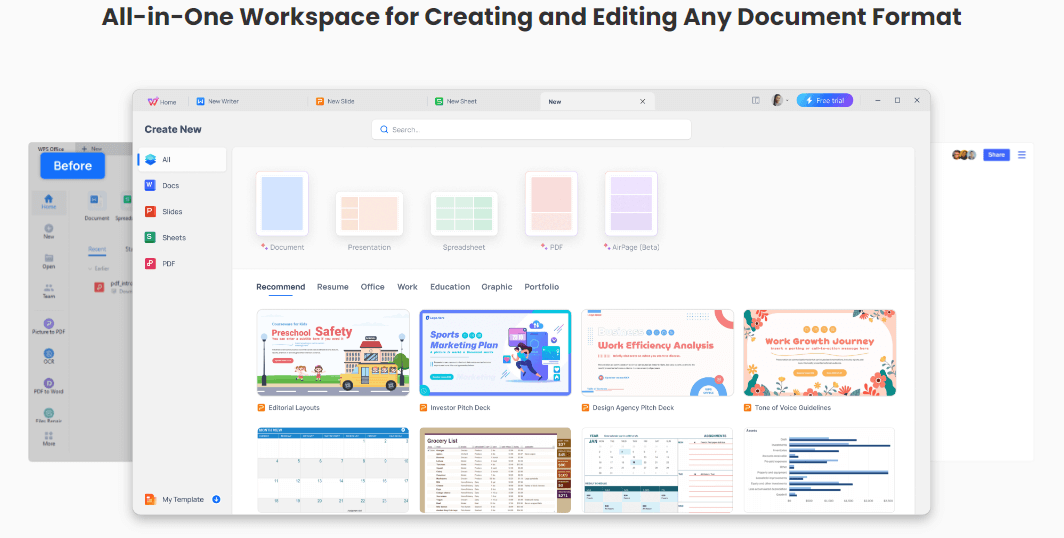
Format APA Paper in WPS Office
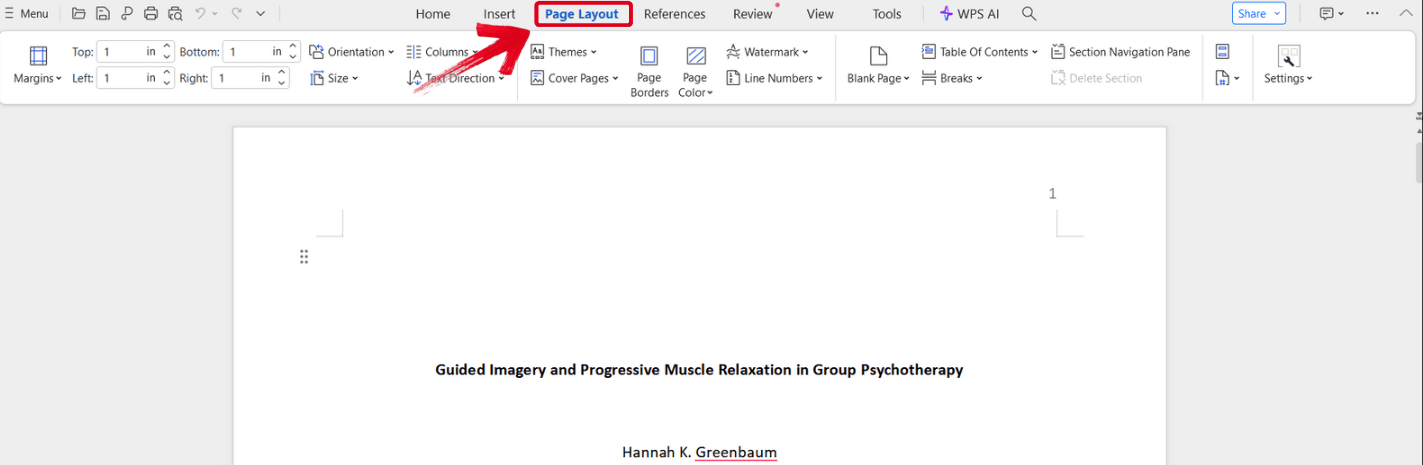
Use WPS Writer to set 1-inch margins, double spacing, page numbers, APA headings, and hanging indents before you start writing or before your final submission check.
APA Paper Setup: Margins, Spacing, Page Numbers, and Sections
Configure the document first, then build the title page, abstract, body, and references on top of it.
Set margins, fonts, line spacing, and page numbers first
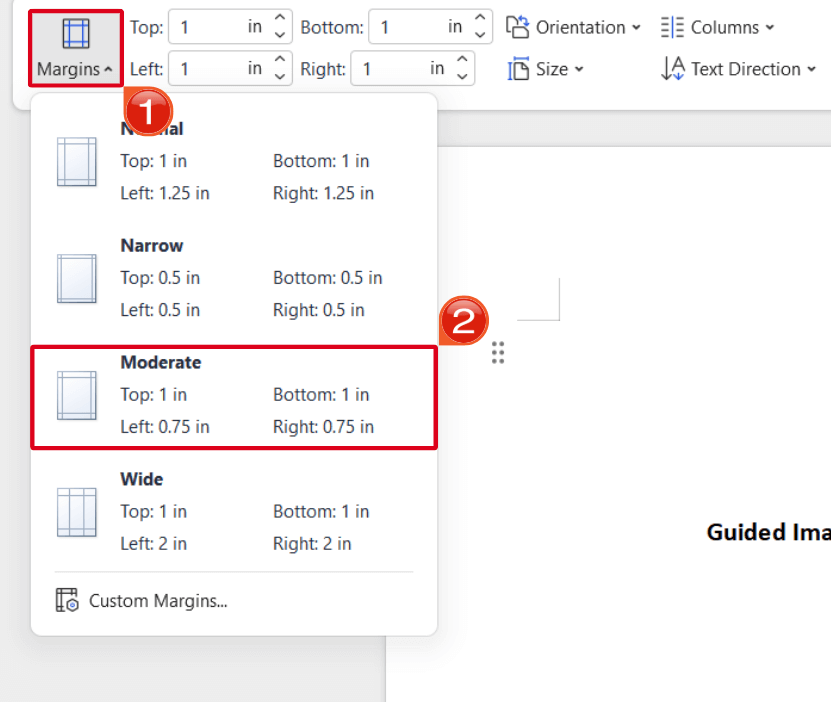
Every APA paper begins with document-level settings. In WPS Writer or Word, start by setting 1-inch margins on all four sides, a consistent readable APA-approved font, double spacing, and page numbers in the top-right corner. These settings affect the title page, abstract, body, block quotations, footnotes, and reference list, so fixing them early prevents layout problems later.
1-inch margins on all sides
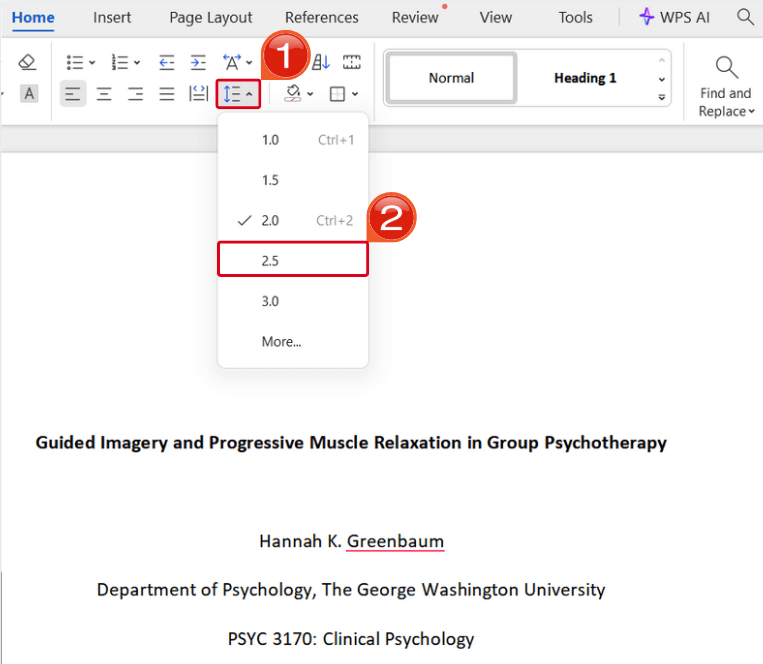
Double spacing (2.0) throughout
Page numbers top-right
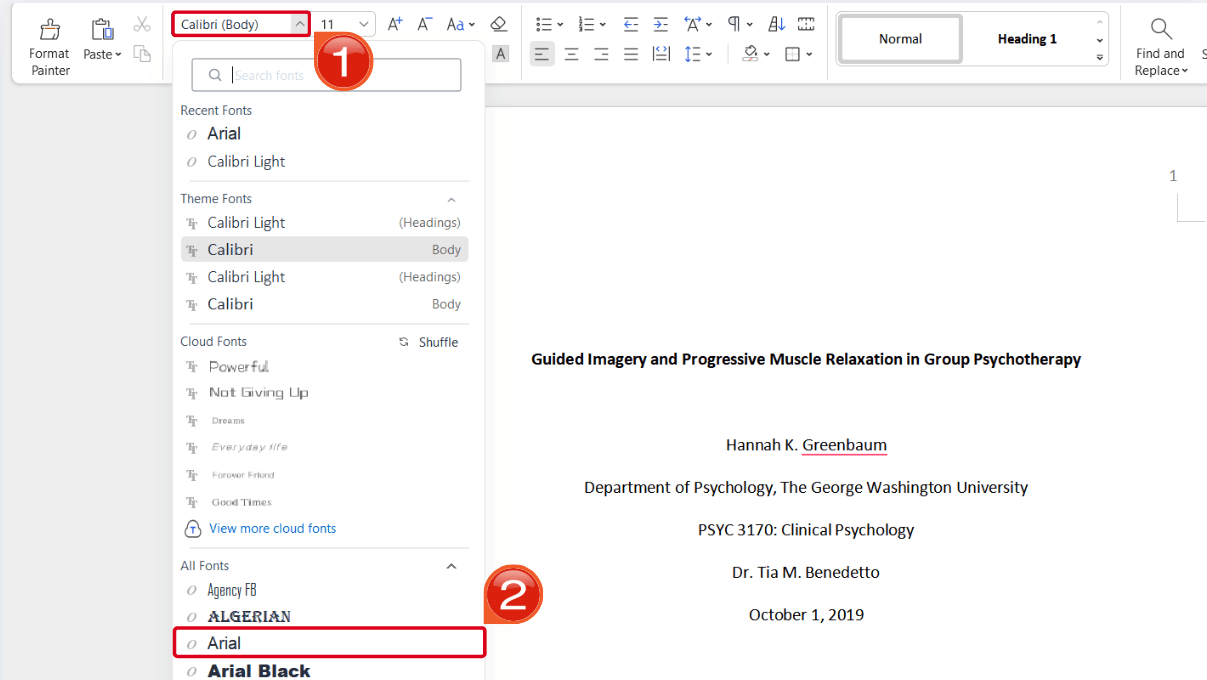
Choose one readable font and keep it consistent throughout the paper, including the reference list. Times New Roman 12 pt is still widely accepted, but APA 7 also allows other readable options such as 11 pt Calibri, 11 pt Arial, 11 pt Georgia, or 10 pt Lucida Sans Unicode. Follow your instructor or journal requirements when they specify a font.
Set a consistent APA-approved font from the Home ribbon before you start typing.
Double spacing is non-negotiable in APA. Apply it to the title page, abstract, body paragraphs, block quotations, footnotes, and reference entries. There should be no extra blank line between paragraphs; the double spacing itself provides visual separation.
Students often lose points for single-spaced abstracts or reference lists that look "tighter" than the body — our the detailed spacing walkthrough explains the subtle cases, such as table notes and figure captions.
Element
APA 7 requirement
Common mistake
Margins
1 inch on all sides
Using 1.25" default template margins
Line spacing
Double (2.0) everywhere
Single-spaced reference list
Paragraphs
0.5" first-line indent
Extra blank line between paragraphs
Page numbers
Top-right, starting on title page
Numbering from page 2 only
Font
Readable APA-approved font, one family throughout
Mixing Calibri body with Times refs
Page numbers belong in the top-right corner of every page, starting with the title page as page 1. Student papers usually need only the page number in the top-right corner. Professional papers include both a page number and a running head in the page header on every page, including the title page — check your assignment brief. If inserting page numbers pushes your layout off, see fix APA page numbers step by step for a step-by-step fix.
Pro tip
Formatting problems often surface only at the end — especially stray blank pages caused by manual page breaks or hidden paragraph marks. Before submitting, scroll the full document and remove any extra blank pages in Word so your page count and pagination stay clean.
Building the title page and abstract
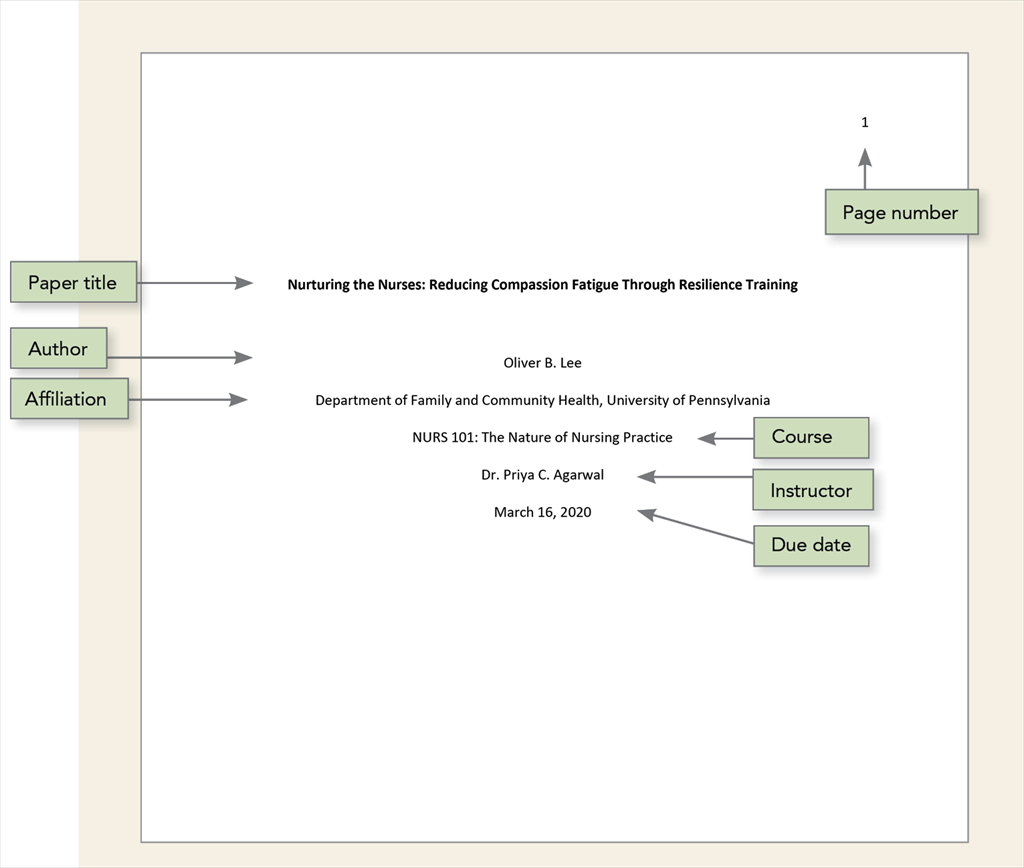
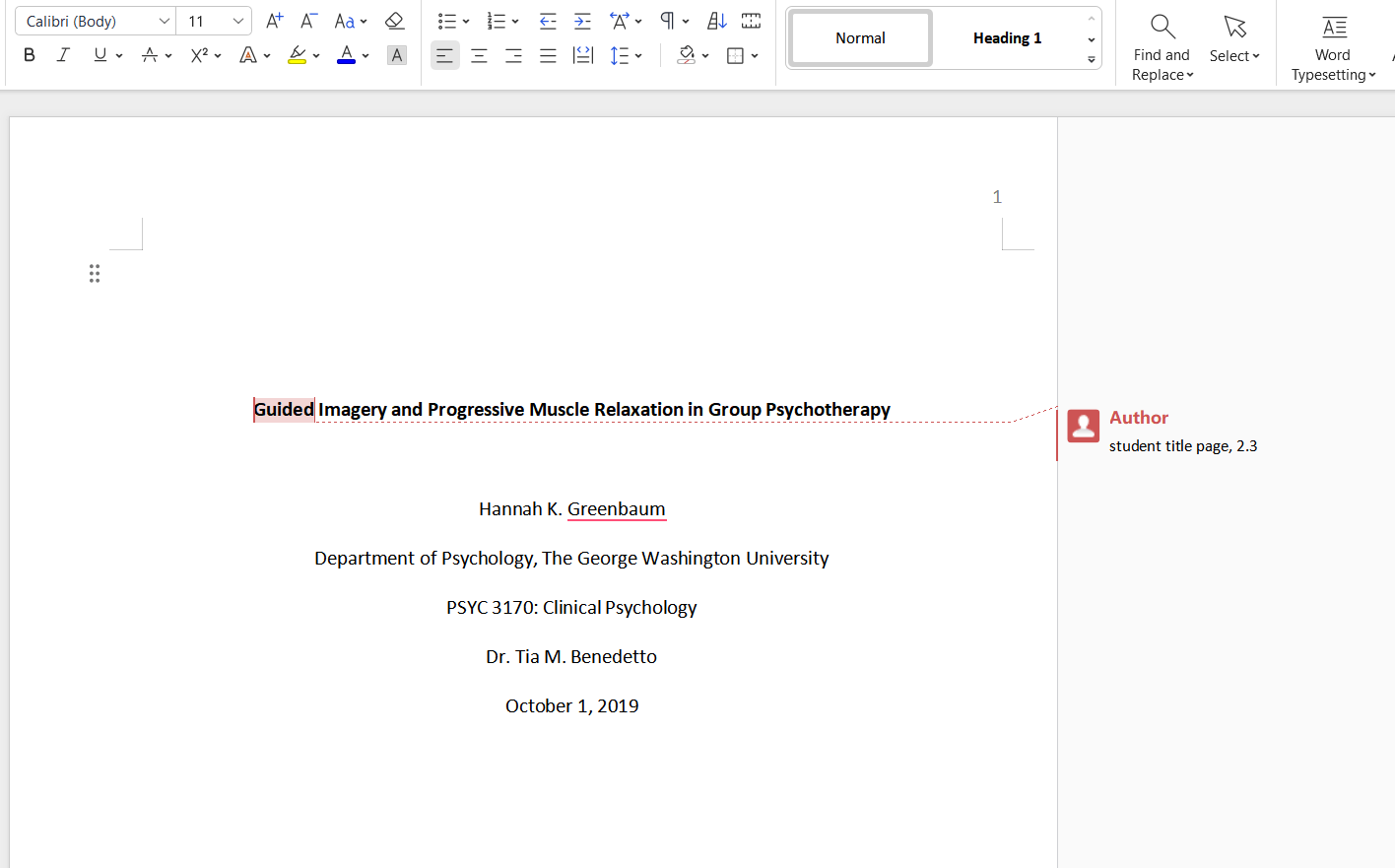
The title page is the reader's first impression. Center all elements vertically and horizontally on the page (in Word, use the vertical alignment tools rather than pressing Enter repeatedly). The paper title appears in bold, title case, centered in the upper half of the page. Below it, list your name, institutional affiliation, course number and name, instructor name, and due date — each on its own centered line for student papers.
For field-specific variations and visual examples, our APA title page formatting guide walks through common instructor requirements.
Student title page: bold centered title, author, affiliation, course, instructor, and date.
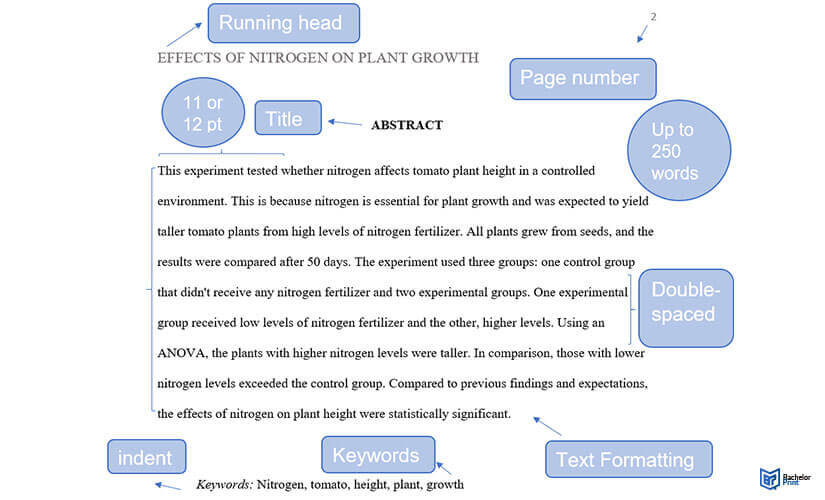
From our abstract tutorial: bold centered label, single unindented paragraph, optional keywords line.
The abstract begins on a new page immediately after the title page. Type the word Abstract (bold, centered) at the top, then write a single paragraph of 150–250 words summarizing your research question, method, key findings, and implications. The abstract paragraph is left-aligned with no first-line indent, unlike body paragraphs.
Do not cite sources in the abstract and avoid abbreviations unless they appear at least three times in the paper. Writing a strong abstract is a skill in itself — walk through the abstract setup with screenshots shows exactly how to structure one and avoid the most common length and formatting mistakes.
The abstract sits on its own page — double-spaced, no indent, 150–250 words.
Abstract (centered, bold label): This study examined whether structured note-taking templates improve retention among undergraduate psychology students (N = 142). Participants were randomly assigned to template or free-form conditions across four weekly lectures. Template users scored 11% higher on a delayed recall test (p < .01). Results suggest that lightweight formatting scaffolds may support attention without increasing cognitive load. Implications for classroom practice are discussed.
1
Open a new page
Insert a page break after the title page so the abstract starts clean.
2
Center the label
Type Abstract in bold, centered at the top.
3
Write one paragraph
150–250 words, no indent, no citations.
4
Add keywords (optional)
Indented line: Keywords: term1, term2, term3
In-Text Citations
APA In-Text Citations: Author–Date Rules and Common Cases
Use APA’s author–date system for paraphrases, direct quotes, multiple authors, and sources with no listed author.
Parenthetical and narrative citations
APA in-text citations answer one core question: which source supports this sentence? The full reference entry belongs on the References page, but the in-text citation gives readers the author and year immediately. This section covers the common patterns; the related APA guides handle edge cases such as two authors, et al., no author, and long block quotations.
Place the parenthetical citation before the final period of the sentence, with a comma between author and year. For direct quotations, add the page number or paragraph number: (Smith, 2020, p. 14). If you name the author in the sentence, include only the year in parentheses immediately after the name.
Body paragraphs use 0.5-inch first-line indents; citations appear before the period.
Paraphrase vs. direct quote
In-text citation
Cognitive load theory explains why multitasking reduces comprehension (Sweller, 2011).
Sweller (2011) noted that "working memory is severely limited" (p. 52).
Reference entry
Sweller, J. (2011). Cognitive load theory. Springer. https://doi.org/10.1007/978-1-4419-8126-9_2
Paraphrase: Cognitive load theory explains why multitasking reduces comprehension (Sweller, 2011). Direct quote: Sweller (2011) noted that "working memory is severely limited" (p. 52).
Two authors, three or more authors, and et al.
Author count changes the citation format — and this is where most APA papers break down. With two authors, cite both names every time, joined by an ampersand in parentheses or "and" in narrative text: (Chen & Rivera, 2019) or Chen and Rivera (2019). Never use "et al." for two-author sources.
Authors
First & subsequent in-text
Reference list
1 author
(Smith, 2020)
Smith, A. A. (2020). …
2 authors
(Chen & Rivera, 2019)
Chen, A., & Rivera, B. (2019). …
3+ authors
(Park et al., 2022) — always
Park, A., Lee, B., … Kim, Z. (2022). …
Group author
(American Psychological Association, 2020)
American Psychological Association. (2020). …
With three or more authors, APA 7 simplifies the rule: use the first author's surname followed by et al. even on the first citation — (Park et al., 2022). This differs from APA 6, which required listing up to five authors on first mention. The reference list, however, still includes up to 20 authors before truncating with an ellipsis. check the two-author citation cases and use the et al. troubleshooting walkthrough cover edge cases; compare et al. across APA, MLA, and Chicago for cross-style comparison.
Three authors (APA 7)
In-text citation
Early intervention improved outcomes across all cohorts (Park et al., 2022).
Reference entry
Park, A., Lee, B., & Kim, C. (2022). Title of article. Journal Name, 12(3), 45–67. https://doi.org/10.xxxx/xxxxx
Sources with no identifiable author
Websites, government reports, and press releases often lack a clear individual author. When no person is credited, use the title (or the first few words of a long title) in place of the author in the citation. Italicize book and report titles; put article and web page titles in double quotation marks. see examples for sources with no author includes side-by-side examples for web pages, organizational reports, and wiki-style sources.
Website with no author
In-text citation
(Climate Action Report, 2023)
Reference entry
Climate action report. (2023). U.S. Environmental Protection Agency. https://www.epa.gov/...
Block quotations (40+ words)
Short quotations (fewer than 40 words) stay inside the paragraph, enclosed in double quotation marks, with the citation after the closing quote. Long quotations — 40 words or more — become block quotes: start on a new line, indent the entire quote 0.5 inch from the left margin, do not use quotation marks, and place the parenthetical citation after the final punctuation of the quote. format block quotations correctly demonstrates formatting in Word and WPS Office.
Smith (2020) described the phenomenon clearly: Participants in the intervention group demonstrated measurable gains across all three assessment waves, whereas the control group showed flat performance. The effect held after controlling for prior GPA and attendance, suggesting that the template itself — not selection bias — drove the improvement. (p. 88)
Pro tip
Block quotes are still double-spaced. Do not add extra blank lines above or below — the indent alone signals the quotation.
Reference List
APA Reference Page and Citation Examples by Source Type
Learn the reference page rules, then open the exact example for the source you need to cite.
Reference page structure and formatting
Every source cited in the body must appear on the References page, and every reference entry should match at least one in-text citation. Start the page on a new sheet with the word References bold and centered at the top. List entries alphabetically by the first author's surname; if no author is listed, alphabetize by the first significant word of the title.
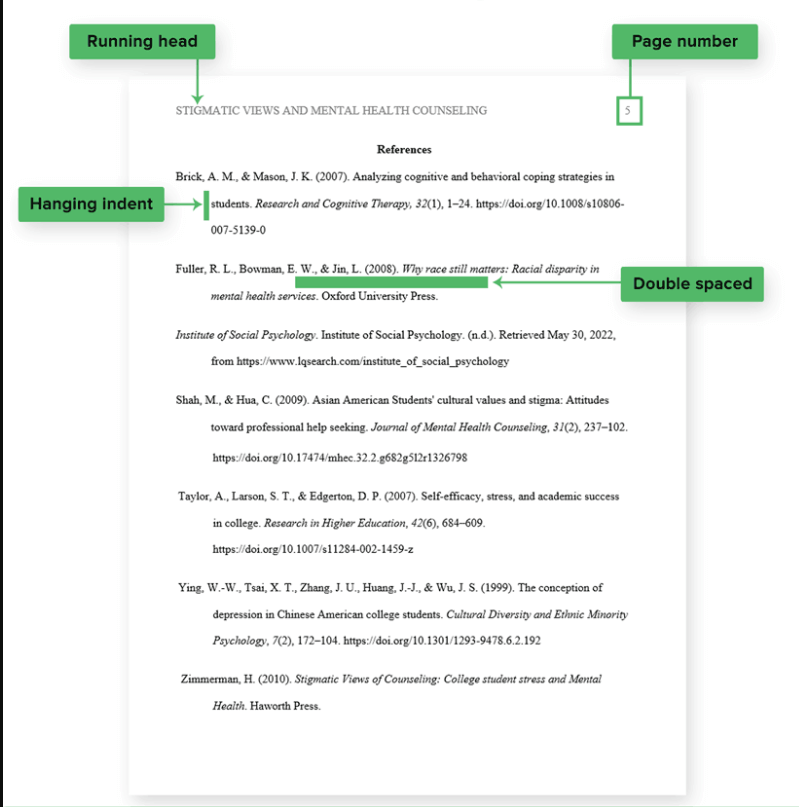
Each entry uses a hanging indent: the first line is flush left, and subsequent lines indent 0.5 inch. Double-space the entire list with no extra blank lines between entries. This section gives you the reference-page rule; the examples below show the exact APA pattern for websites, PDFs, books, journal articles, videos, slides, images, and other source types.
Bold centered heading, alphabetical order, hanging indents, and double-spaced entries.
Choose the right APA citation guide by source type
Do not force every source into one formula. First identify the source type, then open the matching APA 7 example so you can follow the correct pattern without mixing website, book, article, and media rules.
For less common sources such as textbooks, lectures, interviews, movies, religious texts, or slides with embedded citations, use the related APA guides near the end of this page.
Quick APA reference examples
Use the examples below to understand the pattern, then open the matching step-by-step guide when your source has missing authors, unusual dates, editors, translations, lecture materials, or platform-specific details.
Book
In-text citation
(Kahneman, 2011)
Reference entry
Kahneman, D. (2011). Thinking, fast and slow. Farrar, Straus and Giroux.
Journal article with DOI
In-text citation
(Garcia & Lin, 2021)
Garcia, M., & Lin, P. (2021). Student motivation in hybrid classrooms. Journal of Educational Psychology, 113(4), 650–665. https://doi.org/10.xxxx/xxxxx
Webpage
In-text citation
(National Institute of Mental Health, 2023)
National Institute of Mental Health. (2023). Anxiety disorders. https://www.nimh.nih.gov/...
Advanced Topics
Advanced APA Assignments: Annotated Bibliographies and Special Cases
Keep the overview here, then use detailed tutorials for special cases.
Annotated bibliographies
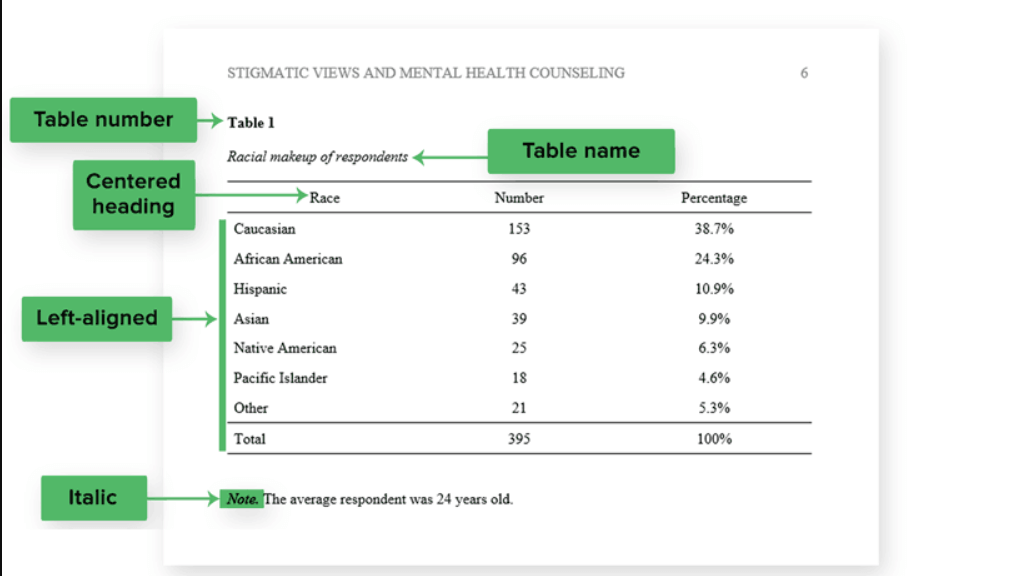
Advanced papers may add tables, figures, and appendices after the reference list.
An annotated bibliography is a reference list in which each entry is followed by a short paragraph — the annotation — that summarizes, evaluates, or reflects on the source's usefulness for your project. Annotations typically run 150–250 words, written in full sentences without bullet points.
A strong annotation answers three questions: What did this source argue? How trustworthy is its evidence? How will you use it in your paper? the annotated bibliography walkthrough shows entries for journal articles, books, and web sources side by side.
Anderson, C. A., Benjamin, R. K., & Wood, P. K. (2019). Effects of sleep on memory consolidation. Journal of Cognitive Research, 12(4), 88–102. https://doi.org/10.1037/xxxxx
This longitudinal study tracked 340 undergraduates across two semesters and found a significant correlation between consistent sleep schedules and exam performance. The methodology is rigorous and the sample size is larger than most classroom studies, making it a strong source for my literature review on student wellness interventions. I will use it to support the claim that institutional sleep-education programs merit further funding.
Tools & Templates
APA Tools, Templates, and WPS Formatting Workflow
Use tools to speed up formatting, but verify every citation and reference before submitting.
Citation generators and reference managers
Citation generators and document editors can speed up APA work, but they should not replace a final manual check. Use tools to draft references, set margins, adjust spacing, add page numbers, and keep the paper editable. Then verify capitalization, DOI, hanging indent, and source type rules before submitting.
Generators speed up reference lists — but always verify title case and DOIs.
Office software, PDFs, and staying organized
WPS Writer — free APA formatting
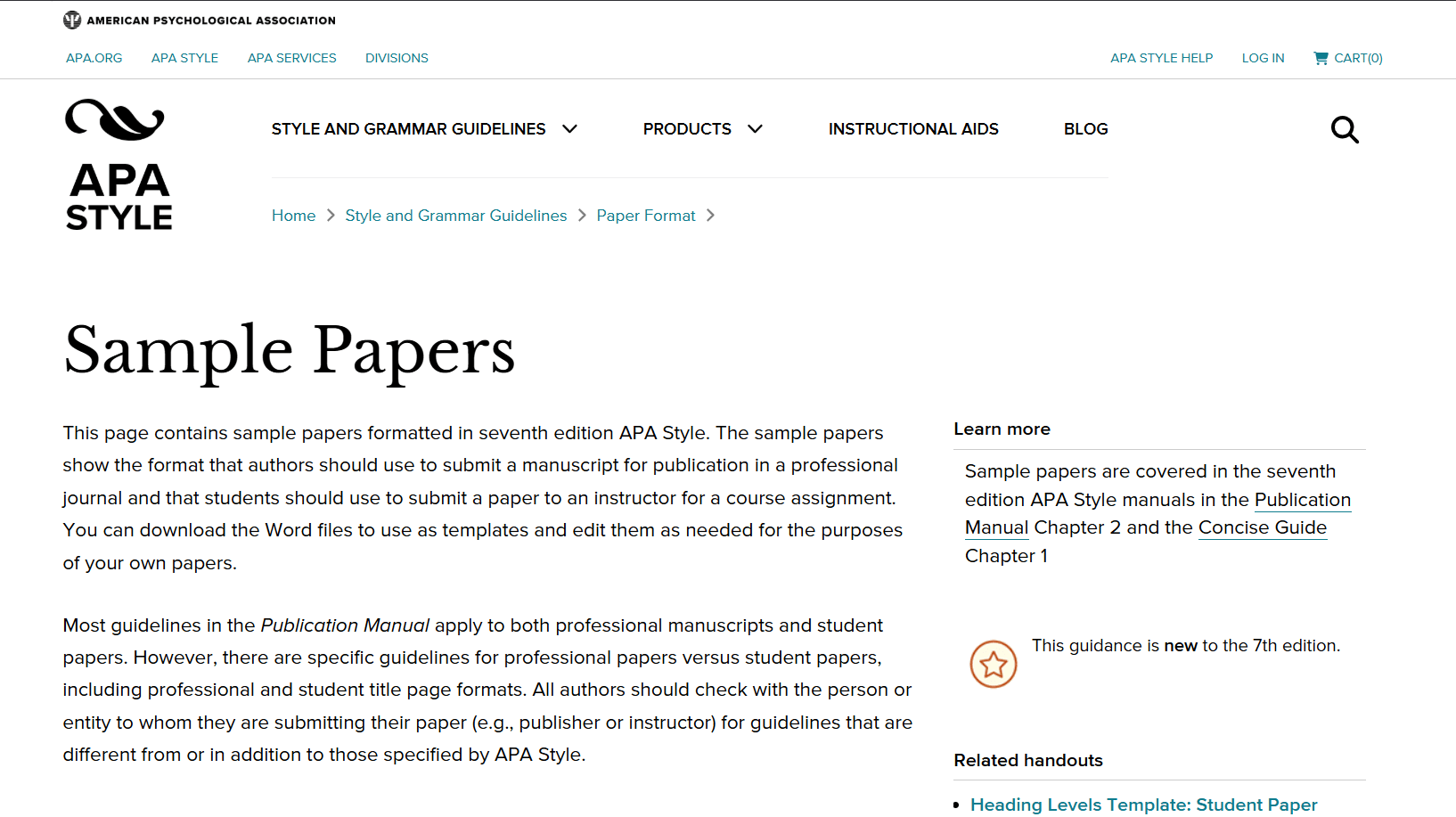
Official APA sample papers
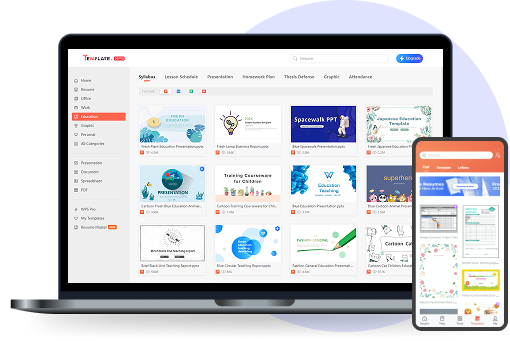
Open template in WPS Office
WPS Writer can support the APA paper setup workflow: edit .docx files, set margins and double spacing, add top-right page numbers, configure headings, and apply hanging indents on the References page. Keep this section focused on APA formatting tasks rather than general Office alternatives.
If you collect sources as PDFs, use the APA examples above to decide whether the PDF should be cited as a journal article, report, book, webpage, or no-author source. The document editor should help your writing workflow, but the citation rule still depends on the source type.
1
Download a template
Start from our editable APA template pack instead of a blank document.
2
Set styles once
Configure Normal, Heading 1–3, and References hanging indent as styles.
3
Save as .wpt
Reuse your configured file for every assignment this semester.
4
Verify before submit
Run a final pass: margins, spacing, page numbers, and reference alphabetization.
Final Review
APA Format Final Checklist Before You Submit
Use this quick checklist after writing, formatting, and building your reference list.
Copyable APA paper checklist
Paper setup
□ 1-inch margins on all sides
□ Readable font used consistently
□ Double spacing throughout the paper
□ Page numbers in the top-right corner
□ Title page details match the assignment
Citations and references
□ Every in-text citation has a matching reference entry
□ Every reference entry is cited in the paper
□ Reference list is alphabetized
□ Hanging indents are applied to all entries
□ DOIs, URLs, dates, and source types are checked
This checklist is intentionally short. Use this guide to confirm the full workflow, then open a detailed APA tutorial when a specific source type or formatting detail needs a step-by-step example.
Next step
Still checking a rule or ready to format?
Use the FAQ section for quick APA questions, or start formatting your paper in WPS Office when your checklist is ready.
These quick answers cover the most common student questions about APA paper structure, citations, and using WPS Office to apply the format.
APA format is a writing and citation style used in many social science, education, business, and nursing papers. It covers both paper layout, such as margins, spacing, title page, page numbers, and references, and source attribution, such as in-text citations and reference entries.
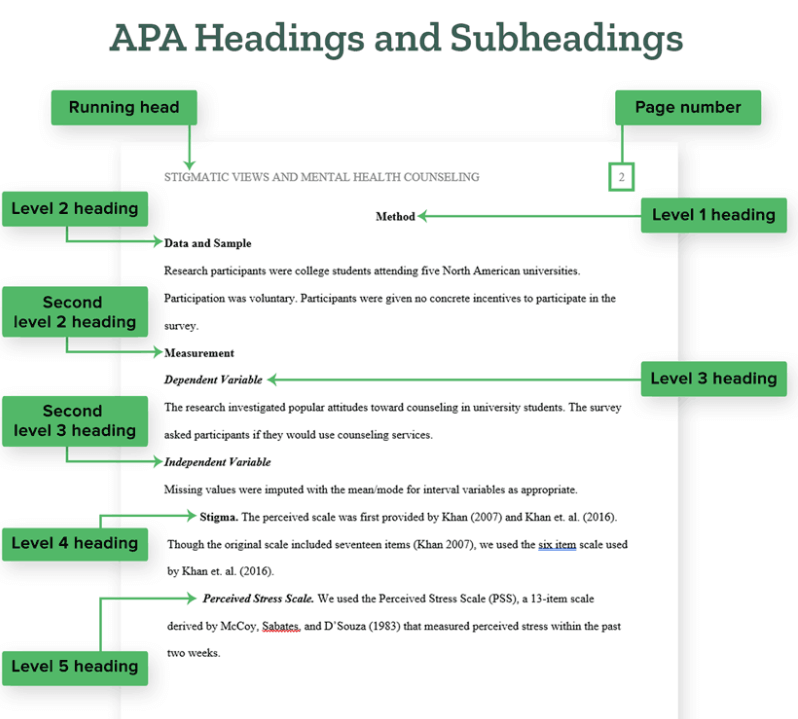
Start with 1-inch margins, double spacing, a readable font, and page numbers in the top-right corner. Add a title page, write the body with APA heading levels if needed, cite sources with the author-date system, and finish with a References page using hanging indents.
APA 7 uses double spacing, 1-inch margins, a consistent readable font, top-right page numbers, author-date in-text citations, and a References page. Student papers usually need only the page number in the page header. Professional papers include both a page number and a running head on every page, including the title page.
Not always. Many student papers do not require an abstract unless the instructor asks for one. When required, the abstract usually appears on a new page after the title page, uses a bold centered heading, and is written as one unindented paragraph of about 150–250 words.
APA page numbers go in the top-right corner of every page, starting with the title page as page 1. Student papers usually need only the page number. Professional papers include a page number and a running head in the header on every page, including the title page.
APA format is the full paper style, including page setup, title page, abstract, headings, references, tables, figures, and citations. APA citations are only the source-crediting part: in-text citations in the body and full reference entries at the end.
Set 1-inch margins, double spacing, a consistent readable font, and top-right page numbers first. Then create the title page, abstract if required, body headings, and a References page with hanging indents. Save the formatted file as a reusable template for future papers.
Use et al. for sources with three or more authors, even on the first citation, such as (Park et al., 2022). For two-author sources, always include both names, such as (Chen & Rivera, 2019).
Ready to apply the APA rules?
Format faster with WPS
Format APA Paper in WPS Office
Use WPS Office to set fonts, spacing, margins, page numbers, headings, and reference-list layout while keeping your APA paper compatible and easy to edit.