

'%3e%3cpath%20d='M8%200C12.4183%200%2016%203.58172%2016%208C16%2012.4183%2012.4183%2016%208%2016C3.58172%2016%200%2012.4183%200%208C0%203.58172%203.58172%200%208%200ZM11.6162%204.38379C11.2257%203.99337%2010.5927%203.99338%2010.2021%204.38379L8%206.58594L5.79785%204.38379C5.40732%203.99334%204.77429%203.99329%204.38379%204.38379C3.99331%204.77429%203.99335%205.40733%204.38379%205.79785L6.58594%208L4.38379%2010.2021C3.99348%2010.5927%203.99341%2011.2257%204.38379%2011.6162C4.77426%2012.0066%205.40734%2012.0065%205.79785%2011.6162L8%209.41406L10.2021%2011.6162C10.5927%2012.0066%2011.2257%2012.0067%2011.6162%2011.6162C12.0067%2011.2257%2012.0066%2010.5927%2011.6162%2010.2021L9.41406%208L11.6162%205.79785C12.0066%205.40735%2012.0066%204.77429%2011.6162%204.38379Z'%20fill='%23080E17'%20fill-opacity='0.46'/%3e%3c/g%3e%3cdefs%3e%3cclipPath%20id='clip0_3761_713'%3e%3crect%20width='16'%20height='16'%20fill='white'/%3e%3c/clipPath%3e%3c/defs%3e%3c/svg%3e)




'%3e%3cpath%20fill-rule='evenodd'%20clip-rule='evenodd'%20d='M21.4999%2010.9993C21.4999%205.20009%2016.7986%200.498901%2010.9993%200.498901C5.19994%200.498901%200.498657%205.20009%200.498657%2010.9993C0.498657%2016.2404%204.33858%2020.5844%209.35855%2021.3722V14.0346H6.69238V10.9993H9.35855V8.68594C9.35855%206.05427%2010.9262%204.60062%2013.3248%204.60062C14.4736%204.60062%2015.6753%204.80571%2015.6753%204.80571V7.38979H14.3512C13.0468%207.38979%2012.64%208.19921%2012.64%209.0296V10.9993H15.5523L15.0867%2014.0346H12.64V21.3722C17.66%2020.5844%2021.4999%2016.2404%2021.4999%2010.9993Z'%20fill='%231568EA'/%3e%3c/g%3e%3c/svg%3e)


'%3e%3cpath%20d='M2.42045%2022.1876H6.31818V12.7217L0.75%208.54553V20.5171C0.75%2021.4414%201.49892%2022.1876%202.42045%2022.1876Z'%20fill='%234285F4'/%3e%3cpath%20d='M19.682%2022.1876H23.5797C24.5041%2022.1876%2025.2502%2021.4387%2025.2502%2020.5171V8.54553L19.682%2012.7217'%20fill='%2334A853'/%3e%3cpath%20d='M19.682%205.48293V12.7216L25.2502%208.54543V6.31816C25.2502%204.25236%2022.8921%203.07469%2021.2411%204.31361'%20fill='%23FBBC04'/%3e%3cpath%20d='M6.31824%2012.7217V5.48303L13.0001%2010.4944L19.6819%205.48303V12.7217L13.0001%2017.733'%20fill='%23EA4335'/%3e%3cpath%20d='M0.75%206.31816V8.54543L6.31818%2012.7216V5.48293L4.75909%204.31361C3.10534%203.07469%200.75%204.25236%200.75%206.31816Z'%20fill='%23C5221F'/%3e%3c/g%3e%3cdefs%3e%3cclipPath%20id='clip0_2954_7305'%3e%3crect%20width='24.5'%20height='18.375'%20fill='white'%20transform='translate(0.75%203.8125)'/%3e%3c/clipPath%3e%3c/defs%3e%3c/svg%3e)


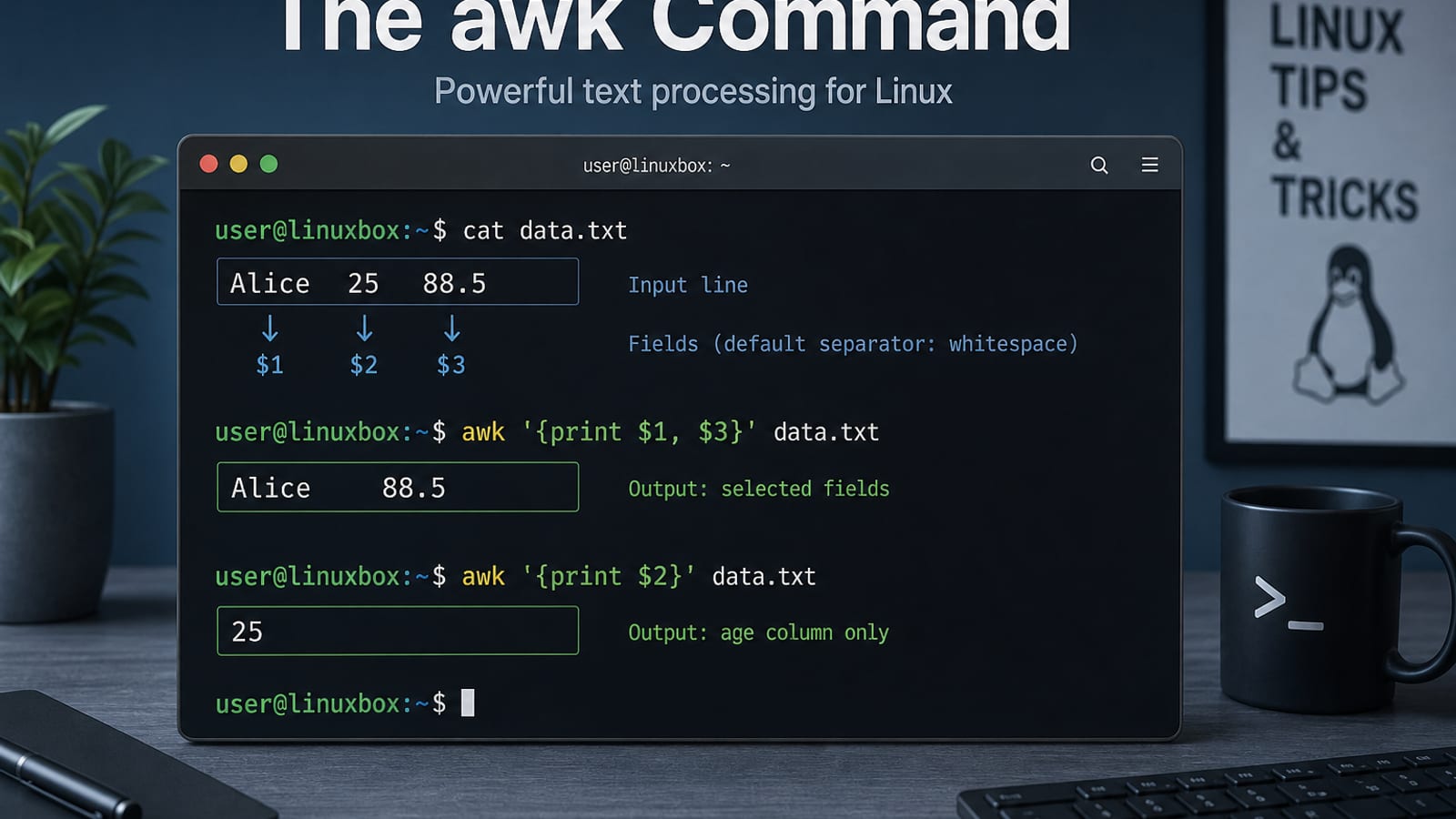
The awk command in Linux is a pattern-scanning and text-processing language. It reads input record by record (usually one line at a time), splits each record into fields (columns), then runs your rules. On Ubuntu you typically get awk as a symlink to an implementation such as mawk or gawk; for the full GNU feature set, install/use gawk.
awk --version 2>/dev/null || awk -W version
man awk
# or, for GNU Awk:
man gawk
Official docs describe AWK as pattern { action } rules: for each input line, matching patterns run their actions. No pattern means “every line”; no action means “print the line.” If you already know your goal, jump to: print fields, -F, patterns, or BEGIN/END. For line search use grep; for substitutions use sed.
For a broader Ubuntu terminal quick reference, see the Linux commands cheat sheet.
Basic Syntax
awk [options] 'program' [file...]
No file → read stdin (pipes). Fields default to whitespace-separated:
| Token | Meaning |
|---|---|
$0 | Whole line |
$1, $2, … | Field 1, 2, … |
$NF | Last field (NF = number of fields) |
NR | Record (line) number so far |
FS / OFS | Input / output field separator |
awk '{print $1}' names.txt
echo 'one two three' | awk '{print $2}'
# two
Print Fields (and Put Spaces Between Them)
A classic Ask Ubuntu gotcha: print $5 $1 glues fields with no separator. Use a comma (uses OFS) or an explicit space:
# Stuck together
awk '{print $5 $1}' a.txt

# Space via string
awk '{print $5 " " $1}' a.txt

# Comma → OFS (default is a space); set OFS to a tab
ls -la | awk -v OFS='\t' '{print $5, $1}'

# Or printf for aligned columns
ls -la | awk '{printf "%8s\t%s\n", $5, $1}'
Tip from that thread: prefer stat/find over parsing ls in scripts—ls is for humans.
Change the Field Separator (-F / FS)
# Colon-separated (passwd-style)
awk -F: '{print $1, $7}' /etc/passwd

# Comma CSV-ish
awk -F',' '{print $1, $NF}' data.csv

# Set FS in BEGIN (same idea)
awk 'BEGIN {FS=","} {print $2}' data.csv
Default FS is whitespace (spaces and tabs). For strict single-character separators, -F is the everyday switch.
Patterns, Conditions, and Regex
# Lines matching a regex → print whole line (default action)
awk '/ERROR/' app.log

# Condition on a field
awk '$3 > 100 {print $1, $3}' scores.txt

# Skip header / blank lines
awk 'NR>1 && NF>0 {print $0}' table.tsv

# Invert: lines that do not match
awk '!/DEBUG/' app.log
awk '{
if ($1 == "FAIL") print "bad:", $0
else if ($1 == "OK") print "good:", $2
}' results.txtBEGIN and END (Headers and Totals)
BEGIN runs before any input; END runs after all input:
awk '
BEGIN { print "Directory Report" }
NF > 9 { print $9, "->", $NF }
END { print "Done. Lines:", NR }
' listing.txt
Sum a column (very common one-liner):
awk '{s += $1} END {print s}' numbers.txt
awk '{s += $3} END {print "avg =", s/NR}' data.txt
Count lines like wc -l:
awk 'END {print NR}' file.txtWork with CSV-Style Files
Awk is not a full CSV parser (quoted commas need care), but it handles simple delimiter files well:
# Print column names (first line)
awk -F',' 'NR==1 {print; exit}' file.csv

# Print selected columns
awk -F',' '{print $2, $4}' file.csv

# Filter rows
awk -F',' '$3 == "active" {print $1, $2}' users.csv
For messy quoted CSV, use a dedicated tool or Python; keep awk for clean TSV/CSV without embedded commas in fields.
Multiple Files and Pipelines
# Process several files; FILENAME / FNR help when needed
awk '{print FILENAME, FNR, $1}' a.log b.log

# Pipeline
df -h | awk 'NR==1 || /\/$/ {print $1, $5, $6}'
ps aux | awk '$3+0 > 5.0 {print $2, $3, $11}'
Ask Ubuntu also discusses reading more than one file in one awk program (ARGV, getline); for most guides, separate files on the command line is enough.
Useful Built-ins at a Glance
| Variable | Role |
|---|---|
NR | Lines seen so far (across files) |
FNR | Line number in the current file |
NF | Fields in current line |
FS / OFS | Input / output field separator |
RS / ORS | Input / output record separator |
FILENAME | Current file name |
awk '{print NR, NF, $1, $NF}' file.txtCommon Mistakes
| Mistake | Fix |
|---|---|
print $1 $2 with no space | Use print $1, $2 or print $1 " " $2 |
| Wrong columns on CSV | Set -F',' (or the real delimiter) |
| Expecting PCRE | Awk regex is ERE-style; not identical to grep -P |
Parsing ls | Prefer stat / find for scripts |
| Need complex CSV quotes | Use a real CSV library |
| Want find-and-replace only | sed may be simpler; use awk when fields matter |
When to Use Awk
Choose awk when text is columnar—print fields, set separators, and summarize with BEGIN/END. Prefer grep to find lines and sed for stream substitutions. Typical chain: grep narrows lines → awk extracts fields → redirect or pipe onward.
Quick Cheat Sheet
awk '{print $1}' f              # first field
awk '{print $1, $NF}' f         # first and last
awk -F: '{print $1}' /etc/passwd
awk -v OFS='\t' '{print $1, $2}' f
awk '/pat/' f                   # lines matching pat
awk 'NR>1 {print}' f            # skip header
awk '{s+=$1} END {print s}' f   # sum column 1
awk 'END {print NR}' f          # line count
From Column Output to Shareable Sheets and Reports
awk is excellent for slicing fields and summarizing text in the terminal. Those same results often become a spreadsheet, a status report, or a PDF for review.
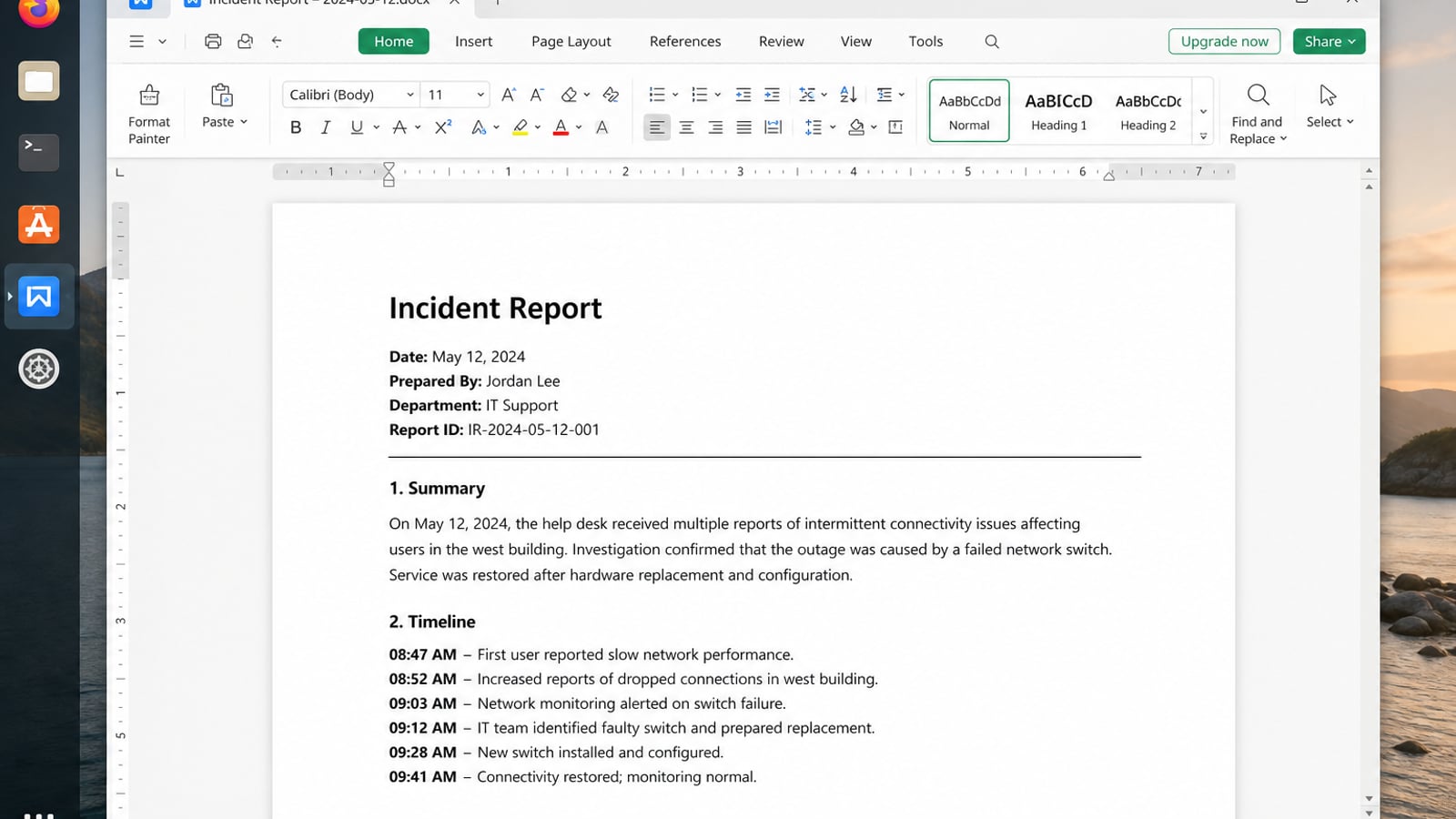
WPS Office for Linux is a natural next step there: Spreadsheet for tabular output, Writer for commentary, and PDF when the final file should not move around.
| What you need next | What WPS gives you |
|---|---|
| Turn awk output into office-style tables and reports | Strong .docx / .xlsx / .pptx layout fidelity when files move between Linux, Windows, and macOS |
| One place for notes, sheets, slides, and PDFs | Free core suite: Writer, Spreadsheet, Presentation, plus PDF view/edit/convert tools |
| A familiar desktop UI for switchers | Ribbon-style apps with a lighter footprint than many heavy suites |
| A trusted install path | Official DEB (Ubuntu/Debian/Mint) and RPM packages from the vendor |
Use the official WPS Office for Linux download page, then install the local package with sudo apt install ./wps-office_VERSION_amd64.deb. Keep awk for extraction and summarizing; use WPS when that output needs to be reviewed in a spreadsheet or document.
FAQ
What does the awk command do in Linux?
It processes text by records and fields—print columns, filter rows, and compute simple aggregates without a full programming language.
How do I print the last column?awk '{print $NF}' file
How do I use a custom delimiter?awk -F',' '{print $2}' file.csv or set FS in BEGIN.
Why is there no space between printed fields?print $a $b concatenates. Use a comma (print $a, $b) so OFS is inserted.
Is Ubuntu’s awk the same as gawk?
Not always. Check awk --version / awk -W version. Install gawk when you need GNU extensions.
Where is the official documentation?
Run man awk or man gawk; GNU Awk is documented as a pattern scanning and processing language.

'%3e%3cpath%20d='M19.9911%204.11386V6.471H18.5894C18.0775%206.471%2017.7322%206.57814%2017.5536%206.79243C17.3751%207.00671%2017.2858%207.32814%2017.2858%207.75671V9.44421H19.9019L19.5536%2012.0871H17.2858V18.8639H14.5536V12.0871H12.2769V9.44421H14.5536V7.49779C14.5536%206.39064%2014.8632%205.53201%2015.4822%204.92189C16.1013%204.31177%2016.9257%204.00671%2017.9554%204.00671C18.8304%204.00671%2019.509%204.04243%2019.9911%204.11386Z'%20fill='%23333333'/%3e%3c/g%3e%3cdefs%3e%3cclipPath%20id='clip0_2938_8199'%3e%3crect%20width='16'%20height='16'%20fill='white'%20transform='translate(8%204.00671)'/%3e%3c/clipPath%3e%3c/defs%3e%3c/svg%3e)
'%3e%3cpath%20d='M17.5237%2010.7813L23.4811%204H22.0699L16.8949%209.88693L12.7648%204H8L14.2469%2012.9029L8%2020.0133H9.4112L14.8725%2013.7952L19.2352%2020.0133H24M9.92053%205.04213H12.0885L22.0688%2019.0224H19.9003'%20fill='%23333333'/%3e%3c/g%3e%3cdefs%3e%3cclipPath%20id='clip0_2938_8200'%3e%3crect%20width='16'%20height='16.0134'%20fill='white'%20transform='translate(8%204)'/%3e%3c/clipPath%3e%3c/defs%3e%3c/svg%3e)


