

'%3e%3cpath%20d='M8%200C12.4183%200%2016%203.58172%2016%208C16%2012.4183%2012.4183%2016%208%2016C3.58172%2016%200%2012.4183%200%208C0%203.58172%203.58172%200%208%200ZM11.6162%204.38379C11.2257%203.99337%2010.5927%203.99338%2010.2021%204.38379L8%206.58594L5.79785%204.38379C5.40732%203.99334%204.77429%203.99329%204.38379%204.38379C3.99331%204.77429%203.99335%205.40733%204.38379%205.79785L6.58594%208L4.38379%2010.2021C3.99348%2010.5927%203.99341%2011.2257%204.38379%2011.6162C4.77426%2012.0066%205.40734%2012.0065%205.79785%2011.6162L8%209.41406L10.2021%2011.6162C10.5927%2012.0066%2011.2257%2012.0067%2011.6162%2011.6162C12.0067%2011.2257%2012.0066%2010.5927%2011.6162%2010.2021L9.41406%208L11.6162%205.79785C12.0066%205.40735%2012.0066%204.77429%2011.6162%204.38379Z'%20fill='%23080E17'%20fill-opacity='0.46'/%3e%3c/g%3e%3cdefs%3e%3cclipPath%20id='clip0_3761_713'%3e%3crect%20width='16'%20height='16'%20fill='white'/%3e%3c/clipPath%3e%3c/defs%3e%3c/svg%3e)




'%3e%3cpath%20fill-rule='evenodd'%20clip-rule='evenodd'%20d='M21.4999%2010.9993C21.4999%205.20009%2016.7986%200.498901%2010.9993%200.498901C5.19994%200.498901%200.498657%205.20009%200.498657%2010.9993C0.498657%2016.2404%204.33858%2020.5844%209.35855%2021.3722V14.0346H6.69238V10.9993H9.35855V8.68594C9.35855%206.05427%2010.9262%204.60062%2013.3248%204.60062C14.4736%204.60062%2015.6753%204.80571%2015.6753%204.80571V7.38979H14.3512C13.0468%207.38979%2012.64%208.19921%2012.64%209.0296V10.9993H15.5523L15.0867%2014.0346H12.64V21.3722C17.66%2020.5844%2021.4999%2016.2404%2021.4999%2010.9993Z'%20fill='%231568EA'/%3e%3c/g%3e%3c/svg%3e)


'%3e%3cpath%20d='M2.42045%2022.1876H6.31818V12.7217L0.75%208.54553V20.5171C0.75%2021.4414%201.49892%2022.1876%202.42045%2022.1876Z'%20fill='%234285F4'/%3e%3cpath%20d='M19.682%2022.1876H23.5797C24.5041%2022.1876%2025.2502%2021.4387%2025.2502%2020.5171V8.54553L19.682%2012.7217'%20fill='%2334A853'/%3e%3cpath%20d='M19.682%205.48293V12.7216L25.2502%208.54543V6.31816C25.2502%204.25236%2022.8921%203.07469%2021.2411%204.31361'%20fill='%23FBBC04'/%3e%3cpath%20d='M6.31824%2012.7217V5.48303L13.0001%2010.4944L19.6819%205.48303V12.7217L13.0001%2017.733'%20fill='%23EA4335'/%3e%3cpath%20d='M0.75%206.31816V8.54543L6.31818%2012.7216V5.48293L4.75909%204.31361C3.10534%203.07469%200.75%204.25236%200.75%206.31816Z'%20fill='%23C5221F'/%3e%3c/g%3e%3cdefs%3e%3cclipPath%20id='clip0_2954_7305'%3e%3crect%20width='24.5'%20height='18.375'%20fill='white'%20transform='translate(0.75%203.8125)'/%3e%3c/clipPath%3e%3c/defs%3e%3c/svg%3e)


The best email client for Linux for most people is Mozilla Thunderbird. It handles multiple IMAP/POP accounts, search and filters, calendars and contacts, and works across Ubuntu, Fedora, and other desktops without locking you into one mail provider. Install it, add your accounts, and keep mail offline when you need it.
That “best” answer changes with your job. Need Microsoft Exchange / EWS on GNOME? Prefer Evolution. Live in KDE Plasma? Prefer KMail. Want a light conversation-style inbox? Try Geary. Want a Thunderbird-compatible fork with extra fixes? Consider Betterbird. Success means your accounts sync reliably, search finds mail quickly, and attachments open in the apps you already use.
If you already know your case, jump ahead: Exchange / work calendar, KDE-only workflow, simple personal Gmail, or Snap/sandbox install issues.

For a broader must-have software list on Ubuntu, see best Linux apps.
Quick Pick: Best Linux Email Client by Use Case
| Your situation | Best pick | Why |
|---|---|---|
| Most users, multi-account, general desktop | Thunderbird | Mature, cross-distro, strong search/filters, calendars/contacts |
| GNOME + Microsoft Exchange / EWS | Evolution | Built-in PIM + Exchange-oriented workflow |
| KDE Plasma daily driver | KMail (Kontact) | Native Plasma integration and deep filtering |
| One personal inbox, minimal UI | Geary | Conversation view, IMAP/SMTP focus |
| Thunderbird user wanting extra fixes/UI tweaks | Betterbird | Thunderbird fork; profiles can be compatible when versions match |
| Terminal-first / scriptable mail | NeoMutt (or similar) | Powerful, not a GUI replacement for most people |
There is no single client that wins every edge case. Ask Ubuntu threads on Gmail IMAP, Exchange, and desktop defaults keep pointing to the same split: generalists choose Thunderbird; workplace Exchange users lean Evolution; desktop loyalists stick with their DE’s native mail app.
What “Best” Should Mean on Linux
Score candidates on these criteria before you install five apps:
Account types you actually need — IMAP/SMTP for Gmail, Outlook.com, Fastmail, etc.; EWS/Exchange for many workplaces; special providers may need bridges.
Desktop fit — GNOME vs KDE vs “any desktop.”
Offline and large mailboxes — local indexes, search, filters.
Calendar/contacts — built-in vs separate app.
Install channel — distro package, Snap/Flatpak, or vendor tarball; sandbox rules matter for attachments and external drives.
Privacy / licensing — open source vs freemium Electron clients.
Ignore marketing lists that crown a winner without asking whether you need Exchange, encryption, or a unified inbox.
1) Thunderbird — Best Overall Email Client for Linux
Best for: most Linux users who want one reliable desktop mail app.
Thunderbird is Mozilla’s free, open-source client. Official builds are available for Linux from thunderbird.net, and Ubuntu commonly ships it via Snap or other channels depending on release.
Strengths
Multiple accounts, unified inbox options, tags, filters, and solid search
Calendar and contacts without forcing a webmail-only workflow
Large community and migration paths when you move machines
Works the same mental model across Linux, Windows, and macOS
Watch-outs
On recent Ubuntu releases, the Snap build is sandboxed. Users report trouble opening mail on some mounts, importing profiles from non-Snap installs, or handing off files to other apps until permissions are fixed (for example connecting removable-media where applicable) or until they use a non-Snap install from Mozilla’s Linux download.
Gmail over IMAP still maps labels as folders. No mainstream desktop client fully recreates Gmail’s label model; plan folder habits accordingly.
Install (typical Ubuntu path)
sudo snap install thunderbird
Or download the official Linux package from Mozilla’s site if you specifically want the non-Snap build. Prefer one channel and stick to it so profiles stay predictable.
2) Evolution — Best for GNOME and Exchange-Heavy Work
Best for: GNOME users who want mail + calendar + contacts + tasks, especially with Microsoft Exchange.
Evolution is GNOME’s full personal information manager. Community and GNOME docs have long pointed Exchange users to Evolution (with EWS support via the appropriate package where your distro provides it). Ask Ubuntu “best client for Exchange” threads repeatedly surface Evolution as the practical Linux path when Outlook-on-Windows is not an option.
Strengths
Integrated calendar/contacts/tasks
Stronger “Outlook-style” workday fit on GNOME
Standard IMAP/POP/SMTP setup when you have provider hostnames and encryption settings
Watch-outs
Heavier than a mail-only app
Setup needs accurate server details from your IT/provider (IMAP vs POP, SMTP, ports, SSL/TLS)
EWS availability depends on your distro packages—confirm
evolution/ EWS packages for your release before promising yourself full Exchange parity
Install (Debian/Ubuntu family)
sudo apt update
sudo apt install evolution
Add Exchange/EWS packages only if your distro documents them for your version.
3) KMail — Best Native Pick on KDE Plasma
Best for: KDE Plasma users who want mail that matches the desktop.
KMail (often used via Kontact) is the KDE mail client with deep filtering and Plasma integration. If your whole workflow is Dolphin, Spectacle, and Plasma notifications, KMail usually feels more “at home” than Thunderbird.
Strengths
Native KDE look and integration
Powerful filters and identity features for power users
Watch-outs
Weaker fit if you do not use Plasma
Gmail and modern OAuth/security rules change over time—follow current Google account requirements rather than outdated “less secure apps” advice from old threads
Install from your Plasma distro’s packages (for example via Discover or apt/dnf package search for kmail).
4) Geary — Best Lightweight Client for Simple Inboxes
Best for: personal IMAP mail with a clean, conversation-first UI.
Geary is GNOME’s simpler mail app. Official GNOME positioning emphasizes modern UI, search, and standard IMAP/SMTP—not full proprietary Exchange compatibility. That narrow focus is why it feels light—and why it is the wrong pick for complex corporate mail stacks.
Install example
sudo apt install geary
5) Betterbird — Best Thunderbird Fork if You Want Extra Fixes
Best for: users who like Thunderbird’s model but want the community fork’s additional fixes and UI options.
Betterbird is a fine-tuned Thunderbird fork. It is not Mozilla’s official Thunderbird. Ask Ubuntu users migrate between Thunderbird and Betterbird because profiles can be compatible when base versions match—back up first. Upgrades are often “replace the app directory” or Flatpak, while settings stay in your home profile.
Use Betterbird only if you accept a community-maintained fork and follow its current release notes.
6) Other Options (Only if They Match a Narrow Need)
Mailspring — modern UI; treat it as a freemium/third-party client, not the default open-source recommendation.
Claws Mail — lightweight classic GUI for speed-focused users.
NeoMutt — terminal power users; excellent for keyboard workflows, not a Thunderbird replacement for most people.
Webmail in the browser — still valid if you only need Gmail/Outlook web features and offline desktop mail is optional.
Do not install random PPAs or unofficial “best client” packages unless you trust the publisher.
Decision Flow: Choose in Under Two Minutes
Do you need Microsoft Exchange / EWS for work?
Yes → Evolution (GNOME) first; verify EWS packages.
No → continue.Is your desktop KDE Plasma and do you want native apps?
Yes → KMail.
No → continue.Do you want the safest default for multiple accounts?
Yes → Thunderbird.
Want Thunderbird-like with fork extras → Betterbird (optional).Is this one personal IMAP inbox and you hate clutter?
Yes → Geary.
That flow matches how Ubuntu users actually ask the question: not “what has the prettiest screenshots,” but “what works with my provider and desktop.”
Install and First-Run Checklist (Any Client)
Confirm architecture and desktop (
uname -m, and whether you use GNOME or Plasma).Install from your distro package, Snap/Flatpak, or the project’s official download—not stale mirror links.
Collect provider settings: email, username, IMAP/SMTP hosts, ports, SSL/TLS.
Add one account first; send a test message to yourself.
Enable offline/download only for folders you need if the mailbox is huge.
Set the system default mail app in your desktop settings if “mailto:” links should open this client.
Common Linux Email Client Problems (and Fixes)
Gmail looks “wrong” in every desktop client
IMAP exposes labels as folders. Pick a client for IMAP reliability (Thunderbird is fine); do not expect perfect Gmail label parity.
Exchange / Office 365 / EWS
Start with Evolution + current EWS support for your distro. Older davmail/hacks from ancient forum posts are last-resort, version-sensitive workarounds—not the default path.
Thunderbird Snap cannot open files on some paths
Sandbox limits are a packaging issue. Connect needed interfaces, move data under allowed paths, or use Mozilla’s non-Snap Linux build. Keep profile location consistent when switching channels.
Switching Thunderbird ↔ Betterbird
Back up the profile. Match major versions when possible. Profiles can carry over, but mixed Snap/tarball layouts still cause import headaches.
After You Download Attachments: Open Office Files on Linux
Choosing an email client is only half the workflow. The real follow-up is opening the DOCX, spreadsheet, slide deck, or PDF attachment someone just sent you.
WPS Office for Linux is a practical attachment companion for Linux mail clients because it gives you Writer, Spreadsheet, Presentation, and PDF tools in a familiar desktop layout.
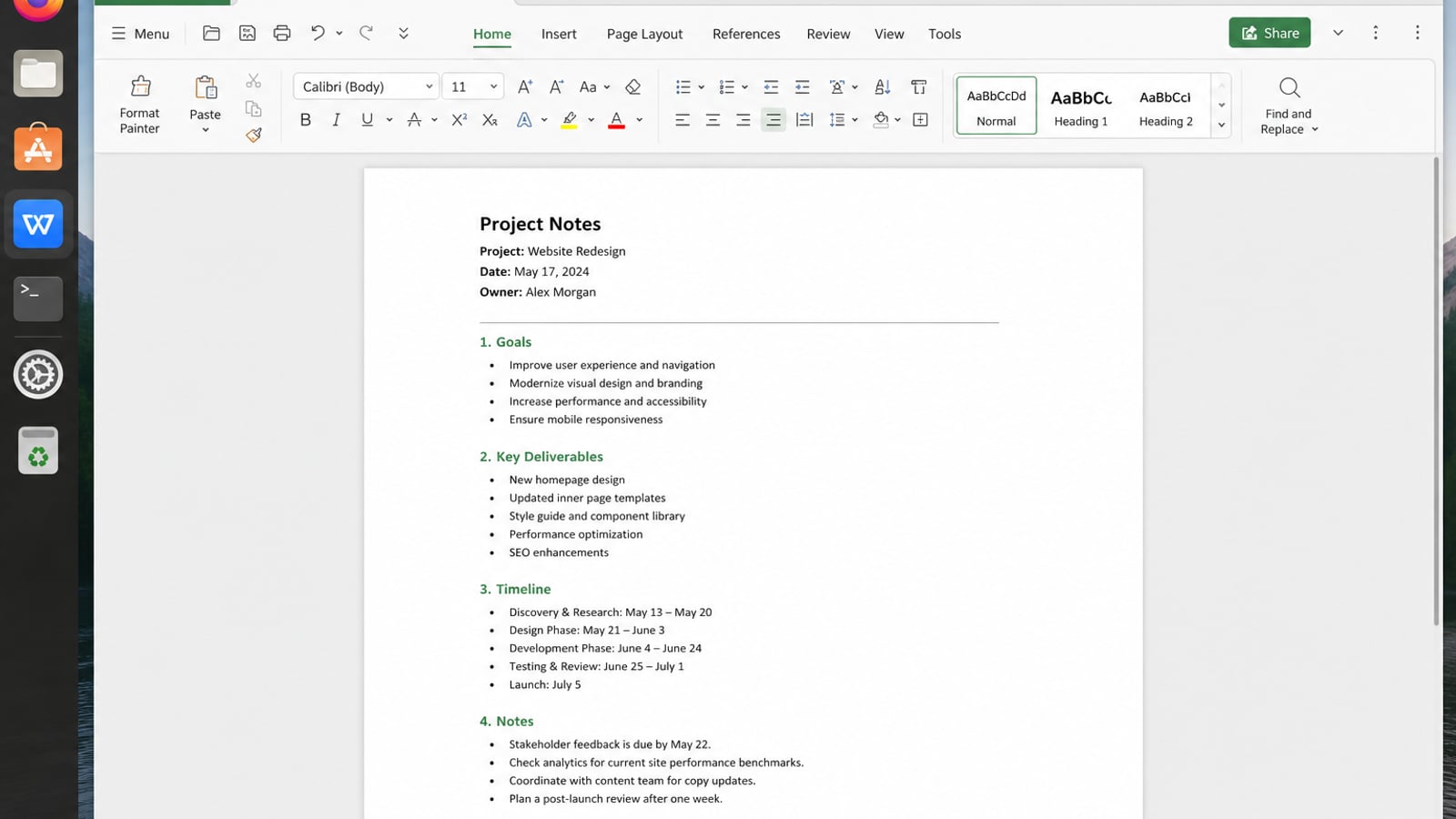
| What you need next | What WPS gives you |
|---|---|
| Open and edit Office attachments from Linux mail apps | Strong .docx / .xlsx / .pptx layout fidelity when files move between Linux, Windows, and macOS |
| One place for notes, sheets, slides, and PDFs | Free core suite: Writer, Spreadsheet, Presentation, plus PDF view/edit/convert tools |
| A familiar desktop UI for switchers | Ribbon-style apps with a lighter footprint than many heavy suites |
| A trusted install path | Official DEB (Ubuntu/Debian/Mint) and RPM packages from the vendor |
Download the current package from the official WPS Office for Linux download page, install it with sudo apt install ./wps-office_VERSION_amd64.deb, and set it as the default opener for DOCX, XLSX, PPTX, or PDF attachments when that fits your desktop workflow.
FAQ
What is the best email client for Linux overall?
Thunderbird for most people. Switch only when Exchange, Plasma integration, or a minimal UI is the deciding factor.
Is Evolution still worth using?
Yes—especially on GNOME when you want calendar/contacts/tasks together or need Exchange-oriented setup.
Is Betterbird better than Thunderbird?
It can be if you want the fork’s extra fixes and accept community maintenance. It is not the official Mozilla client.
Should I use Snap Thunderbird on Ubuntu?
It is convenient, but sandbox limits affect some file paths and profile moves. If you hit those issues, use a non-Snap official build or fix Snap permissions deliberately.
Can one client replace Gmail’s web UI completely?
For mail sync and offline work, yes. For Gmail-only features (true labels, some web-only tools), the browser may still win for that account.
What about Mailspring?
Fine if you like its UI and terms. For a default open-source recommendation, Thunderbird remains the safer first install.

'%3e%3cpath%20d='M19.9911%204.11386V6.471H18.5894C18.0775%206.471%2017.7322%206.57814%2017.5536%206.79243C17.3751%207.00671%2017.2858%207.32814%2017.2858%207.75671V9.44421H19.9019L19.5536%2012.0871H17.2858V18.8639H14.5536V12.0871H12.2769V9.44421H14.5536V7.49779C14.5536%206.39064%2014.8632%205.53201%2015.4822%204.92189C16.1013%204.31177%2016.9257%204.00671%2017.9554%204.00671C18.8304%204.00671%2019.509%204.04243%2019.9911%204.11386Z'%20fill='%23333333'/%3e%3c/g%3e%3cdefs%3e%3cclipPath%20id='clip0_2938_8199'%3e%3crect%20width='16'%20height='16'%20fill='white'%20transform='translate(8%204.00671)'/%3e%3c/clipPath%3e%3c/defs%3e%3c/svg%3e)
'%3e%3cpath%20d='M17.5237%2010.7813L23.4811%204H22.0699L16.8949%209.88693L12.7648%204H8L14.2469%2012.9029L8%2020.0133H9.4112L14.8725%2013.7952L19.2352%2020.0133H24M9.92053%205.04213H12.0885L22.0688%2019.0224H19.9003'%20fill='%23333333'/%3e%3c/g%3e%3cdefs%3e%3cclipPath%20id='clip0_2938_8200'%3e%3crect%20width='16'%20height='16.0134'%20fill='white'%20transform='translate(8%204)'/%3e%3c/clipPath%3e%3c/defs%3e%3c/svg%3e)


