

'%3e%3cpath%20d='M8%200C12.4183%200%2016%203.58172%2016%208C16%2012.4183%2012.4183%2016%208%2016C3.58172%2016%200%2012.4183%200%208C0%203.58172%203.58172%200%208%200ZM11.6162%204.38379C11.2257%203.99337%2010.5927%203.99338%2010.2021%204.38379L8%206.58594L5.79785%204.38379C5.40732%203.99334%204.77429%203.99329%204.38379%204.38379C3.99331%204.77429%203.99335%205.40733%204.38379%205.79785L6.58594%208L4.38379%2010.2021C3.99348%2010.5927%203.99341%2011.2257%204.38379%2011.6162C4.77426%2012.0066%205.40734%2012.0065%205.79785%2011.6162L8%209.41406L10.2021%2011.6162C10.5927%2012.0066%2011.2257%2012.0067%2011.6162%2011.6162C12.0067%2011.2257%2012.0066%2010.5927%2011.6162%2010.2021L9.41406%208L11.6162%205.79785C12.0066%205.40735%2012.0066%204.77429%2011.6162%204.38379Z'%20fill='%23080E17'%20fill-opacity='0.46'/%3e%3c/g%3e%3cdefs%3e%3cclipPath%20id='clip0_3761_713'%3e%3crect%20width='16'%20height='16'%20fill='white'/%3e%3c/clipPath%3e%3c/defs%3e%3c/svg%3e)




'%3e%3cpath%20fill-rule='evenodd'%20clip-rule='evenodd'%20d='M21.4999%2010.9993C21.4999%205.20009%2016.7986%200.498901%2010.9993%200.498901C5.19994%200.498901%200.498657%205.20009%200.498657%2010.9993C0.498657%2016.2404%204.33858%2020.5844%209.35855%2021.3722V14.0346H6.69238V10.9993H9.35855V8.68594C9.35855%206.05427%2010.9262%204.60062%2013.3248%204.60062C14.4736%204.60062%2015.6753%204.80571%2015.6753%204.80571V7.38979H14.3512C13.0468%207.38979%2012.64%208.19921%2012.64%209.0296V10.9993H15.5523L15.0867%2014.0346H12.64V21.3722C17.66%2020.5844%2021.4999%2016.2404%2021.4999%2010.9993Z'%20fill='%231568EA'/%3e%3c/g%3e%3c/svg%3e)


'%3e%3cpath%20d='M2.42045%2022.1876H6.31818V12.7217L0.75%208.54553V20.5171C0.75%2021.4414%201.49892%2022.1876%202.42045%2022.1876Z'%20fill='%234285F4'/%3e%3cpath%20d='M19.682%2022.1876H23.5797C24.5041%2022.1876%2025.2502%2021.4387%2025.2502%2020.5171V8.54553L19.682%2012.7217'%20fill='%2334A853'/%3e%3cpath%20d='M19.682%205.48293V12.7216L25.2502%208.54543V6.31816C25.2502%204.25236%2022.8921%203.07469%2021.2411%204.31361'%20fill='%23FBBC04'/%3e%3cpath%20d='M6.31824%2012.7217V5.48303L13.0001%2010.4944L19.6819%205.48303V12.7217L13.0001%2017.733'%20fill='%23EA4335'/%3e%3cpath%20d='M0.75%206.31816V8.54543L6.31818%2012.7216V5.48293L4.75909%204.31361C3.10534%203.07469%200.75%204.25236%200.75%206.31816Z'%20fill='%23C5221F'/%3e%3c/g%3e%3cdefs%3e%3cclipPath%20id='clip0_2954_7305'%3e%3crect%20width='24.5'%20height='18.375'%20fill='white'%20transform='translate(0.75%203.8125)'/%3e%3c/clipPath%3e%3c/defs%3e%3c/svg%3e)


The best Linux text editor depends on the job. For a quick config change in a terminal, use Nano. For fast, keyboard-driven editing on servers, use Vim or Neovim. On a desktop, Gedit (GNOME) or Kate (KDE) covers everyday files. For coding with extensions and Git, use Visual Studio Code.
Success means you can open a file, save it cleanly, and exit—without locking yourself into the wrong tool. Prefer App Center or apt for editors shipped with Ubuntu; use the vendor’s documented install path for VS Code.
sudo apt update

For a broader must-have software list on Ubuntu, see best Linux apps.
How to Choose a Linux Text Editor
| Your situation | Pick | Why |
|---|---|---|
| SSH / server, first-time CLI | Nano | On-screen shortcuts; easy exit |
| Daily terminal power user | Vim / Neovim | Fast, scriptable, everywhere |
| Simple GUI notes on GNOME | Gedit (Text Editor) | Point-and-click; preinstalled on many Ubuntu desktops |
| KDE / Plasma desktop | Kate | Strong multi-document GUI editor |
| Projects, languages, Git UI | VS Code | Extensions + integrated terminal |
| Deep customization workflows | Emacs | Powerful; steep learning curve |
Ask Ubuntu’s long-running comparisons (Nano vs Vim vs Emacs) still map to the same rule: start simple, graduate when the workflow demands it.
Nano: Best Default for Quick Terminal Edits
Nano is the friendly terminal Linux text editor for beginners and emergency fixes. Shortcuts are listed at the bottom of the window (^ means Ctrl).
sudo apt install nano
nano ~/notes.txt
sudo nano /etc/hosts
Common keys: Ctrl+O save, Ctrl+X exit, Ctrl+W search.
Vim and Neovim: Power Editing in the Terminal
Vim ships widely and remains the classic choice for admins. Neovim (nvim) is a modern Vim-compatible fork available from Ubuntu packages.
sudo apt install vim
# or
sudo apt install neovim
vim file.conf
nvim file.conf
Minimal survival kit:
i          # insert mode
Esc        # normal mode
:w         # save
:q         # quit
:wq        # save and quit
:q!        # quit without saving
Use Vim/Neovim when you live in SSH sessions or want macros and motions. Skip it for a one-line edit if Nano is enough.
GUI Editors: Gedit and Kate
Desktop Ubuntu flavors ship a GUI editor so you are not forced into the terminal for notes and plain text.
sudo apt install gedit    # GNOME Text Editor
sudo apt install kate     # KDE Kate
gedit ~/todo.txt
kate ~/todo.txt
Ask Ubuntu tip: to edit system files with a GUI editor, prefer a controlled elevation path (for example pkexec / admin prompts your desktop provides) over casually running a full GUI app as root all day.
VS Code: Best When You Need a Coding Workbench
VS Code is a full-featured editor with extensions, debugging, and Git—not a tiny config tweaker. On Ubuntu it is not a default apt package from Canonical’s main archive; install from Microsoft’s documented channels (Snap or Microsoft’s APT repo / .deb).
sudo snap install --classic code
code .
For the Microsoft APT repository or a local .deb, follow the current steps on the official VS Code Linux docs—add the vendor source or install ./code_….deb as a local file, then keep updates through that channel.
Set Your Default Text Editor
echo 'export EDITOR=nano' >> ~/.bashrc
source ~/.bashrc

# system-wide interactive choice (example)
sudo update-alternatives --config editor

git config --global core.editor "nano"
# or: nvim, code --wait, etc.
Common Pitfalls
| Problem | What to try |
|---|---|
| Stuck inside Vim | Press Esc, then :q! or :wq |
| “Permission denied” saving a system file | Edit with sudo in the terminal, or a proper admin GUI prompt |
| Huge multi-GB text file freezes the GUI | Prefer terminal tools (less, streaming edits) |
Wrong editor opens for crontab -e | Set EDITOR / VISUAL or select-editor |
From Plain Text to Shareable Office Documents
A Linux text editor is for configs, scripts, logs, and plain notes. When those notes must become a DOCX, spreadsheet, or PDF for Windows teammates, switch to a desktop office suite.
WPS Office for Linux includes Writer, Spreadsheet, Presentation, and PDF tools, with strong Microsoft Office format compatibility and official DEB/RPM packages for Ubuntu and other mainstream distros.
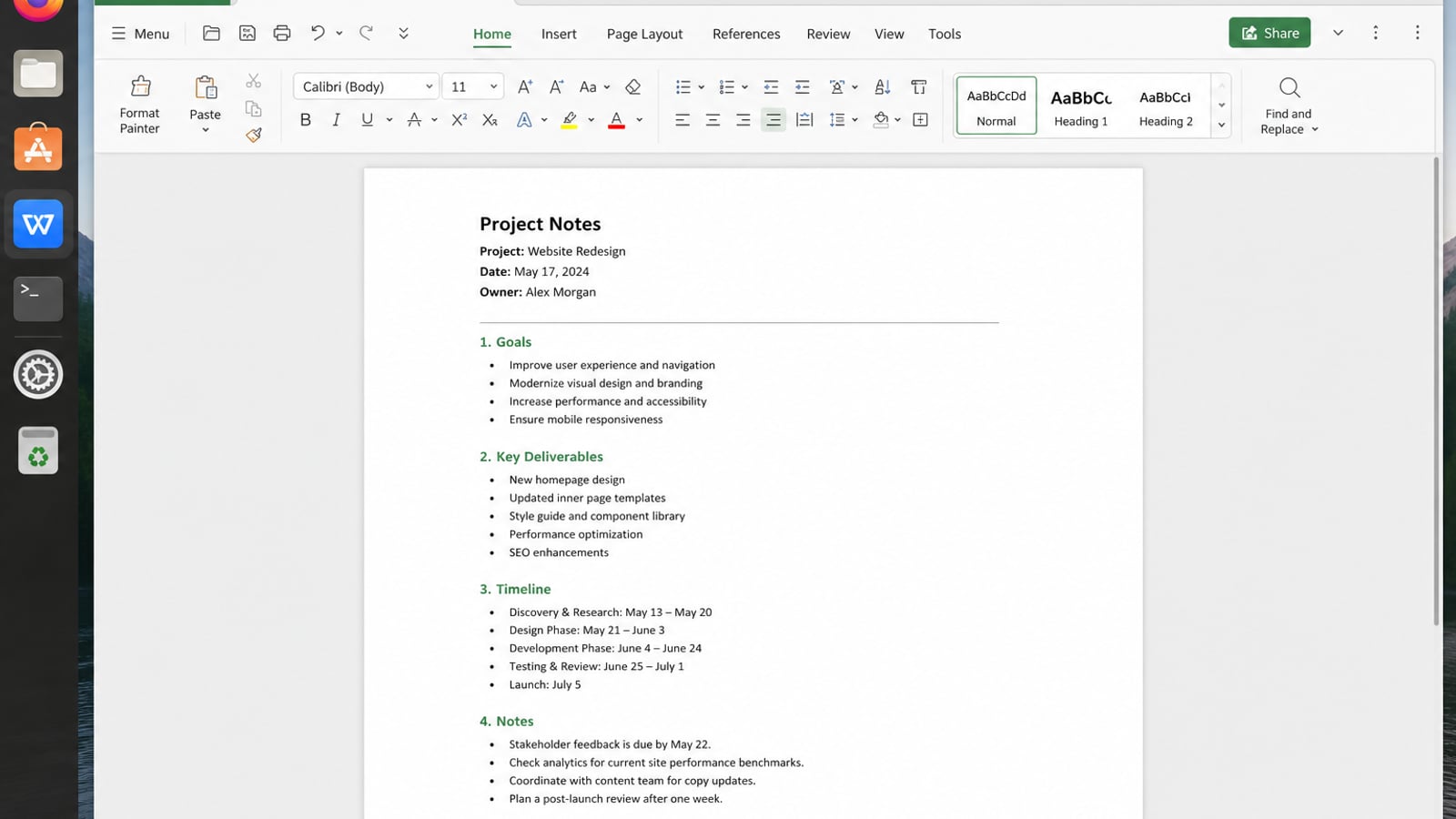
| What you need after editing text | What WPS gives you |
|---|---|
| Keep layout when exchanging Office files | Strong .docx / .xlsx / .pptx fidelity with Windows or macOS |
| One app for docs, sheets, slides, PDF | Free core suite plus PDF view/edit/convert |
| Familiar UI on a modest laptop | Ribbon-style apps with a lighter footprint than many heavy suites |
| Trusted install | Official DEB (Ubuntu/Debian/Mint) and RPM builds |
Get the current 64-bit build from the official WPS Office for Linux download page (choose Deb on Ubuntu), then install the local file—replace VERSION with the name you downloaded:
cd ~/Downloads
sudo apt install ./wps-office_VERSION_amd64.deb
Keep Nano/Vim/VS Code for plain text and code; use WPS when the result must open cleanly as a real Office document.
FAQ
What is the best Linux text editor for beginners?
Nano in the terminal, or Gedit/Kate on the desktop. Move to Vim or VS Code when you need more power.
Is Vim better than Nano?
For quick edits, Nano is easier. For frequent terminal work, Vim/Neovim are faster once learned.
Does Ubuntu include a text editor by default?
Yes—typically Nano in the terminal and a GUI editor such as Gedit (flavor-dependent).
How do I edit a file as root safely?
Prefer sudo nano /path/to/file or your desktop’s admin elevation for GUI editors. Avoid leaving a root GUI session open longer than needed.
Should I use VS Code for /etc configs?
You can, but Nano or Vim over SSH is simpler for small system files. Use VS Code for projects and multi-file coding.

'%3e%3cpath%20d='M19.9911%204.11386V6.471H18.5894C18.0775%206.471%2017.7322%206.57814%2017.5536%206.79243C17.3751%207.00671%2017.2858%207.32814%2017.2858%207.75671V9.44421H19.9019L19.5536%2012.0871H17.2858V18.8639H14.5536V12.0871H12.2769V9.44421H14.5536V7.49779C14.5536%206.39064%2014.8632%205.53201%2015.4822%204.92189C16.1013%204.31177%2016.9257%204.00671%2017.9554%204.00671C18.8304%204.00671%2019.509%204.04243%2019.9911%204.11386Z'%20fill='%23333333'/%3e%3c/g%3e%3cdefs%3e%3cclipPath%20id='clip0_2938_8199'%3e%3crect%20width='16'%20height='16'%20fill='white'%20transform='translate(8%204.00671)'/%3e%3c/clipPath%3e%3c/defs%3e%3c/svg%3e)
'%3e%3cpath%20d='M17.5237%2010.7813L23.4811%204H22.0699L16.8949%209.88693L12.7648%204H8L14.2469%2012.9029L8%2020.0133H9.4112L14.8725%2013.7952L19.2352%2020.0133H24M9.92053%205.04213H12.0885L22.0688%2019.0224H19.9003'%20fill='%23333333'/%3e%3c/g%3e%3cdefs%3e%3cclipPath%20id='clip0_2938_8200'%3e%3crect%20width='16'%20height='16.0134'%20fill='white'%20transform='translate(8%204)'/%3e%3c/clipPath%3e%3c/defs%3e%3c/svg%3e)


