

'%3e%3cpath%20d='M8%200C12.4183%200%2016%203.58172%2016%208C16%2012.4183%2012.4183%2016%208%2016C3.58172%2016%200%2012.4183%200%208C0%203.58172%203.58172%200%208%200ZM11.6162%204.38379C11.2257%203.99337%2010.5927%203.99338%2010.2021%204.38379L8%206.58594L5.79785%204.38379C5.40732%203.99334%204.77429%203.99329%204.38379%204.38379C3.99331%204.77429%203.99335%205.40733%204.38379%205.79785L6.58594%208L4.38379%2010.2021C3.99348%2010.5927%203.99341%2011.2257%204.38379%2011.6162C4.77426%2012.0066%205.40734%2012.0065%205.79785%2011.6162L8%209.41406L10.2021%2011.6162C10.5927%2012.0066%2011.2257%2012.0067%2011.6162%2011.6162C12.0067%2011.2257%2012.0066%2010.5927%2011.6162%2010.2021L9.41406%208L11.6162%205.79785C12.0066%205.40735%2012.0066%204.77429%2011.6162%204.38379Z'%20fill='%23080E17'%20fill-opacity='0.46'/%3e%3c/g%3e%3cdefs%3e%3cclipPath%20id='clip0_3761_713'%3e%3crect%20width='16'%20height='16'%20fill='white'/%3e%3c/clipPath%3e%3c/defs%3e%3c/svg%3e)




'%3e%3cpath%20fill-rule='evenodd'%20clip-rule='evenodd'%20d='M21.4999%2010.9993C21.4999%205.20009%2016.7986%200.498901%2010.9993%200.498901C5.19994%200.498901%200.498657%205.20009%200.498657%2010.9993C0.498657%2016.2404%204.33858%2020.5844%209.35855%2021.3722V14.0346H6.69238V10.9993H9.35855V8.68594C9.35855%206.05427%2010.9262%204.60062%2013.3248%204.60062C14.4736%204.60062%2015.6753%204.80571%2015.6753%204.80571V7.38979H14.3512C13.0468%207.38979%2012.64%208.19921%2012.64%209.0296V10.9993H15.5523L15.0867%2014.0346H12.64V21.3722C17.66%2020.5844%2021.4999%2016.2404%2021.4999%2010.9993Z'%20fill='%231568EA'/%3e%3c/g%3e%3c/svg%3e)


'%3e%3cpath%20d='M2.42045%2022.1876H6.31818V12.7217L0.75%208.54553V20.5171C0.75%2021.4414%201.49892%2022.1876%202.42045%2022.1876Z'%20fill='%234285F4'/%3e%3cpath%20d='M19.682%2022.1876H23.5797C24.5041%2022.1876%2025.2502%2021.4387%2025.2502%2020.5171V8.54553L19.682%2012.7217'%20fill='%2334A853'/%3e%3cpath%20d='M19.682%205.48293V12.7216L25.2502%208.54543V6.31816C25.2502%204.25236%2022.8921%203.07469%2021.2411%204.31361'%20fill='%23FBBC04'/%3e%3cpath%20d='M6.31824%2012.7217V5.48303L13.0001%2010.4944L19.6819%205.48303V12.7217L13.0001%2017.733'%20fill='%23EA4335'/%3e%3cpath%20d='M0.75%206.31816V8.54543L6.31818%2012.7216V5.48293L4.75909%204.31361C3.10534%203.07469%200.75%204.25236%200.75%206.31816Z'%20fill='%23C5221F'/%3e%3c/g%3e%3cdefs%3e%3cclipPath%20id='clip0_2954_7305'%3e%3crect%20width='24.5'%20height='18.375'%20fill='white'%20transform='translate(0.75%203.8125)'/%3e%3c/clipPath%3e%3c/defs%3e%3c/svg%3e)


A bill of lading form can look routine, but a wrong consignee, package count, weight, freight class, or signature can cause delivery delays, billing disputes, and claims problems. The goal is not merely to fill every box; it is to make the form agree with the shipping order, packing list, and carrier instructions.
This field-by-field guide shows how to prepare, complete, verify, and manage a bill of lading form, with a practical WPS workflow for editing the template and producing a clean PDF.
Bill of Lading Form: How to Fill It Out Correctly
Prepare the Records for a Bill of Lading Form
Use the carrier's required form whenever one is provided. A generic template is useful for drafting or routine domestic shipments, but ocean, air, hazardous-material, international, and retailer-specific moves may require different fields or separate documents.
Gather the purchase or sales order, shipping instructions, packing list, verified weights and dimensions, carrier booking information, billing terms, and any required hazardous-material documentation. Never guess operational or regulated details.
Confirm the exact legal or trading names and addresses of the shipper and consignee.
Determine who assigns the BOL number and who supplies the carrier tracking or PRO number.
Count handling units and packages after packing is complete.
Use verified scale weights and agreed commodity descriptions.
Check whether special services, declared value, or delivery instructions must appear on the form.
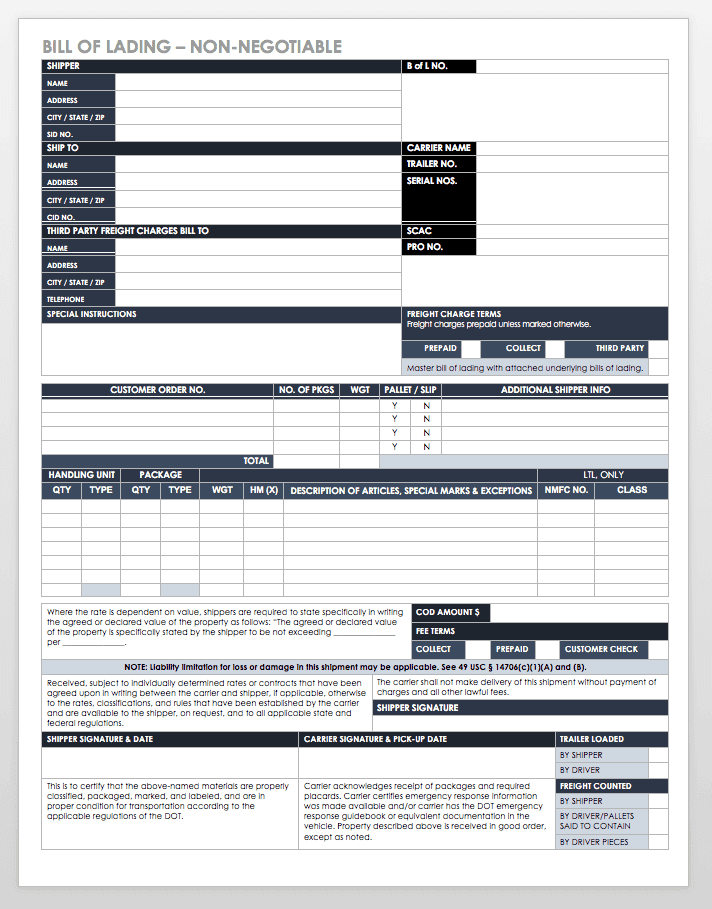
Generic bill of lading template


Fill Out Each Bill of Lading Form Section
Document and shipment references
Enter the BOL number, date, purchase-order or shipment references, and carrier identifiers in their designated boxes. Keep internal BOL numbers unique and traceable.
Shipper, consignee, and bill-to details
Copy company names, contact details, and complete addresses from approved records. The delivery address and billing address may differ; do not merge them.
Carrier and route information
Add the carrier, service level, pickup details, and route or port information required for the mode of transport. Ocean documents may also require vessel, voyage, ports, notify party, container, and seal details.
Freight description and quantities
Enter handling units, package type, item quantity, description, weight, dimensions, and relevant freight classification fields. Hazardous materials require the precise markings and declarations specified by the carrier and applicable rules; consult a qualified shipping professional when uncertain.
Terms, instructions, and signatures
Record payment terms, special handling, accessorial services, declared value, or references only where appropriate. Review the certification wording before the authorized parties sign and date the document.
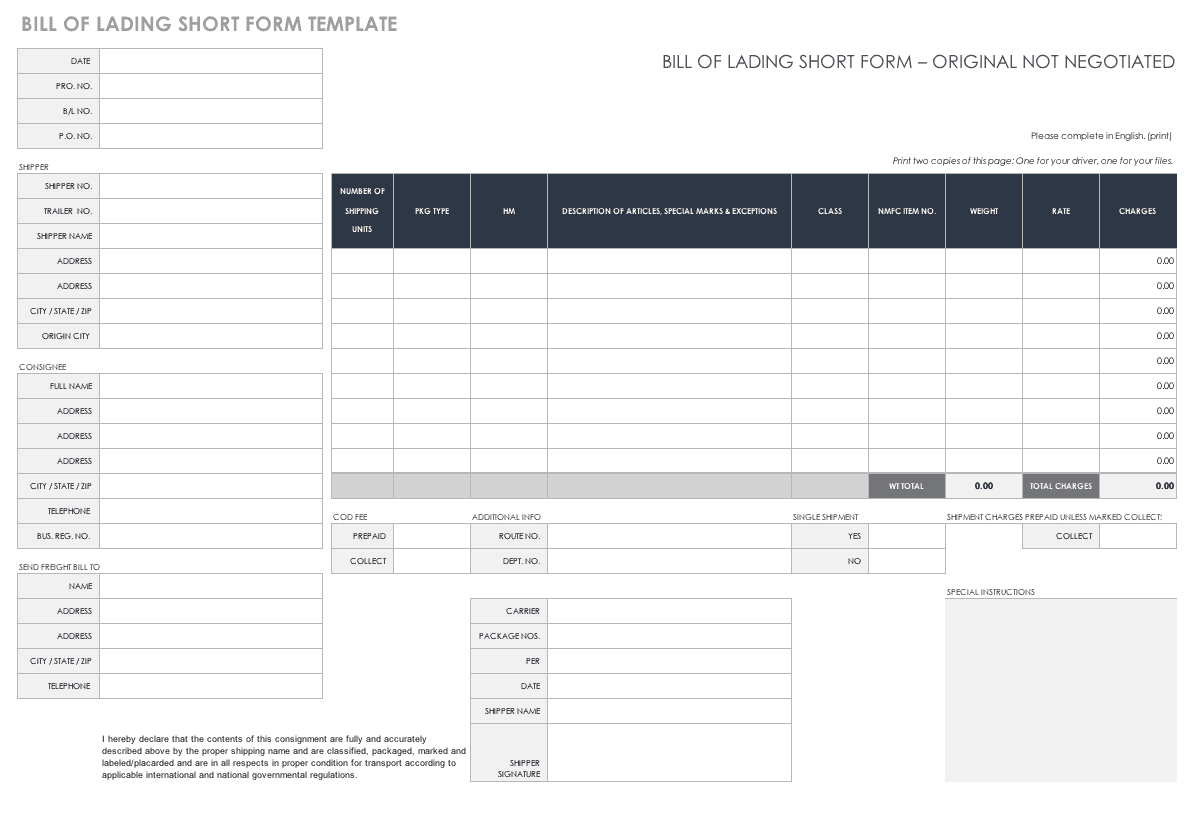
Bill of lading form fields
Edit a Bill of Lading Form Efficiently with WPS Office
WPS Office supports a practical end-to-end document workflow for bill of lading forms. If the template is a Word document, customize recurring shipper details, lock stable wording, duplicate the file for each shipment, and use tables to keep freight lines aligned. If it is a spreadsheet, formulas can help total quantities and weights, while print-area controls keep the form on the intended pages. For a PDF, WPS PDF can support viewing, text or form entry where the file permits it, annotations, signatures, page organization, and final export.
The main advantage is continuity. WPS combines Writer, Spreadsheet, and PDF tools in one suite, so teams can prepare a reusable template, calculate shipment totals, create the final fixed-layout PDF, and archive it without switching between disconnected products. Its familiar office-style interface also makes standardized forms easier for warehouse, logistics, and administrative staff to adopt.
A safer reusable workflow in WPS
Save an untouched master template and create a shipment-specific copy.
Fill recurring parties from an approved address list rather than retyping them.
Complete shipment lines from the final packing list and verified weight records.
Export or save the finished version as PDF so pagination remains stable.
Use WPS PDF to review, annotate, sign where appropriate, and organize attachments or supporting pages.
Name the final file with a consistent BOL number and date, then store it under your organization's retention policy.
WPS helps prepare and manage the document, but it does not replace carrier instructions, customs requirements, dangerous-goods rules, or legal review. Use the form and approval process required for the actual shipment.
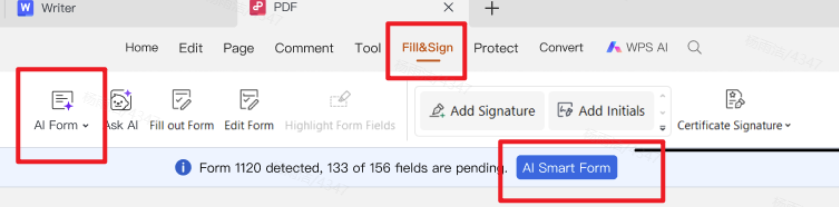
Fill and sign PDF forms
Check a Bill of Lading Form Before Signing
Read the completed form beside the commercial invoice or order, packing list, and carrier instructions. A second-person review is valuable for high-value, regulated, or international shipments.
Do shipper, consignee, notify-party, pickup, delivery, and bill-to details match the approved records?
Do piece counts, handling units, descriptions, dimensions, and weights match the packed freight?
Are BOL, PO, booking, PRO, container, and seal numbers in the correct fields?
Are freight class, NMFC, hazardous-material, declared-value, and accessorial entries verified rather than estimated?
Are required terms, exceptions, signatures, names, dates, and copy counts complete?
Does the saved PDF display every line, page, signature, and condition without clipping?
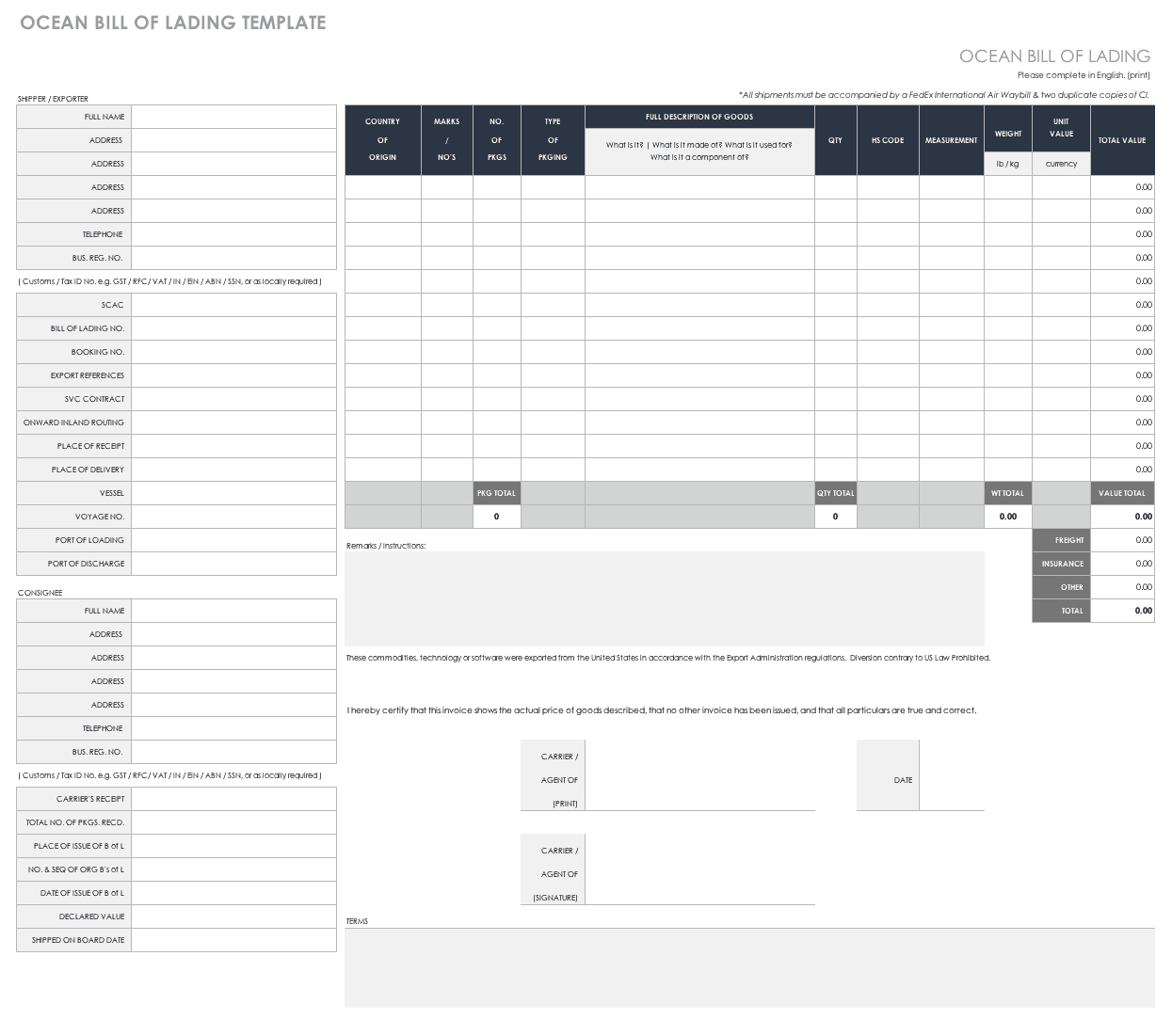
Review ocean bill of lading
FAQs
Who fills out a bill of lading form?
Responsibilities vary by shipment and carrier. The shipper commonly supplies shipment information, while the carrier issues or acknowledges the transport document. Follow the carrier's process.
What information is required on a bill of lading?
Common fields include parties, origin and destination, carrier and references, package count, goods description, weight, terms, instructions, and signatures. Exact requirements depend on mode, jurisdiction, carrier, cargo, and contract.
Can I use a free bill of lading template?
A template can be a drafting aid, but confirm that it matches the carrier, transport mode, cargo, and regulatory requirements before use.
Can I edit a bill of lading form in WPS Office?
Yes, WPS can help edit Word or spreadsheet templates and work with many PDFs, depending on the file's permissions and structure. It can also support final PDF review and signing workflows where available.
Can a signed bill of lading be corrected?
Correction rules vary. Do not silently alter an executed document; contact the carrier and follow the formal amendment or reissue process.

Summary
A reliable bill of lading form starts with verified records, precise party and freight details, correct shipment terms, and a final comparison against the packing list and carrier instructions. WPS Office strengthens the workflow by combining reusable Writer or Spreadsheet templates with PDF review, organization, annotation, signing, and export tools in one accessible office suite.

'%3e%3cpath%20d='M19.9911%204.11386V6.471H18.5894C18.0775%206.471%2017.7322%206.57814%2017.5536%206.79243C17.3751%207.00671%2017.2858%207.32814%2017.2858%207.75671V9.44421H19.9019L19.5536%2012.0871H17.2858V18.8639H14.5536V12.0871H12.2769V9.44421H14.5536V7.49779C14.5536%206.39064%2014.8632%205.53201%2015.4822%204.92189C16.1013%204.31177%2016.9257%204.00671%2017.9554%204.00671C18.8304%204.00671%2019.509%204.04243%2019.9911%204.11386Z'%20fill='%23333333'/%3e%3c/g%3e%3cdefs%3e%3cclipPath%20id='clip0_2938_8199'%3e%3crect%20width='16'%20height='16'%20fill='white'%20transform='translate(8%204.00671)'/%3e%3c/clipPath%3e%3c/defs%3e%3c/svg%3e)
'%3e%3cpath%20d='M17.5237%2010.7813L23.4811%204H22.0699L16.8949%209.88693L12.7648%204H8L14.2469%2012.9029L8%2020.0133H9.4112L14.8725%2013.7952L19.2352%2020.0133H24M9.92053%205.04213H12.0885L22.0688%2019.0224H19.9003'%20fill='%23333333'/%3e%3c/g%3e%3cdefs%3e%3cclipPath%20id='clip0_2938_8200'%3e%3crect%20width='16'%20height='16.0134'%20fill='white'%20transform='translate(8%204)'/%3e%3c/clipPath%3e%3c/defs%3e%3c/svg%3e)


