

'%3e%3cpath%20d='M8%200C12.4183%200%2016%203.58172%2016%208C16%2012.4183%2012.4183%2016%208%2016C3.58172%2016%200%2012.4183%200%208C0%203.58172%203.58172%200%208%200ZM11.6162%204.38379C11.2257%203.99337%2010.5927%203.99338%2010.2021%204.38379L8%206.58594L5.79785%204.38379C5.40732%203.99334%204.77429%203.99329%204.38379%204.38379C3.99331%204.77429%203.99335%205.40733%204.38379%205.79785L6.58594%208L4.38379%2010.2021C3.99348%2010.5927%203.99341%2011.2257%204.38379%2011.6162C4.77426%2012.0066%205.40734%2012.0065%205.79785%2011.6162L8%209.41406L10.2021%2011.6162C10.5927%2012.0066%2011.2257%2012.0067%2011.6162%2011.6162C12.0067%2011.2257%2012.0066%2010.5927%2011.6162%2010.2021L9.41406%208L11.6162%205.79785C12.0066%205.40735%2012.0066%204.77429%2011.6162%204.38379Z'%20fill='%23080E17'%20fill-opacity='0.46'/%3e%3c/g%3e%3cdefs%3e%3cclipPath%20id='clip0_3761_713'%3e%3crect%20width='16'%20height='16'%20fill='white'/%3e%3c/clipPath%3e%3c/defs%3e%3c/svg%3e)




'%3e%3cpath%20fill-rule='evenodd'%20clip-rule='evenodd'%20d='M21.4999%2010.9993C21.4999%205.20009%2016.7986%200.498901%2010.9993%200.498901C5.19994%200.498901%200.498657%205.20009%200.498657%2010.9993C0.498657%2016.2404%204.33858%2020.5844%209.35855%2021.3722V14.0346H6.69238V10.9993H9.35855V8.68594C9.35855%206.05427%2010.9262%204.60062%2013.3248%204.60062C14.4736%204.60062%2015.6753%204.80571%2015.6753%204.80571V7.38979H14.3512C13.0468%207.38979%2012.64%208.19921%2012.64%209.0296V10.9993H15.5523L15.0867%2014.0346H12.64V21.3722C17.66%2020.5844%2021.4999%2016.2404%2021.4999%2010.9993Z'%20fill='%231568EA'/%3e%3c/g%3e%3c/svg%3e)


'%3e%3cpath%20d='M2.42045%2022.1876H6.31818V12.7217L0.75%208.54553V20.5171C0.75%2021.4414%201.49892%2022.1876%202.42045%2022.1876Z'%20fill='%234285F4'/%3e%3cpath%20d='M19.682%2022.1876H23.5797C24.5041%2022.1876%2025.2502%2021.4387%2025.2502%2020.5171V8.54553L19.682%2012.7217'%20fill='%2334A853'/%3e%3cpath%20d='M19.682%205.48293V12.7216L25.2502%208.54543V6.31816C25.2502%204.25236%2022.8921%203.07469%2021.2411%204.31361'%20fill='%23FBBC04'/%3e%3cpath%20d='M6.31824%2012.7217V5.48303L13.0001%2010.4944L19.6819%205.48303V12.7217L13.0001%2017.733'%20fill='%23EA4335'/%3e%3cpath%20d='M0.75%206.31816V8.54543L6.31818%2012.7216V5.48293L4.75909%204.31361C3.10534%203.07469%200.75%204.25236%200.75%206.31816Z'%20fill='%23C5221F'/%3e%3c/g%3e%3cdefs%3e%3cclipPath%20id='clip0_2954_7305'%3e%3crect%20width='24.5'%20height='18.375'%20fill='white'%20transform='translate(0.75%203.8125)'/%3e%3c/clipPath%3e%3c/defs%3e%3c/svg%3e)


In education and professional life, being able to visually organize ideas is critical for learning, planning, and communication. A graphic organizer template helps you map out concepts, compare information, and capture ideas more clearly. But despite their usefulness, many people end up settling for basic, generic designs or spend hours trying to build their own because they have trouble finding high-quality, customizable graphic organizer templates free of cost. In this guide, I’ll share 10 beautiful free templates and show you how to edit them effortlessly.


What is a Graphic Organizer?
When I think about what makes a graphic organizer useful, it’s the way it forces information into a structure your brain can actually work with. A graphic organizer, at its core, is a visual layout designed to help you sort, connect, and break down ideas without getting lost in long paragraphs or scattered notes. Instead of holding everything in your head, you lay it out in front of you: comparisons go into Venn diagrams, cause-and-effect flows into charts, and bigger concepts branch out into mind maps.
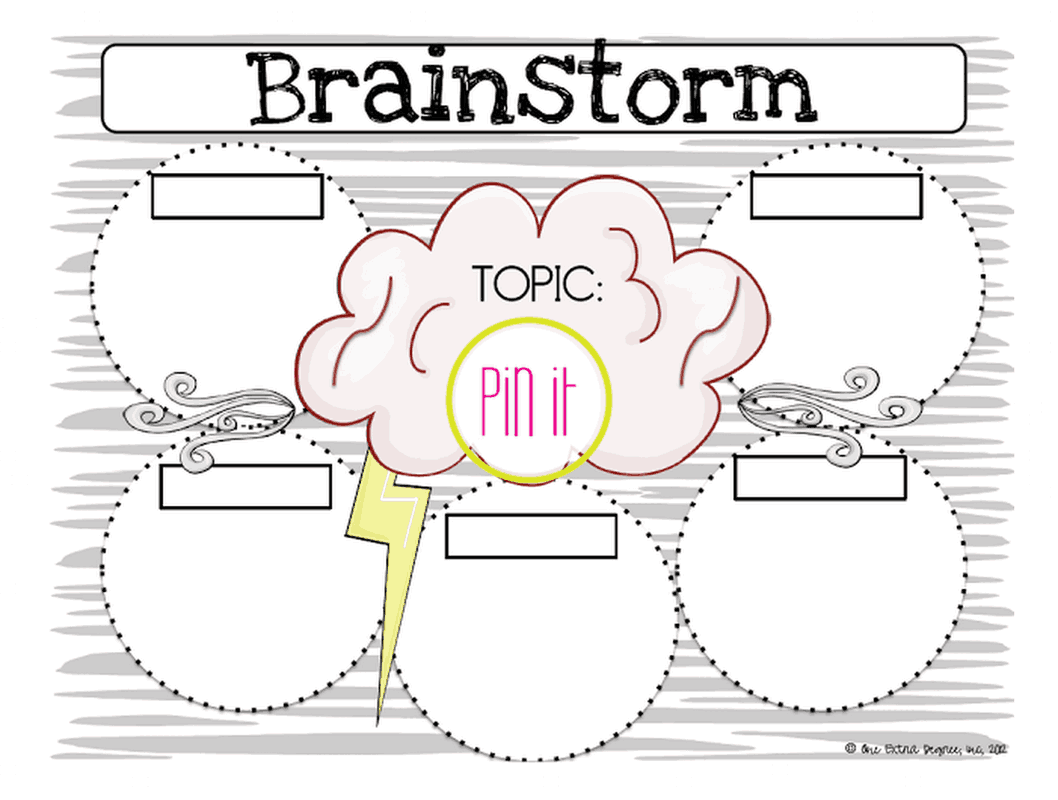
Here are the most widely graphic organizers:
Venn Diagrams are used when you need to compare and contrast two or more ideas, showing exactly where they overlap and where they differ.
Concept Maps help you lay out major ideas and the relationships between them, making it easier to understand how different pieces of information connect.
Mind Maps let you start with a central topic and branch outward, giving you space to explore related thoughts, subtopics, and details in a flexible visual layout.
Flow Charts are ideal for mapping out step-by-step processes, helping you visualize sequences, decisions, and pathways clearly.
Timelines organize events in chronological order, making them perfect for history lessons, project planning, or any situation where you need to track progression over time.
These variations will show up throughout the templates I’m about to share, making it easier for you to choose the one that fits your lesson, project, or study objective.
10 Graphic Organizer Templates [Free Download]
Now that you have a sense of which graphic organizers work best for different tasks, I want to make the next step as easy as possible: choosing a template you can use right away. Instead of spending time designing layouts from scratch, I pulled together a set of templates that I’ve personally found practical. You can choose the format that works best for your purpose, PDF for printing and annotating, or PNG/JPG images.
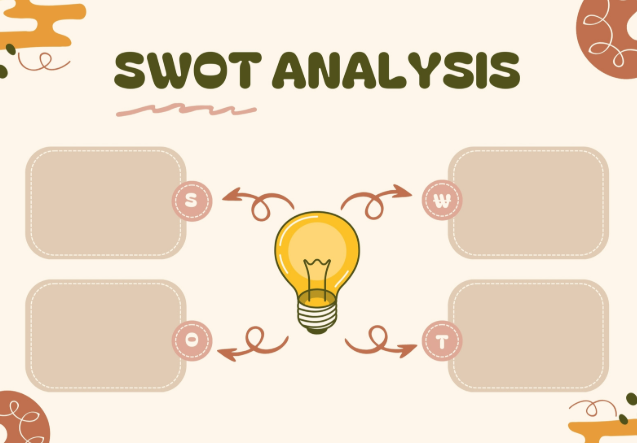
Brown Cute Abstract Aesthetic SWOT Analysis Graphic Organizer [PDF, Image]
This template provides a visually appealing, clean framework for conducting a Strengths, Weaknesses, Opportunities, and Threats (SWOT) analysis. It uses rounded, neutral-toned boxes for data entry and features a central lightbulb graphic, emphasizing a focus on insight and strategy generation. The design is perfect for internal presentations or collaborative strategic planning sessions.
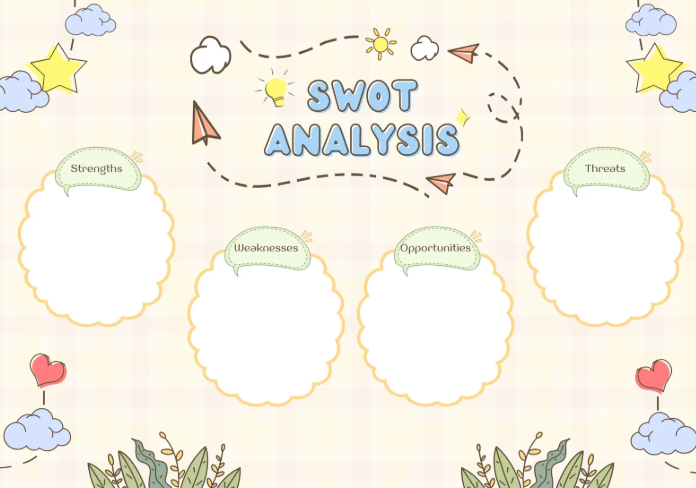
Cream Colorful Pastel Cute Illustration SWOT Analysis Graphic Organizer [PDF, Image]
This fun and engaging SWOT analysis template uses a whimsical design with clouds, hearts, and stars, making it ideal for educational or creative team settings. It provides four large, distinct cloud-shaped text boxes for detailing Strengths, Weaknesses, Opportunities, and Threats. The central SWOT Analysis title is framed by dashed lines and colorful graphics, creating a memorable, playful planning worksheet.
Blue Green and Yellow Venn Diagram Graphic Organizer [PDF, Image]
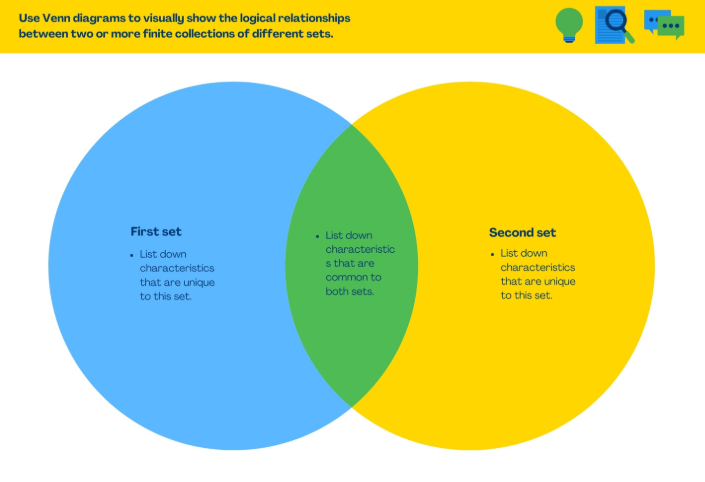
This educational template is designed to visually demonstrate the logical relationships between two separate concepts or sets, using bright blue and yellow circles. It clearly instructs the user to list unique characteristics for the First set and Second set in the non-overlapping areas. The overlapping green section guides the user to list down characteristics that are common to both sets, making it a clear tool for comparison and contrast.
White and Grey Colorful Pastel Bright Plan Mind Map Graphic Organizer [PDF, Image]
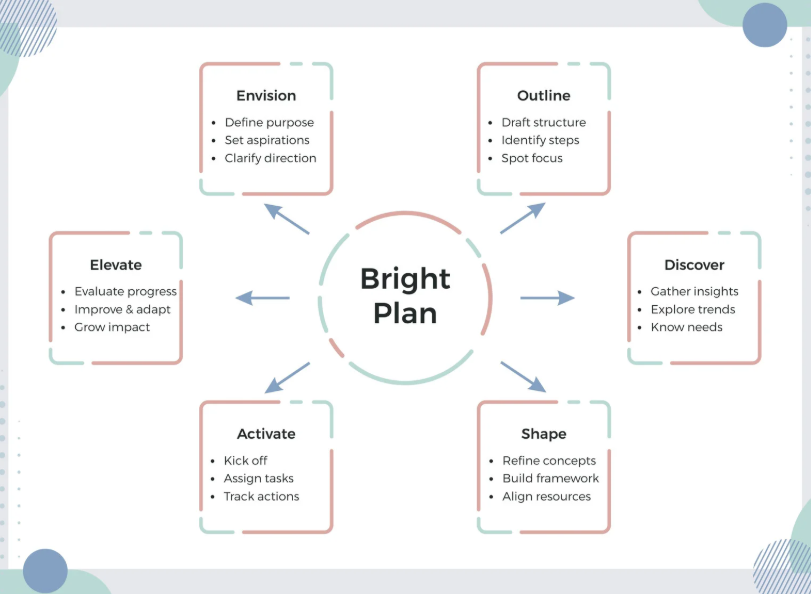
This template visualizes a six-step cyclical business planning process, centering around the phrase "Bright Plan". The steps are presented in distinct, color-coded, rounded rectangles labeled Envision, Outline, Discover, Shape, Activate, and Elevate, with arrows showing the flow of the process. Each step includes bullet points defining its purpose, such as Define purpose under Envision and Track actions under Activate. This flowchart is ideal for process documentation and strategic workshops.
Cream Abstract Business Problem Statement and Solution Graphic Organizer [PDF, Image]
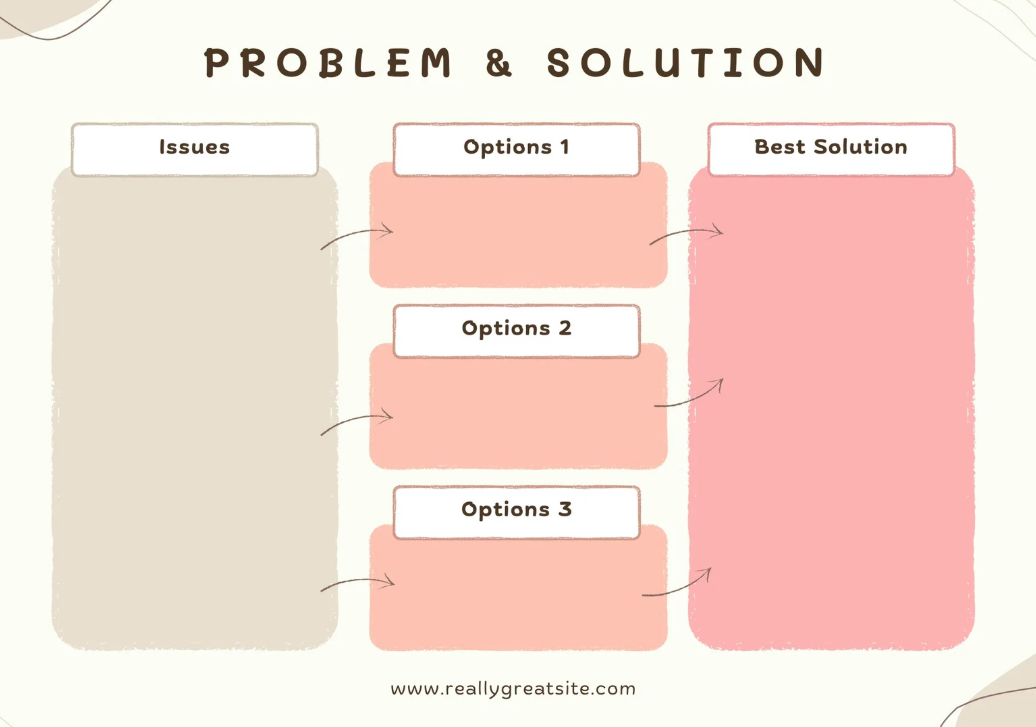
This template is designed to structure the problem-solving process using a clear flow from identification to resolution. The layout guides the user to define the core Issues in a large column, list multiple potential Options in the middle, and then document the final Best Solution on the right. The use of gentle pastel colors and large blocks makes it visually engaging and suitable for presentations or workshops.
Free Reading Comprehension Graphic Organizer [PDF, Image]
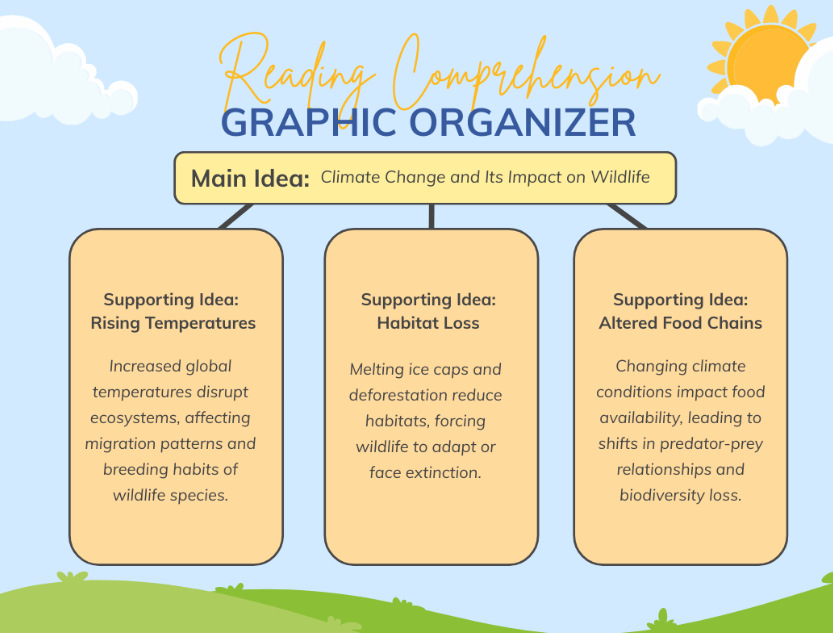
This template serves as a visually appealing, nature-themed graphic organizer for reading comprehension and idea breakdown. It features a central Main Idea box e.g., Climate Change and Its Impact on Wildlife connected to three lower boxes for detailing Supporting Idea concepts. The layout is structured to help users logically decompose a primary topic into its key arguments and supporting evidence.
Free Narrative Writing Graphic Organizer [PDF, Image]
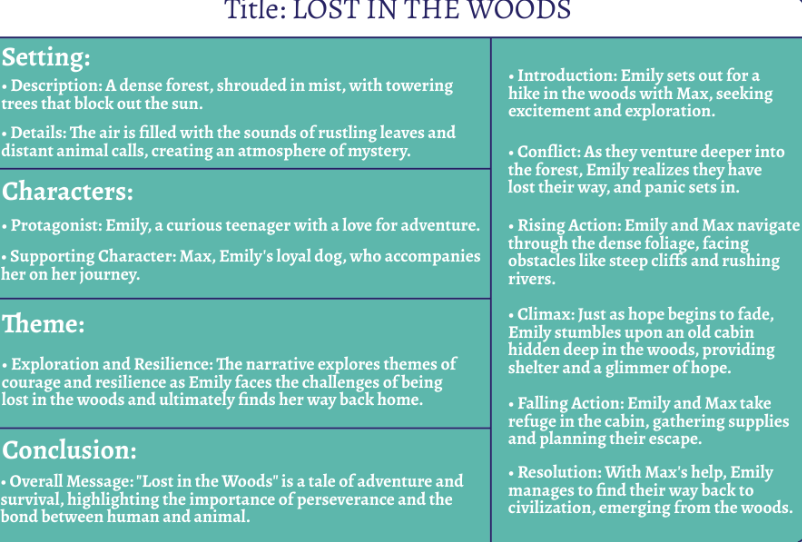
This template is designed as a structured graphic organizer for comprehensive story analysis, using clear teal blocks to separate key elements. The left side is dedicated to foundational elements: Setting, Characters, Theme, and Conclusion, each with detailed descriptions. The right side focuses on the plot arc, detailing the Introduction, Conflict, Rising Action, Climax, Falling Action, and Resolution.
Free Compare and Contrast Graphic Organizer [PDF, Image]
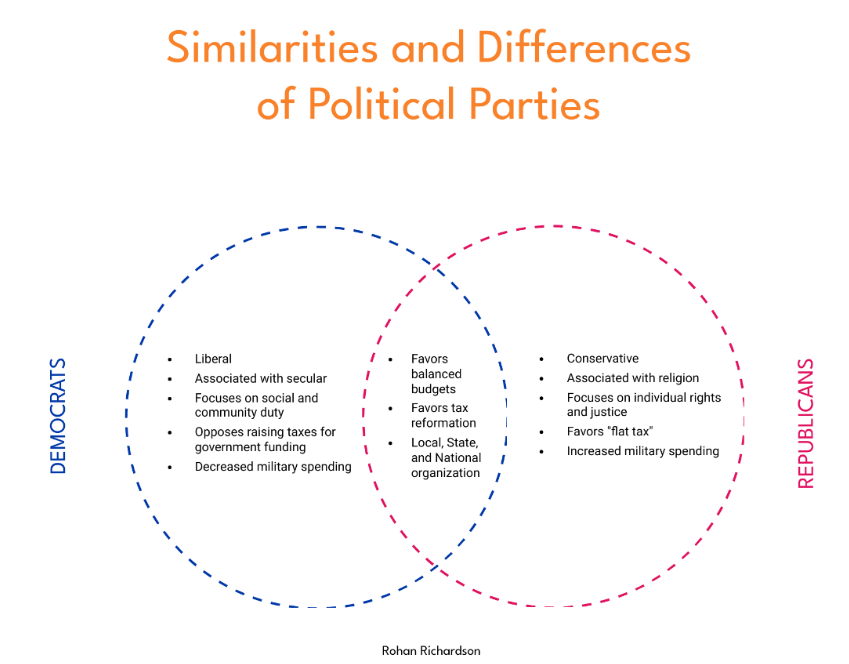
This template utilizes a classic Venn diagram to visually compare and contrast the Similarities and Differences of Political Parties. The circles, colored blue for Democrats and pink for Republicans, feature bulleted lists detailing each party's unique stances on issues like taxes, spending, and social matters. The overlapping section clearly highlights shared characteristics, making it an effective educational tool for political analysis.
Free Concept Map Graphic Organizer [PDF, Image]
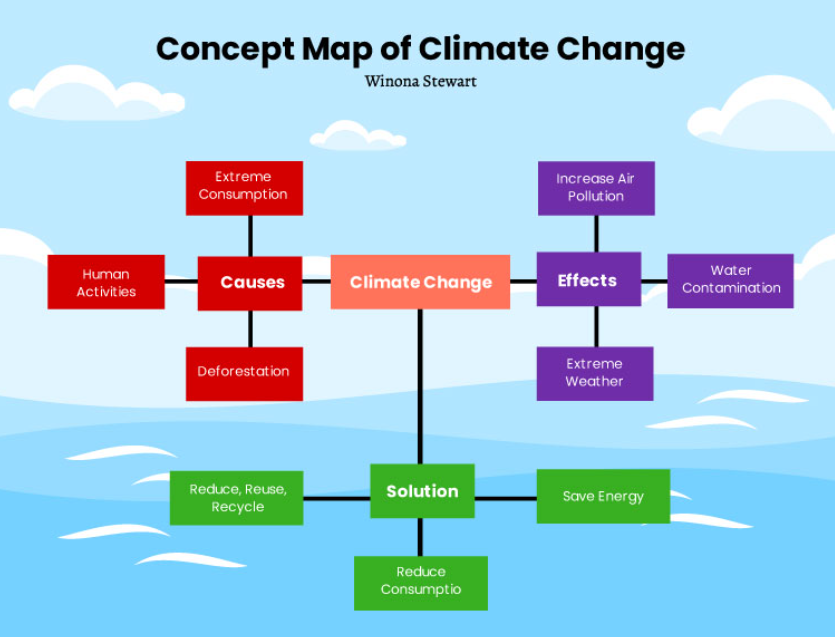
This educational concept template visually breaks down the complex topic of Climate Change into its component parts: Causes, Effects, and Solution. It uses color-coded blocks like red for Causes, purple for Effects and green for Solution connected by lines to show relationships. Specific examples are provided for each category, such as Human Activities and Deforestation as causes and Increase Air Pollution and Extreme Weather as effects.
Free Bubble Map Graphic Organizer [PDF, Image]
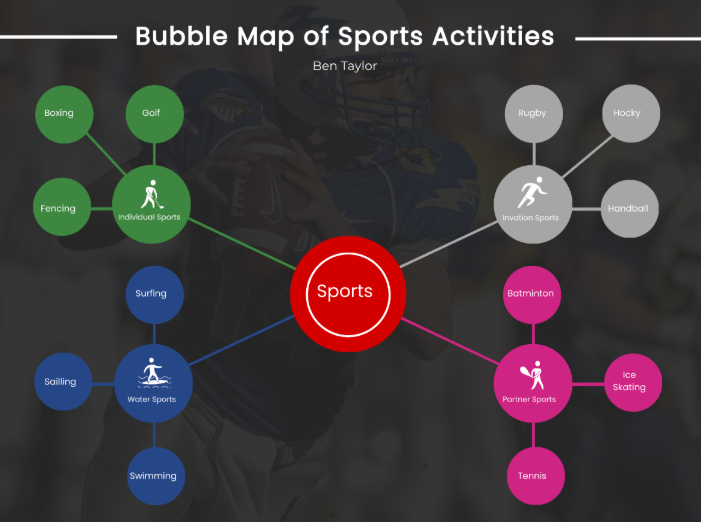
This template is a detailed bubble map designed to categorize various Sports Activities using a vibrant, infographic-style presentation. A central red Sports node connects to four sub-category nodes such as Individual, Water, Partner, and a typo-inclusive 'Invation' Sports using color-coded lines. Each sub-category then branches out to specific activities like Golf, Swimming, and Tennis, making it an excellent tool for classification and visual organization.
How to Edit and Print Graphic Organizer Template
Templates in JPG or PNG format can be enhanced and refined to improve visual clarity, adjust colors, or add design elements, while PDF templates may require text edits, additional boxes, or layout adjustments to suit your needs. Depending on the file format, specific tools make this process efficient: WPS Photo works best for image‑based templates, offering background removal, resolution upscaling and more to bring sharpness to JPG/PNG files. In parallel, WPS PDF is ideal for editing PDFs. Its features include AI‑powered text and image editing, OCR for converting scans, and seamless conversion between PDF and other formats.
How to Edit the Template in WPS Photo (Images)
Once you have your image-based graphic organizer template ready, WPS Photo provides the tools to refine and customize it quickly. Here’s how to use it.
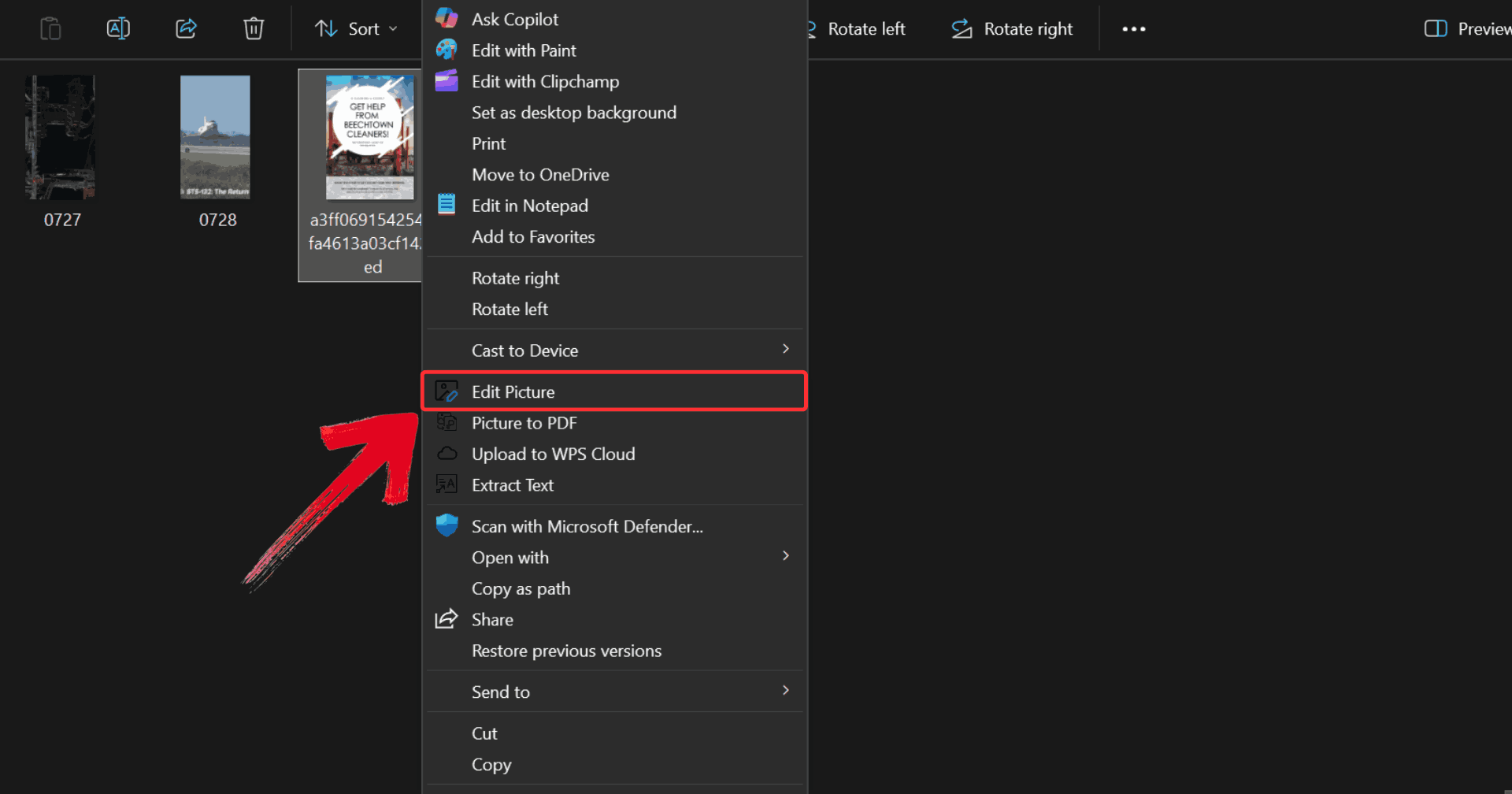
Step 1: Right-click on the template you want to edit, then click on “Edit Photo” to open it in WPS Photo Editor.
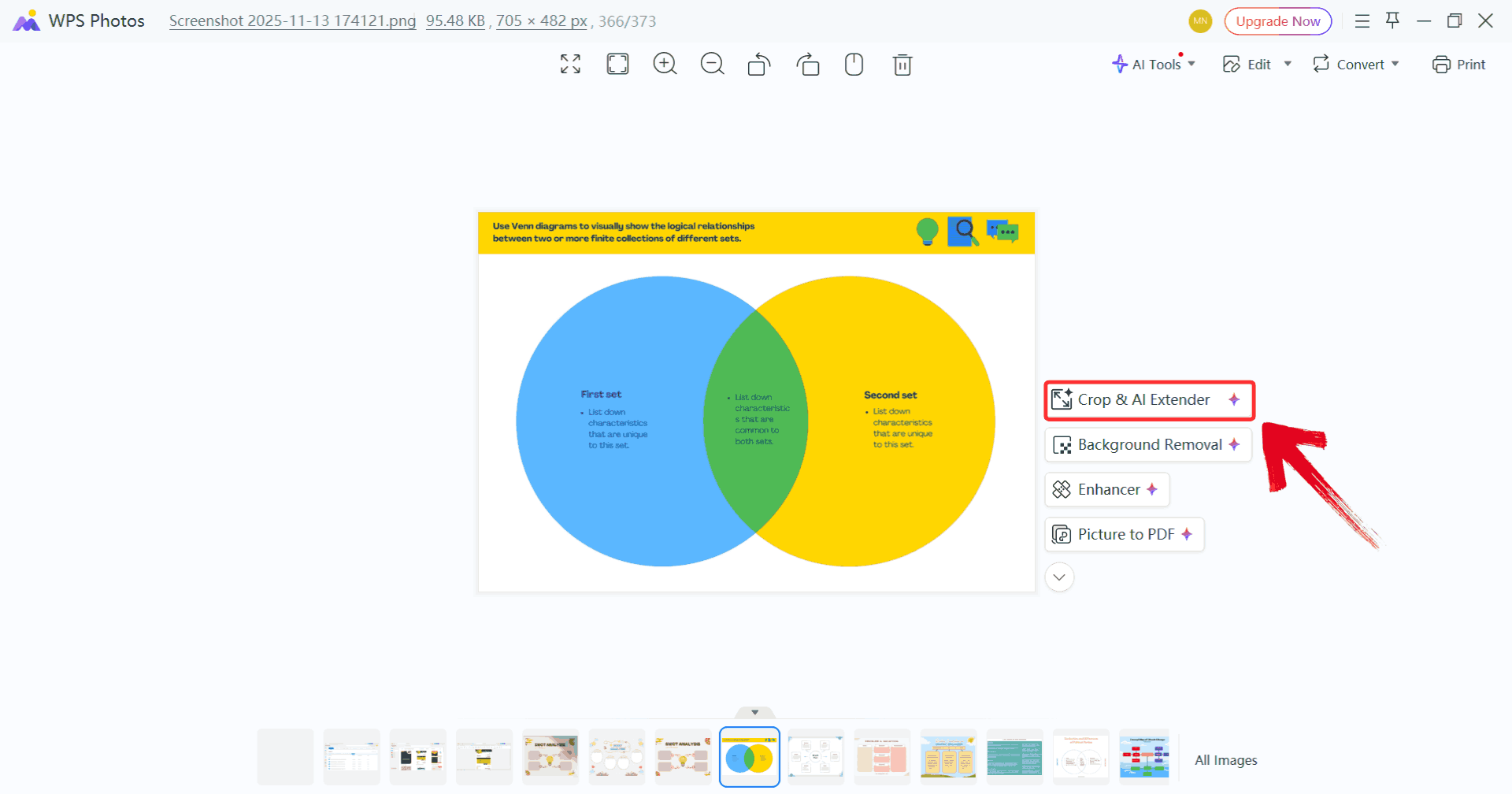
Step 2: Make whatever changes you like, such as using the Crop & AI Extender and adjusting colors for a refined look.
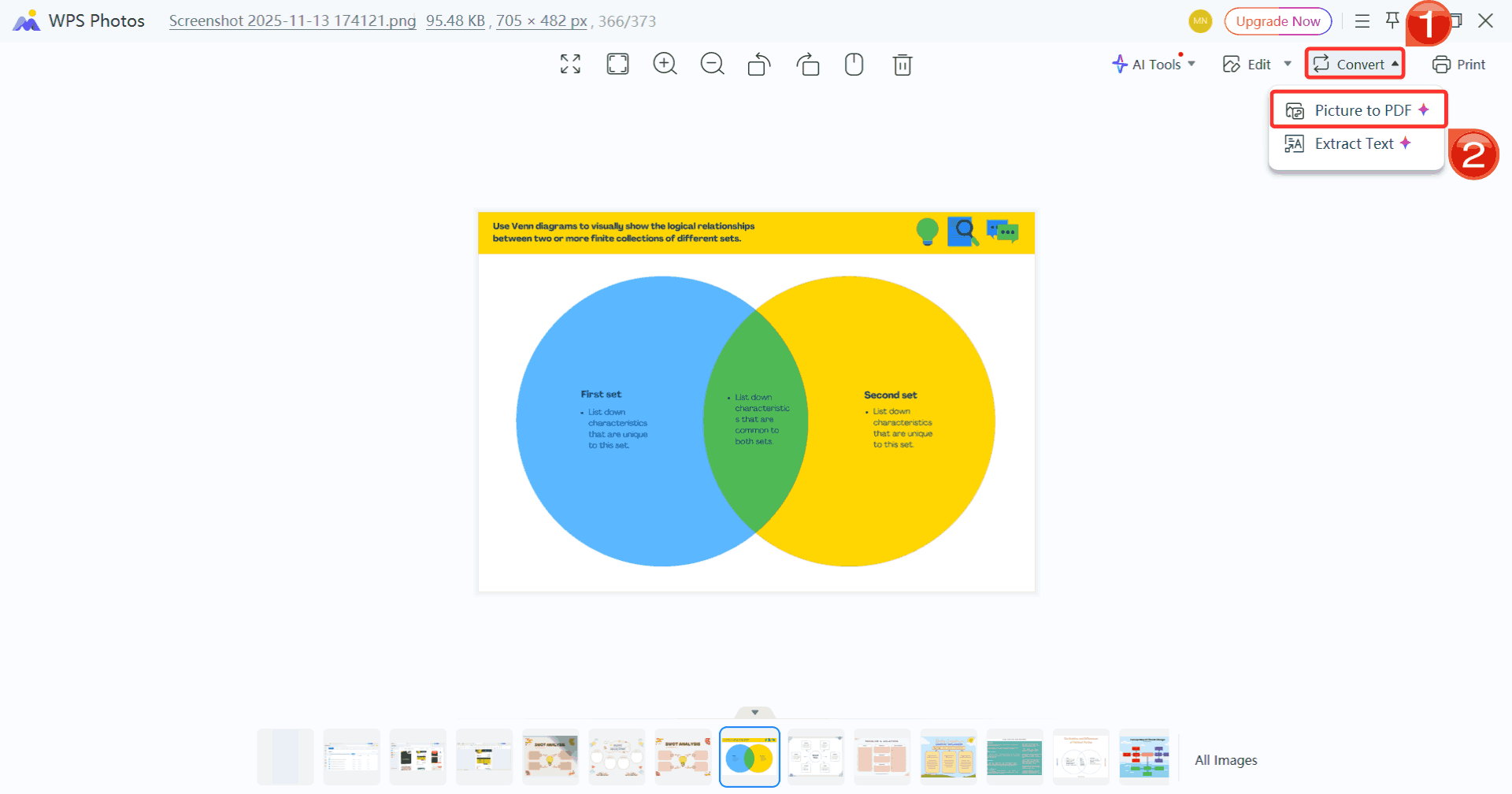
Step 3: Click on “Convert”, then select “Picture to PDF” to save your changes and convert your edited template to a PDF file.
How to Edit the Template in WPS PDF (PDF Files)
For PDF-based graphic organizer templates, WPS PDF offers a range of editing capabilities to tailor your template exactly to your needs. You can modify text, add or rearrange boxes, insert images, and annotate content with precision. Here’s how to create graphic organizer template inside WPS PDF.
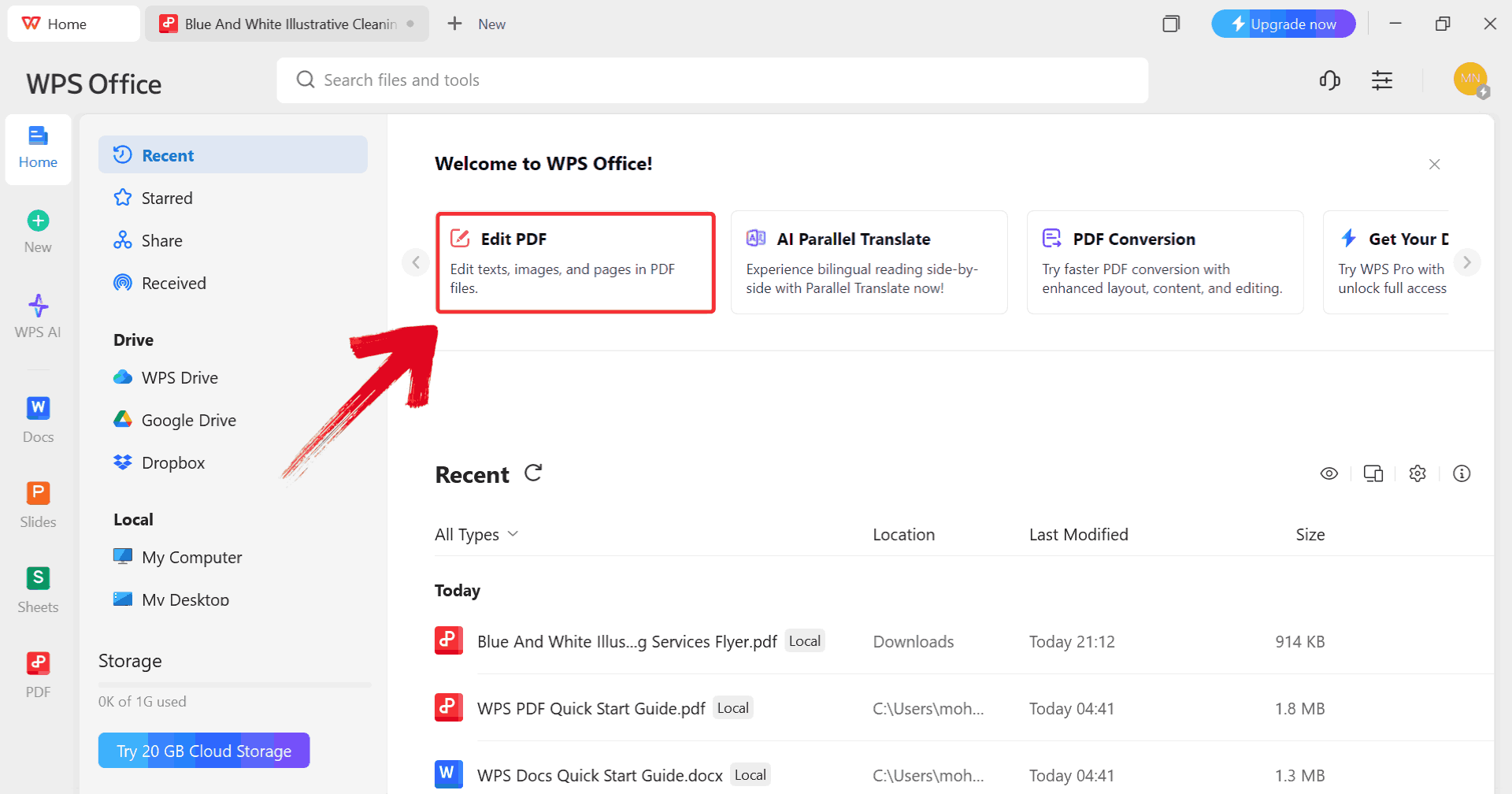
Step 1: Start by clicking on “Edit PDF” on the WPS Office dashboard to import your template.
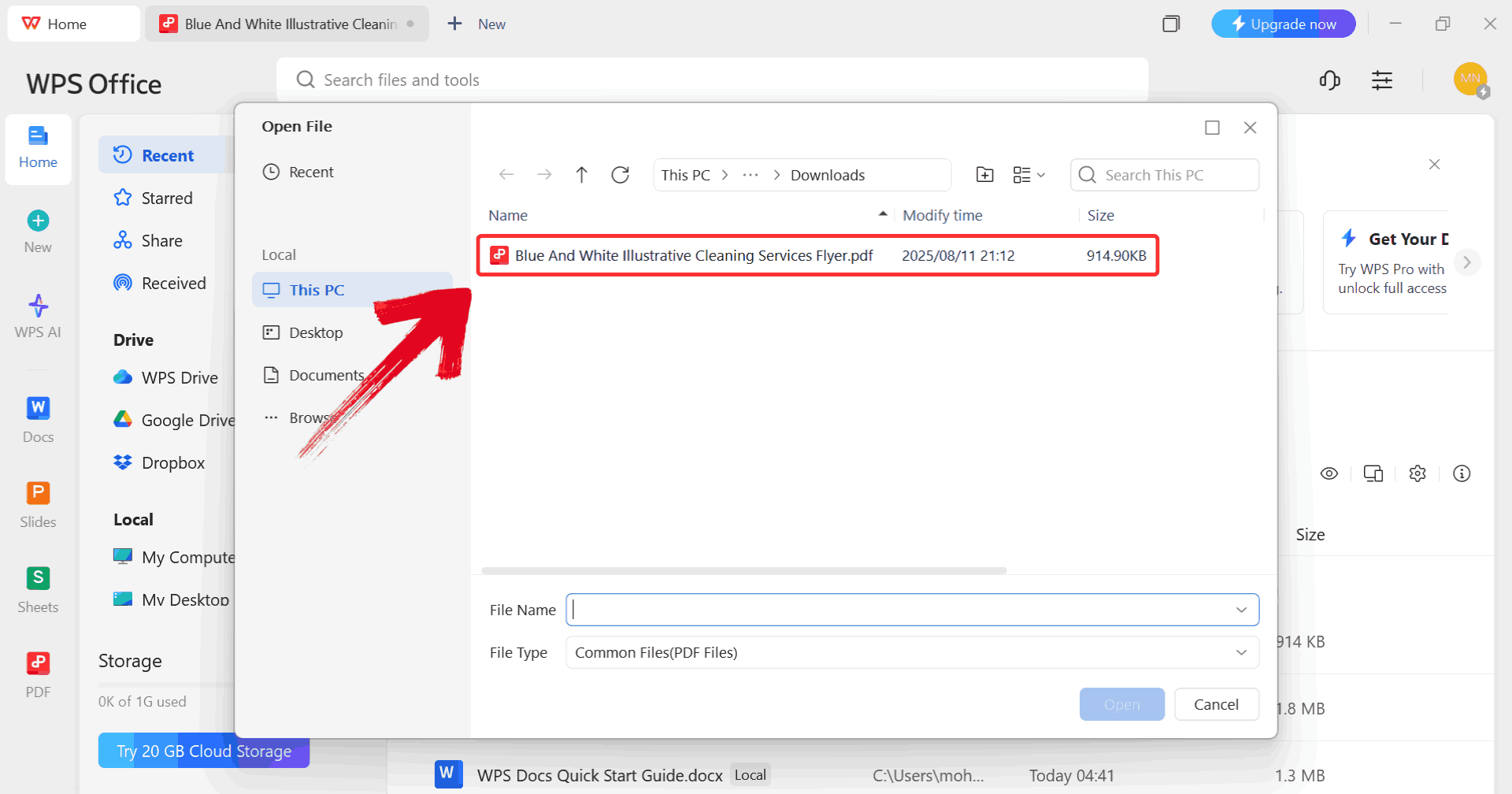
Step 2: When prompted, browse through your computer and select the PDF file you want to edit.
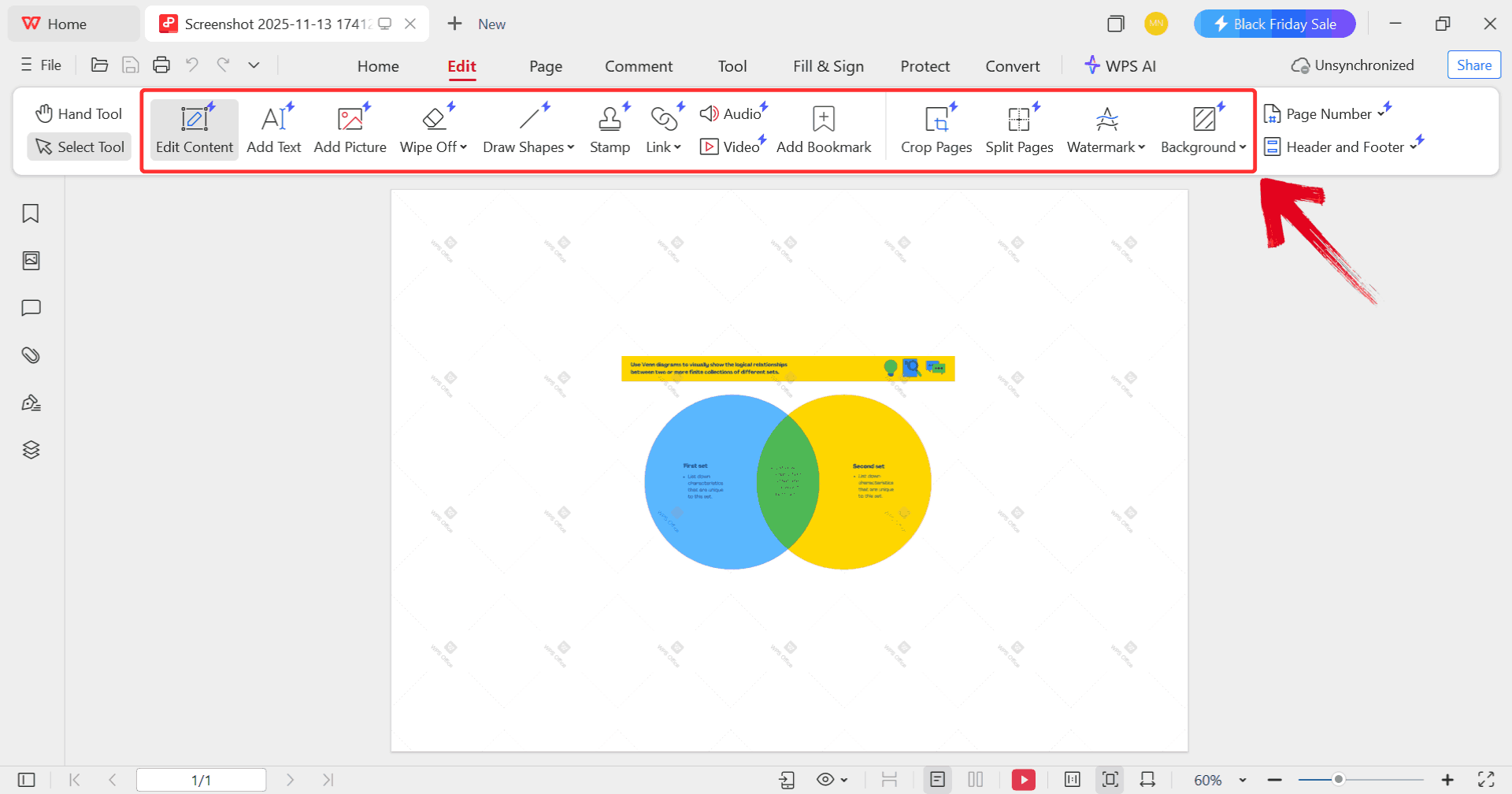
Step 3: Make any changes you want to the PDF using the available editing tools such as drawing shapes or adding a stamp.
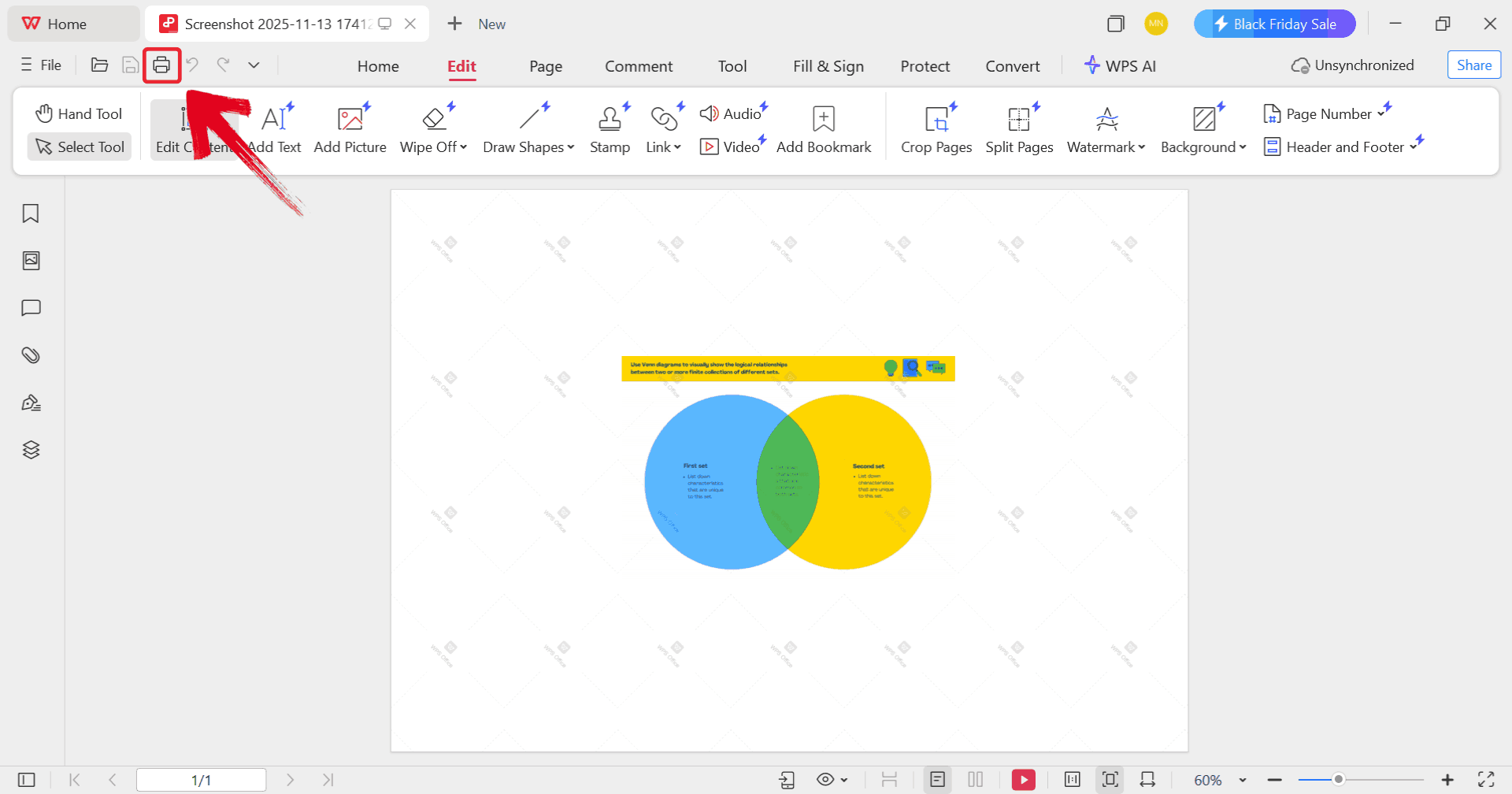
Step 4: Once you’ve made the changes, click on the printer icon to start printing your template but make sure your printer is connected to your device.
Free Office Suite: Customizing Template
WPS Office provides a unified platform for working with graphic organizer templates across documents, spreadsheets, and presentations. It offers a smooth and stable editing experience, allowing you to focus on organizing your ideas rather than worrying about software limitations. Its compatibility with multiple file formats ensures templates created elsewhere can be opened, adjusted, and saved without any loss of formatting. Lightweight and responsive, the software performs well even on devices with limited resources.
These combined features provide an efficient and flexible way to edit, enhance, and use graphic organizer templates for both educational and professional projects.
FAQs
1. What are the main benefits of using a graphic organizer?
Graphic organizers help you understand information faster, improve comprehension, structure writing, and simplify complex concepts.
2. Are these templates suitable for both students and teachers?
Absolutely. Students use them to study or write essays, while teachers use them as handouts, assignments, or visual teaching aids.
3. Can I customize these templates after downloading them?
Yes, using WPS Photo or WPS PDF, you can modify colors, text, images, and layout freely.
4. Are these templates printable?
They’re designed for printing. Just choose high-resolution formats (PDF recommended).

'%3e%3cpath%20d='M19.9911%204.11386V6.471H18.5894C18.0775%206.471%2017.7322%206.57814%2017.5536%206.79243C17.3751%207.00671%2017.2858%207.32814%2017.2858%207.75671V9.44421H19.9019L19.5536%2012.0871H17.2858V18.8639H14.5536V12.0871H12.2769V9.44421H14.5536V7.49779C14.5536%206.39064%2014.8632%205.53201%2015.4822%204.92189C16.1013%204.31177%2016.9257%204.00671%2017.9554%204.00671C18.8304%204.00671%2019.509%204.04243%2019.9911%204.11386Z'%20fill='%23333333'/%3e%3c/g%3e%3cdefs%3e%3cclipPath%20id='clip0_2938_8199'%3e%3crect%20width='16'%20height='16'%20fill='white'%20transform='translate(8%204.00671)'/%3e%3c/clipPath%3e%3c/defs%3e%3c/svg%3e)
'%3e%3cpath%20d='M17.5237%2010.7813L23.4811%204H22.0699L16.8949%209.88693L12.7648%204H8L14.2469%2012.9029L8%2020.0133H9.4112L14.8725%2013.7952L19.2352%2020.0133H24M9.92053%205.04213H12.0885L22.0688%2019.0224H19.9003'%20fill='%23333333'/%3e%3c/g%3e%3cdefs%3e%3cclipPath%20id='clip0_2938_8200'%3e%3crect%20width='16'%20height='16.0134'%20fill='white'%20transform='translate(8%204)'/%3e%3c/clipPath%3e%3c/defs%3e%3c/svg%3e)


