Invoicing is one of those tasks every freelancer or small business
owner has to deal with, yet few actually enjoy doing. While Google Forms
can technically collect payment details or responses, it simply isn’t
designed for creating professional invoices. In this guide, I’ll show
you how to create an invoice using Google Docs, share 10 free Google
Forms invoice template alternatives, and explain how WPS Office helps
you easily edit, export, and share professional invoices.
Use Word, Excel, and PPT for FREE
Google Forms Invoice Templates
How to Create an
Invoice in Google Docs
Anyone and everyone who's ever tried using Google Forms for invoicing
already knows its limits. Forms are great for collecting client information, but not for formatting an
invoice that looks professional or includes automatic totals. Instead,
Google Docs can serve as a better option for creating invoices manually,
though it can seem basic compared to a free invoice template Word file.
Here’s how you can create your own simple invoice in Google Docs:
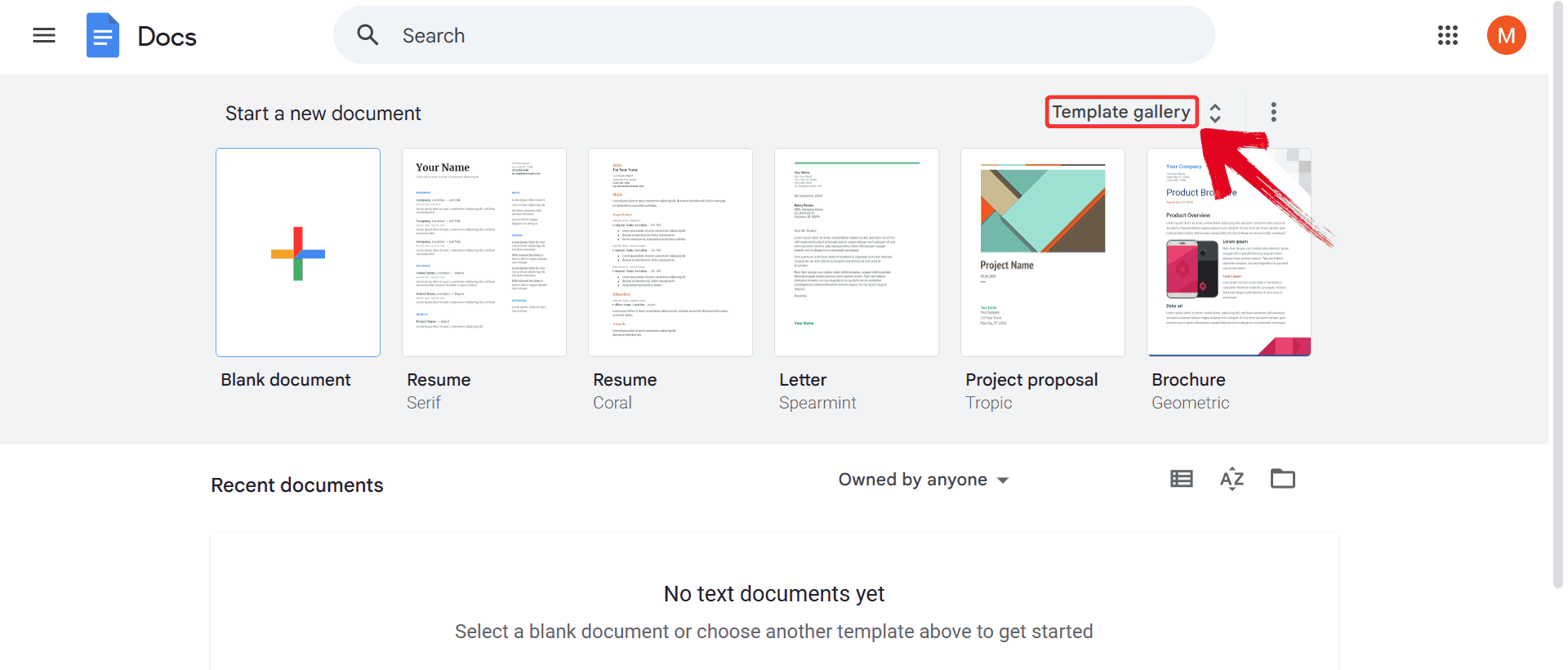
Step 1: Head over to Google Docs, and click on “Template Gallery” at the top right of the homepage.
This expands a list of ready-made templates that you can use as a
starting point.
Template Gallery
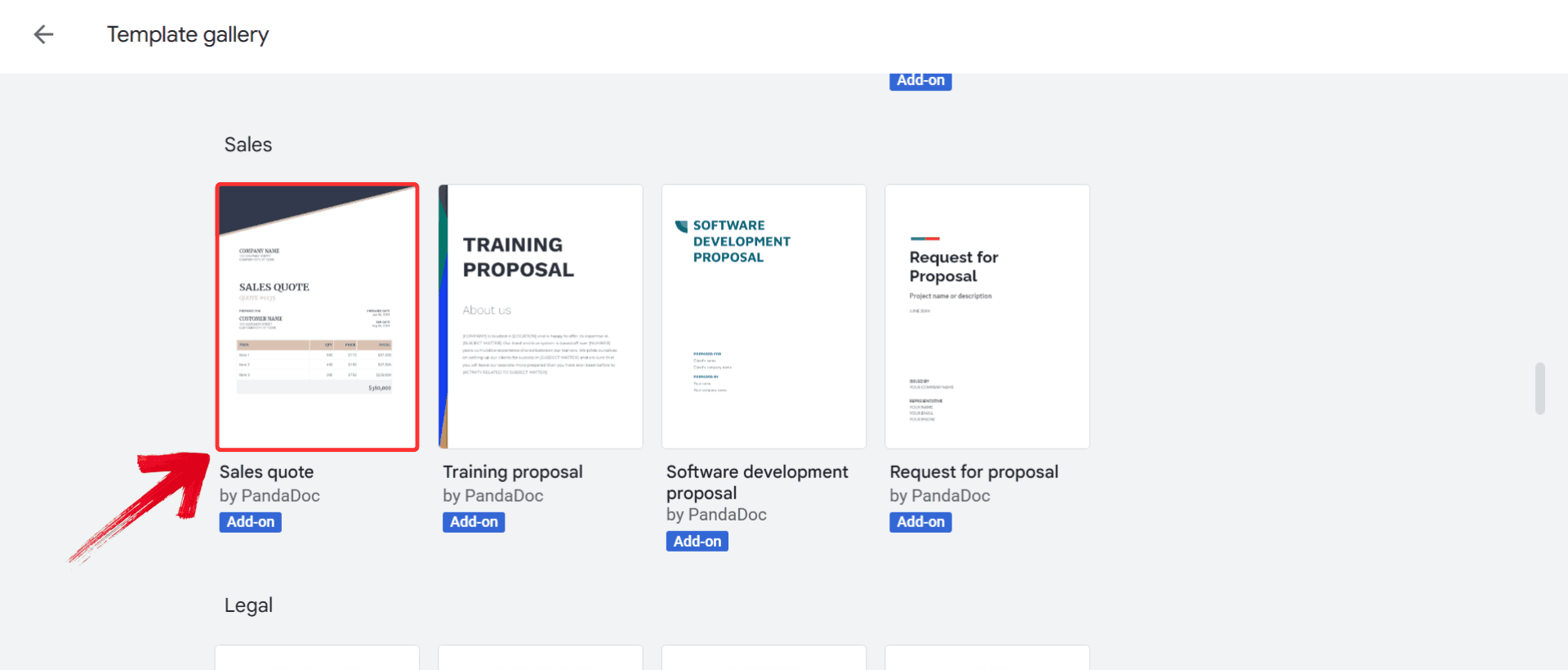
Step 2: Scroll through the gallery and click on a
business-style template, something like “Sales
Quote”.
Select Template
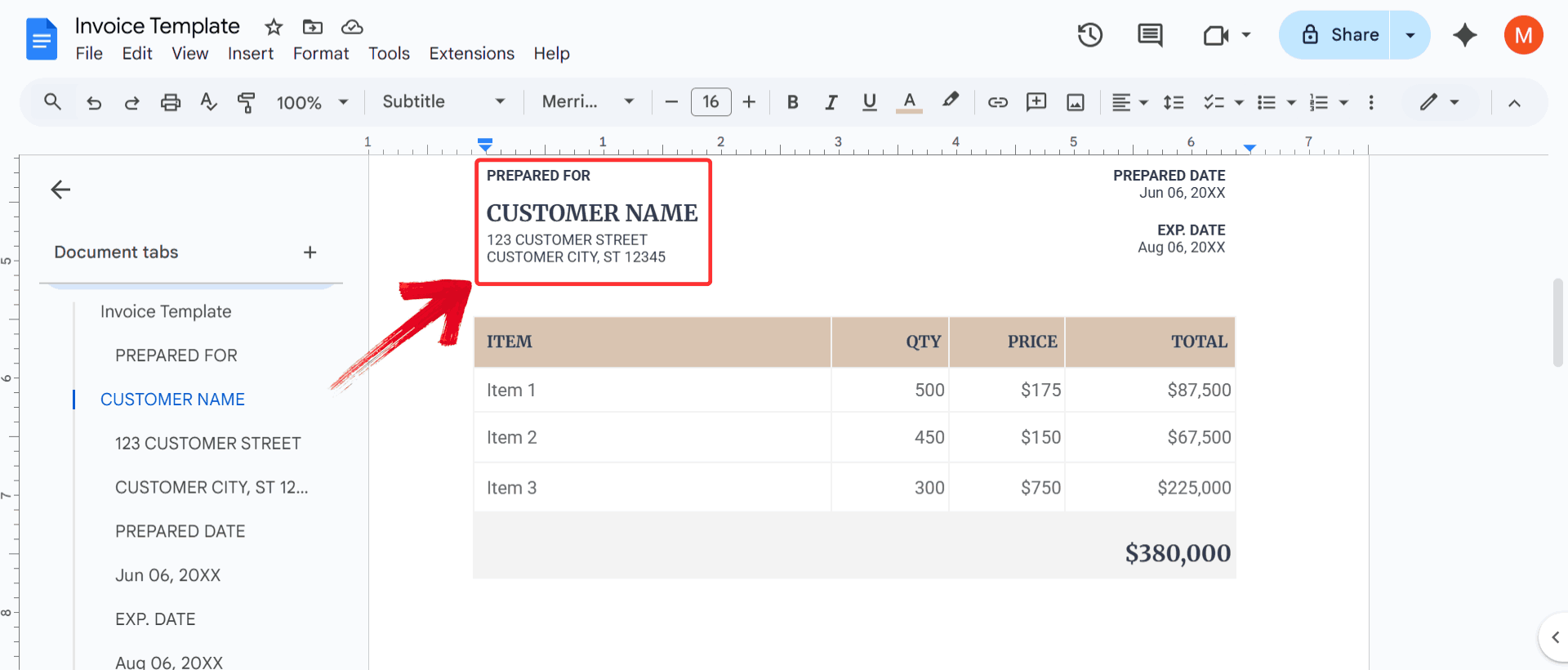
Step 3: Replace the placeholder text with your own
information. Enter your business name, client’s name, address, and
invoice number.
Edit Template
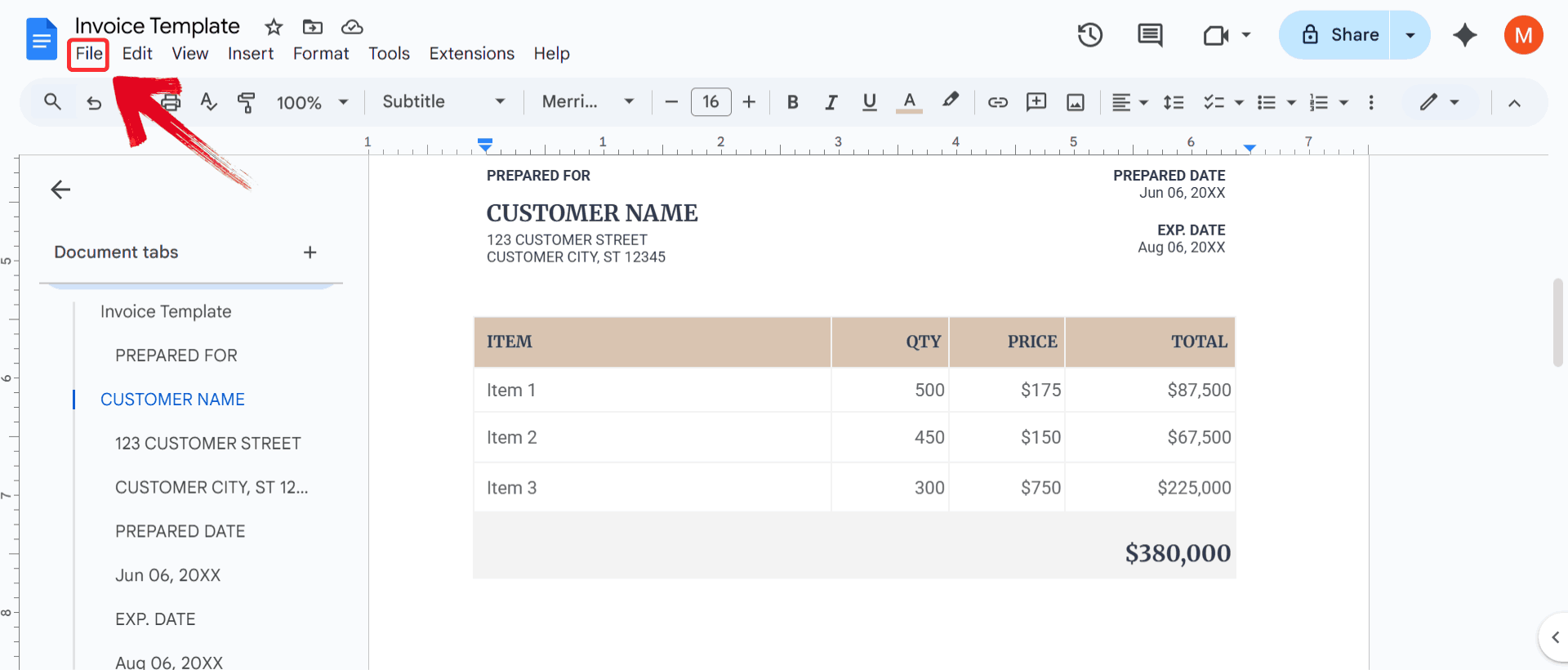
Step 4: Once everything looks good, click on the
“File” menu in the top-left corner.
Click File
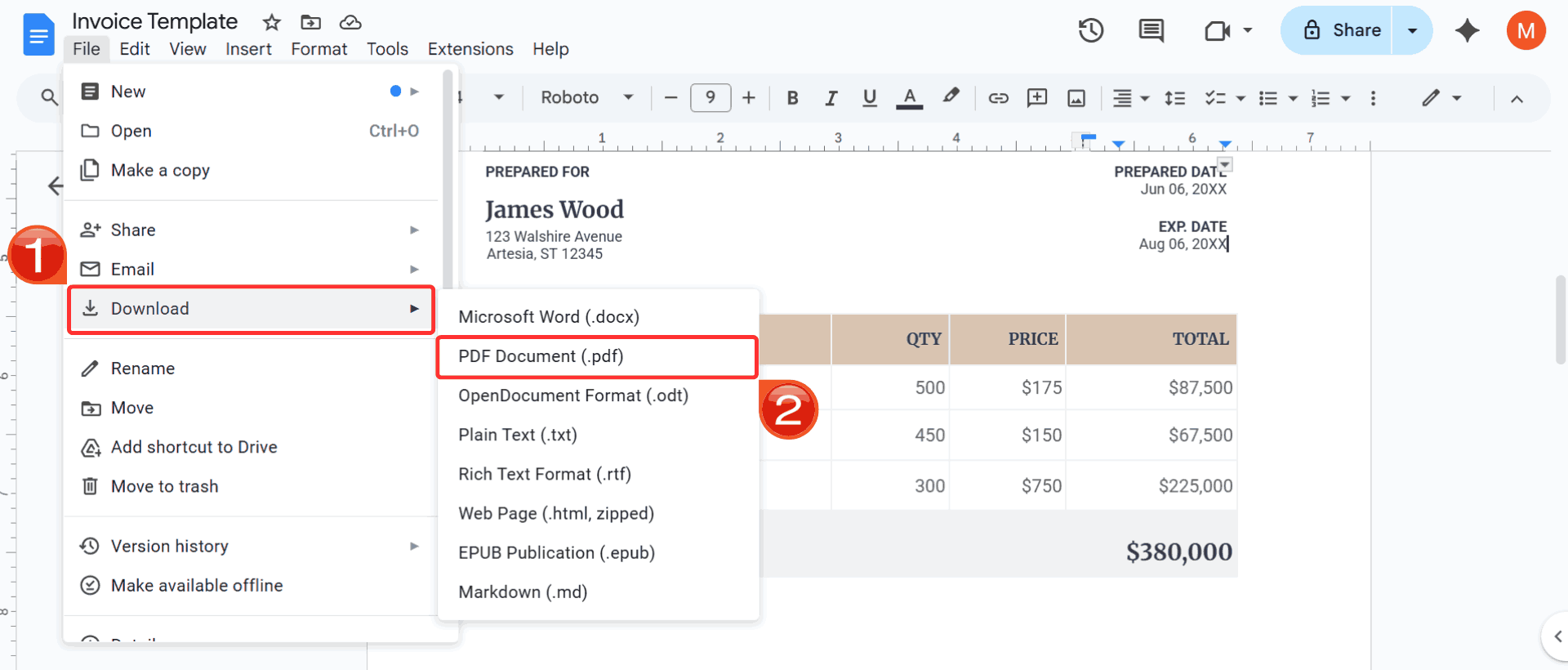
Step 5: One the dropdown appears, click on “Download” and select PDF Document
(.pdf). This will instantly download your invoice in a
shareable format.
Download PDF
While this manual process works, it can feel repetitive when you need
multiple invoices per week. Hence it’s smarter to use pre-built,
professional invoice templates that are ready to edit and print
instantly.
10 Best Free Invoice Templates
Starting from scratch every time isn’t practical when you’re trying
to run a business and manage clients at the same time. What saves me the
most time is working with templates that already have the right
structure: sections for billing details, line items, subtotals, and
payment notes. Below are 10 free Google Forms invoice alternatives you
can download and customize right away. Each one is quick to edit and
ready to send within minutes.
1. Modern Invoice Template
(GDoc)
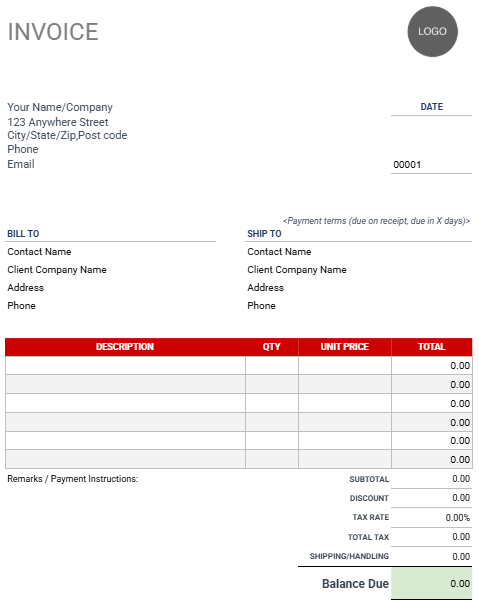
This Modern
Invoice Template is a highly versatile form designed for general
business use. Featuring a simple gray and white layout with a bold red
itemized table header, the template provides dedicated sections for the
seller's and client's contact information. The core of the invoice is a
clear table for Description, Qty, Unit Price, and Total, and it includes
a comprehensive summary section that calculates the Subtotal, Discount,
Tax Rate, Total Tax, and Shipping/Handling to arrive at the final
Balance Due.
Modern Invoice Template
2. Letterhead-Style
Invoice Template (GDoc)
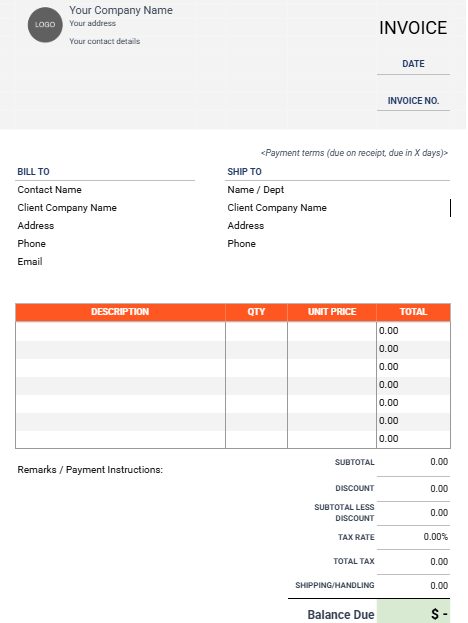
This Elegant
Letterhead-Style Invoice Template is a highly professional form,
ideal for businesses seeking a sophisticated presentation for their
billing. The design features an elevated header area with a placeholder
for a Logo and company contact details, giving it the look of a formal
letterhead. Like the previous invoice, it includes comprehensive Bill To
and Ship To sections and a large itemized table with columns for
Description, Qty, Unit Price, and Total. The summary section is
extremely detailed, calculating Subtotal, Discount, Subtotal less
Discount, Tax Rate, Total Tax, and Shipping/Handling to clearly
determine the final Balance Due.
Letterhead Style Invoice Template
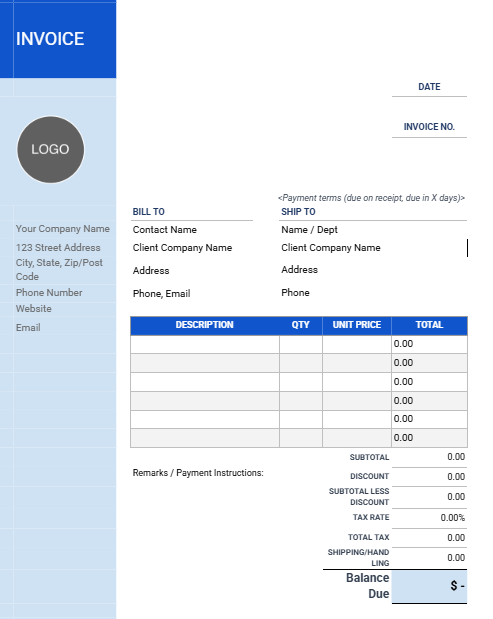
3. Classic Invoice Template
(GDoc)
This Classic
Blue-Bar Invoice Template is a traditional, professional form
designed to capture all necessary billing details with a clean,
instantly recognizable blue-and-white aesthetic. The layout features a
striking blue vertical bar on the left that contains the Logo
placeholder and seller contact information, providing a strong visual
identity. It clearly separates the Bill To and Ship To addresses and
includes a comprehensive itemized table with columns for Description,
Qty, Unit Price, and Total. The detailed summary section accurately
calculates Subtotal, Discount, Tax Rate, and Shipping/Handling to ensure
the final Balance Due is clear and precise.
Classic Invoice Template
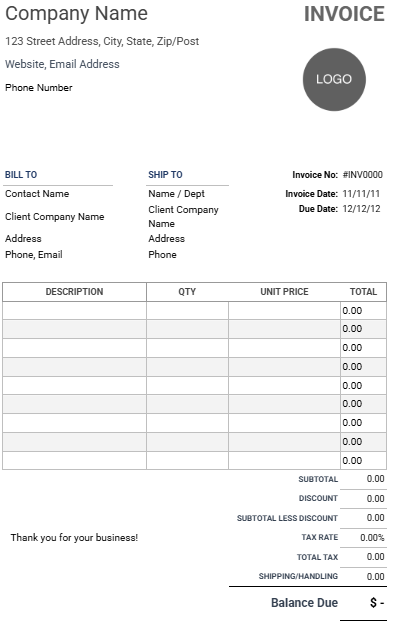
4. Printer-Friendly
Invoice Template (GDoc)
This Printer-Friendly
Invoice Template is a minimal design intended for easy,
high-volume printing and general professional use. The template is
highly functional and conserves ink by relying on a simple
black-and-white structure with clear text and defined boxes. Key
features include spaces for seller contact details, Invoice No, Date,
and Due Date. It offers a large itemized table with columns for
Description, Qty, Unit Price, and Total, and a comprehensive financial
summary that calculates Subtotal, Discount, Tax Rate, and
Shipping/Handling to clearly indicate the final Balance Due.
Printer-Friendly Invoice Template
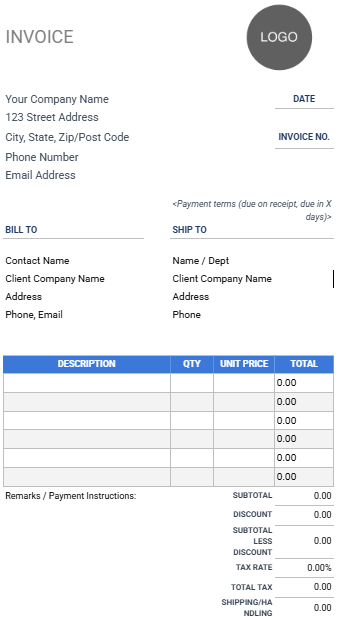
5. Wide-Margin Invoice
Template (GDoc)
This Wide-Margin
Invoice Template is a highly professional and versatile billing
form that is easy to read due to its ample use of white space. The
design features a bold, blue-and-white itemized table header and
prominent, dark text for key elements like "Invoice" and "Logo". It
clearly organizes contact information for the seller and client under
"Bill To" and "Ship To" sections.
The core of the invoice is a comprehensive table detailing
Description, Qty, Unit Price, and Total, while the summary section
accurately calculates Subtotal, Discount, Tax Rate, and
Shipping/Handling to arrive at the final Balance Due.
Wide-Margin Invoice Template
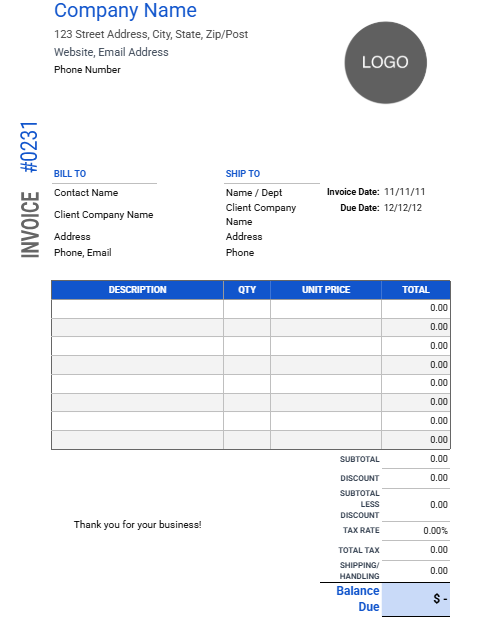
6. Modern II Invoice Template
(GDoc)
This Modern
II Invoice Template is a modern form with a subtle, professional
design, ideal for businesses seeking a contemporary look for their
billing. The layout features a distinctive vertical blue bar containing
the word "Invoice" and a bold blue itemized table header.
It clearly provides space for seller contact details and client
information under Bill To and Ship To, while also highlighting important
dates like Invoice Date and Due Date. The financial summary is
comprehensive, calculating Subtotal, Discount, Tax Rate, and
Shipping/Handling to arrive at the final Balance Due.
Modern II Invoice Template
7. Freelance Invoice
Free Template (gdoc.io)
This Elegant
Freelancer Invoice Template is a modern form designed
specifically for creative professionals who bill by rate and hours. The
layout is highly aesthetic, using a soft, monochromatic beige and white
color scheme and thin fonts to convey sophistication.
The itemized table clearly breaks down services by Task, Rate, Hours,
and Total, making it easy for clients to see the cost breakdown. It
prominently features a calculated Package Discount and the final Total
Due, and includes a detailed section for Payment Information (Bank,
Account Name, Routing Number, and Account Number).
Freelance Invoice Free Template
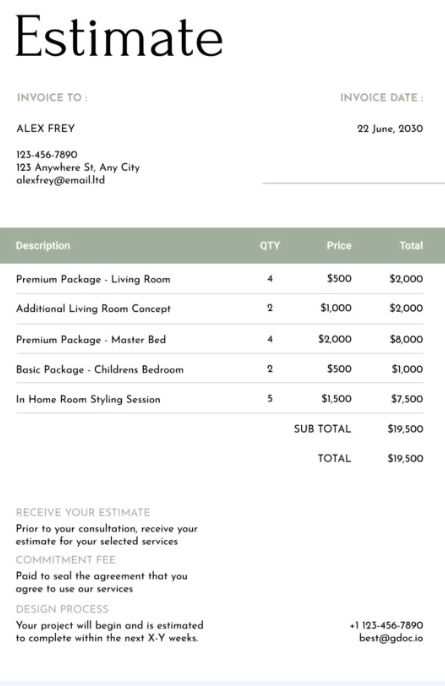
8. Simple Invoice Free
Template (gdoc.io)
This Modern
Estimate/Quote Template is a contemporary form designed for
providing clients with a sleek, detailed estimate of project costs. The
design is elegant, featuring an uncluttered layout, a prominent
"Estimate" title, and a soft sage green header for the itemized
table.
The template clearly lists services under Description, QTY, Price,
and Total. Crucially, it includes distinct sections defining the
process: Receive Your Fee, the Commitment Fee required to agree to
services, and the Design Process timeline, providing transparency and
setting clear client expectations.
Simple Invoice Free Template
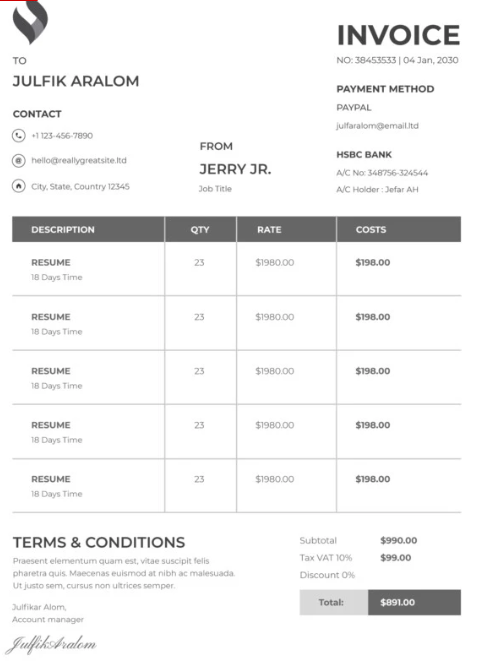
9. Minimal Invoice Free
Template (gdoc.io)
This Sleek
Minimalist Service Invoice is a bold, modern template designed
for streamlined billing for services. It features a sophisticated, dark
gray and white color palette with a striking vertical red header accent
and clear Invoice title. The core itemized table is uniquely structured
with columns for QTY, Rate, and Costs, which is ideal for breaking down
project deliverables or time-based services.
The bottom section clearly outlines Payment Method and Terms &
Conditions. The elegant typography and clean layout make this template
highly professional and easy to read.
Minimal Invoice Free Template
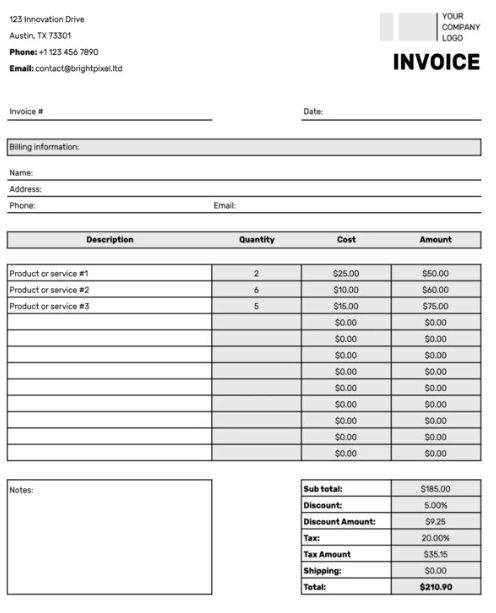
10. Blank Invoice Free
Template (gdoc.io)
This Simple
Modern Grid Invoice Template is a highly versatile and
professional form that prioritizes clarity and comprehensive detail in
its financial summary. The design features a minimalist black-and-white
layout with distinct gray horizontal bars to separate sections for
Company Contact Information, Billing Information, and the main body.
The template provides a clear itemized table with columns for
Description, Quantity, Cost, and Amount. Its strength lies in the
detailed summary, which calculates Subtotal, Discount, Discount Amount,
Tax Rate, Tax Amount, and Shipping to generate the final Total.
Blank Invoice Free Template
If you’re looking for more designs, visit the WPS Template Store, which
includes hundreds of editable invoice template downloads for Word,
Excel, and PDF formats. No matter your business size or style, you’ll
find one that fits perfectly.
How WPS Helps You
Further Edit Invoices
Now that you’ve picked your favorite template, it’s time to make it
truly yours. WPS Office lets you take any downloaded template and change
it exactly how you need from adjusting line items and totals to adding
your logo and brand colors. Beyond simple edits, WPS makes it easy to export
polished PDFs, share invoices digitally, and even automate small
calculations, which saves a lot of time compared to manually updating
each invoice in Google Docs. Here’s how you can edit and enhance it
using WPS Writer:
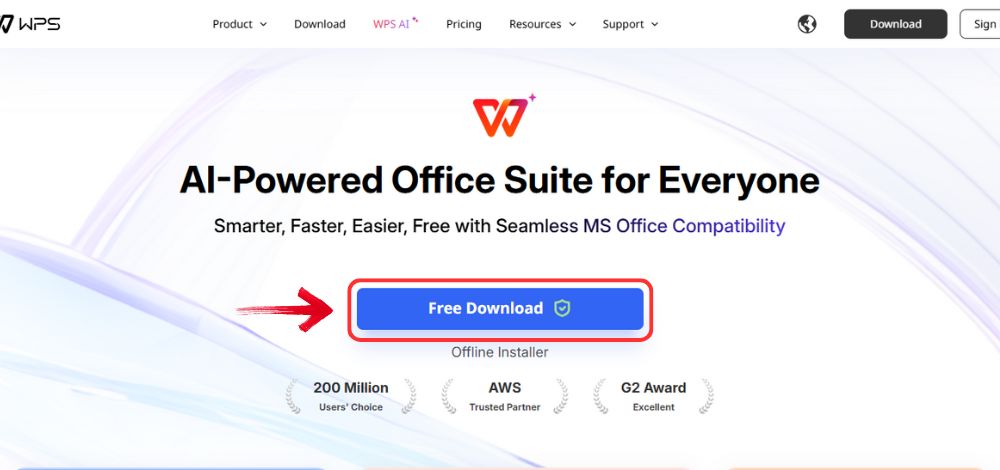
Step 1: Start by heading over to WPS Office and click the "Free Download" button to start the download.
Download WPS Office
Step 2: The download will finish in a few seconds.
Once done, run the installation file like you would for any other app or
software.
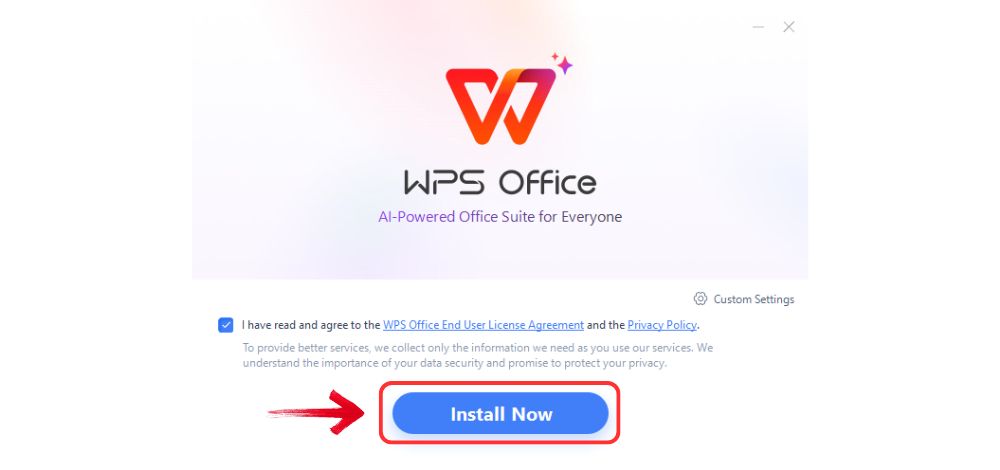
Step 3: WPS Office will show you a few simple terms
and conditions. Accept them, then click the "Install" button to begin the installation.
Install WPS Office
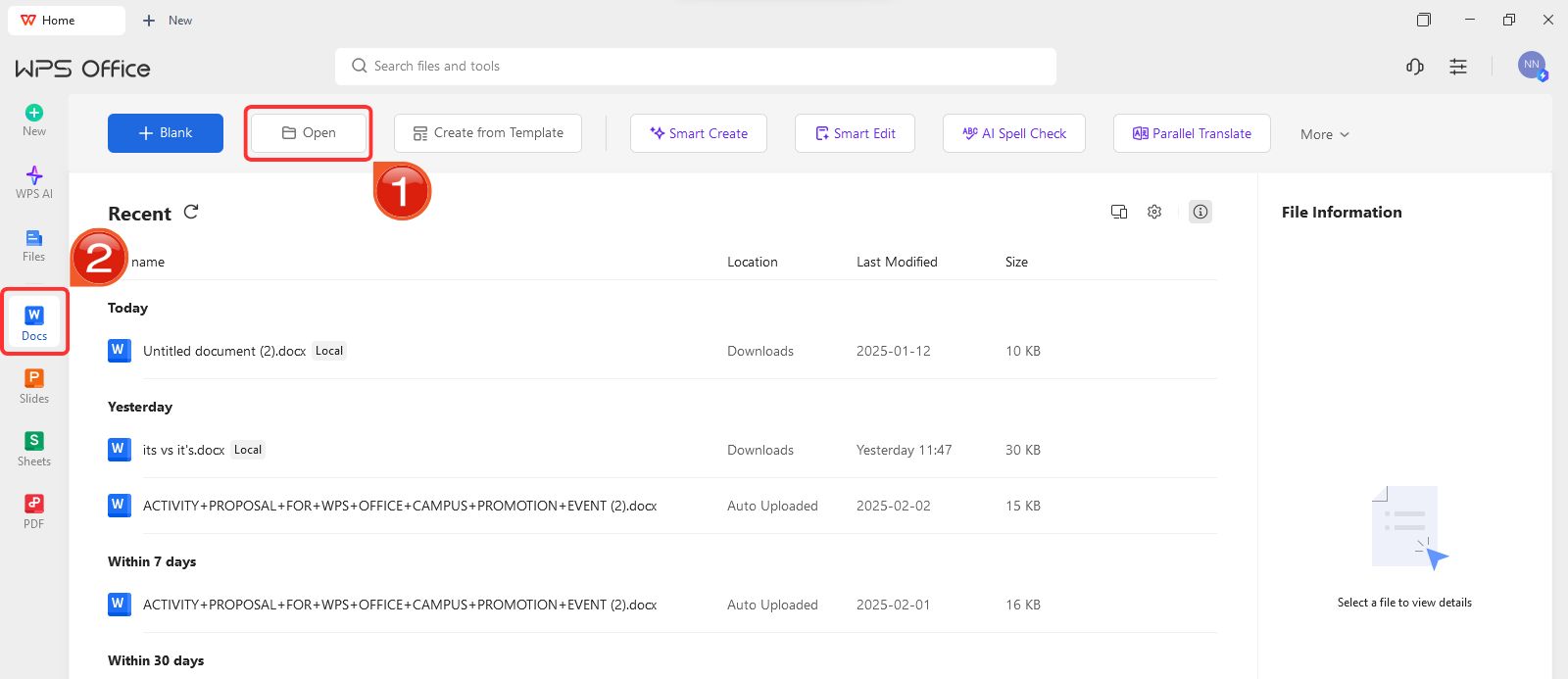
Step 4: After launching WPS Office, select “Docs” from the left-hand panel then click “Open” to access your document dashboard.
Open document
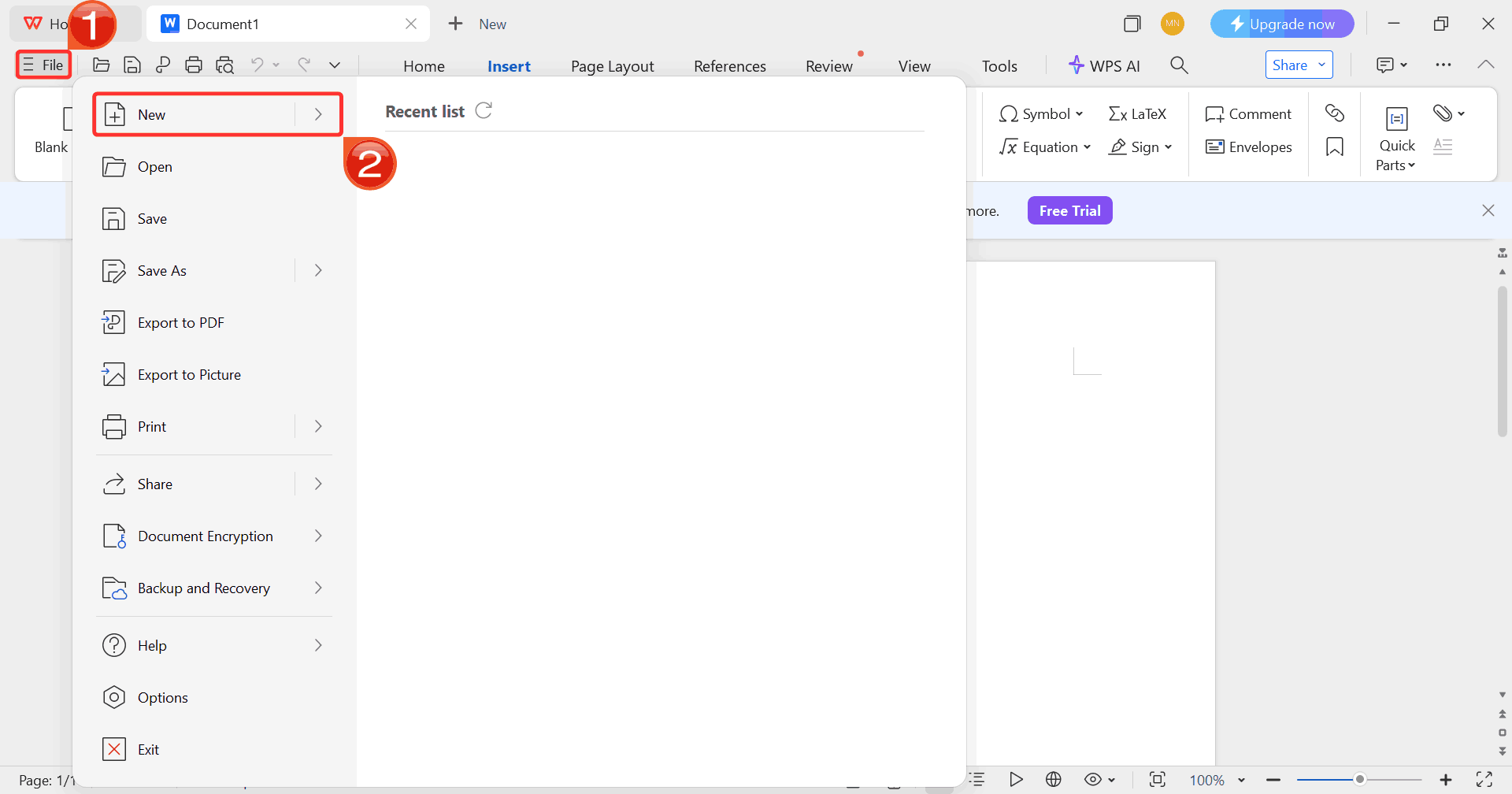
Step 5: Next, click on “File” and
choose “New” to browse available options. You can
either start with a blank document or explore ready-made templates.
Select New document
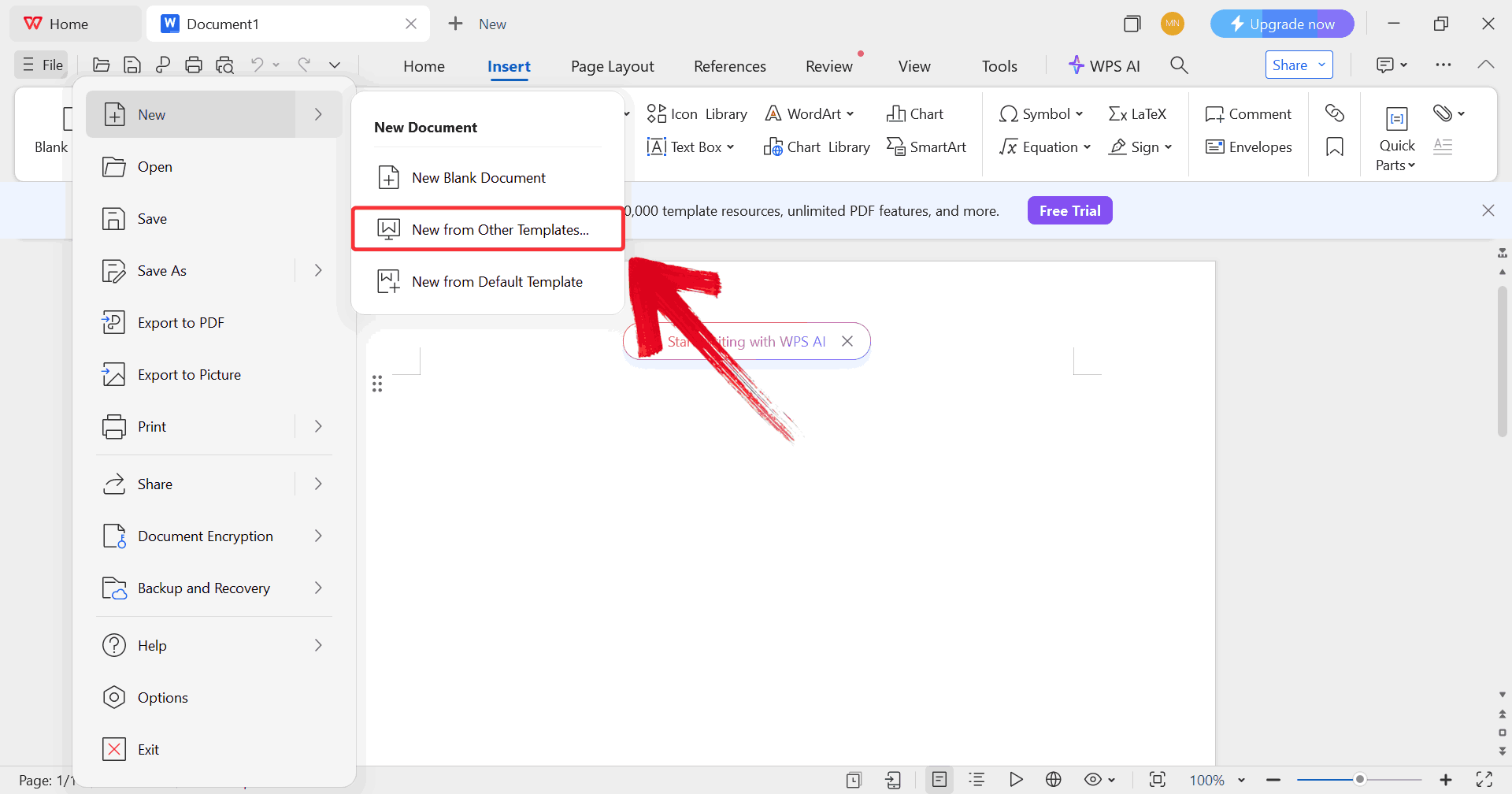
Step 6: Click “New from other
templates” to upload your downloaded invoice template or pick
one directly from the built-in WPS template library.
Upload Invoice Template
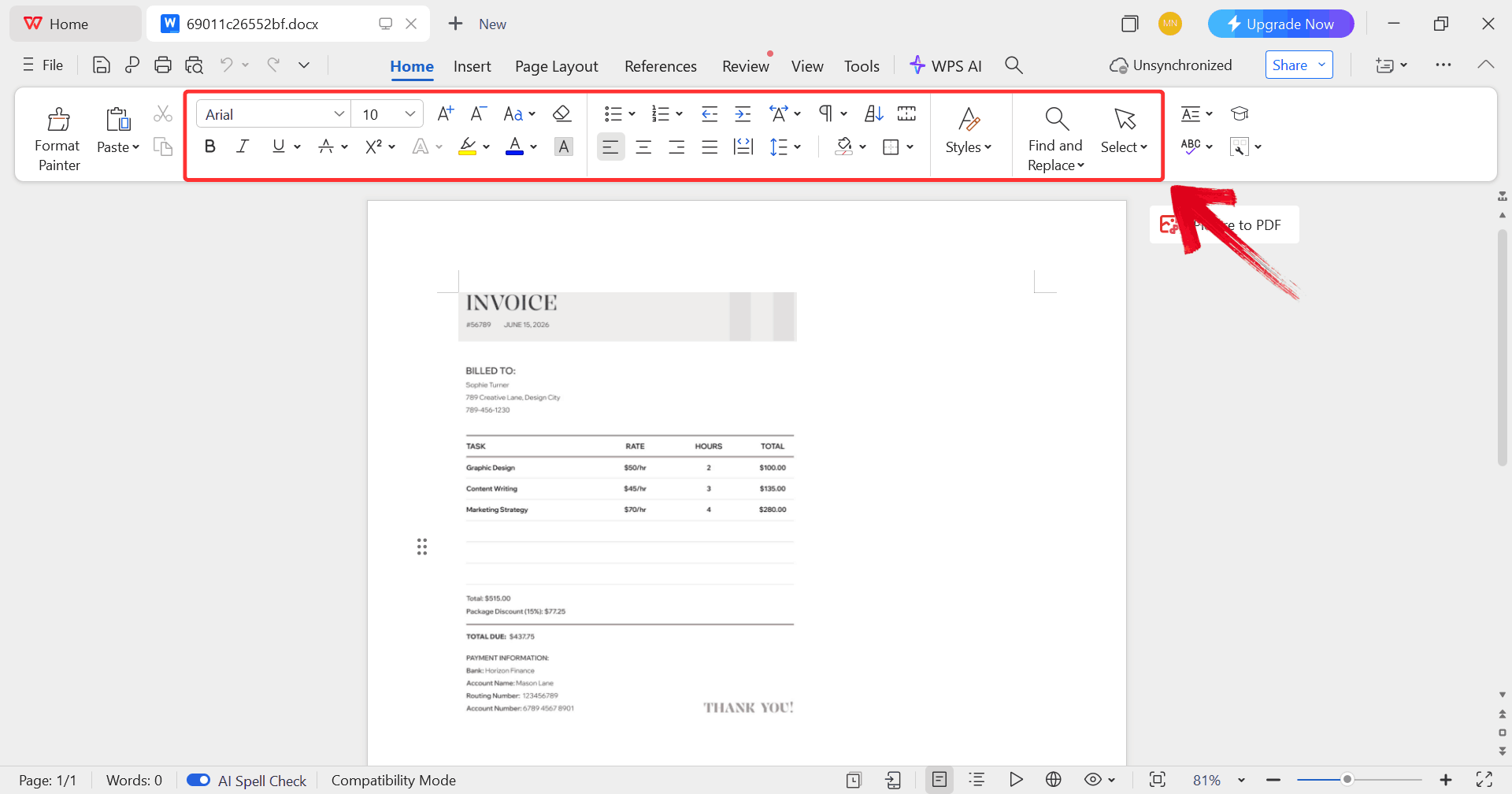
Step 7: Once your template opens, use the editing
tools at the top to update the text, adjust formatting, replace
placeholders, and make the document more professional.
Edit Template
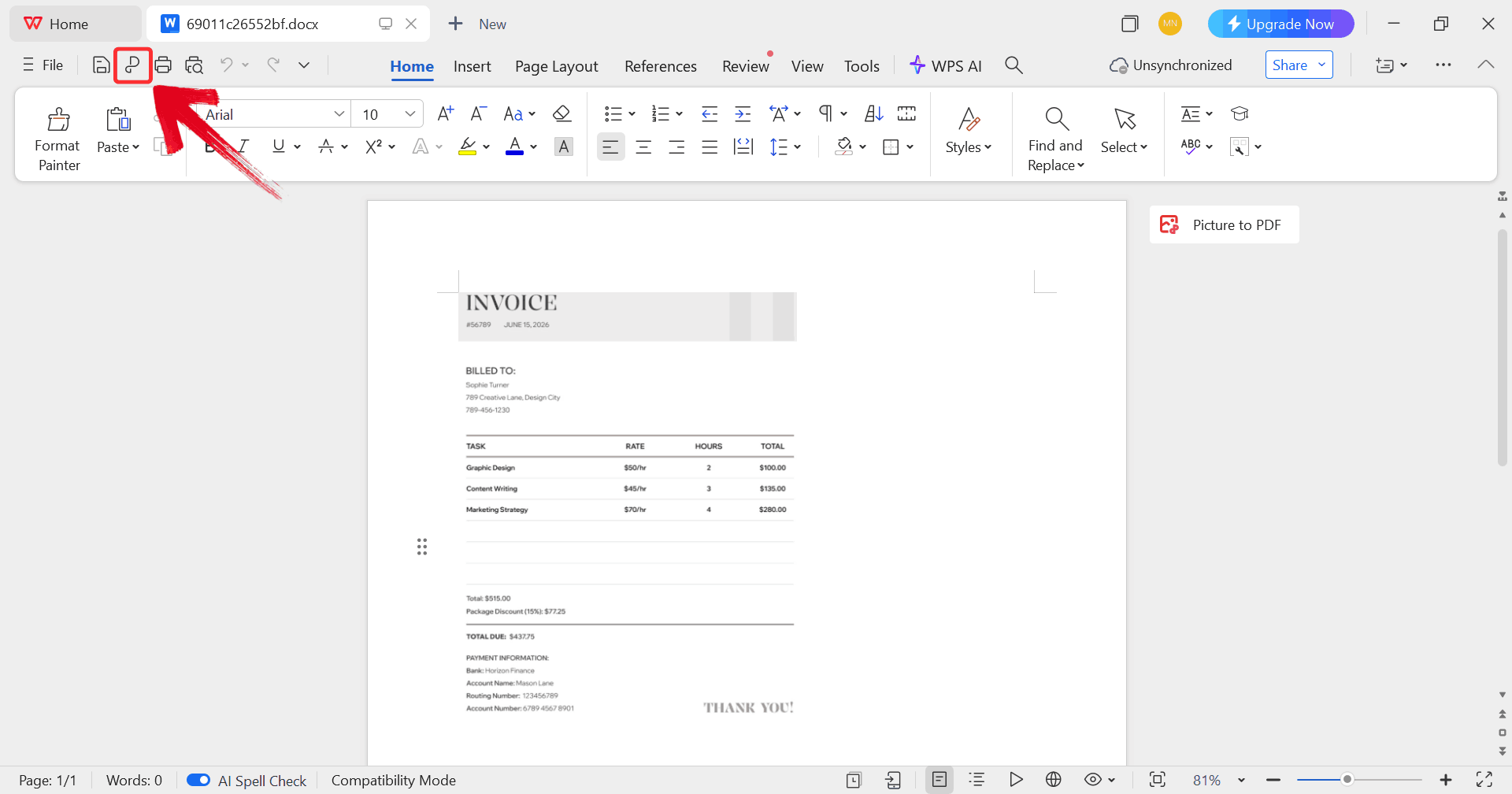
Step 8: When you’re happy with your edits, click the “P” icon to export it as a PDF.
Export Document
By using these steps, you’ll notice how much faster and more reliable
invoicing becomes compared to working with Google Forms invoice
templates.
Free Office Suite
with Editable Templates
Managing invoices efficiently requires more than just a blank
document as you need structure, flexibility, and tools that let you make
quick adjustments. WPS Office offers a wide selection of editable invoice template downloads that can
be opened and customized instantly. You can update line items, apply
automatic calculations, add your logo, and adjust colors to fit your
brand without any extra formatting work. The built-in templates save
time while keeping invoices simple, consistent, and ready to export as
PDFs, making the whole billing process smoother and more organized.
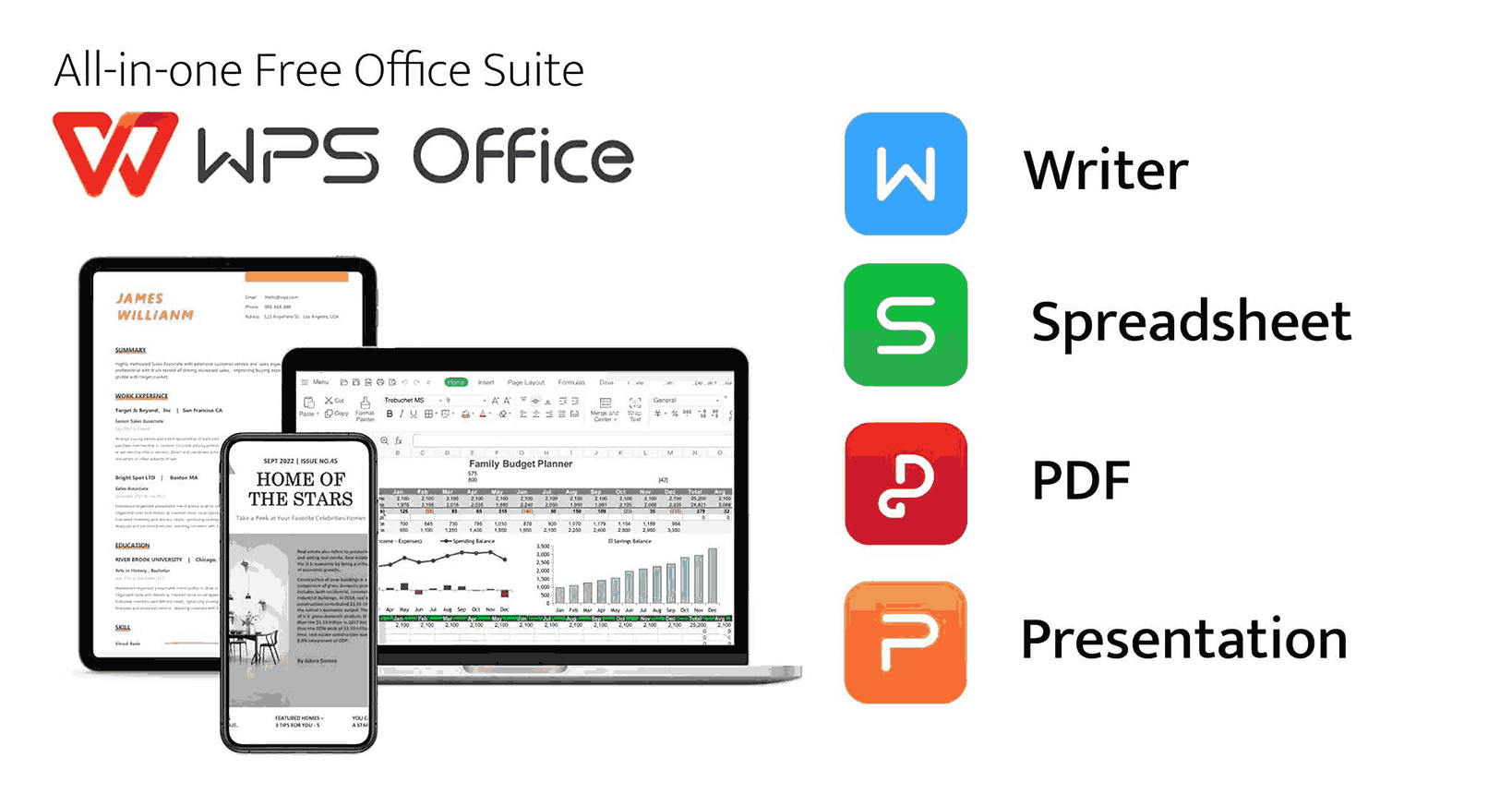
WPS Office Suite
Here’s what makes WPS Office stand out:
Free to download and use: You get full access to
Writer, Spreadsheet, and Presentation without subscription fees.
Hundreds of ready-made templates: Access designs for
invoices, budgets, resumes, planners, and more directly inside the
software.
Supports PDF editing and export: Edit, sign, and
convert invoices to PDF in just one click.
Built-in AI tools: Use AI to summarize
text, fix formatting, or generate content inside your
documents.
If you’re looking for a Google Forms invoice alternative that’s
reliable, private, and feature-rich, WPS Office hits all the right
marks.
100% secure
FAQs
1. Are these
invoice templates free to use in WPS?
Yes, most templates are completely free. Some premium versions are
available under WPS Pro, but the free options cover almost all
needs.
2. Can I edit invoice
templates on my phone?
Absolutely. WPS Office’s mobile app lets you edit, sign, and send
invoices directly from your phone.
3. Can I export invoices to
PDF?
Yes, WPS Writer allows one-click PDF export for professional
sharing.
4. Can I add my
logo and brand colors to invoices?
Definitely. You can insert logos, change colors, and even save a
custom invoice style for future use.
5. Is WPS Office
secure for handling invoices?
Yes, it’s used globally and maintains high data-security standards to
protect sensitive information.
Invoice Insights Provided by WPS
Many try using a Google Forms invoice template to create and manage invoices but it rarely delivers the professional look or functionality that clients expect. For people who are looking for something a bit more than just plain templates, WPS Office is a great substitute. With its ready-made templates, you can download, edit, and customize invoices in just minutes. There’s no design experience needed. The built-in tools let you adjust branding, add automatic calculations, and export polished PDFs for instant sharing. It’s a simple, reliable way to handle billing without the usual headaches.
7+ years in productivity tech. I test and review the latest tools to simplify your workflow. Follow for honest app comparisons, practical guides, and curated tech picks to boost efficiency.


'%3e%3cpath%20d='M8%200C12.4183%200%2016%203.58172%2016%208C16%2012.4183%2012.4183%2016%208%2016C3.58172%2016%200%2012.4183%200%208C0%203.58172%203.58172%200%208%200ZM11.6162%204.38379C11.2257%203.99337%2010.5927%203.99338%2010.2021%204.38379L8%206.58594L5.79785%204.38379C5.40732%203.99334%204.77429%203.99329%204.38379%204.38379C3.99331%204.77429%203.99335%205.40733%204.38379%205.79785L6.58594%208L4.38379%2010.2021C3.99348%2010.5927%203.99341%2011.2257%204.38379%2011.6162C4.77426%2012.0066%205.40734%2012.0065%205.79785%2011.6162L8%209.41406L10.2021%2011.6162C10.5927%2012.0066%2011.2257%2012.0067%2011.6162%2011.6162C12.0067%2011.2257%2012.0066%2010.5927%2011.6162%2010.2021L9.41406%208L11.6162%205.79785C12.0066%205.40735%2012.0066%204.77429%2011.6162%204.38379Z'%20fill='%23080E17'%20fill-opacity='0.46'/%3e%3c/g%3e%3cdefs%3e%3cclipPath%20id='clip0_3761_713'%3e%3crect%20width='16'%20height='16'%20fill='white'/%3e%3c/clipPath%3e%3c/defs%3e%3c/svg%3e)




'%3e%3cpath%20fill-rule='evenodd'%20clip-rule='evenodd'%20d='M21.4999%2010.9993C21.4999%205.20009%2016.7986%200.498901%2010.9993%200.498901C5.19994%200.498901%200.498657%205.20009%200.498657%2010.9993C0.498657%2016.2404%204.33858%2020.5844%209.35855%2021.3722V14.0346H6.69238V10.9993H9.35855V8.68594C9.35855%206.05427%2010.9262%204.60062%2013.3248%204.60062C14.4736%204.60062%2015.6753%204.80571%2015.6753%204.80571V7.38979H14.3512C13.0468%207.38979%2012.64%208.19921%2012.64%209.0296V10.9993H15.5523L15.0867%2014.0346H12.64V21.3722C17.66%2020.5844%2021.4999%2016.2404%2021.4999%2010.9993Z'%20fill='%231568EA'/%3e%3c/g%3e%3c/svg%3e)


'%3e%3cpath%20d='M2.42045%2022.1876H6.31818V12.7217L0.75%208.54553V20.5171C0.75%2021.4414%201.49892%2022.1876%202.42045%2022.1876Z'%20fill='%234285F4'/%3e%3cpath%20d='M19.682%2022.1876H23.5797C24.5041%2022.1876%2025.2502%2021.4387%2025.2502%2020.5171V8.54553L19.682%2012.7217'%20fill='%2334A853'/%3e%3cpath%20d='M19.682%205.48293V12.7216L25.2502%208.54543V6.31816C25.2502%204.25236%2022.8921%203.07469%2021.2411%204.31361'%20fill='%23FBBC04'/%3e%3cpath%20d='M6.31824%2012.7217V5.48303L13.0001%2010.4944L19.6819%205.48303V12.7217L13.0001%2017.733'%20fill='%23EA4335'/%3e%3cpath%20d='M0.75%206.31816V8.54543L6.31818%2012.7216V5.48293L4.75909%204.31361C3.10534%203.07469%200.75%204.25236%200.75%206.31816Z'%20fill='%23C5221F'/%3e%3c/g%3e%3cdefs%3e%3cclipPath%20id='clip0_2954_7305'%3e%3crect%20width='24.5'%20height='18.375'%20fill='white'%20transform='translate(0.75%203.8125)'/%3e%3c/clipPath%3e%3c/defs%3e%3c/svg%3e)




'%3e%3cpath%20d='M19.9911%204.11386V6.471H18.5894C18.0775%206.471%2017.7322%206.57814%2017.5536%206.79243C17.3751%207.00671%2017.2858%207.32814%2017.2858%207.75671V9.44421H19.9019L19.5536%2012.0871H17.2858V18.8639H14.5536V12.0871H12.2769V9.44421H14.5536V7.49779C14.5536%206.39064%2014.8632%205.53201%2015.4822%204.92189C16.1013%204.31177%2016.9257%204.00671%2017.9554%204.00671C18.8304%204.00671%2019.509%204.04243%2019.9911%204.11386Z'%20fill='%23333333'/%3e%3c/g%3e%3cdefs%3e%3cclipPath%20id='clip0_2938_8199'%3e%3crect%20width='16'%20height='16'%20fill='white'%20transform='translate(8%204.00671)'/%3e%3c/clipPath%3e%3c/defs%3e%3c/svg%3e)
'%3e%3cpath%20d='M17.5237%2010.7813L23.4811%204H22.0699L16.8949%209.88693L12.7648%204H8L14.2469%2012.9029L8%2020.0133H9.4112L14.8725%2013.7952L19.2352%2020.0133H24M9.92053%205.04213H12.0885L22.0688%2019.0224H19.9003'%20fill='%23333333'/%3e%3c/g%3e%3cdefs%3e%3cclipPath%20id='clip0_2938_8200'%3e%3crect%20width='16'%20height='16.0134'%20fill='white'%20transform='translate(8%204)'/%3e%3c/clipPath%3e%3c/defs%3e%3c/svg%3e)


