

'%3e%3cpath%20d='M8%200C12.4183%200%2016%203.58172%2016%208C16%2012.4183%2012.4183%2016%208%2016C3.58172%2016%200%2012.4183%200%208C0%203.58172%203.58172%200%208%200ZM11.6162%204.38379C11.2257%203.99337%2010.5927%203.99338%2010.2021%204.38379L8%206.58594L5.79785%204.38379C5.40732%203.99334%204.77429%203.99329%204.38379%204.38379C3.99331%204.77429%203.99335%205.40733%204.38379%205.79785L6.58594%208L4.38379%2010.2021C3.99348%2010.5927%203.99341%2011.2257%204.38379%2011.6162C4.77426%2012.0066%205.40734%2012.0065%205.79785%2011.6162L8%209.41406L10.2021%2011.6162C10.5927%2012.0066%2011.2257%2012.0067%2011.6162%2011.6162C12.0067%2011.2257%2012.0066%2010.5927%2011.6162%2010.2021L9.41406%208L11.6162%205.79785C12.0066%205.40735%2012.0066%204.77429%2011.6162%204.38379Z'%20fill='%23080E17'%20fill-opacity='0.46'/%3e%3c/g%3e%3cdefs%3e%3cclipPath%20id='clip0_3761_713'%3e%3crect%20width='16'%20height='16'%20fill='white'/%3e%3c/clipPath%3e%3c/defs%3e%3c/svg%3e)




'%3e%3cpath%20fill-rule='evenodd'%20clip-rule='evenodd'%20d='M21.4999%2010.9993C21.4999%205.20009%2016.7986%200.498901%2010.9993%200.498901C5.19994%200.498901%200.498657%205.20009%200.498657%2010.9993C0.498657%2016.2404%204.33858%2020.5844%209.35855%2021.3722V14.0346H6.69238V10.9993H9.35855V8.68594C9.35855%206.05427%2010.9262%204.60062%2013.3248%204.60062C14.4736%204.60062%2015.6753%204.80571%2015.6753%204.80571V7.38979H14.3512C13.0468%207.38979%2012.64%208.19921%2012.64%209.0296V10.9993H15.5523L15.0867%2014.0346H12.64V21.3722C17.66%2020.5844%2021.4999%2016.2404%2021.4999%2010.9993Z'%20fill='%231568EA'/%3e%3c/g%3e%3c/svg%3e)


'%3e%3cpath%20d='M2.42045%2022.1876H6.31818V12.7217L0.75%208.54553V20.5171C0.75%2021.4414%201.49892%2022.1876%202.42045%2022.1876Z'%20fill='%234285F4'/%3e%3cpath%20d='M19.682%2022.1876H23.5797C24.5041%2022.1876%2025.2502%2021.4387%2025.2502%2020.5171V8.54553L19.682%2012.7217'%20fill='%2334A853'/%3e%3cpath%20d='M19.682%205.48293V12.7216L25.2502%208.54543V6.31816C25.2502%204.25236%2022.8921%203.07469%2021.2411%204.31361'%20fill='%23FBBC04'/%3e%3cpath%20d='M6.31824%2012.7217V5.48303L13.0001%2010.4944L19.6819%205.48303V12.7217L13.0001%2017.733'%20fill='%23EA4335'/%3e%3cpath%20d='M0.75%206.31816V8.54543L6.31818%2012.7216V5.48293L4.75909%204.31361C3.10534%203.07469%200.75%204.25236%200.75%206.31816Z'%20fill='%23C5221F'/%3e%3c/g%3e%3cdefs%3e%3cclipPath%20id='clip0_2954_7305'%3e%3crect%20width='24.5'%20height='18.375'%20fill='white'%20transform='translate(0.75%203.8125)'/%3e%3c/clipPath%3e%3c/defs%3e%3c/svg%3e)


Turning 16 is probably one of the most memorable events in a kid's life, as it marks the last years of a carefree childhood before becoming an adult. The birthday party is a coming-of-age celebration, and parents and kids are on a mission to make it memorable. The decorations have to be top-notch, the food has to be finger-licking good, and the cake? Absolute perfection, and with all that divided attention, details like the party invitations get overlooked. So, if you’re having trouble designing fabulous invitations for a sweet sixteen, here are 10 templates you can customize to set the tone for your big day.
What is a Sweet Sixteen Invitation
The sixteenth birthday party is unlike any other celebration there is. It is a bridge between teens and adulthood, and its celebration is taken very seriously.
You want people you care about to be there celebrating with you, and formally inviting them with printed cardsor digital e-vites is a meaningful gesture they will surely appreciate. When you do, make sure that your sweet 16 invitations have the following crucial elements.
Honoree’s name (the birthday star!): Having the guest of honour’s name front and center is the most important part of the invitation because it helps people plan accordingly, such as getting gifts that you will appreciate or making something personalized with your name on it.
Occasion (“Sweet Sixteen Celebration”): Mentioning what exactly it is you’re celebrating is another key piece of information you cannot skip out on, as it tells your guests what exactly it is they’re RSVPing yes to, helps them dress the part, sets the tone for the event, and they are better prepared to come to your party. Funny story, on my sweet 16 birthday party invitations, my mom forgot to mention it on the card, and my grandparents brought a casserole thinking it was just a potluck.
Date and Time of The Event: You want your guests to be on time, so make sure the template you choose has a slot to mention the date and time of the event.
Venue with Address: If you’re having a close gathering of your favorite people at home or have a special venue in mind, be sure to mention that to your friends and family. Adding a map link to an ecard or a fun little diagram to help them find the place would be a nice touch because you don’t want them getting lost on their way.
RSVP Details (name, phone, or email): You need to mention the person people need to get in touch with to RSVP to. Knowing how many guests said yes helps you plan better because then you can make sure you have enough room, food, goodies, and other essentials. Provide the person’s name, phone number, and email on the invite.
Dress Code or Theme (if any): If you’ve decided to have a themed party or decided to have it at a special venue like a fancy dinner or the beach, then it's important for you to mention to your guests that they dress the part, because trust me, no one wants to walk on sand in heels.
Helpful tip: Be sure to send out the invitation 4 to 6 weeks before the party to give guests time to plan and make room in their schedule for your birthday party.
10 Free Editable Sweet Sixteen Invitation Templates
Now that we’re clear on all the essentials a sweet sixteen birthday party invitation should have, let's get to the good stuff, and that is picking out the design you want. If you’re someone who doesn’t have the time or the patience to design cards from scratch and find yourself googling “how to create invitations for a sweet sixteen”, WPS and GreentingsIsland have you covered with these phenomenal sweet 16 invitationtemplates.
Website 1: Invitation(WPS)
1. Pink Birthday Invitation
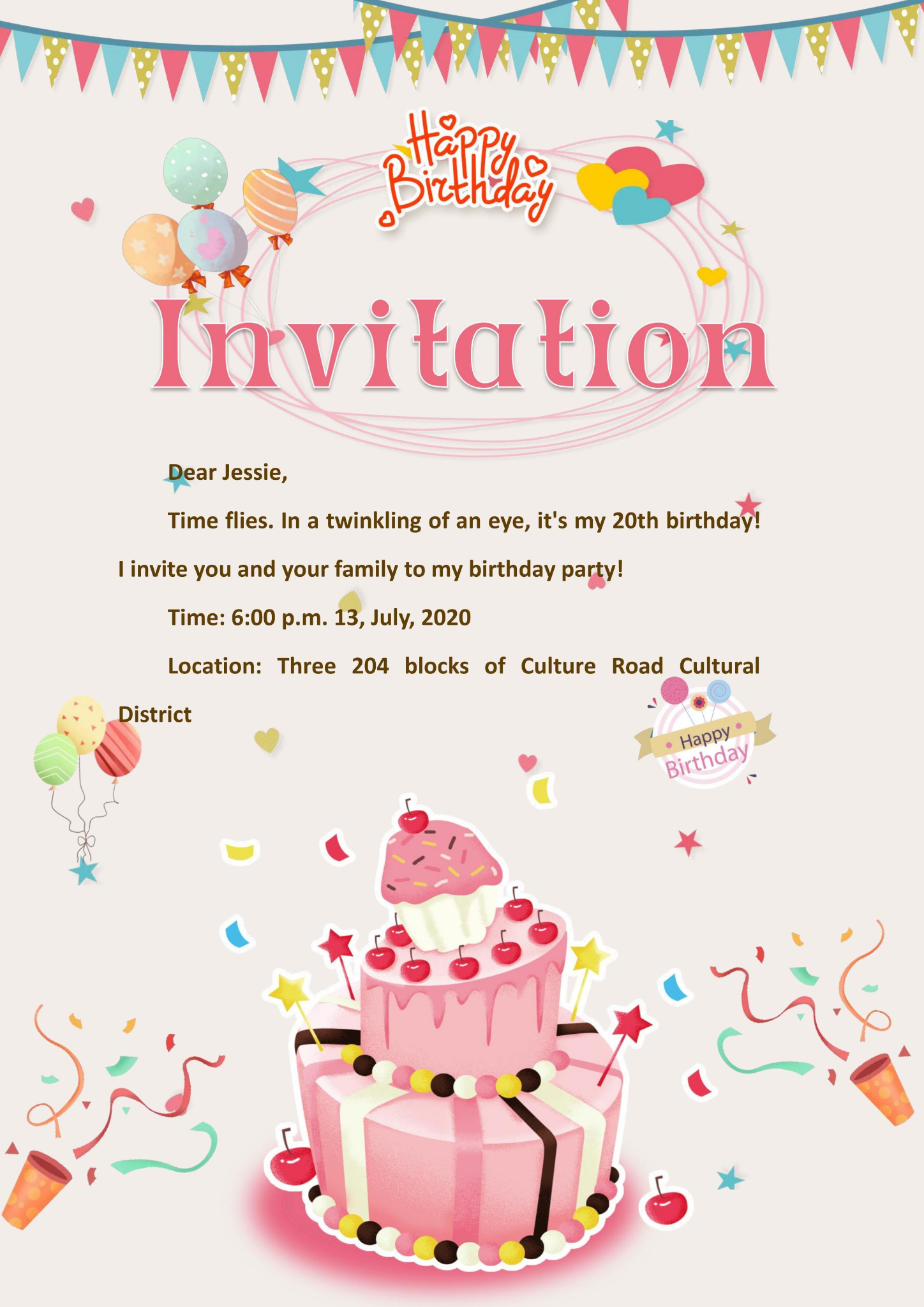
You can never go wrong with pink because there is something about it that just complements happy occasions so well. Like this Pink Birthday Invitation that is perfect for anyone planning a pastel, blush-themed sweet sixteen. The muted grey backdrop makes the bright pinks, blues, yellows, greens, and purple accents pop, whereas the cake, balloons, and confetti all around give it a playful feel to commemorate teenage years. You can mention the date and time of the event, as well as the location, and write your own heartfelt message to the recipient, mentioning them by name.
Template Highlights
Gentle pastel pink background for a soft aesthetic
Simple yet elegant typography for easy customization
Works well for indoor or garden-themed parties
Available in PDF for quick download and sharing
Beginner-friendly, edit text and layout in minutes
2. Warm Color Birthday Invitation
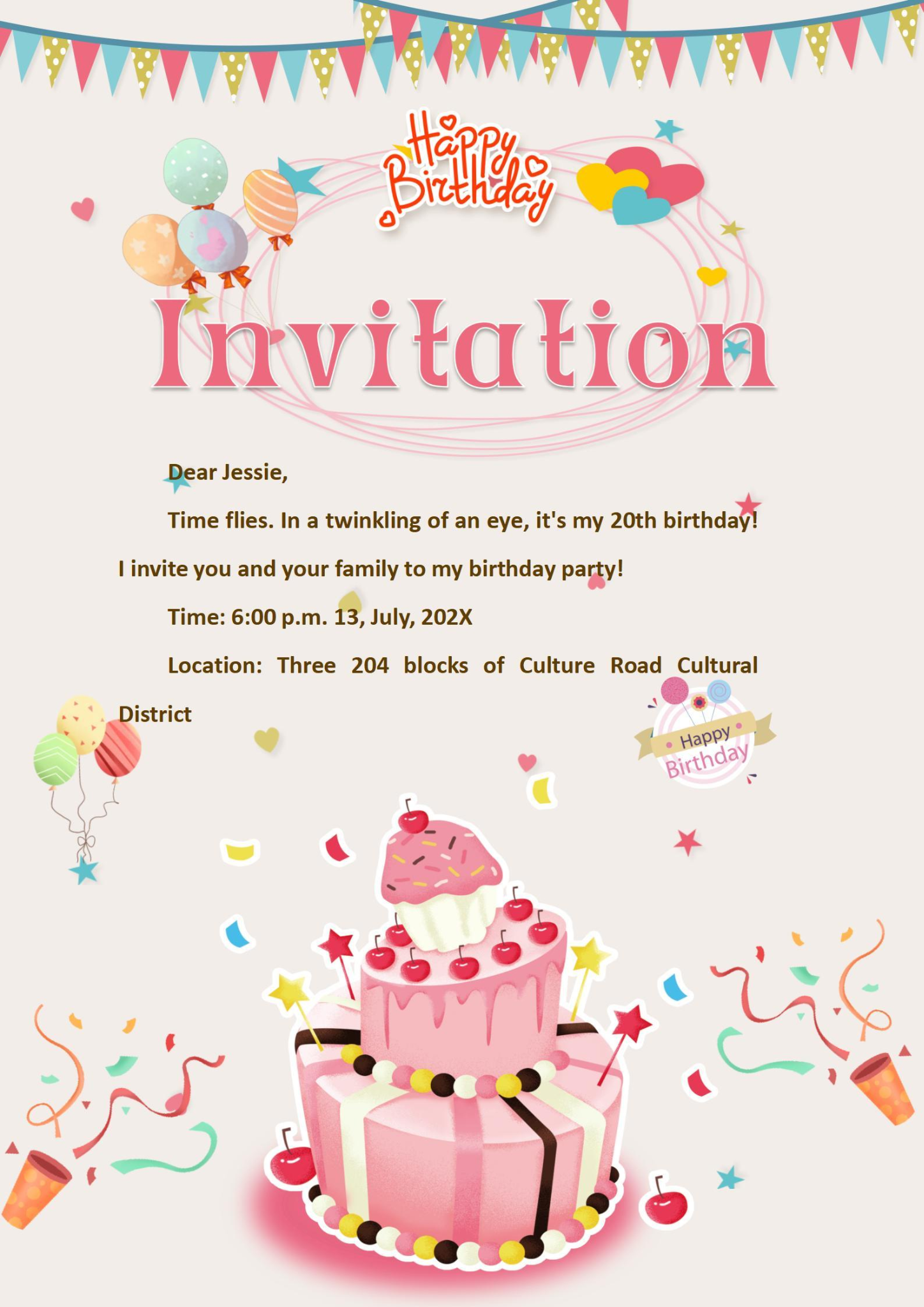
If your birthday party has a tropical vibe to it, then warm colors are the best way to set the tone with this Warm Color Birthday Invitation. It has such a cozy, nostalgic feel to it because instead of being plain and minimal like the trends these days, this one goes all out, kind of like the birthday invitations we used to pick out when we were 10. The pinks, yellows, and warm blues give it a cheerful look without trying to be too bold. You can mention the date, the time, the venue, along with the recipient’s name, and a message to make their day.
Template Highlights
Warm earthy tones with an inviting color palette
Suitable for cozy, seasonal celebration
Professional yet fun design layout
Easy to print or share digitally
Customizable fonts and elements in WPS Writer
3. Birthday Invitation Card
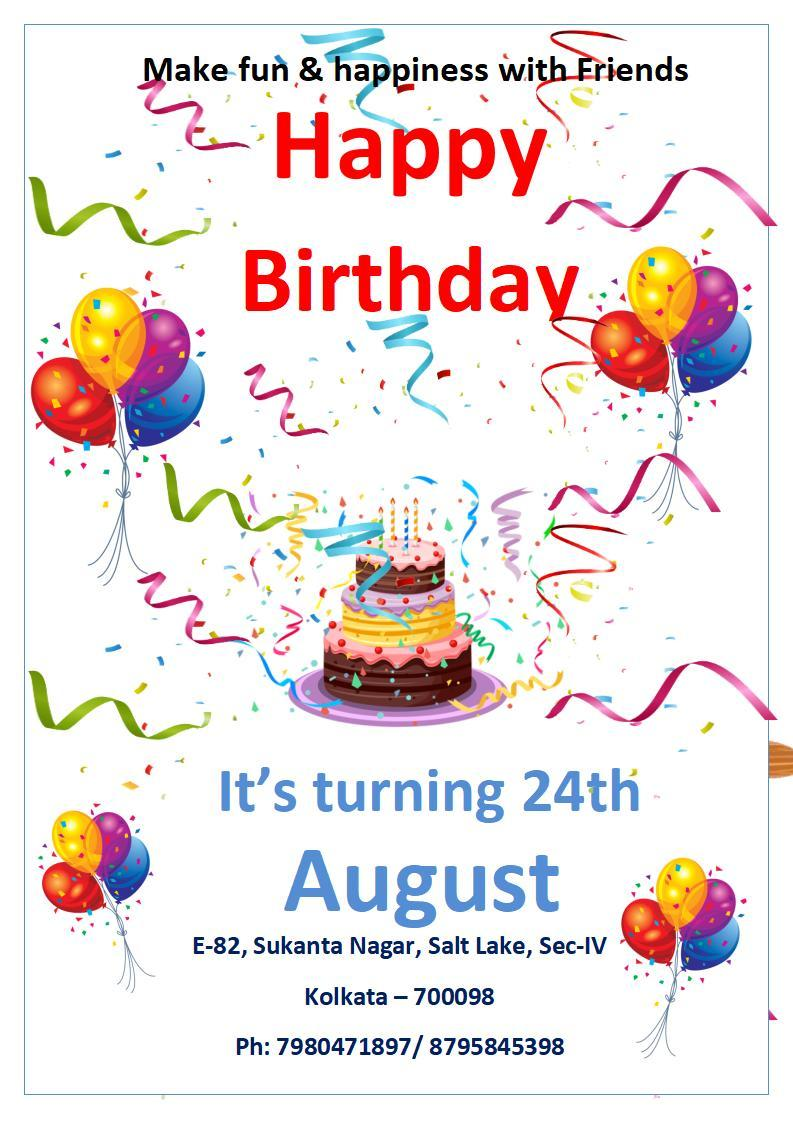
If you’re going for a simpler look because you want to really fit the role of being a new adult, then try going for something like this Birthday Invitation Card. It’s simple, it's practical, and it still has fun accents like the giant birthday cake in the middle to say “I may be grown up, but I’m still a kid at heart”. You can mention the date, the venue, and the RSVP information at the very bottom for your guests to contact so that they can confirm that they’ll be joining you on your special day.
Template Highlights
Minimalistic design for versatile use
Easy to adapt to any theme or style
Crisp font layout for professional appeal
Balanced white space for readability
Great for both printed and digital invites
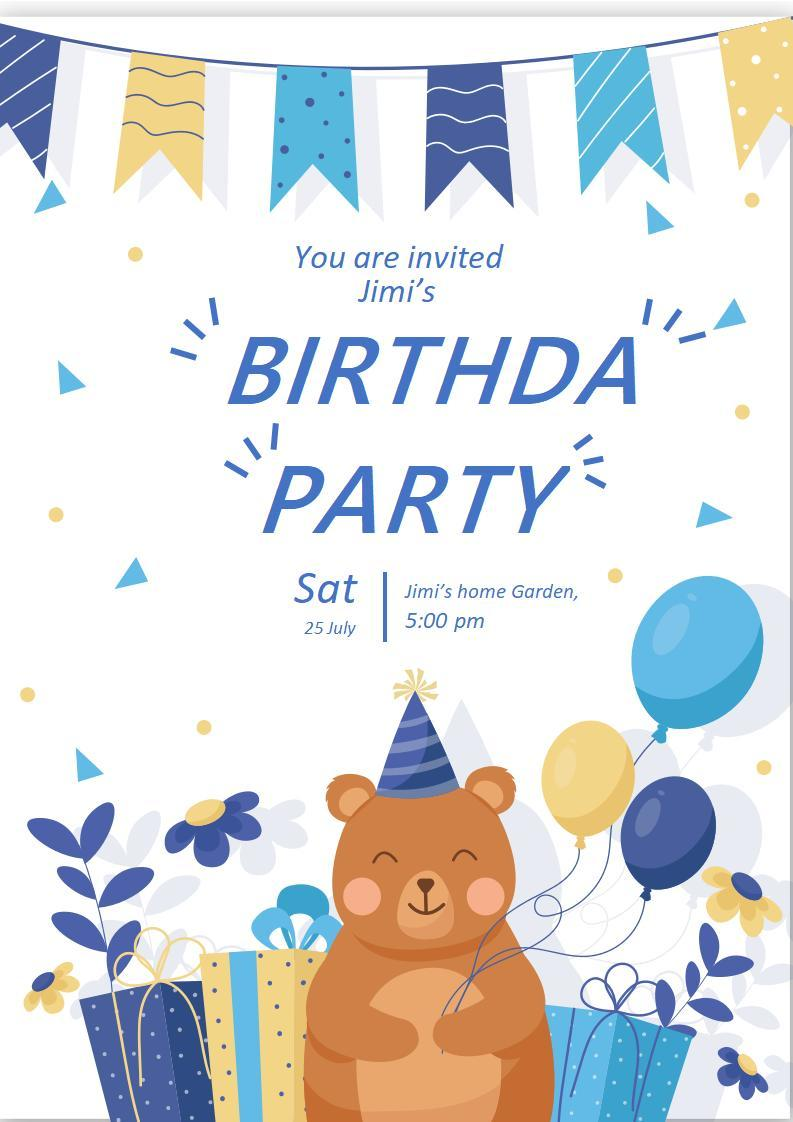
4. Blue Yellow Birthday Party Invitation Flyer
This one has to be my favorite card of all time. I mean, just look at it, it is downright adorable with the bear, and the color scheme is one of my favorites. This Blue Yellow Birthday Party Invitation Flyer is the perfect addition to your birthday party essentials, with its bright blue and yellow accents that are bold but muted enough not to be too harsh on the eyes. You can mention your name, the date, time, and venue of the event. Your guests are going to be as happy as the bear in the birthday hat on the card when they receive this invite.
Template Highlights
Bold color scheme with youthful vibe
Flyer-style design for informal celebrations
Eye-catching and fun layout
Easily shareable as an image or a PDF
Perfect for parties with energetic themes
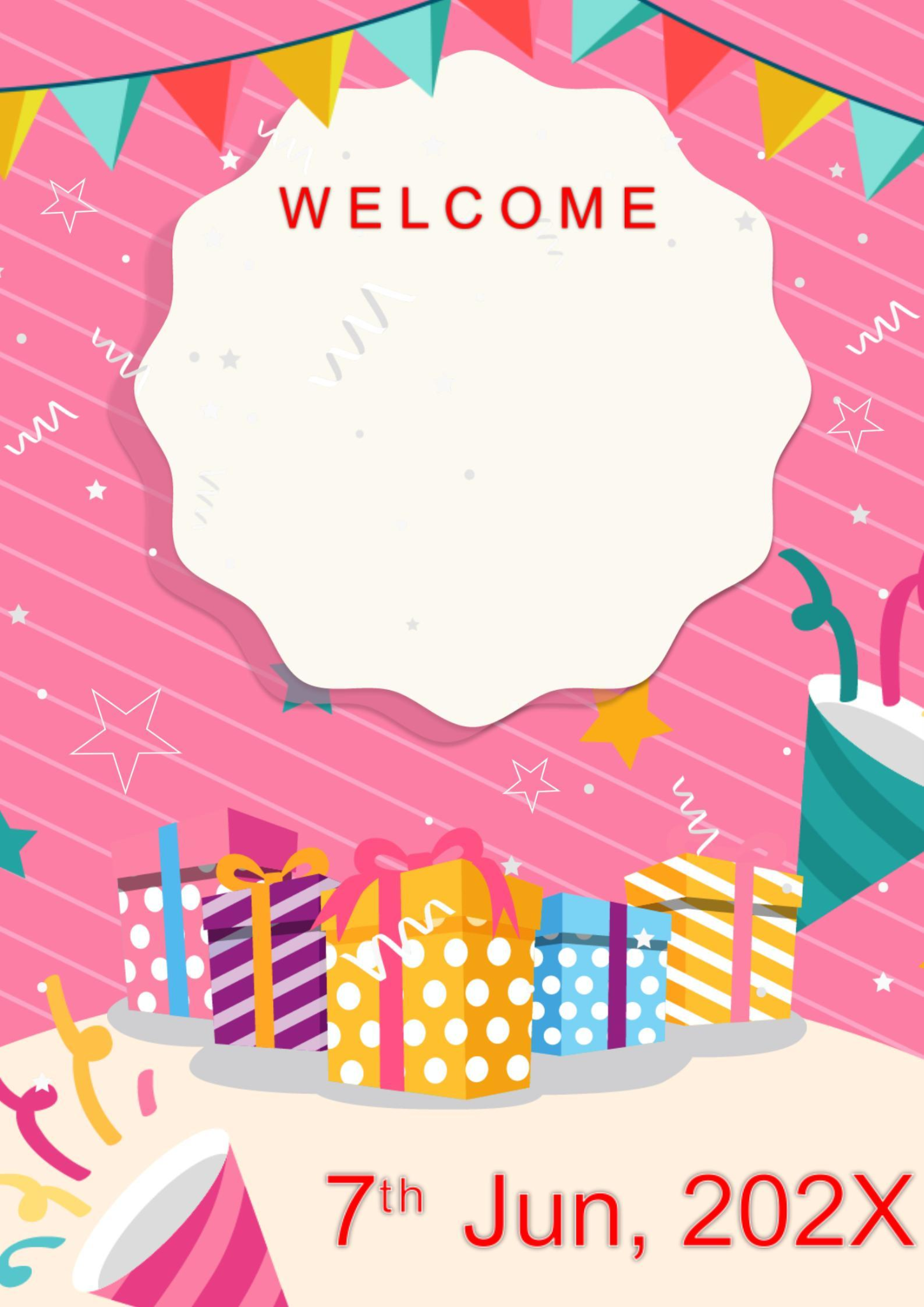
5. Pink Gift Birthday Invitation
And to finish up our selection of WPS templates, we have the most vibrant one of all. This Pink Gift Birthday Invitation is festive, playful, and bold in all the right ways. The card gives you an open field to play around with. All it does is help you along in the design aspect, and the rest it leaves to you. You can customize this one to include anything, including your name, the event date, time, and venue, the recipient’s name, and a little message from you to tie it all together. The colorful row of gifts at the bottom and the strings of banners at the top make it a celebration the minute this invitation is sent out.
Template Highlights
Bright pink tones for a fun, feminine vibe
Gift-box theme makes it festive instantly
Customizable for casual or formal events
Balanced design that’s visually engaging
Works well for both e-vites and printed copies
Website 2: Greetingsisland
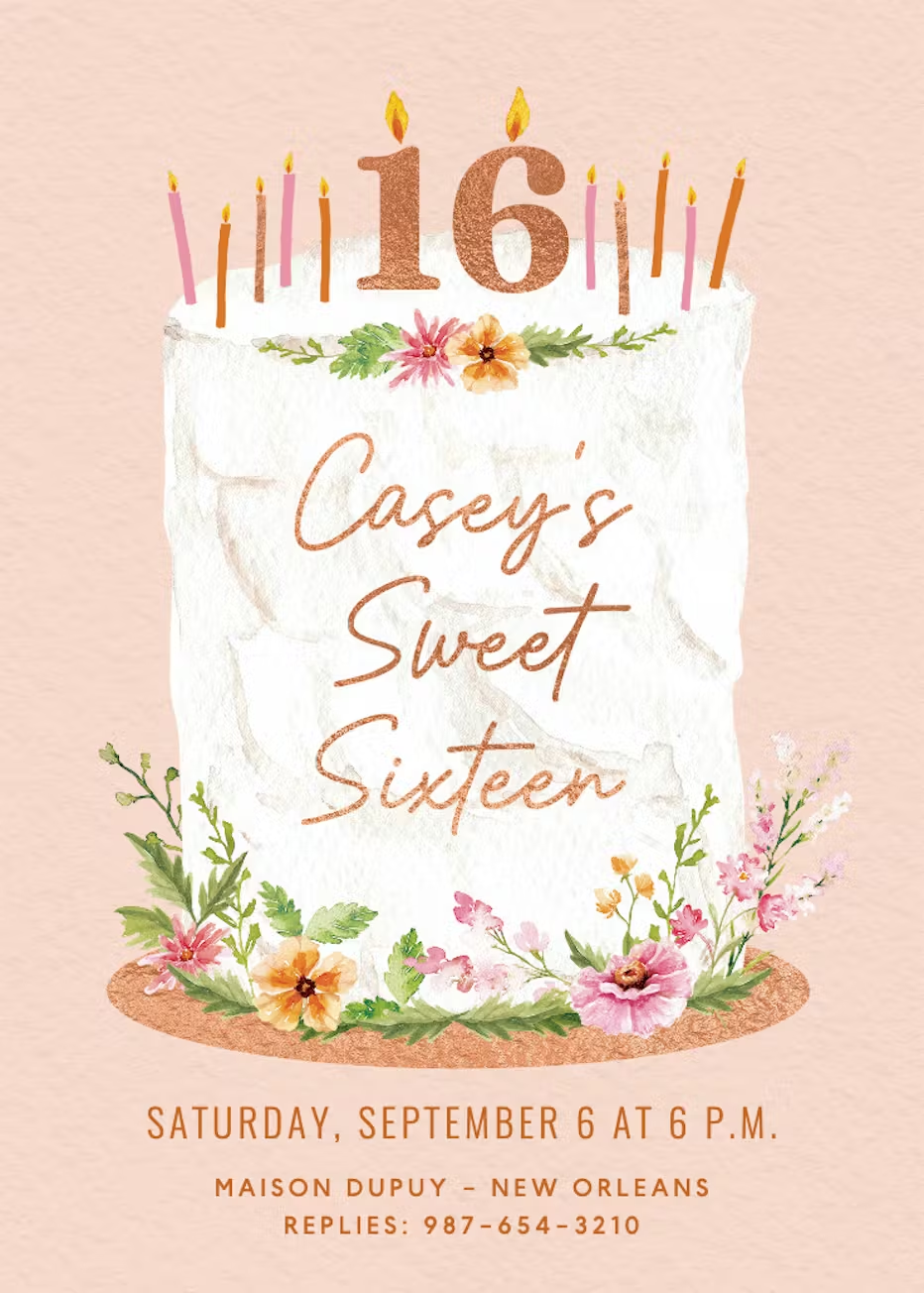
1. Tiered Cake
If you’re about to have yourself a Pinteresty birthday party, then you can’t go wrong with this Tiered Cake invite. The muted rustic tones and the peachy backdrop, complete with the textured plain cream cake in the center, make it a classic yet timeless design that pairs well with any birthday party theme. So if you want to play it safe, this one should be your pick. You can mention your name along with the “sweet 16” message, the date and time of the event, as well as the venue at the very bottom. This one requires the least amount of editing as it is tailor-made to fit the sweet 16 birthday vibe.
Template Highlights
Classic cake illustrationas a focal point
Cheerful design that suits all guests
Easy to personalize with name/date details
Works for casual and formal gatherings
Printable or shareable as e-vite
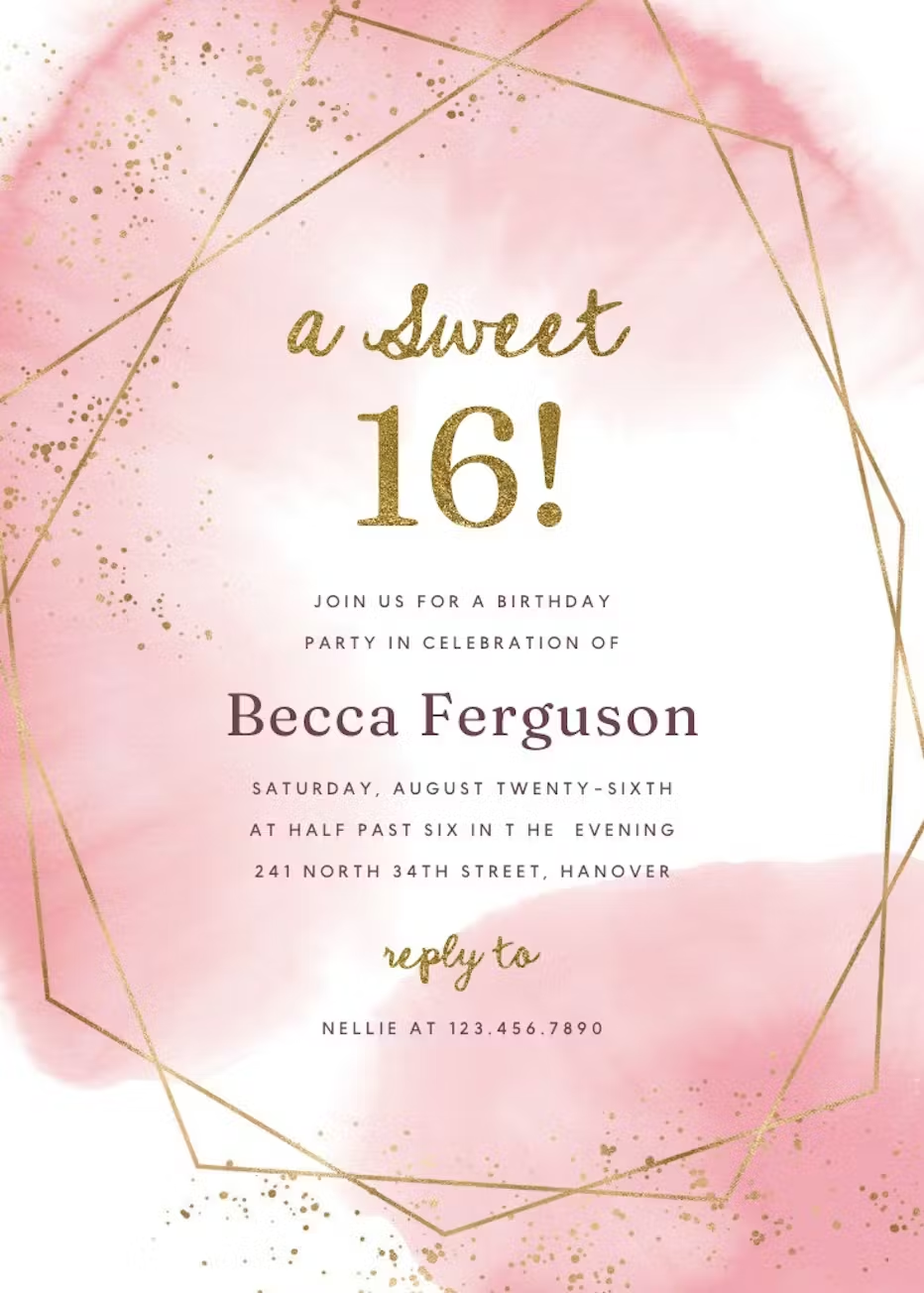
2. Gold Polygon
Nothing says princess like pink and gold, and this Gold Polygon template is definitely meant for royalty with its splashes of soft pink and gold geometric accents along the sides to give it a chic and modern but still elegant look. The card features a sweet 16 slogan right in the center, which means it doesn’t need much editing. All you have to do is mention your name, the event date, time, venue, and add the RSVP contact information, and it’s ready to send out. It doesn’t get easier than this.
Template Highlights
Sleek geometric gold accents for modern appeal
Elegant typography for formal invites
Great for black-tie or upscale events
High-resolution for professional printing
Available in multiple formats (PDF or image)
3. Rose Gold Glitter
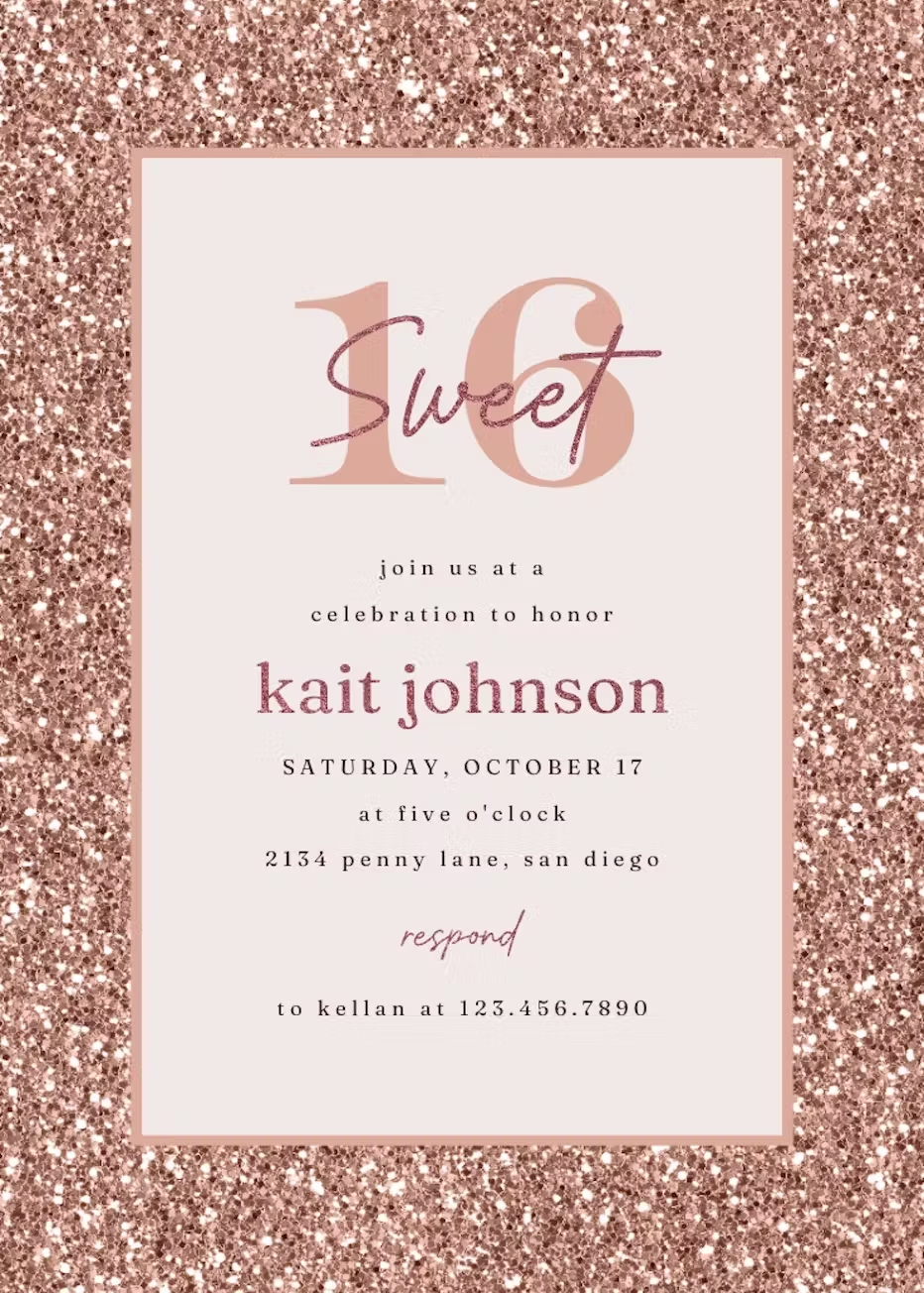
This card is every girl’s dream invite for their sweet 16. Rose Gold Glitter template features a sparkly, glimmering soft rose gold border, adding the perfect amount of dazzle and charm to the card, which perfectly complements the muted greys and pinks in the center. The template doesn’t need much work either because it is designed for a sweet 16 birthday party and mentions that at the very top. You can mention your name, the event date, time, venue, and RSVP contact information at the very bottom.
Template Highlights
Rose gold glitter effect for a luxe look
Glamorous yet modern invitation style
Great for chic or upscale birthday themes
Works beautifully on glossy prints
Quick customization online or in WPS
4. Sweet 16
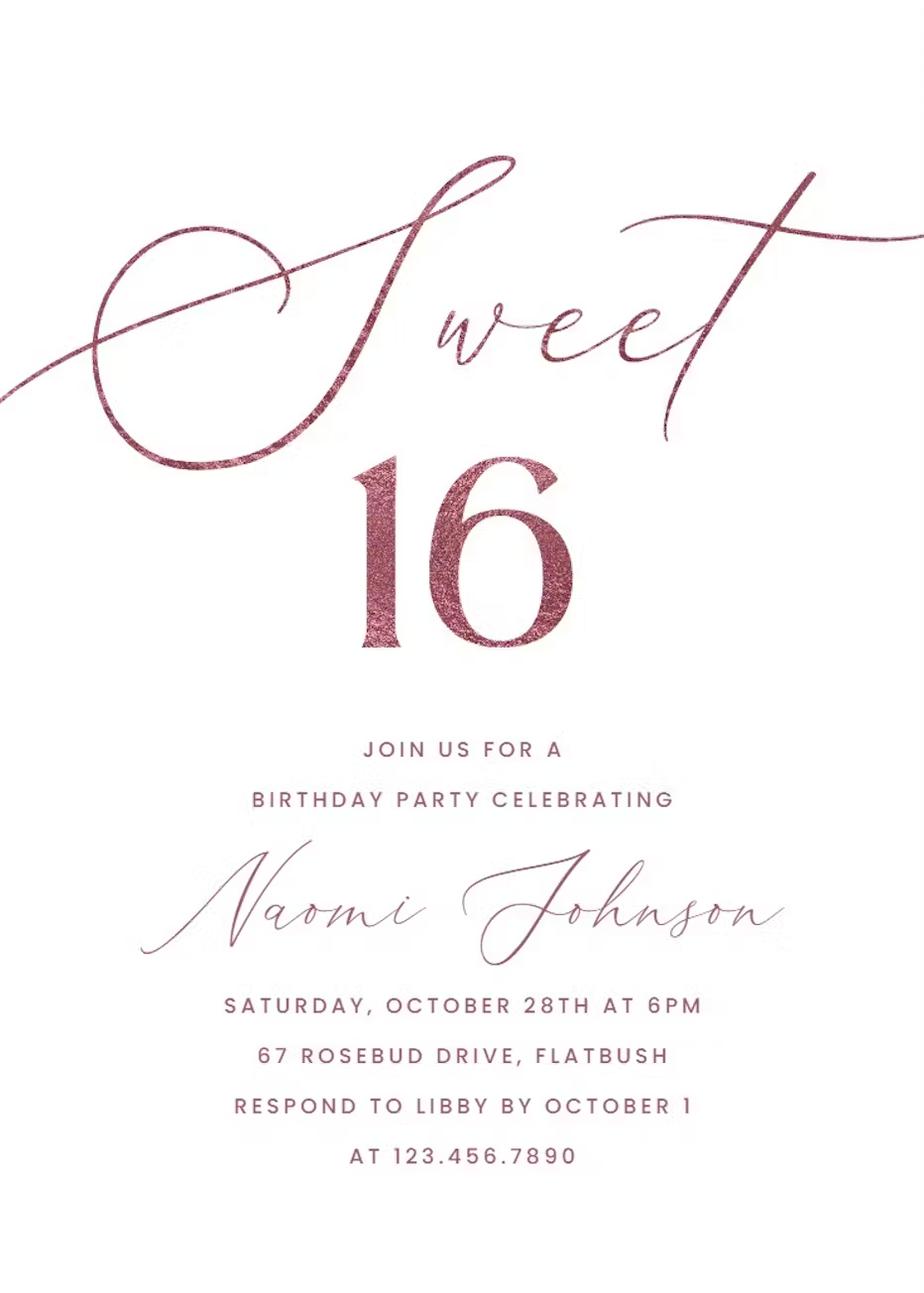
The name says it all. This Sweet 16 template is meant for people who prefer things simple, light, and joyful. It’s elegant without being boring because the soft pink backdrop with the slight glitter in the “Sweet 16” slogan adds a touch of warmth and softness to it, and the mauve tones in the text bring a nice balance to the pinks where a deeper tone might be a little too jarring. You can mention your name, event date, time, venue, and RSVP contact information on the card, and it's ready to go.
Template Highlights
“Sweet 16” lettering as central focus
Stylish layout designed for a milestone event
Easy editing for quick setup
Versatile for formal or casual gatherings
Available as digital invite or print card
5. Luxe Balloons
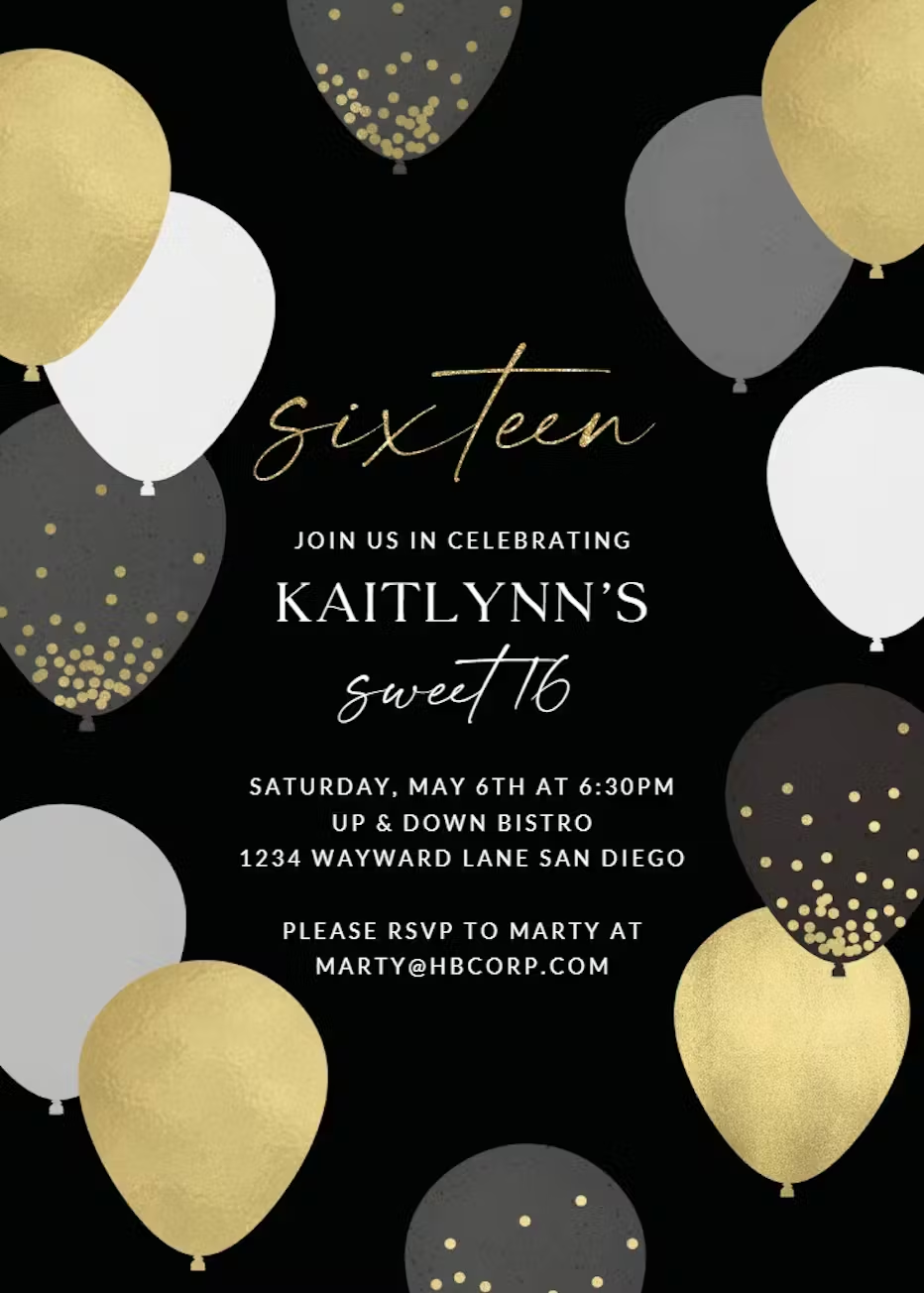
This template is for anyone who loves a touch of sophistication. It’s classy, it’s elegant, and it looks effortlessly high-end. The Luxe Balloons template makes elegant work of gold, black, white, and grey colored balloon accents along the border. It’s festive in a “black tie event” sort of way, and that is exactly what sets it apart from the others. Much like most of our selection from GreetingsIsland, this one says sweet 16 right in the center and only requires you to fill out the information, such as your name, the event date, time, venue, and RSVP contact information.
Template Highlights
Balloon design for a festive, upbeat look
Perfect for casual or lively parties
Bright colors attract instant attention
Easy to personalize with party details
Looks great both on-screen and printed
How to Further Edit and Print Optimized Sweet Sixteen Invitation Templates with WPS
You’ve picked the right template, now you can make it yours with WPS. WPS and GreetingsIslang give you a couple of format options to download the template and no matter what format choose, whether that’s Word, PDF, or Image, you can use WPS Office as a complete editing suite to customize everything about your pick. You can change the colors, the wording, the text, and even improve clarity in a few steps and here is how.
How to Edit an Invitation Template in Word
If you’ve downloaded your template in a Word format, you can use WPS Writer to customize it to your liking, and here is how you can do that.
Step 1: The first thing you need to do is open your downloaded template using WPS Word.
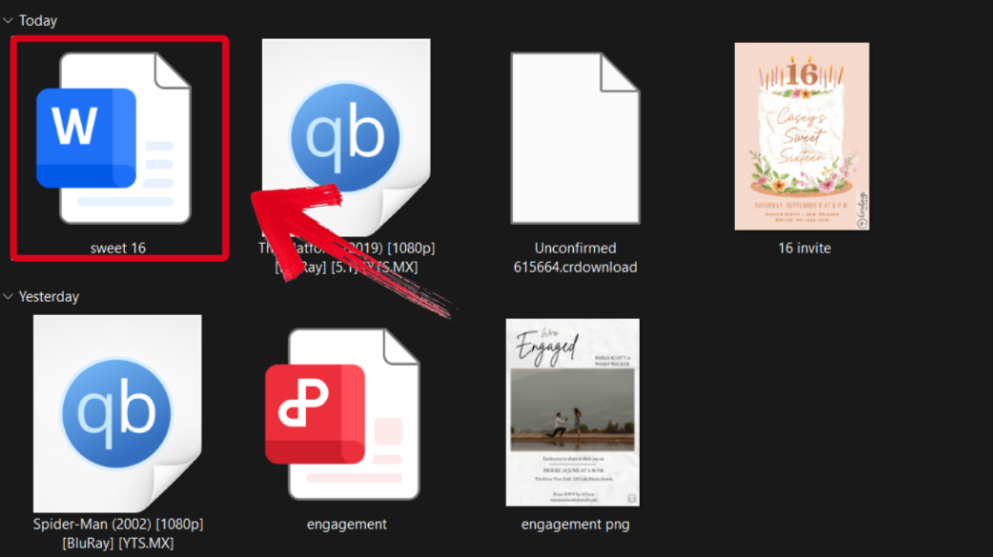
Step 2: Change the event details on the template to match yours. You can also change the body of the application and add your own personal touch to it.
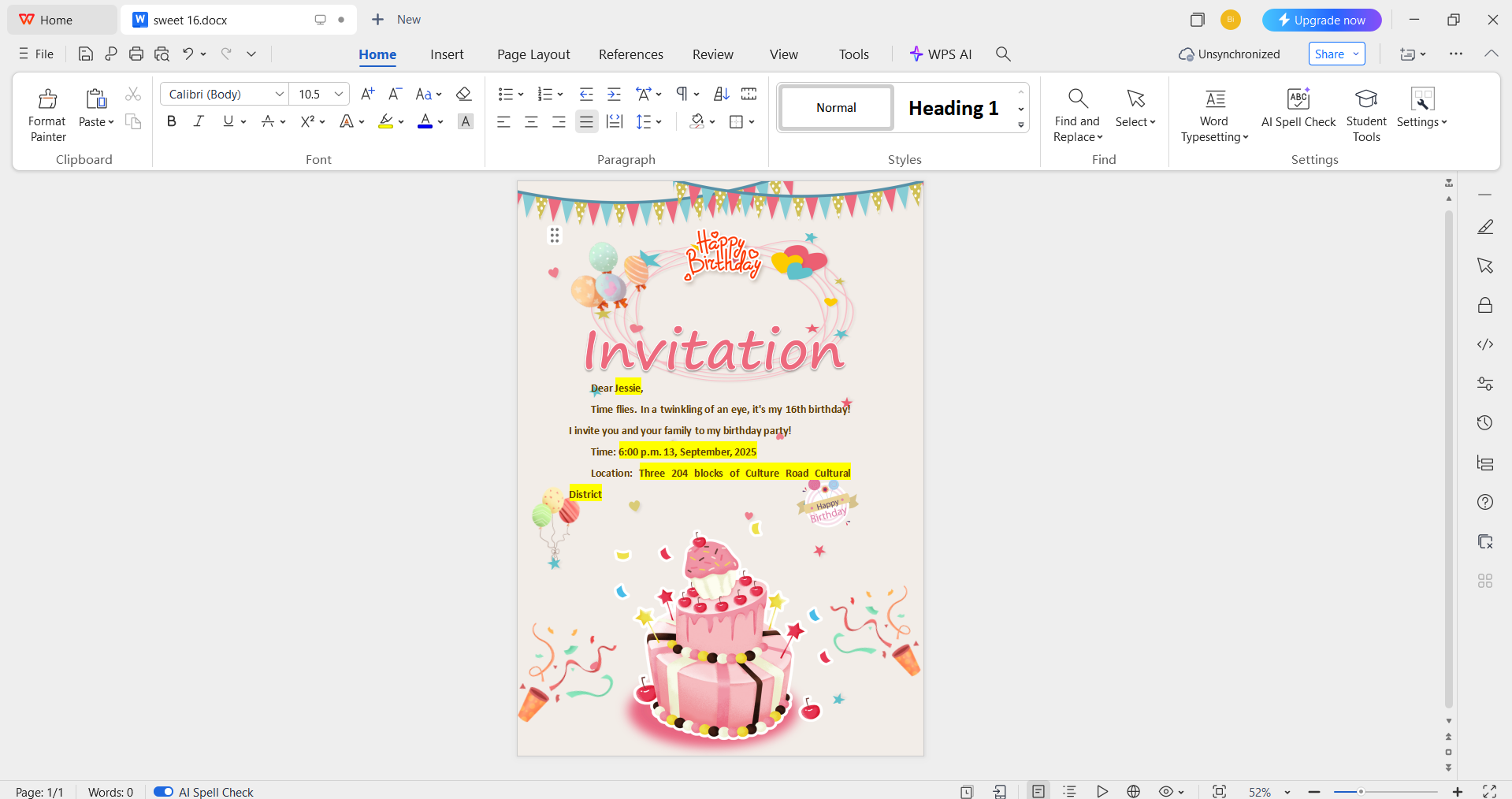
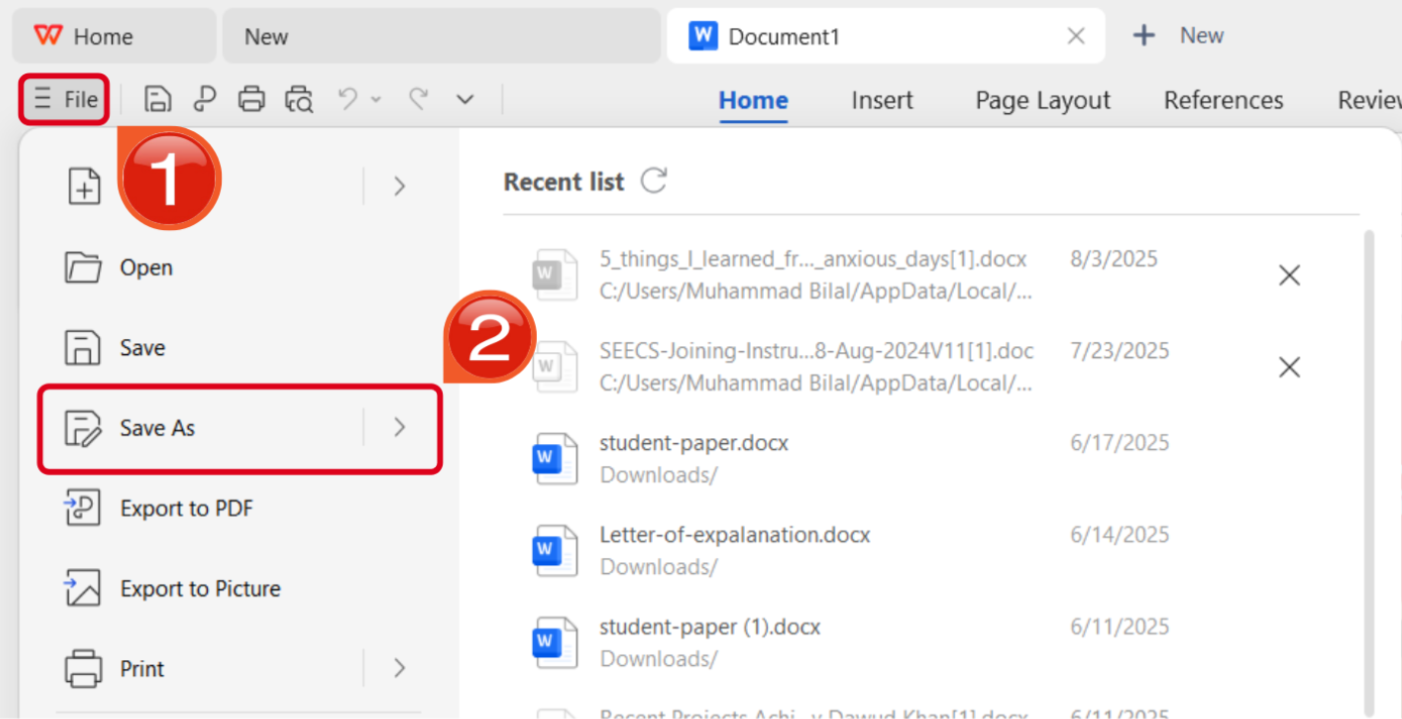
Step 3: Once you’re done editing, press theFile button in the top-left corner and then hitSave As.
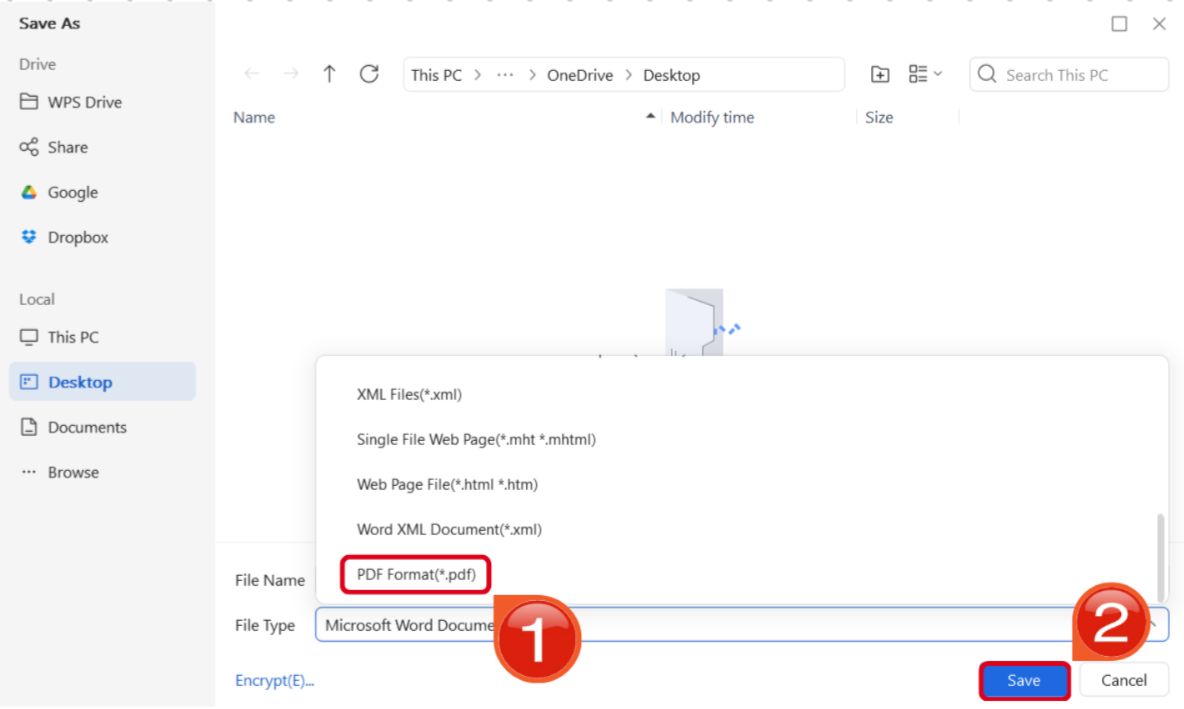
Step 4: Make sure you set the File Type to PDF, then press Saveto finish.
How to Edit Invitation Template in PDF
PDF is probably everyone’s preferred download format and here is how you can use WPS PDF Editor to make alterations to your template.
Step 1: Download the invitation template you want to use as a PDF and open it using WPS Office.
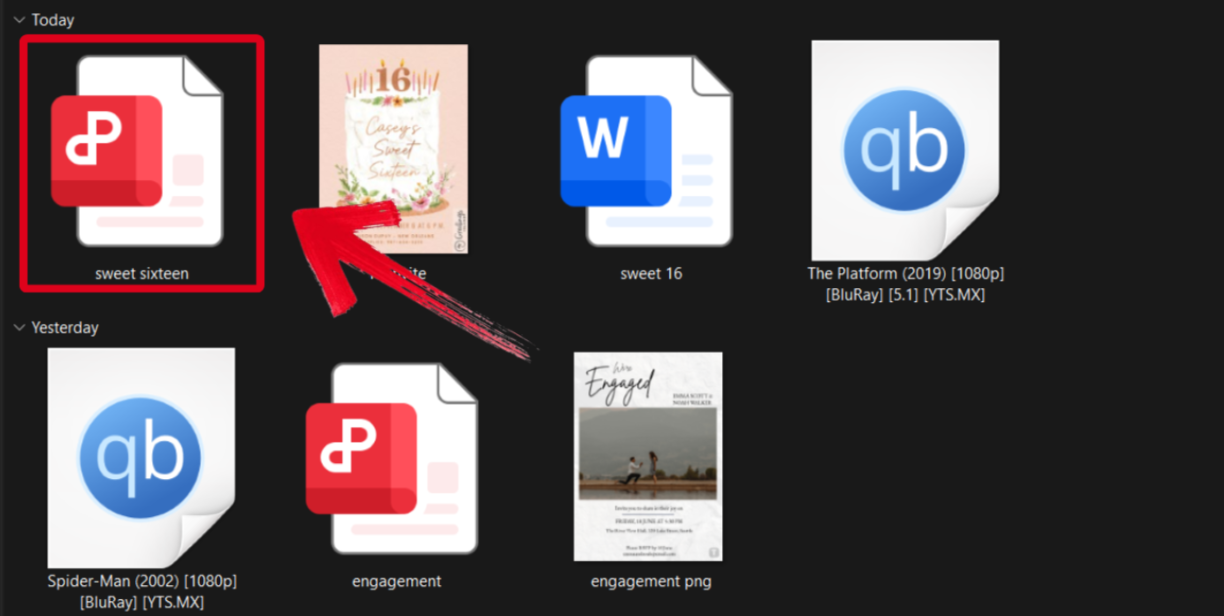
Step 2: Change the event details to match your party. You can change the font, text size, and even the color scheme using the tools provided to you.
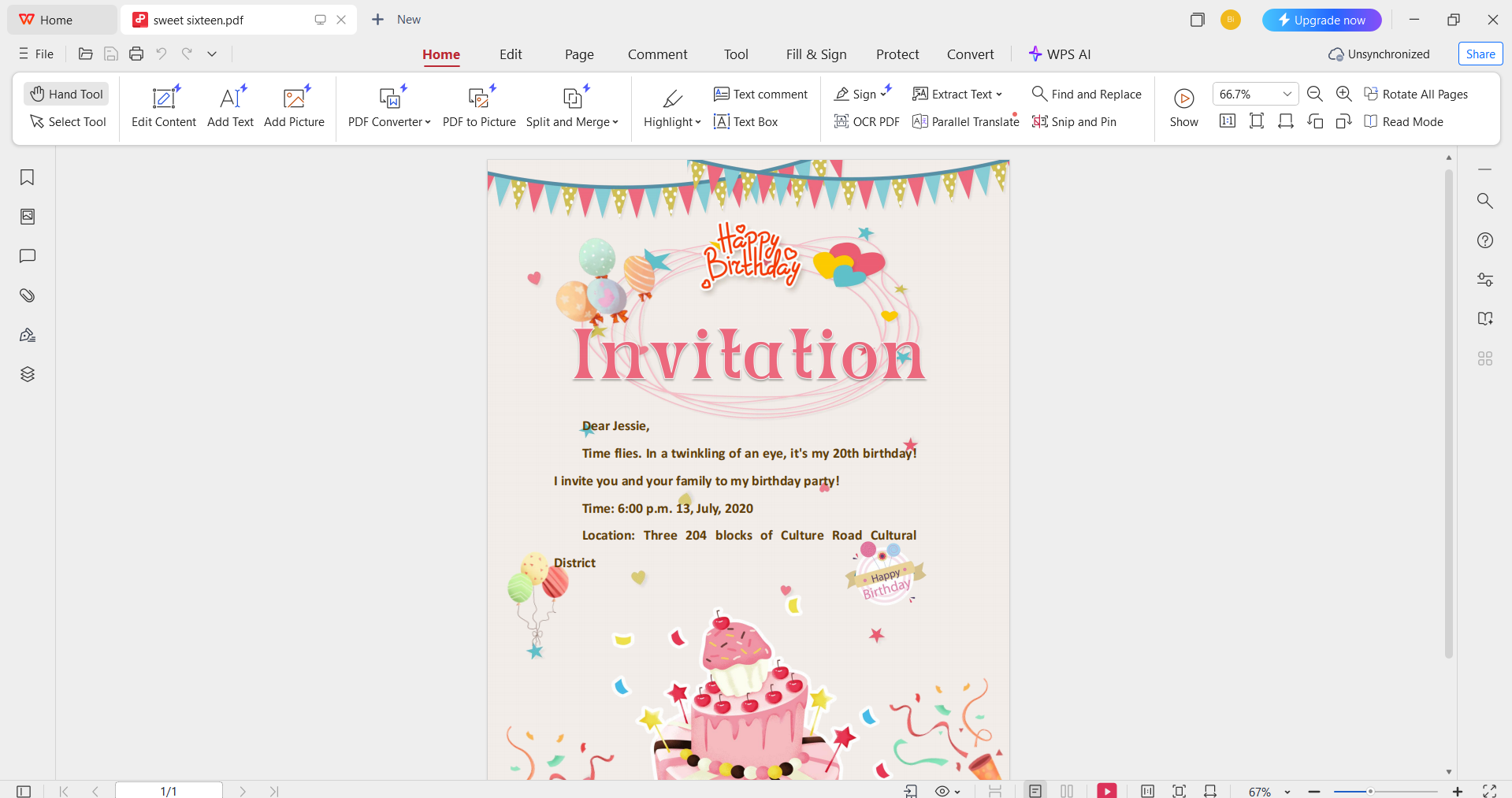
Step 3: Once you’ve finished editing, press theFile button in the top-left corner and then hitSave As.
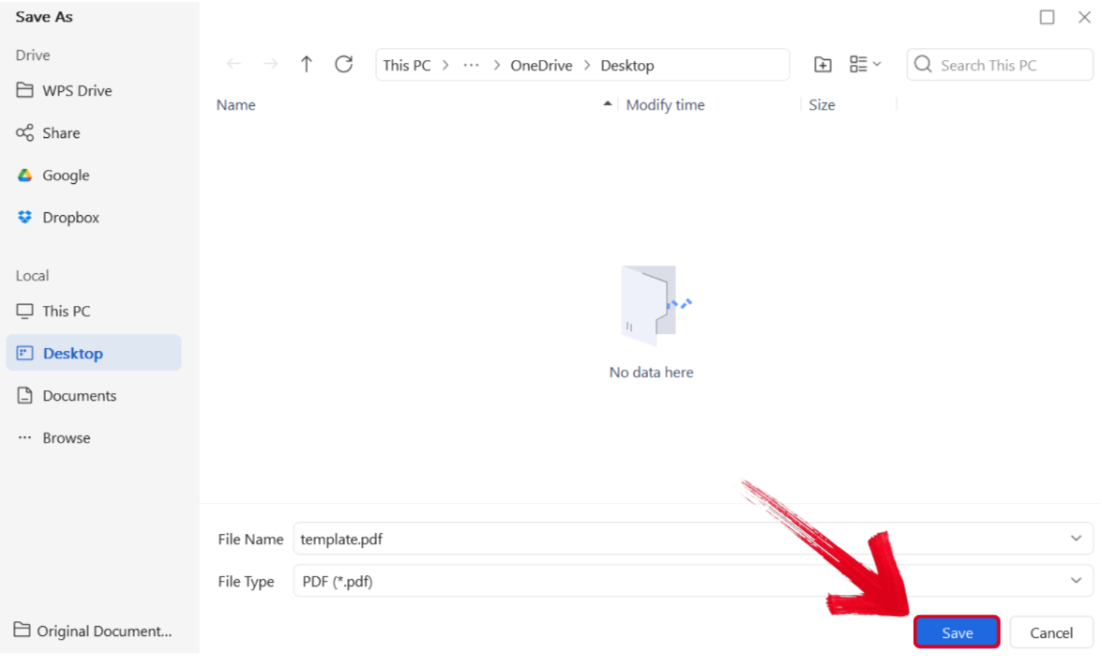
Step 4: Select the folder you want your PDF downloaded to, then press Save.
How to Edit Invitation Template in WPS Photo
Saving your template as a photo is a smart move if you want to get high-quality prints, and here is how you can edit the template to fit your birthday bash using WPS Photo Editor
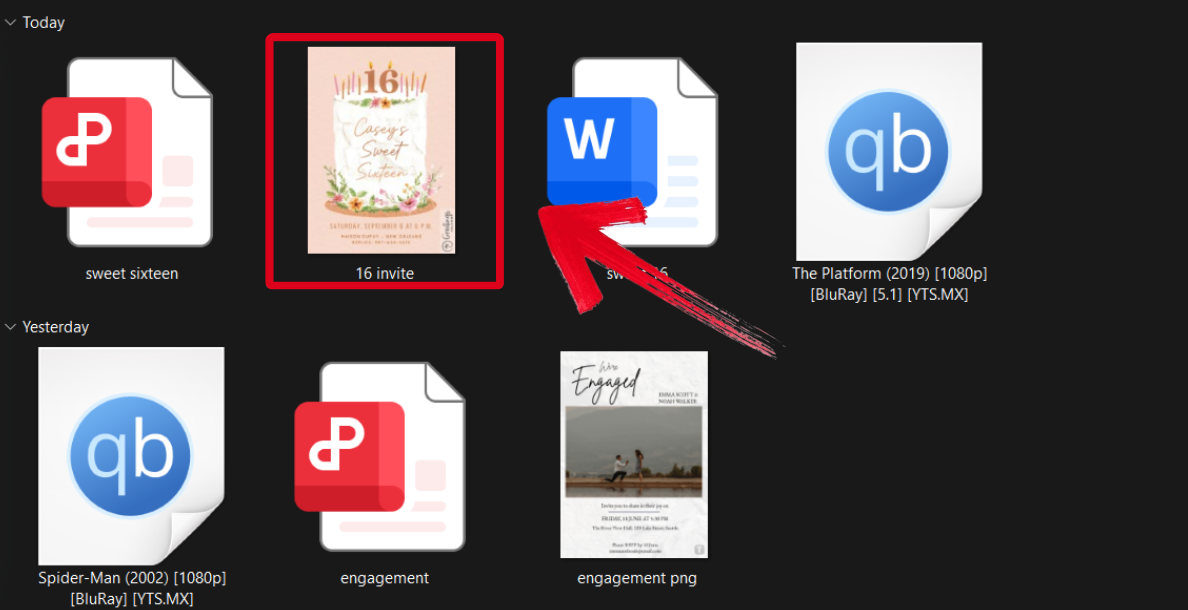
Step 1: Open the sweet sixteen invitation template you downloaded using WPS Photos to get started.
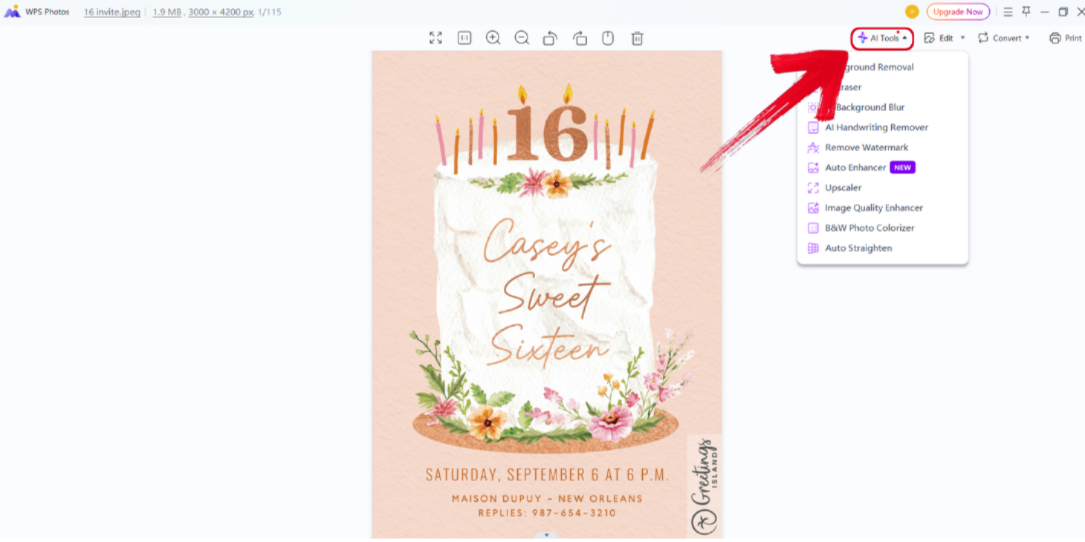
Step 2: In the WPS Photos window, you’ll see a bunch of editing tools given to you, including smart AI Toolsto help you enhance your photos.
AI Image Enhancer: Improve the quality of your image using AI enhancement.
AI Upscaler: Bring life back into old photos by restoring them through the AI upscaler.
AI Watermark Removal: If there are any watermarks on your template, you can elevate the visual appeal with the watermark removal tool.
AI Background Blur: Emphasize focus on the main subjects of your photo by blurring the background.
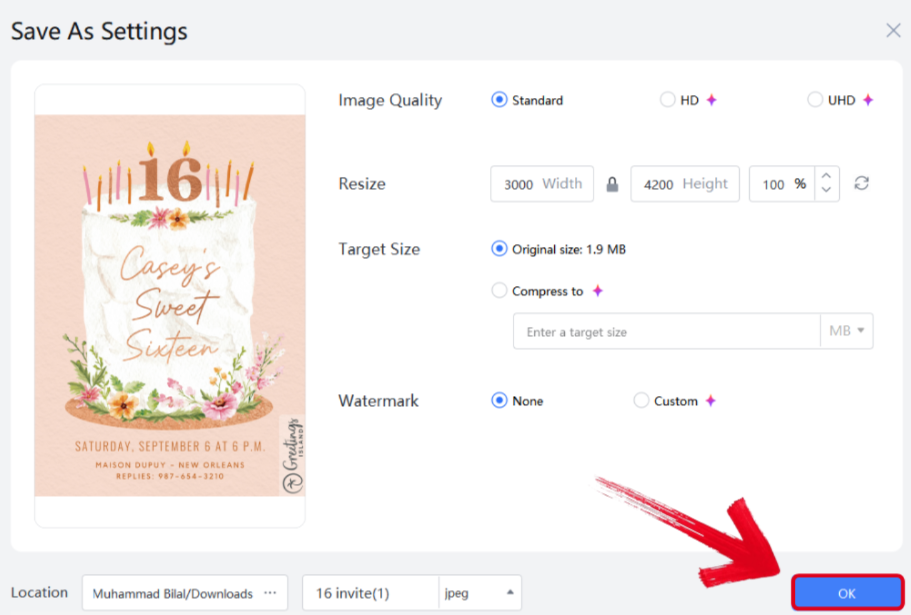
Step 3: Press Ctrl + S to open theSave As window. Adjust the image quality, size, and format, and then press OK to finish.
Free Office Suite: Create & Customize Sweet 16 Templates
So I’ve been using WPS Office for quite some time, and that puts me in a position to give you a complete assessment of what it's all about. Before WPS Office, I always found myself paying licensing fees and subscriptions for Office tools, having to download updates, and having to make space on my devices for the most basic of tools because they were heavy on the hard drive. WPS is designed different.
Not only is it super lightweight and works insanely fast no matter how many tabs and tools I have open, but it is also completely free to use. I can access all kinds of formats using one tool, whether that’s Sheets, Word, PDFs, or even images, and lets me create, edit, and format files all in one place. If I need help with a project it allows me to share my work through links and add collaborators so that my friends and I can work on one project remotely without any lag whatsoever.
It comes packed with online tools, AI tools, templates, and it works across all devices efficiently. Trust me, once I made the switch to WPS Office, I’ve never looked back.
Pros
Free to download & use
AI-powered writing assistant
Powerful PDF toolkit
Rich template store for all occasions
Cloud-based sharing & collaboration
Safe, stable, and mobile-friendly
Features
AI helps with writing: The built-in writing tools make writing easier and a lot faster because with it, you can generate text, fix grammar, rephrase sentences, and create professional content with minimal effort.
Free download and free to use Word, Excel, and PPT. Powerful PDF toolkit: You get access to all essential Office tools for free, and you can edit, convert, and merge PDFs all in one place.
Rich template store: WPS offers thousands of templates for everything, from invitations to itineraries.
Rich functions: It is packed with advanced features like formatting tools, charts, collaboration options, and much more.
Support online documents: You can create, view, and edit documents without having to install anything because it's all online.
Safe and stable: It ensures your files are protected and works without unexpected (and annoying) crashes or glitches.
Shareable editing: You can invite others to edit documents in real time.
FAQs
1. Are the sweet 16 templates on WPS Templates free to download?
Yes. All Sweet Sixteen invitation templates on WPS Templates are completely free to download and edit using WPS Office.
2. Can I customize and print invitations directly from the WPS Office?
Yes. You can personalize the template in WPS and print directly or export as a PDF for professional or home printing.
3. Does Greetings Island offer free sweet 16 templates too?
Yes. Greetings Island provides free customizable templates, but some features (like removing watermarks or downloading high-res PDFs) may require signing up or upgrading.
4. Can I edit WPS templates on mobile devices?
Absolutely. WPS Office supports editing on Android and iOS through its mobile app, allowing you to create and send invites on the go.
5. Can I share my WPS invitation via WhatsApp or email?
Yes. After customizing, export your invitation as a PDF or image and share it via any messaging app or email.
6. Do I need a design background to use these tools?
No design skills are needed for any of these platforms. WPS Templates are especially beginner-friendly, offering clean formatting and simple customization.
Celebrate Your Sweet 16 in Style: Let WPS be Your Party Planner
Your sweet 16 deserves an invitation that matches the excitement and the enormity of the occasion. You only turn 16 once, and if you’re busy making sure that the party is one to remember, then let WPS handle the invitations. You can pick out any template from the list of invitations for a sweet sixteen and let WPS make them beautifully personalized, perfectly polished, and ready to share with your friends and family.

'%3e%3cpath%20d='M19.9911%204.11386V6.471H18.5894C18.0775%206.471%2017.7322%206.57814%2017.5536%206.79243C17.3751%207.00671%2017.2858%207.32814%2017.2858%207.75671V9.44421H19.9019L19.5536%2012.0871H17.2858V18.8639H14.5536V12.0871H12.2769V9.44421H14.5536V7.49779C14.5536%206.39064%2014.8632%205.53201%2015.4822%204.92189C16.1013%204.31177%2016.9257%204.00671%2017.9554%204.00671C18.8304%204.00671%2019.509%204.04243%2019.9911%204.11386Z'%20fill='%23333333'/%3e%3c/g%3e%3cdefs%3e%3cclipPath%20id='clip0_2938_8199'%3e%3crect%20width='16'%20height='16'%20fill='white'%20transform='translate(8%204.00671)'/%3e%3c/clipPath%3e%3c/defs%3e%3c/svg%3e)
'%3e%3cpath%20d='M17.5237%2010.7813L23.4811%204H22.0699L16.8949%209.88693L12.7648%204H8L14.2469%2012.9029L8%2020.0133H9.4112L14.8725%2013.7952L19.2352%2020.0133H24M9.92053%205.04213H12.0885L22.0688%2019.0224H19.9003'%20fill='%23333333'/%3e%3c/g%3e%3cdefs%3e%3cclipPath%20id='clip0_2938_8200'%3e%3crect%20width='16'%20height='16.0134'%20fill='white'%20transform='translate(8%204)'/%3e%3c/clipPath%3e%3c/defs%3e%3c/svg%3e)


