

'%3e%3cpath%20d='M8%200C12.4183%200%2016%203.58172%2016%208C16%2012.4183%2012.4183%2016%208%2016C3.58172%2016%200%2012.4183%200%208C0%203.58172%203.58172%200%208%200ZM11.6162%204.38379C11.2257%203.99337%2010.5927%203.99338%2010.2021%204.38379L8%206.58594L5.79785%204.38379C5.40732%203.99334%204.77429%203.99329%204.38379%204.38379C3.99331%204.77429%203.99335%205.40733%204.38379%205.79785L6.58594%208L4.38379%2010.2021C3.99348%2010.5927%203.99341%2011.2257%204.38379%2011.6162C4.77426%2012.0066%205.40734%2012.0065%205.79785%2011.6162L8%209.41406L10.2021%2011.6162C10.5927%2012.0066%2011.2257%2012.0067%2011.6162%2011.6162C12.0067%2011.2257%2012.0066%2010.5927%2011.6162%2010.2021L9.41406%208L11.6162%205.79785C12.0066%205.40735%2012.0066%204.77429%2011.6162%204.38379Z'%20fill='%23080E17'%20fill-opacity='0.46'/%3e%3c/g%3e%3cdefs%3e%3cclipPath%20id='clip0_3761_713'%3e%3crect%20width='16'%20height='16'%20fill='white'/%3e%3c/clipPath%3e%3c/defs%3e%3c/svg%3e)




'%3e%3cpath%20fill-rule='evenodd'%20clip-rule='evenodd'%20d='M21.4999%2010.9993C21.4999%205.20009%2016.7986%200.498901%2010.9993%200.498901C5.19994%200.498901%200.498657%205.20009%200.498657%2010.9993C0.498657%2016.2404%204.33858%2020.5844%209.35855%2021.3722V14.0346H6.69238V10.9993H9.35855V8.68594C9.35855%206.05427%2010.9262%204.60062%2013.3248%204.60062C14.4736%204.60062%2015.6753%204.80571%2015.6753%204.80571V7.38979H14.3512C13.0468%207.38979%2012.64%208.19921%2012.64%209.0296V10.9993H15.5523L15.0867%2014.0346H12.64V21.3722C17.66%2020.5844%2021.4999%2016.2404%2021.4999%2010.9993Z'%20fill='%231568EA'/%3e%3c/g%3e%3c/svg%3e)


'%3e%3cpath%20d='M2.42045%2022.1876H6.31818V12.7217L0.75%208.54553V20.5171C0.75%2021.4414%201.49892%2022.1876%202.42045%2022.1876Z'%20fill='%234285F4'/%3e%3cpath%20d='M19.682%2022.1876H23.5797C24.5041%2022.1876%2025.2502%2021.4387%2025.2502%2020.5171V8.54553L19.682%2012.7217'%20fill='%2334A853'/%3e%3cpath%20d='M19.682%205.48293V12.7216L25.2502%208.54543V6.31816C25.2502%204.25236%2022.8921%203.07469%2021.2411%204.31361'%20fill='%23FBBC04'/%3e%3cpath%20d='M6.31824%2012.7217V5.48303L13.0001%2010.4944L19.6819%205.48303V12.7217L13.0001%2017.733'%20fill='%23EA4335'/%3e%3cpath%20d='M0.75%206.31816V8.54543L6.31818%2012.7216V5.48293L4.75909%204.31361C3.10534%203.07469%200.75%204.25236%200.75%206.31816Z'%20fill='%23C5221F'/%3e%3c/g%3e%3cdefs%3e%3cclipPath%20id='clip0_2954_7305'%3e%3crect%20width='24.5'%20height='18.375'%20fill='white'%20transform='translate(0.75%203.8125)'/%3e%3c/clipPath%3e%3c/defs%3e%3c/svg%3e)


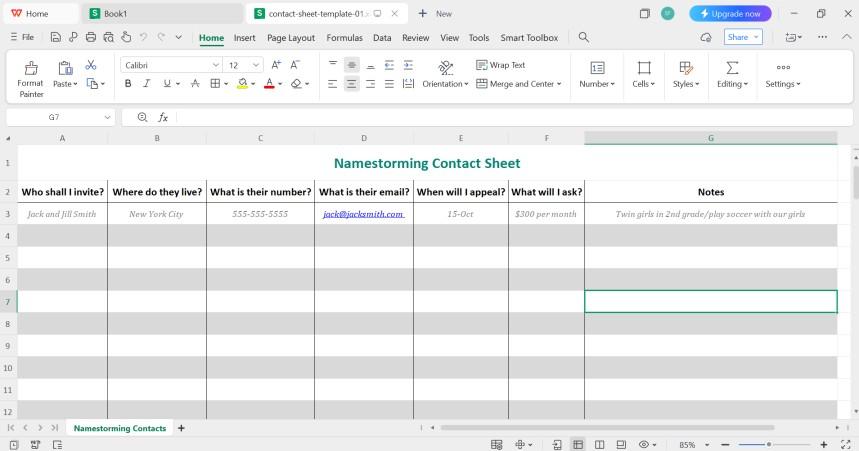
I've managed so many team projects, client lists, and even school events where keeping track of people is the most important part. But trying to create a contact sheet manually is a total time-waster, and it's just so easy to make errors or miss someone. Thankfully, you don't need to start from scratch, as there are plenty of free, ready-to-use contact sheet templates. To solve this, I'll share my 10 favorite Word & Excel templates and show you exactly how I edit and print them using WPS Office.
How to Create a Contact Sheet Template
First, let's get on the same page. A "contact sheet" can mean a few things, but for us in the office, it's all about information.
What is a Contact Sheet Template?
A contact sheet template is a pre-structured document, either a Worddoc or an Excel sheet, that's already set up with all the right columns. Its entire purpose is to give you a uniform way to collect and organize contact information. When you use one, everyone's details are in the same format, in the same place. It's a simple idea, but it's a massive lifesaver for an organization.
What Should Be Included?
When I'm setting up a new sheet, I find there are a few non-negotiables.
You've got to have the basics, like their Full Name.
You absolutely need a Phone Number. I usually like to add two columns: 'Mobile' and 'Work' to be clear.
An Email Address is a must-have for any professional communication.
I also find it really helpful to have a column forAddress or Company/Role, depending on what I'm using the list for.
Always add a 'Notes' column. This is my secret weapon for little reminders, like "Assistant's name is Jen" or "Prefers text over email". It makes managing relationships so much easier.
10 Free Contact Sheet Templates [Download & Edit]
Alright, let's get to the good stuff. I've pulled together 10 fantastic, free templates, five for Excel and five for Word. Whether you're a spreadsheet person like me or prefer a classic document, you'll find something here. Finding a good contact sheet template Word & Excel file online can be a pain, so I've put the best ones right here.
Excel Templates
I’ve found these 5 Exceltemplates to be the most helpful. It covers from general to more specific industry-oriented templates.
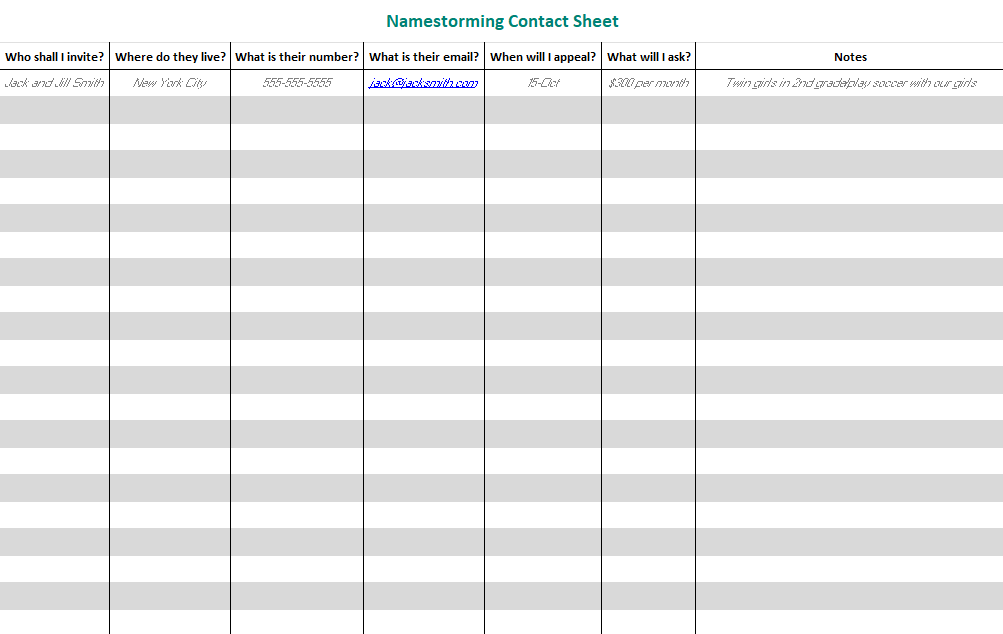
1. Contact Sheet Template Excel 1
This is a great, all-purpose Excel template. Since it’s an Excel template, you can put a large amount of information into it and easily search for anything later on. It's clean, has all the essential fields, and is perfect for a master client or employee list. It's the perfect template for a non-profit, a school fundraiser, or any personal project where you're "namestorming" who to contact and what your "ask" will be.
2. Contact Sheet Template Excel 2
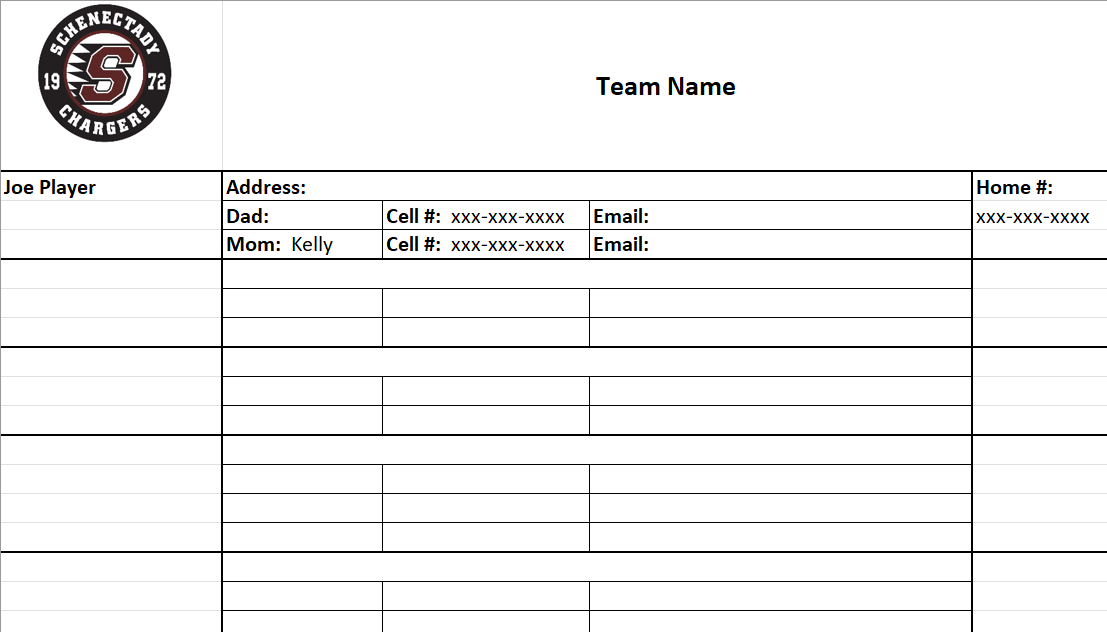
This templateis comparatively simpler. Compared to the previous template, it has a black and white grid with important details like address and parents' information. It's perfect if you’re a teacher or a coach of a team, as it has all the important details all in one place.
3. Contact Sheet Template Excel 3
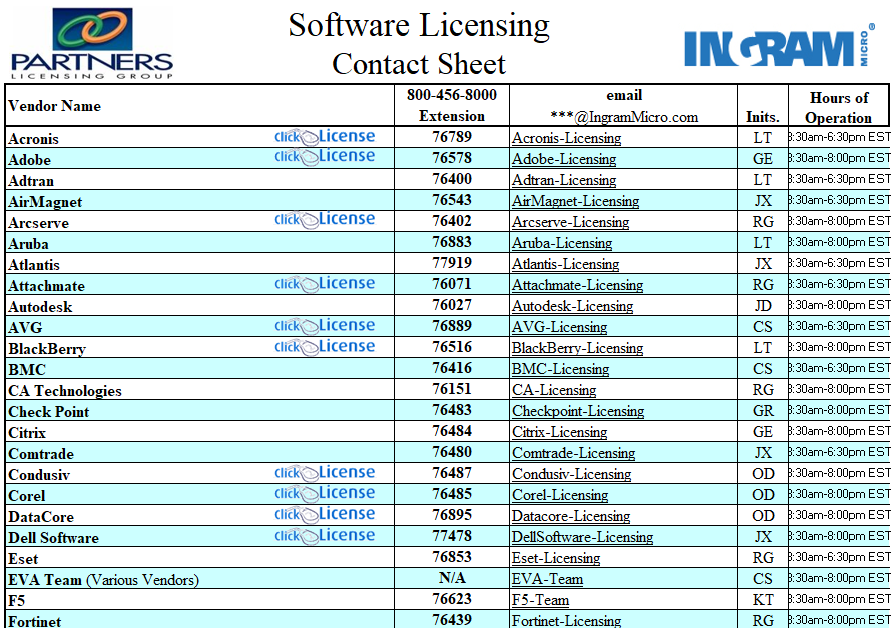
This templateis structured as a formal corporate directory, not a simple blank log. The design is built to be dense but readable, using alternating blue and white rows and placeholders for corporate branding. What's completely unique is that it's built for B2B vendor management. It has highly specific columns like a "click License" hyperlink, a phone "Extension", and even "Hours of Operation". This is the perfect structure for an IT department to build a master list of all their software vendors.
4. Contact Sheet Template Excel 4
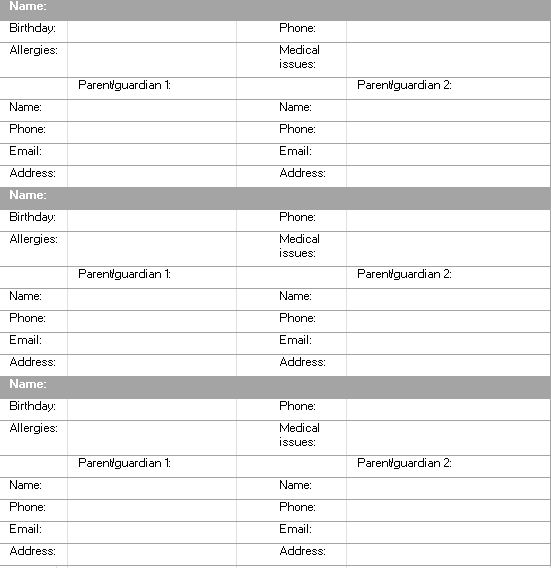
This templateis built as a repeating block of information, which is a very smart structure. The design is minimalist, with dark grey headers separating each block, making it very easy to read on a printout. This is the perfect, essential template for any school, daycare, or kids' camp.
5. Contact Sheet Template Excel 5
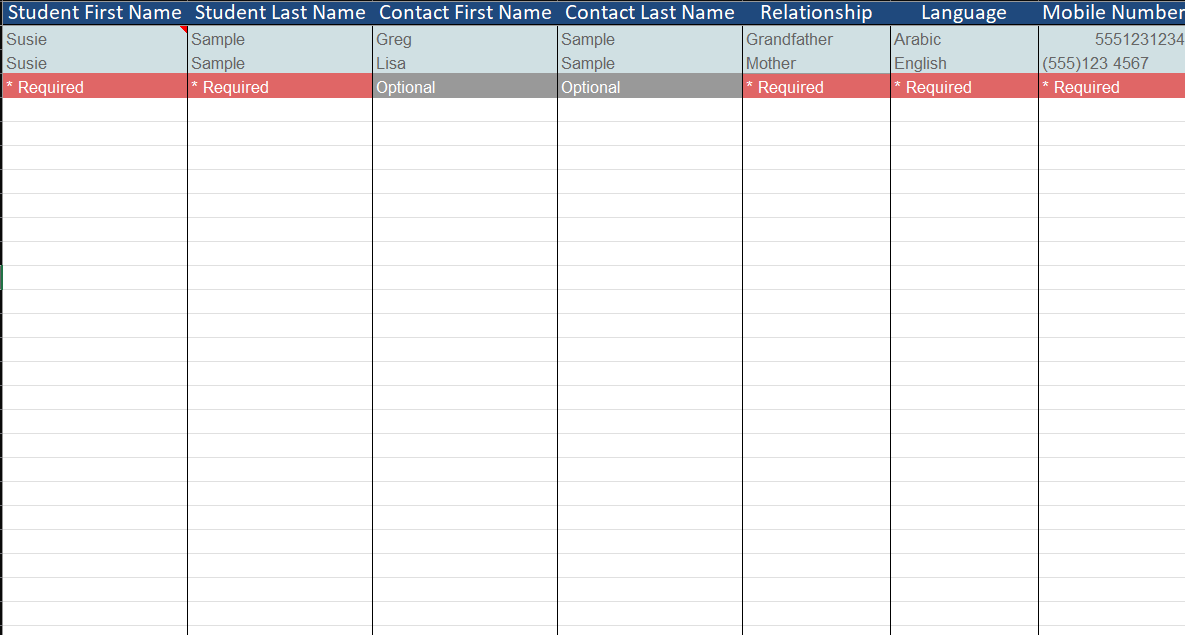
I find this templateis really well-organized, especially for collecting detailed records. It's a clean spreadsheet with a dark blue header. The most unique and helpful feature is the color-coded guide right below the header, which uses red and grey to mark which fields are "Required" and "Optional". This is a great way to ensure you get all the critical info. Making it perfect for any situation where you need to track detailed contact information for a large group.
Word Templates
Now let’s look at some free contact sheet templates you can use in Word. These are perfect if you want simple printable lists.
6. Contact Sheet Template Word 1
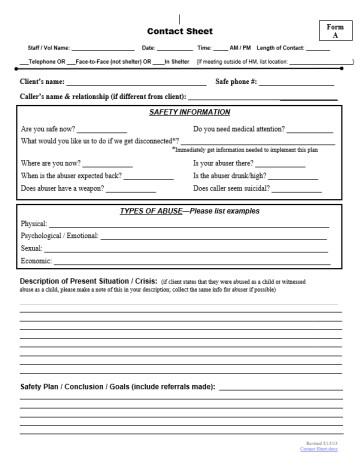
This is a very serious and professional template, and it's clear it's not for standard business use. It's structured as a formal intake document and uses a clean, black-and-white layout of fields and lines. The unique features are the critical intake questions. It has a large "SAFETY INFORMATION" box with urgent questions. It also has dedicated sections for "TYPES OF ABUSE" and a final"Safety Plan / Conclusion / Goals". This is an essential, professional template clearly designed for a crisis hotline, a social worker, or a shelter.
7. Contact Sheet Template Word 2
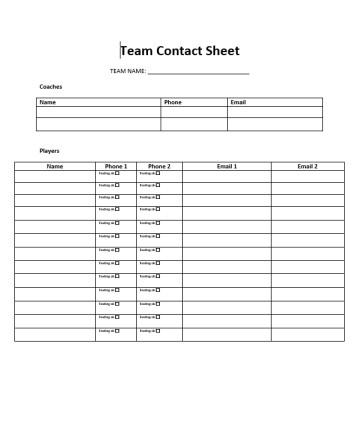
This is a simple, black-and-white designthat's perfectly organized for a sports team. The most unique feature is how it's split into two distinct tables: one for"Coaches" and a more detailed one for"Players". This player section is great, offering fields for "Phone 1" and "Phone 2"(each with a "Texting ok" checkbox), which is ideal for listing both player and parent info. This is the perfect template for any coach.
8. Contact Sheet Template Word 3
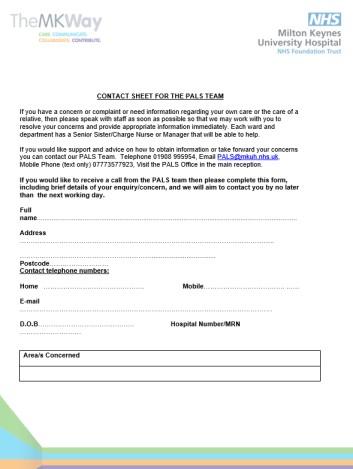
Another templatethat could be used by a team or a school. But the good thing about this one is that it’s more elaborate than the other templates, covering from basic details like your date of birth to your personal healthcare provider; it really doesn’t leave any room for flaws.
9. Contact Sheet Template Word 4
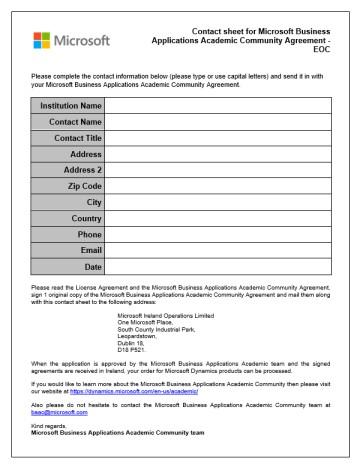
This one is a very formal, official document, not a templatefor building a contact list. It's structured as a single-use application form. The design is a simple, black-and-white table, but it's clearly for only one applicant, asking for details like'Institution Name' and 'Contact Title'. The rest of the page is filled with legal text and instructions on where to mail the form. This is the perfect example of a corporate registration sheet, not a general contact log.
10. Contact Sheet Template Word 5
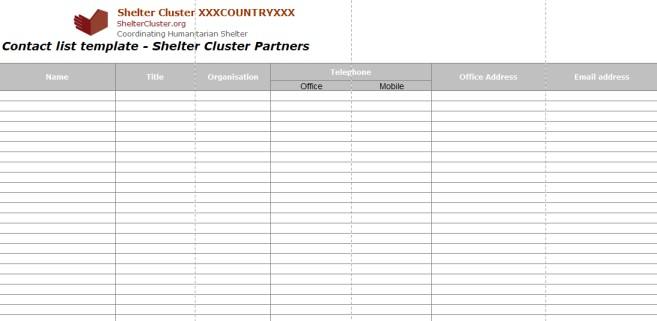
This templateis perfectly built for professional, inter-organizational use. It’s got a clean, wide-format grid and a simple grey header. The most important feature is the prominent "Organisation" column, which shows it’s designed to track external partners, not just individuals. I also really like the practical touch of splitting the "Telephone" column into "Office" and "Mobile". This is the ideal template for any program manager or non-profit needing to manage a list of partner organizations.
How to Edit and Print Contact Sheet Templates
If you’ve reached here, then I'm assuming that you've picked your favorite and want to start editing it. Below, I’ll go over how to edit these templates in both WPS Spreadsheet and Writer.
Edit in WPS Excel (for XLS templates):
You'll use WPS Spreadsheet for this. It's just as powerful as Excel.
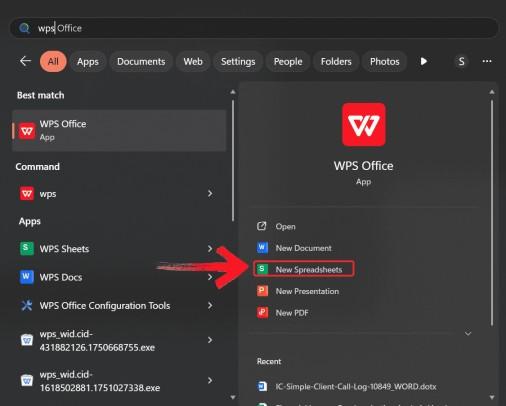
Step 1: First, open WPS Spreadsheet from the start menu.
Step 2: Then, open the template you want to edit in the WPS Spreadsheet. Click on the file icon on the top left of your ribbon.

Step 3: Now, just click on any text you want to change. You can add or delete columns, change fonts. whatever you need.
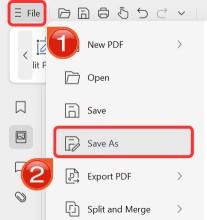
Step 4: Finally, when you’re done, click on file and then click Save As to download this poster onto your device.
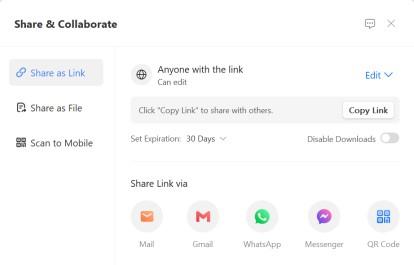
Step 5: You can also share the link to your document with others to enable collaborative work in case they want to make their own changes as well.
Edit in WPS Word (for DOC templates):
Editing the template in WPS Writer is similar as well.
Step 1: First, open WPS Writer from the start menu.
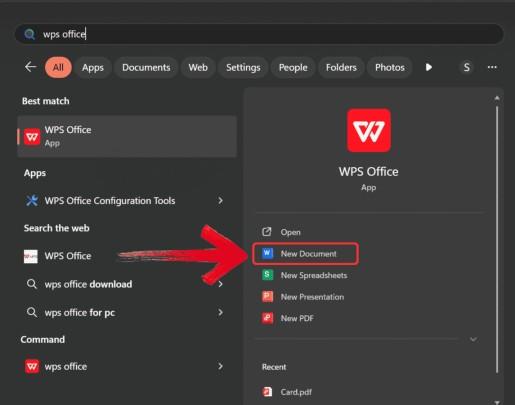
Step 2: Then, open the template you want to edit in the WPS Writer. Click on the file icon on the top left of your ribbon. There should be no problem in opening the document as it is in docx format.
Step 3: Now, just click on any text you want to change. You can add or delete columns, change fonts. whatever you need.
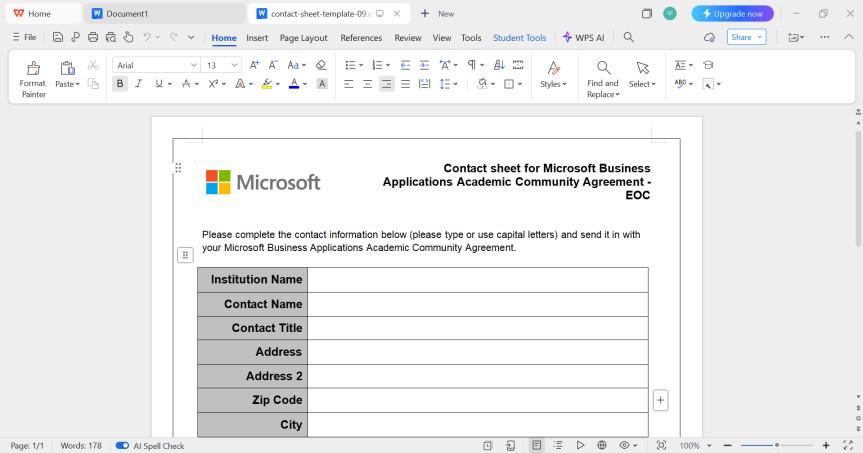
Step 4: Finally, when you’re done, click on file and then click Save As to download this poster onto your device.
Step 5: You can also share the link to your document with others to enable collaborative work in case they want to make their own changes as well.
Free Office Suite with Abundant Templates
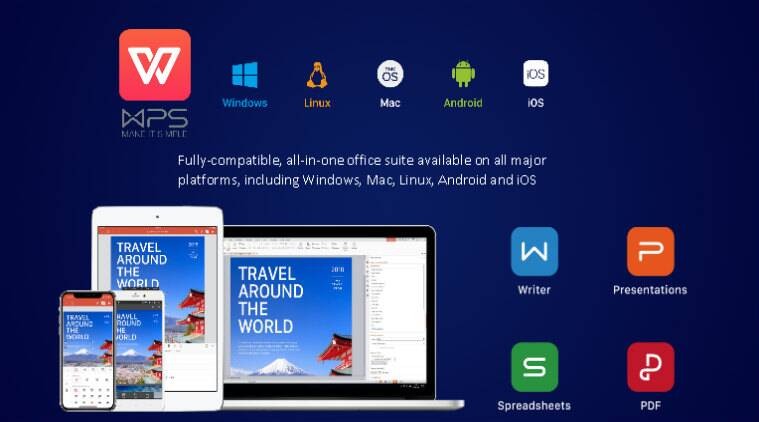
When it comes to managing lists, especially something as important as your contacts, the tool you use really matters. I'm constantly asked what I use to handle all the different documents I get, and my answer is always WPS Office. It's the engine I use to run all my documents. It’s a complete, free office suite, Writer for docs, Spreadsheets, and presentations that I've found to be incredibly reliable and light on my system.
Key Advantages
Full-Featured, Zero-Cost: This is the real clincher for me. I get all the professional tools I need, like editing tables in Writer or sorting data in Spreadsheets, without any subscription fees. It's not a 'lite' version; it’s the full, powerful deal, completely free, which is perfect for managing crucial lists without adding to your software budget.
It Solves the 'Mixed File' Problem: In this guide, I gave you both Word and Excel templates, right? In a real office, you get .doc files from one colleague and .xls files from another. WPS Office is designed for this. It handles them both flawlessly in one single application. I never have to worry about compatibility issues.
It Works Where You Do: This one is crucial for contact lists. I have WPS Office on my phone. This means I can pull up that team contact list right before I walk into a meeting, or add a new person's number the second I get it, whether I'm at my desk or not.
More Than Just Contact Sheets: The built-in template library is fantastic. While I shared some great web templates, WPS has its own library for everything else, including invoices, meeting agendas, and project timelines. It quickly becomes your single hub for all your professional documents.
Look, when you're editing a contact sheet template, you just need a tool that is fast, reliable, and doesn't get in your way. That’s WPS Office. It’s the smart, lightweight choice for this kind of document management. It gives you all the power of a paid suite but without the cost or the lag. It just works.
FAQs
Q1: What is the purpose of a contact sheet template?
Its main purpose is to get all your contact information organized in one standard, easy-to-read place. It saves you time and makes it easy to find someone's phone or email quickly.
Q2: Can I customize fields in the template?
Absolutely. In both WPS Writer and Spreadsheet, you can'right-click' on a column or row to add or delete it. You can easily add fields like "Job Title," "Birthday," or "Company."
Q3: Which format is better, Word or Excel?
That's a great question. I use Excel when I have alarge list that I know I'll need to sort or filter (like finding all contacts in 'New York'). I use Word for simple, printable lists that I'm going to put in a binder or hand out at a meeting.
Q4: How do I print a contact sheet in WPS?
It's easy. Once your file is open and edited, just go to'File' in the top-left corner and select'Print'. My tip is to 'Export as PDF'first for the best results, as it locks the formatting perfectly.
Q5: Can I make a photo contact sheet for my photography work?
You can. While some people use complex tools likePhotoshop, you can do this in WPS Writer. I'dinsert a table and make one column for the photo. Then, just 'click in the cell' and use the'Insert' > 'Picture' menu to add your image. It's great for a simple, visual client list.
My Final Takeaway
In the end, creating a clean contact sheet templatedoesn't have to be a chore. Grabbing a pre-built template is the smartest way to stay organized and look professional. I've shown you 10 great options to get started. When it's time to edit, I genuinely recommend WPS Office. It’s free, it handles both Word and Excel files perfectly, and it makes the whole process seamless. Download your template and WPS Office, and you’ll be more organized in five minutes.

'%3e%3cpath%20d='M19.9911%204.11386V6.471H18.5894C18.0775%206.471%2017.7322%206.57814%2017.5536%206.79243C17.3751%207.00671%2017.2858%207.32814%2017.2858%207.75671V9.44421H19.9019L19.5536%2012.0871H17.2858V18.8639H14.5536V12.0871H12.2769V9.44421H14.5536V7.49779C14.5536%206.39064%2014.8632%205.53201%2015.4822%204.92189C16.1013%204.31177%2016.9257%204.00671%2017.9554%204.00671C18.8304%204.00671%2019.509%204.04243%2019.9911%204.11386Z'%20fill='%23333333'/%3e%3c/g%3e%3cdefs%3e%3cclipPath%20id='clip0_2938_8199'%3e%3crect%20width='16'%20height='16'%20fill='white'%20transform='translate(8%204.00671)'/%3e%3c/clipPath%3e%3c/defs%3e%3c/svg%3e)
'%3e%3cpath%20d='M17.5237%2010.7813L23.4811%204H22.0699L16.8949%209.88693L12.7648%204H8L14.2469%2012.9029L8%2020.0133H9.4112L14.8725%2013.7952L19.2352%2020.0133H24M9.92053%205.04213H12.0885L22.0688%2019.0224H19.9003'%20fill='%23333333'/%3e%3c/g%3e%3cdefs%3e%3cclipPath%20id='clip0_2938_8200'%3e%3crect%20width='16'%20height='16.0134'%20fill='white'%20transform='translate(8%204)'/%3e%3c/clipPath%3e%3c/defs%3e%3c/svg%3e)


